Best Mind Mapping Software - Page 4

How Many Mind Mapping Software Products Does G2 Track?

Total Products under this Category: 80

Category Stats (Aug 2026)

  • Average Rating: 4.47/5 The average rating of products in this category, based on all submitted ratings
  • Top Trending Product: MindMap AI (+2.78%) - Among all products in this category, MindMap AI recorded the largest rating increase compared to last month

Last updated: August 06, 2026

How Does G2 Rank Mind Mapping Software Products?

Why You Can Trust G2's Software Rankings:

  • 30 Analysts and Data Experts
  • 43,500+ Authentic Reviews
  • 80+ Products
  • Unbiased Rankings

G2's software rankings are built on verified user reviews, rigorous moderation, and a consistent research methodology maintained by a team of analysts and data experts. Each product is measured using the same transparent criteria, with no paid placement or vendor influence. While reviews reflect real user experiences, which can be subjective, they offer valuable insight into how software performs in the hands of professionals. Together, these inputs power the G2 Score, a standardized way to compare tools within every category.

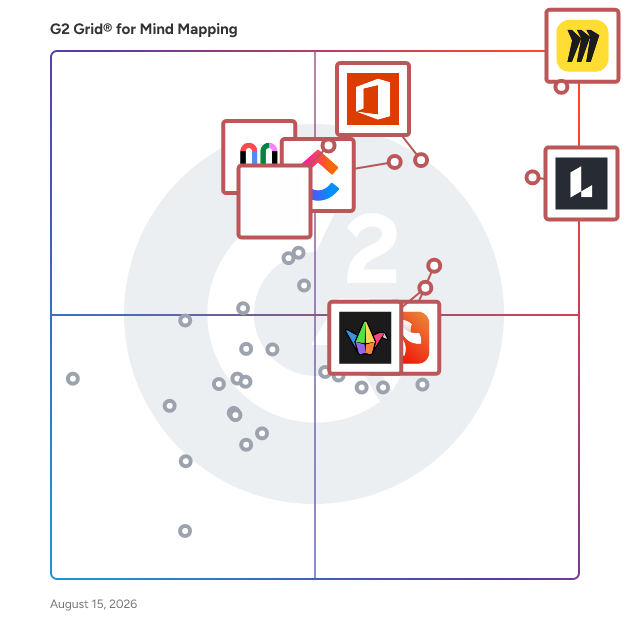
G2 Grid® for Mind Mapping Software

G2 Grid® for Mind Mapping Software plotting products by satisfaction and market presence

Highlighted products: Miro, Lucid Visual Collaboration Suite, Visio, ClickUp, FigJam, Xmind, Padlet, and Mural.

Underlying data: [Grid® JSON](https://www.g2.com/categories/mind-mapping-software/grids.json?focus%5B%5D=miro&focus%5B%5D=lucid-software-inc-lucid-visual-collaboration-suite&focus%5B%5D=visio&focus%5B%5D=clickup&focus%5B%5D=fig-jam&focus%5B%5D=xmind&focus%5B%5D=padlet&focus%5B%5D=mural)

Midlap

Midlap is an online collaboration and brainstorming tool where we are solving the problem that arises due to switching between multiple apps to collaborate with your team. We solve this problem by providing tools like Whiteboards, Kanban Boards, Flow Diagrams, Files, Chat, Events, Gantt Charts etc under a single app. So no more switching between different apps and get more done with Midlap.

Average Rating: 4.9/5.0

Total Reviews: 12

How Do G2 Users Rate Midlap?

  • Quality of Support: 9.6/10 (Category avg: 8.7/10)

Who Is the Company Behind Midlap?

Who Uses This Product?

  • Company Size: 75% Small, 17% Large

What Are Recent G2 Reviews of Midlap?

MindOnMap for Mac

MindOnMap mainly focuses on providing the free online tools. Users can use online tools to create mind mapping, remove image watermark, convert HEIC to JPG and so on to inspire creativity and boost efficiency.

Average Rating: 3.7/5.0

Total Reviews: 3

How Do G2 Users Rate MindOnMap for Mac?

  • Quality of Support: 8.3/10 (Category avg: 8.7/10)

Who Is the Company Behind MindOnMap for Mac?

Who Uses This Product?

  • Company Size: 67% Medium, 67% Small

What Are Recent G2 Reviews of MindOnMap for Mac?

QuikFlow

Create flowcharts (and mind maps) without worrying about layout with QuikFlow. With our interactive layout algorithms, you can work as if you were using a mind mapping application while creating flowcharts. Define your structure and the app handles the layout! CREATE FLOWS, NOT JUST MIND MAPS Creating flows is just like creating mind maps. But without the restrictions. Let flows converge or loop back around. All while retaining the same intuitive workflow. FOCUS ON YOUR CONTENT, NOT ON THE LAYOUT Define your flow and the relationships between different elements. The layout happens automatically while you are working. To adjust the layout, you can reorganize elements using drag-and-drop. MAKE CHANGES WITHOUT WORRYING ABOUT THE DETAILS No matter what you change, the layout will automatically adapt. Paste a whole subflow into the middle of the flow. Delete any part of the flow, no matter how intertwined. You won’t have to spend most of your time fixing the layout. SHARE AND EXPORT WITHOUT SURPRISES Easily share your creations in popular file formats (PDF and PNG). In high quality and without fuss. It is that simple. USE FOR FREE. UPGRADE IF YOU WANT TO QuikFlow gives you access to most features, including all of our innovative layout features, for free without any strings attached. You can upgrade to QuikFlow Pro to access additional styling and export features. Try QuikFlow Pro with a free 7-day trial. Buy it either as a monthly or yearly subscription, or as a one-time purchase. The one-time purchase for Mac is also available as a separate app for volume licensing via Apple Business Manager. Files created using QuikFlow Pro can be opened and edited in the free version.

Average Rating: 4.7/5.0

Total Reviews: 3

How Do G2 Users Rate QuikFlow?

  • Has the product been a good partner in doing business?: 10.0/10 (Category avg: 9.1/10)
  • Quality of Support: 8.9/10 (Category avg: 8.7/10)

Who Is the Company Behind QuikFlow?

  • Seller: coneno
  • Year Founded: 2016
  • HQ Location: Kaiserslautern, DE
  • Twitter: @coneno_team
    25 Twitter followers
  • LinkedIn® Page: www.linkedin.com
    5 employees on LinkedIn®

Who Uses This Product?

  • Company Size: 67% Medium, 33% Small

What Are Recent G2 Reviews of QuikFlow?

toketaWare

Mindmapping for Windows, Mac, iPad and iPhone.

Average Rating: 5.0/5.0

Total Reviews: 3

How Do G2 Users Rate toketaWare?

  • Quality of Support: 10.0/10 (Category avg: 8.7/10)

Who Is the Company Behind toketaWare?

  • Seller: toketaWare
  • Year Founded: 2017
  • HQ Location: N/A
  • Twitter: @toketaware
    1,449 Twitter followers
  • LinkedIn® Page: www.linkedin.com
    4 employees on LinkedIn®

Who Uses This Product?

  • Company Size: 67% Medium, 33% Small

What Are Recent G2 Reviews of toketaWare?

What Are G2 Users Discussing About toketaWare?

Mindly

Capture your ideas. Create quick summaries. Plan your projects. Use the power of associations to keep your inner universe organized. With you all the time, on all different devices. Ready to be shared to friends and colleagues.

Average Rating: 4.8/5.0

Total Reviews: 2

How Do G2 Users Rate Mindly?

  • Quality of Support: 6.7/10 (Category avg: 8.7/10)

Who Is the Company Behind Mindly?

Who Uses This Product?

  • Company Size: 100% Small

What Are Recent G2 Reviews of Mindly?

What Are G2 Users Discussing About Mindly?

MindMaple

MindMaple will increase the productivity and creativity by visually organizing the ideas and thoughts onto a mind map.

Average Rating: 3.8/5.0

Total Reviews: 2

How Do G2 Users Rate MindMaple?

  • Has the product been a good partner in doing business?: 7.5/10 (Category avg: 9.1/10)
  • Quality of Support: 8.3/10 (Category avg: 8.7/10)

Who Is the Company Behind MindMaple?

Who Uses This Product?

  • Company Size: 100% Medium

What Are Recent G2 Reviews of MindMaple?

What Are G2 Users Discussing About MindMaple?

Mindmaps for Jira

Create impressive mind maps to articulate your ideas like a pro! Automatic layout to save editing time. Add colors and emojis to enhance your messaging. Export or print for presentation and sharing, or continue working in Jira to take off with your plan!

Average Rating: 4.8/5.0

Total Reviews: 2

How Do G2 Users Rate Mindmaps for Jira?

  • Quality of Support: 8.3/10 (Category avg: 8.7/10)

Who Is the Company Behind Mindmaps for Jira?

Who Uses This Product?

  • Company Size: 50% Small, 50% Medium

What Are Recent G2 Reviews of Mindmaps for Jira?

MindView 7

MatchWare proudly introduces MindView 7, the FIRST choice in mind mapping for business and educational use.

Average Rating: 3.3/5.0

Total Reviews: 2

How Do G2 Users Rate MindView 7?

  • Has the product been a good partner in doing business?: 8.3/10 (Category avg: 9.1/10)
  • Quality of Support: 6.7/10 (Category avg: 8.7/10)

Who Is the Company Behind MindView 7?

Who Uses This Product?

  • Company Size: 100% Small

What Are G2 Users Discussing About MindView 7?

MyMap

MyMap.AI is an innovative, AI-powered platform designed to transform textual ideas into structured visual diagrams effortlessly. By engaging in a simple chat interface, users can generate flowcharts, mind maps, matrices, and presentations without any prior design experience. This tool caters to a diverse audience, including students, professionals, and content creators, by streamlining the process of visualizing complex concepts and enhancing productivity. Key Features: - AI-Native Interface: Create diagrams by conversing with the AI, eliminating the need for manual design tools. - Multiple Format Support: Upload various file types or input topics directly; the AI interprets the content to produce relevant diagrams. - Web Search Integration: Incorporate live Google or Bing search results to enrich diagrams with current information. - Internet Access: Paste any URL, and the AI extracts pertinent information to enhance your maps. - Real-Time Collaboration: Work simultaneously with team members on the same map, facilitating seamless teamwork. - Share & Export: Save diagrams as images or PDFs, or share them via public links for easy distribution. Primary Value and Solutions: MyMap.AI addresses the challenge of converting abstract ideas into clear, visual representations. By automating the diagram creation process through AI, it saves users significant time and effort, allowing them to focus on content rather than design. The platform's real-time collaboration feature enhances teamwork, while its integration with live web searches ensures that diagrams are contextually rich and up-to-date. Whether for academic research, project planning, or content creation, MyMap.AI simplifies the visualization of complex information, making it accessible and actionable for all users.

Average Rating: 4.8/5.0

Total Reviews: 2

How Do G2 Users Rate MyMap?

  • Quality of Support: 10.0/10 (Category avg: 8.7/10)

Who Is the Company Behind MyMap?

Who Uses This Product?

  • Company Size: 100% Small

What Are Recent G2 Reviews of MyMap?

Nodeland

Elevate Your Note-Taking Experience with NodeLand: A Dynamic Mind Mapping Tool NodeLand offers a unique blend of mind mapping and note-taking functionalities, allowing users to create rich and interactive documents that go beyond simple text-based notes. It provides a versatile platform that combines the flexibility of mind maps with the functionality of traditional note-taking apps, transforming how you capture and organize your ideas. Why NodeLand? Human thinking is inherently associative, not linear. We naturally draw connections between learned concepts unconsciously. By embracing the power of visual thinking, NodeLand leverages this natural process. NodeLand transforms your note-taking experience by visually mapping out your ideas, and enhancing comprehension, retention, and creativity. This approach aligns perfectly with the way our minds naturally work. Whether you’re planning a trip, brainstorming a project, studying for an exam, or organizing tasks, try NodeLand and experience the future of note-taking. Transform your notes into incredible mind maps and unlock the full potential of your ideas.

Average Rating: 5.0/5.0

Total Reviews: 2

How Do G2 Users Rate Nodeland?

  • Has the product been a good partner in doing business?: 10.0/10 (Category avg: 9.1/10)
  • Quality of Support: 10.0/10 (Category avg: 8.7/10)

Who Is the Company Behind Nodeland?

Who Uses This Product?

  • Company Size: 100% Small

What Are Recent G2 Reviews of Nodeland?

Vani

Vani is a visual collaboration platform where teams create, meet, and work together. It's where teammates brainstorm for ideas, come up with plans, and work on mockups over a shared infinite canvas. You can quickly get your team started on common product development processes, marketing exercises, checklists, and process flowcharts with a handful of ready-made templates. Express your ideas visually by creating diagrams, mind maps, wireframes, or storyboards. And embed documents, spreadsheets, images, and videos, from Google, Microsoft, YouTube, Figma and other platforms so you have all your work in one place. It's super easy to hop over a video call with your teammates and follow each other's live cursors, drop comments, and react with emojis on the fly—it's like being in the same room, but better. Whether you're a marketing team working on your next big campaign, a product team preparing for a launch, or a design studio working on a creative, Vani helps you simplify collaboration with cross-functional teams and helps you go faster from idea to finished product. Start for free with unlimited shared Spaces to grow your biggest and brightest ideas.

Average Rating: 4.6/5.0

Total Reviews: 5

How Do G2 Users Rate Vani?

  • Has the product been a good partner in doing business?: 9.2/10 (Category avg: 9.1/10)
  • Quality of Support: 9.2/10 (Category avg: 8.7/10)

Who Is the Company Behind Vani?

  • Seller: Zoho
  • Year Founded: 1996
  • HQ Location: Austin, TX
  • Twitter: @Zoho
    137,880 Twitter followers
  • LinkedIn® Page: www.linkedin.com
    30,766 employees on LinkedIn®
  • Phone: +1 (888) 900-9646

Who Uses This Product?

  • Company Size: 60% Small, 40% Large

What Do G2 Reviewers Say About Vani?

AI-generated summary from verified user reviews

Pros
  • Users find the integration with Slack and Zoom very helpful for effective collaboration during daily stand-ups.
  • Users find the integrations with Slack and Zoom invaluable for collaboration, especially during daily stand-ups.
  • Users find the integration with tools like Slack and Zoom enhances collaboration, especially for daily scrums.
  • Users find the readymade templates highly beneficial for effective collaboration in daily stand-ups and meetings.
Cons
  • Users find the integration with ERP to be complex, which can hinder seamless usage of Vani.
  • Users find the integration with ERP to be somewhat challenging, impacting the overall usability of Vani.
  • Users find the integration with ERP systems complex, which can hinder smooth operations and efficiency.

What Are Recent G2 Reviews of Vani?

Decision Explorer

Decision Explorer is a proven tool for managing soft issues the qualitative information that surrounds complex or uncertain situations. It allows you to capture in detail thoughts and ideas, to explore them, and gain new understanding and insight.

Average Rating: 4.0/5.0

Total Reviews: 1

How Do G2 Users Rate Decision Explorer?

  • Quality of Support: 6.7/10 (Category avg: 8.7/10)

Who Is the Company Behind Decision Explorer?

Who Uses This Product?

  • Company Size: 100% Small

What Do G2 Reviewers Say About Decision Explorer?

AI-generated summary from verified user reviews

Pros
  • Users value the high customizability of Decision Explorer, enhancing their ability to adapt it to complex tasks.
  • Users value the ease of use of Decision Explorer, noting its straightforward interface and quick learning curve.
  • Users value the easy creation process in Decision Explorer, allowing quick setup and efficient collaboration on tasks.
  • Users appreciate the easy setup of Decision Explorer, making it straightforward for new users to get started.
  • Users value the easy implementation and collaborative features of Decision Explorer for effective project management teamwork.
Cons
  • Users find the learning curve steep for advanced features of Decision Explorer, especially beginners struggling to adapt.
  • Users note the limited features of Decision Explorer, particularly regarding third-party integrations and advanced functionalities.
  • Users find time consumption challenging due to the learning curve and support delays with Decision Explorer.

What Are Recent G2 Reviews of Decision Explorer?

Effie

# Make ideas happen Ideas are just the first step. The hard part is what follows. How to seize the aha moments, fill the gap between your vision and reality, and, more importantly, how to make your ideas happen. Luckily, Effie will help with the hard part. ## Unblock your creativity and productivity Focus is the key to good writing. So Effie cuts out distractions with its minimal interface. No bells and whistles. It’s just you, your thoughts, and the words on the page. ## Turn your writing into what you wanted Your brain likes associations. So to turn your great ideas and thoughts into brilliant writing, you need to visualize them, keep them organized, and find logical connections. That's why you can create mind maps in Effie even when writing. With the mind mapping feature, we help to bring your ideas to life. ## Markup formatting and mind mapping, two is better than one Whether you’re already writing or planning to write, Effie is ready to help. With just one click, you can switch from a mind map to an editor. All changes are automatically synced. ## Work on all your devices Wherever you are and whatever device you have, Effie is there for you whenever your inspiration strikes. She works on Windows, Mac, iPhone, and iPad. She also syncs between all your devices in real-time. So when another idea hits, note it down with whatever device you have on hand, so you'll have easy access to it when you're back at your desk. ## We care deeply about your privacy and data security All your work in Effie is encrypted with your unique key. In other words, no one has access to what you write. So no targeted ads, no intelligent recommendations, nothing. Your data is safe with us. ## You focus on your thoughts, Effie helps with the rest Effie has what you need to start writing and keep writing. Her simple Markdown-based editor allows you to mark your headlines, important text, comments and more, so you can finish your work without having to lift a finger from your keyboard. ------------------------- Features: + All your work is in one place and within reach. So there’s no confusing file management. + Autosave and sync all your work in the cloud, so you can access anything from anywhere. + An immersive writing environment to keep you away from distractions. + One tap to convert an unordered list into a mind map, and vice versa. + Edits on the unordered list will be synced with a mind map, saving you from jumping the hoops from one app to another. + Flexible export to a PDF, DOCX, Markdown, EffieSheet, and JPEG file, which looks awesome when checked on the phone. + Simplified markup language allows you to finish your writing without even lifting your fingers away from the keyboard. + Markup Insight panel woken by a “/” makes it much easier to use the markup language. + You can choose to write in the dark or light theme, whichever drives your creativity and productivity. + Different styles are available for your mind maps: Fishbones, Logic Chart, Matrix, Timeline, and Org Chart. + Built with native codes, so it occupies less system resources than you'd think.

Average Rating: 4.8/5.0

Total Reviews: 2

Who Is the Company Behind Effie?

Who Uses This Product?

  • Company Size: 100% Small

What Are Recent G2 Reviews of Effie?

Heuristi

Heuristica helps you discover custom content by chosen topics, providing tailored content for your research needs.

Average Rating: 4.5/5.0

Total Reviews: 1

How Do G2 Users Rate Heuristi?

  • Quality of Support: 8.3/10 (Category avg: 8.7/10)

Who Is the Company Behind Heuristi?

  • Seller: Heuristi
  • Year Founded: 2023
  • HQ Location: Zürich, CH
  • LinkedIn® Page: www.linkedin.com
    1 employees on LinkedIn®

Who Uses This Product?

  • Company Size: 100% Medium

What Are Recent G2 Reviews of Heuristi?

ideamapper

ideamapper is a powerful mind mapping, visual learning and writing tool, which produces well-structured documents.

Average Rating: 4.5/5.0

Total Reviews: 1

How Do G2 Users Rate ideamapper?

  • Quality of Support: 8.3/10 (Category avg: 8.7/10)

Who Is the Company Behind ideamapper?

Who Uses This Product?

  • Company Size: 100% Small

What Are Recent G2 Reviews of ideamapper?

Neeraja Prakash
NP
Researched and written by Neeraja Prakash
Updated March 10, 2025