Best Legal Case Management Software - Page 3

How Many Legal Case Management Software Products Does G2 Track?

Total Products under this Category: 310

Category Stats (Sep 2026)

  • Average Rating: 4.21/5 (↓0.01 vs Aug 2026) The average rating of products in this category, based on all submitted ratings
  • Top Trending Product: IQ Legal (+1.25%) - Among all products in this category, IQ Legal recorded the largest rating increase compared to last month

Last updated: September 26, 2026

How Does G2 Rank Legal Case Management Software Products?

Why You Can Trust G2's Software Rankings:

  • 30 Analysts and Data Experts
  • 5,400+ Authentic Reviews
  • 310+ Products
  • Unbiased Rankings

G2's software rankings are built on verified user reviews, rigorous moderation, and a consistent research methodology maintained by a team of analysts and data experts. Each product is measured using the same transparent criteria, with no paid placement or vendor influence. While reviews reflect real user experiences, which can be subjective, they offer valuable insight into how software performs in the hands of professionals. Together, these inputs power the G2 Score, a standardized way to compare tools within every category.

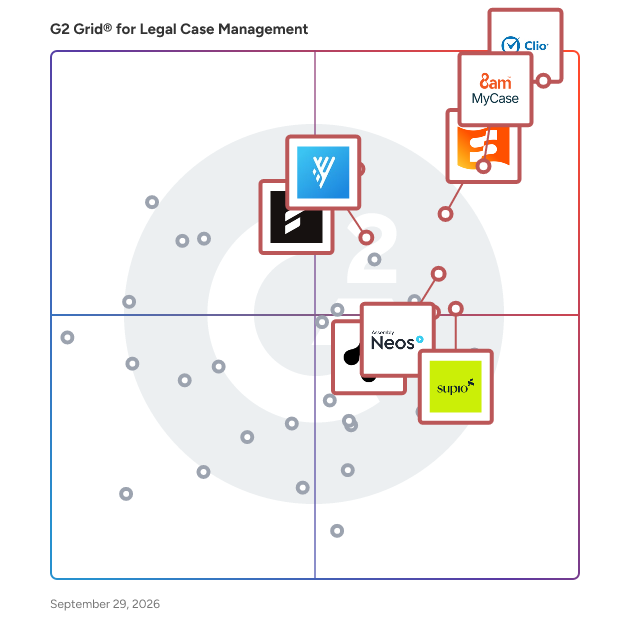
G2 Grid® for Legal Case Management Software

G2 Grid® for Legal Case Management Software plotting products by satisfaction and market presence

Highlighted products: Clio Manage, 8am MyCase, Smokeball, Filevine, Assembly Neos, Supio, Litify, and CloudLex.

Underlying data: [Grid® JSON](https://www.g2.com/categories/legal-case-management/grids.json?focus%5B%5D=clio-clio-manage&focus%5B%5D=8am-mycase&focus%5B%5D=smokeball&focus%5B%5D=filevine&focus%5B%5D=assembly-software-assembly-neos&focus%5B%5D=supio&focus%5B%5D=litify&focus%5B%5D=cloudlex&segment=all)

Assembly Trialworks

Assembly Trialworks, powered by Assembly Software, is a feature-rich case management platform built by experienced trial attorneys. Created to make legal practice management more efficient, this productivity partner is the litigator’s daily advantage. Optimize resources, eliminate inefficiencies, and empower staff to achieve more. It’s all about expediting and improving effectiveness in handling every detail of every case. And if you thought you loved Trialworks’ robust feature set, just wait until you see it reimagined in the cloud. We've taken your favorite Trialworks features to the next level in our cloud-based case management solution, Assembly Neos. Learn more at assemblysoftware.com/trialworks

Average Rating: 4.0/5.0

Total Reviews: 17

How Do G2 Users Rate Assembly Trialworks?

  • Has the product been a good partner in doing business?: 8.3/10 (Category avg: 8.9/10)
  • Activity Dashboard: 10.0/10 (Category avg: 8.6/10)
  • Reporting: 10.0/10 (Category avg: 8.4/10)

Who Is the Company Behind Assembly Trialworks?

  • Seller: TrialWorks
  • Year Founded: 1985
  • HQ Location: Coral Gables, US
  • Twitter: @TrialWorks
    529 Twitter followers
  • LinkedIn® Page: linkedin.com
    130 employees on LinkedIn®

Who Uses This Product?

  • Top Industries: Law Practice
  • Company Size: 59% Small, 41% Medium

What Do G2 Reviewers Say About Assembly Trialworks?

AI-generated summary from verified user reviews

Pros
  • Users value the customizable dashboards and streamlined processes for managing cases efficiently from start to finish.
  • Users value the customizability of Assembly Trialworks, enabling tailored dashboards and streamlined case management processes.
  • Users value the customization options in Assembly Trialworks, enhancing their workflow and case management efficiency.
  • Users value the customizable dashboards in Assembly Trialworks for effective litigation management from start to finish.
Cons
  • Users struggle with billing issues due to expensive changes and complex dashboards requiring specialized skills.
  • Users find the costly adjustments in Assembly Trialworks frustrating, especially for those lacking SQL experience.

What Are Recent G2 Reviews of Assembly Trialworks?

Amicus Attorney by CARET

Amicus Attorney is an intuitive case management solution that tracks and invoices billable time, automates important documents, and provides easy access to all your clients and case files. Work from your desktop or in the private cloud while integrating with QuickBooks and other applications. CARET provides leading practice management and fintech platforms to thousands of legal firms across the world, empowering highly skilled professionals to refocus their expertise on what truly matters. CARET serves more midmarket law firms than any other provider through its portfolio of practice management platforms including AbacusLaw, Amicus Attorney, Amicus Cloud, Abacus Private Cloud, and CARET Legal.

Average Rating: 3.8/5.0

Total Reviews: 163

How Do G2 Users Rate Amicus Attorney by CARET?

  • Has the product been a good partner in doing business?: 7.6/10 (Category avg: 8.9/10)
  • Workflow: 7.5/10 (Category avg: 8.5/10)
  • Activity Dashboard: 7.5/10 (Category avg: 8.6/10)
  • Reporting: 6.6/10 (Category avg: 8.4/10)

Who Is the Company Behind Amicus Attorney by CARET?

  • Seller: CARET
  • Year Founded: 1983
  • HQ Location: San Diego, CA
  • LinkedIn® Page: www.linkedin.com
    353 employees on LinkedIn®

Who Uses This Product?

  • Who Uses This: Paralegal, Attorney
  • Top Industries: Law Practice, Legal Services
  • Company Size: 96% Small, 2% Medium

What Are Recent G2 Reviews of Amicus Attorney by CARET?

What Are G2 Users Discussing About Amicus Attorney by CARET?

LollyLaw

LollyLaw is an award-winning legal practice management solution for immigration law or related areas. Since 2014, LollyLaw has been unparalleled in its ease of use and powerful tools to create, manage, and track cases. LollyLaw now comes stocked with fully customizable immigration workflows and immigration form sets from USCIS, DOJ, DOS, and the FBI. Each form can be filled out through the web in a live collaboration mode so that you can assist clients remotely. The software features include contact management, SMS messaging, calendaring, notifications, time tracking, task management, invoicing, document automation, form filling, cloud storage, branded client portal, online payments, and customizable case types and workflows. New features and enhancements are added each month. With LollyLaw and LollyForms, you can work with clients anywhere to quickly gather information from intakes, questionnaires, and online PDF forms. LollyForms lets you and your clients work in a live document where you can chat online and assist with form related questions.

Average Rating: 4.5/5.0

Total Reviews: 119

How Do G2 Users Rate LollyLaw?

  • Has the product been a good partner in doing business?: 9.1/10 (Category avg: 8.9/10)
  • Workflow: 8.5/10 (Category avg: 8.5/10)
  • Activity Dashboard: 8.4/10 (Category avg: 8.6/10)
  • Reporting: 8.4/10 (Category avg: 8.4/10)

Who Is the Company Behind LollyLaw?

  • Seller: Paradigm
  • Company Website:
  • HQ Location: New York, New York, United States
  • LinkedIn® Page: www.linkedin.com
    90 employees on LinkedIn®

Who Uses This Product?

  • Who Uses This: Paralegal, Legal Assistant
  • Top Industries: Legal Services, Law Practice
  • Company Size: 87% Small, 13% Medium

What Do G2 Reviewers Say About LollyLaw?

AI-generated summary from verified user reviews

Pros
  • Users appreciate the effective communication from LollyLaw's support team, ensuring timely responses and respectful consideration of suggestions.
  • Users appreciate the ease of use and timely updates of LollyLaw, enhancing their immigration practice significantly.
  • Users appreciate the ease of use of LollyLaw, making it accessible and enjoyable for clients and staff alike.
  • Users appreciate the ease of use and updated forms of LollyLaw, enjoying its client-friendly features and responsive support.
  • Users appreciate the easy form generation and client management features of LollyLaw, enhancing overall workflow efficiency.
Cons
  • Users are frustrated by the data transfer issues in LollyLaw, which complicate form completion and client interactions.
  • Users find the glitches in document management disruptive, leading to time-consuming issues and incomplete form processing.
  • Users are frustrated by glitches in form management, with issues in saving data and transferring information properly.
  • Users report functionality issues with LollyLaw, such as glitches and data transfer problems that hinder efficiency.
  • Users express frustration with inefficient data entry, as information often fails to transfer correctly between forms and systems.

What Are Recent G2 Reviews of LollyLaw?

What Are G2 Users Discussing About LollyLaw?

LEAP

LEAP Legal Software combines case management, document automation, legal accounting, billing, and AI into a single platform. Designed to help maximize law firm efficiency, LEAP’s award-winning technology helps legal professionals enhance organization, accelerate document creation, reduce manual work, and improve client services. Explore how LEAP’s award-winning solution supports law firms: - Practice Management: A unified system keeps teams connected and cases organized while providing a single source of truth. - Advanced Automation: Reduce repetitive tasks and speed up processes, from document drafting to billing. - AI Tools: Boost efficiency with legal AI that assists in research, drafting, document analysis, and more. - App Integrations: Access Microsoft 365, WealthCounsel, LawConnect, Power BI, QuickBooks, Xero, InfoTrack, DecisionVault, and more—all from LEAP's platform. Learn more at www.leap.us.

Average Rating: 3.6/5.0

Total Reviews: 38

How Do G2 Users Rate LEAP?

  • Has the product been a good partner in doing business?: 6.8/10 (Category avg: 8.9/10)
  • Workflow: 6.7/10 (Category avg: 8.5/10)
  • Activity Dashboard: 5.3/10 (Category avg: 8.6/10)
  • Reporting: 5.6/10 (Category avg: 8.4/10)

Who Is the Company Behind LEAP?

  • Seller: LEAP
  • Year Founded: 1992
  • HQ Location: Jersey City, NJ
  • Twitter: @LEAP4Lawyers
    2,069 Twitter followers
  • LinkedIn® Page: www.linkedin.com
    124 employees on LinkedIn®

Who Uses This Product?

  • Top Industries: Law Practice, Legal Services
  • Company Size: 98% Small

What Do G2 Reviewers Say About LEAP?

AI-generated summary from verified user reviews

Pros
  • Users value the seamless document management that LEAP provides, enhancing accessibility and integration with other software.
  • Users find LEAP to be incredibly easy to use, streamlining business operations with a comprehensive toolkit.
  • Users appreciate the centralized management of client information and efficient document automation in LEAP, enhancing law firm operations.
  • Users value the secure document sharing of LEAP, which enhances collaboration with its user-friendly interface.
  • Users praise LEAP for its efficient communication tools, which streamline client interactions and enhance overall productivity.
Cons
  • Users report poor customer support with LEAP, highlighting difficulties with conflict checks and unhelpful staff responses.
  • Users experience billing issues with Leap, finding the process complicated and not intuitive for multiple matters.
  • Users find the difficult setup of LEAP frustrating, complicating their transition and overall experience with the product.
  • Users find difficult training necessary for LEAP, as the learning curve and installation process are highly challenging.
  • Users criticize Leap for being expensive and requiring multiple licenses, making it hard for efficient workflow.

What Are Recent G2 Reviews of LEAP?

What Are G2 Users Discussing About LEAP?

Mitratech INSZoom

Designed to simplify the complexities of U.S., Canadian, and global immigration, Mitratech INSZoom unifies your case management, compliance, and billing into a single, secure system. Boost your firm’s productivity and enhance client service by automating workflows, increasing accuracy, and ensuring you never miss a critical deadline. With Mitratech INSZoom, your team can: 1. Automate and Customize Your Workflow: Leverage configurable workflows, reminders, and automated events to eliminate manual tasks and guide your team through every step of the case lifecycle. 2. Streamline Forms and Filing: Utilize an extensive library of digital questionnaires and forms, including an H-1 registration module and automation of data entry from USCIS receipts, to ensure fast and accurate filings. 3. Never Miss a Critical Date: Stay ahead of deadlines and expiration dates with automatic alerts and reminders, ensuring complete compliance and peace of mind for you and your clients. 4. Gain Actionable Insights: Build custom reports and track case phases against SLAs to maintain clear visibility over your entire case portfolio and make data-driven decisions. 5. Simplify Billing and Invoicing: Ensure fast and accurate invoice generation for all billable work, streamlining your firm’s financial operations. Mitratech INSZoom provides the power and flexibility to manage cases in any country. Move your practice forward with the solution built to handle the demands of modern immigration law.

Average Rating: 3.6/5.0

Total Reviews: 15

How Do G2 Users Rate Mitratech INSZoom?

  • Has the product been a good partner in doing business?: 6.0/10 (Category avg: 8.9/10)
  • Workflow: 7.3/10 (Category avg: 8.5/10)
  • Activity Dashboard: 7.8/10 (Category avg: 8.6/10)
  • Reporting: 7.7/10 (Category avg: 8.4/10)

Who Is the Company Behind Mitratech INSZoom?

  • Seller: Mitratech
  • Year Founded: 1987
  • HQ Location: Austin, TX
  • Twitter: @MitratechLegal
    1,055 Twitter followers
  • LinkedIn® Page: www.linkedin.com
    2,105 employees on LinkedIn®

Who Uses This Product?

  • Top Industries: Law Practice
  • Company Size: 56% Small, 25% Medium

What Do G2 Reviewers Say About Mitratech INSZoom?

AI-generated summary from verified user reviews

Pros
  • Users value the comprehensive case management features of Mitratech INSZoom for handling immigration cases effectively.
  • Users recognize the essential features of INSZoom for immigration law firms, but note significant drawbacks.
Cons
  • Users lament the high costs and poor treatment from INSZoom, feeling frustrated with pricing and lack of support.
  • Users report severe functionality issues with INSZoom, highlighting its outdated design and frustrating navigation challenges.
  • Users report significant access issues with INSZoom, finding the system outdated, slow, and difficult to navigate.
  • Users find difficult migration with INSZoom, citing high fees and slow, unresponsive systems as major frustrations.
  • Users find INSZoom's platform to be difficult to navigate, causing frustration and hindering effective use of the system.

What Are Recent G2 Reviews of Mitratech INSZoom?

What Are G2 Users Discussing About Mitratech INSZoom?

Prevail Case Management System

Prevail Case Management System is a comprehensive solution designed to streamline legal practice management by automating routine tasks and consolidating case-related information into a centralized platform. This integration enhances efficiency, allowing legal professionals to manage more cases in less time while reducing reliance on physical files. Key Features and Functionality: - Process Builder: A workflow tool that enables the creation of step-by-step roadmaps for any process, aligning with internal procedures or court rules. - Matter Management: Provides a centralized view of all case details and related parties, offering a comprehensive overview on a single, organized page. - Medical Records Management: Streamlines the handling of medical providers and treatment details, crucial for personal injury and mass tort practices. - Settlement Calculator: Facilitates negotiations by recording and managing offers, demands, and liens efficiently. - Document Merge: Simplifies document generation by merging data from various fields within Prevail, reducing manual input. - Automated Intake: Customizable intake questionnaires enhance the efficiency of client onboarding processes. - Ledger and Damages Tracking: Manages financial aspects, including tracking special damages and monitoring payment histories. - Analytics: Offers insights into case progress and firm performance through customizable reporting tools. Primary Value and User Solutions: Prevail addresses the challenges legal professionals face in managing complex cases by automating routine tasks and centralizing case information. This approach reduces administrative burdens, minimizes manual errors, and enhances workflow efficiency. By integrating features like medical records management and settlement calculations, Prevail is particularly beneficial for personal injury and mass tort practices, enabling them to handle high volumes of cases effectively. The system's adaptability allows customization to align with unique organizational policies and regulatory requirements, ensuring compliance and optimized internal procedures. Overall, Prevail empowers legal teams to focus more on case strategy and client outcomes, improving productivity and service quality.

Average Rating: 4.0/5.0

Total Reviews: 20

How Do G2 Users Rate Prevail Case Management System?

  • Has the product been a good partner in doing business?: 9.6/10 (Category avg: 8.9/10)
  • Workflow: 8.3/10 (Category avg: 8.5/10)
  • Activity Dashboard: 8.3/10 (Category avg: 8.6/10)
  • Reporting: 7.9/10 (Category avg: 8.4/10)

Who Is the Company Behind Prevail Case Management System?

  • Seller: Prevail
  • Year Founded: 2019
  • HQ Location: San Diego, CA
  • Twitter: @PrevailLegal
    101 Twitter followers
  • LinkedIn® Page: www.linkedin.com
    88 employees on LinkedIn®

Who Uses This Product?

  • Top Industries: Legal Services, Law Practice
  • Company Size: 45% Medium, 45% Small

What Do G2 Reviewers Say About Prevail Case Management System?

AI-generated summary from verified user reviews

Pros
  • Users appreciate the centralized access provided by Prevail, allowing for efficient case management and teamwork.
  • Users appreciate the ease of use and customizable features of Prevail, enhancing daily task management effectively.
  • Users appreciate the customization options of Prevail Case Management System, enhancing its adaptability to specific business needs.
  • Users find Prevail Case Management System to be very user-friendly, streamlining case management and enhancing accessibility.
  • Users appreciate the organization of cases and information in Prevail, making case management efficient and user-friendly.
Cons
  • Users often face connectivity complications and freezing issues when changing user settings on the Prevail Case Management System.
  • Users face compatibility issues with other software, affecting the integration and data display in Prevail.
  • Users experience data duplication issues when integrating Prevail with other software, complicating data management and access.
  • Users find the learning curve steep, making it challenging to understand the Prevail Case Management System initially.
  • Users feel that Prevail lacks updated features, missing essential tools for comprehensive case management in one place.

What Are Recent G2 Reviews of Prevail Case Management System?

What Are G2 Users Discussing About Prevail Case Management System?

PerfectLaw

PerfectLaw® provides law firms with a true all-in-one practice management solution that unifies case management, timekeeping, billing, accounting, and document management within a single database. Available on-premises or in the cloud, PerfectLaw is also available as a browser-based application, ensuring secure access from anywhere. Key features include matter management, automated billing, workflow automation, and mobile access, enabling attorneys and staff to work more efficiently. Firms gain faster billing cycles, stronger cash flow, and measurable ROI, while PerfectLaw’s native integration ensures reliability, scalability, and proven results.

Average Rating: 3.4/5.0

Total Reviews: 14

How Do G2 Users Rate PerfectLaw?

  • Has the product been a good partner in doing business?: 7.1/10 (Category avg: 8.9/10)

Who Is the Company Behind PerfectLaw?

Who Uses This Product?

  • Top Industries: Law Practice, Legal Services
  • Company Size: 57% Small, 43% Medium

What Are Recent G2 Reviews of PerfectLaw?

What Are G2 Users Discussing About PerfectLaw?

Bill4Time

Bill4Time is a cloud-based time tracking and billing software designed for lawyers, consultants, entrepreneurs, and freelancing professionals. We’re here to make sure your billable time is tracked, organized, invoiced, and accessed securely from any computer or mobile device. Time is money and it’s important to keep track of both. We are dedicated to streamlining your billing system with industry-leading features and an award-winning customer support team.

Average Rating: 4.7/5.0

Total Reviews: 36

How Do G2 Users Rate Bill4Time?

  • Has the product been a good partner in doing business?: 9.4/10 (Category avg: 8.9/10)
  • Workflow: 8.6/10 (Category avg: 8.5/10)
  • Activity Dashboard: 9.2/10 (Category avg: 8.6/10)
  • Reporting: 9.2/10 (Category avg: 8.4/10)

Who Is the Company Behind Bill4Time?

  • Seller: Paradigm
  • HQ Location: New York, New York, United States
  • LinkedIn® Page: www.linkedin.com
    90 employees on LinkedIn®

Who Uses This Product?

  • Top Industries: Law Practice, Legal Services
  • Company Size: 97% Small, 8% Large

What Do G2 Reviewers Say About Bill4Time?

AI-generated summary from verified user reviews

Pros
  • Users find Bill4Time's ease of use remarkable, enabling effortless navigation and prompt customer support when needed.
  • Users value the ease of use of Bill4Time, finding it an intuitive and convenient billing solution for their needs.
  • Users find the customer support of Bill4Time responsive and helpful, enhancing their overall experience with the product.
  • Users appreciate the responsive customer support of Bill4Time, always receiving immediate assistance when needed.
  • Users appreciate the intuitive design of Bill4Time, which simplifies navigation and enhances the billing experience.
Cons
  • Users report functionality issues with Bill4Time, including bugs in the calendar and lack of color-coding options.
  • Users find invoicing issues troublesome, especially when needing to correct mistakes in batch invoices.
  • Users experience invoicing problems as corrections to batch invoices can be cumbersome and lead to inconsistencies.
  • Users find the limited features of Bill4Time frustrating, especially lacking calendar integration and color-coding options.
  • Users struggle with missing calendar functionalities, such as viewing office-wide schedules and color-coding appointments.

What Are Recent G2 Reviews of Bill4Time?

GrowPath

GrowPath is a cutting-edge legal case management software delivering industry-leading solutions for personal injury law firms. By partnering with GrowPath, in addition to yielding the benefits of using a market leading platform, firms get access to some of the best, and most creative minds in the industry. From leadership to our customer service teams, we have years of real-world expertise building successful plaintiffs’ firms. GrowPath is empowering firms to boost revenue by improving the efficiency of the services they deliver. To learn more, visit GrowPath.com.

Average Rating: 4.4/5.0

Total Reviews: 9

How Do G2 Users Rate GrowPath?

  • Has the product been a good partner in doing business?: 9.2/10 (Category avg: 8.9/10)
  • Workflow: 8.0/10 (Category avg: 8.5/10)
  • Activity Dashboard: 8.7/10 (Category avg: 8.6/10)
  • Reporting: 9.0/10 (Category avg: 8.4/10)

Who Is the Company Behind GrowPath?

  • Seller: GrowPath
  • Year Founded: 2017
  • HQ Location: Durham, NC
  • Twitter: @growpath
    227 Twitter followers
  • LinkedIn® Page: www.linkedin.com
    13 employees on LinkedIn®

Who Uses This Product?

  • Top Industries: Law Practice
  • Company Size: 64% Medium, 36% Small

What Are Recent G2 Reviews of GrowPath?

What Are G2 Users Discussing About GrowPath?

My Legal Software

MyLegalSoftware is a cloud based Saas legal application that aims to enhance productivity, accuracy, collaboration, and compliance within legal practices by offering specialized tools tailored to the unique needs of legal professionals and their clients. MyLegalSoftware encompasses two basic versions - General Practice & Immigration Speed and is made up of a wide range of technological tools and applications designed specifically for legal professionals, law firms, and legal departments to streamline their work, manage cases, automate processes, and improve overall efficiency. Here are the features of MyLegalSoftware categorized into feature categories, along with their benefits for legal software users: 1. Case Management: MyLegalSoftware features case management tools that allow lawyers and legal professionals to organize and manage case-related information, documents, deadlines, contacts, and tasks in a centralized system. Customizable Form Grouping: Enables users to organize forms according to their preferences and specific case requirements, enhancing efficiency in case management. Notifications and Alerts: Keeps users updated in real-time about crucial case developments, deadlines, and client communications, ensuring timely responses and actions. Data Security and Storage: Provides secure storage for sensitive legal data, ensuring compliance with data protection regulations, and maintaining client confidentiality. Customizable Audits: Allows tailored audits for legal procedures, enhancing accuracy, and compliance within the legal framework. 2. Financial and Accounting Features: My legal software includes features for tracking billable hours, expenses, and client billing. It streamlines the invoicing process and ensures accurate and timely billing for legal services rendered. All-in-One Accounting: Offers a comprehensive accounting solution within the legal software, streamlining financial processes and facilitating accurate financial management. Integrated Credit Card Terminal: Simplifies payment processing for legal services, offering convenience and secure transactions for clients. Timesheets for Hourly Billing: Facilitates accurate time tracking for billing purposes, ensuring transparent and fair invoicing for billable hours. 3. Employee Management and Collaboration Features: MyLegalSoftware offers overall management capabilities for law firms, helping with staff management and reporting. My legal software solution provides secure communication channels for lawyers to interact with clients, share documents, and provide updates on case progress Employee Monitoring and Reports: Enables monitoring employee productivity, facilitating performance evaluations, and optimizing workflow efficiency. Mail Management: Organizes and manages incoming and outgoing correspondence, ensuring streamlined communication within the firm. Task Assignment Histories: Tracks task assignments and completion history, aiding in accountability and optimizing task allocation. Internal Chat Features: Promote quick and secure communication among team members, enhancing collaboration and decision-making. Remote Collaboration Features: Facilitates seamless collaboration among remote team members, ensuring effective teamwork and project management. Video-Conferencing Integrations: Enables virtual client meetings, enhancing communication and client engagement while saving time and travel costs. 4. Integration and Customization Features: MyLegalSoftware boasts seamless integration with Gmail, Zoom, Dialpad, DocuSign, and Google Calendar, enabling efficient communication, video conferencing, call management, secure document signing, and synchronized scheduling within a unified legal platform. Dropbox Integration: Seamlessly integrates with Dropbox, allowing easy access and sharing of legal documents and files. Client Portals: Provides a secure platform for clients to access case-related information, enhancing transparency and client satisfaction. Mandatory Case-Creation Modules: Ensures consistent and comprehensive case creation, reducing errors and omissions in legal processes. Customizable Templates: Allows users to create tailored templates for documents and forms, saving time and maintaining consistency in documentation. Data Migration Available (for an Additional Fee): Offers the flexibility to migrate existing data into the legal software, ensuring a smooth transition and continuity of operations. 5. Document Management: My legal software assists in document creation, storage, indexing, retrieval, version control, and collaboration among legal teams, making it easier to manage and track legal documents, contracts, pleadings, and correspondence. 6. Legal Research: My legal software provides access to comprehensive legal research databases and resources, helping lawyers find and analyze case law, statutes, regulations, and legal precedents more efficiently. 7. E-Discovery: My legal software includes e-discovery tools that assist in electronically identifying, collecting, reviewing, and producing electronic data relevant to legal cases, particularly in litigation. 8. Compliance and Risk Management: My legal software offers features to ensure compliance with legal and regulatory requirements, helping to mitigate risks and maintain adherence to industry standards in the United States of America. 9. Automation and Workflow Optimization: My legal software incorporates automation capabilities, streamlining repetitive tasks, workflows, and processes to save time and reduce manual errors. 10. Legal Analytics and Reporting: My legal software includes analytics features that allow lawyers to track performance metrics, analyze trends, and generate reports for informed decision-making and strategy planning.

Average Rating: 5.0/5.0

Total Reviews: 9

How Do G2 Users Rate My Legal Software?

  • Has the product been a good partner in doing business?: 10.0/10 (Category avg: 8.9/10)
  • Workflow: 10.0/10 (Category avg: 8.5/10)
  • Activity Dashboard: 10.0/10 (Category avg: 8.6/10)
  • Reporting: 10.0/10 (Category avg: 8.4/10)

Who Is the Company Behind My Legal Software?

Who Uses This Product?

  • Top Industries: Legal Services
  • Company Size: 89% Medium, 11% Small

What Are Recent G2 Reviews of My Legal Software?

HighQ

HighQ is a secure, cloud‑based collaboration platform built specifically for legal professionals to streamline workflows, improve productivity, and elevate service delivery. By bringing documents, workflows, and stakeholders together in one centralized platform, HighQ enables legal teams to work more efficiently, collaborate securely, and deliver exceptional client experiences at scale. With integrated AI capabilities embedded directly into legal workflows, HighQ helps teams meet rising client expectations through real‑time collaboration, 24/7 access to legal matters, and faster insights from complex information. Automated workflows reduce administrative burden, increase transparency, and minimize risk—freeing legal professionals to focus on higher‑value work. Designed to manage complexity, HighQ empowers legal teams to streamline processes, eliminate manual inefficiencies, and build differentiated, future‑ready services through technology, automation, and data‑driven decision‑making.

Average Rating: 4.3/5.0

Total Reviews: 16

How Do G2 Users Rate HighQ?

  • Has the product been a good partner in doing business?: 8.2/10 (Category avg: 8.9/10)
  • Workflow: 8.3/10 (Category avg: 8.5/10)
  • Activity Dashboard: 8.7/10 (Category avg: 8.6/10)
  • Reporting: 7.7/10 (Category avg: 8.4/10)

Who Is the Company Behind HighQ?

  • Seller: Thomson Reuters
  • Company Website:
  • Year Founded: 2008
  • HQ Location: Toronto, CA
  • Twitter: @thomsonreuters
    150,224 Twitter followers
  • LinkedIn® Page: www.linkedin.com
    36,803 employees on LinkedIn®

Who Uses This Product?

  • Top Industries: Legal Services
  • Company Size: 50% Medium, 38% Large

What Do G2 Reviewers Say About HighQ?

AI-generated summary from verified user reviews

Pros
  • Users appreciate the comprehensive information provided by HighQ, facilitating effective collaboration and content sharing.
  • Users value the high customizability of HighQ, enabling personalized workflows and tailored views for their needs.
  • Users highlight the simplicity and robustness of HighQ, enhancing workflow efficiency and project management.
  • Users love the automated workflows in HighQ, enhancing efficiency and streamlining their processes effectively.
  • Users value the highly customizable case management features, which enhance user experience and efficiency in handling cases.
Cons
  • Users find the difficult setup of HighQ requires excessive time and resources, causing frustration and challenges.
  • Users face implementation challenges with HighQ, citing time-consuming processes and inadequate integrations that complicate usage.
  • Users find the missing features of HighQ limiting, affecting workflow automation, UI intuitiveness, and integrations.
  • Users struggle with a steep learning curve, finding implementation difficult and time-consuming due to the platform's complexity.
  • Users face frequent technical issues with HighQ, including downtime, bugs, and a lack of intuitive integrations.

What Are Recent G2 Reviews of HighQ?

What Are G2 Users Discussing About HighQ?

IQ Legal

IQ Legal is a cloud-native software platform designed for law firms across the UK and Ireland. It brings practice and case management, financial management, compliance, document management and AI-powered automation together in one connected platform, helping legal teams streamline operations, improve productivity and deliver a better client experience. Powered by IQ, our connected, trusted and Intelligent System of Work, this solution brings together people, data and AI to help your organisation move faster, make clearer decisions and drive innovation without risk or disruption. By connecting the processes, information and intelligence that legal teams rely on every day, IQ Legal helps firms reduce administrative effort, improve visibility and make confident decisions while maintaining the security and compliance expected of a modern legal practice. From time recording and billing to client collaboration, risk management and document management, the platform supports the full range of activities involved in running a successful law firm. AI-powered automation can help teams simplify tasks such as file quality reviews and matter analysis, freeing professionals to spend more time on higher-value work and client service. IQ Legal is designed around the needs of different roles across a firm, with persona-based dashboards providing each user with the operational, financial and practice insight most relevant to them. Managing Partners gain firm-wide visibility, while Finance Leads have access to financial controls and reporting. Practice Managers can standardise workflows across teams, Partners and Fee Earners can focus on maximising billable time, and IT Leads benefit from robust security and connectivity. Dedicated capabilities also support Risk and Compliance Leads, Knowledge Managers and Legal Cashiers with risk management, knowledge sharing and financial reconciliation. Built to support firms of different sizes, IQ Legal provides the scalability and flexibility needed to adapt as practices evolve. Secure collaboration and document sharing help teams work effectively across locations, while connected data and workflows provide greater visibility across the firm. The result is a more streamlined way of working that helps legal professionals spend less time on administration and more time delivering exceptional outcomes for clients. With more than 37 years of legal technology expertise, IQ Legal supports more than 40,000 legal practitioners every day and has helped firms progress more than 2 million matters. This experience, combined with continued innovation, helps law firms modernise their operations, strengthen client service and remain competitive in a changing legal landscape. The IQ Legal platform also brings together complementary solutions including Legal Forms, The National Will Register and OneAdvanced AI. By connecting forms, will registration and search capabilities, and AI assistance within the same platform experience, firms can access more of the tools they need through one trusted environment.

Average Rating: 3.7/5.0

Total Reviews: 20

How Do G2 Users Rate IQ Legal?

  • Has the product been a good partner in doing business?: 7.5/10 (Category avg: 8.9/10)
  • Workflow: 5.3/10 (Category avg: 8.5/10)
  • Activity Dashboard: 8.0/10 (Category avg: 8.6/10)
  • Reporting: 5.3/10 (Category avg: 8.4/10)

Who Is the Company Behind IQ Legal?

  • Seller: OneAdvanced
  • Company Website:
  • Year Founded: 2008
  • HQ Location: Brimingham
  • Twitter: @advanced
    411 Twitter followers
  • LinkedIn® Page: www.linkedin.com
    2,165 employees on LinkedIn®

Who Uses This Product?

  • Who Uses This: Solicitor
  • Top Industries: Law Practice, Legal Services
  • Company Size: 57% Large, 33% Medium

What Do G2 Reviewers Say About IQ Legal?

AI-generated summary from verified user reviews

Pros
  • Users commend the ease of use of OneAdvanced Legal, appreciating its accessibility and efficient document organization.
  • Users appreciate the exceptional customer support from OneAdvanced Legal, praising their quick resolution of queries.
  • Users find the efficiency of OneAdvanced Legal invaluable for quickly locating missing Wills in estate administration.
  • Users find the intuitive interface of OneAdvanced Legal enhances their efficiency and overall user experience.
  • Users value the navigation ease of OneAdvanced Legal, finding it user-friendly and efficient in managing their tasks.
Cons
  • Users find the missing features in OneAdvanced Legal lead to longer workflows and confusion during usage.
  • Users find the email integration lacking, particularly regarding the production and accessibility of emails and reminders.
  • Users note coding issues with forms, prompting unnecessary extra work in other software, though improvements are underway.
  • Users face significant functionality issues with OneAdvanced Legal, making tasks more complex and time-consuming.
  • Users face several interface issues in OneAdvanced Legal, resulting in confusion and decreased efficiency while working.

What Are Recent G2 Reviews of IQ Legal?

What Are G2 Users Discussing About IQ Legal?

SILQ

SILQ is legal practice management software used in an online, cloud-based environment to support Australian and NZ Barristers and Solicitors with their everyday legal tasks. Founded in 2002, first for Barristers, SILQ expanded into the Solicitor market in 2012. SILQ services legal practitioners who practice all types of law, including criminal law, family law, litigation, mediation, conveyancing and Wills and Estates. SILQ operates in a responsive development environment, empowering users by ensuring their voices directly shape the platform. SILQ provides high-quality data security. From SOC2 compliance to Multi-Factor Authentication and 24/7 system monitoring, SILQ ensures client data is safe and secure. SILQ utilises automation to assist clients in accurately completing legal tasks on time. By spending less time on administration, SILQ’s client base can focus on helping their own clients through legal situations, thus increasing firm billables and thereby becoming more profitable. SILQ offers month-to-month billing with no lock-in contracts. The core features and functions used by SILQ legal professionals include: - Accounting - Integrated legal searches - Award-winning, CDR-compliant Automatic Bank Feeds - Invoicing (including bulk invoicing) - Certified Trust Accounting - Legal Matter and task management - Court forms and Precedents - Safe Custody - Document generation - Settlement calculator - Email and document tracking - Time recording SILQ’s Australian-based support team has in-depth knowledge of each client's history. 86% of phone calls are answered within 60 seconds, with most issues resolved on first contact. SILQ integrates with best-of-breed products rather than developing all the tech in-house. This enables SILQ to introduce high-quality, mature features to the market more quickly and at a lower cost. SILQ’s integrations with industry heavyweights like Xero, MYOB and Basiq are accredited in their respective industries, providing SILQ with increased legitimacy for the product in the legal market. Find out more: https://www.silq.com.au/

Average Rating: 4.7/5.0

Total Reviews: 20

How Do G2 Users Rate SILQ?

  • Has the product been a good partner in doing business?: 10.0/10 (Category avg: 8.9/10)
  • Workflow: 10.0/10 (Category avg: 8.5/10)
  • Activity Dashboard: 10.0/10 (Category avg: 8.6/10)
  • Reporting: 10.0/10 (Category avg: 8.4/10)

Who Is the Company Behind SILQ?

  • Seller: Silqware
  • Company Website:
  • Year Founded: 2002
  • HQ Location: Sydney, AU
  • LinkedIn® Page: www.linkedin.com
    9 employees on LinkedIn®

Who Uses This Product?

  • Top Industries: Legal Services
  • Company Size: 95% Small

What Do G2 Reviewers Say About SILQ?

AI-generated summary from verified user reviews

Pros
  • Users love the ease of use of SILQ, finding it quick and efficient for practice management tasks.
  • Users value SILQ for its time-saving features, allowing quick invoicing and efficient management of their legal practice.
  • Users value the comprehensive client management of SILQ, enhancing efficiency in handling all legal practice aspects.
  • Users value the excellent customer support of SILQ, enhancing their experience with the product's ease of use.
  • Users benefit from the efficiency of SILQ, streamlining tasks like invoicing and time management effectively.
Cons
  • Users struggle with poor email integration in SILQ, highlighting the need for improvement with Outlook connectivity.
  • Users often face integration issues with Outlook in SILQ, necessitating workarounds for optimal functionality.
  • Users often experience access issues with SILQ, especially regarding advanced features like email storage and merging.
  • Users struggle with usability issues, finding it hard to access and utilize advanced features effectively.

What Are Recent G2 Reviews of SILQ?

Best Case Bankruptcy

Best Case by Stretto, used to prepare more than 80% of the bankruptcy cases filed nationwide, represents the industry-leading case preparation and filing software for attorneys. Providing a myriad of useful and time-saving features, this best-in-class technology simplifies workflows and eases administrative burdens. Stretto continually updates federal and local forms, as well as IRS and Census Bureau data, to ensure that attorneys have access to the most current information and remain compliant with court requirements. OneTouch®, the electronic filing feature of Best Case, instantly navigates the court’s website and uploads the proper documents while delivering a case number and court receipt. Conveniently, OneTouch® also creates and automates the post-petition filing of Form 423 and the Chapter 13 Plan. Best Case includes access to the three primary credit-report bureaus enabling attorneys to access and directly import the bureaus’ data into the software. On average, bankruptcy attorneys save 60 minutes of data entry per case by importing credit report data directly into the Forms and Schedules. In addition to providing credit reports, Best Case allows attorneys to easily order bankruptcy courses, tax transcripts and other important documents. Our proprietary technology also increases productivity and accuracy with one-of-a-kind features enabling attorneys to submit documents directly to Chapter 7 Trustees.

Average Rating: 4.1/5.0

Total Reviews: 6

How Do G2 Users Rate Best Case Bankruptcy?

  • Has the product been a good partner in doing business?: 10.0/10 (Category avg: 8.9/10)
  • Workflow: 6.7/10 (Category avg: 8.5/10)
  • Activity Dashboard: 8.3/10 (Category avg: 8.6/10)
  • Reporting: 7.2/10 (Category avg: 8.4/10)

Who Is the Company Behind Best Case Bankruptcy?

Who Uses This Product?

  • Company Size: 100% Small

What Do G2 Reviewers Say About Best Case Bankruptcy?

AI-generated summary from verified user reviews

Pros
  • Users appreciate the convenient document sharing features of Best Case Bankruptcy, simplifying the process of accessing essential reports.
Cons
  • Users experience significant compatibility issues with Best Case Bankruptcy, leading to frustration and inefficiencies in case management.
  • Users report significant functionality issues with Best Case Bankruptcy, including document loss and unsyncing problems with the court.
  • Users experience poor customer support with prolonged response times and inability to resolve issues efficiently.
  • Users report significant software bugs, including lost documents and poor customer support, complicating their bankruptcy filing process.

What Are Recent G2 Reviews of Best Case Bankruptcy?

Legal Files

Providing anytime/anywhere access, Legal Files is a web application licensed for use and hosted within your own environment. Thousands of users in corporate legal departments, university legal departments, leading law firms, insurance companies and government agencies at every level — federal, state, county, municipal and tribal — throughout the world and across diverse industries rely on Legal Files software to manage cases and matters, email, documents (including contracts), and contact information, as well as automate office workflow.

Average Rating: 3.3/5.0

Total Reviews: 6

How Do G2 Users Rate Legal Files?

  • Has the product been a good partner in doing business?: 10.0/10 (Category avg: 8.9/10)

Who Is the Company Behind Legal Files?

  • Seller: Legal Files Software
  • Year Founded: 1990
  • HQ Location: Springfield, US
  • Twitter: @legal_files
    26 Twitter followers
  • LinkedIn® Page: www.linkedin.com
    25 employees on LinkedIn®

Who Uses This Product?

  • Company Size: 57% Medium, 43% Small

What Are Recent G2 Reviews of Legal Files?

Neya Kumaresan
NK
Researched and written by Neya Kumaresan
Updated October 3, 2024