Top Free Intelligent Document Processing (IDP) Software - Page 3

How Many Intelligent Document Processing (IDP) Software Products Does G2 Track?

Total Products under this Category: 340

Category Stats (Aug 2026)

  • Average Rating: 4.57/5 The average rating of products in this category, based on all submitted ratings
  • Top Trending Product: ABBYY Intelligent Document Processing (+4.11%) - Among all products in this category, ABBYY Intelligent Document Processing recorded the largest rating increase compared to last month

Last updated: August 06, 2026

How Does G2 Rank Intelligent Document Processing (IDP) Software Products?

Why You Can Trust G2's Software Rankings:

  • 30 Analysts and Data Experts
  • 19,700+ Authentic Reviews
  • 340+ Products
  • Unbiased Rankings

G2's software rankings are built on verified user reviews, rigorous moderation, and a consistent research methodology maintained by a team of analysts and data experts. Each product is measured using the same transparent criteria, with no paid placement or vendor influence. While reviews reflect real user experiences, which can be subjective, they offer valuable insight into how software performs in the hands of professionals. Together, these inputs power the G2 Score, a standardized way to compare tools within every category.

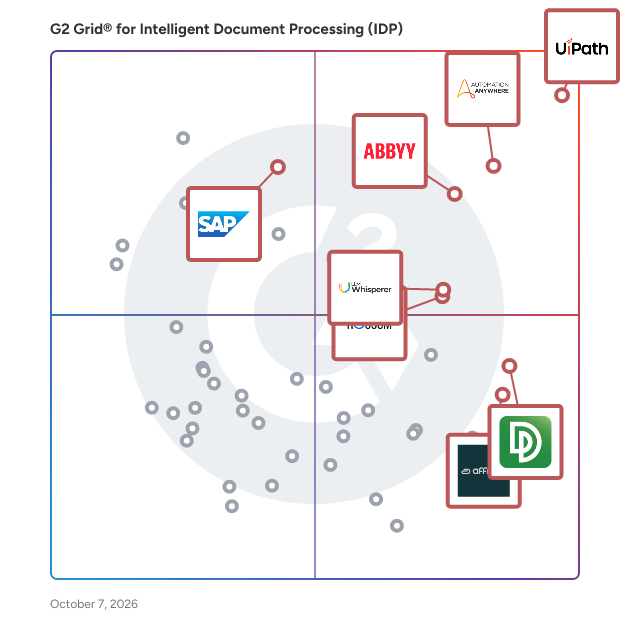
G2 Grid® for Intelligent Document Processing (IDP) Software

G2 Grid® for Intelligent Document Processing (IDP) Software plotting products by satisfaction and market presence

Highlighted products: UiPath Agentic Automation, ABBYY Intelligent Document Processing, Automation Anywhere Agentic Process Automation, Rossum, LLM Whisperer, DocuPipe, CloudFiles, and Affinda.

Underlying data: [Grid® JSON](https://www.g2.com/categories/intelligent-document-processing-idp/grids.json?focus%5B%5D=uipath-agentic-automation&focus%5B%5D=abbyy-intelligent-document-processing&focus%5B%5D=automation-anywhere-agentic-process-automation&focus%5B%5D=rossum&focus%5B%5D=llm-whisperer&focus%5B%5D=docupipe&focus%5B%5D=cloudfiles-cloudfiles&focus%5B%5D=affinda)

Sponsored

Nextworld Platform

Nextworld is an application generation platform designed for developing enterprise-grade applications, automations, and AI-powered processes, all within a single governed environment. This innovative solution enables organizations to create and deploy applications without requiring extensive coding knowledge, allowing users to concentrate on building solutions tailored to their specific operational needs. By moving away from the traditional rip-and-replace model, Nextworld helps businesses avoid accumulating new technical debt while enhancing their existing systems. Primarily targeted at mid-sized, high-growth companies seeking to optimize their operations, Nextworld serves a diverse range of users, including IT departments, business analysts, and operational teams. The platform empowers these users to build applications that traditional ERP systems may not support, such as operational apps, internal tools, and workflow systems. Additionally, the AI-powered app generation feature facilitates the rapid creation of applications, streamlining the development process and significantly reducing the time-to-market for new solutions. A key feature of Nextworld is its ability to automate processes across the entire organization. Intelligent agents orchestrate work between various ERPs, systems, teams, and data sources, ensuring that tasks are completed efficiently and effectively. This interconnectedness enhances productivity and fosters a cohesive workflow, as users can manage and monitor processes from a centralized platform. Moreover, the headless capabilities of Nextworld ensure that data and logic are not confined to a single application, providing the flexibility to surface information wherever it is needed within the organization. Security is a critical consideration for enterprise applications, and Nextworld addresses this by automatically inheriting enterprise-grade security measures. Features such as role-based access, gated promotion, and comprehensive audit trails protect sensitive information while maintaining compliance with industry standards. The platform is also SOC 1 and SOC 2 Type II attested, reinforcing its commitment to security and reliability. With Nextworld, organizations can operate with a single source of truth, enabling informed decision-making based on accurate and up-to-date data. Nextworld represents a significant advancement in the realm of no-code development platforms, offering a robust solution for enterprises looking to innovate and streamline their operations. By combining ease of use with powerful automation and security features, Nextworld stands out as a comprehensive tool for organizations aiming to enhance their operational efficiency and agility.

Visit website

Ephesoft

Ephesoft’s Intelligent Document Processing (IDP) platform and data enrichment solutions automate document-centric processes to maximize operational efficiency and human productivity for enterprises and the public sector. Using AI, patented machine learning and proprietary classification models, Ephesoft’s customizable and scalable platform turns any document type into structured, actionable data to accelerate business processes and data-driven decisions. Enterprises with high volume of valuable documents like invoices, records, contracts, mail, claims or loans, can benefit by accelerating and streamlining processes, eliminating manual data entry and boosting productivity. It’s time to automate your processes and get work done faster. The platform’s APIs and iPaaS connectors allow for fast integrations into other business systems for seamless end-to-end automation. Working with a vast partner ecosystem, Ephesoft has been deployed in the cloud and on-premises to customers around the globe saving costs, improving data accuracy and fueling their digital transformation journey towards hyperautomation. Ephesoft is headquartered in Irvine, Calif., with regional offices throughout the US, EMEA and Asia Pacific. For more information, visit ephesoft.com.

Average Rating: 4.5/5.0

Total Reviews: 84

How Do G2 Users Rate Ephesoft?

  • Ease of Admin: 8.3/10 (Category avg: 8.9/10)
  • Has the product been a good partner in doing business?: 9.1/10 (Category avg: 9.1/10)
  • Ease of Use: 8.2/10 (Category avg: 9.0/10)
  • Ease of Setup: 8.0/10 (Category avg: 8.8/10)

Who Is the Company Behind Ephesoft?

  • Seller: Ephesoft
  • Year Founded: 2010
  • HQ Location: Irvine, CA
  • Twitter: @Ephesoft
    2,276 Twitter followers
  • LinkedIn® Page: www.linkedin.com
    23 employees on LinkedIn®

Who Uses This Product?

  • Top Industries: Information Technology and Services, Computer Software
  • Company Size: 48% Medium, 28% Small

What Are Recent G2 Reviews of Ephesoft?

What Are G2 Users Discussing About Ephesoft?

AIDA

AIDA is an intelligent document automation software that leverages a unique Hybrid-AI engine to help businesses streamline data extraction, document management, and process automation with high adaptability. Designed for organizations of all sizes across industries, AIDA supports use cases like invoice processing, contract management, regulatory compliance, and payment automation. Unlike traditional template-based or generative AI solutions, AIDA uses a point-and-click learning method, enabling users to train the software on any document type with a single example. This process makes AIDA adaptive to ongoing changes in document formats and structures, ensuring that the system continuously learns and improves with minimal user input. Key features and benefits include: One-Click Learning: AIDA learns to extract key data from documents after seeing just one example, reducing setup time and eliminating the need for extensive reconfiguration as documents evolve. Broad Document Type Support: Capable of processing over 16,000 document types, AIDA adapts to everything from simple invoices to complex regulatory documents, making it highly versatile for a variety of industries. Hybrid AI and No-Code Templating: By combining artificial intelligence with no-code configurability, AIDA enables both technical and non-technical users to set up and manage document workflows quickly and efficiently. Secure and Compliant Architecture: AIDA’s cloud-native infrastructure provides end-to-end encryption, ensuring data security and compliance with global standards. Cost-Effective Solution with Rapid ROI: Designed to provide value from day one, AIDA delivers a high return on investment by automating repetitive tasks, reducing errors, and minimizing the need for ongoing maintenance. AIDA is an adaptable, low-maintenance solution that addresses the needs of organizations seeking efficient and scalable document processing without the high setup or retraining costs associated with traditional systems.

Average Rating: 4.8/5.0

Total Reviews: 9

How Do G2 Users Rate AIDA?

  • Ease of Admin: 8.3/10 (Category avg: 8.9/10)
  • Has the product been a good partner in doing business?: 7.5/10 (Category avg: 9.1/10)
  • Ease of Use: 9.4/10 (Category avg: 9.0/10)
  • Ease of Setup: 9.7/10 (Category avg: 8.8/10)

Who Is the Company Behind AIDA?

Who Uses This Product?

  • Company Size: 89% Small, 11% Medium

What Do G2 Reviewers Say About AIDA?

AI-generated summary from verified user reviews

Pros
  • Users value the ease of use of AIDA, which simplifies document management and automates repetitive tasks effortlessly.
  • Users value the time-saving capabilities of AIDA, simplifying document management and enhancing productivity.
  • Users value the ease of use of AIDA, effectively simplifying document review and organization through powerful integrations.
  • Users value the automation capabilities of AIDA, simplifying repetitive tasks and enhancing overall efficiency.
  • Users appreciate the customization options of AIDA, enhancing organization and simplifying document management for various tasks.
Cons
  • Users note the complexity of AIDA fails to adequately reflect today's intricate consumer behavior.
  • Users find the simplicity of the AIDA model inadequate for addressing the complexities of today’s consumer behavior.
  • Users experience slow customer support, which can hinder their overall satisfaction with the AIDA product.
  • Users find the poor UI design of AIDA to be unappealing, although it doesn't significantly affect usability.

What Are Recent G2 Reviews of AIDA?

DataSnipper

DataSnipper is the agentic platform transforming how audit and finance teams work. Powered by AI Agents, DataSnipper helps professionals reduce manual work, analyze documents and data faster, and focus more time on judgement and analysis where it matters most. In 2025, DataSnipper delivered more than $1.4B in productivity savings across audit and finance workflows, as organizations increasingly adopted AI to support complex, regulated processes. At the center of this innovation are Excel Agents and Disclosure Agents, designed to move beyond task-level automation and support end-to-end audit and reporting workflows directly inside Excel. DataSnipper's innovation has been recognized globally, including the 2026 Forbes Fintech 50 — the only European company on the list — and TIME's Best Inventions of 2025 in the Artificial Intelligence category for DocuMine, highlighting breakthrough AI designed to help professionals analyze large volumes of documents with speed and transparency. Trusted by Fortune 500 companies, government agencies, global enterprises, and all Big Four audit firms, DataSnipper is used by professionals in 175 countries to accelerate audit and finance workflows while maintaining full transparency and control. AI Agents: The Next Generation of Audit & Finance Automation At the core of DataSnipper are Excel Agents and Disclosure Agents, designed to go beyond task-level automation and support complete audit and reporting workflows: - Excel Agents — Describe a task in plain language and the agent plans and executes it end-to-end: matching sample data to documents, extracting key fields, and comparing results to expectations. No templates, no complex setup — just prompt-driven automation with explainable, audit-ready outputs and full cross-references. - Disclosure Agents — Turn days of manual disclosure checklist reviews into minutes. Automatically analyze checklists against financial statements across IFRS, GAAP, and other global standards, cross-check firm-specific policies, and link every requirement to transparent, verifiable evidence. Intelligent Automation Features DataSnipper also gives audit and finance teams a full suite of automation capabilities directly in Excel: - Document Matching — Automatically match Excel data to invoices, bank statements, contracts, and other source documents. - Data Extraction — Extract data from documents with consistent layouts and apply the same logic at scale. - DocuMine — AI-powered document intelligence that lets teams mine, analyze, and verify large volumes of documents. Named to TIME's Best Inventions of 2025 in the Artificial Intelligence category, alongside Nvidia, Anthropic, and DeepSeek. - AI Extractions — Turn unstructured documents across languages and formats into analysis-ready data directly in Excel. - Cross-Referencing & Audit Trail — Every snip, extraction, and AI output links back to its source document, creating a fully traceable, verifiable audit trail. - Real-Time Collaboration — Work simultaneously with team members in the same workbook, syncing data and references in real time. Why Audit & Finance Teams Choose DataSnipper - Lives inside Excel — No new tools to learn. Teams adopt DataSnipper immediately within the environment they already know, supported by a dedicated customer success team. - $1.4B+ in productivity savings delivered in 2025 — Measurable impact across audit and finance workflows globally. - 600,000+ professionals across 175 countries — Trusted by all Big Four firms (Deloitte, EY, KPMG, PwC), Fortune 500 companies, government agencies, and global enterprises. - Award-winning innovation — 2026 Forbes Fintech 50 (only European company on the list) · TIME Best Inventions 2025 (AI category) · Fast Company Next Big Things in Tech 2025 · G2 Leader in Financial Audit Software. - Scales with your team — Three packages (Start, Accelerate, Elevate) to support firms from small practices to global organizations. Built for Trust and Transparency Every AI output is grounded in source evidence. DataSnipper does not train or fine-tune models on customer data. Customer prompts and documents are processed temporarily (up to 24 hours) and then permanently deleted. SOC 2 Type II certified, with data encrypted in transit and at rest, and regional data centers across the U.S., EU, and Australia. See DataSnipper in Action Ready to automate your audit and finance workflows with AI Agents? Book a personalized demo and discover how DataSnipper can help your team reduce manual work, improve quality, and reclaim time for higher-value analysis, all without leaving Excel.

Average Rating: 4.8/5.0

Total Reviews: 219

How Do G2 Users Rate DataSnipper?

  • Ease of Admin: 9.3/10 (Category avg: 8.9/10)
  • Has the product been a good partner in doing business?: 8.9/10 (Category avg: 9.1/10)
  • Ease of Use: 9.3/10 (Category avg: 9.0/10)
  • Ease of Setup: 9.2/10 (Category avg: 8.8/10)

Who Is the Company Behind DataSnipper?

  • Seller: DataSnipper
  • Company Website:
  • Year Founded: 2017
  • HQ Location: Amsterdam, NL
  • Twitter: @DataSnipper
    150 Twitter followers
  • LinkedIn® Page: www.linkedin.com
    280 employees on LinkedIn®

Who Uses This Product?

  • Who Uses This: Auditor, Associate
  • Top Industries: Accounting, Financial Services
  • Company Size: 43% Large, 36% Medium

What Do G2 Reviewers Say About DataSnipper?

AI-generated summary from verified user reviews

Pros
  • Users find DataSnipper to be easy to use, facilitating quick adoption and efficient review processes for audits.
  • Users value the efficiency of document management in DataSnipper, greatly reducing manual effort and enhancing accuracy.
  • Users highlight the enhanced efficiency of DataSnipper, significantly speeding up audit processes and document management.
  • Users highlight the time-saving efficiency of DataSnipper, enabling faster and more accurate document processing.
  • Users value the audit efficiency of DataSnipper, significantly speeding up document reviews and data extraction processes.
Cons
  • Users experience slow loading times with DataSnipper, especially when handling large documents or multiple uploads.
  • Users experience bugs and extraction issues with DataSnipper, leading to frustration during document processing.
  • Users experience missing features like limited customization options and certain advanced tools locked behind higher-tier licenses.
  • Users find poor usability in DataSnipper, struggling with correcting snips and experiencing sluggish spreadsheet performance.
  • Users experience Excel performance issues with DataSnipper, particularly during heavy document usage and large financial statements.

What Are Recent G2 Reviews of DataSnipper?

What Are G2 Users Discussing About DataSnipper?

Suralink

Suralink is the agentic automation platform for accounting firms & their clients. We help our customers deliver their most efficient engagements ever. We do that by unifying the entire Request-to-Review process and empowering teams with configurable AI agents to pre-screen data, automate analysis, and deliver critical insights. Suralink Workpaper Suite integrates with any Excel-based binder solution and connects directly to Request List Management. It automates data matching for sample testing or population analysis, streamlines reviews with linked client documents, and enables direct client follow-up—all without ever leaving your Excel workpapers. Clients’ responses and support documents sync automatically into your workbook, ensuring real-time updates and smoother collaboration. By combining Request List Management’s powerful, secure document request management with Workpaper Suite’s seamless integration with Excel, Suralink empowers firms to simplify workflows, reduce manual tasks, and foster better collaboration with clients. These tools help firms keep engagements on track, minimize inefficiencies, and enhance client interactions—ensuring a more efficient and cost-effective engagement process from initial PBC requests to workpaper review.

Average Rating: 4.5/5.0

Total Reviews: 176

How Do G2 Users Rate Suralink?

  • Ease of Admin: 8.8/10 (Category avg: 8.9/10)
  • Has the product been a good partner in doing business?: 8.9/10 (Category avg: 9.1/10)
  • Ease of Use: 9.0/10 (Category avg: 9.0/10)
  • Ease of Setup: 8.7/10 (Category avg: 8.8/10)

Who Is the Company Behind Suralink?

  • Seller: Suralink
  • Company Website:
  • Year Founded: 2014
  • HQ Location: Salt Lake City,Utah
  • Twitter: @Suralink
    724 Twitter followers
  • LinkedIn® Page: www.linkedin.com
    111 employees on LinkedIn®

Who Uses This Product?

  • Who Uses This: Senior Manager, Partner
  • Top Industries: Accounting, Consulting
  • Company Size: 44% Medium, 41% Small

What Do G2 Reviewers Say About Suralink?

AI-generated summary from verified user reviews

Pros
  • Users love the intuitive ease of use of Suralink, making client onboarding quick and hassle-free.
  • Users value the secure document sharing of Suralink, ensuring safe uploads and easy interactions for confidential information.
  • Users appreciate the intuitive interface of Suralink, which simplifies document management and enhances collaboration.
  • Users value the easy initial setup of Suralink, ensuring a smooth transition and intuitive experience for all clients.
  • Users highlight Suralink's efficiency and time savings, as it automates requests and enhances collaboration seamlessly.
Cons
  • Users are frustrated by poor notifications from Suralink, which delay alerts for new client uploads and cause confusion.
  • Users express frustration with missing features in Suralink, including limitations in email functionality and a subpar notification system.
  • Users experience file management limitations with Suralink, making it difficult to attach additional files in existing email threads.
  • Users experience access issues with Suralink, including difficulties locating files and challenges with Multi-Factor Authentication.
  • Users face difficult learning curves with Suralink, struggling with uploading and accessing documents effectively.

What Are Recent G2 Reviews of Suralink?

What Are G2 Users Discussing About Suralink?

DeskConnect

DeskConnect has intelligent capture technology to manage documents on the user’s desktop easily. Whenever a user needs to process a repetitive document, DeskConnect can improve the process by eliminating the user’s repetitive steps, removing human error, and forcing consistency. DeskConnect uses AI and Machine Learning to improve the user experience greatly. FabSoft combines best-of-breed solutions to optimize the amount and quality of the data you capture and minimize the effort required to do it. How It Works DeskConnect captures PDF and other type of documents' information easily from users’ desktops and applications, classifies it, analyzes the contents, optimizes the document, and delivers it to the intended destination. Highlights: Real-time Document Interaction: Streamlines business processes by providing real-time interactions with documents. AI and Machine Learning: Enhances document processing with AI for better accuracy and efficiency. Seamless Integration: Works hand-in-hand with many applications, facilitating an integrated workflow. User-Friendly Design: Easy to install and simple to use, reducing the need for extensive training or technical expertise. Scalability: Adapts to the needs of any size business. Includes a management portal for larger deployments.

Average Rating: 4.7/5.0

Total Reviews: 14

How Do G2 Users Rate DeskConnect?

  • Ease of Admin: 9.2/10 (Category avg: 8.9/10)
  • Has the product been a good partner in doing business?: 9.2/10 (Category avg: 9.1/10)
  • Ease of Use: 9.6/10 (Category avg: 9.0/10)
  • Ease of Setup: 9.2/10 (Category avg: 8.8/10)

Who Is the Company Behind DeskConnect?

  • Seller: FabSoft
  • Year Founded: 1992
  • HQ Location: Montville, US
  • Twitter: @FabsoftTech
    63 Twitter followers
  • LinkedIn® Page: www.linkedin.com
    10 employees on LinkedIn®

Who Uses This Product?

  • Company Size: 64% Small, 36% Large

What Do G2 Reviewers Say About DeskConnect?

AI-generated summary from verified user reviews

Pros
  • Users value the effortless document management of DeskConnect, appreciating its reliability and intuitive design for quick information access.
  • Users value the ease of use of DeskConnect, enabling quick and efficient document processing without technical skills.
  • Users value the accuracy and reliability of DeskConnect, making document processing straightforward and efficient.
  • Users find DeskConnect's document automation effortless, enabling quick information retrieval and smooth editing processes.
  • Users appreciate the effortless device integration of DeskConnect, simplifying file sharing across multiple platforms seamlessly.
Cons
  • Users experience connection issues that hinder functionality, especially when devices aren’t on the same network.
  • Users experience limited platform support, facing challenges with app integration alternatives for DeskConnect.
  • Users find the complex setup challenging, though later usage becomes straightforward and manageable.
  • Users find the difficult installation challenging initially, but later usage becomes straightforward and manageable.
  • Users find difficult learning curve with DeskConnect, but once mastered, it becomes easier to navigate.

What Are Recent G2 Reviews of DeskConnect?

Docparser

Docparser is a powerful data extraction tool that automates the process of extracting valuable data from documents. With its user-friendly interface and advanced features, Docparser makes it easy for businesses to streamline their document processing workflows and eliminate manual data entry. With Docparser, you can quickly and accurately extract data from a wide range of document types including PDF, MS Word, DOCX, JPG, TIFF, PNG, CSV, XLS, TXT, and XML. Whether you need to extract customer information from sales invoices, financial data from bank statements, or shipping details from delivery receipts, Docparser makes it simple and efficient. Leverage DocparserAI - our most advanced AI solution designed to enhance data extraction and optimize document processing workflows in Docparser. Some of the key features of Docparser include: Custom parsing rules: Docparser's powerful parsing engine allows you to create custom parsing rules to extract the exact data you need from your documents. Easy integration: Docparser integrates seamlessly with a wide range of third-party tools, including Zapier, Google Sheets, Microsoft Power Automate, Make, Workato and more. You can even just email the documents to Docparser and the system can grab the attachments and extract the data. Cloud-based processing: Docparser is a cloud-based solution, which means you can access it from anywhere and scale it to meet your business's changing needs. Comprehensive security: Docparser takes the security of your data seriously and employs robust security measures to keep your information safe. Excellent customer support: With Docparser's knowledgeable and friendly customer support team, you can rest assured that you'll get the help you need when you need it. Routing Functionality: Docparser can identify your documents as they come in and route them to the appropriate set of rules for that specific document. Overall, if you're looking for a powerful and flexible tool to automate your document processing workflows, Docparser is an excellent choice. Try it today and see how it can transform the way you handle your documents!

Average Rating: 4.6/5.0

Total Reviews: 53

How Do G2 Users Rate Docparser?

  • Ease of Admin: 8.7/10 (Category avg: 8.9/10)
  • Has the product been a good partner in doing business?: 9.4/10 (Category avg: 9.1/10)
  • Ease of Use: 9.2/10 (Category avg: 9.0/10)
  • Ease of Setup: 8.6/10 (Category avg: 8.8/10)

Who Is the Company Behind Docparser?

  • Seller: Docparser
  • Year Founded: 2016
  • HQ Location: Edina, Minnesota
  • Twitter: @docparser
    301 Twitter followers
  • LinkedIn® Page: www.linkedin.com
    5 employees on LinkedIn®

Who Uses This Product?

  • Top Industries: Retail, Accounting
  • Company Size: 69% Small, 19% Medium

What Do G2 Reviewers Say About Docparser?

AI-generated summary from verified user reviews

Pros
  • Users value the ease of data management with Docparser, highlighting its simple setup and accurate extraction capabilities.
  • Users find Docparser to be incredibly easy to use, simplifying data extraction from various document types effortlessly.
  • Users value the accurate data extraction of Docparser, appreciating its ease of use and seamless integration capabilities.
  • Users highlight the customizable parsing rules of Docparser, making data extraction tailored and efficient.
  • Users find it easy to get started with Docparser, effectively extracting data from various document types.
Cons
  • Users find that complex workflows can be time-consuming, with formatting issues needing manual adjustments that hinder efficiency.
  • Users find constant adjustments necessary for complex documents, making the setup process time-consuming and frustrating.
  • Users find the difficult installation process time-consuming, often needing manual adjustments for formatting issues.
  • Users find it challenging to maintain rules for numerous document types, leading to potential learning difficulties.
  • Users find that the complex document setup is time-consuming and often requires manual formatting adjustments.

What Are Recent G2 Reviews of Docparser?

What Are G2 Users Discussing About Docparser?

MeasureOne

Instantly access and verify consumer data with MeasureOne. The most comprehensive and dynamic platform on the market with industry-leading coverage spanning multiple geographies and a rapidly growing list of 15,000+ data sources, MeasureOne provides businesses with access to insurance, tax, income, employment, education data, and more. Discover the powerful combination of consumer-permissioned data and automated document processing for your consumer data needs.

Average Rating: 5.0/5.0

Total Reviews: 8

How Do G2 Users Rate MeasureOne?

  • Ease of Admin: 8.3/10 (Category avg: 8.9/10)
  • Has the product been a good partner in doing business?: 9.2/10 (Category avg: 9.1/10)
  • Ease of Use: 9.3/10 (Category avg: 9.0/10)
  • Ease of Setup: 9.3/10 (Category avg: 8.8/10)

Who Is the Company Behind MeasureOne?

  • Seller: MeasureOne
  • Year Founded: 2015
  • HQ Location: San Francisco, US
  • LinkedIn® Page: www.linkedin.com
    70 employees on LinkedIn®

Who Uses This Product?

  • Company Size: 63% Small, 25% Medium

What Do G2 Reviewers Say About MeasureOne?

AI-generated summary from verified user reviews

Pros
  • Users find MeasureOne to be very easy to use, streamlining the verification process for employment and education.
  • Users value the verification speed of MeasureOne, significantly improving efficiency in background screening processes.
  • Users commend the excellent customer support of MeasureOne, enhancing the overall experience and satisfaction with the platform.
  • Users highlight the accurate data management of MeasureOne, enhancing convenience and efficiency in background screening processes.
  • Users appreciate the efficiency of MeasureOne, simplifying background checks and minimizing unnecessary calls during verification.
Cons
  • Users face access issues with MeasureOne, making it difficult for applicants to verify their credentials effectively.
  • Users experience confusion with expired links, making it difficult for applicants to access their credentials consistently.
  • Users face challenges with limited accessibility when applicants cannot access their credentials for information verification.
  • Users report lag in resources when using multiple payroll providers, impacting efficiency and performance.
  • Users experience performance issues with lag when utilizing multiple payroll providers in MeasureOne.

What Are Recent G2 Reviews of MeasureOne?

Texifyit

TexifyIt is an advanced AI-powered document, image, audio, and video extraction platform built to help businesses eliminate manual data entry, transcription, and content recreation across high-volume workflows. Designed for accuracy, speed, and enterprise-scale reliability, TexifyIt enables teams to upload images, PDFs, receipts, forms, handwritten notes, scanned documents, audio files, or full video links and instantly convert them into clean, editable, and structured text. With powerful OCR, speech-to-text, and multilingual capabilities, TexifyIt automatically detects layout, formatting, and over 50 supported languages. This allows organizations to edit extracted content, translate it, and export results directly into business-ready formats including Google Sheets, Excel, CSV, and PDF. TexifyIt is built for teams that rely on fast documentation processing—such as finance, operations, HR, customer support, compliance, training, and global content teams. TexifyIt also includes industry-leading video and audio extraction features, allowing users to pull subtitles, transcripts, and spoken content from any uploaded media file or URL. Marketing, training, and support teams can instantly convert long recordings, webinars, tutorials, and international content into searchable scripts, multilingual transcripts, and reusable written assets. This dramatically reduces the time spent on manual transcription and accelerates content production across organizations. For companies managing global operations, TexifyIt offers integrated image-repainting technology. After extracting and translating text, teams can automatically recreate the original image or graphic with updated content—preserving layout, structure, and visual style. This makes TexifyIt ideal for repurposing product packaging, training materials, posters, presentations, UGC content, and localized documents at scale, without requiring design support. Businesses use TexifyIt to streamline invoice capture, receipt recognition, form digitization, contract extraction, multilingual documentation, customer-support transcript analysis, and large-scale media transcription. By combining OCR, AI translation, video/audio intelligence, and export automation in a single platform, TexifyIt helps organizations reduce operational bottlenecks, eliminate manual data re-entry, and accelerate digital workflows across departments. TexifyIt is built for speed, accuracy, security, and enterprise readiness—supporting modern teams that need reliable automation for text extraction, transcription, and global content processing

Average Rating: 4.9/5.0

Total Reviews: 6

How Do G2 Users Rate Texifyit?

  • Ease of Admin: 10.0/10 (Category avg: 8.9/10)
  • Has the product been a good partner in doing business?: 10.0/10 (Category avg: 9.1/10)
  • Ease of Use: 10.0/10 (Category avg: 9.0/10)
  • Ease of Setup: 10.0/10 (Category avg: 8.8/10)

Who Is the Company Behind Texifyit?

Who Uses This Product?

  • Company Size: 117% Small, 67% Medium

What Do G2 Reviewers Say About Texifyit?

AI-generated summary from verified user reviews

Pros
  • Users love the ease of use of Texifyit, highlighting its simplicity and quick responsiveness for various applications.
  • Users love the easy text extraction from audio, enhancing social media engagement and simplifying content repurposing.
  • Users commend the intuitive user interface of Texifyit, making task completion fast and straightforward.
  • Users love the speed and responsiveness of Texifyit for quick text extraction and translation for social media.
  • Users find Texifyit to be easy to use and efficient for extracting and repurposing audio content effectively.
Cons
  • Users note the limited features of Texifyit, particularly missing options for recording and editing voice overs.
  • Users are disappointed by the lack of voice over recording features, limiting functionality and user experience.

What Are Recent G2 Reviews of Texifyit?

FlowForma Process Automation

FlowForma is a type of process automation solution designed to help users digitize, automate, and optimize business processes across various complexities. This enterprise-grade platform leverages AI technology to provide a no-code environment, allowing users, regardless of their technical expertise, to create and manage automated workflows efficiently. By integrating intelligent automation into everyday operations, FlowForma addresses the growing need for organizations to enhance productivity and streamline processes. The target audience for FlowForma includes business leaders, IT professionals, and organizations of all sizes seeking to improve their operational efficiency. With its user-friendly interface, FlowForma caters to both small businesses and large enterprises, making it an adaptable solution for diverse industries. Specific use cases range from automating simple tasks, such as data entry and approvals, to managing complex workflows that require intricate decision-making and collaboration among multiple stakeholders. Key features of FlowForma include its agentic AI capabilities, which allow users to design and optimize processes with the assistance of AI as an active collaborator. This functionality not only enhances the automation experience but also enables users to evolve their processes intelligently over time. The platform is built to be scalable and secure, ensuring that organizations can grow and adapt their automation strategies without compromising data integrity or system performance. FlowForma stands out in the process automation category by making automation accessible and affordable. With over 300,000 users worldwide, the platform has proven its effectiveness in delivering measurable results. Users benefit from the ability to streamline operations, reduce manual errors, and enhance overall productivity. The no-code aspect of FlowForma empowers individuals to take control of their automation needs without relying heavily on IT resources, fostering a culture of innovation and agility within organizations. In addition to its robust features, FlowForma offers a free trial, allowing potential users to experience the platform's capabilities firsthand. This trial period provides an opportunity for organizations to evaluate how FlowForma can transform their processes and drive efficiency, ultimately leading to improved business outcomes.

Average Rating: 4.5/5.0

Total Reviews: 99

How Do G2 Users Rate FlowForma Process Automation?

  • Ease of Admin: 8.2/10 (Category avg: 8.9/10)
  • Has the product been a good partner in doing business?: 9.3/10 (Category avg: 9.1/10)
  • Ease of Use: 8.7/10 (Category avg: 9.0/10)
  • Ease of Setup: 8.4/10 (Category avg: 8.8/10)

Who Is the Company Behind FlowForma Process Automation?

  • Seller: FlowForma
  • Company Website:
  • Year Founded: 2012
  • HQ Location: Dublin
  • Twitter: @FlowForma
    493 Twitter followers
  • LinkedIn® Page: www.linkedin.com
    26 employees on LinkedIn®

Who Uses This Product?

  • Top Industries: Construction, Information Technology and Services
  • Company Size: 64% Medium, 26% Small

What Do G2 Reviewers Say About FlowForma Process Automation?

AI-generated summary from verified user reviews

Pros
  • Users find the ease of use in FlowForma Process Automation enhances efficiency and integration within their business.
  • Users find automation features of FlowForma invaluable for enhancing efficiency and simplifying client data management.
  • Users commend the efficiency of FlowForma, highlighting its ability to streamline workflows and reduce workload effectively.
  • Users find automation efficiency in FlowForma Process Automation boosts productivity and simplifies data management seamlessly.
  • Users value the productivity improvement FlowForma delivers, enhancing efficiency and reducing team workload significantly.
Cons
  • Users find the learning curve steep, requiring time and training to navigate FlowForma’s system effectively.
  • Users find the difficult learning curve of FlowForma challenging, requiring time and training to navigate effectively.
  • Users find the missing features in FlowForma Process Automation lead to customization and integration limitations.
  • Users find that learning difficulty impacts their ability to navigate and manage complex tasks effectively in FlowForma.
  • Users find the complexity of FlowForma challenging, hindering smooth navigation and efficient task management.

What Are Recent G2 Reviews of FlowForma Process Automation?

What Are G2 Users Discussing About FlowForma Process Automation?

PF 360 Capture

PF 360 Capture is a highly scalable cloud-based document workflow platform that intelligently captures, classifies and transmits critical data from documents and faxes to the right process workflows. Our purpose is to help organizations eliminate costly, time-consuming manual processes and traditional document workflows so users can focus on tasks that require their attention. Our mission is to create and integrate the best cloud technologies to simplify digital transformation experiences for our customers. PF 360 Capture is ISO 27001 and SOC 2 Type II certified and HIPAA compliant. Organizations have the flexibility to decide the best deployment scenario for their environment with enterprise-grade SLAs and 24/7 support.

Average Rating: 4.4/5.0

Total Reviews: 15

How Do G2 Users Rate PF 360 Capture?

  • Ease of Admin: 8.1/10 (Category avg: 8.9/10)
  • Has the product been a good partner in doing business?: 8.3/10 (Category avg: 9.1/10)
  • Ease of Use: 8.3/10 (Category avg: 9.0/10)
  • Ease of Setup: 7.5/10 (Category avg: 8.8/10)

Who Is the Company Behind PF 360 Capture?

Who Uses This Product?

  • Company Size: 87% Medium, 7% Large

What Do G2 Reviewers Say About PF 360 Capture?

AI-generated summary from verified user reviews

Pros
  • Users find PF 360 Capture to be very easy to use, streamlining their workflow and enhancing team collaboration.
  • Users appreciate the efficiency of PF 360 Capture, highlighting its smooth implementation and adaptability to business needs.
  • Users value the seamless hybrid office solution of PF 360 Capture, enhancing collaboration and simplifying document workflows.
  • Users value the automation adaptability of PF 360 Capture, seamlessly integrating with business processes and ERP systems.
  • Users appreciate the automation ease of PF 360 Capture, seamlessly integrating with their business processes and ERP software.
Cons
  • Users experience occasional communication issues, but find it easy to rectify these disruptions quickly.
  • Users often experience connection issues with PF 360 Capture that lead to frustration and hinder functionality.
  • Users often face connectivity issues with PF 360 Capture, leading to frustration during usage.
  • Users find that obtaining support and development can be difficult and time-consuming, impacting their overall experience.
  • Users feel the limited customization of PF 360 Capture may hinder meeting specific needs effectively.

What Are Recent G2 Reviews of PF 360 Capture?

Sensible

Sensible is an API-first document processing platform that streamlines data extraction for developers, product, and operations teams. With advanced parsing techniques, comprehensive APIs, and a focus on seamless integration, Sensible enables teams to focus on building great products and features. Effortless automation: Extract data from any document across any industry using state-of-the-art methods like LLM parsing and deterministic rules. Seamless integration: Integrate document processing into your applications using our SDKs, APIs, webhooks, and Zapier. Sensible fits into your existing tech stack. Data security: Protect your data with Sensible's robust security measures, including SOC-2 and HIPAA compliance, custom data regions, and granular access control. Learn more at sensible.so

Average Rating: 4.9/5.0

Total Reviews: 11

How Do G2 Users Rate Sensible?

  • Ease of Admin: 8.3/10 (Category avg: 8.9/10)
  • Has the product been a good partner in doing business?: 10.0/10 (Category avg: 9.1/10)
  • Ease of Use: 8.8/10 (Category avg: 9.0/10)
  • Ease of Setup: 8.3/10 (Category avg: 8.8/10)

Who Is the Company Behind Sensible?

Who Uses This Product?

  • Company Size: 82% Small, 18% Medium

What Are Recent G2 Reviews of Sensible?

ExB

ExB automates your document processes – quickly, efficiently, and error-free. Our AI-based IDP platform processes all types of documents: from PDFs and emails with attachments to scanned receipts. Without rigid templates, but with maximum flexibility. This saves time, reduces errors, and lowers costs. Companies in logistics and manufacturing benefit from real-time data validation and seamless integration into existing systems such as TMS and ERP. With ExB, workflow automation becomes effortless, allowing teams to focus on value-adding tasks. Our solution combines cutting-edge AI with simple implementation and adapts flexibly to individual business processes. Thanks to intelligent data processing, processes can not only be optimized but fully automated – from document receipt to final processing.

Average Rating: 4.3/5.0

Total Reviews: 4

How Do G2 Users Rate ExB?

  • Ease of Admin: 7.5/10 (Category avg: 8.9/10)
  • Has the product been a good partner in doing business?: 6.7/10 (Category avg: 9.1/10)
  • Ease of Use: 6.1/10 (Category avg: 9.0/10)
  • Ease of Setup: 5.8/10 (Category avg: 8.8/10)

Who Is the Company Behind ExB?

Who Uses This Product?

  • Company Size: 50% Medium, 50% Small

What Do G2 Reviewers Say About ExB?

AI-generated summary from verified user reviews

Pros
  • Users appreciate the complete knowledge transfer of ExB, allowing better understanding and prediction of outcomes before projects begin.
  • Users commend ExB for its scalable solutions that enhance understanding and predict outcomes effectively before project initiation.
Cons
  • Users find integration with existing software challenging, indicating a need for improvement in compatibility with AI modules.

What Are Recent G2 Reviews of ExB?

Documo

Documo is an AI-powered healthcare document automation platform combining HIPAA-compliant cloud fax with Intelligent Document Processing (IDP) to automate the full lifecycle of unstructured clinical document intake, from the moment a document arrives through classification, data extraction, patient matching, and direct delivery into the EHR. Where most cloud fax solutions stop at secure transmission, Documo goes further, treating every inbound document as structured data waiting to be unlocked. Its AI automatically reads, classifies, and extracts field-level information from referrals, prior authorizations, lab results, consent forms, and clinical records, then routes that data directly into PointClickCare, ModMed, NextGen, and other connected EHR and practice management systems with no manual intervention required. Built for mid-to-large health systems, healthcare organizations, and healthtech integrators, Documo eliminates the document processing bottlenecks that slow care coordination, create compliance risk, and consume clinical and administrative staff time every day. Documo customers see dramatic reductions in manual document handling, faster care coordination, and measurable ROI from day one. If your team is still manually processing faxed referrals, prior authorizations, or clinical records, Documo can help. Schedule a demo today and see how leading healthcare organizations are turning document chaos into automated, EHR-ready workflows.

Average Rating: 4.6/5.0

Total Reviews: 226

How Do G2 Users Rate Documo?

  • Ease of Admin: 9.2/10 (Category avg: 8.9/10)
  • Has the product been a good partner in doing business?: 9.5/10 (Category avg: 9.1/10)
  • Ease of Use: 9.4/10 (Category avg: 9.0/10)
  • Ease of Setup: 9.2/10 (Category avg: 8.8/10)

Who Is the Company Behind Documo?

  • Seller: Documo
  • Company Website:
  • Year Founded: 2014
  • HQ Location: Wilmington, DE
  • LinkedIn® Page: www.linkedin.com
    55 employees on LinkedIn®

Who Uses This Product?

  • Who Uses This: Owner, CEO
  • Top Industries: Hospital & Health Care, Health, Wellness and Fitness
  • Company Size: 52% Small, 26% Medium

What Do G2 Reviewers Say About Documo?

AI-generated summary from verified user reviews

Pros
  • Users find Documo's seamless integration with cloud-based fax functionality and notifications to be exceptionally useful.
  • Users find Documo's ease of use exceptional, with a clean interface that simplifies faxing for everyone.
  • Users commend Documo for its exceptional reliability, ensuring smooth operation with minimal issues during use.
  • Users find Documo incredibly simple for sending and receiving faxes, making it ideal for all tech levels.
  • Users find Documo to be affordable, making it an excellent choice for small businesses and advanced users alike.
Cons
  • Users experience fax issues that hinder efficiency, particularly during the porting process and while retrieving incoming faxes.
  • Users face porting difficulties with Documo, leading to lengthy onboarding and complicated fax sending processes.
  • Users find the difficult learning process challenging, especially in getting staff to use Documo effectively.
  • Users find Documo expensive, particularly due to infrequent usage leading to high per-use costs.
  • Users find the interface usability lacking, complicating tasks and making simple functions time-consuming to perform.

What Are Recent G2 Reviews of Documo?

What Are G2 Users Discussing About Documo?

EcoDocs

EcoDocs is an innovative AI-powered automation system that revolutionizes business operations across diverse sectors. This versatile platform transcends the scope of traditional automation, providing a highly adaptable solution that can be customized to align with a wide array of business needs. A cornerstone of EcoDocs' capabilities is its Accounts Payable (AP) automation. With the integration of sophisticated natural language processing and machine learning algorithms, the platform automates the extraction and verification of critical data from documents, such as invoices and delivery receipts. This eliminates the dependency on manual data entry, thereby significantly reducing the chances of errors and streamlining the AP process. Moreover, EcoDocs stands out with its 3-way matching technology that automates the reconciliation of invoices, purchase orders, and delivery receipts. This not only allows for the prevention of overpayments and identification of discrepancies but also mitigates financial risks, ensuring seamless and efficient AP operations. Beyond these, EcoDocs comes equipped with real-time customizable dashboards, offering users an instant overview of their financial status. These dashboards empower businesses to gain valuable insights, track performance metrics, and make informed, data-driven decisions. To ensure a secure business environment, EcoDocs integrates advanced statistical and machine learning algorithms for robust fraud detection and prevention, safeguarding your business against potential financial threats. With the flexibility to tailor its functionalities according to specific business needs, EcoDocs guarantees maximum value and ROI. It optimizes workflows, curtails costs, boosts operational efficiency, and allows teams to focus on strategic initiatives rather than routine tasks. EcoDocs represents the future of automation, driving growth, enhancing accuracy, and empowering businesses to thrive in the era of digital transformation.

Average Rating: 4.8/5.0

Total Reviews: 3

How Do G2 Users Rate EcoDocs?

  • Ease of Use: 9.4/10 (Category avg: 9.0/10)
  • Ease of Setup: 10.0/10 (Category avg: 8.8/10)

Who Is the Company Behind EcoDocs?

Who Uses This Product?

  • Company Size: 67% Medium, 33% Small

What Do G2 Reviewers Say About EcoDocs?

AI-generated summary from verified user reviews

Pros
  • Users commend the AI-powered automation in EcoDocs, enhancing efficiency and streamlining data management tasks.
  • Users praise the AI-powered automation of EcoDocs, highlighting its efficiency in data management tasks.
  • Users praise EcoDocs for its seamless automation, enhancing efficiency in data management tasks effortlessly.
  • Users praise EcoDocs for its AI-powered automation and data management, enhancing efficiency and organization.

What Are Recent G2 Reviews of EcoDocs?

Rivelio

Docuverse is the revolutionary platform, driven by Artificial Intelligence, for Intelligent Data Extraction from documents and files. Docuverse stands out for its effectiveness in extracting data from any type of document, including technical drawings, images, audio files, and videos, with up to 99.9% accuracy. The system can automatically classify documents and enrich them with metadata. Docuverse is groundbreaking because it is layout-agnostic and immediately operational. This means it doesn’t require preliminary training on documents, reducing implementation and configuration time by 98% compared to other software. Docuverse easily integrates with any software, including ERP, CRM, MES, and more, and offers well-documented APIs for both inbound and outbound integration. Docuverse supports multiple channels for document and file acquisition, including manual upload, email, FTP, external software, Google Drive, Dropbox, OneDrive, and others.

Average Rating: 4.0/5.0

Total Reviews: 3

How Do G2 Users Rate Rivelio?

  • Ease of Use: 8.3/10 (Category avg: 9.0/10)
  • Ease of Setup: 8.9/10 (Category avg: 8.8/10)

Who Is the Company Behind Rivelio?

Who Uses This Product?

  • Company Size: 67% Large, 33% Small

What Do G2 Reviewers Say About Rivelio?

AI-generated summary from verified user reviews

Pros
  • Users praise the efficiency of AI technology in Rivelio, streamlining data extraction from various formats effortlessly.
  • Users value the ease of use of Rivelio, appreciating its straightforward document upload and organization process.
  • Users appreciate the efficient data extraction of Rivelio, saving time on processing invoices and contracts effortlessly.
  • Users commend Rivelio for its efficient data management, significantly reducing time spent on extracting key information.
  • Users appreciate the ease of use of Rivelio, finding it straightforward to upload, tag, and sort documents.
Cons
  • Users face integration issues with Rivelio, requiring extra IT resources to ensure smooth data transfer with other systems.
  • Users experience missing features like drag and drop, causing frustrations with document uploads and browser freezes.
  • Users often struggle with poor customer support, experiencing issues like freezing when uploading documents without timely assistance.
  • Users experience slow processing with Rivelio, often facing freezes during document uploads that require refreshing.

What Are Recent G2 Reviews of Rivelio?