Top Free Intelligent Document Processing (IDP) Software

How Many Intelligent Document Processing (IDP) Software Products Does G2 Track?

Total Products under this Category: 508

Category Stats (Oct 2026)

  • Average Rating: 4.58/5 The average rating of products in this category, based on all submitted ratings
  • Top Trending Product: Parseur (+2.77%) - Among all products in this category, Parseur recorded the largest rating increase compared to last month

Last updated: October 07, 2026

How Does G2 Rank Intelligent Document Processing (IDP) Software Products?

Why You Can Trust G2's Software Rankings:

  • 30 Analysts and Data Experts
  • 20,100+ Authentic Reviews
  • 508+ Products
  • Unbiased Rankings

G2's software rankings are built on verified user reviews, rigorous moderation, and a consistent research methodology maintained by a team of analysts and data experts. Each product is measured using the same transparent criteria, with no paid placement or vendor influence. While reviews reflect real user experiences, which can be subjective, they offer valuable insight into how software performs in the hands of professionals. Together, these inputs power the G2 Score, a standardized way to compare tools within every category.

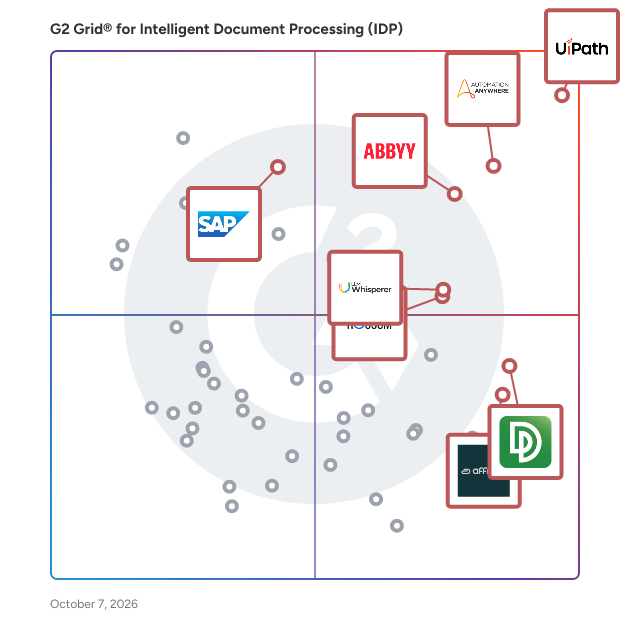
G2 Grid® for Intelligent Document Processing (IDP) Software

G2 Grid® for Intelligent Document Processing (IDP) Software plotting products by satisfaction and market presence

Highlighted products: UiPath Agentic Automation, Automation Anywhere Agentic Process Automation, ABBYY Intelligent Document Processing, LLM Whisperer, DocuPipe, Rossum, SAP Document AI, and Affinda.

Underlying data: [Grid® JSON](https://www.g2.com/categories/intelligent-document-processing-idp/grids.json?focus%5B%5D=uipath-agentic-automation&focus%5B%5D=automation-anywhere-agentic-process-automation&focus%5B%5D=abbyy-intelligent-document-processing&focus%5B%5D=llm-whisperer&focus%5B%5D=docupipe&focus%5B%5D=rossum&focus%5B%5D=sap-document-ai&focus%5B%5D=affinda)

UiPath Agentic Automation

UiPath (NYSE: PATH) is a global leader in agentic automation, empowering enterprises to harness the full potential of AI agents to autonomously execute and optimize complex business processes. The UiPath Platform™ uniquely combines controlled agency, developer flexibility, and seamless integration to help organizations scale agentic automation safely and confidently. Committed to security, governance, and interoperability, UiPath supports enterprises as they transition into a future where automation delivers on the full potential of AI to transform industries. For more information, visit www.uipath.com. Agentic testing is an AI-powered approach to software quality assurance that leverages autonomous agents to generate, execute, and evolve tests across the entire testing lifecycle. By partnering intelligent agents with human testers, agentic testing dramatically increases test coverage, accelerates release cycles, improves system resilience, and enables continuous testing at enterprise scale. It empowers teams to shift from manual, reactive testing to proactive, scalable quality engineering—driving faster innovation with higher confidence.

Average Rating: 4.6/5.0

Total Reviews: 6,269

How Do G2 Users Rate UiPath Agentic Automation?

  • Ease of Admin: 8.5/10 (Category avg: 8.9/10)
  • Has the product been a good partner in doing business?: 8.8/10 (Category avg: 9.1/10)
  • Ease of Use: 9.1/10 (Category avg: 8.9/10)
  • Ease of Setup: 8.6/10 (Category avg: 8.8/10)

Who Is the Company Behind UiPath Agentic Automation?

  • Seller: UiPath
  • Company Website:
  • Year Founded: 2005
  • HQ Location: New York
  • Twitter: @UiPath
    108,104 Twitter followers
  • LinkedIn® Page: www.linkedin.com
    5,142 employees on LinkedIn®

Who Uses This Product?

  • Who Uses This: RPA Developer, Software Engineer
  • Top Industries: Information Technology and Services, Computer Software
  • Company Size: 51% Large, 28% Medium

What Do G2 Reviewers Say About UiPath Agentic Automation?

AI-generated summary from verified user reviews

Pros
  • Users appreciate the advanced AI capabilities of UiPath Agentic Automation, enhancing adaptability and seamless workflow integration.
  • Users value the seamless integration of AI with automation in UiPath Agentic Automation for handling complex tasks.
  • Users appreciate the ease of use of UiPath Agentic Automation, making it simple for developers to integrate and automate tasks.
  • Users commend the automation ease of UiPath Agentic Automation, benefiting from its advanced AI capabilities and orchestration.
  • Users appreciate the user-friendly interface of UiPath Agentic Automation, enabling quick learning and effective automation solutions.
Cons
  • Users find the product expensive, with high licensing costs compared to other RPA tools, impacting overall value.
  • Users find the learning curve challenging, especially with agent training and required programming knowledge for non-tech individuals.
  • Users find the missing features in UiPath, such as modern folder access, hinder their overall experience.
  • Users find the complexity of UiPath Agentic Automation overwhelming, especially when navigating advanced features and setups.
  • Users feel that the pricing issues of UiPath Agentic Automation are too high, affecting repurchase decisions.

What Are Recent G2 Reviews of UiPath Agentic Automation?

What Are G2 Users Discussing About UiPath Agentic Automation?

Automation Anywhere Agentic Process Automation

Automation Anywhere Agentic Process Automation (APA) is an enterprise platform that orchestrates AI agents, RPA bots, APIs, documents, and human expertise as a single governed system of work. APA transforms what is possible with automation — orchestrating every instrument of work across every system, with execution grounded in process expertise, and end-to-end process governance across every agent, every step, and every decision. It turns individual capabilities into compounded business transformation. With the APA platform, you can optimize what already runs your business and expand into what has never been feasible before. What's inside the platform Process Reasoning Engine (PRE) — the decision layer. Goal-driven AI agents plan, act, adapt, and self-correct in real time as conditions change. Mozart Orchestrator — a unified composer that manages decisions, dependencies, context, and exceptions across agents, automations, documents, and APIs. AI Agent Studio — a low-code workspace for building AI agents on foundational models from Amazon Bedrock, Google Vertex AI, Azure OpenAI, OpenAI, and others. Automator AI — generative AI–powered automation development across any application, cloud or on-premises. Document Automation — processes unstructured documents at over 95% accuracy, and 5x faster with Cloud Extraction Service for large-scale extraction. Process Discovery — surfaces bottlenecks and identifies what to automate next. Automation Co-Pilot — triggers multi-step agentic workflows in natural language, inside the applications teams already use. Governance built in, not bolted on Every agent, action, and decision runs inside enterprise controls: fine-grained role-based access control (RBAC), AES-256 encryption at rest, TLS in transit, native audit logs with SIEM integration, and human-in-the-loop oversight. Automation Anywhere maintains SOC 1 Type 2, SOC 2 Type 2, ISO 27001, ISO 22301, and HITRUST certifications, and supports GDPR compliance. Proven in production 1,500+ live APA deployments, 400M+ automations run per year, and 1.8M+ unique AI agent executions across 26 global regions. Bancolombia — 1,300% ROI in the first year and a 50% increase in customer service efficiency JBS — $1M and 125,000 hours saved in IT Granite Telecom — $635,000 in monthly savings and 15,000 hours saved per month Ricoh — 500 days of operational time saved per month SoftBank Corp. — 85% reduction in recruitment hours Who it's for Enterprise operations, IT, finance, HR, customer service, and shared services teams in banking, insurance, healthcare, life sciences, manufacturing, telecommunications, and the public sector — wherever complex, cross-system work has to run reliably and be governed. Learn more at https://www.automationanywhere.com.

Average Rating: 4.5/5.0

Total Reviews: 4,150

How Do G2 Users Rate Automation Anywhere Agentic Process Automation?

  • Ease of Admin: 8.4/10 (Category avg: 8.9/10)
  • Has the product been a good partner in doing business?: 8.7/10 (Category avg: 9.1/10)
  • Ease of Use: 8.9/10 (Category avg: 8.9/10)
  • Ease of Setup: 8.3/10 (Category avg: 8.8/10)

Who Is the Company Behind Automation Anywhere Agentic Process Automation?

  • Seller: Automation Anywhere
  • Company Website:
  • Year Founded: 2003
  • HQ Location: San Jose, CA
  • Twitter: @AutomationAnywh
    55,050 Twitter followers
  • LinkedIn® Page: www.linkedin.com
    2,327 employees on LinkedIn®

Who Uses This Product?

  • Who Uses This: RPA Developer, Software Engineer
  • Top Industries: Information Technology and Services, Computer Software
  • Company Size: 58% Large, 23% Medium

What Do G2 Reviewers Say About Automation Anywhere Agentic Process Automation?

AI-generated summary from verified user reviews

Pros
  • Users praise the ease of use in Automation Anywhere Agentic Process Automation for simplifying RPA bot creation and management.
  • Users value the ease of automating repetitive tasks with Automation Anywhere, enhancing productivity and efficiency effortlessly.
  • Users appreciate the efficiency of Automation Anywhere, highlighting its ease of use and significant impact on productivity.
  • Users value the automation ease of Automation Anywhere, enabling non-coders to effortlessly build bots and streamline tasks.
  • Users appreciate the intuitive interface of Automation Anywhere, making automation easy and enhancing overall efficiency.
Cons
  • Users find Automation Anywhere's pricing model to be expensive and complex, which can be challenging for small teams.
  • Users find the steep learning curve challenging, especially for beginners navigating advanced features and debugging workflows.
  • Users find the missing features of Automation Anywhere Agentic Process Automation frustrating, limiting their workflow capabilities.
  • Users experience software bugs causing issues like errors in automation and problems with browser extensions.
  • Users often face bot issues including complex debugging and integration challenges, affecting overall usability and performance.

What Are Recent G2 Reviews of Automation Anywhere Agentic Process Automation?

What Are G2 Users Discussing About Automation Anywhere Agentic Process Automation?

LLM Whisperer

LLMWhisperer helps parse text from difficult documents like poor scans, PDFs, invoices, reports, and even handwriting. The output is layout-preserved, helping provide LLMs maximum context for QnAs, structured data extraction, and more. LLMWhisperer can deal with wide-ranging quality and formats of documents, preparing them for LLM consumption. Start with 100 pages per day for free. No credit card required. No strings attached. Key Features & Benefits - Layout-preserving output: Maintain the original layout of the document to ensure maximum context for LLMs. - Form element detection: Make data extraction from complex forms easy with checkbox and radio button identification. - Table border detection: Easily process dense tables and Excel spreadsheets with Table Border Detection that represents them with dashes in the output. - Extraction mode control: Ensure highly efficient, accurate, and cost-effective text extraction with different extraction modes: Native Text, Low Cost, High Quality, or Form. - Image pre-processing: Control API parameters like Median Filter or Gaussian Blur for high quality pre-processing. - API Integration: Seamlessly fit LLMWhisperer into your existing systems with Extraction, Status, Highlight, and Webhook Management RESTful APIs.

Average Rating: 4.5/5.0

Total Reviews: 86

How Do G2 Users Rate LLM Whisperer?

  • Ease of Admin: 9.1/10 (Category avg: 8.9/10)
  • Has the product been a good partner in doing business?: 9.2/10 (Category avg: 9.1/10)
  • Ease of Use: 9.1/10 (Category avg: 8.9/10)
  • Ease of Setup: 8.8/10 (Category avg: 8.8/10)

Who Is the Company Behind LLM Whisperer?

Who Uses This Product?

  • Top Industries: Computer Software, Accounting
  • Company Size: 75% Small, 20% Medium

What Do G2 Reviewers Say About LLM Whisperer?

AI-generated summary from verified user reviews

Pros
  • Users highlight the exceptional accuracy of LLM Whisperer, making data conversion and text extraction remarkably efficient.
  • Users praise LLM Whisperer for its powerful data extraction capabilities, making it essential for processing complex documents.
  • Users value the ease of use of LLM Whisperer, appreciating its intuitive setup and excellent documentation.
  • Users appreciate the easy integrations of LLM Whisperer, finding it seamless and reliable for various applications.
  • Users value the precise text extraction of LLM Whisperer, enhancing accuracy for complex document workflows.
Cons
  • Users face challenges with OCR issues, particularly with older fonts and less accurate recognition for certain languages.
  • Users note the limited functionality of LLM Whisperer, requiring significant additional processing for effective use in specific domains.
  • Users note the missing features in LLM Whisperer, particularly in page selection and language support limitations.
  • Users find the limited options like the free plan and page selection restrictions quite frustrating.
  • Users find the poor UI design challenging, making navigation and initial use somewhat difficult.

What Are Recent G2 Reviews of LLM Whisperer?

AI can help you find the answers. G2 helps you trust them.

Connect G2 to Claude or ChatGPT for answers grounded in G2's trusted reviews, comparisons, and pricing from real user insights.

How it works

Rossum

Rossum is a market-leading Intelligent Document Processing solution combining the industry’s most advanced data extraction capabilities with a complete low-code platform that automates significant amounts of manual work. Our goal for every use case is, at minimum, a 90% document processing speed increase. Over 450 organizations across industries, including Bosch, Siemens, Panasonic, Flexport, Morton Salt, and The Master Trust Bank of Japan, use Rossum to reduce manual effort, improve turnaround times, and eliminate errors. Rossum automates document processing in four steps: receiving multi-channel documents, automated understanding, resolving exceptions with two-way communication, and using in-depth integrations to act on data. Our proprietary AI engine has been specifically designed from the ground up to deliver unparalleled accuracy when processing data from any type of document. Rossum cuts down on most maintenance efforts thanks to cloud hosting and automated self-learning AI engine. It takes care of the entire document lifecycle from receiving to internal IT systems posting. Rossum is ISO 27001 and SOC 2 Type II certified and HIPAA compliant. The cloud service has been specifically engineered for high availability, with enterprise-grade SLAs ranging up to a 99.9% uptime guarantee and 24/7 support. Try it for yourself with Rossum’s free trial.

Average Rating: 4.5/5.0

Total Reviews: 119

How Do G2 Users Rate Rossum?

  • Ease of Admin: 9.0/10 (Category avg: 8.9/10)
  • Has the product been a good partner in doing business?: 9.3/10 (Category avg: 9.1/10)
  • Ease of Use: 8.9/10 (Category avg: 8.9/10)
  • Ease of Setup: 8.6/10 (Category avg: 8.8/10)

Who Is the Company Behind Rossum?

  • Seller: Rossum
  • Year Founded: 2017
  • HQ Location: London
  • Twitter: @RossumAi
    1,220 Twitter followers
  • LinkedIn® Page: www.linkedin.com
    175 employees on LinkedIn®

Who Uses This Product?

  • Top Industries: Accounting, Financial Services
  • Company Size: 43% Medium, 30% Small

What Do G2 Reviewers Say About Rossum?

AI-generated summary from verified user reviews

Pros
  • Users find Rossum incredibly easy to use, benefiting from its intuitive UI and smooth implementation process.
  • Users rave about the excellent customer support provided by Rossum, ensuring quick and effective assistance whenever needed.
  • Users highlight the intelligent AI capabilities of Rossum, enabling efficient processing and significant time savings.
  • Users praise the nice and clear UI of Rossum, enhancing their workflow and overall experience seamlessly.
  • Users appreciate the accuracy of data extraction in Rossum, significantly enhancing processing efficiency and saving time.
Cons
  • Users find the missing intuitive features in Rossum frustrating, leading to confusion during setup and usage.
  • Users experience software bugs in Rossum, leading to inconsistent confidence scores and frustrating document automation issues.
  • Users find the limited functionality of Rossum frustrating, particularly with dataset configuration and status options.
  • Users experience slow processing with Rossum, especially with larger invoices and at the start of each month.
  • Users experience a learning difficulty with Rossum, finding it challenging to fully master the features and customization.

What Are Recent G2 Reviews of Rossum?

What Are G2 Users Discussing About Rossum?

DocuPipe

DocuPipe is an AI document processing solution designed to help users efficiently extract and understand information from a wide variety of documents. This software employs advanced computer vision and large language model (LLM) orchestration to analyze documents even when they are long, vary in layout, and have complex tables or handwriting. DocuPipe lets your business easily define how you want to understand your specific document types. Automatically traige incoming documents and map them to right extracion, and get a reliable output every time - even if the document is long, scanned, or comes in at variable layout. Automate anything from invoice processing to patient intake checklist based on lab reports to utility bill understanding. A key feature of DocuPipe is its schema-first extraction capability. Users can just explain in plain English how they want a document to be understood, and the AI engine pores over thousands of documents to build a structure that makes sense given real life documents. This results in strongly typed and consistent outputs, ensuring that the extracted data is reliable and easily integrated with other systems. Unlike LLM-only solutions, DocuPipe is able to ground its predictions in physical text - yellow markering the evidence behind every number, date or conclusion it has drawn from a document. This lets you define review pipeliens for high-stakes processing, or when compliance requires a human in the loop. Focus valuable human attention on lower confidence fields, and unlock a 10x productivity growth for data entry operations. DocuPipe offers a numerous paths to integration. Send your data results to 5000+ destinations unlocked using no-code solutions such as Workato, Make, and n8n. Define workflows with a graphical interface, and hook up complex pipeliens using its extensively documented API.

Average Rating: 4.9/5.0

Total Reviews: 61

G2 Deal: DocuPipe Business

Get 40% off DocuPipe's Business plan for 12 months — over $475 in savings. Includes full API access, 2,500 credits/month, and pay-as-you-go overage billing.

Price: ~~$99/mo~~ → $59.40/mo

View this exclusive G2 deal

How Do G2 Users Rate DocuPipe?

  • Ease of Admin: 9.0/10 (Category avg: 8.9/10)
  • Has the product been a good partner in doing business?: 9.4/10 (Category avg: 9.1/10)
  • Ease of Use: 9.5/10 (Category avg: 8.9/10)
  • Ease of Setup: 9.1/10 (Category avg: 8.8/10)

Who Is the Company Behind DocuPipe?

  • Seller: DocuPipe
  • Year Founded: 2023
  • HQ Location: New York City, US
  • LinkedIn® Page: www.linkedin.com
    5 employees on LinkedIn®

Who Uses This Product?

  • Top Industries: Accounting, Computer Software
  • Company Size: 53% Small, 24% Medium

What Do G2 Reviewers Say About DocuPipe?

AI-generated summary from verified user reviews

Pros
  • Users find DocuPipe's ease of use exceptional, with intuitive setup and straightforward document processing capabilities.
  • Users are impressed by DocuPipe's remarkably high accuracy rate, ensuring reliable results from inconsistent documents.
  • Users commend the outstanding customer support of DocuPipe, noting quick responses and expert assistance during integration.
  • Users value the exceptional data extraction capabilities of DocuPipe, facilitating efficient document processing and categorization.
  • Users find DocuPipe's setup to be very easy, allowing quick integration and efficient data extraction.
Cons
  • Users feel the poor interface design of DocuPipe hinders navigation and clarity in job processing.
  • Users find the poor UI design of DocuPipe confusing, affecting navigation and overall user experience.
  • Users find DocuPipe expensive, as costs accumulate with schema errors and the pricing structure is complex.
  • Users feel that the user interface of DocuPipe needs improvement for better clarity and easier navigation.
  • Users find the difficult learning curve of DocuPipe frustrating, especially with costs associated with schema errors and usage.

What Are Recent G2 Reviews of DocuPipe?

Affinda

Affinda is an AI platform for document processing. It learns to process any document type in minutes, helping any organization quickly unlock cost savings and boost productivity by shifting teams away from manual data entry and toward more meaningful work. Our AI agents extract any data from any document with 99%+ accuracy, instantly learning from every interaction so you can achieve smarter automation without lengthy training cycles. More advanced than machine-learning IDP: Traditional ML approaches typically require lengthy training periods and ongoing maintenance. Affinda's architecture enables instant learning on new document types and schema changes, minimizing maintenance requirements and accelerating implementation. More complete than LLMs alone: Standard LLM implementations for document processing face limitations due to static prompt dependencies. Affinda addresses these challenges through a decade of development, resulting in an end-to-end platform that enhances LLM capabilities. Achieve 99%+ accuracy: Our model memory approach and technical architecture enable consistent high accuracy in data extraction. This level of accuracy supports straight-through processing capabilities, reducing the need for manual verification and allowing organizations to optimize resource allocation. Some of Affinda’s key features include: Splitting – automatically separates multi-page files into individual documents, streamlining batch processing and ensuring accurate document handling Classification – identifies and categorizes documents by type automatically, optimizing workflow routing and processing paths Cleanse and transform data – structures and standardizes extracted data to match your requirements, ensuring compatibility with downstream systems Apply business logic – implement custom validation rules using natural language instructions, allowing business users to define and maintain processing logic without coding Machine Validation – validates extracted data against your master data sources, enabling automatic matching and verification with existing systems of record Try Affinda for yourself with our 14-day free trial.

Average Rating: 4.9/5.0

Total Reviews: 26

How Do G2 Users Rate Affinda?

  • Ease of Admin: 9.9/10 (Category avg: 8.9/10)
  • Has the product been a good partner in doing business?: 10.0/10 (Category avg: 9.1/10)
  • Ease of Use: 9.9/10 (Category avg: 8.9/10)
  • Ease of Setup: 9.9/10 (Category avg: 8.8/10)

Who Is the Company Behind Affinda?

  • Seller: Affinda
  • Year Founded: 2012
  • HQ Location: Melbourne, 3000
  • Twitter: @affinda_ai
    20 Twitter followers
  • LinkedIn® Page: www.linkedin.com
    61 employees on LinkedIn®

Who Uses This Product?

  • Company Size: 50% Medium, 46% Small

What Do G2 Reviewers Say About Affinda?

AI-generated summary from verified user reviews

Pros
  • Users commend Affinda for its high accuracy, effectively handling complex document extraction and classification tasks.
  • Users appreciate the helpful customer support of Affinda, making implementation smooth and hassle-free.
  • Users praise the ease of use of Affinda, highlighting its intuitive setup and user-friendly interface.
  • Users commend the easy implementation of Affinda, highlighting excellent support that ensures a smooth transition.
  • Users value the automation capabilities of Affinda, significantly enhancing efficiency in document processing.
Cons
  • Users face integration issues due to lack of documentation and additional time required for setup.
  • Users find the difficult implementation requires significant development time, complicating the integration process with Affinda.
  • Users face documentation issues when trying to integrate specific applications, leading to frustrations and unmet needs.
  • Users still report some OCR issues, despite improvements, indicating room for further enhancement in accuracy.
  • Users face challenges due to poor documentation, making integration with specific applications difficult.

What Are Recent G2 Reviews of Affinda?

Automate®

Automate® is a robotic process automation (RPA) solution designed to help users streamline repetitive manual tasks across various business processes. By utilizing no-code features, Automate® makes RPA accessible to individuals and organizations regardless of their coding experience. This user-friendly approach allows businesses to enhance efficiency and productivity by automating tasks that would otherwise require significant manual effort. The target audience for Automate® includes businesses of all sizes looking to optimize their operations. From small teams focusing on specific tasks to large enterprises aiming for comprehensive automation across multiple departments, Automate® caters to a wide range of use cases. Organizations can start with automating a single task within one department and gradually scale their automation efforts to encompass enterprise-wide workflows. This flexibility enables users to adapt their automation strategies as their needs evolve, ensuring that they can keep pace with the fast-changing business landscape. Key features of Automate® include its intuitive drag-and-drop interface, which allows users to create automation workflows without any programming knowledge. This feature is particularly beneficial for organizations that want to empower their employees to take part in automation initiatives without the need for extensive training. Additionally, Automate® supports integration with various applications and systems, enabling users to automate virtually any IT or business process seamlessly. This capability not only enhances operational efficiency but also reduces the risk of human error, leading to more reliable outcomes. Another significant advantage of Automate® is its ability to scale automation efforts across the organization. As businesses grow and their processes become more complex, Automate® can adapt to meet these challenges. The solution is part of Fortra’s comprehensive portfolio, which aims to simplify the automation landscape by providing integrated products that address various organizational needs. This holistic approach ensures that users have access to a suite of tools designed to streamline and secure their operations throughout their automation journey. In summary, Automate® stands out in the RPA category by offering an accessible, scalable, and flexible solution for automating repetitive tasks. Its no-code features, extensive integration capabilities, and alignment with Fortra’s broader automation strategy make it a valuable asset for organizations looking to enhance their efficiency and adapt to the evolving demands of the business environment.

Average Rating: 4.5/5.0

Total Reviews: 151

How Do G2 Users Rate Automate®?

  • Ease of Admin: 8.9/10 (Category avg: 8.9/10)
  • Has the product been a good partner in doing business?: 9.0/10 (Category avg: 9.1/10)
  • Ease of Use: 8.8/10 (Category avg: 8.9/10)
  • Ease of Setup: 8.7/10 (Category avg: 8.8/10)

Who Is the Company Behind Automate®?

  • Seller: Fortra
  • Company Website:
  • Year Founded: 1982
  • HQ Location: Eden Prairie, Minnesota
  • Twitter: @fortraofficial
    2,773 Twitter followers
  • LinkedIn® Page: www.linkedin.com
    1,784 employees on LinkedIn®

Who Uses This Product?

  • Top Industries: Information Technology and Services, Financial Services
  • Company Size: 54% Medium, 23% Small

What Do G2 Reviewers Say About Automate®?

AI-generated summary from verified user reviews

Pros
  • Users appreciate the automation capabilities of Automate®, enabling seamless integration of various tasks for enhanced efficiency.
  • Users appreciate the automation ease of Automate®, simplifying routine tasks and enhancing workflow efficiency.
  • Users find Automate® easy to use, appreciating its intuitive drag-and-drop interface for simplifying automation tasks.
  • Users value the intuitive ease of use of Automate®, making task automation accessible for everyone.
  • Users appreciate the ease of use and efficiency of Automate®, enabling seamless task automation without programming skills.
Cons
  • Users experience slow performance in some tools, impacting workflow and causing delays in task execution.
  • Users find the complexity of workflows in Automate® challenging, needing more intuitive guidance and support to navigate efficiently.
  • Users frequently experience software bugs in Automate®, impacting performance and complicating essential tasks.
  • Users struggle with workflow complexity, facing challenges in tracing workflows and troubleshooting errors effectively.
  • Users find the automation setup process difficult due to clunky connections and troubleshooting challenges that require patience.

What Are Recent G2 Reviews of Automate®?

What Are G2 Users Discussing About Automate®?

CloudFiles

CloudFiles is an all-in-one document operations platform for Salesforce and HubSpot that helps organizations manage, generate, process, share, and automate documents directly from their CRM. Built for document-intensive business processes, CloudFiles combines document management, AI-powered document processing, document generation, secure sharing, external storage integrations, and workflow automation into a single platform. Organizations use CloudFiles to connect Salesforce and HubSpot with SharePoint, Google Drive, OneDrive, Dropbox, Amazon S3, and other enterprise storage platforms while maintaining structured document organization, centralized visibility, and secure access across teams. With CloudFiles, teams can: • Manage files and folders directly inside Salesforce and HubSpot • Automate document generation for agreements, proposals, onboarding forms, financial documents, and client communications • Extract and process data from documents using AI • Build secure datarooms and external document-sharing workflows • Automate document-heavy processes like client onboarding, loan processing, document verification, intake forms, and operational workflows • Configure CRM-native automations using flows, widgets, and custom actions CloudFiles helps organizations reduce manual work, centralize document operations, streamline document-heavy workflows, and improve productivity without leaving Salesforce or HubSpot. CloudFiles supports enterprise security and compliance requirements with SOC 2, HIPAA, GDPR, and ISO 27001 aligned practices. Data residency is supported across the US, EU, UK, and AU, while files remain securely stored within customers’ external storage platforms and are never used to train AI models. Trusted by teams across financial services, healthcare, insurance, legal, real estate, technology, and professional services, CloudFiles enables businesses to modernize document workflows with enterprise-grade security, flexible storage integrations, and AI-powered automation.

Average Rating: 4.5/5.0

Total Reviews: 221

How Do G2 Users Rate CloudFiles?

  • Ease of Admin: 9.0/10 (Category avg: 8.9/10)
  • Has the product been a good partner in doing business?: 8.8/10 (Category avg: 9.1/10)
  • Ease of Use: 9.1/10 (Category avg: 8.9/10)
  • Ease of Setup: 8.9/10 (Category avg: 8.8/10)

Who Is the Company Behind CloudFiles?

  • Seller: CloudFiles
  • Year Founded: 2021
  • HQ Location: Fremont, US
  • Twitter: @cloudfilesapp
    54 Twitter followers
  • LinkedIn® Page: www.linkedin.com
    30 employees on LinkedIn®
  • Ownership: Venture-backed

Who Uses This Product?

  • Who Uses This: Manager
  • Top Industries: Information Technology and Services, Computer Software
  • Company Size: 44% Small, 29% Medium

What Do G2 Reviewers Say About CloudFiles?

AI-generated summary from verified user reviews

Pros
  • Users enjoy the ease of use of CloudFiles, praising its seamless setup and centralized file management.
  • Users value the robust security of CloudFiles, ensuring their sensitive files remain safe and compliant while being easily accessible.
  • Users value the efficient cloud storage of CloudFiles, allowing seamless access and management of documents across platforms.
  • Users love the easy access to files from anywhere with an internet connection, enhancing convenience and productivity.
  • Users appreciate the easy setup of CloudFiles, finding it user-friendly and efficient for daily file management.
Cons
  • Users have noted the slow loading times for downloads and uploads, impacting their overall experience with CloudFiles.
  • Users find that the training required for CloudFiles can slow down initial usage and frustrate new members.
  • Users desire limited customization options in CloudFiles, wishing for features like custom tags and color coding.
  • Users experience slow performance with CloudFiles, noting glitches and delays in response time during specific actions.
  • Users often face slow upload speeds with CloudFiles, leading to a frustrating and time-consuming experience.

What Are Recent G2 Reviews of CloudFiles?

What Are G2 Users Discussing About CloudFiles?

Unstract

Unstract is an Agentic Document Intelligence platform that helps automate complex workflows which currently requires humans to process. Unstract consistently and accurately maps complex documents (with unlimited variants) into a single JSON schema - helping supercharge downstream workflows and agentic automations. Unstract features a purpose-built environment, Prompt Studio, for JSON schema mapping. The platform also supports various connectors to systems like n8n or MCP servers to enable real-world agentic workflows. Mapping and structuring can also be done through API calls or ETL pipelines, enabling wide-ranging and easy integration. Key Features & Benefits - Prompt Studio: Purpose-built, no-code environment to map unlimited variants to a single JSON schema through prompt engineering. - LLMChallenge: A powerful LLM-as-a-judge implementation that avoids hallucinations and increases accuracy for high-impact agents. It employs two LLMs that need to arrive at a consensus for any mapping value to be accepted. - SinglePass and Summarized Extraction: Cost optimization technologies built to reduce token usage by 5-10x. - Human-in-the-Loop: Designate and loop in reviewers and approvers into the feedback cycle to minimize errors and reduce operational oversight. - API Hub: Plug-and-play, prebuilt APIs for instant document data extraction - without the lengthy development cycles. - Source Document Highlighting: Technology using which the system scrolls to the right location of the source documents and highlights the portions from where the LLM has extracted the data. With Unstract, companies have realized: -> 99.9% accurate document extraction -> 80% Lesser Human Touchpoints -> 90%+ Straight-Through Processing -> 20x Boost in Operational Efficiency -> 100% Document Context Maintained -> 90% Reduction in Prompt Maintenance All with a platform Enterprise-Grade, out-of-the-box: with SOC 2 Type II, ISO 27001, GDPR and HIPAA compliances.

Average Rating: 4.4/5.0

Total Reviews: 37

How Do G2 Users Rate Unstract?

  • Ease of Admin: 8.8/10 (Category avg: 8.9/10)
  • Has the product been a good partner in doing business?: 9.0/10 (Category avg: 9.1/10)
  • Ease of Use: 8.8/10 (Category avg: 8.9/10)
  • Ease of Setup: 8.4/10 (Category avg: 8.8/10)

Who Is the Company Behind Unstract?

Who Uses This Product?

  • Top Industries: Computer Software, Information Technology and Services
  • Company Size: 68% Small, 29% Medium

What Do G2 Reviewers Say About Unstract?

AI-generated summary from verified user reviews

Pros
  • Users praise Unstract for its ease of use, enabling efficient document processing without technical skills required.
  • Users value the document automation capabilities of Unstract, efficiently transforming complex data without coding skills needed.
  • Users commend Unstract for its efficient data extraction, simplifying document processing without needing technical expertise.
  • Users highly value the accuracy of Unstract in transforming unstructured data into structured formats efficiently.
  • Users praise the responsive customer support of Unstract, ensuring fast implementation and addressing queries effectively.
Cons
  • Users face missing features like improved error notifications and version control, impacting their overall experience with Unstract.
  • Users notice slow performance during bulk extractions and occasional downtimes that can affect the overall experience.
  • Users note documentation issues that could use improvement, but appreciate the responsive support team on Slack.
  • Users find the poor UI design of Unstract outdated and initially confusing due to scattered components.
  • Users face technical issues with Unstract, including slow support and limitations in document structure and accuracy.

What Are Recent G2 Reviews of Unstract?

Graip.AI

Graip.AI is a new-generation Intelligent Document Processing (IDP) platform designed to help organizations turn unstructured documents into reliable, actionable data without relying on templates or manual effort. It extracts, validates, enriches, and classifies information across 140 languages with up to a 100% recognition rate. These capabilities help teams reduce manual workload in finance, logistics, procurement, operations, and compliance. Graip.AI Agents Lab extends the platform with a library of 50+ specialized AI agents that automate end-to-end document workflows. Each agent can extract and verify key fields, enrich data with external sources, and route results into business systems. Agents can work independently or be combined to support multi-step processes. The platform is powered by a mix of LLMs, public ML models, NER components, and proprietary machine learning engines. Together, they provide high-accuracy, template-free data extraction and allow users to customize behavior through natural language prompts. Graip.AI is suitable for organizations of any size and carries ISO 27001, ISO 27701, ISO 9001, and ISO 22301 certifications, demonstrating strong standards for information security, data privacy, quality management, and business continuity.

Average Rating: 4.8/5.0

Total Reviews: 35

How Do G2 Users Rate Graip.AI?

  • Ease of Admin: 9.6/10 (Category avg: 8.9/10)
  • Has the product been a good partner in doing business?: 10.0/10 (Category avg: 9.1/10)
  • Ease of Use: 9.4/10 (Category avg: 8.9/10)
  • Ease of Setup: 9.4/10 (Category avg: 8.8/10)

Who Is the Company Behind Graip.AI?

  • Seller: graip.ai
  • Company Website:
  • Year Founded: 2020
  • HQ Location: Washington, D.C., US
  • LinkedIn® Page: www.linkedin.com
    13 employees on LinkedIn®

Who Uses This Product?

  • Who Uses This: Accountant
  • Top Industries: Accounting, Information Technology and Services
  • Company Size: 54% Small, 46% Medium

What Do G2 Reviewers Say About Graip.AI?

AI-generated summary from verified user reviews

Pros
  • Users highlight the exceptional accuracy of Graip.AI in processing diverse documents and managing financial workflows efficiently.
  • Users praise the efficiency of Graip.AI, appreciating its straightforward processes and swift support that enhances productivity.
  • Users praise the automated document processing of Graip.AI for its accuracy and minimal manual intervention.
  • Users find Graip.AI to be easy to use with a straightforward loan application process and efficient integration.
  • Users praise the automated data management of Graip.AI, noting its seamless integration and exceptional accuracy.
Cons
  • Users note a slow performance when uploading larger files, though it doesn't greatly affect their overall experience.
  • Users face documentation issues during debugging, especially with improperly digitized document fields causing frustration.
  • Users find the insufficient training on advanced features challenging, impacting their initial experience with Graip.AI.
  • Users find the learning curve challenging, requiring training to effectively utilize Graip.AI's advanced features.
  • Users report issues with misidentification of commas and dots, altering the essence of equations in Graip.AI.

What Are Recent G2 Reviews of Graip.AI?

PIX RPA

PIX RPA is an intelligent automation platform that combines RPA, AI, and BPM to help businesses automate processes, improve efficiency, and scale operations. Advantages of PIX RPA Platform: - Built-in IDP for intelligent document automation; - Enterprise-ready platform with robust scalability; - PROM Framework for flexible process modeling; - Integrated AI support for smarter decision-making; - Centralized orchestration with BPM tools; - Multi-platform compatibility for diverse systems. PIX Platform Components: - PIX Studio: Tool for creating and designing software robots; - PIX Robot: Execution module that runs automated algorithms; - PIX Master (On-premise & Cloud): Administration console to manage multiple robots and processes; - PIX Runner: Application for running and operating robots on a user’s device; - PIX Converter: Tool for automated migration of UiPath projects to PIX RPA; - PIX Analytics Module: A new component that enables real-time monitoring of automation results and evaluation of PIX RPA implementation impact through advanced data visualizations and performance insights; - PIX Smart Module: Intelligent add-on that enhances automation capabilities through AI-driven decision-making, adaptive process optimization, and predictive analytics. Key Benefits: - Faster automation speed than traditional methods; - Accelerated process execution with improved quality; - Enhanced compliance and reduced operational risks; - Higher employee satisfaction through task automation; - Quick ROI with scalable and intelligent automation.

Average Rating: 4.8/5.0

Total Reviews: 233

How Do G2 Users Rate PIX RPA?

  • Ease of Admin: 9.2/10 (Category avg: 8.9/10)
  • Has the product been a good partner in doing business?: 9.3/10 (Category avg: 9.1/10)
  • Ease of Use: 9.1/10 (Category avg: 8.9/10)
  • Ease of Setup: 9.1/10 (Category avg: 8.8/10)

Who Is the Company Behind PIX RPA?

Who Uses This Product?

  • Who Uses This: Desarrollador, Estudiante
  • Top Industries: Computer Software, Information Technology and Services
  • Company Size: 68% Small, 19% Medium

What Do G2 Reviewers Say About PIX RPA?

AI-generated summary from verified user reviews

Pros
  • Users appreciate the ease of use of PIX RPA, highlighting its intuitive interface and quick setup for bot creation.
  • Users appreciate the efficiency of automation in PIX RPA, simplifying repetitive tasks and enhancing productivity.
  • Users love the intuitive interface of PIX RPA, making bot creation fast and accessible without extensive coding.
  • Users appreciate the friendly and easy-to-use interface of PIX RPA, enhancing their overall experience and satisfaction.
  • Users appreciate the intuitive visual editor and AI features of PIX RPA, enabling quick and complex automation tasks.
Cons
  • Users note the missing features in PIX RPA, particularly in advanced AI capabilities and customization options.
  • Users note the limited integration issues with PIX RPA, particularly regarding support for various AI models.
  • Users note the limited features of PIX RPA, particularly in AI capabilities and multi-step planning integrations.
  • Users note limited features in PIX RPA, especially regarding AI capabilities and documentation for niche integrations.
  • Users find the difficult learning curve of PIX RPA challenging, especially transitioning from Python to its graphical interface.

What Are Recent G2 Reviews of PIX RPA?

Star Software

Star Software offers comprehensive, end-to-end automated workflows for Finance operations, including Procure-to-Pay and Order-to-Cash processes, as well as the management of complex documents like Certificates of Analysis (COAs) and Material Test Certificates. Powered by advanced technologies such as Intelligent Document Processing (IDP), Artificial Intelligence (AI), Optical Character Recognition (OCR), and Robotic Process Automation (RPA), our solutions deliver exceptional accuracy, efficiency, and seamless integration with existing systems. We are dedicated to continuous improvement and user-centric innovation, streamlining critical processes to enable organizations to focus on their strategic objectives and drive business success. Join the Constellation of Automation - Get Started with Star!

Average Rating: 5.0/5.0

Total Reviews: 23

How Do G2 Users Rate Star Software?

  • Ease of Admin: 10.0/10 (Category avg: 8.9/10)
  • Has the product been a good partner in doing business?: 10.0/10 (Category avg: 9.1/10)
  • Ease of Use: 9.9/10 (Category avg: 8.9/10)
  • Ease of Setup: 9.9/10 (Category avg: 8.8/10)

Who Is the Company Behind Star Software?

Who Uses This Product?

  • Top Industries: Information Technology and Services
  • Company Size: 68% Medium, 61% Small

What Do G2 Reviewers Say About Star Software?

AI-generated summary from verified user reviews

Pros
  • Users value the ease of use of Star Software, enabling efficient document review and seamless integration.
  • Users value the seamless automation capabilities of Star Software, enhancing efficiency and integration across various platforms.
  • Users appreciate the excellent customer service provided by Star Software, enhancing their overall experience with the product.
  • Users find the document automation features of Star Software highly efficient and easy to use for audits.
  • Users appreciate the versatile data extraction capabilities of Star Software, simplifying their workflow from various documents.
Cons
  • Users report slow performance with Star Software, requiring more processing power for optimal functionality.
  • Users face access issues with Star Software, needing browser access and lacking a desktop application for development.
  • Users find the licensing fees of Star Software to be too high, especially for small businesses.
  • Users find the learning curve steep, making it challenging for small businesses to master advanced features effectively.
  • Users find the limited functionality of Star Software restricts complex task automation without programming knowledge.

What Are Recent G2 Reviews of Star Software?

Suralink

Suralink is the agentic automation platform for accounting firms & their clients. We help our customers deliver their most efficient engagements ever. We do that by unifying the entire Request-to-Review process and empowering teams with configurable AI agents to pre-screen data, automate analysis, and deliver critical insights. Suralink Workpaper Suite integrates with any Excel-based binder solution and connects directly to Request List Management. It automates data matching for sample testing or population analysis, streamlines reviews with linked client documents, and enables direct client follow-up—all without ever leaving your Excel workpapers. Clients’ responses and support documents sync automatically into your workbook, ensuring real-time updates and smoother collaboration. By combining Request List Management’s powerful, secure document request management with Workpaper Suite’s seamless integration with Excel, Suralink empowers firms to simplify workflows, reduce manual tasks, and foster better collaboration with clients. These tools help firms keep engagements on track, minimize inefficiencies, and enhance client interactions—ensuring a more efficient and cost-effective engagement process from initial PBC requests to workpaper review.

Average Rating: 4.5/5.0

Total Reviews: 178

How Do G2 Users Rate Suralink?

  • Ease of Admin: 8.8/10 (Category avg: 8.9/10)
  • Has the product been a good partner in doing business?: 8.9/10 (Category avg: 9.1/10)
  • Ease of Use: 9.0/10 (Category avg: 8.9/10)
  • Ease of Setup: 8.7/10 (Category avg: 8.8/10)

Who Is the Company Behind Suralink?

  • Seller: Suralink
  • Company Website:
  • Year Founded: 2014
  • HQ Location: Salt Lake City,Utah
  • Twitter: @Suralink
    724 Twitter followers
  • LinkedIn® Page: www.linkedin.com
    112 employees on LinkedIn®

Who Uses This Product?

  • Who Uses This: Senior Manager, Partner
  • Top Industries: Accounting, Consulting
  • Company Size: 44% Medium, 40% Small

What Do G2 Reviewers Say About Suralink?

AI-generated summary from verified user reviews

Pros
  • Users find Suralink remarkably easy to use, needing minimal guidance for new clients to navigate the platform.
  • Users value the secure document sharing capabilities of Suralink, ensuring safety and ease for confidential uploads.
  • Users value Suralink's intuitive interface that simplifies document management and enhances collaboration among teams.
  • Users find the initial setup extremely easy, ensuring a smooth transition to Suralink for all clients.
  • Users find Suralink to significantly enhance efficiency by automating document requests and simplifying client engagement management.
Cons
  • Users experience poor notifications with Suralink, often receiving delays and misleading updates on file uploads.
  • Users are frustrated with the missing features in Suralink, such as poor document review and limited attachment options.
  • Users express frustration over restrictive file management in Suralink, hindering collaboration and causing delays in notifications.
  • Users experience access issues such as trouble locating files and complications with Multi-Factor Authentication and SSO.
  • Users find the difficult learning curve cumbersome, as it requires extensive training and timely document management.

What Are Recent G2 Reviews of Suralink?

What Are G2 Users Discussing About Suralink?

Algodocs

Algodocs frees you from annoying and error-prone manual data entry by offering fast, secure and accurate document data extraction. Algodocs lets you extract important data from your documents such as PDF, WORD or images with no coding at all. With Algodocs you can extract specific fields (e.g. Account Number, Purchase Order, Statement Date, Ship To, etc.) or tables of any complexity that even span over multiple pages.

Average Rating: 4.6/5.0

Total Reviews: 50

How Do G2 Users Rate Algodocs?

  • Ease of Admin: 8.7/10 (Category avg: 8.9/10)
  • Has the product been a good partner in doing business?: 8.5/10 (Category avg: 9.1/10)
  • Ease of Use: 9.1/10 (Category avg: 8.9/10)
  • Ease of Setup: 9.0/10 (Category avg: 8.8/10)

Who Is the Company Behind Algodocs?

  • Seller: Algosoft
  • Year Founded: 2014
  • HQ Location: Turkey, TR
  • LinkedIn® Page: www.linkedin.com
    8 employees on LinkedIn®

Who Uses This Product?

  • Top Industries: Accounting
  • Company Size: 52% Small, 24% Large

What Do G2 Reviewers Say About Algodocs?

AI-generated summary from verified user reviews

Pros
  • Users find AlgoDocs incredibly easy to use, thanks to quick setup and efficient data extraction capabilities.
  • Users love the accuracy and ease of data extraction, significantly streamlining their workflow and saving time.
  • Users find that AlgoDocs provides a significant time-saving benefit by efficiently converting handwritten data into Excel.
  • Users value the efficient data management of AlgoDocs, enhancing accuracy and streamlining their workflows effectively.
  • Users commend the efficiency of AlgoDocs in automating data extraction, significantly reducing errors and saving time.
Cons
  • Users find limited AI features in Algodocs, feeling it lacks advanced tools compared to competitors.
  • Users face a learning difficulty with Algodocs, finding the setup and advanced features challenging to navigate.
  • Users find the limited customization of Algodocs restrictive, impacting their ability to tailor the software to their needs.
  • Users find the UI design outdated, noting difficulties with customization and navigation that hinder usability.
  • Users find that AlgoDocs has complex workflows that can hinder advanced customization for intricate documentation requirements.

What Are Recent G2 Reviews of Algodocs?

Lido

Lido.app is an AI powered document processing platform that automates data extraction, transformation, validation, and delivery from any type of document into spreadsheets and external systems. Enterprises use Lido to eliminate manual data entry, reduce errors, and accelerate the flow of operational data across logistics, finance, manufacturing, legal, healthcare, insurance, and other document heavy environments. Lido ingests PDFs, images, scanned documents, emails, forms, and multi page packets. The platform uses a trained AI extraction engine combined with programmatic validation logic to capture structured data with high accuracy and reliability. Users can configure extraction templates in minutes, create business rules without code, and push the resulting data directly into ERP, TMS, EDI, accounting, or workflow systems.

Average Rating: 4.8/5.0

Total Reviews: 17

How Do G2 Users Rate Lido?

  • Ease of Admin: 9.2/10 (Category avg: 8.9/10)
  • Has the product been a good partner in doing business?: 10.0/10 (Category avg: 9.1/10)
  • Ease of Use: 9.4/10 (Category avg: 8.9/10)
  • Ease of Setup: 9.6/10 (Category avg: 8.8/10)

Who Is the Company Behind Lido?

  • Seller: Lido
  • Year Founded: 2019
  • HQ Location: New York, US
  • LinkedIn® Page: www.linkedin.com
    34 employees on LinkedIn®

Who Uses This Product?

  • Company Size: 59% Small, 41% Medium

What Do G2 Reviewers Say About Lido?

AI-generated summary from verified user reviews

Pros
  • Users appreciate the ease of use of Lido, empowering them to streamline workflows and enhance efficiency.
  • Users commend Lido for its outstanding customer support, which enhances the user experience and implementation process.
  • Users value Lido for its significant time-saving capabilities, streamlining document handling and workflow efficiency.
  • Users appreciate the accurate data extraction of Lido, saving time and enhancing trust in results.
  • Users appreciate the intuitive design and ease of use of Lido, enhancing productivity and workflow development.
Cons
  • Users face Excel manipulation challenges with Lido, finding it time-consuming to locate familiar options amid different menus.
  • Users experience difficulties with Excel compatibility, hindering smooth manipulation of Excel files within Lido.
  • Users often face formatting issues with PDFs and experience difficulties with Excel to Excel manipulation on Lido.
  • Users find the learning curve challenging due to differences in menus compared to Excel, affecting navigation speed.
  • Users often face technical issues with Lido, particularly regarding inconsistent PDF formatting and Excel manipulation challenges.

What Are Recent G2 Reviews of Lido?

Bijou Barry
BB
Researched and written by Bijou Barry
Updated October 3, 2024