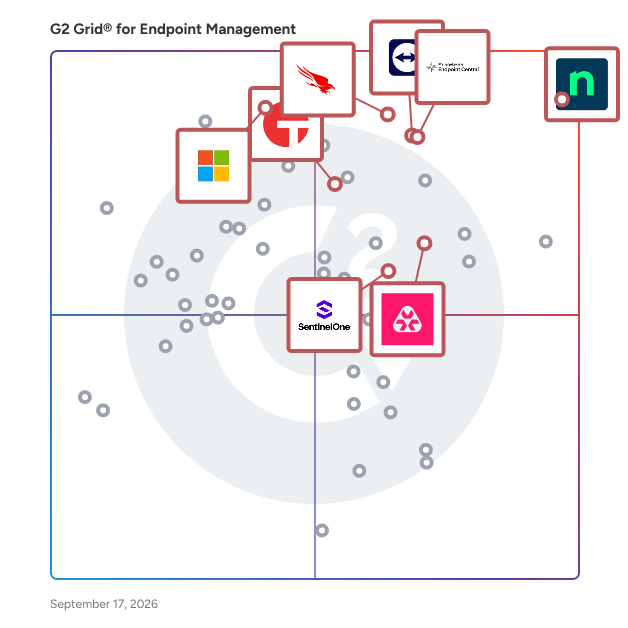
# Best Enterprise Endpoint Management Software - Page 2

*By [Brandon Summers-Miller](https://research.g2.com/insights/author/brandon-summers-miller)*


Products classified in the overall Endpoint Management category are similar in many regards and help companies of all sizes solve their business problems. However, enterprise business features, pricing, setup, and installation differ from businesses of other sizes, which is why we match buyers to the right Enterprise Business Endpoint Management to fit their needs. Compare product ratings based on reviews from enterprise users or connect with one of G2&#39;s buying advisors to find the right solutions within the Enterprise Business Endpoint Management category.

In addition to qualifying for inclusion in the Endpoint Management Software category, to qualify for inclusion in the Enterprise Business Endpoint Management Software category, a product must have at least 10 reviews left by a reviewer from an enterprise business.


## Top Endpoint Management Software at a Glance
| # | Product | Rating | Best For | What Users Say |
|---|---------|--------|----------|----------------|
| 1 | [NinjaOne](https://www.g2.com/products/ninjaone/reviews) | 4.7/5.0 (4,347 reviews) | Policy-driven patching with background remote remediation | "[NinjaOne Streamlines Endpoint Management and Remote Troubleshooting](https://www.g2.com/survey_responses/ninjaone-review-12791930)" |
| 2 | [TeamViewer](https://www.g2.com/products/teamviewer/reviews) | 4.5/5.0 (3,910 reviews) | Cross-platform unattended remote endpoint support | "[Remote Support Made Simple](https://www.g2.com/survey_responses/teamviewer-review-13069675)" |
| 3 | [Action1](https://www.g2.com/products/action1/reviews) | 4.9/5.0 (1,089 reviews) | Automated patch deployment with third-party vulnerability remediation | "[Simple and Useful](https://www.g2.com/survey_responses/action1-review-13049497)" |
| 4 | [ManageEngine Endpoint Central](https://www.g2.com/products/manageengine-endpoint-central/reviews) | 4.5/5.0 (1,105 reviews) | Unified endpoint patching and remote control | "[Helpful Endpoint Management Platform](https://www.g2.com/survey_responses/manageengine-endpoint-central-review-12976569)" |
| 5 | [CrowdStrike Falcon Endpoint Protection Platform](https://www.g2.com/products/crowdstrike-falcon-endpoint-protection-platform/reviews) | 4.6/5.0 (412 reviews) | Cloud-native behavioral EDR with real-time response | "[Lightweight Deployment, Powerful Incident Response Visibility](https://www.g2.com/survey_responses/crowdstrike-falcon-endpoint-protection-platform-review-12952621)" |
| 6 | [Acronis Cyber Protect Cloud](https://www.g2.com/products/acronis-cyber-protect-cloud/reviews) | 4.7/5.0 (1,358 reviews) | Single-agent endpoint backup, EDR, and patching | "[Acronis Cyber Proctect — Reliable Backup &amp; DR, Quick Support and Handy AI Automation](https://www.g2.com/survey_responses/acronis-cyber-protect-cloud-review-13051186)" |
| 7 | [Iru](https://www.g2.com/products/iru/reviews) | 4.7/5.0 (813 reviews) | Zero-touch Apple fleet compliance automation | "[Mac management without the Jamf effort](https://www.g2.com/survey_responses/iru-review-12969987)" |
| 8 | [PDQ Connect](https://www.g2.com/products/pdq-connect/reviews) | 4.6/5.0 (411 reviews) | VPN-free remote endpoint patching and deployment | "[PDQ&#39;s All-in-One Suite: Fast Deployments, Superior Remote Desktop, Great Reporting &amp; Great Value](https://www.g2.com/survey_responses/pdq-connect-review-13050680)" |
| 9 | [Datto RMM](https://www.g2.com/products/datto-rmm/reviews) | 4.5/5.0 (774 reviews) | Autotask-native multi-tenant endpoint patching automation | "[Intuitive and Robust for Remote Management](https://www.g2.com/survey_responses/datto-rmm-review-12725098)" |
| 10 | [FortiClient](https://www.g2.com/products/forticlient/reviews) | 4.4/5.0 (268 reviews) | Fortinet-native endpoint enforcement with ZTNA telemetry | "[Seamless and Reliable Security Management](https://www.g2.com/survey_responses/forticlient-review-12727398)" |


## How Many Endpoint Management Software Products Does G2 Track?
**Total Products under this Category:** 135

### Category Stats (Jul 2026)
- **Average Rating**: 4.45/5 The average rating of products in this category, based on all submitted ratings
- **Top Trending Product**: Bitdefender GravityZone XDR (+1.8%) - Among all products in this category, Bitdefender GravityZone XDR recorded the largest rating increase compared to last month
*Last updated: July 07, 2026*


## How Does G2 Rank Endpoint Management Software Products?

**Why You Can Trust G2's Software Rankings:**

- 30 Analysts and Data Experts
- 24,200+ Authentic Reviews
- 135+ Products
- Unbiased Rankings

G2's software rankings are built on verified user reviews, rigorous moderation, and a consistent research methodology maintained by a team of analysts and data experts. Each product is measured using the same transparent criteria, with no paid placement or vendor influence. While reviews reflect real user experiences, which can be subjective, they offer valuable insight into how software performs in the hands of professionals. Together, these inputs power the G2 Score, a standardized way to compare tools within every category.


---

**Sponsored**

### Queue-Fair

Queue-Fair is the original Virtual Waiting Room, Bot Mitigation and peak-demand traffic management platform for busy websites, mobile apps and APIs, invented by us and originally patented in 2004. Queue-Fair protects websites and digital services when traffic surges, bots attack, or demand exceeds available capacity. When too many visitors arrive at once, Queue-Fair automatically places excess visitors in a fully branded online queue and returns them to your site in fair, first-come, first-served order at a rate you control. This keeps your website, checkout, login, payment pages, booking flows, registration forms, landing pages, APIs and critical infrastructure fast, stable and available without over-scaling, re-platforming or re-architecting your stack. Built for enterprise deployment and trusted for the world’s largest online queues, Queue-Fair is powerful enough for governments, global retailers, ticketing companies, transport providers, universities, visitor attractions and major ecommerce brands — while remaining simple, fast and affordable for smaller businesses too. Organisations can start with our Free Tier and grow into paid protection as their needs develop, with special pricing available to make professional peak-demand protection accessible to businesses of every size. Queue-Fair combines Virtual Waiting Room technology with Bot Detection and Mitigation features that help protect high-demand sales, ticket onsales, product launches, registrations, application windows, flash sales and 24/7 websites from overload, scraping, automated abuse, unfair access, fake demand and malicious bot activity. Queue-Fair helps identify and control suspicious traffic before it can overwhelm your systems, distort analytics, waste capacity, submit forms, attack APIs, bypass fairness controls or prevent genuine visitors from getting the service they deserve. Teams get granular control over visitor flow across an entire site or app, specific pages, bottlenecks and customer journeys, including login, add-to-cart, checkout, payment gateways, booking engines, registration pages and API calls. Queue-Fair includes real-time traffic analytics, flexible activation rules, secure pass validation, exclusive access mechanisms, proof-of-work protection, bot-resistant joining options, Single Use Join Tokens to ensure one order per human being, rate controls, branded queue pages, visitor messaging, email notifications and full customisation of the waiting experience. Unlike generic bot tools that only block traffic, Queue-Fair protects both your infrastructure and your customer experience. Genuine visitors are held safely, informed clearly and admitted fairly, while automated and suspicious traffic can be challenged, throttled or blocked entirely. This makes Queue-Fair ideal for enterprise-scale traffic management, scheduled peak-demand events, 24/7 high-traffic protection, bot mitigation, fair access control and online queue management. Founded in 2004, Queue-Fair has decades of experience in online queuing, traffic management, admission control and fair access technology - no-one has been doing this for longer. With Queue-Fair, your website stays responsive, your real visitors are treated fairly, bots and bad actors are kept under control, and your revenue, infrastructure and brand reputation are protected.


[Visit website](https://www.g2.com/external_clickthroughs/record?secure%5Bad_program%5D=ppc&amp;secure%5Bad_slot%5D=category_product_list&amp;secure%5Bcategory_id%5D=1161&amp;secure%5Bchosen_at%5D=2026-07-07T18%3A56%3A20Z&amp;secure%5Bdisplayable_resource_id%5D=1161&amp;secure%5Bdisplayable_resource_type%5D=Category&amp;secure%5Bmedium%5D=sponsored&amp;secure%5Bplacement_reason%5D=page_category&amp;secure%5Bplacement_resource_ids%5D%5B%5D=1161&amp;secure%5Bprioritized%5D=false&amp;secure%5Bproduct_id%5D=137711&amp;secure%5Bresource_id%5D=1161&amp;secure%5Bresource_type%5D=Category&amp;secure%5Bsource_type%5D=category_page&amp;secure%5Bsource_url%5D=https%3A%2F%2Fwww.g2.com%2Fcategories%2Fendpoint-management%2Fenterprise%3Fpage%3D2&amp;secure%5Btoken%5D=9d9febf9352eae455a6f931018131f932154c6b6835bb5bd7099f39ba70bd4e0&amp;secure%5Burl%5D=https%3A%2F%2FQueue-Fair.com&amp;secure%5Burl_type%5D=company_website)

---

## What Are the Top-Rated Endpoint Management Software Products in 2026?
### 1. [N-able N-central](https://www.g2.com/products/n-able-n-central/reviews)
Join the thousands of MSPs and IT professionals who use N-able™ N-central® to remotely monitor and manage devices and complex networks. Built with security in mind, N-central provides the visibility and efficiency you need to monitor more, provide great customer service, and scale your business. Key features include: • Monitor almost any device, including support for Windows, Linux, and macOS • Gain complete insight across your network and cloud services without the need for extra network monitoring software • Create automated patch management policies to ensure devices are up to date • Streamline your workflow with drag-and-drop scripting in automation manager—no need to write a line of code • Provide remote support across devices and platforms with the integrated Take Control feature • Integrate your existing PSA software or use N-able MSP Manager to manage tickets and billing • Manage security with integrated backup, EDR, AV, and disk encryption • Available as an on-premises or hosted cloud solution to fit your business N-central is designed to help you run your managed services business or internal IT department more efficiently, so you can focus on scaling operations.


**Average Rating:** 4.4/5.0
**Total Reviews:** 539
**How Do G2 Users Rate N-able N-central?**

- **Has the product been a good partner in doing business?:** 8.6/10 (Category avg: 9.2/10)
- **Ease of Admin:** 7.9/10 (Category avg: 8.8/10)
- **Quality of Support:** 8.0/10 (Category avg: 8.8/10)
- **Ease of Use:** 7.9/10 (Category avg: 8.9/10)

**Who Is the Company Behind N-able N-central?**

- **Seller:** [N-able](https://www.g2.com/sellers/n-able)
- **Company Website:** https://www.n-able.com
- **HQ Location:** Morrisville, North Carolina
- **Twitter:** @Nable (15,859 Twitter followers)
- **LinkedIn® Page:** https://www.linkedin.com/company/n-able (2,287 employees on LinkedIn®)
- **Ownership:** NYSE: NABL

**Who Uses This Product?**
- **Who Uses This:** Director, Owner
- **Top Industries:** Information Technology and Services, Computer &amp; Network Security
- **Company Size:** 60% Small-Business, 33% Mid-Market


#### What Are N-able N-central's Pros and Cons?

**Pros:**

- Ease of Use (188 reviews)
- Automation (116 reviews)
- Features (112 reviews)
- Remote Access (89 reviews)
- Monitoring (80 reviews)

**Cons:**

- Missing Features (81 reviews)
- Feature Issues (65 reviews)
- Needs Improvement (61 reviews)
- Learning Curve (47 reviews)
- Not User-Friendly (47 reviews)


### What Do G2 Reviewers Say About N-able N-central?
*AI-generated summary from verified user reviews*

**Pros:**

- Users appreciate the **ease of use** of N-able N-central, benefiting from integrated tools and seamless remote access.
- Users value the **customizable automation** features of N-able N-central, enhancing control and efficiency in IT management.
- Users value the **customizable scripting options** of N-able N-central, which enhance control over IT environments and system management.
- Users value the **solid remote access** capabilities of N-able N-central for effective system management and monitoring.
- Users value the **effective monitoring tools** of N-able N-central, enabling proactive management without disrupting clients.

**Cons:**

- Users experience **missing features** , such as lack of chat with end users and credential management issues.
- Users report **feature issues** including connection problems, bugs, and inconsistent filtering that hinder usability and efficiency.
- Users express frustration over **edit restrictions on filters** , hindering collaboration and complicating automation processes in N-able N-central.
- Users face a **steep learning curve** due to scattered documentation and limited support for diverse environments and scripting.
- Users find the **user interface confusing** , leading to frustration and a steep learning curve for effective navigation.

#### What Are Recent G2 Reviews of N-able N-central?

**"[Reliable Central Hub for Seamless Remote Management](https://www.g2.com/survey_responses/n-able-n-central-review-12787613)"**

**Rating:** 5.0/5.0 stars
*— Chris M.*

[Read full review](https://www.g2.com/survey_responses/n-able-n-central-review-12787613)

---

**"[Very powerful, flexible platform with strong integrations and automation](https://www.g2.com/survey_responses/n-able-n-central-review-12805749)"**

**Rating:** 5.0/5.0 stars
*— Patrick K.*

[Read full review](https://www.g2.com/survey_responses/n-able-n-central-review-12805749)

---


#### What Are G2 Users Discussing About N-able N-central?

- [How much does SolarWinds RMM cost?](https://www.g2.com/discussions/how-much-does-solarwinds-rmm-cost) - 1 comment
- [What does SolarWinds MSP do?](https://www.g2.com/discussions/what-does-solarwinds-msp-do)
- [What is MSP N Central?](https://www.g2.com/discussions/what-is-msp-n-central)
- [What is N Central?](https://www.g2.com/discussions/what-is-n-central)

### 2. [WithSecure Elements Extended Detection and Response (XDR)](https://www.g2.com/products/withsecure-elements-extended-detection-and-response-xdr/reviews)
WithSecure Elements Extended Detection and Response (XDR) is a unified solution, designed to protect modern IT estates. It minimizes the impact of attacks by using automated and advanced preventative controls that keep incident volumes and lower-level attacks at bay. AI-powered tooling enables fast detection, investigation, and response to threats. Luminen GenAI assistant is automatically included with Elements XDR, further empowering your analyst. Secure your digital environment: - Endpoints (laptops and workstations, mobiles, servers) - Digital identities and their user credentials (Microsoft Entra ID) - Cloud resources (Microsoft Azure) - Emails and cloud-based collaboration services (Microsoft 365 including Exchange, SharePoint sites, OneDrive, and Microsoft Teams)


**Average Rating:** 4.4/5.0
**Total Reviews:** 117
**How Do G2 Users Rate WithSecure Elements Extended Detection and Response (XDR)?**

- **Has the product been a good partner in doing business?:** 8.8/10 (Category avg: 9.2/10)
- **Ease of Admin:** 8.5/10 (Category avg: 8.8/10)
- **Quality of Support:** 8.8/10 (Category avg: 8.8/10)
- **Ease of Use:** 9.1/10 (Category avg: 8.9/10)

**Who Is the Company Behind WithSecure Elements Extended Detection and Response (XDR)?**

- **Seller:** [WithSecure](https://www.g2.com/sellers/withsecure)
- **Year Founded:** 1988
- **HQ Location:** Helsinki, Finland
- **Twitter:** @WithSecure (66,501 Twitter followers)
- **LinkedIn® Page:** https://www.linkedin.com/company/6219/ (1,783 employees on LinkedIn®)
- **Ownership:** FSOYF

**Who Uses This Product?**
- **Company Size:** 45% Mid-Market, 40% Small-Business


#### What Are WithSecure Elements Extended Detection and Response (XDR)'s Pros and Cons?

**Pros:**

- Ease of Use (2 reviews)
- Efficiency (2 reviews)
- Alerting (1 reviews)
- Cloud Management (1 reviews)
- Easy Management (1 reviews)

**Cons:**

- Not User-Friendly (2 reviews)
- Alert Issues (1 reviews)
- Console Issues (1 reviews)
- Delay Issues (1 reviews)
- False Positives (1 reviews)


### What Do G2 Reviewers Say About WithSecure Elements Extended Detection and Response (XDR)?
*AI-generated summary from verified user reviews*

**Pros:**

- Users find WithSecure Elements XDR to be **intuitive and efficient** , greatly simplifying management and enhancing performance.
- Users highlight the **efficient operation** of WithSecure Elements XDR, ensuring seamless performance without slowing down devices.
- Users value the **effective alerting** of WithSecure XDR, enabling easy identification of network vulnerabilities and weaknesses.
- Users value the **user-friendly cloud console** of WithSecure Elements XDR for easy management and efficient performance.
- Users commend the **easy management** of WithSecure Elements XDR, facilitated by a user-friendly cloud console for monitoring.

**Cons:**

- Users experience **navigation confusion** and slow sync issues, making WithSecure Elements XDR less user-friendly overall.
- Users experience **frequent and repetitive alerts** , which can be annoying and hinder the overall user experience.
- Users experience **console issues** with slow updates and frequent alerts, along with a need for a modern interface.
- Users often face **delay issues** with updates syncing, along with frequent, repetitive alerts that hinder productivity.
- Users report that **false positives** remain a challenge, making it difficult for the system to learn appropriately.

#### What Are Recent G2 Reviews of WithSecure Elements Extended Detection and Response (XDR)?

**"[Extends protection to a next level](https://www.g2.com/survey_responses/withsecure-elements-extended-detection-and-response-xdr-review-10785922)"**

**Rating:** 4.5/5.0 stars
*— Verified User in Logistics and Supply Chain*

[Read full review](https://www.g2.com/survey_responses/withsecure-elements-extended-detection-and-response-xdr-review-10785922)

---

**"[WithSecure Elements Endpoint Protection: Security and Efficiency in Endpoint Protection](https://www.g2.com/survey_responses/withsecure-elements-extended-detection-and-response-xdr-review-11242743)"**

**Rating:** 5.0/5.0 stars
*— Claudio F.*

[Read full review](https://www.g2.com/survey_responses/withsecure-elements-extended-detection-and-response-xdr-review-11242743)

---


#### What Are G2 Users Discussing About WithSecure Elements Extended Detection and Response (XDR)?

- [What are the benefits and drawbacks of using WithSecure Elements for endpoint protection?](https://www.g2.com/discussions/what-are-the-benefits-and-drawbacks-of-using-withsecure-elements-for-endpoint-protection)
- [What is WithSecure Elements Endpoint Protection used for?](https://www.g2.com/discussions/what-is-withsecure-elements-endpoint-protection-used-for)
- [What is WithSecure Elements for Microsoft 365 used for?](https://www.g2.com/discussions/what-is-withsecure-elements-for-microsoft-365-used-for)
- [What is WithSecure Elements Endpoint Detection and Response used for?](https://www.g2.com/discussions/what-is-withsecure-elements-endpoint-detection-and-response-used-for)
- [What does F Secure protect?](https://www.g2.com/discussions/what-does-f-secure-protect) - 1 comment

### 3. [LogMeIn Central](https://www.g2.com/products/logmein-central/reviews)
Helping people and businesses access their digital lives from virtually anywhere, on any device.


**Average Rating:** 4.2/5.0
**Total Reviews:** 203
**How Do G2 Users Rate LogMeIn Central?**

- **Has the product been a good partner in doing business?:** 8.4/10 (Category avg: 9.2/10)
- **Ease of Admin:** 9.1/10 (Category avg: 8.8/10)
- **Quality of Support:** 8.0/10 (Category avg: 8.8/10)
- **Ease of Use:** 8.8/10 (Category avg: 8.9/10)

**Who Is the Company Behind LogMeIn Central?**

- **Seller:** [GoTo](https://www.g2.com/sellers/goto-e9cfa0d5-5de0-41fa-9bc6-a0e0ce54cb86)
- **Year Founded:** 2003
- **HQ Location:** Boston, MA
- **Twitter:** @goto (41,211 Twitter followers)
- **LinkedIn® Page:** https://www.linkedin.com/company/37788/ (994 employees on LinkedIn®)

**Who Uses This Product?**
- **Who Uses This:** IT Manager, Network Administrator
- **Top Industries:** Information Technology and Services, Computer Software
- **Company Size:** 51% Small-Business, 38% Mid-Market


#### What Are Recent G2 Reviews of LogMeIn Central?

**"[LogMeIn For Fast, Efficient Remote Troubleshooting](https://www.g2.com/survey_responses/logmein-central-review-12661807)"**

**Rating:** 5.0/5.0 stars
*— Verified User in Oil &amp; Energy*

[Read full review](https://www.g2.com/survey_responses/logmein-central-review-12661807)

---

**"[Great Remote Management and Remote Control software!](https://www.g2.com/survey_responses/logmein-central-review-4579787)"**

**Rating:** 4.0/5.0 stars
*— Fernando F.*

[Read full review](https://www.g2.com/survey_responses/logmein-central-review-4579787)

---


### 4. [Avast Small Business Cybersecurity Solutions](https://www.g2.com/products/avast-small-business-cybersecurity-solutions/reviews)
Essential cyber protection and security control for your small business Avast Essential Business Security helps deliver device security for small businesses that want remote visibility and centrally controlled protection against viruses, phishing, ransomware, and advanced cyberattacks.  Avast Small Business Solutions deliver next-gen endpoint protection for business Windows PCs, Mac, and Windows servers that you can manage anywhere via a web browser. Our robust, easy-to-use security for devices and data is designed to keep small organizations and their employees safer online. Avast antivirus with multiple layers of security, online privacy, and remote-control features provides powerful cybersecurity controlled via a cloud-based management console.


**Average Rating:** 4.3/5.0
**Total Reviews:** 109
**How Do G2 Users Rate Avast Small Business Cybersecurity Solutions?**

- **Has the product been a good partner in doing business?:** 8.9/10 (Category avg: 9.2/10)
- **Ease of Admin:** 9.0/10 (Category avg: 8.8/10)
- **Quality of Support:** 8.7/10 (Category avg: 8.8/10)
- **Ease of Use:** 9.0/10 (Category avg: 8.9/10)

**Who Is the Company Behind Avast Small Business Cybersecurity Solutions?**

- **Seller:** [Gen Digital](https://www.g2.com/sellers/gen-digital)
- **Year Founded:** 2022
- **HQ Location:** Tempe, Arizona
- **Twitter:** @GenDigitalInc (4,481 Twitter followers)
- **LinkedIn® Page:** https://www.linkedin.com/company/gendigitalinc (3,500 employees on LinkedIn®)
- **Ownership:** NASDAQ: GEN

**Who Uses This Product?**
- **Who Uses This:** IT Manager
- **Top Industries:** Information Technology and Services, Computer Software
- **Company Size:** 42% Mid-Market, 39% Small-Business


#### What Are Avast Small Business Cybersecurity Solutions's Pros and Cons?

**Pros:**

- Accessibility (1 reviews)
- Centralized Management (1 reviews)
- Cloud Management (1 reviews)
- Cloud Services (1 reviews)
- Connectivity (1 reviews)

**Cons:**

- Compatibility Issues (1 reviews)
- Complex Installation (1 reviews)
- Complexity (1 reviews)
- Complex Setup (1 reviews)
- Inadequate Protection (1 reviews)


### What Do G2 Reviewers Say About Avast Small Business Cybersecurity Solutions?
*AI-generated summary from verified user reviews*

**Pros:**

- Users love the **easy accessibility** of Avast&#39;s cloud management, simplifying security monitoring for teams of all sizes.
- Users value the **centralized management** of Avast, facilitating easy monitoring and configuration across multiple devices.
- Users value the **easy-to-use cloud management** of Avast, enabling effortless security oversight across multiple devices.
- Users value the **cloud-based management** that simplifies remote security monitoring and enhances team scalability.
- Users value the **seamless connectivity** of Avast Small Business Cybersecurity Solutions, enhancing their operational efficiency significantly.

**Cons:**

- Users find the **initial setup complexity and compatibility issues** with Avast Small Business Cybersecurity Solutions to be challenging.
- Users find the **initial setup complex** , which can lead to challenges in ensuring compatibility and ease of use.
- Users find the **initial setup and compatibility complex** , creating challenges during the onboarding process.
- Users find the **initial setup complex** , which can lead to compatibility challenges and delays in usage.
- Users experience **inadequate protection** on older devices due to occasional performance issues with Avast Small Business Cybersecurity Solutions.

#### What Are Recent G2 Reviews of Avast Small Business Cybersecurity Solutions?

**"[Advanced protection with remote management capabilities](https://www.g2.com/survey_responses/avast-small-business-cybersecurity-solutions-review-10465737)"**

**Rating:** 4.5/5.0 stars
*— Siddhant P.*

[Read full review](https://www.g2.com/survey_responses/avast-small-business-cybersecurity-solutions-review-10465737)

---

**"[The Detailed View about Avast](https://www.g2.com/survey_responses/avast-small-business-cybersecurity-solutions-review-11127160)"**

**Rating:** 4.5/5.0 stars
*— Blessed J.*

[Read full review](https://www.g2.com/survey_responses/avast-small-business-cybersecurity-solutions-review-11127160)

---


#### What Are G2 Users Discussing About Avast Small Business Cybersecurity Solutions?

- [What is Avast Business CloudCare used for?](https://www.g2.com/discussions/what-is-avast-business-cloudcare-used-for)
- [What is Avast Business for Linux used for?](https://www.g2.com/discussions/what-is-avast-business-for-linux-used-for)
- [What is the difference between Avast Free and Pro?](https://www.g2.com/discussions/what-is-the-difference-between-avast-free-and-pro)
- [Is Avast a legitimate company?](https://www.g2.com/discussions/is-avast-a-legitimate-company)
- [Is Avast Pro worth?](https://www.g2.com/discussions/is-avast-pro-worth)

### 5. [Ivanti Endpoint Manager](https://www.g2.com/products/ivanti-endpoint-manager/reviews)
All in one on-premises endpoint management. One place to manage user profiles and all client devices from Windows to macOS, Linux to Chrome OS, and beyond to IoT. With Day Zero support, have peace of mind knowing your device can be managed without any loss of management functionality or downtime.


**Average Rating:** 4.2/5.0
**Total Reviews:** 134
**How Do G2 Users Rate Ivanti Endpoint Manager?**

- **Has the product been a good partner in doing business?:** 8.3/10 (Category avg: 9.2/10)
- **Ease of Admin:** 8.0/10 (Category avg: 8.8/10)
- **Quality of Support:** 8.0/10 (Category avg: 8.8/10)
- **Ease of Use:** 7.5/10 (Category avg: 8.9/10)

**Who Is the Company Behind Ivanti Endpoint Manager?**

- **Seller:** [Ivanti](https://www.g2.com/sellers/ivanti)
- **Year Founded:** 1985
- **HQ Location:** South Jordan, UT
- **Twitter:** @GoIvanti (6,761 Twitter followers)
- **LinkedIn® Page:** https://www.linkedin.com/company/15224185/ (3,023 employees on LinkedIn®)

**Who Uses This Product?**
- **Top Industries:** Information Technology and Services, Hospital &amp; Health Care
- **Company Size:** 62% Enterprise, 37% Mid-Market


#### What Are Ivanti Endpoint Manager's Pros and Cons?

**Pros:**

- Centralized Management (1 reviews)
- Easy Deployment (1 reviews)
- Integrations (1 reviews)
- Remote Access (1 reviews)
- Remote Control (1 reviews)

**Cons:**

- Expensive (1 reviews)
- Pricing Issues (1 reviews)
- Slow Performance (1 reviews)


### What Do G2 Reviewers Say About Ivanti Endpoint Manager?
*AI-generated summary from verified user reviews*

**Pros:**

- Users appreciate the **centralized management** of Ivanti Endpoint Manager, enabling efficient control and remote updates of all devices.
- Users appreciate the **easy deployment** of Ivanti Endpoint Manager, enabling remote control and automatic updates for all devices.
- Users appreciate the **centralized device control** of Ivanti Endpoint Manager, enabling remote work and automated updates seamlessly.
- Users appreciate the **remote access capabilities** of Ivanti Endpoint Manager, enabling seamless control of devices from anywhere.
- Users appreciate the **remote control capabilities** of Ivanti Endpoint Manager, enabling seamless management of all devices.

**Cons:**

- Users find Ivanti Endpoint Manager to be **expensive** for small businesses, affecting its overall value and functionality.
- Users find the **pricing issues** of Ivanti Endpoint Manager a challenge, especially for small business budgets.
- Users experience **slow performance** with Ivanti Endpoint Manager, leading to frustrations and inefficiencies in their tasks.

#### What Are Recent G2 Reviews of Ivanti Endpoint Manager?

**"[Unified Endpoint Management with Strong Patch Management and Remote Support](https://www.g2.com/survey_responses/ivanti-endpoint-manager-review-10591123)"**

**Rating:** 4.5/5.0 stars
*— Ravi Ranjan G.*

[Read full review](https://www.g2.com/survey_responses/ivanti-endpoint-manager-review-10591123)

---

**"[Efficient Endpoint Management](https://www.g2.com/survey_responses/ivanti-endpoint-manager-review-13061632)"**

**Rating:** 4.0/5.0 stars
*— Verified User in Information Technology and Services*

[Read full review](https://www.g2.com/survey_responses/ivanti-endpoint-manager-review-13061632)

---


#### What Are G2 Users Discussing About Ivanti Endpoint Manager?

- [What is Ivanti Unified Endpoint Manager used for?](https://www.g2.com/discussions/what-is-ivanti-unified-endpoint-manager-used-for)
- [What is unified endpoint security?](https://www.g2.com/discussions/what-is-unified-endpoint-security)
- [What is Ivanti used for?](https://www.g2.com/discussions/what-is-ivanti-used-for)
- [What is Ivanti EPM?](https://www.g2.com/discussions/what-is-ivanti-epm)
- [What is Ivanti Endpoint Manager?](https://www.g2.com/discussions/what-is-ivanti-endpoint-manager)

### 6. [SmartDeploy](https://www.g2.com/products/smartdeploy/reviews)
SmartDeploy is a Windows imaging and OS deployment solution that helps IT administrators and sysadmins provision, reimage, and manage Windows endpoints across on-premises, remote, and hybrid environments. Designed for IT teams managing fleets of 50 to 10,000 Windows devices, SmartDeploy simplifies the imaging and deployment cycle from image creation and driver management to bare-metal provisioning and user data migration without the complexity of other legacy tools. Common use cases include: OS reimaging after hardware refresh, bare-metal provisioning of new endpoints, image deployment across mixed-hardware environments, user data and settings migration during device replacement, and OS standardization for compliance-sensitive fleets. SmartDeploy supports both agentless and agent-based deployment modes. In agentless environments, deployments are supported through offline media or WDS/PXE boot. With the SmartDeploy client installed, IT teams can deploy Windows images over the network or directly from cloud storage in addition to offline media. Key capabilities: Hardware-independent imaging with automated driver injection: Create a single WIM-based Windows image and deploy it across different hardware models. Driver injection technology automatically matches and delivers the correct driver pack to each target device, drawing from a library of 1,500+ prebuilt, PDQ-maintained driver packs covering all major OEM business-class models. Flexible deployment methods: Deploy Windows images using offline media, local network servers, WDS/PXE boot, or directly from cloud storage (OneDrive, Box, Dropbox, Google Drive, or S3) without requiring a VPN for remote endpoints. Multi-admin web console with distribution points: A locally hosted web console enables multiple IT administrators to access SmartDeploy concurrently from any networked device. Distribution points allow teams to store deployment assets at local offices or in cloud storage and deploy from the nearest available source. Native USMT integration: Built-in support for the User State Migration Tool (USMT) allows admins to capture and restore user data and settings as part of a standard deployment workflow. Quick setup and ease of use: SmartDeploy delivers comparable Windows imaging and OS deployment capabilities with faster setup, lower administrative overhead, and greater deployment flexibility — designed for teams that don&#39;t need full-scale enterprise deployment infrastructure. PDQ is a software company founded in 2001 and headquartered in Salt Lake City, Utah. Built by sysadmins for sysadmins, PDQ develops device management and deployment tools for IT teams. SmartDeploy is PDQ&#39;s Windows imaging and OS deployment product, used by IT teams across government, education, healthcare, and compliance-sensitive industries where consistent, auditable Windows provisioning is critical.


**Average Rating:** 4.7/5.0
**Total Reviews:** 145
**How Do G2 Users Rate SmartDeploy?**

- **Has the product been a good partner in doing business?:** 9.6/10 (Category avg: 9.2/10)
- **Ease of Admin:** 9.5/10 (Category avg: 8.8/10)
- **Quality of Support:** 9.5/10 (Category avg: 8.8/10)
- **Ease of Use:** 9.3/10 (Category avg: 8.9/10)

**Who Is the Company Behind SmartDeploy?**

- **Seller:** [PDQ.com](https://www.g2.com/sellers/pdq-com)
- **Company Website:** https://www.PDQ.com
- **Year Founded:** 2001
- **HQ Location:** Salt Lake City, Utah, United States
- **Twitter:** @admarsenal (987 Twitter followers)
- **LinkedIn® Page:** https://www.linkedin.com/company/17961724/ (366 employees on LinkedIn®)

**Who Uses This Product?**
- **Who Uses This:** Systems Engineer, IT Manager
- **Top Industries:** Education Management, Information Technology and Services
- **Company Size:** 68% Mid-Market, 18% Enterprise


#### What Are SmartDeploy's Pros and Cons?

**Pros:**

- Ease of Use (6 reviews)
- Easy Deployment (4 reviews)
- Navigation Ease (4 reviews)
- Easy Installation (3 reviews)
- Customer Support (2 reviews)

**Cons:**

- Licensing Issues (2 reviews)
- Missing Features (2 reviews)
- Setup Complexity (2 reviews)
- Slow Performance (2 reviews)
- Expensive (1 reviews)


### What Do G2 Reviewers Say About SmartDeploy?
*AI-generated summary from verified user reviews*

**Pros:**

- Users find SmartDeploy to be **extremely easy to use** , simplifying image creation and deployment processes effectively.
- Users appreciate the **easy deployment** of SmartDeploy, enabling seamless image creation and management across multiple environments.
- Users praise the **navigation ease** of SmartDeploy, highlighting its intuitive deployment process and user-friendly features.
- Users highlight the **easy installation** of SmartDeploy, praising its intuitive interface and seamless integration for quick deployment.
- Users commend the **excellent customer support** provided by SmartDeploy, enhancing their overall experience with the product.

**Cons:**

- Users face **licensing issues** with SmartDeploy, leading to unnecessary complexity and increased costs over time.
- Users find the **lack of essential features** in SmartDeploy frustrating, impacting efficiency and increasing costs over time.
- Users find the **initial setup complex** , often requiring significant time and effort, despite helpful support resources.
- Users experience **slow performance** during setup and simultaneous usage, impacting overall efficiency and satisfaction.
- Users note the **high and increasing licensing costs** of SmartDeploy, which impacts budget considerations significantly.

#### What Are Recent G2 Reviews of SmartDeploy?

**"[SmartDeploy Made My Life Easier!](https://www.g2.com/survey_responses/smartdeploy-review-11575083)"**

**Rating:** 5.0/5.0 stars
*— Kevin T.*

[Read full review](https://www.g2.com/survey_responses/smartdeploy-review-11575083)

---

**"[Within 30 mins I figured out how to create an image and deploy.](https://www.g2.com/survey_responses/smartdeploy-review-11574850)"**

**Rating:** 5.0/5.0 stars
*— Tim C.*

[Read full review](https://www.g2.com/survey_responses/smartdeploy-review-11574850)

---


#### What Are G2 Users Discussing About SmartDeploy?

- [How has SmartDeploy simplified your IT deployment processes, and what would you like to see improved?](https://www.g2.com/discussions/how-has-smartdeploy-simplified-your-it-deployment-processes-and-what-would-you-like-to-see-improved)
- [What is SmartDeploy used for?](https://www.g2.com/discussions/what-is-smartdeploy-used-for)
- [What is Desktop Imaging?](https://www.g2.com/discussions/what-is-desktop-imaging)
- [What is a deployment image?](https://www.g2.com/discussions/what-is-a-deployment-image)
- [How do you use SmartDeploy?](https://www.g2.com/discussions/how-do-you-use-smartdeploy)

### 7. [LogMeIn Resolve](https://www.g2.com/products/logmein-resolve/reviews)
LogMeIn Resolve is a unified endpoint management (UEM) platform that helps IT teams and managed service providers (MSPs) centrally manage, secure, and support every device across their organization — from a single intelligent console, without the complexity of disconnected tools. Designed for IT professionals facing growing device diversity, escalating security demands, and relentless pressure to do more with less, Resolve combines proactive endpoint management with AI-driven automation to shift IT from constant firefighting to predictive, outcome-driven support. Whether managing a lean SMB environment or a multi-tenant MSP operation, Resolve scales to fit your team and your workflows. Built on a zero-trust security architecture, Resolve verifies every identity, device, and action before access is granted — making enterprise-grade security a built-in default, not an afterthought. Key capabilities include: -Remote Monitoring &amp; Management (RMM): Automated patch management, IT alerting, and scheduled background maintenance keep endpoints healthy and compliant without technician intervention or end-user disruption -Mobile Device Management (MDM): Enforce security policies, application controls, and remote lock/wipe capabilities across iOS, Android, and BYOD environments to minimize data exposure -AI-driven automation &amp; reporting: Codeless automation, AI-generated scripts, on-demand fleet reporting, and an AI Virtual Technician handle repeatable tasks so technicians can focus on higher-impact work -Integrated helpdesk &amp; knowledge management: AI-powered ticket classification, automated knowledge base article creation, and session summaries capture institutional knowledge and accelerate time-to-resolution -Asset management: Real-time software discovery, license tracking, lifecycle monitoring, and asset-to-ticket correlation give IT full visibility across their environment -Cross-platform remote support: Seamless access and control across Windows, macOS, iOS, Android, and Chrome OS from a single console Resolve integrates with the tools IT teams already rely on — including Microsoft Teams, Microsoft Intune, ServiceNow, Acronis, SentinelOne, Jira Service Desk, ConnectWise PSA, HaloPSA, Logitech, and more — reducing stack complexity and streamlining workflows end-to-end.


**Average Rating:** 4.3/5.0
**Total Reviews:** 463
**How Do G2 Users Rate LogMeIn Resolve?**

- **Has the product been a good partner in doing business?:** 8.7/10 (Category avg: 9.2/10)
- **Ease of Admin:** 8.8/10 (Category avg: 8.8/10)
- **Quality of Support:** 8.7/10 (Category avg: 8.8/10)
- **Ease of Use:** 9.0/10 (Category avg: 8.9/10)

**Who Is the Company Behind LogMeIn Resolve?**

- **Seller:** [GoTo](https://www.g2.com/sellers/goto-e9cfa0d5-5de0-41fa-9bc6-a0e0ce54cb86)
- **Company Website:** https://www.goto.com
- **Year Founded:** 2003
- **HQ Location:** Boston, MA
- **Twitter:** @goto (41,211 Twitter followers)
- **LinkedIn® Page:** https://www.linkedin.com/company/37788/ (994 employees on LinkedIn®)

**Who Uses This Product?**
- **Who Uses This:** IT Manager, IT Director
- **Top Industries:** Information Technology and Services, Computer Software
- **Company Size:** 43% Mid-Market, 36% Small-Business


#### What Are LogMeIn Resolve's Pros and Cons?

**Pros:**

- Ease of Use (54 reviews)
- Remote Control (29 reviews)
- Remote Access (26 reviews)
- Remote Support (25 reviews)
- Customer Support (23 reviews)

**Cons:**

- Remote Access Issues (14 reviews)
- Expensive (12 reviews)
- Slow Performance (12 reviews)
- Technical Issues (10 reviews)
- Connection Issues (9 reviews)


### What Do G2 Reviewers Say About LogMeIn Resolve?
*AI-generated summary from verified user reviews*

**Pros:**

- Users appreciate the **user-friendly interface** of LogMeIn Resolve, simplifying tasks and enhancing productivity seamlessly.
- Users love the **convenience of remote control** in LogMeIn Resolve, facilitating seamless support and quick issue resolution.
- Users love the **convenience of remote access** in LogMeIn Resolve, enabling quick and effective support across devices.
- Users appreciate the **ease of remote support** with LogMeIn, enabling efficient assistance from anywhere, even on-the-go.
- Users appreciate the **easy-to-use customer support** of LogMeIn Resolve, enhancing their ability to assist clients effectively.

**Cons:**

- Users report issues with **remote access** , experiencing slow performance and inconsistencies during client launches with LogMeIn Resolve.
- Users find LogMeIn Resolve **expensive** compared to alternatives, raising concerns about its overall value for money.
- Users report **slow performance** with LogMeIn Resolve, particularly during updates and with older machines, affecting usability.
- Users report frequent **technical issues** , including glitches during sessions and inaccurate geolocation, impacting their overall experience.
- Users face **connection issues** that can lead to delays and disconnections, impacting their overall experience.

#### What Are Recent G2 Reviews of LogMeIn Resolve?

**"[Strong MSP Toolset with Room to Smooth Out Large-Scale Onboarding](https://www.g2.com/survey_responses/logmein-resolve-review-12873985)"**

**Rating:** 4.0/5.0 stars
*— Steve K.*

[Read full review](https://www.g2.com/survey_responses/logmein-resolve-review-12873985)

---

**"[Efficient Remote Access, Frustrating Support](https://www.g2.com/survey_responses/logmein-resolve-review-12800737)"**

**Rating:** 4.0/5.0 stars
*— David K.*

[Read full review](https://www.g2.com/survey_responses/logmein-resolve-review-12800737)

---


#### What Are G2 Users Discussing About LogMeIn Resolve?

- [How much does LogMeIn Resolve cost?](https://www.g2.com/discussions/how-much-does-logmein-resolve-cost)
- [How do I use LogMeIn Resolve remote?](https://www.g2.com/discussions/how-do-i-use-logmein-resolve-remote) - 1 comment
- [What is LogMeIn Resolve remote support?](https://www.g2.com/discussions/what-is-logmein-resolve-remote-support)
- [Is LogMeIn Resolve legitimate?](https://www.g2.com/discussions/is-logmein-resolve-legitimate) - 3 comments


## What Is Endpoint Management Software?

[Endpoint Protection Software](https://www.g2.com/categories/endpoint-protection)

## What Software Categories Are Similar to Endpoint Management Software?

- [Mobile Device Management (MDM) Software](https://www.g2.com/categories/mobile-device-management-mdm)
- [Endpoint Detection &amp; Response (EDR) Software](https://www.g2.com/categories/endpoint-detection-response-edr)
- [Antivirus Software](https://www.g2.com/categories/antivirus)
- [Patch Management Software](https://www.g2.com/categories/patch-management)
- [Endpoint Protection Platforms](https://www.g2.com/categories/endpoint-protection-platforms)
- [Remote Monitoring &amp; Management (RMM) Software](https://www.g2.com/categories/remote-monitoring-management-rmm)
- [Unified Endpoint Management (UEM) Software](https://www.g2.com/categories/unified-endpoint-management-uem)


---

## How Do You Choose the Right Endpoint Management Software?

### What You Should Know About Endpoint Management Software

### Endpoint Management software buying insights at a glance

Endpoint management software helps IT teams monitor, secure, and control devices across an organization from a single system. As workforces become more distributed, I’ve seen [endpoint management software](https://www.g2.com/categories/endpoint-management) shift from a backend IT function to a critical layer of security and operations. These endpoint management platforms allow teams to manage laptops, mobile devices, and servers, enforce policies, deploy updates, and respond to issues without needing physical access. ([Source 1](https://www.g2.com/categories/endpoint-management))&amp;nbsp;

In practice, endpoint management tools help businesses maintain visibility and control across every device connected to their network. I consistently see teams adopt endpoint management solutions to automate patching, support remote troubleshooting, and reduce downtime caused by manual processes. As companies scale, the best endpoint management software becomes less about just managing devices and more about enabling IT teams to operate efficiently and securely at scale.

Buyers evaluating endpoint management platforms tend to focus on reliability, automation depth, and ease of administration. Across the category, satisfaction trends are strong, especially for tools that balance usability with advanced functionality. Pricing typically depends on the number of endpoints managed, with additional costs tied to automation features, security add-ons, and support tiers.

Pricing for endpoint management software is typically structured around the number of devices or endpoints, often offered through tiered plans. Costs tend to increase as organizations adopt more advanced features like automation, security integrations, and reporting capabilities. As a result, buyers pay close attention to scalability, especially as the number of managed devices grows over time.

#### **Top 5 FAQs from software buyers:**

- What is the best endpoint management software for growing IT teams?
- How do endpoint management tools automate patching and updates?
- Which endpoint management platforms support both on-premise and remote devices?
- What security features are standard in endpoint management solutions?
- How easy is it to deploy and manage endpoint management software at scale?

G2’s top-rated endpoint management software, based on thousands of verified reviews, includes [Microsoft Intune](https://www.g2.com/products/microsoft-intune-enterprise-application-management/reviews), [NinjaOne](https://www.g2.com/products/ninjaone/reviews), [ManageEngine Endpoint Central](https://www.g2.com/products/manageengine-endpoint-central/reviews), and [Atera](https://www.g2.com/products/atera/reviews).

### What are the top-reviewed Endpoint Management Software on G2?

These are 5 of the top-reviewed endpoint management software:

- [Microsoft Intune](https://www.g2.com/products/microsoft-intune-enterprise-application-management/reviews)
- Number of Reviews: 256
- &amp;nbsp;Satisfaction: 49
- &amp;nbsp;Market Presence: 96
- G2 Score: 73
- [NinjaOne](https://www.g2.com/products/ninjaone/reviews)
- Number of Reviews: 3,701
- Satisfaction: 100
- &amp;nbsp;Market Presence: 89
- G2 Score: 94
- [ManageEngine Endpoint Central](https://www.g2.com/products/manageengine-endpoint-central/reviews)
- Number of Reviews: 1,061
- Satisfaction: 75
- Market Presence: 90
- G2 Score: 83
- [Action1](https://www.g2.com/products/action1/reviews)
- Number of Reviews: 894
- Satisfaction: 97
- Market Presence: 63
- G2 Score: 80
- [Atera](https://www.g2.com/products/atera/reviews)
- Number of Reviews: 1,063
- Satisfaction: 79
- Market Presence: 64
- G2 Score: 72

Satisfaction score reflects how happy reviewers are with a product, based on review-driven factors G2 uses to model customer sentiment, not just star ratings alone. ([Source 2](https://www.g2.com/reports))

Market Presence score reflects a product’s reach and scale in the market using review data and additional signals. ([Source 2](https://www.g2.com/reports))

G2 Score is the overall score used to rank products within the category, calculated from Satisfaction and Market Presence. ([Source 2](https://www.g2.com/reports))

### What I Often See in Endpoint Management Software

**Feedback Pros: What Users Consistently Appreciate**

**Intuitive dashboard interface simplifies device management workflows and onboarding processes**

- _“I like the user interface of ManageEngine Endpoint Central and find it valuable for deployment. We can deploy software and it gets installed automatically, which helps when we need to manage installations remotely without doing it one by one. The initial setup was piece of cake since we had a manager from ManageEngine to guide us.” -_ [_Ruben N._](https://www.g2.com/products/manageengine-endpoint-central/reviews/manageengine-endpoint-central-review-12090471) _ManageEngine Endpoint Central Review_

**Automated patch deployment ensures consistent updates across distributed endpoint environments**

- _“I like how it centralizes patch management, software deployment, remote support, and device monitoring into one easy-to-use console. The automation features save significant time, and the remote control capability allows us to support users quickly without disrupting classes. It gives strong visibility and control over all endpoints in one place.” -_ [_Serafin S_](https://www.g2.com/products/manageengine-endpoint-central/reviews/manageengine-endpoint-central-review-12414244)_. ManageEngine Endpoint Central Review_

**Reliable remote access tools enable fast troubleshooting without physical device access**

- _“I love the ease of use and how easy it is to get started with Action1. The automation features are robust, and the system effectively flags a wide variety of vulnerabilities. I find the centralization and automation of updates and asset inventory extremely helpful, as it significantly simplifies our workload. The remote access capabilities are easier and quicker to roll out compared to our previous solutions, such as TeamViewer. Additionally, the automated patching and updates feature works very well, allowing us to efficiently manage software updates. Overall, Action1 has been instrumental in helping us clear our backlog, providing a comprehensive solution for our needs.” -_ [_John S._](https://www.g2.com/products/action1/reviews/action1-review-12015332) _Action1 Review_

**Cons: Where Many Platforms Fall Short**

**Complex configuration settings create friction during initial setup and policy customization**

- _“I found the configuration aspect in profile management a bit confusing at the start. Also, the patch management requires setting up separate config policies for reboot, which is a little confusing. It would be better if these were on one screen. Another challenge was the installation process which needed a second notification through email to get the software installed, preventing it from being easily pushed as a GPO package.” -_ [_Kurt K_](https://www.g2.com/products/atera/reviews/atera-review-12438200)_. Atera Review_

**Slow or inconsistent remote session performance impacts real time issue resolution**

- _“From our Network Services team’s perspective, Action1 delivers strong patch management and endpoint visibility, but there are areas where we would like to see continued evolution. We currently leverage a robust RMM platform from another provider, and while Action1 meets our patching needs very effectively, some of the broader RMM capabilities are still maturing. The remote access and advanced management features, in particular, would need to deepen further for us to fully consolidate tools. That said, we see meaningful progress and would welcome the opportunity to displace our existing solution as Action1’s functionality continues to expand.” -_ [_Richard R_](https://www.g2.com/products/action1/reviews/action1-review-12344827)_. Action1 Review_

**Limited reporting flexibility with rigid dashboards and insufficient customization options**

- “Reporting can feel limited: it’s clean, but sometimes not customizable or detailed enough for exec-level or compliance reporting. Advanced automation has a learning curve: basic stuff is easy, but more complex workflows can require extra scripting and trial-and-error. Some features aren’t as deep as best-of-breed tools: things like ticketing, MDM, or third-party integrations may not fully replace specialized platforms. UI trade-offs: the simplicity is great, but it can mean extra clicks or less granular control in certain areas.” - [Umesh J](https://www.g2.com/products/ninjaone/reviews/ninjaone-review-12306534). NinjaOne Review

### My Expert Takeaway on Endpoint Management Software in 2026

Teams that get the most value from endpoint management software treat it as a system for automation and visibility, not just device control. High-performing IT teams lean heavily on automation features like patch management and monitoring, which directly improves efficiency and reduces manual work.

Across the category, products tend to score well in ease of use and meet requirements, but there is more variation in ease of setup and ease of admin, especially for more advanced endpoint management tools. Teams that invest time upfront in configuration tend to report higher satisfaction and stronger likelihood to recommend scores.

I also notice that quality of support plays a major role in overall satisfaction. Tools with responsive support teams consistently receive higher ratings, especially among smaller IT teams that rely on vendor guidance. Industries like IT services, SaaS, and managed service providers often adopt endpoint management platforms more aggressively, since they need to manage large volumes of devices efficiently.

The best endpoint management software stands out when it combines automation, strong support, and scalability. It is not just about managing endpoints. It is about enabling IT teams to operate faster, stay secure, and scale without adding complexity.

### Endpoint Management FAQs

#### **Which endpoint management software offers the most granular controls?**

Granular control typically comes from platforms that combine device management, policy enforcement, and scripting flexibility. These tools are often highlighted for fine-tuned control across endpoints:

- [Microsoft Intune](https://www.g2.com/products/microsoft-intune-enterprise-application-management/reviews) – Strong policy-based controls across devices, identities, and apps.
- [ManageEngine Endpoint Central](https://www.g2.com/products/manageengine-endpoint-central/reviews) – Deep configuration options and detailed device-level policies.
- [Node4](https://www.g2.com/products/node-4/reviews) – Advanced compliance rules and conditional access controls.

#### **Which endpoint management solution supports hybrid environments?**

Hybrid environments require support for both on-premise and cloud-managed devices. These platforms are commonly used for that flexibility:

- [Microsoft Intune](https://www.g2.com/products/microsoft-intune-enterprise-application-management/reviews) + [Configuration Manager](https://www.g2.com/products/manageengine-network-configuration-manager/reviews?source=search)– Combines cloud and on-prem management.
- [ManageEngine Endpoint Central](https://www.g2.com/products/manageengine-endpoint-central/reviews) – Supports both deployment models in one platform.
- [Node4](https://www.g2.com/products/node-4/reviews) – Designed for hybrid and multi-cloud environments.

#### **What is the best endpoint management software?**

The best endpoint management software depends on your environment, but these platforms consistently stand out:

- [NinjaOne](https://www.g2.com/products/ninjaone/reviews) – Known for ease of use and strong automation capabilities.
- [Atera](https://www.g2.com/products/atera/reviews) – Popular with smaller IT teams and MSPs for its all-in-one approach.

#### **What’s the difference between MDM and EMM?**

MDM (Mobile Device Management) focuses on managing and securing mobile devices like smartphones and tablets, including features like device enrollment, remote wipe, and policy enforcement.

EMM (Enterprise Mobility Management) is broader and includes MDM along with mobile app management, identity controls, and content management. In short, MDM manages devices, while EMM manages the full mobile ecosystem.

#### What is the best software for automating device provisioning and updates?

Automation is strongest in platforms built around patching and deployment workflows:

- [NinjaOne](https://www.g2.com/products/ninjaone/reviews) – Strong automation for patching, monitoring, and provisioning.
- [ManageEngine Endpoint Central](https://www.g2.com/products/manageengine-endpoint-central/reviews) – Automated patching, OS imaging, and software deployment.

#### What are the best tools for mobile device management within endpoint platforms?

For mobile device management within endpoint platforms, these tools are widely recognized:

- [Node4](https://www.g2.com/products/node-4/reviews) – Advanced mobile lifecycle and app management.
- [IBM MaaS360](https://www.g2.com/products/ibm-maas360/reviews) – Focused on mobile security and compliance with AI insights.

### Sources

1. [G2 category](https://www.g2.com/categories/endpoint-management) definition and inclusion criteria for Endpoint Management.
2. [G2 Research Scoring Methodologies](https://documentation.g2.com/docs/research-scoring-methodologies?_gl=1*rm4vvy*_gcl_au*Mzc5OTIzMzA5LjE3NzEyNDk4ODQuODE3MDU4MTE5LjE3NzE3OTA0MzAuMTc3MTc5MDQyOQ..*_ga*NzY1MDU0NjE3LjE3NjM0NzQ3ODM.*_ga_MFZ5NDXZ5F*czE3NzI0ODg3NTckbzE2MSRnMSR0MTc3MjQ5MDQ3MCRqNjAkbDAkaDA.)(Satisfaction, Market Presence, and G2 Score definitions).

**Researched by:** [Brandon Summers-Miller](https://research.g2.com/insights/author/brandon-summers-miller?_gl=1*j5hkdz*_gcl_au*Mzc5OTIzMzA5LjE3NzEyNDk4ODQuMTQ2ODA5MDMyMC4xNzczNzg0NDcxLjE3NzM3ODQ0NzI.*_ga*NzY1MDU0NjE3LjE3NjM0NzQ3ODM.*_ga_MFZ5NDXZ5F*czE3NzM3ODM4MjQkbzE4OSRnMSR0MTc3Mzc4NDQ3MiRqMzgkbDAkaDA.)

**Last Updated on:** March 19, 2026


