Best Document Creation Software - Page 6

How Many Document Creation Software Products Does G2 Track?

Total Products under this Category: 343

Category Stats (Sep 2026)

  • Average Rating: 4.37/5 The average rating of products in this category, based on all submitted ratings
  • Top Trending Product: DocNexus (+2.22%) - Among all products in this category, DocNexus recorded the largest rating increase compared to last month

Last updated: September 01, 2026

How Does G2 Rank Document Creation Software Products?

Why You Can Trust G2's Software Rankings:

  • 30 Analysts and Data Experts
  • 156,500+ Authentic Reviews
  • 343+ Products
  • Unbiased Rankings

G2's software rankings are built on verified user reviews, rigorous moderation, and a consistent research methodology maintained by a team of analysts and data experts. Each product is measured using the same transparent criteria, with no paid placement or vendor influence. While reviews reflect real user experiences, which can be subjective, they offer valuable insight into how software performs in the hands of professionals. Together, these inputs power the G2 Score, a standardized way to compare tools within every category.

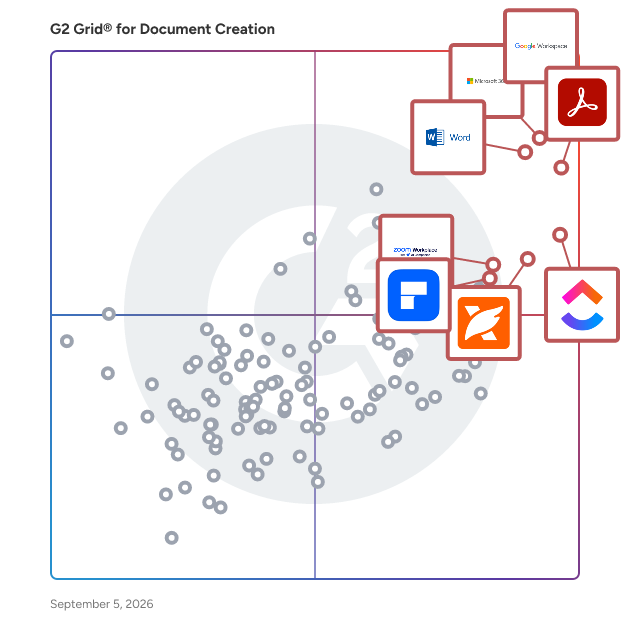
G2 Grid® for Document Creation Software

G2 Grid® for Document Creation Software plotting products by satisfaction and market presence

Highlighted products: Google Workspace, Microsoft 365, Adobe Acrobat, Microsoft Word, ClickUp, Foxit PDF Editor, Zoom Workplace, and Wondershare PDFelement.

Underlying data: [Grid® JSON](https://www.g2.com/categories/document-creation/grids.json?focus%5B%5D=google-workspace&focus%5B%5D=microsoft365&focus%5B%5D=adobe-acrobat&focus%5B%5D=microsoft-word&focus%5B%5D=clickup&focus%5B%5D=foxit-pdf-editor&focus%5B%5D=zoom-workplace&focus%5B%5D=wondershare-wondershare-pdfelement)

AbleWord

AbleWord is a word processing and PDF editing application.

Average Rating: 4.3/5.0

Total Reviews: 10

How Do G2 Users Rate AbleWord?

  • Has the product been a good partner in doing business?: 10.0/10 (Category avg: 9.0/10)
  • Quality of Support: 9.3/10 (Category avg: 8.6/10)
  • Ease of Use: 9.3/10 (Category avg: 8.9/10)
  • Ease of Admin: 8.3/10 (Category avg: 8.9/10)

Who Is the Company Behind AbleWord?

  • Seller: Ableword
  • Year Founded: 2001
  • HQ Location: Nantwich, GB
  • LinkedIn® Page: www.linkedin.com
    100 employees on LinkedIn®

Who Uses This Product?

  • Company Size: 50% Small, 30% Large

What Are Recent G2 Reviews of AbleWord?

What Are G2 Users Discussing About AbleWord?

PrizmDoc

Founded in 1991, Accusoft is a software development company specializing in content processing, conversion, and automation solutions. From configurable applications to APIs built for developers, Accusoft software enables users to solve their most complex workflow challenges and gain insights from content in any format, on any device. The company's flagship product, PrizmDoc Viewer, is an HTML5 document viewer and collection of content manipulation APIs that help web developers embed document viewing, processing, and conversion into their applications with ease. PrizmDoc Viewer is a browser-based solution that renders and displays 100+ document and image formats without the need to open native applications. Users can view, search, annotate, redact, e-sign, print, and download using one common interface, which increases productivity and saves on licensing costs. Accusoft's zero-footprint viewer is fully customizable, from quick integrations with minimal configuration to complete programmatic control using our extensive Javascript API. Developers can augment and automate their end users’ viewing experience with key features that can be turned on or off depending on your business needs.

Average Rating: 4.6/5.0

Total Reviews: 58

How Do G2 Users Rate PrizmDoc?

  • Has the product been a good partner in doing business?: 9.2/10 (Category avg: 9.0/10)
  • Quality of Support: 8.8/10 (Category avg: 8.6/10)
  • Ease of Use: 9.0/10 (Category avg: 8.9/10)
  • Ease of Admin: 8.3/10 (Category avg: 8.9/10)

Who Is the Company Behind PrizmDoc?

  • Seller: Apryse
  • Year Founded: 1998
  • HQ Location: Denver, CO
  • Twitter: @aprysesolutions
    381 Twitter followers
  • LinkedIn® Page: www.linkedin.com
    552 employees on LinkedIn®

Who Uses This Product?

  • Top Industries: Information Technology and Services, Marketing and Advertising
  • Company Size: 45% Large, 40% Medium

What Are Recent G2 Reviews of PrizmDoc?

What Are G2 Users Discussing About PrizmDoc?

PDF Studio Viewer

PDF Studio Viewer, Qoppa by Apryse’s friendly and reliable PDF reader / annotator / form filler, is now available on the Mac App store, and it is completely free to download, without any in-app purchases! If you are a Mac user unable to markup a PDF document, fill tax forms, or simply need more features than available in the Preview application, try downloading Qoppa’s Free PDF Reader from Itunes App store. PDF Studio Viewer allows you to: - Display PDFs with high fidelity - Annotate & Markup PDFs - Fill & Save Forms - Render Digital Signatures & Layers - Advanced User Interface - Advanced Print & Search Options - Integration with Docusign, DropBox, Google Drive, OneDrive - PDF Studio Viewer uses Qoppa Software's proprietary technology to view and modify PDF files. It is platform independent and can run on Windows, Mac OS X, and Linux. Simply download, install, and start working with PDF files immediately. Platforms: - Windows: Windows 10, Windows 8 & 8.1, Windows 7, Vista, XP, Server, NT, etc. - MAC OS X: 10.14 Mojave, 10.13 (High Sierra), 10.12 (Sierra), 10.11, 10.10, 10.9, 10.8, 10.7 - Linux: Ubuntu (18.04, 16.04, 14.04...), Fedora, Linux Mint, Debian... - Unix: Raspbian (Raspberry Pi), AIX, Solaris Intel, Solaris Sparc, HP-UX Keywords: - PDF Reader - PDF Viewer - Free PDF Software - PDF Application - PDF Annotator - Free PDF Form Filler Customer Support Online Step-by-step tutorials as well as answers to most common questions on just about anything you would need. – Help Tab -> Online User Guide: https://www.qoppa.com/files/pdfstudioviewer/guide/ – Help Tab -> Knowledge Base: https://kbpdfstudio.qoppa.com Within PDF Studio Contact us from within PDF Studio by going to Help Tab > Email Support and sending us an email or question. This is the most effective way for us to assist you as it will provide us a copy of the PDF Studio error logs which will help us to resolve any problems you may have. Email Feedback, comments or issues? Contact us directly at studiosupport@qoppa.com Mac Versions PDF Studio Viewer works on macOS 10.14 Mojave, macOS 10.13 High Sierra, macOS 10.12 Sierra, Mac OS X 10.11 (El Capitan), 10.10 (Yosemite), 10.9 (Mavericks), 10.8 (Mountain Lion), 10.7 (Lion).

Average Rating: 4.2/5.0

Total Reviews: 24

How Do G2 Users Rate PDF Studio Viewer?

  • Has the product been a good partner in doing business?: 8.3/10 (Category avg: 9.0/10)
  • Quality of Support: 7.2/10 (Category avg: 8.6/10)
  • Ease of Use: 9.4/10 (Category avg: 8.9/10)
  • Ease of Admin: 8.3/10 (Category avg: 8.9/10)

Who Is the Company Behind PDF Studio Viewer?

  • Seller: Apryse
  • Year Founded: 1998
  • HQ Location: Denver, CO
  • Twitter: @aprysesolutions
    381 Twitter followers
  • LinkedIn® Page: www.linkedin.com
    552 employees on LinkedIn®

Who Uses This Product?

  • Company Size: 42% Small, 42% Medium

What Are Recent G2 Reviews of PDF Studio Viewer?

What Are G2 Users Discussing About PDF Studio Viewer?

ONLYOFFICE Workspace

ONLYOFFICE Workspace is a web-based open-source business platform for efficient team management and online collaboration, developed by Ascensio System SIA, a Latvian software development company. The solution features online document editors, a platform for document management, corporate communication, mail and project management tools. The ONLYOFFICE online editors allow you to create, edit and collaborate on text documents, spreadsheets, presentations, fillable forms and PDF files. Complete compatibility with Word, Excel and PowerPoint files.

Average Rating: 4.4/5.0

Total Reviews: 63

How Do G2 Users Rate ONLYOFFICE Workspace?

  • Has the product been a good partner in doing business?: 9.2/10 (Category avg: 9.0/10)
  • Quality of Support: 8.6/10 (Category avg: 8.6/10)
  • Ease of Use: 8.9/10 (Category avg: 8.9/10)
  • Ease of Admin: 9.3/10 (Category avg: 8.9/10)

Who Is the Company Behind ONLYOFFICE Workspace?

  • Seller: Ascensio System
  • Year Founded: 2008
  • HQ Location: Riga, Latvia
  • Twitter: @only_office
    6,700 Twitter followers
  • LinkedIn® Page: www.linkedin.com
    120 employees on LinkedIn®

Who Uses This Product?

  • Top Industries: Computer Software, Higher Education
  • Company Size: 76% Small, 17% Medium

What Do G2 Reviewers Say About ONLYOFFICE Workspace?

AI-generated summary from verified user reviews

Pros
  • Users appreciate the affordability of ONLYOFFICE Workspace, especially with the availability of a free tier.
  • Users appreciate the centralization of documents in ONLYOFFICE Workspace, enhancing organization and ease of access.
  • Users enjoy the intuitive and centralized organization of ONLYOFFICE Workspace, making document management effortless and efficient.
  • Users appreciate the ease of use of ONLYOFFICE Workspace, finding it intuitive and helpful for organization.
  • Users appreciate the easy collaboration of ONLYOFFICE Workspace, enhanced by its intuitive interface and centralized document management.
Cons
  • Users express frustration over billing issues and a lack of effective customer support, impacting their overall experience.
  • Users are frustrated by the incomplete information and lack of responsive customer support in ONLYOFFICE Workspace.
  • Users are frustrated with the insufficient training and lack of customer support for ONLYOFFICE Workspace.
  • Users are frustrated by the limited storage capacity and inadequate customer support when dealing with large documents.
  • Users express disappointment with the poor customer support of ONLYOFFICE Workspace, highlighting the need for improvement in assistance.

What Are Recent G2 Reviews of ONLYOFFICE Workspace?

What Are G2 Users Discussing About ONLYOFFICE Workspace?

Easy PDF

Easy PDF is 15 tools in one. It's totally free and anonymous, you can convert files without limits and email registration. Convert PDF to most popular file formats and vice versa. Merge, compress and split PDFs.

Average Rating: 4.5/5.0

Total Reviews: 378

How Do G2 Users Rate Easy PDF?

  • Has the product been a good partner in doing business?: 9.4/10 (Category avg: 9.0/10)
  • Quality of Support: 8.8/10 (Category avg: 8.6/10)
  • Ease of Use: 9.3/10 (Category avg: 8.9/10)
  • Ease of Admin: 9.4/10 (Category avg: 8.9/10)

Who Is the Company Behind Easy PDF?

  • Seller: Easy PDF
  • Year Founded: 2020
  • HQ Location: Bath, Somerset
  • LinkedIn® Page: www.linkedin.com
    1 employees on LinkedIn®

Who Uses This Product?

  • Who Uses This: Marketing Staff, Sales And Marketing Specialist
  • Top Industries: Marketing and Advertising, Information Technology and Services
  • Company Size: 44% Medium, 35% Large

What Do G2 Reviewers Say About Easy PDF?

AI-generated summary from verified user reviews

Pros
  • Users praise the ease of use of Easy PDF, noting its intuitive interface for daily tasks.
  • Users find Easy PDF to be very easy to use, making it perfect for daily tasks and productivity.
  • Users appreciate the easy editing features of Easy PDF, enabling seamless text, image, and link modifications.
  • Users find the intuitive UI of Easy PDF very easy to use, enhancing their daily productivity.
Cons
  • Users experience file corruption issues if files aren't fully downloaded, complicating usage and access to documents.

What Are Recent G2 Reviews of Easy PDF?

What Are G2 Users Discussing About Easy PDF?

Ulysses

Ulysses is your one-stop writing environment for Mac, iPhone and iPad. Its pleasant, focused writing experience, combined with effective document management, seamless sync, and flexible export, make Ulysses the first choice for writers of all kinds.

Average Rating: 4.5/5.0

Total Reviews: 25

How Do G2 Users Rate Ulysses?

  • Has the product been a good partner in doing business?: 10.0/10 (Category avg: 9.0/10)
  • Quality of Support: 9.2/10 (Category avg: 8.6/10)
  • Ease of Use: 9.2/10 (Category avg: 8.9/10)
  • Ease of Admin: 8.3/10 (Category avg: 8.9/10)

Who Is the Company Behind Ulysses?

  • Seller: Ulysses
  • Year Founded: 2011
  • HQ Location: Leipzig, DE
  • Twitter: @ulyssesapp
    11,867 Twitter followers
  • LinkedIn® Page: www.linkedin.com
    21 employees on LinkedIn®

Who Uses This Product?

  • Company Size: 76% Small, 16% Large

What Do G2 Reviewers Say About Ulysses?

AI-generated summary from verified user reviews

Pros
  • Users find Ulysses to be easy to use for organizing documents and setting writing goals effectively.
  • Users love the easy integrations in Ulysses, allowing seamless exports and effective organization of their writing projects.
  • Users value the excellent organization tools in Ulysses for efficient text management and precise planning.
  • Users appreciate the clean and minimalistic interface of Ulysses, which enhances their focus on writing.
Cons
  • Users find the sheet/group hierarchy confusing, causing initial uncertainty about document organization and structure.
  • Users find the sheet/group hierarchy confusing initially, struggling to understand document organization within Ulysses.
  • Users find the sheet/group hierarchy confusing at first, leading to uncertainty about document organization.
  • Some users find the unique interface and features overwhelming, which can complicate the overall experience with Ulysses.

What Are Recent G2 Reviews of Ulysses?

What Are G2 Users Discussing About Ulysses?

Docufiller

Docufiller is an online brand portal for B2B. Easily create, publish and share brochures, e-mailings, flyers etc. by yourself, 100% according to your corporate identity! - All in one product. Create tool, DAM, E-mailing software. - Save precious time: No more correction meetings, do it all by yourself. - Save money: direct savings on your marketing budget, unlimited resources for a fixed amount per year. - Corporate identity monitoring: whether you have one corporate identity or multiple brands or labels, they are all guaranteed in your templates.

Average Rating: 4.4/5.0

Total Reviews: 15

How Do G2 Users Rate Docufiller?

  • Has the product been a good partner in doing business?: 10.0/10 (Category avg: 9.0/10)
  • Quality of Support: 9.0/10 (Category avg: 8.6/10)
  • Ease of Use: 9.8/10 (Category avg: 8.9/10)
  • Ease of Admin: 9.4/10 (Category avg: 8.9/10)

Who Is the Company Behind Docufiller?

Who Uses This Product?

  • Company Size: 60% Small, 40% Medium

What Are Recent G2 Reviews of Docufiller?

What Are G2 Users Discussing About Docufiller?

SmartOffice

Work on the go with robust mobile productivity With SmartOffice you can easily view, edit, create, print, present, and share Microsoft Office and PDF documents via your mobile device. The SmartOffice PDF functionality allows you to view, annotate, redact, highlight, form-fill, digitally sign, and share PDF documents. Convert Office documents to PDF, save locally to your mobile device or to a cloud account, and print wirelessly to thousands of supported printers. SmartOffice is designed for today’s mobile devices. The small download size ensures fast loading and high-quality performance. SmartOffice Mobile App A full-featured app that serves as a faster, lighter alternative to MS Office 365. SmartOffice can be downloaded for free from the AppStore or GooglePlay for personal use. Upgrade to our PRO version to access premium features. SmartOffice is not dependent on Internet connectivity and can be used while offline. SmartOffice SDK and Enterprise SmartOffice offers a variety of solutions that can be securely incorporated into your enterprise document workflow platform. The SmartOffice SDK seamlessly and securely integrates with your EFSS, MDM, or EMM environment, while the SmartOffice for Enterprise mobile app can be wrapped in an organization's security platform. Enterprise IT departments can prevent data breaches via SmartOffice SDK controlled access permission tools and customizable document editing controls, that extend down to the user or document level.

Average Rating: 4.1/5.0

Total Reviews: 35

How Do G2 Users Rate SmartOffice?

  • Has the product been a good partner in doing business?: 9.2/10 (Category avg: 9.0/10)
  • Quality of Support: 8.1/10 (Category avg: 8.6/10)
  • Ease of Use: 8.3/10 (Category avg: 8.9/10)
  • Ease of Admin: 9.2/10 (Category avg: 8.9/10)

Who Is the Company Behind SmartOffice?

  • Seller: Artifex Software
  • Year Founded: 1993
  • HQ Location: San Francisco, US
  • Twitter: @Artifex
    211 Twitter followers
  • LinkedIn® Page: www.linkedin.com
    21 employees on LinkedIn®

Who Uses This Product?

  • Company Size: 49% Small, 37% Medium

What Do G2 Reviewers Say About SmartOffice?

AI-generated summary from verified user reviews

Pros
  • Users love the ease of automation for daily tasks, requiring no coding skills to streamline processes.
  • Users love the automation of daily tasks with SmartOffice, easily managing their workflow without coding skills.
  • Users find SmartOffice's ease of use exceptional, enabling task management without coding skills.

What Are Recent G2 Reviews of SmartOffice?

LeaderGuide Pro

LeaderGuide Pro is an add-in to Word that provides templates and work task automation to change for the better the way you build, edit and maintain leader guides and participant materials.

Average Rating: 4.7/5.0

Total Reviews: 10

How Do G2 Users Rate LeaderGuide Pro?

  • Has the product been a good partner in doing business?: 9.7/10 (Category avg: 9.0/10)
  • Quality of Support: 9.8/10 (Category avg: 8.6/10)
  • Ease of Use: 8.3/10 (Category avg: 8.9/10)
  • Ease of Admin: 9.0/10 (Category avg: 8.9/10)

Who Is the Company Behind LeaderGuide Pro?

Who Uses This Product?

  • Company Size: 50% Medium, 30% Large

What Are Recent G2 Reviews of LeaderGuide Pro?

What Are G2 Users Discussing About LeaderGuide Pro?

Sumnotes

Sumnotes is an online PDF summary and highlight extractor.

Average Rating: 4.5/5.0

Total Reviews: 10

How Do G2 Users Rate Sumnotes?

  • Has the product been a good partner in doing business?: 10.0/10 (Category avg: 9.0/10)
  • Quality of Support: 8.8/10 (Category avg: 8.6/10)
  • Ease of Use: 9.3/10 (Category avg: 8.9/10)
  • Ease of Admin: 10.0/10 (Category avg: 8.9/10)

Who Is the Company Behind Sumnotes?

  • Seller: Sumnotes
  • Year Founded: 2012
  • HQ Location: Toronto, Ontario
  • Twitter: @sumnotesnet
    1,136 Twitter followers
  • LinkedIn® Page: www.linkedin.com

Who Uses This Product?

  • Company Size: 70% Small, 30% Medium

What Are Recent G2 Reviews of Sumnotes?

What Are G2 Users Discussing About Sumnotes?

Resmume - resume builder

No more time consuming and confusing resume writing from scratch. Resmume gives you power to create a professional resume with just a few minutes.

Average Rating: 4.3/5.0

Total Reviews: 22

How Do G2 Users Rate Resmume - resume builder?

  • Has the product been a good partner in doing business?: 9.4/10 (Category avg: 9.0/10)
  • Quality of Support: 8.4/10 (Category avg: 8.6/10)
  • Ease of Use: 8.6/10 (Category avg: 8.9/10)
  • Ease of Admin: 9.4/10 (Category avg: 8.9/10)

Who Is the Company Behind Resmume - resume builder?

Who Uses This Product?

  • Top Industries: Computer Software
  • Company Size: 57% Small, 35% Medium

What Do G2 Reviewers Say About Resmume - resume builder?

AI-generated summary from verified user reviews

Pros
  • Users appreciate the user-friendly design and customization options of Resmume, enhancing their resume-building experience.
  • Users value the high level of customization in Resmume, enabling personalized and aesthetically pleasing resumes.
  • Users appreciate the intuitive interface of Resmume, making resume creation easy for everyone, regardless of skill level.
  • Users value the excellent customer support of Resmume, enhancing their experience and satisfaction with the product.
  • Users value the ease of use of Resmume, as it offers diverse templates tailored to their needs.
Cons
  • Users find the limited free features of Resmume restrict their ability to create effective resumes without an upgrade.
  • Users are frustrated by the add-on costs for printing or saving resumes, limiting their access to essential features.
  • Users dislike that they cannot recover deleted resumes, limiting their options for resume management on Resmume.
  • Users experience difficulties exporting or editing their resumes later, complicating the overall usability of Resmume.
  • Users feel that Resmume lacks affordable features, as many essential tools require payment to access.

What Are Recent G2 Reviews of Resmume - resume builder?

PDF-XChange Editor

Our business began in 1997 as ‘Tracker Software Products Ltd’ to develop document management and imaging-related software. These products included TIFF and PDF digital conversion utilities that enabled the conversion of many document formats to TIFF and PDF for subsequent archiving within document management products. These standalone conversion applications quickly proved their worth and we made the decision to concentrate on the development of these utilities for the end-user and third-party software developer markets. During the intervening years we have become a global leader in the PDF software market. Our offices are located in Canada, the U.K., Bulgaria and Ukraine. Our corporate headquarters relocated to Vancouver Island, British Columbia, in 2008. At 2016 we incorporated PDF-XChange Co Ltd in the U.K. to tie together all of our interests worldwide. In the coming months it is our intention to rebrand all of our sales and marketing under this one common brand worldwide. Our vision is to provide dynamic and powerful software for the creation, editing, manipulation and conversion of PDF documents, and our applications can convert a huge range of document formats to and from PDF. Our dedicated team of developers strive continually to improve the quality and functionality of our products. We aim to create applications that are flexible enough to meet the needs of all practitioners from novice users to professional document creators. Our software creates files that conform to the internationally-recognized ISO PDF standard, which means they are compatible with all major PDF document viewers/editors worldwide.

Average Rating: 4.5/5.0

Total Reviews: 147

How Do G2 Users Rate PDF-XChange Editor?

  • Has the product been a good partner in doing business?: 8.5/10 (Category avg: 9.0/10)
  • Quality of Support: 8.7/10 (Category avg: 8.6/10)
  • Ease of Use: 9.1/10 (Category avg: 8.9/10)
  • Ease of Admin: 8.4/10 (Category avg: 8.9/10)

Who Is the Company Behind PDF-XChange Editor?

Who Uses This Product?

  • Top Industries: Information Technology and Services, Accounting
  • Company Size: 38% Large, 36% Small

What Do G2 Reviewers Say About PDF-XChange Editor?

AI-generated summary from verified user reviews

Pros
  • Users praise the ease of use of PDF-XChange Editor, enabling smooth file viewing, editing, and collaboration effortlessly.
  • Users highlight the easy editing capabilities of PDF-XChange Editor, praising its intuitive tools and efficient workflow.
  • Users praise the document editing capabilities of PDF-XChange Editor for its smooth performance and powerful annotation tools.
  • Users find the easy conversion feature of PDF-XChange Editor to be highly beneficial for managing PDF documents.
  • Users commend the robust feature set of PDF-XChange Editor, facilitating easy editing, annotation, and integration with other tools.
Cons
  • Users find the interface not user friendly, noting it feels outdated and lacks modern design elements.
  • Users feel the UI design is outdated and would greatly benefit from a more modern and appealing interface.
  • Users find user adoption challenging, often requiring additional efforts to gain acceptance of PDF-XChange Editor.
  • Users express frustration over the lack of integration with cloud services, hindering seamless workflow and accessibility.
  • Users find the lack of integrations with popular cloud services limits their workflow and efficiency.

What Are Recent G2 Reviews of PDF-XChange Editor?

What Are G2 Users Discussing About PDF-XChange Editor?

novaPDF

novaPDF is a PDF creator for Windows that enables users to convert any printable document into a PDF format with ease. Designed for both individual and business use, it facilitates the creation of PDFs from reports, contracts, spreadsheets, emails, and more, ensuring seamless document sharing and collaboration. The software integrates as a virtual printer, allowing PDF generation from any application with print capabilities. Key Features and Functionality: - Universal Printing: Convert any printable document (e.g., DOCX, XLSX, PPTX, HTML) to PDF by selecting novaPDF as the printer. - Microsoft Office Add-ins: One-click PDF conversion from Word, Excel, PowerPoint, and other Office applications, preserving bookmarks and hyperlinks. - PDF Security: Apply 256-bit AES encryption and set permissions to control viewing, printing, and copying of PDFs. - Digital Signatures: Sign PDFs to certify authenticity and integrity, ensuring documents remain unaltered. - Merge PDFs: Combine multiple documents into a single PDF or insert pages into existing PDFs. - Watermarks: Add text or image watermarks with customizable settings for rotation, opacity, and positioning. - Email Integration: Automatically send generated PDFs via email using default clients, SMTP, or Outlook. - PDF Overlays: Overlay content from one PDF onto another, useful for adding letterheads or templates. - Clickable Links: Convert URLs and email addresses in documents into active hyperlinks in the PDF. - PDF/A Compliance: Create PDFs compliant with PDF/A standards for long-term archiving. Primary Value and User Solutions: novaPDF streamlines the process of converting documents into universally accessible PDFs, enhancing document portability and collaboration. Its robust security features protect sensitive information, while integration with Microsoft Office and other applications ensures a smooth workflow. By offering features like digital signatures, watermarks, and PDF merging, novaPDF addresses the diverse needs of users seeking efficient and secure document management solutions.

Average Rating: 4.5/5.0

Total Reviews: 55

How Do G2 Users Rate novaPDF?

  • Has the product been a good partner in doing business?: 8.3/10 (Category avg: 9.0/10)
  • Quality of Support: 8.7/10 (Category avg: 8.6/10)
  • Ease of Use: 8.8/10 (Category avg: 8.9/10)
  • Ease of Admin: 10.0/10 (Category avg: 8.9/10)

Who Is the Company Behind novaPDF?

  • Seller: Softland
  • Year Founded: 1999
  • HQ Location: Cluj-Napoca, Cluj
  • Twitter: @freesoft112
    998 Twitter followers
  • LinkedIn® Page: www.linkedin.com

Who Uses This Product?

  • Top Industries: Information Technology and Services, Computer Networking
  • Company Size: 39% Medium, 39% Small

What Do G2 Reviewers Say About novaPDF?

AI-generated summary from verified user reviews

Pros
  • Users value the customization options of novaPDF, allowing efficient management and secure conversion of various document types.
  • Users find easy integrations with novaPDF beneficial for quick and effective PDF conversion across various document types.
  • Users find novaPDF's easy setup for encryption and file conversion to be quick and effective, enhancing productivity.
  • Users value the flexibility of novaPDF for quick and effective PDF conversions, even with large files.
  • Users find phone calls with novaPDF helpful for fast and flawless support during PDF conversion tasks.

What Are Recent G2 Reviews of novaPDF?

What Are G2 Users Discussing About novaPDF?

TextfromPDF

TEXTfromPDF is a text extraction tool for WinXP/2000 that automates the conversion of Adobe PDF documents to text files. The PDFs may be on local drives, network drives, or on the Internet.

Average Rating: 4.0/5.0

Total Reviews: 24

How Do G2 Users Rate TextfromPDF?

  • Has the product been a good partner in doing business?: 8.9/10 (Category avg: 9.0/10)
  • Quality of Support: 6.9/10 (Category avg: 8.6/10)
  • Ease of Use: 8.2/10 (Category avg: 8.9/10)
  • Ease of Admin: 8.3/10 (Category avg: 8.9/10)

Who Is the Company Behind TextfromPDF?

Who Uses This Product?

  • Company Size: 65% Small, 23% Medium

What Are Recent G2 Reviews of TextfromPDF?

What Are G2 Users Discussing About TextfromPDF?

VisibleThread

VisibleThread is a full-lifecycle RFP platform designed to support every stage of the bid and contract process - before, during, and after submission. It fits into existing workflows across sales, capture, proposal, and contracts teams, supporting organizations of all sizes without forcing process change. Manual, repetitive work is replaced with intelligence and automation, helping teams move faster while maintaining control, consistency, and quality across complex documents. All insights in VisibleThread are grounded in evidence and fully traceable back to source content. The platform creates a clear, visible thread between AI-powered outputs and the original documents they come from enabling confident decision-making, defensible compliance, and reliable analysis. From opportunity qualification and document comparison to risk identification and quality checks, teams gain actionable insights without relying on black-box AI or manual interpretation. Security is built in, not bolted on. VisibleThread is trusted with highly sensitive, mission-critical content and supports multiple deployment options including private cloud and on-premise to meet a wide range of security and governance requirements. The result is a single, secure platform that improves speed, quality, collaboration, and outcomes, while reducing risk and enabling teams to win more business with confidence.

Average Rating: 4.3/5.0

Total Reviews: 14

How Do G2 Users Rate VisibleThread?

  • Quality of Support: 8.3/10 (Category avg: 8.6/10)
  • Ease of Use: 8.9/10 (Category avg: 8.9/10)

Who Is the Company Behind VisibleThread?

  • Seller: VisibleThread
  • Year Founded: 2008
  • HQ Location: Baltimore, MD
  • Twitter: @VisibleThread
    1,469 Twitter followers
  • LinkedIn® Page: www.linkedin.com
    59 employees on LinkedIn®

Who Uses This Product?

  • Top Industries: Information Technology and Services
  • Company Size: 47% Medium, 47% Small

What Do G2 Reviewers Say About VisibleThread?

AI-generated summary from verified user reviews

Pros
  • Users praise the efficiency of VisibleThread for rapidly generating compliance matrices and tailored proposals.
  • Users appreciate the user-friendly interface of VisibleThread, enhancing efficiency with easy navigation and helpful documentation.
  • Users benefit from excellent tracking capabilities, enhancing document compliance and providing essential insights for proposal writing.
  • Users appreciate the easy document scanning and compliance generation feature of VisibleThread, enhancing efficiency and accuracy.
  • Users value the user-friendly documentation of VisibleThread, enhancing their ability to quickly generate compliance metrics.
Cons
  • Users find limited customization options in VisibleThread, affecting the ability to tailor the experience to their needs.
  • Users highlight limited features in VisibleThread, particularly the lack of customizable options and language support.
  • Users find the interface not intuitive, requiring time and support to navigate and understand the features effectively.
  • Users experience bug issues with VisibleThread, as it sometimes fails to correctly recognize paragraphs when shredding PDFs.
  • Users report a steep learning curve with VisibleThread, making it time-consuming to master the complex interface.

What Are Recent G2 Reviews of VisibleThread?

What Are G2 Users Discussing About VisibleThread?

Neeraja Prakash
NP
Researched and written by Neeraja Prakash
Updated April 10, 2026