Best Enterprise Cloud Infrastructure Monitoring Software - Page 2

How Many Cloud Infrastructure Monitoring Software Products Does G2 Track?

Total Products under this Category: 126

Category Stats (Oct 2026)

  • Average Rating: 4.54/5 The average rating of products in this category, based on all submitted ratings
  • Top Trending Product: Observe (+1.75%) - Among all products in this category, Observe recorded the largest rating increase compared to last month

Last updated: October 20, 2026

How Does G2 Rank Cloud Infrastructure Monitoring Software Products?

Why You Can Trust G2's Software Rankings:

  • 30 Analysts and Data Experts
  • 12,500+ Authentic Reviews
  • 126+ Products
  • Unbiased Rankings

G2's software rankings are built on verified user reviews, rigorous moderation, and a consistent research methodology maintained by a team of analysts and data experts. Each product is measured using the same transparent criteria, with no paid placement or vendor influence. While reviews reflect real user experiences, which can be subjective, they offer valuable insight into how software performs in the hands of professionals. Together, these inputs power the G2 Score, a standardized way to compare tools within every category.

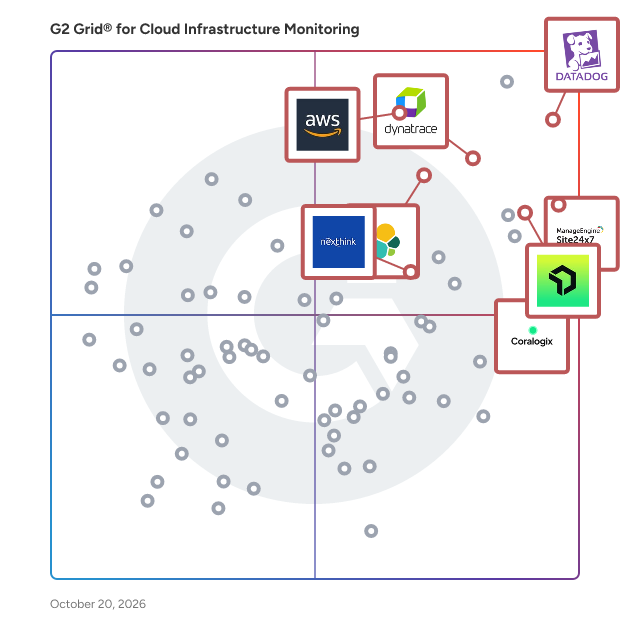
G2 Grid® for Cloud Infrastructure Monitoring Software

G2 Grid® for Cloud Infrastructure Monitoring  Software plotting products by satisfaction and market presence

Highlighted products: Datadog, Dynatrace, Amazon CloudWatch, Nexthink, New Relic, Coralogix, Site24x7, and Elastic Observability.

Underlying data: [Grid® JSON](https://www.g2.com/categories/cloud-infrastructure-monitoring/grids.json?focus%5B%5D=datadog&focus%5B%5D=dynatrace&focus%5B%5D=amazon-cloudwatch&focus%5B%5D=nexthink&focus%5B%5D=new-relic&focus%5B%5D=coralogix&focus%5B%5D=site24x7&focus%5B%5D=elastic-observability&segment=enterprise)

Cloudshot

Cloudshot is a patented, visual cloud management platform that helps enterprises gain complete visibility, governance, and control across their cloud and IT spend. Designed for organizations operating in complex environments, Cloudshot delivers multi-cloud management visibility across AWS, Azure, GCP, and hybrid setups through an intuitive, visual-first approach. Unlike traditional tools that rely on raw data, scripts, or fragmented dashboards, Cloudshot represents cloud environments visually, enabling teams to understand architecture, dependencies, risks, and costs at a glance. This reduces operational complexity and accelerates decision-making across engineering, security, and finance teams. Cloudshot brings DevOps, SecOps, FinOps, and Sustainability together under a single umbrella. DevOps teams benefit from faster environment understanding and infrastructure insights, SecOps teams gain continuous security posture and drift visibility, and FinOps teams receive accurate, allocation-ready cost and optimization data. Sustainability is natively built into the platform, helping organizations optimize costs while reducing environmental impact. Cloudshot aligns closely with the FinOps Foundation framework and is an official FOCUS-compatible tool, supporting the FinOps Open Cost and Usage Specification (FOCUS). This ensures standardized, portable, and provider-agnostic cost and usage data across cloud platforms, enabling enterprises to scale FinOps practices with confidence and consistency. Beyond cloud infrastructure, Cloudshot provides a unified IT spend dashboard that consolidates multi-cloud costs, cloud marketplace usage, SaaS spend, and shared IT services into a single, consistent view. This enables leadership teams to understand true technology spend, improve accountability, and align IT investments with business outcomes. Enterprise customers using Cloudshot typically achieve 10% to 35% savings on their cloud spend through continuous optimization, waste elimination, and improved governance. By combining patented technology, visual cloud management, and FOCUS-aligned spend visibility, Cloudshot enables enterprises to move from reactive cost control to proactive, strategic management of their IT ecosystem.

Average Rating: 4.9/5.0

Total Reviews: 60

G2 Deal: Exclusive offer for G2

Get 30% flat discount only if you are a fellow G2 user. You'll automatically additional 10% off from 4th month onwards - for life.

Price: ~~99~~ → 69

View this exclusive G2 deal

How Do G2 Users Rate Cloudshot?

  • Usage Monitoring: 10.0/10 (Category avg: 9.1/10)
  • Ease of Use: 9.7/10 (Category avg: 8.8/10)
  • Dashboards and Visualizations: 9.5/10 (Category avg: 8.9/10)
  • Reporting: 10.0/10 (Category avg: 8.6/10)

Who Is the Company Behind Cloudshot?

Who Uses This Product?

  • Who Uses This: Cloud Architect, MD
  • Top Industries: Information Technology and Services
  • Company Size: 135% Large, 23% Medium

What Do G2 Reviewers Say About Cloudshot?

AI-generated summary from verified user reviews

Pros
  • Users value the detailed cost analysis offered by Cloudshot, enabling effective optimization of cloud expenses.
  • Users find Cloudshot's ease of use enhances workflow and simplifies cloud infrastructure management effortlessly.
  • Users value the effective cloud management of Cloudshot, enhancing workflow with organized access to resources and insights.
  • Users praise Cloudshot for its easy-to-use interface and comprehensive features, enhancing workflow and insights in cloud management.
  • Users benefit from cost optimization through detailed data transfer insights and resource identification, effectively saving money.
Cons
  • Users note the missing features in Cloudshot, such as lack of APM and non-modular Terraform scripts.
  • Users may find the difficult learning curve challenging as they navigate Cloudshot's rich features and structured approach.
  • Users find the steep learning curve of Cloudshot challenging, particularly due to its extensive features and requirements for adaptation.
  • Users find the complex configuration of Cloudshot challenging, requiring considerable effort for initial setup and alignment.
  • Users find the difficult setup of Cloudshot challenging as it requires significant effort to align with DevOps processes.

What Are Recent G2 Reviews of Cloudshot?

IBM Instana

IBM Instana, now part of the Concert platform, discovers and maps all services, infrastructure, and their inter-dependencies automatically. Instana ingests all observability metrics, traces each request, profiles every process, and updates application dependency maps in real-time to deliver the context and actionable feedback needed by DevOps to optimize application performance, enable innovation and mitigate risk to help them add value and efficiency to the pipeline. IBM Instana is available on AWS Marketplace.

Average Rating: 4.4/5.0

Total Reviews: 470

How Do G2 Users Rate IBM Instana?

  • Usage Monitoring: 8.9/10 (Category avg: 9.1/10)
  • Ease of Use: 8.6/10 (Category avg: 8.8/10)
  • Dashboards and Visualizations: 8.5/10 (Category avg: 8.9/10)
  • Reporting: 8.5/10 (Category avg: 8.6/10)

Who Is the Company Behind IBM Instana?

  • Seller: IBM
  • Company Website:
  • Year Founded: 1911
  • HQ Location: Armonk, New York, United States
  • Twitter: @IBMSecurity
    74,660 Twitter followers
  • LinkedIn® Page: www.linkedin.com
    344,328 employees on LinkedIn®

Who Uses This Product?

  • Who Uses This: Software Engineer, System Engineer
  • Top Industries: Information Technology and Services, Computer Software
  • Company Size: 40% Medium, 36% Large

What Do G2 Reviewers Say About IBM Instana?

AI-generated summary from verified user reviews

Pros
  • Users value the ease of use of IBM Instana, which simplifies app tracking and enhances performance analysis.
  • Users value the fast and comprehensive monitoring capabilities of IBM Instana, ensuring robust protection across all environments.
  • Users value the real-time monitoring of IBM Instana, appreciating its ease of use and robust dashboard features.
  • Users value the fast and effective monitoring capabilities of IBM Instana, ensuring comprehensive system protection and anomaly detection.
  • Users highlight the effortless setup of IBM Instana, enabling seamless monitoring of complex applications without manual configuration.
Cons
  • Users express that the pricing can accumulate quickly as their environments grow, making it a significant concern.
  • Users find the user interface complex, leading to a steeper learning curve and affecting overall usability.
  • Users find the learning curve challenging, particularly for new team members navigating the complex interface and features.
  • Users find the difficult learning curve of IBM Instana challenging, hindering quick adaptation and efficient use of the tool.
  • Many users find the pricing structure of IBM Instana to be expensive, particularly for smaller teams and startups.

What Are Recent G2 Reviews of IBM Instana?

What Are G2 Users Discussing About IBM Instana?

ManageEngine Applications Manager

ManageEngine Applications Manager is an application performance & IT infrastructure monitoring solution that is designed to combat modern infrastructure problems and ensure that your business and end users are unaffected by substandard performance and downtime. By leveraging deep application performance monitoring with byte-code instrumentation, infrastructure monitoring, hybrid cloud monitoring, and digital experience monitoring from a single console, IT and DevOps teams will be able to gain code-level insights, automate their processes, pinpoint & resolve performance issues, and deliver better business outcomes. Overall, our product will help businesses optimize application usage & revenue, reduce MTTR, improve DevOps processes, migrate to the cloud with confidence, respond to incidents faster, and ensure seamless user experiences.

Average Rating: 4.7/5.0

Total Reviews: 112

How Do G2 Users Rate ManageEngine Applications Manager?

  • Usage Monitoring: 9.5/10 (Category avg: 9.1/10)
  • Ease of Use: 9.3/10 (Category avg: 8.8/10)
  • Dashboards and Visualizations: 9.4/10 (Category avg: 8.9/10)
  • Reporting: 9.1/10 (Category avg: 8.6/10)

Who Is the Company Behind ManageEngine Applications Manager?

  • Seller: Zoho
  • Year Founded: 1996
  • HQ Location: Austin, TX
  • Twitter: @Zoho
    137,880 Twitter followers
  • LinkedIn® Page: www.linkedin.com
    30,913 employees on LinkedIn®
  • Phone: +1 (888) 900-9646

Who Uses This Product?

  • Top Industries: Information Technology and Services, Computer Software
  • Company Size: 46% Medium, 41% Large

What Do G2 Reviewers Say About ManageEngine Applications Manager?

AI-generated summary from verified user reviews

Pros
  • Users appreciate the real-time monitoring capabilities of ManageEngine Applications Manager, enhancing visibility and troubleshooting efficiency.
  • Users value the real-time monitoring capabilities of ManageEngine Applications Manager, enhancing troubleshooting and application health visibility.
  • Users value the real-time monitoring features of ManageEngine Applications Manager for proactive issue resolution and performance tracking.
  • Users value the real-time monitoring capabilities of ManageEngine Applications Manager, enhancing their ability to troubleshoot proactively.
  • Users value the real-time visibility in ManageEngine Applications Manager, enabling proactive issue resolution and performance monitoring.
Cons
  • Users experience limited features that hinder integration and scalability, making it hard to monitor efficiently.
  • Users face feature limitations in ManageEngine Applications Manager, impacting integration and scalability for large enterprises.
  • Users face integration issues that hinder scalability and complicate monitoring across diverse applications in large environments.
  • Users find the learning curve steep for ManageEngine Applications Manager, complicating setup and utilization of advanced features.
  • Users find the initial setup complexity to be time-consuming and challenging, especially in larger environments.

What Are Recent G2 Reviews of ManageEngine Applications Manager?

What Are G2 Users Discussing About ManageEngine Applications Manager?

AI can help you find the answers. G2 helps you trust them.

Connect G2 to Claude or ChatGPT for answers grounded in G2's trusted reviews, comparisons, and pricing from real user insights.

How it works

Splunk AppDynamics

Powered by Cisco, AppDynamics is on a mission to help companies see their technology through the lens of the business so they can work as one to prioritize what matters most. We’re reinventing the observability space and simplifying the challenge of digital transformation for the world’s largest enterprises. In this era of unprecedented digital growth, the AppDynamics Business Observability Platform transforms organizations faster by providing business context deep into the technology stack, aligning teams around shared priorities, and enabling technologists to act with confidence and control. AppDynamics has been recognized by Gartner as a leader in the APM market for more than eight years and was positioned highest in ‘ability to execute’ in Gartner’s 2021 Magic Quadrant Report for APM.

Average Rating: 4.3/5.0

Total Reviews: 335

How Do G2 Users Rate Splunk AppDynamics?

  • Usage Monitoring: 8.8/10 (Category avg: 9.1/10)
  • Ease of Use: 8.5/10 (Category avg: 8.8/10)
  • Dashboards and Visualizations: 8.9/10 (Category avg: 8.9/10)
  • Reporting: 8.9/10 (Category avg: 8.6/10)

Who Is the Company Behind Splunk AppDynamics?

  • Seller: Cisco
  • Year Founded: 1984
  • HQ Location: San Jose, CA
  • Twitter: @Cisco
    720,366 Twitter followers
  • LinkedIn® Page: www.linkedin.com
    95,294 employees on LinkedIn®
  • Ownership: NASDAQ:CSCO

Who Uses This Product?

  • Who Uses This: Software Engineer, Senior Software Engineer
  • Top Industries: Information Technology and Services, Computer Software
  • Company Size: 58% Large, 35% Medium

What Do G2 Reviewers Say About Splunk AppDynamics?

AI-generated summary from verified user reviews

Pros
  • Users value the automation capabilities of AppDynamics, facilitating seamless integration with essential ITSM tools.
  • Users value the seamless integration capabilities of AppDynamics with multi-cloud environments and ITSM tools like ServiceNow.
  • Users find the ease of integration with tools like ServiceNow enhances their AppDynamics experience significantly.
  • Users value the easy integration with ITSM tools like ServiceNow, enhancing their AppDynamics experience.
  • Users appreciate the easy integrations with downstream products like ITSM tools, enhancing the overall monitoring experience.
Cons
  • Users face billing issues such as high renewal costs and delayed support following the Cisco acquisition.
  • Users find the high renewal costs and slow updates frustrating after Cisco's acquisition of AppDynamics.
  • Users express frustration over the inefficient alert system, impacting timely responses and overall product effectiveness.
  • Users report poor customer support, citing delays in assistance and lengthy timelines for product enhancements after the acquisition.
  • Users face pricing issues with Splunk AppDynamics, citing high renewal costs and slow support responses post-acquisition.

What Are Recent G2 Reviews of Splunk AppDynamics?

What Are G2 Users Discussing About Splunk AppDynamics?

SUSE Rancher

SUSE Rancher is a complete Kubernetes management platform that simplifies how teams deploy, manage, and secure clusters across any infrastructure on-prem, in the cloud, or at the edge. It brings centralized authentication, policy enforcement, visibility, and tooling together in one place so platform teams can manage the full Kubernetes lifecycle without jumping between systems. You can run SUSE Rancher as a free community edition, or choose Rancher Prime for enterprise support and security, or Rancher Suite to combine Rancher with integrated observability, storage, and virtualization. Why teams use SUSE Rancher Cluster management that scales Manage all your Kubernetes clusters across different clouds, data centers, and even edge devices from one dashboard. Provision new clusters, apply global policies, and monitor everything from a central control plane. Works anywhere Rancher supports any certified Kubernetes distro. Use it with upstream Kubernetes, RKE2, EKS, AKS, GKE, K3s, or even vSphere. You get the same control and experience everywhere. Simple, secure app deployment Use Helm or the built-in SUSE Application Collection to deploy apps across one or many clusters. You can enforce consistent policies and get visibility into health and performance. What you get Centralized cluster lifecycle management Create, upgrade, scale, and delete clusters across environments with a few clicks or API calls. Automate Day 2 operations like backups, upgrades, and monitoring. Built-in authentication and access control Integrates with your identity provider (LDAP, AD, SAML, OIDC) and gives you fine-grained RBAC controls for all clusters. Policy and compliance management Use pre-built Kubewarden policies or write your own to enforce security and operational best practices across your fleet. Extensible platform Extend Rancher with your own tools or use community and partner-developed extensions. Easily add monitoring, logging, backup, and more through the UI. Enterprise support and ecosystem With Rancher Prime, you get access to SUSE’s private container registry, hardened images, long-term support, and expert services. Rancher Suite bundles this with enterprise observability, storage (Longhorn), and virtualization (KubeVirt-based). Who it’s for SUSE Rancher is for organizations running Kubernetes at scale. Whether you’re just getting started with containers or managing hundreds of clusters, Rancher helps platform teams simplify operations, secure infrastructure, and enable developer self-service without compromising visibility or control. Use the Community Edition to start for free, or step up to Rancher Prime or Rancher Suite for full enterprise-grade capabilities and support.

Average Rating: 4.4/5.0

Total Reviews: 162

How Do G2 Users Rate SUSE Rancher?

  • Usage Monitoring: 8.8/10 (Category avg: 9.1/10)
  • Ease of Use: 8.7/10 (Category avg: 8.8/10)
  • Dashboards and Visualizations: 8.7/10 (Category avg: 8.9/10)
  • Reporting: 8.1/10 (Category avg: 8.6/10)

Who Is the Company Behind SUSE Rancher?

  • Seller: SUSE
  • Company Website:
  • Year Founded: 1992
  • HQ Location: Nürnberg, DE
  • Twitter: @SUSE
    64,779 Twitter followers
  • LinkedIn® Page: www.linkedin.com
    2,718 employees on LinkedIn®

Who Uses This Product?

  • Who Uses This: DevOps Engineer, Senior DevOps Engineer
  • Top Industries: Information Technology and Services, Telecommunications
  • Company Size: 45% Large, 29% Medium

What Do G2 Reviewers Say About SUSE Rancher?

AI-generated summary from verified user reviews

Pros
  • Users value the ease of setting up Kubernetes clusters with SUSE Rancher, enhancing operational efficiency and management.
  • Users value the ease of managing clusters with SUSE Rancher, enhancing integration and orchestration efficiency.
  • Users love the versatile and powerful features of SUSE Rancher, enhancing cluster management and application deployment.
  • Users find the intuitive user interface of SUSE Rancher simplifies managing Kubernetes clusters effectively.
  • Users commend the excellent customer support from SUSE, appreciating the highly responsive and committed service provided.
Cons
  • Users find the complexity of SUSE Rancher's setup and configuration challenging, especially for Kubernetes newcomers.
  • Users find the complex setup of SUSE Rancher challenging, especially for those unfamiliar with Kubernetes.
  • Users find the configuration complexity of SUSE Rancher challenging, especially for those new to Kubernetes.
  • Users face a difficult learning curve with SUSE Rancher, challenging for those unfamiliar with Kubernetes and advanced configurations.
  • Users experience latency issues with SUSE Rancher, particularly when managing large clusters or during high load times.

What Are Recent G2 Reviews of SUSE Rancher?

What Are G2 Users Discussing About SUSE Rancher?

Checkmk

Checkmk is a full-stack monitoring and observability platform designed to provide unified visibility into hybrid IT infrastructures. With more than 2,000 built-in integrations, it offers broad coverage across networks, servers, cloud workloads, Kubernetes and applications. The platform is highly automated, featuring auto-discovery of hosts and services and rule-based configuration to reduce manual setup. It is highly scalable, capable of efficiently monitoring thousands of hosts and millions of services. A central web-based interface allows users to manage configuration, visualize data with customizable dashboards, and track system performance over time. Checkmk is available as packages for all common Linux distributions, as a virtual or physical appliance, through AWS and Azure Marketplace images, or as SaaS. Checkmk is available in four editions: Checkmk Community offers free and open source monitoring for small infrastructures. Checkmk Pro allows for monitoring at speed and scale for data center infrastructures. Checkmk Ultimate offers full-stack observability for hybrid and cloud-native infrastructures which is also available with multi-tenancy and data segregation to support security and compliance. And Checkmk Cloud for full-stack observability for hybrid and cloud-native infrastructures in a SaaS platform. Available extensions include synthetic monitoring and OpenTelemetry for application monitoring. The Checkmk Relay enables secure data collection for segmented networks using outbound-only communication, supporting fully air-gapped and zero-inbound monitoring deployments. Checkmk supports integration with ITSM tools and third-party platforms, enabling automatic ticket creation and consistent alerting. Features such as forecasting, capacity planning, and asset inventory as well as lifecycle management and auto-registration help teams manage dynamic IT environments. Monitoring capabilities: - Monitoring of hybrid infrastructures: cloud, on-premises, virtual, and container environments. - 2000+ built-in integrations networks, servers, cloud workloads, Kubernetes and applications out-of-the-box dashboards provide key metrics for AWS and Azure environments, Linux and Windows servers, and Kubernetes clusters. - Automated discovery and configuration. - Alerting with native ITSM integrations. Operational benefits: - Provides insights into system health, capacity trends, and future resource needs through built-in assessments and forecasting tools. - Reduces manual effort with auto-discovery, rule-based configuration, and centralized agent management as well as auto-registration and host lifecycle management. - Accelerates incident response time by using custom self-healing workflows via the ‘Alert Handler’. - Allows creation of tailored dashboards and views to focus on the most relevant metrics for each team. - Maintains an up-to-date inventory of hardware and software assets, enriched with live monitoring data. - Supports distributed monitoring and can handle massive amounts of data. Why choose Checkmk? - Cost Efficiency: Transparent pricing model with a strong price-performance ratio - Security: Meets stringent security requirements, including fully air-gapped deployments and zero-inbound monitoring. - Visibility: Delivers broad and deep visibility with flexible deployment options. - Scalability: Scales efficiently to support large, distributed environments with high host and service counts. - Extensibility: Supports custom plug-ins, integrations, synthetic monitoring to monitor you applications from the user’s perspective and OpenTelemetry for application monitoring. Customers include: Adobe, Cloudera, Fujitsu, Siemens, Orange, VW, HP, Zalando, Fitbit, NEC, Continental, NHL, Capgemini, Sixt, Intesa SanPaolo

Average Rating: 4.7/5.0

Total Reviews: 295

How Do G2 Users Rate Checkmk?

  • Usage Monitoring: 8.6/10 (Category avg: 9.1/10)
  • Ease of Use: 8.1/10 (Category avg: 8.8/10)
  • Dashboards and Visualizations: 8.2/10 (Category avg: 8.9/10)
  • Reporting: 7.6/10 (Category avg: 8.6/10)

Who Is the Company Behind Checkmk?

  • Seller: Checkmk
  • Company Website:
  • Year Founded: 2007
  • HQ Location: Munich, DE
  • Twitter: @checkmk
    1,755 Twitter followers
  • LinkedIn® Page: www.linkedin.com
    232 employees on LinkedIn®

Who Uses This Product?

  • Who Uses This: IT Engineer, Systemadministrator
  • Top Industries: Information Technology and Services, Computer & Network Security
  • Company Size: 42% Medium, 40% Large

What Do G2 Reviewers Say About Checkmk?

AI-generated summary from verified user reviews

Pros
  • Users appreciate the ease of use of Checkmk, finding it quick to deploy and well-documented.
  • Users commend Checkmk for its flexibility and powerful monitoring capabilities, effectively managing diverse IT infrastructures.
  • Users appreciate the comprehensive monitoring capabilities of Checkmk, enabling effective oversight of diverse IT environments.
  • Users value the flexibility and customization of Checkmk, making it a powerful solution tailored to their needs.
  • Users value Checkmk for its real-time monitoring capabilities, allowing efficient oversight of diverse systems and applications.
Cons
  • Users find the steep learning curve challenging, making onboarding difficult for non-regular users and complicating their experience.
  • Users find difficult learning due to complex customization and limited data insights in Checkmk, affecting usability.
  • Users find the configuration process overly complex, especially during onboarding for new and non-regular users.
  • Users find the learning difficulty steep due to complex configurations and lacking intuitive documentation for advanced features.
  • Users find the complex setup of Checkmk challenging, especially for newcomers unfamiliar with the system.

What Are Recent G2 Reviews of Checkmk?

What Are G2 Users Discussing About Checkmk?

Paessler PRTG

Your infrastructure is complex. Your monitoring tool shouldn't be. Paessler PRTG delivers mission-critical visibility across IT and OT environments, deploying in minutes, not months. Whether you're managing servers, switches, virtual machines, cloud services, or industrial systems, PRTG monitors everything from a single platform, so your team always knows what's running, what's struggling, and what needs attention, before users do. Fast to deploy. Easy to run. Auto-discovery finds devices on your network automatically, and 300+ pre-configured sensors cover the most common infrastructure components out of the box. Support for all major protocols (SNMP, WMI, REST APIs, SSH, NetFlow, and more) means PRTG fits into your existing environment without forcing changes to it. Built for lean teams under real pressure. Customizable dashboards give instant visibility across your entire landscape. Flexible alerting (via email, SMS, push notification, or third-party integrations) ensures the right people are notified the moment something goes wrong. Historical trend data helps you spot patterns and plan ahead, not just react. Scales on your terms. From a single site to distributed multi-location environments, PRTG grows with your organization. Available as an on-premises installation or a hosted solution, it adapts to your infrastructure and your IT policies, no rip-and-replace required. Trusted by more than 500,000 users across 190+ countries since 1997, Paessler PRTG is the monitoring standard for IT professionals who need results, not complexity.

Average Rating: 4.7/5.0

Total Reviews: 208

How Do G2 Users Rate Paessler PRTG?

  • Usage Monitoring: 8.8/10 (Category avg: 9.1/10)
  • Ease of Use: 9.1/10 (Category avg: 8.8/10)
  • Dashboards and Visualizations: 8.6/10 (Category avg: 8.9/10)
  • Reporting: 8.4/10 (Category avg: 8.6/10)

Who Is the Company Behind Paessler PRTG?

  • Seller: Paessler GmbH
  • Company Website:
  • Year Founded: 1997
  • HQ Location: Nuremberg, Germany
  • LinkedIn® Page: www.linkedin.com
    397 employees on LinkedIn®

Who Uses This Product?

  • Who Uses This: Software Engineer, Network Administrator
  • Top Industries: Information Technology and Services, Telecommunications
  • Company Size: 52% Medium, 35% Large

What Do G2 Reviewers Say About Paessler PRTG?

AI-generated summary from verified user reviews

Pros
  • Users find Paessler PRTG's ease of use impressive, enjoying intuitive setup and customizable features for effective monitoring.
  • Users value the reliable monitoring capabilities of PRTG, enjoying its customizable sensors and mobile accessibility.
  • Users highlight the reliable monitoring capabilities of PRTG, enabling efficient tracking of critical network infrastructure.
  • Users value the robust alerting system of PRTG, ensuring immediate notifications for any network disruptions or issues.
  • Users find the easy setup of Paessler PRTG efficient, enabling quick monitoring of their network infrastructure.
Cons
  • Users find the high acquisition cost problematic, complicating the decision to monitor additional metrics and services.
  • Users report slow performance with large reports and dashboards, affecting usability during peak access times.
  • Users report user interface issues with PRTG, finding the web interface dated and the mobile app lacking polish.
  • Users find the learning curve for advanced features of PRTG to be steeper than expected, especially for new users.
  • Users find the complex setup of PRTG challenging, requiring extensive experimentation and fine-tuning for optimal performance.

What Are Recent G2 Reviews of Paessler PRTG?

What Are G2 Users Discussing About Paessler PRTG?

IBM Turbonomic

IBM Turbonomic, now part of the Concert platform, is a real-time application resource management platform designed to help users optimize and manage resources across hybrid and multi-cloud environments. This innovative solution continuously analyzes application performance and resource utilization, automating critical resourcing decisions to ensure optimal application performance while minimizing costs associated with cloud and infrastructure resources. IBM Turbonomic addresses the challenges of managing complex, dynamic environments. As organizations increasingly adopt hybrid and multi-cloud strategies, the need for effective resource management becomes paramount. Turbonomic provides a comprehensive approach to performance management by analyzing the entire technology stack, identifying inefficiencies, and uncovering dependencies that can impact application performance. This proactive management capability allows organizations to maintain high service levels while controlling costs. One of the key features of IBM Turbonomic is its ability to continuously adjust application resources in real time. By monitoring resource utilization and application performance, Turbonomic prevents performance degradation and overprovisioning. This dynamic adjustment ensures that applications receive the necessary resources when needed, which is crucial for maintaining optimal performance levels. Additionally, the platform automates resource decisions such as scaling and placement, allowing organizations to focus on strategic initiatives rather than manual resource management tasks. Turbonomic customers report an average 33% reduction in cloud and infrastructure waste without impacting application performance, and return-on-investment of 471% over three years. IBM Turbonomic is also available on AWS Marketplace. By leveraging Turbonomic, businesses can ensure that their applications run smoothly, resources are utilized effectively, and costs are kept in check, all while maintaining a focus on innovation and growth. For further information, please visit www.ibm.com/products/turbonomic

Average Rating: 4.4/5.0

Total Reviews: 287

How Do G2 Users Rate IBM Turbonomic?

  • Usage Monitoring: 8.7/10 (Category avg: 9.1/10)
  • Ease of Use: 8.4/10 (Category avg: 8.8/10)
  • Dashboards and Visualizations: 7.9/10 (Category avg: 8.9/10)
  • Reporting: 7.9/10 (Category avg: 8.6/10)

Who Is the Company Behind IBM Turbonomic?

  • Seller: IBM
  • Year Founded: 1911
  • HQ Location: Armonk, New York, United States
  • Twitter: @IBMSecurity
    74,660 Twitter followers
  • LinkedIn® Page: www.linkedin.com
    344,328 employees on LinkedIn®
  • Ownership: SWX:IBM

Who Uses This Product?

  • Who Uses This: Software Engineer, System Engineer
  • Top Industries: Information Technology and Services, Computer Software
  • Company Size: 42% Large, 32% Medium

What Do G2 Reviewers Say About IBM Turbonomic?

AI-generated summary from verified user reviews

Pros
  • Users appreciate the intelligent cost optimization of IBM Turbonomic, effectively reducing cloud expenses while maintaining performance.
  • Users value the ease of use of IBM Turbonomic, which streamlines resource management and enhances efficiency.
  • Users appreciate the intelligent automation of IBM Turbonomic, optimizing resources and reducing costs efficiently.
  • Users appreciate the intelligent automation of IBM Turbonomic, ensuring optimal performance while reducing cloud costs and over-provisioning.
  • Users value the real-time monitoring of IBM Turbonomic, which optimizes resources effectively, enhancing performance and reducing costs.
Cons
  • Users find the complexity of setup and reporting in IBM Turbonomic challenging, impacting efficient utilization and time-to-value.
  • Users find the learning curve challenging, requiring time and better documentation for effective onboarding and setup.
  • Users face complex configuration challenges with IBM Turbonomic, leading to longer setup times and delayed value realization.
  • Users face a difficult learning curve with IBM Turbonomic, requiring time and effort to become comfortable with the tool.
  • Users find the difficult setup of IBM Turbonomic challenging, requiring significant time and effort to get accustomed.

What Are Recent G2 Reviews of IBM Turbonomic?

What Are G2 Users Discussing About IBM Turbonomic?

Catchpoint

The Internet relies on Catchpoint Global 5000 companies, top online retailers, financial services, cloud infrastructure and services companies, and xSPs trust Catchpoint’s Internet Performance Monitoring (IPM) to detect and resolve internal or external issues across the Internet stack before they impact customers, employees, or digital experiences. Offering Internet Synthetics, RUM, BGP, Heartbeat Monitoring, Distributed Tracing, and performance optimization with high-fidelity data and flexible visualizations, Catchpoint is powered by the world’s largest active agent network to provide real-world user experience visibility and internet stack insights that complement Application Performance Monitoring (APM) to give IT Ops team instant awareness of incidents, root cause insights, and quick resolution.

Average Rating: 4.5/5.0

Total Reviews: 109

How Do G2 Users Rate Catchpoint?

  • Usage Monitoring: 7.5/10 (Category avg: 9.1/10)
  • Ease of Use: 8.4/10 (Category avg: 8.8/10)
  • Dashboards and Visualizations: 8.7/10 (Category avg: 8.9/10)
  • Reporting: 8.3/10 (Category avg: 8.6/10)

Who Is the Company Behind Catchpoint?

  • Seller: LogicMonitor
  • Company Website:
  • Year Founded: 2007
  • HQ Location: Santa Barbara, CA
  • Twitter: @logicmonitor
    12,430 Twitter followers
  • LinkedIn® Page: www.linkedin.com
    1,258 employees on LinkedIn®

Who Uses This Product?

  • Who Uses This: Software Engineer
  • Top Industries: Information Technology and Services, Financial Services
  • Company Size: 65% Large, 22% Medium

What Do G2 Reviewers Say About Catchpoint?

AI-generated summary from verified user reviews

Pros
  • Users value Catchpoint for its real-time issue detection, enhancing performance monitoring and speeding up resolution times.
  • Users value Catchpoint for its effective monitoring capabilities, providing real-time insights and proactive issue detection.
  • Users praise the exceptional customer support of Catchpoint, highlighting their quick responses and effective troubleshooting.
  • Users appreciate the real-time alerting features of Catchpoint, enabling quick issue detection and seamless user experience.
  • Users value the real-time alerts from Catchpoint that enhance issue detection and improve system performance monitoring.
Cons
  • Users feel that the pricing is too high and lacks transparency, making it less accessible for smaller teams.
  • Users find the difficult learning curve of Catchpoint challenging initially, though it becomes easier with time.
  • Users find the learning curve challenging, noting the initial complexity and time needed to master Catchpoint's features.
  • Users find the pricing structure inflexible, as it tends to favor larger enterprises over smaller teams.
  • Users find the complex configuration challenging initially, as it requires time to learn and master the features.

What Are Recent G2 Reviews of Catchpoint?

What Are G2 Users Discussing About Catchpoint?

Google Cloud Observability

Monitoring, logging, and diagnostics for applications on Cloud Platform and AWS

Average Rating: 4.3/5.0

Total Reviews: 83

How Do G2 Users Rate Google Cloud Observability?

  • Usage Monitoring: 8.7/10 (Category avg: 9.1/10)
  • Ease of Use: 8.5/10 (Category avg: 8.8/10)
  • Dashboards and Visualizations: 8.5/10 (Category avg: 8.9/10)
  • Reporting: 8.6/10 (Category avg: 8.6/10)

Who Is the Company Behind Google Cloud Observability?

  • Seller: Google
  • Year Founded: 1998
  • HQ Location: Mountain View, CA
  • Twitter: @google
    31,899,995 Twitter followers
  • LinkedIn® Page: www.linkedin.com
    301,144 employees on LinkedIn®
  • Ownership: NASDAQ:GOOG

Who Uses This Product?

  • Who Uses This: DevOps Engineer
  • Top Industries: Computer Software, Information Technology and Services
  • Company Size: 42% Medium, 36% Large

What Do G2 Reviewers Say About Google Cloud Observability?

AI-generated summary from verified user reviews

Pros
  • Users appreciate the easy-to-use APIs and documentation of Google Cloud Observability, enhancing their logging and tracing experience.
  • Users appreciate the easy-to-use logging and tracing features of Google Cloud Observability that streamline monitoring.
  • Users appreciate the easy integration of Cloud Tracing with OpenCensus, enhancing their tracking and monitoring experience.
Cons
  • Users experience UX issues with tracing and visibility in Google Cloud Observability, making navigation and understanding difficult.

What Are Recent G2 Reviews of Google Cloud Observability?

What Are G2 Users Discussing About Google Cloud Observability?

meshIQ

meshIQ is the enterprise evolution platform purpose-built to transform how organizations manage and optimize their middleware—the digital nervous system of the enterprise. It provides unified visibility, control, and modernization of messaging, event streaming, and B2B transactional flows across all middleware vendors, all environments, and at enterprise scale. Acting as a real-time intelligence layer across your entire ecosystem, meshIQ connects, monitors, and analyzes every message, event, and business transaction with forensic-level insight, so you can run incredibly lean operations with confidence and control. By eliminating the expense, complexity, and manual nature of managing multiple middleware platforms, meshIQ helps enterprises dramatically cut OPEX, resolve incidents and disputes up to 70% faster, reduce manual reconciliation efforts, and accelerate service delivery. The platform also provides a safe, fast, and reliable path to modernize middleware and migrate to modern architectures such as Apache Kafka®, ActiveMQ®, and cloud-native environments—without disruption. And with built-in B2B Flow Intelligence, organizations can assure every business transaction to safeguard revenue, meet regulatory requirements, and protect customer trust and experiences.

Average Rating: 4.6/5.0

Total Reviews: 99

How Do G2 Users Rate meshIQ?

  • Usage Monitoring: 9.4/10 (Category avg: 9.1/10)
  • Ease of Use: 8.6/10 (Category avg: 8.8/10)
  • Dashboards and Visualizations: 9.0/10 (Category avg: 8.9/10)
  • Reporting: 9.3/10 (Category avg: 8.6/10)

Who Is the Company Behind meshIQ?

  • Seller: meshIQ
  • Company Website:
  • Year Founded: 1994
  • HQ Location: Plainview, US
  • LinkedIn® Page: www.linkedin.com
    60 employees on LinkedIn®

Who Uses This Product?

  • Who Uses This: Software Engineer
  • Top Industries: Banking, Information Technology and Services
  • Company Size: 43% Large, 37% Medium

What Do G2 Reviewers Say About meshIQ?

AI-generated summary from verified user reviews

Pros
  • Users value the ease of use of meshIQ, enjoying its intuitive design and seamless integration across platforms.
  • Users value the real-time monitoring of meshIQ, enabling quick issue detection and enhanced operational efficiency.
  • Users value the intuitive user interface of meshIQ, enabling quick insights and ease of use for everyone.
  • Users value the deep visibility meshIQ provides into middleware, enhancing monitoring and troubleshooting efficiency significantly.
  • Users appreciate the deep visibility into middleware environments, simplifying monitoring and troubleshooting processes significantly.
Cons
  • Users find the difficult learning curve of meshIQ overwhelming due to its powerful features and complex interface.
  • Users find the steep learning curve of meshIQ challenging due to its powerful but overwhelming features.
  • Users find meshIQ's complexity daunting, especially during initial setup and configuration for new users.
  • Users face difficult configuration with meshIQ, finding the setup time-consuming and the WebUI challenging to navigate.
  • Users find the learning difficulty of meshIQ challenging, particularly during initial setup and advanced feature utilization.

What Are Recent G2 Reviews of meshIQ?

Chronosphere

Chronosphere is the only observability platform that puts you back in control by taming rampant data growth and cloud-native complexity, delivering increased business confidence. Chronosphere is an efficient, reliable and flexible SaaS solution, built for scaling cloud-native engineering organizations. Teams at startups to well-known global brands in the Fortune 500 around the world trust Chronosphere to help them operate scalable, highly available, and resilient applications. The Chronosphere platform can ingest metrics and distributed trace data in a variety of open source formats, allowing you to leverage existing observability investments for greater speed and flexibility.

Average Rating: 4.5/5.0

Total Reviews: 20

How Do G2 Users Rate Chronosphere?

  • Usage Monitoring: 9.0/10 (Category avg: 9.1/10)
  • Ease of Use: 8.1/10 (Category avg: 8.8/10)
  • Dashboards and Visualizations: 9.0/10 (Category avg: 8.9/10)
  • Reporting: 9.2/10 (Category avg: 8.6/10)

Who Is the Company Behind Chronosphere?

  • Seller: Palo Alto Networks
  • Year Founded: 2005
  • HQ Location: Santa Clara, CA
  • Twitter: @PaloAltoNtwks
    128,951 Twitter followers
  • LinkedIn® Page: www.linkedin.com
    23,492 employees on LinkedIn®
  • Ownership: NYSE: PANW

Who Uses This Product?

  • Top Industries: Financial Services
  • Company Size: 65% Large, 25% Medium

What Are Recent G2 Reviews of Chronosphere?

Centreon Infra Monitoring

Centreon is a comprehensive IT monitoring solution designed to help organizations gain full visibility and control over their IT operations. By providing real-time insights into system performance, network health, and application availability, Centreon enables businesses to proactively manage their IT environments, ensuring uninterrupted operations and optimal resource utilization. Targeted primarily at IT departments and operations teams, Centreon serves a diverse range of industries, from small businesses to large enterprises. Its user-friendly interface and customizable dashboards make it accessible for both technical and non-technical users. This versatility allows organizations to tailor the monitoring experience to their specific needs, making it an invaluable tool for maintaining operational efficiency and enhancing service delivery. One of the key use cases for Centreon is its ability to prevent downtime through proactive issue detection. By continuously monitoring critical systems and applications, Centreon alerts IT teams to potential problems before they escalate into significant outages. This proactive approach minimizes disruptions and helps organizations maintain a reliable IT infrastructure, which is essential for meeting business demands and ensuring customer satisfaction. Centreon also emphasizes resource optimization, allowing businesses to maximize efficiency and reduce IT costs. By providing detailed insights into resource utilization, organizations can identify underperforming assets and make informed decisions about capacity planning and resource allocation. This capability enables businesses to streamline their IT operations, ultimately leading to cost savings and improved performance. In addition, Centreon enhances the user experience by delivering consistent, high-quality IT services. With its comprehensive monitoring capabilities, IT teams can ensure that applications and services are running smoothly, providing end-users with the reliable performance they expect. This focus on user experience fosters customer loyalty and supports overall business success by aligning IT services with organizational goals. Centreon distinguishes itself in the IT monitoring category by combining powerful monitoring features with a user-centric approach. Its ability to deliver actionable insights, prevent downtime, optimize resources, and enhance user experience makes it a vital tool for organizations looking to improve their IT operations and achieve business success.

Average Rating: 4.6/5.0

Total Reviews: 97

How Do G2 Users Rate Centreon Infra Monitoring?

  • Usage Monitoring: 8.6/10 (Category avg: 9.1/10)
  • Ease of Use: 8.7/10 (Category avg: 8.8/10)
  • Dashboards and Visualizations: 7.9/10 (Category avg: 8.9/10)
  • Reporting: 7.5/10 (Category avg: 8.6/10)

Who Is the Company Behind Centreon Infra Monitoring?

  • Seller: Centreon
  • Company Website:
  • Year Founded: 2005
  • HQ Location: Paris, France
  • Twitter: @Centreon
    697 Twitter followers
  • LinkedIn® Page: www.linkedin.com
    154 employees on LinkedIn®

Who Uses This Product?

  • Who Uses This: Network Engineer
  • Top Industries: Information Technology and Services, Internet
  • Company Size: 58% Medium, 31% Large

What Do G2 Reviewers Say About Centreon Infra Monitoring?

AI-generated summary from verified user reviews

Pros
  • Users appreciate the ease of use of Centreon Infra Monitoring, enjoying its flexibility and organized monitoring experience.
  • Users appreciate the ease of centralized monitoring with Centreon, enjoying a clear view of their entire infrastructure.
  • Users value the centralized monitoring capabilities of Centreon, providing a clear and organized view of their infrastructure.
  • Users value the real-time monitoring capabilities of Centreon, enhancing their ability to oversee diverse infrastructure seamlessly.
  • Users appreciate the flexible integrations of Centreon Infra Monitoring, seamlessly connecting with various tools and devices.
Cons
  • Users find the complex configuration process challenging, especially during setup and integration with other tools.
  • Users find Centreon Infra Monitoring to have a not user-friendly interface, complicating setup and upgrades significantly.
  • Users find the complex setup of Centreon Infra Monitoring time-consuming and challenging, particularly for newcomers.
  • Users find the difficult learning curve of Centreon Infra Monitoring challenging, particularly during setup and upgrades.
  • Users find the learning curve steep, particularly during setup and upgrades, requiring significant technical effort.

What Are Recent G2 Reviews of Centreon Infra Monitoring?

What Are G2 Users Discussing About Centreon Infra Monitoring?

OpsPilot

OpsPilot OpsPilot is an AI-powered observability and autonomous reliability platform with an AI Site Reliability Engineering (SRE) teammate that helps engineering and operations teams detect, understand, and resolve incidents faster — and increasingly prevent them from happening at all. Your 24/7 stack expert Modern production systems — microservices, distributed architectures, cloud and hybrid environments — generate enormous volumes of telemetry. Your existing tools surface that data. But they still leave engineers responsible for interpreting signals, finding root causes, and deciding what to do next. OpsPilot closes that gap. It continuously analyzes telemetry across your applications, infrastructure, and services — then tells your team what is happening, why it is happening, and what to do about it. From dashboards to autonomous reliability OpsPilot goes beyond alerting and visualization. It correlates signals across metrics, logs, traces, and deployment events to identify abnormal behavior, explain root causes, and guide teams toward faster resolution — dramatically reducing time spent on incident investigation and operational troubleshooting. Over time, it evolves from reactive investigation toward proactive and autonomous operations. Your AI SRE teammate OpsPilot acts as an AI SRE teammate — augmenting your operations team by answering the questions engineers face during incidents: What changed? Where is the failure occurring? Which service is responsible? What should we investigate next? Three core capabilities Observability — collects and correlates telemetry across metrics, logs, traces, JVM data, and application-level diagnostics for a complete picture of system behavior. Operational Intelligence — applies AI-driven analysis to surface what changed, what is causing the issue, which components are involved, and what actions may resolve it. Foundational capabilities include anomaly detection, alert reduction, telemetry correlation, and root cause analysis. Action and Automation — supports guided incident response, runbook generation, automated remediation, and continuous operational learning — moving teams progressively toward autonomous reliability. OpenTelemetry-native. No new agents required. OpsPilot ingests telemetry via OTLP over gRPC or HTTP — no proprietary agent required. It works with your existing OpenTelemetry instrumentation across Kubernetes, microservices, cloud services, and serverless platforms. Prometheus-compatible metrics, Loki log ingestion, and Jaeger/Zipkin trace formats are also supported. For teams needing deep JVM or ColdFusion diagnostics, the optional FusionReactor APM agent provides additional application-level telemetry. Built for DevOps, SRE, and platform engineering teams OpsPilot is designed for organizations running modern production systems that require high reliability and operational efficiency — particularly teams moving toward SRE or platform engineering models who need deeper operational insight without increasing headcount. Deployed as SaaS, hybrid, or agentless via OpenTelemetry.

Average Rating: 4.8/5.0

Total Reviews: 175

How Do G2 Users Rate OpsPilot?

  • Usage Monitoring: 8.5/10 (Category avg: 9.1/10)
  • Ease of Use: 8.8/10 (Category avg: 8.8/10)
  • Dashboards and Visualizations: 9.1/10 (Category avg: 8.9/10)
  • Reporting: 8.5/10 (Category avg: 8.6/10)

Who Is the Company Behind OpsPilot?

  • Seller: Intergral
  • Company Website:
  • Year Founded: 1998
  • HQ Location: Böblingen, DE
  • Twitter: @Fusion_Reactor
    9,345 Twitter followers
  • LinkedIn® Page: www.linkedin.com
    1 employees on LinkedIn®

Who Uses This Product?

  • Who Uses This: CTO, Developer
  • Top Industries: Information Technology and Services, Computer Software
  • Company Size: 60% Small, 29% Medium

What Do G2 Reviewers Say About OpsPilot?

AI-generated summary from verified user reviews

Pros
  • Users value the ease of use of OpsPilot, facilitating quick access to crucial metrics and troubleshooting insights.
  • Users find the real-time web metrics invaluable, enabling quick insights and identification of performance issues in their applications.
  • Users appreciate the real-time visibility and detailed insights provided by FusionReactor APM for effective monitoring.
  • Users value the real-time monitoring of OpsPilot, enabling effective performance management and quick issue resolution.
  • Users praise the responsive and friendly customer support of OpsPilot, making troubleshooting and assistance seamless.
Cons
  • Users find the learning curve challenging, as advanced features require careful configuration and can be overwhelming.
  • Users face difficult configuration challenges, leading to confusion and potentially missing out on important insights.
  • Users find the learning difficulty of OpsPilot challenging initially, requiring some research before effective use.
  • Users find the UI confusing, especially the Cloud version, despite ongoing improvements for clarity and usability.
  • Users find the UI design confusing, noting that it can complicate the initial experience with OpsPilot.

What Are Recent G2 Reviews of OpsPilot?

What Are G2 Users Discussing About OpsPilot?

ThousandEyes

Cisco ThousandEyes empowers organizations to assure every digital experience across every network, everywhere, every time. With built-in AI and powerful ecosystem integrations, ThousandEyes enables IT teams to proactively detect, diagnose, and resolve issues before they impact end-user experiences. ThousandEyes is deeply integrated across Cisco's entire technology portfolio and beyond, enabling customers to deploy at scale while delivering assurance across Cisco's industry-leading Networking, Security, Collaboration, and Observability solutions.

Average Rating: 4.5/5.0

Total Reviews: 79

How Do G2 Users Rate ThousandEyes?

  • Usage Monitoring: 9.2/10 (Category avg: 9.1/10)
  • Ease of Use: 8.2/10 (Category avg: 8.8/10)
  • Dashboards and Visualizations: 9.0/10 (Category avg: 8.9/10)
  • Reporting: 8.8/10 (Category avg: 8.6/10)

Who Is the Company Behind ThousandEyes?

  • Seller: Cisco
  • Year Founded: 1984
  • HQ Location: San Jose, CA
  • Twitter: @Cisco
    720,366 Twitter followers
  • LinkedIn® Page: www.linkedin.com
    95,294 employees on LinkedIn®
  • Ownership: NASDAQ:CSCO

Who Uses This Product?

  • Top Industries: Information Technology and Services, Computer Networking
  • Company Size: 79% Large, 13% Medium

What Do G2 Reviewers Say About ThousandEyes?

AI-generated summary from verified user reviews

Pros
  • Users value the clear visibility and comprehensive insights of ThousandEyes, streamlining issue tracking and enhancing network performance.
  • Users value the clear and detailed visibility provided by ThousandEyes, enhancing efficiency in diagnosing network issues.
  • Users value the real-time visibility of ThousandEyes, streamlining issue detection and enhancing network performance significantly.
  • Users value the clear visibility provided by ThousandEyes, enabling quick identification of network issues in real time.
  • Users value the clear visibility of ThousandEyes, enabling efficient real-time problem detection and network management.
Cons
  • Users find the complex configuration and metric screens less intuitive, impacting their overall experience with ThousandEyes.
  • Users find the complex interface of ThousandEyes challenging, impacting their ability to navigate configuration and metrics effectively.
  • Users find the complex setup challenging, requiring significant time to master all features effectively.
  • Users find the configuration difficulties in ThousandEyes challenging, as some screens lack intuitiveness.
  • Users find the difficult learning curve challenging at first, requiring time to grasp all the features effectively.

What Are Recent G2 Reviews of ThousandEyes?

Tian Lin
TL
Researched and written by Tian Lin
Updated