Top Free Automation Testing Tools - Page 2

How Many Automation Testing Tools Products Does G2 Track?

Total Products under this Category: 327

Category Stats (Sep 2026)

  • Average Rating: 4.46/5 The average rating of products in this category, based on all submitted ratings
  • Top Trending Product: BotGauge (+0.85%) - Among all products in this category, BotGauge recorded the largest rating increase compared to last month

Last updated: September 01, 2026

How Does G2 Rank Automation Testing Tools Products?

Why You Can Trust G2's Software Rankings:

  • 30 Analysts and Data Experts
  • 18,900+ Authentic Reviews
  • 327+ Products
  • Unbiased Rankings

G2's software rankings are built on verified user reviews, rigorous moderation, and a consistent research methodology maintained by a team of analysts and data experts. Each product is measured using the same transparent criteria, with no paid placement or vendor influence. While reviews reflect real user experiences, which can be subjective, they offer valuable insight into how software performs in the hands of professionals. Together, these inputs power the G2 Score, a standardized way to compare tools within every category.

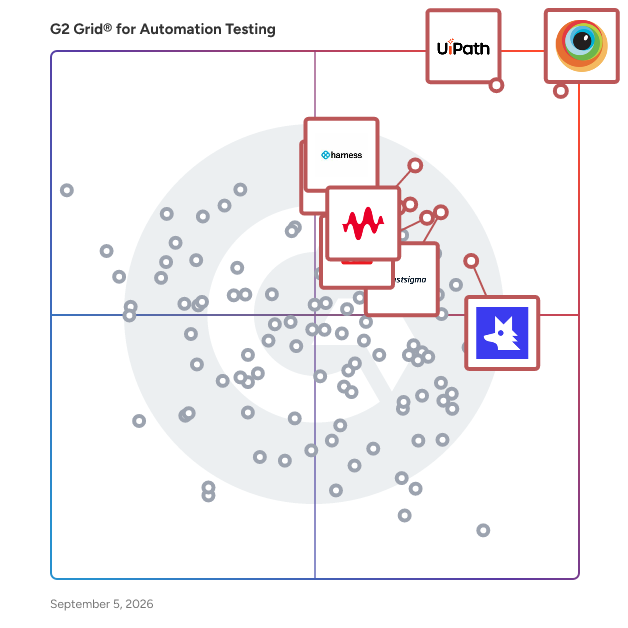
G2 Grid® for Automation Testing Tools

G2 Grid® for Automation Testing Tools plotting products by satisfaction and market presence

Highlighted products: BrowserStack, UiPath Agentic Automation, Keysight Eggplant, Testsigma, QA Wolf, Katalon, testRigor, and Harness Platform.

Underlying data: [Grid® JSON](https://www.g2.com/categories/automation-testing-tools/grids.json?focus%5B%5D=browserstack&focus%5B%5D=uipath-agentic-automation&focus%5B%5D=keysight-eggplant&focus%5B%5D=testsigma&focus%5B%5D=qa-wolf&focus%5B%5D=katalon&focus%5B%5D=testrigor&focus%5B%5D=harness-platform)

Rainforest QA

AI-Powered Test Automation Software for Modern SaaS Teams Rainforest QA is an intelligent test automation platform designed to transform how growing SaaS companies approach quality assurance. By combining artificial intelligence with no-code simplicity, Rainforest enables teams to build, maintain, and scale comprehensive test suites without the complexity and resource requirements of traditional testing frameworks. AI-Driven Testing That Accelerates Your Development Cycle Rainforest's AI capabilities manage the entire testing lifecycle from planning to execution. The platform automatically generates comprehensive test plans and identifies coverage gaps in your existing test suite, ensuring no critical user flows go untested. Unlike traditional frameworks that require manual test creation, Rainforest creates automated, end-to-end tests for you, dramatically reducing the time from specification to execution. What truly sets Rainforest apart is its self-healing test technology. When UI changes occur—whether it's a button relocation or design refresh—tests automatically adapt without manual intervention. This eliminates the constant maintenance burden that plagues traditional automation frameworks. When tests do fail, Rainforest provides granular visibility into exactly what changed and why the failure occurred, enabling rapid root cause analysis and resolution. No-Code Simplicity for Every Team Member Rainforest's intuitive, no-code interface democratizes test automation across your organization. Developers, product managers, and QA professionals alike can write, run, and maintain test suites without specialized training or coding expertise. The platform's visual-first approach interacts with UI elements the same way users do, rather than relying exclusively on fragile CSS selectors that break with every design update. Teams achieve measurable value in days, not months. There's no lengthy buildout period, no specialized hiring requirements, and no vendor lock-in to engineering resources. Test ownership can flexibly sit with development, product, or QA teams based on your organizational structure. Complete All-in-One Testing Infrastructure Rainforest provides everything needed to create, execute, review, and organize comprehensive test suites within a single platform. Tests run in parallel for rapid feedback, and seamless integrations with GitHub, CircleCI, CLI, Slack, and other tools in your tech stack ensure testing fits naturally into existing workflows. It's the complete testing solution built for the speed and scale of modern SaaS development.

Average Rating: 4.3/5.0

Total Reviews: 166

How Do G2 Users Rate Rainforest QA?

  • Reliability: 7.9/10 (Category avg: 8.7/10)
  • Thoroughness: 8.5/10 (Category avg: 8.7/10)
  • Test Feedback: 8.4/10 (Category avg: 8.8/10)
  • Has the product been a good partner in doing business?: 9.3/10 (Category avg: 9.2/10)

Who Is the Company Behind Rainforest QA?

  • Seller: Rainforest
  • Company Website:
  • Year Founded: 2012
  • HQ Location: San Francisco, California
  • Twitter: @rainforestqa
    2,364 Twitter followers
  • LinkedIn® Page: www.linkedin.com
    115 employees on LinkedIn®

Who Uses This Product?

  • Who Uses This: QA Engineer, Software Engineer
  • Top Industries: Computer Software, Information Technology and Services
  • Company Size: 61% Small, 37% Medium

What Do G2 Reviewers Say About Rainforest QA?

AI-generated summary from verified user reviews

Pros
  • Users find Rainforest QA's platform user-friendly and easy to navigate, enabling effortless creation and execution of test cases.
  • Users appreciate the ease of creating automation test cases with Rainforest QA, simplifying their QA processes significantly.
  • Users value the easy testing capabilities of Rainforest QA, enabling seamless automation without coding knowledge required.
  • Users value the time-saving capabilities of Rainforest QA, which simplifies testing and minimizes QA workload effectively.
  • Users value the clear and detailed bug detection in Rainforest QA, enhancing confidence in identifying application errors.
Cons
  • Users often face testing issues with Rainforest QA, including forced AI summaries and frequent VM connection problems.
  • Users experience slow performance during test execution, particularly with larger suites and peak usage times.
  • Users experience cloud limitations with Rainforest QA due to unreliable AI features and lack of customization options.
  • Users find the pricing a bit high, particularly for smaller teams or startups, impacting budget considerations.
  • Users report issues with inaccuracy in geolocation, leading to reduced confidence and occasional false alarms during tests.

What Are Recent G2 Reviews of Rainforest QA?

Copado Robotic Testing

Copado Robotic Testing revolutionizes Salesforce QA by streamlining and optimizing manual testing. It accelerates test automation by leveraging AI-powered generative scripting, enabling teams to create robust, maintainable tests efficiently. Designed for scalability, Copado Robotic Testing includes parallel robots, increasing test performance and test coverage. Its seamless integration with CI/CD pipelines ensures that testing is part of the DevOps lifecycle, reducing errors and delays and ensuring teams deploy with confidence. Copado Robotic Testing is the solution for teams aiming to optimize manual testing, while building automation to improve software quality, and drive faster releases.

Average Rating: 4.5/5.0

Total Reviews: 47

How Do G2 Users Rate Copado Robotic Testing?

  • Reliability: 8.9/10 (Category avg: 8.7/10)
  • Thoroughness: 9.0/10 (Category avg: 8.7/10)
  • Test Feedback: 8.9/10 (Category avg: 8.8/10)
  • Has the product been a good partner in doing business?: 8.8/10 (Category avg: 9.2/10)

Who Is the Company Behind Copado Robotic Testing?

  • Seller: Copado Solutions
  • Company Website:
  • Year Founded: 2013
  • HQ Location: Chicago, IL
  • Twitter: @CopadoSolutions
    2,475 Twitter followers
  • LinkedIn® Page: www.linkedin.com
    668 employees on LinkedIn®

Who Uses This Product?

  • Top Industries: Telecommunications, Information Technology and Services
  • Company Size: 41% Large, 29% Medium

What Do G2 Reviewers Say About Copado Robotic Testing?

AI-generated summary from verified user reviews

Pros
  • Users value the automation capabilities of Copado Robotic Testing, which simplify testing processes for all team members.
  • Users value the ease of use of Copado Robotic Testing, facilitating test creation for both technical and non-technical users.
  • Users value the time-saving benefits of Copado Robotic Testing, enhancing efficiency with minimal maintenance effort.
  • Users value the easy integrations of Copado Robotic Testing with Salesforce, significantly enhancing their regression testing efficiency.
  • Users value the seamless integration with Copado release pipelines, enhancing their test automation experience and workflow efficiency.
Cons
  • Users find the difficult setup of Copado Robotic Testing frustrating, especially for those less experienced in automation.
  • Users find the steep learning curve frustrating, particularly during the initial setup and for non-technical individuals.
  • Users find the performance issues in Copado Robotic Testing affect speed, especially with large data sets.
  • Users face issues with the poor UI of Copado Robotic Testing, leading to slow performance and frequent interaction failures.
  • Users report slow performance, particularly during test execution and when loading test steps, affecting overall efficiency.

What Are Recent G2 Reviews of Copado Robotic Testing?

What Are G2 Users Discussing About Copado Robotic Testing?

Maestro

Maestro is an end-to-end testing framework designed to streamline the process of mobile and web UI testing. It addresses common challenges faced by developers and QA teams, such as writing brittle test scripts, debugging flaky tests, and managing slow test suites. With Maestro, users can expect a more efficient and effective approach to testing their applications. This versatile framework supports testing for iOS, Android, and web applications through a unified methodology. Whether your team is developing native applications in Swift or Kotlin, utilizing frameworks like React Native or Flutter, or building web apps, Maestro accommodates all these platforms without the need for multiple testing frameworks or separate test suites. This integration simplifies the testing process, allowing teams to focus on development rather than juggling various tools. One of the standout features of Maestro is its user-friendly design. Unlike many testing frameworks that require extensive setup and technical expertise, Maestro employs a declarative YAML syntax that is intuitive and accessible. Users can create their first test in under five minutes, significantly reducing the time spent on test creation from hours to mere minutes. This ease of use makes it an attractive option for teams with varying levels of technical knowledge. For those who prefer a visual approach, Maestro Studio offers a no-code interface for test creation. This free desktop application enables users to find elements visually, record interactions, and leverage AI assistance in crafting maintainable tests. This feature is particularly beneficial for developers, QA engineers, and non-technical team members, fostering collaboration across diverse skill sets. Maestro Cloud enhances the framework's capabilities by providing enterprise-grade infrastructure for running tests in CI/CD pipelines and across multiple device configurations. Users can execute hundreds of tests in parallel on real iOS and Android devices, drastically reducing total test time by up to 90%. Each test run is accompanied by detailed video playback, comprehensive logs, and flake detection, facilitating quick and effective debugging. Unlike generic cloud testing solutions, Maestro Cloud is specifically designed for Maestro tests, ensuring reliable and consistent results. With a proven track record among engineering teams at major companies such as Microsoft, Meta, Uber, Disney, Stripe, and Deel, Maestro is an open-source framework that is actively maintained and supported by a growing community of developers. Whether you are a startup launching your first mobile app or an enterprise managing extensive testing across various devices, Maestro offers the reliability, speed, and simplicity necessary to deliver exceptional user experiences.

Average Rating: 4.4/5.0

Total Reviews: 70

How Do G2 Users Rate Maestro?

  • Reliability: 7.8/10 (Category avg: 8.7/10)
  • Thoroughness: 9.3/10 (Category avg: 8.7/10)
  • Test Feedback: 8.5/10 (Category avg: 8.8/10)
  • Has the product been a good partner in doing business?: 8.3/10 (Category avg: 9.2/10)

Who Is the Company Behind Maestro?

Who Uses This Product?

  • Who Uses This: Senior Software Engineer
  • Top Industries: Computer Software, Information Technology and Services
  • Company Size: 61% Small, 36% Medium

What Do G2 Reviewers Say About Maestro?

AI-generated summary from verified user reviews

Pros
  • Users find Maestro's ease of use remarkable, allowing quick setup and smooth automation for mobile testing.
  • Users praise Maestro for its ease of automation, fostering quick script updates and efficient management for distributed teams.
  • Users laud the setup ease of Maestro, allowing fast, intuitive test flow creation with minimal effort.
  • Users find Maestro's flexibility and ease of use invaluable for efficient mobile testing and project management.
  • Users praise Maestro for its easy setup, facilitating swift mobile and web automation testing with minimal fuss.
Cons
  • Users face testing difficulties due to slow runs, limited flexibility, and inadequate debugging support in complex scenarios.
  • Users find Maestro lacking in essential features, resulting in limited community support and flexibility for complex scenarios.
  • Users encounter insufficient information on configuration and troubleshooting, particularly affecting mobile usability and advanced features.
  • Users find limited customization in Maestro, particularly for complex workflows requiring advanced automation flexibility.
  • Users find the poor documentation of Maestro complicates configuration and slows down the initial setup process.

What Are Recent G2 Reviews of Maestro?

Tricentis Testim

Tricentis Testim is an AI-powered test automation solution designed for teams building and maintaining automated tests for web, Salesforce, and mobile applications. It is a type of software test automation platform that helps development and QA teams author, execute, and maintain tests faster through AI-driven test generation, self-healing locators, and cloud-based execution infrastructure. Testim uses machine learning to identify and interact with UI elements reliably, even as application interfaces evolve over time. Its AI-powered locator technology reduces test flakiness and lowers the cost of test maintenance by automatically adapting tests when underlying application elements change. Teams can create tests through visual recording, natural language input via Testim Copilot, or by writing custom JavaScript steps. Key capabilities include: - Agentic test automation that builds complete test cases from natural language descriptions - Testim Copilot for generating and debugging custom test steps using generative AI, plus a Help Assistant that answers testing questions and surfaces best practices - Self-healing AI locators that automatically adapt to application changes - Cloud execution grid for parallel test runs across browsers and environments, plus a Virtual Mobile Grid for native, hybrid, and cross-platform mobile apps - Optimized support for Salesforce Lightning with pre-built components and metadata-based locators - Root cause analysis tools to diagnose test failures quickly using screenshots, console logs, and network logs - TestOps capabilities for managing test changes, organizing teams and tests, and prioritizing testing activities at scale - CI/CD integrations with Jenkins, GitHub Actions, and other pipeline tools Testim is well suited for Agile development teams that need to maintain fast feedback loops, Salesforce organizations requiring reliable automated testing, and QA engineers looking to reduce time spent on test maintenance. It operates as a SaaS platform with a freemium tier, eliminating the need for infrastructure management and allowing teams to get started with no upfront commitment.

Average Rating: 4.5/5.0

Total Reviews: 51

How Do G2 Users Rate Tricentis Testim?

  • Reliability: 8.3/10 (Category avg: 8.7/10)
  • Thoroughness: 8.3/10 (Category avg: 8.7/10)
  • Test Feedback: 8.3/10 (Category avg: 8.8/10)
  • Has the product been a good partner in doing business?: 8.9/10 (Category avg: 9.2/10)

Who Is the Company Behind Tricentis Testim?

  • Seller: Tricentis
  • Year Founded: 2007
  • HQ Location: Austin, Texas
  • Twitter: @Tricentis
    12,931 Twitter followers
  • LinkedIn® Page: www.linkedin.com
    1,679 employees on LinkedIn®

Who Uses This Product?

  • Top Industries: Computer Software, Information Technology and Services
  • Company Size: 54% Medium, 30% Small

What Do G2 Reviewers Say About Tricentis Testim?

AI-generated summary from verified user reviews

Pros
  • Users find the automation capabilities of Tricentis Testim easy and efficient, significantly reducing testing time.
  • Users appreciate the easy and fast automation support of Tricentis Testim, significantly reducing time spent on testing.
  • Users find the ease of use of Tricentis Testim noteworthy, making automation quick and efficient.
  • Users value the efficient parallel testing in Tricentis Testim, significantly reducing time spent on automation tasks.
  • Users find the speed of automation in Tricentis Testim remarkable, significantly enhancing efficiency and reducing effort.
Cons
  • Users find the pricing of Tricentis Testim to be expensive, impacting overall value for the features offered.
  • Users face inconsistent functionality issues, including flaky tests and the need for custom code in complex scenarios.

What Are Recent G2 Reviews of Tricentis Testim?

What Are G2 Users Discussing About Tricentis Testim?

Zebrunner

Zebrunner is an AI-powered, unified platform that bridges the gap between manual and automated testing, enabling QA teams to work together seamlessly. Zebrunner Testing Platform leverages advanced AI to optimize and accelerate the testing process, from generating and autocompleting test cases to prioritizing failures and providing real-time insights. This unified approach ensures that all aspects of testing are integrated, streamlined, and aligned with your development cycle, ultimately leading to higher quality software and faster delivery times. Zebrunner Test Case Management is an integral component of the platform, offering a comprehensive solution for managing manual test cases. The tool simplifies test organization with features like split-screen navigation, customizable layouts, and drag-and-drop editing. Testers can gain real-time insights into their testing progress, quickly identifying and addressing blockers or failures. The integration of AI further accelerates the process by automating the creation and completion of test cases, allowing teams to focus on more critical tasks. Additionally, Zebrunner's customizable fields and filters enable tailored test management, ensuring that testing aligns with specific project requirements and goals. Zebrunner Automation Reporting is designed to empower teams with advanced reporting and analysis capabilities for their automated testing efforts. This module seamlessly integrates with existing test automation frameworks like TestNG, JUnit, PyTest, Cypress, and Playwright, or custom setups via REST API. It provides real-time insights into test execution, allowing teams to monitor progress, analyze failures, and access runtime artifacts such as logs and video recordings. By visualizing trends and metrics, Zebrunner helps teams identify areas for improvement and optimize their testing processes. The platform's robust reporting capabilities ensure that stakeholders have access to accurate and actionable data, facilitating smarter decision-making and continuous improvement in testing practices. In addition to its core features, Zebrunner offers rich integrations with tools like Jira, enabling bidirectional traceability and a unified workflow across testing and development teams. With its modular design, teams can choose to use the entire platform or select specific modules that best meet their needs. Zebrunner is also enterprise-ready, supporting large teams with features like role-based access control, Single Sign-On, and ISO 27001 certification for data security. This makes Zebrunner a scalable, secure, and efficient solution for organizations of all sizes looking to enhance their testing capabilities.

Average Rating: 5.0/5.0

Total Reviews: 23

How Do G2 Users Rate Zebrunner?

  • Reliability: 9.6/10 (Category avg: 8.7/10)
  • Thoroughness: 9.7/10 (Category avg: 8.7/10)
  • Test Feedback: 9.9/10 (Category avg: 8.8/10)
  • Has the product been a good partner in doing business?: 10.0/10 (Category avg: 9.2/10)

Who Is the Company Behind Zebrunner?

  • Seller: Solvd
  • Year Founded: 2011
  • HQ Location: Walnut Creek, US
  • LinkedIn® Page: www.linkedin.com
    554 employees on LinkedIn®

Who Uses This Product?

  • Top Industries: Computer Software, Health, Wellness and Fitness
  • Company Size: 71% Medium, 25% Small

What Do G2 Reviewers Say About Zebrunner?

AI-generated summary from verified user reviews

Pros
  • Users praise Zebrunner for its ease of use, enhancing workflow efficiency with a smooth, intuitive interface.
  • Users commend the intuitive and user-friendly interface of Zebrunner, enhancing workflow efficiency and easing onboarding.
  • Users find Zebrunner's intuitive UI enhances efficiency, making navigation and onboarding seamless for improved workflows.
  • Users highlight the efficiency of automation in Zebrunner, which significantly enhances their testing workflow and productivity.
  • Users benefit from the time-saving features of Zebrunner, enhancing workflow efficiency and meeting release deadlines effortlessly.
Cons
  • Users find the difficult navigation in Zebrunner challenging, particularly in locating themes and organizing test suites.
  • Users express concerns about missing features like consistent text formatting and difficulty finding a dark theme.
  • Users often face intermittent bug issues leading to occasional failures, impacting the reliability of Zebrunner.
  • Users find the interface and features overwhelming, especially when starting with Zebrunner, complicating the user experience.
  • Users find the difficult learning curve of Zebrunner daunting, making it challenging for new users to adapt.

What Are Recent G2 Reviews of Zebrunner?

QA.Tech

QA.tech is an AI-driven platform designed to facilitate intelligent and efficient end-to-end testing for web applications. By leveraging advanced AI agents, QA.tech meticulously scans your application, constructs a comprehensive memory of its architecture, and generates automated tests that reflect user interactions and specific objectives. This innovative approach allows for a more dynamic testing process, where the AI agents simulate real user behavior, adapt to changes in the application, and continuously assess the app's performance as part of the development pipeline. Targeted primarily at software developers, QA engineers, and quality assurance teams, QA.tech caters to organizations seeking to enhance their testing processes and improve the overall quality of their web applications. The platform is particularly beneficial for teams that require rapid testing cycles and need to identify defects efficiently. With its ability to detect issues across various severity levels, QA.tech ensures that critical bugs are identified and addressed early in the development process, ultimately reducing the risk of deploying flawed applications. One of the standout features of QA.tech is its capability to create custom tests through simple prompts. This user-friendly approach allows developers to specify their testing requirements without needing extensive coding knowledge. The AI takes over from there, generating the necessary tests and adapting them as the application evolves. This not only saves time but also empowers teams to focus on higher-level tasks rather than getting bogged down in repetitive testing procedures. Additionally, QA.tech provides developer-friendly bug reports that include detailed information such as console logs and network requests. This level of detail aids developers in quickly diagnosing and resolving issues. The platform also supports the ability to replay tests, which can be invaluable for understanding the context of a bug. For seamless integration into existing workflows, QA.tech allows users to export issues to popular project management tools like Linear, Jira, or ClickUp, streamlining the bug-tracking process. QA.tech stands out in the realm of testing solutions by combining AI technology with user-centric features, making it a valuable asset for teams aiming to enhance their web application testing processes. Its ability to adapt to changes, generate custom tests, and provide detailed reporting ensures that users can maintain high standards of quality and efficiency throughout their development cycles. This comprehensive approach not only enhances the testing experience but also contributes to the overall success of software development projects.

Average Rating: 4.9/5.0

Total Reviews: 15

How Do G2 Users Rate QA.Tech?

  • Reliability: 8.8/10 (Category avg: 8.7/10)
  • Thoroughness: 9.4/10 (Category avg: 8.7/10)
  • Test Feedback: 8.9/10 (Category avg: 8.8/10)
  • Has the product been a good partner in doing business?: 10.0/10 (Category avg: 9.2/10)

Who Is the Company Behind QA.Tech?

  • Seller: QA.Tech
  • Year Founded: 2023
  • HQ Location: Stockholm , SE
  • Twitter: @getqatech
    140 Twitter followers
  • LinkedIn® Page: www.linkedin.com
    31 employees on LinkedIn®

Who Uses This Product?

  • Top Industries: Computer Software
  • Company Size: 53% Small, 40% Medium

What Do G2 Reviewers Say About QA.Tech?

AI-generated summary from verified user reviews

Pros
  • Users commend the efficiency of automation with QA.Tech, significantly reducing manual efforts and enhancing testing speed.
  • Users commend the prompt customer support from QA.Tech, enhancing their testing experience and accelerating decision-making.
  • Users appreciate the ease of use of QA.Tech, finding it accessible even for non-technical backgrounds.
  • Users appreciate the super smooth initial setup of QA.Tech, enabling seamless integration and efficient testing processes.
  • Users praise the easy integrations of QA.Tech, enhancing their testing workflow and overall efficiency.
Cons
  • Users note the high initial cost of QA.Tech, which limits viability for some clients.
  • Users find the setup difficulty with authentication configs challenging, though support helps clarify the process.

What Are Recent G2 Reviews of QA.Tech?

BugBug

BugBug is an AI-assisted low-code end-to-end test automation tool for SaaS teams and web applications running on Chromium-based browsers. It helps product Teams, QA engineers, and developers build reliable regression coverage faster — without locking their tests inside a proprietary platform. Teams can create tests visually and keep them as human-readable YAML, making test assets portable, reviewable, versionable, and accessible to engineering. With BugBug’s intuitive Chrome recorder, users can create tests by clicking through real user flows, then replay, edit, debug, rewind, and schedule them in the cloud, without the overhead of building and maintaining a full Playwright, Selenium, or Cypress framework. BugBug is built for teams that need to move from manual regression testing to automated coverage quickly. AI-assisted features such as Adaptive Locators, Smart Waiting, and Smart Click & Scroll help reduce flaky tests and maintenance caused by dynamic web interfaces. For more advanced scenarios, teams can use variables, custom JavaScript steps, conditional logic, reusable components, email inbox testing, visual regression, webhooks, CLI, CI/CD integrations, REST API access, Jira, and advanced reports, depending on the selected plan. BugBug’s pricing is designed for collaboration and predictable scaling. The Free plan lets users create tests and run unlimited local test executions. Paid plans add unlimited cloud runs, scheduling, alerts, and integrations, while Pro and Business plans include unlimited users, tests, projects, and suites. BugBug is best suited for SaaS companies, web-first product teams and QA teams, that want fast, maintainable regression coverage without hiring more QA or spending engineering time on test infrastructure. Speed up your testing process, catch bugs before release, and keep your web app working as expected with BugBug.

Average Rating: 4.7/5.0

Total Reviews: 31

How Do G2 Users Rate BugBug?

  • Reliability: 9.2/10 (Category avg: 8.7/10)
  • Thoroughness: 9.4/10 (Category avg: 8.7/10)
  • Test Feedback: 9.8/10 (Category avg: 8.8/10)
  • Has the product been a good partner in doing business?: 10.0/10 (Category avg: 9.2/10)

Who Is the Company Behind BugBug?

  • Seller: TestRevolution
  • Year Founded: 2019
  • HQ Location: Tarnowskie Góry
  • Twitter: @BugbugIo
    84 Twitter followers
  • LinkedIn® Page: www.linkedin.com
    12 employees on LinkedIn®

Who Uses This Product?

  • Top Industries: Computer Software
  • Company Size: 74% Small, 19% Medium

What Do G2 Reviewers Say About BugBug?

AI-generated summary from verified user reviews

Pros
  • Users value the ease of use of BugBug, praising its simple setup and intuitive interface for beginners.
  • Users highlight the ease of use of BugBug, making test creation and management quick and intuitive.
  • Users praise the responsive customer support of BugBug, noting quick and helpful assistance for inquiries.
  • Users find BugBug's easy implementation straightforward, requiring just credentials to quickly start recording tests.
  • Users find implementation super simple, with quick setup and minimal prerequisites for recording tests efficiently.
Cons
  • Users note several missing features in BugBug, such as loops and conditional branching, hindering complex test creation.
  • Users experience slow performance due to limitations in step execution and lack of efficient test controls.
  • Users report bug issues causing tests to fail unexpectedly, needing workarounds to proceed smoothly.
  • Users find it challenging to build complex scenarios due to missing important features like loops and conditional branching.
  • Users find the complexity due to missing features like loops and conditional branching hampers easy maintenance of scenarios.

What Are Recent G2 Reviews of BugBug?

Tricentis qTest

Tricentis qTest is an AI-driven test management platform designed to help enterprise organizations centralize, standardize, and scale their software testing operations. It is a type of test management solution that helps QA teams, project managers, and development leads plan, track, and report on testing activities across Agile, waterfall, and hybrid delivery methodologies. qTest provides a centralized repository for test cases, test plans, and test execution results, enabling teams to maintain visibility and control over testing across large, distributed projects. It integrates with the leading ALM, CI/CD, and defect management tools used across enterprise software delivery pipelines, including Jira, Azure DevOps, Jenkins, Bamboo, Cucumber, Selenium, and Rally. Key capabilities include: - AI-powered agentic test creation (qTest Copilot) that autonomously drafts and reuses test cases from natural-language requirements - Test case management supporting structured, exploratory, and automated test types, deployable in the cloud or on-premises - DevOps-native workflow integration for event-driven, automated testing processes - Exploratory testing with built-in recording, annotation, and session management - Behavior-driven development support through qTest Scenario, a Jira app that helps Agile teams scale BDD practices - Customizable dashboards and analytics for quality metrics, test coverage, and sprint velocity - Automated test orchestration and execution host management - Scaling to support thousands of test cases, multiple projects, and large distributed teams qTest is well suited for enterprise QA organizations transitioning from legacy test management tools, teams implementing AI-assisted quality practices, and organizations that need a single source of truth for testing across complex programs. Its reporting and analytics capabilities give program managers and quality leads the visibility needed to make informed decisions about release readiness and quality risk throughout the development lifecycle. qTest also integrates with Tricentis Tosca, enabling teams to sync manual test cases for automated execution, and with Tricentis Vera for organizations that need compliance validation alongside Agile software testing.

Average Rating: 4.3/5.0

Total Reviews: 103

How Do G2 Users Rate Tricentis qTest?

  • Reliability: 9.0/10 (Category avg: 8.7/10)
  • Thoroughness: 8.8/10 (Category avg: 8.7/10)
  • Test Feedback: 9.1/10 (Category avg: 8.8/10)
  • Has the product been a good partner in doing business?: 8.3/10 (Category avg: 9.2/10)

Who Is the Company Behind Tricentis qTest?

  • Seller: Tricentis
  • Year Founded: 2007
  • HQ Location: Austin, Texas
  • Twitter: @Tricentis
    12,931 Twitter followers
  • LinkedIn® Page: www.linkedin.com
    1,679 employees on LinkedIn®

Who Uses This Product?

  • Who Uses This: Software Engineer
  • Top Industries: Information Technology and Services, Computer Software
  • Company Size: 45% Medium, 28% Small

What Do G2 Reviewers Say About Tricentis qTest?

AI-generated summary from verified user reviews

Pros
  • Users value the seamless integration of Tricentis qTest with tools like Jira, enhancing efficiency and visibility.
  • Users appreciate the seamless integration with Jira, enhancing collaboration and tracking in their testing processes.
  • Users find qTest's ease of use exceptional, with a user-friendly UI for efficient test management and integration.
  • Users value the easy integrations of qTest with tools like Jira, enhancing efficiency and visibility in test management.
  • Users value the centralized test management of qTest, enhancing collaboration and integration with tools like Jira.
Cons
  • Users find the slow performance of Tricentis qTest frustrating, particularly with large projects and complex integrations.
  • Users find the poor UI of Tricentis qTest makes navigation difficult, especially with larger projects and advanced integrations.
  • Users face poor reporting in Tricentis qTest, finding customization and insights options limited and complicated.
  • Users often face integration issues with Tricentis qTest, requiring extra effort for smooth functionality and setup.
  • Users find the setup difficulty of Tricentis qTest challenging, especially with complex integrations and slow interface performance.

What Are Recent G2 Reviews of Tricentis qTest?

What Are G2 Users Discussing About Tricentis qTest?

Applitools

Applitools is a test automation platform that helps engineering teams release software with confidence by replacing the guesswork of probabilistic AI with deterministic, reproducible test results. As organizations ship AI-influenced code faster, they face a growing visibility problem: AI-generated code validated by opaque AI agents creates a cycle of unquantifiable risk. Applitools provides a deterministic, outside vantage point, comparing your evolving product against a trusted production baseline to deliver a verifiable Go/No-Go signal at every release. At the core of the platform is a Deterministic Language Model (DLM) combined with Visual AI. The DLM converts plain English test intent into repeatable, debuggable steps with no LLM involvement at runtime, eliminating AI drift and flaky CI results. Visual AI replaces brittle DOM assertions with single-line visual snapshots that simulate how a real user sees your application, filtering out rendering noise and surfacing actual regressions. Together, they eliminate the maintenance tax of legacy test automation, shifting engineering time away from fixing broken scripts and toward building better test coverage. Core capabilities: - Visual AI testing replaces brittle DOM assertions with single-line visual snapshots that simulate how a real user sees your application, filtering out rendering noise and surfacing actual regressions - Deterministic Language Model (DLM) converts plain English test intent into repeatable, debuggable steps with no LLM involvement at runtime, eliminating AI drift and flaky CI results - Cross-browser and cross-device test coverage runs across thousands of browser and device combinations without local grid infrastructure or maintenance overhead - Framework-native SDKs integrate directly into Selenium, Cypress, Playwright, Appium, and Storybook, so teams keep existing tooling and workflows - Automated baseline management groups related visual differences across browsers and resolutions for bulk one-click acceptance, reducing test maintenance as suites scale Applitools supports functional, visual, accessibility, API, component, and data-driven testing across web, mobile, desktop, PDFs, and documents, providing a consistent quality signal from design through production.

Average Rating: 4.3/5.0

Total Reviews: 90

How Do G2 Users Rate Applitools?

  • Reliability: 8.5/10 (Category avg: 8.7/10)
  • Thoroughness: 8.8/10 (Category avg: 8.7/10)
  • Test Feedback: 8.9/10 (Category avg: 8.8/10)
  • Has the product been a good partner in doing business?: 9.4/10 (Category avg: 9.2/10)

Who Is the Company Behind Applitools?

  • Seller: Applitools
  • Company Website:
  • Year Founded: 2015
  • HQ Location: Reston, US
  • Twitter: @Applitools
    6,328 Twitter followers
  • LinkedIn® Page: www.linkedin.com
    122 employees on LinkedIn®

Who Uses This Product?

  • Who Uses This: Software Engineer
  • Top Industries: Computer Software, Information Technology and Services
  • Company Size: 39% Medium, 37% Large

What Do G2 Reviewers Say About Applitools?

AI-generated summary from verified user reviews

Pros
  • Users value the ease of use of Applitools, enjoying its intuitive setup and efficient visual testing capabilities.
  • Users highly value the automation capabilities of Applitools, enhancing efficiency and accuracy in visual testing processes.
  • Users appreciate the browser variety support of Applitools, enhancing visual testing across multiple platforms and devices.
  • Users appreciate the easy integrations of Applitools, enhancing workflow efficiency with various automation tools and frameworks.
  • Users praise Applitools for its efficiency improvement, significantly reducing manual checks and saving valuable time during visual testing.
Cons
  • Users find the complexity of Applitools challenging, particularly with baseline management and initial setup difficulties.
  • Users find Applitools to be expensive, making it less appealing for large-scale adoption and flexible budgeting.
  • Users are frustrated by the clunky UI of Applitools, which complicates the management of test results and learning process.
  • Users find the difficult learning curve of Applitools challenging, especially with advanced configurations and complex integrations.
  • Users find the difficult navigation of the web interface for tests frustrating and not intuitive.

What Are Recent G2 Reviews of Applitools?

What Are G2 Users Discussing About Applitools?

BitBar

"BitBar allows you to test your application across the latest and most popular real browsers and devices. Scale your testing by increasing test coverage and decreasing test execution time by running automated tests in parallel across browsers and devices. BitBar seamlessly integrates with your current tech stack or CI/CD pipeline. Don’t spend time managing environments – focus on what matters. Key Features: * BitBar offers one cloud for all testing platforms whether it be web, native, or hybrid applications. * Test your application across real environments without the need of maintaining a device lab. * Deploy your testing from your preferred cloud environment. * Your team will be able to scale the automation speed with Selenium and Appium cloud testing."

Average Rating: 4.1/5.0

Total Reviews: 34

How Do G2 Users Rate BitBar?

  • Reliability: 7.5/10 (Category avg: 8.7/10)
  • Thoroughness: 7.5/10 (Category avg: 8.7/10)
  • Test Feedback: 4.2/10 (Category avg: 8.8/10)
  • Has the product been a good partner in doing business?: 8.9/10 (Category avg: 9.2/10)

Who Is the Company Behind BitBar?

  • Seller: SmartBear
  • HQ Location: Somerville, MA
  • Twitter: @smartbear
    16,468 Twitter followers
  • LinkedIn® Page: www.linkedin.com
    944 employees on LinkedIn®

Who Uses This Product?

  • Top Industries: Computer Software, Information Technology and Services
  • Company Size: 35% Medium, 32% Small

What Are Recent G2 Reviews of BitBar?

What Are G2 Users Discussing About BitBar?

Opkey

Opkey is the first end-to-end AI-native agentic platform that streamlines every step of the enterprise application journey while optimizing business processes and the complex technology stacks that support them. Powered by a purpose-built small language model trained on terabytes of robust business process data and infused with decades of expertise implementing and managing enterprise systems, Opkey’s platform features a central orchestration agent, five specialized AI agents, and hundreds of micro-agents coordinating key lifecycle phases — process management, configuration, testing, training, and support. Enhanced by 30,000+ pre-built test cases and advanced process and configuration mining, Opkey goes beyond automation to intelligently identify process inefficiencies, recommend improvements, and adapt autonomously. The result: a self-optimizing, holistic system that transforms how enterprises implement, maintain, and scale mission-critical business applications.

Average Rating: 4.8/5.0

Total Reviews: 97

How Do G2 Users Rate Opkey?

  • Reliability: 9.4/10 (Category avg: 8.7/10)
  • Thoroughness: 9.2/10 (Category avg: 8.7/10)
  • Test Feedback: 9.4/10 (Category avg: 8.8/10)
  • Has the product been a good partner in doing business?: 9.7/10 (Category avg: 9.2/10)

Who Is the Company Behind Opkey?

  • Seller: Opkey
  • Year Founded: 2015
  • HQ Location: Pittsburgh, PA
  • Twitter: @opkey_ssts
    310 Twitter followers
  • LinkedIn® Page: www.linkedin.com
    458 employees on LinkedIn®

Who Uses This Product?

  • Who Uses This: Business Analyst, Marketing Analyst
  • Top Industries: Information Technology and Services, Computer Software
  • Company Size: 52% Medium, 36% Large

What Do G2 Reviewers Say About Opkey?

AI-generated summary from verified user reviews

Pros
  • Users appreciate the ease of use of Opkey, benefiting from its no-code approach and user-friendly interface.
  • Users value the testing capabilities of Opkey for its user-friendliness and self-healing scripts that enhance efficiency.
  • Users appreciate Opkey's effective automation features that streamline test creation and enhance efficiency across various applications.
  • Users value the excellent customer support from Opkey, enhancing their experience with effective solutions and guidance.
  • Users highlight Opkey for its time-saving capabilities, significantly reducing test creation timelines and manual testing efforts.
Cons
  • Users find the insufficient training for new testers frustrating, impacting their navigation and onboarding experience.
  • Users mention a lack of documentation on system requirements, causing confusion and delays during the setup process.
  • Users find the difficult learning curve for new testers hinders effective navigation and onboarding with Opkey.
  • Users feel that difficult navigation hampers the onboarding experience, making it hard for new testers to adapt.
  • Users note the steep learning curve for new testers, highlighting insufficient onboarding resources and navigation challenges.

What Are Recent G2 Reviews of Opkey?

What Are G2 Users Discussing About Opkey?

Ghost Inspector

Ghost Inspector is an automated browser testing service that allow you to monitor and test your websites using real browsers from the cloud. We offer a cohesive solution for easily creating, recording, managing and running your tests. Review detailed test results and get notified when failures occur. Ensure that your websites and applications are working as expected by testing them end-to-end from a user's perspective in the browser.

Average Rating: 4.6/5.0

Total Reviews: 29

How Do G2 Users Rate Ghost Inspector?

  • Reliability: 9.2/10 (Category avg: 8.7/10)
  • Thoroughness: 9.0/10 (Category avg: 8.7/10)
  • Test Feedback: 10.0/10 (Category avg: 8.8/10)
  • Has the product been a good partner in doing business?: 9.7/10 (Category avg: 9.2/10)

Who Is the Company Behind Ghost Inspector?

  • Seller: Ghost Inspector
  • Year Founded: 2014
  • HQ Location: Edina, Minnesota
  • Twitter: @GhostInspector
    1,584 Twitter followers
  • LinkedIn® Page: www.linkedin.com
    4 employees on LinkedIn®

Who Uses This Product?

  • Top Industries: Computer Software, Information Technology and Services
  • Company Size: 50% Medium, 47% Small

What Are Recent G2 Reviews of Ghost Inspector?

What Are G2 Users Discussing About Ghost Inspector?

SoftSpell

SoftSpell is an AI-powered platform that accelerates software delivery and simplifies legacy modernization. It transforms unstructured requirements and existing codebases into structured outputs, enabling faster development with clarity and control. By combining intelligent requirement analysis, context-aware code generation, and automated testing, it ensures end-to-end traceability while reducing manual effort and rework. SoftSpell integrates seamlessly into existing workflows, helping teams deliver high-quality software faster.

Average Rating: 4.4/5.0

Total Reviews: 43

How Do G2 Users Rate SoftSpell?

  • Reliability: 9.0/10 (Category avg: 8.7/10)
  • Thoroughness: 9.0/10 (Category avg: 8.7/10)
  • Test Feedback: 9.0/10 (Category avg: 8.8/10)
  • Has the product been a good partner in doing business?: 7.9/10 (Category avg: 9.2/10)

Who Is the Company Behind SoftSpell?

Who Uses This Product?

  • Who Uses This: Senior Software Engineer
  • Top Industries: Computer Software, Program Development
  • Company Size: 43% Large, 43% Small

What Do G2 Reviewers Say About SoftSpell?

AI-generated summary from verified user reviews

Pros
  • Users value the time-saving capabilities of SoftSpell, making coding faster and enhancing overall productivity.
  • Users appreciate the coding assistance from SoftSpell, enhancing quality and speeding up the programming process effortlessly.
  • Users value the automation features of SoftSpell, significantly enhancing productivity and simplifying the development process.
  • Users praise the significant improvement in code quality that SoftSpell provides, enhancing productivity and development speed.
  • Users appreciate the ease of use of SoftSpell, enhancing their coding experience and simplifying problem-solving.
Cons
  • Users experience slow performance with SoftSpell, leading to delays and frustrating interruptions during use.
  • Users experience prompt issues with SoftSpell, citing delays and outdated solutions during usage, impacting their workflow.
  • Users express concerns about limited multimedia support, hoping future updates will enhance compatibility with tech stacks.
  • Users find the cluttered interface of SoftSpell challenging, leading to mistakes and requiring manual adjustments.
  • Users face limitations with browser compatibility, hoping updates will improve functionality in the future.

What Are Recent G2 Reviews of SoftSpell?

testomat.io

Test Case Management system testomat.io is a web-based testing tool that allows users to structure test projects best. It synchronizes your manual and automation tests in one place. It integrates with popular test automation frameworks and CI\CD tools. Its top features include: - Built-in AI capabilities (test generation, analysis, suggestion, prediction) - Flexible test execution: allows you to pick tests and run them as you need to focus on particular areas. Moreover, it provides multi-environment and parallel execution, mixed run manual with automation tests in one run, and running automated tests manually. - Real-time reporting with varied heatmaps and analytics. - Analytics dashboard with such metrics as requirement coverage, flaky tests, slowest tests, automation coverage, and more. - Version Control & Test History. - Advanced BDD support. - Advanced Jira plugin. - Team management control functionality. Test Management tool integrates with the most popular test automated frameworks such as Cypress.io, WebdriverIO, Playwright, Cucumber, CodeceptJS, Codeception, TestCafe, Protractor, Jasmine, Jest, Mocha, and Chai. Supports JUnit integration, and via XML file is possible to generate reports for any language or other test framework. Regarding CI\CD integration, it supports GitHub, GitLab, GitHub Action, Azure DevOps, Jenkins, Bamboo and CircleCI. Testomat.io is an enterprise-ready system. It shows excellent performance, AQAs can run even 15,000 tests at once, and check the result even if 1 test is executed. The price model consists of monthly/yearly subscriptions and a free plan for small teams. Support is extended via email or chat. 👇 Check out the comparison with popular TCMS in the market and pricing model and discover why #testomatio best suits your needs on our pages: 🔗 https://testomat.io/?utm_source=g2&utm_medium=referral&utm_campaign=g2_profile 🔗 https://testomat.io/pricing/

Average Rating: 4.8/5.0

Total Reviews: 93

How Do G2 Users Rate testomat.io?

  • Reliability: 9.4/10 (Category avg: 8.7/10)
  • Thoroughness: 9.6/10 (Category avg: 8.7/10)
  • Test Feedback: 9.5/10 (Category avg: 8.8/10)
  • Has the product been a good partner in doing business?: 9.7/10 (Category avg: 9.2/10)

Who Is the Company Behind testomat.io?

  • Seller: testomatio
  • Year Founded: 2020
  • HQ Location: Krakow
  • Twitter: @testomatio
    1,481 Twitter followers
  • LinkedIn® Page: www.linkedin.com
    20 employees on LinkedIn®

Who Uses This Product?

  • Who Uses This: QA, QA Engineer
  • Top Industries: Computer Software, Information Technology and Services
  • Company Size: 61% Small, 34% Medium

What Do G2 Reviewers Say About testomat.io?

AI-generated summary from verified user reviews

Pros
  • Users praise Testomat.io for its user-friendly interface, enabling effortless test case management for everyone.
  • Users value the seamless integrations of Testomat.io, enhancing their testing workflows and overall software quality.
  • Users appreciate the easy integrations with frameworks and CI/CD tools, enhancing collaboration and testing efficiency.
  • Users value the automation capabilities of Testomat.io, significantly speeding up test case generation and enhancing overall efficiency.
  • Users commend the extremely responsive customer support of Testomat.io, quickly addressing queries and implementing user feedback.
Cons
  • Users find the complexity of advanced features challenging, often requiring better documentation and tutorials for clarity.
  • Users experience testing difficulties due to sync issues, editing limitations, and subpar support for Java tests.
  • Users face editing difficulties with Testomat.io, including syncing issues and manual adjustments for test case formatting.
  • Users find the limited features of Testomat.io affect usability, hindering customization and advanced usage effectively.
  • Users note a lack of certain features in Testomat.io, though they appreciate quick implementations upon request.

What Are Recent G2 Reviews of testomat.io?

Semaphore

We’re excited to announce that Semaphore’s core CI/CD platform is officially open source. Now, you can explore, tweak, and contribute to the same production-grade code that’s powered your builds and deployments—all under the Apache 2.0 license. Find the GitHub repo here: https://github.com/semaphoreio/semaphore Semaphore CI/CD helps product teams ship software faster, with quality and security. 🚀 Features Blazing-fast CI/CD – Get your builds & deployments done in record time. Simple yet powerful – YAML-based config, parallel execution, and more! Scales with you – From solo developers to massive engineering teams. Built for the modern cloud – Works seamlessly with containers, Kubernetes, and multi-cloud environments.

Average Rating: 4.7/5.0

Total Reviews: 193

How Do G2 Users Rate Semaphore?

  • Reliability: 9.0/10 (Category avg: 8.7/10)
  • Thoroughness: 9.1/10 (Category avg: 8.7/10)
  • Test Feedback: 9.3/10 (Category avg: 8.8/10)
  • Has the product been a good partner in doing business?: 9.6/10 (Category avg: 9.2/10)

Who Is the Company Behind Semaphore?

  • Seller: Semaphore
  • Year Founded: 2009
  • HQ Location: Vojvodina, Serbia
  • Twitter: @semaphoreci
    6,227 Twitter followers
  • LinkedIn® Page: www.linkedin.com
    24 employees on LinkedIn®

Who Uses This Product?

  • Who Uses This: CTO, Software Engineer
  • Top Industries: Computer Software, Information Technology and Services
  • Company Size: 66% Small, 27% Medium

What Do G2 Reviewers Say About Semaphore?

AI-generated summary from verified user reviews

Pros
  • Users praise the fast and reliable customer support from Semaphore, highlighting their initiative in solving issues promptly.
  • Users value the fast and helpful support from Semaphore, appreciating the effective resolution of issues and clear documentation.
  • Users value the reliability of Semaphore, highlighting consistent performance and exceptional support that enhances productivity.
  • Users highlight the ease of use of Semaphore, appreciating its simplicity and intuitive setup process.
  • Users love the easy integrations of Semaphore, enabling seamless setup and efficient development processes.
Cons
  • Users find difficult navigation in Semaphore, especially when adapting from other CI tools, which can be challenging.
  • Users report poor customer support responsiveness due to limited availability, causing delays in resolving critical issues.
  • Users find the poor documentation challenging for advanced configurations, complicating the CI workflow despite responsive support.
  • Users experience slow performance with Semaphore, particularly during agent response times and UI interactions.
  • Users find the lack of effective permission management in Semaphore can lead to complicated workarounds and challenges.

What Are Recent G2 Reviews of Semaphore?

What Are G2 Users Discussing About Semaphore?

Adam Crivello
AC
Researched and written by Adam Crivello
Updated March 3, 2025