Top Free AR Collaboration Tools

How Many AR Collaboration Tools Products Does G2 Track?

Total Products under this Category: 43

Category Stats (Sep 2026)

  • Average Rating: 4.45/5 The average rating of products in this category, based on all submitted ratings

Last updated: September 01, 2026

How Does G2 Rank AR Collaboration Tools Products?

Why You Can Trust G2's Software Rankings:

  • 30 Analysts and Data Experts
  • 4,800+ Authentic Reviews
  • 43+ Products
  • Unbiased Rankings

G2's software rankings are built on verified user reviews, rigorous moderation, and a consistent research methodology maintained by a team of analysts and data experts. Each product is measured using the same transparent criteria, with no paid placement or vendor influence. While reviews reflect real user experiences, which can be subjective, they offer valuable insight into how software performs in the hands of professionals. Together, these inputs power the G2 Score, a standardized way to compare tools within every category.

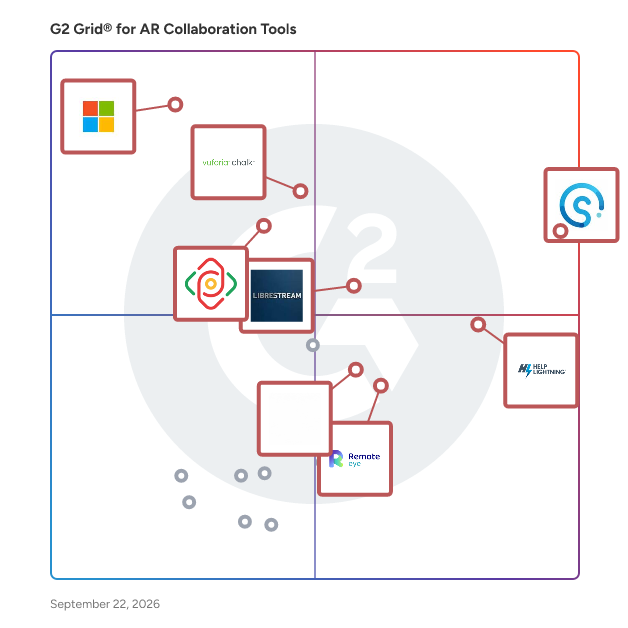
G2 Grid® for AR Collaboration Tools

G2 Grid® for AR Collaboration Tools plotting products by satisfaction and market presence

Highlighted products: Streem, Help Lightning, Vuforia Chalk, Dynamics 365 Remote Assist, Librestream, Zoho Lens, Remote Eye, and AIRe Link.

Underlying data: [Grid® JSON](https://www.g2.com/categories/ar-collaboration-tools/grids.json?focus%5B%5D=streem&focus%5B%5D=help-lightning&focus%5B%5D=vuforia-chalk&focus%5B%5D=dynamics-365-remote-assist&focus%5B%5D=librestream&focus%5B%5D=zoho-lens&focus%5B%5D=remote-eye&focus%5B%5D=aire-link)

Vuforia Chalk

Quickly scale problem-solving guidance, support and expertise to your factory operations & service teams with augmented reality. Vuforia Chalk is a powerful collaboration and communication tool for your organization’s experts to provide real-time assistance to technicians facing complex or unfamiliar challenges. Vuforia Chalk combines advanced augmented reality (AR) with real-time communications to connect a field technician with an expert so that the expert can see and discuss the situation in the field. Technicians and experts can draw digital annotations on a mobile screen or desktop that accurately stick to 3D physical objects, allowing the expert to guide the technician through a process, step-by-step. With more accurate annotations, experts and technicians spend less time resolving issues, increasing operational productivity and efficiency. Vuforia Chalk delivers faster resolution without the time and expense of expert travel or repeat technician visits.

Average Rating: 4.4/5.0

Total Reviews: 17

How Do G2 Users Rate Vuforia Chalk?

  • AR annotations: 8.9/10 (Category avg: 8.9/10)
  • Content management: 8.2/10 (Category avg: 8.8/10)
  • Ease of Use: 9.2/10 (Category avg: 9.1/10)
  • Mobile phones: 8.8/10 (Category avg: 8.8/10)

Who Is the Company Behind Vuforia Chalk?

  • Seller: PTC
  • Year Founded: 1985
  • HQ Location: Boston, Massachusetts
  • Twitter: @PTC
    37,560 Twitter followers
  • LinkedIn® Page: www.linkedin.com
    8,226 employees on LinkedIn®
  • Ownership: NASDAQ: PTC

Who Uses This Product?

  • Company Size: 47% Small, 41% Medium

What Are Recent G2 Reviews of Vuforia Chalk?

Librestream

Librestream transforms workforces with AR & AI- enabled knowledge networks for safer, more efficient & resilient workforces. Librestream’s Onsight solution is the leading augmented reality platform, built for industrial enterprises & deployed in 184 countries, on 6 continents, & supports translations in 27 languages. Compatible with existing workflows and ecosystems, Onsight provides immediate access to the content, people, relevant data, & guidance needed — in any environment & on any device.

Average Rating: 4.7/5.0

Total Reviews: 13

How Do G2 Users Rate Librestream?

  • AR annotations: 8.5/10 (Category avg: 8.9/10)
  • Content management: 8.6/10 (Category avg: 8.8/10)
  • Ease of Use: 9.1/10 (Category avg: 9.1/10)
  • Mobile phones: 9.2/10 (Category avg: 8.8/10)

Who Is the Company Behind Librestream?

  • Seller: Librestream
  • Year Founded: 2003
  • HQ Location: Winnipeg, Manitoba
  • Twitter: @Librestream
    1,201 Twitter followers
  • LinkedIn® Page: www.linkedin.com
    43 employees on LinkedIn®

Who Uses This Product?

  • Company Size: 54% Small, 38% Medium

What Do G2 Reviewers Say About Librestream?

AI-generated summary from verified user reviews

Pros
  • Users value the diverse features of Librestream, enhancing collaboration and communication efficiency significantly.
Cons
  • Users find the high price of Librestream burdensome, especially needing additional licenses for guests.
  • Users find the high licensing costs inconvenient, especially needing additional licenses for guests.

What Are Recent G2 Reviews of Librestream?

Remote Eye

Wideum is a remote service technology company, innovating in applications for smartphones, tablets and smart glasses. Our proprietary software allows users to execute difficult tasks and operation maintenance with remote assistance thanks to information sharing between field service operators and support departments. Remote Eye is a remote assistance software that improves communication and knowledge management between an Expert, remotely and a local Operator. The Expert will be able to remotely visualize what the technician has in front of his eyes to guide and assist him in the installation, maintenance, or repairs that require more specialized external knowledge. Remote Eye is specially designed for Smart Glasses, hands-free devices that allow the operator to complete the freedom to move. It is also available on Android and iOS mobile phones. For more information visit www.wideum.com

Average Rating: 4.7/5.0

Total Reviews: 30

How Do G2 Users Rate Remote Eye?

  • AR annotations: 9.5/10 (Category avg: 8.9/10)
  • Content management: 9.8/10 (Category avg: 8.8/10)
  • Ease of Use: 9.5/10 (Category avg: 9.1/10)
  • Mobile phones: 9.4/10 (Category avg: 8.8/10)

Who Is the Company Behind Remote Eye?

  • Seller: Wideum
  • Year Founded: 2017
  • HQ Location: Barcelona, ES
  • Twitter: @wideumofficial
    37 Twitter followers
  • LinkedIn® Page: www.linkedin.com
    12 employees on LinkedIn®

Who Uses This Product?

  • Top Industries: Information Technology and Services
  • Company Size: 39% Small, 33% Large

What Do G2 Reviewers Say About Remote Eye?

AI-generated summary from verified user reviews

Pros
  • Users appreciate the cost efficiency of Remote Eye, benefiting from budget-friendly subscription packages and streamlined processes.
  • Users value the ease of use of Remote Eye, appreciating its simplicity in data management and integration.
  • Users value the easy integration with other tools, enhancing their workflow and overall productivity with Remote Eye.
  • Users value the simplicity of integrations with other tools, enhancing their overall workflow and efficiency.
  • Users value the simplicity of reviewing remote reports, enhancing their ability to work efficiently and effectively.

What Are Recent G2 Reviews of Remote Eye?

AIRe Link

AIRe Link is a cloud-based solution for remote visual support that’s easy to use, with no app downloads needed. Developed by Konica Minolta, a leader in workplace innovation for over 150 years, it’s built with robust security and fully complies with GDPR and B2B standards. AIRe Link streamlines customer support or service with features like video streaming, live pointers, drawing, OCR, and more. It also boosts team collaboration through group sessions, a knowledge base, and real-time data analytics. With AIRe Link, you can provide efficient, secure support and improve team productivity. Additionally, you'll save money, time, and cut down on CO2 emissions by reducing on-site service visits.

Average Rating: 4.5/5.0

Total Reviews: 20

How Do G2 Users Rate AIRe Link?

  • AR annotations: 9.4/10 (Category avg: 8.9/10)
  • Content management: 9.3/10 (Category avg: 8.8/10)
  • Ease of Use: 9.3/10 (Category avg: 9.1/10)
  • Mobile phones: 8.9/10 (Category avg: 8.8/10)

Who Is the Company Behind AIRe Link?

  • Seller: AIRe Link
  • HQ Location: Brno, CZ
  • Twitter: @AIRe_Link
    4 Twitter followers
  • LinkedIn® Page: www.linkedin.com
    1 employees on LinkedIn®

Who Uses This Product?

  • Company Size: 65% Small, 25% Medium

What Are Recent G2 Reviews of AIRe Link?

AR Genie

AR Genie is a visual remote assistance tool powered by AI, augmented reality (AR), and the Large Langauge Model (L.L.M.). It enables experts to collaborate globally with technicians or customers to assist and guide visually using AR annotations on live video for resolving complex technical issues remotely. Our user-friendly tools make it easy to troubleshoot problems using AR Glasses, mobile devices, or tablets, eliminating the confusion and complexity associated with technical terminology. Elevate your technical support capabilities in operation and maintenance or training to expedite resolution, enhance the customer experience, save time, and reduce costs.

Average Rating: 4.5/5.0

Total Reviews: 11

How Do G2 Users Rate AR Genie?

  • AR annotations: 9.4/10 (Category avg: 8.9/10)
  • Content management: 9.0/10 (Category avg: 8.8/10)
  • Ease of Use: 8.9/10 (Category avg: 9.1/10)
  • Mobile phones: 7.9/10 (Category avg: 8.8/10)

Who Is the Company Behind AR Genie?

  • Seller: AR Genie
  • Year Founded: 2023
  • HQ Location: San Jose, US
  • LinkedIn® Page: www.linkedin.com
    12 employees on LinkedIn®

Who Uses This Product?

  • Company Size: 64% Small, 27% Medium

What Are Recent G2 Reviews of AR Genie?

XRmeet

XRmeet is an AR-based remote solution that enables businesses and enterprises alike to provide remote assistance to the workforce by allowing their experts to see what their workers see and solve problems in real-time around the globe. XRmeet combines augmented reality features such as 3D AR annotations with the live video stream to communicate and resolve problems faster. XRmeet is widely used in various industries for training, installation, inspection, maintenance, and repair of complex equipment. Key Features - Encrypted HD video stream - Multiple device compatibility - Multiple users in a single session - VoIP and in-built text chat - AR annotations and free-hand drawings on live video stream - Freeze/Pause the live video stream and take screenshots and draw annotations. - Record live video stream - Add notes during a session - Screen share - 3D object detection - Real-time analytics Deploying XRmeet, companies saw upto 50% reduction in downtime, 30-50% reduction in the time taken to resolve issues, 30% reduction in operational expenditure and was able to work with a 25% reduction in manpower. Learn more at www.xrmeet.io

Average Rating: 4.7/5.0

Total Reviews: 13

How Do G2 Users Rate XRmeet?

  • AR annotations: 8.8/10 (Category avg: 8.9/10)
  • Content management: 8.3/10 (Category avg: 8.8/10)
  • Ease of Use: 8.7/10 (Category avg: 9.1/10)
  • Mobile phones: 8.5/10 (Category avg: 8.8/10)

Who Is the Company Behind XRmeet?

  • Seller: iBoson Innovations
  • Year Founded: 2016
  • HQ Location: Trivandrum, Kerala
  • Twitter: @ibosoninnov
    219 Twitter followers
  • LinkedIn® Page: www.linkedin.com
    22 employees on LinkedIn®

Who Uses This Product?

  • Company Size: 46% Medium, 38% Small

What Are Recent G2 Reviews of XRmeet?

TeamViewer

TeamViewer is a leading provider of remote connectivity software for individuals and businesses of all sizes. Our remote software enables companies across various industries to enhance their efficiency and achieve their business goals by digitally transforming their processes. We offer a selection of bespoke solutions: TeamViewer Tensor, our enterprise remote connectivity solution, enables businesses to connect, manage, and protect computers, mobile devices, and embedded platforms – on site and around the globe. TeamViewer Remote, our remote access and support solution, enables secure access to devices for remote support in small and medium-sized businesses. A free version of TeamViewer Remote is available for personal use. TeamViewer is actively working to shape the digital revolution by innovating in the fields of augmented reality (AR) and the Internet of Things (IoT). Our AR platform, Frontline, brings digital technology onto the shop floor with industrial AR solutions designed to optimize manual processes. Strategic partnerships and software integrations with other industry leaders such as SAP, Google, and Microsoft let us provide our customers with a seamless experience, regardless of their device or operating system. Since TeamViewer was founded in Göppingen, Germany, in 2005, our solutions have been installed on more than 2.5 billion devices worldwide. For more information, visit www.teamviewer.com.

Average Rating: 4.5/5.0

Total Reviews: 4,081

How Do G2 Users Rate TeamViewer?

  • AR annotations: 9.7/10 (Category avg: 8.9/10)
  • Content management: 10.0/10 (Category avg: 8.8/10)
  • Ease of Use: 9.1/10 (Category avg: 9.1/10)
  • Mobile phones: 10.0/10 (Category avg: 8.8/10)

Who Is the Company Behind TeamViewer?

  • Seller: TeamViewer
  • Company Website:
  • Year Founded: 2005
  • HQ Location: Goppingen
  • Twitter: @TeamViewer
    48,070 Twitter followers
  • LinkedIn® Page: www.linkedin.com
    2,818 employees on LinkedIn®

Who Uses This Product?

  • Who Uses This: Software Engineer, IT Manager
  • Top Industries: Information Technology and Services, Computer Software
  • Company Size: 41% Small, 34% Medium

What Do G2 Reviewers Say About TeamViewer?

AI-generated summary from verified user reviews

Pros
  • Users appreciate the ease of use of TeamViewer, enjoying a smooth experience for remote access and support.
  • Users appreciate the easy remote access provided by TeamViewer, simplifying connections and enhancing productivity.
  • Users value the easy remote access with TeamViewer, simplifying connections and control over devices effortlessly.
  • Users love the Easy Access feature of TeamViewer, making remote connections seamless and efficient.
  • Users appreciate the seamless remote access of TeamViewer, enhancing productivity through easy connections and cross-platform compatibility.
Cons
  • Users face significant connection issues with TeamViewer, impacting performance during slow or unstable internet conditions.
  • Users experience connectivity issues with TeamViewer, leading to poor performance during slow or bad connections.
  • Users find TeamViewer expensive in South Africa due to high subscription fees and limited performance on slow connections.
  • Users experience slow performance with TeamViewer, particularly during weak internet connections and after network disruptions.
  • Users often face remote access issues with TeamViewer, including connection failures and confusing control panel interfaces.

What Are Recent G2 Reviews of TeamViewer?

What Are G2 Users Discussing About TeamViewer?

Trimble Connect

Trimble Connect is an open, cloud-based common data environment (CDE) and collaboration solution for global commercial building, civil construction, and geospatial firms. It provides value across the entire construction project lifecycle, from design teams finding fewer clashes and faster reviews to fabricators having constructible models and smoother coordination. Trimble Connect allows teams to: -Store, organize, and manage version-controlled files across teams. -View, inspect, and overlay over 60 industry file formats—including 2D drawings, 3D models, and point clouds. -Automate clash detection before construction begins in the field. -Assign tasks that tie specific action items directly to 3D model elements. -Link office software with field hardware for real-time data sync and accurate layout verification. Trimble Connect is built for the way you work, with web, desktop, and mobile availability. You can use the tools you know with our hundreds of integrations and open APIs. Permissions, audit logs, and compliance-ready governance allow you to stay in control and keep your data secure. Trimble Connect is a platform your business can rely on today--and grow with tomorrow. -Work from one source of truth → Less confusion, more confidence across your teams. -Reduce costly risk → Fewer errors, rework, and delays eating into your margins. -Decide faster, with confidence → Real-time access to the right models and data. -Stay future-ready → A platform that connects today’s projects with tomorrow’s digital twins and constructible workflows. Join the thousands of companies that trust Trimble Connect to power their projects. With over 24 million projects already created, we're the proven solution for planning, building, and delivering excellence.

Average Rating: 4.4/5.0

Total Reviews: 54

How Do G2 Users Rate Trimble Connect?

  • AR annotations: 6.7/10 (Category avg: 8.9/10)
  • Content management: 7.2/10 (Category avg: 8.8/10)
  • Ease of Use: 8.3/10 (Category avg: 9.1/10)
  • Mobile phones: 7.2/10 (Category avg: 8.8/10)

Who Is the Company Behind Trimble Connect?

  • Seller: Trimble
  • Year Founded: 1978
  • HQ Location: Sunnyvale, CA
  • Twitter: @TrimbleCorpNews
    12,061 Twitter followers
  • LinkedIn® Page: www.linkedin.com
    18,122 employees on LinkedIn®
  • Ownership: NASDAQ

Who Uses This Product?

  • Who Uses This: Architect
  • Top Industries: Construction, Civil Engineering
  • Company Size: 50% Small, 39% Medium

What Do G2 Reviewers Say About Trimble Connect?

AI-generated summary from verified user reviews

Pros
  • Users find Trimble Connect's ease of use exceptional, facilitating seamless navigation and efficient collaboration among project teams.
  • Users value the seamless integration of Trimble Connect for efficient collaboration and enhanced project organization across teams.
  • Users appreciate the seamless integration of 3D models and documents, enhancing collaboration and coordination across project teams.
  • Users value the cross-platform connectivity of Trimble Connect, enhancing project visibility and data integration significantly.
  • Users value the easy collaboration in Trimble Connect, enhancing project coordination and streamlining access to key information.
Cons
  • Users find Trimble Connect lacking advanced features, with navigation issues that complicate user experience and onboarding.
  • Users note a significant training required for navigating Trimble Connect, especially for those unfamiliar with the platform.
  • Users find the limited design capabilities of Trimble Connect restrictive, impacting their overall user experience and functionality.
  • Users experience slow performance with large models and high user activity, impacting usability and efficiency.
  • Users find the expensive pricing a significant hurdle, especially for small contractors and new users.

What Are Recent G2 Reviews of Trimble Connect?

What Are G2 Users Discussing About Trimble Connect?

VSight

VSight is an AI-powered Connected Worker Platform that helps industrial organizations capture knowledge, standardize frontline work, solve problems remotely, and give employees trusted guidance at the point of need. It brings together augmented reality (AR) remote assistance, digital work instructions, AI knowledge capture, an industrial AI copilot, and work order management. Built for manufacturing, field service, utilities, energy, mining, automotive, machinery, construction, healthcare, and other asset-intensive industries, VSight connects workers with the people, procedures, and technical knowledge they need. Organizations use it to reduce downtime, improve first-time fix rates, preserve expert knowledge, accelerate onboarding, and standardize operations. One Platform for the Connected Worker Journey • Guide: Deliver approved digital instructions at the point of work. • Support: Connect workers with remote experts when issues occur. • Capture: Preserve task results, recordings, and expert know-how. • Improve: Turn knowledge into searchable answers, training, and procedures. VSight Remote: AR-Powered Remote Assistance VSight Remote enables secure, real-time visual collaboration between frontline workers and remote experts. Experts see what the worker sees through a smartphone, tablet, computer, or industrial smart glasses. • Live visual guidance: Use video, audio, AR pointers, persistent annotations, freeze-frame markup, screen sharing, and shared files. • Rich collaboration tools: Mark up photos and PDFs, share 3D models, place visual instructions in the worker’s environment, and remotely control supported camera functions. • No-install guest access: Customers, contractors, suppliers, and technicians can join through a browser link or QR code without an account or software installation. • Flexible sessions: Run scheduled or instant meetings, bring multiple users together, record sessions, and access session history. • Industrial use cases: Support troubleshooting, maintenance, inspections, commissioning, installation, audits, customer support, and emergency response. • Operational impact: Extend scarce expertise across locations while reducing downtime, site visits, travel, and truck rolls. VSight Workflow: Digital Work Instructions, SOPs, and Checklists VSight Workflow replaces paper procedures with interactive, step-by-step digital work instructions. • No-code authoring: Create SOPs, checklists, inspections, assembly instructions, maintenance procedures, quality processes, safety guidance, and training workflows. • AI-assisted creation: Turn written instructions or existing videos into a starting workflow and automatically translate content for multilingual teams. • Interactive execution: Add text, images, video, forms, tables, required steps, conditional logic, measurements, barcode or QR data, photos, and signatures. • Structured reporting: Capture completed work in reports with version history, timestamps, audit trails, approvals, and digital signatures for traceability and compliance. • Point-of-work access: Deliver instructions on phones, tablets, browsers, and supported smart glasses, including offline, link-based, and QR-based access. • Integrated expert support: Launch a VSight Remote session from inside a workflow when the procedure alone cannot resolve an issue. VSight VideoFlow: AI-Powered Knowledge Capture and Training VSight VideoFlow captures practical expertise before it is lost through retirement, turnover, or knowledge silos. • Capture real work: Record tasks on a phone or smart glasses or upload existing work videos. • Create content with AI: Transcribe and segment recordings into work instructions, one-point lessons, SOPs, and training materials. • Preserve tribal knowledge: Convert expert demonstrations and support sessions into reusable organizational knowledge. • Scale best practices: Train technicians with real work and reduce manual documentation. • Find exact moments: Search step-level video content without watching an entire recording. VSight Nova: Industrial AI Copilot VSight Nova is an industrial AI copilot for maintenance, operations, quality, and field service. It turns manuals, technical documents, SOPs, workflows, training videos, and captured knowledge into source-cited answers and step-by-step guidance. • Natural-language answers: Ask operational questions without manually searching PDFs, video libraries, or disconnected repositories. • Exact citations: Trace answers to a document page, workflow step, section, or video timestamp. • Grounded industrial AI: Retrieve information from approved company sources to help users verify answers and minimize hallucinations. • Technical guidance: Find troubleshooting steps, equipment specifications, safety checks, parts information, and operating procedures. • Procedure generation: Convert answers into audit-ready checklists, work instructions, and executable procedures. • Permission-aware knowledge: Ensure employees only receive answers from sources they are authorized to access. • Faster knowledge access: Reduce search time, improve onboarding, and retain expertise. Work Order and Frontline Task Management VSight Work Order Management helps teams organize and coordinate frontline tasks across devices. • Plan and assign work: Create digital work orders with owners, due dates, priorities, labels, files, and attached workflows. • Track execution: Monitor status and completion while activity history shows who changed what and when. • Keep teams aligned: Use automated notifications to inform assigned workers and stakeholders. • Manage recurring tasks: Schedule inspections, preventive maintenance, audits, and other routine activities. • Standardize completion: Give employees both the assigned task and the approved digital method for performing it. Key Business Outcomes Organizations use VSight to: • Reduce equipment downtime and mean time to repair by connecting technicians with experts and trusted instructions at the moment of need. • Improve first-time fix rates through visual diagnosis, AR guidance, and standardized procedures. • Lower travel, truck roll, and external service costs by resolving more issues remotely. • Reduce human error and process variation with clear, version-controlled digital work instructions. • Capture knowledge from experienced employees and convert it into reusable training and operational content. • Accelerate technician onboarding and continuous learning with visual, step-by-step guidance. • Improve traceability with structured reports, digital signatures, approvals, recordings, and audit trails. • Scale consistent processes across sites, shifts, customers, and service partners. Designed for Industrial Use VSight is device-agnostic and supports: • Smartphones and tablets. • Windows computers and modern web browsers. • Industrial smart glasses from RealWear, Vuzix, Rokid, Moziware, and Epson. Use cases include corrective and preventive maintenance, field service, troubleshooting, assembly, installation, commissioning, inspections, audits, quality control, operator rounds, customer support, remote training, onboarding, safety procedures, visual claims, and after-sales service. Enterprise Security, Administration, and Integration Enterprise capabilities include: • Security and identity: Secure communication, encrypted data transmission, role-based access, two-factor authentication, Single Sign-On, and SCIM user provisioning. • Privacy and compliance: Support for GDPR and CCPA requirements, HIPAA-ready use cases, and ISO 27001-compliant infrastructure. • Deployment flexibility: Data residency and enterprise deployment options for regional, regulatory, and IT requirements. • Enterprise connectivity: APIs and integrations for identity providers, document repositories, and CRM, ERP, CMMS, and EAM systems. • Fits the existing ecosystem: Add connected worker capabilities without replacing systems used for assets, service, documentation, or workforce processes. A Connected Knowledge Loop for Frontline Operations VSight connects real-time support, guided work, knowledge capture, and industrial AI. Remote solves the immediate problem, Workflow standardizes repeatable work, VideoFlow captures expertise, Nova makes approved knowledge searchable, and work orders coordinate execution. Together, they create a continuous loop: guide the worker, capture the result, improve the procedure, and reuse the learning.

Average Rating: 4.5/5.0

Total Reviews: 10

How Do G2 Users Rate VSight?

  • AR annotations: 10.0/10 (Category avg: 8.9/10)
  • Content management: 9.4/10 (Category avg: 8.8/10)
  • Ease of Use: 9.0/10 (Category avg: 9.1/10)
  • Mobile phones: 9.3/10 (Category avg: 8.8/10)

Who Is the Company Behind VSight?

  • Seller: VSight
  • Year Founded: 2019
  • HQ Location: Vilnius, Vilniaus
  • Twitter: @vsightio
    236 Twitter followers
  • LinkedIn® Page: www.linkedin.com
    12 employees on LinkedIn®

Who Uses This Product?

  • Company Size: 100% Small, 10% Large

What Are Recent G2 Reviews of VSight?

XMReality

XMReality provides a remote visual assistance solution built for your enterprise, always fully secure and customizable to align with your brand. Enhanced by augmented reality and designed for ease of use, XMReality is powerful enough to make remote problem-solving faster than ever before and still simple enough to have anyone in your organization use it. With zero implementation time, you can get started immediately. XMReality AB (publ) is a market leader in remote visual assistance, and our solution is used globally in more than 60 countries. Nestlé, Electrolux Professional, Sidel, Heineken, and Nibe are examples of more than 150 customers. XMReality is based in Sweden and the U.S. and is listed on the Nasdaq First North Growth Market (ticker: XMR). For more information, visit: www.xmreality.com

Average Rating: 4.5/5.0

Total Reviews: 38

How Do G2 Users Rate XMReality?

  • AR annotations: 8.3/10 (Category avg: 8.9/10)
  • Content management: 6.7/10 (Category avg: 8.8/10)
  • Ease of Use: 9.1/10 (Category avg: 9.1/10)
  • Mobile phones: 8.9/10 (Category avg: 8.8/10)

Who Is the Company Behind XMReality?

  • Seller: XMReality
  • Year Founded: 2007
  • HQ Location: Linkoping, Sweden
  • Twitter: @XMReality
    551 Twitter followers
  • LinkedIn® Page: www.linkedin.com
    19 employees on LinkedIn®
  • Ownership: STO: XMR

Who Uses This Product?

  • Company Size: 39% Small, 37% Large

What Are Recent G2 Reviews of XMReality?

What Are G2 Users Discussing About XMReality?

Plutomen Connect

Plutomen Connect is an AR-powered remote assistance & technical support solution that enables your frontline workforce to connect with your experts instantly. Deliver quick incident response, and expedite your field servicing process with one click connect. Plutomen Connect is proven to minimize downtime by 50%, improve first-time fix rates by 30% and conduct field tasks – MRO, Troubleshooting, Compliance & Audits checks remotely. Plutomen Connect can be seamlessly integrated with the existing industrial systems such as ERP, LMS, CRM, etc., thereby allowing seamless centralized user management for controlling analytics, work orders, dataflow, & users. The features of Plutomen Connect include: Plutomen Connect can be accessed on different devices like web, smartphones, tablets, and assisted reality wearables like RealWear and Vuzix.

Average Rating: 4.6/5.0

Total Reviews: 6

How Do G2 Users Rate Plutomen Connect?

  • AR annotations: 9.7/10 (Category avg: 8.9/10)
  • Content management: 8.0/10 (Category avg: 8.8/10)
  • Ease of Use: 9.2/10 (Category avg: 9.1/10)
  • Mobile phones: 9.7/10 (Category avg: 8.8/10)

Who Is the Company Behind Plutomen Connect?

Who Uses This Product?

  • Company Size: 50% Medium, 33% Small

What Are Recent G2 Reviews of Plutomen Connect?

Misterine AR Platform

Misterine's AR Platform democratizes access to Augment Reality (AR) for Industry. This no-code platform enables visualization of products and creation of AR Manuals with companies own assets and without expensive custom development. The AR Platform is ideal for: * Marketing/Sales presentation of physical products in 3D without requiring transport of those products including variations * Visualization of products in the user's own space * Convenient and easier to understand pre-viz and review of product designs for internal and external parties via private sharing * AR Training Manuals - make easier to understand how to use the product and reduce returns * AR Technical Manuals - reduce support costs and # of dissatisfied customers Misterine App is the free mobile App on Apple and Google Play stores. Usage is always free to the end user and no per user fee for companies using the platform. Misterine Studio is the development software. This no-code platform is approachable by anyone and advanced users will be at ease with the 3D scene tools. A tiered subscription service makes Misterine Platform cost effective across industries, company sizes and use cases.

Average Rating: 4.0/5.0

Total Reviews: 1

How Do G2 Users Rate Misterine AR Platform?

  • AR annotations: 10.0/10 (Category avg: 8.9/10)
  • Content management: 6.7/10 (Category avg: 8.8/10)
  • Ease of Use: 8.3/10 (Category avg: 9.1/10)
  • Mobile phones: 8.3/10 (Category avg: 8.8/10)

Who Is the Company Behind Misterine AR Platform?

  • Seller: Misterine
  • Year Founded: 2016
  • HQ Location: Praha 8, CZ
  • Twitter: @_misterine
    10 Twitter followers
  • LinkedIn® Page: www.linkedin.com
    9 employees on LinkedIn®

Who Uses This Product?

  • Company Size: 100% Medium

What Are Recent G2 Reviews of Misterine AR Platform?

bitnamic CONNECT

Bitnamic GmbH is a specialist in digital (AR) software solutions for location-independent service and employee training. With "bitnamic CONNECT", the company offers three versatile hubs - Visual Support (Remote Maintenance), Documentation HUB and Academy - in one product to speed up service processes, save costs and effectively counteract the shortage of qualified staff. Companies in various industries (e.g. aero, automotive, food & beverage, agriculture, manufacturing, pharmaceuticals, packaging) benefit from service optimization, employee qualification & digital transformation. MULTIPLE SERVICE NEEDS. ONE EFFICIENT SOFTWARE. "bitnamic CONNECT - Documentation HUB" Provide fast and easy access to digital knowledge for employees and customers, about machines and systems. Manuals, documentation, digital work instructions also per QR-code / NFC-tag and informations on service pages. "bitnamic CONNECT - Academy" Preparation for practical use. With the e-learning software, you can easily create efficient employee and customer training courses and build up sustainable knowledge within the company. (Learn Management System) "bitnamic CONNECT - Visual Support" Solve problems on systems and machines remotely together with experts using your preferred device via live video and augmented reality. Live chat translation (21 languages and more) , service case can be triggered directly from your existing ticket system and m any more. Bitnamic is part of a future-proof ecosystem of partners.

Who Is the Company Behind bitnamic CONNECT?

  • Seller: Bitnamic
  • Year Founded: 2015
  • HQ Location: Osnabrück, DE
  • LinkedIn® Page: www.linkedin.com
    17 employees on LinkedIn®

SynergyXR

SynergyXR: Revolutionizing the Future with XR Solutions Company Overview Nestled in the vibrant city of Aarhus, Denmark, SynergyXR stands as a beacon of innovation in the extended reality (XR) landscape. Born from a deep understanding of the manufacturing and energy sectors, we've grown into a formidable force, specializing in bringing augmented and virtual reality tools to the forefront of business technology. Our expertise isn't just in crafting futuristic solutions; it's in making them accessible and practical for today's dynamic business needs. Cutting-Edge Features At SynergyXR, we’re not just creating tools; we’re sculpting experiences. Our products are more than just software; they are gateways to new dimensions of interaction and collaboration. With a focus on user-friendly interfaces and robust functionalities, our XR solutions seamlessly integrate into your business processes. From immersive training modules to interactive product demonstrations, we ensure that augmented and virtual reality are more than buzzwords – they're essential tools for modern business success. Unmatched Value and Solutions What sets SynergyXR apart is our commitment to solving real-world business challenges. We believe in a people-first approach, where technology serves as an enabler, not a barrier. Our solutions are designed to enhance efficiency, foster innovation, and streamline communication across global teams. By embracing our XR tools, businesses can transcend traditional boundaries, unlocking new potentials in collaboration, training, and customer engagement. Dive into the future with SynergyXR – where extended reality becomes an everyday reality for your business.

Average Rating: 4.3/5.0

Total Reviews: 13

How Do G2 Users Rate SynergyXR?

  • Ease of Use: 9.1/10 (Category avg: 9.1/10)

Who Is the Company Behind SynergyXR?

Who Uses This Product?

  • Company Size: 46% Small, 38% Medium

What Are Recent G2 Reviews of SynergyXR?

Adam Crivello
AC
Researched and written by Adam Crivello
Updated October 3, 2024