AI-Generated Results
Finding matches…
LibreOffice Impress is a powerful, free, and open-source presentation program that enables users to create and deliver professional multimedia presentations. As part of the LibreOffice suite, Impress offers a comprehensive set of tools for designing slides that can include text, images, diagrams, and multimedia elements. It supports various editing and viewing modes, such as Normal, Outline, Notes, Handout, and Slide Sorter, facilitating versatile slide creation and organization.
Key Features and Functionality:
- Versatile Editing and Viewing Modes: Impress provides multiple modes to cater to different aspects of presentation creation, including Normal for general editing, Outline for text organization, Notes for adding speaker notes, Handout for printed materials, and Slide Sorter for easy slide management.
- Rich Drawing and Diagramming Tools: Users have access to a wide range of drawing and diagramming tools, allowing the addition of sophisticated graphics and diagrams to presentations.
- Slide Show Animations and Effects: Impress includes a variety of animations and transition effects to enhance the visual appeal of presentations.
- Fontwork Tool: This feature enables the creation of attractive 2D and 3D text art, adding a creative touch to slides.
- 3D Scene Management: Users can build and control 3D scenes, incorporating various objects and components for dynamic presentations.
- Presenter Console Extension: Impress supports multiple monitors and includes a Presenter Console extension, offering control over slide shows, such as viewing upcoming slides, slide notes, and managing the presentation timer.
- Template Repository: A collection of templates is available for download, helping users save time and maintain consistency across presentations.
Primary Value and User Solutions:
LibreOffice Impress addresses the need for a robust, user-friendly, and cost-effective solution for creating multimedia presentations. Its extensive feature set allows users to design engaging and professional presentations without the expense of proprietary software. The program's compatibility with multiple file formats, including those used by Microsoft PowerPoint, ensures seamless collaboration and sharing. Additionally, as an open-source application, Impress benefits from continuous improvements and community support, providing users with a reliable and up-to-date tool for their presentation needs.
Not seeing what you're looking for?
Dive deeper into "UFile" on G2 AI

Apache NiFi is an open-source data integration platform designed to automate the flow of information between systems. It enables users to design, manage, and monitor data flows through an intuitive, web-based interface, facilitating real-time data ingestion, transformation, and routing without extensive coding. Originally developed by the National Security Agency (NSA) as "NiagaraFiles," NiFi was released to the open-source community in 2014 and has since become a top-level project under the Apache Software Foundation.
Key Features and Functionality:
- Intuitive Graphical Interface: NiFi offers a drag-and-drop web interface that simplifies the creation and management of data flows, allowing users to configure processors and monitor data streams visually.
- Real-Time Processing: Supports both streaming and batch data processing, enabling the handling of diverse data sources and formats in real-time.
- Extensive Processor Library: Provides over 300 built-in processors for tasks such as data ingestion, transformation, routing, and delivery, facilitating integration with various systems and protocols.
- Data Provenance Tracking: Maintains detailed lineage information for every piece of data, allowing users to track its origin, transformations, and routing decisions, which is essential for auditing and compliance.
- Scalability and Clustering: Supports clustering for high availability and scalability, enabling distributed data processing across multiple nodes.
- Security Features: Incorporates robust security measures, including SSL/TLS encryption, authentication, and fine-grained access control, ensuring secure data transmission and access.
Primary Value and Problem Solving:
Apache NiFi addresses the complexities of data flow automation by providing a user-friendly platform that reduces the need for custom coding, thereby accelerating development cycles. Its real-time processing capabilities and extensive processor library allow organizations to integrate disparate systems efficiently, ensuring seamless data movement and transformation. The comprehensive data provenance tracking enhances transparency and compliance, while its scalability and security features make it suitable for enterprise-level deployments. By simplifying data flow management, NiFi enables organizations to focus on deriving insights and value from their data rather than dealing with the intricacies of data integration.

Gavel is easy to use legal automation software with powerful document automation for Word, PDF, or other .docx documents. Easily collect client intake, set up robust nested conditional logic, numerical and date calculations, and collect and populate lists. Grow your practice by building legal products. Make your Gavel workflows client-facing to collect client intake data. For the legal tech entrepreneurs, go a step further by building a "TurboTax" for any area of law to sell legal documents to the public. Payment integrations, file uploads, videos, and whitelabeling are also supported.

AI-based data anonymization tool for knowledge management.
Nymiz detects sensitive data in unstructured files (doc, docx, xls, xlsx, jpg, tlf, png, pdf) and also in structured data (databases), and anonymizes or pseudonymizes them reversibly or irreversibly.

Adlib enables the digital preparation of content for improved migration, compliance, privacy and security, digital transformation, capture and classification.

ACE allows companies like yours to adapt and grow to meet your evolving quality management needs, without coding. With ACE™ , you will minimize the administrative hassles and maximize ROI with productivity gains from day one ‒ all while 21 CFR Part 11 compliant.
The OpenText BizManager family of products offer a comprehensive platform for managed file transfers (MFT), messaging, mapping, translation, tracking and auditing B2B transactions. Using OpenText Trading Grid, the world largest B2B network, BizManager incorporates and simplifies industry standards to ensure the uninterrupted flow of information and the direct, secure transport of all types of data and documents.
CtrlOps is a local-first desktop application for managing Linux servers without DevOps expertise. It brings every server, deployment, and diagnostic tool into one unified dashboard running entirely on the user's machine.
The core feature is an AI Terminal that accepts natural language input. Users describe a server problem or task in plain English and the terminal generates the exact Linux command needed. Before anything executes, CtrlOps displays the command, explains what it will do, and requires explicit approval. The AI also queries live web sources before generating suggestions, ensuring recommendations reflect current documentation and security advisories rather than outdated training data.
Additional capabilities include a multi-server dashboard for managing all connected servers from one screen, one-click deployments from GitHub repositories, a visual file manager for remote file management, real-time monitoring of CPU usage, memory, and disk space, SSH key management with all credentials stored locally, backup status visibility, a scripts library for saving reusable commands, and user access control for managing team permissions.
Everything runs 100% locally. No credentials, SSH keys, or infrastructure details are ever transmitted to external servers. There are no agents to install on remote machines. CtrlOps communicates directly with servers over standard SSH protocol.
Available on Mac, Windows, and Linux. Compatible with any Linux server on AWS, Google Cloud, Azure, DigitalOcean, or any VPS provider. Priced at $7 per month or $70 per year with a 30-day free trial and no credit card required.

Bzzt! Image Editor is a user-friendly application designed for quick and efficient image processing tasks. It allows users to compress, resize, rotate, and convert images seamlessly, making it an ideal tool for preparing photos for web use or optimizing storage space. With its intuitive drag-and-drop interface, Bzzt! Image Editor simplifies batch processing, enabling users to handle multiple images simultaneously without compromising quality.
Key Features and Functionality:
- Resize: Offers conditional resizing with aspect ratio control, ensuring images maintain their proportions during the resizing process.
- Compress: Supports both lossy and lossless compression methods, allowing users to reduce file sizes while preserving image quality.
- Convert: Enables conversion of various image formats to JPEG and PNG, facilitating compatibility across different platforms and applications.
- Rotate: Provides options to rotate images by 90° clockwise, 180°, or 90° counter-clockwise, accommodating different orientation needs.
- Batch Processing: Allows users to process entire folders of images simultaneously, streamlining workflows and saving time.
Primary Value and User Solutions:
Bzzt! Image Editor addresses the common challenges associated with managing large volumes of images by offering a straightforward solution for resizing, compressing, and converting photos. Its batch processing capabilities significantly reduce the time and effort required to prepare images for online sharing, storage optimization, or professional use. By maintaining image quality while reducing file sizes, Bzzt! Image Editor ensures that users can efficiently manage their digital assets without the need for complex software or technical expertise.
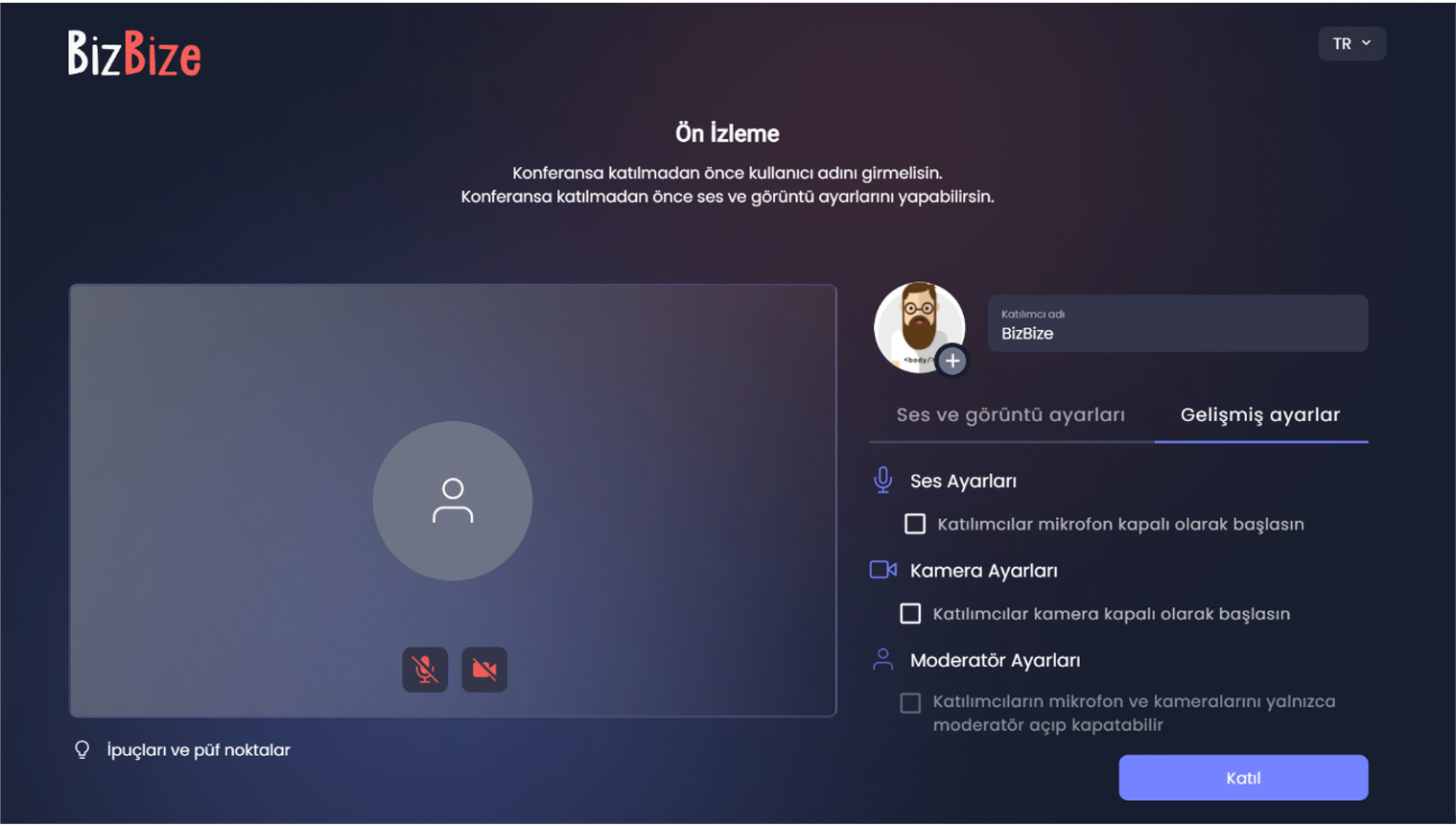
BizBize for all your video conferencing and online meeting needs with 4 languages support (English, Spanish, Russian, Turkish)
Secure Communication: Your data is safe with end-to-end encryption.
Easy Accessa: Use the video conferencing platform on your browser without installation.
Functional Features: Discover BizBize’s advanced features that will elevate your video communication experience.
Local Setup Option: Store your data on your own servers.
Webinar, Secure File Sharing, Whiteboard, Encrypted Meeting Mode, Web-Based Application
Individual Use
A flawless video conferencing experience with unique features.
Corporate Use
Sector-specific online meeting solutions for you to stay connected with your coworkers and clients.

UEStudio is a comprehensive development environment built upon the robust foundation of UltraEdit, tailored specifically for developers and teams requiring advanced Git integration and project management capabilities. It combines powerful text editing features with native support for version control systems, streamlining the development workflow within a single application.
Key Features and Functionality:
- Integrated Git Support: Manage Git repositories directly within UEStudio, enabling cloning, committing, pushing, pulling, and branch management without leaving the editor.
- Branch Manager: A user-friendly interface to create, merge, rebase, and track Git branches, facilitating efficient version control and collaboration.
- UltraCompare Integration: Seamlessly review changes, compare file versions, and resolve merge conflicts using the integrated UltraCompare tool.
- IntelliTips Language Intelligence: Enhance coding efficiency with context-aware code suggestions, function parameter lists, and class member insights.
- Compiler Support: Native support for over 30 popular compilers, including Microsoft Visual C++, Java, and GNU C/C++, allowing for in-editor compilation and debugging.
- Project Management: Advanced project features such as batch building, class browsing, and project conversion to streamline development processes.
Primary Value and User Solutions:
UEStudio addresses the complexities of modern software development by integrating essential tools into a unified platform. By combining a powerful text editor with comprehensive Git support, it eliminates the need for multiple disparate applications, thereby enhancing productivity and reducing context switching. The inclusion of IntelliTips and compiler support further accelerates coding and debugging tasks, making UEStudio an invaluable asset for developers seeking an efficient and cohesive development environment.

AI4Chat introduces a revolutionary all-in-one chatbot hub, eliminating the need for multiple apps to interact with different AI chatbots. This platform houses a diverse range of bots like Google Bard, OpenAI's ChatGPT and GPT4, Meta's Llama 2, and others, all accessible under a single roof.
The app supports over 75 languages, customizable word counts, a variety of conversational tones, and seamless integration with Google Search for real-time information access. Additional functionalities include voice chat in multiple languages and the capability to upload and discuss files and images, enriching the interactive experience.
With chat synchronization across devices with the AI4Chat website and mobile apps and a suite of organizational tools like folders, labels, notes and search, AI4Chat is designed to streamline and elevate the digital content creation process, catering to a broad spectrum of user needs and preferences.
AI4Chat emphasizes convenience and allows users to explore the realms of generative AI without the hassle of managing multiple applications.

Vercept introduces Vy, an AI-powered computer interface designed to revolutionize human-computer interaction by enabling users to accomplish tasks more efficiently and intuitively. Vy operates directly on your Mac, integrating seamlessly with your existing applications and accounts without requiring additional configurations. By understanding your screen and responding to natural language commands, Vy automates repetitive tasks, allowing you to focus on more meaningful work. Its on-device operation ensures your data remains private and secure, as it doesn't rely on cloud-based processing. Vy is compatible with macOS 14.0 or later.
Key Features and Functionality:
- Automated Task Execution: Vy handles repetitive tasks with high accuracy, freeing up your time for more important activities.
- Zero Configuration: Eliminates the need for manual integrations; no connecting Slack, linking Google Drive, or authenticating Notion—Vy just works.
- Privacy-Focused: Operates directly from your workspace, keeping sensitive files, passwords, and personal data private and under your control.
- Background Mode: Completes tasks without interrupting your workflow, allowing you to continue using your computer normally.
- Scheduled Workflows: Automates tasks by scheduling workflows to run at specific times or intervals, enhancing productivity.
Primary Value and User Solutions:
Vy addresses the inefficiencies of traditional human-computer interactions by providing an intuitive, AI-driven interface that understands and executes user commands directly on their devices. This eliminates the need for navigating complex menus or performing repetitive tasks manually. By automating routine processes and operating seamlessly within existing applications, Vy enhances productivity, reduces time spent on mundane tasks, and ensures user data remains secure by processing information locally. Its user-centric design empowers individuals to achieve more with less effort, transforming the way they interact with technology.

PST exporter Tool, also referred to as PST conversion software, is a powerful and valuable tool for converting PST files. This software provides the functionality to migrate PST emails, convert PST files, and export them to various mail accounts including Office 365, Google, Thunderbird, Gmail, AOL, and IMAP.

Form-Data is a backend service that handles form submissions. It offers effective spam detection, email notifications, auto-responses, and file upload. Users can manage submissions in one place, export data to CSV, and integrate with tools like CRMs, Google Sheets, and Slack via Zapier or webhooks.
Multi-workspace allows organizing forms by project or by customer, and with Teams users can all collaborate in the same workspace.
Pricing is based on non-expiring (lifetime) credits, with optional add-ons.
Useful for makers and developers that create their own HTML forms, and want a backend to manage the submissions.
Need to backup & restore your disks, recover deleted documents & photos, erase disks securely, monitor HDD health, or even repair PC when Windows can't start normally? Try Active@ Data Studio!

FastStats is a web analytics solution. FastStats is optimized to deal with the massive log files generated by busy modern web sites. The FastStats analysis module contains only optimized C code and hooks directly into low-level Windows APIs.

Best Free Keylogger is a PC monitoring tool with built in parental controls and web filters. It runs invisibly in the background and monitors keystrokes, clipboard records, internet activity and application usage. Best Free Keylogger can also capture periodical screenshots of ongoing activities. These features on Best Free Keylogger make it an ideal solution for monitoring your childrens or employees PC activity while you are away. The attractive and user-friendly interface on Best Free Keylogger gives easy control to average users as well as power users. Unique Smart Read feature makes keystroke records easily readable by cleverly replacing keystrokes like space and backspace. You can easily tweak Best Free Keyloggers settings to fit your needs. It can monitor specific users, specific applications during specific time periods. You can also configure Best Free Keylogger to uninstall automatically on a specific date without being detected to the user. Parental controls built into Best Free Keylogger consist of Web Filtering, Web Blocking and Application Blocking, all of which can be scheduled to run during specific hours if needed. Web filtering can filter websites based on their text content. These filters can automatically block websites in categories like porn, gambling, weapons, alcohol, drugs etc. They can also block social networking sites and video-sharing sites if required. Web blocking can either block or allow a set of user-defined websites. Best Free Keyloggers Application Blocking feature can block applications on the local machine. Reports generated by Best Free Keylogger can be sent to you over Email, FTP, LAN, or USB as encrypted files or HTML reports. Encrypted files can require a private key for opening whereas HTML reports can be password protected. You can also export all logs locally for backup purposes. However, remote monitoring features are available only on the Pro version.

A one-stop-shop for IT admins. From user permissions and data governance to signature management and people directories, we make managing single or multiple domains simple.

Parallels makes it simple for customers to use and access the application and files they need on any device or OS.