AI-Generated Results
Finding matches…
Berrycast is a screen recording and video messaging platform designed to enhance workplace communication by allowing users to effortlessly capture and share videos of their screen and webcam. This tool aims to improve clarity and productivity in professional settings by transforming complex communications into clear, visual messages, thereby minimizing misunderstandings and accelerating decision-making processes.
Key Features and Functionality:
- One-Click Recording: Easily initiate screen recordings with a single click, capturing both screen activity and webcam input simultaneously.
- Audio and Video Support: Record audio through microphone input and include webcam footage to add a personal touch to communications.
- Annotations: Enhance recordings with annotations such as text, arrows, and shapes to highlight key points and provide additional context.
- Integrations: Seamlessly integrate with popular work tools like Microsoft Teams, Gmail, Asana, Figma, and Didacte, embedding video messages directly into daily workflows.
- Password Protection: Secure recordings with password protection to control access and maintain confidentiality.
- Video Trimming: Edit recordings by trimming unnecessary sections, focusing on essential content for more concise communication.
Primary Value and User Solutions:
Berrycast addresses the challenges of remote and asynchronous communication by providing a platform that enables users to convey complex information visually and personally. By allowing users to record and share detailed video messages, Berrycast enhances understanding, reduces the need for lengthy written explanations, and fosters more effective collaboration. This leads to increased productivity, clearer communication, and a more humanized interaction experience in professional environments.
Not seeing what you're looking for?
Dive deeper into "Microsoft Project" on G2 AI
Toca.io is an intelligent no-code automation platform designed to accelerate digital transformation by enabling organizations to integrate systems, automate business processes, and develop applications without writing a single line of code. By combining robotic process automation (RPA, direct API integration, and data analytics, Toca.io empowers users to streamline operations, enhance productivity, and achieve a faster return on investment compared to traditional automation methods.
Key Features and Functionality:
- Automation: Create and orchestrate complex workflows using a no-code, drag-and-drop interface, allowing for seamless automation of business processes across various systems.
- Application Development: Rapidly build enterprise-ready applications, from simple web portals to complex, logic-based applications, using an intuitive drag-and-drop designer.
- Integrations: Access a repository of pre-built connectors for popular applications and technologies, including Microsoft 365, Teams, Azure, Google Workspace, Slack, Twilio, HubSpot, and Salesforce, facilitating effortless integration with existing systems.
- Toca Development Kit (TDK: Extend the platform's functionality through a built-in software toolkit and browser-based integrated development environment (IDE, enabling developers to create and publish new integrations, automation actions, and application components using C#, Python, and React.
Primary Value and Solutions Provided:
Toca.io addresses the challenges of complex development and integration by offering a unified, low-code platform that simplifies the design, development, and deployment of automation solutions. It empowers organizations to:
- Accelerate Digital Transformation: Implement automation and application development projects in hours or days, rather than weeks or months, leading to quicker returns on investment.
- Enhance Productivity: Automate repetitive tasks and streamline workflows, allowing employees to focus on higher-value activities.
- Democratize Development: Enable users with little to no coding experience, known as citizen developers, to build applications and automate processes in collaboration with IT, fostering innovation and reducing reliance on specialized development resources.
- Ensure Scalability and Security: Deploy and scale solutions easily with enterprise-grade availability and security, supporting the evolving needs of the organization.
By providing a comprehensive suite of tools for automation, application development, and integration, Toca.io empowers organizations to overcome development challenges efficiently and cost-effectively.

AWS Directory Service is a fully managed service that enables organizations to run Microsoft Active Directory (AD) in the AWS Cloud without the need to deploy and maintain their own infrastructure. It simplifies the integration of AD-dependent applications and services, allowing users to access AWS resources using their existing AD credentials.
Key Features and Functionality:
- Managed Microsoft Active Directory: AWS Directory Service offers a native Microsoft AD environment, eliminating the need for data synchronization or replication from on-premises directories.
- High Availability: The service deploys domain controllers across multiple Availability Zones, ensuring resilience and continuous operation.
- Seamless Integration: It integrates with various AWS services, including Amazon EC2, Amazon RDS for SQL Server, and Amazon WorkSpaces, facilitating the deployment of directory-aware workloads.
- Security and Compliance: AWS Directory Service provides end-to-end encryption and meets compliance standards such as SOC, PCI, HIPAA, and FedRAMP.
- Scalability: The service supports organizations of different sizes, offering Standard, Enterprise, and Hybrid editions to meet varying needs.
Primary Value and Solutions Provided:
AWS Directory Service addresses the challenges of managing and scaling Active Directory infrastructure by offering a fully managed, secure, and scalable solution in the cloud. It enables organizations to:
- Simplify Cloud Migration: Easily migrate AD-dependent workloads to AWS without modifying existing applications or user credentials.
- Enhance Security: Leverage AWS's robust security measures to protect directory data and meet regulatory compliance requirements.
- Reduce Operational Overhead: Offload routine maintenance tasks such as patching, monitoring, and backups to AWS, allowing IT teams to focus on strategic initiatives.
- Ensure High Availability: Benefit from a highly available directory service that spans multiple Availability Zones, providing resilience against failures.
By utilizing AWS Directory Service, organizations can seamlessly extend their on-premises AD to the cloud, maintain a consistent user experience, and efficiently manage access to AWS resources.

OnePager Pro builds Gantt charts, timelines and multi-project reports using data from Microsoft Project, Project Online, and Project Server.

Microsoft Purview Communication Compliance is a comprehensive solution designed to help organizations detect, capture, and remediate potentially inappropriate communications across various channels, including email, Microsoft Teams, Microsoft 365 Copilot, Viva Engage, and third-party platforms. By leveraging predefined and customizable policies, it enables organizations to monitor internal and external communications for regulatory compliance violations, such as sharing sensitive information, harassing language, or adult content. Built with privacy at its core, the solution ensures user anonymity through pseudonymization, incorporates role-based access controls, and maintains detailed audit logs to uphold user privacy.
Key Features and Functionality:
- Multi-Channel Monitoring: Supports surveillance of communications across email, Microsoft Teams, Microsoft 365 Copilot, Viva Engage, and various third-party platforms.
- Customizable Policies: Offers both predefined and user-defined policies to detect specific compliance violations tailored to organizational needs.
- Privacy-Centric Design: Ensures user anonymity through pseudonymization, implements role-based access controls, and maintains comprehensive audit logs to protect user privacy.
- Flexible Remediation Workflows: Provides workflows to quickly address violations, including the ability to remove inappropriate messages from Microsoft Teams.
- Integration with Other Tools: Seamlessly integrates with Microsoft Insider Risk Management, Power Automate, and Data Loss Prevention solutions to enhance compliance and risk management strategies.
Primary Value and Problem Solved:
Communication Compliance addresses the critical need for organizations to monitor and manage communication risks effectively. By detecting and mitigating regulatory compliance violations and business conduct issues, it helps organizations maintain a safe and compliant communication environment. This proactive approach not only reduces the risk of regulatory fines and legal repercussions but also fosters a positive corporate culture by ensuring that all communications adhere to established policies and standards.

NetExplorer is a French software company specializing in secure online file sharing, storage, and collaborative solutions for businesses. Founded in 2007, NetExplorer offers a cloud-based platform that enables organizations to manage the entire lifecycle of their documents, accessible from anywhere, while maintaining stringent security standards. The company provides a comprehensive suite of applications, including web interfaces, synchronization software, mobile applications, network drives, and integrations with tools like Microsoft Office and Outlook. NetExplorer's solutions are designed to enhance productivity and ensure data sovereignty, with data centers located in France, Luxembourg, and Switzerland. The platform is certified ISO 27001 for information security, ISO 9001 for quality, and ISO 14001 for environmental management, and is authorized to store and process personal health data through its HDS certification.
Key Features and Functionality:
- Secure File Sharing: Transfer files of any size or format with restricted access through secure, customizable links.
- Real-Time Collaboration: Collaborate on documents with internal and external users, featuring real-time co-editing, version control, and online review and annotation capabilities.
- Electronic Signature: Simplify processes with secure electronic signatures compliant with European standards (eIDAS).
- Advanced Security Measures: Implement password protection, access expiration settings, download notifications, and single download limitations to safeguard sensitive information.
- Integration with Office 365: Edit documents directly in the browser with Office Online, enabling real-time co-editing without the need for downloads or manual saving.
- Mobile Accessibility: Access and manage files securely from smartphones or tablets, ensuring data availability on the go.
Primary Value and Solutions Provided:
NetExplorer addresses the critical need for secure and efficient document management and collaboration within organizations. By offering a centralized platform with robust security features, it ensures that sensitive data is protected while facilitating seamless collaboration among team members, regardless of their location. The integration with tools like Office 365 and compliance with stringent certifications make NetExplorer a trusted solution for businesses aiming to enhance productivity without compromising on security.
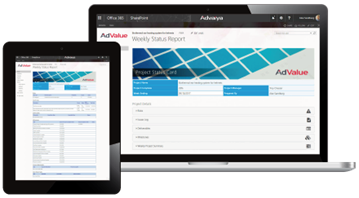
Advaiya’s project status reporting tool for Microsoft Project Online is designed for documenting and sharing projects weekly status easily and effectively.
Omega 365 is a fully integrated Software as a Service platform designed to streamline project and asset management across various industries, including industrial and building construction, infrastructure, and facilities management. By offering a cohesive suite of applications, Omega 365 enables organizations to efficiently plan, execute, control, and manage projects and assets of all sizes. Built with native cloud technology and a zero-trust architecture, the platform ensures data availability, reliability, and security, leveraging Microsoft Azure's data governance and security innovations.
Key Features and Functionality:
- Document Management: Organize and control access to documentation for compliance and streamlined workflows.
- Completion Management: Track progress and ensure timely, structured handovers at each execution stage.
- BIM and Asset Management: Optimize management, enhance portfolio management, and ensure seamless construction processes.
- Planning and Scheduling: Manage projects with efficiency, create scenarios to analyze and adjust schedules, and connect project activities, milestones, costs, resources, risks, and document delivery to project plans.
- Cost Management: Gain full cost control with detailed tracking and forecasting.
- Contract Management: Manage contract obligations and timelines with complete transparency.
- Quality Management: Ensure adherence to quality standards and compliance throughout.
- Risk Management: Identify and mitigate risks to minimize potential impacts.
- HSE Management: Track incidents and improve health, safety, and environmental outcomes.
- Work Preparation and Execution: Coordinate work preparation, material supply, and logistics to ensure efficient resource use and project readiness.
- Interface Management: Track and resolve interfaces between various teams or disciplines.
- Management of Change: Control changes to manage impacts on scope, cost, and timing.
Primary Value and Solutions Provided:
Omega 365 enhances collaboration by connecting data and teams, reducing errors, and providing real-time status overviews and accurate data about projects and assets. The platform increases efficiency through its integrated system, allowing teams to seamlessly view, share, and contribute across the solution without the need for specialized systems. It improves quality by organizing data in a structured way, providing visibility for teams to track, control, and optimize critical processes. Additionally, Omega 365 supports improved decision-making by offering real-time updates and accurate data, enabling teams to make informed decisions about projects and assets.

The software you use within the IT environment impacts the productivity of your team and business. But, what if software doesn't fit or you can't use it within the corporate infrastructure? It can cause the growth of Shadow IT and jeopardize your IT estate, from software contamination to the failure of the entire system.
Apptimized SafeBox allows you to use a managed sandbox environment in the cloud and work with non-standard workloads depending on your needs.
Use cloud-native safeboxes to assess, test, evaluate, package, etc. before installing software on your devices.
Any data produced using SafeBox and your installed apps are kept kept as long as you need. Also, SafeBox provides you with a snapshot feature that allows you to switch between SafeBox states, setups, and configurations. If you wish to go back to the initial or intermediate state - simply revert it to a snapshot.
SafeBox benefits:
- Cloud-based. Increase data security through cloud isolation, hosted on Microsoft Azure. No need to find “shadow IT” alternatives or risk company’s infrastructure and data while using unknown or not yet approved software.
- Cost-effective. Use an isolated consumption-based environment with flexible PAYG pricing to minimize the financial risks of developing, maintaining, and licensing your solutions, not being sure of their efficiency.
- Access anywhere. Available 24/7 and accessible from any location and device.
- Simlicity. Intuitive and logically designed SafeBox interface, friendly to users of all skill levels. Minimal technical prerequisites are needed: Internet access & modern browser.
- Centralized management. Use SafeBox dashboards to manage projects without the need to leave the system. There is no upper limit for projects, users, or Safeboxes.
- Compliance. Product evaluation and pre-production software validation allow you to keep the environment compliant and minimize risks of incompatibilities.

Microsoft Security Exposure Management is a comprehensive security solution designed to provide organizations with unified visibility into their security posture across various assets and workloads. By continuously discovering and assessing assets, it enables security teams to proactively identify vulnerabilities, prioritize critical risks, and implement effective remediation strategies to reduce the attack surface and enhance overall security.
Key Features and Functionality:
- Attack Surface Management: Offers a continuous and comprehensive view of the organization's attack surface, allowing teams to monitor exposure and focus on protecting critical assets.
- Attack Path Analysis: Visualizes potential attack paths, enabling security teams to identify and prioritize remediation efforts to reduce risks effectively.
- Unified Exposure Insights: Aggregates security posture data from various sources, providing decision-makers with a consolidated view of the organization's threat exposure to facilitate informed decision-making.
- Integration with Security Tools: Seamlessly integrates with both Microsoft and non-Microsoft security and infrastructure tools, including Microsoft Defender for Endpoint, Microsoft Defender for Identity, and Microsoft Defender for Cloud Apps, to provide a holistic view of the security environment.
Primary Value and Problem Solved:
Microsoft Security Exposure Management addresses the challenge of fragmented security data and siloed management by unifying disparate data sources into a single, comprehensive view. This integration empowers organizations to proactively manage their attack surfaces, protect critical assets, and mitigate exposure risks. By providing continuous visibility and actionable insights, it enables security teams to transition from reactive vulnerability management to a proactive, risk-based approach, thereby enhancing the organization's overall security posture and resilience against evolving cyber threats.

Azure Data Lake Storage is a cloud-based, enterprise-grade data lake solution designed to store and analyze massive amounts of data in its native format. It enables organizations to eliminate data silos by providing a single storage platform that supports structured, semi-structured, and unstructured data. This service is optimized for high-performance analytics workloads, allowing businesses to derive insights from their data efficiently.
Key Features and Functionality:
- Scalability: Offers virtually unlimited storage capacity, accommodating data of any size and type without the need for upfront capacity planning.
- Security: Provides robust security mechanisms, including encryption at rest, advanced threat protection, and integration with Microsoft Entra ID (formerly Azure Active Directory) for role-based access control.
- Integration: Seamlessly integrates with various Azure services such as Azure Databricks, Azure Synapse Analytics, and Azure HDInsight, facilitating comprehensive data processing and analytics.
- Cost Optimization: Allows independent scaling of storage and compute resources, supports tiered storage options, and offers lifecycle management policies to optimize costs.
- Performance: Supports high-throughput and low-latency data access, enabling efficient processing of large-scale analytics queries.
Primary Value and Solutions Provided:
Azure Data Lake Storage addresses the challenges of managing and analyzing vast amounts of diverse data by offering a scalable, secure, and cost-effective storage solution. It eliminates data silos, enabling organizations to store all their data in a single repository, regardless of format or size. This unified approach facilitates seamless data ingestion, processing, and visualization, empowering businesses to unlock valuable insights and drive informed decision-making. By integrating with popular analytics frameworks and Azure services, it streamlines the development of big data solutions, reducing time-to-insight and enhancing overall productivity.

UEStudio is a comprehensive development environment built upon the robust foundation of UltraEdit, tailored specifically for developers and teams requiring advanced Git integration and project management capabilities. It combines powerful text editing features with native support for version control systems, streamlining the development workflow within a single application.
Key Features and Functionality:
- Integrated Git Support: Manage Git repositories directly within UEStudio, enabling cloning, committing, pushing, pulling, and branch management without leaving the editor.
- Branch Manager: A user-friendly interface to create, merge, rebase, and track Git branches, facilitating efficient version control and collaboration.
- UltraCompare Integration: Seamlessly review changes, compare file versions, and resolve merge conflicts using the integrated UltraCompare tool.
- IntelliTips Language Intelligence: Enhance coding efficiency with context-aware code suggestions, function parameter lists, and class member insights.
- Compiler Support: Native support for over 30 popular compilers, including Microsoft Visual C++, Java, and GNU C/C++, allowing for in-editor compilation and debugging.
- Project Management: Advanced project features such as batch building, class browsing, and project conversion to streamline development processes.
Primary Value and User Solutions:
UEStudio addresses the complexities of modern software development by integrating essential tools into a unified platform. By combining a powerful text editor with comprehensive Git support, it eliminates the need for multiple disparate applications, thereby enhancing productivity and reducing context switching. The inclusion of IntelliTips and compiler support further accelerates coding and debugging tasks, making UEStudio an invaluable asset for developers seeking an efficient and cohesive development environment.

Logan Consulting is a professional services firm dedicated to assisting businesses in maximizing the value of their consulting investments. Established in 1992, the firm employs a top-down, business process-driven methodology to help clients capture EBITDA and ROI from enterprise software projects. Operating primarily throughout North America, Logan Consulting serves a diverse clientele ranging from global Fortune 100 companies to middle-market regional firms.
Key Features and Functionality:
- Enterprise Software Services: Specializes in strategic planning, selection, implementation, and support of enterprise software solutions, including:
- Microsoft Dynamics 365 Finance & Supply Chain Management
- Microsoft Dynamics 365 Business Central
- NetSuite
- QAD
- Acumatica
- Microsoft Dynamics 365 Customer Engagement
- Management Consulting: Offers services such as enterprise software strategic planning, project management, change management, and business process design and implementation.
- Technology Consulting: Provides expertise in strategic technology planning, packaged software selection, and customer relationship management solutions.
Primary Value and Solutions Provided:
Logan Consulting's primary value lies in its commitment to delivering high-quality consulting services that drive tangible business outcomes. By leveraging standard software functionality and promoting knowledge transfer, the firm ensures clients achieve self-sufficiency and maximize their return on investment. Their disciplined, agile approach focuses on understanding each company's unique business needs, prescribing and executing solutions that are needs-based, and minimizing costly customizations.
#develop (short for SharpDevelop) is a free IDE for C#, VB.NET and Boo projects on Microsoft's .NET platform. It is open-source, and you can download both sourcecode and executables from this site.

Fantastical is a comprehensive calendar and task management application designed to streamline scheduling across various platforms, including Mac, iPhone, iPad, Apple Watch, Apple Vision Pro, and Windows. By integrating multiple calendars such as Google, Outlook, and iCloud into a unified interface, Fantastical ensures users can manage their personal and professional commitments efficiently.
Key Features and Functionality:
- Unified Calendar View: Consolidates multiple calendars into a single, organized display, eliminating the hassle of juggling separate schedules.
- Natural Language Input: Allows users to create events and tasks using everyday language, such as "Meeting with Alex at 3pm tomorrow," facilitating quick and intuitive scheduling.
- Task Management Integration: Supports task management tools like Todoist, enabling users to oversee tasks and reminders alongside their calendar events.
- Calendar Sets: Offers customizable calendar sets for different aspects of life (e.g., work, family, projects), allowing users to switch views effortlessly and maintain focus.
- Conference Call Integration: Provides seamless integration with over 30 conference call services, including Zoom, Microsoft Teams, and Google Meet, enabling users to join meetings with a single tap.
- Time Zone Support: Simplifies scheduling across multiple time zones by displaying converted times and availability, ideal for coordinating with distributed teams.
- Customizable Widgets and Weather Forecasts: Features widgets for at-a-glance updates and integrates detailed 10-day weather forecasts into calendar views, assisting in comprehensive planning.
- Cross-Platform Synchronization: Ensures a seamless experience across all supported devices, with a single subscription unlocking premium features everywhere.
Primary Value and User Solutions:
Fantastical addresses the complexities of modern scheduling by unifying disparate calendars and task lists into a cohesive, user-friendly interface. Its natural language processing and integration with popular task management tools streamline event creation and task tracking. The application's support for multiple time zones and conference call services simplifies coordination with global teams. By offering customizable views and widgets, Fantastical enhances productivity and ensures users stay informed and organized, effectively reducing the cognitive load associated with managing multiple schedules and commitments.
OrCAD Capture is a schematic design solution widely utilized by electronic design engineers and technicians for creating and documenting electrical circuits. It offers a comprehensive environment for schematic entry, facilitating the design of complex circuits with efficiency and precision.
Key Features and Functionality:
- Hierarchical Design Support: Enables the creation of complex designs through hierarchical structures, promoting modularity and ease of management.
- Variant Design Capabilities: Allows for the development of multiple design variants within a single project, streamlining the process of accommodating different requirements.
- Extensive Component Library: Provides access to a vast library of schematic symbols and components, including discretes, FPGAs, operational amplifiers, and microcontrollers, enhancing design flexibility.
- Component Information System (CIS) Integration: Facilitates seamless integration with company component databases, ensuring the use of preferred and current parts, thereby accelerating the design process and reducing project costs.
- Bi-Directional PCB Integration: Offers seamless integration with PCB design tools, enabling data synchronization and cross-probing between schematic and board designs, ensuring consistency and reducing errors.
- Simulation Integration: Supports integration with simulation tools like PSpice, allowing for early analysis and verification of circuit behavior directly within the schematic environment.
Primary Value and User Solutions:
OrCAD Capture streamlines the schematic design process by providing a user-friendly interface combined with powerful features that enhance productivity and accuracy. Its integration with component databases and simulation tools ensures that designs are both efficient and reliable. By supporting hierarchical and variant designs, it accommodates complex projects and multiple design requirements, reducing time-to-market and development costs. The extensive component library and seamless PCB integration further simplify the design workflow, making OrCAD Capture an essential tool for modern electronic design.

iPPM is a comprehensive Project and Portfolio Management (PPM) platform designed for PMOs and organizations that need greater visibility, governance, and control over their project portfolios.
Built for the Microsoft 365 ecosystem, iPPM helps organizations manage the entire project lifecycle — from demand intake, prioritization and portfolio planning to project execution, schedules, resources, risks, costs, benefits, strategic alignment and executive reporting.
The platform combines powerful PPM capabilities with an intuitive user experience, helping PMOs standardize processes, improve decision-making and demonstrate the business value delivered by projects.
iPPM includes integrated solutions for portfolio and project management, professional Gantt scheduling, Kanban boards, workflows, strategic planning and OKRs, dashboards, reports and AI-powered project insights.
Unlike standalone PPM tools, iPPM leverages the customer's Microsoft 365 environment, including SharePoint Online and Microsoft Entra ID, providing enterprise-grade authentication, security and integration while keeping organizational data within the customer's Microsoft ecosystem.
iPPM is ideal for PMOs looking for a modern alternative to legacy PPM platforms and for organizations that need more robust portfolio and project governance than task management tools can provide.

InspireIP is an innovative platform designed to streamline the management of ideas and intellectual property (IP within organizations. By integrating tools for idea generation, collaboration, and IP protection, InspireIP empowers teams to transform creative concepts into valuable assets efficiently. The platform's user-friendly interface and robust features facilitate a seamless innovation journey from inception to implementation.
Key Features and Functionality:
- Idea Management: Capture, submit, evaluate, and collaborate on ideas effortlessly, ensuring no valuable concept is overlooked.
- Innovation Challenges: Organize and manage innovation campaigns to focus team efforts on specific goals.
- Real-Time Updates: Stay informed with instant notifications and progress tracking.
- Multi-Team Support: Facilitate collaboration across various departments and teams.
- Integrated Communication: Utilize built-in chat and commenting features to enhance team interaction.
- AI-Powered Assistance: Leverage AI tools like the Novelty Checker to assess the uniqueness of ideas.
- Invention Disclosure Management: Simplify the process of documenting and protecting inventions with intuitive disclosure forms.
- Advanced Reporting: Gain insights into innovation performance through comprehensive analytics.
- Third-Party Integrations: Seamlessly connect with existing tools such as Microsoft Teams, Trello, Jira, Slack, and Asana.
Primary Value and User Solutions:
InspireIP addresses the common challenges organizations face in managing innovation and intellectual property. By providing a centralized platform, it ensures that ideas are systematically captured, evaluated, and developed, reducing the risk of lost or overlooked concepts. The integration of AI tools and real-time collaboration features accelerates the innovation cycle, leading to faster time-to-market for new products and services. Additionally, InspireIP's robust IP management capabilities safeguard intellectual assets, ensuring legal protection and compliance. Overall, InspireIP fosters a culture of continuous innovation, enhances team engagement, and drives business growth by transforming ideas into tangible outcomes.

Trend Micro IM Security provides threat and data protection for Microsoft Skype for Business servers. Top-rated malware and URL filtering block phishing messages and malicious file transfers. Built-in Data Loss Prevention (DLP) controls the sharing of sensitive data. Minimize risk exposure with messaging content filters that warn users of unprofessional behavior. This real-time security solution also helps avoid conflicts of interest with communication controls to enforce blocks or ethical walls.