AI-Generated Results
Finding matches…
fastCRW is an open-source web scraping, crawling, search, and data extraction API distributed as a single Rust binary. It exposes a /v1 HTTP API compatible with the Firecrawl request and response format, and a search endpoint compatible with the Tavily response format, allowing existing client SDKs to connect by changing only the base URL.
The product provides four primary endpoints. Scrape fetches a single URL and returns the page as structured markdown along with metadata, optional screenshots, raw HTML, and link graphs. Crawl traverses an entire site or a subset of paths, supports sitemap discovery, robots.txt rules, canonical URL deduplication, and streams results as pages complete. Search accepts a natural-language query and returns ranked web results with the full page content already converted to markdown in the same response. Extract retrieves structured fields from one or more URLs using either a JSON schema or a natural-language prompt. Map returns the URL graph of a site without fetching individual pages.
The binary is written in Rust and distributed as an 8 MB Docker image. Idle resident memory is approximately 6.6 MB. On a public 1,000-URL benchmark, the median request latency is 710 ms and the average is 833 ms. JavaScript rendering is included for pages that require it, and a static fetch path is used automatically when JavaScript execution is not needed.
fastCRW is available in two deployment modes. A managed cloud service provides a free tier of 500 credits per month and paid tiers for higher volumes. The full source code is also published under the AGPL-3.0 license on GitHub and can be self-hosted on any infrastructure with no per-request fees. Both modes share the same binary and feature set.
Official client SDKs are available for Python and Node.js, along with a command-line interface. Integrations exist for LangChain, LlamaIndex, CrewAI, n8n, and Dify. Distribution packages are available through Homebrew, apt, and Docker.
Typical use cases include retrieval-augmented generation pipelines, autonomous LLM agents, competitive intelligence monitoring, lead enrichment workflows, and dataset construction for model training and fine-tuning.
Not seeing what you're looking for?
Dive deeper into "ScreenDuo" on G2 AI

Relativity Asia Systems offers a comprehensive suite of cloud-based legal technology solutions designed to streamline e-discovery, compliance, and investigation processes for organizations across the Asia-Pacific region. By leveraging advanced artificial intelligence and secure cloud infrastructure, Relativity Asia Systems enables legal teams to manage large volumes of complex, unstructured data efficiently and securely.
Key Features and Functionality:
- RelativityOne: A secure, end-to-end SaaS platform that allows users to control their data in-country, innovate faster with a flexible and extensible cloud platform, and streamline their technology stack to manage large volumes of complex, unstructured data.
- Relativity aiR: A suite of generative AI solutions, including aiR for Review and aiR for Privilege, designed to enhance document review and privilege identification capabilities.
- Data Security and Compliance: RelativityOne offers proactive threat prevention, 24/7 monitoring, automated security processes, and leading compliance certifications to reduce risk.
- Multilingual and Multimedia Data Processing: The platform accommodates diverse file types and messaging platforms, including formats from platforms like WeChat, which include audio clips, screenshots, and attachments.
Primary Value and Solutions Provided:
Relativity Asia Systems addresses the unique challenges faced by legal teams in the Asia-Pacific region, such as managing cross-border disputes, handling multilingual and multimedia data, and ensuring compliance with local data privacy laws. By providing a secure, scalable, and AI-powered platform, Relativity Asia Systems empowers organizations to:
- Enhance Efficiency: Accelerate document processing and review times, reducing manual workloads and associated costs.
- Ensure Compliance: Maintain data within local jurisdictions to comply with regional data privacy regulations.
- Improve Accuracy: Utilize advanced AI tools to identify relevant information and privileged content more effectively.
- Facilitate Collaboration: Enable seamless collaboration across global teams with standardized workflows and cloud-based access.
By integrating these capabilities, Relativity Asia Systems provides a robust solution that transforms how legal professionals manage and analyze data, ultimately leading to more informed decision-making and better outcomes in legal proceedings.

Operarium is a specialized service that deploys AI agents to enhance B2B growth and client operations. These agents are designed to handle tasks such as researching signals, conducting outreach, managing follow-ups, supporting client relationships, creating proofs, performing quality assurance, and reporting progress. Human supervision is maintained for critical actions involving financial transactions, account management, legal risks, or irreversible decisions.
Key Features and Functionality:
- Agent Ownership: Each AI agent operates within a defined scope, equipped with specific tools, communication channels, and safety boundaries to ensure accountability and efficiency.
- Operational Loops: Agents execute tasks that drive tangible progress, such as advancing leads, managing conversations, preparing proposals, processing payments, delivering services, creating proofs, and mitigating risks.
- Validation Mechanisms: Every action taken by an agent is subject to validation through evidence like screenshots, receipts, logs, tests, delivered artifacts, or observable platform changes, ensuring transparency and reliability.
- Human Oversight: Critical operations involving expenditures, billing, two-factor authentication, know-your-customer processes, legal considerations, sensitive information, and irreversible actions are reserved for human intervention to maintain security and compliance.
Primary Value and Solutions Provided:
Operarium addresses the challenge of managing persistent operational tasks that are often overlooked or inconsistently handled by human teams. By integrating AI agents into B2B workflows, businesses can achieve:
- Enhanced Efficiency: Automating routine tasks allows human resources to focus on strategic initiatives, improving overall productivity.
- Consistent Follow-Up: Agents ensure that leads and client communications are consistently nurtured, reducing the risk of missed opportunities.
- Quality Assurance: Systematic monitoring and validation of processes help maintain high standards and minimize errors.
- Scalable Operations: The agentic model allows businesses to scale their operations without proportionally increasing human resources, facilitating growth and adaptability.
By implementing Operarium's agentic operating cells, companies can streamline their B2B processes, enhance client engagement, and drive sustainable growth.

Ovi AI is an AI-powered quality assurance (QA) engineer designed to seamlessly integrate with development workflows, providing comprehensive QA coverage from ticket creation to release. By connecting to platforms like GitHub and Linear, Ovi AI automates the entire QA process, enabling engineering teams to maintain high-quality standards without the need for dedicated QA personnel.
Key Features and Functionality:
- Ticket Analysis: Ovi AI reviews project tickets before development begins, identifying gaps, edge cases, and potential risks, ensuring that requirements are clear and complete.
- Pull Request (PR) Analysis: Upon opening or updating a PR, Ovi AI analyzes code changes to detect functional bugs, logic errors, and UI/UX issues, providing a ship score and highlighting blockers.
- Test Scenario Generation: It generates prioritized test scenarios with detailed steps and expected outcomes, derived directly from code changes, facilitating thorough testing.
- Automated Browser Testing: Ovi AI executes test scenarios in real cloud-based Chromium browsers, capturing screenshots and delivering pass/fail reports, ensuring that applications function correctly across different environments.
- Playwright Test Code: It provides ready-to-use Playwright `.spec.js` files with accurate selectors extracted from the codebase, which can be integrated into continuous integration (CI) pipelines for automated testing.
- Release Reports: Ovi AI delivers clear summaries on PRs, outlining blockers, non-blockers, and providing a final Go/No-Go decision, aiding teams in making informed release decisions.
Primary Value and Problem Solved:
Ovi AI addresses the common challenges faced by startups and scaling teams, such as the high cost and complexity of implementing effective QA processes. By automating QA tasks, Ovi AI reduces the time and resources spent on bug detection and rework, allowing teams to focus on feature development and innovation. This leads to faster release cycles, improved product quality, and enhanced user satisfaction. Ovi AI effectively serves as a virtual QA engineer, providing consistent and reliable QA coverage without the overhead associated with traditional QA hiring and management.

TestParty is an AI-powered digital accessibility remediation platform designed to help organizations achieve and maintain compliance with the Web Content Accessibility Guidelines (WCAG) across their digital assets, including websites, mobile applications, images, and PDFs. By integrating seamlessly into existing development workflows, TestParty ensures that accessibility is addressed proactively throughout the software development lifecycle, from initial coding to production monitoring. This comprehensive approach not only enhances user experience for individuals with disabilities but also mitigates legal risks associated with non-compliance.
Key Features and Functionality:
- PreGame Web AI Scanner: Identifies accessibility violations directly within integrated development environments (IDEs), enabling developers to detect and address issues early in the development process.
- Bouncer Plus (Legacy Code Remediation): Scans existing codebases to identify and remediate accessibility issues in legacy code, automatically generating pull requests with AI-suggested fixes.
- Bouncer (New Pull Request Integration): Analyzes new pull requests for accessibility violations, providing actionable feedback within GitHub, GitLab, or Bitbucket workflows to prevent issues from reaching production.
- Spotlight (Production Monitoring): Continuously monitors live websites for accessibility compliance, generating detailed reports with screenshots and remediation guidance to ensure ongoing adherence to WCAG standards.
- The Hub (Centralized Dashboard): Offers a unified control center for managing accessibility across all projects, providing executive reporting, team performance analytics, progress tracking, and automated generation of Accessibility Conformance Reports (ACRs) and Voluntary Product Accessibility Templates (VPATs).
Primary Value and Problem Solved:
TestParty addresses the critical need for organizations to create and maintain accessible digital experiences for users with disabilities. By automating the detection and remediation of accessibility issues at the source code level, TestParty ensures that compliance is not merely a superficial overlay but a fundamental aspect of the development process. This proactive approach reduces the reliance on manual audits, accelerates the remediation process, and provides organizations with the tools to demonstrate ongoing compliance with global accessibility standards, thereby reducing legal risks and enhancing inclusivity.

Cleverence Label is browser-based barcode label software for warehouses, stores and plants. Labels are designed once and printed at any site on the printers already there, and HQ can see what printed.
Design: lay out text, barcodes, images and shapes at the label's real size. Supported symbologies include Code 128, Code 39, EAN-13, UPC-A, GS1-128, ITF-14, QR and Data Matrix. Fields fill from Excel, CSV or Google Sheets, so one design prints thousands of different labels. An AI assistant drafts a label from a description, or from a photo or screenshot of an existing label, which makes moving off desktop label software quick.
Print anywhere: install PrintHub on one Windows PC per site with label printers. Anyone in the organization can then print to those Zebra, DYMO or other Windows printers from a browser in another office, warehouse or country, and each job shows whether it printed. No driver on every laptop and no per-printer license. Labels can also be printed as PDFs at label size or on A4 and Letter sheets.
Many sites: HQ keeps a versioned label library and publishes a version when it is ready. Rules lock label size, barcode sizes and required elements. Site staff get a "Can use" role, so they print the published label but cannot change it.
Automation: helpers produce whole runs, such as SSCC-18 codes from a GS1 company prefix, pallet LPNs or every bin location in a rack, with check digits calculated. Scan stations print a label for each scanned product. A REST API lets an ERP or WMS send labels to any printer.
Templates cover 4x6 shipping, SSCC, LPN, bin location, shelf price, UPC/EAN product, asset tags, Amazon FBA box labels and DYMO stock sizes.
Free plan available. Paid plans are priced by labels printed, not per printer or seat. Cleverence has built barcode software for more than 20 years and is used by 15,000 companies in 30+ countries.

Greypike Compliance App helps small and mid-sized businesses get audit-ready and stay that way. It skips the spreadsheets and the confusing control language. Instead, it gives your team a clear list of plain-English tasks, and Greypike's compliance experts review your work as you go.
How it works
Pick your frameworks. Greypike supports CMMC (Level 1 and Level 2), NIST SP 800-171, HIPAA, SOC 2, ISO/IEC 27001, PCI DSS, CIS Controls, and the FTC Safeguards Rule.
Do one task at a time. Every requirement becomes a simple task, like writing a policy, uploading a screenshot, or confirming a routine check. You always see the next step.
Do the work once. One finished task counts toward every framework it covers, so you don't redo the same work for each standard.
Get expert review. Greypike practitioners check your evidence and either approve it or send it back with clear notes.
Watch your progress. Dashboards show how ready you are for each framework. For CMMC, that includes your SPRS score, System Security Plan (SSP), and Plan of Action & Milestones (POA&M).
Key features
Policy and procedure templates you can adapt to your business
Automatic evidence collection from Microsoft 365 and Google Workspace
AI-assisted policy review that suggests improvements (your experts still decide)
Recurring task reminders, so you stay compliant all year, not just at audit time
Risk assessments, asset inventories, and access reviews
Built-in training courses on each framework and on security basics
A Trust Center for sharing your security posture with customers
E-signatures for policies and formal statements
Built secure
Every customer's data is kept separate from every other customer's, encrypted at rest and in transit, and protected with role-based access. Every action leaves a tamper-evident audit trail.
Who it's for
Defense contractors, healthcare organizations, financial services firms, SaaS companies, and any growing business that needs to prove its security to customers, auditors, or regulators, without hiring a full compliance team.

gptme is a personal AI assistant designed to operate directly within your terminal, offering a suite of tools to enhance productivity across various tasks. It enables users to execute code, manage files, browse the web, and process images seamlessly from a command-line interface. By integrating with multiple large language model (LLM) providers, including OpenAI and Anthropic, gptme delivers a versatile and customizable experience. Its open-source nature ensures transparency and adaptability, making it a reliable companion for developers and knowledge workers seeking efficient, local AI assistance.
Key Features and Functionality:
- Code Execution: Run shell commands and Python code directly within your terminal environment.
- File Management: Read, write, and modify files using incremental changes facilitated by the patch tool.
- Web Interaction: Browse and interact with web content through integrated browser capabilities.
- Vision Support: Analyze images and screenshots to enhance visual data processing.
- Self-Correction: Utilize feedback loops to refine outputs and improve accuracy over time.
- Lessons System: Access contextual guidance and best practices tailored to your tasks.
- Multi-LLM Support: Choose from various LLM providers to suit your specific needs.
- Web Interface and API: Engage with gptme through a modern web interface or integrate it into your applications via a REST API.
- Computer Use Tool: Interact with GUI applications by granting the assistant access to your desktop environment.
- Persistent Agents: Create long-running agents with structured memory and identity management for complex tasks.
Primary Value and User Solutions:
gptme addresses the need for an unconstrained, local AI assistant capable of performing a wide range of tasks without the limitations often associated with cloud-based solutions. By operating directly within the user's terminal, it ensures privacy, reduces latency, and provides a seamless integration into existing workflows. Whether it's accelerating development processes, automating routine tasks, or facilitating interactive learning, gptme empowers users to enhance their productivity and efficiency through intelligent, context-aware assistance.

Impero Wellbeing is a comprehensive student safety solution designed to proactively monitor and address potential risks to student mental health and safety in educational environments. By integrating advanced AI and machine learning technologies, it enables real-time detection of concerning online behaviors, allowing educators to intervene promptly and effectively.
Key Features and Functionality:
- AI-Powered Keyword Detection: Monitors student devices for harmful keywords related to self-harm, bullying, violence, drugs, weapons, pornography, or radicalization, capturing incidents through screenshots for immediate review.
- False Positive Reduction: Utilizes machine learning to minimize false positives, ensuring that educators are alerted only to genuine threats, thereby saving time and focusing attention where it's most needed.
- Offline Concern Management: Allows teachers to log observed offline incidents, such as signs of neglect or physical harm, creating a comprehensive profile of a student's well-being.
- Holistic Student Profiles: Combines online and offline data to provide a complete view of each student's mental and physical health, facilitating informed interventions.
- Granular Permission Levels: Ensures confidentiality by allowing schools to set specific access permissions for staff members handling sensitive student information.
- Extensive Keyword Database: Maintains a continually updated repository of over 7,000 keywords and phrases covering various concerns, including mental health and exploitation.
- Intuitive Reporting: Offers detailed reports on individual student behavior and broader trends across classes or the entire school, aiding in strategic planning for interventions.
- Cross-Platform Compatibility: Supports multiple operating systems, including Windows, macOS, iOS, Android, and ChromeOS, ensuring seamless integration into diverse educational settings.
Primary Value and Problem Solved:
Impero Wellbeing addresses the critical need for proactive student safety measures in the digital age. By providing real-time monitoring and comprehensive insights into both online and offline behaviors, it empowers educators to identify and address potential risks early. This holistic approach not only enhances student safety but also supports mental health initiatives, creating a secure and supportive learning environment. The integration of AI and machine learning streamlines the monitoring process, reducing false positives and allowing educators to focus on genuine concerns, thereby improving efficiency and effectiveness in safeguarding students.

Bright Development is a boutique digital agency based in the United States, specializing in cross-platform web and mobile development. They offer a comprehensive suite of services, including business consulting, design, and development, tailored to meet the unique needs of each client. With a focus on integrity and transparency, Bright Development ensures that projects are curated from start to finish, providing clients with clear specifications, open communication, and real-time project status updates. Their commitment to excellence is evident in their tried-and-true process, which emphasizes establishing clear project specifications, maintaining total transparency through access to project management systems, and upholding the highest standards of integrity by promptly addressing any issues that may arise.
Key Features and Functionality:
- Comprehensive Project Management: Bright Development guides projects from inception to completion, ensuring clarity and alignment with client goals.
- Transparent Communication: Clients have access to project management systems, participate in communication channels like Slack, and receive detailed time sheets with activity monitoring and screenshots.
- Integrity and Accountability: The agency is committed to owning up to mistakes and promptly informing clients of any project issues.
- High-Quality Product Development: They create intelligent, modular apps and websites built to last and aligned with business objectives.
- Performance Optimization: Sites and apps are developed following modern best practices to ensure fast loading times and optimal performance.
- User-Centric Design: Design principles are rooted in a deep understanding of the client's business, resulting in intuitive and effective designs.
- Straightforward Pricing: Clients receive clear timelines and cost estimates, eliminating confusion and unexpected expenses.
- Personalized Service: Bright Development offers a personal approach, taking client businesses seriously and providing VIP service.
- Reliable Support: The agency is readily available to address any problems, offering real support when it's needed most.
Primary Value and Solutions Provided:
Bright Development addresses the challenges businesses face in navigating the complexities of digital development by offering a transparent, integrity-driven approach to project management. Their comprehensive services ensure that clients receive high-quality, performance-optimized digital products tailored to their specific needs. By emphasizing clear communication, personalized service, and accountability, Bright Development builds trust and fosters long-term partnerships, enabling clients to achieve their business objectives with confidence.

Dock is a comprehensive App Store Optimization (ASO) platform designed to enhance the visibility and performance of mobile applications in the App Store. By integrating advanced tools and AI-driven insights, Dock empowers developers to optimize their app's textual and visual elements, manage user reviews effectively, and stay ahead of competitors, ultimately driving higher download rates and user engagement.
Key Features and Functionality:
- ASO Management: Provides a suite of text optimization tools to craft compelling content, including keyword research and performance analytics, to improve app discovery and conversion rates.
- Smart Keyword Analysis: Offers advanced keyword analysis tools that track popularity metrics, provide actionable ASO recommendations, and identify optimization opportunities to boost app visibility.
- AI-Powered Keyword Generation: Utilizes an AI engine to analyze market trends and competitor strategies, automatically prioritizing high-performing keywords based on search volume and competition levels.
- Text Optimization Advisor: Delivers real-time feedback on app titles, subtitles, descriptions, and update notes, suggesting improvements aligned with ASO best practices to enhance conversion rates.
- Screenshot Management: Enables the creation, analysis, and optimization of visual assets through intuitive tools and AI-powered recommendations, enhancing the app's visual appeal to potential users.
- Review Management: Centralizes user feedback monitoring, response, and analysis, transforming reviews into actionable insights to improve app features and user satisfaction.
- Competitor Analysis: Provides tools to monitor competitors' ASO strategies, identify market gaps, and discover opportunities to differentiate and outperform in the app marketplace.
- App Evolution: Tracks the impact of metadata updates on App Store rankings, offering a clear timeline of ASO efforts and their results.
- App Intelligence: Offers comprehensive insights into any app's performance, including downloads, revenue, keyword rankings, and marketing strategies, facilitating informed decision-making.
Primary Value and User Solutions:
Dock addresses the challenges developers face in optimizing their apps for the App Store by providing a unified platform that combines AI-driven analytics with user-friendly tools. It simplifies the ASO process, enabling developers to enhance app visibility, engage users effectively, and make data-informed decisions to stay competitive. By leveraging Dock's comprehensive features, developers can achieve higher download rates, improved user satisfaction, and sustained app success in a competitive digital landscape.

Grass Go is a lawn care business app for solo operators and small crews. It runs your recurring schedule, sends estimates and invoices, collects card and bank payments through Stripe, and keeps every client and property in one place. It works on iPhone, Android and the web (app.grassgo.com), and your data syncs across all three.
Schedule: a recurring timeline built for weekly and biweekly mowing. Complete a visit with one tap and the next one is scheduled automatically. Add photos to completed visits, see which visits are still unbilled, and bill straight from the schedule.
Estimates: build estimates with line items and photos, or describe the job and let the AI assistant draft it. Send by email or text. Your client can accept or decline on a web page, and an accepted estimate turns into an invoice or a recurring service plan.
Invoices and payments: send invoices by email, text or print. Clients pay online by card or bank transfer through Stripe, and you can keep cards on file and charge one with a tap after service. Cash, check and other payments you mark as paid offline are free to record.
Routes and map: build a multi-stop route, let Grass Go order the stops for the shortest drive, and adjust by hand. Share a route with a crew member by link. A map shows every property you service, with one-tap navigation.
Clients: contacts, properties, service plans, billing preferences and service history, with no required fields. The AI assistant can import a messy spreadsheet, a photo of a notebook or screenshots into clients, properties and jobs, and you approve every change before it is saved.
Optional add-ons: a business phone line ($24.99/mo) with a dedicated number, calling and texting, call recording, 100 minutes and 100 texts a month, and an AI receptionist that answers when you can't. A simple business website ($5/mo) on sites.grassgo.com/yourname, free to build and preview, with a contact form that sends requests into the app as leads.
Pricing: the core app is free; phone ($24.99/mo) and website ($5/mo) are optional add-ons. Online payments cost Stripe's processing (2.9% + 30 cents per card payment; less for bank transfers) plus a 0.7% Grass Go platform fee. No credit card is needed to sign up.

PerkyDash is a modern website monitoring platform designed for indie makers, freelancers, agencies, and small SaaS teams who need reliable monitoring without enterprise complexity or pricing.
THE PROBLEM
Most monitoring tools either do too little (basic uptime pings that miss real problems) or too much (enterprise observability suites that cost hundreds per month and require a DevOps team to configure). PerkyDash sits in the sweet spot: comprehensive monitoring that's simple to set up and affordable to run.
CORE FEATURES
Uptime Monitoring
HTTP/HTTPS, TCP, DNS, and Ping checks every 60 seconds from multiple global locations. Alerts via email, Slack, SMS, and webhooks.
Visual Diff Monitoring
Automated screenshot comparison detects layout breaks, missing elements, and CSS regressions — problems that return HTTP 200 but look broken to users. Especially valuable for WordPress sites where plugin updates can silently break layouts.
API Flow Monitoring
Configure multi-step API sequences to monitor complete user journeys: authenticate, chain requests, validate responses. Monitor login flows, checkout processes, and complex API interactions without writing code.
SSL & Domain Monitoring
Track SSL certificate and domain registration expiry dates. Get alerts at 30, 14, and 7 days before expiry. Prevents the most embarrassing and most preventable type of outage.
Status Pages
Full-featured public and private status pages with custom domains, subscriber notifications (email/SMS), and incident management. Connected to real monitoring data for automatic status updates.
Emergency Status Page
The standout feature: create a public status page in 60 seconds during a crisis — completely free, no signup required. When your site is down and you need to communicate immediately, this is your fire extinguisher.
WHO IT'S FOR
- Indie makers running multiple SaaS products
- Freelancers managing client websites
- Agencies needing white-label monitoring for clients
- Small SaaS teams who need monitoring + status pages in one tool
- E-commerce stores needing checkout flow monitoring
PRICING
Simple, transparent pricing with no per-monitor limits:
- Free: Emergency Status Page tool
- Pro ($9.99/month): Full monitoring + status pages
- Agency ($39.99/month): White-label + everything
- 14-day free trial, no credit card required
Built by a software entrepreneur with 30 years of SaaS experience and a previous 7-figure exit.

Pixparkle is a chat-based AI image and video generator for people who ship visuals every day: content creators, e-commerce sellers, social media managers, and brand teams.
Instead of filling in a prompt form once and starting over when the result is off, Pixparkle works like a real conversation. Describe the image you need in plain language, attach reference photos, and refine the output across as many turns as you want. Every edit builds on the previous one without regenerating from scratch and without quality loss, so you can go from rough idea to polished asset inside a single chat thread.
Three things make Pixparkle different from one-shot prompt tools like Midjourney, DALL-E, and Adobe Firefly:
1. A long multimodal chat powered by Gemini 3. A single conversation can hold dozens of turns of context: your reference photos, your brand guidelines, your generated outputs, and your follow-up edits. Drop in pictures, paste screenshots, type in plain English, and the assistant keeps every detail consistent across the whole session.
2. Six frontier image and video models in one subscription. GPT Image 2 from OpenAI for precise text rendering and photorealism, the full Google Nano Banana family for fast high-quality output, Flux Fast for low-cost drafts, Seedream 5 and Veo 3.1 Lite for video. You can switch between models per turn to match the task without losing context, and we absorb model upgrades for you.
3. Image-to-video in the same chat. Generate a hero image with text plus reference photos, then ask Pixparkle to turn it into a short marketing clip for Reels, TikTok, or product demos. No platform switching, no re-uploading, no copy-pasting prompts.
Pixparkle is built for real workflows:
- Content creators turn a thumbnail concept into 4 A/B/C/D variants in under 5 minutes (down from a 4.2-hour Photoshop grind), exported up to 4K.
- E-commerce sellers upload one rough product photo and generate Amazon and Shopify spec compliant white-background, lifestyle, and seasonal shots on demand. A 200-SKU catalog now costs under $5 of compute instead of $30 to $50 per studio shot.
- Social media managers drop one brand visual into the chat and ask for 9:16 Reels, 1:1 Instagram, and 16:9 X variants in one session, with brand color, typography, and subject identity locked across every ratio.

Woodo is a statement-analysis workspace built for financial advisors, fee-only planners, and bookkeepers who manage spending data across multiple clients, without ever asking a client to hand over their bank login.
Most financial tools rely on Plaid: to see a client's transactions, you need them to connect their bank with their credentials. In practice, that's where onboarding stalls, privacy-conscious clients refuse, bank connections break, and you're left chasing screenshots and spreadsheets. Woodo removes that friction entirely. Your client downloads the same monthly statement PDF they already get from their bank or card issuer, and Woodo's AI extracts every transaction, identifies merchants, assigns categories, and builds a clean spending dashboard in seconds. No Plaid token. No credential vault. No bank handshake.
Built for multi-client practices:
Unlimited client profiles (Advisor and Max tiers) ⇾ a separate, organized workspace for every client or household you manage.
Magic-link sharing ⇾ invite a client or a household member into their profile without sharing logins.
AI transaction extraction from any bank or credit card statement PDF ⇾ Chase, BofA, Citi, Capital One, Amex, Wells Fargo, Discover, plus almost all international banks and online banks.
Auto-categorization and an editorial dashboard ⇾ headline spend, category breakdowns, week-over-week deltas, recurring-charge detection, and outliers, ready to walk a client through.
CSV and Excel export ⇾ drop clean, categorized data straight into your own models or bookkeeping workflow.
Card rewards analysis ⇾ what each client's cards actually earned in the period.
Pricing scales with your book of business: Advisor at $49.99/mo ($39.99/mo annual) covers 50 statements/month with unlimited profiles, and Max ($249.99/mo, $209.99/mo annual) unlocks unlimited statements for larger practices.
And it isn't only advisors who love it. The same clarity that makes Woodo useful in a client review is exactly why end-clients adopt it for themselves: individuals leaving Mint, couples who want a shared view without sharing bank passwords, and freelancers who need clean expense data without a heavyweight accounting suite.
The tool you run your practice on is the one your clients are happy to keep using on their own.

Codex CLI is OpenAI's open-source, terminal-based coding agent designed to enhance developers' productivity by integrating AI assistance directly into the command-line interface. It enables users to generate, edit, and execute code locally through natural language prompts, streamlining the development process without leaving the terminal environment.
Key Features and Functionality:
- Local Execution: Codex CLI operates entirely on the user's machine, ensuring that code remains within the local environment, thereby maintaining privacy and security.
- Multimodal Input Support: The tool accepts various input forms, including text, screenshots, and diagrams, allowing for versatile code generation and editing capabilities.
- Multiple Programming Language Support: Codex CLI supports a wide range of programming languages, including Python, JavaScript, TypeScript, C++, and Bash, catering to diverse development needs.
- Flexible Operation Modes: Users can choose from three distinct modes based on their requirements:
- Suggest Mode: Proposes edits and commands, requiring user approval before implementation.
- Auto Edit Mode: Automatically edits files but seeks confirmation before executing shell commands.
- Full Auto Mode: Performs read, write, and execute operations autonomously within a sandboxed environment.
- Version Control Integration: Codex CLI is aware of version control systems like Git, providing safety prompts to prevent unintended changes to live code.
- Open Source Accessibility: Being open-source under the Apache-2.0 license, Codex CLI allows for customization and community contributions, fostering continuous improvement and adaptability.
Primary Value and User Solutions:
Codex CLI addresses several challenges faced by developers:
- Enhanced Productivity: By automating routine coding tasks and providing intelligent suggestions, it reduces the time spent on manual coding, allowing developers to focus on complex problem-solving.
- Seamless Integration: Operating directly within the terminal, it eliminates the need to switch between different tools or interfaces, maintaining a smooth and efficient workflow.
- Improved Code Quality: With features like code reviews and debugging assistance, Codex CLI helps in identifying and rectifying errors early, leading to more robust and reliable codebases.
- Privacy Assurance: Since all operations are performed locally, users have full control over their code, ensuring that sensitive information remains secure.
In summary, Codex CLI serves as a powerful AI-driven assistant that integrates seamlessly into the terminal, offering developers an efficient, secure, and versatile tool to enhance their coding experience.

AnyMP4 Mac Screen Recorder is a multifaceted digital capture utility for macOS that enables users to record high-definition video and audio directly from their computer screen. This software functions as a primary tool for documenting on-screen activities, allowing for the creation of video tutorials, the archiving of live streaming content, and the capturing of virtual meetings or gameplay sessions.
The application falls into the category of screen capture and recording software, designed specifically to integrate with the macOS environment, including support for Retina displays and compatibility with both Intel and Apple Silicon architectures. It serves a diverse audience, including educators producing instructional content, business professionals documenting software workflows, and gamers seeking to record their performance. By offering granular control over the recording area—ranging from the full screen to specific application windows or custom-defined regions—the tool provides the flexibility required for professional-grade media production.
Essential Features and Functionalities
• Multi-Source Recording: Simultaneously captures system audio, microphone input, and webcam feeds, allowing users to overlay personal narration or "picture-in-picture" video onto screen recordings.
• Real-Time Annotation Tools: Features a suite of drawing tools that permit users to add shapes, lines, text, and callouts during the recording process to emphasize specific on-screen elements.
• Task Scheduling: Includes an automated recording feature where users can set specific start and end times, enabling the software to capture live broadcasts or webinars without manual intervention.
• Flexible Output Formats: Supports saving recordings in various high-quality formats such as MP4, MOV, and M4V, with customizable frame rates and bitrates to balance file size and visual clarity.
• Advanced Mouse Tracking: Offers the ability to highlight the cursor, record mouse clicks, and show keystrokes, which is critical for creating clear and effective technical demonstrations.
Beyond basic video capture, AnyMP4 Mac Screen Recorder includes a dedicated audio recording mode and a screenshot utility. The audio recorder is capable of isolating system sounds from microphone input, which is useful for capturing high-fidelity music or podcasts. The snapshot tool allows for the capture of still images during or independently of a recording session, with options to save them in standard formats like PNG or JPEG. By consolidating these recording and editing functions, the software provides Mac users with an objective and reliable method for transforming fleeting on-screen information into permanent digital assets.

ViralDM is Instagram auto DM and comment-to-DM automation software for businesses, brands and creators in India. When someone comments a keyword on a post or reel, replies to a story or sends a DM, ViralDM replies automatically through the Instagram API provided by Meta, in the customer's own language (English, Hinglish and 9 Indian languages), with links, buttons, product cards or a UPI payment link. Businesses use it to capture leads, sell products and take bookings from Instagram without replying by hand.
AUTOMATION: comment-to-DM on posts and reels, story reply and story mention replies, DM keyword replies, live comment replies, any-comment triggers, follow-to-unlock replies, tap-to-get-it buttons, link buttons, product cards, multi-step flows and sequences, broadcasts, and public comment replies.
AI: AI replies trained on your own FAQs and prices (AI Brain), automatic language detection, AI comment replies, an inbox copilot that drafts replies, and Audience Pulse to see questions, buying intent and complaints.
SELL AND COLLECT PAYMENTS: UPI payment links inside the DM with payment screenshot verification, a store with UPI and Razorpay checkout, digital products with PDF stamping, paid questions (Priority DMs), memberships, coupons and bookings with calendar sync.
LEADS AND CRM: lead capture of email and phone inside the DM, subscriber tags and segments, a pipeline, and connectors for Google Sheets, Slack, Telegram, Calendly, Shopify and webhooks.
GROW: post scheduling to Instagram, Facebook Pages, LinkedIn, Telegram, Pinterest and YouTube, giveaways, referral (Friend Loops) campaigns, a link-in-bio page, a media kit, Google review requests, Comment Shield to hide spam and abusive comments, and a safety mode for posts that go viral.
TEAMS AND DEVELOPERS: shared team inbox with roles, agency and client accounts, analytics, a REST API, an n8n node and an MCP server so Claude, ChatGPT and Cursor can run your Instagram inbox.
COMING SOON: WhatsApp Business automation (Meta has approved our WhatsApp Business messaging permissions), automatic AI replies to your Google Business Profile reviews, the Android app back on Google Play, and an iPhone app.
Free plan available; paid plans start at Rs 499 per month.

Submi is the top-rated directory submission service built for SaaS companies, AI tools, startups, developer products, and online businesses that want more visibility, backlinks, and discovery without spending hours submitting to directories manually.
Instead of charging for submission attempts, Submi focuses on live results.
With Submi, you create and approve your product profile once, choose the directories you want to target, and the team handles the submission process for you. This includes directory account creation, form submissions, email verification, badge requirements, follow-ups, and tracking each listing until it goes live.
Every live listing is added to your Submi dashboard with the directory name, domain rating, backlink type, status, and public listing URL, so you can verify the results yourself.
Submi is designed for founders and marketing teams that want a more transparent alternative to traditional directory submission services.
Key features include:
- 100 or 300 live directory listing campaigns
- Directory selection before starting a campaign
- AI, SaaS, startup, developer, and software-focused directories
- Public live URL for every completed listing
- Dofollow and nofollow backlink opportunities
- Directory authority and DR tracking
- Managed account creation and email verification
- Badge Sync for directories that require website badges
- Optional indexing requests
- Live campaign dashboard
- CSV export of completed listings
- No recurring subscription required
One of the biggest differences with Submi is that a rejected or unpublished submission does not count toward the campaign total. If a directory declines, stalls, or does not publish the product, Submi continues with other suitable directories until the agreed number of live listings is reached.
Customers can also review the available directory database and exclude directories where their product is already listed or where they do not want to appear.
Submi is especially useful after launching on platforms such as Product Hunt, Fazier, or other startup communities, when founders want to expand their product's presence across a larger network of relevant directories.
Rather than managing dozens or hundreds of forms, accounts, verification emails, screenshots, descriptions, and follow-ups manually, founders can manage the entire process from one place.
Submi helps companies turn one product profile into a broader online presence across relevant software, startup, SaaS, AI, and developer directories.
You build the product. Submi helps the world find it.
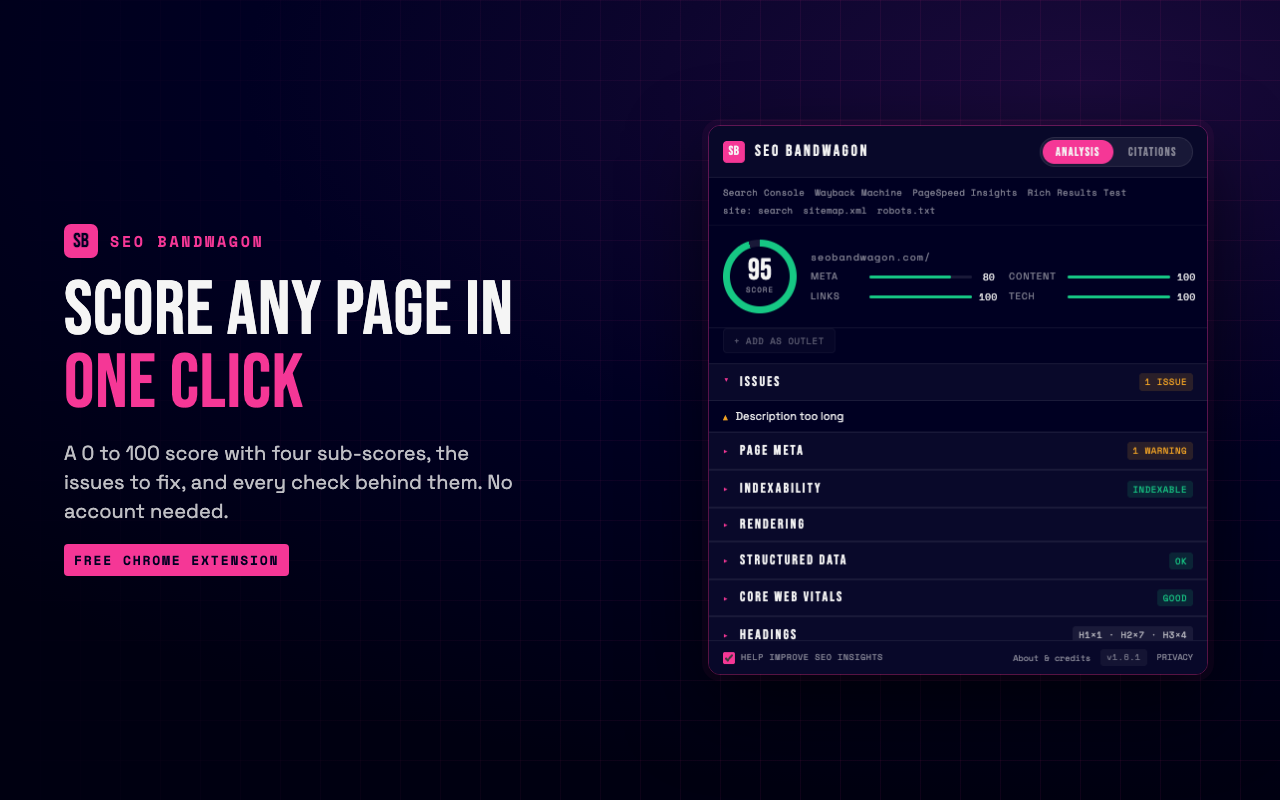
SEO Bandwagon SEO Chrome Extension reviews the on-page SEO of the site you have open, right in
your browser. One click gives you the findings, and no account is needed.
ON-PAGE ANALYSIS
A score from 0 to 100 with a letter grade, four sub-scores and a short list
of fixes. You also see a preview of how the listing could look on Google,
loading and layout speed as your browser measured it, the heading outline,
links and images, and the technology behind the site.
LINK CHECK
On request, tests every link, groups them by status code and highlights the
broken ones where they sit.
INDEXABILITY
Shows the redirects that led to the URL and whether search engines may index
it, with a plain yes or no. You can trace another address without leaving.
HREFLANG
Finds mistakes in language and region tags and, when you ask, confirms that
each alternate version links back.
RENDERING
Compares the HTML the server sent with what your browser displayed, so you
can spot what scripts changed. You can also reload the tab the way a crawler
requests it.
STRUCTURED DATA
Reads the structured data on the page and tells you what is missing before
Google can use it. A local business without a phone number, or a product
without an offer, is flagged with the exact field to add, and complete items
show the rich result they qualify for.
SEARCH RESULTS OVERLAY
Adds a small stats bar under each organic listing on Google and a toolbar to
copy or export what you see. Exports stay on your computer, and only domain
names are looked up, never your query.
SEARCH CONSOLE HELPERS
In a performance report, opens any query on Google in one click and, when
you compare two date ranges, puts the percent change beside each number.
PANELS AND APPEARANCE
A side panel keeps the findings open while you work. Choose Night, Day or
Auto; two matching Chrome themes are available separately.
EXPORTS AND TOOLS
Every section exports a CSV you save yourself, and a right-click menu opens
the current URL in common testing and archive tools.
OPTIONAL ACCOUNT
Connect a free SEO Bandwagon account to keep your analyses, review local
business listings and manage outreach. While reviewing a listing you can save
a screenshot of the whole page as proof, kept on your computer. Nothing is sent until you connect and
turn on sending in Settings.
```
**Privacy policy**: https://seobandwagon.com/privacy