AI-Generated Results
Finding matches…
Final Cut Pro is a professional video editing software developed by Apple Inc., designed for filmmakers, video editors, and content creators seeking advanced editing capabilities. It offers a comprehensive suite of tools that enable users to craft high-quality videos with precision and efficiency.
Key Features and Functionality:
- Magnetic Timeline: Allows for flexible and non-destructive editing by automatically adjusting clips as others are added or removed.
- Multicam Editing: Supports simultaneous editing of multi-camera projects with automatic synchronization based on timecodes, audio waveforms, or markers.
- Advanced Color Grading: Provides professional color correction tools, including color wheels, color curves, and hue/saturation curves, for precise color adjustments.
- 360° Video Editing: Offers tools for editing and exporting 360-degree videos, including support for VR headsets.
- High-Performance Rendering: Utilizes the power of modern Mac hardware to deliver fast rendering and playback, even for complex projects.
- Extensive Plugin Support: Integrates seamlessly with a wide range of third-party plugins, expanding its capabilities with additional effects, transitions, and tools.
Primary Value and Solutions Provided:
Final Cut Pro streamlines the video editing process, enabling users to produce professional-grade content efficiently. Its intuitive interface combined with powerful features reduces the learning curve for newcomers while offering depth for seasoned editors. The software's optimization for macOS ensures smooth performance, allowing users to focus on creativity without technical hindrances. By supporting a wide array of formats and resolutions, including 4K and HDR, Final Cut Pro addresses the diverse needs of modern video production, making it a versatile tool for various projects.
Not seeing what you're looking for?
Dive deeper into "Color Designer" on G2 AI

Taggbox Widget is a versatile platform that enables businesses to curate and embed dynamic social media feeds, user-generated content (UGC, and customer reviews directly onto their websites. By aggregating content from over 20 social media and digital platforms, Taggbox Widget enhances website engagement, builds trust, and drives conversions. Its user-friendly interface allows for seamless integration without the need for coding expertise, making it accessible for businesses of all sizes.
Key Features and Functionality:
- Social Media Feed Integration: Collect and display content from platforms such as Instagram, Facebook, Twitter, YouTube, TikTok, and more, providing a comprehensive view of your brand's social presence.
- User Reviews Widget: Aggregate and showcase customer reviews from sources like Google, Yelp, Airbnb, and Facebook, highlighting authentic feedback to build credibility.
- Customization Options: Personalize widgets with various themes, layouts, fonts, colors, and styles to align with your brand identity.
- Advanced Moderation and Filters: Ensure content quality by filtering out irrelevant or inappropriate posts, maintaining a premium user experience.
- Responsive Design: Widgets are designed to be fully responsive, ensuring optimal display across all devices and screen sizes.
- Real-Time Updates: Automatically update content in real-time, keeping your website fresh and engaging without manual intervention.
- Shoppable Galleries: Transform UGC into shoppable content by tagging products, enabling a seamless shopping experience directly from the widget.
- Insightful Analytics: Track widget performance with metrics such as impressions, clicks, and engagement rates to inform and optimize your content strategy.
Primary Value and Solutions Provided:
Taggbox Widget addresses the challenge of keeping websites engaging and trustworthy by leveraging authentic content from real users. By embedding social media feeds and customer reviews, businesses can:
- Build Social Proof and Trust: Showcasing real customer experiences and feedback enhances credibility, encouraging new visitors to trust and engage with the brand.
- Increase Audience Engagement: Dynamic and regularly updated content captures visitor attention, leading to longer site visits and higher interaction rates.
- Boost Conversions and Sales: Authentic UGC and reviews influence purchasing decisions, driving higher conversion rates and sales.
- Enhance Brand Awareness: Integrating social media content broadens reach and visibility, connecting with a wider audience across multiple platforms.
By seamlessly integrating Taggbox Widget, businesses can create a more interactive and trustworthy online presence, ultimately leading to improved customer relationships and increased revenue.

LumaFusion is a professional-grade video editing app designed for iOS devices, offering a comprehensive suite of tools that transform your iPhone or iPad into a powerful editing studio. With its intuitive interface and robust features, LumaFusion caters to filmmakers, journalists, and content creators seeking to produce high-quality videos on the go.
Key Features and Functionality:
- Multitrack Editing: Supports up to 12 video/audio tracks and 12 additional audio tracks, enabling complex, layered video projects.
- Advanced Effects: Offers layered effects including green screen, luma and chroma keys, blurs, distortions, and color corrections.
- Custom Titling: Allows creation of multilayer titles with adjustable fonts, colors, borders, and shadows.
- Audio Tools: Features graphic and parametric EQs, voice isolation, keyframeable audio levels, and support for third-party audio plugins.
- Speed Control: Provides speed ramping with unlimited keyframes, slow-motion, fast-motion, and time-lapse editing capabilities.
- Media Management: Enables direct use of media from various sources, including Photos, Frame.io, Dropbox Replay, and USB-C drives.
- Project Management: Supports various aspect ratios and frame rates, with options to duplicate, add notes, color-tag, and archive projects.
Primary Value and User Solutions:
LumaFusion empowers users to create professional-quality videos directly from their mobile devices, eliminating the need for traditional desktop setups. Its comprehensive feature set addresses the needs of both novice and experienced editors, providing tools for intricate editing, precise color grading, and sophisticated audio mixing. By offering a one-time purchase model, LumaFusion delivers exceptional value, making high-end video editing accessible and affordable for a wide range of users.

PhotoBulk is a user-friendly bulk image editor designed for macOS, enabling users to efficiently process large volumes of images with ease. It offers a comprehensive suite of tools for adding watermarks, resizing, optimizing, renaming, and converting images, all within a streamlined interface. With real-time preview capabilities, users can see modifications as they are applied, ensuring precise control over the editing process. PhotoBulk supports popular image formats, including JPEG, PNG, GIF, BMP, and TIFF, making it a versatile solution for photographers, designers, and anyone needing to manage multiple images simultaneously.
Key Features and Functionality:
- Bulk Watermarking: Apply multiple text or image watermarks to numerous photos simultaneously. Customize watermarks with various fonts, sizes, colors, and opacity levels, and position them anywhere on the image.
- Batch Resizing: Resize hundreds of images quickly by specifying dimensions, percentages, or maximum sizes, while maintaining the original aspect ratio.
- Image Optimization: Compress JPEG and PNG files to reduce file sizes without compromising resolution or quality, facilitating faster sharing and saving storage space.
- Bulk Renaming: Rename multiple photos in one go, using customizable naming patterns and sequences, to keep your photo library organized.
- Format Conversion: Convert images between various formats, including JPEG, PNG, GIF, BMP, TIFF, and HEIC (on macOS 10.13 and later), to suit different requirements.
- Real-Time Preview: View changes instantly before processing, allowing for adjustments and ensuring desired outcomes.
- Preset Management: Save frequently used settings as presets for quicker application in future editing sessions.
Primary Value and User Solutions:
PhotoBulk addresses the challenges of managing and editing large collections of images by providing a powerful yet intuitive platform for batch processing. It significantly reduces the time and effort required to perform repetitive tasks such as watermarking, resizing, and renaming, thereby enhancing productivity. By offering real-time previews and customizable presets, PhotoBulk ensures that users achieve consistent and professional results across all their images. Its support for multiple formats and optimization features makes it an essential tool for anyone looking to streamline their image editing workflow.

DropSend is a file transfer and storage service designed to facilitate the secure and efficient sharing of large files. Catering to both individual and business users, DropSend enables the transmission of files up to 8GB in size without the need for recipients to have an account or download additional software. This user-friendly platform ensures that large videos, photos, documents, and other file types can be sent quickly and securely, streamlining workflows and enhancing productivity.
Key Features and Functionality:
- Large File Transfers: Send files up to 8GB in size, eliminating the constraints of email attachments.
- Secure Online Storage: Store files in a secure cloud environment, accessible from any device.
- Cross-Platform Accessibility: Access and manage files via web browsers, desktop applications for Windows and Mac, and mobile apps for iOS devices.
- No Recipient Account Required: Recipients can download files without needing a DropSend account, simplifying the sharing process.
- Password Protection and Download Limits: Enhance security by setting passwords and controlling the number of downloads per file.
- Custom Branding: Business users can customize the interface with their company name, logo, and colors for a branded experience.
Primary Value and User Solutions:
DropSend addresses the common challenge of sharing large files that exceed email size limitations. By providing a secure, efficient, and user-friendly platform, it enables users to send substantial files without compromising on speed or security. The service's flexibility across various devices and operating systems ensures that users can manage and share their files seamlessly, whether for personal projects or professional collaborations. For businesses, DropSend offers advanced features like custom branding and multi-user accounts, facilitating enhanced collaboration and maintaining brand consistency.

Espresso is a macOS-native web development application designed to streamline the creation, editing, and publishing of websites. It combines a sophisticated text editor with visual design tools, real-time previews, and automated build systems, supporting languages such as HTML, CSS, JavaScript, and dynamic languages like PHP, Ruby, and Python. The application also integrates modern preprocessors like SCSS and LESS, enhancing the development workflow.
Key Features and Functionality:
- Live Preview with Browser Xray: Espresso offers real-time previews in browsers like Chrome, Firefox, and Safari, allowing developers to inspect and edit CSS directly on live pages without saving or reloading.
- CSSEdit Tools and Preprocessor Support: The application includes visual editors for colors, gradients, shadows, and layouts, compatible with standard CSS, SCSS, and LESS. The Navigator panel provides style previews and quick filtering for efficient code navigation.
- Dynamo Auto-Building and Clodette Server Sync: Dynamo enables static site generation with reusable templates and smart path resolution, producing output without server dependencies. Clodette facilitates seamless server synchronization, ensuring that local changes are accurately reflected online.
Primary Value and User Solutions:
Espresso's core value lies in its ability to merge next-generation intelligence with Mac-optimized performance, enabling developers to design and code efficiently without compromising on standards or creativity. By integrating live editing, server synchronization, and static site generation, Espresso provides a versatile tool suitable for both prototyping and production-grade projects, thereby enhancing productivity and streamlining the web development process.

Zoho Notebook is a note-taking application designed to enhance productivity by allowing users to capture, organize, and share various types of content seamlessly. Available across multiple platforms—including iOS, Android, Mac, Windows, and Linux—Zoho Notebook offers a unified experience for managing notes, checklists, audio recordings, and images. Its intuitive interface and rich feature set make it suitable for individuals, students, and teams seeking an efficient way to document and collaborate on ideas.
Key Features and Functionality:
- Diverse Note Cards: Zoho Notebook introduces 'Note Cards,' specialized templates for different content types. These include Text Cards for written notes, Checklist Cards for to-do lists, Audio Cards for voice recordings, Photo Cards for images, Sketch Cards for drawings, and File Cards for document attachments.
- Customization and Organization: Users can personalize their notebooks with handcrafted covers, assign colors to Note Cards, and organize content using tags and collections. The app supports both grid and landscape views for flexible navigation.
- Collaboration Tools: Zoho Notebook facilitates real-time collaboration by allowing users to share notes and notebooks with varying levels of access—view, edit, or share permissions. This feature is particularly beneficial for teams working on shared projects.
- Advanced Search and AI Integration: The application offers advanced search capabilities, including Optical Character Recognition (OCR) and object detection, enabling users to find content within images and handwritten notes. Additionally, Notebook AI assists in transcribing audio recordings, translating content, and enhancing note quality by checking for tone, redundancy, and inclusivity.
- Security and Synchronization: All notes are encrypted at rest, ensuring data security. Zoho Notebook syncs across devices and to the cloud, providing consistent access to notes from anywhere.
Primary Value and User Solutions:
Zoho Notebook addresses the need for a comprehensive and user-friendly note-taking solution that caters to various content types and collaboration requirements. By offering customizable Note Cards, seamless organization tools, and robust collaboration features, it empowers users to capture ideas effectively, stay organized, and work collaboratively. The integration of advanced search and AI functionalities further enhances productivity by simplifying content retrieval and improving note quality. With its cross-platform availability and secure synchronization, Zoho Notebook ensures that users have reliable access to their information, making it an invaluable tool for personal and professional use.
VEGAS Pro is a comprehensive video editing software designed to empower creators with a seamless and efficient editing experience. It combines a user-friendly interface with powerful tools, enabling both beginners and professionals to produce high-quality content ranging from social media videos to feature films. With its intuitive design and robust functionality, VEGAS Pro streamlines the editing process, allowing users to focus on their creative vision without technical hindrances.
Key Features and Functionality:
- VEGAS Core Engine: Delivers enhanced performance with up to four times faster playback, ensuring smooth previews and precise color accuracy, even when handling high-resolution media and complex effects.
- Integrated Color Grading: Offers a fully integrated color grading workflow directly on the timeline, eliminating the need to switch modes and maintaining an uninterrupted creative flow.
- Customizable Interface: Allows users to tailor the workspace by docking panels or floating them across multiple screens, creating a personalized editing environment that suits individual workflows.
- Advanced AI Tools: Includes features like Smart Mask for automatic object identification and tracking, Text-based Editing for generating accurate transcripts editable like text documents, and Speech to Text for creating voiceovers in multiple languages with natural-sounding voices.
- Comprehensive Audio Editing: Integrates SOUND FORGE Pro for precise audio recording, editing, and mixing, along with ACID Pro for loop-based music creation, providing a complete audio production suite.
Primary Value and Solutions:
VEGAS Pro addresses the needs of content creators by offering a powerful yet accessible platform that enhances productivity and creativity. Its seamless integration of video and audio editing tools, combined with advanced AI capabilities, simplifies complex tasks and reduces editing time. By providing a customizable and efficient workflow, VEGAS Pro enables users to produce professional-grade content with ease, making it an invaluable tool for filmmakers, YouTubers, and multimedia artists seeking to elevate their projects.

Font Awesome is a comprehensive icon toolkit designed to enhance web and application interfaces with scalable vector icons. Since its inception in 2012, it has become a staple for developers and designers, offering a vast library of icons that can be customized in size, color, and style using CSS. As of 2024, Font Awesome is utilized by 25.4% of websites employing third-party font scripts, making it the second most popular choice after Google Fonts.
Key Features and Functionality:
- Extensive Icon Library: Provides thousands of icons across various categories, including web application icons, brand logos, and more.
- Customizable Styles: Icons are available in multiple styles such as solid, regular, light, and duotone, allowing for seamless integration into diverse design aesthetics.
- Scalability: As vector graphics, the icons maintain clarity and sharpness at any size, ensuring optimal display on high-resolution screens.
- Ease of Use: Integrates effortlessly with web projects through simple CSS classes, enabling quick implementation without the need for additional JavaScript.
- Regular Updates: Continuously expands its collection with new icons and features, keeping pace with evolving design trends and user needs.
Primary Value and User Solutions:
Font Awesome addresses the need for a versatile and easily implementable icon set that enhances user interfaces without compromising performance. By offering a wide range of icons that are both customizable and scalable, it empowers developers and designers to create visually appealing and consistent designs across various platforms. Its ease of integration and extensive documentation reduce development time, allowing for more efficient project workflows. Additionally, the regular introduction of new icons and styles ensures that users have access to contemporary design elements, keeping their projects modern and engaging.

SurveyHero is a comprehensive online survey platform designed to help users create, distribute, and analyze surveys with ease. Since its inception in 2007, it has been trusted by over 3 million users worldwide. The platform offers a user-friendly interface that requires no coding knowledge, enabling individuals and organizations to gather valuable feedback efficiently.
Key Features and Functionality:
- Unlimited Surveys and Responses: Users can create an unlimited number of surveys and collect unlimited responses, ensuring flexibility for various data collection needs.
- Diverse Question Types: The platform provides a wide range of question types, allowing for tailored surveys that meet specific requirements.
- Drag-and-Drop Builder: An intuitive drag-and-drop interface simplifies the survey creation process, making it accessible to users without technical expertise.
- Multilingual Support: Surveys can be translated into multiple languages, catering to a global audience and enhancing inclusivity.
- Anonymous Surveys: The option to create anonymous surveys ensures participant confidentiality, encouraging honest and candid responses.
- Custom Branding: Users can add their own logos and colors, providing a professional appearance that aligns with their brand identity.
- Advanced Logic Features: Skip and display logic (branching) capabilities allow for dynamic surveys that adapt based on participant responses.
- Real-Time Analysis: Responses are updated in real-time, enabling users to monitor trends and make informed decisions promptly.
- Data Export Options: Collected data can be exported in various formats, facilitating further analysis and reporting.
- Mobile Optimization: Surveys are automatically optimized for mobile devices, ensuring a seamless experience for participants on any device.
Primary Value and User Solutions:
SurveyHero addresses the need for an efficient, user-friendly survey creation tool that accommodates both simple and complex survey requirements. By offering unlimited surveys and responses, diverse question types, and advanced features like multilingual support and custom branding, it empowers users to gather meaningful insights from their target audience. The platform's real-time analysis and data export options streamline the decision-making process, making it an invaluable resource for businesses, educators, researchers, and organizations seeking to understand and engage their stakeholders effectively.
Sticky Notes is a Chrome browser extension designed to facilitate quick and efficient note-taking directly within your browser. Since its launch in 2011, it has garnered over 2 million downloads, becoming a trusted tool for users seeking a seamless note-taking experience without the need to switch between applications.
Key Features and Functionality:
- Offline Access: Operate without an internet connection, ensuring uninterrupted note-taking.
- Multiple Notes Layout: Organize thoughts with a three-notes layout and single-click folder organization.
- Customization: Choose from animated themes, various fonts, and text sizes to personalize the interface.
- Focus Mode: Minimize distractions by removing colorful elements, allowing for concentrated work.
- Dark Mode: Reduce eye strain with a dark-themed interface.
- Cloud Backups: Securely store notes with daily, weekly, or monthly backup options.
- Draggable Popup: Keep the extension open and movable across the screen for enhanced multitasking.
Primary Value and User Solutions:
Sticky Notes addresses the need for a swift, in-browser note-taking solution, eliminating the hassle of toggling between different applications. Its offline capability ensures users can capture thoughts anytime, while features like focus mode and customizable themes enhance productivity and user experience. The extension's commitment to privacy ensures that notes remain on the user's device unless cloud backups are enabled, providing peace of mind regarding data security.

Graphy helps you grow your audience, monetize your skills, and host live cohort-based courses. Graphy has been at the forefront of transforming online education and empowering knowledge entrepreneurs to achieve unparalleled success. Our all-in-one platform is designed to streamline course delivery, boost engagement, and fuel business growth, making it a go-to solution for educators and creators alike.

Leadmonk is an inbound lead conversion and scheduling software designed to help B2B revenue teams efficiently convert leads into meetings. By automating the processes of lead qualification, routing, and scheduling, Leadmonk enables businesses to engage with prospects in real-time across various channels, including web forms, cold calls, and marketing campaigns. This streamlined approach reduces manual tasks, minimizes scheduling conflicts, and accelerates the sales cycle, ultimately enhancing conversion rates and driving revenue growth.
Key Features and Functionality:
- Real-Time Lead Qualification: Assess leads instantly based on self-provided information and enriched data, reducing unqualified meetings and increasing the number of qualified engagements.
- Automated Lead Routing: Distribute leads to the appropriate sales representatives using customizable rules, such as round-robin, account-based, or territory-based assignments, ensuring optimal alignment with team strengths and priorities.
- Simplified Scheduling: Allow prospects to book meetings directly through your website, emails, text messages, or social profiles, eliminating back-and-forth communications and enhancing the customer experience.
- Integration Capabilities: Seamlessly connect with various CRM systems, email marketing tools, and video conferencing platforms to maintain a cohesive sales and marketing ecosystem.
- Customizable Booking Pages: Personalize booking interfaces with your brand's logos and colors, providing a consistent and professional appearance to clients.
- Automated Notifications and Reminders: Send confirmation and reminder emails or texts to both prospects and sales representatives, reducing no-shows and ensuring timely follow-ups.
Primary Value and Solutions Provided:
Leadmonk addresses common challenges in the lead conversion process by automating and optimizing key stages of the sales funnel. By enabling real-time lead qualification and routing, it ensures that high-potential prospects are promptly connected with the right sales representatives, reducing response times and increasing the likelihood of successful conversions. The platform's intuitive scheduling features eliminate the inefficiencies of manual appointment setting, allowing businesses to engage with leads more effectively and close deals faster. Overall, Leadmonk empowers organizations to enhance their lead management processes, improve team productivity, and drive significant growth in their sales performance.

LoadMaster is a comprehensive transportation management system (TMS) developed by McLeod Software, designed to streamline operations for truckload carriers. It offers a suite of tools that enhance dispatching, planning, and overall fleet management, enabling carriers to operate more efficiently and profitably.
Key Features and Functionality:
- Dispatch and Planning: LoadMaster provides dynamic, real-time visual planning tools, allowing dispatchers to assign and manage loads with ease. The system includes features like drag-and-drop assignments, color-coded timelines, and interactive data highlights to facilitate quick decision-making.
- Driver Management: The platform offers comprehensive driver management capabilities, including tracking hours of service (HOS), managing driver preferences, and optimizing load assignments to align with driver availability and preferences.
- Mobile Accessibility: With LoadMaster//web, users can access the full power of LoadMaster anytime, anywhere, using just an internet connection. This ensures that dispatching, load tracking, and driver management tools are always within reach.
- Integration Capabilities: LoadMaster seamlessly integrates with various third-party applications and services, such as ELD providers and mobile communication platforms, enhancing its functionality and adaptability to different operational needs.
- Business Intelligence: The system includes built-in business intelligence tools and market rate intelligence, empowering users to make informed decisions based on real-time data and analytics.
Primary Value and Solutions Provided:
LoadMaster addresses the complex challenges faced by truckload carriers by offering a unified platform that enhances operational efficiency, improves driver satisfaction, and increases profitability. By automating and optimizing key processes such as dispatching, load planning, and driver management, LoadMaster reduces manual workload and minimizes errors. Its real-time insights and analytics enable carriers to make data-driven decisions, adapt to changing market conditions, and maintain a competitive edge. Furthermore, the system's integration capabilities ensure that carriers can leverage existing technologies and workflows, resulting in a cohesive and streamlined operation.
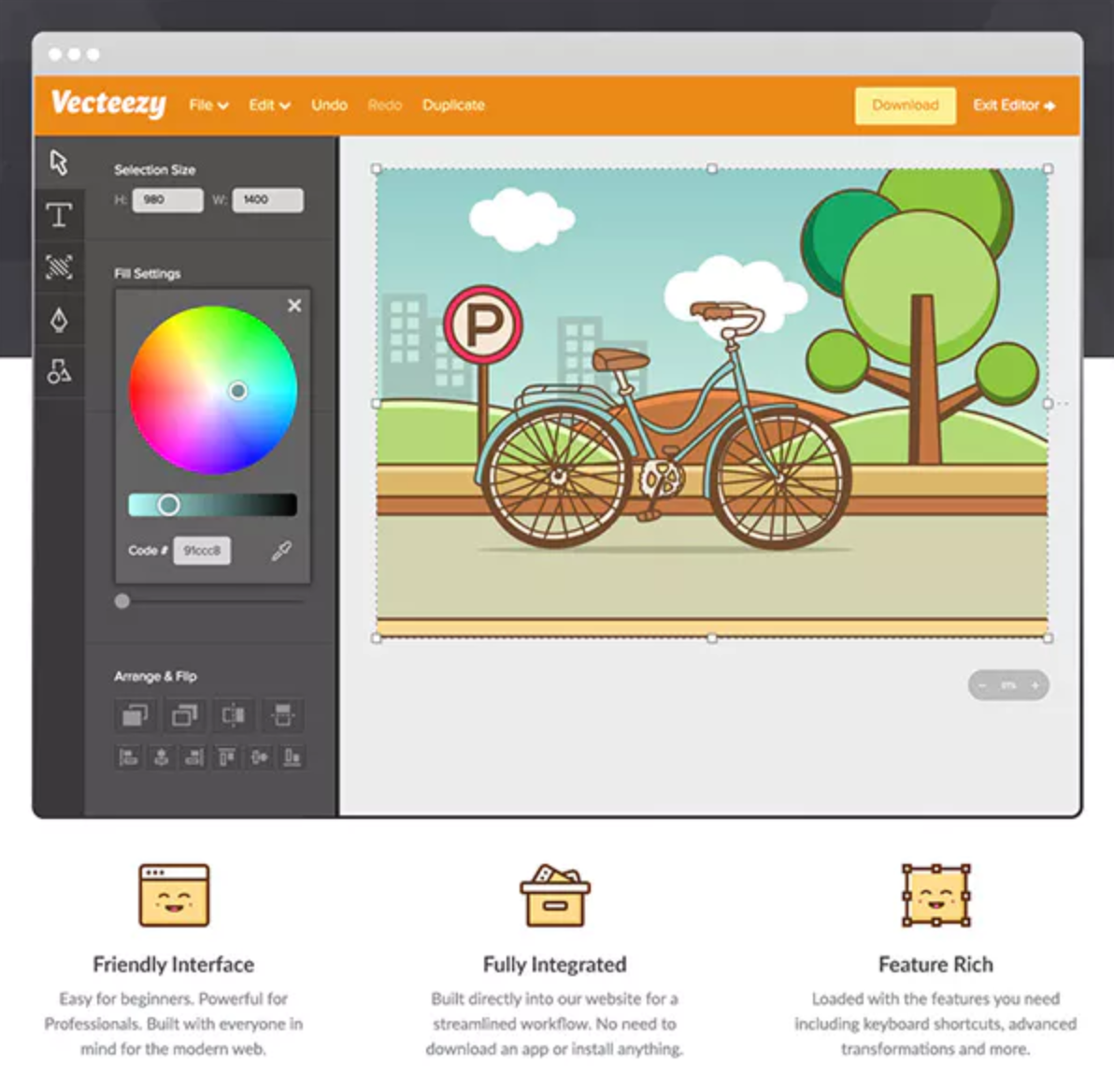
Vecteezy Editor is a free, web-based SVG editing tool that enables users to customize vector graphics directly within their browser. Designed for both beginners and professionals, it offers an intuitive interface and a suite of features to create and modify vector designs without the need for additional software installations.
Key Features and Functionality:
- User-Friendly Interface: The editor is accessible to users of all skill levels, providing a seamless design experience.
- Comprehensive Editing Tools: It includes essential vector drawing tools such as the Pen, Line, Curve, and Shape tools, along with editing capabilities like move, scale, rotate, align, and distribute.
- Text and Style Customization: Users can add and modify text, adjust fonts, colors, sizes, and apply gradients to objects.
- Integrated Asset Library: The platform offers access to a vast collection of vector graphics, stock photos, and design templates, enhancing creative possibilities.
- Multiple Export Options: Designs can be exported in various formats, including JPG, PNG, SVG, and PDF, ensuring compatibility with other design tools.
Primary Value and User Solutions:
Vecteezy Editor streamlines the design process by eliminating the need for external software, allowing users to edit and customize vector graphics directly in their browser. This accessibility is particularly beneficial for those seeking a cost-effective and efficient solution for creating high-quality vector designs. By integrating a comprehensive asset library with robust editing tools, Vecteezy Editor empowers users to produce professional-grade visuals for various applications, from social media content to marketing materials.

VidHex is your all-in-one AI video creation tool. It helps you enhance your videos in just minutes, even if you have no editing skills. Whether you’re making a video for social media, or a personal project, VidHex gives you everything you need in one simple application. You save hours and get rid of tedious video enhancements. Key Features 1. AI-Powered Video Enhancement. With VidHex, video improvement becomes effortless. Just upload your videos, pick the right AI model, video resolution, and let our AI tool do the rest. It offers multiple AI models designed for different enhancement needs, including general enhancement model, face model, anime model, video quality repair model, detail restoration model, video denoise model, frame interpolation model, colorize model, and SDR to HDR Model. With these AI models, VidHex will take care of your videos and output 4K/8K videos. 2. Video Restorer. VidHex can bring old or damaged videos back to life with the advanced restoration tools. It can fix scratches, clarity issues, and quality loss caused by compression or age. It helps turn blurry or broken footage into clear, smooth video. It’s an easy way to save your previous memories. 3. Colorizer. With one simple click, VidHex uses AI to colorize black-and-white videos, boost SDR to HDR quality, and brighten dark scenes. You will get your videos back to life and keep colors natural and realistic with ease. Whether you're a beginner or an experienced video creator, VidHex helps you create high-quality videos with the power of AI without the need to learn complex editing skills.

Novi Survey is a comprehensive online survey tool designed to facilitate the creation, distribution, and analysis of surveys and assessments. It offers a user-friendly interface complemented by a rich text editor, enabling users to design surveys with over 100 question variations, including advanced types like matrices, constant sum, rating scales, and file uploads. The platform supports sophisticated features such as conditional logic, branching, text piping, and parameter substitution, allowing for highly customized survey experiences.
Key Features and Functionality:
- Survey Design: Utilize a modern interface with a rich text editor to craft surveys featuring a wide array of question types and advanced functionalities.
- Distribution: Deploy surveys via a robust email engine, embed them into web pages, or share through social media platforms.
- Branding: Customize surveys with professionally designed templates or create unique designs by adjusting logos, colors, fonts, and button styles.
- Internationalization: Develop surveys in multiple languages, with a built-in spell checker supporting 34 languages, and allow respondents to switch languages seamlessly.
- Data Analysis: Access real-time responses, generate summary reports with descriptive statistics, and visualize data through customizable charts and graphs.
- Collaboration: Manage teams with varying access levels, collect responses anonymously or linked to contacts, and ensure secure communication via SSL encryption.
Primary Value and User Solutions:
Novi Survey addresses the need for an advanced yet accessible survey solution suitable for various applications, including market research, employee evaluations, customer feedback, and more. By offering extensive customization options, robust distribution methods, and powerful analytical tools, it empowers organizations to gather meaningful insights efficiently. The platform's flexibility in deployment—either as a hosted service or an installable software package—ensures that businesses can choose the setup that best aligns with their operational requirements.

Krita is a free and open-source digital painting and 2D animation software designed for artists of all levels, from beginners to professionals. It offers a comprehensive suite of tools tailored for illustrators, concept artists, comic creators, and animators, enabling the creation of high-quality artwork across various platforms, including Windows, macOS, Linux, Android, and ChromeOS.
Key Features and Functionality:
- Advanced Brush Engine: Krita provides a diverse range of brush engines, allowing for extensive customization to suit different artistic styles and techniques.
- Layer Management: The software supports multiple layer types, including raster, vector, filter, and group layers, facilitating complex compositions and non-destructive editing.
- Animation Tools: Krita includes a timeline with onion skinning, frame-by-frame animation capabilities, and audio support, making it suitable for creating detailed animations.
- Vector Tools: Users can create and edit vector graphics, which is beneficial for tasks like designing comics and creating scalable illustrations.
- Color Management: With support for various color models such as RGB and CMYK, Krita ensures accurate color representation, essential for professional print and digital work.
- Customizable Interface: The user interface is highly adaptable, allowing artists to tailor the workspace to their preferences, enhancing productivity and comfort.
Primary Value and User Solutions:
Krita addresses the need for a robust, cost-effective digital art solution without compromising on features. Its open-source nature fosters a collaborative community, leading to continuous improvements and a wealth of resources for users. By offering tools comparable to those found in premium software, Krita empowers artists to bring their creative visions to life without financial barriers.

Zebracat is an AI-powered video creation platform that transforms text prompts, scripts, and blog posts into engaging videos within minutes. Designed for marketers, content creators, and businesses, it automates the video production process, eliminating the need for traditional editing skills or expensive equipment. By leveraging advanced AI technologies, Zebracat enables users to produce high-quality videos that drive engagement, increase reach, and boost conversions.
Key Features and Functionality:
- Text-to-Video Conversion: Quickly generate videos from text prompts, scripts, or blog URLs, streamlining content creation.
- AI-Generated Visuals and Avatars: Incorporate AI-generated visuals and customizable avatars to enhance video appeal.
- Human-Like AI Voiceovers: Choose from a range of realistic AI voices across multiple languages to narrate your content.
- Automated Editing: Utilize AI-driven editing tools for smart cuts, transitions, and professional-quality output.
- Multilingual Support: Translate videos into over 170 languages to reach a global audience.
- Brand Customization: Maintain brand consistency with customizable logos, fonts, colors, and other brand assets.
Primary Value and User Solutions:
Zebracat addresses the challenges of time-consuming and costly video production by offering an efficient, AI-driven solution. Users can rapidly create professional videos without prior editing experience, making it ideal for producing social media content, marketing campaigns, tutorials, and more. By automating the video creation process, Zebracat empowers users to focus on strategic initiatives, ensuring consistent and engaging content that resonates with their target audience.

easyfeedback is an intuitive online survey tool designed to help organizations and individuals create, distribute, and analyze surveys efficiently. It offers a user-friendly interface that simplifies the survey creation process, making it accessible for users of all technical backgrounds. With a focus on data security and compliance, easyfeedback ensures that all surveys adhere to GDPR standards, providing peace of mind for users concerned about data protection.
Key Features:
- Extensive Question Types: Offers 14 different question types, including multiple choice, matrix, ranking, and slider, allowing for versatile survey designs.
- Dynamic Content: Supports personalized content, answer piping, and randomization of pages, questions, and answers to enhance respondent engagement.
- Multilingual Support: Provides 14 preconfigured languages with automatic language detection, facilitating surveys for a global audience.
- Branding and Design Customization: Features a layout configurator with options for logos, images, fonts, colors, and a CSS editor to align surveys with corporate branding.
- Mobile Responsiveness: Ensures surveys are automatically adapted for optimal display on any device, including desktops, tablets, and smartphones.
- Real-Time Analytics: Delivers immediate insights with real-time statistics, customizable reports, and advanced filtering options to analyze survey results effectively.
- Data Security: Emphasizes GDPR compliance with data hosted on ISO 27001-certified servers located in Germany, ensuring high standards of data protection.
- Integration Capabilities: Offers API access and webhooks for seamless integration with existing systems, enhancing workflow efficiency.
Primary Value and Solutions:
easyfeedback addresses the need for a comprehensive yet straightforward survey solution that caters to various applications, including employee feedback, customer satisfaction, market research, and event evaluations. By providing a platform that combines ease of use with robust features, it enables users to gather valuable insights without the need for extensive technical expertise. The emphasis on data security and compliance ensures that sensitive information is handled responsibly, making it a trusted choice for organizations prioritizing data protection. Additionally, the tool's flexibility in design and distribution methods allows for tailored surveys that effectively engage respondents, leading to higher response rates and more accurate data collection.