AI-Generated Results
Finding matches…
Nexetic Backup for Microsoft 365 is your ultimate solution for protecting critical business data across the Microsoft 365 ecosystem.
Designed to support IT teams, our reliable, automated and seamless backup solution safeguards your organization against accidental deletions, ransomware and compliance risks. With Nexetic Backup, your data in Exchange, SharePoint, OneDrive and Teams is secure, recoverable and always available — ensuring uninterrupted business operations.
Trusted by thousands of businesses, our high-performance solution delivers simplicity, speed and flexibility to meet the demands of Microsoft 365 backup for modern organizations.
Backup coverage for Nexetic Backup for Microsoft 365:
- Outlook Exchange emails
- Outlook In-Place archive
- Outlook Public folders
- Outlook Calendar
- Outlook Contacts
- One Drive for Business
- SharePoint files
- SharePoint list Items
- SharePoint meta data
- Users
- Groups
- Teams channel files
- Teams messages & attachements
- OneNote
- Planner
- Lists
Want to explore more? Discover how Nexetic Backup for Microsoft 365 can keep your business-critical data safe and your IT team stress-free!
Not seeing what you're looking for?
Dive deeper into "chargepoint" on G2 AI

Easily archive SAP content to SharePoint, linking content, data, and connecting business processes
Gimmal Link™ stores SAP content and data within Microsoft SharePoint and Microsoft 365, expanding access to content while enhancing the SAP user experience. This integration allows users inside and outside of SAP to collaborate and work on the same document-centric business processes while reducing total cost of ownership.
Improve Collaboration and Productivity
Make SAP information easily accessible enterprise-wide through SharePoint Online and Microsoft 365. Combine SAP workflow with Power Automate to integrate business process across the organization. Gimmal Link™ also enhances the SAPGUI user experience, providing an enhanced document management and workflow experience.
Ensure Compliance
Once in SharePoint Online, your SAP content can be managed under the same records management and compliance policies as all other content
Lower Total Cost of Ownership
As you look to move to SAP S/4HANA you want to reduce the size of your SAP database. Gimmal Link™ lets you leverage your Microsoft investment for SAP document management and archiving, while lowering SAP costs and improving performance.

Solution Foundry is a SharePoint Consulting, Customization, Training, Microsoft SharePoint evaluation, implementation, and customziations service.
Gig Werks is an award winning SharePoint solution provider with certified expertise across all aspects of SharePoint.

CV Helpdesk is a SharePoint-based ticketing system designed for Microsoft 365 environments. Built on the SharePoint Framework, the platform integrates directly into Microsoft 365 and centralizes support requests into a structured queue.
Tickets can be submitted through SharePoint portals, Email, Team with automated routing based on departments and configurable approval workflows. Priority classification streamlines triage, while real-time tracking provides visibility from submission to resolution.
Notifications inform users of ticket status changes, and file attachments can be included to aid diagnosis. Role-based access control defines permissions for employees, agents, and administrators. Dashboards and reporting features provide insights into ticket trends and agent performance. Internal notes allow agents to collaborate without exposing communications to requesters.

Binary Republik is a SharePoint Consulting and Development firm that focused on SharePoint Implementations, Office 365 roll outs and Azure Services.

Binary Republik is a SharePoint Consulting and Development firm that focused on SharePoint Implementations, Office 365 roll outs and Azure Services.
Client Onboarding Portal is a web-based application that replaces scattered email, WhatsApp, and message threads with one structured channel for collecting documents from clients, customers, and contractors.
Clients sign in with a passwordless email link, see exactly which documents you’ve requested, and upload them directly. Behind the scenes, configured Power Automate workflows move and organise each submission into the correct SharePoint site and folder. Your team gets a staff dashboard showing what’s been received and what’s still missing, so follow-ups go only to the people who need them.
What it helps you do
1. Give clients one place to submit documents and check progress
2. See submitted and outstanding items at a glance
3. Cut repeat follow-up emails and manual downloading, renaming, and filing
4. Keep client files in consistent, structured SharePoint locations
5. Run a repeatable onboarding process across your team
Key features
1. Centralised, web-based client portal
2. Passwordless email sign-in
3. Personalised document requirements per client
4. Customer dashboard and staff dashboard
5. Document submission tracking
6. Automated filing into SharePoint via Power Automate
7. Configurable folder structures, naming conventions, and routing rules
8. Optional notifications and follow-up workflows
Who it’s for
Organisations that regularly collect documents from external parties and use, or plan to use, Microsoft 365 and SharePoint: accounting and bookkeeping practices, legal firms, financial services, construction and contracting, real estate and property management, recruitment and education, and insurance and professional services.
Deployment
We deploy and configure the portal for each client, tailored to your document requirements and existing Microsoft 365 environment.
Categories: Client Onboarding Software, Document Management, Document Collection
Best for: SMBs and mid-market firms on Microsoft 365
Integrations to list: Microsoft SharePoint, Microsoft Power Automate, Microsoft 365

Peafowl IT Solution is a premier provider of forward-thinking IT services, specializing in the development of custom applications using Microsoft PowerApps, SharePoint, Office 365, and other Microsoft technologies. Established in 2016 and headquartered in Ahmedabad, India, the company is dedicated to delivering high-quality, cost-effective solutions tailored to the unique needs of global businesses.
Key Features and Functionality:
- Custom Application Development: Expertise in building tailored applications using Microsoft PowerApps, enabling businesses to automate processes and enhance productivity.
- SharePoint Solutions: Development and integration of SharePoint platforms to facilitate efficient collaboration and document management.
- Office 365 Integration: Seamless integration of Office 365 tools to optimize business operations and communication.
- Mobile Application Development: Creation of user-friendly mobile applications to meet diverse business requirements.
- IT Consulting Services: Comprehensive consulting to align technology strategies with business objectives.
Primary Value and Solutions Provided:
Peafowl IT Solution addresses the challenges businesses face in digital transformation by offering customized, scalable, and efficient IT solutions. By leveraging modern technologies like PowerApps, SharePoint, and Office 365, the company helps organizations automate workflows, improve collaboration, and enhance data management. This results in increased operational efficiency, reduced costs, and a competitive edge in the market. Their commitment to innovation and customer satisfaction ensures that clients receive solutions that are not only technologically advanced but also aligned with their specific business goals.

MacroView Legal gives legal teams a faster, cleaner, and more consistent way to manage documents and emails across matters. Firms using MacroView report saving up to a full day of productivity every week, thanks to streamlined filing, powerful search, and a SharePoint environment designed specifically for legal workflows.
At its core, MacroView Legal combines advanced document management with seamless Outlook and SharePoint integration. Lawyers and support staff can batch-file emails and documents with metadata, maintain consistent matter structures, and quickly retrieve anything they need — even across large, complex matters. Legal-specific features such as version numbering, document IDs, and configurable metadata schemas ensure every file is stored correctly and remains easily traceable throughout its lifecycle.
MacroView Legal also includes a legal-focused SharePoint design that makes creating and managing matters simple. Metadata is captured cleanly at the point of filing, ensuring compliance, faster search, and more accurate document histories. Outlook integration keeps inboxes under control, automating email capture and ensuring all correspondence is stored against the right matter without manual effort.
Collaboration becomes effortless too — teams can work across Outlook, SharePoint, Teams, and OneDrive with consistent structures and reliable version control. Documents stay organised, matter files stay complete, and everyone works from the same, accurate source of truth.
Saketa is a SharePoint Productivity Suite that offers solutions for an efficient collaborative digital workplace. The solution helps enterprises to quickly launch and organically grow their SharePoint environment.
Attach2Cloud Automatically uploads your Microsoft Outlook attached files to OneDrive, SharePoint Online and Teams and replaces them by Modern Attachments (links) when you send your emails.
Thanks to Attach2Cloud, you can now use MS Outlook to send files up to 250 GB per file and without any email size limit.
Attach2Cloud can operate fully automatically based on parameters, or semi-automatically; in this case a UI is displayed when sending your Outlook emails containing attached files, allowing to select the attached files to upload to OneDrive SharePoint Online or Teams, and, on a per file basis, their destination in the cloud (on OneDrive folder, SharePoint Online library, or Teams), their sharing permission, and optionally, a number of days after which the file must be deleted).
Attach2Cloud includes many other MS 365 Cloud integration features for MS Outlook, like upload rules based on attached file size and types, and on email size, inserting invitations to upload files to OneDrive in one click in emails being edited, uploading files attached to existing emails to the MS 365 cloud, and in its latest version 6, an MS Outlook Cloud Navigator Side Panel offering a view to your OneDrive, SharePoint Online and Teams folders and files and supporting bi-directional drag drop of files, from this side panel to emails and from emails to this side panel.
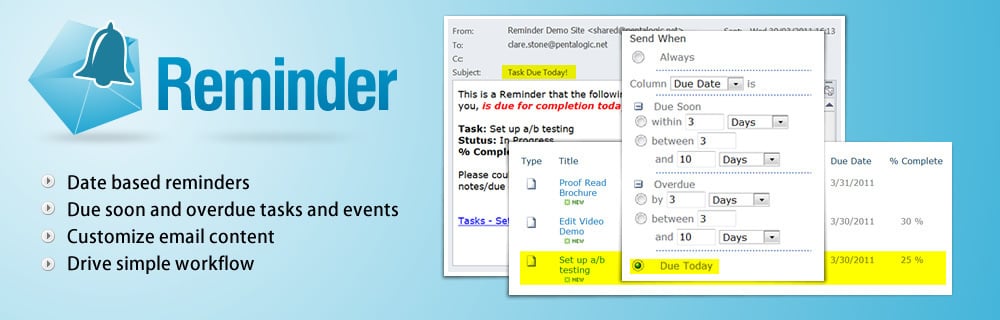
Pentalogic Reminder is delivered as a SharePoint web part and an NT Service. Once installed on a SharePoint server you add it to a Web Part Page and then configure it to 'watch' one of your lists and send out Reminder emails according to your requirements.

Quickly and easily build reports on your Microsoft 365 content such as SharePoint lists, Planner Tasks, OneDrive items and much more. Display your content in a central report within modern SharePoint or Microsoft Teams tabs.

Resource Manager by Virto is designed for effective resource management in Office 365 and SharePoint. Add and edit SharePoint project tasks, check the workload of your employees and the utilization of resources, color-code different resources, and track several projects in one view.

SharePoint is a web-based, collective platform that fit in with Microsoft Office. SharePoint is mainly sold as a document management and storage system, but the product is highly configurable, and usage varies substantially between organizations. It is a useful tool to enhance and streamline your business in so many different ways.

SPSync is a read-only replication tool that copies SharePoint Online lists and document library metadata into SQL Server, PostgreSQL, MySQL and 28 other databases, warehouses and search stores, and keeps them in sync with incremental delta queries.
The problem it solves. Teams on Microsoft 365 keep working data in SharePoint lists: requests, assets, approvals and project trackers. Lists suit the people typing into them but are slow for anything that reads many rows at once. Power BI refreshes time out on large lists, views stop at the 5,000-item threshold, and joining three lists means stitching them together by hand. SPSync keeps a current copy of those lists in a database you run, so the tools that already speak SQL can read it directly.
How it works. The first run is a full load. After that, SPSync asks Microsoft Graph only for what changed, on a schedule that respects the tenant’s throttling budget. A reconcile, weekly by default, confirms that SharePoint and the database still match and recovers after an outage.
Tables you can actually query. Lookup columns become foreign keys. Multi-choice and multi-person columns become child tables, and people go into one users table. Deleted items stay in the table with the time they were deleted, and new SharePoint columns are added automatically. Lists from many sites can be merged into one table. For SQL and warehouse destinations, SPSync can generate reporting views for Power BI DirectQuery. For Postgres with pgvector and Azure AI Search, it writes embeddings on each sync.
Built for IT and security review. SPSync never writes to SharePoint. For unattended sync, an admin grants access site by site through Sites.Selected, and the first-run wizard produces a one-page pack explaining what to grant and why. Reports and AI agents read the copy with a database login and hold no Graph permission of their own.
Two ways to run it. There is a desktop app for Apple Silicon Macs and Windows 10 and 11, and a command line for macOS, Windows and Linux, driven by YAML for pipelines and schedulers. Both use the same engine and the same licence key. Licences are annual and quoted after a short call. SPSync is made by EBORACUM IT LTD in London.
NITRO Studio by Crow Canyon Software is a no-code/low-code business process automation platform built natively for Microsoft 365, Teams, and SharePoint. It enables organizations to design custom forms, automate workflows, and build powerful applications with minimal to no code.
The WYSIWYG Forms Designer with drag-and-drop controls creates dynamic, responsive forms with conditional logic. The Visual Workflow Designer builds workflows with triggers, timers, and branching logic.
Native Teams integration allows users to submit and manage requests without leaving Teams. A self-service portal, real-time dashboards, advanced approvals, and Email Manager are included.
Optional NITRO Copilot AI helps classify requests, summarize conversations, and respond faster.
All data stays within your Microsoft 365 tenant, ensuring control over data residency and compliance. Deployment options include SharePoint On-Premises including connected and air-gapped environments, SharePoint Online including commercial and customer-hosted Azure GCC and GCC High. Flat-rate licensing with no per-user fees.

𝗛𝗧𝗠𝗟 𝗣𝗮𝗴𝗲𝘀 𝗶𝗻 𝗦𝗵𝗮𝗿𝗲𝗣𝗼𝗶𝗻𝘁, 𝘄𝗵𝗲𝗿𝗲 𝗳𝗹𝗲𝘅𝗶𝗯𝗶𝗹𝗶𝘁𝘆 𝗺𝗲𝗲𝘁𝘀 𝗰𝘂𝘀𝘁𝗼𝗺𝗶𝘇𝗮𝘁𝗶𝗼𝗻.
With the right approach, HTML can help create tailored page experiences, extend branding, and support unique business requirements within the SharePoint ecosystem.
At Reality-Craft, we focus on building SharePoint experiences that are functional, scalable, and aligned with how teams actually work.

Almost every organization that uses SharePoint stores some form of sensitive content within it. The challenge is adequately protecting it. Unfortunately, most DLP systems add support for SharePoint as an afterthought rather being designed specifically for it. The end result is a system that is unfit for purpose and becomes unusable with crippling false positive rates. It's time you got a DLP system that actually works.