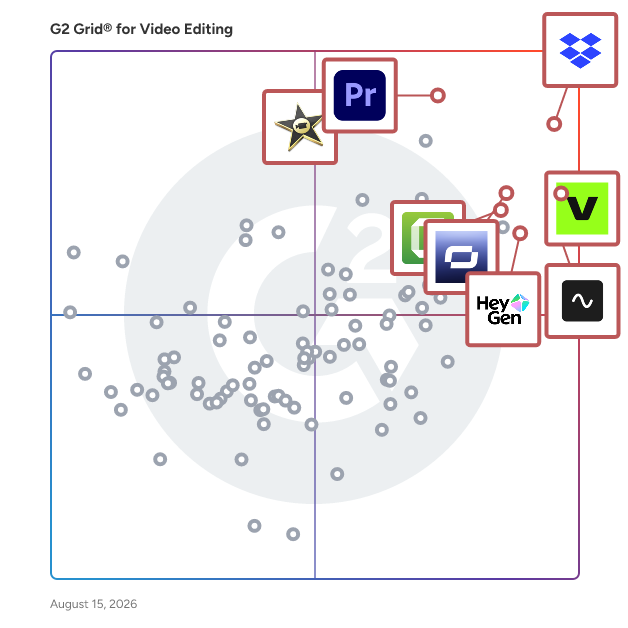
  # Best Video Editing Software - Page 5

  *By [Gauri Pawsey](https://research.g2.com/insights/author/gauri-pawsey)*

   Video editing software enables users to digitally create, edit, and modify video files, providing tools for clipping, arranging, layering, color correction, audio editing, motion tracking, and visual effects, giving content creators, marketers, and media professionals precise control over video output.

### Core Capabilities of Video Editing Software

To qualify for inclusion in the Video Editing category, a product must:

- Allow users to upload video files or capture newly recorded videos for editing
- Provide tools for clipping, arranging, splitting, layering, and manipulating videos
- Save and export completed files in one or more file types

### Common Use Cases for Video Editing Software

Content creators, marketing teams, and media professionals use video editing software to produce polished video content across a range of formats and channels. Common use cases include:

- Producing promotional videos, brand content, and social media clips for marketing campaigns
- Editing film and TV productions with advanced color correction, audio mixing, and motion tracking tools
- Creating tutorials, training videos, and product demonstrations with custom graphics and effects

### How Video Editing Software Differs from Other Tools

Unlike [AI video generators](https://www.g2.com/categories/ai-video-generators), which primarily create video content from text or AI-driven inputs, traditional video editing software focuses on manual or AI-assisted manipulation of uploaded or captured video files, giving users precise control over editing, arrangement, and output. Video editing tools are often used alongside [video effects software](https://www.g2.com/categories/video-effects) to enhance production quality for promotional and commercial content.

### Insights from G2 on Video Editing Software

Based on category trends on G2, timeline editing flexibility and export format support as standout capabilities. These platforms deliver improvements in video production speed and output quality as primary outcomes of adoption.


## How Many Video Editing Software Products Does G2 Track?
**Total Products under this Category:** 279

### Category Stats (May 2026)
- **Average Rating**: 4.47/5 (↑0.01 vs Apr 2026)
- **New Reviews This Quarter**: 561
- **Buyer Segments**: Small-Business 73% │ Mid-Market 17% │ Enterprise 9%
- **Top Trending Product**: Jupitrr AI (+0.75)
*Last updated: May 18, 2026*

  
## How Does G2 Rank Video Editing Software Products?

**Why You Can Trust G2's Software Rankings:**

- 30 Analysts and Data Experts
- 65,100+ Authentic Reviews
- 279+ Products
- Unbiased Rankings

G2's software rankings are built on verified user reviews, rigorous moderation, and a consistent research methodology maintained by a team of analysts and data experts. Each product is measured using the same transparent criteria, with no paid placement or vendor influence. While reviews reflect real user experiences, which can be subjective, they offer valuable insight into how software performs in the hands of professionals. Together, these inputs power the G2 Score, a standardized way to compare tools within every category.

  
## Top Video Editing Software at a Glance
| # | Product | Rating | Best For | What Users Say |
|---|---------|--------|----------|----------------|
| 1 | [Dropbox](https://www.g2.com/products/dropbox/reviews) | 4.4/5.0 (30,729 reviews) | Large video file sharing | "[Dropbox is the best in the data and collaboration field!](https://www.g2.com/survey_responses/dropbox-review-9034005)" |
| 2 | [VEED](https://www.g2.com/products/veed/reviews) | 4.6/5.0 (2,077 reviews) | Browser-based subtitle editing | "[Enhances Educational Video Creation with Ease](https://www.g2.com/survey_responses/veed-review-12341279)" |
| 3 | [Adobe Premiere Pro](https://www.g2.com/products/adobe-premiere-pro/reviews) | 4.5/5.0 (1,626 reviews) | Advanced video production workflows | "[My #1 video editor](https://www.g2.com/survey_responses/adobe-premiere-pro-review-8839658)" |
| 4 | [Riverside](https://www.g2.com/products/riverside/reviews) | 4.8/5.0 (1,712 reviews) | Remote podcast and interview production | "[Practical Platform for Remote Webinar and Walkthrough Recording](https://www.g2.com/survey_responses/riverside-review-12846489)" |
| 5 | [Synthesia](https://www.g2.com/products/synthesia/reviews) | 4.6/5.0 (2,726 reviews) | AI training video creation | "[Intuitive Interface, Great for Streamlining](https://www.g2.com/survey_responses/synthesia-review-9552201)" |
| 6 | [iMovie](https://www.g2.com/products/imovie/reviews) | 4.3/5.0 (566 reviews) | Basic Apple video editing | "[iMovie Makes Video Editing Simple Without Sacrificing Quality](https://www.g2.com/survey_responses/imovie-review-12698198)" |
| 7 | [Movavi Video Editor](https://www.g2.com/products/movavi-movavi-video-editor/reviews) | 4.7/5.0 (414 reviews) | Beginner-friendly video editing | "[easy Video Editing for Teaching and Patient Guidance](https://www.g2.com/survey_responses/movavi-video-editor-review-12691061)" |
| 8 | [Camtasia](https://www.g2.com/products/camtasia/reviews) | 4.6/5.0 (1,702 reviews) | Screen-recorded training videos | "[Easy and Reliable Tool for Creating Professional Training Videos](https://www.g2.com/survey_responses/camtasia-review-12251107)" |
| 9 | [Adobe Express](https://www.g2.com/products/adobe-express/reviews) | 4.5/5.0 (820 reviews) | Quick social video design | "[Fast, Professional Designs with Templates and an Easy Drag-and-Drop UI](https://www.g2.com/survey_responses/adobe-express-review-12775639)" |
| 10 | [Wondershare Filmora](https://www.g2.com/products/wondershare-filmora/reviews) | 4.4/5.0 (587 reviews) | Effect-rich beginner editing | "[Unlocking Expert Video Editing Potential](https://www.g2.com/survey_responses/wondershare-filmora-review-9142924)" |

  
## Which Video Editing Software Is Best for Your Use Case?

- **Leader:** [Dropbox](https://www.g2.com/products/dropbox/reviews)
- **Highest Performer:** [WeVideo](https://www.g2.com/products/wevideo/reviews)
- **Easiest to Use:** [Riverside](https://www.g2.com/products/riverside/reviews)
- **Top Trending:** [Synthesia](https://www.g2.com/products/synthesia/reviews)
- **Best Free Software:** [VEED](https://www.g2.com/products/veed/reviews)

  
## Which Type of Video Editing Software Tools Are You Looking For?
  - [Video Editing Software](https://www.g2.com/categories/video-editing) *(current)*
  - [Screen and Video Capture Software](https://www.g2.com/categories/screen-and-video-capture)
  - [AI Video Generators](https://www.g2.com/categories/ai-video-generators)
  - [Video Content Creation Software](https://www.g2.com/categories/video-content-creation)


## Buyer Guide: Key Questions for Choosing Video Editing Software Software
  ### What does Video editing software do?
  When people ask me about video editing software, I usually explain it as tools that help businesses create, refine, and publish video content. But in practice, I see video editing software as something bigger: it gives teams a faster way to turn raw footage, remote sessions, podcasts, training clips, and social content into polished videos. Instead of stitching together separate tools for recording, audio cleanup, captions, templates, screen capture, and publishing, users can manage the whole workflow in one place with less manual effort.


  ### Why do businesses use Video editing software?
  From the G2 reviewer patterns I evaluated, businesses use these tools to solve delays, production complexity, and uneven content quality. Users need to produce more videos across marketing, education, sales, customer communication, and internal enablement with lean teams.

Key benefits reviewers highlight include:

- Faster turnaround for social clips, courses, podcasts, webinars, and explainers.
- Easier editing for nontechnical users.
- Better consistency through templates and brand controls.
- Improved accessibility through subtitles, captions, transcription, and text-based editing.
- Lower production burden through AI avatars, automated edits, and remote recording.
- Cleaner output through audio tools and screen capture.


  ### Who uses Video editing software primarily?
  According to G2 review data, I&#39;ve seen several groups rely on these tools the most:

- **Content creators, podcasters, and video editors** who need to record, edit, polish, and publish videos on a regular schedule.
- **Marketing and social teams** who need to turn webinars, podcasts, interviews, and long-form videos into short clips for campaigns and social channels.
- **Educators, trainers, and coaches** who need to create lessons, tutorials, onboarding videos, and instructional content.
- **Founders, owners, and executives** who need to produce professional-looking videos, announcements, and thought leadership content with lean resources.
- **Sales, support, and customer teams** who need to create product demos, walkthroughs, customer updates, and training clips.


  ### What types of Video editing software should I consider?
  The G2 review feedback pointed to several buyer paths:

- **Professional timeline editors** for advanced control, effects, and post-production.
- **Browser-based editors** for fast edits, social content, subtitles, and simple collaboration.
- **AI video and avatar platforms** for scalable presenter-led videos.
- **Recording-first platforms** for podcasts, interviews, webinars, and remote conversations.
- **Screen recording and training tools** for tutorials and walkthroughs.
- **Template-led design tools** for speed and brand consistency.


  ### What are the core features to look for in Video editing software?
  When I assessed reviewer sentiment, the strongest feature signals were practical. Buyers should evaluate:

- An intuitive interface that doesn&#39;t slow down early adoption.
- Reliable performance across recording, rendering, and publishing workflows.
- Captioning, transcription, and text-based editing tools built into the core experience.
- Audio cleanup and sync controls that handle noise reduction and voice quality.
- Templates, brand kits, stock assets, and effects for faster content production.
- AI capabilities spanning avatars, clip generation, translation, scripting, and automation.
- Collaboration and cloud access with structured file management and review workflows.
- Advanced timeline, subtitle, and export controls for complex or high-volume projects.
- Responsive support and onboarding resources that reduce time to competency.


  ### What trends are shaping Video editing software right now?
  I&#39;ve seen video editing platforms on G2 introduce features that make production faster and easier:

- **AI-assisted production** for avatars, automated clips, transcription, captions, and content repurposing.
- **Social-first workflows** that turn webinars, podcasts, and long-form videos into short posts.
- **Remote recording capabilities** for interviews, podcasts, training content, and distributed teams.
- **Performance and quality improvements** that support reliability, creative control, and polished output.

These trends indicate that video editing software is evolving into a more complete content production platform for teams creating video at scale.


  ### How should I choose Video editing software?
  For me, the strongest video editing tools are the ones that match the team&#39;s main workflow, balance ease of use with creative control, and deliver reliable captions, audio, speed, and exports. When those elements align, video editing software becomes a dependable way to create polished content without adding production bottlenecks.


---

  ## What Are the Top-Rated Video Editing Software Products in 2026?
### 1. [Lumen5](https://www.g2.com/products/lumen5/reviews)
  **Average Rating:** 4.5/5.0
  **Total Reviews:** 63
  **Product Description:** Lumen5 empowers your global team to create video content in minutes. We work with enterprise brands, organizations, and creatives to produce highly-engaging videos that get results. Powered by AI and designed for business, our platform allows you to focus on storytelling while relying on our technology to help you bring ideas to life. Lumen5 is the ideal solution for social media and marketing teams to drive growth, scale their business, and increase engagement.


### What Do G2 Reviewers Say About Lumen5?
*AI-generated summary from verified user reviews*

**Pros:**

- Users commend Lumen5 for its **exceptional customer support** , highlighting responsive assistance and personalized engagement from the team.
- Users appreciate the **easy editing** features of Lumen5, enabling quick video creation without needing expertise.
- Users appreciate the **easy integrations** of Lumen5, facilitating quick and efficient video creation without technical expertise.
- Users appreciate the **Text to Video feature** of Lumen5 for its ease in creating professional videos quickly.
- Users value Lumen5&#39;s **versatility** for creating professional videos effortlessly across various formats tailored for social media.

**Cons:**

- Users face a challenge with the **cost issue** as essential features are limited to higher-tier plans, excluding small businesses.
- Users experience frustrating **download issues** , often facing delays when trying to access their videos promptly.
- Users find Lumen5 **expensive** as key features are limited to the costly Enterprise plan, excluding small businesses.
- Users find the **feature limitations** of Lumen5 frustrating, especially as some key tools are reserved for higher-tier plans.
- Users find the **limited access** to features like Custom AI Voice frustrating, especially for small businesses.
  #### What Are Recent G2 Reviews of Lumen5?

**"[A great product](https://www.g2.com/survey_responses/lumen5-review-10897307)"**

**Rating:** 5.0/5.0 stars
*— Naga S.*

[Read full review](https://www.g2.com/survey_responses/lumen5-review-10897307)

---

**"[A pioneer in text-to-video](https://www.g2.com/survey_responses/lumen5-review-10328568)"**

**Rating:** 5.0/5.0 stars
*— Promod S.*

[Read full review](https://www.g2.com/survey_responses/lumen5-review-10328568)

---

  #### What Are G2 Users Discussing About Lumen5?

- [What is Lumen5 used for?](https://www.g2.com/discussions/what-is-lumen5-used-for)
- [How do you use lumen5?](https://www.g2.com/discussions/how-do-you-use-lumen5)
- [Is lumen5 good?](https://www.g2.com/discussions/is-lumen5-good) - 1 comment
### 2. [SCRATCH](https://www.g2.com/products/scratch/reviews)
  **Average Rating:** 4.3/5.0
  **Total Reviews:** 7
  **Product Description:** Just about the best set of dailies, grading and finishing tools this side of the moon.


### What Do G2 Reviewers Say About SCRATCH?
*AI-generated summary from verified user reviews*

**Pros:**

- Users find SCRATCH extremely **easy to use** , appreciating its seamless implementation and effective customer support.
- Users love the **speed and efficiency** of SCRATCH, enhancing productivity in complex, multi-layered projects.
- Users value the **streamlined collaboration** features of SCRATCH, enhancing efficiency and precision in complex projects.
- Users value the **time-saving features** of SCRATCH, especially with automatic audio sync and customizable macros for efficiency.

**Cons:**

- Users find the **navigation difficult** , suggesting a more intuitive layout would benefit new and mixed-experience teams.
- Users find SCRATCH **not free** due to storage requirements and persistent ads during usage, affecting the experience.
- Users express frustration with **plan limitations** , noting inadequate space for installation and persistent ads during use.
  #### What Are Recent G2 Reviews of SCRATCH?

**"[usefull application for beginner](https://www.g2.com/survey_responses/scratch-review-10564184)"**

**Rating:** 4.5/5.0 stars
*— Muhamad A.*

[Read full review](https://www.g2.com/survey_responses/scratch-review-10564184)

---

**"[Stable performance and detailed control in multi-layered projects](https://www.g2.com/survey_responses/scratch-review-11294441)"**

**Rating:** 4.5/5.0 stars
*— Verified User in Marketing and Advertising*

[Read full review](https://www.g2.com/survey_responses/scratch-review-11294441)

---

### 3. [Vozo AI](https://www.g2.com/products/vozo-ai/reviews)
  **Average Rating:** 4.6/5.0
  **Total Reviews:** 17
  **Product Description:** Vozo is an AI video localization platform designed to help creators, marketers, educators, and enterprise teams translate and adapt video content for global audiences at scale. This innovative solution integrates various functionalities such as AI video translation, dubbing, subtitle translation, voice cloning, lip sync, and on-screen text translation into a single workflow. By streamlining the localization process, Vozo allows teams to effectively localize videos without the need to rebuild them from scratch, thereby saving time and resources. Targeted at a diverse audience, Vozo serves creators, marketers, and educators who require efficient video localization to reach international markets. With support for video translation in over 110 languages, the platform is particularly beneficial for those producing content that needs to resonate with multilingual audiences. Vozo has gained the trust of more than 7 million creators and companies across 40 countries, showcasing its widespread adoption and reliability in the field of video localization. One of Vozo&#39;s standout features is its Visual Translation capability, which allows the platform to detect, remove, translate, and rebuild on-screen text while maintaining the original layout and style. This feature is particularly advantageous for various types of video content, including product demonstrations, tutorials, presentations, training videos, and social media content. Additionally, Vozo offers subtitle translation with semantic line breaks and style customization, providing teams with enhanced control over the appearance of localized captions. Vozo further distinguishes itself with proprietary technologies such as VoiceREAL™ and LipREAL™, which enhance the localization workflow. VoiceREAL™ identifies speakers and clones their voices for dubbing, ensuring that the voice identity, tone, and emotion are preserved across different languages. Complementing this, LipREAL™ aligns the translated speech with the video through realistic lip sync, resulting in dubbed videos that feel natural and immersive. These capabilities are particularly valuable for multilingual dubbing and speaker-led content, where authenticity and presentation quality are crucial. In essence, Vozo is designed for teams seeking an all-in-one video localization solution that combines translation, dubbing, lip sync, subtitles, and visual text adaptation. By offering a comprehensive suite of features, Vozo enables users to efficiently create localized video content that meets the demands of a global audience while maintaining high standards of quality and engagement.


### What Do G2 Reviewers Say About Vozo AI?
*AI-generated summary from verified user reviews*

**Pros:**

- Users appreciate the **human-like voiceovers** of Vozo AI, enhancing authenticity and professionalism in multilingual demos.
- Users praise the **quality and accuracy** of Vozo AI in transforming long webinars into engaging short videos effortlessly.
- Users love the **accurate long-to-short video conversion** of Vozo AI, making social media editing effortless and efficient.
- Users appreciate the **intuitive and accurate AI features** of Vozo AI, enhancing video translation and dubbing with ease.
- Users value the **intuitive and accurate translation** capabilities of Vozo AI, enhancing video content with ease and proficiency.

**Cons:**

- Users note **AI limitations** like robotic voices in less common languages and a lack of emotional tone in storytelling.
- Users desire **limited customization** options in Vozo AI, particularly for fonts, animations, and voice-over capabilities.
- Users desire **more preset templates** for various platforms, as current options feel limited for specific needs.
- Users find the **slow rendering** time can occasionally hinder the experience, especially with longer or complex videos.
- Users notice **missing features** like limited preset templates and occasional excess clips in highlight detection.
  #### What Are Recent G2 Reviews of Vozo AI?

**"[Very Easy-to-Use AI Dubbing with Accurate, Realistic Translations](https://www.g2.com/survey_responses/vozo-ai-review-12800676)"**

**Rating:** 4.0/5.0 stars
*— Verified User in Manufacturing*

[Read full review](https://www.g2.com/survey_responses/vozo-ai-review-12800676)

---

**"[Fast and Easy Voice Replacement Tool](https://www.g2.com/survey_responses/vozo-ai-review-12801940)"**

**Rating:** 4.5/5.0 stars
*— Daryl W.*

[Read full review](https://www.g2.com/survey_responses/vozo-ai-review-12801940)

---

### 4. [Design Huddle](https://www.g2.com/products/design-huddle/reviews)
  **Average Rating:** 4.8/5.0
  **Total Reviews:** 35
  **Product Description:** Design Huddle is a white label design and video creation platform, offering complete branding control and powerful APIs for custom integrations. It empowers businesses to streamline the creation of digital, print, video, and slide content through template-based editing and automation. Who it’s for: - Web-to-print businesses that want to simplify the design experience and increase customer loyalty with easy-to-personalize standard and large format media, packaging, signage, stickers, apparel, and any other unique product. - SaaS and technology platforms looking to expand their product offerings through a custom media creation experience, featuring programmatic automation for personalized content and a user-friendly UI for seamless editing. - Brands and agencies seeking to fast-track the design-to-approval process by giving teams and clients the autonomy to edit designs and videos within brand-approved guardrails. - Franchises aiming to scale marketing to a diverse network of business owners while maintaining brand consistency and enabling franchisees to effortlessly localize content. Product Description: Design Huddle’s API-first embeddable media creation platform makes it easy to import existing designs, convert them into editable, lockable templates, and personalize media through an intuitive interface or programmatically. The platform offers a comprehensive feature set, including media asset management, smooth design and motion graphics imports, granular template locking, and creative automation for programmatic content population. Design Huddle also provides user-friendly editing workflows, a robust API library and JavaScript SDK for custom integrations and UI experiences, a drag-and-drop editor for both static and motion graphics, royalty-free stock media libraries, social media integrations, user roles and permissions, and dedicated admin and user portals. The benefits of Design Huddle include: - One tool for every media type - Create editable templates for digital, print, video, and slides–everything in one place. - Built for everyone, not just designers - An intuitive UI and consistent, template-based editing workflows empower any user to customize designs and eliminate guesswork. - Personalized content at scale - Creative automation streamlines repetitive production tasks on existing designs and videos, boosting efficiency, speeding up production, and saving businesses and creative teams time. - Your creative process, uninterrupted - Design Huddle’s seamless design and motion graphics imports let you design in your favorite apps, then quickly import pixel-perfect media and convert it into editable templates. - Design autonomy, brand aligned - Template locking defines which elements and properties can be edited, guaranteeing that designs remain consistent while giving users the creative independence and simple workflows to produce designs quickly. - Custom development with turnkey speed - Design Huddle’s API and JavaScript SDK make it easy to use our ready-made editor as a base for customizations, speeding up time-to-launch and reducing development costs.


### What Do G2 Reviewers Say About Design Huddle?
*AI-generated summary from verified user reviews*

**Pros:**

- Users appreciate the **strong branding management features** that ensure consistent application of brand standards across all materials.
- Users value the **versatility** of Design Huddle, enabling effective branding and collaboration across various projects and teams.
- Users value the **user-friendly branding tools** of Design Huddle, enhancing collaboration and resource accessibility for all staff.
- Users appreciate the **seamless branding customization** features of Design Huddle, ensuring consistent application of brand standards.
- Users value the **customization features** of Design Huddle, enhancing user experience and streamlining the production process.

**Cons:**

- Users note **feature limitations** , yet appreciate the team&#39;s responsiveness and ability to work around these issues.
- Users note some **limitations in user account setup** , yet they have discovered effective workarounds.
- Users find it **difficult** to keep everything organized from the admin side within Design Huddle.
- Users find **difficulty in keeping everything organized** from the admin side, complicating their overall experience with Design Huddle.
- Users find it **difficult to keep everything organized** from the admin side, which complicates their editing experience.
  #### What Are Recent G2 Reviews of Design Huddle?

**"[Auto-Populated Template Library software](https://www.g2.com/survey_responses/design-huddle-review-12573285)"**

**Rating:** 4.0/5.0 stars
*— Verified User in Real Estate*

[Read full review](https://www.g2.com/survey_responses/design-huddle-review-12573285)

---

**"[Intuitive, Modern UI That Makes Brand Asset Organization Effortless](https://www.g2.com/survey_responses/design-huddle-review-12569918)"**

**Rating:** 5.0/5.0 stars
*— Amanda M.*

[Read full review](https://www.g2.com/survey_responses/design-huddle-review-12569918)

---

  #### What Are G2 Users Discussing About Design Huddle?

- [What does Design Huddle do?](https://www.g2.com/discussions/what-does-design-huddle-do)
- [What is the use of Design Huddle?](https://www.g2.com/discussions/what-is-the-use-of-design-huddle)
- [How much does design huddle cost?](https://www.g2.com/discussions/how-much-does-design-huddle-cost) - 1 comment
### 5. [Icecream Video Editor](https://www.g2.com/products/icecream-video-editor/reviews)
  **Average Rating:** 3.8/5.0
  **Total Reviews:** 6
  **Product Description:** Icecream Video Editor is an easy-to-use free video editing software that enables you to edit videos and create new ones from both videos and photos in a few minutes.


### What Do G2 Reviewers Say About Icecream Video Editor?
*AI-generated summary from verified user reviews*

**Pros:**

- Users find Icecream Video Editor to be **immediate and simple to use** , significantly saving time in video editing.
- Users appreciate the **time-saving efficiency** of Icecream Video Editor, finding it immediate and simple to use.

**Cons:**

- Users find the **feature limitations** of Icecream Video Editor restrictive compared to competing editing software.
  #### What Are Recent G2 Reviews of Icecream Video Editor?

**"[Easy and customizable](https://www.g2.com/survey_responses/icecream-video-editor-review-4583692)"**

**Rating:** 5.0/5.0 stars
*— Cindy P.*

[Read full review](https://www.g2.com/survey_responses/icecream-video-editor-review-4583692)

---

**"[Easy video editor for windows](https://www.g2.com/survey_responses/icecream-video-editor-review-10527425)"**

**Rating:** 4.5/5.0 stars
*— Verified User in Logistics and Supply Chain*

[Read full review](https://www.g2.com/survey_responses/icecream-video-editor-review-10527425)

---

  #### What Are G2 Users Discussing About Icecream Video Editor?

- [Does icecream video editor have watermark?](https://www.g2.com/discussions/does-icecream-video-editor-have-watermark)
- [Is ice cream Video Editor good?](https://www.g2.com/discussions/is-ice-cream-video-editor-good)
### 6. [Opus Clip](https://www.g2.com/products/opus-clip/reviews)
  **Average Rating:** 4.8/5.0
  **Total Reviews:** 6
  **Product Description:** Opus Clip is a generative AI video tool that repurposes long videos into shorts in one click.


### What Do G2 Reviewers Say About Opus Clip?
*AI-generated summary from verified user reviews*

**Pros:**

- Users love the **ease of use** of Opus Clip, simplifying podcast editing and eliminating the need for outsourced help.
- Users love the **speedy dual upload options** , simplifying podcast clipping and saving time and effort.

  #### What Are Recent G2 Reviews of Opus Clip?

**"[Huge Time-Saver with Smart Auto-Clipping](https://www.g2.com/survey_responses/opus-clip-review-12755845)"**

**Rating:** 5.0/5.0 stars
*— Lauren M.*

[Read full review](https://www.g2.com/survey_responses/opus-clip-review-12755845)

---

**"[Hassle-Free AI Tool for Turning Long Videos into Engaging Short Clips](https://www.g2.com/survey_responses/opus-clip-review-12617847)"**

**Rating:** 5.0/5.0 stars
*— Tushar V.*

[Read full review](https://www.g2.com/survey_responses/opus-clip-review-12617847)

---

### 7. [Photo Story Deluxe](https://www.g2.com/products/photo-story-deluxe/reviews)
  **Average Rating:** 4.0/5.0
  **Total Reviews:** 6
  **Product Description:** CREATES BREATHTAKING SLIDESHOWS


  #### What Are Recent G2 Reviews of Photo Story Deluxe?

**"[Love this program!](https://www.g2.com/survey_responses/photo-story-deluxe-review-6829896)"**

**Rating:** 4.5/5.0 stars
*— Verified User in Consumer Goods*

[Read full review](https://www.g2.com/survey_responses/photo-story-deluxe-review-6829896)

---

**"[I love all its features](https://www.g2.com/survey_responses/photo-story-deluxe-review-8533058)"**

**Rating:** 5.0/5.0 stars
*— Scott S.*

[Read full review](https://www.g2.com/survey_responses/photo-story-deluxe-review-8533058)

---

  #### What Are G2 Users Discussing About Photo Story Deluxe?

- [What is Photo Story Deluxe used for?](https://www.g2.com/discussions/what-is-photo-story-deluxe-used-for)
### 8. [Sequel.io](https://www.g2.com/products/sequel-io/reviews)
  **Average Rating:** 4.5/5.0
  **Total Reviews:** 112
  **Product Description:** Sequel runs webinars directly on your website and turns the engagement into first-party data you can use to drive pipeline, personalization, and attribution. Webinars Belong on Your Website Webinars shouldn’t send your best prospects to a third-party destination. Sequel delivers the entire webinar experience on your website, so traffic, brand experience, and conversion paths stay under your control. Webinars are embedded directly into your CMS, not hosted on an external domain. Registration, viewing, CTAs, and follow-up all happen within your owned site—keeping attendees surrounded by your product pages, pricing, and next steps. Instead of siphoning traffic away, webinars contribute to organic traffic, SEO, and conversion. Actionable, First-Party Intent Data Attendance alone isn’t insight. When Sequel is embedded on your website, it unlocks access to a deep data layer that captures how people engage during the webinar and what they do on your website before and after, creating a single behavioral record per person and account. In-event actions like polls, questions, CTAs, and watch time are combined with website behavior and post-event actions such as pricing page visits or demo clicks to create a unified timeline with clean, configurable data pushed directly into CRM and MAP systems—enabling scoring, routing, and follow-up based on real behavior, not assumptions. Faster Follow-Up and Better Attribution Sequel is built to shorten the gap between engagement and action. With real-time sync to Salesforce, HubSpot, and Marketo, teams can map custom engagement fields, trigger alerts and nurture flows, and tie webinars directly to pipeline and revenue—not just MQLs. It’s designed for teams that care about forecast accuracy and ROI credibility. AI-Powered Content Repurposing Extends the Life of Every Event Webinars shouldn’t end when the live session does. Sequel uses AI to turn every event into a scalable content engine—automatically transforming long-form video into high-performing assets that drive ongoing engagement and pipeline. Studio-quality local recordings power better outputs, while AI generates clips, highlights, summaries, written content, and chapters that break replays into navigable, topic-based sections. Sales and marketing can share precise moments instead of entire recordings, fueling SEO, nurture, and on-site discovery without post-production bottlenecks or loss of brand control. Built for Global Audiences Modern B2B audiences are global. Sequel makes it easy to serve international viewers without duplicating programs or fragmenting data. Live AI-powered translations with captions support multiple spoken languages in a single session. On-demand replays include translated subtitles, viewers select their preferred language seamlessly, and AI dubbing enables multilingual versions of webinar content—all within the same owned-site experience. The Foundation of the Intelligent Website Sequel is not just a webinar tool. It’s the starting point for making the website adaptive, personalized, and revenue-aware. Webinars act as high-signal moments to identify intent and interests. Engagement data feeds personalization and recommendations over time. AI summarizes, repurposes, and operationalizes content—setting the groundwork for adaptive web experiences by role, account, or behavior, and evolving naturally into a broader Intelligent Website strategy.


### What Do G2 Reviewers Say About Sequel.io?
*AI-generated summary from verified user reviews*

**Pros:**

- Users appreciate the **intuitive UI and seamless webinar management** with automated features, enhancing overall event engagement.
- Users appreciate the **intuitive attendee management** of Sequel.io, enhancing engagement and streamlining event organization seamlessly.
- Users commend the **responsive customer support** of Sequel.io, highlighting their guidance and assistance throughout the process.
- Users appreciate the **intuitive UI** of Sequel.io, making webinar management and event participation effortless.
- Users appreciate the **easy setup** of Sequel.io, ensuring a quick integration for seamless event hosting on websites.

**Cons:**

- Users express a desire for **missing features** like webinar filters and speaker notes to enhance their experience.
- Users experience **integration issues** with Salesforce, prompting occasional glitches that require support intervention to resolve.
- Users express disappointment in the **limited customization options** for site display and analytics filtering in Sequel.io.
- Users note a **feature deficiency** in Sequel.io, particularly with display limitations and timing for email additions.
- Users desire more **filtering options and granular access** in Sequel.io analytics, highlighting current feature limitations.
  #### What Are Recent G2 Reviews of Sequel.io?

**"[Lightweight, Native Embeds with Rock-Solid Reliability for Live Events](https://www.g2.com/survey_responses/sequel-io-review-12642426)"**

**Rating:** 4.0/5.0 stars
*— Vishal K.*

[Read full review](https://www.g2.com/survey_responses/sequel-io-review-12642426)

---

**"[Flexible, Innovative AI—Backed by a Standout Customer Success Team](https://www.g2.com/survey_responses/sequel-io-review-12634512)"**

**Rating:** 4.5/5.0 stars
*— Arpine B.*

[Read full review](https://www.g2.com/survey_responses/sequel-io-review-12634512)

---

### 9. [Topaz Video AI](https://www.g2.com/products/topaz-video-ai/reviews)
  **Average Rating:** 4.7/5.0
  **Total Reviews:** 6
  **Product Description:** We believe all creatives should have access to the latest technology to do their best work. Our AI-powered image and video quality software serve over a million customers, including teams at Apple, Netflix, NASA, and more.


### What Do G2 Reviewers Say About Topaz Video AI?
*AI-generated summary from verified user reviews*

**Pros:**

- Users appreciate the **ease of use and effective video enhancement** of Topaz Video AI, delivering impressive results.
- Users find Topaz Video AI to be **easy to use** , effectively upscaling and enhancing video quality effortlessly.
- Users love the **easy creation process** of Topaz Video AI, achieving significant video improvements effortlessly.
- Users appreciate the **high quality** enhancements of Topaz Video AI, significantly improving their video clarity and detail.
- Users love the **easy-to-use upscaling** features of Topaz Video AI, achieving significant improvements over traditional editing software.

**Cons:**

- Users desire **additional functions** like face recovery, limiting the effectiveness of Topaz Video AI in some cases.
- Users note the **need for a more interactive interface** , indicating there&#39;s significant room for improvement.
- Users note the **long processing time** of Topaz Video AI, requiring careful planning for video enhancements.
  #### What Are Recent G2 Reviews of Topaz Video AI?

**"[Crisp, Clear Social Videos Thanks to Topaz Video’s Sharpening and Noise Removal](https://www.g2.com/survey_responses/topaz-video-ai-review-12709155)"**

**Rating:** 5.0/5.0 stars
*— Verified User in Media Production*

[Read full review](https://www.g2.com/survey_responses/topaz-video-ai-review-12709155)

---

**"[Great tool for video editors](https://www.g2.com/survey_responses/topaz-video-ai-review-10498106)"**

**Rating:** 4.5/5.0 stars
*— Jennie R.*

[Read full review](https://www.g2.com/survey_responses/topaz-video-ai-review-10498106)

---

### 10. [Visibot](https://www.g2.com/products/visibot/reviews)
  **Average Rating:** 4.9/5.0
  **Total Reviews:** 6
  **Product Description:** VisiBot is a type of AI-powered video editing software that helps users convert raw, talking-head footage into polished, short-form user-generated content (UGC) optimized for social media. Built for creators, marketers, and teams producing content at scale, VisiBot automates the editing process—from trimming and jump cuts to subtitles and branded templates—enabling fast turnaround and consistent output. It&#39;s especially suited for B2B brands, agencies, and content teams aiming to publish frequent, short-form clips across platforms like TikTok, LinkedIn, Instagram Reels, and YouTube Shorts. VisiBot is purpose-built for the kind of authentic, personality-driven video that performs best on social: direct-to-camera talking, thought leadership clips, testimonials, and customer-generated content. Rather than relying on long-form recordings, the focus is on rapidly turning raw takes into compelling, watchable UGC. Key features and value points: - AI editing automation: Upload a raw video and get back a social-ready version with cuts, effects, and captions—no manual work required. - Short-form output focus: Optimized for sub-60-second clips that meet platform requirements and grab attention fast. - UGC-friendly design templates: Keep videos looking on-brand while preserving the authentic feel of user-generated content. - Auto captions and highlights: Generate accurate, styled subtitles and auto-detect key moments to enhance engagement. VisiBot enables teams to produce high volumes of short-form UGC without the traditional bottlenecks of manual editing or outsourcing.


### What Do G2 Reviewers Say About Visibot?
*AI-generated summary from verified user reviews*

**Pros:**

- Users appreciate the **responsive customer support** of Visibot, enhancing their content creation experience significantly.
- Users praise Visibot for its **ease of use** , allowing quick video editing without extensive effort or time.
- Users appreciate the **personalization features** of Visibot, making video creation faster and more engaging for various audiences.
- Users commend the **reliability** of Visibot, consistently delivering fast and efficient video editing for social media.
- Users love the **speed and efficiency** of Visibot, which dramatically enhances their video creation process for social media.

**Cons:**

- Users experience **limited editing features** , particularly struggling with audio clarity when speaking softly, affecting video quality.
- Users report encountering **video editing issues** with Visibot, particularly when softer speech gets cut off during editing.
  #### What Are Recent G2 Reviews of Visibot?

**"[How visibot helped me reach 80,000 views](https://www.g2.com/survey_responses/visibot-review-11148843)"**

**Rating:** 5.0/5.0 stars
*— Celine A.*

[Read full review](https://www.g2.com/survey_responses/visibot-review-11148843)

---

**"[A Game Changer for Content Creators](https://www.g2.com/survey_responses/visibot-review-11156992)"**

**Rating:** 5.0/5.0 stars
*— Myriam S.*

[Read full review](https://www.g2.com/survey_responses/visibot-review-11156992)

---

### 11. [Avid | Edit On Demand](https://www.g2.com/products/avid-edit-on-demand/reviews)
  **Average Rating:** 4.5/5.0
  **Total Reviews:** 5
  **Product Description:** Avid | Edit On Demand is a cloud-based post-production solution that provides a fully configured virtual editing environment, enabling teams to collaborate remotely with the same efficiency and security as on-premises setups. This SaaS offering combines Avid&#39;s industry-leading Media Composer editing software with Avid NEXIS cloud storage, allowing users to set up a complete post-production suite in the cloud within hours. Designed for scalability, it supports up to 30 simultaneous editors and offers storage capacity expandable up to 200 TB, making it suitable for projects of varying sizes. Key Features and Functionality: - Cloud-Based Editing Environment: Provides a secure, fully configured virtual workspace accessible from anywhere, eliminating the need for physical infrastructure. - Seamless 4K Performance: Utilizes Teradici&#39;s PCoIP Ultra display protocol to deliver high-quality remote editing experiences, even with 4K/UHD media. - Secure Media Sharing and Storage: Incorporates Avid NEXIS cloud storage with robust data protection and FileCatalyst for high-speed, encrypted media transfers. - Scalability: Allows easy scaling of resources, supporting up to 30 Media Composer seats and up to 200 TB of storage, accommodating projects of various sizes. - Flexible Subscription Options: Offers straightforward weekly or monthly subscriptions without hidden fees, enabling cost-effective resource management. Primary Value and User Solutions: Avid | Edit On Demand addresses the challenges of remote collaboration and the need for rapid scalability in post-production. By providing a turnkey cloud-based editing suite, it enables teams to start new projects quickly without the delays associated with setting up physical infrastructure. Its secure and efficient environment ensures that editors can work from any location, facilitating seamless collaboration and maintaining high productivity levels. This solution is particularly beneficial for production companies, post houses, and broadcasters seeking to adapt to dynamic project demands and distributed team structures.


  #### What Are Recent G2 Reviews of Avid | Edit On Demand?

**"[Excellent Post-Production Cloud Software](https://www.g2.com/survey_responses/avid-edit-on-demand-review-9378877)"**

**Rating:** 5.0/5.0 stars
*— Griffin R.*

[Read full review](https://www.g2.com/survey_responses/avid-edit-on-demand-review-9378877)

---

**"[The perfect tool for remote editing on just about any setup](https://www.g2.com/survey_responses/avid-edit-on-demand-review-7504665)"**

**Rating:** 4.0/5.0 stars
*— Christian R.*

[Read full review](https://www.g2.com/survey_responses/avid-edit-on-demand-review-7504665)

---

  #### What Are G2 Users Discussing About Avid | Edit On Demand?

- [What is Avid | Edit On Demand used for?](https://www.g2.com/discussions/what-is-avid-edit-on-demand-used-for)
### 12. [Exemplary AI](https://www.g2.com/products/exemplaryai/reviews)
  **Average Rating:** 4.6/5.0
  **Total Reviews:** 24
  **Product Description:** Exemplary AI is an all-in-one content creation tool It revolutionizes content creation with its AI-powered transcription, translation, and content generation. Our platform leverages cutting-edge AI models to provide accurate transcriptions in over 120 languages, breaking language barriers for a global audience. Our intuitive interface and user-friendly tools make it simple to extract key insights, create engaging content, and streamline workflows. You can effortlessly create summaries, and audiograms, add subtitles, and translations from audio/video files, and engage with real-time AI Chat based on the content. Also, generate AI clips from the transcript within minutes, edit them using AI video editor, generate platform-specific captions, and hashtags, and post them on social media directly from Exemplary AI. This streamlines your content creation smoothly without juggling between multiple tools. Whether you&#39;re a content creator, researcher, journalist, or business professional, Exemplary AI helps with efficient workflows, improves productivity, and enhances content accessibility with our industry-leading AI solutions.


### What Do G2 Reviewers Say About Exemplary AI?
*AI-generated summary from verified user reviews*

**Pros:**

- Users commend the **accuracy** of Exemplary AI, especially in generating transcripts from challenging languages like Finnish.
- Users value the **exceptional transcription capabilities** of Exemplary AI, especially for the Finnish language.
- Users appreciate the **efficient transcription capabilities** of Exemplary AI, particularly for the Finnish language.
- Users value the **effective transcription capabilities** of Exemplary AI, especially for challenging languages like Finnish.
- Users appreciate the **excellent transcription capabilities** of Exemplary AI, especially for challenging languages like Finnish.

**Cons:**

- Users are facing **download issues** with Exemplary AI, leading to frustration and disappointment with its reliability.
- Users report **forced purchases** and frustrations due to poor platform reliability and lack of timely support.
- Users experience frequent **login issues** with Exemplary AI, causing frustration and limiting effective use of the platform.
- Users find the platform **not intuitive** , leading to frequent errors and a frustrating experience overall.
- Users experience **poor customer support** with slow reply times and unresolved errors affecting their overall satisfaction.
  #### What Are Recent G2 Reviews of Exemplary AI?

**"[Turbocharging my AI game](https://www.g2.com/survey_responses/exemplary-ai-review-10945317)"**

**Rating:** 4.0/5.0 stars
*— Harri R.*

[Read full review](https://www.g2.com/survey_responses/exemplary-ai-review-10945317)

---

**"[Very good](https://www.g2.com/survey_responses/exemplary-ai-review-11422236)"**

**Rating:** 4.0/5.0 stars
*— Dini M.*

[Read full review](https://www.g2.com/survey_responses/exemplary-ai-review-11422236)

---

### 13. [Filmage Editor - Video Editor](https://www.g2.com/products/filmage-editor-video-editor/reviews)
  **Average Rating:** 4.2/5.0
  **Total Reviews:** 5
  **Product Description:** Filmage Video Editor integrates all advanced &amp; basic features, making you create &amp; edit video in minutes even if you’re new to video editing! Filmage Video Editor has tons of advanced features such as key frame, efficient multi-track editing, frame by frame editing, color correction, background noise removal and more. Also Filmage Editor contains all basic editing features you need like split, cut, rotate, flip, etc. Use all editing and share them with anyone in the world. Give your videos a creative boost with Filmage movie maker and editor now! \&gt;\&gt;\&gt; Key Frame Customizes Animations - Set keyframes easily. Easily scale or change the positions to set a total customized animation effect for a sticker, a logo or a video clip. - Remove keyframes without effort. All you need to do is to click again on the keyframe in Viewer to remove it directly. \&gt;\&gt;\&gt; Professional Video Editing Suite - Multi-track editing. Stunning video and audio tracks supported. You can directly add video, music, text and more effects on your original video to create complex stories easily. - Key frame. Customize the animation by changing the size, position, opacity and rotation angle. - Frame by frame editing. Zoom in the timeline to preview a video frame by frame. Click Previous Frame or Next Frame to preview a specific frame and make a freeze frame. - Easy-to-use color correction. Customizable color correction features including brightness, contrast, saturation and more. - Blur effects. Use Mosaic to blur stationary objects like house numbers, face or phone numbers to protect privacy. \&gt;\&gt;\&gt; Easy-to-use Video Maker - Make your videos in minutes even if you are a beginner. All you need to do is to upload videos, photos, and music, then Filmage Editor will create the track for you. - A full keyboard shortcuts lets you edit video with ease by moving your fingers on the keyboard. Use S to split video clips, use command+z to undo your editing and so on. Total 40+ keyboard shortcuts enable you to finish your video editing with speed and fluency. - Fully customizable videos. Cut, merge, trim, rotate, flip and crop your video with ease. - Convenient Timeline. The improved timeline gives you a lot more creative freedom. You can now add transitions on supplementary tracks, and move your files more freely around the tracks. - Screen recording. Record the screen of your Mac, record a voice-over and record the camera. It will be easy to make a reaction video. \&gt;\&gt;\&gt; Customizable Built-in Video Resources (Titles, Filters, Transitions, etc.) - 130+ stickers (still update) enables you to add marks, shapes, funny emojis and more on your video. - Create a stunning movie by using 60+ filters. - Make your video more funny by applying adorable special effects on videos. - Rich built-in subtitles. Filmage Editor has a variety of built-in subtitle styles, the text size, color, position, and angle can be adjusted freely. \&gt;\&gt;\&gt; Intuitive Audio Control Tools - Remove background noise to avoid the interruption of hum. - Adjust the speed, volume, and tone of your audio. Fully adjust any audio as you want. - Equalize sound effects for more than 10 types, including Pop, Dance and more. Choose any type and get the most enjoyable listening experience. - Fade audio clips in and out. - Synchronize audio from multiple cameras, microphones, and other sources. \&gt;\&gt;\&gt; Share Your Talent to Anywhere of The World - Create 16:9, 9:16, 1:1, 4:3, 21:9 projects for you to instantly upload the results to YouTube, Vimeo, Instagram, FaceBook, Twitter and Tiktok. - Save video for viewing on specific mobile devices - iPhones, iPads and more. \&gt;\&gt;\&gt; Better Adaptation and Support for macOS - Available for macOS 10.12 or later, also supports the latest macOS Big Sur (version 11) and Apple M1 chip. If you have questions, please email us to support@filmagepro.com or check out: https://www.filmagepro.com Find tutorials on our YouTube channel: https://www.youtube.com/channel/UCuDe5VA4FzIbHZTCK\_d24IA


  #### What Are Recent G2 Reviews of Filmage Editor - Video Editor?

**"[Easy to use and also echo friendly for begainer. Also available in export multiple format.](https://www.g2.com/survey_responses/filmage-editor-video-editor-review-9380356)"**

**Rating:** 5.0/5.0 stars
*— Kashyap P.*

[Read full review](https://www.g2.com/survey_responses/filmage-editor-video-editor-review-9380356)

---

**"[User friendly, solid capability, difficult to master.](https://www.g2.com/survey_responses/filmage-editor-video-editor-review-10029249)"**

**Rating:** 4.0/5.0 stars
*— Drew G.*

[Read full review](https://www.g2.com/survey_responses/filmage-editor-video-editor-review-10029249)

---

  #### What Are G2 Users Discussing About Filmage Editor - Video Editor?

- [What is Filmage Editor - Video Editor used for?](https://www.g2.com/discussions/what-is-filmage-editor-video-editor-used-for)
### 14. [GoPlay Screen Recorder &amp; Video Editor](https://www.g2.com/products/goplay-screen-recorder-video-editor/reviews)
  **Average Rating:** 4.6/5.0
  **Total Reviews:** 5
  **Product Description:** GoPlay is a powerful screen recorder &amp; video editor for PC, Android and IOS device. It can capture your device’s screen and save it as a HD video. In addition, it can edit and create videos via importing various HD videos from the device. You may make 1080p-60fps videos easily by using the excellent functions. By dragging with a finger, it is convenient to edit videos, add subtitle and add dubbing. Besides that, you can search BGM online for videos. Moreover, rich video filters makes movie-level effects available.


### What Do G2 Reviewers Say About GoPlay Screen Recorder &amp; Video Editor?
*AI-generated summary from verified user reviews*

**Pros:**

- Users appreciate the **fast performance** of GoPlay Screen Recorder &amp; Video Editor, enhancing their overall experience seamlessly.
- Users praise the **ease of use** of GoPlay Screen Recorder &amp; Video Editor, highlighting its smooth interface and reliable support.
- Users love the **easy interface** of GoPlay, finding it smooth and user-friendly for video editing and screen recording.
- Users appreciate the **easy user interface** of GoPlay, highlighting its smooth usability and excellent team support.
- Users love the **easy-to-use interface** and smooth functionality of GoPlay Screen Recorder &amp; Video Editor.

**Cons:**

- Users experience **upload issues** with GoPlay Screen Recorder &amp; Video Editor, hindering their ability to download on Android.
  #### What Are Recent G2 Reviews of GoPlay Screen Recorder &amp; Video Editor?

**"[i have using for youtube shorts edit create clips for insta](https://www.g2.com/survey_responses/goplay-screen-recorder-video-editor-review-10505208)"**

**Rating:** 5.0/5.0 stars
*— Mehul P.*

[Read full review](https://www.g2.com/survey_responses/goplay-screen-recorder-video-editor-review-10505208)

---

**"[Go Play is a solid screen recorder and video editor tool. You can make high quality videos.](https://www.g2.com/survey_responses/goplay-screen-recorder-video-editor-review-10186585)"**

**Rating:** 4.0/5.0 stars
*— Pradeep B.*

[Read full review](https://www.g2.com/survey_responses/goplay-screen-recorder-video-editor-review-10186585)

---

### 15. [Piktochart Video](https://www.g2.com/products/piktochart-video/reviews)
  **Average Rating:** 4.6/5.0
  **Total Reviews:** 7
  **Product Description:** Piktostory is the document-like video editing tool that smoothly turns your webinars, Zoom recordings, or virtual events into bite-size clips ready to be shared on social media. Piktostory takes content repurposing to another level by letting you highlight the best or most important parts of your video, sharing them with your network, and improving audience engagement.


### What Do G2 Reviewers Say About Piktochart Video?
*AI-generated summary from verified user reviews*

**Pros:**

- Users find Piktochart Video to be incredibly **user-friendly** , enabling effortless creation of professional-looking videos and content.
- Users enjoy the **easy creation** features of Piktochart Video, making it simple to produce professional video content effortlessly.
- Users love the **easy editing** features of Piktochart Video, enabling professional-looking videos without advanced skills.
- Users love the **variety of templates and design options** in Piktochart Video, enhancing their creative projects effortlessly.
- Users value the **speedy creation** of videos with Piktochart, enabling quick customization for various content needs.

**Cons:**

- Users note that the **free version has limitations** , requiring a premium plan for full access to features.
- Users note the **limited features in the free version** , requiring premium for advanced functionalities and enhancements.
- Users find **design limitations** in Piktochart Video, particularly lacking in customization for complex layouts and features.
- Users find Piktochart Video&#39;s **limited customization options** restrictive for high-specific features and complex layouts.
- Users find the **limited customization options** of Piktochart Video restrictive for specific features and complex layouts.
  #### What Are Recent G2 Reviews of Piktochart Video?

**"[Piktochart Video: ideal for turning data into visual art](https://www.g2.com/survey_responses/piktochart-video-review-10757506)"**

**Rating:** 5.0/5.0 stars
*— Verified User in Education Management*

[Read full review](https://www.g2.com/survey_responses/piktochart-video-review-10757506)

---

**"[Ai Powered Infographics tool](https://www.g2.com/survey_responses/piktochart-video-review-10305214)"**

**Rating:** 5.0/5.0 stars
*— M S.*

[Read full review](https://www.g2.com/survey_responses/piktochart-video-review-10305214)

---

  #### What Are G2 Users Discussing About Piktochart Video?

- [What is Piktochart Video used for?](https://www.g2.com/discussions/what-is-piktochart-video-used-for)
### 16. [Video Editor and Movie Maker](https://www.g2.com/products/video-editor-and-movie-maker/reviews)
  **Average Rating:** 4.3/5.0
  **Total Reviews:** 5
  **Product Description:** Animotica is an Easy-To-Use Video Editor, Movie Maker and Slideshow Video Maker for Windows 10. With this app you can easily join, split, trim and combine video and photo, add music, add voiceover, add transitions, scale, rotate video, adjust color and image, apply Chroma Key effect, add animated titles and captions, stickers, custom logo with amazing animations, apply Blur Background for video, make slow or fast video, make square video for Instagram or vertical video for Instagram Stories and IGTV and more. Just to try this Video Editor to understand how to easily create own video clip, movie or slideshow for YouTube or Instagram. Animotica is the easiest and best video editor for beginner YouTube and Instagram vloggers. Create marvelous videos, share personal moments and explore the video world. Make your ideas stand out on social media. Operate with various options not only for YouTube and Instagram but other Social networking websites.


  #### What Are Recent G2 Reviews of Video Editor and Movie Maker?

**"[Quality Video Editor Built for Speed &amp; Simplicity](https://www.g2.com/survey_responses/video-editor-and-movie-maker-review-5271924)"**

**Rating:** 5.0/5.0 stars
*— Christopher N.*

[Read full review](https://www.g2.com/survey_responses/video-editor-and-movie-maker-review-5271924)

---

**"[Excellent choice for an easy video edition](https://www.g2.com/survey_responses/video-editor-and-movie-maker-review-8124492)"**

**Rating:** 4.0/5.0 stars
*— Ricardo José Ochoa R.*

[Read full review](https://www.g2.com/survey_responses/video-editor-and-movie-maker-review-8124492)

---

  #### What Are G2 Users Discussing About Video Editor and Movie Maker?

- [What is the benefits of movie maker?](https://www.g2.com/discussions/what-is-the-benefits-of-movie-maker)
- [How many features are there in Windows Movie Maker?](https://www.g2.com/discussions/how-many-features-are-there-in-windows-movie-maker)
- [What is the difference between video editor and movie maker?](https://www.g2.com/discussions/what-is-the-difference-between-video-editor-and-movie-maker)
### 17. [Aiseesoft Free Video Converter](https://www.g2.com/products/aiseesoft-free-video-converter/reviews)
  **Average Rating:** 4.8/5.0
  **Total Reviews:** 4
  **Product Description:** Free Video Converter is easy to use to convert any popular video and audio format like MKV/MP4/AVI/MOV/WMV and MP3 with super high quality and fast speed for free.


  #### What Are Recent G2 Reviews of Aiseesoft Free Video Converter?

**"[Aiseesoft Free Video Converter Review](https://www.g2.com/survey_responses/aiseesoft-free-video-converter-review-5099288)"**

**Rating:** 4.5/5.0 stars
*— Bryan G.*

[Read full review](https://www.g2.com/survey_responses/aiseesoft-free-video-converter-review-5099288)

---

**"[Top notch free Video converter](https://www.g2.com/survey_responses/aiseesoft-free-video-converter-review-4678864)"**

**Rating:** 5.0/5.0 stars
*— Verified User in Information Technology and Services*

[Read full review](https://www.g2.com/survey_responses/aiseesoft-free-video-converter-review-4678864)

---

  #### What Are G2 Users Discussing About Aiseesoft Free Video Converter?

- [Is any video converter really free?](https://www.g2.com/discussions/aiseesoft-free-video-converter-is-any-video-converter-really-free)
- [What is the best free video to audio converter?](https://www.g2.com/discussions/aiseesoft-free-video-converter-what-is-the-best-free-video-to-audio-converter)
- [What is Wondershare free video converter?](https://www.g2.com/discussions/aiseesoft-free-video-converter-what-is-wondershare-free-video-converter)
### 18. [Apeaksoft Screen Recorder](https://www.g2.com/products/apeaksoft-studio-apeaksoft-screen-recorder/reviews)
  **Average Rating:** 4.4/5.0
  **Total Reviews:** 4
  **Product Description:** Apeaksoft Screen Recorder is a professional tool to record any video/audio and capture screen on your Windows PC or Mac. This screen recorder enables you to record any on-screen activities you want with original image/sound quality. For instance, you can use it to record online videos, Skype calls, GoToMeeting, games, podcast, webinars, lectures, online conference, webcam videos, etc. in full screen or customized screen size.


### What Do G2 Reviewers Say About Apeaksoft Screen Recorder?
*AI-generated summary from verified user reviews*

**Pros:**

- Users appreciate the **ease of use** of Apeaksoft Screen Recorder, which simplifies troubleshooting and navigation.
- Users find the **helpfulness** of Apeaksoft Screen Recorder beneficial for troubleshooting and enhancing client communication.
- Users find Apeaksoft Screen Recorder **easy to navigate** , making screen recording a valuable addition without pre-existing software.
- Users find that Apeaksoft Screen Recorder significantly enhances **work simplification** , easing troubleshooting and communication during setup.

**Cons:**

- Users find Apeaksoft Screen Recorder has **limited selection** compared to existing built-in screen recording options on devices.
- Users feel Apeaksoft Screen Recorder lacks unique features, as many devices already offer **built-in recording options**.
- Users often face **upload issues** due to large file sizes, complicating sharing with clients and teams.
  #### What Are Recent G2 Reviews of Apeaksoft Screen Recorder?

**"[Review for Apeaksoft Screen Recorder.](https://www.g2.com/survey_responses/apeaksoft-screen-recorder-review-5398180)"**

**Rating:** 4.0/5.0 stars
*— Siddhartha S.*

[Read full review](https://www.g2.com/survey_responses/apeaksoft-screen-recorder-review-5398180)

---

**"[Apeaksoft Screen Recorder Review](https://www.g2.com/survey_responses/apeaksoft-screen-recorder-review-7038552)"**

**Rating:** 5.0/5.0 stars
*— Hayley F.*

[Read full review](https://www.g2.com/survey_responses/apeaksoft-screen-recorder-review-7038552)

---

  #### What Are G2 Users Discussing About Apeaksoft Screen Recorder?

- [What is Apeaksoft Screen Recorder used for?](https://www.g2.com/discussions/what-is-apeaksoft-screen-recorder-used-for)
### 19. [Bandicut Video Cutter](https://www.g2.com/products/bandicut-video-cutter/reviews)
  **Average Rating:** 4.3/5.0
  **Total Reviews:** 4
  **Product Description:** Bandicut is a video editor that can cut out certain parts of video or merge multiple videos. Because it cuts videos without re-encoding, you can clip/trim parts of video quickly while keeping the original video quality. Users can also extract audio from video to MP3, join multiple video files, or split the video into multiple files. If you want to create a video clip from a video file and upload it to YouTube or Vimeo, please try Bandicut.


### What Do G2 Reviewers Say About Bandicut Video Cutter?
*AI-generated summary from verified user reviews*

**Pros:**

- Users appreciate the **high quality** of Bandicut, enabling clean cuts and fast processing without losing original video quality.
- Users love the **fast processing speed** of Bandicut, making video editing efficient even on standard machines.
- Users love the **speedy creation** capabilities of Bandicut, which streamline video editing without compromising quality.
- Users enjoy the **fast and efficient video creation** capabilities of Bandicut, ensuring high-quality output with ease.

**Cons:**

- Users find Bandicut Video Cutter adequate for basic tasks, but it lacks **advanced features** like multi-track editing and color grading.
- Users note a **limited selection** of features in Bandicut Video Cutter, ideal only for basic editing tasks.
  #### What Are Recent G2 Reviews of Bandicut Video Cutter?

**"[Efficient Video Trimming](https://www.g2.com/survey_responses/bandicut-video-cutter-review-7070768)"**

**Rating:** 4.5/5.0 stars
*— Islam R.*

[Read full review](https://www.g2.com/survey_responses/bandicut-video-cutter-review-7070768)

---

**"[Bandicut helps me get quick results without losing quality](https://www.g2.com/survey_responses/bandicut-video-cutter-review-11265464)"**

**Rating:** 4.5/5.0 stars
*— Verified User in Marketing and Advertising*

[Read full review](https://www.g2.com/survey_responses/bandicut-video-cutter-review-11265464)

---

  #### What Are G2 Users Discussing About Bandicut Video Cutter?

- [What are the main components of Fortify?](https://www.g2.com/discussions/bandicut-video-cutter-what-are-the-main-components-of-fortify-f0b68b97-cd3b-4054-bfd4-b62310170d2e)
- [What are the main components of Fortify?](https://www.g2.com/discussions/bandicut-video-cutter-what-are-the-main-components-of-fortify)
- [What is fortify Micro Focus?](https://www.g2.com/discussions/what-is-fortify-micro-focus)
### 20. [Cinema8](https://www.g2.com/products/cinema8/reviews)
  **Average Rating:** 5.0/5.0
  **Total Reviews:** 8
  **Product Description:** Cinema8 is an AI-driven video technology platform designed to support businesses in creating, managing, and optimising interactive video content. As a type of video hosting and engagement solution, Cinema8 helps users generate leads, improve audience engagement, and streamline workflows with AI automation. It provides tools for video editing, screen recording, and interactive features such as branching pathways, pop-up cards, and lead generation forms. Suitable for marketers, educators, and product teams, Cinema8 enables secure video hosting, advanced analytics, and A/B testing to improve ROI and strategy performance. The platform offers solutions for complex use cases, including interactive training, product demonstrations, and shoppable videos, making it an all-in-one system for leveraging video as a growth tool.


### What Do G2 Reviewers Say About Cinema8?
*AI-generated summary from verified user reviews*

**Pros:**

- Users love the **interactive tools and analytics** of Cinema8, enhancing engagement and effectiveness in learning and marketing videos.
- Users love how Cinema8 enhances **content creation** with interactive tools, making learning and marketing videos more engaging.
- Users value the **personalization features** of Cinema8, enhancing engagement through interactive tools and insights.
- Users value the **versatility** of Cinema8, making it easy to create various engaging and interactive learning experiences.
- Users value the **insightful analytics tools** of Cinema8, enhancing engagement and enabling continuous improvement in learning experiences.

**Cons:**

- Users find the **learning curve steep** initially, but support helps to ease the transition over time.
- Users find the **learning difficulty** challenging initially, but support helps ease the transition to proficiency.
- Users find the **steep learning curve** initially challenging, but support helps in easing the transition over time.
- Users find the **complex setup** of Cinema8 challenging, as clearer guidance would enhance their onboarding experience.
- Users find the **lack of guidance** in Cinema8 hampers their ability to quickly utilize its powerful features.
  #### What Are Recent G2 Reviews of Cinema8?

**"[A powerful platform for interactive and measurable video training](https://www.g2.com/survey_responses/cinema8-review-12277847)"**

**Rating:** 5.0/5.0 stars
*— Verified User in Automotive*

[Read full review](https://www.g2.com/survey_responses/cinema8-review-12277847)

---

**"[Excellent Platform for Interactive Videos](https://www.g2.com/survey_responses/cinema8-review-11206928)"**

**Rating:** 5.0/5.0 stars
*— Zeynep K.*

[Read full review](https://www.g2.com/survey_responses/cinema8-review-11206928)

---

  #### What Are G2 Users Discussing About Cinema8?

- [What is cinema8 used for?](https://www.g2.com/discussions/what-is-cinema8-used-for)
### 21. [Gihosoft Free Video Joiner](https://www.g2.com/products/gihosoft-free-video-joiner/reviews)
  **Average Rating:** 4.5/5.0
  **Total Reviews:** 4
  **Product Description:** Gihosoft Free Video Joiner, is a video joiner software, also called as a video merger or a video combiner. It can be used to join several MP4, MKV, AVI or MOV videos to a big one at a fast speed.


  #### What Are Recent G2 Reviews of Gihosoft Free Video Joiner?

**"[The powerful tool for joining video with easy-going ever](https://www.g2.com/survey_responses/gihosoft-free-video-joiner-review-4970366)"**

**Rating:** 5.0/5.0 stars
*— Trieu N.*

[Read full review](https://www.g2.com/survey_responses/gihosoft-free-video-joiner-review-4970366)

---

**"[ Merge several videos in a single presentation](https://www.g2.com/survey_responses/gihosoft-free-video-joiner-review-2018999)"**

**Rating:** 4.5/5.0 stars
*— Vanessa E.*

[Read full review](https://www.g2.com/survey_responses/gihosoft-free-video-joiner-review-2018999)

---

  #### What Are G2 Users Discussing About Gihosoft Free Video Joiner?

- [What is the best MP4 Joiner?](https://www.g2.com/discussions/gihosoft-free-video-joiner-what-is-the-best-mp4-joiner-e1250875-548c-4599-8bbf-cc080ce31fa3)
- [What is the best MP4 Joiner?](https://www.g2.com/discussions/gihosoft-free-video-joiner-what-is-the-best-mp4-joiner-5dbb2006-2a9f-4c2e-91d2-9fa182306c10)
- [What is the best MP4 Joiner?](https://www.g2.com/discussions/gihosoft-free-video-joiner-what-is-the-best-mp4-joiner)
### 22. [Vadoo](https://www.g2.com/products/vadoo/reviews)
  **Average Rating:** 4.6/5.0
  **Total Reviews:** 469
  **Product Description:** Vadoo is a comprehensive platform offering two primary services: 1. Vadoo AI: An all-in-one artificial intelligence video platform that simplifies the creation and editing of short-form videos. It allows users to transform text prompts into engaging videos within minutes, offering features such as customizable themes, voiceovers, subtitles, and advanced editing tools. The platform supports multi-language captioning in over 50 languages, making it suitable for a global audience. Additionally, Vadoo AI provides seamless integration with social media platforms like YouTube, Instagram, and TikTok, allowing users to export and share their content effortlessly. 2. Vadoo.tv: A professional video hosting solution that offers a sophisticated suite of video marketing tools to help businesses grow with video. It provides features like video hosting, customizable video players, landing pages, and marketing integrations, enabling users to manage and share video content effectively. Together, these services empower users to create, edit, host, and share high-quality video content seamlessly.


### What Do G2 Reviewers Say About Vadoo?
*AI-generated summary from verified user reviews*

**Pros:**

- Users praise Vadoo for its **ease of use** , enhancing workflow and efficiency in video production and hosting.
- Users highlight the **accuracy** of Vadoo, achieving optimal results for faceless video creation effortlessly.
- Users love the **AI Excellence** of Vadoo for effortlessly creating diverse and engaging multimedia content from one platform.
- Users appreciate the **versatile captioning features** of Vadoo, enhancing their videos with engaging and tailored text.
- Users love the **easy content creation** process, generating engaging videos, images, and music from one intuitive dashboard.

**Cons:**

- Users experience occasional **delays in features** due to reliance on external APIs, disrupting their creative workflow.
- Users find Vadoo&#39;s **cost issue** problematic, feeling it lacks value and wastes credits without adequate support.
- Users find the **feature deficiency** frustrating, as untested updates waste credits and lack responsive support.
- Users find the **hidden costs** of Vadoo concerning, with credits lost and unresponsive support exacerbating the issue.
- Users find the **limited features** of Vadoo unsatisfactory, feeling it lacks value for the money spent.
  #### What Are Recent G2 Reviews of Vadoo?

**"[Value of VadooTv For Video](https://www.g2.com/survey_responses/vadoo-review-4739573)"**

**Rating:** 5.0/5.0 stars
*— Robert R.*

[Read full review](https://www.g2.com/survey_responses/vadoo-review-4739573)

---

**"[The Swiss Army Knife of Multimedia Content Creation](https://www.g2.com/survey_responses/vadoo-review-11446886)"**

**Rating:** 5.0/5.0 stars
*— Mark D.*

[Read full review](https://www.g2.com/survey_responses/vadoo-review-11446886)

---

  #### What Are G2 Users Discussing About Vadoo?

- [What is Vadoo used for?](https://www.g2.com/discussions/what-is-vadoo-used-for)
### 23. [Video2Edit](https://www.g2.com/products/video2edit/reviews)
  **Average Rating:** 4.1/5.0
  **Total Reviews:** 4
  **Product Description:** Video2Edit is an online platform dedicated to video editing and conversion. It provides a range of tools to handle various video processing tasks directly in the browser. Here&#39;s a summary of its main features and services: Video Conversion: Converts videos between various formats, including MP4, AVI, MOV, MKV, and more. Supports conversion to and from formats optimized for different devices and platforms. Video Editing: Tools for cutting, trimming, and merging video clips. Options to rotate and flip videos. Allows users to adjust video settings such as bitrate, resolution, and frame rate. Video Compression: Reduces video file sizes while maintaining quality. Useful for optimizing videos for web use and storage. Other: Extracts audio tracks from video files and saves them in various audio formats like MP3 and AAC. Converts video clips into GIF animations, with options to adjust the duration and frame rate. Overall, Video2Edit provides a comprehensive suite of video editing and conversion tools, making it a versatile and accessible platform for managing video content for various needs.


### What Do G2 Reviewers Say About Video2Edit?
*AI-generated summary from verified user reviews*

**Pros:**

- Users love the **ease of use** of Video2Edit, finding it easy and wonderful to navigate.

  #### What Are Recent G2 Reviews of Video2Edit?

**"[I use the video editors for basic tasks, I find the entry tier is OK for me](https://www.g2.com/survey_responses/video2edit-review-9352312)"**

**Rating:** 4.0/5.0 stars
*— Andrea G.*

[Read full review](https://www.g2.com/survey_responses/video2edit-review-9352312)

---

**"[the best](https://www.g2.com/survey_responses/video2edit-review-11798883)"**

**Rating:** 5.0/5.0 stars
*— Tornado F.*

[Read full review](https://www.g2.com/survey_responses/video2edit-review-11798883)

---

### 24. [Video Candy](https://www.g2.com/products/video-candy/reviews)
  **Average Rating:** 4.8/5.0
  **Total Reviews:** 4
  **Product Description:** Video Candy provides every tool you need to edit videos online. It&#39;s free and easy to use, making video editing accessible to everyone.


### What Do G2 Reviewers Say About Video Candy?
*AI-generated summary from verified user reviews*

**Pros:**

- Users find Video Candy&#39;s **content creation capabilities** invaluable for efficient video editing in organizational settings.
- Users find that Video Candy offers **ease of learning** , making it quick to master for effective video editing.
- Users find Video Candy&#39;s **easy learning curve** essential for efficient content and practical video editing in organizations.

**Cons:**

- Users report **poor support** , experiencing difficulty in getting timely assistance for minor issues during uploads.
- Users occasionally face **upload issues** that require assistance from the support team, but problems are generally resolved swiftly.
  #### What Are Recent G2 Reviews of Video Candy?

**"[Video Candy](https://www.g2.com/survey_responses/video-candy-review-10221371)"**

**Rating:** 5.0/5.0 stars
*— SAIKRISHNA M.*

[Read full review](https://www.g2.com/survey_responses/video-candy-review-10221371)

---

**"[Purpose for Edit the Content of Video](https://www.g2.com/survey_responses/video-candy-review-10492376)"**

**Rating:** 5.0/5.0 stars
*— Manickam D.*

[Read full review](https://www.g2.com/survey_responses/video-candy-review-10492376)

---

### 25. [Wildmoka](https://www.g2.com/products/wildmoka/reviews)
  **Average Rating:** 4.5/5.0
  **Total Reviews:** 4
  **Product Description:** Wildmoka enables you to deliver your content to any platform, for any audience – at speed and scale. Audiences today expect content that’s instant, engaging, and tailored to their platform of choice. Media teams must move fast, scale efficiently, and maximize every moment. Wildmoka empowers broadcasters, sports organizations, and content creators to clip, edit, distribute, and monetize high-quality video in real time—without heavy resources or complexity. With AI-driven automation and cloud-based workflows, teams can transform live events, repurpose media, and launch multi-platform channels faster than ever. From instant sports highlights to branded social clips and always-on digital channels, Wildmoka delivers the flexibility, efficiency, and speed required to stay ahead in today’s competitive media landscape. Your media drives your business—Wildmoka powers the future of your media. ------ Why Wildmoka? In a digital-first world, every organization needs to move fast and optimize resources. Wildmoka helps teams: ✅ Create content at speed to keep up with real-time events and audience expectations ✅ Deliver to every platform in the right format, maximizing reach and engagement ✅ Scale their efforts efficiently, with AI-driven automation reducing manual work ✅ Maintain high-quality output while accelerating workflows ✅ Capture audience attention with tailored, platform-optimized content ✅ Increase revenue opportunities through content monetization and expanded distribution ------ The Three Pillars of Wildmoka 🌍 Hyper Distribution: Maximize Reach Across Every Platform Audiences are everywhere—your content should be too. Wildmoka ensures frictionless, high-quality distribution to social, web, OTT, and broadcast platforms. AI-powered automation optimizes formats, layouts, and branding, delivering platform-native experiences instantly. Whether it’s breaking news, live sports, or branded entertainment, Wildmoka helps teams deliver the right content, in the right place, at the right time. ⚡ Live Event Coverage: Real-Time Content, Maximum Impact Engagement is highest when events happen. Wildmoka enables real-time clipping, editing, and publishing so teams can capture and distribute highlights as the action unfolds. Live-to-VOD workflows, AI-generated highlights, and intelligent automation ensure every key moment is monetized and amplified—without the need for large production teams. Whether for sports, news, or entertainment, Wildmoka helps broadcasters maximize the value of live content. 📺 Channel Creation &amp; Management: Build and Scale Digital-First Channels From 24/7 digital channels to pop-up event streams, Wildmoka enables teams to create, operate, and monetize dynamic live and on-demand channels. Flexible scheduling, live-to-VOD transformation, and built-in monetization tools ensure that teams can scale operations efficiently, delivering a consistent, branded viewing experience across multiple platforms.


### What Do G2 Reviewers Say About Wildmoka?
*AI-generated summary from verified user reviews*

**Pros:**

- Users find Wildmoka&#39;s **ease of creation** remarkable, as it streamlines video editing and simplifies the setup process.
- Users find Wildmoka&#39;s **ease of use** exceptional, allowing for quick setup and hassle-free video editing and publishing.
- Users love Wildmoka’s **real-time clipping feature** , making video editing efficient and hassle-free across multiple platforms.
- Users find Wildmoka&#39;s **initial setup easy** , enabling quick access to its powerful video editing and publishing features.
- Users highlight Wildmoka&#39;s **efficient real-time clipping** , significantly enhancing their video editing and publishing processes.

**Cons:**

- Users find Wildmoka suffers from a **feature deficiency** , especially in advanced editing tools and capabilities.
- Users find Wildmoka&#39;s **difficult editing** limited for advanced tasks, requiring additional tools for more complex video edits.
- Users note the **feature limitations** of Wildmoka, specifically in advanced editing tools and integration options.
- Users find Wildmoka has **limited editing capabilities** , often requiring additional software for more complex video edits.
- Users find Wildmoka&#39;s **limited editing features** insufficient for complex video edits, often needing additional software for advanced tasks.
  #### What Are Recent G2 Reviews of Wildmoka?

**"[Real-Time Clipping and Easy Multi-Platform Publishing](https://www.g2.com/survey_responses/wildmoka-review-12005629)"**

**Rating:** 4.5/5.0 stars
*— Aman R.*

[Read full review](https://www.g2.com/survey_responses/wildmoka-review-12005629)

---

**"[Speedy Video Clipping for Instant Social Publishing](https://www.g2.com/survey_responses/wildmoka-review-11993822)"**

**Rating:** 4.5/5.0 stars
*— amit s.*

[Read full review](https://www.g2.com/survey_responses/wildmoka-review-11993822)

---

  #### What Are G2 Users Discussing About Wildmoka?

- [What is Wildmoka used for?](https://www.g2.com/discussions/what-is-wildmoka-used-for) - 1 comment

    ## What Is Video Editing Software?
  [Video Software](https://www.g2.com/categories/video)
  ## What Software Categories Are Similar to Video Editing Software?
    - [Screen and Video Capture Software](https://www.g2.com/categories/screen-and-video-capture)
    - [AI Video Generators](https://www.g2.com/categories/ai-video-generators)
    - [Video Content Creation Software](https://www.g2.com/categories/video-content-creation)

  
---

## How Do You Choose the Right Video Editing Software?

### What You Should Know About Video Editing Software

### What is video editing software?

Video editing software handles post-production editing of content after video production has been completed. Filmmakers rely on these solutions to edit their video footage in a nonlinear format, meaning they can arrange clips in whichever format they need for their final product. Video editing tools support raw footage, and most solutions can work with a variety of file types as long as they are in a digital format. Users then convert the format of the video if required.&amp;nbsp;

When a video has been completely uploaded to the platform, editors begin the post-production process by dragging audio and video files onto the editing tool’s timeline. Video editing programs then help trim excess footage. Most solutions give users the option to edit video and audio files in one bundle or separately. They let creators insert transitions between clips so videos seamlessly transition from scene to scene. Users can make copies of video files, which allows them to alter footage without losing the original. Potential modifications available are trimming video clips, editing audio, adding video effects and graphics, color grading, and editing multi-camera shots. Editing software allows users to export video as well.&amp;nbsp;

Users can usually upload a product created with editing software to any major video hosting platform like YouTube, TikTok, or Instagram. Some video editing tools are optimized for specific operating systems, such as MacOS, Linux, and Windows for computers or Android and iOS for mobile phones.

- **Best free professional video editor for Windows and Mac:** Adobe Premiere Pro
- **Best free video editor for Windows and Mac:** DaVinci Resolve
- **Best video editing software for beginners:** Wondershare Filmora
- **Other options for Apple users:** Final Cut Pro and iMovie
- **Best mid-range video editing software for Windows:** Luxea Pro

### What are the common features of video editing software?

While some video editors provide basic editing assistance, other products maintain an arsenal of features for making the perfect video for user needs.&amp;nbsp;

The features highlighted below can be found in video editing solutions. However, buyers should be advised that not all of these features are guaranteed in each product. Before purchasing a solution, buyers must contact a vendor to ensure the solution has the required features.

- **Video clip editing:** These solutions should allow users to trim footage and arrange clips with drag-and-drop functionality. Users can make cuts to those clips and add transitions so the video flows from one clip to the next. The software can make copies of clips so as not to distort the original; all versions of the clips are stored within the platform.
- **Audio editing tools:** Background noise can drown out audio during production. Video editors include audio editing tools to manipulate the audio level so it’s perfectly clear to the audience. These solutions should come with the option to either edit video and audio files together as a bundle or as two separate items. Video editing software also includes a library of sound effects.
- **Video templates:** Templates are customizable frameworks that creators can use as a foundation for their projects. Users who aren&#39;t video editing pros benefit from the time- and cost-saving convenience they offer.
- **Presets:** Presets are similar to templates in that they both allow users to skip some of the manual video editing steps. A set of pre-made visual adjustments that users can apply to their videos. Presets give videos a high-quality finish.
- **Color correction:** Light doesn’t always cooperate during video productions. Creators use software to adjust lighting and colors within a frame until they’re right. These tools should allow users to maintain the color across a string of clips. Color grading features let users alter elements such as shading and highlights with these platforms.
- **Closed captioning:** Some solutions give you the ability to add captions to the video. Users can edit captions in a variety of formats and styles from the platform and save them as a part of the video or as a completely different file.
- **Overlays:** Overlaying means that creators can place videos, pictures, or words on top of the main video and play them simultaneously. Overlays create more interesting and complex videos.

### What types of video editing software exist?

All video editing software products have the same endgame, which is to help users create the perfect video that looks and sounds exactly how they want it. That’s why there aren’t many subcategories. Different solutions might have different sets of features, but they all aim to get users the same result. The tools may, however, differ slightly in each product’s individual focus.

#### Open-source video editing software

&amp;nbsp;An open-source software solution means that any user can modify the code of that particular solution. If the changes one user makes happen to be popular with the community, they can elect to adopt those changes officially into the solution. Many users consider open-source video editing software to be more stable and secure than alternatives. They’re often free of charge, making them ideal options for small businesses or users who are just beginning to learn.

#### Closed-source video editing software

Closed-source video editing software, also known as proprietary video editing software, is the opposite of an open-source solution. Simply put, that means users cannot make changes to its code. These solutions often include improved software functionality, advanced features, and increased user-friendliness and support. While open-source software is constantly being updated, those updates typically cannot keep up with the quality of closed-source video editors. And while closed-source video editing programs are not guaranteed to be free of charge, some are low-cost or offer a free trial.

Neither one of these types of video editors is superior to the other. It depends on what you need from a particular solution. For example, if you want a professional video on a tight budget, an open-source solution may be the way to go. If customer support and user-friendliness are more important, then closed-source video editing software is your best option.

### What are the benefits of video editing software?

It can be tempting to send clips off to a professional videographer to put together a final product. However, it can easily be done in-house with a good video editing solution too. And, there are various benefits to using editing software. The following are some of the benefits a business will reap from using video editors.

- **Cost savings:** Hiring a company to edit a video can be quite costly. Plus, bringing on professional services in order to get a high-quality video isn’t the only way. Some video editors on the market are even available for free. Plenty of these solutions offer tutorials as well, so you can edit on your own.
- **Convenience:** Along with being more cost-efficient, editing software allows users to work on their videos at their own convenience. Users can edit videos in the comfort of their own homes or at the office or anywhere in between because many of these solutions are cloud-based.
- **Quick publishing:** Editing videos in-house gives your business greater control. The team can decide what needs to be cut, edited, or added and how many rounds of edits the video needs to go through. There is no need to rely on an outside company’s timeline.
- **Collaboration:** Cloud-based or online video editing apps also offer a level of boosted collaboration to the editing process. They let editors send files back and forth with all members of the team. That ensures everyone who needs to have eyes on the project will do so before the final product goes live.
- **Organization:** Video editing is messy. Editing software takes a cluttered collection of video clips and keeps it organized.

### Who uses video editing software?

Video editors are popular across many different fields. The following are a few examples of common use cases.

- **Marketing professionals:** Marketing teams are always looking for new ways to expand their audience. A brief and well-edited video is a great way to do just that. Marketing teams commonly put this practice to use on their social media channels. Users can create advertisements with video software and share them on different channels to increase brand recognition. As video editing platforms have become more affordable and user-friendly, more and more teams have adopted videos as part of their marketing strategy. Because of this, a basic understanding of video editing software is quickly becoming a requirement for marketing professionals.
- **Content teams:** Content teams often work together with marketing teams to make sure content stays on target. Video is an easily digestible type of content that can help elevate a company’s brand. This type of content is a great way to establish a company’s voice while informing and maybe entertaining the target demographic. It’s a little more eye-catching than the typical written word, and editing software makes sure the company’s video content stands out from the crowd. Videos are also a great way to break up a longer blog post or article.
- **Video production companies:** A video production company is obviously constantly working with videos day in and day out. Editing software ensures they can deliver the best product possible to their clients. Production companies collaborate with a variety of clientele who require different kinds of content. The videos can range from something simple, like a wedding montage to a major motion picture.&amp;nbsp;

### Video editing software pricing

Users can expect to pay between $50-$200 for video editing software. Some sellers offer their products at a monthly or yearly cost, while others have a one-off fee. There are free products or those that offer free versions. However, you’ll experience tradeoffs in functionality and quality with the free options. Videos created on some free versions may have a watermark, for example. Some sellers use tiered pricing, with different features and functions offered at different pricing levels.

### Software and services related to video editing software

When it comes to creating the perfect video, editing is just part of the process. There are many other software platforms and services related to video editing. The ones listed below are just a few.

- [Video CMS software:](https://www.g2.com/categories/video-cms) A video content management system (CMS) enables users to organize, share, and modify video files for both internal and external use. They often come into play once a video has been completely edited and offer analytics for video performance. This helps businesses make informed decisions about future content creation.
- [Animation software](https://www.g2.com/categories/animation) **:** Create moving graphics from visual files. Depending on the specific product, you can make 2D or 3D animation. The solutions provide the functionality to add music and special effects. Animation software solutions typically integrate with video editors.
- **Visual effects software:** Turn to these tools to alter your video files with custom effects, such as title sequences and CGI. Once all the visual effects are put into place, video editing programs can be used to create the final product.
- [Audio editing software](https://www.g2.com/categories/audio-editing) **:** These tools record, mix, and arrange sound content. They have features to cut, paste, and trim pieces of audio, add effects, adjust quality, compress files, edit song metadata, and rip audio CDs.&amp;nbsp;
- [Video hosting software](https://www.g2.com/categories/video-hosting) **:** Users can upload and store their files on video hosting platforms to reach their intended audience. Hosting tools typically work with editors so that the video is perfect before audiences can view it.
- [Video production companies](https://www.g2.com/categories/video-production-companies) **:** These companies help businesses with content planning, filming, and editing. Essentially, you can outsource this work to production companies, and they provide the equipment and staff for the project.&amp;nbsp;

### Challenges with video editing software

Editing software is absolutely vital to any company that creates videos, but that doesn’t mean the software is without its issues.&amp;nbsp;

- **Customer support:** If users select free video editing software, the odds are that they will not have access to any type of customer support. Sure, many of these solutions offer forums where users can share tips and advice with one another, but it doesn’t compare to having the support of the software vendors themselves. And while paid solutions offer customer support, they can end up being pricey.
- **Learning curve:** Mastering advanced video editing techniques takes time and patience. Many video editing tools feature intricate and non-intuitive interfaces with a multitude of options. It’s overwhelming for almost every beginner to figure out how to navigate and understand the tool.&amp;nbsp;
- **Exporting and rendering time:** Creating high-quality videos is a time-consuming and challenging process, especially when working with large video files or intricate edits. Users may experience delays or lose edits while completing video projects.

### How to choose the best video editing software

#### 1. Requirements gathering (RFI/RFP) for video editing software

Professional video editing software isn’t as expensive as some other enterprise-level tools, and there are plenty of free video editors on the market, but it is still important to make sure the product of choice meets user needs. Several video editing software products are on the market, and while having options is good, the variety often makes it difficult to differentiate between sellers.&amp;nbsp;

Video editing vendors are usually playing a game of catch up with each other to make certain they are keeping up with the trends and offering the most attractive features. While many components are the same, buyers need to look out for key differences when considering a purchase. Consider the following areas:

- **User interface:** Video editing software features are similar, but user interfaces differ, so it’s important to understand who will be using the software and their level of expertise. Intuitive and simple interfaces are better suited for beginners. On the other hand, experienced editors may prefer products with complex interfaces so they can produce more sophisticated work.
- **Input formats:** While most video editing programs offer compatibility with a wide range of video file formats, it’s important to check since there are so many kinds of recording devices available today. Users must be sure to know which video formats they will be using and then confirm the software can handle that type of input file.
- **File outputs and distribution:** Along with the number of video recording devices, there is also a vast amount of playback devices, especially with the growing popularity of video hosting services. Get a good idea of all the possible video file formats you want to produce and a plan for where you will publish them.&amp;nbsp;
- **Operating systems:** Sometimes, the software is specifically made to run on certain operating systems, i.e., video editing software for Windows and video editing software for Mac.
- **Software upgrades:** Many products offer tiered pricing. If you’re not sure if you need a full-blown video editing product, it may be a good idea to start with the most basic offering. However, be sure to check which functionality the higher tiers offer and compare it with your video editing needs. It’s simpler to upgrade to the pro version of a product than to transition to a completely new product.

#### 2. Compare video editing software products

- **Create a long list:** There are an extensive number of options when it comes to video editors, but most product websites have a “Features” page that provides a high-level picture of what the software comprises. G2.com is a good place to start.
- **Create a short list:** Next, research further into the long list of solutions to create a short list. A lot of research (articles and videos) online explains and reviews different products from different perspectives. Find research that caters to your industry. G2’s “Compare” feature gives you side-by-side comparisons of specific features, so you learn how real users rate them.
- **Conduct demos:** Demos are a great way to watch potential solutions in action. During the demo, you’ll be able to ask questions to determine which product is right for your organization. Demos aren’t common with video editor providers because this type of software isn’t as expensive or integrated as deeply with a company’s existing software ecosystem as other software is. However, video editing software providers usually offer a free trial, which allows buyers to test out solutions before purchasing.&amp;nbsp;

#### 3. Selection of video editing software

- **Choose a selection team:** Team members from content creation, marketing, or design are usually the ones using video editing software. The workers who are going to be using the software directly should select the product.
- **Negotiation:** Negotiations typically don’t occur for video editing software purchases. The prices are set.
- **Final decision:** The final decision depends on the teams or, more often, individuals who use the video editor the most.

### Video editing software trends

As video editing software continues to evolve, new trends have been popping up in the space. Some may revolve around specific video editing techniques, while others are all about using editing to convey story and meaning. The following are a few other trends to look out for.

- **Mobile video editing:** Users can already shoot and edit videos on their smartphones. Video editing software sellers are focusing on extending beyond the basic editing functionalities and creating more powerful and feature-rich mobile video editing apps. The vision is to integrate advanced features like special effects, title card additions, and artificial intelligence integration to enhance the overall experience.
- **Live video editing:** Live videos are already popular, but those videos aren’t edited. Soon, that will change. There are already a few apps on the market that let users edit in real-time as they shoot. For example, users can change white balance or focus exposure on the go. We can expect live video editing to become more mainstream soon.
- **Changing standard aspect ratios:** Video editors used to have to work with an aspect ratio of around 4:3 or 16:9 in mind. But thanks to mobile phones and tablets, people watch videos on many kinds of screens. That means that standard aspect ratios need to keep up.