Sponsored
Google Cloud Identity & Access Management (IAM)
Fine-grained access control and visibility for centrally managing cloud resources.
Total Products under this Category: 154
Last updated: August 05, 2026
Why You Can Trust G2's Software Rankings:
G2's software rankings are built on verified user reviews, rigorous moderation, and a consistent research methodology maintained by a team of analysts and data experts. Each product is measured using the same transparent criteria, with no paid placement or vendor influence. While reviews reflect real user experiences, which can be subjective, they offer valuable insight into how software performs in the hands of professionals. Together, these inputs power the G2 Score, a standardized way to compare tools within every category.

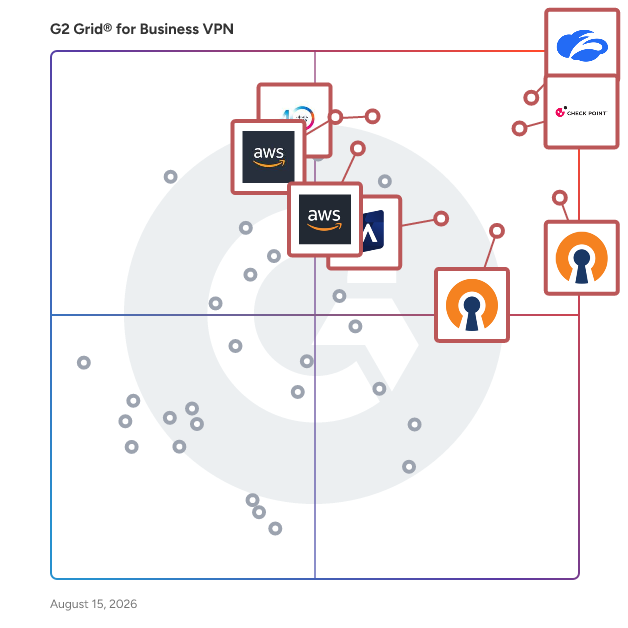
Highlighted products: Zscaler Private Access, Check Point Remote Access VPN, OpenVPN Access Server, OpenVPN CloudConnexa, Cisco Secure Client, Absolute Secure Access, AWS Client VPN, and AWS VPN.
Underlying data: [Grid® JSON](https://www.g2.com/categories/business-vpn/grids.json?focus%5B%5D=zscaler-private-access&focus%5B%5D=check-point-remote-access-vpn&focus%5B%5D=openvpn-access-server&focus%5B%5D=openvpn-cloudconnexa&focus%5B%5D=cisco-secure-client&focus%5B%5D=absolute-secure-access&focus%5B%5D=aws-client-vpn&focus%5B%5D=aws-vpn)
Sponsored
Fine-grained access control and visibility for centrally managing cloud resources.
Zscaler Private Access (ZPA) is a cloud-based zero trust solution that securely connects users to private applications hosted in public clouds, data centers, or on-premises environments without relying on traditional VPNs or exposing them to the internet. Built on the principles of zero trust, ZPA ensures that users are authenticated and authorized before granting access, providing application-specific access rather than exposing the network. With AI-powered segmentation and identity-based policies, ZPA minimizes the attack surface, makes applications invisible to the internet, and prevents lateral movement. By simplifying access, reducing IT complexity, and improving user experience, ZPA supports modern hybrid work while delivering unmatched scalability and performance. Key Features and Benefits: • Minimize the Attack Surface: Private applications are hidden behind the Zero Trust Exchange, making them invisible and unreachable. Users connect to apps, not the network. • Eliminate Lateral Movement: Least-privileged access allows one-to-one user-to-application connections, avoiding network-wide exposure. • Deliver Exceptional User Experience & Boost Hybrid Workforce Productivity: Fast, direct access to apps via 160+ global points of presence ensures low latency and no backhauling, boosting productivity. • Accelerate Zero Trust Journey with AI-powered User-to-app Segmentation: AI/ML generates custom app segmentation recommendations, simplifying user-to-app segmentation. • Prevent Compromised Users, Insider Threats & Advanced Attackers: Comprehensive protection for private apps with OWASP Top 10 prevention, inline inspection, advanced threat protection, and data loss prevention. • Extend Zero Trust to All Applications: Enable secure remote access for legacy network connected applications such as VOIP and server-to-client applications, and extranet applications hosted in business partner or vendor networks. • Ensure Business Continuity and High Availability: ZPA Private Service Edge caches policies for zero trust access during internet outages, allowing for secure connectivity and business continuity. • Reduce Cost & Operational Complexity: Replaces legacy VPNs, simplifying management and cutting hardware and operational costs. Accelerate M&A time-to-value without having to integrate networks.
Average Rating: 4.5/5.0
Total Reviews: 132
AI-generated summary from verified user reviews
"Zscaler Private Access: Stable, Secure VPN Alternative That Streamlines Daily Work"
Rating: 4.0/5.0 stars
— Esma Y.
"Brilliant Zero Trust Secure Access That Replaces Traditional VPNs"
Rating: 4.5/5.0 stars
— Luciana S.
Check Point Remote Access VPN is an enterprise-grade solution that enables secure and seamless remote access to corporate networks and resources for employees working remotely or traveling. It ensures the privacy and integrity of sensitive information through multi-factor authentication, endpoint compliance scanning, and encryption of all transmitted data. Key Features and Functionality: - Secure Remote Access: Provides full IPsec VPN connectivity, ensuring strong authentication, data integrity, and confidentiality. - Multi-Factor Authentication Support: Offers comprehensive authentication options, including username/password, SecurID, RADIUS Challenge/Response, CAPI software and hardware tokens, and P12 certificates. - Endpoint Compliance Scanning: Verifies that client devices comply with the organization's security policies, blocking non-compliant connections to the network. - Seamless User Experience: Features VPN Auto-Connect and logoff when corporate resources are needed and upon network roaming, ensuring a hassle-free experience for users. - Integrated Management: Allows configuration of policies and viewing of VPN events from a single console, streamlining administration. Primary Value and User Solutions: Check Point Remote Access VPN addresses the critical need for secure remote connectivity, enabling employees to access corporate resources safely from any location. By implementing robust security measures such as multi-factor authentication and endpoint compliance scanning, it mitigates risks associated with remote work, including data breaches and unauthorized access. The solution's seamless integration and user-friendly experience enhance productivity while maintaining stringent security standards, making it an essential tool for organizations with remote or traveling employees.
Average Rating: 4.5/5.0
Total Reviews: 95
AI-generated summary from verified user reviews
"Secure, Scalable, and Simple VPN Integration""
Rating: 5.0/5.0 stars
— Ivan S.
"Secure, Seamless Connectivity with Robust Management Features"
Rating: 5.0/5.0 stars
— Abhimanyu K.
OpenVPN Access Server is a self-hosted VPN server application that provides organizations with secure remote access to their private network, applications, and data. Built as business VPN software, it can be deployed in the cloud or on-premises, giving companies a flexible VPN for business teams that are remote, hybrid, or in-office. Because it runs on infrastructure you control, it's easily one of the best business VPN and best VPN for business picks for organizations that want a genuine VPN service for business without long-term vendor lock-in, whether you're a growing team looking for a VPN for small business or a larger organization that needs an enterprise VPN with high availability and clustering. Positioned as a remote access VPN, or simply a VPN for remote access, Access Server layers in essential zero trust network access (ZTNA) capabilities: granular permissions, least-privilege enforcement, and verification that connections come from trusted devices and locations. This makes it a strong secure remote access VPN choice for protecting sensitive data and isolating SaaS applications from the open internet. It also supports site-to-site VPN connections, extending your business network securely to remote offices. For deployment, Access Server offers real flexibility as VPN server hosting: pre-configured images are available for AWS, Google Cloud, Microsoft Azure, DigitalOcean, Oracle Cloud, and IBM Cloud, giving you a cloud VPN service option, or you can run it as an on-premises VPN on your own hardware. Whether you prefer a fully managed VPN experience or hands-on control, Access Server can function as a VPN-as-a-service through your infrastructure provider, and it pairs an intuitive Admin Web UI, REST/XML-RPC API, and command-line tools with strong security: built-in X.509 PKI, SAML/LDAP/RADIUS authentication, multi-factor authentication, and AES-256-GCM encryption. The result is one of the more complete VPN solutions for businesses that need scalable, cost-effective, and genuinely secure connectivity as they grow.
Average Rating: 4.5/5.0
Total Reviews: 354
AI-generated summary from verified user reviews
"Easy to Use, Quiet in the Background, and Regularly Updated"
Rating: 5.0/5.0 stars
— Djustin B.
"Easy to Deploy, User-Friendly, Powerful and Reliable VPN."
Rating: 5.0/5.0 stars
— Gonzalo R.
CloudConnexa is a cloud-delivered zero trust network access (ZTNA) and secure access service edge (SASE) platform that provides organizations with secure, policy-based access to private networks, applications, and resources. As a single-vendor SASE solution built with small and midsize businesses (SMBs) in mind, CloudConnexa combines ZTNA, secure web gateway capabilities, and built-in threat protection into one cloud-delivered service, without the cost or complexity of stitching together point products from multiple ZTNA vendors or ZTNA providers. For organizations evaluating zero trust network access solutions, CloudConnexa stands out among ZTNA solutions by pairing continuous, identity-based zero trust access with a fully managed Wide-area Private Cloud (WPC) spanning 30+ global points of presence, delivering zero trust remote access and zero trust application access to private apps and networks without ever exposing them to the public internet. Granular zero trust access control lets administrators define exactly which users and groups can reach specific hosts, networks, and applications, while built-in IDS/IPS (Cyber Shield), content filtering, and device posture checks extend zero trust network security and zero trust cloud security across every connection, reducing attack surface and blocking common cyber threats before they reach your environment. CloudConnexa also functions as a network access control solution, enforcing device posture, location context, and passwordless authentication policies before any connection is established, with SSO, SCIM provisioning, and multi-factor authentication further hardening identity verification. Because CloudConnexa is delivered entirely as a service, it removes the up-front hardware investment associated with many legacy SASE vendors, giving SMBs predictable SASE pricing and an all-in-one alternative to piecing together separate ZTNA and networking tools. For growing businesses that need enterprise-grade zero trust security without enterprise-level overhead, CloudConnexa delivers ZTNA and SASE in a single, easy-to-manage platform.
Average Rating: 4.6/5.0
Total Reviews: 129
AI-generated summary from verified user reviews
Rating: 5.0/5.0 stars
— Tina L.
"Secure, Stable VPN Access That Makes Remote Work Effortless"
Rating: 5.0/5.0 stars
— Sree K.
Cisco AnyConnect Secure Mobility Client is a comprehensive endpoint security solution that provides secure and seamless remote access to corporate networks for users across various devices and platforms. By integrating advanced VPN capabilities with robust security features, AnyConnect ensures that employees can connect to enterprise resources from anywhere, maintaining productivity without compromising security. Key Features and Functionality: - Secure VPN Access: Supports SSL and IPsec IKEv2 protocols, offering encrypted connections for remote users to access corporate resources securely. - Broad Platform Support: Compatible with multiple operating systems, including Windows, macOS, Linux, iOS, Android, and Chrome OS, facilitating diverse device connectivity. - Always-On Intelligent VPN: Automatically selects the optimal network access point and adapts tunneling protocols to ensure continuous and efficient connectivity. - Endpoint Compliance and Posture Enforcement: Integrates with Cisco Identity Services Engine (ISE) to assess device compliance and enforce security policies across wired, wireless, and VPN environments. - Network Visibility Module (NVM): Provides detailed insights into endpoint application usage and network behavior, aiding in the detection of anomalies and potential threats. - Web Security Integration: Offers built-in modules for web security, either through on-premise Cisco Web Security Appliance or cloud-based Cisco Cloud Web Security, protecting users from web-based threats. - Per-App VPN: Allows administrators to specify which applications can access the VPN, enhancing security by limiting exposure to corporate resources. Primary Value and User Solutions: Cisco AnyConnect Secure Mobility Client addresses the critical need for secure, reliable, and user-friendly remote access in today's mobile and diverse work environments. By providing a unified security solution that encompasses VPN access, endpoint compliance, and network visibility, AnyConnect enables organizations to: - Enhance Security Posture: Implement consistent security policies and compliance checks across all devices and connection types, reducing the risk of data breaches and unauthorized access. - Improve User Productivity: Offer seamless and uninterrupted access to corporate resources, allowing employees to work efficiently from any location without technical hindrances. - Simplify IT Management: Utilize a single client to manage multiple security services, streamlining deployment, monitoring, and maintenance processes for IT administrators. In summary, Cisco AnyConnect Secure Mobility Client delivers a robust and integrated approach to secure remote access, ensuring that organizations can maintain operational continuity while safeguarding their digital assets.
Average Rating: 4.5/5.0
Total Reviews: 339
AI-generated summary from verified user reviews
"Secure, Reliable VPN Access to Stage and Production Environments"
Rating: 5.0/5.0 stars
— Mani V.
"Rock-Solid, Secure VPN with an Easy-to-Navigate Interface"
Rating: 4.5/5.0 stars
— Alden R.
AWS Client VPN is a fully managed, client-based VPN service that enables secure and seamless access to AWS resources and on-premises networks from any location. Utilizing the OpenVPN protocol, it provides encrypted connections, ensuring data privacy and integrity. The service is designed to be elastic, automatically scaling to accommodate varying numbers of users without manual intervention, making it ideal for organizations with fluctuating remote access needs. Key Features and Functionality: - Secure Remote Access: Establishes encrypted TLS connections from any location through OpenVPN clients, ensuring data privacy and integrity. - Fully Managed Service: AWS handles the deployment, capacity provisioning, and service updates, reducing the operational burden on IT teams. - High Availability and Elasticity: Dynamically scales to accommodate varying numbers of users connecting to AWS and on-premises resources without manual intervention. - Flexible Authentication Methods: Supports multiple authentication methods, including Active Directory integration, federated authentication with SAML 2.0, and certificate-based authentication. - Granular Access Control: Implements precise security controls through network-based access rules configurable at the Active Directory group level and security group-based access control. - Comprehensive Monitoring: Offers detailed connection logs and real-time management capabilities, including the ability to monitor and terminate active client connections when necessary. - Cross-Platform Compatibility: Supports OpenVPN-based clients on various devices, including Windows, macOS, iOS, Android, and Linux-based systems. Primary Value and User Solutions: AWS Client VPN addresses the challenges of providing secure, scalable, and manageable remote access to corporate resources. By eliminating the need for traditional hardware-based VPN solutions, it reduces infrastructure costs and complexity. Its elasticity ensures that organizations can handle sudden increases in remote access demand without compromising performance or availability. The service's integration with existing AWS infrastructure and support for various authentication methods allow for seamless incorporation into current IT environments. This makes AWS Client VPN an ideal solution for businesses seeking a reliable and scalable remote access VPN service.
Average Rating: 4.4/5.0
Total Reviews: 21
AI-generated summary from verified user reviews
"Seamless AWS Integration for Secure, Scalable Remote Access"
Rating: 4.5/5.0 stars
— Mohamed B.
Rating: 4.0/5.0 stars
— Leonidas R.
Absolute Secure Access (formerly NetMotion by Absolute) is one of the company’s core product lines, which was added through the acquisition of NetMotion in July 2021. The product portfolio provides resilient network connectivity for users to securely access critical resources in the public cloud, private data centers, and on-premises. These products allow users to transition from traditional VPN to a resilient Zero Trust approach, without impairing productivity or admin controls. Absolute Secure Access encompasses three products: • Absolute VPN provides security and confidentiality for data in motion by means of encryption and access controls. It also offers benefits to the end user, such as making tunnel and network sessions resilient and optimizing streaming video and audio. • Absolute ZTNA provides a software-defined perimeter via Zero Trust Network Access, creating a context-based, logical access boundary around an application or set of applications – wherever they're hosted. It shields applications from the Internet, making them invisible to unauthorized users. Access policies are enforced at the endpoint, avoiding latency and any data transgression. • Absolute Insights™ for Network offers diagnostic and experience monitoring capabilities across endpoints and network, allowing organizations to proactively monitor, investigate, and remediate end user performance issues quickly and at scale, even on networks that are not company-owned or managed
Average Rating: 4.7/5.0
Total Reviews: 224
AI-generated summary from verified user reviews
"Effortless, Secure Remote Access with Minimal Interaction"
Rating: 5.0/5.0 stars
— Greg S.
"Absolute Secure - NetMotion VPN"
Rating: 4.0/5.0 stars
— Mo V.
AWS VPN is a comprehensive, fully managed service designed to establish secure and private connections between your on-premises networks, remote workers, and AWS cloud resources. It offers two primary solutions: AWS Site-to-Site VPN and AWS Client VPN. AWS Site-to-Site VPN enables secure connections between your data centers or branch offices and AWS cloud resources, facilitating seamless integration of on-premises networks with the cloud. AWS Client VPN provides remote employees with secure access to AWS and on-premises resources from any location, ensuring flexibility and scalability without the need for traditional hardware-based VPN solutions. Key Features and Functionality: - Secure Connectivity: AWS VPN utilizes robust encryption protocols to ensure data privacy and integrity during transmission. - Scalability: The service automatically scales to accommodate varying user demands, allowing organizations to handle peak loads without over-provisioning resources. - High Availability: AWS VPN offers extensive availability with multiple global AWS Availability Zones, ensuring reliable and uninterrupted connectivity. - Integration with AWS Services: Seamless integration with other AWS services, such as Amazon VPC, AWS Direct Connect, and AWS Transit Gateway, enables efficient network architecture design within the AWS environment. - Flexible Authentication Options: Supports various authentication methods, including Active Directory, certificate-based authentication, and federated authentication using SAML-2.0, providing organizations with flexibility in managing user access. Primary Value and Solutions Provided: AWS VPN addresses the critical need for secure, scalable, and reliable connectivity between on-premises networks, remote users, and AWS cloud resources. By offering fully managed VPN solutions, it eliminates the operational burden associated with deploying and maintaining traditional VPN hardware or software. Organizations benefit from enhanced security through encrypted connections, improved performance with accelerated traffic routing, and cost efficiency via a pay-as-you-go pricing model. This enables businesses to focus on their core operations while ensuring secure and seamless access to their cloud and on-premises resources.
Average Rating: 4.7/5.0
Total Reviews: 25
AI-generated summary from verified user reviews
"Fast, Secure Hybrid Connectivity with Minimal Overhead"
Rating: 4.5/5.0 stars
— Atharva P.
"Super Helpful for Connecting AWS Private Resources Across Our Team"
Rating: 5.0/5.0 stars
— Jahangeer W.
Tailscale is a zero trust network overlay designed to help users establish secure and seamless connectivity across various resources and infrastructures. Built on the WireGuard® protocol, Tailscale enables organizations to create secure networks that communicate between devices and services without the traditional complexities associated with VPNs and other networking solutions. This innovative approach allows for end-to-end security, ensuring that data remains protected as it travels between endpoints. The target audience for Tailscale includes IT professionals, developers, and organizations looking to enhance their network security while simplifying connectivity. As businesses increasingly adopt remote work and cloud-based services, the need for robust security measures has never been more critical. Tailscale addresses these challenges by providing a user-friendly interface that allows teams to set up secure connections quickly, making it an ideal solution for companies transitioning to a zero trust architecture or seeking to modernize their networking strategies. Key use cases for Tailscale include delivering secure remote access for employees, replacing legacy VPNs that may be cumbersome and less secure, and connecting various software-as-a-service (SaaS) applications and developer workloads. By leveraging Tailscale, organizations can streamline their networking operations, reduce the attack surface, and enhance overall security posture. The ability to connect resources across different environments—whether on-premises, in the cloud, or hybrid—further underscores Tailscale's versatility in meeting diverse networking needs. Tailscale's key features include its simple setup process, which allows users to create secure connections with minimal configuration. The product also supports automatic key management, ensuring that encryption keys are handled securely without requiring manual intervention. Additionally, Tailscale's integration with existing identity providers enables organizations to manage access controls effectively, ensuring that only authorized users can connect to specific resources. The use of WireGuard® technology provides high-performance encryption, making Tailscale not only secure but also efficient in terms of speed and resource usage. By offering a straightforward approach to secure networking, Tailscale stands out in its category. Its focus on zero trust principles, combined with ease of use and robust security features, makes it a valuable tool for organizations looking to enhance their connectivity while maintaining a strong security posture. Whether for remote work, application development, or cloud integration, Tailscale provides a comprehensive solution that addresses the evolving needs of modern businesses.
Average Rating: 4.6/5.0
Total Reviews: 32
AI-generated summary from verified user reviews
"Effortless Remote Access for Home Networks"
Rating: 4.0/5.0 stars
— Swet S.
"Tailscale Transformed My Workflow with Secure, Effortless Setup"
Rating: 5.0/5.0 stars
— Johnathan B.
Google Cloud VPN is a service that securely connects your on-premises network to Google's Virtual Private Cloud (VPC) network through an IPsec VPN tunnel. This encrypted connection ensures that data traveling between your networks remains protected over the public internet. Cloud VPN is particularly beneficial for low-volume data connections and is designed for secure communication between private networks, not for routing traffic to the public internet. Key Features and Functionality: - High Availability (HA) VPN: Offers a high-availability solution with an SLA of up to 99.99% service availability, depending on the configuration. - Multiple VPN Gateways: Supports the creation of multiple HA VPN gateways, each with two interfaces and external IP addresses, enhancing redundancy and reliability. - Dynamic and Static Routing: Supports both dynamic routes using Cloud Router and static routes, providing flexibility in network configuration. - Protocol Support: Compatible with both IKEv1 and IKEv2 protocols, ensuring broad interoperability with various VPN devices. - Encryption Standards: Utilizes ESP in Tunnel mode with authentication, ensuring secure data transmission. Primary Value and User Benefits: Google Cloud VPN enables organizations to securely extend their on-premises networks into Google's cloud infrastructure, facilitating hybrid cloud deployments. By encrypting traffic between networks, it ensures data security during transmission. The service's high availability and support for multiple gateways and tunnels provide reliable and scalable connectivity solutions. Additionally, its compatibility with various routing protocols and encryption standards allows for seamless integration with existing network infrastructures, reducing operational complexity and enhancing overall network security.
Average Rating: 4.3/5.0
Total Reviews: 16
AI-generated summary from verified user reviews
Rating: 4.5/5.0 stars
— Sohel K.
"Managed IPsec VPN solution that bridges on-premises networks with Google Cloud VPC infrastructure"
Rating: 4.5/5.0 stars
— Luca P.
GoodAccess is a cybersecurity platform (SASE/SSE) that empowers medium-sized enterprises to easily implement Zero Trust Architecture (ZTA) in their infrastructure, regardless of its complexity or scale. By leveraging a Low-Code/No-Code approach, GoodAccess delivers a hardware-free, rapid deployment solution within hours or days, allowing companies to enhance their security without the need for in-house IT experts. Our platform ensures seamless integration with modern SaaS/cloud applications as well as legacy systems, protecting critical assets for remote and hybrid workforces. GoodAccess serves businesses with 50-5000 employees across diverse industries, particularly those adopting multi-cloud and SaaS environments. What does GoodAccess do? GoodAccess protects the customer’s infrastructure under one zero-trust umbrella, regardless of how complex, heterogeneous, or widespread it is. It is a good fit for companies supporting full-remote or hybrid modes of work using both company-issued and employees’ own devices. The low-code/no-code, cloud-based SASE platform allows medium-sized businesses to create and manage zero trust architecture easily. In today’s cybersecurity landscape, this is an essential part of any medium-sized organization’s security, and a highly effective enabler of regulatory compliance. The GoodAccess platform combines several latest technologies to tackle the most pressing cybersecurity challenges of today. ✅ Remote access and BYOD—Device security enforcement with device inventory and posture checks. ✅ Multi-factor authentication (MFA)---Unified MFA solution for all critical systems, including legacy applications. ✅ Identity-based access control (IAM/FwaaS)---Zero-Trust Architecture enabling control of all access by identity (SSO/SCIM). ✅ Network encryption and segmentation—Segmentation at maximum granularity radically reduces the attack surface. ✅ Full control and visibility—Security logs and reports from across the entire organization with SIEM integration. What makes GoodAccess unique? GoodAccess stands out by its usability-first design. It is an all-SaaS, zero-hardware platform that fits any infrastructure to deliver network-based Zero-Trust Architecture (SDP) without the need for an IT expert on staff. Our key uniquenesses include: ✅ Simplicity—Low-code/no-code/no-hardware platform for medium-sized organizations. ✅ Market-leading deployment time—GoodAccess takes hours to days to deploy. ✅ Infrastructure-agnostic—Deployable over any existing infrastructure. ✅ Easy management—No certified IT experts needed. ✅ Zero Trust on network layer—Allows for simple integration of legacy applications. ✅ Based in the EU—Ideal cybersecurity provider for NIS2 compliance. Interested in giving GoodAccess a shot? Book a Free Demo: https://calendar.goodaccess.com/meetings/eva-hisemova Start your Free Trial: https://app.goodaccess.com/free-trial/
Average Rating: 4.7/5.0
Total Reviews: 164
AI-generated summary from verified user reviews
"Seamless VPN Solution with Top-Tier Performance"
Rating: 5.0/5.0 stars
— Satya Prateek B.
"Seamless Setup and Secure, Centralized VPN Access with Static IPs"
Rating: 4.5/5.0 stars
— Rinalon E.
pfSense® Plus software is the world’s most trusted firewall. The software has garnered the respect and adoration of users worldwide - installed well over three million times. Made possible by open source technology. Made into a robust, reliable, dependable product by Netgate.
Average Rating: 4.7/5.0
Total Reviews: 318
AI-generated summary from verified user reviews
"Reliable, Flexible, and Built for Real Control"
Rating: 5.0/5.0 stars
— MD D.
"Easy Setup, Reliable High Availability, Needs Better Hardware Performance on Entry Level Hardware"
Rating: 5.0/5.0 stars
— Shawn L.
The internet is the new corporate network, leading organizations to transition to their network security to Secure Access Service Edge (SASE). However, current solutions break the user experience with slow connections and complex management. Check Point SASE is a game-changing solution that delivers 10x faster internet security, SaaS Security, and full mesh Zero Trust Access and optimized SD-WAN performance—all with an emphasis on streamlined management. Combining innovative on-device and cloud-delivered network protections, Check Point SASE offers a local browsing experience with tighter security and privacy, and an identity-centric zero trust access policy that accommodates everyone: employees, BYOD and third parties. Its SD-WAN solution unifies industry-leading threat prevention with optimized connectivity, automated steering for over 10,000 applications and seamless link failover for uninterrupted web conferencing. Using Check Point SASE, business can build a secure corporate network over a private global backbone in less than an hour. The service is managed from a unified console and is backed by an award-winning global support team that has you covered 24/7.
Average Rating: 4.5/5.0
Total Reviews: 223
AI-generated summary from verified user reviews
"Powerful Zero Trust Security, Simple Centralized Management"
Rating: 5.0/5.0 stars
— Isiyak S.
"A Robust SASE Solution for Modern Enterprises"
Rating: 4.5/5.0 stars
— Aziz S.
Surfshark is a privacy protection company offering a seamless VPN with a strong focus on security. It offers intuitive apps for all devices, thousands of IP addresses in more than 65 locations, and 3200+ bare-metal servers. Surfshark VPN is an ideal solution for small businesses or big families as it offers unlimited simultaneous connections per each account. On top of that, it’s one of the few VPN providers that had a successful independent audit and has received a seal of approval from the AV-TEST, an independent IT-security institute.
Average Rating: 4.0/5.0
Total Reviews: 22
AI-generated summary from verified user reviews
"The best VPN I have ever used."
Rating: 5.0/5.0 stars
— Milos J.
"Reliable, Competitive VPN with Occasional Connection Glitches"
Rating: 5.0/5.0 stars
— Shoaib S.
Twingate is a secure remote access solution for an organization’s private applications, data, and environments, whether they are on-premise or in the cloud. Built to make the lives of DevOps teams, IT/infrastructure teams, and end users easier, it replaces outdated business VPNs which were not built to handle a world in which "work from anywhere" and cloud-based assets are increasingly the norm. Twingate’s modern zero trust-based approach to securing remote access focuses on improving security, while not compromising on usability and maintainability. Twingate distinguishes itself from other solutions in the following ways: - Software-only solution can be deployed alongside existing solutions in minutes, without requiring changes to existing infrastructure. - Enables least privilege access at the application level without requiring networks to be re-architected. - Centralized admin console, coupled with extensive logging capabilities, provides control and visibility over an enterprise’s entire network. - Scales up to support more users and resources without burdening IT teams with network segmentation projects or buying new hardware. - Client agents can be set up by users without IT support, are always on, and do not require user interaction once enabled. - User internet connectivity is improved due to split tunneling, no backhauling, and an intelligent client agent that handles authorization and routing activities on device.
Average Rating: 4.7/5.0
Total Reviews: 74
AI-generated summary from verified user reviews
"Seamless, Scalable ZTNA with Granular Access Controls"
Rating: 4.0/5.0 stars
— Vivek S.
"Easy Setup, Strong Network Access Control, and Great Google Workspace Integration"
Rating: 5.0/5.0 stars
— Ray S.
Virtual private network (VPN) software connects users and devices to private networks using encryption and security mechanisms. It ensures that only credentialed users have access to private networks and sensitive data, and protects data in transit, using encryption.
Users of VPN software employ these tools to restrict access to corporate networks to credentialed users, protect the information they send over the internet from being accessed by third parties like hackers attempting to view confidential information, mask their IP address and location, and access geo-specific website content.
VPN software has both corporate and personal use cases. Companies seeking to increase their security or restrict user access to sensitive corporate data can utilize VPNs to set up gated, internal networks. Individuals often use personal VPN software to secure their connection and encrypt their traffic when using an unsecured or public Wi-Fi network that may be vulnerable to attacks, such as those found at homes, airports, hotels, or coffee shops.
VPN software works by creating a secure, encrypted connection over a less secure network, like public internet. VPN software uses VPN tunneling protocols to achieve this and encrypts incoming and outgoing data traffic. These tools also encrypt IP addresses, mask locations, and can bridge connections between devices. These products often contain firewalls to prevent viruses, hacks, and other threats.
What Does VPN Stand For?
VPN stands for virtual private network. VPNs are virtual because they connect users to other computers virtually. They are private because of their ability to hide a user’s IP address and encrypt their traffic data. The word network in VPN refers to the network of VPN servers accessible to the user with their VPN provider.
Corporate or enterprise VPN: Corporate or enterprise VPN software securely connects remote employees to corporate networks and cloud services. These tools encrypt company data traffic end to end and prevent unauthorized access to company networks. This VPN connection enables a company’s mobile workforce to access corporate email, chat, file sharing, intranet sites, and other corporate and cloud applications when working remotely.
Personal VPN: Personal VPNs help users access the internet when they are connected to an unsecured network to privately browse the internet. It also allows them to change their IP address to access geo-restricted websites and content.
The following are some core features within VPN software:
Strength of VPN protocol: Each VPN protocol has strengths and weaknesses related to speed, encryption, stability, streaming, and downloading. The most secure and mobile-friendly VPN connection protocols are OpenVPN and IKEv2 protocols.
Strength of encryption: The most common encryption types are AES-128 encryption or AES-256 encryption, known as military-grade encryption.
Double VPN: Some VPN service providers send internet traffic through two servers, encrypting it twice.
Kill switch: A kill switch automatically shuts off a user’s internet access when the encrypted connection is lost, preventing data breach.
Logging data: Some companies and IT administrators want to monitor VPN usage. Some VPN providers record and store user logs.
No log or zero log policy: In some instances, VPN users value privacy and opt to have no user logs recorded. Some VPN service providers offer a no log or zero log policy. The VPN provider does not collect or keep any data transmitted on the VPN. Depending on the jurisdiction, there may be legal issues with no log policies.
GDPR compliance: If a VPN provider keeps data logs on European Union (EU) citizens, the provider is required to comply with GDPR regulation.
Desktop clients: Many VPN providers work with operating systems such as Windows, macOS, or Linux.
Mobile clients: For mobile and secure VPN access, many VPN providers support Android and iOS mobile device connections.
Browser extension: Some VPN providers offer browser extensions as a quick, easy way to connect to a VPN server using browsers like Chrome, Firefox, and Safari.
Multidevice limitations: VPN providers may limit the number of devices, users, or businesses that can access the VPN. Most free VPNs allow up to five or six devices before they require users to switch to a paid version.
High-speed connectivity and reliability: Speed, bandwidth, and reliability are important when considering which VPN provider to select. VPN providers may highlight the geo-location and the number of server switches they have, as user speeds improve when more servers are available.
Malware protection: Some VPN providers offer auto installation of patches to prevent malware attacks.
Zero-trust secure access: This ensures only authenticated users with compliant devices can access network applications.
DNS leak prevention: This encrypts DNS queries, preventing leakages due to security flaws in DNS requests that may be revealed to ISP DNS servers.
Ease of administration: People use VPN software because accessibility is important. Choosing a solution with an intuitive, user-friendly interface can help users log on to the VPN more easily.
Customer service: Many free VPN providers offer no customer support while enterprise VPN providers offer dedicated customer support to help troubleshoot problems.
With VPN software, remote employees can securely log on to their corporate networks and access the same corporate applications, folders, messaging, intranet sites, and corporate email as their colleagues at the corporate office. For an increasingly remote workforce, traveling employees and people who work from home, VPN software is a major consideration for companies to make. Benefits of using VPN software include:
Remote workforce support: VPN software enables remote employees to connect to corporate networks.
Secure access: VPN software restricts access to corporate networks to credentialed users and secures data sharing between offices with end-to-end encryption.
Privacy: For those using VPNs for personal use, the most common reason is to mask the user’s true IP address. This helps when using public internet for privacy purposes, to access geo-restricted content, and to ensure a secure connection.
The two main constituencies of VPN software are businesses that want to protect sensitive company data by restricting access to their company data and individuals who want to mask their IP address while browsing the internet, whether for work or for personal reasons.
IT administrators: IT administrators generally manage VPN software. Companies that want to ensure their information is safeguarded and control who has access to their networks use VPN software. Companies primarily use VPN software to connect regional office networks to their headquarters and to authorize users, such as their remote employees or partners, with access to their corporate network.
Remote or mobile employees: With an increasingly mobile workforce, secure access to business applications is critical to accomplish work. Employees use VPN software when they are out of the office to get secure, seamless access to corporate networks and applications, such as corporate email, messaging, and file sharing.
Individuals: When not using VPN software to access corporate networks, individuals commonly use VPN software for secure personal internet browsing. This is typically to evade snooping from hackers while using unsecured Wi-Fi or to mask an IP address and location when visiting websites that track visitors. Individuals use VPNs to change their IP address’s country of origin to access geo-blocked websites. For example, if a person traveling for work in Singapore tries to access a website or service based in the United States, they might find that it is geo-restricted content per the Singaporean Media Development Authority. The traveler could utilize VPN software to use an IP address located in a different country, such as the United States, to bypass the Singaporean restrictions and view the content.
VPN solutions provide access to networks, like corporate networks for credentialed users; VPNs do not validate the user’s identity or provide access management functions. To get user-specific session information, adding identity and access-related tools to VPN deployment can be helpful.
Identity and access management (IAM) software: IAM software helps companies protect their systems from unauthorized access or misuse by only allowing authenticated, authorized users (typically employees, based on job roles) to access specific, protected company systems and data.
Privileged access management (PAM) software: PAM software helps companies protect the keys to their IT domain by ensuring the credentials of their privileged accounts, such as admin accounts on critical company assets, are only accessed by those with proper permissions to do so. PAM software helps prevent external hacking or internal misuse of important company assets by employing the least privilege access policies, wherein users receive the absolute minimum access needed to perform their duties.
Software-defined perimeter (SDP) software: SDP products are a specific type of network security solution that focuses on network segmentation and user authentication. SDP itself is an architecture designed to allow access on a need-to-know basis, meaning every device and user must be verified before accessing either the network as a whole or specific systems and applications within a network.
Remote desktop software: For companies seeking a lighter weight software solution to view desktops remotely--often used for technical support use cases--remote desktop software may be an option. Remote desktop software allows a user to seamlessly connect to and interact with a computer in another location via an internal network or the internet. Remote desktop software enables the user to see and control a connected PC or laptop as though they were sitting directly in front of it.
Legality: Some countries ban the use of VPN software. For example, in the United States, it is perfectly legal to use VPNs. In Russia, Venezuela, Turkey, and several other countries, it is illegal to use a VPN in some instances. This includes changing an IP address’s country of origin to access blocked websites.
List of countries where VPNs are illegal, as of May, 2019:
List of countries where only government-approved VPNs are legal, as of May, 2019:
(Source: Comparitech)
Legality of no log or zero log policies: Depending on where the VPN provider’s servers are located, local legislation dictates what recordkeeping is required of VPN providers. Information VPN providers may be legally required to hand over to local authorities include user activity, IP address, connection timestamps, and devices used. This means that in some cases, no log or zero log policies may not be available.
Free VPNs may track and sell user data: Some free VPNs sell user data, which usually defeats the purpose of using a VPN in the first place. Hence, it is important to read the terms and conditions of the VPN provider carefully.
Businesses of all sizes can benefit from VPNs, in particular those supporting a remote workforce.
Remote workforce: VPNs allow a remote workforce to securely access the corporate network.
Employees who travel: For employees who travel frequently and use insecure internet connections, VPNs can ensure traffic is secured.
Global companies: For companies looking to connect their branch offices to the headquarters’ corporate networks, site-to-site VPNs may be an option.
VPN software can meet a variety of business needs depending on a business’s specific requirements. When developing the list of requirements and priorities for selecting a VPN software solution, companies should be mindful of the following:
End-user use cases: Companies should determine the use cases of the software by asking the following questions:
Strength of protocol: Businesses should determine which protocol they require based on the speed, encryption strength, stability, streaming, and downloading capabilities. A VPN protocol is the instruction a VPN uses to communicate with the VPN client and the VPN server. The protocol is comprised of transmission protocols and encryption standards.
There are several types of VPN protocols with differing speed, encryption, stability, streaming, and downloading abilities. The most secure and mobile-friendly VPN protocols are OpenVPN and IKEv2 protocols, while PPTP and L2TP/IPsec are less secure protocols.
Pros: speed, stability, streaming, downloading
Cons: poor encryption
Pros: speed, streaming, downloading
Cons: fair encryption, fair stability
Pros: encryption, stability
Cons: fair speed, poor streaming, poor downloading
Pros: encryption, downloading
Cons: fair speed, fair stability, fair streaming
Pros: speed, encryption, stability
Cons: fair streaming, fair downloading
Encryption standard: Companies must determine which encryption standard meets their security requirements. The most common encryption standards include:
Business segment or region-specific solution: When looking for software tailored to the small businesses segment versus mid-market or enterprise segments, companies should be clear in their RFP about this. Similarly, if there is a need for a tool that works well in a specific geographical region or language, that should be included in the RFP.
Integrations: Companies must ascertain which integrations are important.
Licenses needed: Companies should decide how many licenses they need for end users and if there are different license types based on user type.
Number of servers and geographic locations: The number of servers and their geographic location is important when selecting a VPN solution, in particular for individual VPN use cases.
Timeline: How quickly a company needs to implement a solution is also a factor in the buying process.
Level of support: Companies should know if they require high-quality support or if they are able to implement this in house?
Create a long list
Upon finding some products through research on G2.com, selections can be saved in “My List”, so buyers can easily reference these software solutions. From meeting the business functionality needs to implementation, vendor evaluations are an essential part of the software buying process. For ease of comparison after all demos are complete, it helps to prepare a consistent list of questions regarding specific needs and concerns to ask each vendor.
Create a short list
To determine the best VPN solution from the long list of products, buyers should read through product user reviews, view ratings on the G2 Grid® report for the Virtual Private Network (VPN) software category, read usability ratings, and cull the long list of vendors in the G2 “My List” down to a handful.
Conduct demos
In the next step, buyers can contact the shortlisted vendors for demos using the G2 “Get a Quote” button. During the demo of each solution, buyers should ask the same questions, get clarifications on the same use cases to best evaluate like for like, and see how each vendor stacks up against the competition.
Choose a selection team
The software selection team should consist of members of the organization who have the right interest, skills, and time to participate in this process. A good starting point is to aim for three to five people who fill roles such as the main decision maker, project manager, process owner, system owner, or staffing subject matter expert, as well as a technical lead, IT administrator, or security administrator, in addition to an end user. It is important to include an end user on the selection team because after all, for VPN software to work, end-user adoption is critical.
Negotiation
Pricing often depends on the number of licenses bought and the length of time. The more licenses bought and for a longer term, usually helps in getting a discounted deal. Negotiates may be possible for free or reduced implementation services or ongoing support, as well.
Final decision
After this stage, and before going all in, it is recommended to roll out a test run or pilot program to test adoption with a small sample size of users. If the tool is well used and well received, the buyer can be confident that the selection was correct. If not, it might be time to go back to the drawing board.