2026 Best Software Awards are here!See the list
Crossware Email Signature

By Crossware Ltd

4.8 out of 5 stars
3 star
0%
2 star
0%
1 star
0%

How would you rate your experience with Crossware Email Signature?

Crossware Email Signature Reviews & Product Details

Pricing

Pricing provided by Crossware Email Signature.

Free Trial

Free Trial
Per Month

Crossware Email Signature Integrations

(3)
Verified by Crossware Email Signature

Crossware Email Signature Media

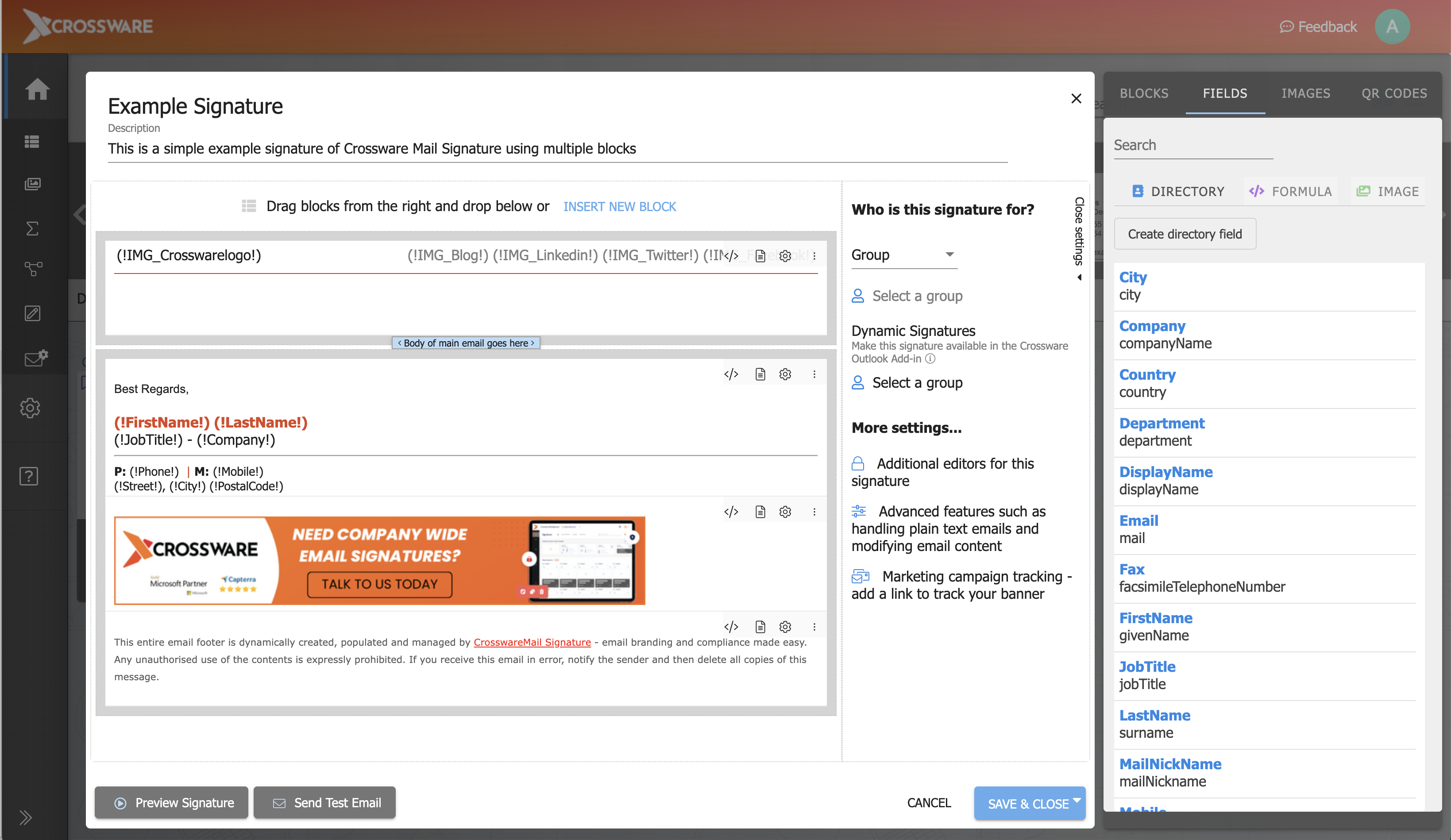
Crossware Email Signature Demo - Central Dashboard
Drag-and-drop editor for creating custom email signatures with logos, banners, contact details, social icons, and legal disclaimers — no coding required.
Want to simplify your email signatures and make every email a brand asset? Discover how Crossware helps businesses of all sizes create, manage, and automate professional email signatures across Microsoft 365, Google Workspace, Exchange, and
Play Crossware Email Signature Video
Want to simplify your email signatures and make every email a brand asset? Discover how Crossware helps businesses of all sizes create, manage, and automate professional email signatures across Microsoft 365, Google Workspace, Exchange, and
Take control of your brand’s email communication with Crossware, the world-leading email signature solution!
Play Crossware Email Signature Video
Take control of your brand’s email communication with Crossware, the world-leading email signature solution!
Interactive Demo
Try an interactive demo created by the software seller (right here on G2).
Product Avatar Image

Have you used Crossware Email Signature before?

Answer a few questions to help the Crossware Email Signature community

Crossware Email Signature Reviews (33)

Reviews

Crossware Email Signature Reviews (33)

4.8
33 reviews

Review Summary

Generated using AI from real user reviews
Users consistently praise the ease of use and flexibility of Crossware Email Signature, highlighting its straightforward setup and ability to manage signatures centrally across various platforms. The responsive customer support further enhances user satisfaction, making it a reliable choice for organizations. However, some users note that the interface could benefit from additional tutorials and improvements.

Pros & Cons

Generated from real user reviews
View All Pros and Cons
Search reviews
Filter Reviews
Clear Results
G2 reviews are authentic and verified.
Simon B.
SB
IT Consultant
Small-Business (50 or fewer emp.)
"Great solution for email signatures!"
What do you like best about Crossware Email Signature?

Crossware is a great product for adding signatures to Microsoft 365 emails. It's powerful web-based interface allows you to drag and drop elements into signatures, as well using HTML to get the exact look that you want. I like the way that you can create individual signatures for users, or have ones that apply to groups of users. Very handy for orgnaisations that want different signatures based on department etc.

I have used Crossware for several clients, due to its easy implementation. In the event of any issues, their customer support is excellent and are always on hand to assist.

I would highly recommend Crossware for anyone wanting a powerful, centralised email signature solution Review collected by and hosted on G2.com.

What do you dislike about Crossware Email Signature?

There is nothing about Crosseare that I dislike so far! Review collected by and hosted on G2.com.

Nicole G.
NG
Marketing Specialist
Mid-Market (51-1000 emp.)
"A great solution and easy / supportive team to work with!"
What do you like best about Crossware Email Signature?

The Crossware Email Signature solution has been very easy to use and implement. We did have some additional features and 'smarts' which we wanted to work into our banner advertising - the team were fantastic in jumping on a call with us to come up with a custom coded solution that would meet your needs. Nothing has been too much trouble for the support team and they are easy to reach and communicate with. Review collected by and hosted on G2.com.

What do you dislike about Crossware Email Signature?

The custom coding can be daunting to start with but the team has been helpful and supportive. The team are also looking at ways to negate the need for us to do custom coding and put the features needed into the UI. Review collected by and hosted on G2.com.

Paul T.
PT
Property Consultant
Small-Business (50 or fewer emp.)
"Seamless Multi-Device Access with Easy Updates"
What do you like best about Crossware Email Signature?

the fact that i can use it across multiple devices without having to store onto the device itself and that I can update it at my leisure Review collected by and hosted on G2.com.

What do you dislike about Crossware Email Signature?

Sometimes the HTML file appears not to follow through and the icons can drop off on certain received e mails Review collected by and hosted on G2.com.

Soorej K.
SK
Systems Administrator
Mid-Market (51-1000 emp.)
"Crossware Email Signature Software Evolved as an Leading Product"
What do you like best about Crossware Email Signature?

Crossware Email Signature Management has been in the market for more than 15 years and only software which is flexible for integration and easy to use with an good customer support and only Software Supporting HCL Domino Platform as well as M365. Review collected by and hosted on G2.com.

What do you dislike about Crossware Email Signature?

They could have provide some Tutorial Training Videos for customers. Review collected by and hosted on G2.com.

Alex N.
AN
IT Manager
Mid-Market (51-1000 emp.)
"Great product for the price"
What do you like best about Crossware Email Signature?

Ease of use, especially since the new user interface. I've been using a number of years both at my current employment and my previous. Support is also very good. UK based, Dan and Ian will always be able to help.

In terms of the product, once setup, its as easy as adding a user to a group, they will then get the signature on every email.

rules also allow you to have more granular control, if you have a campaign running for a few week as an example, you can setup a rule with dates to apply the signature block, then say external only, for people in this group.

Fantastic product. Review collected by and hosted on G2.com.

What do you dislike about Crossware Email Signature?

Cant think of any at this moment in time, it does what we need well. Review collected by and hosted on G2.com.

Darren W.
DW
Group Manager - Technology (CTO)
Mid-Market (51-1000 emp.)
"Crossware Support team made our unique requirements actually work"
What do you like best about Crossware Email Signature?

I think we stretch the functionality to it's absolute limit; we have differing signatures & signature branding based on email sensitivity label, for example, and it gets more complicated from there. We have to change the "from" email domain for each of those brands based on that same label, and so on. Crossware support were exceptionally good - and fast - at helping us with the coding for the Rules and configuration that we needed to make this all work.

The Outlook plugin is very useful for those staff members who only have a small number of signatures where changing "from" address is necessary, or they are sending from a shared mailbox as the shared mailbox account. It was easy to deploy as well. Review collected by and hosted on G2.com.

What do you dislike about Crossware Email Signature?

It would be helpful if we could see the logs of what signature was being applied to which email - given the complexity of what we do with Crossware. I accept, though, that given the number of emails they're processing then log storage sizes would be horrific. I'd happily pay a bit more, though, for 30 days of log storage. Review collected by and hosted on G2.com.

Sean M.
SM
Account Manager
Small-Business (50 or fewer emp.)
"Crossware email signatures"
What do you like best about Crossware Email Signature?

Crossware allows us to create a standard email signature for a company and can be customised by role or division in the company. They can easily be modified so we can have a different message for standard and holiday periods.

The email signature is applied across the email regardless of whether I use a PC, the web app or a mobile phone. Review collected by and hosted on G2.com.

What do you dislike about Crossware Email Signature?

With the new Outlook there can be a minor delay of just a second or two while it downloads the email signature from the server when using the app on a PC. Review collected by and hosted on G2.com.

"Effortless Setup, Exceptional Support for Email Signatures"
What do you like best about Crossware Email Signature?

I find Crossware Email Signature exceptionally flexible and the best option among competitors. Its setup is straightforward due to the wizard feature, and the support team is incredibly helpful. I value the hands-off management and automatic application of signatures, enhancing convenience and efficiency. Review collected by and hosted on G2.com.

What do you dislike about Crossware Email Signature?

Nothing really Review collected by and hosted on G2.com.

DL
Business Development Manager
Small-Business (50 or fewer emp.)
"Jhanea Gonzales 1000 stars review"
What do you like best about Crossware Email Signature?

The professional service from Ms Jhanea Gonzales, she was both proficient and helpful with every step of the process. She executed exactly what our firm required and went above and beyond. We will remember Crossware due to her services as she make the product shine. Hence why given a 1000 star review. Well done, an asset to represent the brand. Review collected by and hosted on G2.com.

What do you dislike about Crossware Email Signature?

Was difficult at the start but Ms Jhanea Gonzales made the process seamless Review collected by and hosted on G2.com.

Steve K.
SK
Lotus Notes Development
Mid-Market (51-1000 emp.)
"Excellent signature solution for complex organisation"
What do you like best about Crossware Email Signature?

Very customisable and easy to use interface once you have worked it out. A new user to the system saw how to use it and configured signature for new part of the business within very short time and rolled it out to their 100 users. Review collected by and hosted on G2.com.

What do you dislike about Crossware Email Signature?

The installation into 365 was a little tricky but that was mainly down to our complex environemnt with additional connectors and dozens of internet domains. Crossware support assisted with personal hand holding support through these issues so the customer service and technical support was excellent. Review collected by and hosted on G2.com.

No Discussions for This Product Yet

Be the first to ask a question and get answers from real users and experts.

Start a discussion

Pricing Options

Pricing provided by Crossware Email Signature.

Free Trial

Free Trial
Per Month

Standard

Starting at $0.57
1 User Per Month
Crossware Email Signature Comparisons
Product Avatar Image
CodeTwo Email Signatures 365
Compare Now
Product Avatar Image
Exclaimer
Compare Now
Crossware Email Signature Features
Designed Templates
Advanced Template Customization
Image Editor
Departments
Auto Updates
Email Distribution
Banner Advertising
Account-Based Marketing
Analytics Tracking
Email Software Integrations
Product Avatar Image
Crossware Email Signature