Best Digital Learning Platforms

How Many Digital Learning Platforms Products Does G2 Track?

Total Products under this Category: 352

Category Stats (Nov 2026)

  • Average Rating: 4.44/5 (↑0.01 vs Oct 2026) The average rating of products in this category, based on all submitted ratings
  • Top Trending Product: Rapport (+3.64%) - Among all products in this category, Rapport recorded the largest rating increase compared to last month

Last updated: November 01, 2026

How Does G2 Rank Digital Learning Platforms Products?

Why You Can Trust G2's Software Rankings:

  • 30 Analysts and Data Experts
  • 4,600+ Authentic Reviews
  • 352+ Products
  • Unbiased Rankings

G2's software rankings are built on verified user reviews, rigorous moderation, and a consistent research methodology maintained by a team of analysts and data experts. Each product is measured using the same transparent criteria, with no paid placement or vendor influence. While reviews reflect real user experiences, which can be subjective, they offer valuable insight into how software performs in the hands of professionals. Together, these inputs power the G2 Score, a standardized way to compare tools within every category.

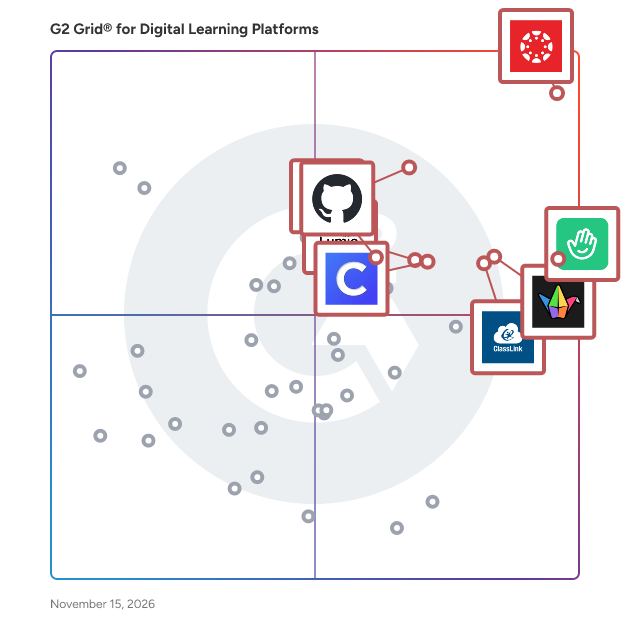
G2 Grid® for Digital Learning Platforms

G2 Grid® for Digital Learning Platforms plotting products by satisfaction and market presence

Highlighted products: Canvas LMS, Classkick, GitHub Inc., Padlet, ClassLink, Clever, Lumio, and Imagine Edgenuity.

Underlying data: [Grid® JSON](https://www.g2.com/categories/digital-learning-platforms/grids.json?focus%5B%5D=canvas-lms&focus%5B%5D=classkick&focus%5B%5D=github-inc&focus%5B%5D=padlet&focus%5B%5D=classlink&focus%5B%5D=clever-portal-clever&focus%5B%5D=smart-technologies-lumio&focus%5B%5D=imagine-edgenuity)

Canvas LMS

Canvas by Instructure is a versatile, cloud-based learning management system (LMS) designed to transform online learning across every stage of education. Since its launch in 2011, Canvas has become the foundational hub for digital classrooms, empowering institutions to deliver high-quality instruction from K-12 to Corporate Training. Trusted by millions worldwide, Canvas remains the #1 educational software and the core of the Instructure ecosystem. Comprehensive Instructor Tools for Every Environment Canvas is built with flexibility at its core, allowing organizations to tailor the platform to their unique goals. Whether you are managing complex curricula in Higher Education or streamlining Primary/Secondary Education (K-12), our robust instructor tools ensure that every learning experience is impactful and learner-centered. From educational initiatives to professional development, Canvas adapts to your mission by providing a seamless interface to: -Create and manage online courses and high-quality learning materials. -Deliver assignments, quizzes, and assessments that meet diverse learning standards. -Enable collaboration through integrated discussions and messaging to boost student engagement. -Track student progress and learning outcomes through real-time data. -Integrate with third-party education tools, with over 900+ partners to choose from. Empowering Success Through Virtual Learning The platform provides a scalable, secure environment for virtual learning that goes beyond the traditional classroom. By combining course management with advanced assessments and grading features, Canvas reduces administrative friction and allows educators to focus on what matters most: student success. Key Features & Benefits Intuitive Design: An easy-to-use interface reduces overhead and ensures learners stay focused on their goals. Mobile Accessibility: The top-rated Canvas mobile app keeps learners connected, even offline. Advanced Analytics: Gain actionable insights to monitor student engagement and improve institutional outcomes. Scalable Ecosystem: With 500+ third-party integrations, Canvas connects with your existing tech stack to build a truly dynamic learning environment. Industries We Serve Canvas by Instructure is the trusted partner for organizations aiming to unlock the full potential of their learners across: -Higher Education -Primary/Secondary Education (K-12) -Corporate Training

Average Rating: 4.5/5.0

Total Reviews: 1,733

How Do G2 Users Rate Canvas LMS?

  • Ease of Use: 8.5/10 (Category avg: 8.7/10)
  • Integrations: 9.0/10 (Category avg: 7.8/10)
  • Adaptive Learning: 8.3/10 (Category avg: 7.9/10)
  • Assessments: 8.8/10 (Category avg: 8.5/10)

Who Is the Company Behind Canvas LMS?

  • Seller: Instructure
  • Year Founded: 2008
  • HQ Location: Salt Lake City, Utah
  • LinkedIn® Page: www.linkedin.com
    2,279 employees on LinkedIn®
  • Ownership: NYSE: INST

Who Uses This Product?

  • Who Uses This: Teacher, Student
  • Top Industries: Higher Education, Education Management
  • Company Size: 45% Medium, 42% Large

What Do G2 Reviewers Say About Canvas LMS?

AI-generated summary from verified user reviews

Pros
  • Users praise the ease of use of Canvas LMS, enjoying its intuitive navigation and user-friendly interface.
  • Users appreciate the user-friendly interface of Canvas LMS, making navigation and course management effortless.
  • Users praise the intuitive experience of Canvas LMS, noting its user-friendly interface and helpful guides.
  • Users value the diverse features of Canvas LMS, enhancing both teaching creativity and student engagement effectively.
  • Users appreciate Canvas LMS for its intuitive interface, making course setup and navigation effortless for all users.
Cons
  • Users often find limited features in Canvas LMS, making navigation and course setup challenging and non-intuitive.
  • Users find Canvas LMS to have a lack of intuitiveness, requiring frequent relearning and struggle with user roles.
  • Users express frustration with poor support, often facing delays and incorrect guidance from the Canvas support team.
  • Users feel that the limited customization in Canvas LMS restricts creativity and personal expression in course design.
  • Users frequently struggle with navigation issues on Canvas LMS, leading to confusion and difficulty locating course materials.

What Are Recent G2 Reviews of Canvas LMS?

What Are G2 Users Discussing About Canvas LMS?

Classkick

Classkick is an app and web-based platform that can be used as an instructional tool in the classroom. Teachers upload their own content or create something new– with drawings, text, images, audio, links, and videos to provide instruction or create assessments. Students input drawings, text, images, and audio or answer fill-the-blank or multiple choice in response to teacher-created material. Teachers provide individualized, real-time feedback and grading with an array of tools–directly on the canvas, in the help center or with pointed stickers. Students can even ask their peers for help anonymously. Teachers can see who needs help and how students are progressing through the assignment. Teachers love Classkick because it allows them to take their classroom paperless, see students working in real- time, and support kids with just-in-time feedback. Students love Classkick because they can work at their own pace, show their thinking in diverse ways, and receive fun, engaging feedback from their peers and teachers.

Average Rating: 4.9/5.0

Total Reviews: 84

How Do G2 Users Rate Classkick?

  • Ease of Use: 9.6/10 (Category avg: 8.7/10)
  • Integrations: 6.5/10 (Category avg: 7.8/10)
  • Adaptive Learning: 7.0/10 (Category avg: 7.9/10)
  • Assessments: 8.4/10 (Category avg: 8.5/10)

Who Is the Company Behind Classkick?

Who Uses This Product?

  • Who Uses This: Teacher, High School Math Teacher
  • Top Industries: Primary/Secondary Education, Education Management
  • Company Size: 56% Medium, 32% Small

What Do G2 Reviewers Say About Classkick?

AI-generated summary from verified user reviews

Pros
  • Users appreciate the real-time feedback system of Classkick, enabling personalized support and improved student engagement.
  • Users appreciate the ease of use of Classkick, facilitating seamless submission and grading of student assignments.
  • Users appreciate the real-time monitoring feature of Classkick, enabling instant feedback and support for students.
  • Users appreciate the efficiency of Classkick, streamlining grading and real-time interaction for a seamless teaching experience.
  • Users appreciate the easy setup of Classkick, enabling a smooth start for effective teaching and learning.
Cons
  • Users find the difficult usability of Classkick challenging, especially with copy-pasting and overwhelming student folders.
  • Users experience access issues with student logins and inconsistent screen layouts that complicate assignments.
  • Users struggle with editing difficulties in Classkick, particularly with modifying assignments and managing student accounts.
  • Users are frustrated by the lack of customization options, limiting their ability to tailor the app to their needs.
  • Users find roster setup tedious and it's inconvenient to copy and paste images without needing screenshots.

What Are Recent G2 Reviews of Classkick?

What Are G2 Users Discussing About Classkick?

GitHub Inc.

GitHub Education is a comprehensive program designed to equip students, educators, and educational institutions with the tools and resources necessary to enhance coding education and bridge the gap to professional tech careers. By providing free access to industry-standard development tools and fostering a collaborative learning environment, GitHub Education empowers the next generation of developers worldwide. Key Features and Functionality: - GitHub Student Developer Pack: Offers students free access to over 80 premium developer tools and services, including GitHub Pro, GitHub Copilot Pro, and GitHub Codespaces. - GitHub Classroom: Enables educators to create, distribute, and manage assignments seamlessly, with features like automated grading and real-time feedback. - Campus Experts Program: Trains students to build and lead technology communities on their campuses, providing leadership development and community-building skills. - GitHub Enterprise for Schools: Provides educational institutions with free access to GitHub Enterprise, facilitating the integration of GitHub into their curriculum and administrative workflows. Primary Value and Solutions: GitHub Education addresses the challenge of providing students and educators with real-world development experience by offering free access to professional tools and fostering a collaborative learning environment. For students, it offers hands-on experience with industry-standard tools, enhancing their skills and employability. Educators benefit from streamlined classroom management and access to a global community of peers, enriching their teaching methods. Educational institutions can integrate GitHub's platform into their curriculum, preparing students for future careers in technology.

Average Rating: 4.7/5.0

Total Reviews: 56

How Do G2 Users Rate GitHub Inc.?

  • Ease of Use: 9.0/10 (Category avg: 8.7/10)
  • Integrations: 9.1/10 (Category avg: 7.8/10)
  • Adaptive Learning: 8.4/10 (Category avg: 7.9/10)
  • Assessments: 8.2/10 (Category avg: 8.5/10)

Who Is the Company Behind GitHub Inc.?

  • Seller: GitHub
  • Year Founded: 2008
  • HQ Location: San Francisco, CA
  • LinkedIn® Page: www.linkedin.com
    6,653 employees on LinkedIn®

Who Uses This Product?

  • Top Industries: Computer Software, Information Technology and Services
  • Company Size: 63% Small, 21% Large

What Do G2 Reviewers Say About GitHub Inc.?

AI-generated summary from verified user reviews

Pros
  • Users find GitHub incredibly easy to use, enabling quick onboarding and seamless repository management.
  • Users appreciate the seamless collaboration capabilities of GitHub, enabling efficient teamwork across distances and streamlined workflows.
  • Users value the integrated development ecosystem of GitHub, enhancing collaboration and streamlining workflows for developers.
  • Users love the seamless app integration in GitHub, enhancing productivity and collaboration in development tasks.
  • Users appreciate the seamless integrations of GitHub, enhancing collaboration and streamlining development workflows significantly.
Cons
  • Users find the high costs of advanced features on GitHub Inc. difficult to manage, particularly for smaller teams.
  • Users find the complex requirements for advanced features and pricing structures to be challenging and overwhelming.
  • Users find GitHub's difficult usability challenging, especially with revert options and handling merge conflicts.
  • Users express frustration with the slow performance of GitHub, affecting usability and efficiency, particularly with large repositories.
  • Users find the steep learning curve of GitHub challenging, particularly with complex interfaces and merge conflicts.

What Are Recent G2 Reviews of GitHub Inc.?

AI can help you find the answers. G2 helps you trust them.

Connect G2 to Claude or ChatGPT for answers grounded in G2's trusted reviews, comparisons, and pricing from real user insights.

How it works

Padlet

Dostoevsky said that beauty will save the world. Padlet offers beautiful boards and canvases for visual thinkers and learners. Use boards to collect, organize, and present anything. Use sandboxes for whiteboarding, lessons, and activities. Over 40 million people every month actively use Padlet around the world. Here are some of the ways they use it: -Collaborate on files with clients -Store instructional videos -Share marketing assets -Manage real-estate listings on a map -Create interactive lessons -Design collaborative worksheets -Make slideshows -Build meeting agendas -Solicit feedback -Brainstorm ideas -And more Dostoevsky would have loved Padlet.

Average Rating: 4.9/5.0

Total Reviews: 353

How Do G2 Users Rate Padlet?

  • Ease of Use: 9.6/10 (Category avg: 8.7/10)
  • Integrations: 8.3/10 (Category avg: 7.8/10)
  • Adaptive Learning: 8.4/10 (Category avg: 7.9/10)
  • Assessments: 7.8/10 (Category avg: 8.5/10)

Who Is the Company Behind Padlet?

  • Seller: Padlet
  • Year Founded: 2012
  • HQ Location: San Francisco, US
  • LinkedIn® Page: www.linkedin.com
    79 employees on LinkedIn®

Who Uses This Product?

  • Who Uses This: Teacher
  • Top Industries: Education Management, Primary/Secondary Education
  • Company Size: 49% Small, 42% Medium

What Do G2 Reviewers Say About Padlet?

AI-generated summary from verified user reviews

Pros
  • Users find Padlet's ease of use exceptional, enhancing collaboration in various settings like classrooms and large groups.
  • Users love Padlet's variety of features and accessibility, making it essential for organizing and sharing ideas effortlessly.
  • Users love Padlet for its easy-to-use interface, making lesson planning and organization a breeze for teachers and students.
  • Users find Padlet to be intuitive and user-friendly, making it easy to organize and utilize their content effectively.
  • Users praise Padlet for its user-friendly interface, making collaboration and engagement easy for all age groups.
Cons
  • Users find the access limitations of Padlet's free version restrictive, impacting their ability to create and manage content.
  • Users feel restricted by the limited Padlet count in the free version, hindering optimal use for multiple classes.
  • Users find the lack of features in Padlet's free version limits their ability to manage multiple projects effectively.
  • Users find the limited features of Padlet's free version restrict their ability to utilize the platform effectively.
  • Users find Padlet too expensive, feeling the free plan limits functionality and options for students and budget-conscious users.

What Are Recent G2 Reviews of Padlet?

What Are G2 Users Discussing About Padlet?

ClassLink

ClassLink is a leading provider of cloud-based education products that connect educators and students with their classroom, curriculum, and each other in richer, more powerful ways. As leading advocates for open data standards, we offer instant access to apps and files with single sign-on, streamline class rostering, automate account provisioning, and provide actionable analytics. ClassLink empowers 14 million students and staff in over 1,800 school systems.

Average Rating: 4.7/5.0

Total Reviews: 58

How Do G2 Users Rate ClassLink?

  • Ease of Use: 9.3/10 (Category avg: 8.7/10)
  • Integrations: 8.1/10 (Category avg: 7.8/10)
  • Adaptive Learning: 4.3/10 (Category avg: 7.9/10)
  • Assessments: 4.2/10 (Category avg: 8.5/10)

Who Is the Company Behind ClassLink?

Who Uses This Product?

  • Who Uses This: Teacher
  • Top Industries: Primary/Secondary Education, Education Management
  • Company Size: 57% Medium, 36% Large

What Do G2 Reviewers Say About ClassLink?

AI-generated summary from verified user reviews

Pros
  • Users appreciate the ease of use of ClassLink, making platform management simple and efficient with single sign-on.
  • Users value the exceptional customer support from ClassLink, providing timely assistance and collaborative guidance throughout the implementation process.
  • Users appreciate the easy setup of ClassLink, streamlining access to all platforms with a single sign-on.
  • Users find ClassLink's setup ease invaluable, with effortless access to all platforms via a single login.
  • Users value the efficiency of ClassLink, experiencing seamless access to resources and significant time savings every day.
Cons
  • Users find the data management complicated and integrations with vendors challenging, impacting overall efficiency.
  • Users struggle with integration issues when connecting ClassLink with certain vendors and software programs for seamless access.
  • Users experience access issues when ClassLink is down, limiting login options for connected software programs.
  • Users struggle with access restrictions when ClassLink is down, limiting login options for connected software programs.
  • Users find interacting and managing data on ClassLink complicated, leading to some confusion and frustration.

What Are Recent G2 Reviews of ClassLink?

What Are G2 Users Discussing About ClassLink?

Clever

Clever was born of co-founder Dan Carroll’s frustration as a school tech director in Denver. His plans to use technology to save teachers time and personalize learning were stymied by countless CSV files and forgotten passwords. Dan recalls, “I wanted to be an innovator, but I got stuck being a human API.” Software has the potential to empower teachers and create new ways to learn. But one thing must happen first. Everyone must be able to log in—quickly and securely. To solve Dan’s problem, we built a single sign-on portal that now helps 95,000 of U.S. K–12 schools spend more time learning and less time logging in. Dan and all of us at Clever believe that technology is a powerful lever that can make education more equitable and engaging. Since the beginning, we’ve seen that when great teachers are supported by great technology, it leads to incredible learning outcomes. More than 95,000 of U.S. K–12 schools use Clever, including 97 of the largest 100 districts. That’s 60% of US students logging in with Clever monthly! We are proud to work with the education community to bring a lifetime of opportunity within reach of every student.

Average Rating: 4.5/5.0

Total Reviews: 51

How Do G2 Users Rate Clever?

  • Ease of Use: 9.2/10 (Category avg: 8.7/10)
  • Integrations: 9.9/10 (Category avg: 7.8/10)
  • Adaptive Learning: 8.8/10 (Category avg: 7.9/10)
  • Assessments: 9.0/10 (Category avg: 8.5/10)

Who Is the Company Behind Clever?

Who Uses This Product?

  • Who Uses This: Teacher
  • Top Industries: Primary/Secondary Education, Education Management
  • Company Size: 53% Medium, 35% Large

What Do G2 Reviewers Say About Clever?

AI-generated summary from verified user reviews

Pros
  • Users find that Clever's app integration saves time by automating student roster syncing across multiple education applications.
  • Users value how Clever offers comprehensive solutions that save hours of work with seamless student roster syncing.
  • Users find Clever's ease of use invaluable, saving time with effortless syncing and simple setup processes.
  • Users value the easy integrations of Clever, which significantly streamline student roster management across multiple education apps.
  • Users find the easy setup of Clever saves time and streamlines syncing student rosters effortlessly.
Cons
  • Users experience integration issues, with slow merging and inconsistent support from third-party apps affecting their onboarding process.
  • Users experience poor customer support during the merging process, often facing slow onboarding and sync issues with third-party apps.
  • Users experience syncing issues with 3rd party apps, impacting onboarding and overall system reliability.
  • Users experience unstable system issues during the initial merging with 3rd party apps, impacting onboarding efficiency.

What Are Recent G2 Reviews of Clever?

What Are G2 Users Discussing About Clever?

Lumio

Lumio is a web-based instructional platform that offers more ways to effortlessly make learning fun and engaging on student devices. Teachers can start from scratch, or import existing content like PDFs, Google Slides, PowerPoints, and Canva designs and transform them into dynamic, engaging learning experiences on any device. Within Lumio, they can mix and match file types and add interactive elements like games, collaborative whiteboards, handouts, and assessments, all from a single place. Teachers can even share content with colleagues through shared libraries and co-edit lessons in real-time to leverage one another’s classroom experiences. Tools like instructional audio, activity dashboards, and the ability to offer real-time feedback make Lumio a one-stop tool for teachers. It allows them to personalize learning, enable student creation, and gain insight into learning while providing engaging, active lessons. Lumio inspires and supports curriculum with EdTech partners teachers already know and trust, like Desmos, PhET, Epic!, Tynker, and more. All while integrating with common LMS platforms Canvas and Schoology. Not only does Lumio offer more ways to engage students, it’s also specifically designed to improve outcomes – it’s not just fun, it works! Lumio is developed and updated based on an extensive logic model, ensuring that product improvements lead to desired learning outcomes. With the Research-Based Design Certification from Digital Promise, educators and administrators can feel confident in the benefits of using Lumio. With three available plan options (Free, Standard, and Spark), there’s a Lumio plan, and price, that’s right for everyone. Note: Lumio was formerly known as SMART Learning Suite Online (SLSO)

Average Rating: 4.8/5.0

Total Reviews: 165

How Do G2 Users Rate Lumio?

  • Ease of Use: 9.5/10 (Category avg: 8.7/10)
  • Integrations: 8.5/10 (Category avg: 7.8/10)
  • Adaptive Learning: 9.2/10 (Category avg: 7.9/10)
  • Assessments: 9.0/10 (Category avg: 8.5/10)

Who Is the Company Behind Lumio?

Who Uses This Product?

  • Who Uses This: Teacher, Instructional Technology Specialist
  • Top Industries: Primary/Secondary Education, Education Management
  • Company Size: 45% Medium, 28% Large

What Do G2 Reviewers Say About Lumio?

AI-generated summary from verified user reviews

Pros
  • Users love the interactive lessons that make it easy to engage and motivate students effectively.
  • Users commend Lumio for its easy student engagement features, enabling educators to create interactive lessons effortlessly.
  • Users appreciate the customization options in Lumio, enhancing their ability to create engaging educational content effortlessly.
  • Users find Lumio's ease of use exceptional, allowing effortless creation of engaging interactive content for students.
  • Users enjoy the easy creation of engaging content with Lumio, enhancing student interaction and learning experiences.
Cons
  • Users find the costly tiered components frustrating, affecting accessibility and budgeting for educators.
  • Users find the extra costs for tiered components frustrating, impacting accessibility based on budget constraints.
  • Users express frustration over the integration issues with Canvas grade passback, impacting its usability in schools.
  • Users dislike the lack of integration with Canvas grade passback, limiting functionality for daily use in schools.
  • Users find the subscription costs frustrating, especially when additional fees hinder access to essential features for educators.

What Are Recent G2 Reviews of Lumio?

What Are G2 Users Discussing About Lumio?

WeVideo

WeVideo is the interactive video learning platform where instruction, demonstration, and assessment happen in one place. Purpose-built for K-12 school districts and higher education institutions, WeVideo closes the loop from creation directly through to the gradebook, helping educators save time while giving institutions clear evidence of student understanding. By consolidating video creation, interactivity, screen recording, and hosting into a single platform, WeVideo replaces redundant tech stack line items and delivers measurable learning outcomes. The platform empowers educators to transform passive video viewing into active, measurable learning. Teachers build interactive lessons with embedded questions, branched pathways, and real-time polls to quickly gauge who is understanding the material. At the same time, students can record video reflections to explain and defend their reasoning in their own words, giving instructors observable proof of critical thinking. WeVideo unifies the entire learning lifecycle into a single cloud-based tool. Educators and students can record, edit, and access over 2 million royalty-free media assets. Instructors can evaluate student video submissions against custom rubrics, monitor real-time engagement, and track concept mastery across classrooms or programs. Built with enterprise-grade LTI 1.3 integrations, WeVideo connects seamlessly with major LMS platforms—including Canvas, Blackboard, D2L, Moodle, and Schoology—for secure Single Sign-On, easy assignment distribution, and automatic grade passback.

Average Rating: 4.6/5.0

Total Reviews: 95

How Do G2 Users Rate WeVideo?

  • Ease of Use: 9.2/10 (Category avg: 8.7/10)

Who Is the Company Behind WeVideo?

  • Seller: WeVideo
  • Year Founded: 2011
  • HQ Location: Lake Forest, US
  • LinkedIn® Page: www.linkedin.com
    106 employees on LinkedIn®

Who Uses This Product?

  • Who Uses This: Teacher
  • Top Industries: Primary/Secondary Education, Education Management
  • Company Size: 40% Medium, 32% Small

What Do G2 Reviewers Say About WeVideo?

AI-generated summary from verified user reviews

Pros
  • Users appreciate the creativity offered by WeVideo, enabling unique and engaging video content for interactive learning.
  • Users love the ease of use of WeVideo, finding it intuitive and empowering for their creative projects.
  • Users appreciate the seamless AI integration of WeVideo, enhancing engagement and interactivity for a more dynamic learning experience.
  • Users highlight the intuitive user interface of WeVideo, making video creation accessible and engaging for educators and students.
  • Users appreciate the outstanding customer support of WeVideo, enhancing their overall experience and satisfaction with the product.
Cons
  • Users express frustration with the limitations of the free version, which restricts access to valuable video and picture resources.
  • Users face output limitations with WeVideo's tiered system, restricting video quality to only 720p at some institutions.
  • Users report issues with software bugs affecting key features like video rewind, impacting usability for students.

What Are Recent G2 Reviews of WeVideo?

What Are G2 Users Discussing About WeVideo?

Imagine Edgenuity

Imagine Edgenuity is a comprehensive digital curriculum designed to support students in grades 6–12 through a diverse array of over 400 interactive courses. These courses encompass core subjects, electives, world languages, test preparation, career and technical education (CTE), and Advanced Placement (AP) offerings. The curriculum is crafted to cater to various instructional models, including in-person, blended, and virtual learning environments, ensuring flexibility and adaptability to meet individual student needs. Key Features and Functionality: - Extensive Course Catalog: Offers a wide range of courses across multiple disciplines, allowing students to pursue their academic interests and goals. - Engaging Instructional Content: Features explicit instruction led by expert on-screen teachers, complemented by media-rich content and interactive tools to enhance learning engagement. - Comprehensive Assessments: Includes formative, summative, and authentic assessments to monitor student progress and mastery of learning objectives. - Data-Driven Insights: Provides robust reporting tools for educators and administrators to track student performance and adjust instructional strategies accordingly. - Academic Integrity Tools: Incorporates features such as plagiarism checkers, AI detection, and secure browsing environments to uphold academic standards. - Customization and Differentiation: Offers adaptable content and accommodations to support diverse learning needs, including extended time for assessments and accessibility features for students with special needs. Primary Value and Solutions Provided: Imagine Edgenuity addresses the diverse learning requirements of students by offering a flexible and engaging digital curriculum that supports both initial credit acquisition and credit recovery. By integrating rigorous, standards-aligned content with interactive instructional tools, it empowers students to achieve their academic goals while providing educators with the resources to effectively monitor and enhance student learning outcomes. The platform's commitment to academic integrity and data-driven insights ensures a trustworthy and effective educational experience for all users.

Average Rating: 4.4/5.0

Total Reviews: 31

How Do G2 Users Rate Imagine Edgenuity?

  • Ease of Use: 9.0/10 (Category avg: 8.7/10)
  • Integrations: 6.9/10 (Category avg: 7.8/10)
  • Adaptive Learning: 7.3/10 (Category avg: 7.9/10)
  • Assessments: 8.8/10 (Category avg: 8.5/10)

Who Is the Company Behind Imagine Edgenuity?

Who Uses This Product?

  • Who Uses This: Teacher
  • Top Industries: Primary/Secondary Education, Education Management
  • Company Size: 42% Medium, 31% Large

What Do G2 Reviewers Say About Imagine Edgenuity?

AI-generated summary from verified user reviews

Pros
  • Users praise the ease of use of Imagine Edgenuity, noting its intuitive design for students and teachers alike.
  • Users appreciate Edgenuity's adaptability and comprehensive features, enhancing student success and engagement across diverse learning needs.
  • Users value the flexibility of Edgenuity, appreciating its adaptability in meeting diverse student needs and classroom environments.
  • Users praise the superb customer support of Edgenuity, appreciating quick access to real assistance when needed.
  • Users appreciate the customization options of Imagine Edgenuity, enabling tailored learning experiences for diverse student needs.
Cons
  • Students face inefficient learning methods with Edgenuity, often rushing through content without true understanding or engagement.
  • Users often face lab issues with bugs and confusing interfaces, impacting the overall learning experience.
  • Users find the limited features of Imagine Edgenuity hinder effective tracking and engagement among students.
  • Users frequently encounter difficult usability issues with Imagine Edgenuity, impacting engagement and overall learning experience.
  • Users report navigation issues with Edgenuity, finding it challenging to track quizzes and manage multiple students efficiently.

What Are Recent G2 Reviews of Imagine Edgenuity?

What Are G2 Users Discussing About Imagine Edgenuity?

EdPuzzle

Edpuzzle is an easy-to-use platform allowing you to engage every student, one video at a time.

Average Rating: 4.6/5.0

Total Reviews: 37

How Do G2 Users Rate EdPuzzle?

  • Ease of Use: 8.9/10 (Category avg: 8.7/10)
  • Integrations: 8.1/10 (Category avg: 7.8/10)
  • Adaptive Learning: 5.3/10 (Category avg: 7.9/10)
  • Assessments: 8.6/10 (Category avg: 8.5/10)

Who Is the Company Behind EdPuzzle?

  • Seller: EdPuzzle
  • Year Founded: 2013
  • HQ Location: San Francisco, California
  • LinkedIn® Page: www.linkedin.com
    269 employees on LinkedIn®

Who Uses This Product?

  • Who Uses This: Teacher
  • Top Industries: Primary/Secondary Education
  • Company Size: 47% Medium, 26% Large

What Do G2 Reviewers Say About EdPuzzle?

AI-generated summary from verified user reviews

Pros
  • Users appreciate the ease of use of EdPuzzle, seamlessly integrating videos and interactive questions for effective learning.
  • Users appreciate the education improvement offered by EdPuzzle, enhancing engagement through customizable video assignments.
  • Users appreciate the flexibility in using any video with EdPuzzle, enhancing their teaching with customizable questions.
  • Users love the student engagement capabilities of EdPuzzle, enhancing interactive learning with tailored video interactions.
  • Users appreciate the flexibility of using any video with EdPuzzle, enhancing engagement and interactivity in lessons.
Cons
  • Users find it difficult to use EdPuzzle embedded in their school's LMS, leading to frustrating experiences.

What Are Recent G2 Reviews of EdPuzzle?

What Are G2 Users Discussing About EdPuzzle?

MagicBox

MagicBox is an AI-powered, end-to-end digital publishing platform that empowers K-12 and higher education publishers, authors, and content providers, as well as enterprise publishers, to create, manage, enrich, and deliver digital content through custom-branded web and mobile apps. With its multi-tenant architecture, each school, district, or corporate entity is a separate tenant that can be customized to individual requirements. With over 7 million users globally, MagicBox has received several accolades for its inclusive learning solutions and continues to innovate to enhance its features and functionalities.

Average Rating: 4.5/5.0

Total Reviews: 29

How Do G2 Users Rate MagicBox?

  • Ease of Use: 8.7/10 (Category avg: 8.7/10)
  • Integrations: 9.2/10 (Category avg: 7.8/10)
  • Adaptive Learning: 8.0/10 (Category avg: 7.9/10)
  • Assessments: 8.4/10 (Category avg: 8.5/10)

Who Is the Company Behind MagicBox?

Who Uses This Product?

  • Top Industries: Primary/Secondary Education, Publishing
  • Company Size: 69% Medium, 28% Small

What Do G2 Reviewers Say About MagicBox?

AI-generated summary from verified user reviews

Pros
  • Users highlight the ease of use of MagicBox, appreciating its user-friendly design and intuitive navigation.
  • Users appreciate the great assessment features of MagicBox, enhancing the e-Learning experience with ease of use.
  • Users appreciate the intuitive design of MagicBox, making content creation and navigation effortless and efficient.
  • Users commend the interactive and personalized learning features of MagicBox, enhancing engagement for teachers and students alike.
  • Users commend the effective eLearning features of MagicBox, enhancing teaching and learning experiences significantly.
Cons
  • Users find MagicBox to be not user-friendly, with a steep learning curve and complex features that hinder classroom integration.
  • Users find MagicBox's difficult usability frustrating, with complex features and slow performance hindering effective implementation.
  • Users find the difficulty of use with MagicBox frustrating, particularly regarding reporting and onboarding challenges.
  • Users express concerns about the expensive costs associated with MagicBox, particularly for custom report building and implementation.
  • Users find the limited customization options of MagicBox hinder their ability to create unique content designs.

What Are Recent G2 Reviews of MagicBox?

Imagine Language & Literacy

Imagine Language & Literacy is a personalized learning program designed to accelerate reading and language proficiency for students in PreK through 6th grade. It offers individualized instruction across all four language domains—reading, writing, listening, and speaking—through a comprehensive, systematic, and standards-aligned curriculum. The program focuses on developing critical skills such as phonological awareness, phonics, fluency, vocabulary, and comprehension, while also teaching academic language essential for understanding complex grade-level texts. Key Features and Functionality: - Adaptive Learning Paths: The program dynamically adjusts to each student's needs, providing targeted instruction that accelerates learning or offers additional support as required. - Comprehensive Literacy Instruction: It delivers direct, explicit, and systematic instruction in phonological awareness, phonics, fluency, vocabulary, and comprehension, aligning with the science of reading. - Multilingual Support: To assist English learners, the program includes human-voiced audio support in 15 languages and specialized instruction based on the student's first language. - Engaging Content: Students interact with game-based activities and a diverse cast of characters, enhancing engagement and motivation. - Integrated Assessments and Reporting: Educators have access to robust data and reporting tools, enabling them to monitor progress and tailor instruction effectively. Primary Value and Solutions Provided: Imagine Language & Literacy addresses the diverse instructional needs of today's learners by offering a personalized approach that supports students at various proficiency levels, including English learners and striving readers. By integrating language and literacy development, the program ensures that students build a strong foundation in both areas, leading to improved reading skills and overall academic success. Its adaptive nature and multilingual support create an equitable learning environment, empowering all students to achieve their full potential.

Average Rating: 4.1/5.0

Total Reviews: 25

How Do G2 Users Rate Imagine Language & Literacy?

  • Ease of Use: 8.9/10 (Category avg: 8.7/10)
  • Integrations: 8.1/10 (Category avg: 7.8/10)
  • Adaptive Learning: 9.0/10 (Category avg: 7.9/10)
  • Assessments: 9.0/10 (Category avg: 8.5/10)

Who Is the Company Behind Imagine Language & Literacy?

Who Uses This Product?

  • Top Industries: Primary/Secondary Education, Education Management
  • Company Size: 38% Large, 38% Medium

What Do G2 Reviewers Say About Imagine Language & Literacy?

AI-generated summary from verified user reviews

Pros
  • Users appreciate the student engagement fostered by Imagine Language & Literacy through interactive games and progress monitoring.
  • Users find the ease of use of Imagine Language & Literacy enhances student engagement and simplifies lesson planning.
  • Users value the high engagement levels offered by Imagine Language & Literacy, enhancing learning through interactive features and games.
  • Users value the customized learning experience of Imagine Language & Literacy for engaging English Language Learners effectively.
  • Users value the flexibility of Imagine Language & Literacy for both independent and small group instruction.
Cons
  • Users find the navigation issues frustrating, as the new platform requires more clicks than the original.
  • Users experience slow performance due to frequent glitches and issues that hinder usability and efficiency.
  • Users experience frequent technical glitches that hinder usability and complicate reporting for teachers and admin.
  • Users report frequent access issues, particularly when trying to use the app at home or on smartphones.
  • Users find the difficult usability of Imagine Language & Literacy frustrating, particularly when generating reports and troubleshooting issues.

What Are Recent G2 Reviews of Imagine Language & Literacy?

What Are G2 Users Discussing About Imagine Language & Literacy?

Kaltura

Kaltura helps organizations turn content, knowledge, and audience signals into personalized, AI-powered experiences that move people forward. Our platform brings together content, video, data, intelligence, and agentic AI to help businesses engage customers, enable employees, and guide every user with the right content, interaction, or next step in the moment. Kaltura’s solutions are built around two critical business challenges: accelerating revenue across the customer journey and helping people learn, perform, and succeed at scale. **Agentic Revenue Engagement** Kaltura Agentic Revenue Engagement helps organizations create connected, personalized experiences across the buyer and customer journey. Instead of leaving people to navigate static websites, disconnected content, forms, webinars, and follow-up on their own, Kaltura turns these touchpoints into interactive experiences that understand intent and actively guide each user forward. Organizations can create digital destinations, events, webinars, content experiences, and AI-powered conversational interactions that adapt to each buyer or customer. Agentic experiences can answer questions, recommend relevant content, help users explore solutions, capture intent, identify meaningful engagement signals, and connect people with sales or customer teams when human involvement adds value. For marketing and revenue teams, this creates a more continuous journey from first engagement through purchase, onboarding, adoption, and expansion, while providing richer insight into what each account and individual actually cares about. Teams can use Kaltura to: • Create personalized digital experiences for buyers and customers • Run webinars, virtual events, and always-on content destinations • Turn video and other content into interactive, discoverable experiences • Deploy AI-powered agents that answer questions and guide users in real time • Recommend content and next steps based on user needs and behavior • Capture and activate engagement and intent signals • Support customer onboarding, education, activation, and ongoing engagement • Connect digital interactions with revenue workflows and business outcomes The goal is simple: reduce friction across the journey and help every interaction create momentum toward the next meaningful action. **Agentic Learning & Enablement** Kaltura Agentic Learning & Enablement helps organizations turn institutional knowledge into personalized learning, practice, and on-demand guidance that improves performance. Traditional learning often depends on static courses, fragmented knowledge, and one-size-fits-all training. Kaltura creates a more continuous model of enablement, where employees, sales teams, customers, and partners can access the knowledge, practice, and guidance they need at the moment they need it. Organizations can create and manage learning content at scale, transform existing knowledge and video into new learning experiences, personalize learning based on individual needs, and give users AI-powered guides that help them find answers and apply knowledge in their day-to-day work. Kaltura also supports interactive practice and simulation, allowing people to rehearse important conversations and scenarios and receive immediate feedback. This can include sales conversations, customer interactions, leadership scenarios, onboarding, certification, and other high-stakes situations where practice directly affects performance. Teams can use Kaltura to: • Create and manage video, learning, and enablement content at scale • Generate and repurpose content using AI-powered creation tools • Deliver personalized onboarding, upskilling, and continuous learning • Give employees on-demand access to company knowledge and guidance • Provide sales teams with training, coaching, and in-the-moment enablement • Run realistic roleplay and simulation experiences with AI-powered feedback and assessment • Educate and enable customers and partners • Support structured learning paths, certifications, and skills development • Understand engagement, readiness, and learning effectiveness • Connect learning and enablement programs more closely to business performance Rather than treating learning as an occasional activity, Kaltura helps make knowledge and guidance available continuously, embedded into the way people work and perform. **One platform for intelligent digital experiences** Both solutions are powered by the same Kaltura foundation. Kaltura has spent years helping global organizations create, manage, distribute, and understand video and digital content at enterprise scale. Today, those capabilities are combined with AI, audience intelligence, content generation, conversational agents, analytics, and experience orchestration. This means organizations do not have to treat content, engagement, learning, and AI as separate layers. Kaltura can help teams turn existing content and organizational knowledge into active, reusable intelligence; understand what each user needs based on context and behavior; and deliver a personalized experience that responds in real time. The result is a new type of digital experience: one that does more than present information. It understands, interacts, guides, and helps each person take the next step. Whether that next step is booking a meeting, exploring a solution, completing onboarding, learning a new skill, practicing an important conversation, adopting a product, or finding the right answer, Kaltura helps organizations make every interaction more relevant, useful, and measurable. Kaltura is used by organizations around the world to power digital experiences across marketing, sales, customer engagement, learning, employee enablement, education, media, and communications.

Average Rating: 4.3/5.0

Total Reviews: 117

How Do G2 Users Rate Kaltura?

  • Ease of Use: 8.6/10 (Category avg: 8.7/10)
  • Integrations: 8.9/10 (Category avg: 7.8/10)
  • Adaptive Learning: 7.7/10 (Category avg: 7.9/10)
  • Assessments: 8.1/10 (Category avg: 8.5/10)

Who Is the Company Behind Kaltura?

  • Seller: Kaltura
  • Company Website:
  • Year Founded: 2006
  • HQ Location: New York, NY
  • LinkedIn® Page: www.linkedin.com
    734 employees on LinkedIn®

Who Uses This Product?

  • Top Industries: Higher Education, Education Management
  • Company Size: 42% Medium, 33% Large

What Do G2 Reviewers Say About Kaltura?

AI-generated summary from verified user reviews

Pros
  • Users find Kaltura's platform incredibly easy to use, facilitating video uploads and management effortlessly.
  • Users value Kaltura's comprehensive video quality and management, making video creation and organization seamless and effective.
  • Users appreciate Kaltura's flexible integration capabilities, making it compatible with essential tools like Moodle and Canvas.
  • Users value the exceptional video quality of Kaltura, facilitating smooth streaming and comprehensive management across platforms.
  • Users commend Kaltura for its reliable video streaming and comprehensive management features that enhance content delivery.
Cons
  • Users find Kaltura's complex setup and basic editing features require developer assistance and lack intuitiveness.
  • Users find Kaltura's difficult setup cumbersome, often requiring developer assistance for initial configuration.
  • Users experience integration issues with Kaltura, requiring technical support and improvements for a smoother setup.
  • Users often face technical issues with Kaltura, particularly during file uploads and live streaming buffering.
  • Users find Kaltura's setup to be complex and requiring technical assistance, which complicates the overall user experience.

What Are Recent G2 Reviews of Kaltura?

What Are G2 Users Discussing About Kaltura?

Khan Academy

Khan Academy is a nonprofit online learning platform for students, teachers, schools, and districts. It offers K–12 math, science, and humanities content through videos, practice exercises, and AI-powered support. Students learn at their own pace, while teachers can assign work and monitor progress. Khan Academy Districts adds district-level reporting, implementation support, and professional learning.

Average Rating: 4.5/5.0

Total Reviews: 176

How Do G2 Users Rate Khan Academy?

  • Ease of Use: 9.1/10 (Category avg: 8.7/10)
  • Integrations: 6.7/10 (Category avg: 7.8/10)
  • Adaptive Learning: 7.1/10 (Category avg: 7.9/10)
  • Assessments: 8.8/10 (Category avg: 8.5/10)

Who Is the Company Behind Khan Academy?

Who Uses This Product?

  • Who Uses This: Teacher
  • Top Industries: Higher Education, Education Management
  • Company Size: 40% Small, 36% Large

What Are Recent G2 Reviews of Khan Academy?

What Are G2 Users Discussing About Khan Academy?

Freckle

Freckle is an adaptive practice program that helps educators effectively differentiate math, ELA, science, and social studies. Interactive features, team challenges, real-world scenarios, nonfiction and fiction articles, and instant feedback make practice engaging and fun, while embedded supports and scaffolds help students master even the most challenging concepts. Covering K–12 standards and skills, Freckle helps students make the most of every minute spent on independent practice.

Average Rating: 4.3/5.0

Total Reviews: 26

How Do G2 Users Rate Freckle?

  • Ease of Use: 8.6/10 (Category avg: 8.7/10)
  • Integrations: 8.1/10 (Category avg: 7.8/10)
  • Adaptive Learning: 8.5/10 (Category avg: 7.9/10)
  • Assessments: 8.5/10 (Category avg: 8.5/10)

Who Is the Company Behind Freckle?

Who Uses This Product?

  • Who Uses This: Teacher
  • Top Industries: Primary/Secondary Education, Education Management
  • Company Size: 56% Small, 26% Medium

What Are Recent G2 Reviews of Freckle?

What Are G2 Users Discussing About Freckle?

Emma Stein
ES
Researched and written by Emma Stein
Updated October 3, 2024

Learn More About Digital Learning Platforms

What are Digital Learning Platforms?

As the technology used at schools, colleges, and universities has grown more advanced, teachers are using a new generation of software products designed to get their students to engage with their course concepts in new ways. Instead of reading a print textbook chapter on multiplying fractions, students may use their laptop to complete a lesson that includes video demonstrations, practice problems, and mini assessments to determine their proficiency level and what they should work on next. Digital learning platforms have the potential to be an effective learning tool for students at many levels of education.

Key Benefits of Digital Learning Platforms

  • Create engaging, multimedia learning experiences for students
  • Differentiate instruction automatically based on student ability
  • Track student progress on key learning targets

Why Use Digital Learning Platforms?

Add engaging experiences to lessons — Digital learning platforms allow students to explore lesson content in new and interesting ways. Many platforms include lessons with a variety of multimedia elements, including videos, animations, photos, and audio recordings. Lessons may come with interactive elements that require students to complete a task in order to move on. Some offer virtual experiences, like virtual laboratories that let students conduct experiments using computer-generated lab equipment that otherwise would be cost-prohibitive to use. Some products come pre-loaded with these lessons, saving teachers the time it would take to create engaging learning materials from scratch. Providing engaging experiences makes it more likely that students will find the learning enjoyable and memorable.

Differentiate instruction — One of the most challenging aspects of teaching is that students are often at different levels of mastery for a given skill. Some digital learning platforms have advanced assessment abilities that enable them to adapt to a lesson dynamically, based on a student’s performance. This adaptive learning technology allows a room of 30 students to each be working on a lesson that is at their level, without the teacher having to manually create and distribute dozens of individualized lessons. As a result, students work on assignments that are just right–not too hard or too easy–and teachers have more freedom to work with individual students who need extra support.

Track student progress — A key part of an educator’s job is to evaluate to what extent their students have mastered a course’s objectives. Digital learning platforms monitor the work students do on lessons and give teachers access to reports or visual dashboards showing performance data for each student. Using this information, instructors can identify concepts students are struggling to understand and provide insights into which topics the teacher should consider reteaching. Some platforms allow teachers to create their own assessments while others come with assessments that are pre-made and ready to use.

Who Uses Digital Learning Platforms?

Generally, digital learning platforms are used by people at educational institutions of all levels, including instructors, tutors, and students.

K-12 teachers — A wide range of digital learning platforms are available for K-12 schools and teachers who are heavy users of the software. Teachers use these tools to select lesson materials for students, send assignments, and review data from student work.

College professors — Some digital learning platforms offer content that is appropriate for higher education students and can be used by college professors in their courses. Digital content is available for a variety of college and university subjects, including math, social science, economics, science, business, and engineering.

Students — After instructors assign work on digital learning platforms, students use the software to complete the lesson. Depending on the platform, students could be asked to do a range of tasks. A math program may have the student watch a video on a strategy for solving a certain kind of problem, then instruct the student to do a practice problem. Adaptive platforms will adjust the lesson on the fly, based on the level of mastery the student demonstrates.

Tutors — For helping students who need extra support, tutors use digital learning platforms to give their clients extra practice on skills that they have not yet mastered. Many platforms offer a library of activities for tutors to use with their students or assign to students as homework.

Kinds of Digital Learning Platforms

Some significant differentiators for digital learning platforms are whether they include ready-to-use lessons and adaptive learning functionality.

Pre-made content vs. teacher-created content — While some platforms come with a library of ready-to-use lessons, others require teachers to create their own lessons by uploading materials. Some platforms offer both. A teacher may choose to use a platform with pre-made content if they are looking for resources with which to build a new curriculum or add substantial resources to an existing curriculum. Instructors who would rather use their existing materials to engage students in a new way may not need that ready-to-use content and may opt for a platform that allows them to create courses.

Adaptive vs. non-adaptive platforms — Advancements in artificial intelligence have enabled some platforms to make use of adaptive learning, in which the software dynamically adjusts the lesson based on student performance to create a personalized learning experience. Other platforms may have a student take a more traditional pre-assessment to determine which learning path the student should follow. Still others might leave it up to the teacher or student to manually select which lesson to complete.

Digital Learning Platforms Features

File imports — For teachers who are creating their own lessons using digital learning platforms, the ability to upload files allow them to add texts or multimedia elements to their assignments. Example file types include PDFs, JPEGs, presentation files, and word processor documents.

Multimedia content — To make lessons more engaging for students, platforms often support a variety of multimedia content, including video, audio, and animation.

Lesson library – Some platforms come with pre-made lessons that teachers can select from. How extensive the selection is varies by platform, with some offering thousands of lessons. The platform may have free pre-made lessons or the user may need to purchase the lessons. Many products also offer teachers the ability to customize those ready-to-use lessons to fit their needs.

Administrative dashboards – Teachers can use visual dashboards to see which activities students are completing and how they are performing on assessments. Many platforms offer the ability to export this data into reports.

Quizzes and assessments – Digital learning platforms give instructors the ability to assign assessments to students to gauge their mastery of the materials. The tool may come with preloaded assessments or it could allow teachers to make their own assessments.

Student device control – In some platforms, teachers have the ability to control the content on student devices. Teachers may be able to synchronize a lesson across multiple student devices, or lock a web browser to control the browsing activity of students who are taking a test.

Polls and audience feedback tools – For an instructor who wants to know what their students are thinking in the moment, some digital learning platforms give users the ability to set up a live poll that students can respond to. The instant feedback allows instructors to adjust the lesson or start a discussion about the results. Some platforms allow instructors to view other kinds of audience feedback, like seeing text responses that students have typed in response to a question.

Integrations – Digital learning platforms often integrate with a variety of other education software, including learning management systems (LMS) and student information systems (SIS), to allow instructors to easily transfer student data from one system to another or share information about assignments with students.

Adaptive learning – Using artificial intelligence, some platforms incorporate adaptive learning technology that enables the software to continuously assess a student’s performance and change the lesson on the fly, depending on the student’s ability to demonstrate mastery of the subject. Adaptive learning makes it possible for each student to have a personalized learning experience tailored to their specific needs.

Potential Issues with Digital Learning Platforms

Lack of pre-loaded content — Some platforms come with large libraries of pre-made educational content that teachers can assign to their students while other products simply offer a platform that teachers can use to create lessons from their own materials. Even if a platform has pre-made content, users might need to buy those lessons before using them. Before purchasing a platform, users should determine whether they need the product to come with pre-made lesson content and should investigate whether the content the platform offers will meet the instructor’s needs.

Alignment with the instructor’s curriculum — Digital learning platforms vary according to the subjects students can learn on the platform. A platform might focus on a single subject, like math or it might include lessons on many different subjects, including history, science, literature, and computer science. The platforms also vary based on the student groups they cater to. Some products are intended to be used by grade-school teachers while others can be used by college students. Buyers should explore a platform’s subject offerings to understand whether it fits naturally into their existing curriculum.