Introducing G2.ai, the future of software buying.Try now

Digital Forensics

by Sagar Joshi
Digital forensics collects and delivers historical digital information as evidence in cybercrime investigations. Learn more about its steps and techniques.

What is digital forensics?

Digital forensics, also known as computer forensics, collects and helps users present digital evidence to assist litigation.

As technology evolves, so do cybercrimes. Digital evidence stored in computers, smartphones, flash drives, or cloud storage can be corrupted or stolen. Digital forensics preserves this evidence through technology and investigative techniques.

Digital forensics software allows researchers to safely identify, collect, and store digital evidence. Digital forensics experts use this evidence in legal proceedings to assist the judiciary. 

Types of digital forensics

Digital forensics recovers lost data or analyzes data evidence to discover the “why” and “how” behind a cyber attack. It’s classified into the following types:

  • Media forensics includes collecting, identifying, analyzing, and presenting audio, video, or image evidence during an investigation.
  • Cyber forensics covers data collection and digital evidence presentation during a cyber crime investigation.
  • Mobile forensics encompasses recovering digital evidence from mobile phones, global positioning system (GPS) devices, tablets, or laptops.
  • Software forensics presents evidence related to software during an investigation. 
  • Computer forensics collects digital evidence from computers, laptops, and other computing devices. 
  • Database forensics investigates any malicious activities or access to a database and analyzes any modifications. It verifies commercial contracts and investigates large-scale financial crimes. 

Common digital forensic techniques

Digital forensics experts use one or more of the following techniques to collect and analyze evidence.

  • Deleted file recovery: This helps recover and restore files deliberately or unknowingly deleted by a person or a virus.
  • Reverse steganography: While steganography hides data within a digital message, reverse steganography is when experts look at a message's hashing. Hashing refers to a data string that changes when a file or message is interrupted.
  • Cross-drive analysis: Cross-drive analysis examines data across several computer drives using concepts like correlation and cross-referencing to compare events.
  • Live analysis: This analyzes a running computer’s volatile data stored in random access memory (RAM) or cache memory. It helps to identify the cause of abnormal computer traffic. 
  • Preserving evidence: Experts use a write blocker tool to create an exact copy of the initial data. It prevents any device or program from corrupting the original evidence. 
  • Web activity reconstruction: Experts use web activity reconstruction to retrieve browsing history and access temporary internet files and accepted cookies. It comes in handy when a user deletes the browsing history to plead plausible deniability.
  • Network device investigation: This technique investigates all network logs. Experts use it when server logs are unavailable for unknown reasons. 
  • Bait tactics: It helps experts extract and copy a cyber criminal’s internet protocol (IP) address. Experts send an email to capture the recipient's IP address, allowing them to track suspected criminals. 

Digital forensics steps

For digital evidence to be accepted, an expert has to follow specific steps so that the evidence is not tampered with.
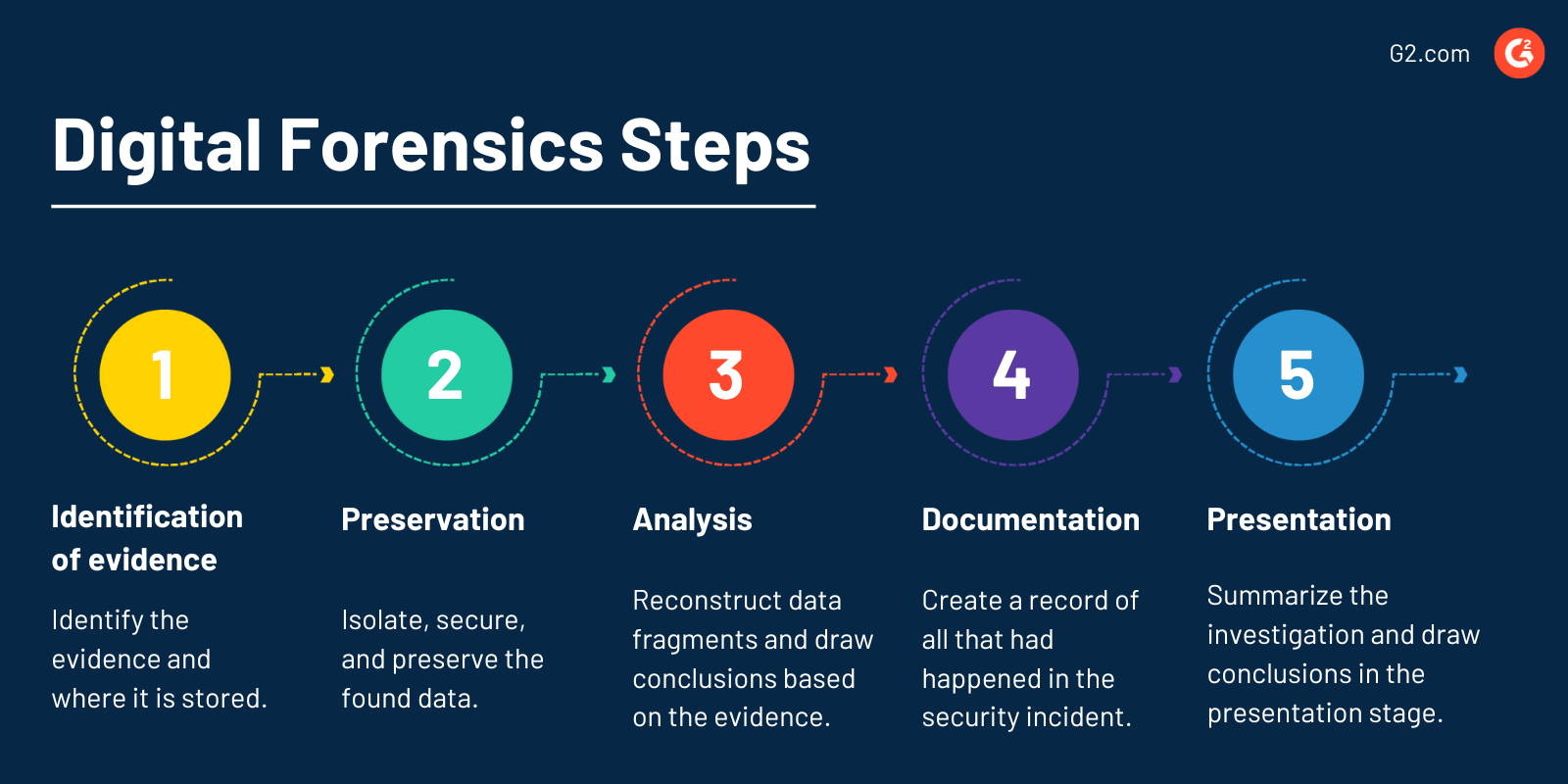
Digital Forensics Steps

Below are the five common steps involved in a digital forensics investigation.

  • Identification of evidence: Identify the evidence and where it is stored.
  • Preservation: Isolate, secure, and preserve the found data. Ensure any external or internal threat cannot tamper with the data. 
  • Analysis: Reconstruct data fragments and draw conclusions based on the digital evidence. 
  • Documentation: Create a record recreating all that had happened in the security incident. 
  • Presentation: Summarize the entire investigation and draw a conclusion in the presentation stage.

Digital forensics vs. cyber security

Digital forensics is recovering data from a digital device to identify evidence of criminal activity. Cyber security is safeguarding online data against any threats from cyber criminals before they can happen. 

Cyber security deploys tools and protocols to protect computers from cyberattacks. Professionals use information technology (IT) skills and operating system (OS) knowledge to create an unbreachable system.

Although digital forensics and cyber security may seem similar, they have unique differences. Cyber security is preventative, and digital forensics is reactive. Digital forensics doesn’t deal with preventing cybercrimes. However, it does help cyber security professionals note how a cyber crime occurred and how it can be prevented.

A digital forensics expert works with investigators to access a system’s data or with organizations to help them recover lost data. Cyber security offers specializations such as systems architecture, software security, access management, ethical hacking, etc. The main specializations offered by digital forensics are criminal investigations and data recovery. 

Learn more about cybersecurity and protect organizations and enterprises against cyber attacks.

Sagar Joshi
SJ

Sagar Joshi

Sagar Joshi is a former content marketing specialist at G2 in India. He is an engineer with a keen interest in data analytics and cybersecurity. He writes about topics related to them. You can find him reading books, learning a new language, or playing pool in his free time.

Digital Forensics Software

This list shows the top software that mention digital forensics most on G2.

Autopsy is an easy to use, GUI-based program that allows you to efficiently analyze hard drives and smart phones. It has a plug-in architecture that allows you to find add-on modules or develop custom modules in Java or Python.

EnCase Forensic enables you to quickly search, identify, and prioritize potential evidence, in computers and mobile devices, to determine whether further investigation is warranted.

Magnet Forensics provides digital investigation solutions that acquire, analyze, report on, and manage evidence from digital sources, including mobile devices, computers, IoT devices and cloud services.

Kali Linux is an open-source, Debian-based distribution tailored for advanced penetration testing and security auditing. It offers a comprehensive suite of tools and configurations, enabling users to focus on their security tasks without the need for extensive setup. Kali Linux is accessible across multiple platforms and is freely available to information security professionals and enthusiasts. Key Features and Functionality: - Extensive Toolset: Provides hundreds of pre-installed tools for various information security tasks, including penetration testing, security research, computer forensics, reverse engineering, vulnerability management, and red team testing. - Multi-Platform Support: Compatible with various platforms, ensuring flexibility and adaptability for different user needs. - Cloud Integration: Available as an Amazon Machine Image on AWS Marketplace, allowing users to deploy Kali Linux instances in the cloud efficiently. Primary Value and User Solutions: Kali Linux addresses the critical need for a robust and comprehensive security testing environment. By offering a vast array of tools and configurations out of the box, it enables security professionals to conduct thorough assessments, identify vulnerabilities, and strengthen defenses without the overhead of manual tool integration. Its availability on platforms like AWS further enhances its utility by providing scalable and on-demand access to a powerful security testing environment.

With Encase eDiscovery, effectively manage electronically stored documents in litigation, arbitration, and internal or regulatory investigations significantly reduces the risk and cost associated with e-discovery.

Parrot Security (ParrotSec) is a Security GNU/Linux distribution designed for the Cyber-Security (InfoSec) field. It includes a full portable laboratory for security and digital forensics experts.

Infosec Skills is the only cybersecurity training platform that moves as fast as you do. Train on your schedule with unlimited access to 100s of hands-on cybersecurity courses and hands-on virtual labs — or upgrade to an Infosec Skills boot camp for live, instructor-led training guaranteed to get you certified on your first attempt. Whether you're seeking training for yourself or your team, Infosec’s deep bench of cyber expertise and award-winning training platform provide the resources and guidance you need to stay ahead of technology change. Infosec Skills helps you: ● Build and validate in-demand cybersecurity skills ● Learn by doing with hands-on cloud-hosted labs, projects and assessments ● Get certified and stay certified with 100s of continuing education credits opportunities ● Train for your current job — or your dream career— with role-based learning paths mapped to the NICE Cybersecurity Workforce Framework ● Assess and fill your team’s skill gaps with easy-to-use team management tools, custom training assignments and immersive team boot camps

Connect your employees' development with your company goals.

Individual Access gives you unlimited access to our entire catalog of over 15,000 videos of network and IT training. Business Plans provide teams of 4 or more the same access to course content that individuals receive with the addition of features like advanced user analytics, transferrable licenses, and access to Cisco lab environments.

Dgraph shards the data to horizontally scale to hundreds of servers. It is designed to minimize the number of disk seeks and network calls. Dgraph is built like a search engine. Queries are broken into sub-queries, which run concurrently to achieve low-latency and high throughput. Dgraph can easily scale to multiple machines, or datacenters. Its sharded storage and query processing were specifically designed to minimize the number of network calls.

Super-fast, easy to use and free, the Ubuntu operating system powers millions of desktops, netbooks and servers around the world.

Fortunately Disk Drill helps with advanced file recovery software on all of your connected devices and files.

UltraEdit is a powerful text editor and code editor for Windows, Mac, and Linux that supports nearly any programming language and easily handles huge (4+ GB) files. Includes (S)FTP, SSH console, powerful find/replace with Perl regex support, scripting / macros, and more.

Free and open source software for video recording and live streaming. Download and start streaming quickly and easily on Windows, Mac or Linux.

eSentire MDR is designed to keep organizations safe from constantly evolving cyberattacks that technology alone cannot prevent.

The JumpCloud Directory Platform reimagines the directory as a complete platform for identity, access, and device management.

D3 Security provides a proven incident management platform that empowers security operations with a full-lifecycle remediation solution and a single tool to determine the root cause of and corrective action for any threat- be it cyber, physical, financial, IP or reputational.

Relativity simplifies and accelerates how the world conducts e-discovery by bringing the entire process and community together in one open, flexible, and connected platform.

Threat.Zone is a hypervisor-based, automated and interactive tool for analyzing malware , you can fight new generation malwares.