Top Free Workforce Management Software - Page 9

How Many Workforce Management Software Products Does G2 Track?

Total Products under this Category: 991

Category Stats (Nov 2026)

  • Average Rating: 4.35/5 (↑0.01 vs Oct 2026) The average rating of products in this category, based on all submitted ratings
  • Top Trending Product: Kenjo (+3.48%) - Among all products in this category, Kenjo recorded the largest rating increase compared to last month

Last updated: November 01, 2026

How Does G2 Rank Workforce Management Software Products?

Why You Can Trust G2's Software Rankings:

  • 30 Analysts and Data Experts
  • 125,200+ Authentic Reviews
  • 991+ Products
  • Unbiased Rankings

G2's software rankings are built on verified user reviews, rigorous moderation, and a consistent research methodology maintained by a team of analysts and data experts. Each product is measured using the same transparent criteria, with no paid placement or vendor influence. While reviews reflect real user experiences, which can be subjective, they offer valuable insight into how software performs in the hands of professionals. Together, these inputs power the G2 Score, a standardized way to compare tools within every category.

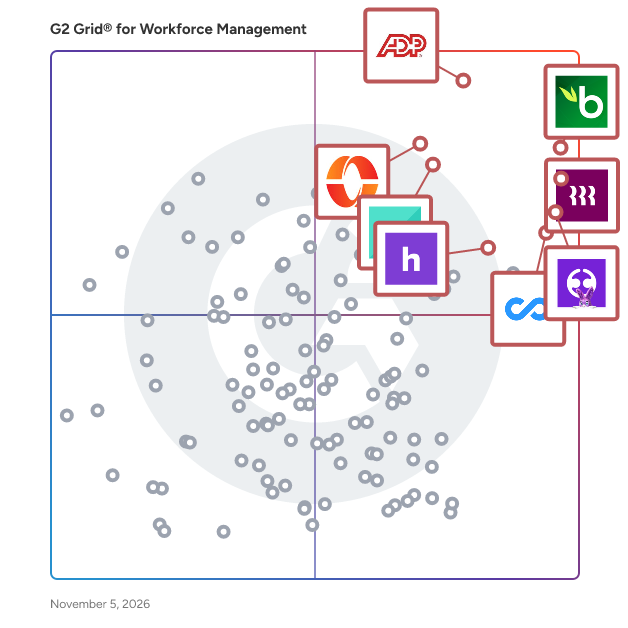
G2 Grid® for Workforce Management Software

G2 Grid® for Workforce Management Software plotting products by satisfaction and market presence

Highlighted products: BambooHR, Rippling, ADP Workforce Now, Employment Hero, Connecteam, Paylocity, UKG Ready, and Homebase.

Underlying data: [Grid® JSON](https://www.g2.com/categories/workforce-management/grids.json?focus%5B%5D=bamboohr&focus%5B%5D=rippling&focus%5B%5D=adp-workforce-now&focus%5B%5D=employment-hero&focus%5B%5D=connecteam&focus%5B%5D=paylocity&focus%5B%5D=ukg-ready&focus%5B%5D=homebase)

FieldEquip

FieldEquip is a cloud-based Field Service Management (FSM) SaaS platform purpose-built for industries that rely on field operations, heavy equipment, and mobile workforces. Founded in 2016 and headquartered in Houston, Texas, FieldEquip helps field service organizations digitize their operations — from scheduling and dispatching to field ticketing, asset tracking, and invoicing — on a single, connected platform. Industries We Serve: - Oil&Gas - Equipment Rental - Oilfield Logistics - Industrial Services What Makes FieldEquip Different: - AI Powered Field Documentation: FieldEquip AI — our first in a series of AI agents — automatically generates professional work notes, accelerating job closeout and ensuring consistent, error-free service records. - True Offline/Online Mobile App: Technicians in remote locations stay productive with full mobile access to work orders, customer data, inventory, and digital field tickets — even without connectivity. - Digital Field Ticketing:Eliminate paper-based processes. Create, review, approve, and invoice field tickets digitally from the field to the back office. - Asset & Equipment Tracking: Gain complete visibility into equipment service history, location, rental status, and maintenance schedules to maximize uptime. - Seamless Integrations: Connect with 20+ platforms including SAP, Oracle, Microsoft Dynamics, Salesforce, HubSpot, Sage, and Infor — eliminating data silos. - No Third-Party Implementation Required: FieldEquip's in-house team works directly with you on implementation, training, and ongoing support — no third-party consultants needed. FieldEquip scales from mid-sized field teams to large enterprise operations and holds SOC 2 Type 2 certification, ensuring industry-leading data security. We deliver superior service at a cost of at least 30% lower than competitive solutions — and we stay by your side as a long-term technology partner.

Average Rating: 4.5/5.0

Total Reviews: 9

How Do G2 Users Rate FieldEquip?

  • Has the product been a good partner in doing business?: 9.0/10 (Category avg: 8.8/10)

Who Is the Company Behind FieldEquip?

  • Seller: FieldEquip
  • Company Website:
  • Year Founded: 2016
  • HQ Location: Houston, US
  • LinkedIn® Page: www.linkedin.com
    7 employees on LinkedIn®

Who Uses This Product?

  • Company Size: 56% Small, 22% Large

What Do G2 Reviewers Say About FieldEquip?

AI-generated summary from verified user reviews

Pros
  • Users find the ease of use of FieldEquip beneficial, enhancing efficiency in managing on-site equipment.
  • Users value the real-time tracking of FieldEquip, significantly improving equipment management and reducing delays in the field.
  • Users value the real-time tracking efficiency of FieldEquip, significantly improving equipment management and reducing delays.

What Are Recent G2 Reviews of FieldEquip?

Fillyourshift

FillYourShift is staffing agency software that fills open shifts with bulk SMS and email invites, a 0-100 reliability score, and per-seat pricing. Built for coordinators who still run rosters in spreadsheets and group chats.

Who Is the Company Behind Fillyourshift?

flair.hr

flair is HR software for companies with 500 to 5,000 employees. It’s as easy to use as the well-known standard HR tools, but can be customized as far as you’d normally only get with large enterprise systems. That makes flair a strong fit for organizations that have outgrown simple HR tools but don’t want a lengthy enterprise project. Multiple locations, legal entities and countries are all covered in one system, each with its own absence policies, working time rules and payroll territories. You define your own role and permission structures, fields and approval workflows, so flair adapts to the way your organization works, not the other way around. Recruiting, employee administration, time tracking, payroll, performance and learning run in one system. Applicants become employees without switching tools or re-entering data. Digital personnel files, absence management, onboarding and offboarding are all included, and employees and managers handle their own requests through self-service. With custom reports and dashboards, your HR data becomes a solid basis for decisions. Beyond HR, flair also offers modules for finance, compliance and controlling. Reporting, salary review rounds and even complex headcount planning can all be handled in the same system. flair AI helps you write job ads faster, evaluate applications and analyze your data. Interview intelligence brings more structure to your hiring decisions, and pay transparency features help you prepare for the EU Pay Transparency Directive. With the flair app for iOS and Android, employees have HR at hand on the go, including those who don’t work at a desk. flair is built on Salesforce, but you don’t need a Salesforce license. Your data sits on the same infrastructure large corporations rely on, with the security and scalability that come with it. Other systems can be connected, and if you already use Salesforce, HR and CRM come together, for example to link commission-based sales to payroll. There are no rigid packages: you choose the modules you need and combine them freely. Pricing starts at €2.50 per user per month.

Average Rating: 4.5/5.0

Total Reviews: 65

How Do G2 Users Rate flair.hr?

  • Has the product been a good partner in doing business?: 8.6/10 (Category avg: 8.8/10)
  • Performance: 9.8/10 (Category avg: 8.6/10)

Who Is the Company Behind flair.hr?

  • Seller: flair.hr
  • Year Founded: 2019
  • HQ Location: Munich, Bavaria
  • LinkedIn® Page: www.linkedin.com
    36 employees on LinkedIn®

Who Uses This Product?

  • Top Industries: Computer Software, Medical Practice
  • Company Size: 74% Medium, 25% Small

What Do G2 Reviewers Say About flair.hr?

AI-generated summary from verified user reviews

Pros
  • Users highlight the ease of use of flair.hr, making feedback and integration with tools seamless and efficient.
  • Users love the natural feedback process of Flair.hr, enhancing collaboration and boosting team morale effectively.
  • Users value the responsive customer support of Flair.hr, ensuring quick assistance whenever needed.
  • Users love the easy integrations of flair.hr, enhancing collaboration and streamlining their daily processes effortlessly.
  • Users find the user interface intuitive and user-friendly, enhancing collaboration and morale within their teams.
Cons
  • Users note the missing advanced features in flair.hr, limiting customization and performance tracking options.
  • Users find cost issues with flair.hr, as advanced features are restricted to higher-tier plans, limiting flexibility.
  • Users find customization issues with flair.hr, feeling advanced options are limited to higher-tier plans.
  • Users find the product expensive, as advanced features are often restricted to higher-tier plans, limiting flexibility.
  • Users indicate that there is room for improvement in goals and performance tracking, especially on mobile.

What Are Recent G2 Reviews of flair.hr?

AI can help you find the answers. G2 helps you trust them.

Connect G2 to Claude or ChatGPT for answers grounded in G2's trusted reviews, comparisons, and pricing from real user insights.

How it works

Flexwell

Flexwell: the all-in-one software platform for staffing agencies, flex intermediaries and flex pools Flexwell is a complete software platform for organizations that bring flexible workers and hiring companies together. Whether you run a staffing agency, work as a freelance intermediary or manage a flex pool, Flexwell gives you one place to plan shifts, register and validate hours, generate invoices and stay in touch with everyone involved. Planners, back-office staff, flex workers and hiring companies all work in the same platform, so information is entered once and flows through the entire process, from the first shift request to the final invoice. Flexwell was built for the way flexible work really happens. Shifts change, workers cancel, clients adjust their needs at the last minute and the paperwork has to keep up. Instead of spreadsheets, e-mail threads and separate tools that do not talk to each other, Flexwell connects planning, time registration, invoicing and communication in a single system. The result is less manual work, fewer errors and more time to spend on what really grows your business: building relationships with candidates and hiring companies. WHO IS FLEXWELL FOR? Flexwell is made for: - Staffing agencies that want to professionalize and automate their planning and back office - Freelance intermediaries who connect self-employed professionals with assignments - Flex pools and organizations that want to launch their own work platform - Intermediaries active in sectors such as construction, healthcare and security - Back-office teams that spend too much time on hours, invoices and corrections - Planners who need a clear overview of shifts, availability and candidates Within an organization, Flexwell supports every role that touches the flex process: owners, intermediaries, planners, back-office employees, flex workers and hiring companies. Each role sees what is relevant to them, and access can be managed per user, per pool or per client. SHIFT PLANNING AND SCHEDULING Planning is at the heart of Flexwell. Create shifts per hiring company and location, and see them in a clear weekly calendar. For every shift you can see how many workers are needed and how many have been assigned, so open positions never go unnoticed. When you are looking for the right person, Flexwell helps you find them quickly. Filter candidates by availability, distance to the work location, favorites of the hiring company and the pools they belong to. You can see who recently worked at a location, who is about to start, and who is a suitable match. Assign a candidate in a few clicks, or open a shift to a pool of qualified workers and let them respond themselves. Flex workers can sign up online, share their availability and respond to open shifts through the mobile app. Real-time notifications and reminders keep everyone informed of changes, which means fewer no-shows, fewer phone calls and less back and forth. TIME REGISTRATION AND VALIDATION OF HOURS Hours are registered in the same system in which shifts are planned, so there is no need to retype anything. Flex workers register their hours, and hiring companies or planners validate them. Because the planned shift and the worked hours are linked, differences are visible immediately and corrections are easy to make. Validated hours flow directly into invoicing. That removes a lot of the manual work and the errors that come with it, and it speeds up the time between work done and invoice sent. AUTOMATIC INVOICING AND SELF-BILLING Flexwell generates invoices automatically based on the validated hours. Agencies that work with freelancers can use self-billing, so the invoices for the self-employed professionals are created for them, based on the same data. This saves your back office hours every week and gives your freelancers an accurate invoice on time. Because planning, hours and invoicing are connected, you always know what has been worked, what has been validated and what has been invoiced. Flexwell integrates with payroll software and payroll partners, and with Exact Online, so your financial administration stays in sync without double entry. CONTRACT MANAGEMENT Keep your contracts organized and accessible. Flexwell helps you manage agreements with workers and hiring companies in one place, so you always know which agreements apply and what the terms are. With the contract information stored next to planning and hours, there is less risk of mistakes and less time spent searching for documents. BUDGET MANAGEMENT Hiring companies often work with budgets. Flexwell lets you keep track of those budgets alongside the planned and worked hours, so you and your clients stay in control of costs. You see at a glance how much of a budget is used, and you can act before it is exceeded. POOL AND ACCESS MANAGEMENT Not every worker should see every shift. With pool management you group candidates, for example by skill, location or hiring company, and decide who can see and respond to which shifts. This is ideal for agencies that serve multiple clients, for ambassador or favorite pools of a specific client, and for organizations that want to keep control over who works where. Access management makes sure every user only sees the information they need. COMMUNICATION Good communication prevents mistakes. Flexwell brings communication into the platform, so messages about shifts and changes are connected to the shift itself. Workers receive real-time notifications and reminders, and planners can reach the right people quickly. Fewer messages get lost in e-mail inboxes and chat apps. CUSTOMIZABLE CRM Keep track of your candidates and hiring companies in a customizable CRM. Store the information that matters to your agency, see the service history of a candidate or client and use that knowledge to make better matches. Online sign-up for flex workers means new candidates can register themselves, and their data lands directly in your system. The company data of hiring companies and freelancers can be checked, for example by validating VAT numbers through the VIES service. MOBILE APP FOR FLEX WORKERS Flex workers take Flexwell with them. The mobile app, available for Android and iPhone, lets them view their shifts, respond to open assignments, register hours and receive notifications. It makes working with your agency easy, which helps you attract and keep good people. REPORTING, BUSINESS INTELLIGENCE AND AI Flexwell gives you insight into your business. Use reporting and business intelligence to follow open shifts, candidates at work, new registrations, applications, pools and hours worked. A clear dashboard shows what is happening today, so you can focus on what needs your attention. AI-supported features help you save time on repetitive tasks and make smarter decisions. YOUR OWN PLATFORM, UNDER YOUR OWN BRAND Flexwell is a white-label platform. You can launch a work platform under your own name and branding, so your candidates and hiring companies recognize your organization from the first moment. For intermediaries and organizations that want to start their own flex platform, this means a professional, complete environment without having to build software. PRICING: PAY ONLY FOR WHAT YOU USE Flexwell is built to help your agency grow, and the pricing model grows with you. You only pay for things that directly generate revenue for your business. - There is no minimum number of hours - Costs are calculated monthly, based on the hours that were actually worked, scheduled in Flexwell and invoiced - You pay a small amount per hour worked and per invoice that Flexwell generates automatically - Cancelled or expired shifts are never charged - If your costs exceed 500 euros per month, you do not pay the 2,000 euro setup fee - You always have access to all features, regardless of the number of hours worked, the size of your team, or the number of candidates and hiring companies What you see is what you get. You can start for free, and the calculator on the Flexwell website shows you right away what Flexwell will cost your agency. WHY AGENCIES CHOOSE FLEXWELL - One platform for planning, hours, invoicing, communication and contracts - Less manual work and fewer errors thanks to automation - Faster invoicing and a smoother back office - A pricing model that is fair, transparent and scales with your growth - All features available for every customer - A white-label platform under your own brand - Integrations with payroll software, Exact Online and VIES - A mobile app that flex workers actually enjoy using - Support and onboarding through documentation, videos and training GETTING STARTED Getting started with Flexwell is simple. Plan an online appointment on the Flexwell website, and an environment is set up for you in no time, so you can explore the platform at your own pace and see how it fits the way your agency works. Whether you are a small intermediary taking the first steps or a growing agency looking to automate your back office, Flexwell grows with you. Take control of your planning, hours and invoices with Flexwell, and spend your time on what matters most: connecting the right people to the right work.

Who Is the Company Behind Flexwell?

GainOwner

GainOwner combines workforce scheduling, time tracking, labor cost and invoicing in one system. While a shift is being planned, the platform calculates its full labor cost, including gross pay, employer contributions, shift premiums and youth wage scales, and sets it against the revenue that matches how the business earns. The result is a margin per shift, per client and per assignment, visible during planning rather than afterwards on the payslip. Businesses are grouped by earning model rather than industry: products and point of sale, hours and assignments, appointments and calendar, or projects and case files. Scheduling covers availability, open shifts and leave requests. Employees see their own roster and payslips in a mobile app, without access to company figures. Approved hours flow through to invoicing and payroll, with integrations for Lightspeed, Square and Nmbrs. GainOwner is built for organizations from fifteen employees or with multiple sites.

Who Is the Company Behind GainOwner?

GoPlanr

Who Is the Company Behind GoPlanr?

  • Seller: GoPlanr
  • Year Founded: 2018
  • HQ Location: London, GB
  • LinkedIn® Page: www.linkedin.com
    4 employees on LinkedIn®

Growee

Growee streamlines HR tasks, saving you time while boosting transparency and efficiency for both company owners and employees. Focus on empowering your most valuable asset - your People. Also, it empowers your business to save time, stay compliant and enhance employee satisfaction - all in one platform.

Average Rating: 5.0/5.0

Total Reviews: 1

How Do G2 Users Rate Growee?

  • Has the product been a good partner in doing business?: 10.0/10 (Category avg: 8.8/10)
  • Performance: 10.0/10 (Category avg: 8.6/10)

Who Is the Company Behind Growee?

  • Seller: Growee
  • Year Founded: 2023
  • HQ Location: Cluj Napoca, RO
  • LinkedIn® Page: www.linkedin.com
    5 employees on LinkedIn®

Who Uses This Product?

  • Company Size: 100% Small

What Are Recent G2 Reviews of Growee?

Grownu

Grownu is workforce management software for companies that manage shift-based, field, mobile, and fixed-location teams. It helps operations managers, business owners, HR teams, and payroll teams plan work, track time, manage attendance, approve records, prepare payroll-ready timesheets, and understand project profitability in one connected workflow. Grownu is built for operational industries where work happens on the floor, in the field, at client sites, across locations, or by shift. Typical users include restaurants, warehouses, manufacturing companies, cleaning companies, construction teams, field service companies, facility service providers, security teams, retail teams, logistics operations, agriculture teams, and other businesses with hourly, mobile, or task-based employees. The platform connects the full workforce workflow: planned schedule or task → employee clock-in or task start → attendance record or project time → GPS location, notes, photos, work type, expenses, and exceptions → manager review and approval → payroll-ready timesheets → billable hours, invoice records, and project profitability. Core capabilities include: Employee scheduling: Grownu helps managers create employee schedules, assign shifts, manage roles, plan coverage, and compare planned hours with actual attendance. This is useful for restaurants, warehouses, manufacturing, retail, cleaning, security, and other shift-based teams. AI shift scheduling: Grownu can support demand-based shift planning, helping managers create better schedule drafts around expected workload, busy periods, coverage needs, availability, and operational demand. Managers stay in control while AI helps reduce manual scheduling work. Employee time tracking: Employees can register working time through mobile, web, terminals, or project records. Managers can track clock-in and clock-out times, worked hours, job site time, project time, task time, and attendance exceptions before payroll. Mobile time clock app: Mobile teams can clock in and out from the field using a mobile app. Grownu can support GPS clock-ins, work location context, comments, photos of completed work, and task-related records. This is useful for field service, cleaning, construction, maintenance, security, agriculture, and mobile employees. Attendance terminals: For fixed workplaces, Grownu supports time attendance terminals where employees can clock in and out using PIN, RFID cards, badges, or other terminal-based methods. Terminals are useful for warehouses, manufacturing, restaurants, facility cleaning, security desks, logistics sites, and other fixed-location teams. RFID and PIN clock-ins: Teams can use RFID cards, badges, fobs, or PIN codes for fast employee identification at the start and end of shifts. This helps reduce manual entry and gives managers clearer attendance records. Photo capture and clock-out records: Depending on workflow, Grownu can support photo capture during clock-in or clock-out, as well as comments and photos showing work done. This helps managers review attendance and completed work with more context. Time clock terminal with breathalyzer: Grownu can support a time clock terminal with breathalyzer for safety-sensitive workplaces. This can connect attendance control with alcohol test records, photo capture, failed-test visibility, and manager notifications where that type of safety workflow is required or appropriate. Employee task management: Managers can assign tasks, jobs, work orders, checklists, and instructions to employees. Employees can receive tasks on mobile, update status, add notes, upload work photos, and record task completion. This is especially useful for field service, cleaning, maintenance, construction, security patrols, facility work, and mobile teams. Employee leave management: Grownu helps manage PTO, vacation, sick leave, approved absences, and employee availability. Leave records can be connected to scheduling so managers avoid assigning unavailable employees and can plan replacements before the schedule is published. Attendance checking and logbook review: Grownu helps managers review attendance records before they become timesheets. Early clock-ins, late clock-outs, missed clock-outs, manual changes, unpaid time, and exceptions can be checked in a logbook before payroll approval. Early clock-in and late clock-out control: Grownu can help identify time registered before a scheduled shift or after a scheduled shift. Outside-schedule time can be held separately as unpaid time until a manager reviews and approves it. Companies can also control whether employees are allowed to clock in too early before their scheduled start time. Payroll-ready timesheets: Registered time is not automatically payroll-ready time. Grownu helps companies check, split, calculate, and approve time records before payroll. Timesheets can include approved work hours, breaks, overtime, PTO, work hour types, unpaid time, manager approvals, and payroll-ready records. Breaks and overtime: Breaks can be handled based on company settings. They may be automatic, manually registered by employees, or reviewed by managers. Overtime can be calculated based on configured rules, company policies, regions, work types, and approved timesheet records. Work hour types: Grownu can help separate different types of work such as regular work, night work, weekend work, public holiday work, emergency work, deep cleaning, special service work, client-specific work, billable time, and non-billable time. Payroll exports and integrations: Approved payroll-ready data can be exported through Excel, custom Excel formats, API integrations, or connected payroll/accounting systems depending on setup. This helps reduce manual copy-paste work and gives payroll teams cleaner approved data. Project records: For project-based and service companies, Grownu connects worked time, tasks, job sites, clients, expenses, and approvals to project records. Managers can understand where labor time was spent and how each project performed. Expenses: Employees or managers can record expenses such as materials, travel, parking, fuel, supplies, equipment rental, subcontractor costs, emergency purchases, and client-specific costs. Expenses can be connected to the right project, client, task, or job site. Billable and non-billable hours: For service companies, not every worked hour should be invoiced to the customer. Grownu helps managers distinguish billable and non-billable time. Billable hours can move toward invoice preparation, while non-billable hours remain visible for cost and profitability analysis. Invoicing: Approved billable hours, expenses, materials, and markups can be selected for invoice preparation. This is useful for field service, cleaning, construction, maintenance, facility services, security, and other companies that sell work time or project work to customers. Markups: Grownu can support markups on selected expenses, materials, subcontractor work, emergency work, special work, night work, weekend work, or other billable project records. This helps companies protect margin instead of simply passing costs through without profit. Project profitability: Grownu helps companies understand whether a project, client, job site, or contract is profitable by connecting labor cost, billable hours, non-billable time, expenses, markups, invoice revenue, and approvals. Managers can see not only whether work was completed, but whether it created healthy margin. Industry examples: Restaurants use Grownu to plan shifts, cover front-of-house and back-of-house roles, manage availability and PTO, track actual hours, review attendance, control labor cost, and prepare payroll-ready timesheets. Warehouses and logistics teams use Grownu for shift scheduling, RFID or PIN clock-ins, terminal attendance, photo capture, demand-based staffing, early clock-in and late clock-out control, logbook review, unpaid outside-schedule time, and payroll-ready records. Manufacturing teams use Grownu for production shifts, fixed-site attendance, terminal clock-ins, overtime visibility, work types, absence planning, and payroll-ready timesheets. Cleaning companies use Grownu for both mobile teams and fixed facility cleaning. Mobile teams can receive tasks, record time by client or site, add notes/photos, track expenses, and prepare invoice records. Facility cleaning teams can use shifts, attendance terminals, PIN/RFID clock-ins, night work tracking, PTO visibility, and payroll-ready timesheets. Construction teams use Grownu to track work by job site, project, task, employee, expense, and approval status. This helps with payroll-ready hours, project cost visibility, invoicing, and profitability. Field service and maintenance companies use Grownu to assign jobs, track time by task or client, record mobile work, add notes and photos, track expenses, mark billable hours, prepare invoices, and review project profitability. Security teams use Grownu to manage post coverage, guard shifts, mobile attendance, fixed-site clock-ins, patrol tasks, night work, weekend work, public holiday work, and payroll-ready records. Retail teams use Grownu to manage store coverage, employee scheduling, attendance, time tracking, leave management, and labor visibility across locations. Agriculture and seasonal teams use Grownu for mobile field work, task scheduling, employee time tracking, seasonal labor planning, work types, and payroll-ready hours. Grownu is designed for companies that need more than a basic time clock or simple scheduling calendar. It brings scheduling, time tracking, attendance, tasks, leave, approvals, payroll records, expenses, invoicing, and profitability into one operational system.

Who Is the Company Behind Grownu?
  • Seller: Grownu
  • Year Founded: 2022
  • HQ Location: N/A
  • LinkedIn® Page: www.linkedin.com
    1 employees on LinkedIn®

hilighter

SkillsBoard is a skills-based learning and talent management solution for enterprises, which provides tools for managing learning, assessments, feedback, skills, and more. The cloud-based platform provides portable skills passports for employees to track and share their skills. The all-in-one SkillsBoard platform offers modules for online learning, learning management, feedback and assessments, skills management, talent management, and HR analytics. With the SkillsBoard Skills Passport employees gain a portable, digital record of their skills and qualifications. Employees are able to share their personal Skills Passport within the company, as well as publicly when required, and the passport contains data on certificates obtained, skills developed, feedback received, and more. SkillsBoard also uses artificial intelligence (AI) to provide smart skills detection as well as personalized career, learning, and development recommendations to employees. The SkillsBoard Learning Centre allows businesses to manage and distribute online learning courses and resources. Each learning and assessment activity is natively integrated with employees skills passports allowing for continuous skills and achievements feedback and personalized learning recommendations. Learning content can be imported from existing tools or created directly within the SkillsBoard LMS platform. Other features of SkillsBoard include 360 feedback, peer reviews, succession planning, development reviews, performance appraisals and more.

Average Rating: 4.5/5.0

Total Reviews: 10

How Do G2 Users Rate hilighter?

  • Has the product been a good partner in doing business?: 8.3/10 (Category avg: 8.8/10)
  • Performance: 9.5/10 (Category avg: 8.6/10)

Who Is the Company Behind hilighter?

Who Uses This Product?

  • Company Size: 50% Medium, 30% Small

What Are Recent G2 Reviews of hilighter?

HiveDesk

Empower your BPO, IT Services, Agency, or Back-office team to track time, manage tasks, optimize payroll, schedule employees, and enhance transparency. HiveDesk is an employee time tracking, monitoring and workforce management software. Key features include: 1) Track employee time by tasks, and projects 2) Generate timesheets 3) Review and approve timesheets for payroll and billing 4) Create and assign tasks 5)Track labor cost 6) Manage time-off requests, holidays, and attendance 7) Schedule employees in shifts 8) Optionally capture screenshots 9) Monitor employee activities 10) Generate invoice from timesheets 11) Run shrinkage report, activity reports and charts Sign up for your 14-day Free Trial!

Average Rating: 4.4/5.0

Total Reviews: 5

How Do G2 Users Rate HiveDesk?

  • Has the product been a good partner in doing business?: 10.0/10 (Category avg: 8.8/10)

Who Is the Company Behind HiveDesk?

Who Uses This Product?

  • Company Size: 80% Small, 20% Medium

What Are Recent G2 Reviews of HiveDesk?

What Are G2 Users Discussing About HiveDesk?

Hourvy

Hourvy is simple time tracking and wage calculation for small businesses with hourly, shift-based teams: cafes, restaurants, retail, salons, cleaning and landscaping crews. Workers clock in from their phone browser, with no app download. Hourvy automatically calculates hours, overtime and pay, lets owners mark shifts as paid, and exports clean data for payroll. $1 per active worker per month, no base fee, free trial with no credit card required.

Who Is the Company Behind Hourvy?

HRLocker

HRLocker is a cloud-based HR platform designed for small to mid-sized businesses. Based in Ireland, it helps organisations simplify everyday HR tasks like time tracking, leave management, document handling, performance reviews, and onboarding. With everything stored in one secure place, HRLocker helps teams move away from spreadsheets and manual processes. The system is easy to navigate, quick to set up and backed by dedicated local support to help customers get the most out of the platform. HRLocker gives HR teams and people managers the tools they need to manage their workforce clearly and confidently. It reduces admin, supports compliance, and grows with your business through modular add-ons like recruitment and performance management.

Average Rating: 4.3/5.0

Total Reviews: 99

How Do G2 Users Rate HRLocker?

  • Has the product been a good partner in doing business?: 8.8/10 (Category avg: 8.8/10)
  • Performance: 8.3/10 (Category avg: 8.6/10)

Who Is the Company Behind HRLocker?

  • Seller: HRLocker
  • Company Website:
  • Year Founded: 2014
  • HQ Location: Dublin 4., IE
  • LinkedIn® Page: www.linkedin.com
    39 employees on LinkedIn®

Who Uses This Product?

  • Who Uses This: CEO
  • Top Industries: Non-Profit Organization Management, Civic & Social Organization
  • Company Size: 59% Small, 39% Medium

What Do G2 Reviewers Say About HRLocker?

AI-generated summary from verified user reviews

Pros
  • Users value the ease of use of HRLocker, as it simplifies access to information and streamlines HR processes.
  • Users value the easy access to information and resources, simplifying HR processes and enhancing user experience.
  • Users appreciate the user-friendly interface of HRLocker, making it easy to access and manage HR information efficiently.
  • Users appreciate the efficient customer support of HRLocker, valuing rapid responses and comprehensive guidance.
  • Users appreciate the helpful support and guidance provided by HRLocker, enhancing the overall user experience.
Cons
  • Users find HRLocker has limited features, lacking essential tools like rostering and better reporting options.
  • Users find HRLocker lacking in missing features like rostering or advanced reporting options, hindering overall usability.
  • Users find it challenging to manage deletion difficulty when editing leave requests, impacting their overall experience.
  • Users find HRLocker has limited options for search functionality and report customization, hindering overall effectiveness.
  • Users find HRLocker not intuitive, with complex setups and convoluted features causing frustration and inefficiency.

What Are Recent G2 Reviews of HRLocker?

What Are G2 Users Discussing About HRLocker?

Humanz

Humanz is an Australian-built workforce management platform designed to streamline the complexities of managing field, trades, and construction teams. Established in 2019, Humanz integrates scheduling, compliance, communication, and resource management into a unified system, providing businesses with real-time visibility and control over their operations. At its core, Humanz offers a dynamic rostering and scheduling module that allows coordinators to create and adjust multi-site rosters with ease. The drag-and-drop interface supports live availability tracking, shift confirmations, and instant notifications, ensuring that the right personnel are assigned to the right tasks promptly. This real-time approach helps reduce no-shows and enhances overall operational efficiency. Compliance management is a critical feature of Humanz. The platform tracks employee qualifications, licenses, and inductions, sending automated alerts ahead of expiry dates. Integrated compliance gates prevent the scheduling of workers whose credentials are outdated, thereby mitigating risks associated with non-compliance. Additionally, Humanz incorporates fatigue management tools that monitor work hours against predefined policies, alerting managers to potential fatigue risks before they become issues. For businesses that rely on subcontractors, Humanz provides a comprehensive subcontractor management system. It enables the booking and management of subcontractors alongside direct employees within the same interface. Subcontractor profiles include essential details such as ABN, licenses, and insurance documents, with expiry tracking and compliance checks built-in. This ensures that all personnel, regardless of employment status, meet the necessary compliance standards. The platform also features a mobile application accessible to all workers. Through the app, employees and subcontractors can view their schedules, confirm shifts, submit timesheets, request leave, and communicate with team members. This mobile access fosters better communication and engagement among the workforce, while also providing managers with real-time updates from the field. Humanz's digital timesheet functionality simplifies the process of capturing and approving work hours. Timesheets are pre-filled based on roster data, allowing workers to submit their actual hours worked directly through the mobile app. Managers can review and approve timesheets with audit trails, ensuring accuracy and reducing administrative overhead. The system also facilitates seamless integration with existing payroll systems, streamlining the payroll process. In addition to these features, Humanz offers tools for onboarding new employees and subcontractors. The platform supports digital onboarding processes, including document collection and induction forms, which workers can complete via their mobile devices. This accelerates the onboarding process and ensures that all necessary documentation is collected and stored securely. Humanz is designed with scalability in mind, making it suitable for businesses of varying sizes. Its modular structure allows companies to adopt the entire suite of features or select specific modules that align with their operational needs. The platform's Australian origin ensures that it is tailored to meet local industry standards and compliance requirements, providing businesses with a solution that understands the nuances of the Australian workforce landscape. In summary, Humanz delivers a comprehensive workforce management solution that addresses the challenges faced by field, trades, and construction teams. By integrating scheduling, compliance, communication, and resource management into a single platform, Humanz empowers businesses to operate more efficiently, maintain compliance, and make informed decisions based on real-time data.

Who Is the Company Behind Humanz?

  • Seller: Humanz
  • Company Website:
  • Year Founded: 2019
  • HQ Location: West Perth, AU
  • LinkedIn® Page: www.linkedin.com
    5 employees on LinkedIn®

iCombine

Does your organization find itself in a competitive, fast moving and project / production oriented market? To stay ahead, you will have to solve these three problems: 1.  Inefficiency: Talent is kept in silos or fixed teams, it cannot be applied where it is really needed.  Knowledge exchange and interdisciplinary work is hindered. 2. Demotivation: Fast-growing skills, individual interests and potential are not recognized. The risk of and churn rises. Instead of developing talents, new staff is hired at high cost. 3. Lethargy: Outdated, slow and intransparent processes to identify and allocate talents to tasks and projects. It is difficult and time-intensive to assemble best possible teams that are skilled to tackle market challenges. With iCombine, you will overcome these issues. We combine skill management, project planning and time scheduling in one collaborative software solution. By establishing an expert network within your organization, we enable you to manage your projects and people with ease. Our software makes all your employees' skills, interests and availabilities visible. You will accelerate your project planning processes by quickly identifying the right experts or alternatives for project teams. Based on our structured data and unified skill language, your organization will reveal its expertise, connect knowledge carriers, develop potential, raise staff motivation, decrease churn and increase overall utilization. Your clients will be delighted by your gain in momentum and better results. Get in touch with us today to learn more about your potential.

Average Rating: 2.5/5.0

Total Reviews: 1

Who Is the Company Behind iCombine?

  • Seller: iCombine
  • Year Founded: 2016
  • HQ Location: Berlin, DE
  • LinkedIn® Page: www.linkedin.com
    1 employees on LinkedIn®

Who Uses This Product?

  • Company Size: 100% Small

What Are G2 Users Discussing About iCombine?

INFINITI Fleet Safety Training

INFINITI Fleet Safety Training delivers a behavior based training system designed to improve performance where it matters most, on the road and across your operation. Our platform is purpose built for fleets. Training works on any digital device and fits into real world schedules, allowing drivers and teams to train anytime and anywhere without disrupting operations. From onboarding to ongoing reinforcement and corrective action, training remains consistent, targeted, and aligned. Expectations are clear, documentation stays current, and performance moves forward together. Since 1999, we have focused on one measurable outcome: Return on Safety. Our web based training systems are designed to change behavior, reduce risk, and improve results across the entire business. Fleets using INFINITI Fleet Safety Training have achieved documented results including: -50.7 percent decrease in accident costs -18 percent reduction in accidents -85 percent reduction in driver turnover -50 percent reduction in training costs -Lower CSA scores -Improved litigation and audit defense -Preferred insurance positioning -Reduction in overages, shortages, and damages -Violation reduction -Automated, defensible documentation -Higher driver engagement This is not generic workforce training. It is a specialized safety system built to protect drivers, reduce exposure, and improve profit per mile.

Average Rating: 4.8/5.0

Total Reviews: 2

How Do G2 Users Rate INFINITI Fleet Safety Training?

  • Has the product been a good partner in doing business?: 10.0/10 (Category avg: 8.8/10)
  • Skills Management: 8.3/10 (Category avg: 8.3/10)
  • Workforce Analytics: 8.3/10 (Category avg: 8.4/10)

Who Is the Company Behind INFINITI Fleet Safety Training?

  • Seller: INFINITI
  • Year Founded: 1999
  • HQ Location: Irving, US
  • LinkedIn® Page: www.linkedin.com
    84 employees on LinkedIn®

Who Uses This Product?

  • Company Size: 100% Medium

What Are Recent G2 Reviews of INFINITI Fleet Safety Training?

What Are G2 Users Discussing About INFINITI Fleet Safety Training?

Inia Debnath
ID
Researched and written by Inia Debnath
Updated October 3, 2024