Top Free Webinar Platforms - Page 2

How Many Webinar Platforms Products Does G2 Track?

Total Products under this Category: 137

Category Stats (Sep 2026)

  • Average Rating: 4.45/5 (↓0.01 vs Aug 2026) The average rating of products in this category, based on all submitted ratings
  • Top Trending Product: EasyWebinar (+0.6%) - Among all products in this category, EasyWebinar recorded the largest rating increase compared to last month

Last updated: September 01, 2026

How Does G2 Rank Webinar Platforms Products?

Why You Can Trust G2's Software Rankings:

  • 30 Analysts and Data Experts
  • 21,800+ Authentic Reviews
  • 137+ Products
  • Unbiased Rankings

G2's software rankings are built on verified user reviews, rigorous moderation, and a consistent research methodology maintained by a team of analysts and data experts. Each product is measured using the same transparent criteria, with no paid placement or vendor influence. While reviews reflect real user experiences, which can be subjective, they offer valuable insight into how software performs in the hands of professionals. Together, these inputs power the G2 Score, a standardized way to compare tools within every category.

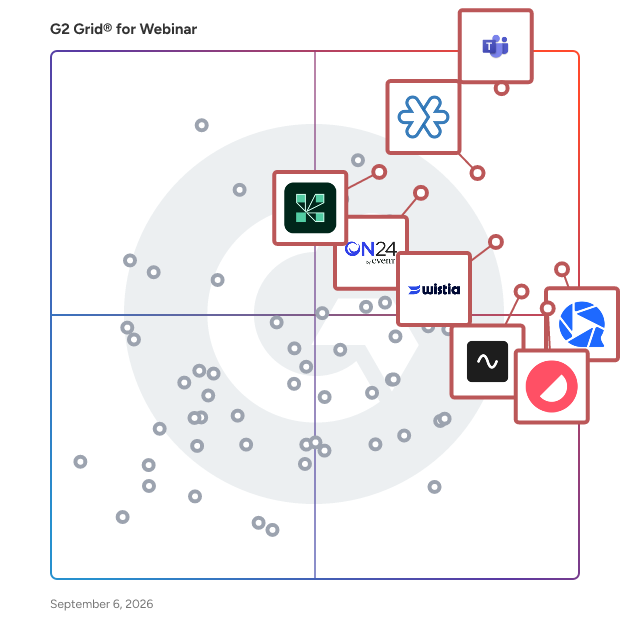
G2 Grid® for Webinar Platforms

G2 Grid® for Webinar Platforms plotting products by satisfaction and market presence

Highlighted products: Microsoft Teams Webinars, Zoho Meeting, WebinarGeek, Wistia, Contrast, ON24, Riverside, and Adobe Connect.

Underlying data: [Grid® JSON](https://www.g2.com/categories/webinar/grids.json?focus%5B%5D=microsoft-teams-webinars&focus%5B%5D=zoho-meeting&focus%5B%5D=webinargeek&focus%5B%5D=wistia&focus%5B%5D=contrast-contrast&focus%5B%5D=on24&focus%5B%5D=riverside&focus%5B%5D=adobe-connect)

Restream

Restream is the live video platform for professional broadcasts. Produce studio-quality live video in your browser, record in 4K, bring remote guests on screen, and stream on YouTube, LinkedIn, X, Twitch, Facebook, Instagram, TikTok, and 30+ platforms at the same time. No downloads, no extra hardware, no production crew required. Create in our web-based Studio or connect the tools you already use: OBS, Zoom, vMix, or Ecamm Live. What Restream helps you do: → Reach every audience with one stream. Multistream to 30+ social channels at once and manage live chats from a single view. More reach from the same broadcast, with no extra bandwidth. → Look professional without a production team. Custom layouts, branded overlays, high-resolution screen sharing, and calls to action turn a single virtual event into a polished live show. → Turn one broadcast into weeks of content. Restream Clips converts long videos into short, captioned vertical highlights and posts them automatically, including live clips that publish while you're still on air. → Guests bring their audience. Invite up to 10 remote guests on screen for interviews, panels, and co-hosted shows. Let them add their social channels or company profiles to 3X your reach. → Record TV-quality video. Capture 4K video with 48kHz audio for podcasts and interviews, solo or with guests, while you stream or on its own. → Fit every feed. Stream portrait and landscape at the same time, so your video looks right on YouTube and TikTok alike. → Stay live even when you're offline. Schedule pre-recorded videos to play as live and keep your channels active around the clock. → Know exactly what worked. Track views, engagement, and growth across every platform in one place. Ask AI to surface missed questions, chat sentiment, or peak viewer moments. → Run it as a team. Shared workspaces and assigned seats let hosts, producers, and marketers plan, run, and repurpose broadcasts together. What teams use Restream for: ✔︎ Launch and announce. Product launches, demos, press conferences, music releases, and company announcements that reach every channel at once, while attention is at its peak. ✔︎ Engage your audience. Webinars, Q&As, AMAs, interviews, podcasts, and executive fireside chats with remote guests and live audience interaction built in. ✔︎ Broadcast live moments. Sports, news, industry conferences, hackathons, meetups, and live coding and build-in-public sessions, produced professionally and streamed everywhere. ✔︎ Communicate at scale. Town halls, internal comms, earnings calls, and public briefings delivered live to employees, investors, and communities wherever they watch.

Average Rating: 4.5/5.0

Total Reviews: 81

How Do G2 Users Rate Restream?

  • Has the product been a good partner in doing business?: 8.7/10 (Category avg: 9.0/10)
  • Social Media Integration: 10.0/10 (Category avg: 8.3/10)
  • Third-Party Integrations: 10.0/10 (Category avg: 8.6/10)

Who Is the Company Behind Restream?

  • Seller: Restream
  • Company Website:
  • Year Founded: 2015
  • HQ Location: Austin, TX
  • Twitter: @Restreamio
    190,188 Twitter followers
  • LinkedIn® Page: www.linkedin.com
    116 employees on LinkedIn®

Who Uses This Product?

  • Top Industries: Marketing and Advertising, Religious Institutions
  • Company Size: 84% Small, 12% Medium

What Do G2 Reviewers Say About Restream?

AI-generated summary from verified user reviews

Pros
  • Users find setup extraordinarily simple, allowing quick connections to social channels and seamless streaming of content.
  • Users value the user-friendly content management of Restream for seamless livestreaming and easy file extraction.
  • Users value the user-friendly interface of Restream, facilitating easy content management and livestreaming across multiple platforms.
  • Users love the easy integrations of Restream, simplifying livestreaming and enhancing content management effortlessly.
  • Users enjoy the easy management of Restream, appreciating its user-friendly interface and seamless integration for content creation.
Cons
  • Users are frustrated by the access limitations of Restream, facing difficulties with video storage and cumbersome processes.
  • Users find Restream expensive due to its costly upgrade for basic storage needs, causing frustration and inefficiency.
  • Users are frustrated with storage limitations on Restream, making it cumbersome to manage recordings effectively.
  • Users report streaming issues with Restream, including time zone errors and limited channel selection for events.

What Are Recent G2 Reviews of Restream?

What Are G2 Users Discussing About Restream?

ClickMeeting

ClickMeeting is a feature-rich, browser-based webinar and online meeting platform, chosen and loved by thousands of marketers, salespeople, teachers, trainers, and managers worldwide. ClickMeeting is suitable for freelancers and organizations of all types: from micro-businesses to international enterprises. It proves its worth as a multi-purpose application dedicated to managing and running various types of online events: • Online meetings – where up to 25 attendees can see, hear and talk to each other in one virtual conference room. • Live webinars – to present your content to a broader audience of up to 1000 attendees in real-time. • Automated webinars – to put your webinars on autopilot and win back your time in the process. • On-demand webinars – to let your audience watch your webinar recordings whenever they want. • Paid webinars – to sell access to your online courses and training sessions and to transform your expertise into a primary or additional source of revenue. • Huge virtual events – to scale up and stream your content to thousands of attendees with webcast technology. By choosing ClickMeeting, you don't have to worry about your and your users' data and privacy. As a European entity, ClickMeeting is required to act in accordance with GDPR - the most comprehensive catalog of information processing rules.

Average Rating: 4.2/5.0

Total Reviews: 269

How Do G2 Users Rate ClickMeeting?

  • Has the product been a good partner in doing business?: 8.3/10 (Category avg: 9.0/10)
  • Social Media Integration: 8.9/10 (Category avg: 8.3/10)
  • Third-Party Integrations: 8.9/10 (Category avg: 8.6/10)
  • Attendee Reports: 9.1/10 (Category avg: 8.9/10)

Who Is the Company Behind ClickMeeting?

  • Seller: ClickMeeting
  • Year Founded: 2012
  • HQ Location: Gdansk, Poland
  • Twitter: @clickmeeting
    5,208 Twitter followers
  • LinkedIn® Page: www.linkedin.com
    79 employees on LinkedIn®

Who Uses This Product?

  • Who Uses This: Owner, CEO
  • Top Industries: E-Learning, Non-Profit Organization Management
  • Company Size: 66% Small, 25% Medium

What Do G2 Reviewers Say About ClickMeeting?

AI-generated summary from verified user reviews

Pros
  • Users find ClickMeeting easy to use, enhancing event management with its simple interface and powerful features.
  • Users appreciate the intuitive interface and excellent support of ClickMeeting, enhancing their webinar experience significantly.
  • Users commend ClickMeeting for its intuitive interface, making hosting webinars easy even for non-tech-savvy individuals.
  • Users commend the reliability of ClickMeeting, praising its smooth performance even with large audiences during webinars.
  • Users appreciate the prompt and helpful customer support from ClickMeeting, enhancing their overall experience significantly.
Cons
  • Users experience connection issues occasionally, impacting their ability to engage smoothly during meetings.
  • Users often face connectivity issues that can disrupt the experience, affecting reliability and ease of use.
  • Users find ClickMeeting's pricing to be high, especially for smaller businesses needing higher attendee limits.
  • Users find limited customization options for design and branding on ClickMeeting, which can restrict personalization efforts.
  • Users note the missing features on mobile compared to desktop and suggest improvements for event navigation.

What Are Recent G2 Reviews of ClickMeeting?

What Are G2 Users Discussing About ClickMeeting?

Aonmeetings

AONMeetings is a comprehensive browser-based video conferencing solution that helps businesses conduct HD video meetings, webinars, and live streams without requiring software installations. The platform operates entirely through web browsers, primarily Google Chrome and MS Edge, enabling users to connect instantly for professional communications. Here's the revised second paragraph: Designed to serve healthcare, education, legal, and corporate environments, AONMeetings also fits small to medium-sized businesses across various industries, prioritizing security with HIPAA compliance, end-to-end encryption, and granular access controls. The platform addresses the communication needs of organizations ranging from small businesses to large enterprises through its scalable participant limits and feature sets. Core Features and Capabilities: Unlimited HD video meetings and webinars with registration capabilities AI-powered meeting summaries and smart search functionality Screen sharing with annotations, whiteboard collaboration, and live polling Audio and video recording with closed captioning and virtual backgrounds Custom branding, multi-camera broadcasts, and RTMP streaming for advanced users AONMeetings operates on a tiered pricing model starting at $3.99 per month for up to 25 participants in the Standard plan, progressing through Pro (100 participants) and Business Pro (250 participants) tiers. The platform includes enterprise add-ons for large-scale webinars supporting 500 to 5,000 participants with both monthly subscription and one-time event pricing options. The solution distinguishes itself through its browser-based accessibility, eliminating the need for downloads or installations while maintaining professional-grade security standards. Integration capabilities include calendar systems like Calendly, MS Outlook, Google Calendar and Slack, while advanced analytics and insights help organizations optimize their communication strategies . This positions AONMeetings as a cost-effective alternative to traditional video conferencing platforms, particularly suited for organizations requiring reliable, secure, and feature-rich communication tools without the complexity of software management.

Average Rating: 4.9/5.0

Total Reviews: 40

How Do G2 Users Rate Aonmeetings?

  • Has the product been a good partner in doing business?: 9.7/10 (Category avg: 9.0/10)
  • Social Media Integration: 9.3/10 (Category avg: 8.3/10)
  • Third-Party Integrations: 8.3/10 (Category avg: 8.6/10)
  • Attendee Reports: 9.4/10 (Category avg: 8.9/10)

Who Is the Company Behind Aonmeetings?

  • Seller: Aonmeetings
  • Company Website:
  • Year Founded: 2020
  • HQ Location: Des Moines, US
  • LinkedIn® Page: www.linkedin.com
    4 employees on LinkedIn®

Who Uses This Product?

  • Top Industries: Information Technology and Services, Marketing and Advertising
  • Company Size: 115% Small, 4% Large

What Do G2 Reviewers Say About Aonmeetings?

AI-generated summary from verified user reviews

Pros
  • Users find Aonmeetings' ease of use remarkable, allowing quick setup without the need for heavy software installations.
  • Users commend the reliable quality of Aonmeetings, ensuring smooth sessions even with varying bandwidth conditions.
  • Users commend the smooth video quality of Aonmeetings, enhancing their overall conferencing experience with reliable connections.
  • Users find Aonmeetings' easy setup incredibly beneficial, enabling hassle-free meetings without any downloads required.
  • Users highlight the superior video quality and seamless experience of Aonmeetings, enhancing live demos and collaboration.
Cons
  • Users find limited features in Aonmeetings, with basic polling and a need for better storage management options.
  • Users find the limited customization options frustrating, especially in meeting templates and data export functionality.
  • Users find the missing features in Aonmeetings limiting, particularly with storage and customization options.
  • Users find the user interface lacking, highlighting issues with complexity and payment integration, detracting from the overall experience.
  • Users find the limited options for virtual backgrounds and controls to be a drawback for Aonmeetings.

What Are Recent G2 Reviews of Aonmeetings?

StreamYard

StreamYard is a live streaming, recording and webinar tool in your browser. Interview guests, share your screen, and much more. Stream directly to Facebook, YouTube, LinkedIn, and other platforms. StreamYard makes it easy to broadcast your live show to all audiences on multiple platforms at once. Interview guests, sync comments, and brand every broadcast. Better yet, our backup servers make sure your livestream runs smoothly no matter what—because the show must go on. Record your podcasts with high quality local recordings. Host your virtual events and webinars with StreamYard.

Average Rating: 4.8/5.0

Total Reviews: 289

How Do G2 Users Rate StreamYard?

  • Has the product been a good partner in doing business?: 9.3/10 (Category avg: 9.0/10)
  • Social Media Integration: 7.5/10 (Category avg: 8.3/10)
  • Third-Party Integrations: 8.3/10 (Category avg: 8.6/10)
  • Attendee Reports: 8.3/10 (Category avg: 8.9/10)

Who Is the Company Behind StreamYard?

  • Seller: Hopin
  • Year Founded: 2019
  • HQ Location: London
  • LinkedIn® Page: www.linkedin.com
    230 employees on LinkedIn®

Who Uses This Product?

  • Who Uses This: Owner, CEO
  • Top Industries: Entertainment, Marketing and Advertising
  • Company Size: 89% Small, 6% Medium

What Do G2 Reviewers Say About StreamYard?

AI-generated summary from verified user reviews

Pros
  • Users find StreamYard to be remarkably easy to use, enhancing their live broadcasting experience effortlessly.
  • Users love the customization features of StreamYard, enhancing professionalism and engagement in their live streaming experiences.
  • Users highlight the professionalism of StreamYard, benefiting from seamless branding and reliable live streaming capabilities.
  • Users find StreamYard to be a cost-effective solution for easy and efficient live broadcasting sessions.
  • Users appreciate the exceptional audio quality of StreamYard, enhancing their video content significantly.
Cons
  • Users face significant bugs and inadequate support, impacting StreamYard's usability and overall experience negatively.
  • Users feel StreamYard is expensive, especially for smaller teams, forcing upgrades without clear communication or adequate support.
  • Users highlight the poor customer support of StreamYard, noting unresponsive service and miscommunication on critical issues.
  • Users express frustration with the lack of live support, receiving no responses to urgent inquiries during critical situations.
  • Users often face link issues, including limited editing options and unresponsive customer support, affecting overall experience.

What Are Recent G2 Reviews of StreamYard?

What Are G2 Users Discussing About StreamYard?

SpotMe

SpotMe is the enterprise event platform that helps global brands run engaging in-person, hybrid, and virtual events that allow enterprises to increase the commercial impact of their events. With SpotMe, you get a branded and compliant event app, personalized experiences for every participant, and deep engagement data that flows in real time to your CRM. From registration and lead capture to appointment scheduling and content engagement, SpotMe is built to support complex enterprise use cases with consumer-grade ease. Trusted by 12,000+ enterprise users, including 15 of the top 20 life science companies, the Big Four, and global leaders in tech, finance, and manufacturing, SpotMe's product and services allows enterprises to deliver high-impact experiences. The robust CRM and marketing automation integrations ensure that every event becomes a high-performing asset that generates a measurable increase in ROI.

Average Rating: 4.7/5.0

Total Reviews: 195

How Do G2 Users Rate SpotMe?

  • Has the product been a good partner in doing business?: 9.5/10 (Category avg: 9.0/10)
  • Social Media Integration: 8.5/10 (Category avg: 8.3/10)
  • Third-Party Integrations: 8.2/10 (Category avg: 8.6/10)
  • Attendee Reports: 9.0/10 (Category avg: 8.9/10)

Who Is the Company Behind SpotMe?

  • Seller: SpotMe
  • Year Founded: 2001
  • HQ Location: Lausanne, Switzerland
  • Twitter: @SpotMe
    959 Twitter followers
  • LinkedIn® Page: www.linkedin.com
    147 employees on LinkedIn®

Who Uses This Product?

  • Top Industries: Pharmaceuticals, Accounting
  • Company Size: 55% Large, 27% Medium

What Do G2 Reviewers Say About SpotMe?

AI-generated summary from verified user reviews

Pros
  • Users praise the ease of use of SpotMe, highlighting its user-friendly design and seamless functionality.
  • Users commend SpotMe for their excellent customer support, ensuring a seamless experience and effective communication throughout.
  • Users appreciate the organized and user-friendly event management of SpotMe, making event planning seamless and effective.
  • Users appreciate the customization options of SpotMe, allowing for tailored content and organized agendas.
  • Users praise SpotMe's reliability, appreciating the excellent support and seamless implementation during their event experiences.
Cons
  • Users note the poor usability of SpotMe, mentioning difficulties in user experience and menu customization for newcomers.
  • Users wish there was a way to work backstage via the app, highlighting the limited app availability for event updates.
  • Users desire the ability to make updates backstage through the app, as app functionality issues hinder real-time event management.
  • Users desire a way to link Speakers with user accounts for improved attendee interactions and seamless connections.
  • Users desire a better connection between attendees and speakers to enhance chatting capabilities within SpotMe.

What Are Recent G2 Reviews of SpotMe?

What Are G2 Users Discussing About SpotMe?

TwentyThree

TwentyThree is the world's first all-in-one Video Marketing Platform that enables everyone in any company to Get Real with Video. From our much-loved webinar tool, to simple but powerful ways of hosting and managing videos on your site, gathering leads, and analyzing your videos’ performance, TwentyThree is the essential platform for bringing companies into a video-driven world. As Europe’s only global video leader, we have all the tools any team needs to make, manage, and share video and webinars.

Average Rating: 4.5/5.0

Total Reviews: 17

How Do G2 Users Rate TwentyThree?

  • Has the product been a good partner in doing business?: 9.5/10 (Category avg: 9.0/10)
  • Social Media Integration: 7.9/10 (Category avg: 8.3/10)
  • Third-Party Integrations: 9.6/10 (Category avg: 8.6/10)
  • Attendee Reports: 9.0/10 (Category avg: 8.9/10)

Who Is the Company Behind TwentyThree?

  • Seller: TwentyThree
  • Year Founded: 2005
  • HQ Location: Copenhagen Area, Capital Region
  • Twitter: @TwentyThree
    2,311 Twitter followers
  • LinkedIn® Page: www.linkedin.com
    42 employees on LinkedIn®

Who Uses This Product?

  • Top Industries: Marketing and Advertising
  • Company Size: 53% Small, 32% Medium

What Do G2 Reviewers Say About TwentyThree?

AI-generated summary from verified user reviews

Pros
  • Users value the comprehensive video integration features of TwentyThree, enhancing their webinar and content creation experience.
  • Users value the comprehensive content creation tools of TwentyThree, enhancing their webinar and video integration experiences.
  • Users find TwentyThree's helpfulness exceptional, with top-notch support and features enhancing their video marketing strategies.
  • Users love the video editing capabilities of TwentyThree, praising its integration and user-friendly features for improved content management.
  • Users value the insightful analytics and statistics provided by TwentyThree, enhancing their understanding of engagement and performance.
Cons
  • Users find the slow rendering in TwentyThree's web-based AV production can disrupt their viewing experience.

What Are Recent G2 Reviews of TwentyThree?

What Are G2 Users Discussing About TwentyThree?

Airmeet - Virtual Events & Webinar Platform

Airmeet - Virtual Events & Webinar Platform is a scalable webinar and virtual events platform that helps in creating interactive webinars to engaging and impactful virtual events from normal sessions to massive global audiences. Organize interactive and engaging webinars: - Boost turnout with a. One-click registration, b. CRM integration, c. CSV upload, d. Email triggers, and e. Customizable landing pages. - Enhance conversion and pipeline progression with a. Custom CTAs, b. Personalized resource lists, c. X-ray profile view, and d. CRM integration for enriched profiles. - Incorporate networking features a. Speed networking, b. Social lounges, c. Fluid spaces and d. Breakout rooms. - Drive participation with a. Moderated Q&A, b. Live polling, c. Chat, d. Emoji reactions, e. Leaderboards etc. - Utilize AI for easy setup and branding options. - Offer live interpreters for preferred language listening during sessions. - Deepen engagement with breakout sessions for in-depth topics and connections.

Average Rating: 4.6/5.0

Total Reviews: 732

How Do G2 Users Rate Airmeet - Virtual Events & Webinar Platform?

  • Has the product been a good partner in doing business?: 9.0/10 (Category avg: 9.0/10)
  • Social Media Integration: 8.4/10 (Category avg: 8.3/10)
  • Third-Party Integrations: 8.4/10 (Category avg: 8.6/10)
  • Attendee Reports: 8.7/10 (Category avg: 8.9/10)

Who Is the Company Behind Airmeet - Virtual Events & Webinar Platform?

  • Seller: Airmeet
  • Year Founded: 2019
  • HQ Location: Lewes, Delaware
  • Twitter: @airmeet
    11,409 Twitter followers
  • LinkedIn® Page: www.linkedin.com
    122 employees on LinkedIn®

Who Uses This Product?

  • Who Uses This: Student, Founder
  • Top Industries: Education Management, Higher Education
  • Company Size: 58% Small, 32% Medium

What Do G2 Reviewers Say About Airmeet - Virtual Events & Webinar Platform?

AI-generated summary from verified user reviews

Pros
  • Users highlight the flexible and intuitive event management features of Airmeet, enhancing their virtual event experience significantly.
  • Users commend the ease of use of Airmeet, facilitating smooth organization and management of events and webinars.
  • Users value the high audience engagement in Airmeet, enhancing interaction and participation during events and webinars.
  • Users appreciate the intuitive interface and strong audience engagement features of Airmeet for seamless virtual events.
  • Users appreciate the seamless attendee management of Airmeet, facilitating organization and enhancing webinar experiences.
Cons
  • Users face a challenging learning curve with Airmeet, requiring time to understand the setup and customization features.
  • Users note that the customization options are limited, making it less flexible compared to other platforms.
  • Users find the steep learning curve of Airmeet challenging, especially for managing event setup and customization.
  • Users note the design limitations of Airmeet, particularly in mobile compatibility and customization options.
  • Users often find Airmeet's interface not intuitive, making it challenging for new or less tech-savvy users to navigate.

What Are Recent G2 Reviews of Airmeet - Virtual Events & Webinar Platform?

What Are G2 Users Discussing About Airmeet - Virtual Events & Webinar Platform?

Goldcast

Goldcast is an AI-powered B2B Video Content Platform that puts video at the heart of the customer journey. Effectively capture attention and engage your audience, efficiently create and repurpose video content, and capitalize on intent. Elevate your video content strategy with Goldcast for true audience engagement, brand development, and revenue growth.

Average Rating: 4.7/5.0

Total Reviews: 230

How Do G2 Users Rate Goldcast?

  • Has the product been a good partner in doing business?: 9.5/10 (Category avg: 9.0/10)
  • Social Media Integration: 8.3/10 (Category avg: 8.3/10)
  • Third-Party Integrations: 8.7/10 (Category avg: 8.6/10)
  • Attendee Reports: 9.2/10 (Category avg: 8.9/10)

Who Is the Company Behind Goldcast?

  • Seller: Cvent
  • Company Website:
  • Year Founded: 1999
  • HQ Location: Tysons Corner, VA
  • Twitter: @cvent
    42,011 Twitter followers
  • LinkedIn® Page: www.linkedin.com
    6,821 employees on LinkedIn®

Who Uses This Product?

  • Who Uses This: CEO, Founder
  • Top Industries: Computer Software, Information Technology and Services
  • Company Size: 51% Medium, 32% Small

What Do G2 Reviewers Say About Goldcast?

AI-generated summary from verified user reviews

Pros
  • Users find Goldcast to be extremely easy to use, enhancing their webinar experience with intuitive design and seamless onboarding.
  • Users appreciate the easy integration and engaging features of Goldcast, enhancing webinar experiences for clients and hosts.
  • Users love the seamless integration and intuitive design of Goldcast, enhancing the overall webinar experience.
  • Users appreciate the easy setup of Goldcast, making it intuitive for first-time webinar hosts and speakers.
  • Users highlight the seamless engagement features of Goldcast that enhance audience interaction during events and webinars.
Cons
  • Users find the navigation difficult, often needing training to locate options and settings effectively.
  • Users find the learning curve challenging, requiring training to navigate Goldcast effectively at first.
  • Users find Goldcast's onboarding difficult, requiring training to navigate layout and settings effectively.
  • Users find the initial difficulty in navigating Goldcast requires training to utilize its features effectively.
  • Users find the limited customization options frustrating, especially with permissions and event management flexibility.

What Are Recent G2 Reviews of Goldcast?

What Are G2 Users Discussing About Goldcast?

Digital Samba

Since its foundation in 2003, Digital Samba has been a trusted provider of secure video conferencing solutions in the European market. Entirely built and hosted within the European Union, it guarantees full GDPR compliance and delivers a robust platform for modern digital communication. With both a free, ready-to-use platform and an embeddable API/SDK, Digital Samba is designed for effortless use or seamless integration into applications across industries, from healthcare to event management. Digital Samba stands out for its minimalist design combined with a feature-rich conferencing experience. Core features include high-definition group video calls, customisable roles and permissions, screen sharing, interactive hand raise, AI-powered captions, and secure cloud recordings. The platform also offers multilingual support in English, German, and Spanish. For organisations requiring deeper integration, Digital Samba Embedded extends these capabilities with advanced options such as full white labelling, CNAME support, and extensive developer tools for custom branding and workflow integration. Known for its reliability, Digital Samba ensures smooth connectivity with negligible downtime and swift resolution of any technical issues. The platform emphasises security, featuring anonymised user IDs and token-based authentication to safeguard user data. To discover more about Digital Samba, visit www.digitalsamba.com.

Average Rating: 4.3/5.0

Total Reviews: 58

How Do G2 Users Rate Digital Samba?

  • Has the product been a good partner in doing business?: 9.4/10 (Category avg: 9.0/10)
  • Social Media Integration: 9.7/10 (Category avg: 8.3/10)
  • Third-Party Integrations: 9.3/10 (Category avg: 8.6/10)
  • Attendee Reports: 10.0/10 (Category avg: 8.9/10)

Who Is the Company Behind Digital Samba?

Who Uses This Product?

  • Top Industries: E-Learning, Information Technology and Services
  • Company Size: 54% Small, 38% Medium

What Do G2 Reviewers Say About Digital Samba?

AI-generated summary from verified user reviews

Pros
  • Users value the ease of use in Digital Samba, appreciating its simple setup and smooth collaboration features.
  • Users find the initial setup easy, enabling a seamless experience for secure and professional video communication.
  • Users appreciate the consistently strong video quality of Digital Samba, ensuring smooth interactions during important events.
  • Users appreciate the reliable and secure video communication of Digital Samba, enhancing engagement and professionalism in meetings.
  • Users commend the reliability of Digital Samba, enjoying seamless video communication with minimal technical issues.
Cons
  • Users feel that Digital Samba has limited features, seeking improvements in usability and mobile performance.
  • Users find the limited customization options of Digital Samba restricts flexibility and complicates specific setups.
  • Users find missing features in Digital Samba, urging for enhancements in integrations and customization options.
  • Users find the learning curve steep for first-time use, especially with webinar setups and navigation complications.
  • Users often face integration issues with Digital Samba, affecting the overall functionality and ease of use.

What Are Recent G2 Reviews of Digital Samba?

What Are G2 Users Discussing About Digital Samba?

Univid

Univid lets you create engaging webinars in less than 60 seconds. No more boring events. Go live and get a ton of engagement, without the complexity of large event systems. Your favorite features re-imagined. The Univid interaction is built to be easy - no extra work for you as a host. Enjoy the benefits of a more engaging webinar, together with your participants. One click to launch polls, live reactions, Q&A, call-to-actions, engagement leaderboard, and much more. Beautiful branding, in no time. Make the session, registration page, and email reminders your own - without being a designer. Your colors, your logos, and your backgrounds. Gather tons of great insights, powered by engagement. Take the right decisions. Connect to your CRM, with native Hubspot integration and more. Univid is trusted by companies of all sizes - from startups to leading Fortune 500 companies. Built for companies who want smooth operations, while delivering attendee experiences in top-class.

Average Rating: 4.8/5.0

Total Reviews: 46

How Do G2 Users Rate Univid?

  • Has the product been a good partner in doing business?: 9.9/10 (Category avg: 9.0/10)
  • Social Media Integration: 7.7/10 (Category avg: 8.3/10)
  • Third-Party Integrations: 8.8/10 (Category avg: 8.6/10)
  • Attendee Reports: 9.0/10 (Category avg: 8.9/10)

Who Is the Company Behind Univid?

  • Seller: Univid
  • Year Founded: 2019
  • HQ Location: Stockholm, SE
  • LinkedIn® Page: www.linkedin.com
    4 employees on LinkedIn®

Who Uses This Product?

  • Top Industries: Computer Software, Information Technology and Services
  • Company Size: 72% Small, 22% Medium

What Do G2 Reviewers Say About Univid?

AI-generated summary from verified user reviews

Pros
  • Users love the easy setup of Univid, enabling seamless webinars with minimal prior knowledge required.
  • Users love the high level of interactivity Univid offers, making webinars engaging and enjoyable to manage.
  • Users praise the responsive customer support of Univid, enhancing their overall experience with timely assistance.
  • Users love the high level of customization in Univid, allowing for clean branding and engaging webinars.
  • Users find Univid to be an intuitive and easy platform, enhancing their overall experience with its features.
Cons
  • Users express a desire for more features in Univid for enhanced behind-the-scenes functionality for production companies.

What Are Recent G2 Reviews of Univid?

Dreamcast

Dreamcast is a large-scale and enterprise event technology solution provider with over 12+ years of experience, delivering 5000+ successful events to 1000+ satisfied clients globally. We specialize in a wide range of large-scale on-ground event tech solutions, including on-site event registration, on-demand badge printing, attendee access management, crowd management systems, secure cashless payment systems, and more. Our solutions are built to handle high attendee volumes with speed, accuracy, and reliability. We help organizers simplify mega event operations while improving the overall experience for every attendee. We combine innovation with practicality to deliver technology that enhances every aspect of event execution.  With a proven track record across diverse industries, Dreamcast ensures that every event is powered by efficiency and impact. We provide advanced on-ground event technology solutions, such as: Onspot Event Registration Event Badge Printing Solutions Attendee Access Management Mobile Event App Cashless Payment System QR Code Badges & Fast Check-In Turnstile Access for Events Facial Recognition for Enhanced Security Event Badges & RFID WhatsApp-Based Automation Social Media Walls Branded Game Engagements Insightful Data and Analytics Real-Time Audience Interaction Third-Party Integrations Dreamcast continuously strives to build industry-leading solutions that ensure smooth event execution and memorable attendee experiences. Our on-ground event technology has empowered global organizations like PWC, TOI, ISRO, ISB, FICCI, Johnson & Johnson, Dell, Lenovo, and many others to host fully customizable, enterprise-grade events. With no geographical limitations, Dreamcast enables organizations to deliver impactful, large-scale, and multi-day events through user-friendly, reliable technology- bringing every event vision to life with efficiency and innovation.

Average Rating: 4.8/5.0

Total Reviews: 68

How Do G2 Users Rate Dreamcast?

  • Has the product been a good partner in doing business?: 9.6/10 (Category avg: 9.0/10)
  • Social Media Integration: 8.3/10 (Category avg: 8.3/10)
  • Third-Party Integrations: 8.3/10 (Category avg: 8.6/10)
  • Attendee Reports: 10.0/10 (Category avg: 8.9/10)

Who Is the Company Behind Dreamcast?

Who Uses This Product?

  • Top Industries: Information Technology and Services, Accounting
  • Company Size: 35% Medium, 34% Small

What Do G2 Reviewers Say About Dreamcast?

AI-generated summary from verified user reviews

Pros
  • Users praise the quick and expert customer support of Dreamcast, enhancing their overall event management experience.
  • Users appreciate the ease of use of Dreamcast, highlighting its intuitive event registration and quick check-in process.
  • Users praise Dreamcast for its advanced event tech solutions, which simplify registration and ensure quick check-ins.
  • Users appreciate the easy-to-use event registration and quick check-in process offered by Dreamcast.
  • Users value the fast response time of Dreamcast, ensuring efficient event registration and expert customer support.
Cons
  • Users find the Dreamcast to be expensive, especially for small gathering events where costs can add up quickly.

What Are Recent G2 Reviews of Dreamcast?

What Are G2 Users Discussing About Dreamcast?

GetResponse

GetResponse is a lifecycle automation platform for businesses that want to drive more consistent, repeatable revenue across the entire customer journey. We help you move customers from first touch to first purchase, repeat purchase, and reactivation - using email, SMS, push notifications, and lifecycle automation across every stage of the customer journey With built-in deliverability, behavioral triggers, and deep integrations, you can launch faster, reduce manual work, and turn your lifecycle into a predictable revenue system. No disconnected tools. No campaign chaos. Just one system designed to move customers forward.

Average Rating: 4.3/5.0

Total Reviews: 1,118

G2 Deal: Save big and get up to 20% off any plan!

Create a FREE account and try the complete marketing software. No credit card required. After 30 days, choose the plan that best fits you and save from 20% off of list price.

Price: ~~$15-99/user/month~~ → $12-81/user/month

View this exclusive G2 deal

How Do G2 Users Rate GetResponse?

  • Has the product been a good partner in doing business?: 8.6/10 (Category avg: 9.0/10)
  • Social Media Integration: 8.7/10 (Category avg: 8.3/10)
  • Third-Party Integrations: 8.5/10 (Category avg: 8.6/10)
  • Attendee Reports: 9.0/10 (Category avg: 8.9/10)

Who Is the Company Behind GetResponse?

  • Seller: GetResponse
  • Company Website:
  • Year Founded: 1998
  • HQ Location: Poland
  • Twitter: @getresponse
    54,233 Twitter followers
  • LinkedIn® Page: www.linkedin.com
    430 employees on LinkedIn®

Who Uses This Product?

  • Who Uses This: Owner, CEO
  • Top Industries: Marketing and Advertising, Health, Wellness and Fitness
  • Company Size: 78% Small, 17% Medium

What Do G2 Reviewers Say About GetResponse?

AI-generated summary from verified user reviews

Pros
  • Users appreciate the ease of use of GetResponse, allowing for quick creation of professional email campaigns without technical skills.
  • Users rave about the exceptional customer support of GetResponse, noting prompt assistance whenever needed.
  • Users highlight the user-friendly interface of GetResponse, making email building fast and efficient with drag-and-drop features.
  • Users find GetResponse to be a highly effective platform for professional newsletters and robust email marketing campaigns.
  • Users value the user-friendly interface of GetResponse, enabling swift creation of professional email campaigns and effective automation.
Cons
  • Users find the missing features of GetResponse limiting, especially in list sorting and report clarity.
  • Users often find GetResponse expensive as costs increase with higher-tier features and larger contact lists.
  • Users find the limited features of GetResponse restrictive, especially for larger organizations needing advanced options.
  • Users experience a significant learning curve for advanced features that can hinder their ability to utilize the platform fully.
  • Users note significant pricing increases and a steep learning curve as limitations of GetResponse.

What Are Recent G2 Reviews of GetResponse?

What Are G2 Users Discussing About GetResponse?

Remo Conference

Remo is a virtual event platform that enables interactive events and conferences that rival live, in-person gatherings. With the help of different tables, floors & buildings, Remo provides an immersive experience that empowers people to move around freely and spark spontaneous “hallway conversations”. It helps you create events that foster authentic, meaningful relationships that last beyond your event. Remo supports multiple use cases with more use cases being discovered all the time! If you’re in the business of connecting and networking, Remo can be used to conduct networking events, virtual conferences, career fairs, expos and much more. With Remo, you can: 1. Create Stunning Virtual Events Easily Set up events that guests rave about in less than 5 minutes. 2. Supercharge attendee interaction and engagement Connect Speakers and Guests in a satisfying way that enables everyone to feel heard, energized and inspired. 3. Customize And Brand Your Event Space You create the environment and experience that you want for your guests 4. Showcase Sponsors to Amplify Your Event Gain credibility and revenue when you create interactive opportunities for Sponsors to connect to your guests. Experience the magic of Remo!

Average Rating: 4.5/5.0

Total Reviews: 300

How Do G2 Users Rate Remo Conference?

  • Has the product been a good partner in doing business?: 9.0/10 (Category avg: 9.0/10)
  • Social Media Integration: 10.0/10 (Category avg: 8.3/10)
  • Third-Party Integrations: 9.4/10 (Category avg: 8.6/10)
  • Attendee Reports: 10.0/10 (Category avg: 8.9/10)

Who Is the Company Behind Remo Conference?

  • Seller: Events.com
  • Year Founded: 2018
  • HQ Location: Claymont, Delaware
  • Twitter: @use_remo
    1,251 Twitter followers
  • LinkedIn® Page: www.linkedin.com
    182 employees on LinkedIn®

Who Uses This Product?

  • Who Uses This: Owner, CEO
  • Top Industries: Non-Profit Organization Management, Events Services
  • Company Size: 65% Small, 26% Medium

What Do G2 Reviewers Say About Remo Conference?

AI-generated summary from verified user reviews

Pros
  • Users appreciate the effective team collaboration features of Remo, enhancing engagement and networking at virtual events.
  • Users love the interactive design of Remo Conference, enhancing engagement and creativity in virtual events.
  • Users highlight the excellent customer support of Remo Conference, praising its responsiveness and attentiveness to needs.
  • Users praise Remo Conference for its exceptional customer support and seamless virtual event experience, making connections feel genuine.
  • Users appreciate the interactive event management of Remo Conference, enhancing engagement and organization for virtual fairs.
Cons
  • Users note the high cost of Remo Conference, especially for extensive features and customizations.
  • Users note the limited interaction options in Remo Conference, impacting engagement during group activities.
  • Users experience a steep learning curve when setting up Remo Conference, leading to initial confusion and intimidation.
  • Users find the user interface confusing and experience limitations with recording and whiteboard features on Remo Conference.
  • Users highlight the need for improved visual quality in Remo Conference to enhance the overall experience.

What Are Recent G2 Reviews of Remo Conference?

What Are G2 Users Discussing About Remo Conference?

Chati

Chati is a flexible, highly scalable virtual event platform designed to help users create immersive and engaging online experiences. This software solution caters to a diverse array of event organizers, including corporate professionals, educators, and anyone looking to host impactful virtual gatherings. With decades of experience in producing virtual events, Chati equips users with the necessary tools to ensure their events are both successful and memorable. The platform's target audience encompasses businesses hosting conferences, trade shows, webinars, and workshops, as well as educational institutions conducting online classes and seminars. Chati is particularly beneficial for organizations seeking a customizable solution to meet specific event objectives. With a variety of templates available, users can also create their own unique experiences, allowing for tailored events that resonate with their intended audience and purpose. Chati distinguishes itself in the virtual event software landscape through its user-friendly interface and extensive customization options. Users can easily navigate the platform to design events that align with their brand identity. The platform also features interactive tools that enhance attendee engagement, such as customizable event layouts, real-time analytics, and integrated communication features. These functionalities not only enrich the attendee experience but also enable organizers to monitor engagement levels and adapt their strategies to maintain participant involvement throughout the event. Accessibility is another cornerstone of Chati's design philosophy. The platform is built to ensure that attendees from various backgrounds and locations can participate without barriers. Chati's commitment to inclusivity is evident in its functionality across different devices and internet speeds, facilitating a seamless experience for all users. By prioritizing accessibility and immersion, Chati enhances the overall attendee experience and fosters a sense of community, encouraging participants to look forward to future events. Chati provides a comprehensive solution for hosting virtual events that are engaging and tailored to specific needs. Its combination of flexibility, scalability, and focus on user experience empowers event organizers to create memorable experiences that leave a lasting impression on attendees. With Chati, users can confidently navigate the complexities of virtual event planning, ensuring that every gathering is not only successful but also impactful.

Average Rating: 4.4/5.0

Total Reviews: 121

How Do G2 Users Rate Chati?

  • Has the product been a good partner in doing business?: 9.3/10 (Category avg: 9.0/10)
  • Social Media Integration: 10.0/10 (Category avg: 8.3/10)
  • Third-Party Integrations: 10.0/10 (Category avg: 8.6/10)
  • Attendee Reports: 10.0/10 (Category avg: 8.9/10)

Who Is the Company Behind Chati?

  • Seller: Chati
  • Company Website:
  • Year Founded: 2021
  • HQ Location: Yorba Linda, California
  • Twitter: @getchati
    44 Twitter followers
  • LinkedIn® Page: www.linkedin.com
    28 employees on LinkedIn®

Who Uses This Product?

  • Who Uses This: Medical Laboratory Scientist, Researcher
  • Top Industries: Hospital & Health Care, Biotechnology
  • Company Size: 47% Small, 27% Medium

What Do G2 Reviewers Say About Chati?

AI-generated summary from verified user reviews

Pros
  • Users appreciate the ease of use of Chati, finding it user-friendly and simple for virtual trainings.
  • Users value Chati for its intuitive interactions that enhance real-time engagement during virtual events.
  • Users find the navigation ease of Chati exceptional, making it simple to move through the virtual event environment.
  • Users find Chati's intuitive interaction makes it user-friendly, allowing effortless navigation and easy access from any device.
  • Users appreciate the interactive experience of Chati, transforming virtual events into engaging and organized sessions.
Cons
  • Users often experience information overload due to lengthy and vague responses, complicating their search for specific details.
  • Users find the lack of essential features in Chati, such as schedules and closed captioning, disappointing.
  • Users experience presentation problems due to poorly arranged sub-windows, making it difficult to manage and view content effectively.
  • Users feel that Chati needs more technical accuracy and improved integration for better support in academic tasks.
  • Users express frustration with chat functionality, noting inaccuracies in responses and inconsistencies in features across exhibitors.

What Are Recent G2 Reviews of Chati?

Streamlabs

Streamlabs is a creator platform that helps livestreamers produce, distribute, and monetize content from a single workflow. Creators can stream from desktop, mobile, or console, engage their audience with customizable overlays and widgets, edit and repurpose content for social media, and generate revenue through tipping, sponsorships, and merch sales. Designed for creators at every stage of growth, Streamlabs combines streaming, editing, collaboration, and audience engagement tools into one platform, reducing the need to manage multiple subscriptions and disconnected workflows. Free tools are available for getting started, while Streamlabs Ultra and Ultra+ unlock advanced capabilities such as multistreaming, cross-device streaming, premium design assets, expanded AI-powered tools, and additional cloud storage. 🏆Top Features Cross Device Streaming However you want to go live, Streamlabs has a tool for that. Features include: ✔ Desktop Streaming: Go live with Streamlabs Desktop or OBS with the Streamlabs Plugin. ✔ Mobile Streaming: Stream from any mobile device with the native mobile app. Available for iOS and Android. ✔ Stream Shift: Transition live broadcast feeds seamlessly between Streamlabs Desktop and Streamlabs Mobile apps without dropping connection or disconnecting viewers. ✔ Browser-Based Streaming: Live stream from your browser with Streamlabs Talk Studio. ✔ Console Streaming: Stream directly from Xbox console setups without an external capture card or PC. Branding and Engagement Tools Streamlabs customization and engagement tools allow for a branded identity for every creator. Features include: ✔ Custom Alerts and Widgets: Get on-screen notifications for follows, tips, subscribers, and more and customize with dozens of widgets. Integrated with Twitch, YouTube, Kick, Patreon, and more and available for free. ✔ Overlays: Choose from hundreds of free overlay themes, or unlock thousands of professionally designed overlays with Streamlabs Ultra. ✔ Scene Collections: Fully-editable scene collections are saved to the cloud. Multi-Platform Broadcasting & Server-Side Multistreaming Streamlabs enables simulcasting to popular streaming platforms plus RTMP destinations to accelerate discovery and growth. Features include: ✔ ️ Dual Output Broadcasting: Simultaneously output portrait (vertical 9:16) and landscape (horizontal 16:9) canvas resolutions to target desktop and mobile audiences. ✔ Multistreaming: Go live to multiple platforms at once. Unlike hardware-intensive setups that require local encoding for each destination, Streamlabs utilizes cloud servers to split a single video feed into multiple concurrent destinations. Broadcast simultaneously to Twitch, YouTube Live, TikTok, Kick, Patreon, and custom RTMP endpoints without additional CPU overhead. Automation & Production Tools Streamlabs minimizes creator workload through performance- and engagement-focused AI automation tools that protect creative integrity while driving engagement Features include: ✔ Producer Automations: Execute real-time, automated scene switches triggered dynamically by in-game events and telemetry data. ✔ Automated Clipping: Highlights detection automatically isolates, clips, and formats stream moments into short-form vertical videos for YouTube Shorts and TikTok. ✔ Reactive Overlays & Widgets: Dynamic themes that animate based on real-time gameplay events. Monetization & Production Suite The platform acts as a centralized command center for creator business operations, offering monetization tools and immediate post-stream content repurposing. Features include: ✔ First-Party Tipping Pages: Customizable, 0% platform-fee tipping with fraud protection alerts. ✔ Merch Platform: Design and sell custom merch items in a personalized storefront. ✔ Multi-Guest Production: Invite up to 11 live guests or remote cameras into a single scene with lower-latency browser-based source linking. ✔ Browser-Based Creator Suite: Instantly transition raw footage into polished content using automatic transcription and text-based video editing with Podcast Editor.

Average Rating: 4.1/5.0

Total Reviews: 57

How Do G2 Users Rate Streamlabs?

  • Has the product been a good partner in doing business?: 8.8/10 (Category avg: 9.0/10)

Who Is the Company Behind Streamlabs?

  • Seller: Logitech
  • Year Founded: 1981
  • HQ Location: Newark, California
  • Twitter: @Logitech
    331,910 Twitter followers
  • LinkedIn® Page: www.linkedin.com
    9,321 employees on LinkedIn®
  • Ownership: NASDAQ: LOGI

Who Uses This Product?

  • Top Industries: Computer Games, Entertainment
  • Company Size: 92% Small, 8% Medium

What Do G2 Reviewers Say About Streamlabs?

AI-generated summary from verified user reviews

Pros
  • Users find Streamlabs easy to navigate, making it ideal for beginners and those just starting out.
Cons
  • Users criticize the feature deficiency in Streamlabs, noting many key tools are locked behind paywalls.

What Are Recent G2 Reviews of Streamlabs?

What Are G2 Users Discussing About Streamlabs?