Best Remote Monitoring & Management (RMM) Software for Medium-Sized Businesses - Page 2

How Many Remote Monitoring & Management (RMM) Software Products Does G2 Track?

Total Products under this Category: 76

Category Stats (Sep 2026)

  • Average Rating: 4.55/5 The average rating of products in this category, based on all submitted ratings
  • Top Trending Product: MSP360 RMM (+0.65%) - Among all products in this category, MSP360 RMM recorded the largest rating increase compared to last month

Last updated: September 26, 2026

How Does G2 Rank Remote Monitoring & Management (RMM) Software Products?

Why You Can Trust G2's Software Rankings:

  • 30 Analysts and Data Experts
  • 18,400+ Authentic Reviews
  • 76+ Products
  • Unbiased Rankings

G2's software rankings are built on verified user reviews, rigorous moderation, and a consistent research methodology maintained by a team of analysts and data experts. Each product is measured using the same transparent criteria, with no paid placement or vendor influence. While reviews reflect real user experiences, which can be subjective, they offer valuable insight into how software performs in the hands of professionals. Together, these inputs power the G2 Score, a standardized way to compare tools within every category.

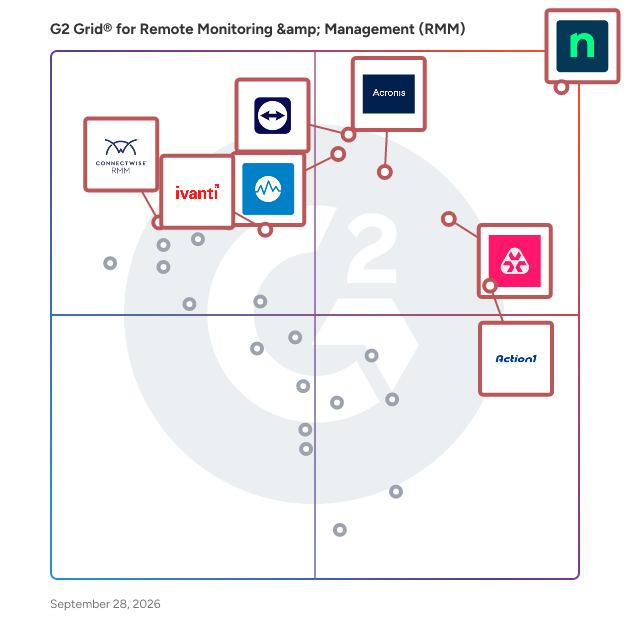
G2 Grid® for Remote Monitoring & Management (RMM) Software

G2 Grid® for Remote Monitoring & Management (RMM) Software plotting products by satisfaction and market presence

Highlighted products: NinjaOne, Action1, Acronis Cyber Protect Cloud, Datto RMM, TeamViewer, Ivanti Autonomous Endpoint Management, Remote Monitoring and Management, and ConnectWise RMM.

Underlying data: [Grid® JSON](https://www.g2.com/categories/remote-monitoring-management-rmm/grids.json?focus%5B%5D=ninjaone&focus%5B%5D=action1&focus%5B%5D=acronis-cyber-protect-cloud&focus%5B%5D=datto-rmm&focus%5B%5D=teamviewer&focus%5B%5D=ivanti-autonomous-endpoint-management&focus%5B%5D=remote-monitoring-and-management&focus%5B%5D=connectwise-rmm&segment=mid-market)

N-able N-Sight RMM

N-able N-sight™ RMM combines remote monitoring and management, remote access, ticketing, and billing capabilities, into one powerful yet easy to use platform that streamlines day-to-operations, combats threats and drives operational efficiency. Key features include: • Manage all devices across Windows, Linux and Apple platforms • Get up in running rapidly with simple onboarding steps, built-in automation scripts and patching policies • Automated Microsoft patch management to help ensure compliance and security at all times • Integrated Endpoint Detection and Response for layered security • Drag and drop automation for efficient service delivery • Secure and instant remote access to desktop or mobile devices (Windows, macOS, iOS and Android) • Ticketing, including workflows, routing rules and automation to drive efficiency and collaboration across teams • Simple time tracking, including functionality for recurring tickets and appointments • Automated billing and invoicing that integrates with your existing accounting software • Best in class integrations, providing flexibility via APIs and open ecosystem N-sight RMM makes it easy for MSPs and IT Professionals to get started in minutes with a powerful all-in-one platform that delivers the perfect blend of capabilities and ease of use.

Average Rating: 4.3/5.0

Total Reviews: 349

How Do G2 Users Rate N-able N-Sight RMM?

  • Ease of Admin: 8.2/10 (Category avg: 8.9/10)
  • Device Management: 8.5/10 (Category avg: 9.3/10)
  • Service Management: 8.0/10 (Category avg: 8.5/10)
  • Remote Monitoring: 9.0/10 (Category avg: 9.3/10)

Who Is the Company Behind N-able N-Sight RMM?

  • Seller: N-able
  • Company Website:
  • HQ Location: Morrisville, North Carolina
  • Twitter: @Nable
    15,859 Twitter followers
  • LinkedIn® Page: www.linkedin.com
    2,307 employees on LinkedIn®
  • Ownership: NYSE: NABL

Who Uses This Product?

  • Who Uses This: Owner, President
  • Top Industries: Information Technology and Services, Computer & Network Security
  • Company Size: 73% Small, 20% Medium

What Do G2 Reviewers Say About N-able N-Sight RMM?

AI-generated summary from verified user reviews

Pros
  • Users enjoy the ease of use of N-able N-Sight RMM, finding it simple to navigate and set up.
  • Users value the fast remote access of N-able N-Sight RMM, enhancing control and productivity for customer support.
  • Users value the automation capability of N-able N-Sight RMM, as it significantly enhances efficiency and time management.
  • Users value the real-time monitoring capabilities of N-able N-Sight RMM, enhancing proactive management of systems.
  • Users appreciate the intuitive ease of use of N-able N-Sight RMM, enhancing their team's efficiency with straightforward functionality.
Cons
  • Users experience feature issues with N-able N-Sight RMM, leading to frustration and inefficiency in daily operations.
  • Users find the interface not user-friendly, making navigation and understanding features challenging and frustrating.
  • Users struggle with laggy performance on slow devices, making remote access challenging and frustrating at times.
  • Users find the missing features in N-able N-Sight RMM limit integration and functionality for device management.
  • Users experience significant patching issues, with unreliable agents and inconsistent management creating more work, not less.

What Are Recent G2 Reviews of N-able N-Sight RMM?

What Are G2 Users Discussing About N-able N-Sight RMM?

ConnectWise Automate

ConnectWise Automate, formerly LabTech, is an IT management tool that helps deliver IT services at the speed of business. Our remote monitoring and management (RMM) platform provides powerful automation to discover & manage devices, monitor for problems, and automate action. Deliver streamlined reactive and proactive managed services, stop putting out fires, and start focusing on what matters most. See why over 5,500 partners worldwide chose ConnectWise Automate by visiting https://www.connectwise.com/software/automate or calling 877-522-8323.

Average Rating: 4.1/5.0

Total Reviews: 133

How Do G2 Users Rate ConnectWise Automate?

  • Ease of Admin: 7.2/10 (Category avg: 8.9/10)
  • Device Management: 9.4/10 (Category avg: 9.3/10)
  • Service Management: 8.8/10 (Category avg: 8.5/10)
  • Remote Monitoring: 9.4/10 (Category avg: 9.3/10)

Who Is the Company Behind ConnectWise Automate?

  • Seller: ConnectWise
  • Year Founded: 1982
  • HQ Location: Tampa, FL
  • Twitter: @ConnectWise
    14,926 Twitter followers
  • LinkedIn® Page: www.linkedin.com
    3,401 employees on LinkedIn®
  • Phone: 800-671-6898

Who Uses This Product?

  • Top Industries: Information Technology and Services, Computer & Network Security
  • Company Size: 66% Small, 32% Medium

What Do G2 Reviewers Say About ConnectWise Automate?

AI-generated summary from verified user reviews

Pros
  • Users value the customization and comprehensive features of ConnectWise Automate, enhancing their remote management experience.
  • Users love the convenient all-in-one asset management solution, finding it easy to implement and use daily.
  • Users value the customization capabilities of ConnectWise Automate, enhancing efficiency in managing numerous machines.
  • Users value the alert system in ConnectWise Automate, which efficiently manages ticket SLAs and updates.
  • Users appreciate the excellent customer support of ConnectWise Automate, which enhances their experience with the product.
Cons
  • Users find that the initial setup is time-consuming and requires strong admin oversight for optimal use.
  • Users feel the dated UI and lack of ease of use hinder their experience with ConnectWise Automate.
  • Users report that the agent reliability can be inconsistent, causing delays during reinstallation processes.
  • Users experience intermittent connection issues or site downtime, impacting their overall satisfaction with ConnectWise Automate.
  • Users experience significant bugs and breaking updates in ConnectWise Automate, complicating remote access and device management.

What Are Recent G2 Reviews of ConnectWise Automate?

What Are G2 Users Discussing About ConnectWise Automate?

Splashtop Autonomous Endpoint Management

Splashtop Autonomous Endpoint Management (AEM) is an automation-led endpoint management solution that helps IT teams streamline software updates, improve security posture, and reduce manual workloads. With real-time OS and third-party software patching, cross-platform support, dashboards, inventory reporting and quick remediation tools, AEM can be used by IT teams to stay secure, compliant, and efficient. Splashtop AEM enables IT to: • Automate patching for OS, third-party, and custom apps • Complement Intune and other MDMs with real-time patching, scripting and remediation • Detect and prioritize vulnerabilities using AI-powered based threat CVE insights • Track and manage hardware and software inventory across all endpoints • Monitor endpoints and resolve issues proactively

Average Rating: 4.5/5.0

Total Reviews: 73

How Do G2 Users Rate Splashtop Autonomous Endpoint Management?

  • Ease of Admin: 9.0/10 (Category avg: 8.9/10)
  • Device Management: 10.0/10 (Category avg: 9.3/10)
  • Remote Monitoring: 8.3/10 (Category avg: 9.3/10)

Who Is the Company Behind Splashtop Autonomous Endpoint Management?

  • Seller: Splashtop Inc.
  • Company Website:
  • Year Founded: 2006
  • HQ Location: Cupertino, CA
  • Twitter: @splashtop
    5,216 Twitter followers
  • LinkedIn® Page: www.linkedin.com
    353 employees on LinkedIn®

Who Uses This Product?

  • Who Uses This: Software Engineer, IT Manager
  • Top Industries: Computer Software, Information Technology and Services
  • Company Size: 51% Medium, 34% Small

What Do G2 Reviewers Say About Splashtop Autonomous Endpoint Management?

AI-generated summary from verified user reviews

Pros
  • Users appreciate the ease of use of Splashtop, facilitating seamless integration and quick deployment across machines.
  • Users value the reliability of Splashtop's Endpoint Management, ensuring timely updates and consistent software compatibility.
  • Users value the easy remote access features of Splashtop, enhancing efficiency for troubleshooting and training.
  • Users value the robust security features of Splashtop, ensuring their environment remains well-protected and updated.
  • Users are thrilled with the intuitive dashboard and seamless integration of Splashtop, enhancing security and efficiency effortlessly.
Cons
  • Users note missing features in Splashtop AEM, particularly in advanced reporting and compliance-focused capabilities.
  • Users feel the limited features of Splashtop Autonomous Endpoint Management hinder effective update management and reporting capabilities.
  • Users face limitations in functionality access due to owner-only permissions, affecting efficiency in larger organizations.
  • Users note that Splashtop Autonomous Endpoint Management exhibits excessive memory and CPU usage, impacting performance unpredictably on various systems.
  • Users face remote access issues due to network adapter problems and the need for manual intervention to restore connections.

What Are Recent G2 Reviews of Splashtop Autonomous Endpoint Management?

Pandora FMS

Pandora FMS is a unified monitoring and observability platform designed to consolidate visibility, alerting, reporting, and automation across heterogeneous IT environments. Instead of combining multiple point tools for networks, servers, applications, and cloud services, Pandora FMS centralizes data collection and operational workflows in a single console, reducing integration effort and operational complexity in on-premise, hybrid, and multi-cloud architectures. The platform collects telemetry using multiple methods, including agents, remote checks, standard protocols (e.g., SNMP/WMI), APIs, and log/event ingestion. This enables teams to monitor infrastructure and services end-to-end, correlate signals, and maintain consistent alerting policies and dashboards across distributed estates. Pandora FMS also supports capacity and trend analysis to anticipate resource constraints and identify recurring patterns, and includes AI-assisted capabilities for anomaly detection and automated thresholds to surface hard-to-spot operational signals. Pandora FMS is extensible through a large plugin ecosystem (500+ plugins and integrations), covering a wide range of enterprise and infrastructure technologies such as SAP, Oracle, Citrix, JBoss, VMware, AWS, SQL Server, Red Hat, and WebSphere. This extensibility helps organizations standardize monitoring across legacy and modern stacks without redesigning their monitoring approach per technology. Core capabilities: -Unified monitoring for networks, servers, applications, cloud services, endpoints, and logs -Centralized alerting, event correlation, dashboards, and scheduled reporting -Flexible data collection via agents, remote checks, APIs, and plugins -Scalability for distributed environments and large numbers of monitored elements -Analytics for trend/capacity planning plus AI-assisted anomaly detection and dynamic thresholds -A key differentiator is direct vendor support, which simplifies escalation and ensures continuity of expertise for deployment, tuning, and ongoing operations.

Average Rating: 4.6/5.0

Total Reviews: 212

How Do G2 Users Rate Pandora FMS?

  • Ease of Admin: 8.5/10 (Category avg: 8.9/10)
  • Device Management: 9.6/10 (Category avg: 9.3/10)
  • Service Management: 9.6/10 (Category avg: 8.5/10)
  • Remote Monitoring: 9.8/10 (Category avg: 9.3/10)

Who Is the Company Behind Pandora FMS?

  • Seller: Pandora FMS
  • Company Website:
  • Year Founded: 2004
  • HQ Location: Madrid, Spain
  • Twitter: @pandorafms
    5,458 Twitter followers
  • LinkedIn® Page: www.linkedin.com
    56 employees on LinkedIn®

Who Uses This Product?

  • Who Uses This: Data Analyst
  • Top Industries: Information Technology and Services, Telecommunications
  • Company Size: 50% Medium, 37% Small

What Do G2 Reviewers Say About Pandora FMS?

AI-generated summary from verified user reviews

Pros
  • Users value the reliable remote monitoring capabilities of Pandora FMS, ensuring seamless oversight of their systems.
  • Users enjoy the ease of use of Pandora FMS, appreciating its intuitive interface and reliable support.
  • Users value the real-time monitoring capabilities of Pandora FMS, enhancing visibility of all network devices effortlessly.
  • Users value the flexibility and adaptability of Pandora FMS, making it suitable for diverse IT monitoring needs.
  • Users value the versatility of network monitoring in Pandora FMS, effectively managing diverse devices and environments.
Cons
  • Users find the learning curve steep, particularly with initial setup and complex functionalities of Pandora FMS.
  • Users find the complex setup of Pandora FMS challenging, particularly due to compatibility issues and steep learning curves.
  • Users note the learning difficulty with Pandora FMS, especially for those lacking technical expertise for setup and configuration.
  • Users find the complex configuration of Pandora FMS challenging, especially without extensive technical expertise.
  • Users face a difficult learning curve with Pandora FMS, which can hinder effective usage for beginners.

What Are Recent G2 Reviews of Pandora FMS?

What Are G2 Users Discussing About Pandora FMS?

Kaseya VSA

Kaseya VSA is an integrated IT systems management platform that can be leveraged seamlessly across IT disciplines to streamline and automate your IT services. Kaseya VSA integrates key management capabilities into a single platform. Kaseya VSA gives your IT Team the ability to automate hundreds of tasks and workflows; manage any device, anywhere, at anytime; and protects every endpoint with enhanced threat detection, automated patch management, and more. VSA capabilities include: Remote Monitoring & Control, Patch Management, Network Monitoring, AV/AM, Process Automation, Backup and more.

Average Rating: 4.0/5.0

Total Reviews: 314

How Do G2 Users Rate Kaseya VSA?

  • Ease of Admin: 7.9/10 (Category avg: 8.9/10)
  • Device Management: 8.3/10 (Category avg: 9.3/10)
  • Service Management: 7.9/10 (Category avg: 8.5/10)
  • Remote Monitoring: 8.6/10 (Category avg: 9.3/10)

Who Is the Company Behind Kaseya VSA?

  • Seller: Kaseya
  • Company Website:
  • Year Founded: 2000
  • HQ Location: Miami, FL
  • Twitter: @KaseyaCorp
    17,411 Twitter followers
  • LinkedIn® Page: www.linkedin.com
    5,483 employees on LinkedIn®

Who Uses This Product?

  • Who Uses This: Owner, CEO
  • Top Industries: Information Technology and Services, Computer & Network Security
  • Company Size: 52% Small, 42% Medium

What Do G2 Reviewers Say About Kaseya VSA?

AI-generated summary from verified user reviews

Pros
  • Users appreciate the ease of use of Kaseya VSA, enjoying its practical interface and efficient management tools.
  • Users love the seamless automation features in Kaseya VSA, enhancing their efficiency and productivity across tasks.
  • Users appreciate the seamless script execution and user-friendly interface of Kaseya VSA for efficient management.
  • Users appreciate the user-friendly interface of Kaseya VSA, which simplifies management and enhances administrative efficiency.
  • Users find Kaseya VSA's intuitive interface enhances their experience, making configuration and management seamless.
Cons
  • Users feel the missing features hinder Kaseya VSA, particularly a direct file transfer method and O365 management.
  • Users experience connection issues, finding the process cumbersome and encountering crashes, impacting their workflow significantly.
  • Users face connectivity issues with Kaseya VSA, slowing down their workflow and complicating remote sessions.
  • Users face remote access issues with Kaseya VSA, finding the connection process cumbersome and unreliable at times.
  • Users experience slow performance with Kaseya VSA, facing delays in loading and remote desk operations.

What Are Recent G2 Reviews of Kaseya VSA?

What Are G2 Users Discussing About Kaseya VSA?

Syncro

Syncro unifies RMM, PSA, and Microsoft 365 security management in a single platform for MSPs and internal IT departments. Built-in AI handles the repetitive work that fills a technician's day, from alert triage to ticket updates and reporting, so teams deliver services faster and scale profitably instead of absorbing the cost of tool sprawl that creates security gaps and slows them down. RMM Built for MSPs and IT Teams Syncro's RMM delivers unlimited endpoint management with complete visibility across every client environment and internal network from a single console. Automated patch management, real-time alerting, PowerShell scripting, and remote access via Splashtop let technicians identify and resolve issues before users are impacted. Network Discovery detects unmanaged devices on client networks automatically. PSA That Connects Service Delivery Syncro's built-in PSA routes RMM alerts directly into tickets, keeps SLAs on track, and gives technicians a single queue instead of multiple portals. MSPs spend less time on manual coordination and more time on billable work. IT teams gain the same service desk efficiency, integrated ticketing, automated workflows, and invoicing, without the overhead of a standalone PSA tool. Microsoft 365 Security Built In Most RMM tools stop at the physical device. Syncro extends protection into Microsoft 365 with Security Snapshot (instant tenant risk assessment, zero configuration), CIS-aligned security baseline enforcement, Entra ID backup and restoration, and Cloud Backup covering Exchange, OneDrive, SharePoint, Teams, Planner, OneNote, and Entra ID. Security and endpoint management run through the same platform, not separate tools. Available for both MSPs managing multi-tenant environments and IT departments securing a single organization. AI Access Through the Syncro MCP Server The Syncro MCP Server connects the AI assistants you’re already using to your live Syncro data, including tickets, assets, alerts, billing records, appointments, and client records. Technicians can prompt in natural language and take action: create, assign, and update tickets, log time, escalate issues, book appointments, and generate client-ready reports and QBRs all within AI tools like Claude, ChatGPT, and Microsoft Copilot. Native Integrations and Vendor Marketplace Syncro connects to 50+ AV, EDR, and identity protection tools through a unified alert queue. Native integrations include Splashtop (remote access, included at no extra cost), Huntress, QuickBooks, IT Glue, Pax8, Domotz, Hudu, Zapier, and ConnectWise Control. The Syncro Marketplace lets you add best-in-class security, backup, and productivity apps directly to your platform, including Bitdefender, Acronis, Proofpoint, Threatdown, Guardz, Ironscales, Webroot, and Autoelevate. No minimums, no long-term contracts. Browse, activate, and manage vendor costs from a single bill, with direct access to vendor support when you need it. Pricing That Scales With Your Team Syncro uses flat per-technician pricing with no per-device fees. Costs scale with your headcount, not your device count. Whether you run an MSP with hundreds of endpoints or an IT department managing company infrastructure.

Average Rating: 4.5/5.0

Total Reviews: 556

How Do G2 Users Rate Syncro?

  • Ease of Admin: 8.9/10 (Category avg: 8.9/10)
  • Device Management: 8.9/10 (Category avg: 9.3/10)
  • Service Management: 8.6/10 (Category avg: 8.5/10)
  • Remote Monitoring: 8.9/10 (Category avg: 9.3/10)

Who Is the Company Behind Syncro?

Who Uses This Product?

  • Who Uses This: Owner, President
  • Top Industries: Information Technology and Services, Computer & Network Security
  • Company Size: 80% Small, 9% Medium

What Do G2 Reviewers Say About Syncro?

AI-generated summary from verified user reviews

Pros
  • Users value the ease of use of Syncro, enabling efficient troubleshooting and seamless client communication.
  • Users value Syncro's game-changing features like ticket storage, scripting, and seamless integration for enhanced efficiency.
  • Users find the initial setup easy, making it accessible for first-time users and enhancing overall experience.
  • Users value the seamless integrations of Syncro, enhancing their overall workflow and aligning tools with company needs.
  • Users commend Syncro for its intuitive automation features, enhancing workflow efficiency and simplifying asset management.
Cons
  • Users find many missing features in Syncro, particularly in remote access and automation capabilities, hindering productivity.
  • Users highlight the improvement needed in Syncro's interface and responsiveness for a better overall experience.
  • Users find reporting and invoicing limitations frustrating and seek improvements in UI and Linux support.
  • Users are frustrated with feature issues in Syncro, citing a lack of intuitive design and limited functionality.
  • Users find that Syncro needs improvement in customization, API features, and overall functionality for better management at scale.

What Are Recent G2 Reviews of Syncro?

What Are G2 Users Discussing About Syncro?

SuperOps

SuperOps is an AI-native, unified platform built for modern Managed Service Providers (MSPs) and internal IT teams. It addresses one of the biggest operational challenges in IT- tool sprawl. Many organizations rely on multiple disconnected solutions for Professional Services Automation (PSA), Remote Monitoring and Management (RMM), Mobile Device Management (MDM), asset management, help desk, and network monitoring. Managing these separate tools often leads to complex integrations, fragmented data, and increased operational overhead. SuperOps eliminates this complexity by bringing everything together in a single platform built on a unified architecture. Unlike traditional solutions that connect multiple products through integrations, SuperOps is built on a shared data layer, allowing every feature to work seamlessly together. This unified approach enables IT teams to manage their entire environment from one platform while providing AI with the complete operational context needed to automate tasks and improve decision-making. Key Features 1) Professional Services Automation (PSA) for managing MSP business operations, contracts, billing, SLAs, and service delivery. 2) Remote Monitoring & Management (RMM) with unified endpoint management capabilities. 3) Help Desk & Ticketing with ITSM workflows for incidents, service requests, problems, and change management. 4) Mobile Device Management (MDM) for iOS, iPadOS, and Android devices. 5)Asset Management to maintain complete visibility across IT infrastructure. 6) Network Monitoring using SNMP and ICMP across more than **250+ network vendors. 7) Patch Management** for operating systems as well as third-party applications. 8) IT Documentation** and a modern **self-service portal** for end users. 9) Cross-platform endpoint management** supporting Windows, macOS, Linux, iOS, iPadOS, and Android. Monica AI: AI-Native IT Operations At the heart of SuperOps is **Monica AI**, an agentic AI layer designed alongside the platform from day one. Unlike AI assistants that operate as standalone chatbots, Monica has access to the platform's unified data layer, enabling it to understand the complete IT environment. Monica AI helps teams by: 1) Automatically triaging and prioritizing tickets. 2) Summarizing customer conversations and technician communications. 3) Drafting worklogs and technician notes. 4) Recommending relevant knowledge base articles. 5) Proactively identifying patch vulnerabilities and CVE risks. 6) Automating repetitive tasks such as password resets, software access requests, and recurring remediation workflows. Because Monica operates with complete visibility into tickets, devices, assets, patches, and policies, it can take context-aware actions rather than simply making recommendations. Integrations SuperOps integrates with a broad ecosystem of business, security, and productivity applications, including: - Slack - Microsoft Teams - Microsoft Outlook - Azure Active Directory - Okta - QuickBooks - Xero - Bitdefender - SentinelOne - ESET - Acronis - TeamViewer - ConnectWise Control - Chocolatey - Winget The platform also includes Splashtop and ISL Online remote access at no additional cost, helping organizations reduce software licensing expenses. Benefits for MSPs SuperOps enables MSPs to scale efficiently with features designed for operational growth and profitability. 1) Multi-tenant client management. 2) Real-time profitability tracking using live operational data. 3) Contract and SLA management. 4) Automated billing and invoicing. 5) AI-powered workflow automation to reduce manual effort. 6) Operational scalability without increasing headcount proportionally. Benefits for Internal IT Teams For enterprise IT departments, SuperOps provides centralized visibility and control across modern hybrid environments. - Unified endpoint management across multiple operating systems. - Infrastructure monitoring and asset visibility. - Compliance-ready audit trails. - Structured ITSM workflows. - AI-driven automation for routine IT operations. - Improved efficiency for hybrid and distributed workforces. Why Choose SuperOps? SuperOps combines modern architecture with enterprise-grade capabilities in a single platform designed for today's IT operations. - AI-native platform built from the ground up. - Single unified solution replacing multiple standalone tools. - Shared data architecture that eliminates data silos. - Fast implementation, typically measured in days rather than months. - Transparent pricing with no hidden complexity. - 24/5 human customer support. - Dedicated onboarding and migration assistance. - Continuous innovation from a founder-led product company. SuperOps helps MSPs and internal IT teams consolidate their IT operations stack into one unified platform, replacing reactive, tool-driven workflows with proactive, AI-powered service delivery. By reducing operational complexity and automating repetitive work, organizations can improve efficiency, enhance service quality, and scale without adding unnecessary overhead.

Average Rating: 4.4/5.0

Total Reviews: 204

How Do G2 Users Rate SuperOps?

  • Ease of Admin: 9.0/10 (Category avg: 8.9/10)
  • Device Management: 9.0/10 (Category avg: 9.3/10)
  • Service Management: 8.8/10 (Category avg: 8.5/10)
  • Remote Monitoring: 9.0/10 (Category avg: 9.3/10)

Who Is the Company Behind SuperOps?

  • Seller: SuperOps Inc
  • Company Website:
  • Year Founded: 2020
  • HQ Location: Claymont, US
  • LinkedIn® Page: www.linkedin.com
    172 employees on LinkedIn®

Who Uses This Product?

  • Who Uses This: Owner, Director
  • Top Industries: Information Technology and Services, Computer & Network Security
  • Company Size: 84% Small, 14% Medium

What Do G2 Reviewers Say About SuperOps?

AI-generated summary from verified user reviews

Pros
  • Users highlight the ease of use of SuperOps, allowing quick onboarding and effortless integration for all team members.
  • Users commend SuperOps for its exceptional customer support, highlighting quick responses and practical solutions from the team.
  • Users appreciate the user-friendly interface and feature-rich capabilities of SuperOps, making it an essential MSP tool.
  • Users praise SuperOps for its intuitive and attractive user interface, enhancing the efficiency of IT support operations.
  • Users love the intuitive interface of SuperOps, making multitasking and operations management effortless and efficient.
Cons
  • Users note a lack of features in SuperOps compared to competitors, affecting functionality and user experience.
  • Users note several feature issues with SuperOps, including limited integrations and cumbersome workflows affecting usability.
  • Users note integration issues with SuperOps, suggesting the need for more enhancements to existing integrations.
  • Users find access limitations frustrating, needing to download files and facing constraints with RMM and file size uploads.
  • Users find a lack of integrations in SuperOps, which limits functionality and potential enhancements.

What Are Recent G2 Reviews of SuperOps?

Tian Lin
TL
Researched and written by Tian Lin
Updated