# Top Free General-Purpose CAD Software

## How Many General-Purpose CAD Software Products Does G2 Track?

**Total Products under this Category:** 132

### Category Stats (Aug 2026)

- **Average Rating:** 4.35/5 (↓0.01 vs Jul 2026) The average rating of products in this category, based on all submitted ratings
- **Top Trending Product:** Space Designer 3D (+0.74%) - Among all products in this category, Space Designer 3D recorded the largest rating increase compared to last month

_Last updated: August 19, 2026_

## How Does G2 Rank General-Purpose CAD Software Products?

**Why You Can Trust G2's Software Rankings:**

- 30 Analysts and Data Experts
- 10,500+ Authentic Reviews
- 132+ Products
- Unbiased Rankings

G2's software rankings are built on verified user reviews, rigorous moderation, and a consistent research methodology maintained by a team of analysts and data experts. Each product is measured using the same transparent criteria, with no paid placement or vendor influence. While reviews reflect real user experiences, which can be subjective, they offer valuable insight into how software performs in the hands of professionals. Together, these inputs power the G2 Score, a standardized way to compare tools within every category.

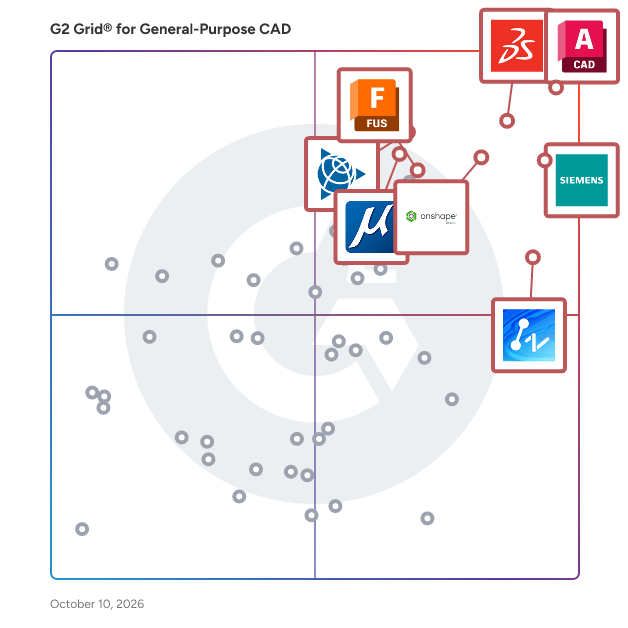
## G2 Grid® for General-Purpose CAD Software
 ![G2 Grid® for General-Purpose CAD Software plotting products by satisfaction and market presence](https://www.g2.com/categories/general-purpose-cad/grids.png?focus%5B%5D=1797&focus%5B%5D=1792&focus%5B%5D=16895&focus%5B%5D=1795&focus%5B%5D=1798&focus%5B%5D=2981&focus%5B%5D=2994&focus%5B%5D=5307)

Highlighted products: AutoCAD, Designcenter Solid Edge, Onshape, SOLIDWORKS, SketchUp, ZWCAD, MicroStation, and Autodesk Fusion.

Underlying data: [Grid® JSON](https://www.g2.com/categories/general-purpose-cad/grids.json?focus%5B%5D=autocad&focus%5B%5D=designcenter-solid-edge&focus%5B%5D=onshape&focus%5B%5D=solidworks&focus%5B%5D=sketchup&focus%5B%5D=zwcad&focus%5B%5D=microstation&focus%5B%5D=autodesk-fusion)

### [AutoCAD](https://www.g2.com/products/autocad/reviews)

Redefine how you create with Autodesk® AutoCAD®. Autodesk AI empowers you to reimagine your creative process in AutoCAD, delivering advanced automation and meaningful performance enhancements that help you design faster and work smarter. Intelligent features reduce repetitive tasks and surface actionable insights, so you can spend more time creating with precision and confidence. Use natural, conversational interactions to ask questions, check standards unique to your team, and quickly validate designs against established workflows. Securely managed data supports informed decision making and helps turn ideas into high quality results more efficiently. A truly collaborative design experience brings teams together through Forma Data Management. Purpose built cloud storage makes it easy to save, manage, and access project files while supporting collaborative design processes. Multiple users can add markups to a single drawing on desktop or web with Multi-user Markup, improving transparency and reducing errors. Checkout transforms collaborative drafting by allowing contributors to work on specific geometry, submit edits for review, and merge changes smoothly by eliminating manual collation and file conflicts. Your data and intellectual property remain secure and governed, giving you confidence across every stage of design. Optimize productivity with seven specialized toolsets, including Electrical, Mechanical, and Plant 3D. Automate routine tasks with AutoLISP, tailor workflows to your discipline, and extend AutoCAD through APIs and thousands of apps on the Autodesk App Store.

**Average Rating:** 4.4/5.0

**Total Reviews:** 1,843

#### How Do G2 Users Rate AutoCAD?

- **Has the product been a good partner in doing business?:** 8.5/10 (Category avg: 8.5/10)
- **Drawing:** 9.5/10 (Category avg: 8.9/10)
- **File Import :** 8.7/10 (Category avg: 8.3/10)
- **Views:** 8.5/10 (Category avg: 8.6/10)

#### Who Is the Company Behind AutoCAD?

- **Seller:** [Autodesk](https://www.g2.com/sellers/autodesk)
- **Company Website:** www.autodesk.com
- **Year Founded:** 1982
- **HQ Location:** San Francisco
- **Twitter:** @autodesk  
273,215 Twitter followers
- **LinkedIn® Page:** [www.linkedin.com](https://www.g2.com/external_clickthroughs/record?secure%5Bsource_type%5D=product_profile&secure%5Btoken%5D=a2fe9ff0f27ad5413604e083d9467fcc58e4e387e3e0b0a04c70db95dce1df58&secure%5Burl%5D=https%3A%2F%2Fwww.linkedin.com%2Fcompany%2Fautodesk%2F&secure%5Burl_type%5D=linkedin_company_website)  
15,352 employees on LinkedIn®

#### Who Uses This Product?

- **Who Uses This:** Architect, Designer
- **Top Industries:** Architecture & Planning, Civil Engineering
- **Company Size:** 46% Small, 34% Medium

#### What Do G2 Reviewers Say About AutoCAD?

_AI-generated summary from verified user reviews_

##### Pros

- Users find AutoCAD to be **easy to use** , enhancing productivity with its intuitive tools and extensive features.
- Users appreciate AutoCAD for its **precision and professional standards** , significantly enhancing their design skills and career prospects.
- Users appreciate AutoCAD for its **precision and professional standards** , enhancing accuracy in engineering and architectural designs.
- Users value the **powerful 3D modeling capabilities** of AutoCAD, benefiting from its precision and flexibility in design.
- Users commend AutoCAD for its **detailed engineering drawings** , enhancing precision and understanding in design and drafting.

##### Cons

- Users find the **high subscription cost** of AutoCAD to be a significant barrier, especially for students and freelancers.
- Users struggle with the **steep learning curve** of AutoCAD, making it difficult for newcomers to effectively begin using the software.
- Users find the **high cost** of AutoCAD to be prohibitive for freelancers and small businesses.
- Users find the **difficult learning** curve of AutoCAD challenging, especially for newcomers trying to navigate its complexity.
- Users face **high hardware requirements** for AutoCAD, necessitating costly, powerful computers for optimal performance.

#### What Are Recent G2 Reviews of AutoCAD?

**["AutoCAD: Best-in-Class for Technical 2D Drawings and Custom Automations"](https://www.g2.com/survey_responses/autocad-review-13278186)**

**Rating:** 5.0/5.0 stars

_— Katelyn H._

[Read full review](https://www.g2.com/survey_responses/autocad-review-13278186)

**["Easy 2D drafting and Reliable DWG/DXF Editing in AutoCAD"](https://www.g2.com/survey_responses/autocad-review-13193727)**

**Rating:** 4.5/5.0 stars

_— Sonu P._

[Read full review](https://www.g2.com/survey_responses/autocad-review-13193727)

#### What Are G2 Users Discussing About AutoCAD?

- [What is AutoCAD Architecture used for?](https://www.g2.com/discussions/what-is-autocad-architecture-used-for) - 2 comments, 3 upvotes
- [What is AutoCAD Mechanical used for?](https://www.g2.com/discussions/autocad-mechanical-what-is-autocad-mechanical-used-for) - 1 comment, 1 upvote
- [What is AutoCAD Map 3D used for?](https://www.g2.com/discussions/autodesk-map-3d-what-is-autocad-map-3d-used-for) - 1 comment
- [Which software is useful for mechanical engineers?](https://www.g2.com/discussions/which-software-is-useful-for-mechanical-engineers) - 1 comment
- [How do I draw a road map in AutoCAD?](https://www.g2.com/discussions/how-do-i-draw-a-road-map-in-autocad)

### [Designcenter Solid Edge](https://www.g2.com/products/designcenter-solid-edge/reviews)

Designcenter Solid Edge is a portfolio of affordable, easy to deploy, maintain, and use software tools that advance all aspects of the product development process – mechanical and electrical design, simulation, manufacturing, technical documentation, data management, and cloud-based collaboration. Developed on Siemens' industry-leading technologies, Designcenter Solid Edge provides the most innovative and comprehensive approach to product development for the mainstream market.

**Average Rating:** 4.3/5.0

**Total Reviews:** 635

#### How Do G2 Users Rate Designcenter Solid Edge?

- **Has the product been a good partner in doing business?:** 8.8/10 (Category avg: 8.5/10)
- **Drawing:** 8.9/10 (Category avg: 8.9/10)
- **File Import :** 8.4/10 (Category avg: 8.3/10)
- **Views:** 8.6/10 (Category avg: 8.6/10)

#### Who Is the Company Behind Designcenter Solid Edge?

- **Seller:** [Siemens Digital Industries Software](https://www.g2.com/sellers/siemens-digital-industries-software)
- **Company Website:** www.sw.siemens.com
- **Year Founded:** 1980
- **HQ Location:** Plano, Texas
- **Twitter:** @siemenssoftware  
36,972 Twitter followers
- **LinkedIn® Page:** [www.linkedin.com](https://www.g2.com/external_clickthroughs/record?secure%5Bsource_type%5D=product_profile&secure%5Btoken%5D=1dd3753f2277968b1f3c28e3070b9762650d5b5c8485137227b26fcbc85343e0&secure%5Burl%5D=https%3A%2F%2Fwww.linkedin.com%2Fcompany%2F28423178%2F&secure%5Burl_type%5D=linkedin_company_website)  
20,941 employees on LinkedIn®

#### Who Uses This Product?

- **Who Uses This:** Design Engineer, Mechanical Engineer
- **Top Industries:** Mechanical or Industrial Engineering, Automotive
- **Company Size:** 53% Small, 29% Medium

#### What Do G2 Reviewers Say About Designcenter Solid Edge?

_AI-generated summary from verified user reviews_

##### Pros

- Users value the **ease of use** of Designcenter Solid Edge, appreciating its practical tools for efficient design and part reuse.
- Users value the **intuitive 3D modeling environment** of Solid Edge, enhancing speed and efficiency in design processes.
- Users appreciate the **synchronous technology** in Solid Edge for its ease of use and efficiency in design tasks.
- Users praise the **efficiency** of Designcenter Solid Edge, streamlining modeling and management of CAD files seamlessly.
- Users value the **ease of use** of Designcenter Solid Edge, enhancing efficiency and collaboration in the design process.

##### Cons

- Users experience a **challenging learning curve** with advanced features, affecting their efficiency and overall user experience.
- Users struggle with the **difficult learning curve** for advanced features, impacting efficiency and overall user experience.
- Users report **performance issues** with Solid Edge, particularly on older hardware and when handling large assemblies, impacting productivity.
- Users experience **slow performance** when handling larger assemblies, impacting workflow and delivery times.
- Users find the interface **not user-friendly** , with a steep learning curve and outdated design hindering efficient use.

#### What Are Recent G2 Reviews of Designcenter Solid Edge?

**["Best mid range CAD with some very advanced features"](https://www.g2.com/survey_responses/designcenter-solid-edge-review-5291499)**

**Rating:** 5.0/5.0 stars

_— Francesco A._

[Read full review](https://www.g2.com/survey_responses/designcenter-solid-edge-review-5291499)

**["Solid Edge: A Powerhouse for 3D Engineering with Cloud Collaboration"](https://www.g2.com/survey_responses/designcenter-solid-edge-review-13243291)**

**Rating:** 5.0/5.0 stars

_— H A._

[Read full review](https://www.g2.com/survey_responses/designcenter-solid-edge-review-13243291)

#### What Are G2 Users Discussing About Designcenter Solid Edge?

- [What is Solid Edge used for?](https://www.g2.com/discussions/what-is-solid-edge-used-for) - 2 comments, 1 upvote
- [Is Solidworks or Solid Edge better?](https://www.g2.com/discussions/is-solidworks-or-solid-edge-better) - 6 comments, 2 upvotes
- [Is Solid Edge free?](https://www.g2.com/discussions/is-solid-edge-free) - 3 comments
- [What file type does Solid Edge use?](https://www.g2.com/discussions/what-file-type-does-solid-edge-use) - 2 comments
- [Is Solid Edge good?](https://www.g2.com/discussions/is-solid-edge-good) - 2 comments

### [Onshape](https://www.g2.com/products/onshape/reviews)

Onshape by PTC is the leading cloud-native CAD & PDM platform that runs on any device, anywhere-requiring zero IT. Onshape is for product design companies who are fed up with the errors, time waste, and hidden costs of outdated file-based CAD & PDM. Only Onshape: - Eliminates CAD crashes and never loses data - Enables secure, real-time collaboration - Tracks all activity and provides infinite restore - Has built-in PDM with branching and merging

**Average Rating:** 4.7/5.0

**Total Reviews:** 712

#### How Do G2 Users Rate Onshape?

- **Has the product been a good partner in doing business?:** 9.3/10 (Category avg: 8.5/10)
- **Drawing:** 8.8/10 (Category avg: 8.9/10)
- **File Import :** 8.6/10 (Category avg: 8.3/10)
- **Views:** 8.9/10 (Category avg: 8.6/10)

#### Who Is the Company Behind Onshape?

- **Seller:** [PTC](https://www.g2.com/sellers/ptc)
- **Company Website:** www.ptc.com
- **Year Founded:** 1985
- **HQ Location:** Boston, Massachusetts
- **Twitter:** @PTC  
37,560 Twitter followers
- **LinkedIn® Page:** [www.linkedin.com](https://www.g2.com/external_clickthroughs/record?secure%5Bsource_type%5D=product_profile&secure%5Btoken%5D=2562b24957155b8473247eb4a4b81fe707ca04fac9fc006da5825ec0a8c5e255&secure%5Burl%5D=https%3A%2F%2Fwww.linkedin.com%2Fcompany%2F1935%2F&secure%5Burl_type%5D=linkedin_company_website)  
8,145 employees on LinkedIn®

#### Who Uses This Product?

- **Who Uses This:** Mechanical Engineer, Owner
- **Top Industries:** Mechanical or Industrial Engineering, Design
- **Company Size:** 78% Small, 17% Medium

#### What Do G2 Reviewers Say About Onshape?

_AI-generated summary from verified user reviews_

##### Pros

- Users praise the **ease of use** in Onshape, finding it simple, fast, and accessible from any device.
- Users value the **collaboration features** of Onshape, enabling seamless communication and real-time document access with their teams.
- Users appreciate the **online accessibility** of Onshape, enabling work from any device without installation concerns.
- Users appreciate the **easy cloud-based access** of Onshape, allowing seamless workflow and organization from any device.
- Users value the **ease of sharing documents** in Onshape, allowing collaboration even with non-CAD users effectively.

##### Cons

- Users note the **missing features** in Onshape compared to established CAD software, specifically in sheet metal and CAM options.
- Users note a **lack of features** compared to Solidworks, impacting usability and collaboration potential.
- Users find **drawing issues** in Onshape, citing limitations in annotation, exporting, and basic drawing functionalities.
- Users experience **internet dependency** issues with Onshape, leading to frustration during slow or unstable connections.
- Users note that Onshape has **limited CAD features** , particularly in sheet metal and drawing environments, affecting usability.

#### What Are Recent G2 Reviews of Onshape?

**["Onshape’s Cloud Collaboration and Version Tracking Make Design Work Effortless"](https://www.g2.com/survey_responses/onshape-review-13141706)**

**Rating:** 5.0/5.0 stars

_— Benjamin M._

[Read full review](https://www.g2.com/survey_responses/onshape-review-13141706)

**["Onshape: Fast, Easy, and Collaborative 3D Modeling"](https://www.g2.com/survey_responses/onshape-review-13129234)**

**Rating:** 5.0/5.0 stars

_— Carl E._

[Read full review](https://www.g2.com/survey_responses/onshape-review-13129234)

#### What Are G2 Users Discussing About Onshape?

- [What is Onshape used for?](https://www.g2.com/discussions/what-is-onshape-used-for) - 1 comment

### [ZWCAD](https://www.g2.com/products/zwcad/reviews)

ZWCAD is a fast, powerful, and compatible 2D CAD solution for architects, designers, and engineers in the AEC and manufacturing industries. Its unparalleled compatibility and compelling price make it the best alternative to expensive subscription-based CAD solutions. Its lightning-fast performance, innovative features, and a complete set of tools enable professionals to bring their creative visions to life effortlessly.

**Average Rating:** 4.6/5.0

**Total Reviews:** 352

#### How Do G2 Users Rate ZWCAD?

- **Has the product been a good partner in doing business?:** 9.1/10 (Category avg: 8.5/10)
- **Drawing:** 9.4/10 (Category avg: 8.9/10)
- **File Import :** 9.3/10 (Category avg: 8.3/10)
- **Views:** 9.1/10 (Category avg: 8.6/10)

#### Who Is the Company Behind ZWCAD?

- **Seller:** [ZWSOFT](https://www.g2.com/sellers/zwsoft)
- **Company Website:** www.zwsoft.com
- **Year Founded:** 1998
- **HQ Location:** Guangzhou, Guangdong
- **Twitter:** @ZWSOFT  
1,609 Twitter followers
- **LinkedIn® Page:** [www.linkedin.com](https://www.g2.com/external_clickthroughs/record?secure%5Bsource_type%5D=product_profile&secure%5Btoken%5D=c321f69fda3ad4799e0cd222118d7cdb05cbacdb899a515ee02f6547c9e08fff&secure%5Burl%5D=https%3A%2F%2Fwww.linkedin.com%2Fcompany%2F796054%2F&secure%5Burl_type%5D=linkedin_company_website)  
367 employees on LinkedIn®

#### Who Uses This Product?

- **Who Uses This:** Engineer, Designer
- **Top Industries:** Architecture & Planning, Civil Engineering
- **Company Size:** 67% Small, 26% Medium

#### What Do G2 Reviewers Say About ZWCAD?

_AI-generated summary from verified user reviews_

##### Pros

- Users find ZWCAD incredibly **easy to use** , appreciating its familiar interface and smooth transition from AutoCAD.
- Users value the **efficiency** of ZWCAD, enjoying faster performance and reduced time on design tasks.
- Users appreciate the **tool efficiency** of ZWCAD, benefiting from fast performance and customizable shortcuts.
- Users praise ZWCAD's **powerful performance** , noting its speed and efficiency with large drawings at an affordable price.
- Users commend ZWCAD for its **easy learning curve** , facilitating a seamless transition for those familiar with AutoCAD.

##### Cons

- Users experience **slow performance** with ZWCAD, facing lag and delays, especially during initial launches and with large files.
- Users experience **software freezing** issues, often requiring restarts and encountering glitches with multiple files open.
- Users report facing **update issues** that hinder performance and compatibility, particularly with file loading and graphics enhancements.
- Users find that ZWCAD lacks **essential features** like key commands and proper parametric functions compared to competitors.
- Users feel that ZWCAD's **3D modeling capabilities need improvement** , lacking advanced features for complex projects compared to competitors.

#### What Are Recent G2 Reviews of ZWCAD?

**["Streamlining technical drawings with a familiar CAD environment"](https://www.g2.com/survey_responses/zwcad-review-12485911)**

**Rating:** 5.0/5.0 stars

_— Priya K._

[Read full review](https://www.g2.com/survey_responses/zwcad-review-12485911)

**["Major Time Saver for Drafting; Smart Mouse, Smart Plotting, and Smart Voice Shine"](https://www.g2.com/survey_responses/zwcad-review-13104636)**

**Rating:** 5.0/5.0 stars

_— Vijay V._

[Read full review](https://www.g2.com/survey_responses/zwcad-review-13104636)

### [SketchUp](https://www.g2.com/products/sketchup/reviews)

Trimble is a global technology company founded in 1978 and headquartered in Westminster, Colorado. With over 11,000 employees worldwide, Trimble connects the physical and digital worlds to transform the ways work gets done. Through relentless innovation in precise positioning, modeling, and data analytics, Trimble powers essential industries including construction, geospatial, and transportation. Whether helping customers build infrastructure, optimize global supply chains, or map the world, Trimble is at the forefront of driving productivity and progress. Trimble SketchUp provides a comprehensive 3D design ecosystem starting with its highly intuitive 3D modeling app, empowering professionals to create and communicate in 3D quickly and accurately. 3D output transitions seamlessly into detailed, precise 2D documentation, allowing designers to combine 2D and 3D graphics into impactful presentations and comprehensive construction drawing sets. Speed up the design process with access to 3D Warehouse, a massive searchable library of pre-built models, while SketchUp AI introduces intelligent tools for rapid rendering and geometry creation to instantly turn basic concepts into client-ready deliverables. SketchUp also offers advanced tools for working with point clouds and Revit files efficiently, plus photorealistic rendering with V-Ray, and more. What's Included\* \> Professional 3D modeling applications for Desktop, iPad, and Web \> Desktop publishing tools for professional documentation \> The world's largest free 3D library of pre-built models \> Site-specific climate insights, environmental analysis, and design recommendations \> Plugin library to customize and augment SketchUp capabilities \> Geolocation of models to import satellite imagery, terrain, and surrounding context \> Cloud storage to manage and share project files in 2D and 3D \> AI-powered image and 3D geometry creation \> Advanced interoperability with native Revit files \> Import, view, and model directly on point cloud data within SketchUp \> Advanced photorealistic rendering, includes ray tracing and artificial lighting with V-Ray SketchUp enables unmatched creative flow with precision, making it the best tool for creating, developing, and communicating your design solutions. It solves critical workflow barriers by ensuring users never have to compromise creativity for accuracy—or wrestle with the budgetary, time, and quality deficits that result from navigating between disjointed programs. By providing this integrated, intuitive ecosystem, SketchUp removes technical barriers and enables unlimited creative freedom, effective communication, and seamless collaboration. \*Dependent on subscription tier

**Average Rating:** 4.5/5.0

**Total Reviews:** 1,299

#### How Do G2 Users Rate SketchUp?

- **Has the product been a good partner in doing business?:** 8.5/10 (Category avg: 8.5/10)
- **Drawing:** 8.7/10 (Category avg: 8.9/10)
- **File Import :** 8.1/10 (Category avg: 8.3/10)
- **Views:** 8.8/10 (Category avg: 8.6/10)

#### Who Is the Company Behind SketchUp?

- **Seller:** [Trimble](https://www.g2.com/sellers/trimble)
- **Year Founded:** 1978
- **HQ Location:** Sunnyvale, CA
- **Twitter:** @TrimbleCorpNews  
12,061 Twitter followers
- **LinkedIn® Page:** [www.linkedin.com](https://www.g2.com/external_clickthroughs/record?secure%5Bsource_type%5D=product_profile&secure%5Btoken%5D=bb32e89443162260d956fc36255bfda228b84df2773f8f019666beaa8a3818b4&secure%5Burl%5D=https%3A%2F%2Fwww.linkedin.com%2Fcompany%2F5160%2F&secure%5Burl_type%5D=linkedin_company_website)  
10,997 employees on LinkedIn®
- **Ownership:** NASDAQ

#### Who Uses This Product?

- **Who Uses This:** Architect, Designer
- **Top Industries:** Architecture & Planning, Design
- **Company Size:** 75% Small, 18% Medium

#### What Do G2 Reviewers Say About SketchUp?

_AI-generated summary from verified user reviews_

##### Pros

- Users value the **ease of use** of SketchUp, enjoying its intuitive learning curve and straightforward modeling process.
- Users appreciate the **intuitive 3D modeling** capabilities of SketchUp, making design work quick and straightforward.
- Users appreciate the **ease of learning** in SketchUp, finding it intuitive and straightforward for 3D modeling.
- Users love the **intuitive design** of SketchUp, finding it simplifies 3D modeling and enhances the creative process.
- Users love the **intuitive and quick drawing capabilities** of SketchUp for creating accurate 2D and 3D designs.

##### Cons

- Users find the **poor rendering quality** of SketchUp hampers detailed work and requires costly plugins for improvement.
- Users find SketchUp **expensive** with hidden costs and subscription models, complicating access to essential features and updates.
- Users report **slow performance** with large models in SketchUp, leading to frustration and limitations on sophisticated projects.
- Users find the **limited rendering capabilities** of SketchUp frustrating, hindering high-detail modeling and professional visualizations.
- Users often experience **performance issues** with SketchUp, particularly when handling large or complex models, causing frustrating delays.

#### What Are Recent G2 Reviews of SketchUp?

**["SketchUp Makes 3D Modeling Fast, Approachable, and Easy to Present"](https://www.g2.com/survey_responses/sketchup-review-13033539)**

**Rating:** 5.0/5.0 stars

_— Muzammil M._

[Read full review](https://www.g2.com/survey_responses/sketchup-review-13033539)

**["SketchUp: Designers’ Ultimate "Ideation Engine""](https://www.g2.com/survey_responses/sketchup-review-12704602)**

**Rating:** 5.0/5.0 stars

_— Jayant G._

[Read full review](https://www.g2.com/survey_responses/sketchup-review-12704602)

#### What Are G2 Users Discussing About SketchUp?

- [What is SketchUp used for?](https://www.g2.com/discussions/what-is-sketchup-used-for) - 3 comments

### [MicroStation](https://www.g2.com/products/microstation/reviews)

MicroStation is a specialized computer-aided design (CAD) software solution tailored specifically for infrastructure design. It is designed to assist architects and engineers in transforming their creative visions into tangible projects, enabling them to present their designs effectively to clients and deliver high-quality results to the community. By providing a comprehensive suite of tools that are integrated into the platform, MicroStation allows users to work efficiently and flexibly, streamlining the design process without the need for additional add-ons. Targeted primarily at professionals in architecture and engineering, MicroStation serves a diverse range of industries, including transportation, utilities, and urban planning. Its capabilities cater to users who require robust design and documentation tools to handle complex infrastructure projects. As project demands grow in complexity and scale, MicroStation equips users with the necessary resources to manage these challenges effectively, ensuring timely and budget-conscious delivery of designs. One of the key features of MicroStation is its ability to facilitate the design, documentation, and visualization of infrastructure models in both 2D and 3D formats. This versatility allows users to create detailed and accurate representations of their projects, enhancing communication with stakeholders and clients. The software supports collaborative workflows, enabling seamless interaction among team members and external parties, which is essential for successful project execution. MicroStation also emphasizes risk minimization and automation acceleration. By providing advanced tools for modeling and analysis, users can identify potential issues early in the design process, reducing the likelihood of costly revisions later on. The software’s automation features streamline repetitive tasks, allowing professionals to focus on more strategic aspects of their projects. This efficiency not only helps in meeting deadlines but also enhances the overall quality of the work produced. WHAT'S NEW IN MICROSTATION 2026: Python Assistant (tech Preview) - An AI assistant to create Python scripts more easily. Python scripting and automation are now accessible to a broader range of users. Bentley Copilot (Tech preview) - Accelerate help, learning, and onboarding with an AI-powered assistant. Instant guidance that bridges AutoCAD-to-MicroStation differences and turns questions into productivity gains. 3D Geospatial Context Dialog (Tech preview) - Access curated global datasets in MicroStation for immersive, real-world context for infrastructure designs. Provides efficient streaming and open-standard interoperability. Configurations Wizard - Guided workflows and best-practice templates enable fast, error-free configurations set up for consistent standards—accessible to everyone, regardless of technical expertise. Component Center 2.0 - Component management with a modern library offering deeper integration, smarter governance, and iTwin-ready workflows. Ensure consistency, compliance, and collaboration across projects. Updated Space Mouse integration - Experience smoother, faster 3D navigation—modern modes, SmartUI customization, and certified compatibility for complex models.

**Average Rating:** 4.0/5.0

**Total Reviews:** 407

#### How Do G2 Users Rate MicroStation?

- **Has the product been a good partner in doing business?:** 7.7/10 (Category avg: 8.5/10)
- **Drawing:** 8.9/10 (Category avg: 8.9/10)
- **File Import :** 8.2/10 (Category avg: 8.3/10)
- **Views:** 8.2/10 (Category avg: 8.6/10)

#### Who Is the Company Behind MicroStation?

- **Seller:** [Bentley Systems](https://www.g2.com/sellers/bentley-systems)
- **Year Founded:** 1984
- **HQ Location:** Exton, PA
- **Twitter:** @BentleySystems  
17,564 Twitter followers
- **LinkedIn® Page:** [www.linkedin.com](https://www.g2.com/external_clickthroughs/record?secure%5Bsource_type%5D=product_profile&secure%5Btoken%5D=3dcf7c9e5c41323034d72c8b4aaa7d0fc90f77668995d474f35466baaee4ef4b&secure%5Burl%5D=https%3A%2F%2Fwww.linkedin.com%2Fcompany%2F4929%2F&secure%5Burl_type%5D=linkedin_company_website)  
5,621 employees on LinkedIn®
- **Ownership:** NASDAQ: BSY

#### Who Uses This Product?

- **Who Uses This:** Project Engineer, Transportation Engineer
- **Top Industries:** Civil Engineering, Architecture & Planning
- **Company Size:** 33% Large, 33% Small

#### What Do G2 Reviewers Say About MicroStation?

_AI-generated summary from verified user reviews_

##### Pros

- Users value the **ease of use** in MicroStation, appreciating its customizable interface and beginner-friendly features.
- Users appreciate the **effective 3D modeling capabilities** of MicroStation, enhancing their architectural and engineering design processes.
- Users value the **detailed engineering drawings** in MicroStation, enhancing efficiency and collaboration in design projects.
- Users value the **efficiency** of MicroStation, appreciating its ease of use and quick access to features.
- Users appreciate the **advanced 3D modeling capabilities** of MicroStation, enhancing their architectural design and visualization process.

##### Cons

- Users struggle with a **steep learning curve** in MicroStation, particularly new users transitioning from other software.
- Users report a **steep learning curve** with MicroStation, particularly challenging for beginners transitioning from AutoCAD.
- Users face challenges with **difficult configuration** in MicroStation, impacting productivity and learning for new users.
- Users often experience **slow performance** with MicroStation, particularly when handling large files or complex settings.
- Users find the **outdated interface** of MicroStation hinders usability and productivity, making it challenging to navigate.

#### What Are Recent G2 Reviews of MicroStation?

**["MicroStation Delivers Precision Control for Massive Civil and Infrastructure Models"](https://www.g2.com/survey_responses/microstation-review-12853055)**

**Rating:** 4.0/5.0 stars

_— Ahmed M._

[Read full review](https://www.g2.com/survey_responses/microstation-review-12853055)

**["Powerful Data Integration and Modeling, But Steep Learning Curve"](https://www.g2.com/survey_responses/microstation-review-11908438)**

**Rating:** 4.0/5.0 stars

_— Mark T._

[Read full review](https://www.g2.com/survey_responses/microstation-review-11908438)

#### What Are G2 Users Discussing About MicroStation?

- [What is MicroStation used for?](https://www.g2.com/discussions/what-is-microstation-used-for)

### [Autodesk Fusion](https://www.g2.com/products/autodesk-fusion/reviews)

Autodesk Fusion connects capabilities, data, and people across the entire product development lifecycle. Fusion provides you with CAD, CAM, CAE and PCB tools along with PLM/PDM and MES (manufacturing execution system) capabilities to facilitate seamless workflows across your entire organization. Key features: - 3D Design and Modeling: Autodesk Fusion offers a robust set of tools for creating 3D models and designs, making it ideal for product development and industrial design. - Manufacturing Integration: With Autodesk Fusion, you can design and manufacture products using the same platform, streamlining the process from concept to production. - Electronics Design: PCB design capabilities are integrated into the Autodesk Fusion platform, allowing for the creation of electronic components as part of the overall product design process. - Simulation and Analysis: Autodesk Fusion includes simulation tools to test and optimize designs before manufacturing, reducing the need for physical prototypes. - Cloud Collaboration: As a cloud-based platform, Autodesk Fusion enables seamless collaboration among design and engineering teams, regardless of location. - Generative Design: This feature allows you to input design goals and constraints, and Autodesk Fusion will generate multiple design options that meet these criteria. By integrating the entire product development process into one platform, Autodesk Fusion allows users to bring products to market faster and more efficiently.

**Average Rating:** 4.5/5.0

**Total Reviews:** 510

#### How Do G2 Users Rate Autodesk Fusion?

- **Has the product been a good partner in doing business?:** 8.8/10 (Category avg: 8.5/10)
- **Drawing:** 9.1/10 (Category avg: 8.9/10)
- **File Import :** 8.4/10 (Category avg: 8.3/10)
- **Views:** 8.8/10 (Category avg: 8.6/10)

#### Who Is the Company Behind Autodesk Fusion?

- **Seller:** [Autodesk](https://www.g2.com/sellers/autodesk)
- **Company Website:** www.autodesk.com
- **Year Founded:** 1982
- **HQ Location:** San Francisco
- **Twitter:** @autodesk  
273,215 Twitter followers
- **LinkedIn® Page:** [www.linkedin.com](https://www.g2.com/external_clickthroughs/record?secure%5Bsource_type%5D=product_profile&secure%5Btoken%5D=a2fe9ff0f27ad5413604e083d9467fcc58e4e387e3e0b0a04c70db95dce1df58&secure%5Burl%5D=https%3A%2F%2Fwww.linkedin.com%2Fcompany%2Fautodesk%2F&secure%5Burl_type%5D=linkedin_company_website)  
15,352 employees on LinkedIn®

#### Who Uses This Product?

- **Who Uses This:** Owner, Design Engineer
- **Top Industries:** Mechanical or Industrial Engineering, Design
- **Company Size:** 68% Small, 22% Medium

#### What Do G2 Reviewers Say About Autodesk Fusion?

_AI-generated summary from verified user reviews_

##### Pros

- Users find Autodesk Fusion's **ease of use** advantageous for linking 3D printers and managing personal projects seamlessly.
- Users appreciate the **customizable toolbars and advanced modeling tools** in Autodesk Fusion, enhancing productivity and design precision.
- Users praise the **design efficiency** of Autodesk Fusion, as customizable tools and easy navigation enhance productivity.
- Users commend the **user-friendly interface and extensive capabilities** of Autodesk Fusion 360, enhancing their design engineering experience.
- Users appreciate the **seamless integration of formats** in Autodesk Fusion, enhancing their 3D modeling workflow and productivity.

##### Cons

- Users find **difficult learning** in Autodesk Fusion, making initial use challenging despite its smoother operation afterward.
- Users face a challenging **learning curve** in Autodesk Fusion, complicating design adjustments and assembly processes.
- Users face **assembly difficulties** due to limited customization options and complex timeline management when adjusting designs.
- Users express frustration over **missing features** like real-time editing and easy adjustments, impacting their overall experience.
- Users experience significant **performance issues** with Autodesk Fusion, including bugs, glitches, and slow processing.

#### What Are Recent G2 Reviews of Autodesk Fusion?

**["Autodesk Fusion Streamlines Parametric 3D Design from Idea to Prototype"](https://www.g2.com/survey_responses/autodesk-fusion-review-13041979)**

**Rating:** 5.0/5.0 stars

_— Muzammil M._

[Read full review](https://www.g2.com/survey_responses/autodesk-fusion-review-13041979)

**["Autodesk Fusion 360 is a great parametric 3D modeling software"](https://www.g2.com/survey_responses/autodesk-fusion-review-5236244)**

**Rating:** 5.0/5.0 stars

_— Damaris C._

[Read full review](https://www.g2.com/survey_responses/autodesk-fusion-review-5236244)

#### What Are G2 Users Discussing About Autodesk Fusion?

- [What is Fusion 360 used for?](https://www.g2.com/discussions/what-is-fusion-360-used-for) - 1 comment
- [Is Fusion 360 still free for hobbyists?](https://www.g2.com/discussions/fusion-360-is-fusion-360-still-free-for-hobbyists) - 1 comment
- [Is Fusion 360 a CAD software?](https://www.g2.com/discussions/is-fusion-360-a-cad-software) - 1 comment
- [What is Fusion 360 software used for?](https://www.g2.com/discussions/what-is-fusion-360-software-used-for)
- [What functionality does Fusion 360 offer its users?](https://www.g2.com/discussions/fusion-360-what-functionality-does-fusion-360-offer-its-users)

### [DraftSight](https://www.g2.com/products/draftsight/reviews)

A feature-rich DraftSight is a versatile 2D CAD solution tailored for professionals such as architects, engineers, construction service providers, professional CAD users, designers, educators, and hobbyists. Serving industries such as architecture, engineering, construction, facilities management, manufacturing, landscape architecture, and industrial design, the software boasts an extensive range of features that enable users to efficiently create, edit, view, and markup 2D and 3D DWG files. With its user-friendly interface, DraftSight ensures a smooth transition from any existing CAD application. Whether you're involved in detailed architectural drawings or complex engineering designs, DraftSight's comprehensive 2D CAD capabilities make it an ideal choice for all your design needs.

**Average Rating:** 4.2/5.0

**Total Reviews:** 208

#### How Do G2 Users Rate DraftSight?

- **Has the product been a good partner in doing business?:** 8.3/10 (Category avg: 8.5/10)
- **Drawing:** 9.3/10 (Category avg: 8.9/10)
- **File Import :** 8.3/10 (Category avg: 8.3/10)
- **Views:** 7.6/10 (Category avg: 8.6/10)

#### Who Is the Company Behind DraftSight?

- **Seller:** [SOLIDWORKS](https://www.g2.com/sellers/solidworks-2026-08-24)
- **Company Website:** www.3ds.com
- **Year Founded:** 1981
- **HQ Location:** Velizy-Villacoublay
- **Twitter:** @SOLIDWORKS  
74,082 Twitter followers
- **LinkedIn® Page:** [www.linkedin.com](https://www.g2.com/external_clickthroughs/record?secure%5Bsource_type%5D=product_profile&secure%5Btoken%5D=8838610188602d0b0df4ba383dc593bc747572b0dd2109dab9f014de526c6d69&secure%5Burl%5D=https%3A%2F%2Fwww.linkedin.com%2Fshowcase%2Fsolidworks%2F&secure%5Burl_type%5D=linkedin_company_website)  
27,414 employees on LinkedIn®

#### Who Uses This Product?

- **Who Uses This:** Mechanical Engineer, Design Engineer
- **Top Industries:** Mechanical or Industrial Engineering, Manufacturing
- **Company Size:** 62% Small, 32% Medium

#### What Do G2 Reviewers Say About DraftSight?

_AI-generated summary from verified user reviews_

##### Pros

- Users find DraftSight's **ease of use** appealing, especially those familiar with AutoCAD for 2D layouts.
- Users appreciate the **ease of use and comprehensive functionality** of DraftSight for efficient drafting and support.
- Users find DraftSight **easy to learn** , appreciating its user-friendly interface and accessible menus for all skill levels.
- Users value the **design efficiency** of DraftSight, enabling quick production of detailed drawings with ease.
- Users value the **user-friendly drawing tools** in DraftSight, enabling quick and efficient creation of detailed drawings.

##### Cons

- Users often struggle with **copy/paste issues** for large drawings and face recurring printing problems in DraftSight.
- Users express concerns about the **high cost** of DraftSight, especially after it transitioned from freeware.
- Users express frustration over **poor customer support** , finding it difficult to get assistance when needed.
- Users experience **software instability** with DraftSight, facing frequent crashes that hinder their workflow.
- Users express a need for more **training resources** on DraftSight to enhance their understanding and usage of the software.

#### What Are Recent G2 Reviews of DraftSight?

**["Professional-Grade 2D CAD with a Fast, Intuitive Interface"](https://www.g2.com/survey_responses/draftsight-review-12639225)**

**Rating:** 5.0/5.0 stars

_— Jose P._

[Read full review](https://www.g2.com/survey_responses/draftsight-review-12639225)

**["DraftSight: Low-Cost, Comfortable UI, and Strong DWG Performance"](https://www.g2.com/survey_responses/draftsight-review-12958423)**

**Rating:** 5.0/5.0 stars

_— Deepak K._

[Read full review](https://www.g2.com/survey_responses/draftsight-review-12958423)

#### What Are G2 Users Discussing About DraftSight?

- [What is DraftSight used for?](https://www.g2.com/discussions/draftsight-what-is-draftsight-used-for)
- [Is DraftSight 2018 still free?](https://www.g2.com/discussions/is-draftsight-2018-still-free)
- [How much is DraftSight 2020?](https://www.g2.com/discussions/how-much-is-draftsight-2020)
- [What is DraftSight used for?](https://www.g2.com/discussions/what-is-draftsight-used-for)
- [Is DraftSight 2020 free?](https://www.g2.com/discussions/is-draftsight-2020-free)

### [AutoCAD LT](https://www.g2.com/products/autocad-lt/reviews)

Create precise 2D drawings faster with the easy-to-use drafting tools in Autodesk® AutoCAD LT® software. Share your work with confidence using TrustedDWG™ technology, the original and most accurate way to store and exchange design data. Simplified 2D drafting and documentation tools help you produce detailed technical drawings that you can easily edit and repurpose. Collaborate with colleagues using connected desktop, cloud, and mobile Autodesk® AutoCAD® solutions. AutoCAD LT software – engineered for the future.

**Average Rating:** 4.3/5.0

**Total Reviews:** 281

#### How Do G2 Users Rate AutoCAD LT?

- **Has the product been a good partner in doing business?:** 8.7/10 (Category avg: 8.5/10)
- **Drawing:** 9.5/10 (Category avg: 8.9/10)
- **File Import :** 8.9/10 (Category avg: 8.3/10)
- **Views:** 7.8/10 (Category avg: 8.6/10)

#### Who Is the Company Behind AutoCAD LT?

- **Seller:** [Autodesk](https://www.g2.com/sellers/autodesk)
- **Year Founded:** 1982
- **HQ Location:** San Francisco
- **Twitter:** @autodesk  
273,215 Twitter followers
- **LinkedIn® Page:** [www.linkedin.com](https://www.g2.com/external_clickthroughs/record?secure%5Bsource_type%5D=product_profile&secure%5Btoken%5D=a2fe9ff0f27ad5413604e083d9467fcc58e4e387e3e0b0a04c70db95dce1df58&secure%5Burl%5D=https%3A%2F%2Fwww.linkedin.com%2Fcompany%2Fautodesk%2F&secure%5Burl_type%5D=linkedin_company_website)  
15,352 employees on LinkedIn®
- **Ownership:** NASDAQ:ADSK

#### Who Uses This Product?

- **Who Uses This:** Project Engineer, Designer
- **Top Industries:** Architecture & Planning, Construction
- **Company Size:** 52% Small, 36% Medium

#### What Do G2 Reviewers Say About AutoCAD LT?

_AI-generated summary from verified user reviews_

##### Pros

- Users appreciate the **ease of use** of AutoCAD LT, finding it intuitive and efficient for everyday tasks.
- Users find the **ease of use** in AutoCAD LT enhances their productivity and helps them teach others effectively.
- Users value the **high compatibility** of AutoCAD LT, ensuring smooth collaboration with architects and engineers in the industry.
- Users appreciate the **simple and well-developed interface** of AutoCAD LT, making drafting an intuitive experience.
- Users highlight the **user-friendly 2D drafting tools** of AutoCAD LT, allowing smooth and efficient design work.

##### Cons

- Users express frustration over the **lack of features** in AutoCAD LT, hindering efficiency and workflow flexibility.
- Users express frustration over the **lack of 3D modeling capabilities** in AutoCAD LT, hindering their design experience.
- Users are frustrated with the **high price point** and the need for additional purchases after expiration.
- Users often face **update issues** with AutoCAD LT, leading to unpredictability and frustration during workflow interruptions.
- Users face challenges with **drawing issues** , particularly in 3D rendering and manipulating tools and perspective lines.

#### What Are Recent G2 Reviews of AutoCAD LT?

**["Reliable and easy to use"](https://www.g2.com/survey_responses/autocad-lt-review-13069696)**

**Rating:** 5.0/5.0 stars

_— Zain Ul A._

[Read full review](https://www.g2.com/survey_responses/autocad-lt-review-13069696)

**["User-Friendly with Excellent File Conversion"](https://www.g2.com/survey_responses/autocad-lt-review-13165579)**

**Rating:** 4.0/5.0 stars

_— Sethurajan M._

[Read full review](https://www.g2.com/survey_responses/autocad-lt-review-13165579)

#### What Are G2 Users Discussing About AutoCAD LT?

- [What is AutoCAD LT used for?](https://www.g2.com/discussions/autocad-lt-what-is-autocad-lt-used-for) - 1 comment
- [What are the main features of AutoCAD?](https://www.g2.com/discussions/autocad-lt-what-are-the-main-features-of-autocad)
- [Is AutoCAD LT free?](https://www.g2.com/discussions/is-autocad-lt-free) - 3 comments
- [What is AutoCAD LT used for?](https://www.g2.com/discussions/what-is-autocad-lt-used-for) - 2 comments
- [What is LT version of AutoCAD?](https://www.g2.com/discussions/what-is-lt-version-of-autocad) - 2 comments

### [Inventor](https://www.g2.com/products/inventor/reviews)

Autodesk® Inventor® 2021 software provides engineers and designers professional grade design and engineering solution for 3D mechanical design, simulation, visualization, and documentation. With Inventor software, engineers can integrate 2D and 3D data into a single design environment, creating a virtual representation of the final product that enables them to validate the form, fit, and function of the product before it is ever built. Autodesk Inventor includes powerful parametric, direct edit and freeform modeling tools as well as multi-CAD translation capabilities and industry standard DWG™ drawings. Helping you to reduce development costs, get to market faster, and make great products. Speak to Autodesk Sales at 1-844-335-4986.

**Average Rating:** 4.4/5.0

**Total Reviews:** 423

#### How Do G2 Users Rate Inventor?

- **Has the product been a good partner in doing business?:** 8.2/10 (Category avg: 8.5/10)
- **Drawing:** 8.6/10 (Category avg: 8.9/10)
- **File Import :** 8.2/10 (Category avg: 8.3/10)
- **Views:** 8.0/10 (Category avg: 8.6/10)

#### Who Is the Company Behind Inventor?

- **Seller:** [Autodesk](https://www.g2.com/sellers/autodesk)
- **Year Founded:** 1982
- **HQ Location:** San Francisco
- **Twitter:** @autodesk  
273,215 Twitter followers
- **LinkedIn® Page:** [www.linkedin.com](https://www.g2.com/external_clickthroughs/record?secure%5Bsource_type%5D=product_profile&secure%5Btoken%5D=a2fe9ff0f27ad5413604e083d9467fcc58e4e387e3e0b0a04c70db95dce1df58&secure%5Burl%5D=https%3A%2F%2Fwww.linkedin.com%2Fcompany%2Fautodesk%2F&secure%5Burl_type%5D=linkedin_company_website)  
15,352 employees on LinkedIn®
- **Ownership:** NASDAQ:ADSK

#### Who Uses This Product?

- **Who Uses This:** Design Engineer, Mechanical Engineer
- **Top Industries:** Mechanical or Industrial Engineering, Machinery
- **Company Size:** 43% Medium, 35% Small

#### What Do G2 Reviewers Say About Inventor?

_AI-generated summary from verified user reviews_

##### Pros

- Users appreciate the **ease of use** of Inventor, benefiting from its user-friendly interface and customization options.
- Users love the **user-friendly interface** of Inventor, making 3D modeling accessible for all skill levels.
- Users commend the **accuracy** of Inventor, enhancing their design precision and overall modeling experience.
- Users value the **user-friendly interface** of Inventor, which enhances both learning and usability for all skill levels.
- Users value the **user-friendly assembly management** in Inventor, enhancing their modeling experience and support interactions.

##### Cons

- Users experience **lag during heavy assembly operations** in Inventor, impacting their workflow and efficiency.
- Users find the **complexity** of Inventor overwhelming, as there is much to learn and retain.
- Users find that **Inventor occasionally crashes** , leading to frustration and potential loss of unsaved work.
- Users find the **difficult learning curve** of Inventor challenging, as there are many details to master.
- Users find the **insufficient training** makes it hard for novice students to grasp premade projects effectively.

#### What Are Recent G2 Reviews of Inventor?

**["Versatile Design Tool with Room for Improvement"](https://www.g2.com/survey_responses/inventor-review-7829390)**

**Rating:** 4.5/5.0 stars

_— Adhikari V._

[Read full review](https://www.g2.com/survey_responses/inventor-review-7829390)

**["Highly Customizable and Efficient, But Occasional Crashes"](https://www.g2.com/survey_responses/inventor-review-11897737)**

**Rating:** 5.0/5.0 stars

_— Verified User in Professional Training & Coaching_

[Read full review](https://www.g2.com/survey_responses/inventor-review-11897737)

#### What Are G2 Users Discussing About Inventor?

- [What is Inventor used for?](https://www.g2.com/discussions/what-is-inventor-used-for) - 1 comment
- [Who invented Autodesk?](https://www.g2.com/discussions/who-invented-autodesk)
- [What are the features of CAD software?](https://www.g2.com/discussions/what-are-the-features-of-cad-software)
- [What is Autodesk Inventor and what can it do?](https://www.g2.com/discussions/what-is-autodesk-inventor-and-what-can-it-do) - 1 comment
- [What is Inventor software used for?](https://www.g2.com/discussions/what-is-inventor-software-used-for) - 1 comment

### [Creo](https://www.g2.com/products/creo-2025-08-26/reviews)

Creo helps you deliver your best designs in less time with numerous productivity and usability enhancements. Manufacturers rely on PTC to deliver innovative CAD tools for designing composites, conducting real-time simulation, driving generative design, and streamlining additive and subtractive manufacturing. And Creo continues to expand Model-Based Definition capabilities, as well as several core modeling functions that make Creo easier for every user. Creo 11 provides an on-premises solution, while Creo+ delivers a SaaS solution that drives cloud-enabled collaboration and license management / deployment tools.

**Average Rating:** 4.1/5.0

**Total Reviews:** 192

#### How Do G2 Users Rate Creo?

- **Has the product been a good partner in doing business?:** 8.2/10 (Category avg: 8.5/10)
- **Drawing:** 9.1/10 (Category avg: 8.9/10)
- **File Import :** 8.9/10 (Category avg: 8.3/10)
- **Views:** 8.7/10 (Category avg: 8.6/10)

#### Who Is the Company Behind Creo?

- **Seller:** [PTC](https://www.g2.com/sellers/ptc)
- **Year Founded:** 1985
- **HQ Location:** Boston, Massachusetts
- **Twitter:** @PTC  
37,560 Twitter followers
- **LinkedIn® Page:** [www.linkedin.com](https://www.g2.com/external_clickthroughs/record?secure%5Bsource_type%5D=product_profile&secure%5Btoken%5D=2562b24957155b8473247eb4a4b81fe707ca04fac9fc006da5825ec0a8c5e255&secure%5Burl%5D=https%3A%2F%2Fwww.linkedin.com%2Fcompany%2F1935%2F&secure%5Burl_type%5D=linkedin_company_website)  
8,145 employees on LinkedIn®
- **Ownership:** NASDAQ: PTC

#### Who Uses This Product?

- **Who Uses This:** Design Engineer, Mechanical Design Engineer
- **Top Industries:** Mechanical or Industrial Engineering, Automotive
- **Company Size:** 37% Large, 36% Medium

#### What Do G2 Reviewers Say About Creo?

_AI-generated summary from verified user reviews_

##### Pros

- Users find Creo **easy to use** , facilitating structural thinking and providing essential features for effective modeling.
- Users value Creo for its **structural thinking and advanced features** , promoting engineering discipline and design integrity.
- Users find the **easy-to-use interface** of Creo simplifies part modeling, enhancing their productivity and efficiency.
- Users appreciate the **efficient part modeling** capabilities of Creo, praising its user-friendly interface and robust features.
- Users appreciate the **easy part modeling** in Creo, enabling streamlined workflows and precise design control.

##### Cons

- Users find **Creo's complexity** challenging due to its intricate menus and parametric requirements, hindering the user experience.
- Users find Creo **not user-friendly** , struggling with its complex interface and intimidating features for beginners.
- Users experience **performance issues** with Creo, especially with large assemblies, which significantly hampers productivity and efficiency.
- Users find that **3D modeling issues** in Creo make editing cumbersome and surfacing tools less effective compared to competitors.
- Users find the **difficult configuration** of Creo to be overwhelming, requiring significant time and effort to master.

#### What Are Recent G2 Reviews of Creo?

**["Creo Supercharged Our Complex Projects with Generative Design and Multi-CAD Compatibility"](https://www.g2.com/survey_responses/creo-review-13118176)**

**Rating:** 4.0/5.0 stars

_— Vijay V._

[Read full review](https://www.g2.com/survey_responses/creo-review-13118176)

**["Creo Inspires Structural Thinking and Engineering Discipline"](https://www.g2.com/survey_responses/creo-review-12070261)**

**Rating:** 5.0/5.0 stars

_— Jay V._

[Read full review](https://www.g2.com/survey_responses/creo-review-12070261)

#### What Are G2 Users Discussing About Creo?

- [What is Creo Parametric used for?](https://www.g2.com/discussions/what-is-creo-parametric-used-for) - 2 comments, 2 upvotes
- [Who uses Creo Parametric?](https://www.g2.com/discussions/who-uses-creo-parametric) - 1 comment, 1 upvote
- [Why Creo is called parametric?](https://www.g2.com/discussions/why-creo-is-called-parametric) - 1 comment
- [What are the special features in Creo Modelling?](https://www.g2.com/discussions/what-are-the-special-features-in-creo-modelling)
- [What is Creo software used for?](https://www.g2.com/discussions/what-is-creo-software-used-for)

### [Altium Develop](https://www.g2.com/products/altium-develop/reviews)

Altium Develop is a collaborative platform for electronic product development that connects requirements management (via Requirements Portal), ECAD design, supply chain, and manufacturing into a single, unified environment. Built on Altium Designer® and Altium 365®, it enables real-time collaboration across engineering, design, and operations teams, reducing delays caused by disconnected tools and file-based workflows. Designed for electronics teams and organizations managing complex PCB and hardware development, Altium Develop supports cross-functional collaboration throughout the entire product lifecycle. Through Requirements Portal, stakeholders can contribute to and review requirements in a centralized workspace, helping ensure alignment from definition through design and delivery. Key capabilities include: • Real-time collaboration: Shared workspace for ECAD design, reviews, and project coordination • Component and supply chain visibility: Access to live component data, pricing, and availability • Requirements management (Requirements Portal): Capture, review, and link product requirements to design decisions for end-to-end traceability • BOM and workflow management: Manage bill of materials, sourcing, and change processes in one platform • ECAD-MCAD co-design: Enable collaboration between electrical and mechanical teams By centralizing design data, workflows, and collaboration, Altium Develop improves visibility, reduces rework, and helps teams bring electronic products to market faster. The platform is particularly well suited for organizations looking to streamline PCB design processes, enhance collaboration, and scale development across distributed teams. Altium Develop is used by teams evaluating alternatives to tools like Autodesk Fusion, KiCad, Cadence OrCAD, and SOLIDWORKS for PCB design and collaborative electronics development, including requirements management for hardware and electronics systems.

**Average Rating:** 4.5/5.0

**Total Reviews:** 1,035

#### How Do G2 Users Rate Altium Develop?

- **Has the product been a good partner in doing business?:** 8.5/10 (Category avg: 8.5/10)
- **Drawing:** 8.5/10 (Category avg: 8.9/10)
- **File Import :** 8.1/10 (Category avg: 8.3/10)
- **Views:** 8.9/10 (Category avg: 8.6/10)

#### Who Is the Company Behind Altium Develop?

- **Seller:** [Altium](https://www.g2.com/sellers/altium-caf10713-ff96-44ab-90af-cc9c6c9ef346)
- **Company Website:** www.altium.com
- **Year Founded:** 1985
- **HQ Location:** La Jolla, CA
- **Twitter:** @altium  
9,901 Twitter followers
- **LinkedIn® Page:** [www.linkedin.com](https://www.g2.com/external_clickthroughs/record?secure%5Bsource_type%5D=product_profile&secure%5Btoken%5D=e8ac7f969d8d3823c09de9b4e34bd0449a8dd73903b4979d1f4699f91b92887e&secure%5Burl%5D=https%3A%2F%2Fwww.linkedin.com%2Fcompany%2F11855%2F&secure%5Burl_type%5D=linkedin_company_website)  
1,242 employees on LinkedIn®

#### Who Uses This Product?

- **Who Uses This:** Electrical Engineer, Student
- **Top Industries:** Electrical/Electronic Manufacturing, Automotive
- **Company Size:** 59% Small, 29% Medium

#### What Do G2 Reviewers Say About Altium Develop?

_AI-generated summary from verified user reviews_

##### Pros

- Users love the **intuitive ease of use** of Altium Develop, which greatly enhances their PCB design experience.
- Users appreciate the **powerful collaboration features** of Altium Develop, streamlining teamwork and enhancing design efficiency.
- Users appreciate the **user-friendly interface and seamless integration** of Altium Designer for efficient PCB design.
- Users value the **collaborative environment** of Altium Develop, enhancing teamwork and efficiency during design and testing phases.
- Users commend Altium Develop for its **efficiency** , significantly enhancing productivity and streamlining PCB design processes.

##### Cons

- Users find the **steep learning curve** challenging, requiring significant time and effort to master Altium Develop.
- Users find Altium Develop **expensive** , with high costs posing barriers for hobbyists and new learners in the ecosystem.
- Users express the need for more **editing options** and tools, as current features feel limited and confusing.
- Users find the **complex interface** of Altium Develop confusing, especially when navigating layers and settings.
- Users experience **slow performance** issues, particularly with loading times and clunky interfaces, impacting productivity.

#### What Are Recent G2 Reviews of Altium Develop?

**["Excellent Release System and Git-Style Version Control for PCB Design"](https://www.g2.com/survey_responses/altium-develop-review-13118496)**

**Rating:** 5.0/5.0 stars

_— Eric M._

[Read full review](https://www.g2.com/survey_responses/altium-develop-review-13118496)

**["Integrated Schematic-to-PCB Workflow with Powerful 3D Visualization"](https://www.g2.com/survey_responses/altium-develop-review-13337119)**

**Rating:** 4.5/5.0 stars

_— Talha A._

[Read full review](https://www.g2.com/survey_responses/altium-develop-review-13337119)

#### What Are G2 Users Discussing About Altium Develop?

- [What is Altium 365 used for?](https://www.g2.com/discussions/what-is-altium-365-used-for) - 2 comments
- [Who uses Altium?](https://www.g2.com/discussions/who-uses-altium) - 3 comments
- [How much does Altium Designer cost?](https://www.g2.com/discussions/how-much-does-altium-designer-cost) - 1 comment
- [Is Altium Designer free?](https://www.g2.com/discussions/is-altium-designer-free) - 3 comments
- [What is Altium Designer used for?](https://www.g2.com/discussions/what-is-altium-designer-used-for) - 3 comments

### [Shapr3D](https://www.g2.com/products/shapr3d/reviews)

Shapr3D is the leading multi-platform CAD software, delivering precision, flexibility, and efficiency across devices, including iPad, Mac, Windows, and Vision Pro. Built on Siemens Parasolid®, Shapr3D offers advanced modeling tools and seamless collaboration, streamlining the design process from concept to production. With Shapr3D, you can: - Accelerate early-stage design workflows, quickly exploring concepts and iterating on ideas. - Create precise, manufacturing-ready models with History-Based Parametric Modeling. - Conduct real-time design reviews and spatial collaboration using immersive Vision Pro workflows. - Integrate with industry-standard CAD tools for smooth data exchange and compatibility. - Collaborate efficiently through secure cloud workflows with instant synchronization across teams. - Protect your designs with enterprise-grade security and compliance. Shapr3D is tailored to address the challenges of traditional CAD systems. Its cross-platform capabilities streamline early-stage conceptual design and single-part modeling for manufacturing tooling and fixtures, eliminating bottlenecks and enabling faster time-to-market with improved team collaboration. Adopted by industry leaders and professionals worldwide, Shapr3D is redefining CAD for product design, architecture, and engineering. From exploring initial concepts to creating precise, manufacturing-ready models, and conducting real-time design reviews with Vision Pro, Shapr3D delivers a reliable solution for today’s most demanding workflows. Since its founding in 2015, Shapr3D has been at the forefront of CAD innovation, equipping professionals and enterprises to tackle modern design challenges with confidence. Download Shapr3D from the App Store, Microsoft Store, or our website.

**Average Rating:** 4.8/5.0

**Total Reviews:** 171

#### How Do G2 Users Rate Shapr3D?

- **Has the product been a good partner in doing business?:** 9.8/10 (Category avg: 8.5/10)
- **Drawing:** 9.5/10 (Category avg: 8.9/10)
- **File Import :** 8.3/10 (Category avg: 8.3/10)
- **Views:** 9.4/10 (Category avg: 8.6/10)

#### Who Is the Company Behind Shapr3D?

- **Seller:** [Shapr3D](https://www.g2.com/sellers/shapr3d)
- **Year Founded:** 2015
- **HQ Location:** Budapest, Hungary
- **Twitter:** @shapr3d  
9,640 Twitter followers
- **LinkedIn® Page:** [www.linkedin.com](https://www.g2.com/external_clickthroughs/record?secure%5Bsource_type%5D=product_profile&secure%5Btoken%5D=672f467715a619e00b4d958bff967fc78e4dd4ac08753b630e559184e5425134&secure%5Burl%5D=https%3A%2F%2Fwww.linkedin.com%2Fcompany%2Fshapr3d%2F&secure%5Burl_type%5D=linkedin_company_website)  
151 employees on LinkedIn®

#### Who Uses This Product?

- **Who Uses This:** Student, Founder
- **Top Industries:** Design, Mechanical or Industrial Engineering
- **Company Size:** 84% Small, 10% Medium

#### What Do G2 Reviewers Say About Shapr3D?

_AI-generated summary from verified user reviews_

##### Pros

- Users praise the **ease of use** of Shapr3D, highlighting its fast learning curve and intuitive interface.
- Users find Shapr3D to be **easy to learn** , enabling quick design without extensive training or experience.
- Users find Shapr3D to be **intuitive** , allowing for quick design and complex shapes with ease.
- Users find Shapr3D's **3D visualization** engaging and intuitive, making it a favorite for both beginners and experts.
- Users admire the **top-notch UI/UX** of Shapr3D, appreciating its intuitive design and seamless platform integration.

##### Cons

- Users note that Shapr3D's pricing can be **expensive** for small DIY enthusiasts without a revenue stream.
- Users find the **learning curve steep** , requiring time and guides to master Shapr3D's advanced features and logic.
- Users desire **better rendering options** , including more instruments and texture uploads, feeling limited by the subscription model.
- Users find **missing features** frustrating in Shapr3D, citing confusion and difficulties in functionality and performance.
- Users report significant **performance issues** with Shapr3D, finding recent updates to complicate basic functionality and usability.

#### What Are Recent G2 Reviews of Shapr3D?

**["Ideal for Architectural Concepting — Clean UI, Natural Apple Pencil & Seamless iPad/Desktop Sync"](https://www.g2.com/survey_responses/shapr3d-review-13053179)**

**Rating:** 4.0/5.0 stars

_— Muzammil M._

[Read full review](https://www.g2.com/survey_responses/shapr3d-review-13053179)

**["Great Tool for R&D"](https://www.g2.com/survey_responses/shapr3d-review-13129101)**

**Rating:** 5.0/5.0 stars

_— Alpay Z._

[Read full review](https://www.g2.com/survey_responses/shapr3d-review-13129101)

#### What Are G2 Users Discussing About Shapr3D?

- [Can you 3D print from Shapr3D?](https://www.g2.com/discussions/can-you-3d-print-from-shapr3d) - 1 comment, 1 upvote
- [Is Shapr3D any good?](https://www.g2.com/discussions/is-shapr3d-any-good) - 4 comments
- [What can you do with Shapr3D free version?](https://www.g2.com/discussions/what-can-you-do-with-shapr3d-free-version) - 6 comments
- [What can you do with Shapr3D?](https://www.g2.com/discussions/what-can-you-do-with-shapr3d) - 9 comments

### [Coohom](https://www.g2.com/products/coohom/reviews)

Coohom is an AI-powered, cloud-based 3D interior design and visualization platform for furniture brands, manufacturers, retailers, dealers, and design professionals. It connects space planning, product visualization, sales, marketing, and manufacturing preparation in one digital workflow. Coohom is the international brand of Manycore Tech Inc. (HKEX: 00068), a spatial intelligence company founded in 2011. Supported by proprietary GPU cloud rendering and Spatial AI technologies, It serves more than 47,000 enterprise clients across over 200 countries and regions. The platform supports 16 languages and provides access to more than 480 million 3D models and assets. Businesses use Coohom to create interior and kitchen designs with real product data, manage enterprise catalogs, generate marketing content, and connect approved designs with downstream business systems. Key capabilities include: • AI-powered design: AI Kitchen helps users create personalized kitchen concepts and compare layouts, styles, materials, and finishes. AI Instant transforms ideas and reference images into interior visualizations without requiring advanced 3D design skills. • 3D content and visualization: AI Modeler turns product information and concepts into usable 3D assets. Coohom PhotoStudio 2.0 creates product renderings, videos, and 360° panoramas for e-commerce, websites, and social media. • Enterprise catalog management: Centralized product libraries help headquarters, branches, and dealers maintain current product information and consistent brand standards. • Global operations: GoGlobal Suite supports multilingual product catalogs and synchronized content updates across markets and dealer networks. • Design-to-production integration: Coohom can generate CAM-ready files containing customer, design, and product data for integration with ERP and manufacturing systems. By connecting AI design, 3D visualization, product data, customer engagement, marketing, and production, Coohom helps home furnishing businesses manage their workflows more efficiently on one platform.

**Average Rating:** 4.4/5.0

**Total Reviews:** 136

#### How Do G2 Users Rate Coohom?

- **Has the product been a good partner in doing business?:** 8.7/10 (Category avg: 8.5/10)
- **Drawing:** 8.8/10 (Category avg: 8.9/10)
- **File Import :** 8.2/10 (Category avg: 8.3/10)
- **Views:** 8.8/10 (Category avg: 8.6/10)

#### Who Is the Company Behind Coohom?

- **Seller:** [Coohom](https://www.g2.com/sellers/coohom)
- **Company Website:** www.coohom.com
- **Year Founded:** 2018
- **HQ Location:** New York
- **Twitter:** @coohom  
856 Twitter followers
- **LinkedIn® Page:** [www.linkedin.com](https://www.g2.com/external_clickthroughs/record?secure%5Bsource_type%5D=product_profile&secure%5Btoken%5D=cf8050179304ef147656afc2f2d08ed6eeef05aad472a438394cdc93905af60c&secure%5Burl%5D=https%3A%2F%2Fwww.linkedin.com%2Fcompany%2Fcoohom%2F&secure%5Burl_type%5D=linkedin_company_website)  
149 employees on LinkedIn®

#### Who Uses This Product?

- **Who Uses This:** Architect
- **Top Industries:** Architecture & Planning, Design
- **Company Size:** 86% Small, 8% Medium

#### What Do G2 Reviewers Say About Coohom?

_AI-generated summary from verified user reviews_

##### Pros

- Users appreciate the **ease of use** with Coohom, enabling quick and intuitive 3D design creation for all skill levels.
- Users praise Coohom for its **fast rendering capabilities** , enabling quick design iterations and efficient project development.
- Users love the **fast and efficient real-time 3D rendering** capabilities of Coohom, streamlining the design process significantly.
- Users value the **fast 3D rendering** and intuitive interface of Coohom, enhancing their design process effortlessly.
- Users love Coohom for its **efficiency in quickly turning ideas into realistic 3D designs** , enhancing the design process significantly.

##### Cons

- Users find the **slow performance** of Coohom frustrating, particularly with rendering and exporting large scenes.
- Users find Coohom **difficult to learn** initially, with overwhelming features and setup challenges affecting their experience.
- Users feel that the subscription costs are **expensive** , especially after the initial month, impacting overall satisfaction.
- Users note the **extra costs** associated with premium features, restricting access to full capabilities of Coohom.
- Users feel the **lack of features** limits functionality, particularly for free users needing more models and templates.

#### What Are Recent G2 Reviews of Coohom?

**["Coohom Speeds Up Design Workflow with Fast, Realistic 3D Visualizations"](https://www.g2.com/survey_responses/coohom-review-13168314)**

**Rating:** 4.0/5.0 stars

_— Lester S._

[Read full review](https://www.g2.com/survey_responses/coohom-review-13168314)

**["All-in-One AI Design Tool with Pro Features and an Easy-to-Use UI"](https://www.g2.com/survey_responses/coohom-review-13142842)**

**Rating:** 5.0/5.0 stars

_— Verified User in Design_

[Read full review](https://www.g2.com/survey_responses/coohom-review-13142842)

#### What Are G2 Users Discussing About Coohom?

- [What is Coohom 3D Visualization used for?](https://www.g2.com/discussions/what-is-coohom-3d-visualization-used-for) - 1 comment

### [Ares Commander](https://www.g2.com/products/ares-commander/reviews)

THE ARES TRINITY OF CAD SOFTWARE: Modern DWG Editing for Desktop, Mobile and Cloud Create and modify DWG drawings anywhere, on any device, and enjoy unrivaled flexibility The n°1 alternative to AutoCAD for 2D/3D CAD in dwg. Much more than a cost-effective alternative for CAD in DWG, our Trinity concept combines the strengths of desktop computers, mobile devices and cloud computing into a unique ecosystem. With ARES Commander, you keep the ability to work offline on your main computers as usual. With ARES Kudo and ARES Touch you further add the agility of Cloud and Mobile CAD.

**Average Rating:** 4.8/5.0

**Total Reviews:** 19

#### How Do G2 Users Rate Ares Commander?

- **Has the product been a good partner in doing business?:** 9.4/10 (Category avg: 8.5/10)
- **Drawing:** 9.4/10 (Category avg: 8.9/10)
- **File Import :** 8.2/10 (Category avg: 8.3/10)
- **Views:** 9.0/10 (Category avg: 8.6/10)

#### Who Is the Company Behind Ares Commander?

- **Seller:** [Graebert](https://www.g2.com/sellers/graebert)
- **Year Founded:** 1977
- **HQ Location:** Berlin, Berlin
- **Twitter:** @graebertcad  
1,035 Twitter followers
- **LinkedIn® Page:** [www.linkedin.com](https://www.g2.com/external_clickthroughs/record?secure%5Bsource_type%5D=product_profile&secure%5Btoken%5D=104452f0df11de48403b2701e9d6e9b78f705174bd798aaec5eab488a3a76a68&secure%5Burl%5D=https%3A%2F%2Fwww.linkedin.com%2Fcompany%2Fgraebert-gmbh&secure%5Burl_type%5D=linkedin_company_website)  
93 employees on LinkedIn®

#### Who Uses This Product?

- **Company Size:** 53% Small, 47% Medium

#### What Do G2 Reviewers Say About Ares Commander?

_AI-generated summary from verified user reviews_

##### Pros

- Users value the **CAD compatibility** of Ares Commander, finding it a cost-effective alternative to AutoCAD.
- Users value the **cloud integration** of Ares Commander, enabling seamless access to DWG files across multiple platforms.
- Users value the **powerful collaboration tools** in Ares Commander, enhancing teamwork and project efficiency across devices.
- Users value the **ease of use** of Ares Commander, facilitating extended work periods with its smooth performance.
- Users value the **powerful performance** of Ares Commander, ensuring smooth workflow and effective collaboration across devices.

##### Cons

- Users experience **lag with large models** in Ares Commander, particularly with solids, hatches, and material rendering quality.
- Users find the **limited rendering capabilities** of Ares Commander result in lag and subpar material quality.
- Users experience **performance issues** with Ares Commander, particularly with lagging on large Acad DWG files.

#### What Are Recent G2 Reviews of Ares Commander?

**["Simplified UI and Smooth Performance at a Great Price"](https://www.g2.com/survey_responses/ares-commander-review-12081242)**

**Rating:** 5.0/5.0 stars

_— Deepak K._

[Read full review](https://www.g2.com/survey_responses/ares-commander-review-12081242)

**["ARES CAD Software"](https://www.g2.com/survey_responses/ares-commander-review-9902353)**

**Rating:** 5.0/5.0 stars

_— Kusum T._

[Read full review](https://www.g2.com/survey_responses/ares-commander-review-9902353)

#### What Are G2 Users Discussing About Ares Commander?

- [What is Ares Commander used for?](https://www.g2.com/discussions/what-is-ares-commander-used-for)

- &lsaquo; Prev ‹ Prev
- 1
- [2](/categories/general-purpose-cad/free?order=g2_score&page=2#product-list)
- [3](/categories/general-purpose-cad/free?order=g2_score&page=3#product-list)
- [Next &rsaquo; Next ›](/categories/general-purpose-cad/free?order=g2_score&page=2#product-list)

Spotlight Categories

[Email Marketing Software](https://www.g2.com/categories/email-marketing)

[Digital Signage Software](https://www.g2.com/categories/digital-signage)

[Applicant Tracking Systems (ATS)](https://www.g2.com/categories/applicant-tracking-systems-ats)

[Employee Communications Software](https://www.g2.com/categories/employee-communications)

[Pricing Software](https://www.g2.com/categories/pricing)

Similar Categories

- [3D Parts Catalog](/categories/3d-parts-catalog)
- [Building Design and Building Information Modeling (BIM)](/categories/building-design-and-building-information-modeling-bim)
- [CAD Data Exchange](/categories/cad-data-exchange)
- [CAD Libraries](/categories/cad-libraries)
- [CAD Viewers](/categories/cad-viewers)

- [Civil Engineering Design](/categories/civil-engineering-design)
- [Mechanical Computer-aided Design (MCAD)](/categories/mechanical-computer-aided-design-mcad)
- [MEP](/categories/mep)
- [Other CAD](/categories/other-cad)
- [PCB Design](/categories/pcb-design)

- [Sketching](/categories/sketching)
- [Solar Design](/categories/solar-design)
- [Systems Engineering And MBSE](/categories/systems-engineering-and-mbse)

[Browse General-Purpose CAD Themes](/categories/general-purpose-cad/themes)