# Best Enterprise Field Service Management Software - Page 2

## How Many Field Service Management Software Products Does G2 Track?

**Total Products under this Category:** 853

### Category Stats (Aug 2026)

- **Average Rating:** 4.41/5 (↑0.01 vs Jul 2026) The average rating of products in this category, based on all submitted ratings
- **Top Trending Product:** fieldd (+41.19%) - Among all products in this category, fieldd recorded the largest rating increase compared to last month

_Last updated: August 01, 2026_

## How Does G2 Rank Field Service Management Software Products?

**Why You Can Trust G2's Software Rankings:**

- 30 Analysts and Data Experts
- 29,300+ Authentic Reviews
- 853+ Products
- Unbiased Rankings

G2's software rankings are built on verified user reviews, rigorous moderation, and a consistent research methodology maintained by a team of analysts and data experts. Each product is measured using the same transparent criteria, with no paid placement or vendor influence. While reviews reflect real user experiences, which can be subjective, they offer valuable insight into how software performs in the hands of professionals. Together, these inputs power the G2 Score, a standardized way to compare tools within every category.

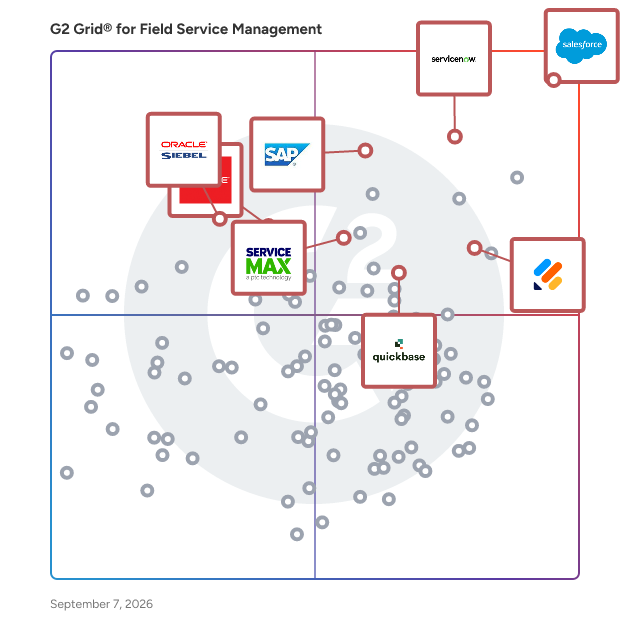
## G2 Grid® for Field Service Management Software
 ![G2 Grid® for Field Service Management Software plotting products by satisfaction and market presence](https://www.g2.com/categories/field-service-management/grids.png?focus%5B%5D=25952&focus%5B%5D=55257&focus%5B%5D=2730&focus%5B%5D=2732&focus%5B%5D=98528&focus%5B%5D=552&focus%5B%5D=931&focus%5B%5D=23672)

Highlighted products: Agentforce Field Service (formerly Salesforce Field Service), ServiceNow Field Service Management, Oracle Field Service, SAP Field Service Management, ServiceMax, Oracle Field Service Cloud, Quickbase, and Jotform.

Underlying data: [Grid® JSON](https://www.g2.com/categories/field-service-management/grids.json?focus%5B%5D=agentforce-field-service-formerly-salesforce-field-service&focus%5B%5D=servicenow-field-service-management&focus%5B%5D=oracle-field-service&focus%5B%5D=sap-field-service-management&focus%5B%5D=ptc-servicemax&focus%5B%5D=oracle-field-service-cloud&focus%5B%5D=quickbase&focus%5B%5D=jotform&segment=enterprise)

**Sponsored**

### Housecall Pro

Housecall Pro is a comprehensive business solution designed specifically for home service professionals, providing a suite of innovative tools and features within an easy-to-use platform. Trusted by over 200k+ Pros, Housecall Pro aims to streamline operations for professionals in various home service industries, including plumbing, electrical work, landscaping, and cleaning services. This platform is accessible via both web and mobile applications, allowing users to manage their businesses efficiently from anywhere. The target audience for Housecall Pro includes small to medium-sized businesses in the home services sector that are looking to enhance their operational efficiency and increase revenue. The platform caters to a variety of use cases, such as automating marketing efforts to attract new customers, facilitating online booking, and managing job schedules. By integrating these functionalities, Housecall Pro empowers service professionals to focus more on their core work while effectively managing the business side of operations. Key features of Housecall Pro include automated marketing campaigns that help users reach potential clients, visually appealing proposal creation, and consumer financing options that enable businesses to secure larger jobs. The platform also supports online payment processing, allowing customers to pay via multiple methods, including credit cards, bank transfers, and mobile wallets. This flexibility not only enhances customer satisfaction but also accelerates cash flow for service providers. In addition to revenue growth and payment solutions, Housecall Pro offers robust job management capabilities. Users can automate routine tasks such as scheduling, dispatching, and invoicing, while also tracking leads and job progress through a comprehensive workflow management board. Real-time alerts enhance communication among team members and clients, ensuring everyone stays informed throughout the service process. Furthermore, the platform integrates seamlessly with third-party tools like QuickBooks, enabling users to sync data effortlessly and manage payroll and employee benefits. Housecall Pro also provides valuable insights through detailed analytics and reporting on key business metrics, allowing professionals to make informed decisions and scale their operations effectively. On average, users report a more than 35% increase in monthly revenue after their first year with Housecall Pro. Subscribers gain access to an online community where they can connect with other home service professionals, sharing insights and best practices. This collaborative environment fosters growth and learning, making Housecall Pro not just a tool, but a partner in business success.

[Visit website](https://www.g2.com/external_clickthroughs/record?secure%5Bad_program%5D=ppc&secure%5Bad_slot%5D=category_product_list_llm&secure%5Bcategory_id%5D=25&secure%5Bchosen_at%5D=2026-08-03T10%3A56%3A36Z&secure%5Bdisplayable_resource_id%5D=25&secure%5Bdisplayable_resource_type%5D=Category&secure%5Bmedium%5D=sponsored&secure%5Bplacement_reason%5D=page_category&secure%5Bplacement_resource_ids%5D%5B%5D=25&secure%5Bprioritized%5D=false&secure%5Bproduct_id%5D=14037&secure%5Bresource_id%5D=25&secure%5Bresource_type%5D=Category&secure%5Bsource_type%5D=category_page&secure%5Bsource_url%5D=https%3A%2F%2Fwww.g2.com%2Fcategories%2Ffield-service-management%2Fenterprise%3Fpage%3D2&secure%5Btoken%5D=75dc1552929d02e286a6ae2c50c445200f91d071864558e391b7ab796496c0df&secure%5Burl%5D=https%3A%2F%2Fwww.housecallpro.com%2Ftop%2Fhome-service-software%2F%3Futm_source%3DG2%26utm_medium%3Dpaid-external-page%26utm_campaign%3Daq_ga_field_service_management_cpc%26mc%3DG2%26msc%3Daq_ga_field_service_management_cpc&secure%5Burl_type%5D=free_trial)

### [GoSpotCheck by FORM](https://www.g2.com/products/gospotcheck-by-form/reviews)

GoSpotCheck by FORM is an industry-leading field execution app that guides, tracks, and improves performance in real time. Our easy-to-use mobile solution unleashes the power of field teams to drive market execution with dynamic task management, cutting-edge image recognition, photo reporting, field team communications, and advanced reporting – all within one easy-to-use platform. Guide teams, improve execution, and drive sales while creating a shared view of the field that helps leaders make better decisions, faster.

**Average Rating:** 4.7/5.0

**Total Reviews:** 66

#### How Do G2 Users Rate GoSpotCheck by FORM?

- **Has the product been a good partner in doing business?:** 9.7/10 (Category avg: 8.9/10)
- **Roles:** 9.8/10 (Category avg: 8.6/10)
- **Analytics:** 9.5/10 (Category avg: 8.4/10)
- **Location:** 9.8/10 (Category avg: 8.5/10)

#### Who Is the Company Behind GoSpotCheck by FORM?

- **Seller:** [FORM](https://www.g2.com/sellers/form-a0713402-5d88-4ae8-a2ea-2245be8dee71)
- **Year Founded:** 2011
- **HQ Location:** Denver, CO
- **Twitter:** @Form\_com  
281 Twitter followers
- **LinkedIn® Page:** [www.linkedin.com](https://www.g2.com/external_clickthroughs/record?secure%5Bsource_type%5D=product_profile&secure%5Btoken%5D=5cf256588557e6aca2a5ba985aeeb213a7cf3db362d4fc87a0c1fb3b234f01a0&secure%5Burl%5D=https%3A%2F%2Fwww.linkedin.com%2Fcompany%2F2286254%2F&secure%5Burl_type%5D=linkedin_company_website)  
28 employees on LinkedIn®

#### Who Uses This Product?

- **Top Industries:** Consumer Goods, Retail
- **Company Size:** 46% Medium, 34% Large

#### What Do G2 Reviewers Say About GoSpotCheck by FORM?

_AI-generated summary from verified user reviews_

##### Pros

- Users commend the **ease of use** of GoSpotCheck, making retail tracking and note-taking straightforward and efficient.
- Users appreciate the **ease of use** of GoSpotCheck by FORM, benefiting from its effective retail tracking capabilities.
- Users love the **note management features** of GoSpotCheck, which enhance tracking and sharing valuable insights with their team.
- Users value the **extensive option variety** in GoSpotCheck, facilitating management across numerous retail accounts effectively.
- Users find GoSpotCheck by FORM to be **extremely useful** , appreciating its ease of use and detailed note-taking capabilities.

#### What Are Recent G2 Reviews of GoSpotCheck by FORM?

**["GoSpotCheck Review"](https://www.g2.com/survey_responses/gospotcheck-by-form-review-11748238)**

**Rating:** 5.0/5.0 stars

_— Gary A._

[Read full review](https://www.g2.com/survey_responses/gospotcheck-by-form-review-11748238)

**["The best data collection tool out there"](https://www.g2.com/survey_responses/gospotcheck-by-form-review-7819501)**

**Rating:** 5.0/5.0 stars

_— Daniel P._

[Read full review](https://www.g2.com/survey_responses/gospotcheck-by-form-review-7819501)

#### What Are G2 Users Discussing About GoSpotCheck by FORM?

- [What is FORM MarketX used for?](https://www.g2.com/discussions/what-is-form-marketx-used-for)

### [Dynamics 365 Field Service](https://www.g2.com/products/dynamics-365-field-service/reviews)

Microsoft Dynamics 365 Field Service is the agile platform for Intelligent field service management enabling companies to deliver world class customer experiences in the field while maximizing efficiency and minimizing costs.

**Average Rating:** 3.9/5.0

**Total Reviews:** 151

#### How Do G2 Users Rate Dynamics 365 Field Service?

- **Has the product been a good partner in doing business?:** 8.4/10 (Category avg: 8.9/10)
- **Roles:** 8.1/10 (Category avg: 8.6/10)
- **Analytics:** 8.0/10 (Category avg: 8.4/10)
- **Location:** 8.3/10 (Category avg: 8.5/10)

#### Who Is the Company Behind Dynamics 365 Field Service?

- **Seller:** [Microsoft](https://www.g2.com/sellers/microsoft)
- **Year Founded:** 1975
- **HQ Location:** Redmond, Washington
- **Twitter:** @microsoft  
13,091,739 Twitter followers
- **LinkedIn® Page:** [www.linkedin.com](https://www.g2.com/external_clickthroughs/record?secure%5Bsource_type%5D=product_profile&secure%5Btoken%5D=9458f51bd6ded48ad432a804f19ad736469f007787569b63827154231c315630&secure%5Burl%5D=https%3A%2F%2Fwww.linkedin.com%2Fcompany%2Fmicrosoft%2F&secure%5Burl_type%5D=linkedin_company_website)  
231,632 employees on LinkedIn®
- **Ownership:** MSFT

#### Who Uses This Product?

- **Top Industries:** Hospital & Health Care, Education Management
- **Company Size:** 38% Medium, 31% Large

#### What Do G2 Reviewers Say About Dynamics 365 Field Service?

_AI-generated summary from verified user reviews_

##### Pros

- Users value the **easy integration** of Dynamics 365 Field Service with other Microsoft apps for seamless functionality.
- Users value the **deep integration with Dynamics 365** , enhancing field service management through seamless connectivity and optimization.
- Users appreciate the **advanced scheduling and resource optimization** features of Dynamics 365 Field Service for efficient management.
- Users value the **end-to-end field service management** capabilities of Dynamics 365 Field Service for streamlined operations.

##### Cons

- Users find **Dynamics 365 Field Service time-consuming** due to complex setup and slow performance in daily operations.
- Users experience significant **customization difficulties** with Dynamics 365 Field Service, hindering effective planner operations.
- Users find the **difficult setup** of Dynamics 365 Field Service a significant hurdle to effective implementation.
- Users find the **cost** of Dynamics 365 Field Service to be quite high, impacting affordability and value perception.
- Users find **feature limitations** in Dynamics 365 Field Service hinder customization and efficiency in operations.

#### What Are Recent G2 Reviews of Dynamics 365 Field Service?

**["Great Performance and Seamless Dynamics CRM Integration"](https://www.g2.com/survey_responses/dynamics-365-field-service-review-12661508)**

**Rating:** 4.0/5.0 stars

_— Verified User in Insurance_

[Read full review](https://www.g2.com/survey_responses/dynamics-365-field-service-review-12661508)

**["End-to-End Field Service Management with Advanced Scheduling and IoT Integration"](https://www.g2.com/survey_responses/dynamics-365-field-service-review-12090435)**

**Rating:** 4.0/5.0 stars

_— Vivek S._

[Read full review](https://www.g2.com/survey_responses/dynamics-365-field-service-review-12090435)

#### What Are G2 Users Discussing About Dynamics 365 Field Service?

- [What is Dynamics 365 Field Service used for?](https://www.g2.com/discussions/what-is-dynamics-365-field-service-used-for)
- [What is Dynamics 365 used for?](https://www.g2.com/discussions/what-is-dynamics-365-used-for)
- [What is included in Dynamics 365?](https://www.g2.com/discussions/dynamics-365-field-service-what-is-included-in-dynamics-365)
- [How do I create a Field Service in Dynamics 365?](https://www.g2.com/discussions/how-do-i-create-a-field-service-in-dynamics-365)
- [What is Field Service in Dynamics CRM?](https://www.g2.com/discussions/what-is-field-service-in-dynamics-crm)

### [Skedulo](https://www.g2.com/products/skedulo/reviews)

Skedulo builds deskless productivity software for the 80% of global workers who don’t work in a traditional office setting. From employees in fixed location facilities to mobile field workers on the frontline, deskless workers number 2.7 billion worldwide. DHL, Sunrun, The American Red Cross and hundreds of other organizations have used Skedulo’s Deskless Productivity Cloud to book over 35M appointments worldwide. The Skedulo Deskless Productivity Cloud helps organizations greatly simplify scheduling, gain visibility into and control over job scheduling and workforce utilization, equip employees with an intuitive app to help them better perform their day-to-day operations, provide actionable analytics on their workforce, and reduce operating costs. Founded in 2013, Skedulo is headquartered in San Francisco with offices in Australia, Vietnam, and the United Kingdom. The company has secured over $115 million in funding to date, led by Softbank, Microsoft's venture firm M12, Costanoa Ventures, and Blackbird. For more information, please visit www.skedulo.com.

**Average Rating:** 4.1/5.0

**Total Reviews:** 422

#### How Do G2 Users Rate Skedulo?

- **Has the product been a good partner in doing business?:** 8.5/10 (Category avg: 8.9/10)
- **Roles:** 7.9/10 (Category avg: 8.6/10)
- **Analytics:** 7.6/10 (Category avg: 8.4/10)
- **Location:** 8.1/10 (Category avg: 8.5/10)

#### Who Is the Company Behind Skedulo?

- **Seller:** [Skedulo](https://www.g2.com/sellers/skedulo)
- **Year Founded:** 2013
- **HQ Location:** San Francisco, CA
- **Twitter:** @Skedulo  
903 Twitter followers
- **LinkedIn® Page:** [www.linkedin.com](https://www.g2.com/external_clickthroughs/record?secure%5Bsource_type%5D=product_profile&secure%5Btoken%5D=8b612aa4cb52ce2d1fd6a3728b5834ff08cde8b3c193e741eabc904328b5ca80&secure%5Burl%5D=https%3A%2F%2Fwww.linkedin.com%2Fcompany%2F3252148%2F&secure%5Burl_type%5D=linkedin_company_website)  
185 employees on LinkedIn®

#### Who Uses This Product?

- **Who Uses This:** Dispatcher, Salesforce Administrator
- **Top Industries:** Hospital & Health Care, Health, Wellness and Fitness
- **Company Size:** 59% Medium, 27% Small

#### What Do G2 Reviewers Say About Skedulo?

_AI-generated summary from verified user reviews_

##### Pros

- Users find Skedulo's **ease of use** essential for efficiently managing scheduling and billing across multiple locations.
- Users find Skedulo to be **very user-friendly** , making tasks clear, concise, and easy to navigate.
- Users commend Skedulo for its **helpful adaptability** and responsive customization, enhancing their overall experience and productivity.
- Users praise Skedulo's **excellent customer support** , appreciating quick responses and helpful solutions when issues arise.
- Users appreciate the **intuitive interface** of Skedulo, making scheduling easy and efficient for their teams.

##### Cons

- Users feel **customization could be improved** , as limitations require frequent adjustments and cause confusion across applications.
- Users experience **limited features and customization** in Skedulo, affecting functionality and information relevance.
- Users find the **learning curve steep** , as task creation and integration can be cumbersome and confusing.
- Users find the **limited customization** in Skedulo restricts essential functionalities for effective roster management.
- Users express frustration with the **missing features** in Skedulo, limiting functionality and overall satisfaction.

#### What Are Recent G2 Reviews of Skedulo?

**["Skedulo Makes Scheduling and Resource Planning Simple and Efficient"](https://www.g2.com/survey_responses/skedulo-review-12860326)**

**Rating:** 4.5/5.0 stars

_— MARTHA L._

[Read full review](https://www.g2.com/survey_responses/skedulo-review-12860326)

**["Easy Job Scheduling with Smart Optimisation and Outstanding Support"](https://www.g2.com/survey_responses/skedulo-review-12889919)**

**Rating:** 4.5/5.0 stars

_— Nathan S._

[Read full review](https://www.g2.com/survey_responses/skedulo-review-12889919)

#### What Are G2 Users Discussing About Skedulo?

- [What is Skedulo used for?](https://www.g2.com/discussions/what-is-skedulo-used-for)

### [Jobber](https://www.g2.com/products/jobber/reviews)

Start Your Free Trial of Jobber - No Credit Card Required Run a more efficient, predictable service business with one system built for growing, multi-crew teams. Keep Work Moving as You Get Busier Jobber connects quoting, scheduling, invoicing, and payments in one place so work moves forward without constant follow-ups or manual coordination. Build efficient days without spending hours managing the calendar, and adjust quickly when plans change. Plus, connect with tools like QuickBooks Online to keep your operations running smoothly. Keep Your Team Aligned in the Field and Office Give your crews clear schedules, job details, and updates they can access anywhere. While they stay focused on the work, your office has real-time visibility into every job without chasing calls, texts, or status updates. Drive Predictable, Profitable Performance Track jobs, revenue, and payments in one place so you always know how your business is performing. Automations keep quotes, invoices, and follow-ups moving, helping you maintain steady cash flow without adding more admin work. Client Testimonial “I spend maybe an hour per week on invoicing and paperwork now. Online payments and invoicing make me look professional.” - Stacey Flanagan, SEF The Lawn Surgeon Discover the Jobber Difference Join 200,000+ service professionals across 50+ industries including landscaping, HVAC, and residential cleaning who run their business with Jobber.

**Average Rating:** 4.6/5.0

**Total Reviews:** 514

#### How Do G2 Users Rate Jobber?

- **Has the product been a good partner in doing business?:** 9.3/10 (Category avg: 8.9/10)
- **Roles:** 8.9/10 (Category avg: 8.6/10)
- **Analytics:** 7.9/10 (Category avg: 8.4/10)
- **Location:** 8.3/10 (Category avg: 8.5/10)

#### Who Is the Company Behind Jobber?

- **Seller:** [Jobber](https://www.g2.com/sellers/jobber)
- **Company Website:** www.getjobber.com
- **Year Founded:** 2011
- **HQ Location:** Edmonton, Canada
- **Twitter:** @GetJobber  
7,288 Twitter followers
- **LinkedIn® Page:** [www.linkedin.com](https://www.g2.com/external_clickthroughs/record?secure%5Bsource_type%5D=product_profile&secure%5Btoken%5D=b92b99ac1d7e36be81396e5827cbd4b91f210cc65b2d1249d25c488bcf893c09&secure%5Burl%5D=https%3A%2F%2Fwww.linkedin.com%2Fcompany%2F1617574&secure%5Burl_type%5D=linkedin_company_website)  
1,364 employees on LinkedIn®

#### Who Uses This Product?

- **Who Uses This:** Owner, Office Manager
- **Top Industries:** Construction, Consumer Services
- **Company Size:** 85% Small, 6% Medium

#### What Do G2 Reviewers Say About Jobber?

_AI-generated summary from verified user reviews_

##### Pros

- Users find Jobber to be **incredibly easy to use** , enhancing work efficiency both in the office and on-site.
- Users value the **easy-to-use scheduling** features of Jobber, allowing seamless task management and client interactions.
- Users love the **easy invoicing process** in Jobber, enhancing efficiency with professional-looking quotes and seamless payments.
- Users value the **flexibility and comprehensive features** of Jobber, significantly improving their efficiency and professionalism.
- Users appreciate the **convenience of centralized scheduling management** , enabling easy access to all job-related information.

##### Cons

- Users suggest that **improvement is needed** for the maintenance agreement process and invoicing flexibility in Jobber.
- Users express frustration with Jobber's **limited functionality** , wishing for more integrated features without additional costs.
- Users find Jobber's **limited features** frustrating, especially the lack of automated tracking and more customizable options.
- Users express frustration with **feature limitations** in Jobber, particularly regarding time tracking and cost analysis usability.
- Users face **significant challenges with job management** , citing issues with reporting, lead management, and time tracking features.

#### What Are Recent G2 Reviews of Jobber?

**["Jobber CRM review"](https://www.g2.com/survey_responses/jobber-review-13140746)**

**Rating:** 5.0/5.0 stars

_— Verified User in Construction_

[Read full review](https://www.g2.com/survey_responses/jobber-review-13140746)

**["Honest Jobber Review"](https://www.g2.com/survey_responses/jobber-review-11139241)**

**Rating:** 5.0/5.0 stars

_— Paula C._

[Read full review](https://www.g2.com/survey_responses/jobber-review-11139241)

#### What Are G2 Users Discussing About Jobber?

- [What is Jobber used for?](https://www.g2.com/discussions/what-is-jobber-used-for) - 1 comment
- [What is jobber cost?](https://www.g2.com/discussions/what-is-jobber-cost)
- [Is jobber any good?](https://www.g2.com/discussions/is-jobber-any-good)
- [What is jobber?](https://www.g2.com/discussions/what-is-jobber)
- [What is jobber software?](https://www.g2.com/discussions/what-is-jobber-software)

### [mHelpDesk](https://www.g2.com/products/mhelpdesk/reviews)

Win more jobs with mhelpDesk. Get organized and grow your business with mHelpDesk. 10,000+ businesses have already made the switch.

**Average Rating:** 4.0/5.0

**Total Reviews:** 131

#### How Do G2 Users Rate mHelpDesk?

- **Has the product been a good partner in doing business?:** 7.6/10 (Category avg: 8.9/10)
- **Roles:** 8.1/10 (Category avg: 8.6/10)
- **Analytics:** 8.0/10 (Category avg: 8.4/10)
- **Location:** 7.4/10 (Category avg: 8.5/10)

#### Who Is the Company Behind mHelpDesk?

- **Seller:** [mHelpDesk](https://www.g2.com/sellers/mhelpdesk)
- **HQ Location:** Fairfax, VA
- **Twitter:** @mHelpDesk  
1,448 Twitter followers
- **LinkedIn® Page:** [www.linkedin.com](https://www.g2.com/external_clickthroughs/record?secure%5Bsource_type%5D=product_profile&secure%5Btoken%5D=7fabd2e0ca50e6bc5141150a9697fb5d7ede9627feaa52290275bc61421ceb52&secure%5Burl%5D=https%3A%2F%2Fwww.linkedin.com%2Fcompany%2F1409167%2F&secure%5Burl_type%5D=linkedin_company_website)  
18 employees on LinkedIn®

#### Who Uses This Product?

- **Top Industries:** Hospital & Health Care, Education Management
- **Company Size:** 44% Small, 34% Medium

#### What Do G2 Reviewers Say About mHelpDesk?

_AI-generated summary from verified user reviews_

##### Pros

- Users find mHelpDesk to be very **easy to use** , enhancing their overall satisfaction and experience with the product.
- Users find mHelpDesk **user-friendly** , appreciating its ease of use and overall satisfaction with the software.

##### Cons

- Users are frustrated by the **lack of features and integrations** , which limits the overall functionality of mHelpDesk.
- Users face **integration issues** with mHelpDesk, struggling with limited features and inadequate support.
- Users find the **missing features** in mHelpDesk limiting, particularly regarding integrations and support options.
- Users report **poor customer support** from mHelpDesk, leading to frustration and unresolved issues.
- Users struggle with **poor support** , feeling frustrated and neglected when seeking assistance with mHelpDesk.

#### What Are Recent G2 Reviews of mHelpDesk?

**["Very Easy to Use—Love It"](https://www.g2.com/survey_responses/mhelpdesk-review-12259973)**

**Rating:** 5.0/5.0 stars

_— Verified User in Retail_

[Read full review](https://www.g2.com/survey_responses/mhelpdesk-review-12259973)

**["All encompassing system for scheduling, field reporting, and invoicing"](https://www.g2.com/survey_responses/mhelpdesk-review-5316122)**

**Rating:** 4.5/5.0 stars

_— Dave F._

[Read full review](https://www.g2.com/survey_responses/mhelpdesk-review-5316122)

#### What Are G2 Users Discussing About mHelpDesk?

- [What is mHelpDesk used for?](https://www.g2.com/discussions/what-is-mhelpdesk-used-for)

### [FieldEZ](https://www.g2.com/products/fieldez/reviews)

At FieldEZ, we strive to deliver the best in field service management automation technology and consulting. Being at the heart of the Digital Transformation story, FieldEZ drives the bleeding edge in IoT, Mobility, Analytics and Cloud, to bring in tectonic and continuous improvements in the way Field organization and team work, collaborate and engage with its customers. FieldEZ’s cutting-edge digital initiatives benefit numerous businesses across multiple industries to significantly enhance their business value, operational efficiency and customer experience. FieldEZ products and services are used globally by Fortune 100 companies as well as SMEs, across multiple industries including IT & Telecom, Healthcare, BFSI, Oil & Gas, Power & Energy, Consumer Durables, FMCG & Retail, E-Commerce and Manufacturing industries. FieldEZ’s Service Management application provides you and your employees a seamless and hassle-free working experience through online and offline modes. The field service management app is extremely user compatible and offers smooth efficient synchronization of data. The easy-to-use interface of the app and its functionality ensure optimum performance and productivity. FieldEZ’s Service Management App can help you achieve more than 10% of the improved field load factor, 34% of cost-saving on travel, and 46% of improved task assignment efficiency. Features of Fieldez field service management software Easy and intuitive UI – FieldEZ’s field service management software offers an easy-to-use and intuitive user interface that makes the entire process seamless for you and your employees field workers. Scheduling and dispatching – The FSM software allows the service manager to optimize schedules for his service technicians and field crews and then dispatch them to jobs accordingly. Invoicing and billing – The field service management software enables the service technician to effectively carry out payment procedures without any manual errors and complexities. Fleet management – The service manager can easily track the delivery fleet in real-time while also getting access to the individual vehicles’ maintenance and service history. This ensures that vehicles get their proper maintenance in their due-time and reduces the chances of vehicles’ random breakdowns. Asset and inventory management – Through FSM software, you can check and track equipment and inventories in individual vehicles as well as warehouses. Warranty Management – Field service management software provides you with the ability to check for the respective warranties of individual parts equipment, ensuring warranty claims, and more. HRM – The FSM software features, while integrated with workforce management and payroll, make a very effective and productive suite of optimum functionality and efficiency of your business through a single platform. Reporting and Analytics – FSM software offers you the ability to capture business data and insights and enables you to make more informed business decisions by running reports and evaluating analytics. This ensures higher operational efficiency and productivity of your business.

**Average Rating:** 4.4/5.0

**Total Reviews:** 69

#### How Do G2 Users Rate FieldEZ?

- **Has the product been a good partner in doing business?:** 8.6/10 (Category avg: 8.9/10)
- **Roles:** 8.3/10 (Category avg: 8.6/10)
- **Analytics:** 8.5/10 (Category avg: 8.4/10)
- **Location:** 8.5/10 (Category avg: 8.5/10)

#### Who Is the Company Behind FieldEZ?

- **Seller:** [FieldEZ Technologies](https://www.g2.com/sellers/fieldez-technologies)
- **Year Founded:** 2011
- **HQ Location:** Bangalore, India
- **Twitter:** @FieldEZ  
73 Twitter followers
- **LinkedIn® Page:** [www.linkedin.com](https://www.g2.com/external_clickthroughs/record?secure%5Bsource_type%5D=product_profile&secure%5Btoken%5D=054088f8953f3e3f6e53ea38d5e6c94010f3c6bdb0651e02fb2c4c550dc216e0&secure%5Burl%5D=https%3A%2F%2Fwww.linkedin.com%2Fcompany%2F2717959%2F&secure%5Burl_type%5D=linkedin_company_website)  
21 employees on LinkedIn®

#### Who Uses This Product?

- **Top Industries:** Information Technology and Services, Computer Software
- **Company Size:** 39% Medium, 36% Small

#### What Do G2 Reviewers Say About FieldEZ?

_AI-generated summary from verified user reviews_

##### Pros

- Users praise the **responsive customer support** of FieldEZ, enhancing work order scheduling and field service data management.
- Users value the **efficient scheduling management** in FieldEZ, praising the excellent training and supportive customer service.
- Users commend the **workflow efficiency** of FieldEZ, highlighting excellent training and effective work order scheduling.

##### Cons

- Users often experience **sync issues** causing data loss, particularly during connections with poor quality.

#### What Are Recent G2 Reviews of FieldEZ?

**["Helped in scheduling work orders"](https://www.g2.com/survey_responses/fieldez-review-10878327)**

**Rating:** 5.0/5.0 stars

_— Priya R._

[Read full review](https://www.g2.com/survey_responses/fieldez-review-10878327)

**["Nice support from the team"](https://www.g2.com/survey_responses/fieldez-review-7362444)**

**Rating:** 5.0/5.0 stars

_— SIVA PRASAD J._

[Read full review](https://www.g2.com/survey_responses/fieldez-review-7362444)

#### What Are G2 Users Discussing About FieldEZ?

- [Is Field force management is part of sales management function?](https://www.g2.com/discussions/fieldez-is-field-force-management-is-part-of-sales-management-function)
- [What is field force management?](https://www.g2.com/discussions/what-is-field-force-management)
- [What is Salesforce FSM?](https://www.g2.com/discussions/what-is-salesforce-fsm)
- [What is FSM software?](https://www.g2.com/discussions/what-is-fsm-software)

### [Geopointe](https://www.g2.com/products/geopointe/reviews)

Geopointe is the leading geolocation solution built exclusively for Salesforce. Turn your CRM data into actionable territory maps, optimized routes, and smarter field execution—without leaving Salesforce. Sales teams use Geopointe to: Visualize accounts, leads, and opportunities on interactive maps Optimize routes and reduce drive time Plan territories with precision Improve field productivity and pipeline coverage Managers gain real-time visibility into field activity, while admins and developers get powerful, flexible configuration options directly inside Salesforce. Trusted by companies around the world, Geopointe helps revenue teams work smarter in the field and close more business. Start a free 15-day trial on the Salesforce AppExchange and see your data on the map in minutes.

**Average Rating:** 4.2/5.0

**Total Reviews:** 276

#### How Do G2 Users Rate Geopointe?

- **Has the product been a good partner in doing business?:** 9.1/10 (Category avg: 8.9/10)
- **Roles:** 8.4/10 (Category avg: 8.6/10)
- **Analytics:** 8.5/10 (Category avg: 8.4/10)
- **Location:** 8.9/10 (Category avg: 8.5/10)

#### Who Is the Company Behind Geopointe?

- **Seller:** [Ascent Cloud](https://www.g2.com/sellers/ascent-cloud)
- **Company Website:** ascentcloud.io
- **Year Founded:** 2020
- **HQ Location:** Detroit, US
- **Twitter:** @ascent\_cloud  
59 Twitter followers
- **LinkedIn® Page:** [www.linkedin.com](https://www.g2.com/external_clickthroughs/record?secure%5Bsource_type%5D=product_profile&secure%5Btoken%5D=4d70b3c445b978f3015c348754c717bf9e81e15fbbf6176a2030516e8807c72c&secure%5Burl%5D=https%3A%2F%2Fwww.linkedin.com%2Fcompany%2Fascent-cloud%2F&secure%5Burl_type%5D=linkedin_company_website)  
79 employees on LinkedIn®

#### Who Uses This Product?

- **Who Uses This:** Salesforce Admin
- **Top Industries:** Non-Profit Organization Management, Financial Services
- **Company Size:** 46% Medium, 39% Small

#### What Do G2 Reviewers Say About Geopointe?

_AI-generated summary from verified user reviews_

##### Pros

- Users value the **customization options** in Geopointe, as it significantly enhances their mapping and data handling efficiency.
- Users find **Geopointe easy to learn** , with straightforward setup and efficient heat map updates saving time.
- Users value the **ease of setup** with Geopointe, allowing them to quickly begin utilizing its features.
- Users find Geopointe's **ease of use** impressive, allowing quick setup and immediate utilization of its features.
- Users love the **easy setup** of Geopointe, allowing them to quickly start using the product effectively.

##### Cons

- Users report **app bugs** that hinder functionality, with frequent updates failing to resolve issues effectively.
- Users often face **app instability** , with frequent updates and features not functioning as intended.
- Users find **difficult learning** curve with Geopointe, which impacts their onboarding and overall user experience.
- Users face **email issues** that complicate cancellation and auto-renewal, leading to frustrating experiences with the product.
- Users find that **improvement is needed** as many features do not work as expected and require constant updates.

#### What Are Recent G2 Reviews of Geopointe?

**["Effortless Route Mapping and Easy Data Updates with Geopointe"](https://www.g2.com/survey_responses/geopointe-review-2226034)**

**Rating:** 5.0/5.0 stars

_— Steve B._

[Read full review](https://www.g2.com/survey_responses/geopointe-review-2226034)

**["Powerful Asset and Order Visualization with Flexible, Responsive Support"](https://www.g2.com/survey_responses/geopointe-review-12589851)**

**Rating:** 5.0/5.0 stars

_— William W._

[Read full review](https://www.g2.com/survey_responses/geopointe-review-12589851)

#### What Are G2 Users Discussing About Geopointe?

- [What is Geopointe used for?](https://www.g2.com/discussions/what-is-geopointe-used-for)

### [Ascendo AI](https://www.g2.com/products/ascendo-ai/reviews)

Ascendo builds Physical AI agents for critical infrastructure. Operating as a coordinated digital workforce, our 16 specialized L4 agents automate more than 1,800 complex service workflows out of the box. Deployed across MedTech, Telecom, industrial manufacturing and more, Ascendo AI agents ingest unstructured dark data to predict parts demand, operationalize technician expertise, and help prevent field escalations before they occur. Our goal is to not just give you the outcome you want but to make you an AI first company like ours. Learn why Field Service and Technical Support teams love us and recommend us as their #1 choice!

**Average Rating:** 5.0/5.0

**Total Reviews:** 27

#### How Do G2 Users Rate Ascendo AI?

- **Has the product been a good partner in doing business?:** 10.0/10 (Category avg: 8.9/10)

#### Who Is the Company Behind Ascendo AI?

- **Seller:** [Ascendo.AI](https://www.g2.com/sellers/ascendo-ai)
- **Year Founded:** 2020
- **HQ Location:** Palo Alto, US
- **Twitter:** @AscendoAI  
19 Twitter followers
- **LinkedIn® Page:** [www.linkedin.com](https://www.g2.com/external_clickthroughs/record?secure%5Bsource_type%5D=product_profile&secure%5Btoken%5D=f47f5988b47b4c500e390de44f65a3e3934d9b5432ee7d1a6f7c492a54814a30&secure%5Burl%5D=https%3A%2F%2Fwww.linkedin.com%2Fcompany%2Fascendoai%2F&secure%5Burl_type%5D=linkedin_company_website)  
28 employees on LinkedIn®

#### Who Uses This Product?

- **Top Industries:** Telecommunications, Hospital & Health Care
- **Company Size:** 74% Large, 19% Medium

#### What Are Recent G2 Reviews of Ascendo AI?

**["Robust Chatbot Integration: Quick Freshservice API Setup for Better SCADA Support"](https://www.g2.com/survey_responses/ascendo-ai-review-12247074)**

**Rating:** 5.0/5.0 stars

_— Verified User in Renewables & Environment_

[Read full review](https://www.g2.com/survey_responses/ascendo-ai-review-12247074)

**["Ascendo AI Agent Tools: Faster, More Accurate Support with a Truly Collaborative Team"](https://www.g2.com/survey_responses/ascendo-ai-review-12673212)**

**Rating:** 5.0/5.0 stars

_— Verified User in Telecommunications_

[Read full review](https://www.g2.com/survey_responses/ascendo-ai-review-12673212)

#### What Are G2 Users Discussing About Ascendo AI?

- [What is Ascendo used for?](https://www.g2.com/discussions/what-is-ascendo-used-for)

### [MobiWork](https://www.g2.com/products/mobiwork/reviews)

MobiWork is a Field Services Management (FSM) software solution that helps businesses with field employees or contractors streamline operations, increase productivity, and deliver consistent, high-quality services across small, mid-size, and enterprise-level organizations. MobiWork is a mobile-first, cloud-based platform that unifies all critical field operations into one system, connecting office personnel and mobile workers in real-time. The MobiWork solution is utilized by any company with employees or contractors in the field on a regular basis. The field services management software solution is fast and responsive, ready for immediate deployment, and available worldwide. Designed for operations across 16+ industries, including HVAC Services, Plumbing Services, Oil & Gas Field Services, Pool & Spa Services, Hauling Services, and Vegetation Management Services, MobiWork addresses the core challenge of managing remote workforces, paper-based processes, and fragmented data systems. The platform's architecture is built for robust scalability, supporting customers from two users up to thousands globally. The platform centralizes job management and execution, providing consistency and visibility from quote to final payment. Core operational management includes real-time job scheduling, dispatch, mobile work orders, time tracking, and detailed job costing. For the mobile workforce, the system enables technicians to complete digital forms, capture signatures and images, and receive step-by-step guidance via patented workflow technology. Financially, the system handles customizable quoting, automated invoicing, on-site payment capture, and supports progressive billing. For enterprise needs, the platform includes AI-driven route optimization, inventory management, asset tracking, and preventative maintenance, alongside integration with ERP, CRM, and accounting systems like QuickBooks and Sage Intacct. MobiWork provides tools that support reducing operational costs and boosting productivity and efficiency, offering a consistent operational framework.

**Average Rating:** 4.9/5.0

**Total Reviews:** 70

#### How Do G2 Users Rate MobiWork?

- **Has the product been a good partner in doing business?:** 9.8/10 (Category avg: 8.9/10)
- **Roles:** 9.3/10 (Category avg: 8.6/10)
- **Analytics:** 9.1/10 (Category avg: 8.4/10)
- **Location:** 8.8/10 (Category avg: 8.5/10)

#### Who Is the Company Behind MobiWork?

- **Seller:** [MobiWork](https://www.g2.com/sellers/mobiwork)
- **Company Website:** www.mobiwork.com
- **Year Founded:** 2010
- **HQ Location:** Delray Beach , Florida
- **Twitter:** @mobiwork  
842 Twitter followers
- **LinkedIn® Page:** [www.linkedin.com](https://www.g2.com/external_clickthroughs/record?secure%5Bsource_type%5D=product_profile&secure%5Btoken%5D=b62b0593b258c942d40ad6def8e3294905a2a21112d692ea1f906644b0e1baf7&secure%5Burl%5D=https%3A%2F%2Fwww.linkedin.com%2Fcompany%2F2303837%2F&secure%5Burl_type%5D=linkedin_company_website)  
30 employees on LinkedIn®

#### Who Uses This Product?

- **Top Industries:** Recreational Facilities and Services, Real Estate
- **Company Size:** 51% Small, 34% Medium

#### What Do G2 Reviewers Say About MobiWork?

_AI-generated summary from verified user reviews_

##### Pros

- Users praise the **ease of use** of MobiWork, highlighting its intuitive design and smooth implementation process.
- Users value the **exceptional customer support** from MobiWork, appreciating their responsiveness and tailored solutions for efficiency.
- Users appreciate the **flexibility and customization** of MobiWork, perfectly tailored to meet diverse business needs.
- Users praise MobiWork for its **intuitive platform and exceptional customer support** , enhancing productivity and ease of use.
- Users value the **high customizability** of MobiWork, enhancing productivity and adaptability to their specific business needs.

##### Cons

- Users find the **learning curve challenging** , citing complexity in features and difficulties in navigating the interface.
- Users find the **complex setup** of MobiWork challenging, particularly for scheduling and invoicing processes.
- Users find **inventory management cumbersome** , requiring significant effort to make it functional and efficient.
- Users find **limited customization** options in MobiWork, hindering efficient integration of forms and inventory tracking.
- Users experience **poor usability** with MobiWork, citing complicated scheduling and invoicing processes that hinder efficiency.

#### What Are Recent G2 Reviews of MobiWork?

**["Mobiwork: A Versatile and User-Friendly Platform for Field Service Management"](https://www.g2.com/survey_responses/mobiwork-review-8303593)**

**Rating:** 5.0/5.0 stars

_— Michelle G._

[Read full review](https://www.g2.com/survey_responses/mobiwork-review-8303593)

**["Intuitive platform with a lot of flexibility."](https://www.g2.com/survey_responses/mobiwork-review-12129747)**

**Rating:** 4.5/5.0 stars

_— David M._

[Read full review](https://www.g2.com/survey_responses/mobiwork-review-12129747)

#### What Are G2 Users Discussing About MobiWork?

- [What is MobiWork used for?](https://www.g2.com/discussions/what-is-mobiwork-used-for)

- [&lsaquo; Prev‹ Prev](/categories/field-service-management/enterprise?order=g2_score#product-list)
- [1](/categories/field-service-management/enterprise?order=g2_score#product-list)
- 2
- Next &rsaquo;Next ›

Spotlight Categories

[Remote Monitoring & Management (RMM) Software](https://www.g2.com/categories/remote-monitoring-management-rmm)

[CRM Software](https://www.g2.com/categories/crm)

[Low-Code Development Platforms](https://www.g2.com/categories/low-code-development-platforms)

[Managed File Transfer (MFT) Software](https://www.g2.com/categories/managed-file-transfer-mft)

[Contact Center Workforce Software](https://www.g2.com/categories/contact-center-workforce)

Similar Categories

- [Help Desk](/categories/help-desk)
- [Live Chat](/categories/live-chat)
- [Customer Self-Service](/categories/customer-self-service)
- [Social Customer Service](/categories/social-customer-service)
- [Appointment Reminder](/categories/appointment-reminder)

- [Call & Contact Center](/categories/call-contact-center)
- [Client Onboarding](/categories/client-onboarding)
- [Co-Browsing](/categories/co-browsing)
- [Complaint Management](/categories/complaint-management)
- [Contact Center Outsourcing Services](/categories/contact-center-outsourcing-services)

- [Contact Center Payments](/categories/contact-center-payments)
- [Conversational Support](/categories/conversational-support)
- [Customer Communications Management](/categories/customer-communications-management)
- [Customer Education](/categories/customer-education)
- [Customer Service Automation](/categories/customer-service-automation)

[Browse Field Service Management Themes](/categories/field-service-management/themes)

 ![Jeffrey Lin](/assets/transparent-ad5be28fbcd25b7b08d2cebe1d957125437fb5407d75ee717965ad22c8808791.gif "Jeffrey Lin")
JL

Researched and written by [Jeffrey Lin](https://research.g2.com/insights/author/jeffrey-lin)

Updated 

Products classified in the overall Field Service Management category are similar in many regards and help companies of all sizes solve their business problems. However, enterprise business features, pricing, setup, and installation differ from businesses of other sizes, which is why we match buyers to the right Enterprise Business Field Service Management to fit their needs. Compare product ratings based on reviews from enterprise users or connect with one of G2's buying advisors to find the right solutions within the Enterprise Business Field Service Management category.

In addition to qualifying for inclusion in the Field Service Management Software category, to qualify for inclusion in the Enterprise Business Field Service Management Software category, a product must have at least 10 reviews left by a reviewer from an enterprise business.

Show More

* * *

## How Do You Choose the Right Field Service Management Software?

### What You Should Know About Field Service Management Software

### What is Field Service Management Software?

Field service management (FSM) software helps businesses manage all the resources that go into the process of FSM. Field service refers to any service delivered away from company property or offsite. These services typically involve dispatching workers or employees to specific client locations to install, repair, or maintain equipment or systems. FSM software enables companies to easily supervise such off-site employee activities monitoring, keeping transparency into every operation, vehicle tracking, and integration with other business systems.

That supervision promise now comes with a deadline attached. Reviewers on G2 increasingly judge these tools by how fast setup turns into savings, and buyers ask vendors to show field service management software ROI in the first 3 months and deployment plans to match. Contractor reviews describe estimate and proposal tools alone paying for the investment, and accounting integrations making returns arrive quicker than expected. Based on G2 reviews, administrators, everyday users, and consultants evaluate field service management software by comparing how much of their workflow consolidates into one system, how heavy setup and the learning curve run, and how add-on pricing grows after purchase.

#### What Types of Field Service Management Software Exist?

**Cloud-based FSM**

Cloud-based field service management solutions store data remotely, allowing access by multiple users at a given time. Cloud storage also prevents data loss due to malfunctioning computers or devices, which is beneficial to businesses with a large number of technicians in the field. Many cloud-based products are also priced on a monthly subscription model.

**On-premises FSM**

On-premise field service management solutions are more customizable and sometimes offer simpler integrations with already established systems. These products are often cheaper because they are one-time purchases. This can be a good choice for businesses where customizations are needed to meet business processes.

### What are the Common Features of Field Service Management Software?

- **Work order management:** FSM software allows field service managers to manage all work order history in an easy-to-read dashboard. Work order management also helps field service workers place service requests and monitor real-time status updates. This makes repair and maintenance more efficient within the field.
- **Scheduling:** FSM software offers scheduling features to help with project and employee management. Businesses can schedule routes and work schedules for field service workers months in advance so they can see their work ahead of time and make necessary arrangements in their schedules.
- **Dispatching:** FSM software helps with the logistics of planning routes, choosing the right facilities, and ensuring that assets are used optimally. Dispatching features can help workers in the trucking industry find optimal driving routes that have less traffic, which can help them complete their tasks.
- **Invoicing:** FSM software offers invoicing features that help manage field service sales transactions. This feature includes immediate invoicing directly from the field technician who completed the work, thus achieving a more streamlined, quicker payment cycle.
- **Mobile apps:** Mobile apps help managers oversee field services on the go. Field service managers can monitor their workers, dispatch fleets, and schedule work for employees while they are traveling from site to site.
- **Quote estimates:** Quote estimator features help prospective clients get a price estimate to help them with the decision to move forward with the service. Once a business sends out an estimate to a client, they have the option to accept or decline. If the client accepts within the quote estimator, businesses can start making the necessary arrangements to begin fieldwork.

### What are the Benefits of Field Service Management Software?

Field service management solutions can make a business more agile and efficient. This software provides features that dispatch technicians, schedule workers, track employee location, and access work, all via a mobile app which can vastly improve time management. Companies can also set key performance indicators that can help teams track and manage annual goals.

**Increased efficiency and productivity:** FSM software helps optimize employee work schedules and service routes, track how and where assets and inventory are being used, report on productivity, and automate billing and customer interactions. This solution has totally replaced the traditional and manual system of keeping track of such data, thereby boosting both operational efficiency and employee productivity.

**Error reduction:** FSM software helps collect, track, and analyze crucial data (like job completion times, expenses, and field notes), reducing the likeliness of errors in scheduling, completing, and billing work. These improvements can streamline the business’s operations and improve customer satisfaction.

**Meeting customer expectations:** FSM software provides customer portals with easy online booking, automated notifications, reports, and invoicing, and more capability around customer-friendly features like consumer financing and recurring service plans.

**Optimal employee experience:** Relieved of administrative burdens, field workers can easily access essential resources, communicate effectively, receive schedules, and updates in one centralized place.

### Who Uses Field Service Management Software?

Field service management software is used by anyone working in field services—offsite or client location activities—such as installations, repairs, and services of equipment or systems. These include businesses that provide services in the fields of HVAC, property maintenance, healthcare, cable, telecommunications, and heavy engineering. FSM software helps streamline the day-to-day operations of fieldwork by improving communication between the onsite and offsite locations that field service workers must shift between. In a field service such as construction, for example, a manager can deploy his workers into an offsite location and then track and manage his workers during the day using FSM software.

### What’s the best field service management software for small businesses?

For small businesses aiming to streamline operations, enhance customer service, and manage field teams efficiently, [leading small business field service management platforms](https://www.g2.com/categories/field-service-management/small-business) include:

- [Connecteam](https://www.g2.com/products/connecteam/reviews) offers a mobile-first workforce management solution tailored for deskless teams. It provides features such as scheduling, time tracking, task management, and communication tools, making it ideal for small businesses seeking an all-in-one platform.
- [Jobber](https://www.g2.com/products/jobber/reviews) is designed for home service businesses. It offers tools for scheduling, invoicing, client management, and payment processing. Its user-friendly interface and affordability make it a top choice for small enterprises.
- [Housecall Pro](https://www.g2.com/products/housecall-pro/reviews) provides a comprehensive solution for home service professionals, including features like online booking, dispatching, invoicing, and payment processing. It's known for its ease of use and robust functionality.

### What are the popular field management tools for medium-sized businesses?

For medium-sized businesses aiming to optimize field operations and improve service delivery, leading field management tools include:

- [ServiceTitan](https://www.g2.com/products/servicetitan/reviews) is a comprehensive platform designed for home and commercial service businesses. It offers features like dispatching, CRM, reporting, and marketing automation, making it suitable for growing companies.
- [ServiceMax](https://www.g2.com/products/ptc-servicemax/reviews) provides asset-centric field service management solutions, including work order management, inventory tracking, and analytics. It's ideal for medium-sized businesses seeking to enhance operational efficiency.
- [Salesforce Field Service](https://www.g2.com/products/agentforce-field-service-formerly-salesforce-field-service/reviews) integrates seamlessly with Salesforce CRM, offering tools for scheduling, dispatching, and real-time communication. It's a robust solution for medium-sized enterprises looking to unify their service operations.

### Software Related to Field Service Management Software

- [Accounting software](https://www.g2.com/categories/accounting) **:** Field service management software often integrates with accounting software to streamline payment cycles. This usually includes invoicing payments, automating accounts payable, and giving quote estimates.
- [CRM software](https://www.g2.com/categories/crm) **:** FSM software can integrate with CRM software for field managers to manage customer relationships. This can help field managers maintain relationships with recurring clients and gain leads on new clients that are in need of fieldwork.
- [ERP software](https://www.g2.com/categories/erp) **:** FSM software can integrate with ERP software for optimization of field service operations. It is important for a business to essentially connect between all the various departments. Successful project management is possible only with better resource planning.
- [Product lifecycle management (PLM) software](https://www.g2.com/categories/plm) **:** PLM software helps field service managers manage data during the development of a product from inception through the manufacturing, servicing, and disposal processes. Having PLM software integrated with field service management solution can help improve equipment development as well as maintenance.
- [GIS software](https://www.g2.com/categories/gis) **:** GIS software usually focuses on gathering, analyzing, and displaying geographical data to manage business operations. This can help field service managers by tracking the location of fleets and locating where field workers are in real time. It can also help field managers find the next location workers need to head to. If a project location changes, workers will be notified immediately so they can make the necessary changes.
- [Fleet management software](https://www.g2.com/categories/fleet-management) **:** Fleet management software helps field service businesses monitor, track, and create detailed performance reports on vehicle fleets.

### Challenges with Field Service Management Software

**Duplicate entries:** An issue that might arise from using FSM software is duplicate entries. Since field workers tend to write field reports manually, this can be tedious if they have to transfer them into the FSM software as well. This leads to wasted time and extra paperwork.

**Lack of in-person communication:** Managing field workers through FSM software can leave no time for actual face-to-face communication. While field managers might feel as if they are managing their workers effectively through the cloud, it might lead to communication problems that would not arise if the problem was addressed in person. Businesses implementing FSM software must ensure to provide adequate time to address important issues in person.

### Which Companies Should Buy Field Service Management Software?

**Mobile, healthcare, and real estate:** Industries such as mobile, healthcare, and real estate can use FSM software as they might use field service principles and tools in their work.

**Businesses with full-time employees and contractors:** Industries with full-time employees and independent contractors working side by side might require tools that can provide access and permissions based on the worker’s role.

### How to Buy Field Service Management Software

Different companies have different needs and objectives, so when looking for FSM software, there will be a number of factors to consider to find the best solution.

#### Requirements Gathering (RFI/RFP) for Field Service Management Software

The primary goal when making a purchase decision for FSM software is to pick a software that is well aligned with the business’s desire and budget. For improving field service staff performance and allowing managers to easily monitor and improve team’s performance, the company may require a product that can capture even minute information from start of the process to completion of task.

Another key factor when requirement gathering for FSM software is to ensure it supports a company's future upgrade plans. It is a good practice to check with the software vendor if the FSM software can support the buyer in the long term as well.

Some important questions to ask when deciding on the field service management journey are:

- What information can be captured in FSM software?
- How accurate and real time can the information be captured?
- Can the software provide real-time recommendations of asset availability?
- Will the FSM software be used for legacy data centers or brand new ones?
- Is the solution scalable to meet future requirements?
- Does the FSM solution provide a high level of security?

Answering these questions will help to define the scope of requirements for FSM software.

**Create a long list**

Once the customer has decided that they require FSM software to oversee their data center operations, the next step would be to make a long list of the best options that are presently available in the market. Long lists help eliminate software that does not provide critical functionality, thereby reducing the list to be more compact and precise.

**Create a short list**

Once the list has been narrowed down, the customer can begin to compare different features and offerings of the FSM software as per the company’s needs. Pricing decisions are also taken to ensure that the software selected fits the IT budget. A highly efficient method of comparing various FSM software would be to opt for technology review platforms such as g2.com, which provide unbiased reviews and also provide different perspectives on the benefits or issues with various FSM software, and hear what other users have to say.

**Conduct demos**

Once the list has been further narrowed down, customers can then opt to check if the FSM software vendors are providing a live demo, or a free trial version (with limited functionality). FSM software is a significant commitment in terms of time and cost, and therefore making the right choice is critical for the customer. Customers can use the trial versions before finally committing to the purchase decision.

#### Selection of Field Service Management Software

**Choose a selection team**

Choosing the right team to work together on choosing the FSM software is a critical part of the process. This team will be in charge of identifying pain points to finally overseeing the entire implementation of FSM software.

### What Does Field Service Management Software Cost?

Field service management software can be a worthwhile investment for many businesses that handle a large volume of work orders. Subscription pricing, usually linked to the number of organizational users, is the most common pricing structure. Generally, subscription-based offerings have costs that start at $30–$50 per month for a single user and then increase by around $20–$30 per additional user per month for the most basic plans. Advanced tools and integrations typically require higher-priced subscription tiers that start at $100 or more per month.

### Field Service Management Software Trends

**Automation:** FSM software is automating more and more tedious tasks. Most of the automation applies to backend operations such as scheduling, dispatch management, contract, SLA and warranty management, and inventory management. The trend of automating these tedious tasks will help with streamlining the operational process.

**Predictive maintenance:** A major trend in field service management is predicting when repairs will need to be made. Lots of field service managers are connecting their field service tools with [IoT management software](https://www.g2.com/categories/iot-management). This helps them actively monitor equipment health and set up predetermined measures to prevent potential damage. Some IoT tools can even simulate normal device behavior which lets them compare against the current device’s health. This way they can see if field devices are in the best possible condition.

### Field Service Management Software FAQs

#### Most Popular FAQs

**Which field service management software has the best reviews?**

Across G2's field service management category, these platforms pair strong satisfaction scores with substantial review bases:

- [Jobber](https://www.g2.com/products/jobber) : 4.6 stars across 516 reviews, with reviewers citing one-day onboarding, on-site signing and payment, and a marketing suite that generates leads.
- [FieldPulse](https://www.g2.com/products/fieldpulse-fieldpulse) : 4.7 stars across 370 reviews, praised for consolidating scheduling, dispatch, and invoicing with named support reps who answer fast.
- [ServiceTitan](https://www.g2.com/products/servicetitan) : 4.5 stars across 374 reviews, the operational backbone for HVAC and trades companies, with routing that cuts drive time.
- [Connecteam](https://www.g2.com/products/connecteam) : 4.6 stars across 3,505 reviews, a mobile-first workforce app whose time clock alone saves reviewers real payroll money.

Two honesty notes: [Zapium](https://www.g2.com/products/zapium) holds a perfect 5.0 on 159 reviews and [Zuper](https://www.g2.com/products/zuper) a 4.7 on 152, both far smaller bases than the leaders, so weigh score against sample size. And Connecteam spans many G2 categories beyond field service, so read the reviews tagged to this category specifically when comparing.

**What is the best HVAC field service management software?**

Based on the past year's reviews, four platforms lead for HVAC, with the choice coming down to cost structure:

- [ServiceTitan](https://www.g2.com/products/servicetitan): Reviews call it the backbone that keeps an HVAC business running, with real-time dispatch, on-site invoicing before leaving the home, and inventory tracking that prevents mid-job parts surprises, though the same reviews note it gets expensive once pro add-ons stack up.
- [FieldPulse](https://www.g2.com/products/fieldpulse-fieldpulse): HVAC reviewers who moved from other field service tools report smooth switches and say the proposal tools already paid for the software.
- [Simpro](https://www.g2.com/products/simpro): Serves HVAC among its core trades, per the vendor, with reviewers in adjacent trades confirming strong quoting-to-invoicing flow with QuickBooks and MYOB links.
- [Jobber](https://www.g2.com/products/jobber): Counts HVAC among its 200,000-plus service pros, per the vendor.

The deciding review theme is cost structure: Flat and predictable at the Jobber and FieldPulse end, powerful but add-on-heavy at the ServiceTitan end.

**Which field service software has the best customer support?**

Three platforms earn the strongest customer support reviews in the past year, and customers name names:

- [FieldPulse](https://www.g2.com/products/fieldpulse-fieldpulse): Reviewers repeatedly credit individual reps for fast, followed-through answers, from onboarding through daily use.
- [Simpro](https://www.g2.com/products/simpro): Users call the tech help team knowledgeable and responsive, backed by detailed release notes and a comprehensive technical guide.
- [Workiz](https://www.g2.com/products/workiz): Reviewers say the team responds quickly to bug reports and visibly builds customer forum feedback into updates.

Experiences vary elsewhere: Some mid-market [ServiceTitan](https://www.g2.com/products/servicetitan) reviews describe email-only support with long waits, including after a data migration that went wrong, and [Zuper](https://www.g2.com/products/zuper) reviews describe the implementation team as less helpful than expected during a rollout that ran long, so file a real support ticket during the trial and time the answer.

**How long does field service management software take to implement?**

Anywhere from one day to several months, depending on the tool class. This question reflects a dominant pattern across search results for this category rather than a single source.

- **Days** : Companies switching to Jobber describe completing onboarding in a single day, and Connecteam construction crews go from hesitant to fluent in about a week.
- **Weeks** : The middle is structured onboarding, where FieldPulse reviewers credit its guided process for keeping new team members consistent.
- **Months** : The longer timelines belong to the platforms, where [Agentforce Field Service](https://www.g2.com/products/agentforce-field-service-formerly-salesforce-field-service) reviewers say autonomous scheduling needs near-complete data and sometimes a dedicated specialist, [Zuper](https://www.g2.com/products/zuper) reviews include implementation running longer than the sales process suggested, and [ServiceTitan](https://www.g2.com/products/servicetitan) reviews describe setup still absorbing time well after go-live.

Ask every vendor for the median days-to-first-invoice for customers your size, in writing.

**What are the best field service management platforms for non-IT teams?**

Most field service software users are tradespeople, not technologists, and the fastest adoption stories in the past year come from the trades-focused tools:

- [Workiz](https://www.g2.com/products/workiz): Administrators say every employee picks it up quickly in training, with a simple interface that lets admins switch features on and off.
- [Connecteam](https://www.g2.com/products/connecteam): Construction teams describe being hesitant to learn a new platform and coming around within about a week.
- [FieldPulse](https://www.g2.com/products/fieldpulse-fieldpulse/reviews): Reviewers say the guys in the field find it very simple, helped by color-coded scheduling.
- [Jobber](https://www.g2.com/products/jobber/reviews): Crews sign, bill, and take payment on-site without office help.

The contrast sits at the platform end of the category, where all five [ServiceNow Field Service Management](https://www.g2.com/products/servicenow-field-service-management/reviews) reviewers in the window say setup and configuration need technical expertise and [Agentforce Field Service](https://www.g2.com/products/agentforce-field-service-formerly-salesforce-field-service/reviews) users describe needing a dedicated specialist to tune scheduling: For a non-IT team, have your least technical technician run one real job end-to-end on a trial before anyone signs.

**Can field service management software deliver ROI with minimal customization?**

Yes, in one half of the category; the other half prices its return in configuration time. The minimal-customization wins cluster in the trades tools:

- **Jobber** : Companies switching from another platform describe completing onboarding in a single day, and solo electrician reviewers describe starting small and growing into it without changing systems.
- **FieldPulse** : Reviews say the estimate and proposal tools alone already paid for the investment.
- **Simpro** : Reviews report ROI arriving quicker than expected once the accounting link was live.

On the platform side, returns take longer to configure, with [Agentforce Field Service](https://www.g2.com/products/agentforce-field-service-formerly-salesforce-field-service/reviews) reviewers saying it needs near-complete territory and skills data before the AI dispatches sensibly and [ServiceTitan](https://www.g2.com/products/servicetitan/reviews) reviews noting setup was not easy and still absorbs time, with paid add-ons stacking on top: Match the tool class to your appetite for configuration first; only then compare features.

#### Small Business FAQs

**What is the most affordable field service management software for small businesses?**

Sticker prices in this category start around $30 to $50 per user monthly, but the past year's reviews show affordability is decided by what stacks on top; compare options across the [small business field service management](https://www.g2.com/categories/field-service-management/small-business) segment with that lens:

- [FieldPulse](https://www.g2.com/products/fieldpulse-fieldpulse) : Small trades reviewers describe fair pricing alongside the consolidation that removed other tools.
- [Jobber](https://www.g2.com/products/jobber) : Solo electrician reviewers call it structured to start small and grow into, though expense tracking sits behind a paid upgrade they feel should be standard.
- [Connecteam](https://www.g2.com/products/connecteam) : Reviews credit the time clock with real payroll savings by ending invoiced-hours guesswork.

Two cost notes from reviews: [Workiz](https://www.g2.com/products/workiz) users cite roughly $100 per technician, per-minute phone billing, and new features that arrive with added costs, and [ServiceTitan](https://www.g2.com/products/servicetitan) reviews mention promotional pricing that changed partway through a contract. Price the add-ons you will actually need, not the base plan.

**Which field service management software is the most user-friendly?**

Workiz, Jobber, FieldPulse, and Connecteam draw the strongest ease-of-use reviews in the past year.

- [Workiz](https://www.g2.com/products/workiz): Admins say every employee picks it up quickly, with a simple interface where features toggle on and off.
- [Jobber](https://www.g2.com/products/jobber): Reviewers call it easy in both the office and the field, down to on-site signatures and payment.
- [FieldPulse](https://www.g2.com/products/fieldpulse-fieldpulse): Field crews describe it as very simple, helped by color-coded scheduling.
- [Connecteam](https://www.g2.com/products/connecteam): Teams reached fluency in about a week on an intuitive dashboard.

Views differ inside the same products, with some Workiz reviewers finding it harder to work with than the majority describe and [Simpro](https://www.g2.com/products/simpro) users noting its depth takes training before it clicks: User-friendly is a distribution, not a verdict, so read the low-star reviews for the product you like most.

**Which field service management software works best with QuickBooks?**

Simpro and Workiz have the most specific QuickBooks review evidence from the past year, with [Jobber](https://www.g2.com/products/jobber) and [Housecall Pro](https://www.g2.com/products/housecall-pro) also listing connections per the vendor:

- [Simpro](https://www.g2.com/products/simpro): Integrates directly with QuickBooks for AR, AP, and payment matching, per its reviewers, though reviews from teams moving off QuickBooks Desktop describe a steep migration curve and a manual accounting link they wish ran on a timer.
- [Workiz](https://www.g2.com/products/workiz): Syncs with QuickBooks Online, and reviewers confirm it works while flagging one live bug: Reopening a completed job can create duplicate invoices in the QuickBooks backend.

Whichever you shortlist, test the failure paths during trial: A reopened job, a partial payment, and an edited invoice will tell you more than a clean demo sync will.

#### Enterprise FAQs

**What is the best-rated field service management software for enterprises?**

Whether buyers ask for the best rating or the most trusted field service management software according to enterprise user reviews, the enterprise review base points to the same three platforms. Enterprise reviewers wrote 147 of the 917 field-service-tagged reviews G2 collected across leading products in this category in the past year, so pilots will tell you more than ratings at this segment; compare the segment directly on the [enterprise field service management](https://www.g2.com/categories/field-service-management/enterprise) page.

- [ServiceMax](https://www.g2.com/products/ptc-servicemax/reviews): Enterprise users in healthcare and IT services praise the Go mobile app's steady improvement and a low-code setup where service workflows are built by drag and drop rather than code.
- [ServiceNow Field Service Management](https://www.g2.com/products/servicenow-field-service-management/reviews): Reviewers trust its dynamic scheduling by skills, availability, and location, and note it holds up across multiple locations.
- [Agentforce Field Service](https://www.g2.com/products/agentforce-field-service-formerly-salesforce-field-service/reviews): Stands out for autonomous dispatch that checks parts and books the right technician unprompted, alongside IoT-driven predictive work orders.

Each carries its own flag in the same review base, with ServiceMax users reporting slow auto-sync that pushes technicians to manual syncs, every ServiceNow reviewer in the window flagging a learning curve, and Agentforce drawing cost notes plus its dependence on clean territory and skills data. [Oracle Field Service Cloud](https://www.g2.com/products/oracle-field-service-cloud), [IFS Cloud](https://www.g2.com/products/ifs-cloud), and [Dynamics 365 Field Service](https://www.g2.com/products/dynamics-365-field-service) also compete here, per the vendors, though little fresh review evidence surfaced for them in the window: Read enterprise-filtered low-star reviews before shortlisting, and ask each vendor for a reference running a fleet your size.

**What should enterprises evaluate in field service management platforms?**

Based on recent G2 reviews, enterprises should evaluate the following in field service management platforms:

- **Low-connectivity mobile behavior** : [Agentforce Field Service](https://www.g2.com/products/agentforce-field-service-formerly-salesforce-field-service) reviewers report the app slowing in basements and remote sites, and [ServiceNow Field Service Management](https://www.g2.com/products/servicenow-field-service-management) users flag the same weak-signal gap.
- **Data readiness** : Agentforce's AI dispatch makes poor assignments without well-mapped territories and skills, and ServiceNow admins stress that unclean inputs produce unreliable outputs.
- **Sync behavior** : [ServiceMax](https://www.g2.com/products/ptc-servicemax) technicians fall back to manual syncs when auto-sync lags.
- **Implementation ownership** : A [Zuper](https://www.g2.com/products/zuper) rollout ran past the promised timeline, and [ServiceTitan](https://www.g2.com/products/servicetitan) reviews include a data migration that lost and duplicated records, followed by slow email-only support.
- **Cost trajectory** : Pro-product add-ons and promotional pricing that changed mid-contract both surfaced in reviews this year.

Rank these five by your exposure, and put the answers in the contract rather than the deck.

**Which enterprise field service management platforms deliver performance and stability?**

At enterprise scale, the performance and stability questions get sharper because reviewers answer them from the field, not the office:

- [ServiceNow Field Service Management](https://www.g2.com/products/servicenow-field-service-management/reviews): Teams running it for years report reliable performance under many simultaneous users and describe it scaling cleanly across locations, though users flag a low-signal weakness plus performance dips under heavy data and deep customization.
- [Agentforce Field Service](https://www.g2.com/products/agentforce-field-service-formerly-salesforce-field-service/reviews): Reviewers report the mobile app turning slow in low-connectivity spots like basements and remote sites.
- [ServiceMax](https://www.g2.com/products/ptc-servicemax/reviews): Reviewers describe auto-sync lag that pushes technicians to manual syncs, with enterprise reviews noting performance issues and downtime despite the underlying platform's reputation.

Stability at a desk does not guarantee stability in a crawl space: Before contracting, pilot each finalist's mobile app at your worst-coverage sites and time a full work-order cycle there.

**How do field service management platforms handle integration with enterprise systems?**

Integration promises get tested, and reviews from the past year separate connections that work from connections that were sold.

- [Simpro](https://www.g2.com/products/simpro): Reviews credit the MYOB accounting integration with making ROI arrive quicker than expected, and describe running it directly into QuickBooks for AR, AP, and payment matching.
- [ServiceNow Field Service Management](https://www.g2.com/products/servicenow-field-service-management/reviews): Reviewers sync updates through Microsoft Teams and Outlook and connect it to other internal modules.
- [Agentforce Field Service](https://www.g2.com/products/agentforce-field-service-formerly-salesforce-field-service/reviews): Developers pull IoT sensor data in to generate predictive work orders.
- [Zuper](https://www.g2.com/products/zuper/reviews): Reviews offer the other side, where the HubSpot connection earns praise, but some reviewers describe the QuickBooks integration as a struggle and features presented during the sale that did not work as expected.

**Note** : Some [Workiz](https://www.g2.com/products/workiz/reviews) users mention a bug where reopening a finished job creates duplicate invoices in the QuickBooks backend: During trial, run a sandboxed test against your live ERP or accounting system, including the edge cases like reopened jobs and mid-cycle edits.