Best Encryption Software

How Many Encryption Software Products Does G2 Track?

Total Products under this Category: 314

Category Stats (Nov 2026)

  • Average Rating: 4.4/5 (↑0.01 vs Oct 2026) The average rating of products in this category, based on all submitted ratings
  • Top Trending Product: Virtru Secure Share (+0.91%) - Among all products in this category, Virtru Secure Share recorded the largest rating increase compared to last month

Last updated: November 01, 2026

How Does G2 Rank Encryption Software Products?

Why You Can Trust G2's Software Rankings:

  • 30 Analysts and Data Experts
  • 7,100+ Authentic Reviews
  • 314+ Products
  • Unbiased Rankings

G2's software rankings are built on verified user reviews, rigorous moderation, and a consistent research methodology maintained by a team of analysts and data experts. Each product is measured using the same transparent criteria, with no paid placement or vendor influence. While reviews reflect real user experiences, which can be subjective, they offer valuable insight into how software performs in the hands of professionals. Together, these inputs power the G2 Score, a standardized way to compare tools within every category.

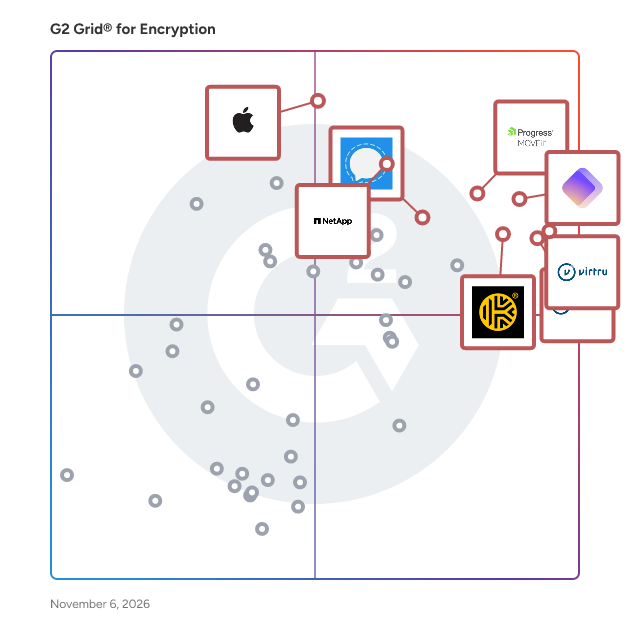
G2 Grid® for Encryption Software

G2 Grid® for Encryption Software plotting products by satisfaction and market presence

Highlighted products: Virtru Secure Share, Proton Pass For Business, Virtru Email Encryption, Progress MOVEit, Keeper Business Password Manager, NetApp ONTAP Data Management Software, FileVault, and Signal.

Underlying data: [Grid® JSON](https://www.g2.com/categories/encryption-software/grids.json?focus%5B%5D=virtru-secure-share&focus%5B%5D=proton-pass-for-business&focus%5B%5D=virtru-email-encryption&focus%5B%5D=progress-moveit&focus%5B%5D=keeper-business-password-manager&focus%5B%5D=netapp-ontap-data-management-software&focus%5B%5D=filevault&focus%5B%5D=open-whisper-systems-signal)

Proton Pass For Business

Proton Pass for Business is a cloud-based password management solution specifically designed to assist small and medium-sized businesses (SMBs) in securely storing, sharing, and managing login credentials and sensitive data. With a focus on end-to-end encryption and robust administrative controls, this platform addresses the critical need for improved credential hygiene, compliance support, and streamlined access to business systems. It is particularly tailored for organizations that prioritize security and efficiency in their operations. The target audience for Proton Pass for Business includes SMBs that face challenges related to password management, such as credential leaks, reused passwords, and unmanaged credential sharing. By consolidating passwords and other sensitive information into a centralized encrypted vault, businesses can enhance their security posture. The platform also allows for the safe sharing of access among employees and external partners, while implementing organization-wide security policies like two-factor authentication (2FA). Furthermore, it supports modern authentication standards, including passkeys and single sign-on (SSO), making it suitable for a variety of business environments. Key features of Proton Pass for Business include secure credential storage and encryption, which ensures that passwords, secure notes, and credit card details are stored in a zero-knowledge vault accessible only to authorized users. The centralized administrative control allows business administrators to deploy the solution across the organization, onboard or offboard users, enforce security policies, and monitor activity logs for compliance purposes. Additionally, the platform supports cross-device and platform access, enabling seamless credential management across web, desktop, and mobile devices. Proton Pass for Business also enhances collaboration and productivity through features such as secure sharing and vaults, which allow teams to create multiple encrypted vaults for projects or departments. The autofill function speeds up the login process by automatically entering credentials and two-factor codes, reducing the time spent logging into systems and minimizing manual errors. Moreover, the platform includes dark web monitoring to alert users if their credentials appear in data leaks, promoting proactive vulnerability management. The security and compliance benefits of Proton Pass for Business are significant, as the platform operates under Swiss privacy laws, which provide strong protections for business data. Its open-source nature and third-party security audits further enhance trust and transparency. By implementing robust access controls and encrypted storage, Proton Pass supports SMBs in meeting regulatory requirements such as GDPR. Overall, this solution provides a structured approach to reducing security risks, improving productivity, and centralizing password management within a secure environment.

Average Rating: 4.7/5.0

Total Reviews: 126

G2 Deal: Try Proton Pass For Business for Free

Start a 14-day free business trial. Protect your data with a business password manager. Create strong passwords, securely share logins, and control access to your accounts.

Price: ~~$4.49 /user per month~~

View this exclusive G2 deal

How Do G2 Users Rate Proton Pass For Business?

  • Has the product been a good partner in doing business?: 9.4/10 (Category avg: 8.9/10)
  • Data Encryption: 10.0/10 (Category avg: 9.4/10)

Who Is the Company Behind Proton Pass For Business?

  • Seller: Proton AG
  • Company Website:
  • Year Founded: 2014
  • HQ Location: Plan-les-Ouates, Geneva, Switzerland
  • LinkedIn® Page: www.linkedin.com
    973 employees on LinkedIn®

Who Uses This Product?

  • Who Uses This: Owner
  • Top Industries: Information Technology and Services, Computer Software
  • Company Size: 18% Small, 2% Medium

What Do G2 Reviewers Say About Proton Pass For Business?

AI-generated summary from verified user reviews

Pros
  • Users find Proton Pass For Business to be notably easy to use, enhancing their overall experience with seamless migration and functionality.
  • Users appreciate the fast performance of Proton Pass, enjoying smooth auto-filling and efficient browsing tools.
  • Users appreciate the cross-platform compatibility of Proton Pass, enjoying seamless access on various devices and browsers.
  • Users appreciate the easy setup of Proton Pass, highlighting its intuitive UI and seamless auto-fill across platforms.
  • Users enjoy the smooth navigation of Proton Pass, appreciating its user-friendly interface and efficient auto-filling features.
Cons
  • Users find folder management lacking, making it challenging to organize their extensive collection of passwords and notes.
  • Users find the learning curve steep, requiring significant time investment to utilize all of Proton Pass for Business's features effectively.

What Are Recent G2 Reviews of Proton Pass For Business?

Virtru Secure Share

Virtru Secure Share is a cloud-native secure file transfer solution designed to simplify sharing sensitive documents. Advanced encryption, customizable access controls, and complete data visibility ensure a seamless and secure user experience. Users maintain full control over their data, with the ability to revoke access at any time—providing peace of mind when sharing sensitive information such as intellectual property, personally identifiable information (PII), personal healthcare information (PHI), and other regulated data. Accessible via any web browser or integrated with popular business applications like Google Drive, Zendesk, and Confluence, Virtru Secure Share delivers robust file protection wherever your files are shared.

Average Rating: 4.4/5.0

Total Reviews: 151

How Do G2 Users Rate Virtru Secure Share?

  • Has the product been a good partner in doing business?: 9.0/10 (Category avg: 8.9/10)
  • Data Encryption: 9.5/10 (Category avg: 9.4/10)
  • Document Encryption: 9.5/10 (Category avg: 9.0/10)
  • Policy Enforcement: 8.3/10 (Category avg: 8.8/10)

Who Is the Company Behind Virtru Secure Share?

  • Seller: Virtru
  • Company Website:
  • Year Founded: 2012
  • HQ Location: Washington, DC
  • LinkedIn® Page: www.linkedin.com
    266 employees on LinkedIn®

Who Uses This Product?

  • Top Industries: Hospital & Health Care, Financial Services
  • Company Size: 45% Medium, 34% Small

What Do G2 Reviewers Say About Virtru Secure Share?

AI-generated summary from verified user reviews

Pros
  • Users value the secure file sharing of Virtru Secure Share, making confidential information transfer quick and effortless.
  • Users find Virtru Secure Share easy to use, making secure file sharing quick and hassle-free for everyone.
  • Users appreciate the secure and easy sharing features of Virtru Secure Share, making file handling seamless and efficient.
  • Users appreciate the ease of use in file sharing with Virtru Secure Share, simplifying secure document exchanges effortlessly.
  • Users appreciate the easy data protection of Virtru Secure Share, enabling safe sharing of confidential information effortlessly.
Cons
  • Users face access limitations with Virtru, finding it inconvenient to log in repeatedly and manage email interactions.
  • Users face email issues with Virtru Secure Share, experiencing frustration with loading times and dashboard navigation.
  • Users find Virtru's interface not user-friendly, facing confusion and frustration during the sharing process.
  • Users struggle with email encryption issues, facing difficulties in reactivation, alias management, and email delivery.
  • Users often face access issues with Virtru Secure Share, leading to frustrations with logging in and retrieving files.

What Are Recent G2 Reviews of Virtru Secure Share?

Virtru Email Encryption

Secure data directly from your inbox with Virtru. Users can easily encrypt emails and attachments with just one click, protecting sensitive data such as personally identifiable information (PII), intellectual property, and other regulated information. Seamlessly integrating with platforms like Gmail and Microsoft Outlook, Virtru empowers organizations to meet compliance requirements for HIPAA, GDPR, CJIS, CMMC 2.0, ITAR and other data privacy regulations, without disrupting existing workflows. Virtru provides full control over email content even after it’s been sent. Users can set expiration dates, revoke access, and track where emails are shared, ensuring total visibility and control over sensitive information. With granular access control and audit trails, Virtru simplifies data protection for enterprises and small businesses alike. Ideal for industries such as healthcare, financial services, government, and education, Virtru empowers your teams to confidently share sensitive information without sacrificing security.

Average Rating: 4.4/5.0

Total Reviews: 434

How Do G2 Users Rate Virtru Email Encryption?

  • Has the product been a good partner in doing business?: 8.9/10 (Category avg: 8.9/10)
  • Data Encryption: 9.3/10 (Category avg: 9.4/10)
  • Document Encryption: 9.4/10 (Category avg: 9.0/10)
  • Policy Enforcement: 9.4/10 (Category avg: 8.8/10)

Who Is the Company Behind Virtru Email Encryption?

  • Seller: Virtru
  • Company Website:
  • Year Founded: 2012
  • HQ Location: Washington, DC
  • LinkedIn® Page: www.linkedin.com
    266 employees on LinkedIn®

Who Uses This Product?

  • Who Uses This: Office Manager, Administrative Assistant
  • Top Industries: Hospital & Health Care, Health, Wellness and Fitness
  • Company Size: 45% Medium, 38% Small

What Do G2 Reviewers Say About Virtru Email Encryption?

AI-generated summary from verified user reviews

Pros
  • Users find Virtru Email Encryption extremely easy to use, appreciating its simple setup and seamless integration into their workflow.
  • Users appreciate the security and ease of use of Virtru Email Encryption, ensuring confidential communications effortlessly.
  • Users find Virtru Email Encryption incredibly easy to use, ensuring smooth communication and confidentiality without hassle.
  • Users praise Virtru Email Encryption for its ease of use, making secure emailing simple and efficient.
  • Users appreciate the secure communication of Virtru Email Encryption, ensuring confidentiality and ease of use for sensitive information.
Cons
  • Users face email issues with Virtru, such as difficulties changing sender email and messages not sending after encryption.
  • Users experience email encryption issues with Virtru, including message delivery failures and attachment size limitations.
  • Users face access issues with Virtru, often needing to reactivate or navigate complex steps for email access.
  • Users face encryption issues with Virtru, experiencing message delivery problems and challenges with client accessibility.
  • Users express frustration over access limitations, finding it difficult to switch accounts and use the app seamlessly.

What Are Recent G2 Reviews of Virtru Email Encryption?

What Are G2 Users Discussing About Virtru Email Encryption?

AI can help you find the answers. G2 helps you trust them.

Connect G2 to Claude or ChatGPT for answers grounded in G2's trusted reviews, comparisons, and pricing from real user insights.

How it works

Progress MOVEit

Progress MOVEit software helps IT operations, enterprise architecture, security and compliance teams automate and secure enterprise file transfers while supporting strict regulatory requirements such as HIPAA, PCI DSS and GDPR. When file transfer volumes grow and oversight requirements tighten, fragmented tools and manual processes can increase operational risk, cause productivity fire drills and add complexity to audit preps. Progress MOVEit Transfer centralizes managed file transfer activity into a single, controlled environment to improve visibility, governance and reliability of mission-critical data flows. Progress MOVEit Cloud extends these capabilities through a fully managed, auditor-certified SaaS deployment that leverages the same documented controls, encryption, detailed audit logging and role-based access without the burden of infrastructure management or software upgrades. Progress MOVEit Automation adds no-code, policy-driven file transfer orchestration that replaces manual scripting, reducing errors that lead to missed SLAs and delays in downstream workflows. MOVEit Automation supports the protocols businesses use today (SFTP, FTPS, HTTPS and more) and seamlessly connects to legacy and cloud endpoints with native connectors. Together, MOVEit Transfer, MOVEit Cloud and MOVEit Automation help regulated organizations or businesses with private data reduce risk, improve operational efficiency and maintain consistent control over data movement. Start your 30-day trial, get a quote, or request more information at www.progress.com/moveit

Average Rating: 4.4/5.0

Total Reviews: 521

How Do G2 Users Rate Progress MOVEit?

  • Has the product been a good partner in doing business?: 9.1/10 (Category avg: 8.9/10)
  • Data Encryption: 9.3/10 (Category avg: 9.4/10)
  • Document Encryption: 9.1/10 (Category avg: 9.0/10)
  • Policy Enforcement: 8.7/10 (Category avg: 8.8/10)

Who Is the Company Behind Progress MOVEit?

  • Seller: Progress Software
  • Company Website:
  • Year Founded: 1981
  • HQ Location: Burlington, MA.
  • LinkedIn® Page: www.linkedin.com
    4,242 employees on LinkedIn®
  • Ownership: NASDAQ:PRGS

Who Uses This Product?

  • Who Uses This: Software Engineer, System Administrator
  • Top Industries: Information Technology and Services, Financial Services
  • Company Size: 40% Medium, 39% Large

What Do G2 Reviewers Say About Progress MOVEit?

AI-generated summary from verified user reviews

Pros
  • Users appreciate the ease of use of Progress MOVEit, enabling quick setup and seamless file transfers with minimal expertise.
  • Users appreciate the efficient file transfer capabilities of MOVEit, enabling secure delivery of large documents effortlessly.
  • Users find file transfer automation in Progress MOVEit effortless, enhancing efficiency and simplifying complex tasks seamlessly.
  • Users appreciate the helpful customer support of Progress MOVEit, enhancing their experience and ensuring smooth operations.
  • Users appreciate the user-friendly features of MOVEit, enhancing automation and simplifying secure file transfers.
Cons
  • Users find the complexity of updates and configurations with Progress MOVEit can complicate the overall experience.
  • Users find the difficult learning curve due to complex processes and unintuitive administration in Progress MOVEit.
  • Users face integration issues with MOVEit, particularly regarding OS, DB support, and connection complexities.
  • Users express concerns about security issues related to file transfers and authentication, affecting their overall experience.
  • Users experience slow performance during large file transfers, impacting efficiency and user satisfaction.

What Are Recent G2 Reviews of Progress MOVEit?

What Are G2 Users Discussing About Progress MOVEit?

Keeper Business Password Manager

Keeper Security is transforming cybersecurity for millions of individuals and thousands of organizations globally. Built with end-to-end encryption, Keeper's intuitive cybersecurity platform is trusted by Fortune 100 companies to protect every user, on every device, in every location. Our patented zero-trust and zero-knowledge privileged access management solution unifies enterprise password, secrets and connections management with zero-trust network access and endpoint privilege mangement. By combining these critical identity and access management components into a single cloud-based solution, Keeper delivers unparalleled visibility, security and control while ensuring compliance and audit requirements are met. Learn how Keeper can defend your organization against today’s cyber threats at KeeperSecurity.com.

Average Rating: 4.6/5.0

Total Reviews: 1,243

G2 Deal: Try Keeper for Free

Start a 14-day free business trial. Protect your organization’s passwords, credentials and secrets with zero-trust and zero-knowledge security.

Price: ~~$2.00 per user/month~~

View this exclusive G2 deal

How Do G2 Users Rate Keeper Business Password Manager?

  • Has the product been a good partner in doing business?: 8.9/10 (Category avg: 8.9/10)
  • Data Encryption: 8.5/10 (Category avg: 9.4/10)
  • Document Encryption: 8.0/10 (Category avg: 9.0/10)
  • Policy Enforcement: 8.8/10 (Category avg: 8.8/10)

Who Is the Company Behind Keeper Business Password Manager?

  • Seller: Keeper Security
  • Company Website:
  • Year Founded: 2011
  • HQ Location: Chicago, IL
  • LinkedIn® Page: www.linkedin.com
    830 employees on LinkedIn®

Who Uses This Product?

  • Who Uses This: IT Manager, Owner
  • Top Industries: Information Technology and Services, Financial Services
  • Company Size: 43% Medium, 41% Small

What Do G2 Reviewers Say About Keeper Business Password Manager?

AI-generated summary from verified user reviews

Pros
  • Users find Keeper Password Manager easy to use, with an intuitive interface and seamless browser extension integration.
  • Users appreciate the high level of security offered by Keeper Password Manager, simplifying credential management while reducing risk.
  • Users value the secure sharing features of Keeper Password Manager, enhancing safety while distributing credentials efficiently.
  • Users admire the secure and centralized password management provided by Keeper, enhancing safety and ease of use.
  • Users value Keeper Password Manager for its intuitive interface and seamless browser extension that enhance daily security management.
Cons
  • Users report challenges with inconsistent autofill performance and occasional glitches, impacting their overall experience with Keeper.
  • Users report autofill issues with Keeper, noting glitches and inconsistent performance across various websites.
  • Users struggle with login issues due to frequent authorization prompts and bugs in the mobile app causing card visibility problems.
  • Users find password visibility issues frustrating due to the plugin blocking the password field constantly.
  • Users find the learning curve steep, requiring training and better onboarding for non-technical users.

What Are Recent G2 Reviews of Keeper Business Password Manager?

What Are G2 Users Discussing About Keeper Business Password Manager?

NetApp ONTAP Data Management Software

Simplify your data infrastructure—from the edge to the core to the cloud—with the industry's leading enterprise data management software.

Average Rating: 4.4/5.0

Total Reviews: 88

How Do G2 Users Rate NetApp ONTAP Data Management Software?

  • Has the product been a good partner in doing business?: 8.6/10 (Category avg: 8.9/10)
  • Data Encryption: 9.2/10 (Category avg: 9.4/10)
  • Document Encryption: 8.9/10 (Category avg: 9.0/10)
  • Policy Enforcement: 8.3/10 (Category avg: 8.8/10)

Who Is the Company Behind NetApp ONTAP Data Management Software?

  • Seller: NetApp
  • Company Website:
  • Year Founded: 1992
  • HQ Location: Sunnyvale, California
  • LinkedIn® Page: www.linkedin.com
    12,706 employees on LinkedIn®
  • Ownership: NASDAQ

Who Uses This Product?

  • Top Industries: Information Technology and Services, Computer & Network Security
  • Company Size: 44% Large, 38% Medium

What Do G2 Reviewers Say About NetApp ONTAP Data Management Software?

AI-generated summary from verified user reviews

Pros
  • Users value the strong data security features of NetApp ONTAP, ensuring robust protection and access control.
  • Users highlight the robust reliability of NetApp ONTAP, ensuring data protection and quick recovery in diverse environments.
  • Users value the comprehensive data management capabilities of NetApp ONTAP, making data control seamless across environments.
  • Users value the seamless integration with cloud and virtualization, enhancing data management and hybrid cloud capabilities.
  • Users value the autonomous ransomware protection of NetApp ONTAP, ensuring robust data security and peace of mind.
Cons
  • Users find the high cost of NetApp ONTAP challenging, particularly for smaller environments seeking budget-friendly solutions.
  • Users find the complexity of licensing and features overwhelming, especially in smaller environments, adding to management costs.
  • Users find the complexity of licensing and features in NetApp ONTAP to be overwhelming and often costly.
  • Users find the initial setup complex, leading to challenges, especially for those unfamiliar with encryption and configurations.
  • Users face integration issues that complicate setup and maintenance, affecting overall performance and support experience.

What Are Recent G2 Reviews of NetApp ONTAP Data Management Software?

What Are G2 Users Discussing About NetApp ONTAP Data Management Software?

FileVault

FileVault is a disk encryption program in Mac OS X 10.3 and later.

Average Rating: 4.3/5.0

Total Reviews: 32

How Do G2 Users Rate FileVault?

  • Has the product been a good partner in doing business?: 7.5/10 (Category avg: 8.9/10)
  • Document Encryption: 9.4/10 (Category avg: 9.0/10)

Who Is the Company Behind FileVault?

  • Seller: Apple
  • Year Founded: 1976
  • HQ Location: Cupertino, CA
  • LinkedIn® Page: www.linkedin.com
    221,352 employees on LinkedIn®
  • Ownership: NASDAQ:AAPL
  • Phone: +1.408.996.1010

Who Uses This Product?

  • Top Industries: Marketing and Advertising
  • Company Size: 37% Small, 34% Large

What Are Recent G2 Reviews of FileVault?

What Are G2 Users Discussing About FileVault?

Signal

Signal is a privacy-focused messaging application that offers end-to-end encrypted communication for text messages, voice calls, and video calls. Designed to prioritize user security, Signal ensures that only the intended recipients can access the content of the communications, safeguarding against potential eavesdropping by third parties. The app is available across multiple platforms, including Android, iOS, Windows, macOS, and Linux, making it accessible to a wide range of users. Key Features and Functionality: - End-to-End Encryption: Utilizes the Signal Protocol to encrypt messages, voice calls, and video calls, ensuring that only the sender and recipient can access the content. - Secure Voice and Video Calls: Provides encrypted voice and video calling capabilities, including group calls, maintaining privacy across all communication channels. - No Data Collection: Operates without collecting user metadata, such as contact lists or communication logs, enhancing user privacy. - Disappearing Messages: Offers a feature where messages can be set to automatically delete after a specified time, adding an extra layer of security. - Open-Source Code: Maintains transparency by making its source code publicly available, allowing for independent security audits and fostering trust among users. Primary Value and User Solutions: Signal addresses the growing concern over digital privacy by providing a secure platform for personal and professional communication. By implementing robust encryption and minimizing data collection, it ensures that users can communicate without fear of surveillance or data breaches. This is particularly valuable for individuals and organizations that handle sensitive information and require a trustworthy communication tool to maintain confidentiality.

Average Rating: 4.4/5.0

Total Reviews: 447

How Do G2 Users Rate Signal?

  • Has the product been a good partner in doing business?: 9.4/10 (Category avg: 8.9/10)
  • Data Encryption: 9.0/10 (Category avg: 9.4/10)
  • Document Encryption: 8.3/10 (Category avg: 9.0/10)
  • Policy Enforcement: 7.5/10 (Category avg: 8.8/10)

Who Is the Company Behind Signal?

  • Seller: Signal
  • Year Founded: 2013
  • HQ Location: San Francisco, CA
  • LinkedIn® Page: www.linkedin.com
    117 employees on LinkedIn®

Who Uses This Product?

  • Who Uses This: Software Engineer, Senior Software Engineer
  • Top Industries: Information Technology and Services, Computer Software
  • Company Size: 70% Small, 22% Medium

What Do G2 Reviewers Say About Signal?

AI-generated summary from verified user reviews

Pros
  • Users value the exceptional security and privacy features of Signal, ensuring their chats remain protected and confidential.
  • Users appreciate the ease of use of Signal, finding it simple to add friends and share media.
  • Users love the user-friendly interface of Signal, appreciating its clean design and seamless desktop synchronization.
  • Users value the end-to-end encryption in Signal, appreciating its privacy, usability, and open-source integrity.
  • Users highlight the secure communication options in Signal, ensuring privacy and peace of mind while chatting.
Cons
  • Users are frustrated by the missing features in Signal, including limitations on calling, file sharing, and location services.
  • Users express frustration with file sharing issues, including limitations on sending files and delayed message delivery.
  • Users report connectivity issues with Signal, including lag during calls and difficulties in establishing peer connections.
  • Users find the steep learning curve of Signal challenging, particularly compared to more user-friendly apps like WhatsApp.
  • Users find Signal's limited features hinder its competitiveness and usability compared to other messaging apps like WhatsApp.

What Are Recent G2 Reviews of Signal?

What Are G2 Users Discussing About Signal?

Vault

IBM Vault (formerly HashiCorp Vault) tightly controls access to secrets and encryption keys by authenticating against trusted sources of identity such as Active Directory, LDAP, Kubernetes, CloudFoundry, and cloud platforms. Vault enables fine grained authorization of which users and applications are permitted access to secrets and keys. Some of Vault's main use cases include: - Secrets Management - Identity Brokering - Data Encryption

Average Rating: 4.3/5.0

Total Reviews: 67

How Do G2 Users Rate Vault?

  • Has the product been a good partner in doing business?: 8.1/10 (Category avg: 8.9/10)
  • Data Encryption: 9.2/10 (Category avg: 9.4/10)
  • Document Encryption: 0.0/10 (Category avg: 9.0/10)
  • Policy Enforcement: 8.3/10 (Category avg: 8.8/10)

Who Is the Company Behind Vault?

  • Seller: HashiCorp
  • Company Website:
  • Year Founded: 2012
  • HQ Location: San Francisco, CA
  • LinkedIn® Page: www.linkedin.com
    9,110 employees on LinkedIn®
  • Ownership: NASDAQ: HCP

Who Uses This Product?

  • Top Industries: Computer Software, Information Technology and Services
  • Company Size: 46% Large, 30% Medium

What Do G2 Reviewers Say About Vault?

AI-generated summary from verified user reviews

Pros
  • Users find the easy setup and secure secret management of IBM Vault highly beneficial for their needs.
  • Users value the easy setup and robust authentication integration features of IBM Vault, enhancing their security practices.
  • Users commend the knowledgeable and helpful customer support of IBM Vault, enhancing their overall experience significantly.
  • Users find the ease of use of IBM Vault exceptional, enhancing security and streamlining management significantly.
  • Users praise IBM Vault for its easy integrations and strong support, enhancing security and usability significantly.
Cons
  • Users find the complexity issues of IBM Vault challenging, especially for those new to the system.
  • Users find that the usage of Vault can be complex, especially challenging for beginners to navigate effectively.
  • Users find the product expensive for unlocking all its enterprise capabilities, which can be a drawback.
  • Users find the learning curve challenging, as Vault's complexity can be difficult for beginners to grasp.
  • Users find the learning difficulty of IBM Vault challenging, especially for those new to the system.

What Are Recent G2 Reviews of Vault?

What Are G2 Users Discussing About Vault?

Tresorit

Tresorit is a secure content collaboration platform designed to help individuals and organizations store, sync, and share sensitive information while prioritizing privacy. This comprehensive solution integrates encrypted storage, file sharing, collaboration tools, data rooms, and e-signatures into a single product family. Trusted by thousands of organizations worldwide, Tresorit is part of Swiss Post and serves as a privacy-first alternative to mainstream cloud tools, particularly for teams managing confidential files, regulated data, or client-facing work. At the heart of Tresorit is its commitment to zero-knowledge, end-to-end encryption. This means that files are encrypted on the user's device before being uploaded, and the encryption keys remain inaccessible to Tresorit itself. As a result, the platform cannot read customer content, ensuring that sensitive information remains protected even in the event of infrastructure compromise. Tresorit's cryptographic design choices are specifically intended to prevent data leakage through content matching or server-side visibility, providing users with peace of mind regarding their data security. Tresorit SecureCloud serves as an encrypted workspace that facilitates both internal collaboration and external exchanges. It supports secure file storage, syncing, and team collaboration while maintaining user-friendly workflows. The platform offers personal and business plans, with personal use functioning as an encrypted vault for sensitive documents and business use providing a secure workspace that emphasizes IT control, governance, and collaboration. This dual approach caters to a wide range of users, from individuals to large organizations. The Tresorit Drive experience allows users to access encrypted content through familiar interfaces such as Windows File Explorer and macOS Finder. This feature includes “cloud-only” access, which prevents the need to store all files locally, thus enhancing efficiency while maintaining centralized control. Administrators have the capability to take action if a device is lost or compromised, such as revoking access and unlinking the device to mitigate risks. For secure external sharing, Tresorit FileSharing offers robust access control features. Users can protect sharing links with expiration rules, passwords, watermarks, and restrictions on downloading or printing, all while benefiting from detailed activity tracking and auditing. Additionally, Tresorit integrates seamlessly into email workflows like Outlook and Gmail, helping to minimize the risks associated with sending sensitive attachments. For structured client collaboration, Tresorit Engage provides customizable, encrypted data rooms that support ongoing projects, role-based access control, and granular permissions, making it particularly useful for industries such as legal, finance, and consulting. Tresorit also enhances its offerings with Tresorit eSign, which combines document signing with encrypted file handling, supporting EU-qualified electronic signatures for high-trust workflows. Tresorit Email Encryption allows users to send encrypted emails directly from Outlook, ensuring secure communication without imposing complex setups on recipients. On the compliance front, Tresorit boasts strong security validation and certifications, including ISO 27001:2022 and Common Criteria EAL4+, while also supporting compliance with frameworks like GDPR and HIPAA. With data residency options across multiple regions, organizations can align their storage locations with legal and governance requirements, further solidifying Tresorit's position as a trusted solution for secure content collaboration.

Average Rating: 4.5/5.0

Total Reviews: 261

How Do G2 Users Rate Tresorit?

  • Has the product been a good partner in doing business?: 8.9/10 (Category avg: 8.9/10)
  • Data Encryption: 9.3/10 (Category avg: 9.4/10)
  • Document Encryption: 9.3/10 (Category avg: 9.0/10)
  • Policy Enforcement: 8.8/10 (Category avg: 8.8/10)

Who Is the Company Behind Tresorit?

  • Seller: Tresorit
  • Company Website:
  • Year Founded: 2011
  • HQ Location: Zurich, Zurich
  • LinkedIn® Page: www.linkedin.com
    147 employees on LinkedIn®

Who Uses This Product?

  • Who Uses This: CEO, Manager
  • Top Industries: Information Technology and Services, Non-Profit Organization Management
  • Company Size: 84% Small, 15% Medium

What Do G2 Reviewers Say About Tresorit?

AI-generated summary from verified user reviews

Pros
  • Users highlight the ease of use of Tresorit, praising its intuitive interface and seamless document sharing capabilities.
  • Users praise Tresorit for its robust security features, highlighting seamless cryptography and continuous improvements.
  • Users value Tresorit for its secure and intuitive file sharing, offering robust controls and privacy in collaboration.
  • Users appreciate the secure sharing options in Tresorit, combining ease of use with robust security features.
  • Users value the strong focus on security in Tresorit, ensuring peace of mind when sharing sensitive files.
Cons
  • Users face access limitations with Tresorit, hindering file sharing and collaboration when offline or on lower plans.
  • Users find Tresorit expensive compared to mainstream services, despite valuing its security and data protection features.
  • Users face file management issues with Tresorit, including complications with lengthy paths and downloads.
  • Users experience syncing issues with Tresorit, especially when transferring large files, impacting overall efficiency.
  • Users face cumbersome file sharing issues with Tresorit, especially regarding file uploads and synchronization challenges.

What Are Recent G2 Reviews of Tresorit?

What Are G2 Users Discussing About Tresorit?

Sophos Intercept X

Sophos Intercept X is a comprehensive endpoint security solution designed to protect organizations from a wide range of cyber threats. Utilizing advanced technologies such as deep learning and anti-exploit measures, it effectively detects and prevents both known and unknown malware, ransomware, and zero-day exploits. Managed through the cloud-based Sophos Central platform, Intercept X offers streamlined deployment and management, ensuring robust protection with minimal system impact. Key Features and Functionality: - Deep Learning Technology: Employs advanced machine learning to identify and block new and previously unseen malware without relying on traditional signatures. - Anti-Ransomware with CryptoGuard: Detects and halts malicious encryption processes, automatically restoring affected files to their original state to mitigate ransomware attacks. - Exploit Prevention: Blocks over 60 exploit techniques used by attackers to compromise systems, steal credentials, and distribute malware. - Behavioral Analysis: Monitors system behavior to identify and stop malicious activities, including fileless attacks that operate directly from memory. - Managed Threat Response (MTR): Provides 24/7 threat hunting, detection, and response services delivered by a team of Sophos experts. - Centralized Management: Offers a unified management console via Sophos Central, simplifying policy configuration, reporting, and alert management. Primary Value and User Benefits: Sophos Intercept X delivers a multi-layered defense strategy that addresses the evolving landscape of cyber threats. By integrating deep learning and exploit prevention technologies, it proactively stops attacks before they can cause harm. The inclusion of CryptoGuard ensures that ransomware threats are neutralized, with automatic file restoration minimizing downtime and data loss. The MTR service adds an extra layer of security by providing continuous monitoring and expert intervention when necessary. With its centralized management through Sophos Central, organizations can efficiently oversee their security posture, ensuring comprehensive protection with reduced administrative overhead.

Average Rating: 3.9/5.0

Total Reviews: 35

How Do G2 Users Rate Sophos Intercept X?

  • Has the product been a good partner in doing business?: 8.9/10 (Category avg: 8.9/10)
  • Data Encryption: 9.3/10 (Category avg: 9.4/10)
  • Document Encryption: 9.5/10 (Category avg: 9.0/10)
  • Policy Enforcement: 9.5/10 (Category avg: 8.8/10)

Who Is the Company Behind Sophos Intercept X?

  • Seller: Sophos
  • Year Founded: 1985
  • HQ Location: Oxfordshire
  • LinkedIn® Page: www.linkedin.com
    5,550 employees on LinkedIn®
  • Ownership: LSE:SOPH

Who Uses This Product?

  • Top Industries: Information Technology and Services
  • Company Size: 54% Medium, 29% Small

What Do G2 Reviewers Say About Sophos Intercept X?

AI-generated summary from verified user reviews

Pros
  • Users appreciate the effortless ease of use of Sophos Intercept X, simplifying management and enhancing threat detection.
  • Users love the advanced protection of Sophos Intercept X, enjoying effective threat detection and management simplicity.
  • Users appreciate the advanced threat detection of Sophos Intercept X, praising its real-time protection and easy management.
  • Users appreciate the advanced protection and ease of management offered by Sophos Intercept X, ensuring effective cybersecurity.
  • Users value the efficiency of Sophos Intercept X, seamlessly combining advanced protection with effortless management and integration.
Cons
  • Users note the complex setup for large networks, requiring careful planning before deployment can proceed smoothly.
  • Users find installation issues with deployment time for large networks, requiring careful rollout planning for optimal performance.
  • Users find the poor documentation challenging, though some parts of the admin guide are somewhat helpful.
  • Users find the poor interface design challenging, complicating the search for specific configurations despite decent documentation.
  • Users find the GUI vague at times, making it challenging to locate specific configurations, despite helpful documentation.

What Are Recent G2 Reviews of Sophos Intercept X?

What Are G2 Users Discussing About Sophos Intercept X?

Microsoft BitLocker

BitLocker helps keep everything from documents to passwords safer by encrypting the entire drive that Windows and your data reside on.

Average Rating: 4.6/5.0

Total Reviews: 24

How Do G2 Users Rate Microsoft BitLocker?

  • Has the product been a good partner in doing business?: 8.9/10 (Category avg: 8.9/10)
  • Data Encryption: 8.3/10 (Category avg: 9.4/10)
  • Document Encryption: 7.8/10 (Category avg: 9.0/10)
  • Policy Enforcement: 8.5/10 (Category avg: 8.8/10)

Who Is the Company Behind Microsoft BitLocker?

  • Seller: Microsoft
  • Year Founded: 1975
  • HQ Location: Redmond, Washington
  • LinkedIn® Page: www.linkedin.com
    232,750 employees on LinkedIn®
  • Ownership: MSFT
  • Phone: +1 (877) 276-2464

Who Uses This Product?

  • Top Industries: Information Technology and Services, Computer Software
  • Company Size: 40% Small, 36% Large

What Do G2 Reviewers Say About Microsoft BitLocker?

AI-generated summary from verified user reviews

Pros
  • Users appreciate the ease of use of Microsoft BitLocker, benefiting from simple setup and management for enhanced security.
  • Users value the high level of data security provided by Microsoft BitLocker, ensuring peace of mind and protection.
  • Users value the high level of data security provided by Microsoft BitLocker with its full disk encryption capabilities.
  • Users value the high level of data security provided by Microsoft BitLocker, ensuring protection from unauthorized access.
  • Users value the centralized management of recovery keys and policies, enhancing security and usability within Windows.
Cons
  • Users are frustrated by the risk of losing access to data if the recovery key is forgotten.
  • Users face limited OS compatibility with BitLocker, restricting its use on non-Windows systems and certain hardware.
  • Users find the manual intervention required for BitLocker cumbersome, particularly with lengthy code entry and deployment challenges.
  • Users report a slow performance with BitLocker, affecting system speed and decryption times during use.
  • Users experience compatibility issues as BitLocker only works for Windows, lacking support for Linux-based machines.

What Are Recent G2 Reviews of Microsoft BitLocker?

What Are G2 Users Discussing About Microsoft BitLocker?

WatchGuard Network Security

WatchGuard Network Security includes Firebox physical, virtual, cloud, and hosted firewall options for protecting network traffic, access, and connected systems. The portfolio supports organizations operating on-premises, cloud, and hybrid environments, including multi-site networks and distributed workforces. Security Beyond Basic Firewall Controls Firebox solutions combine firewall controls with intrusion prevention, application control, URL filtering, DNS security, anti-malware protection, VPN connectivity, SD-WAN, and HTTPS inspection. These capabilities help security teams monitor encrypted traffic, user and application activity, and network events from the perimeter to remote access connections. Centralized Administration and Reporting WatchGuard Cloud provides centralized configuration, policy management, monitoring, alerts, and reporting for supported Firebox appliances, access points, and security services. Administrators can use the platform to manage security policies and review activity across multiple locations from one interface. Support for Hybrid Networks and Managed Services The platform supports physical appliances, virtual firewalls, cloud deployments, and remote-access use cases. WatchGuard also provides licensing, multi-tenant administration, and management workflows for managed service providers and internal IT teams responsible for customer or multi-location environments. The WatchGuard Security Portfolio WatchGuard Network Security is part of a broader security portfolio that includes endpoint security, identity security, secure Wi-Fi, network detection and response, managed detection and response, and secure-access services. These products can be managed alongside network-security controls through WatchGuard’s unified security platform.

Average Rating: 4.7/5.0

Total Reviews: 247

How Do G2 Users Rate WatchGuard Network Security?

  • Has the product been a good partner in doing business?: 9.1/10 (Category avg: 8.9/10)
  • Data Encryption: 9.2/10 (Category avg: 9.4/10)
  • Document Encryption: 9.1/10 (Category avg: 9.0/10)
  • Policy Enforcement: 9.1/10 (Category avg: 8.8/10)

Who Is the Company Behind WatchGuard Network Security?

  • Seller: WatchGuard
  • Company Website:
  • Year Founded: 1996
  • HQ Location: Seatle, WA
  • LinkedIn® Page: www.linkedin.com
    1,226 employees on LinkedIn®

Who Uses This Product?

  • Who Uses This: IT Manager, IT Director
  • Top Industries: Information Technology and Services, Computer & Network Security
  • Company Size: 54% Medium, 44% Small

What Do G2 Reviewers Say About WatchGuard Network Security?

AI-generated summary from verified user reviews

Pros
  • Users value the comprehensive cybersecurity protection of WatchGuard, appreciating its user-friendly interface and threat intelligence capabilities.
  • Users praise the ease of use of WatchGuard Network Security, highlighting its simple administration and user-friendly interface.
  • Users value the excellent customer support from WatchGuard Network Security, enhancing their experience and implementation ease.
  • Users value the ease of integration with WatchGuard Network Security, appreciating its user-friendly setup and support.
  • Users value the comprehensive security management of WatchGuard Network Security, enhancing protection and simplifying administration.
Cons
  • Users find the expense of advanced features burdensome, especially for those on a limited budget.
  • Users find the setup a bit complicated compared to other security solutions, leading to potential frustration.
  • Users find the difficult installation of WatchGuard Network Security challenging compared to other options on the market.
  • Users criticize the lack of interfaces in WatchGuard Network Security, limiting connection options and requiring additional purchases.
  • Users note the limited customization in reporting options, which restricts their ability to tailor the product to specific needs.

What Are Recent G2 Reviews of WatchGuard Network Security?

What Are G2 Users Discussing About WatchGuard Network Security?

Trend Micro Endpoint Encryption

Trend Micro Endpoint Encryption encrypts data on a wide range of devices, both PCs and Macs, laptops and desktops, USB drives, and other removable media. This solution combines enterprise-wide full disk, file/folder, and removable media encryption to prevent unauthorized access and use of private information.

Average Rating: 4.2/5.0

Total Reviews: 31

How Do G2 Users Rate Trend Micro Endpoint Encryption?

  • Has the product been a good partner in doing business?: 7.9/10 (Category avg: 8.9/10)
  • Data Encryption: 7.8/10 (Category avg: 9.4/10)
  • Document Encryption: 7.3/10 (Category avg: 9.0/10)
  • Policy Enforcement: 6.9/10 (Category avg: 8.8/10)

Who Is the Company Behind Trend Micro Endpoint Encryption?

  • Seller: TrendAI
  • Year Founded: 1988
  • HQ Location: Tokyo
  • LinkedIn® Page: www.linkedin.com
    7,996 employees on LinkedIn®
  • Ownership: OTCMKTS:TMICY
  • Total Revenue (USD mm): $1,515

Who Uses This Product?

  • Company Size: 53% Medium, 28% Small

What Are Recent G2 Reviews of Trend Micro Endpoint Encryption?

What Are G2 Users Discussing About Trend Micro Endpoint Encryption?

7Z

7z is a high-compression archive format developed by 7-Zip, designed to offer superior compression ratios and robust encryption capabilities. Its open architecture allows for the integration of various compression, conversion, and encryption methods, making it a versatile choice for efficient data storage and transfer. Key Features and Functionality: - High Compression Ratio: Utilizes advanced algorithms like LZMA and LZMA2 to achieve significant data compression, reducing file sizes effectively. - Strong AES-256 Encryption: Ensures data security by encrypting files with the AES-256 standard, safeguarding sensitive information. - Support for Large Files: Capable of handling files up to 16 exbibytes, accommodating extensive data sets without compromising performance. - Unicode File Names: Supports Unicode, allowing for the use of international characters in file names, enhancing compatibility across different languages. - Solid Compression: Combines multiple files into a single compressed stream, improving compression efficiency, especially for similar files. - Archive Header Compression: Compresses archive headers to further reduce overall archive size. Primary Value and User Solutions: The 7z format addresses the need for efficient data compression and secure storage. By offering high compression ratios, it minimizes storage requirements and accelerates file transfers. Its robust AES-256 encryption ensures that sensitive data remains protected, making it ideal for both personal and professional use. The format's support for large files and Unicode file names enhances its versatility, catering to a wide range of user needs. Overall, 7z provides a reliable and efficient solution for managing and securing large volumes of data.

Average Rating: 4.5/5.0

Total Reviews: 19

How Do G2 Users Rate 7Z?

  • Has the product been a good partner in doing business?: 9.2/10 (Category avg: 8.9/10)
  • Data Encryption: 8.8/10 (Category avg: 9.4/10)
  • Document Encryption: 8.7/10 (Category avg: 9.0/10)
  • Policy Enforcement: 7.8/10 (Category avg: 8.8/10)

Who Is the Company Behind 7Z?

Who Uses This Product?

  • Top Industries: Computer Software
  • Company Size: 47% Medium, 32% Large

What Are Recent G2 Reviews of 7Z?

What Are G2 Users Discussing About 7Z?

Brandon Summers-Miller
BS
Researched and written by Brandon Summers-Miller
Updated March 7, 2025

Learn More About Encryption Software

What is Encryption Software?

Companies use encryption software to protect the confidentiality of their data, ensure that only intended parties can access the data, and reduce their liability if the data is inadvertently exposed or hacked. 

At a basic level, encryption software protects data by converting normal data into scrambled, unintelligible data that is rendered unusable to others. Most commonly, companies use encryption software to protect sensitive data such as their customers’ personally identifiable information (PII), proprietary company data such as trade secrets, and communications such as company emails or business instant messaging. Encryption can be applied to files, folders, disks, other storage products including cloud storage, and for secure communications such as transferring data over networks. 

Encryption has historically been used for protecting military communications, however, with the rise of the internet and online storage, many companies use encryption to protect corporate assets, as well. Particularly with the increasing cyber threats and requirements from data protection and data privacy regulations, more and more companies are using encryption software to protect their data and reduce risks and liability in the event the data is lost or stolen. In fact, many data privacy regulations specifically cite properly encrypted data as sufficiently protected and therefore either out of scope of the regulation or subject to less intensive regulatory scrutiny. 

Encryption software works by using modern cryptography methods to convert data from legible plaintext to unintelligible ciphertext using a pair of cryptographic keys. The original data is converted from plaintext to ciphertext using an encoding key known as a cipher, while the permissioned recipient of the data would use the corresponding decoding key to decrypt the data in order to return it to usable plaintext. Without the appropriate decryption key, the data is virtually unusable by interceptors or other non permissioned parties. 

Cryptographic keys to both encode and decode encrypted data come as either symmetric or asymmetric keys. With symmetric keys, the key used to encode the data is the same key needed to decode it. This requires the key itself to be closely guarded.  With asymmetric keys, however, the two keys are different—one key is a public key and the other key is a private key. A public key can be openly distributed to other parties, while the private key should be closely protected by its owner. A message can be encrypted using a recipient’s public key of the key pair, while only the recipient’s private key has the ability to decrypt it. Companies can protect and manage their encryption keys by utilizing encryption key management software solutions.

What Types of Encryption Software Exist?

Encryption software can be used to protect data at rest, such as data stored in files and folders, data in transit, such as data being transferred over networks or mobile devices, and more recently data in use, particularly when processing data stored in cloud storage.

Encryption for data at rest

Data at rest is data that is in storage and is not actively being used. This data can be stored on physical storage devices, in databases, data warehouses, on mobile devices, laptops, other endpoints, and in cloud storage. Data encryption software is used to protect this data from being accessed, modified, or stolen while at rest. Common types of encryption solutions for these include file encryption, folder encryption, database encryption, full-disk encryption, hard drive encryption, USB encryption, application encryption, and other storage encryption.

Encryption for data in transit

Data in transit is data that is traveling over networks like the internet, internal corporate networks like corporate local area networks (LAN), and mobile networks. Data in transit is sometimes referred to as data in motion, as well. Encryption is used for data in transit to prevent plaintext data from being intercepted by unauthorized persons like hackers. If the data is encrypted and intercepted while in transit, the data has little or no value to the party that intercepted it. Common types of encryption solutions for data in transit include network encryption, mobile data encryption, and website encryption.

Encryption for data in use

Risks to data in use are becoming more prevalent as more companies employ cloud computing resources to analyze data. Previously, unencrypted data was most at risk of interception or unauthorized disclosure during states of transit or at rest, but with greater use of processing in cloud computing, data can become susceptible to inappropriate disclosure or leaks during processing, as well. To address this risk, companies are beginning to utilize a technique known as homomorphic encryption. 

Homomorphic encryption allows the processing of data while it remains encrypted; homomorphic encryption does not require the dataset to be decrypted prior to processing. Companies can store encrypted data in the cloud, run operations on that encrypted data without decrypting it, and the results of that computation will remain in an encrypted format, requiring the same encryption key to decrypt the computational results as would be needed to decrypt the initial data set.  

What are the Common Features of Encryption Software?

The following are some core features within encryption software that can help users:

Encryption layer: Encryption software may be tailored to the medium needing to be encrypted. Specific encryption software can include solutions for full-disk encryption, file encryption, database encryption, data encryption, application encryption, endpoint encryption, network encryption, email encryption, and other communication encryption.  

Encryption key management: Some encryption software solutions include encryption key management functions within their offerings. Encryption key management software handles the administration, distribution, and secure storage of encryption keys. 

Encryption algorithms: There are many encryption algorithms available with different strengths and speeds. One of the most common encryption algorithms is the Advanced Encryption Standards (AES), which is used by the US military, known as military-grade encryption. The most common AES encryption types are AES-128 encryption or AES-256 bit encryption, known as military-grade encryption. Other common encryption algorithms include Rivest–Shamir–Adleman or RSA algorithm, Triple Data Encryption Standard (TripleDES), Blowfish encryption algorithm, Twofish encryption algorithm, the international data encryption algorithm (IDEA), and more. 

What are the Benefits of Encryption Software?

Encryption software helps companies meet regulatory compliance and operationalize their data security models. In particular, encryption technology can help companies achieve parts of the CIA triad, which stands for confidentiality, integrity, and availability of data, a commonly used security model. 

Confidentiality: One of the primary use cases for using encryption software is to protect the confidentiality of data, particularly sensitive data like PII. In the event that data is intercepted by an unsanctioned party, encrypted data is rendered virtually useless. 

Integrity: In addition to protecting the confidentiality of data, it is important for companies to trust that the data has not been tampered with, particularly when data is in transit. Encryption helps ensure that data has not been deleted or modified by unauthorized parties as it moves.

Reduced legal risk or compliance: Many data privacy and data protection regulations specifically cite encrypted data as sufficiently secured and subject to no or less stringent regulatory measures. Encryption can be particularly useful for working with datasets such as PII, protected health information (PHI), and payment card industry (PCI) data.

Who Uses Encryption Software?

Information security (InfoSec) professionals: Individuals working to secure websites, application security, and network security often choose encryption solutions to increase the effectiveness of security professionals. Encryption tools can add an additional level of security to virtually any IT infrastructure solution. The tools make it harder for hackers to penetrate networks or gain access to sensitive data. Encrypted files and encrypted data are also more difficult and less useful to hackers since they can’t actually view data without deciphering it first.

Data professionals: Encryption software allows database managers to create access standards and perform security tests to audit existing security. Many databases can store encrypted data in backup software in the case of a disaster for easy, secure recovery. Mobile data security software provides similar features but adds increased security for mobile devices, communications, and authentication. 

Software Related to Encryption Software

Related solutions that can be used together with encrypting software include:

Email encryption software: Email encryption technology is used to transform and secure information traveling through an email server. These tools ensure data in transit remains secure until the authorized party is identified to prevent emails from ending up in the wrong hands. Email encryption can be useful in any industry but is a requirement for others. Medical records and government data are both examples of information that must be encrypted before being shared.

Encryption key management software: Encryption key management software is used to handle the administration, distribution, and storage of encryption keys. 

Sensitive data discovery software: Sensitive data discovery software helps businesses locate sensitive data—such as PII, PHI, PCI data, intellectual property (IP), and other important business data—stored across multiple company systems including databases and applications, as well as on user endpoints.

Data de-identification and pseudonymity software: De-identification and pseudonymity software replaces personal identifying data in datasets with artificial identifiers, or pseudonyms. Companies choose to de-identify or pseudonymize (also called tokenize) their data to reduce their risk of holding PII and comply with privacy and data protection laws such as the CCPA and GDPR. 

Data masking software: Data masking software, or data obfuscation software, is similar to but different from data de-identification and pseudonymity software. With data masking, sensitive data retains its actual identifying features (such as age range and zip code), but masks (or redacts, blanks, or hashes) identifying information such as name, addresses, phone numbers, and other sensitive data. It is possible to remove the data mask and reidentify the data. Data masking is often used as a way companies maintain sensitive data, but prevent misuse of data by employees or insider threats.

Digital rights management (DRM) software: DRM software provides users with a variety of features intended to safeguard their content and ensure it is accessed within their designated parameters. Businesses are constantly sharing files internally and externally, and many others share branded assets or host media files regularly. DRM solutions protect the content shared or hosted by businesses and ensure it’s only used in the way originally intended. DRM software can provide features like watermarking and timed expiration for shared documents, and subscription and license management for media files. 

Virtual private network (VPN) software: VPNs enable users to connect to private, secure networks. Companies utilize corporate VPNs to provide their employees with secure, encrypted, and remote access to the company’s internal network. This enables employees to access applications, files, printers, and other corporate resources on the corporate network as if they were at the office.

Password manager software: Password managers store and control a user's passwords through either an encrypted vault downloaded to a user’s computer or mobile device, or digitally through browser plugins or extensions. These solutions often require multi-factor authentication prior to accessing the filevault where passwords are stored with a folder lock. Password manager solutions are often cross-platform and operate on PCs, Mac, Android, iPhone, ioS, and other devices.

Challenges with Encryption Software

Performance: Strong encryption requires more resources. It is important for companies to carefully weigh the strength of their encryption algorithms against the computational resources they have and the speed needed to encrypt and decrypt their data. The more secure the encryption algorithms are, the more computation power needed for them. 

Quantum computing: An emerging threat to encryption is quantum computing. Encrypting today is generally secure because the possible combinations for the decrypting encryption keys are so vast that in practice, it is virtually impossible to guess and test that many combinations. For example, decrypting an RSA-2048 bit encryption key, which has 2^2048 distinct numbers, is estimated to take a classical computer 300 trillion years. With the vast computing power of quantum computers, however, it is theorized that cracking an RSA-2048 bit encryption key could take as little as ten seconds to a few hours. As of now, quantum computers are not available for general use in the market, so the risk in practice is low, but theoretically, it does exist.

Which Companies Should Buy Encryption Software?

All companies can benefit from safeguarding their data using encryption software, however, companies in regulated markets, such as healthcare, financial services, and those handling PII and other sensitive data should use encryption software as part of their information security practices. 

How to Buy Encryption Software

Requirements Gathering (RFI/RFP) for Encryption Software

Companies must determine their specific encryption program's needs; what kind of data they are trying to secure—data at rest, data in transit, or data in use and what type of sensitive information, sensitive files, and other secure files do they need to protect. Buyers must have answers to the following questions when selecting encryption software for their business:

  • Do you have individual files, specific storage types, or networks that you are seeking to secure? 
  • Do you want an open-source solution? 
  • Do you need a free version? 
  • Do you prioritize encryption strength over speed? 
  • Do you have the right computational resources to support your encryption method? 
  • Do regulations in your industry recommend specific encryption algorithms? 

Compare Encryption Software Products

Create a long list

After determining the specific business needs, buyers must create a long list of products that can meet their company’s unique requirements. G2.com’s encryption software page compares encryption software solutions with reviews from verified users of encryption software to assist in narrowing the product search. 

Create a short list

After reviewing the long list, businesses should narrow their choices of products that can meet the company’s unique requirements by reading reports for that category of software. G2.com’s reports for encryption software helps compare how users of encryption software solutions rated these products.

Conduct demos

The next step includes contacting vendors to conduct demos of their solutions. Buyers must ask them questions about their solution, how they’ve assisted other similar companies, and how they answer the list of company-specific questions regarding encryption strength, speed, medium, and so on.  

Selection of the Best Encryption software

Choose a selection team

It is important to include day-to-day users of encryption software on the selection team. Typically, this would be an InfoSec professional, an information technology (IT) professional, or a data professional. In a regulated industry, it is important to include representatives from the team’s compliance or legal departments on the selection team, as well. 

Negotiation

The cost of encryption software can vary greatly depending on what the buyer is trying to secure, the volume of data, and any other solutions the buyer may want in conjunction with encryption software, such as sensitive data discovery. 

Final decision

Since encryption software is a data security product, the final product decision will likely be made by information security teams and data professionals, in conjunction with collaborating with business stakeholders to ensure the solution meets both the business’ security needs and the usefulness of accessing the data.