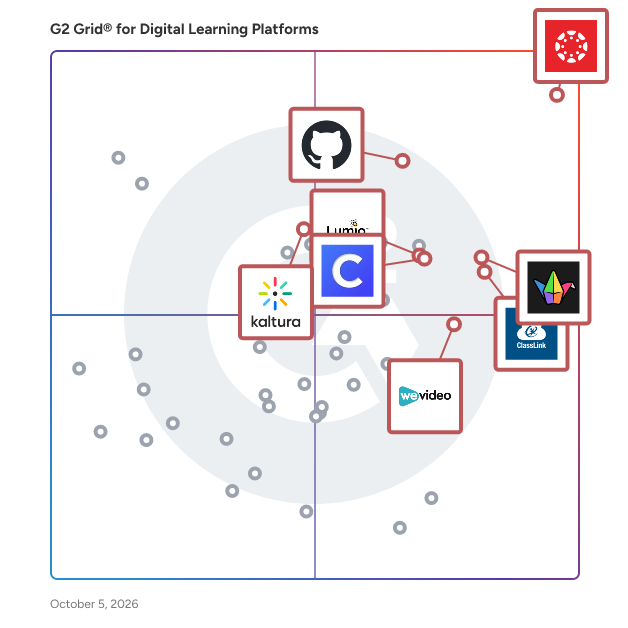
  # Best Enterprise Digital Learning Platforms

  *By [Emma Stein](https://research.g2.com/insights/author/emma-stein)*

   Products classified in the overall Digital Learning Platforms category are similar in many regards and help companies of all sizes solve their business problems. However, enterprise business features, pricing, setup, and installation differ from businesses of other sizes, which is why we match buyers to the right Enterprise Business Digital Learning Platforms to fit their needs. Compare product ratings based on reviews from enterprise users or connect with one of G2&#39;s buying advisors to find the right solutions within the Enterprise Business Digital Learning Platforms category.

In addition to qualifying for inclusion in the Digital Learning Platforms category, to qualify for inclusion in the Enterprise Business Digital Learning Platforms category, a product must have at least 10 reviews left by a reviewer from an enterprise business.


## How Many Digital Learning Platforms Products Does G2 Track?
**Total Products under this Category:** 181

### Category Stats (Jun 2026)
- **Average Rating**: 4.43/5 The average rating of products in this category, based on all submitted ratings
- **New Reviews This Quarter**: 44
- **Buyer Segments**: Small-Business 48% │ Mid-Market 35% │ Enterprise 17% Represents the distribution of reviewers across all products in this category.
- **Top Trending Product**: GitHub Inc. (+0.035) - Among all products in this category, GitHub Inc. recorded the largest rating increase compared to last month
*Last updated: June 01, 2026*

  
## How Does G2 Rank Digital Learning Platforms Products?

**Why You Can Trust G2's Software Rankings:**

- 30 Analysts and Data Experts
- 4,500+ Authentic Reviews
- 181+ Products
- Unbiased Rankings

G2's software rankings are built on verified user reviews, rigorous moderation, and a consistent research methodology maintained by a team of analysts and data experts. Each product is measured using the same transparent criteria, with no paid placement or vendor influence. While reviews reflect real user experiences, which can be subjective, they offer valuable insight into how software performs in the hands of professionals. Together, these inputs power the G2 Score, a standardized way to compare tools within every category.


---

**Sponsored**

### 360Learning

360Learning is the AI-powered learning platform that combines LMS and LXP capabilities to drive onboarding, employee development, and customer training at scale. L&amp;D teams—from solo practitioners to global enterprises—use 360Learning to turn internal expertise into collaborative, skills-based learning for employees, customers, and partners. 360Learning’s collaborative learning approach, combined with deep integrations with systems like SAP and Workday, empowers organizations to upskill at scale through expert-led communities of practice around key topics, roles, and more. Over 2,500 companies including Safran, Cognizant, Bally’s Corporation, Duolingo, and Smile Brands, trust 360Learning to power learning at work. Since 2013, the company has raised $240 million and built a global team across North America and Europe. 360Learning pioneered collaborative learning, launched the first AI certification for L&amp;D, and founded the L&amp;D Collective to connect learning leaders worldwide.


[Visit website](https://www.g2.com/external_clickthroughs/record?secure%5Bad_program%5D=ppc&amp;secure%5Bad_slot%5D=category_product_list&amp;secure%5Bcategory_id%5D=2334&amp;secure%5Bdisplayable_resource_id%5D=565&amp;secure%5Bdisplayable_resource_type%5D=Category&amp;secure%5Bmedium%5D=sponsored&amp;secure%5Bplacement_reason%5D=neighbor_category&amp;secure%5Bplacement_resource_ids%5D%5B%5D=1197&amp;secure%5Bprioritized%5D=false&amp;secure%5Bproduct_id%5D=57927&amp;secure%5Bresource_id%5D=2334&amp;secure%5Bresource_type%5D=Category&amp;secure%5Bsource_type%5D=category_page&amp;secure%5Bsource_url%5D=https%3A%2F%2Fwww.g2.com%2Fcategories%2Fdigital-learning-platforms%3Fsegment%3Denterprise&amp;secure%5Btoken%5D=4b2910606997adc8eb8eb03c97c4cf65c08570c0cae686cfdb9fdc404b0d49cb&amp;secure%5Burl%5D=https%3A%2F%2Fwww.360learning.com%2F%3Futm_medium%3Ddirectory%26utm_source%3Dg2%26utm_campaign%3DUS_UK_G2_PPC%26utm_content%3DG2_Clicks_PPC%26utm_term%3DG2_Clicks_PPC&amp;secure%5Burl_type%5D=custom_url)

---

  ## What Are the Top-Rated Digital Learning Platforms Products in 2026?
### 1. [Canvas LMS](https://www.g2.com/products/canvas-lms/reviews)
  Canvas by Instructure is a versatile, cloud-based learning management system (LMS) designed to transform online learning across every stage of education. Since its launch in 2011, Canvas has become the foundational hub for digital classrooms, empowering institutions to deliver high-quality instruction from K-12 to Corporate Training. Trusted by millions worldwide, Canvas remains the #1 educational software and the core of the Instructure ecosystem. Comprehensive Instructor Tools for Every Environment Canvas is built with flexibility at its core, allowing organizations to tailor the platform to their unique goals. Whether you are managing complex curricula in Higher Education or streamlining Primary/Secondary Education (K-12), our robust instructor tools ensure that every learning experience is impactful and learner-centered. From educational initiatives to professional development, Canvas adapts to your mission by providing a seamless interface to: -Create and manage online courses and high-quality learning materials. -Deliver assignments, quizzes, and assessments that meet diverse learning standards. -Enable collaboration through integrated discussions and messaging to boost student engagement. -Track student progress and learning outcomes through real-time data. -Integrate with third-party education tools, with over 900+ partners to choose from. Empowering Success Through Virtual Learning The platform provides a scalable, secure environment for virtual learning that goes beyond the traditional classroom. By combining course management with advanced assessments and grading features, Canvas reduces administrative friction and allows educators to focus on what matters most: student success. Key Features &amp; Benefits Intuitive Design: An easy-to-use interface reduces overhead and ensures learners stay focused on their goals. Mobile Accessibility: The top-rated Canvas mobile app keeps learners connected, even offline. Advanced Analytics: Gain actionable insights to monitor student engagement and improve institutional outcomes. Scalable Ecosystem: With 500+ third-party integrations, Canvas connects with your existing tech stack to build a truly dynamic learning environment. Industries We Serve Canvas by Instructure is the trusted partner for organizations aiming to unlock the full potential of their learners across: -Higher Education -Primary/Secondary Education (K-12) -Corporate Training


  **Average Rating:** 4.5/5.0
  **Total Reviews:** 1,732
**How Do G2 Users Rate Canvas LMS?**

- **Ease of Use:** 8.5/10 (Category avg: 8.7/10)
- **Integrations:** 9.0/10 (Category avg: 7.8/10)
- **Adaptive Learning:** 8.3/10 (Category avg: 7.8/10)
- **Assessments:** 8.8/10 (Category avg: 8.5/10)

**Who Is the Company Behind Canvas LMS?**

- **Seller:** [Instructure](https://www.g2.com/sellers/instructure)
- **Company Website:** https://www.instructure.com
- **Year Founded:** 2008
- **HQ Location:** Salt Lake City, Utah
- **Twitter:** @Instructure (12,602 Twitter followers)
- **LinkedIn® Page:** https://www.linkedin.com/company/1410999/ (2,172 employees on LinkedIn®)

**Who Uses This Product?**
  - **Who Uses This:** Teacher, Student
  - **Top Industries:** Higher Education, Education Management
  - **Company Size:** 45% Mid-Market, 42% Enterprise


#### What Are Canvas LMS's Pros and Cons?

**Pros:**

- Ease of Use (119 reviews)
- User-Friendly (67 reviews)
- Intuitive Experience (63 reviews)
- Feature Diversity (44 reviews)
- Intuitive Interface (34 reviews)

**Cons:**

- Limited Features (52 reviews)
- Lack of Intuitiveness (31 reviews)
- Poor Support (29 reviews)
- Limited Customization (28 reviews)
- Navigation Issues (26 reviews)

### 2. [Lumio](https://www.g2.com/products/smart-technologies-lumio/reviews)
  Lumio is a web-based instructional platform that offers more ways to effortlessly make learning fun and engaging on student devices. Teachers can start from scratch, or import existing content like PDFs, Google Slides, PowerPoints, and Canva designs and transform them into dynamic, engaging learning experiences on any device. Within Lumio, they can mix and match file types and add interactive elements like games, collaborative whiteboards, handouts, and assessments, all from a single place. Teachers can even share content with colleagues through shared libraries and co-edit lessons in real-time to leverage one another’s classroom experiences. Tools like instructional audio, activity dashboards, and the ability to offer real-time feedback make Lumio a one-stop tool for teachers. It allows them to personalize learning, enable student creation, and gain insight into learning while providing engaging, active lessons. Lumio inspires and supports curriculum with EdTech partners teachers already know and trust, like Desmos, PhET, Epic!, Tynker, and more. All while integrating with common LMS platforms Canvas and Schoology. Not only does Lumio offer more ways to engage students, it’s also specifically designed to improve outcomes – it’s not just fun, it works! Lumio is developed and updated based on an extensive logic model, ensuring that product improvements lead to desired learning outcomes. With the Research-Based Design Certification from Digital Promise, educators and administrators can feel confident in the benefits of using Lumio. With three available plan options (Free, Standard, and Spark), there’s a Lumio plan, and price, that’s right for everyone. Note: Lumio was formerly known as SMART Learning Suite Online (SLSO)


  **Average Rating:** 4.8/5.0
  **Total Reviews:** 165
**How Do G2 Users Rate Lumio?**

- **Ease of Use:** 9.5/10 (Category avg: 8.7/10)
- **Integrations:** 8.5/10 (Category avg: 7.8/10)
- **Adaptive Learning:** 9.2/10 (Category avg: 7.8/10)
- **Assessments:** 9.0/10 (Category avg: 8.5/10)

**Who Is the Company Behind Lumio?**

- **Seller:** [https://www.smarttech.com/](https://www.g2.com/sellers/https-www-smarttech-com)
- **Year Founded:** 1987
- **HQ Location:** Calgary, CA
- **Twitter:** @LumioSocial (3,954 Twitter followers)
- **LinkedIn® Page:** https://www.linkedin.com/company/smart-technologies/ (603 employees on LinkedIn®)

**Who Uses This Product?**
  - **Who Uses This:** Teacher, Instructional Technology Specialist
  - **Top Industries:** Primary/Secondary Education, Education Management
  - **Company Size:** 45% Mid-Market, 28% Enterprise


#### What Are Lumio's Pros and Cons?

**Pros:**

- Interactive Lessons (5 reviews)
- Student Engagement (5 reviews)
- Customization (4 reviews)
- Ease of Use (4 reviews)
- Engagement (4 reviews)

**Cons:**

- Expensive (1 reviews)
- Extra Costs (1 reviews)
- Integration Issues (1 reviews)
- Software Updates (1 reviews)
- Subscription Cost (1 reviews)

### 3. [ClassLink](https://www.g2.com/products/classlink/reviews)
  ClassLink is a leading provider of cloud-based education products that connect educators and students with their classroom, curriculum, and each other in richer, more powerful ways. As leading advocates for open data standards, we offer instant access to apps and files with single sign-on, streamline class rostering, automate account provisioning, and provide actionable analytics. ClassLink empowers 14 million students and staff in over 1,800 school systems.


  **Average Rating:** 4.7/5.0
  **Total Reviews:** 57
**How Do G2 Users Rate ClassLink?**

- **Ease of Use:** 9.5/10 (Category avg: 8.7/10)
- **Integrations:** 8.1/10 (Category avg: 7.8/10)
- **Adaptive Learning:** 4.3/10 (Category avg: 7.8/10)
- **Assessments:** 4.2/10 (Category avg: 8.5/10)

**Who Is the Company Behind ClassLink?**

- **Seller:** [ClassLink](https://www.g2.com/sellers/classlink)
- **Year Founded:** 1998
- **HQ Location:** Clifton, NJ
- **Twitter:** @ClassLink (3,351 Twitter followers)
- **LinkedIn® Page:** https://www.linkedin.com/company/classlink/ (294 employees on LinkedIn®)

**Who Uses This Product?**
  - **Who Uses This:** Teacher
  - **Top Industries:** Primary/Secondary Education, Education Management
  - **Company Size:** 57% Mid-Market, 37% Enterprise


#### What Are ClassLink's Pros and Cons?

**Pros:**

- Ease of Use (22 reviews)
- Customer Support (20 reviews)
- Easy Setup (20 reviews)
- Setup Ease (14 reviews)
- Efficiency (13 reviews)

**Cons:**

- Difficulty (3 reviews)
- Integration Issues (3 reviews)
- Access Issues (2 reviews)
- Access Restrictions (2 reviews)
- Complex Usability (2 reviews)

### 4. [GitHub Inc.](https://www.g2.com/products/github-inc/reviews)
  GitHub Education is a comprehensive program designed to equip students, educators, and educational institutions with the tools and resources necessary to enhance coding education and bridge the gap to professional tech careers. By providing free access to industry-standard development tools and fostering a collaborative learning environment, GitHub Education empowers the next generation of developers worldwide. Key Features and Functionality: - GitHub Student Developer Pack: Offers students free access to over 80 premium developer tools and services, including GitHub Pro, GitHub Copilot Pro, and GitHub Codespaces. - GitHub Classroom: Enables educators to create, distribute, and manage assignments seamlessly, with features like automated grading and real-time feedback. - Campus Experts Program: Trains students to build and lead technology communities on their campuses, providing leadership development and community-building skills. - GitHub Enterprise for Schools: Provides educational institutions with free access to GitHub Enterprise, facilitating the integration of GitHub into their curriculum and administrative workflows. Primary Value and Solutions: GitHub Education addresses the challenge of providing students and educators with real-world development experience by offering free access to professional tools and fostering a collaborative learning environment. For students, it offers hands-on experience with industry-standard tools, enhancing their skills and employability. Educators benefit from streamlined classroom management and access to a global community of peers, enriching their teaching methods. Educational institutions can integrate GitHub&#39;s platform into their curriculum, preparing students for future careers in technology.


  **Average Rating:** 4.7/5.0
  **Total Reviews:** 56
**How Do G2 Users Rate GitHub Inc.?**

- **Ease of Use:** 9.0/10 (Category avg: 8.7/10)
- **Integrations:** 9.2/10 (Category avg: 7.8/10)
- **Adaptive Learning:** 8.4/10 (Category avg: 7.8/10)
- **Assessments:** 8.2/10 (Category avg: 8.5/10)

**Who Is the Company Behind GitHub Inc.?**

- **Seller:** [GitHub](https://www.g2.com/sellers/github)
- **Year Founded:** 2008
- **HQ Location:** San Francisco, CA
- **Twitter:** @github (2,670,109 Twitter followers)
- **LinkedIn® Page:** https://www.linkedin.com/company/1418841/ (6,106 employees on LinkedIn®)

**Who Uses This Product?**
  - **Top Industries:** Computer Software, Information Technology and Services
  - **Company Size:** 60% Small-Business, 21% Enterprise


#### What Are GitHub Inc.'s Pros and Cons?

**Pros:**

- Ease of Use (6 reviews)
- Collaboration (5 reviews)
- Features (4 reviews)
- App Integration (3 reviews)
- Integrations (3 reviews)

**Cons:**

- Expensive (3 reviews)
- Complex Requirements (2 reviews)
- Difficult Usability (2 reviews)
- Slow Performance (2 reviews)
- Steep Learning Curve (2 reviews)

### 5. [Clever](https://www.g2.com/products/clever-portal-clever/reviews)
  Clever was born of co-founder Dan Carroll’s frustration as a school tech director in Denver. His plans to use technology to save teachers time and personalize learning were stymied by countless CSV files and forgotten passwords. Dan recalls, “I wanted to be an innovator, but I got stuck being a human API.” Software has the potential to empower teachers and create new ways to learn. But one thing must happen first. Everyone must be able to log in—quickly and securely. To solve Dan’s problem, we built a single sign-on portal that now helps 95,000 of U.S. K–12 schools spend more time learning and less time logging in. Dan and all of us at Clever believe that technology is a powerful lever that can make education more equitable and engaging. Since the beginning, we’ve seen that when great teachers are supported by great technology, it leads to incredible learning outcomes. More than 95,000 of U.S. K–12 schools use Clever, including 97 of the largest 100 districts. That’s 60% of US students logging in with Clever monthly! We are proud to work with the education community to bring a lifetime of opportunity within reach of every student.


  **Average Rating:** 4.5/5.0
  **Total Reviews:** 44
**How Do G2 Users Rate Clever?**

- **Ease of Use:** 9.2/10 (Category avg: 8.7/10)
- **Integrations:** 9.9/10 (Category avg: 7.8/10)
- **Adaptive Learning:** 8.8/10 (Category avg: 7.8/10)
- **Assessments:** 9.0/10 (Category avg: 8.5/10)

**Who Is the Company Behind Clever?**

- **Seller:** [Clever Portal](https://www.g2.com/sellers/clever-portal)
- **Year Founded:** 2012
- **HQ Location:** San Francisco, California
- **Twitter:** @clever (11,980 Twitter followers)
- **LinkedIn® Page:** https://www.linkedin.com/company/2705784/ (359 employees on LinkedIn®)

**Who Uses This Product?**
  - **Who Uses This:** Teacher
  - **Top Industries:** Primary/Secondary Education, Education Management
  - **Company Size:** 52% Mid-Market, 39% Enterprise


#### What Are Clever's Pros and Cons?

**Pros:**

- App Integration (1 reviews)
- Comprehensive Solutions (1 reviews)
- Ease of Use (1 reviews)
- Easy Integrations (1 reviews)
- Easy Setup (1 reviews)

**Cons:**

- Integration Issues (1 reviews)
- Poor Customer Support (1 reviews)
- Syncing Issues (1 reviews)
- Unstable System (1 reviews)

### 6. [Padlet](https://www.g2.com/products/padlet/reviews)
  Dostoevsky said that beauty will save the world. Padlet offers beautiful boards and canvases for visual thinkers and learners. Use boards to collect, organize, and present anything. Use sandboxes for whiteboarding, lessons, and activities. Over 40 million people every month actively use Padlet around the world. Here are some of the ways they use it: -Collaborate on files with clients -Store instructional videos -Share marketing assets -Manage real-estate listings on a map -Create interactive lessons -Design collaborative worksheets -Make slideshows -Build meeting agendas -Solicit feedback -Brainstorm ideas -And more Dostoevsky would have loved Padlet.


  **Average Rating:** 4.9/5.0
  **Total Reviews:** 336
**How Do G2 Users Rate Padlet?**

- **Ease of Use:** 9.6/10 (Category avg: 8.7/10)
- **Integrations:** 8.3/10 (Category avg: 7.8/10)
- **Adaptive Learning:** 8.4/10 (Category avg: 7.8/10)
- **Assessments:** 7.8/10 (Category avg: 8.5/10)

**Who Is the Company Behind Padlet?**

- **Seller:** [Padlet](https://www.g2.com/sellers/padlet)
- **Year Founded:** 2012
- **HQ Location:** San Francisco, US
- **Twitter:** @padlet (73,356 Twitter followers)
- **LinkedIn® Page:** https://www.linkedin.com/company/padlet/ (78 employees on LinkedIn®)

**Who Uses This Product?**
  - **Who Uses This:** Teacher
  - **Top Industries:** Education Management, Primary/Secondary Education
  - **Company Size:** 49% Small-Business, 43% Mid-Market


#### What Are Padlet's Pros and Cons?

**Pros:**

- Ease of Use (24 reviews)
- Features (11 reviews)
- Simple (10 reviews)
- Helpful (8 reviews)
- Sharing (8 reviews)

**Cons:**

- Access Limitations (8 reviews)
- Missing Features (5 reviews)
- Lack of Features (4 reviews)
- Limited Features (4 reviews)
- Expensive (3 reviews)

### 7. [Kaltura Video Cloud](https://www.g2.com/products/kaltura-video-cloud/reviews)
  Kaltura provides both live and on-demand video solutions that boost engagement, maximize ROI, and foster closer connections between brands and audiences. From virtual and hybrid events to webinars and video hubs, Kaltura’s AI-enhanced off-the-shelf products offer unparalleled flexibility, modularity, and ease of integration. Our products empower any size business to create personalized digital experiences and end-to-end video workflows that are enterprise-grade, immensely scalable, and 100% on-brand.


  **Average Rating:** 4.3/5.0
  **Total Reviews:** 116
**How Do G2 Users Rate Kaltura Video Cloud?**

- **Ease of Use:** 8.5/10 (Category avg: 8.7/10)
- **Integrations:** 8.9/10 (Category avg: 7.8/10)
- **Adaptive Learning:** 7.7/10 (Category avg: 7.8/10)
- **Assessments:** 8.1/10 (Category avg: 8.5/10)

**Who Is the Company Behind Kaltura Video Cloud?**

- **Seller:** [Kaltura](https://www.g2.com/sellers/kaltura)
- **Company Website:** https://corp.kaltura.com/
- **Year Founded:** 2006
- **HQ Location:** New York, NY
- **Twitter:** @Kaltura (8,965 Twitter followers)
- **LinkedIn® Page:** https://www.linkedin.com/company/92413/ (719 employees on LinkedIn®)

**Who Uses This Product?**
  - **Top Industries:** Higher Education, Education Management
  - **Company Size:** 43% Mid-Market, 32% Enterprise


#### What Are Kaltura Video Cloud's Pros and Cons?

**Pros:**

- Ease of Use (13 reviews)
- Features (13 reviews)
- Integrations (9 reviews)
- Quality (9 reviews)
- Reliability (9 reviews)

**Cons:**

- Improvement Needed (5 reviews)
- Difficult Setup (4 reviews)
- Integration Issues (4 reviews)
- Technical Issues (4 reviews)
- Complexity (3 reviews)

### 8. [Khan Academy](https://www.g2.com/products/khan-academy/reviews)
  Khan Academy offers practice exercises, instructional videos, and a personalized learning dashboard that empower learners to study at their own pace in and outside of the classroom.


  **Average Rating:** 4.5/5.0
  **Total Reviews:** 177
**How Do G2 Users Rate Khan Academy?**

- **Ease of Use:** 9.1/10 (Category avg: 8.7/10)
- **Integrations:** 6.7/10 (Category avg: 7.8/10)
- **Adaptive Learning:** 7.1/10 (Category avg: 7.8/10)
- **Assessments:** 8.8/10 (Category avg: 8.5/10)

**Who Is the Company Behind Khan Academy?**

- **Seller:** [Khan Academy](https://www.g2.com/sellers/khan-academy)
- **HQ Location:** Palo Alto, CA
- **Twitter:** @khanacademy (739,228 Twitter followers)
- **LinkedIn® Page:** https://www.linkedin.com/company/482962/ (2,212 employees on LinkedIn®)

**Who Uses This Product?**
  - **Who Uses This:** Teacher
  - **Top Industries:** Higher Education, Education Management
  - **Company Size:** 40% Small-Business, 35% Enterprise


### 9. [EdPuzzle](https://www.g2.com/products/edpuzzle/reviews)
  Edpuzzle is an easy-to-use platform allowing you to engage every student, one video at a time.


  **Average Rating:** 4.6/5.0
  **Total Reviews:** 37
**How Do G2 Users Rate EdPuzzle?**

- **Ease of Use:** 8.9/10 (Category avg: 8.7/10)
- **Integrations:** 8.1/10 (Category avg: 7.8/10)
- **Adaptive Learning:** 5.3/10 (Category avg: 7.8/10)
- **Assessments:** 8.6/10 (Category avg: 8.5/10)

**Who Is the Company Behind EdPuzzle?**

- **Seller:** [EdPuzzle](https://www.g2.com/sellers/edpuzzle)
- **Year Founded:** 2013
- **HQ Location:** San Francisco, California
- **Twitter:** @edpuzzle (67,837 Twitter followers)
- **LinkedIn® Page:** https://www.linkedin.com/company/3639457/ (275 employees on LinkedIn®)

**Who Uses This Product?**
  - **Who Uses This:** Teacher
  - **Top Industries:** Primary/Secondary Education
  - **Company Size:** 47% Mid-Market, 26% Enterprise


#### What Are EdPuzzle's Pros and Cons?

**Pros:**

- Ease of Use (1 reviews)
- Education Improvement (1 reviews)
- Learning Ease (1 reviews)
- Student Engagement (1 reviews)
- Video Content (1 reviews)

**Cons:**

- Difficult Usability (1 reviews)

### 10. [McGraw-Hill Connect](https://www.g2.com/products/mcgraw-hill-connect/reviews)
  McGraw-Hill Education Connect is a robust toolkit of learning resources designed with the flexibility instructors need, to unlock the potential of a diverse student population. Connect provides opportunities for both formative and summative assessment. Our adaptive technology provides students with a safe place to make mistakes encouraging deliberate practice and enabling them to move one step closer to mastery. AUTO-GRADING Your valuable time and expertise should be devoted to teaching—not grading. Connect will automatically grade assignments and quizzes, providing you with easy-to-read reports so you know which students need more guidance. CONSOLIDATED RESOURCES Who has the time to sift through multiple files, folders and click through various websites? Not you. Everything you need to be an effective educator is at your fingertips; consolidate all your course materials with Connect. TAGGED LEARNING OBJECTIVES Focus on what’s important: learning outcomes. Within Connect, you can create assignments and run reports to quickly assess whether students are learning crucial course content. SMARTBOOK SmartBook is a digital version of your course textbook. It contains the same content within the textbook, but unlike a typical eBook, SmartBook actively tailors that content to your individual needs as a student. SmartBook can be accessed online through your laptop. And, many SmartBooks are available on tablet, too!


  **Average Rating:** 3.6/5.0
  **Total Reviews:** 167
**How Do G2 Users Rate McGraw-Hill Connect?**

- **Ease of Use:** 7.3/10 (Category avg: 8.7/10)
- **Integrations:** 7.9/10 (Category avg: 7.8/10)
- **Adaptive Learning:** 7.6/10 (Category avg: 7.8/10)
- **Assessments:** 8.2/10 (Category avg: 8.5/10)

**Who Is the Company Behind McGraw-Hill Connect?**

- **Seller:** [McGraw-Hill Education](https://www.g2.com/sellers/mcgraw-hill-education)
- **HQ Location:** New York, NY
- **Twitter:** @MHEducation (58,484 Twitter followers)
- **LinkedIn® Page:** https://www.linkedin.com/company/2933/ (8,097 employees on LinkedIn®)

**Who Uses This Product?**
  - **Who Uses This:** Teacher, Associate Professor
  - **Top Industries:** Higher Education, Education Management
  - **Company Size:** 42% Enterprise, 36% Mid-Market


### 11. [Pear Deck](https://www.g2.com/products/pear-deck/reviews)
  Create beautiful interactive lessons, presentations, and assessments to engage every student.


  **Average Rating:** 4.4/5.0
  **Total Reviews:** 42
**How Do G2 Users Rate Pear Deck?**

- **Ease of Use:** 8.9/10 (Category avg: 8.7/10)
- **Integrations:** 7.3/10 (Category avg: 7.8/10)
- **Adaptive Learning:** 7.4/10 (Category avg: 7.8/10)
- **Assessments:** 8.7/10 (Category avg: 8.5/10)

**Who Is the Company Behind Pear Deck?**

- **Seller:** [GoGuardian](https://www.g2.com/sellers/goguardian)
- **Year Founded:** 2014
- **HQ Location:** El Segundo, California
- **Twitter:** @goguardian (8,727 Twitter followers)
- **LinkedIn® Page:** https://www.linkedin.com/company/3831755/ (545 employees on LinkedIn®)

**Who Uses This Product?**
  - **Who Uses This:** Teacher
  - **Top Industries:** Primary/Secondary Education, Education Management
  - **Company Size:** 43% Mid-Market, 38% Enterprise


#### What Are Pear Deck's Pros and Cons?

**Pros:**

- Engagement (1 reviews)
- Interactive Engagement (1 reviews)
- Monitoring (1 reviews)
- Student Engagement (1 reviews)

**Cons:**

- Expensive (1 reviews)

### 12. [Yellowdig](https://www.g2.com/products/yellowdig/reviews)
  Yellowdig is an education company on a mission to create a connected learning experience for students around the world. Yellowdig’s Engage digital platform is thoughtfully designed to create vibrant learning communities from pre-enrollment to beyond graduation by combining the power of gameful learning principles with a social media interface. Yellowdig is not a bolt on or a tool, but a learning platform that powers deeper learning and high impact instruction while saving faculty valuable time. It does this by moving learners from being receivers of knowledge to finders and creators of knowledge. This shift leads to a richer level of student and faculty engagement, better academic outcomes, and improved student success outcomes.


  **Average Rating:** 5.0/5.0
  **Total Reviews:** 34
**How Do G2 Users Rate Yellowdig?**

- **Ease of Use:** 9.6/10 (Category avg: 8.7/10)
- **Integrations:** 9.4/10 (Category avg: 7.8/10)
- **Adaptive Learning:** 9.0/10 (Category avg: 7.8/10)
- **Assessments:** 8.4/10 (Category avg: 8.5/10)

**Who Is the Company Behind Yellowdig?**

- **Seller:** [Yellowdig](https://www.g2.com/sellers/yellowdig)
- **Year Founded:** 2015
- **HQ Location:** Philadelphia, Pennsylvania
- **Twitter:** @Yellowdig (1,458 Twitter followers)
- **LinkedIn® Page:** https://www.linkedin.com/company/yellowdig/ (42 employees on LinkedIn®)

**Who Uses This Product?**
  - **Top Industries:** Higher Education, E-Learning
  - **Company Size:** 47% Enterprise, 32% Mid-Market


### 13. [Nearpod](https://www.g2.com/products/nearpod/reviews)
  Nearpod offers an interactive instructional platform that merges real-time formative assessment and dynamic media for live and self-paced learning experiences inside and outside of the classroom. Nearpod works with any classroom technology, from tablets and smartphones to laptops and Chromebooks. The platform helps engage students with more than 15,000 ready-to-run interactive lessons, videos, and activities created in partnership with leading organizations like Common Sense Education and Smithsonian. In 2019, Nearpod acquired Flocabulary, a learning platform that engages students in academically rigorous K–12 concepts while promoting literacy through hip-hop videos. Together, Nearpod and Flocabulary reach educators in 100 of the largest school districts in the US. In 2018, Nearpod was named EdTech Digest’s Company of the Year.


  **Average Rating:** 4.6/5.0
  **Total Reviews:** 118
**How Do G2 Users Rate Nearpod?**

- **Ease of Use:** 8.6/10 (Category avg: 8.7/10)
- **Integrations:** 8.5/10 (Category avg: 7.8/10)
- **Adaptive Learning:** 7.6/10 (Category avg: 7.8/10)
- **Assessments:** 8.7/10 (Category avg: 8.5/10)

**Who Is the Company Behind Nearpod?**

- **Seller:** [Renaissance Learning](https://www.g2.com/sellers/renaissance-learning)
- **Year Founded:** 1986
- **HQ Location:** Wisconsin Rapids, Wisconsin, United States
- **Twitter:** @RenLearnUS (5,804 Twitter followers)
- **LinkedIn® Page:** https://www.linkedin.com/company/14819/ (2,168 employees on LinkedIn®)

**Who Uses This Product?**
  - **Who Uses This:** Teacher
  - **Top Industries:** Primary/Secondary Education, Education Management
  - **Company Size:** 45% Mid-Market, 29% Small-Business


#### What Are Nearpod's Pros and Cons?

**Pros:**

- Access Control (1 reviews)
- App Integration (1 reviews)
- Assessments (1 reviews)
- Cloud Storage (1 reviews)
- Communication (1 reviews)

**Cons:**

- Complexity Issues (1 reviews)
- Expensive (1 reviews)
- Learning Curve (1 reviews)
- Limited Customization (1 reviews)
- Limited Features (1 reviews)

### 14. [ThinkUp!](https://www.g2.com/products/curriculum-associates-thinkup/reviews)
  ThinkUp! curriculum (Grades 1-8) is a dynamic curriculum built upon a foundation of critical thinking. It was designed to develop students who can process and evaluate information at deeper levels, make informed decisions, solve complex problems, and find reasonable solutions—resulting in standards mastery and improved performance. Digital licensing for ThinkUp! curriculum includes access to i-Ready Teacher Toolbox which includes fillable PDFs for all grade levels and subjects purchased in Texas (Math, RLA, &amp; Science in English + Spanish) and North Carolina (Math &amp; ELA in English). Pair ThinkUp! with i-Ready Assessment Suite for a robust suite of assessments, instructional resources, and reporting that address the rigor of the standards and state testing.


  **Average Rating:** 4.6/5.0
  **Total Reviews:** 191
**How Do G2 Users Rate ThinkUp!?**

- **Ease of Use:** 8.6/10 (Category avg: 8.7/10)
- **Integrations:** 8.9/10 (Category avg: 7.8/10)
- **Adaptive Learning:** 9.2/10 (Category avg: 7.8/10)
- **Assessments:** 8.8/10 (Category avg: 8.5/10)

**Who Is the Company Behind ThinkUp!?**

- **Seller:** [Curriculum Associates](https://www.g2.com/sellers/curriculum-associates)
- **Year Founded:** 1976
- **HQ Location:** North Billerica, MA
- **Twitter:** @CurriculumAssoc (15,115 Twitter followers)
- **LinkedIn® Page:** https://www.linkedin.com/company/curriculum-associates/ (2,532 employees on LinkedIn®)

**Who Uses This Product?**
  - **Who Uses This:** Teacher, Instructional Coach
  - **Top Industries:** Primary/Secondary Education, Education Management
  - **Company Size:** 47% Small-Business, 41% Mid-Market


    ## What Is Digital Learning Platforms?
  [Education Software](https://www.g2.com/categories/education)
  ## What Software Categories Are Similar to Digital Learning Platforms?
    - [Classroom Management Software](https://www.g2.com/categories/classroom-management)
    - [Assessment Software](https://www.g2.com/categories/assessment)
    - [Online Learning Platforms](https://www.g2.com/categories/online-learning-platform)

  
---

## How Do You Choose the Right Digital Learning Platforms?

### What You Should Know About Digital Learning Platforms

### What are Digital Learning Platforms?

As the technology used at schools, colleges, and universities has grown more advanced, teachers are using a new generation of software products designed to get their students to engage with their course concepts in new ways. Instead of reading a print textbook chapter on multiplying fractions, students may use their laptop to complete a lesson that includes video demonstrations, practice problems, and mini assessments to determine their proficiency level and what they should work on next. Digital learning platforms have the potential to be an effective learning tool for students at many levels of education.

**Key Benefits of Digital Learning Platforms**

- Create engaging, multimedia learning experiences for students
- Differentiate instruction automatically based on student ability
- Track student progress on key learning targets

### Why Use Digital Learning Platforms?

**Add engaging experiences to lessons —** Digital learning platforms allow students to explore lesson content in new and interesting ways. Many platforms include lessons with a variety of multimedia elements, including videos, animations, photos, and audio recordings. Lessons may come with interactive elements that require students to complete a task in order to move on. Some offer virtual experiences, like virtual laboratories that let students conduct experiments using computer-generated lab equipment that otherwise would be cost-prohibitive to use. Some products come pre-loaded with these lessons, saving teachers the time it would take to create engaging learning materials from scratch. Providing engaging experiences makes it more likely that students will find the learning enjoyable and memorable.

**Differentiate instruction —** One of the most challenging aspects of teaching is that students are often at different levels of mastery for a given skill. Some digital learning platforms have advanced assessment abilities that enable them to adapt to a lesson dynamically, based on a student’s performance. This adaptive learning technology allows a room of 30 students to each be working on a lesson that is at their level, without the teacher having to manually create and distribute dozens of individualized lessons. As a result, students work on assignments that are just right–not too hard or too easy–and teachers have more freedom to work with individual students who need extra support.

**Track student progress —** A key part of an educator’s job is to evaluate to what extent their students have mastered a course’s objectives. Digital learning platforms monitor the work students do on lessons and give teachers access to reports or visual dashboards showing performance data for each student. Using this information, instructors can identify concepts students are struggling to understand and provide insights into which topics the teacher should consider reteaching. Some platforms allow teachers to create their own assessments while others come with assessments that are pre-made and ready to use.

### Who Uses Digital Learning Platforms?

Generally, digital learning platforms are used by people at educational institutions of all levels, including instructors, tutors, and students.

**K-12 teachers —** A wide range of digital learning platforms are available for [K-12 schools](https://www.g2.com/categories/digital-learning-platforms/f/k-12) and teachers who are heavy users of the software. Teachers use these tools to select lesson materials for students, send assignments, and review data from student work.

**College professors —** Some digital learning platforms offer content that is appropriate for [higher education](https://www.g2.com/categories/digital-learning-platforms/f/higher-education) students and can be used by college professors in their courses. Digital content is available for a variety of college and university subjects, including math, social science, economics, science, business, and engineering.

**Students —** After instructors assign work on digital learning platforms, students use the software to complete the lesson. Depending on the platform, students could be asked to do a range of tasks. A math program may have the student watch a video on a strategy for solving a certain kind of problem, then instruct the student to do a practice problem. Adaptive platforms will adjust the lesson on the fly, based on the level of mastery the student demonstrates.

**Tutors —** For helping students who need extra support, tutors use digital learning platforms to give their clients extra practice on skills that they have not yet mastered. Many platforms offer a library of activities for tutors to use with their students or assign to students as homework.

### Kinds of Digital Learning Platforms

Some significant differentiators for digital learning platforms are whether they include ready-to-use lessons and adaptive learning functionality.

**Pre-made content vs. teacher-created content —** While some platforms come with a library of ready-to-use lessons, others require teachers to create their own lessons by uploading materials. Some platforms offer both. A teacher may choose to use a platform with pre-made content if they are looking for resources with which to build a new curriculum or add substantial resources to an existing curriculum. Instructors who would rather use their existing materials to engage students in a new way may not need that ready-to-use content and may opt for a platform that allows them to create courses.

**Adaptive vs. non-adaptive platforms —** Advancements in artificial intelligence have enabled some platforms to make use of adaptive learning, in which the software dynamically adjusts the lesson based on student performance to create a personalized learning experience. Other platforms may have a student take a more traditional pre-assessment to determine which learning path the student should follow. Still others might leave it up to the teacher or student to manually select which lesson to complete.

### Digital Learning Platforms Features

**File imports —** For teachers who are creating their own lessons using digital learning platforms, the ability to upload files allow them to add texts or multimedia elements to their assignments. Example file types include PDFs, JPEGs, presentation files, and word processor documents.

**Multimedia content —** To make lessons more engaging for students, platforms often support a variety of multimedia content, including video, audio, and animation.

**Lesson library –** Some platforms come with pre-made lessons that teachers can select from. How extensive the selection is varies by platform, with some offering thousands of lessons. The platform may have free pre-made lessons or the user may need to purchase the lessons. Many products also offer teachers the ability to customize those ready-to-use lessons to fit their needs.

**Administrative dashboards –** Teachers can use visual dashboards to see which activities students are completing and how they are performing on assessments. Many platforms offer the ability to export this data into reports.

**Quizzes and assessments –** Digital learning platforms give instructors the ability to assign assessments to students to gauge their mastery of the materials. The tool may come with preloaded assessments or it could allow teachers to make their own assessments.

**Student device control –** In some platforms, teachers have the ability to control the content on student devices. Teachers may be able to synchronize a lesson across multiple student devices, or lock a web browser to control the browsing activity of students who are taking a test.

**Polls and audience feedback tools –** For an instructor who wants to know what their students are thinking in the moment, some digital learning platforms give users the ability to set up a live poll that students can respond to. The instant feedback allows instructors to adjust the lesson or start a discussion about the results. Some platforms allow instructors to view other kinds of audience feedback, like seeing text responses that students have typed in response to a question.

**Integrations –** Digital learning platforms often integrate with a variety of other education software, including learning management systems (LMS) and student information systems (SIS), to allow instructors to easily transfer student data from one system to another or share information about assignments with students.

**Adaptive learning –** Using artificial intelligence, some platforms incorporate adaptive learning technology that enables the software to continuously assess a student’s performance and change the lesson on the fly, depending on the student’s ability to demonstrate mastery of the subject. Adaptive learning makes it possible for each student to have a personalized learning experience tailored to their specific needs.

### Trends Related to Digital Learning Platforms

**Gamification —** Making learning fun has always been an important part of teaching and software makers are acknowledging the importance of fun in education by building gamified elements into their platforms. In some cases, students can earn badges or tokens for completing lessons. Leaderboards create friendly competition between students over who can acquire the most points. Students can monitor their own progress and set achievement goals. Animated characters add levity to academic topics. When implemented well, these elements can help keep students engaged and energized while they are working on their lessons.

**Adaptive learning —** Technology that enables software to personalize a student’s learning experience has emerged as a leading force in the latest generation of education software. These adaptive learning platforms analyze student performance data in real time, allowing the software to dynamically adjust the difficulty of the lesson to meet that particular student’s needs. Students are continuously assessed to determine which content or skills should come next. Beyond an individual lesson, adaptive learning technology can change the sequence of lessons so each student gets the instruction they need at the right time. Educators hope that this technology will eventually help close the achievement gap, though more research on the effectiveness of adaptive learning programs will be needed as the technology becomes more mainstream.

### Potential Issues with Digital Learning Platforms

**Lack of pre-loaded content —** Some platforms come with large libraries of pre-made educational content that teachers can assign to their students while other products simply offer a platform that teachers can use to create lessons from their own materials. Even if a platform has pre-made content, users might need to buy those lessons before using them. Before purchasing a platform, users should determine whether they need the product to come with pre-made lesson content and should investigate whether the content the platform offers will meet the instructor’s needs.

**Alignment with the instructor’s curriculum —** Digital learning platforms vary according to the subjects students can learn on the platform. A platform might focus on a single subject, like math or it might include lessons on many different subjects, including history, science, literature, and computer science. The platforms also vary based on the student groups they cater to. Some products are intended to be used by grade-school teachers while others can be used by college students. Buyers should explore a platform’s subject offerings to understand whether it fits naturally into their existing curriculum.

### Software and Services Related to Digital Learning Platforms

[**Learning management systems (LMS)**](https://www.g2.com/categories/learning-management-system-lms) **—** Integrations with LMS give users of digital learning platforms a streamlined way of sharing assignments with their students. Instructors can also use LMS integrations to track student progress on assignments.

[**Student information systems (SIS)**](https://www.g2.com/categories/student-information-systems-sis) **—** An institution’s SIS harbors vast stores of student data, including contact information, demographic data, and their academic history. Integrations between these systems and digital learning platforms enable instructors to seamlessly transfer student rosters into digital learning platforms. They can also export student performance data from a digital learning platform assignment directly into an SIS gradebook.

[**Document creation software**](https://www.g2.com/categories/document-creation) **—** Digital learning platforms that enable instructors to create their own lessons often allow the user to upload files from document creation software.


