Best Construction Project Management Software for Small Business - Page 3

How Many Construction Project Management Software Products Does G2 Track?

Total Products under this Category: 896

Category Stats (Sep 2026)

  • Average Rating: 4.42/5 (↑0.01 vs Aug 2026) The average rating of products in this category, based on all submitted ratings
  • Top Trending Product: O3 Solutions (+1.83%) - Among all products in this category, O3 Solutions recorded the largest rating increase compared to last month

Last updated: September 30, 2026

How Does G2 Rank Construction Project Management Software Products?

Why You Can Trust G2's Software Rankings:

  • 30 Analysts and Data Experts
  • 19,700+ Authentic Reviews
  • 896+ Products
  • Unbiased Rankings

G2's software rankings are built on verified user reviews, rigorous moderation, and a consistent research methodology maintained by a team of analysts and data experts. Each product is measured using the same transparent criteria, with no paid placement or vendor influence. While reviews reflect real user experiences, which can be subjective, they offer valuable insight into how software performs in the hands of professionals. Together, these inputs power the G2 Score, a standardized way to compare tools within every category.

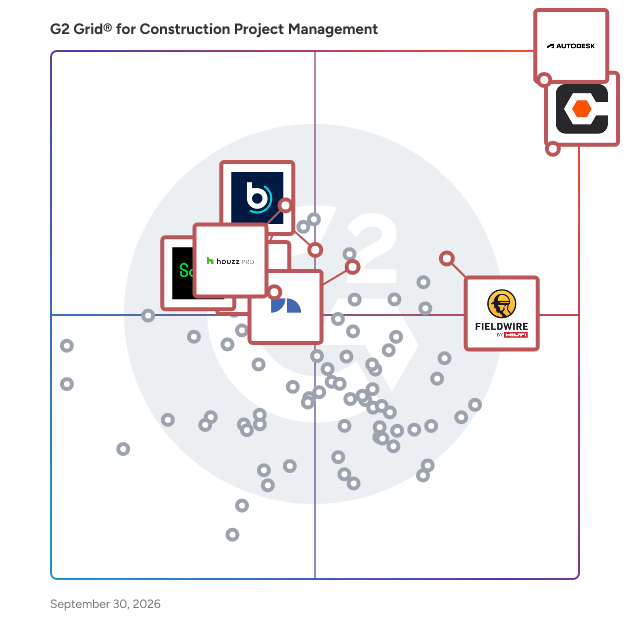
G2 Grid® for Construction Project Management Software

G2 Grid® for Construction Project Management Software plotting products by satisfaction and market presence

Highlighted products: Procore, Autodesk Forma (formerly Autodesk Construction Cloud), Fieldwire by Hilti, Houzz Pro, Buildertrend, JobNimbus, Sage Construction Management (formerly Corecon), and Oracle Primavera.

Underlying data: [Grid® JSON](https://www.g2.com/categories/construction-project-management/grids.json?focus%5B%5D=procore&focus%5B%5D=autodesk-forma-formerly-autodesk-construction-cloud&focus%5B%5D=fieldwire-by-hilti&focus%5B%5D=houzz-pro&focus%5B%5D=buildertrend&focus%5B%5D=jobnimbus&focus%5B%5D=sage-construction-management-formerly-corecon&focus%5B%5D=oracle-primavera&segment=small-business)

Contractor+

Contractor+ is more than just software; it's a comprehensive operating system tailored specifically for home service contractors. At its core, Contractor+ is designed to be the digital backbone of a contracting business, enabling seamless operations and driving growth. Our platform provides an all-encompassing suite of tools that empowers contractors to unify their teams, ensuring everyone is aligned and working efficiently. With Contractor+, impressing clients becomes second nature, thanks to professional and precise estimating capabilities that utilize real-time, localized data for labor, materials, equipment, and assemblies. This ensures that quotes are not only competitive but also accurate, reducing overhead and increasing your margins on every job. But the benefits don't stop there. Our streamlined scheduling and followup reminders ensure that no job or appointment falls through the cracks, while our simplified invoicing system makes billing and payments a breeze. In essence, Contractor+ is more than just another CRM or app for contractors; it's a transformative solution that redefines how contractors operate, save time, and expand their businesses. It's the silent partner every home service contractor needs, offering unparalleled support, insights, and efficiency at every step - at a very fair price that won't break the bank.

Average Rating: 4.6/5.0

Total Reviews: 150

How Do G2 Users Rate Contractor+?

  • Has the product been a good partner in doing business?: 9.3/10 (Category avg: 8.8/10)
  • Construction Workforce Management Tool Integration: 8.0/10 (Category avg: 8.1/10)
  • Workforce Scheduling: 7.9/10 (Category avg: 7.8/10)
  • Information Management: 8.5/10 (Category avg: 8.9/10)

Who Is the Company Behind Contractor+?

  • Seller: Contractor Plus, Inc.
  • Year Founded: 2020
  • HQ Location: Orlando, US
  • Twitter: @cplusapp
    1,840 Twitter followers
  • LinkedIn® Page: linkedin.com
    790 employees on LinkedIn®

Who Uses This Product?

  • Who Uses This: Owner
  • Top Industries: Construction
  • Company Size: 91% Small

What Do G2 Reviewers Say About Contractor+?

AI-generated summary from verified user reviews

Pros
  • Users appreciate the ease of use of Contractor+, praising its seamless integration and intuitive setup process.
  • Users love the easy project tracking and customizable features of Contractor+, enhancing their business efficiency and communication.
  • Users find the easy setup of Contractor+ highly beneficial, streamlining project management from day one.
  • Users love the easy estimating process in Contractor+, streamlining bids, management, and offering great customer support.
  • Users appreciate the hassle-free setup of Contractor+, making invoicing and project management a breeze.
Cons
  • Users find that improvement is needed for data integration and pricing, impacting the overall experience with Contractor+.
  • Users feel the cost issues of Contractor+ are high, particularly regarding upgrades and feature access.
  • Users find the pricing of Contractor+ to be high and hope for improvements in affordability.
  • Users find the learning curve steep for beginners due to the complexity of Contractor+'s many features.
  • Users find the feature limitations of Contractor+ frustrating, especially the lack of Zapier integration and change order processing.

What Are Recent G2 Reviews of Contractor+?

Fonn

Fonn is the user-friendly construction management tool that increases productivity through streamlined collaboration, both in the office, and on site with our easy-to-use mobile app. Plan, track and deliver jobs on time and on budget. Communicate in real time with clients, subcontractors and suppliers to avoid costly re-work errors. Reduce compliance headaches with a clear project audit trail.

Average Rating: 4.6/5.0

Total Reviews: 30

How Do G2 Users Rate Fonn?

  • Has the product been a good partner in doing business?: 8.7/10 (Category avg: 8.8/10)
  • Construction Workforce Management Tool Integration: 7.8/10 (Category avg: 8.1/10)
  • Workforce Scheduling: 8.3/10 (Category avg: 7.8/10)
  • Information Management: 9.3/10 (Category avg: 8.9/10)

Who Is the Company Behind Fonn?

  • Seller: The Access Group
  • Year Founded: 1991
  • HQ Location: Loughborough, Leicestershire
  • Twitter: @theaccessgroup
    4,212 Twitter followers
  • LinkedIn® Page: www.linkedin.com
    7,358 employees on LinkedIn®

Who Uses This Product?

  • Top Industries: Construction
  • Company Size: 88% Small, 12% Medium

What Do G2 Reviewers Say About Fonn?

AI-generated summary from verified user reviews

Pros
  • Users appreciate the ease of use of Fonn, benefiting from automated information generation without needing manual input.
  • Users value the efficiency improvement of Fonn, as it automates information generation with minimal input required.
  • Users appreciate the automated information generation in Fonn, enhancing efficiency and reducing manual input.
  • Users value the automated information generation feature of Fonn, enhancing efficiency and reducing manual input.
  • Users value the up-to-date information feature of Fonn, appreciating its automation that reduces manual input.

What Are Recent G2 Reviews of Fonn?

What Are G2 Users Discussing About Fonn?

GoCanvas

GoCanvas is a mobile-first field operations platform that helps businesses eliminate errors, reduce admin time, and complete jobs faster. Built for teams in the field, GoCanvas replaces paperwork and manual handoffs with easy-to-use mobile forms and flexible digital workflows that connect the field and office in real time. Turn your existing PDFs into smart, mobile-friendly forms using an AI-powered form converter or an intuitive drag-and-drop builder. Streamline inspections, work orders, safety checks, and daily reports by capturing photos and videos, scanning barcodes, logging GPS, and collecting e-signatures - even while offline, with automatic sync when connectivity returns. With thousands of integrations, GoCanvas fits seamlessly into your existing systems so teams always have access to accurate, real-time data. And powerful analytics let you track performance, uncover trends, and make data-informed decisions that drive efficiency. GoCanvas is trusted by thousands of businesses across industries like construction, energy and utilities, transportation, and field services to streamline operations, ensure compliance, and deliver better results—faster.

Average Rating: 4.3/5.0

Total Reviews: 76

How Do G2 Users Rate GoCanvas?

  • Has the product been a good partner in doing business?: 8.8/10 (Category avg: 8.8/10)
  • Construction Workforce Management Tool Integration: 5.0/10 (Category avg: 8.1/10)
  • Workforce Scheduling: 3.3/10 (Category avg: 7.8/10)
  • Information Management: 10.0/10 (Category avg: 8.9/10)

Who Is the Company Behind GoCanvas?

  • Seller: Canvas Solutions
  • Year Founded: 2008
  • HQ Location: Reston, VA
  • Twitter: @GoCanvas
    2,657 Twitter followers
  • LinkedIn® Page: www.linkedin.com
    228 employees on LinkedIn®

Who Uses This Product?

  • Top Industries: Construction, Computer Software
  • Company Size: 44% Medium, 39% Small

What Do G2 Reviewers Say About GoCanvas?

AI-generated summary from verified user reviews

Pros
  • Users appreciate the ease of use of GoCanvas, highlighting its organization and user-friendly design.
  • Users find GoCanvas to be user-friendly, appreciating its organization and ease of use for effective tasks.
  • Users love the customizability of forms in GoCanvas, enhancing their experience and meeting specific needs.
  • Users love the customization of forms in GoCanvas, allowing for tailored solutions that meet their needs.
  • Users enjoy the customization options for forms in GoCanvas, enhancing their data collection flexibility.
Cons
  • Users find the interface outdated, making the scheduling process seem unnecessarily complicated and in need of refinement.
  • Users experience clarity issues with GoCanvas, noting slow responses and images lacking realism.
  • Users find the complexity of scheduling in GoCanvas outdated and not fitting for their needs.
  • Users find the complex setup of GoCanvas to be outdated and unnecessarily complicated for their needs.
  • Users find the complex usability of GoCanvas frustrating, with outdated scheduling complicating their experience unnecessarily.

What Are Recent G2 Reviews of GoCanvas?

AI can help you find the answers. G2 helps you trust them.

Connect G2 to Claude or ChatGPT for answers grounded in G2's trusted reviews, comparisons, and pricing from real user insights.

How it works

ProjectManager

ProjectManager is a project and portfolio management software that offers unparalleled control, in-depth project data and the most comprehensive planning features on the market. With advanced scheduling, automated cost and time tracking, risk analysis and resource management, our platform ensures flawless execution while providing unbeatable insights at every stage. Trusted by thousands worldwide for seamless collaboration, ProjectManager empowers teams to deliver with precision.

Average Rating: 4.4/5.0

Total Reviews: 95

How Do G2 Users Rate ProjectManager?

  • Has the product been a good partner in doing business?: 8.7/10 (Category avg: 8.8/10)
  • Construction Workforce Management Tool Integration: 8.3/10 (Category avg: 8.1/10)
  • Workforce Scheduling: 8.3/10 (Category avg: 7.8/10)
  • Information Management: 8.3/10 (Category avg: 8.9/10)

Who Is the Company Behind ProjectManager?

  • Seller: ProjectManager
  • Year Founded: 2008
  • HQ Location: Austin, Texas
  • Twitter: @ProjectTips
    52,588 Twitter followers
  • LinkedIn® Page: www.linkedin.com
    103 employees on LinkedIn®

Who Uses This Product?

  • Who Uses This: Project Manager
  • Top Industries: Information Technology and Services, Construction
  • Company Size: 50% Small, 32% Medium

What Do G2 Reviewers Say About ProjectManager?

AI-generated summary from verified user reviews

Pros
  • Users praise ProjectManager for its ease of use, enabling smooth project management from start to finish.
  • Users appreciate the helpful support from the knowledgeable staff, enhancing their experience with ProjectManager.
  • Users value ProjectManager for its effortless planning and smart execution, enhancing project management from start to finish.
  • Users value the centralized information of ProjectManager, enhancing project organization and collaboration for smooth execution.
  • Users value ProjectManager for its effective communication, enhancing collaboration and coordination throughout the project lifecycle.
Cons
  • Users face challenges with frequent refreshing due to slow updates, complicating their project management experience.
  • Users often face app crashes, requiring browser refreshes that disrupt their workflow and experience with ProjectManager.
  • Users find the integration limitations of ProjectManager frustrating, negatively impacting their workflows with existing tools.
  • Users often face website errors, necessitating a browser refresh that disrupts their workflow.

What Are Recent G2 Reviews of ProjectManager?

What Are G2 Users Discussing About ProjectManager?

Premier Construction Software

Premier Construction Software is a global, AI-powered construction ERP that helps growing general contractors control job costs, cash flow, and risk across every project in one easy-to-use cloud platform. Replace disconnected accounting, project management, and field tools with a single source of truth for WIP, change orders, and forecasting, so your team can shorten billing cycles and keep margins on track. How we're different: • Built for general contractors, owners, and land developers managing multi-project, multi-entity portfolios. • Advanced construction accounting with detailed job costing, real-time WIP reporting, and cash-flow forecasting to spot issues before they hit the P&L. • Project and field management with RFIs, subcontracts, drawings, and change orders tied directly to the budget and schedule. • Automated billing, approvals, and payroll to reduce manual entry and speed up collections. • Unlimited entities, consolidated reporting, and role-based dashboards.

Average Rating: 4.7/5.0

Total Reviews: 60

How Do G2 Users Rate Premier Construction Software?

  • Has the product been a good partner in doing business?: 9.5/10 (Category avg: 8.8/10)
  • Construction Workforce Management Tool Integration: 7.8/10 (Category avg: 8.1/10)
  • Workforce Scheduling: 5.3/10 (Category avg: 7.8/10)
  • Information Management: 8.5/10 (Category avg: 8.9/10)

Who Is the Company Behind Premier Construction Software?

Who Uses This Product?

  • Who Uses This: Controller
  • Top Industries: Construction, Accounting
  • Company Size: 75% Small, 25% Medium

What Do G2 Reviewers Say About Premier Construction Software?

AI-generated summary from verified user reviews

Pros
  • Users value the responsive support and comprehensive project management capabilities of Premier Construction Software for efficiency.
  • Users value the efficient reporting capabilities of Premier Construction Software, simplifying job costing and WIP management.
  • Users value the team collaboration features of Premier Construction Software, enhancing visibility and connection across projects.
  • Users enjoy the automation capabilities of Premier Construction Software, enhancing workflow efficiency and financial visibility.
  • Users value the business integration capabilities of Premier Construction Software for enhancing operational efficiency and financial visibility.
Cons
  • Users find the learning curve challenging, but acknowledge it's a common hurdle with new systems.
  • Users find the implementation difficulties challenging, yet expect such hurdles with any new system.
  • Users find the limited functionality in payroll processing a drawback, requiring reliance on third-party services.
  • Users note the lack of a payroll processing system in Premier Construction Software, requiring third-party services for payroll.

What Are Recent G2 Reviews of Premier Construction Software?

Buildern

Buildern is a comprehensive construction management software designed to streamline the complexities of both residential and commercial construction projects. It offers an all-in-one platform that integrates estimating, budgeting, project management, and communication tools, facilitating a seamless workflow for builders, contractors, and construction professionals. With its user-friendly interface, Buildern ensures that teams can efficiently manage every aspect of their projects, from pre-sales activities to day-to-day operations. Key Features and Functionality: - Estimating and Takeoff: Generate detailed and accurate estimates for materials, labor, and equipment using up-to-date cost data. The takeoff feature allows for precise measurement and quantity assessments directly from project plans. - Project Management: Assign tasks, track progress, and collaborate across teams with real-time visibility, reducing miscommunication and ensuring alignment from preconstruction to project closeout. - Scheduling: Develop and manage job schedules that reflect real construction timelines, assign responsibilities, and adjust milestones to keep projects on track. - Document Management: Centralize plans, specifications, revisions, and signed documents, controlling access by role and preventing version mix-ups. - Financial Management: Monitor job costs, margins, forecasts, and cash flow in real time through an integrated dashboard, enabling informed decision-making. - AI Billing: Automate billing tasks with AI-powered tools that match purchase orders, delivery records, and invoices, reducing errors and approval times. - Mobile App: Stay connected to projects from anywhere, allowing for file uploads, schedule checks, and team communication directly from mobile devices. Primary Value and Solutions Provided: Buildern addresses the common challenges faced by construction professionals, such as cost overruns, scheduling conflicts, and communication breakdowns. By offering a centralized platform that integrates various project management tools, Buildern enhances efficiency, reduces errors, and improves collaboration among all stakeholders. Its intuitive design ensures ease of use, allowing teams to focus on delivering quality construction projects on time and within budget. Additionally, Buildern's commitment to continuous improvement, with weekly feature releases and responsive support, ensures that the platform evolves to meet the ever-changing needs of the construction industry.

Average Rating: 4.9/5.0

Total Reviews: 22

How Do G2 Users Rate Buildern?

  • Has the product been a good partner in doing business?: 10.0/10 (Category avg: 8.8/10)
  • Construction Workforce Management Tool Integration: 8.7/10 (Category avg: 8.1/10)
  • Workforce Scheduling: 8.9/10 (Category avg: 7.8/10)
  • Information Management: 9.5/10 (Category avg: 8.9/10)

Who Is the Company Behind Buildern?

  • Seller: Buildern
  • Year Founded: 2021
  • HQ Location: Glendale, US
  • LinkedIn® Page: www.linkedin.com
    29 employees on LinkedIn®

Who Uses This Product?

  • Top Industries: Construction
  • Company Size: 96% Small, 4% Medium

What Do G2 Reviewers Say About Buildern?

AI-generated summary from verified user reviews

Pros
  • Users value Buildern's efficiency improvement, enabling quick setup and streamlined project management, saving significant time.
  • Users value the simplicity and comprehensive capabilities of Buildern, greatly enhancing efficiency and operational speed.
  • Users value the efficient budget management features of Buildern, significantly enhancing operational speed and decision-making.
  • Users praise Buildern for its comprehensive capabilities, enhancing efficiency in project management and bid solicitation.
  • Users value the effective communication tools of Buildern, enhancing project management and decision-making efficiency.
Cons
  • Users feel the lack of contact assignment features for vendors makes management more cumbersome and inconvenient.

What Are Recent G2 Reviews of Buildern?

What Are G2 Users Discussing About Buildern?

Breadcrumb

Breadcrumb is a modern worksite safety and compliance tool built for the construction industry in the United States and operating globally across the United Kingdom, Ireland, Australia, and New Zealand. Available on mobile and desktop, Breadcrumb houses vital jobsite safety documentation such as orientations, training and certifications, JHAs, and manpower counts, as well as a complete worker directory linked to every site with the ability to send messages directly to each worker on site. This centralized hub is accessible to everyone who needs it and integrates with Procore in real-time. By streamlining a typically disjointed experience and creating a direct path of communication to the worker, Breadcrumb helps jobsite teams manage projects more efficiently, without losing site of safety. Breadcrumb is connecting the field by providing general contractors the with the database, providing the foremen with the tools to manage their crews, and making it easy for workers to complete their orientations and profiles. We offer core tools like project and company orientations, project sign in and attendance, the collection of training, licenses and certifications, as well as evacuations and subcontractor communications and alerts. We also offer solutions for work permits, JHAs, PTPs and the like. The result is a complete worker directory with the contact information of every worker on every site, as well as a full compliance library and audit trail where everything is time-stamped and saved to the cloud. Furthermore, Breadcrumb offers a deep integration with project management platforms Procore and Autodesk Forma. **Procore integration:** The most downloaded safety app on the Procore marketplace. The integration includes bidirectional directories that sync projects, companies, users and permissions. The integration also means that all man hours recorded in Breadcrumb are pushed across to the Procore Daily Log, and all safety documents such as orientations, certifications and permits are replicated in Procore Documents. **Autodesk Forma integration:** Breadcrumb's integration with Autodesk Forma Build means site-specific safety plans, JHAs, orientations, PTPs and permits flow straight into Autodesk Forma, and real-time manpower counts push directly into Forma Build forms. No manual entry or duplicate work.

Average Rating: 4.7/5.0

Total Reviews: 53

How Do G2 Users Rate Breadcrumb?

  • Has the product been a good partner in doing business?: 9.6/10 (Category avg: 8.8/10)
  • Construction Workforce Management Tool Integration: 10.0/10 (Category avg: 8.1/10)
  • Workforce Scheduling: 10.0/10 (Category avg: 7.8/10)
  • Information Management: 10.0/10 (Category avg: 8.9/10)

Who Is the Company Behind Breadcrumb?

  • Seller: Breadcrumb
  • Company Website:
  • Year Founded: 2020
  • HQ Location: Cremorne, AU
  • LinkedIn® Page: www.linkedin.com
    80 employees on LinkedIn®

Who Uses This Product?

  • Top Industries: Construction
  • Company Size: 57% Small, 43% Medium

What Do G2 Reviewers Say About Breadcrumb?

AI-generated summary from verified user reviews

Pros
  • Users value enhanced communication through Breadcrumb, benefiting from efficient orientations and effective mass notifications.
  • Users find Breadcrumb's ease of use invaluable for efficient orientations and seamless communication across projects.
  • Users commend Breadcrumb for its effective time management, streamlining subcontractor orientation and enhancing communication efficiency.
  • Users find Breadcrumb's training capabilities effective, streamlining orientations and enhancing communication for subcontractors.
Cons
  • Users face challenges with poor connectivity in remote areas, hindering the loading of the Breadcrumb browser version.

What Are Recent G2 Reviews of Breadcrumb?

Projul

Projul is the trusted tool construction companies use to do more with less. • Consolidate your systems into one spot • Save 7+ hours a week per employee • Close 15% more jobs • Instead of paying for storage, enjoy unlimited projects, customers, and contractors Keeping track of clients, projects, documents, photos & files, schedules, deadlines, change orders, estimates, invoices and employees in outdated systems and spreadsheets is for the birds. Projul provides an industry leading premium support package that includes a personalized implementation and analysis of your company's workflows to best fit your company’s needs. We are here to support your success!

Average Rating: 4.9/5.0

Total Reviews: 37

How Do G2 Users Rate Projul?

  • Has the product been a good partner in doing business?: 9.8/10 (Category avg: 8.8/10)
  • Construction Workforce Management Tool Integration: 9.2/10 (Category avg: 8.1/10)
  • Workforce Scheduling: 9.2/10 (Category avg: 7.8/10)
  • Information Management: 9.3/10 (Category avg: 8.9/10)

Who Is the Company Behind Projul?

  • Seller: Projul
  • Year Founded: 2018
  • HQ Location: St George, Utah
  • Twitter: @goprojul
    45 Twitter followers
  • LinkedIn® Page: www.linkedin.com
    14 employees on LinkedIn®

Who Uses This Product?

  • Top Industries: Construction
  • Company Size: 100% Small

What Do G2 Reviewers Say About Projul?

AI-generated summary from verified user reviews

Pros
  • Users value the ability to keep budget on large projects, enhancing their financial control and project management.
  • Users value the budget management capabilities of Projul, effectively maintaining financial control on large projects.

What Are Recent G2 Reviews of Projul?

What Are G2 Users Discussing About Projul?

Newforma

Newforma is project information management (PIM) software for the architecture, engineering, construction, and owner (AECO) industry. It connects the emails, instant messages, files, drawings, models, issues and contract documents spread across a project team's systems and makes them accessible in one searchable project record. Teams use Newforma to run construction administration workflows, control documents, coordinate BIM issues, while showing creating a complete audit log of who knew what and when. The platform comes in cloud and on-premises versions, so firms choose where their project data lives. Newforma Konekt is the cloud option, differentiated by its hosted access, a single mobile companion app, and BIM coordination in 2D and 3D. Newforma Project Center is the server-based option for firms that keep project information inside their own network for control, security, or compliance reasons. Both work with the tools teams most frequently use, including Microsoft Outlook, Microsoft Teams, Microsoft SharePoint, Autodesk Revit, Autodesk Data Management (formally named Docs), local file server drives and Procore. Newforma’s goal is not replacing these solutions but instead provide a single interface users can access their project information regardless of where it is stored. ideal customer types are mid-market and enterprise architects, engineers, general contractors, and owners, frequently delivering document-heavy projects. Common use cases include construction administration, document control, project correspondence, design coordination, and protecting the firm during claims and disputes. Main capabilities: - Search across everything. One search covers project email, files, plans, folders, sheets, and logs, including records stored in connected systems like SharePoint and Autodesk Docs. - Project communication management. Email is filed from Outlook to the project record, so correspondence belongs to the whole team instead of sitting in one person's inbox. Additionally, Newforma connects Microsoft Teams Channels to the project record, retrieving available history and continuously archiving new posts, replies, reactions, and attachments - Construction administration. RFIs, submittals, transmittals, and contract changes move through structured review cycles with due dates, revision history, and a full audit trail. - Document control and file sharing. Version control, drawing and sheet management, package issuance, and large file transfers to outside parties. - BIM coordination and action items. Issues are tracked by location in 2D sheets and 3D models, assigned to the right person, and resolved in Revit or another authoring tool. Newforma has worked in AECO information management for more than 20 years. Firms including Foster + Partners, HOK, WSP, Arcadis, and Thornton Tomasetti use Newforma, and the platform holds records for over 20 million projects and roughly 1 billion project emails. Customers report shorter RFI and submittal response times and faster document retrieval during audits and claims. Pricing is quoted by firm based on product, package, and user count. Support includes implementation services, a customer help center, and training through Newforma Academies.

Average Rating: 4.2/5.0

Total Reviews: 180

How Do G2 Users Rate Newforma?

  • Has the product been a good partner in doing business?: 9.1/10 (Category avg: 8.8/10)
  • Construction Workforce Management Tool Integration: 5.9/10 (Category avg: 8.1/10)
  • Workforce Scheduling: 4.0/10 (Category avg: 7.8/10)
  • Information Management: 9.0/10 (Category avg: 8.9/10)

Who Is the Company Behind Newforma?

  • Seller: Newforma
  • Company Website:
  • Year Founded: 2003
  • HQ Location: Manchester, NH
  • LinkedIn® Page: www.linkedin.com
    37 employees on LinkedIn®

Who Uses This Product?

  • Who Uses This: IT Manager
  • Top Industries: Architecture & Planning, Construction
  • Company Size: 65% Medium, 19% Large

What Do G2 Reviewers Say About Newforma?

AI-generated summary from verified user reviews

Pros
  • Users value the ease of use of Newforma Project Center, enjoying seamless management of all project processes in one platform.
  • Users appreciate the excellent organization capabilities of Newforma Project Center for efficiently managing project files and emails.
  • Users value the centralized document management of Newforma Project Center, streamlining access and improving project efficiency.
  • Users benefit from effective tracking of project data, making information retrieval and management seamless and efficient.
  • Users value the efficient data management of Newforma Project Center, enabling easy access, search, and organization of project information.
Cons
  • Users experience slow performance at times, which can hinder efficiency given the system's data processing demands.
  • Users experience slow processing during startup and email filing, affecting the overall efficiency of Newforma Project Center.
  • Users experience performance issues with Newforma Project Center, citing slow speeds and cumbersome processes that hinder efficiency.
  • Users express frustration over missing features in Newforma Project Center, affecting usability and workflow efficiency.
  • Users find the outdated interface of Newforma Project Center cumbersome and in need of significant improvements.

What Are Recent G2 Reviews of Newforma?

What Are G2 Users Discussing About Newforma?

SKYSITE

SKYSITE is a comprehensive document and project management software for the lifecycle of a building from design, construction, management and business operations. It offers organized document distribution, real-time project collaboration, auto-synced revisions, mark-ups and updates along with centralized information management and cloud-based document archival. Get on the go accessibility to your projects and documents, online and offline, and on any device – iOS and Android. SKYSITE automatically syncs document updates and alerts your team, so you are guaranteed they will always be working from current documents. Why choose SKYSITE? SKYSITE is document and project management software that allows you to manage, markup and share projects and documents with real-time visibility, through a cloud-based platform. With SKYSITE you can keep your team in sync, making communication easier. Whether you are in facilities, construction or managing a business, SKYSITE has the tools to increase your productivity, reduce your risk and maximize collaboration. SKYSITE Projects

  • Made for design & construction
  • Keep your team in sync
  • Always work from latest set
  • No sheet limits
  • Create RFIs
  • Manage submittals
  • Create punch lists
  • Create mark-ups
  • Easy collaboration
  • Single sign-on enabled
  • Email management
  • Custom indexing of files
  • Order prints from app
SKYSITE Facilities
  • Create markups
  • Access critical building documents anytime, anywhere
  • Powerful search to immediately find docs
  • View common file formats
  • Hyperlink support for fast navigation
  • Scalable platform to grow with you
  • Quick and easy upload
  • Custom indexing of files
  • Email management
  • Single sign-on enabled
  • Order prints from app
SKYSITE Archive
  • Save on offsite storage costs
  • Easy sharing and faster collaboration
  • Keep legal and critical documents safe
  • Set compliant retention policies
  • Save time searching through paper documents
  • Order prints from app
  • Email management
  • Single sign-on enabled
SKYSITE supports commonly used file types and keeps them protected with enhanced security. Headquartered in Northern California, SKYSITE offers a seamless document and information management platform, for general contractors, designers, builder/owners, and facilities operators. The SKYSITE engineering teams in Silicon Valley, CA and Kolkata, India research and develop state-of-the-art SaaS technology that supports a customer-base of more than 100,000.

Average Rating: 3.8/5.0

Total Reviews: 59

How Do G2 Users Rate SKYSITE?

  • Has the product been a good partner in doing business?: 8.2/10 (Category avg: 8.8/10)
  • Construction Workforce Management Tool Integration: 10.0/10 (Category avg: 8.1/10)
  • Workforce Scheduling: 10.0/10 (Category avg: 7.8/10)
  • Information Management: 8.3/10 (Category avg: 8.9/10)

Who Is the Company Behind SKYSITE?

  • Seller: SKYSITE Technologies
  • Year Founded: 2015
  • HQ Location: San Ramon, California
  • Twitter: @SKYSITEproject
    1,259 Twitter followers
  • LinkedIn® Page: www.linkedin.com
    20 employees on LinkedIn®

Who Uses This Product?

  • Who Uses This: Designer, Project Manager
  • Top Industries: Architecture & Planning, Construction
  • Company Size: 52% Medium, 36% Small

What Are Recent G2 Reviews of SKYSITE?

What Are G2 Users Discussing About SKYSITE?

SIMPEL | Construction Management Software

SIMPEL is a construction operations platform built for how work happens. Across design, construction, and handover, its software and hardware bring document and drawing management, design reviews, safety, quality, site access, logistics, and reporting into one connected system. By capturing mission-critical workflows, the platform delivers the rich, structured data foundation AI needs to become useful. This breadth and depth has made SIMPEL the platform of choice for developers, contractors, and defence organisations running some of the industry's most demanding and complex projects. What does SIMPEL do? SIMPEL’s software and proprietary hardware is organised into six areas of functionality that span the project lifecycle. Whether it's a few modules or a full suite, SIMPEL allows you to choose exactly what’s required to manage day-to-day operations without paying for features you won’t use. Essentials: Enforce structured communication and document control to enable coordinated, well-managed projects. Quality Management: Standardise inspections and defect workflows to maintain quality benchmarks and complete handovers with confidence. Safety Management: Apply consistent safety protocols across projects, people, and plant to ensure compliant, accountable worksites. Site Access: Control access at point of entry to maintain real-time oversight and reduce onsite risk with hardware, biometrics or posters. Bookings & Warehousing: Establish clear logistics processes to streamline deliveries, manage site capacity, and track storage. Reporting & Analytics: Transform operational data into actionable insights that improve performance and decision-making. Who uses SIMPEL? SIMPEL is used by developers, REITs, contractors, subcontractors, and defence organisations across various sectors including commercial, residential, infrastructure, civil, high-security and government, supporting a wide range of project types and delivery models. Is SIMPEL Secure? SIMPEL has undergone an Australian Government IRAP Assessment to ‘PROTECTED’ level, placing it among a limited number of global providers operating at this level of security assurance. Dedicated personnel holding Australian Government security clearances support the delivery and onboarding requirements of security-critical projects, while secure cloud, air-gapped, and offline deployment configurations allow environments to be aligned to client and operational requirements. Does SIMPEL have an app? SIMPEL is an web-based platform, accessible via mobile, tablet and desktop. SIMPEL additionally offers user-friendly iOS and Android apps, allowing on-the-go management of inspections, QA, defects, and tasks. How much does SIMPEL cost? SIMPEL uses a flexible and modular pricing model. Customers select the core modules required for their projects for an initial quote and scale usage as needs evolve.

Average Rating: 4.5/5.0

Total Reviews: 25

How Do G2 Users Rate SIMPEL | Construction Management Software?

  • Has the product been a good partner in doing business?: 10.0/10 (Category avg: 8.8/10)
  • Construction Workforce Management Tool Integration: 7.9/10 (Category avg: 8.1/10)
  • Workforce Scheduling: 7.9/10 (Category avg: 7.8/10)
  • Information Management: 9.3/10 (Category avg: 8.9/10)

Who Is the Company Behind SIMPEL | Construction Management Software?

  • Seller: SIMPEL
  • Company Website:
  • Year Founded: 2018
  • HQ Location: Sydney, AU
  • LinkedIn® Page: www.linkedin.com
    41 employees on LinkedIn®

Who Uses This Product?

  • Top Industries: Construction
  • Company Size: 48% Medium, 40% Small

What Do G2 Reviewers Say About SIMPEL | Construction Management Software?

AI-generated summary from verified user reviews

Pros
  • Users praise SIMPEL for its ease of use, noting its simple navigation and supportive customer service.
  • Users appreciate the easy access to permits and tasks in SIMPEL, significantly streamlining construction management workflows.
  • Users value SIMPEL for its time-saving features that enhance workflow and streamline construction project management.
  • Users value the accessibility of SIMPEL, allowing for efficient management from any device on or off site.
  • Users find SIMPEL's implementation ease remarkable, enjoying its intuitive interface and strong support from the team.
Cons
  • Users express frustration with the inadequate export tools in SIMPEL, limiting their ability to share data efficiently.
  • Users find the complexity of SIMPEL difficult initially, although they adapt to it with time.
  • Users note that the complex setup can hinder an otherwise beneficial experience with SIMPEL Construction Management Software.
  • Users report download issues with daily plant checklists and QR codes, affecting usability and functionality.
  • Users desire more customization options in SIMPEL, seeking improved flexibility for personalization and interface changes.

What Are Recent G2 Reviews of SIMPEL | Construction Management Software?

LetsBuild

LetsBuild construction project management software delivers real-time visibility and access to all the critical information you need. Built for construction executives, onsite managers and foremen, it enables you to plan your project, manage workflow, assure quality, and share and document everything. In the cloud and on your site, LetsBuild brings you total visibility, complete control, and unique insight.

Average Rating: 4.1/5.0

Total Reviews: 20

How Do G2 Users Rate LetsBuild?

  • Has the product been a good partner in doing business?: 8.1/10 (Category avg: 8.8/10)
  • Construction Workforce Management Tool Integration: 6.7/10 (Category avg: 8.1/10)
  • Workforce Scheduling: 10.0/10 (Category avg: 7.8/10)
  • Information Management: 10.0/10 (Category avg: 8.9/10)

Who Is the Company Behind LetsBuild?

  • Seller: LetsBuild
  • Year Founded: 2012
  • HQ Location: Brussels and Copenhagen , Headquartered
  • Twitter: @letsbuildcom
    7,255 Twitter followers
  • LinkedIn® Page: www.linkedin.com
    55 employees on LinkedIn®

Who Uses This Product?

  • Top Industries: Construction
  • Company Size: 75% Small, 15% Medium

What Are Recent G2 Reviews of LetsBuild?

What Are G2 Users Discussing About LetsBuild?

Touchplan

Touchplan® is a production planning, scheduling, and analytics platform that helps project teams plan work together, make reliable commitments, and track progress in real time. Used by owners, general contractors, and trade partners across complex projects, Touchplan brings planning into a shared digital environment. Teams can align on sequencing, identify constraints early, and adjust plans as conditions change in the field. For project leaders, Touchplan provides visibility into performance through live data and production metrics, enabling more informed decision making. For field teams, it offers an intuitive interface to coordinate work, manage tasks, and keep projects on schedule. In one year, customers generate 430% ROI, reduce time spent in construction planning meetings by 50%, and experience a 50% reduction in planning related project delays. Touchplan® is the premier software offering of MOCA Systems, Inc. (MSI)

Average Rating: 4.3/5.0

Total Reviews: 190

How Do G2 Users Rate Touchplan?

  • Has the product been a good partner in doing business?: 8.9/10 (Category avg: 8.8/10)
  • Construction Workforce Management Tool Integration: 8.3/10 (Category avg: 8.1/10)
  • Workforce Scheduling: 8.5/10 (Category avg: 7.8/10)
  • Information Management: 8.1/10 (Category avg: 8.9/10)

Who Is the Company Behind Touchplan?

  • Seller: Touchplan
  • Year Founded: 2013
  • HQ Location: Boston, MA
  • Twitter: @TouchplanApp
    495 Twitter followers
  • LinkedIn® Page: www.linkedin.com
    36 employees on LinkedIn®

Who Uses This Product?

  • Who Uses This: Project Manager, Project Engineer
  • Top Industries: Construction, Architecture & Planning
  • Company Size: 53% Medium, 30% Large

What Are Recent G2 Reviews of Touchplan?

What Are G2 Users Discussing About Touchplan?

Deltek Specpoint

Deltek Specpoint is a cloud-based construction specification software that helps architects and engineers deliver accurate specification packages faster — with less manual effort and lower project risk. Specpoint pairs digitized AIA MasterSpec guide specifications with a product library of 50,000+ manufacturer listings, giving design teams trusted, always-current content and intelligent automation in one cloud-based application. Ask Dela, the AI orchestrator, provides instant answers sourced from MasterSpec content, product listings, and supporting documents to accelerate research and spec decisions. Best for: Architecture and engineering firms of any size that author construction specifications and need to reduce errors, cut rework, and keep projects on schedule — especially teams replacing manual or Word-based spec workflows. Use cases:  Research and select building products from a verified library during the design phase  Author and produce construction specifications using digitised MasterSpec content with automatic updates  Apply firm and owner standards consistently across projects using Best Practices Smart Tagging  Collaborate with project stakeholders and building product manufacturers through two-way dialogue  Generate submittal reports and identify unresolved product decisions with Smart Reports Key Features:  AIA MasterSpec integration with automatic quarterly content updates  Product library with 50,000+ manufacturer and product listings  Best Practices Smart Tagging for automated firm and owner standard application  Level of Specification automation for managing spec detail at each project phase  One-Click Specification for integrating verified product data into project specs  Ask Dela — AI orchestrator for spec research and product questions  Revit integration for accessing product data within modelling workflows  Contributor module for two-way collaboration between A&Es and BPMs  Smart Reports for submittal tracking and unresolved option identification Why A&E firms choose Specpoint:  Reduce spec errors and project risk with industry-standard content. Specpoint is the exclusive home of digitised AIA MasterSpec — peer- reviewed guide specifications authored by licensed architects and engineers, updated quarterly, and always current.  Cut manual spec work by up to 80%. Best Practices Smart Tagging auto- applies firm and owner standards to projects, eliminating repetitive editing and reducing costly rework.  Get trusted answers during spec research without leaving the platform. Ask Dela draws from MasterSpec content, product listings, and supporting documents to surface relevant, source-backed answers in seconds.  Break down silos between designers and manufacturers. The Contributor module gives project stakeholders and BPMs a shared workspace with two- way dialogue — so product decisions happen in context, not in email chains. Used by: Architecture and engineering firms — from small practices to global design firms — that author construction specifications across commercial, institutional, and infrastructure projects. 20 of the top 25 architectural firms (Architectural Review) and 16 of the top 20 engineering firms (Engineering News Record) use Specpoint.

Average Rating: 4.0/5.0

Total Reviews: 41

How Do G2 Users Rate Deltek Specpoint?

  • Has the product been a good partner in doing business?: 7.5/10 (Category avg: 8.8/10)
  • Workforce Scheduling: 10.0/10 (Category avg: 7.8/10)
  • Information Management: 7.9/10 (Category avg: 8.9/10)

Who Is the Company Behind Deltek Specpoint?

  • Seller: Deltek
  • Year Founded: 1983
  • HQ Location: Herndon, VA
  • Twitter: @Deltek
    6,574 Twitter followers
  • LinkedIn® Page: www.linkedin.com
    4,828 employees on LinkedIn®

Who Uses This Product?

  • Top Industries: Architecture & Planning
  • Company Size: 46% Small, 37% Medium

What Do G2 Reviewers Say About Deltek Specpoint?

AI-generated summary from verified user reviews

Pros
  • Users value the integrations with Revit and MasterSpec, enhancing the selection process and usability of the product library.
  • Users appreciate the ease of use of Deltek Specpoint, finding the admin interface simple and intuitive.
  • Users find the navigation ease of Deltek Specpoint helpful for quickly locating projects on the dashboard.
  • Users value the high-quality product library in Deltek Specpoint, enhancing their experience with MasterSpec integration.
  • Users appreciate the setup ease of Deltek Specpoint, noting the straightforward admin interface for user management.
Cons
  • Users find the limited customization in Deltek Specpoint disappointing, affecting their writing flexibility and options.
  • Users are frustrated with the poor customer support from Deltek Specpoint's Customer Success Managers in 2024.
  • Users struggle with slow performance in Deltek Specpoint, impacting organization and efficiency during project management.

What Are Recent G2 Reviews of Deltek Specpoint?

What Are G2 Users Discussing About Deltek Specpoint?

Part3

Part3 revolutionizes Construction Administration, offering architects a seamless platform for efficient collaboration during the construction process. With its task automation and data-rich digital workflows, Part3 empowers projects to progress swiftly and securely, enabling architectural teams to achieve new heights of success.

Average Rating: 4.9/5.0

Total Reviews: 16

How Do G2 Users Rate Part3?

  • Has the product been a good partner in doing business?: 9.7/10 (Category avg: 8.8/10)
  • Construction Workforce Management Tool Integration: 6.0/10 (Category avg: 8.1/10)
  • Workforce Scheduling: 5.3/10 (Category avg: 7.8/10)
  • Information Management: 9.2/10 (Category avg: 8.9/10)

Who Is the Company Behind Part3?

  • Seller: Part3
  • Year Founded: 2020
  • HQ Location: Toronto, CA
  • Twitter: @part3software
    110 Twitter followers
  • LinkedIn® Page: www.linkedin.com
    25 employees on LinkedIn®

Who Uses This Product?

  • Top Industries: Architecture & Planning
  • Company Size: 69% Small, 31% Medium

What Do G2 Reviewers Say About Part3?

AI-generated summary from verified user reviews

Pros
  • Users love the simplicity of integration, making the product easy to use and implement effectively.
  • Users find the API integration of Part3 to be simple and effective, enhancing overall functionality and ease of use.
  • Users value the responsive customer support, which effectively resolves issues and facilitates smooth collaboration.
  • Users value the centralized document collaboration feature, enhancing coordination among architects, consultants, and contractors.
  • Users praise the ease of learning Part3, finding navigation simple even for first-time users in construction administration.
Cons
  • Users experience technical issues with Procore integration, leading to sync problems and disruptions after updates.
  • Users experience update issues with Procore, leading to syncing problems and disruptions in document handling.

What Are Recent G2 Reviews of Part3?

Neya Kumaresan
NK
Researched and written by Neya Kumaresan
Updated