Best Calendar Software - Page 7

How Many Calendar Software Products Does G2 Track?

Total Products under this Category: 174

Category Stats (Nov 2026)

  • Average Rating: 4.47/5 (↑0.01 vs Oct 2026) The average rating of products in this category, based on all submitted ratings
  • Top Trending Product: Modern Events Calendar (+5.35%) - Among all products in this category, Modern Events Calendar recorded the largest rating increase compared to last month

Last updated: November 01, 2026

How Does G2 Rank Calendar Software Products?

Why You Can Trust G2's Software Rankings:

  • 30 Analysts and Data Experts
  • 156,500+ Authentic Reviews
  • 174+ Products
  • Unbiased Rankings

G2's software rankings are built on verified user reviews, rigorous moderation, and a consistent research methodology maintained by a team of analysts and data experts. Each product is measured using the same transparent criteria, with no paid placement or vendor influence. While reviews reflect real user experiences, which can be subjective, they offer valuable insight into how software performs in the hands of professionals. Together, these inputs power the G2 Score, a standardized way to compare tools within every category.

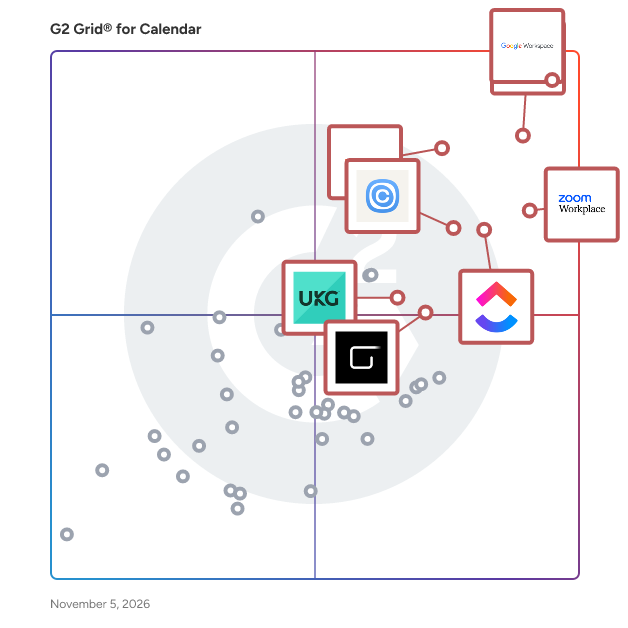
G2 Grid® for Calendar Software

G2 Grid® for Calendar Software plotting products by satisfaction and market presence

Highlighted products: Google Workspace, Microsoft Outlook, Zoom Workplace, Microsoft 365, UKG Ready, ClickUp, Calendly, and GlossGenius.

Underlying data: [Grid® JSON](https://www.g2.com/categories/calendar-software/grids.json?focus%5B%5D=google-workspace&focus%5B%5D=microsoft-outlook&focus%5B%5D=zoom-workplace&focus%5B%5D=microsoft365&focus%5B%5D=ukg-ready&focus%5B%5D=clickup&focus%5B%5D=calendly&focus%5B%5D=glossgenius)

LuxCal

LuxCal is a web-based event calendar to organise and keep track of your appointments.

Average Rating: 4.5/5.0

Total Reviews: 1

How Do G2 Users Rate LuxCal?

  • Sync Multiple Calendars: 6.7/10 (Category avg: 8.7/10)
  • Software Integrations: 6.7/10 (Category avg: 8.2/10)
  • Customized Calendar Notifications: 8.3/10 (Category avg: 8.7/10)

Who Is the Company Behind LuxCal?

Who Uses This Product?

  • Company Size: 100% Small

What Are Recent G2 Reviews of LuxCal?

ScheduleIt

Schedule it is a comprehensive resource management and scheduling software designed to help businesses efficiently plan and manage their resources, including employees, equipment, clients, and projects. With its intuitive interface and robust features, Schedule it enables organizations to streamline operations, reduce scheduling conflicts, and enhance productivity across various industries. Key Features and Functionality: - Drag-and-Drop Scheduling: Easily create and modify schedules by dragging and dropping tasks, facilitating quick adjustments to assignments and timelines. - Multiple Views and Layouts: Visualize workloads through various formats such as timelines, Gantt charts, calendars, lists, and maps, providing flexibility to suit different planning needs. - Resource Management: Schedule unlimited resources, including staff, clients, rooms, and equipment, all within a single platform, ensuring optimal allocation and utilization. - Conflict Resolution: Automated checks prevent double bookings and scheduling conflicts by verifying resource availability and qualifications in real-time. - Customizable Reports and Analytics: Generate tailored reports and gain insights into resource utilization, project progress, and overall efficiency to inform decision-making. - Integration Capabilities: Seamlessly integrate with tools like Outlook, Google Calendar, Salesforce, and Slack, enhancing workflow efficiency and communication. - Automated Notifications and Reminders: Keep teams informed with automatic alerts and reminders, reducing missed appointments and improving punctuality. Primary Value and Solutions Provided: Schedule it addresses the complexities of resource management by offering a centralized platform that simplifies scheduling processes, minimizes errors, and optimizes resource utilization. By automating manual tasks and providing real-time visibility into schedules, it helps businesses save time, reduce costs, and improve overall operational efficiency. Whether managing employee shifts, coordinating equipment usage, or planning client appointments, Schedule it delivers a versatile solution tailored to meet diverse organizational needs.

Average Rating: 4.0/5.0

Total Reviews: 1

How Do G2 Users Rate ScheduleIt?

  • Sync Multiple Calendars: 10.0/10 (Category avg: 8.7/10)
  • Software Integrations: 10.0/10 (Category avg: 8.2/10)
  • Customized Calendar Notifications: 10.0/10 (Category avg: 8.7/10)

Who Is the Company Behind ScheduleIt?

  • Seller: Schedule it Ltd
  • Year Founded: 2010
  • HQ Location: Wakefield, West Yorkshire
  • Twitter: @ScheduleItRocks
    104 Twitter followers
  • LinkedIn® Page: www.linkedin.com
    3 employees on LinkedIn®

Who Uses This Product?

  • Company Size: 100% Small

What Are Recent G2 Reviews of ScheduleIt?

SkedPal

SkedPal is a system that intelligently and intuitively schedules your tasks based on your priorities and commitments.

Average Rating: 5.0/5.0

Total Reviews: 1

How Do G2 Users Rate SkedPal?

  • Sync Multiple Calendars: 10.0/10 (Category avg: 8.7/10)
  • Software Integrations: 5.0/10 (Category avg: 8.2/10)
  • Customized Calendar Notifications: 10.0/10 (Category avg: 8.7/10)

Who Is the Company Behind SkedPal?

Who Uses This Product?

  • Company Size: 100% Small

What Do G2 Reviewers Say About SkedPal?

AI-generated summary from verified user reviews

Pros
  • Users find SkedPal's ease of use impressive, especially after initial setup, enhancing daily productivity.
  • Users find the easy setup of SkedPal enhances daily productivity and offers seamless Google Calendar integration.
  • Users value the seamless integrations with Google Calendar, enhancing their scheduling and productivity experience.
  • Users value the easy scheduling with SkedPal, enjoying seamless integration and efficient time mapping for daily tasks.
Cons
  • Users struggle with time constraints due to multiple layers and lack of integrations with other project management tools.

What Are Recent G2 Reviews of SkedPal?

AI can help you find the answers. G2 helps you trust them.

Connect G2 to Claude or ChatGPT for answers grounded in G2's trusted reviews, comparisons, and pricing from real user insights.

How it works

Spacemail

Spacemail™ is a simple and secure business email for your domain. Create email addresses that match your domain name, so everything you send looks pro. Plus, work from one fast, clean inbox on web or mobile, with calendar, contacts, an AI assistant, and protection built in. Every plan comes with a 30-day free trial, a 99.9% uptime guarantee and 24/7 support. Bring your existing email over for free. Key features Custom domain email – Create addresses on your own domain, like you@yourdomain.com, and connect them in one tap with Unbox™. iOS and Android apps – Take your inbox anywhere, with the same protection as webmail. Calendar and contacts – Check your schedule, respond to invites, find a contact, and send an email without switching apps. AI email assistant – Describe the email you want and get a draft in seconds, ready to edit and send. Jellyfish machine-learning spam filtering – Keep your inbox safe with filters that block spam, phishing, malware, spoofing, and hidden threats. Password-protected emails – Lock sensitive messages so only the intended recipient can open them. Security Center – Manage 2FA and check login and session activity from one place, with storage encryption keeping your data protected. Aliases and catch-all – Keep your main address private with aliases, and catch emails sent to any address on your domain. Tracking link removal – Stop senders tracking your activity without breaking the links. Flexible protocols – Sync with Outlook, Thunderbird, and Gmail via IMAP, SMTP, and POP3, or switch them off for extra security. Free email migration – Move your existing email over for free, with data protection at every step. Personalization – Add a professional signature and profile picture, choose your look, and use Spacemail in multiple languages. 24/7 support – Get help from the support team any time, day or night. Plans Pro – For solopreneurs. 1 mailbox, 5 GB storage, and 10 aliases. Business – For growing projects. 3 mailboxes, 10 GB storage per mailbox, and 50 aliases per mailbox. Advanced – For businesses. 5 mailboxes, 15 GB storage per mailbox, and unlimited aliases per mailbox. Add more mailboxes and storage to any plan at any time. Who makes Spacemail? Spacemail is built by Spaceship, an ICANN-accredited registrar and web services platform based in Phoenix, Arizona, serving customers since 2022.

Average Rating: 4.5/5.0

Total Reviews: 1

Who Is the Company Behind Spacemail?

Who Uses This Product?

  • Company Size: 100% Small

What Are Recent G2 Reviews of Spacemail?

Tackle - timetackle.com

Tackle helps you automatically and effortlessly track time and gather productivity insights from your calendar, project management, and collaboration tools. It works seamlessly with your Google Calendar and helps you to track your activities right from the calendar interface. Tackle provides clarity, ensuring you have the right people on the right projects, and safeguarding your ROI. It gauges operational efficiency, tracks team time effortlessly, and keeps projects within budget through goal-setting. Tackle enhances productivity and time tracking across diverse sectors. From agencies to nonprofits, its tailored solutions, time-tracking automation, and valuable insights bring operational efficiency to any business. 300+ teams embraced Tackle as the solution to their time-tracking challenges who’ve been able to lift productivity by 20% on average. Tackle, your versatile ally, enhances productivity across diverse sectors. From agencies to nonprofits, it offers tailored solutions, automating tasks and providing valuable insights for efficient operations. Achieve your goals like a boss with Tackle! **How do we position yourself against our competitors?** Tackle provides seamless time tracking, empowering employees with valuable insights to optimize their productivity. It offers detailed analytics for any team, enabling data-driven decisions on project allocation and efficiency. Additionally, It stands out for its remarkably user-friendly, simplicity, and extensive reporting options.

Average Rating: 4.0/5.0

Total Reviews: 1

How Do G2 Users Rate Tackle - timetackle.com?

  • Has the product been a good partner in doing business?: 8.3/10 (Category avg: 9.1/10)

Who Is the Company Behind Tackle - timetackle.com?

Who Uses This Product?

  • Company Size: 100% Medium

What Are Recent G2 Reviews of Tackle - timetackle.com?

What Are G2 Users Discussing About Tackle - timetackle.com?

Vimcal

The world's fastest calendar, beautifully designed for a remote world

Average Rating: 4.5/5.0

Total Reviews: 1

How Do G2 Users Rate Vimcal?

  • Sync Multiple Calendars: 10.0/10 (Category avg: 8.7/10)
  • Software Integrations: 6.7/10 (Category avg: 8.2/10)
  • Customized Calendar Notifications: 8.3/10 (Category avg: 8.7/10)

Who Is the Company Behind Vimcal?

Who Uses This Product?

  • Company Size: 100% Large

What Are Recent G2 Reviews of Vimcal?

AnnuCal

AnnuCal is year planning software for people who think in months and quarters, not days and weeks. Standard calendars answer one question well: what happens next? They are built for the coming days. That makes them poor tools for the decisions that play out over a longer horizon, a product roadmap, a teaching year, a season of client work, the rhythm of a small business. AnnuCal answers a different question: what does the whole year look like? All twelve months sit on a single horizontal view. Where the year is dense and where it is empty becomes visible at a glance, without scrolling and without switching between month views. The product is built around a small set of ideas: Scenarios and calendars. A scenario is one plan, your year of client work, your family year, a project year. Each holds multiple calendars you can show and hide, so the same year can be read at different levels of detail. Time bars instead of dots. Anything that lasts longer than a day is drawn as a bar across the months it spans. Holidays, school breaks, projects and travel all read as duration rather than as single points. Public holidays and school breaks. Selectable by country and region, so the fixed structure of your year is there before you add anything of your own. Sharing. Plans can be shared as a read-only link, embedded on a website, or opened to named people as viewers or editors. Deliberately minimal. AnnuCal is not a project management suite. There are no tasks, no dependencies, no status workflows. It does one thing: it shows you a year, clearly. AnnuCal runs in the browser and is made in Hamburg, Germany.

Who Is the Company Behind AnnuCal?

  • Seller: AnnuCal
  • Year Founded: 2022
  • HQ Location: Hamburg, Germany
  • LinkedIn® Page: www.linkedin.com
    1 employees on LinkedIn®

Arch Calendar

Arch Calendar is a minimalist productivity calendar that brings tasks, events, and notes together in one timeline. Built around time blocking, it turns your calendar into a central hub for planning both work and personal life. Its Today Zero feature helps you wrap up each day by comparing your planned schedule with how you actually spent your time, then closing the day with a single photo. Built-in analytics track planned time, completion rates, and daily streaks throughout the year. With Quick Capture, you can send links, notes, and ideas from your phone directly to your calendar without interrupting your workflow. Arch Calendar also offers two-way Google Calendar sync, while keeping Arch-specific information—such as spaces, priorities, and notes—private by default.

Who Is the Company Behind Arch Calendar?

Autolidays

Autolidays automatically syncs public holidays to Google Calendar for distributed teams across 100+ countries. Eliminate manual holiday tracking, prevent scheduling conflicts, and show your international team that their culture matters. Holidays appear as out-of-office blocks, integrating seamlessly with Calendly and other scheduling tools. Setup takes minutes, updates happen automatically - including lunar calendar holidays that shift dates yearly.

Who Is the Company Behind Autolidays?

BCalendar

BCalendar is a simple and flexible shared calendar designed for small teams, small businesses, families, and groups that need to organize schedules quickly—without complexity or expensive software. With BCalendar, you can create a shared calendar instantly, no account required. Just generate a calendar, share the link, and everyone can view or edit events in real time. It’s ideal for coordinating work shifts, project schedules, availability, events, or group activities. Unlike traditional calendar tools built for large enterprises, BCalendar focuses on ease of use, speed, and collaboration. There’s no setup, no onboarding, and no technical knowledge needed. It works directly in the browser and is accessible from any device. BCalendar is perfect for small companies, remote teams, clubs, communities, and groups of friends who want a fast, free, and lightweight alternative to complex scheduling tools—while keeping full control through simple shared links.

Who Is the Company Behind BCalendar?

Calenderify

All-in-One Scheduling Platform for Booking, Polls, and Paid Sessions Scheduling isn’t just about picking a meeting time; It’s about turning availability into a smooth workflow that’s easy to share, embed, and automate. Calenderify brings booking, group coordination, publishing, and monetization into one connected platform. Whether you’re a coach offering 1:1 sessions, an agency coordinating client calls, or a team planning events across stakeholders, Calenderify helps you reduce back-and-forth and prevent double bookings with calendar sync and availability rules. With Calenderify, you can: Create booking types with custom details, questions, limits, reminders, and optional paid bookings. Embed booking pages on your website (WordPress, Webflow, or custom sites) to convert visitors into bookings where they already are. Run polls where guests vote on times, and you can quickly confirm the winner. Publish services or events in a public directory as free or paid listings with shareable links. Connect calendars, video conferencing, and payments to automate confirmations, meeting links, and payment processing for paid sessions. Manage team scheduling with collective scheduling, round robin assignment, and routing forms. Calenderify is designed for people who need more than basic scheduling—booking, voting, publishing, automation, and earnings tracking in one place. Key Features Booking pages with embeddable landing pages (one link per service) Date polls with group voting and fast time confirmation Availability management (weekly hours, specific dates, blocked dates, buffers) Public directory for publishing services/events (free or paid listings) Calendar integrations (Google Calendar, Microsoft 365) Video integrations (Google Meet, Zoom, Microsoft Teams) Payments for paid sessions (Stripe connection or PayPal email) Team scheduling: collective scheduling, round robin, routing forms Earnings tracking dashboard for paid bookings

Who Is the Company Behind Calenderify?

Calendox

Calendox keeps Google Calendar, Microsoft Outlook and on-premises Exchange Server calendars in sync, shows them in one unified calendar, and offers booking pages that check every one of them. Sync one-way or multi-way between your connected calendars. Google and Microsoft changes land in seconds, recurring events included; Exchange Server changes arrive within about 5 minutes. See every calendar you have imported in a single view, and create, edit and move events from one place. Share booking pages whose availability is computed live across all of them, with a Zoom, Google Meet or Microsoft Teams link added when a booking is confirmed (Google Meet on a Google calendar, Teams on a Microsoft work or school calendar). Event titles, descriptions and locations are never stored in our database; they are read live from your calendar provider when displayed. Google and Microsoft calendars connect through OAuth, so Calendox never sees those passwords, and our Microsoft permissions exclude your email and files. On Personal and Business plans, an on-premises Exchange Server 2016 or later mailbox connects with its address and Exchange password, stored encrypted and sent only to that server. Signing in to Calendox itself needs no password. Business accounts add centralized subscription and seat management, member invitations and role-based access for teams. Enterprise is a separate account type: Microsoft 365 tenant-to-tenant sync between your organization and a partner, contractor, subsidiary or client tenant, connected through one admin consent per tenant and priced per imported calendar. Calendars are paired automatically when both the email username and the calendar name match. Enterprise is sync only, with no booking pages or unified calendar. 14-day free trial, no credit card required, at calendox.com. Also available on Microsoft Marketplace, billed through your Microsoft account.

Who Is the Company Behind Calendox?

Neeraja Prakash
NP
Researched and written by Neeraja Prakash
Updated March 6, 2025