  # Best Absence Management Software - Page 5

  *By [Jeffrey Lin](https://research.g2.com/insights/author/jeffrey-lin)*

   Absence management software helps organizations plan, manage, and track employee absences, including vacation, sick leave, and so on. Companies use absence management software to define absences and manage requests and approvals. These solutions often incorporate local regulations, laws, and policies to help companies remain compliant and reduce costs. Absence management solutions are commonly implemented in HR departments, though some standalone products may be used by businesses without a traditional HR department.

Absence management software can be implemented either as part of an integrated HR management suite or as a standalone solution. Absence management software frequently integrates with third-party HR applications, with core HR systems in particular acting as a central repository for workforce data.

To qualify for inclusion in the Absence Management category, a product must:

- Help administrators manage absence requests and approvals
- Allow companies to define relevant absences
- Improve management reporting
- Maintain compliance across multiple geographies with regard to geo-specific provincial, state, or federal laws, as well as corporate and union policies


## How Many Absence Management Software Products Does G2 Track?
**Total Products under this Category:** 157

### Category Stats (May 2026)
- **Average Rating**: 4.43/5 (↓0.01 vs Apr 2026)
- **New Reviews This Quarter**: 423
- **Buyer Segments**: Mid-Market 61% │ Small-Business 31% │ Enterprise 8%
- **Top Trending Product**: Aidora (+0.125)
*Last updated: May 18, 2026*

  
## How Does G2 Rank Absence Management Software Products?

**Why You Can Trust G2's Software Rankings:**

- 30 Analysts and Data Experts
- 32,900+ Authentic Reviews
- 157+ Products
- Unbiased Rankings

G2's software rankings are built on verified user reviews, rigorous moderation, and a consistent research methodology maintained by a team of analysts and data experts. Each product is measured using the same transparent criteria, with no paid placement or vendor influence. While reviews reflect real user experiences, which can be subjective, they offer valuable insight into how software performs in the hands of professionals. Together, these inputs power the G2 Score, a standardized way to compare tools within every category.
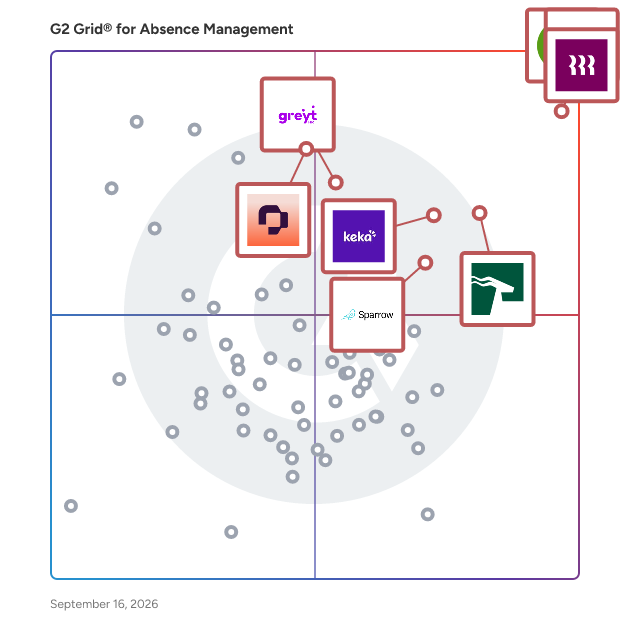
  
## Which Absence Management Software Is Best for Your Use Case?

- **Leader:** [Rippling](https://www.g2.com/products/rippling/reviews)
- **Highest Performer:** [Asanify AI](https://www.g2.com/products/asanify-ai/reviews)
- **Easiest to Use:** [Asanify AI](https://www.g2.com/products/asanify-ai/reviews)
- **Top Trending:** [HROne](https://www.g2.com/products/uneecops-hrone/reviews)
- **Best Free Software:** [Personio](https://www.g2.com/products/personio/reviews)

  
---

**Sponsored**

### Insightful

Insightful is workforce analytics software that shows how work actually happens across your teams. When work is spread across people, locations, and tools, small gaps add up fast. Time goes missing. Work slows down. Problems surface late. Insightful makes this visible. You can see where time is going, how teams are performing, and where work is breaking down — without relying on manual tracking or guesswork. With Insightful, you can: - See how time is spent across teams - Spot drops in utilization and output early - Understand where work slows down or gets stuck - Compare performance across teams, roles, or locations - Use real activity data to review work and resolve disputes This is not just another monitoring tool. Insightful helps you run better operations. You get clear data you can use in weekly reviews, planning, and day-to-day decisions. It combines automatic time tracking, activity data, and reporting in one place — so you can improve performance without adding overhead. Teams choose Insightful because it delivers strong visibility and control without the cost or complexity of heavier tools.


[Visit website](https://www.g2.com/external_clickthroughs/record?secure%5Bad_program%5D=ppc&amp;secure%5Bad_slot%5D=category_product_list&amp;secure%5Bcategory_id%5D=1595&amp;secure%5Bdisplayable_resource_id%5D=63&amp;secure%5Bdisplayable_resource_type%5D=Category&amp;secure%5Bmedium%5D=sponsored&amp;secure%5Bplacement_reason%5D=neighbor_category&amp;secure%5Bplacement_resource_ids%5D%5B%5D=241&amp;secure%5Bplacement_resource_ids%5D%5B%5D=247&amp;secure%5Bplacement_resource_ids%5D%5B%5D=1381&amp;secure%5Bprioritized%5D=false&amp;secure%5Bproduct_id%5D=37386&amp;secure%5Bresource_id%5D=1595&amp;secure%5Bresource_type%5D=Category&amp;secure%5Bsource_type%5D=category_page&amp;secure%5Bsource_url%5D=https%3A%2F%2Fwww.g2.com%2Fcategories%2Fabsence-management-software%3Fpage%3D11&amp;secure%5Btoken%5D=31599fc82af89dc976968842948bc235f557f9591a4c0c531a0f5a69dbc564a2&amp;secure%5Burl%5D=https%3A%2F%2Fwww.insightful.io%2Fworkforce-analytics-enterprise%3Futm_source%3Dg2%26utm_medium%3Dreferral%26utm_campaign%3Ddirectories_paid%26utm_content%3Dpaid%26utm_term%3Dppc2026_topic_employee_monitoring&amp;secure%5Burl_type%5D=custom_url)

---

  ## What Are the Top-Rated Absence Management Software Products in 2026?
### 1. [HRApprova](https://www.g2.com/products/hrapprova/reviews)
  HRApprova automates HR Requests and Approvals ensuring HR services ON THE GO.


  **Average Rating:** 4.0/5.0
  **Total Reviews:** 1

**Who Is the Company Behind HRApprova?**

- **Seller:** [FirstOne Systems](https://www.g2.com/sellers/firstone-systems-a1e0a3a1-e933-4c97-83e0-312a2cf65c5e)
- **Year Founded:** 2010
- **HQ Location:** Chennai, IN
- **LinkedIn® Page:** https://www.linkedin.com/company/1140228 (10 employees on LinkedIn®)

**Who Uses This Product?**
  - **Company Size:** 100% Mid-Market


### 2. [Kelio](https://www.g2.com/products/kelio/reviews)
  Kelio is a Human Resource Information System (HRIS) designed to streamline and enhance the management of employees throughout their lifecycle within an organization. Kelio software solution integrates various essential HR functions, including time and attendance tracking, HR management, and access control with a centralized platform to manage their workforce efficiently. Targeted primarily at HR professionals, managers, and business owners, Kelio caters to organizations of all sizes that seek to improve their HR processes. Its features are suitable for various use cases, from recruitment and onboarding to managing employee absences and expenses. By offering a global approach to HR management, Kelio enables users to maintain accurate records, ensure compliance, and foster a productive work environment. Key features of Kelio include a recruitment module that simplifies the hiring process, an intuitive onboarding system that helps new employees acclimate quickly, and an HR portal that empowers employees to manage their own information. The principal module of Kelio its time and attendance, leaves and absences and planning but also expenses management, ensuring that all aspects of employee management are covered. The access control feature enhances security by regulating who can enter specific areas within the workplace, thereby safeguarding sensitive information and assets. The benefits of using Kelio extend beyond mere convenience. By centralizing HR functions, the software reduces administrative burdens, allowing HR teams to focus on strategic initiatives rather than routine tasks. The system&#39;s user-friendly interface facilitates easy navigation, making it accessible for both HR personnel and employees. Furthermore, with over 20,000 clients worldwide and 5 million daily users, Kelio has established a strong reputation for reliability and user satisfaction, boasting a remarkable 99.1% satisfaction rate among its clientele. In summary, Kelio stands out in the HRIS category by offering a comprehensive, integrated solution that addresses the diverse needs of modern organizations. Its extensive features and user-centric design make it a valuable tool for enhancing HR efficiency, improving employee engagement, and ultimately contributing to the overall success of a business.


  **Average Rating:** 5.0/5.0
  **Total Reviews:** 1
**How Do G2 Users Rate Kelio?**

- **Has the product been a good partner in doing business?:** 10.0/10 (Category avg: 9.2/10)

**Who Is the Company Behind Kelio?**

- **Seller:** [Kelio](https://www.g2.com/sellers/kelio)
- **Company Website:** https://www.kelio.com/
- **Year Founded:** 1987
- **HQ Location:** Cholet, FR
- **LinkedIn® Page:** https://www.linkedin.com/company/kelio-solutions (590 employees on LinkedIn®)

**Who Uses This Product?**
  - **Company Size:** 100% Mid-Market


### 3. [Leavetrack](https://www.g2.com/products/leavetrack/reviews)
  LeaveTrack: Stress-Free Employee Leave Management LeaveTrack is a cloud-based leave management solution designed to eliminate the chaos of tracking employee absences through spreadsheets and manual processes. Built for small to medium-sized businesses, LeaveTrack transforms time-consuming administrative tasks into streamlined, automated workflows. Key Features: Intuitive Leave Booking: Employees request time off through a simple interface, while managers approve or reject requests with one-click email notifications Visual Wall Planner: Get an at-a-glance view of who&#39;s off when with color-coded calendars that instantly highlight potential staffing conflicts Automatic Holiday Import: Public holidays for 100+ countries are automatically imported, ensuring compliance and accurate planning Flexible Leave Types: Customize unlimited leave categories (vacation, sick, remote work, etc.) to match your organization&#39;s policies Smart Conflict Detection: Automatically identifies when multiple team members request overlapping dates Delegation Features: Managers can delegate approval rights when they&#39;re away, preventing bottlenecks Comprehensive Reporting: Built-in analytics plus CSV export for detailed analysis in Excel or other tools Calendar Integration: Sync with Outlook, Google Calendar, and other popular calendar applications Benefits: LeaveTrack eliminates version control nightmares, reduces administrative overhead, and provides complete visibility into workforce availability. Organizations report significant time savings and fewer scheduling conflicts after implementation. Perfect For: Companies with 10-150 employees who want to move beyond spreadsheets without the complexity and cost of enterprise HR suites. Particularly valuable for businesses with seasonal patterns, project-based work, or compliance requirements around leave tracking. With over 100,000 managed absences across diverse industries, LeaveTrack has proven itself as a reliable, user-friendly solution that grows with your business while keeping leave management simple and stress-free.


  **Average Rating:** 5.0/5.0
  **Total Reviews:** 1
**How Do G2 Users Rate Leavetrack?**

- **Has the product been a good partner in doing business?:** 10.0/10 (Category avg: 9.2/10)
- **Reporting:** 10.0/10 (Category avg: 8.7/10)
- **Performance:** 10.0/10 (Category avg: 8.9/10)
- **Customizability:** 10.0/10 (Category avg: 8.5/10)

**Who Is the Company Behind Leavetrack?**

- **Seller:** [captured sparks Limited](https://www.g2.com/sellers/captured-sparks-limited)
- **Year Founded:** 2011
- **HQ Location:** London, GB
- **LinkedIn® Page:** http://www.linkedin.com/company/leavetrack (1 employees on LinkedIn®)

**Who Uses This Product?**
  - **Company Size:** 100% Mid-Market


### 4. [Offlow](https://www.g2.com/products/offlow/reviews)
  Offlow is a leave management and biometric attendance platform headquartered in Dallas, US. Founded in 2025, it was built out of firsthand frustration with expensive, complex HR tools that took weeks to set up and cost $8-12 per user per month. The team that built Offlow uses it daily to manage their own leave and attendance — the product is battle-tested internally before any feature ships to customers. Offlow handles leave requests, approvals, balance tracking, public holidays by location, shift scheduling, and night shifts — all from a single page. Approve or reject leave directly from Slack without opening a browser tab. Connect ZKTeco or other biometric devices for automated attendance tracking. Import existing data via CSV in minutes. Supports multiple departments, locations, and leave policies out of the box. Most leave management tools charge $8-12 per user per month and take days to set up. Offlow is free forever for up to 10 users, with paid plans starting at $2/user/month. Setup takes under 2 minutes — no demos, no sales calls, no onboarding fees, no training required. HR and Admin roles can approve any employee&#39;s leave, eliminating the approval bottleneck that plagues other tools when managers are unavailable.


  **Average Rating:** 5.0/5.0
  **Total Reviews:** 1
**How Do G2 Users Rate Offlow?**

- **Has the product been a good partner in doing business?:** 10.0/10 (Category avg: 9.2/10)

**Who Is the Company Behind Offlow?**

- **Seller:** [Offlow](https://www.g2.com/sellers/offlow)
- **Year Founded:** 2025
- **HQ Location:** Dallas, US
- **LinkedIn® Page:** https://www.linkedin.com/company/offlow-official/ (1 employees on LinkedIn®)

**Who Uses This Product?**
  - **Company Size:** 100% Small-Business


#### What Are Offlow's Pros and Cons?

**Pros:**

- Customer Support (1 reviews)
- Easy Setup (1 reviews)
- Integrations (1 reviews)
- Leave Management (1 reviews)
- Time-saving (1 reviews)


### 5. [Opensoft eLeave](https://www.g2.com/products/opensoft-eleave/reviews)
  Opensoft eLeave is an online leave management software developed specifically for SME.


  **Average Rating:** 3.0/5.0
  **Total Reviews:** 1

**Who Is the Company Behind Opensoft eLeave?**

- **Seller:** [Opensoft](https://www.g2.com/sellers/opensoft)
- **Year Founded:** 2006
- **HQ Location:** Singapore, SG
- **LinkedIn® Page:** https://www.linkedin.com/company/opensoft-singapore (16 employees on LinkedIn®)

**Who Uses This Product?**
  - **Company Size:** 100% Mid-Market


### 6. [Planleave](https://www.g2.com/products/planleave/reviews)
  The most simple and easy way to manage your teams time-off through automation with your existing tools and workflow. The best user experience for PTO Tracking and Vacation Tracking with no learning involved. There is not a better user experience in a Leave Management offering.


  **Average Rating:** 4.0/5.0
  **Total Reviews:** 1

**Who Is the Company Behind Planleave?**

- **Seller:** [Planleave](https://www.g2.com/sellers/planleave)
- **Year Founded:** 2020
- **HQ Location:** St Augustine, US
- **LinkedIn® Page:** http://www.linkedin.com/company/planleave (2 employees on LinkedIn®)

**Who Uses This Product?**
  - **Company Size:** 100% Mid-Market


### 7. [QuarksUp Absences](https://www.g2.com/products/quarksup-absences/reviews)
  quarksUp Absences, managing absences has never been easier


  **Average Rating:** 4.0/5.0
  **Total Reviews:** 1

**Who Is the Company Behind QuarksUp Absences?**

- **Seller:** [Enable Business](https://www.g2.com/sellers/enable-business)
- **Year Founded:** 2013
- **HQ Location:** SG, SG
- **Twitter:** @quickhrsg (168 Twitter followers)
- **LinkedIn® Page:** https://sg.linkedin.com/company/quickhr-sg (66 employees on LinkedIn®)

**Who Uses This Product?**
  - **Company Size:** 100% Mid-Market


### 8. [SD Worx Time](https://www.g2.com/products/sd-worx-time/reviews)
  Get a single view of time and attendance, plan workforce schedules and projects, and enhance security and compliance with our access control system. Our software combines an excellent user experience, flexible processes built around your business, easy self-service for your staff, smooth integration with your existing systems and much more. It also offers seamless integration with SD Worx Payroll and HR services, freeing up more time for you.


  **Average Rating:** 3.0/5.0
  **Total Reviews:** 1

**Who Is the Company Behind SD Worx Time?**

- **Seller:** [SD Worx](https://www.g2.com/sellers/sd-worx)
- **Year Founded:** 1945
- **HQ Location:** Antwerp, Flemish Region, Belgium
- **Twitter:** @SDWorx (1,747 Twitter followers)
- **LinkedIn® Page:** https://www.linkedin.com/company/sdworx (3,768 employees on LinkedIn®)

**Who Uses This Product?**
  - **Company Size:** 100% Mid-Market


### 9. [SOMNO](https://www.g2.com/products/somno/reviews)
  Somno is an elegant vacations and on leave data management solution for small and medium sized companies


  **Average Rating:** 4.5/5.0
  **Total Reviews:** 1
**How Do G2 Users Rate SOMNO?**

- **Has the product been a good partner in doing business?:** 10.0/10 (Category avg: 9.2/10)

**Who Is the Company Behind SOMNO?**

- **Seller:** [Somno OÜ](https://www.g2.com/sellers/somno-oa)
- **Year Founded:** 2015
- **HQ Location:** N/A
- **LinkedIn® Page:** http://www.linkedin.com/company/somno (3 employees on LinkedIn®)

**Who Uses This Product?**
  - **Company Size:** 100% Small-Business


### 10. [Spock](https://www.g2.com/products/spock/reviews)
  Spock is user friendly leave management for your company. It is intuitive and you don&#39;t need to train any team member to use the app. Spock builds a simple and reliable process for leave tracking in your organization. It creates a transparent and responsible environment. Our goal is to bring a solution that significantly improves clarity, openness, and trustworthiness in leave management.


  **Average Rating:** 5.0/5.0
  **Total Reviews:** 1
**How Do G2 Users Rate Spock?**

- **Performance:** 10.0/10 (Category avg: 8.9/10)

**Who Is the Company Behind Spock?**

- **Seller:** [IdeoWorks](https://www.g2.com/sellers/ideoworks)
- **Year Founded:** 2015
- **HQ Location:** Bratislava, SK
- **LinkedIn® Page:** http://www.linkedin.com/company/spockoffice (2 employees on LinkedIn®)

**Who Uses This Product?**
  - **Company Size:** 100% Mid-Market


#### What Are Spock's Pros and Cons?

**Pros:**

- Ease of Use (1 reviews)
- Easy Integrations (1 reviews)
- Integrations (1 reviews)


### 11. [Wallet HR](https://www.g2.com/products/wallet-hr/reviews)
  Wallet HR is a one stop solution for all HR needs. It is a well-integrated suite of modules which helps manage operations starting from hire till retire of an employee with simple and intuitive ESS &amp; MSS. The power of the product lies in its configuration capabilities and architecture that allows customization to be tailored for business of any vertical and scale. The product comprises of 24 modules such as 1. Recruitment management 2. Core HR - Employee Data Management 3. Attendance Management 4. Leave Management 5. Payroll Management 6. Flexi-pay Management 7. Reimbursement Management 8. Expense Management 9. Performance Appraisal 10. Travel Management 11. Timesheet Management 12. Learning and Development 13.Training Management 14.Ticketing 15. HR Analytics 16. Task Management 17. Grievance Management 18. Visitor Management 19. Canteen Management 20. Organization Chart 21. Exit Management 22. Eedo - Wallet HR Assistant/ Chatbot The product also comes with handy mobile app for both android and iOS making operations easy on-the-go.


  **Average Rating:** 4.4/5.0
  **Total Reviews:** 4
**How Do G2 Users Rate Wallet HR?**

- **Performance:** 10.0/10 (Category avg: 8.9/10)

**Who Is the Company Behind Wallet HR?**

- **Seller:** [Crystal HR &amp; Security Solutions](https://www.g2.com/sellers/crystal-hr-security-solutions)
- **Year Founded:** 2009
- **HQ Location:** Chennai, IN
- **Twitter:** @hr_wallet (55 Twitter followers)
- **LinkedIn® Page:** https://www.linkedin.com/company/wallethr (46 employees on LinkedIn®)

**Who Uses This Product?**
  - **Company Size:** 50% Mid-Market, 25% Enterprise


#### What Are Wallet HR's Pros and Cons?

**Pros:**

- Ease of Use (2 reviews)
- Tracking Ease (2 reviews)
- Customer Support (1 reviews)
- Easy Integrations (1 reviews)
- Helpful (1 reviews)

**Cons:**

- Slow Loading (2 reviews)
- Not Intuitive (1 reviews)

### 12. [WhosOffice](https://www.g2.com/products/whosoffice/reviews)
  Administer your staff leave (holiday, vacation, absences) and working times (fixed, part time, shift, rostered) in a way that suits you. WhosOffice has been designed to be the ultimate productivity tool for leave and shift management.


  **Average Rating:** 3.5/5.0
  **Total Reviews:** 1

**Who Is the Company Behind WhosOffice?**

- **Seller:** [Whosoffice](https://www.g2.com/sellers/whosoffice)
- **HQ Location:** Canterbury, GB
- **LinkedIn® Page:** http://www.linkedin.com/company/whosoffice (2 employees on LinkedIn®)

**Who Uses This Product?**
  - **Company Size:** 100% Mid-Market


### 13. [WorkAxle](https://www.g2.com/products/workaxle/reviews)
  WorkAxle is an end-to-end Workforce Management System designed to make managing your deskless and workers easy and efficient. It is a high-level multifaceted system that can handle complex workforce management challenges, at any scale.


  **Average Rating:** 4.8/5.0
  **Total Reviews:** 4
**How Do G2 Users Rate WorkAxle?**

- **Reporting:** 6.7/10 (Category avg: 8.7/10)
- **Performance:** 6.7/10 (Category avg: 8.9/10)
- **Customizability:** 8.3/10 (Category avg: 8.5/10)

**Who Is the Company Behind WorkAxle?**

- **Seller:** [WorkAxle](https://www.g2.com/sellers/workaxle)
- **Year Founded:** 2018
- **HQ Location:** Montreal, CA
- **Twitter:** @WorkAxle (268 Twitter followers)
- **LinkedIn® Page:** https://www.linkedin.com/company/workaxle (45 employees on LinkedIn®)

**Who Uses This Product?**
  - **Company Size:** 50% Mid-Market, 50% Small-Business


### 14. [Absences Management &amp; Time Tracking](https://www.g2.com/products/absences-management-time-tracking/reviews)
  APPLIC8&#39;s Absences Management &amp; Time Tracking suite streamlines workforce management through web and mobile platforms. The solution automates time tracking, absence management, and leave requests while providing real-time analytics. With seamless payroll integration and mobile accessibility, organizations can efficiently manage their workforce and ensure compliance while reducing administrative overhead.


**Who Is the Company Behind Absences Management &amp; Time Tracking?**

- **Seller:** [APPLIC8](https://www.g2.com/sellers/applic8)
- **Year Founded:** 2000
- **HQ Location:** Nyon, Vaud
- **LinkedIn® Page:** https://www.linkedin.com/company/applic8-sa (28 employees on LinkedIn®)


### 15. [Absently](https://www.g2.com/products/absently/reviews)
  Absently is leave and absence management software built specifically for small UK businesses. If you&#39;re still tracking staff holidays on a spreadsheet, chasing people for holiday requests over WhatsApp, or just never quite sure who&#39;s in and who&#39;s off - Absently was built for you. It&#39;s simple by design. Your team can request leave in seconds, managers get a clear view of who&#39;s off and when, and everything is tracked in one place. No complicated setup, no training needed, and no per-feature pricing - just £1 per person per month, with a 30-day free trial and no credit card required.


**Who Is the Company Behind Absently?**

- **Seller:** [Absently](https://www.g2.com/sellers/absently)
- **Year Founded:** 2026
- **HQ Location:** N/A
- **LinkedIn® Page:** https://www.linkedin.com/company/absentlyio/ (1 employees on LinkedIn®)


### 16. [ActecSystems](https://www.g2.com/products/actecsystems/reviews)
  Actec Systems is a leading provider of FNOL reporting, Day 1 Absence, FMLA, and other data intake for the insurance industry. Actec is dedicated to providing first notice and absence reporting solutions for commercial and personal carriers, self-insured companies, third-party administrators, and managed care organizations.


**Who Is the Company Behind ActecSystems?**

- **Seller:** [Sertec](https://www.g2.com/sellers/sertec-b9ee7d3f-bed7-4882-a414-9a998b2e322b)
- **HQ Location:** Atlanta, US
- **Twitter:** @firstnoticeloss (1,184 Twitter followers)
- **LinkedIn® Page:** https://www.linkedin.com/company/380193 (23 employees on LinkedIn®)


### 17. [ActionHRM](https://www.g2.com/products/actionhrm/reviews)
  ActionHRM provides a multi-platform, online business platform for managing employees.


  **Average Rating:** 4.2/5.0
  **Total Reviews:** 9
**How Do G2 Users Rate ActionHRM?**

- **Has the product been a good partner in doing business?:** 8.3/10 (Category avg: 9.2/10)

**Who Is the Company Behind ActionHRM?**

- **Seller:** [ActionHRM](https://www.g2.com/sellers/actionhrm)
- **Year Founded:** 2001
- **HQ Location:** Crows Nest, New South Wales
- **Twitter:** @ActionHRM (185 Twitter followers)
- **LinkedIn® Page:** https://www.linkedin.com/company/actionhrm (12 employees on LinkedIn®)

**Who Uses This Product?**
  - **Company Size:** 40% Small-Business, 40% Enterprise


#### What Are ActionHRM's Pros and Cons?

**Pros:**

- Ease of Use (3 reviews)
- Automation (2 reviews)
- Automation Dominance (2 reviews)
- Automation Features (2 reviews)
- Easy Onboarding (2 reviews)

**Cons:**

- Limited Customization (2 reviews)
- Limited Features (2 reviews)
- Business Size (1 reviews)
- Connectivity Issues (1 reviews)
- Employee Management (1 reviews)

### 18. [Alpaka](https://www.g2.com/products/alpaka/reviews)
  Employee scheduling, absence management, timesheets, expenses and time tracking software.


  **Average Rating:** 2.5/5.0
  **Total Reviews:** 1

**Who Is the Company Behind Alpaka?**

- **Seller:** [Alpaka](https://www.g2.com/sellers/alpaka)
- **Year Founded:** 2014
- **HQ Location:** Northampton, GB
- **Twitter:** @alpaka_io (641 Twitter followers)
- **LinkedIn® Page:** https://linkedin.com/company/alpaka.io (5 employees on LinkedIn®)

**Who Uses This Product?**
  - **Company Size:** 100% Mid-Market


### 19. [Bereave](https://www.g2.com/products/bereave/reviews)
  Bereavement platform helping businesses and employees navigate death and grief. The workplace is not prepared to handle death. We&#39;re changing that. Bereave provides an all-in-one after loss platform for the bereaved while equipping employers with the proper leadership training and policies to ensure a smooth, supported return to the workplace after a loss. From account closure and estate settlement to funeral planning and grief content, the Bereave platform provides a range of resources to make the journey a little easier for grieving employees. Wondering how Bereave works and who we support? We’ve got you covered! • Who uses Bereave? Bereave is a software platform that supports everyone in the workplace—anyone can use it for support during tough times, managers use it to prepare and access resources for those in need, and HR uses it to automate steps, track progress and stay connected every step of the way. • An employee loses a close loved one, how does Bereave help? Bereave brings everyone together: the employee (and their family) receives grief support and task guidance, managers are trained to handle difficult news with care and follow checklists for procedures, while HR tracks progress, participation, and key dates, keeping business moving and everyone supported throughout. • Is this a good investment for my company? Investing in Bereave means doing right by your people. Showing real care in tough times goes a long way, and Bereave gives you the tools to make that happen. With 51% of employees leaving after a close loss, Bereave builds loyalty, boosts morale, and makes sure your team feels valued. What is Provided: A software solution that allows for both business and individual navigation of the bereavement experience: ● In-depth at-need playbook, self-guided training materials, interactive internal communication templates and reentry tools. ● Exclusive employee access to guides &amp; support, content covering funeral planning, estate closure, grief support, and supporting others ● Live manager training by subject matter experts hired by Bereave Business Case: ● 51% of people that suffer a close loss will leave their employer within 12 months ● Grief related productivity loss in the U.S. = $100bn+ ● 80% of bereaved employees spend over 1 hour each workday for 15 months dealing with grief and estate duties ● 58% of people felt their productivity was affected months after a loss ● 80% of adults 18-34 would consider leaving a job if not getting the proper support after a major loss Expected Outcome: A partnership with Bereave will: ● Improve employee well-being and increased productivity during and after loss. ● Talent attraction and retention from a culture of loyalty, trust, and support. ● Maintained continuity and efficiency in operations throughout leave and reentry. ● Reduction in absenteeism from a positive grieving experience for all employees. Investment: $1,333/mo. (based on ~16k employee


**Who Is the Company Behind Bereave?**

- **Seller:** [Bereave](https://www.g2.com/sellers/bereave)
- **Year Founded:** 2020
- **HQ Location:** Indianapolis, US
- **LinkedIn® Page:** https://linkedin.com/company/bereave (9 employees on LinkedIn®)


### 20. [BM4A VRM](https://www.g2.com/products/bm4a-vrm/reviews)
  BM4A VRM is a robust online leave management system that streamlines the entire leave request and approval process. This powerful software boosts efficiency by integrating with payroll, ERP systems, and timesheet tools. BM4A VRM can be customized by our team to meet the specific needs of your business. We can extend its functionality, tailor the UI design, and integrate it with your internal systems and popular platforms. This ensures BM4A VRM works correctly with your current setup and supports your business processes. More features: ✅ On-premise and private cloud deployment. ✅ A personalized version. ✅ Identity Manager: For easier access management and improved app security with SSO technology and role-based authorization. ✅ Integration with Keycloak. ✅ Workflow Manager: A fully customizable workflow process in the BPMN 2.0 format. ✅ Full support for i18n. Join our live demonstration to see how BM4A VRM can revolutionize your leave management processes and add substantial value to your business. Schedule a demo today and experience a solution customized to your specific requirements: https://bm4a.com/solutions/vrm-leave-management-system/


**Who Is the Company Behind BM4A VRM?**

- **Seller:** [Scand Poland](https://www.g2.com/sellers/scand-poland)
- **Year Founded:** 2000
- **HQ Location:** Warszawa, PL
- **Twitter:** @BM4A_
- **LinkedIn® Page:** https://www.linkedin.com/company/bm4a-company/ (2 employees on LinkedIn®)


### 21. [Cabana](https://www.g2.com/products/cabana-cabana/reviews)
  Cabana is a leave management tool built for small teams.Cabana is a leave management tool built for small teams. Employees submit time-off requests through the web app or via the /pto Slack command, with automatic balance checks to catch issues before a request goes through. Managers can approve or deny in one click from their email or Slack — no separate login required. Leave balances stay up to date automatically based on configurable accrual rules, carryover caps, and waiting periods, and a team calendar shows who&#39;s out and when with sync to Google Calendar and Outlook. Getting started takes minutes, not days — no IT tickets, no implementation calls, no spreadsheets. Admins can configure unlimited PTO, fixed allowance, or statutory leave policies, with support for per-location holiday calendars and department-level rules for distributed teams. Slack keeps the whole team in the loop through /pto commands, weekly digests, and daily announcements, without requiring Cabana to be installed as a native Slack app.


**Who Is the Company Behind Cabana?**

- **Seller:** [Cabana](https://www.g2.com/sellers/cabana)
- **HQ Location:** N/A
- **LinkedIn® Page:** https://www.linkedin.com/company/No-Linkedin-Presence-Added-Intentionally-By-DataOps (1 employees on LinkedIn®)


### 22. [Cala HQ](https://www.g2.com/products/cala-hq/reviews)
  CalaHQ is a simple, flexible leave management tool built for small and growing teams. Instead of tracking vacations and sick days in spreadsheets or scattered email threads, CalaHQ gives businesses one clear place to manage time-off requests, approvals, and team availability. Companies can set up their own leave types and rules, while employees submit requests in seconds and managers approve them without back-and-forth. A shared calendar helps teams quickly see who’s away, avoid scheduling conflicts, and keep day-to-day operations running smoothly. CalaHQ is designed for SMBs that want structured leave management without the cost or complexity of large HR systems - easy to set up, easy to use, and flexible enough to grow with your team.


**Who Is the Company Behind Cala HQ?**

- **Seller:** [Cala HQ](https://www.g2.com/sellers/cala-hq)
- **HQ Location:** N/A
- **LinkedIn® Page:** https://www.linkedin.com/company/No-Linkedin-Presence-Added-Intentionally-By-DataOps (1 employees on LinkedIn®)


### 23. [Cegid PeopleNet](https://www.g2.com/products/cegid-peoplenet/reviews)
  Cegid Payroll Peoplenet is a cloud payroll and HR administration solution designed for ETI and large enterprises operating in France and Europe. It centralizes payroll processing, employee master data, absence and time management, and document compliance across multi-location operations. In daily use, HR and payroll teams maintain employee records in the HRIS, plan and simulate theoretical and actual working hours, organize calendars by country/work center/role, and execute payroll runs with built-in checks. The platform includes predictive analysis to surface common payroll and DSN execution errors before submission, electronic signature and signature tracking for legal documents, and ongoing vendor-delivered technological and legal updates so the customer does not carry maintenance responsibility. Used by Velatia, Sodexo, Grant Thornton, HM Hospitales and Viscofan, Cegid Payroll Peoplenet offers a number of key capabilities: • Automate payroll and HR administration processes in the cloud. • Configure payroll rules and company-specific adaptations without local maintenance responsibility. • Anticipate and apply French and European regulatory changes. • Plan and simulate working hours and manage multi-country calendars and work centers. • Maintain real-time employee absence and personal data within the HRIS. • Perform predictive analyses to detect and resolve payroll and DSN execution errors. • Secure documents with electronic signature and track signatures through every stage. The solution aims to centralize payroll and HR operations, maintain legal and regulatory compliance, and provide financial and headcount visibility across locations while delivering continuous cloud-based updates and business continuity.


  **Average Rating:** 4.3/5.0
  **Total Reviews:** 10
**How Do G2 Users Rate Cegid PeopleNet?**

- **Has the product been a good partner in doing business?:** 7.9/10 (Category avg: 9.2/10)

**Who Is the Company Behind Cegid PeopleNet?**

- **Seller:** [Cegid](https://www.g2.com/sellers/cegid)
- **Year Founded:** 1983
- **HQ Location:** Lyon
- **LinkedIn® Page:** https://www.linkedin.com/showcase/cegid-retail/ (1 employees on LinkedIn®)

**Who Uses This Product?**
  - **Company Size:** 50% Mid-Market, 25% Enterprise


#### What Are Cegid PeopleNet's Pros and Cons?

**Pros:**

- Attendance Tracking (3 reviews)
- Payroll (3 reviews)
- Payroll Ease (3 reviews)
- Payroll Management (3 reviews)
- All-in-one Platform (2 reviews)

**Cons:**

- Additional Costs (1 reviews)
- Expensive (1 reviews)
- Feedback Issues (1 reviews)
- High Fees (1 reviews)
- Learning Curve (1 reviews)

### 24. [clockin](https://www.g2.com/products/clockin/reviews)
  clockin is a mobile-first workforce management and time tracking solution that helps companies with decentralized operations manage employees in the field, digitize site documentation, and streamline the flow of data between remote job sites and the administrative back office. The software is explicitly designed to meet the requirements of industries with a high proportion of non-desk workers, including construction, skilled trades, facility management, landscaping, and mobile service providers. The platform serves as a digital bridge connecting the headquarters with workforce teams deployed in the field. Rather than relying on handwritten timesheets or fragmented communication channels, field staff use a native mobile application (iOS and Android) to record attendance and project-specific activities directly at the point of service. This approach ensures that data regarding working hours, breaks, and project progress is captured in real time and automatically synchronized with the browser-based &quot;Office Center&quot;. The primary function of the system is to replace error-prone paper trails with a centralized digital record, ensuring transparency regarding where and when work is being performed off-site. Key features supporting field operations include: - Mobile Time &amp; Attendance: Field employees can clock in and out via smartphone, with the system offering features such as GPS location stamping to verify that staff are at the correct job site when booking time. - Field Documentation &amp; Project Files: The app enables users to create digital field reports by uploading photos, adding voice or text notes, and capturing digital signatures from customers directly on the device, creating an instant audit trail for completed work. - Resource &amp; Absence Management: A centralized calendar allows office managers to schedule field teams for specific shifts or projects and manage vacation requests or sick leave, ensuring that dispatchers always have an overview of available field capacity. - Payroll &amp; Invoicing Integration: Validated data from the field can be exported via standard interfaces (e.g., Paychex, Lexware) for payroll accounting or used to generate accurate invoices based on actual time spent on customer projects. Beyond basic time tracking, clockin assists companies in managing the financial health of their field projects through real-time post-calculation. By comparing budgeted hours against actual logged field hours, businesses can monitor project profitability before billing. The software distinguishes between billable project time and general travel or overhead time, which is critical for accurate service billing. As a Software-as-a-Service (SaaS) solution, clockin allows field teams to access necessary data securely from any location without requiring complex IT infrastructure or on-premise server maintenance.


**Who Is the Company Behind clockin?**

- **Seller:** [clockin](https://www.g2.com/sellers/clockin)
- **Year Founded:** 2018
- **HQ Location:** Münster, DE
- **LinkedIn® Page:** https://www.linkedin.com/company/clockinzeiterfassung/ (51 employees on LinkedIn®)


### 25. [Employes](https://www.g2.com/products/employes/reviews)
  We are a user-friendly Payroll &amp; HR solution for Dutch SMB&#39;s, DGA / Holdings and accounting firms.


**Who Is the Company Behind Employes?**

- **Seller:** [Employes](https://www.g2.com/sellers/employes)
- **Year Founded:** 2016
- **HQ Location:** Amsterdam, NL
- **Twitter:** @employesNL (132 Twitter followers)
- **LinkedIn® Page:** https://www.linkedin.com/company/employes (24 employees on LinkedIn®)


    ## What Is Absence Management Software?
  [HR Software](https://www.g2.com/categories/hr)
  ## What Software Categories Are Similar to Absence Management Software?
    - [Core HR Software](https://www.g2.com/categories/core-hr)
    - [Time Tracking Software](https://www.g2.com/categories/time-tracking-software)
    - [Time &amp; Attendance Software](https://www.g2.com/categories/time-attendance)

  
---

## How Do You Choose the Right Absence Management Software?

### What You Should Know About Absence Management Software

### What is Absence Management Software?

Absence management software streamlines the process of allowing employees to take time off work. Also known as leave management software or time-off management software, absence management solutions help managers and human resources departments handle time off requests for vacation, sick time, or other circumstances. Data from absence management software helps companies understand when employees will be out of the office, how much time off each employee has used, and whether internal policies are being followed. For employees, these systems simplify the process of managing their time-off balances and getting time off approved. Absence management software products are sold either as a standalone solution or as an integrated module of a larger HR software suite.

#### What Types of Absence Management Software Exist?

Generally, absence management software products are either part of a larger HR suite or are sold as a standalone solution.

**HR suite module**

Modular HR suites may include a module for managing employee absence among their other modules, such as core HR, payroll, or performance management.&amp;nbsp;

**Standalone products**

Point solutions are specialized solutions that specifically focus on absence management. Standalone absence management solutions tend to have more robust feature sets since their main focus is on managing employee leaves. These products often integrate with other software.

### What are the Common Features of Absence Management Software?

The following are some core features within absence management software:

**Employee self-service portal:** Individual employees can manage their absences using self-service portals built into absence management software. Self-service systems enable employees to request different types of days off, such as sick or vacation days. They can then monitor the status of the request and access other information like how many days off they have remaining.&amp;nbsp;

**Manager dashboard:** For streamlining management of employee time off, most absence management solutions provide an administrative dashboard that managers can use to track absences across a team or an entire organization. Managers can use a centralized calendar to monitor which days employees are taking off and approve or deny requests. Analytics reports ensure managers have the information they need to maintain appropriate staffing levels.

**Custom leave policies:** Every organization has a different leave policy. Absence management solutions enable administrators to customize the software based on their organization’s unique rules, such as how many vacation days each employee is entitled to. Administrators can adjust those parameters based on different factors, such as job title or an employee’s region. Being able to customize these policies helps ensure employees and managers adhere to internal rules as well as maintain compliance with local or regional regulations. Many solutions also can handle special absence circumstances, such as a longer-term absence under the Family Medical Leave Act (FMLA).

**Flexible approval workflow:** Requests for time off may need to be routed through multiple managers. Absence management products with custom workflows enable administrators to designate which managers need to approve leave requests. That workflow can change depending on the department or employee.

**Employee directory:** Some absence management products enable administrators to create employee profiles with detailed information about each team member, such as position title, department, office location, and manager. This data can help organizations customize their absence policies using a variety of factors. Cloud storage capabilities in some products also enable administrators to store digital records for each employee.&amp;nbsp;

**Reports:** Customized reporting tools give managers insights into how their employees are using the organization’s leave policies. Reports that show how many vacation or sick days each employee has used or how many days off employees have not used can help managers identify organizational trends or craft future policies. These reports can typically be exported so that they can be shared.

**Alerts:** Various kinds of automated notifications can help remind employees or managers about different events related to absences. For example, administrators can set up the system to send a manager a notification when an employee requests an unplanned absence, which can help the team adjust in that employee’s absence. Automated email alerts enable employees to stay informed about the status of their vacation requests or their leave balances.

**Integrations:** Most absence management systems can integrate with other software tools. Calendar integrations help increase the visibility of team member absences so that managers are more likely to remember who will be absent on certain days. Many solutions provide an ability for notifications to be sent through different channels, such as email or business instant messaging software. Some products also integrate with core HR software to streamline sharing of data about each employee.&amp;nbsp;

**Mobile app:** Some solutions include a mobile app that employees can use to request time off or check their eligibility for time off, based on how many days they have already used.&amp;nbsp;

### What are the Benefits of Absence Management Software?

**Streamlines recordkeeping:** Manually tracking employee absences can take up a lot of time and resources that HR teams and managers could better spend elsewhere. Perhaps the biggest benefit of absence management software is automating those processes so that employee requests, leave balances, and planned time off are all handled in the software. Absence management solutions also store accurate records of employee leaves, improving the accessibility of that information.

**Improves communication:** Both managers and employees must know when team members are planning to be out of the office. The reporting functions and dashboards in absence management solutions give everyone in the organization a real-time view of who will be taking time off and when they will be out. Having this information makes it easier for managers to plan and make workforce adjustments so that projects can still be completed on time.&amp;nbsp;

**Makes time off more accessible:** Individual contributors want to feel like their company is supporting their ability to do their best work, and part of that is allowing them to take time for personal wellness, whether that is to recharge or recover from an illness. For employees to take leaves, the systems that allow for time off need to be accessible and easy to use. Employees won’t want to navigate a byzantine series of forms just to take a vacation. Having a streamlined absence management system shows that an organization wants to make time off accessible for employees and support employee wellness, which is something that many workers will appreciate.

**Helps maintain compliance:** As organizations grow and add different business units or departments, it can be increasingly challenging to ensure that people across the organization are adhering to internal policies as well as external regulations. From a time-off standpoint, that means maintaining compliance with the leave policies and allowances that each employee is eligible for, depending on their specific role and geographic location. It also means ensuring the company complies with any applicable laws or regulations related to employee leaves of absence. The customizability of absence management solutions means organizations can set them up to their desired parameters and then automate much of the compliance checking, as administrators run periodic reports to ensure they are maintaining compliance with regulations such as FMLA or the Americans with Disabilities Act (ADA).

### Who Uses Absence Management Software?

**Employees:** Generally, absence management products include a way for employees to request time off, either through a time off form, a self-service portal, or an integration with another tool. Employees also use absence management software to manage their leave balances and view upcoming time off that they scheduled.&amp;nbsp;

**Managers:** Approving time off requests often falls to managers. They use absence management solutions to view employee requests and approve or deny them. Reporting dashboards for managers give them an overview of upcoming employee absences as well as trends on topics like absenteeism or sick leaves.&amp;nbsp;

**HR specialists:** The human resources team will likely have a role in setting leave policies within absence management software and communicating those policies to employees to ensure compliance and help employees understand the benefits that they have available to them. Human resources staff might use absence management software to track absences across the organization to look for broader trends and determine whether they need to make any policy updates.&amp;nbsp;

### What are the Alternatives to Absence Management Software?

Alternatives to absence management software can replace this type of software, either partially or completely:

[Time &amp; attendance software](https://www.g2.com/categories/time-attendance): Software for tracking employee attendance and hours worked typically includes functionality for managing employee leaves as well. Depending on the solution, the absence management features may not be as robust as in a product that is solely designed for managing leave requests and organizing employee absence data.

#### Software Related to Absence Management Software

Related solutions that can be used together with absence management software include:

[Core HR software](https://www.g2.com/categories/core-hr) **:** These systems of record contain voluminous amounts of data on each employee, some of which can be valuable for maintaining employee absence records and determining which leave policies apply to different employees. Absence management systems may integrate with core HR software to facilitate the seamless transfer of this employee data between the systems.&amp;nbsp;

[Business instant messaging software](https://www.g2.com/categories/business-instant-messaging) **:** Integrations with business instant messaging software enables absence management products to send notifications about employee absences through a different channel.&amp;nbsp;

[Email software](https://www.g2.com/categories/email) **:** Reminders about when employees will be absent or alerts about the status of an employee’s absence request can be sent through email.

[Calendar software](https://www.g2.com/categories/calendar) **:** For a broader view of which employees will be absent during certain timeframes, it can be helpful to look at a calendar view that shows upcoming planned absences for different employees. While some absence management products have built-in calendars for this purpose, many also integrate with third-party calendar software so that managers can quickly see who will be out of the office while they are checking the rest of their daily schedule.

### Challenges with Absence Management Software

Absence management solutions can come with their own set of challenges.&amp;nbsp;

**Maintaining compliance:** Some companies may have relatively straightforward leave policies that are easy to track. In recent years, many companies have moved to “unlimited” time off, meaning employees can take as much time off as they want while still meeting their work responsibilities, so there is less of a need to track absences for individual workers. In other cases, companies may give employees who have been at the company longer or those with certain job titles additional days off. Absence management solutions can typically be set up in a way that is responsive to a company’s specific requirements, but buyers need to investigate the flexibility of a system to ensure it will meet their needs. It is also important for organizations to verify whether any local, state, or national laws related to employee time off, such as FMLA or ADA, apply to their business, and to build those requirements into their absence management system. They should also consider its flexibility to deal with unexpected time off, such as for a workers’ compensation claim.

**Integrations:** Absence management software products can help automate the tracking of employee leaves, but adding another piece of software to a company’s existing stack can also build in extra complexity for employees. One thing that can help make absence management software become part of normal workflows is if the product has robust integrations with other products that employees use, like their messaging platform, calendar software, or core HR system. Absence data is also important for payroll purposes, so having a way to smoothly integrate the absence management system with the payroll system is important. Strong integrations with the company’s existing solutions are an essential component of an effective absence management system.

### How to Buy Absence Management Software

#### Requirements Gathering (RFI/RFP) for Absence Management Software

There are many issues to consider when deciding to implement absence management software throughout a company or department. Each business and team has unique needs and will need to consider some or all of the following: business size and team member count, customization, reporting needs, internal policies.

#### Compare Absence Management Software Products

**Create a long list**

An initial list of potential absence management solutions should include any products that meet the company’s basic feature requirements. At this point, buyers should be aiming to get a sense of the features of potential solutions, such as request forms, manager dashboards, employee self-service portals, and reporting functionality. Buyers should also determine their must-have features, which for absence management solutions will likely include how customizable the product is and whether it will meet the specific needs of an organization.

**Create a short list**

After a long list has been created, it’s time to look at each product in more detail to determine if it sounds like it will meet the needs of the company’s employees and managers. This should include evaluating additional features of each product beyond the ones identified as essential to determine if that additional functionality would further automate the process of tracking employee absences.

**Conduct demos**

When the time comes to contact sellers for a demo, buyers should have a sense of the features each product offers and be ready to evaluate how well those features work. One key aspect to consider during the demo of absence management software is usability since employees and managers will be more likely to use the system if the software interface is intuitive. Employees don’t want to navigate a complicated system just to get a day off, and managers don’t want a dashboard that doesn’t immediately tell them what they need to know in terms of who will be out on a given day. Demos can also help evaluate the kinds of reports that absence management software can generate since detailed reports often aren’t available on public-facing product websites. Reports should be customizable, relatively easy to generate, and must display a variety of metrics that managers can incorporate into their workforce planning processes.

#### Selection of Absence Management Software

**Choose a selection team**

When choosing an absence management solution, it is important to involve any relevant stakeholders who might be using the product to ensure choosing the product that will meet everyone’s needs. This likely includes managers, who would be responsible for analyzing employee absence trends. Human resources staff may also want to be involved since HR policies will be implemented using the absence management product. It might also include the company leadership if C-suite executives will be using absence data to make larger strategic decisions.

**Negotiation**

After narrowing in on a preferred product, it’s time to negotiate a pricing package. Buyers must consider the pricing model of the software, such as whether the seller charges a flat monthly fee or, more commonly, charges a fee based on how many user seats the buyer needs. Buyers should also note if they can negotiate to add more user seats to a package that would otherwise meet their needs. They might also consider negotiating a discount in exchange for signing a multi-year contract.&amp;nbsp;

**Final decision**

The final decision is likely to rest with managers, who are most directly responsible for handling employee leave of absence requests, as well as HR staff who must administer the company’s absence policies. All parties should consider whether the software is likely to streamline the process of requesting, managing, and tracking absences.


