AI-Generated Results
Finding matches…
AnyMP4 TransMate can transfer iOS data to iPhone/iPad/iPod/Android/computer and transfer files from Android to Android /iPhone/iPad/iPod/computer. Meanwhile, it has many powerful features like Contacts Backup/Restore, Ringtone Maker, HEIC Converter and more to make sure that you can better manage mobile phone data.
Key Features
1. Transfer data between iOS/Android device and PC.
TransMate allows you to easily transfer data between iOS, Android and PC like music, videos, photos, messages, voice memos, and more. It can back up all kinds of iOS/Android files from phone to your Windows computer. Moreover, it supports popular phones like iPhone 11 Pro Max/11 Pro/11, iPhone XS, iPhone XS Max, iPhone XR, iPhone X, iPhone 8, iPad, iPod, Samsung Galaxy S10, HTC, HUAWEI, etc.
2. Transfer files between iOS and Android devices.
You can transfer data from iOS to iOS devices. You can also transfer from Android to Android devices. Powerfully, transferring data between iPhone and Android is also supported. What's more, you can delete, create, change files on iPhone and Android.
3. Back up or restore Contacts.
You can back up important data from iPhone/iPad/iPod/Android to PC with this professional and easy data transfer product. The data can be saved as excel, text or HTML formats on your PC. You can also back up files from iOS to iOS or from Android to Android.
4. HEIC Converter and Ringtone Maker.
This strong file management utility can create MP3/M4R Ringtones with your favorite music. What's more, you can also convert HEIC to JPEG/PNG without any quality loss.
5. Easy-to-use interface.
AnyMP4 TransMate enables you to back up and restore massive iPhone/Android contacts in one click.
Not seeing what you're looking for?
Dive deeper into "8PWD" on G2 AI

Procreate is a digital art application designed exclusively for the iPad, offering a comprehensive suite of tools for artists and designers. It provides an intuitive interface that caters to both professionals and beginners, enabling the creation of expressive sketches, detailed paintings, intricate illustrations, and dynamic animations. With its powerful features and seamless integration with the Apple Pencil, Procreate transforms the iPad into a portable art studio, allowing creativity to flourish anywhere.
Key Features and Functionality:
- Extensive Brush Library: Over 300 handcrafted brushes, including pencils, inks, charcoals, and artistic brushes, all customizable through the Brush Studio.
- High-Resolution Canvases: Supports canvases up to 16k by 8k on compatible iPad models, ensuring detailed and high-quality artwork.
- Advanced Layer System: Offers a full-featured layering system with groups, masks, and over 25 blend modes for precise control over compositions.
- 3D Painting Capabilities: Allows painting directly on 3D models, supporting popular file formats like .USDZ and .OBJ, complete with lighting and texture options.
- Time-Lapse Recording: Automatically records the creative process, enabling artists to share their work's progression in high-resolution videos.
- Animation Tools: Includes features like Page Assist for creating comics and graphic novels, and QuickShape for perfect geometric shapes.
Primary Value and User Solutions:
Procreate empowers artists by providing a versatile and portable platform that combines the natural feel of traditional drawing with the advantages of digital technology. Its user-friendly design and robust feature set address the needs of both seasoned professionals and aspiring artists, facilitating the creation of high-quality artwork without the constraints of a traditional studio. By integrating advanced tools such as 3D painting and animation capabilities, Procreate offers a comprehensive solution for a wide range of creative projects, making art creation more accessible and enjoyable for everyone.

Blotato AI is an all-in-one content engine designed to empower solopreneurs, content creators, small business owners, and digital agencies to scale their brands through organic social media growth. By leveraging artificial intelligence and automation, Blotato enables users to create and distribute over 50 pieces of high-quality content weekly, including viral posts, carousels, slideshows, and AI-generated videos, without the need for extensive teams or budgets.
Key Features and Functionality:
- Content Remixing: Transform existing content such as YouTube videos, articles, and podcasts into multiple social media posts tailored for platforms like LinkedIn, TikTok, Facebook, Instagram, Threads, and Pinterest.
- Genius AI Writer: Utilize an AI writer trained on over a million viral posts to craft engaging and shareable content.
- AI Automations API: Integrate with social media APIs to automate content distribution using tools like Airtable, Make, n8n, Zapier, and REST.
- Visual Media Engine: Convert narratives into visually appealing carousels and videos to enhance audience engagement.
- Content Calendar: Schedule and manage posts across various platforms to maintain consistency and maximize reach.
- Viral AI Coach: Receive personalized coaching with AI analysis of draft TikToks and Reels, offering actionable feedback to improve video performance.
Primary Value and User Solutions:
Blotato addresses the challenge of producing consistent, high-quality content across multiple social media platforms without the overhead of large teams or significant budgets. By automating content creation and distribution, it allows users to focus on their core business activities while effectively growing their brand presence. The platform's AI-driven tools streamline the content creation process, ensuring that users can maintain a robust and engaging online presence with minimal effort.

Anodot is an AI-based cost management platform that detects waste, tracks savings, and provides transparency on current and future costs. Allowing you to facilitate strategic financial planning and management of your multi-cloud, K8s pods, and SaaS tools.

ROIBest is a leading SaaS provider that offers the Android Progressive Web App (PWA) solution to help businesses expand globally, reduce risk, and boost returns on investment (ROI). ROIBest's innovative approach enables companies to bypass traditional app stores and advertising limitations, offering a scalable, flexible, and fully compliant alternative for user acquisition and monetization. What Pain Points Does ROIBest Solve in the App Ecosystem? ROIBest addresses urgent challenges faced by app-based businesses: App store dependency: Traditional app stores charge high commissions and can delist apps without warning. Ad account bans: Sudden advertising account suspensions can halt campaigns, erase optimized audiences, and cause severe business disruption—particularly for ad-monetized apps. By offering a comprehensive PWA creation and marketing platform, ROIBest removes these bottlenecks and empowers businesses to regain control of their user acquisition strategies. What Is ROIBest’s Android PWA Solution? A progressive web app(PWA)is a lightweight, browser-based app that supports third-party payments (e.g., Stripe, PayPal) and does not require app store approval. Users can install it directly from a browser link, and will not see virus/harmful file warnings on their devices, enjoying a seamless experience. ROIBest wraps up applications using the PWA technology and generate promotional links for businesses to run ads. When users click on an ad, they are redirected to the browser and land on a customizable PWA page optimized for fast loading, localized content, and high-conversion layouts—guiding them smoothly toward installation or registration. How Does ROIBest Enhance ROI for Businesses? ROIBest provides a complete, performance-driven solution. Deploying a PWA is only the begining. ROIBest uses browser fingerprinting to track the user journey from click to launch, posts back real-time behavioral data, and protects data security with cloud-based audience management. In addition, ROIBest's innovative re-engagement system can reach users—even after apps uninstalled—via browser notifications, saving ad costs. To protect businesses from ad account suspensions, ROIBest employs code obfuscation to minimize false flags from linked accounts and AI-powered text masking to speed up ad approvals. Its self-managed complaint channel redirects 80% of user complaints, drastically lowering suspension risks and safeguarding global campaigns. In 2025, ROIBest integrated with DSP platforms and SMS marketing providers, enabling clients to launch, optimize, and retarget PWA ads more efficiently while maximizing ROI through shared real-time data. How Does ROIBest Differ from Other PWA Providers? As the pioneer in Android PWA solutions, ROIBest has already reached 1 in 8 Android devices worldwide. This extensive user base ensures seamless compatibility with new devices and browsers, guaranteeing smooth installation process. Returning users can enjoy zero-load ad access, boosting landing page speed and conversion rates. Which Industries Are Best Suited for ROIBest’s PWA Solution? ROIBest’s solution suits apps prioritizing rapid user acquisition or facing strict compliance hurdles, including: - Gaming: Navigating content moderation, age restrictions, copyright, and privacy laws. - E-commerce/Social/Short-Video Apps: Adapting quickly to market changes with unrestricted feature updates. - AI Tools: Avoiding app removals caused by non-compliant SDKs or generative content. By leveraging cutting-edge technology, ROIBest provides a safer, more agile growth pathway for businesses looking for global scale—free from the constraints of app stores and ad platforms.

Amnic is a cloud intelligence platform designed to help organizations optimize their cloud costs, eliminate waste, and improve tagging and governance. The company's mission is to assimilate cloud infrastructure data and guide organizations through their journey from information to intelligence. Their platform provides 360-degree observability into cloud costs, allowing users to gain visibility at a network, billing, and resource level.
Key Features and Functionality:
- Cost Analyzer: Slice and dice costs across multiple dimensions, categories, providers, and services.
- Anomaly Detection: Detection and alerts for cost spikes.
- Recommendations: Industry-leading cost optimization strategies.
- Kubernetes Observability: Get K8s cost and utilization telemetries at a cluster, pod, and node level.
- Reporting: Generate automated, role-based cost reports.
- Budgeting and Forecasting: Predict future cloud spending trends.
- Cost Allocation: Attribute costs to teams and services.
- Unit Economics: Measure cloud ROI and business impact.
Primary Value and Problem Solved:
Amnic addresses the challenges of rising cloud costs, wasted spend, and a lack of transparency across stakeholders and complex environments. By providing a comprehensive suite of tools, Amnic empowers teams to proactively identify anomalies, benchmark costs against industry standards, and align to best practices molded on leading cloud platforms to build a lean cloud infrastructure.
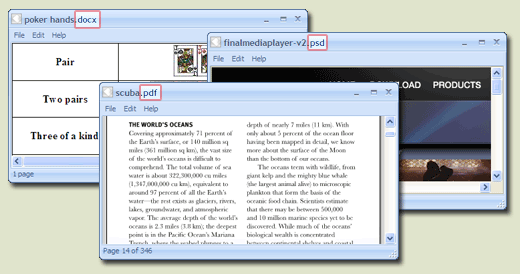
FreeFileViewer is a, all-in-one file viewer designed for Windows operating systems, supporting over 200 file formats. It enables users to open and view a wide array of documents, images, videos, and audio files without the need for multiple specialized software installations. This lightweight application is compatible with Windows 10, 8, 7, Vista, and XP, accommodating both 32-bit and 64-bit versions.
Key Features and Functionality:
- Extensive Format Support: FreeFileViewer can handle a diverse range of file types, including:
- Documents: DOC, DOCX, PDF, TXT, XLS, XLSX
- Images: JPG, PNG, GIF, PSD
- Videos: FLV, MP4, MOV, MPG
- Audio Files: FLAC, MP3, OGG, WMA
- Others: BIN, CFG, DAT, DIZ
- Standalone Operation: The software functions independently, allowing users to view files without requiring the original programs used to create them. For instance, it can display Adobe PDF files and Microsoft Office documents without needing Adobe Reader or Microsoft Office installed.
- User-Friendly Interface: Designed with simplicity in mind, FreeFileViewer offers an intuitive interface that facilitates easy navigation and file access.
- Comprehensive Installation: All necessary components are included within the installer, ensuring a seamless setup process without the need for additional software or plugins.
Primary Value and User Solutions:
FreeFileViewer addresses the common challenge of managing multiple file types by providing a unified solution that eliminates the need for numerous specialized applications. Users can effortlessly open and view a vast array of file formats, streamlining their workflow and enhancing productivity. This all-encompassing approach not only saves time but also conserves system resources, making it an ideal choice for individuals seeking a reliable and efficient file viewing tool.

E se fosse possível, criar um treinamento em 8 minutos? Crie jornadas de aprendizagem altamente eficazes para desenvolver: programas de integração, treinamentos de vendas, programas de liderança e outros. Com o LMS da Engage você vai conseguir: A metodologia da Engage utiliza de Learning Experience e Gamificação para aumentar o engajamento dos colaboradores, em nossas experiências alcançamos índices de 90% de engajamento nas áreas de capacitação e desenvolvimento. Crie trilhas de aprendizagem específicas por público, unindo treinamento presencial, pré-work e desafios para sustentar a aprendizagem após o treinamento. Com a LIA, nossa Assistente Virtual você conseguir criar treinamentos em poucos minutos utilizando Inteligência Artificial. Fale com nosso time de especialistas e entenda como podemos te ajudar a acelerar o processo de aprendizagem na sua empresa e como garantir 4x mais engajamentos dos colabores nas trilhas. A plataforma LMS que utiliza gamificação e inteligência artificial para aumentar em 4x o engajamentos dos seus colaboradores.

Curriculum Genie is an AI Curriculum Agent to help the curriculum team to create cross-subject standards and include portrait of a graduate (21st century skills) supported with student slides, teachers slides, pedagogical best practices for CLR, UDL, and built in quiz. It will only take 8 minutes to generate a unit with pedagogical best practices.

Wondershare UniConverter has many fantastic features such as Video Conversion, Audio Conversion, VR Conversion, Image Converter, Video Downloader, Video Editor, DVD/CD Burning, Screen Recorder, File Transfer, and more. Wondershare UniConverter has a simple and stylish interface for extremely functional and comprehensive purpose.
Convert Video to Any Formats You Want
Wondershare UniConverter is a one-stop video converter for any media file and memories with full GPU acceleration. It supports 4K/8K conversion without losing quality. You can easily convert videos from iPhone/iPad/Android/iOS devices, game players, and social networks over 1000 formats with 30X High-speed conversion.
On the left, you can operate the input and editing settings. On the right, you can manage the output format and remove a file from the list. Make sure the High-Speed Conversion button is turned on and Start All for batch conversion.
Compress Videos with Customizable Settings
No more struggling with storage space as your files can now be compressed by using the software. UniConverter video compression feature allows you to resize and reduce the files. Select file parameters, preview, and change the single/multiple files output format in high-quality. Compress your videos with the right size and high quality for playback on devices. You can share them on your social networks and for other purposes. You can quickly compress multiple videos in batches with simple clicks.
Quality Recorder with Multiple Options
The newly-released Wondershare UniConverter supports screen recording, audio recording, and webcam recording. You can pause and resume your recording at any time. After your finish recording, you can make further edits and modifications like trimming, cropping, adding watermarks, inserting subtitles, and more.
Wondershare UniConverter has a disc burner to create Bu-rays and DVDs from your media files so that you can enjoy an extraordinary DVD experience anywhere.
You'll find more powerful features in Wondershare UniConverter complete toolbox and enjoy more convenience in your daily video tasks. The multi-toolbox includes Image Converter, GIF Maker, Fix Media Metadata, Transfer (transfer local/converted/downloaded media files to your devices), CD Burner, CD Ripper and VR Converter (convert videos to VR format). Your complete toolbox, easy to use, all in one!
Wondershare UniConverter-best video converter ultimate, loved by 50 million customers. Now you are invited to have a worthwhile experience with the features and quality of the software. It supports Windows/Mac/Online Version (Media.io).
Convert video/DVD to 1000+ formats with high quality.
Convert video to MP3 and 100+ audio formats.
Convert video/DVD to different formats in batch.
Support High-Speed Conversion and GPU acceleration.
Merge videos into one.
VR Converter.
Add files to iTunes after conversion automatically.
Download videos from YouTube and other 10,000+ video sites
Record videos from any websites.
Download subtitles/cc from YouTube.
Download YouTube to MP3 in one click. Download YouTube 4K/HD videos.
Download playlist from YouTube, Lynda to MP3, MP4, or other formats.
Multi-task downloading supported.
With download accelerator, 30X faster download speed than others.
Downloading and converting files in one-click.
Trim video into several segments.
Crop video to remove unnecessary parts. Rotate video by 90, 180, or 270 degrees.
Add subtitles to video, including .srt, .ass, or .ssa extensions.
Add watermark to video for copyright protection.
Enhance video by applying special effects and filters.
Adjust audio volume for your videos.
Record videos from any websites.
Record Skype videos, Facetime videos, etc.
Record screen for guide, tutorial, course, etc.
Burn videos in different formats to DVD/ISO/DVD Folder in high quality.
Burn your precious video to a high-quality Blu-ray Disc or DVD.
CD Burner/CD Converter
Customize the DVD menu with various DVD templates.
Auto-fix and edit video metadata info.
Convert video or photos to GIF.
Compress video without losing quality.
Convert image format from one to another.
Transfer videos or music to Android/iOS devices.

Find, resize, crop, watermark, enhance, adjust, convert, rename, and process your pictures and photos in 30+ image formats with 120+ filters and effects using this graphics software. Some features include:
- 120+ Actions and Effects: resize, crop, adjust, contrast, watermark...
- Conditional processing based on image orientation, size, and other attributes
- 4 processing modes: Manual, Background, Scheduled, and Console
- Work with metadata: EXIF, IPTC, GPS, XMP
- Save results in any of 30+ formats: jpg, png, tiff, jp2...
- Full 32-bit support for images with alpha channel
- Resize, scale, shrink, fit to aspect ratio, fit to rectangle...
- Automatic crop, crop to fixed size, crop from edges, crop to W:H ratio
- Color adjustments: brightness, hue, saturation, tint, exposure...
- Use creative effects: pixelate, vignette, frost glass...
- Add static / dynamic text and image watermarks
- Apply tiled, rotated, mirrored, resized watermarks
- Per-channel processing: extract, mix, replace, adjust values, etc...
- Layers with pixel filtering and 40+ Blend Modes: lighten, darken, contrast, inversion...
- 8 Color Models: RGB, HSB/HSV, HSL, HSI, HWB, YCbCr, Lab, LCH
- 20 scaling modes: Lanczos, Bilinear, Bicubic, Box, HqX
- 12 compositing modes: source-over, source-in, source-out...
- Resize canvas and add padding; change print resolution
- Change width and height independently or proportionately
- Set dimensions using pixels, percentages %, or print units
- Automatically shrink images to fit a desired file size in Kilobytes
- Rotate and flip manually or using EXIF orientation tag
- Fit to fixed size or rectangle; fit to aspect ratio
- Fast parallel processing on multi-core CPUs
- Rename image files based on image or file properties and EXIF/IPTC metadata
- Customize output file names with dynamic tags
- Save images to multiple locations and using different settings
- Different image format options: bit depth, compression...

Aiseesoft HEIC converter, which allows you to convert all your HEIF (.heic) photos to JPG/JPEG or to PNG on Windows or Mac computer without any hassle. Besides, it provides amazingly fast and time-saved conversion process. This software support nearly all windows system such Windows 10, 8, 7, XP, Vista and more. And it also supports most popular portable devices, like iPhone XS/ XR/XS Max/X/ 8/8 Plus/5S/5C, iPad mini 3/2, iPad Air 2/iPod, etc. Key Features 1. Convert HEIC to JPG/JPEG on Windows or Mac JPG/JPEG is more useful and compatible with the majority of platforms. JPG is a file type developed by JPEG, also referring to the Joint Photographic Experts Group. It is a standard for professional photographers. JPG images compress image data by reducing sections of images 2. Convert HEIC to PNG and Batch Convert HEIC Files PNG images support multiple colors and internet graphics. Professionally convert unlimited HEIC images to JPG or PNG without hassle. 3.Suppor various Devices This software highly supports iPhone XS/ XR/XS Max/X/ 8/8 Plus, iPad mini 3/2, iPad Air 2, iPod, Apple TV,etc. This software support nearly all windows system such Windows 10, 8, 7, XP, Vista and more. 4: Free and Fast HEIC Converter lets you convert 10 HEIC files for free, providing amazingly fast and time-saving conversion process. It adopts more advanced and modern compression, allowing digital photographs taken by iPhone, iPad or iPod running iOS 11 to be created in smaller file sizes, while keeping higher image quality.

AnyMP4 MTS Converter owns powerful encoder and decoder technology to convert MTS, TS, M2TS, and popular video/audio files to any video(AMV, ASF, AVI, DivX, Flash H264, H.264 AVI, FLV, SWF, H.264/MPEG-4 AVC, M4V MPEG-4, MKV, MOV, etc.) and audio(AAC, AC3, AIFF, AMR, AU, M4A, MKA, FLAC, MP2, MP3, OGG, WAV, WMA) format. Moreover, it supports iPhone 11 Pro Max/11 Pro/11, iPhone XS, iPhone XS Max, iPhone XR, iPhone X, iPhone 8, iPad mini 4, and Samsung S10 and so on. Key Features: 1. Convert MTS to other video/audio formats. It can convert MTS and other video/audio files to the video formats of AMV, ASF, AVI, DivX, Flash H264, FLV, SWF, H.264 AVI, H.264/MPEG-4 AVC, M4V MPEG-4, DV, MKV, MOV, MPEG-1, MPEG-2, MPEG-4, MTV, VOB, WMV, XviD, VCD, WebM and HD or audio format of AAC, AC3, AIFF, AMR, AU, FLAC, M4A, MKA, MP2, MP3, OGG, WAV, WMA. 2. Adjust output video effect. You are allowed to define the output video and audio parameters, such as Video Resolution, Video Bitrate, Frame Rate, Encoder and Audio Channels, Sample Rate, Encoder, Audio Bitrate as well as video Brightness, Contrast, Saturation, Hue, and Volume. What's more, you can choose audio tracks/subtitles at your disposal as well. 3. Crop and Merge function. Unwanted playing areas of a video can be cut out so as to fit your different portable players. You can also trim a video or audio to your desired time length segments by setting the start and end time. Merging several videos or audio files into one is a piece of cake. 4. Convert files to be fit for all players. The output files can be played on iPhone 11 Pro Max/11 Pro/11, iPhone XS, iPhone XS Max, iPhone XR, iPhone X, iPhone 8, iPad mini 4, and Samsung S10 and so on. You can watch the amazing videos at any time and places with your portable devices.

Kingshiper HEIC to JPG Converter is a professional HEIC conversion tool designed to convert HEIC photos to JPEG or JPG formats without losing any quality. Moreover, it supports batch conversion, making it convenient for you to process multiple files at once. With this tool, you can easily convert HEIC photos in 3 simple steps.
Supported image formats: aai, art, arw, bpg, bmp, cals, crw, cr2, cur, dcx, dds, dib, dng, dpx, dpi, exr, emf, fax, fits, flif, gif, hdr, hrz, heic, ico, jpg, jpeg, jng, j2c, j2k, miff, mng, mpc, mrw, mtv, nef, orf, otb, png (png8, png24, png32, png48, png64), pam, pab, pcx, pcd, pcds, pef, pes, pfa, pfb, pgm, pict, pix, pnm, ppm, psb, psd, ptif, pwp, rla, sct, sgi, sun, svg, tim, tif, tiff, tga, vicar, viff, webp, wbmp, wmf, wpg, xbm, xcf, xpm, livp, avif, hif, jfif, and cr3.
WHY CHOOSE KINGSHIPER HEIC to JPG Converter?
1. Lossless HEIC image conversion
2. Privacy-protected and safe conversion
3. Support multiple popular image formats
4. Batch convert heic to jpg with one simple click
HOW TO TRY IT FOR FREE?
After installing, you can directly convert HEIC photos with watermarks.
Upgrade your plan so that you can experience all the features without limitations and export files without watermarks.
GOT QUESTIONS?
Web: https://www.kingshiper.com/heic
Instagram:@kingshipersoft
YouTube: @Kingshiper
Facebook: @KingshiperSoftware
Twitter: @ShiperKing
Kingshiper Support: support@kingshiper.com
ABOUT DEVELOPER
Kingshiper is a leading brand in the desktop and mobile software. We have been established for ten years in China, offering 100% safe, reliable, and cutting-edge products that cater to professionals, students, creatives, and everyday users alike. Our goal is to make things easy, that's also why we aim to offer a comprehensive suite of digital tools designed to meet a variety of needs. From multimedia editing to productivity enhancement, each tool is crafted to simplify and elevate the digital experience. Start converting your HEIC files to JPG with Kingshiper HEIC to JPG Converter!

Residential HVAC Load Calculator is an ACCA-approved Manual J8 HVAC Load Calculator native app available for the Apple iPad

Kalima is AI transcription software for meetings, sales and support calls, interviews, lectures, podcasts and any other conversation. It records the audio right on your computer, so no bot joins the call.
Who uses Kalima
- Teams and companies: meetings, remote teams, sales and customer support
- Education: lectures, seminars and training, with live translation for students
- Research and product teams: interviews you can quote exactly
- Healthcare teams: handovers, coordination and training across languages (not a clinical documentation system)
- Events and conferences: the audience reads the live transcript on their phones
- Podcasters and creators: transcripts, show notes and subtitles
Transcription and AI
- Live transcription with automatic speaker labels and timestamps
- Live translation into 60+ languages, original and translation side by side, even when someone switches language mid-sentence
- Upload audio and video (MP3, WAV, M4A, MP4, MOV and more), up to 10 files at once
- Playback with word-by-word highlighting and chapters; click any word to jump there
- AI Studio: summaries, tasks and decisions, plus a chat that answers questions from the transcript
- Search across all sessions
- Export as PDF, TXT, JSON, SRT, VTT or a Markdown summary
Collaboration
- Live sharing: others read along while you record. Open it to anyone with the link or only to chosen people, teams and organizations, with password, expiry and viewer rights
- Workspaces and projects keep clients and topics apart
Desktop app for Windows, macOS and Linux
- Meeting detection offers to record when a call starts, with optional auto-start and auto-stop
- Records your computer's audio and microphone, so it works with Zoom, Microsoft Teams, Google Meet, Webex, Slack huddles, Discord and any app that plays sound
- Privacy mode keeps the Kalima window out of screen shares and screenshots
- Screen recording, picture-in-picture, tray and shortcuts
- Browser extension for Chrome, Edge and Brave notices Meet, Zoom, Teams, Webex, Jitsi and Whereby calls in a tab
Integrations
- MCP server for Claude, ChatGPT, Cursor and VS Code: your assistant searches your transcripts and names the meeting and moment behind each answer
- 9,000+ apps through Zapier, 3,500+ through Make and 2,000+ through n8n, with ready-made setups for Notion, HubSpot, Slack and Asana
- REST API
Platforms
Web app in any modern browser, desktop app for Windows, macOS (Apple silicon) and Linux, Android app on Google Play. On iPhone and iPad, Kalima runs in the browser.
Privacy and security
Kalima is a German company based in Düsseldorf. Recordings and transcripts are stored in Germany, encrypted at rest and in transit, and never used to train AI. A GDPR data processing agreement is included.
Free plan available, no credit card required. Some features, such as screen recording, the REST API and automation integrations, require a paid plan.

VoiceAIWrapper is a multi-provider white-label platform for agencies that resell voice AI services to their clients. Agencies connect their own API keys from Vapi, Retell, ElevenLabs Agents Platform, Bolna, and Ultravox, then resell those platforms under their own brand, on their own domain, with their own client portals and pricing.
Core capabilities:
- White-label client portals with custom branding (logo, domain, color scheme)
- Inbound and outbound calling workflow builders
- Pod architecture for connecting multiple providers per client account
- Built-in Stripe billing engine with markup pricing, 10-currency support, and four billing frequencies (daily, weekly, monthly, yearly)
- Webhook and API integrations with Make, n8n, Zapier, GoHighLevel, HubSpot, Airtable, and Google Sheets
- Per-client access control: agencies set what each end-client can see and do
- Post-call structured data with full transcripts via webhook
- Voice minutes bill direct to the underlying provider (no markup from VoiceAIWrapper)

VidJuice Video Downloader enables you to save any video and audio content from YouTube and similar services in 8K, 4K, HD, 1080p and other resolutions, even convert to plenty of format automatically. Just copy and paste the URL in the app to get started.
Features
Grab entire YouTube playlist and channels at once within 1 click with pause and resume option.
Batch download videos in 8K, 4K, UHD, 1080p, 720p, 60fps and many more qualities and convert YouTube videos as MP4 or MP3 to your Mac/PC, iPhone, iPad for offline playback.
Download subtitles or captions with YouTube videos. Save them in SRT format or burn the subtitle directly to the output video.
High speed integrated downloading speed.
Extract Audio from YouTube Video and save them to MP3 and M4A formats.
Frequent updates to ensure and add sites supported.
In-app HTTP/SOCKS proxy setting for location restricted downloads

VisualStories.com is a multi-tenant, multi-site platform that has a multi-author AMP CMS at its core. We provide individuals and online businesses with a no-code solution to get a PWA (Progressive Web App) of AMP Stories on their website. We have developed an AMP Story builder tool using the latest technologies (like Angular 8 and .NET Core 2.2), with the help of which the online businesses can publish AMP Stories on their website.

AnyMP4 MXF Converter can help you convert MXF to any video formats like MP4, AVI, WMV, MKV, MOV, M4V, TS and so on. Besides, you can also convert MXF to 3D videos and HD videos. Meanwhile, this software has multiple editing functions. With this software, you can play your videos on many mainstream portable devices including iPad Mini 4, iPhoneXR/XS/XS Max/X/8, Galaxy serail, Google Nexus 7, Kindle Fire, HTC One X, and Windows phone, etc.