AI-Generated Results
Finding matches…
Secure screen and webcam recording in your browser. End to end encrypted. No installation required.
Not seeing what you're looking for?
Dive deeper into "WebDAV Browser" on G2 AI

Purecast is a complete web-based email management solution. It's easy to use and it is accessed securely by customers from any web browser.

AssetTiger is a comprehensive, web-based asset management platform designed to help organizations efficiently track, manage, and audit their assets, including IT equipment, tools, vehicles, and furniture. Trusted by over 30,000 customers, AssetTiger offers a user-friendly interface accessible from any browser or mobile device, eliminating the need for software installation. The platform provides essential features such as barcode scanning, alerts, audit history, and robust reporting capabilities. Users can manage up to 250 assets at no cost, with scalable plans starting at just $20 per month. By streamlining asset management processes, AssetTiger helps organizations stay organized, reduce asset loss, and simplify audits.
Key Features and Functionality:
- Barcode Scanning: Facilitates quick and accurate asset identification and tracking.
- Alerts and Notifications: Keeps users informed about asset status, maintenance schedules, and other critical updates.
- Audit History: Maintains detailed records of asset movements and changes for accountability and compliance.
- Comprehensive Reporting: Generates insightful reports to aid in decision-making and resource allocation.
- Cloud-Based Access: Allows users to manage assets from any location using a web browser or mobile device.
- Scalable Plans: Offers a free plan for up to 250 assets, with affordable options for larger inventories.
Primary Value and User Solutions:
AssetTiger addresses the challenges organizations face in asset management by providing a centralized, easy-to-use platform that enhances organization, minimizes asset loss, and simplifies audit processes. Its cloud-based nature ensures accessibility and flexibility, while features like barcode scanning and comprehensive reporting improve efficiency and accuracy in asset tracking. The scalable pricing model makes it suitable for businesses of various sizes, offering a cost-effective solution for effective asset management.
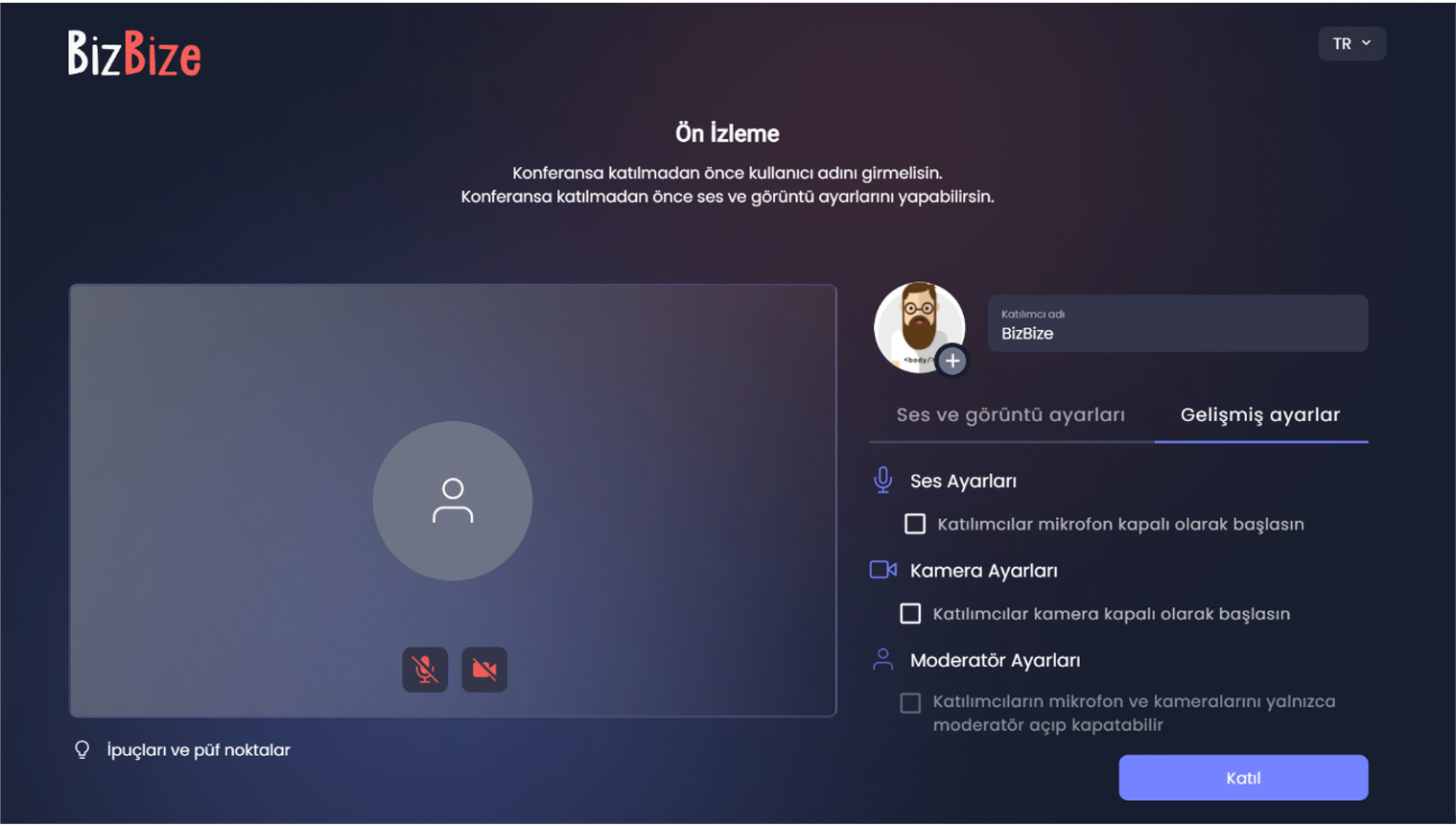
BizBize for all your video conferencing and online meeting needs with 4 languages support (English, Spanish, Russian, Turkish)
Secure Communication: Your data is safe with end-to-end encryption.
Easy Accessa: Use the video conferencing platform on your browser without installation.
Functional Features: Discover BizBize’s advanced features that will elevate your video communication experience.
Local Setup Option: Store your data on your own servers.
Webinar, Secure File Sharing, Whiteboard, Encrypted Meeting Mode, Web-Based Application
Individual Use
A flawless video conferencing experience with unique features.
Corporate Use
Sector-specific online meeting solutions for you to stay connected with your coworkers and clients.

WebMode 4 is a Web-based CRM application running on IBM Domino. It is run and administered entirely through a Web browser, and does not require IBM Lotus Notes.

Dictation IO is a free, web-based speech-to-text tool that enables users to compose emails, documents, and essays through voice input, eliminating the need for manual typing. Utilizing Google Speech Recognition technology, it offers real-time transcription with support for over 50 languages, including English, Spanish, French, Italian, Portuguese, Hindi, Gujarati, and Tamil. Designed to function seamlessly within the Google Chrome browser on Windows, Mac, and Linux systems, Dictation IO ensures user privacy by storing all transcribed text locally in the browser without uploading data to external servers.
Key Features:
- Multi-Language Support: Recognizes and transcribes speech in numerous languages, catering to a diverse user base.
- Voice Commands: Allows users to insert paragraphs, punctuation marks, and even emojis using simple verbal instructions, enhancing the writing experience.
- Real-Time Transcription: Converts spoken words into text instantly, facilitating efficient and uninterrupted content creation.
- Local Data Storage: Ensures privacy by storing transcribed text locally within the browser, with no data uploaded to external servers.
- Browser-Based Accessibility: Operates directly within Google Chrome without the need for additional software installations, making it easily accessible.
Primary Value and User Solutions:
Dictation IO streamlines the writing process by allowing users to dictate content, significantly reducing the time and effort associated with manual typing. Its support for multiple languages and voice commands makes it a versatile tool for composing emails, drafting documents, and taking notes. By storing data locally, it addresses privacy concerns, ensuring that sensitive information remains secure. This tool is particularly beneficial for individuals with mobility challenges, professionals seeking efficient documentation methods, and multilingual users requiring accurate transcription services.
Prime Document Sign is web-based e-signature software for freelancers, agencies, and small businesses that need to send agreements and collect signatures online without printing, scanning, or faxing. It is operated by PrimeSquad and built on Google Firebase and Google Cloud: sessions use HTTPS (TLS), and data is stored on Google-managed services with encryption at rest consistent with Google Cloud’s standard protections. Senders authenticate with Firebase Authentication; Firestore security rules scope each customer’s documents, templates, and email activity to their own account. The workflow is intentionally straightforward: compose agreement text or work from PDFs on eligible plans, use starter templates where available, place signature and field blocks, email a unique signing link (or copy the link), optionally schedule reminder emails on supported plans, and download a signed PDF after completion. Recipients can sign in the browser on desktop or mobile without creating an account unless you enable stricter recipient verification on supported tiers (options such as email confirmation or one-time passcode–style checks where available). When signing completes, Prime Document Sign stores completion records for the document owner, sends confirmation notifications, and retains audit-friendly metadata such as signing timestamp, IP address when obtainable from the client, browser user agent, device timezone, and a SHA-256 fingerprint computed from a canonical string of the agreement content and captured signer field values. That combination supports everyday evidence of who agreed and when. Signed PDFs are produced by rendering the agreement and signing capture into a portable document; they are suitable for many routine B2B and B2C contracts, but they are not EU qualified electronic signatures (QES), embedded PAdES/PDF digital signatures, or a substitute for legal advice. Requirements for regulated industries, specific countries, or high-assurance identity should be validated with qualified counsel. Privacy Policy and Terms of Service describe how personal data is handled, limitations of retention and availability, and user responsibilities including downloading and retaining signed documents within the timeframes described in those terms. Regulated organisations should complete their own compliance review. Published FAQ content on primedocumentsign.com explains how electronic signatures differ by region and when to choose specialised vendors. Pricing is published (from $2/month) with a free first send where offered and pay-per-send options for occasional users. Prime Document Sign focuses on honest positioning: practical signing, verifiable completion details, infrastructure-backed security, and clear published policies, so teams get a credible, affordable alternative to heavyweight enterprise suites without overclaiming formal attestations (such as SOC 2 or ISO 27001 reports) or guaranteed legal outcomes in every jurisdiction.

O&O Syspectr monitors your Windows systems in the background and immediately communicates possible problems – detecting problems before they cause pain. In addition, with O&O Syspectr you get a comprehensive overview and deep insights into your Windows infrastructure. You can have all relevant system information displayed at any time: hardware, software, levels and health status of the hard disks, connection status as well as internal and external IP addresses and much more. O&O Syspectr does not only monitor, but also helps you actively: with the integrated Remote Desktop, you can always help your users directly on their PC.
The administration takes place at O&O Syspectr via the web browser. Any current browser can be used on any Internet-enabled device. Because the application is fully web-based, no additional software or plug-ins are required. This also applies to the Remote Desktop, which also runs completely in the browser.

PrizmDoc® for Java, formerly known as VirtualViewer®, is a comprehensive suite of Java-based APIs designed to seamlessly integrate advanced document viewing and processing capabilities into web applications. It supports a wide array of document types, including AFP, Word, PDF, PNG, PCL, and TIFF, enabling users to view, annotate, redact, and manipulate documents directly within their browser without the need for additional software installations.
Key Features and Functionality:
- Cross-Platform Compatibility: Operates seamlessly across various platforms with a pure Java solution, ensuring consistent performance regardless of the operating system.
- No Client-Side Installation: Eliminates the need for client-side downloads or installations, simplifying deployment and reducing IT overhead.
- Localized User Interface: Automatically detects browser settings to display the interface in the appropriate language, enhancing user experience for a global audience.
- High-Speed Viewing: Utilizes advanced server processing to deliver rapid document rendering and interaction, even with large files.
- Seamless ECM Integration: Easily integrates with existing Enterprise Content Management systems, including Alfresco, IBM FileNet, and OpenText/Documentum, facilitating efficient document management workflows.
Primary Value and User Solutions:
PrizmDoc® for Java addresses the challenges of efficient document management by providing a robust, web-based solution that enhances productivity and collaboration. By enabling users to perform comprehensive document operations—such as viewing, annotating, redacting, and converting—directly within their web applications, it eliminates the need for multiple software tools and streamlines workflows. Its cross-platform support and lack of client-side installation reduce deployment complexities, while its high-speed performance and seamless ECM integration ensure that organizations can manage their documents effectively and securely.

Respondus Monitor® builds upon the power of LockDown Browser, using a student’s webcam and industry-leading video analytics to prevent cheating during non-proctored exams.

Photo Explosion 5.0 is a comprehensive digital photo editing software designed to simplify the process of enhancing, organizing, and sharing photographs. It combines powerful editing tools, special effects, and professional-quality photo projects into a single, user-friendly program. With an intuitive interface and a suite of features, Photo Explosion 5.0 caters to both novice and experienced users seeking to maximize their digital photography experience.
Key Features and Functionality:
- Extensive Photo Capture: Import photos from various sources, including digital cameras, mobile phones, scanners, photo CDs, camcorders, and the Internet.
- Universal Compatibility: Supports a wide range of digital cameras, such as point-and-shoot, compact, SLRs, mobile phones, camcorders, and webcams.
- Organized Management: Utilize a multimedia file browser to organize photos into on-screen albums, with options to add keywords and ratings for efficient retrieval.
- Advanced Editing Tools: Automatically straighten, crop, adjust brightness and contrast, hue and saturation, or focus with one click. Remove red-eye, wrinkles, and other photo flaws effortlessly.
- Creative Enhancements: Apply artistic effects like sepia, watercolor, and monochrome. Add frames, props, and embellishments to personalize images.
- Text Effects: Incorporate captions with colorful, eye-catching text, transforming words into visual elements.
- Panorama Creation: Easily stitch a series of photos into 360° or wide-angle panoramas.
- Photo Projects and Gifts: Access over 1,500 ready-made photo projects, including scrapbooks, greeting cards, calendars, and more. Receive special discount offers on professionally printed photo gifts.
- Sharing Capabilities: Instantly upload photos, slideshows, and video projects to popular social networking sites like Facebook, Flickr, and Picasa.
Primary Value and User Solutions:
Photo Explosion 5.0 addresses the common challenges of digital photo management by offering an all-in-one solution for editing, organizing, and sharing images. Its user-friendly interface and comprehensive feature set enable users to enhance their photos with professional-quality effects and create personalized projects without the need for multiple software programs. By streamlining the photo editing process, Photo Explosion 5.0 empowers users to transform their digital memories into lasting keepsakes with ease.

Clipy is a free, no-watermark screen recorder for Mac, Chrome, and the web. It was built by Codersera as the recorder its team wished existed: hit record, stop, paste a share link. No watermark, no five-minute cap, no signup wall for the person watching. The recording flow is free in the same way a tape measure is free — it's a tool, not a tier.
Clipy ships in three places, each tuned to where its users already work. The native Apple Silicon menu-bar app for macOS records to a hotkey and streams the upload as it captures, so the share link is ready the moment Stop is pressed. The Chrome extension records screen, tab, window, or webcam from inside the browser most users already have open — works on Windows, Linux, ChromeOS, and macOS. And the browser-based recorder at clipy.online runs without an install, useful when neither the Mac app nor an extension is appropriate.
Every recording produces an instantly shareable link. Viewers open the link in any browser, on any device, without creating an account or downloading software. Clipy's product position is that the recording itself should never be the friction — the friction is the watermark in the corner, the five-minute timer, the "sign up to watch" page in front of the video.
Clipy is built by Shubh and the team at Codersera. The project is small on purpose: no fundraising, no growth team, no roadmap pressure to invent paid tiers. That choice keeps the surface area small and the product honest.
The free-ness extends to the share experience. Viewers don't get an upsell, an interstitial, or a "sign up to watch the next clip" wall. The link opens, the video plays, the page is the player. Slack and other tools unfurl the link as a card; the recording itself stays on Clipy's CDN.
Built with Next.js on the web and Tauri (Rust) on macOS, Clipy uses Backblaze B2 for video storage and serves recordings through a global CDN.
Find Clipy at https://clipy.online. Press inquiries: support@clipy.online.
MapBrowser, Nearmap’s flagship web-based application, allows you view, measure, mark-up, and export current and historical, high-resolution vertical, oblique, and 3D imagery and content — and display more than 130 AI-powered data layers.

FortiIsolator is a browser isolation solution designed to protect users from zero-day malware and phishing threats delivered via the web and email. By creating a visual air gap between users' browsers and potentially malicious content, it ensures that web content is executed in a remote, disposable container and safely rendered to users, effectively isolating any threats.
Key Features and Functionality:
- Clientless Browser Access: Users can access web content through any modern HTML5 browser without the need for additional installations or plugins.
- Secure Web Browsing: All web activities are processed in a remote isolation environment, ensuring that malicious content does not reach the end user's device.
- Seamless Integration: FortiIsolator integrates with FortiGate, FortiProxy, and FortiMail for defense against advanced targeted attacks across network, application layers, and endpoint devices.
- Enhanced Productivity: By isolating and rendering safe web content quickly, users experience minimal latency, maintaining productivity.
- Protection of High-Value Data: Adds an extra layer of security for sensitive information by preventing web-based threats from accessing critical data.
Primary Value and Problem Solved:
FortiIsolator addresses the challenge of protecting users from sophisticated web-borne threats, including zero-day malware and phishing attacks, which can lead to data loss, system compromise, or ransomware incidents. By executing web content in a remote, disposable container and rendering only safe content to users, it effectively isolates potential threats, ensuring that malicious content does not reach the end user's device. This approach not only enhances security but also maintains user productivity by allowing safe access to web content without the risk of compromise.
Nakxi is a web-based screenshot design tool built specifically for app developers, indie makers, and mobile app marketers who need professional App Store and Google Play screenshots — fast.
The problem it solves
Most app creators waste hours in Figma or Photoshop setting up device frames, aligning text, managing gradients, and exporting at the right dimensions for every platform. Nakxi eliminates that workflow.
What you get:
- Drag-and-drop screenshot builder with no learning curve
- Professionally designed templates ready to customize
- Real iOS and Android device mockups built in
- Export-ready outputs sized to exact App Store and Google Play specifications
- Browser-based — nothing to install, works on any machine
Who it's for
Solo developers shipping their first app, indie makers refreshing a stale listing, and small teams who need consistent, high-quality visual assets without a dedicated designer.
Why it matters
Your app store screenshots are the single most influential factor in whether someone downloads your app or keeps scrolling. Nakxi exists to make that first impression count — without requiring design skills or expensive software.
Get started free at nakxi.com.

OnlineExamMaker is an online quiz platform that allows users to quickly create, share, and analyze online assessments, tests, lead generation quizzes, and surveys. The platform offers a range of features such as quiz certification, different question types (multiple-choice, true/false, etc.), multimedia support, automated grading, and reporting. It also provides a number of features designed to prevent cheating, including browser lockdown, webcam proctoring, face ID verification, and randomized questions. It is a useful tool for teachers, trainers, and anyone looking to create engaging and effective assessments.

Storrito is a web-based application designed to streamline the creation, scheduling, and automatic posting of Instagram Stories directly from a desktop computer. Tailored for influencers, brands, and social media agencies, Storrito eliminates the need for manual posting or mobile notifications, allowing users to plan and execute their social media strategies efficiently.
Key Features and Functionality:
- True Auto-Posting: Unlike other tools that require manual intervention, Storrito automatically posts stories at the scheduled time without any notifications or additional actions from the user.
- Comprehensive Story Editor: The platform offers a robust editor that supports interactive Instagram elements such as Link Stickers, Polls, Quizzes, Hashtags, Mentions, and Location Stickers. Users can also add GIFs from Giphy, high-resolution emojis, custom fonts, and access professional stock photos.
- Bulk Scheduling and Team Collaboration: Storrito enables users to plan and schedule multiple stories in advance, saving time and ensuring consistent content delivery. Teams can collaborate by managing multiple Instagram accounts simultaneously.
- Cross-Platform Posting: Users can share their Instagram Stories directly to Facebook, maximizing reach without extra effort.
- Video Editing and Animation: The platform allows users to cut videos, add GIF animations, and animate elements like link stickers, headers, and backgrounds to create dynamic story content.
Primary Value and User Solutions:
Storrito addresses the challenges of manual Instagram Story posting by providing a seamless, automated solution that operates entirely from a desktop browser. This automation frees users from the constraints of mobile devices and manual scheduling, allowing them to focus on content creation and audience engagement. By supporting a wide range of interactive stickers and multimedia elements, Storrito enhances the quality and engagement potential of stories. Its bulk scheduling and team collaboration features make it an ideal tool for social media managers and agencies handling multiple accounts, ensuring timely and consistent content delivery. Additionally, the cross-platform posting capability extends content reach, while the video editing and animation features add a dynamic touch to stories, making them more appealing to viewers.
LuGo-Test offers coding and technical skills testing services to optimize your company's recruitment and selection process. Featuring:
1. Online Coding Challenges - use coding challenges to see how applicants write code, compile, and run it. Browse their compilation history. See how the applicants think.
2. Online technical tests for R&D/IT/QA positions covering more than 300 technologies.
3. Live coding tests - during the test, managers can join a live coding test and review applicants' code. Applicants may also ask for assistance using our testing app.
4. Webcam based tests - verify the applicant is the only one taking the test.
5. VM based tests - assign a virtual machine-based task for the applicants, including installation, configuration, and coding, all to be done within certain time limits.
6. Private tests - upload your own private content and prepare an assessment, whether it's a coding challenge, open-ended, and multiple-choice questions.
7. Our service runs on the SalesForce.com platform, which supports all security standards, including GDPR.
Read more at https://www.lugo-test.com

Record and narrate your screen in high quality with our free window screen capture and editor tool for Chrome.
Capture, edit, annotate and share your screen recordings in high quality effortlessly with this powerful Screen Recorder Tool.
Easily record your screen, tab or window while narrating with your webcam and microphone with our free Screen Recording Chrome extension.
This user-friendly Window Screen Recorder Extension seamlessly works in Laptop & PC browsers, allowing you to effortlessly capture any part of your screen. Customize your recordings according to your specific needs and easily capture interactions with ChatGPT using this amazing tool.
Once you've recorded your screen, use the built-in editing features to enhance your recordings.
Trim unwanted sections, add annotations, and captions, or highlight important details to make your videos more engaging and professional.
Sharing your screen recordings is a breeze with this Chrome Screen Recorder. Quickly upload your videos to popular platforms or share them directly with colleagues, clients, or friends. Whether you're collaborating on projects, providing remote support, or showcasing your work, this extension simplifies the sharing process.
Key features of Screen Recorder Chrome extension:**
📸🖥️ Effortlessly capture your desktop, application windows, or browser tabs
💻🌐 Compatible with all Laptop & PC devices browsers
✏️🎥 Edit recordings with ease, trim sections, add annotations, captions, and more
📤👥 Seamlessly share your videos with colleagues, clients, or friends
🎓🕹️ Suitable for tutorials, software demos, gaming, and more
🎥Record and download in different formats as required
More Feature:
-🎤⏱️ Microphone Countdown: Prepare yourself before recording by enabling a microphone countdown.
-🛠️🔓 Toolbar Accessibility: Choose to show or hide the toolbar during the recording process.
-📷🔒 Camera Permission: Grant camera access to capture video alongside your screen recording.
-✒️✒️ Pen Tool: Utilize the pen tool to draw and annotate your screen while recording.
-📝🎨 Whiteboard: Create informative tutorials on various Whiteboards with easy-to-understand explanations using visuals and diagrams.
You can also mute or unmute the microphone, control the usage of the camera, and highlight text while you're recording. These features make the Chrome Screen Recorder software a powerful tool for creating high-quality videos.
**Video Recording Feature -**
-Screen Capture for Tutorials
-Record live Meetings & Webinars
-Record Ongoing Conversations & documentation
-Marketing Purpose
-Branding of any products
-Record Gameplay
-Record highlighted news and stats of the stock market
**Benefits of using the Chrome Window Screen Recorder:**
-High-resolution video: The extension can record videos in high resolution without compromising quality.
-Multiple format availability: You can choose to record your videos in a variety of formats, making them compatible with most devices.
-Editing of recorded video: You can trim or edit your recorded videos to remove any irrelevant parts.
-Easy image download: You can easily download a video in any format.
Get the powerful and intuitive Screen Recorder Tool for a high-quality screen recording experience. Download the Windows Chrome software to enhance productivity and communication in a variety of ways.

i-net HelpDesk is a comprehensive service management solution tailored for medium-sized enterprises, suitable for internal support, ITIL service desks, or as a ticketing system for external customer service. It is a fully web-based application that requires no additional software installation and is compatible with Windows, macOS, and Linux servers. The system is designed for quick and easy implementation without the need for on-site consulting or projects.
Key Features and Functionality:
- Web-Based Application: Operates entirely through web browsers, eliminating the need for additional software installations.
- Cross-Platform Compatibility: Runs seamlessly on Windows, macOS, and Linux servers.
- Progressive Web App Technology: Offers desktop integration via PWA, enhancing user experience.
- Mobile Accessibility: Accessible on iPhone, iPad, and Android devices through web browsers, allowing ticket management on the go.
- Form-Based Ticket Editing: Enables structured and efficient ticket management.
- Customer Feedback Mechanism: Includes a rating function for both internal and external users to assess service quality.
- Ad-Hoc Reporting: Provides tools for creating customizable reports with adjustable themes, layouts, and data sources.
- Enhanced PDF Preview: Offers an improved preview feature for PDFs, facilitating parallel processing.
- Flexible User Data Permissions: Allows for tailored access rights to user data, ensuring security and compliance.
Primary Value and User Solutions:
i-net HelpDesk streamlines service management processes for medium-sized businesses by providing a user-friendly, web-based platform that requires minimal setup and no additional software installations. Its cross-platform compatibility and mobile accessibility ensure that support teams can manage tickets efficiently from any location. The system's integration of ITIL best practices enhances service delivery, while features like form-based ticket editing, customer feedback mechanisms, and ad-hoc reporting empower organizations to optimize their support operations and improve customer satisfaction. By offering a comprehensive and flexible solution, i-net HelpDesk addresses the diverse needs of internal support teams and external customer service departments.