



Compare isso com outras ferramentasSalve no seu quadro e avalie suas opções lado a lado.
Salvar no quadro

Avaliações e Detalhes do Produto CMap

Valor em Destaque

Médias baseadas em avaliações de usuários reais.

Tempo para Implementar

3 meses

Mídia CMap

Demo CMap - Real-time decision making
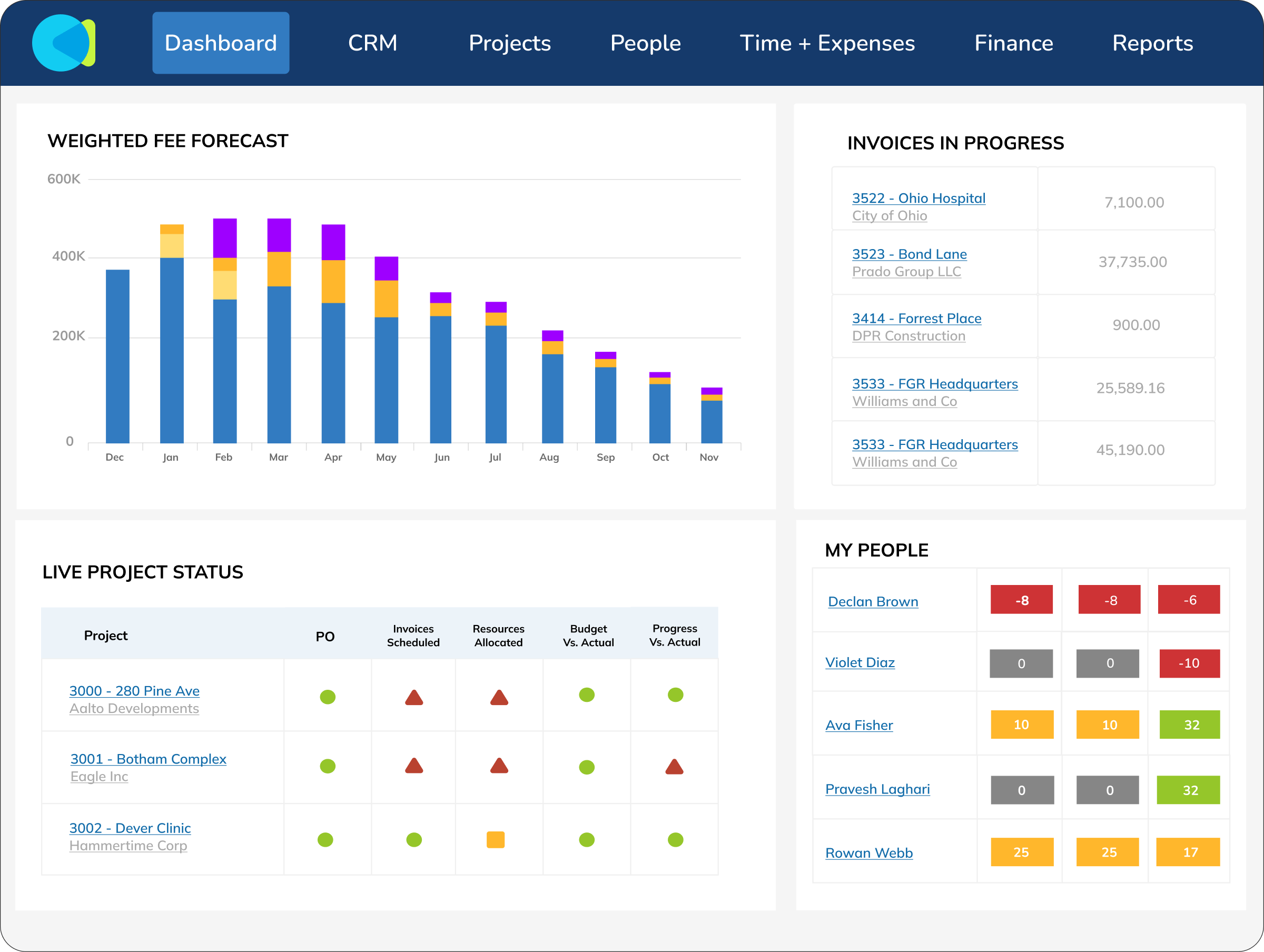
Reports should be something you make decisions on, not something you spend hours and hours creating. CMap’s data feeds reports and live, personalised dashboards to give you the info you need to make key decisions swiftly.
Demo CMap - Business intelligence
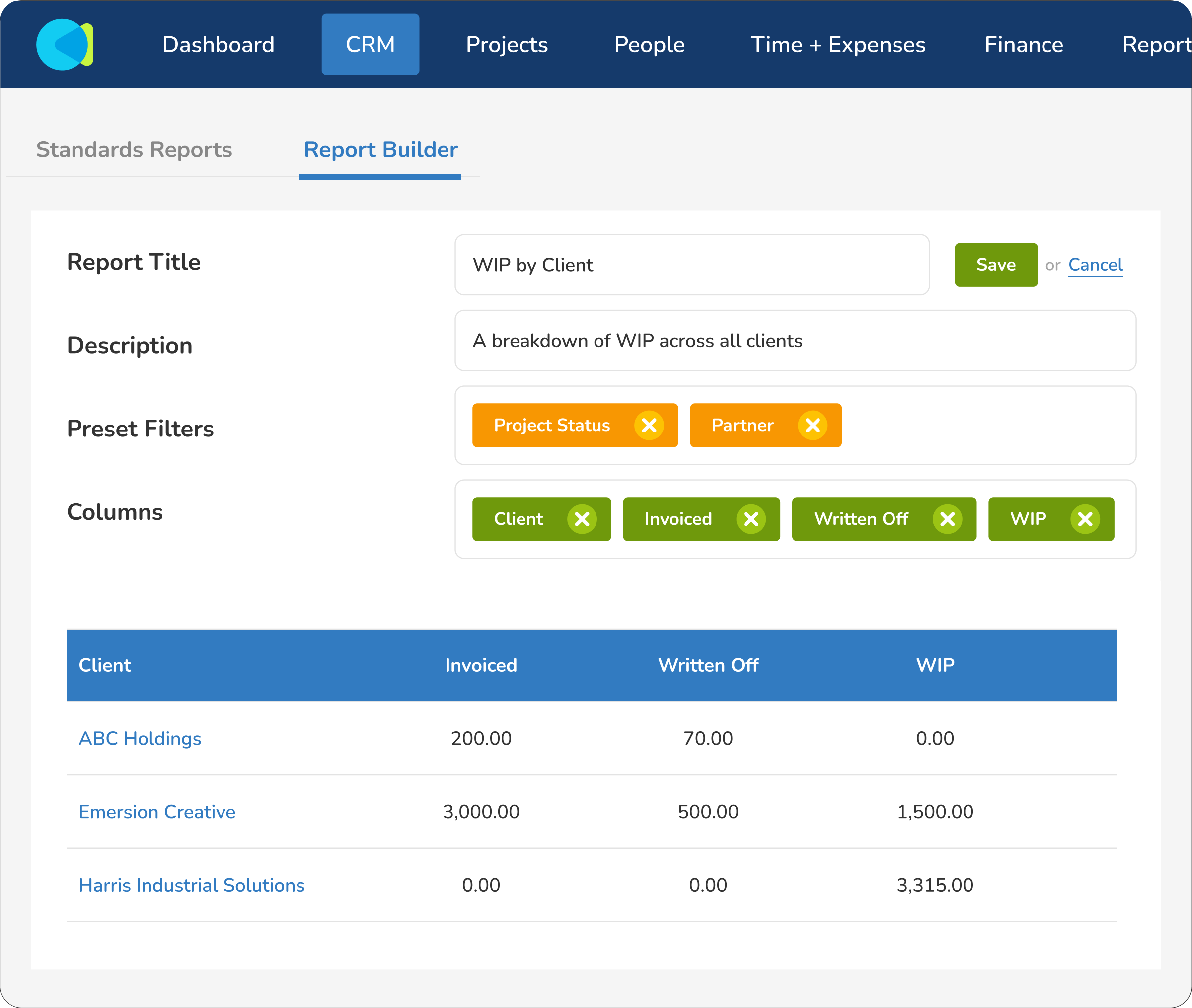
CMap comes with a suite of insightful out-of-the-box reports, but that’s just the start. With the ability to create custom in-app reports and gain direct access to your raw data (in Excel or external BI tools like Power BI), reporting capabilities go stratospheric.
Demo CMap - The power of in-built CRM
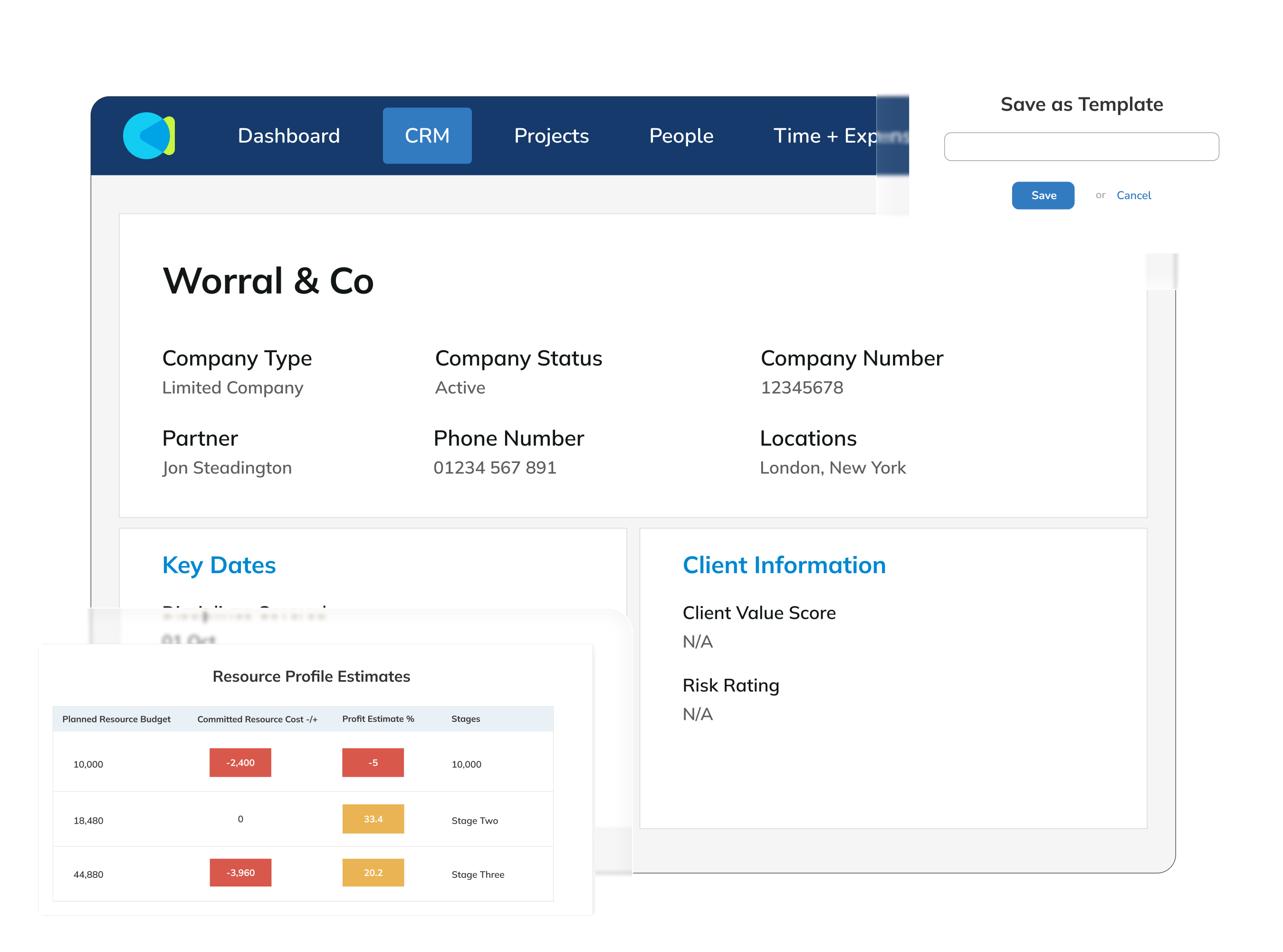
With a separate CRM, data is inconsistent. For example, a “deal value” may be nothing more than a number typed into a field. Whereas CMap’s innovative “Fee Estimator” robustly calculates this value, considering roles, rates and deliverables. Separate CRMs are limited to a pipeline-only view, b...
Demo CMap - Innovative resourcing tools
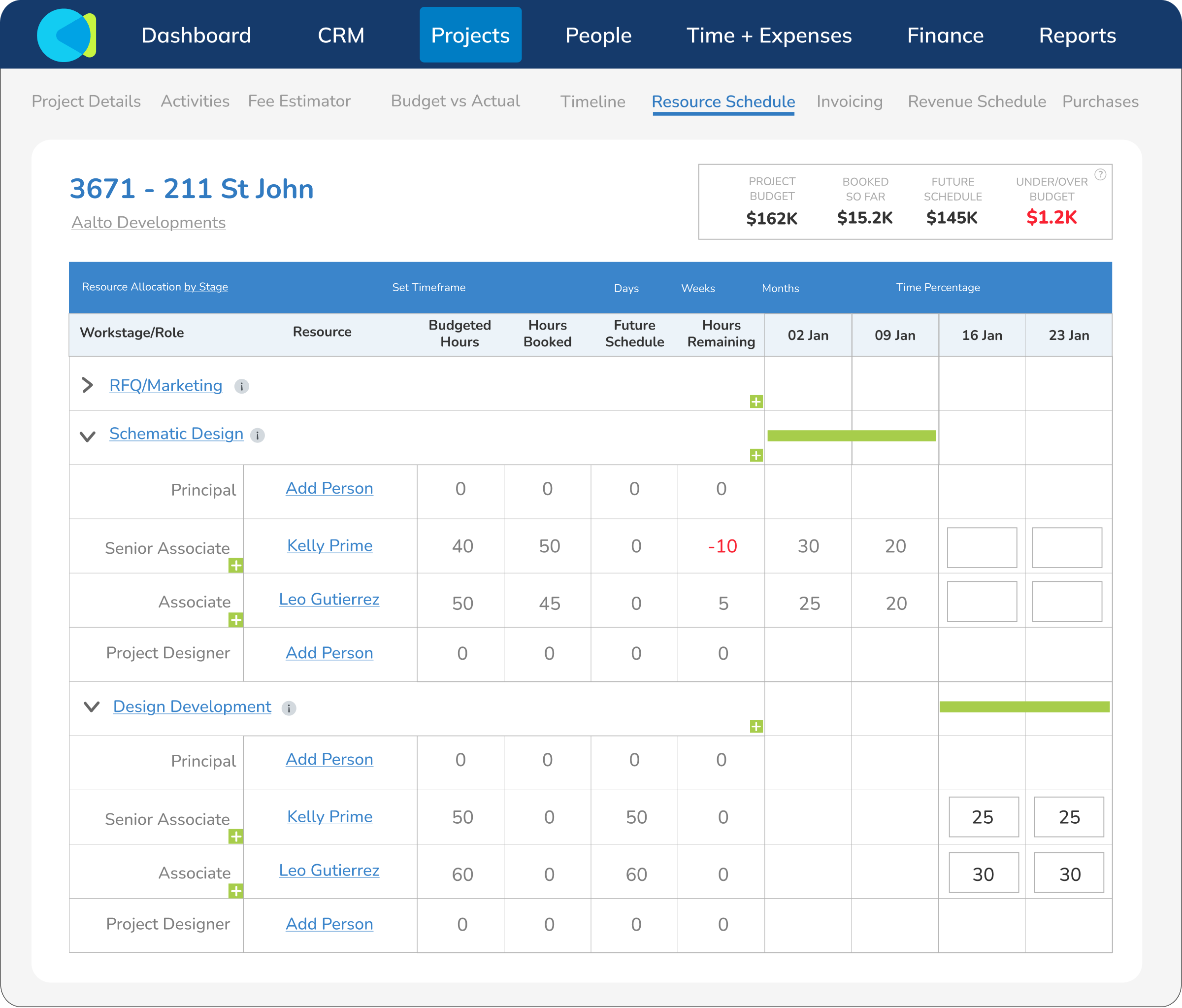
The problem with most resourcing software isn’t the initial set-up of resourcing data: it’s keeping on top of the changes. CMap’s cutting-edge resourcing tools empower you to make super-quick changes and get instant feedback on how they impact the project outcome. With stunning reports that sp...
Demo CMap - HR you can actually use
Many companies only use a fraction of their HR systems. With CMap, we give you the tools & functionality you actually need... and none of the bloat. Thanks to the power of CMap’s “Pages” functionality, setting up a highly configured HR system is a breeze. Performance reviews? Sure thing. I...
Demo CMap - CMap in Outlook
CMap For Outlook is a game-changer for people who live in email. Just received an email from a client to discuss a new potential project? Effortlessly create the opportunity in CMap’s CRM from within Outlook. Need to submit your timesheet? No problem, do it from within Outlook. People love ...
CMap is a PSA software that helps professional services firms, from consultancies to architecture & engineering practices, manage their people, projects, profits and more - all in one place.
Reproduzir Vídeo CMap
CMap is a PSA software that helps professional services firms, from consultancies to architecture & engineering practices, manage their people, projects, profits and more - all in one place.
NextWave testimonial
Reproduzir Vídeo CMap
NextWave testimonial
Imagem do Avatar do Produto

Já usou CMap antes?

Responda a algumas perguntas para ajudar a comunidade CMap

Avaliações CMap (151)

Avaliações

Avaliações CMap (151)

4.5
avaliações 151

Resumo da Revisão

Gerado usando IA a partir de avaliações reais de usuários
Os usuários elogiam consistentemente o CMap por seu layout intuitivo e facilidade de uso, o que simplifica o gerenciamento de projetos e melhora a colaboração da equipe. A plataforma consolida efetivamente várias funções empresariais, permitindo uma melhor visibilidade do desempenho dos projetos e das finanças. No entanto, alguns usuários observam que os recursos de relatórios poderiam ser mais intuitivos e abrangentes.

Prós & Contras

Gerado a partir de avaliações reais de usuários
Ver Todos os Prós e Contras
Pesquisar avaliações
Filtrar Avaliações
Limpar Resultados
As avaliações da G2 são autênticas e verificadas.
David S.
DS
Director at Beckenham Office, Quantity Surveyor
Médio Porte (51-1000 emp.)
"Great invoicing and dashboards, but external cost tracking needs better reporting"
O que você mais gosta CMap?

Scheduling of invoicing is simple and easy to track. Reporting is simple and the custom reports feature is simple to use and allows bespoke reports to be generated.

The dashboards feature allows me to set up simplified dashboards for fee earning staff to allow a snapshot of their position which I can measure them against each other. Análise coletada por e hospedada no G2.com.

O que você não gosta CMap?

The External costs feature does not allow us to monitor expenditure in the same way as Invoicing which is frustrating. We would like a monthly projection of externals spend to be provided on a simple report in the same way as invoicing.

CMAP is also relatively expensive for the amount of the software we use. Análise coletada por e hospedada no G2.com.


Alesha P.
AP
Finance Manager
Pequena Empresa (50 ou menos emp.)
"Auto-Budgeting Made Easy, with Fast and Helpful Support"
O que você mais gosta CMap?

I like how it can automatically build a budget from a fee, based on the profit target you’re aiming for. The resourcing schedule is very easy to use, and it lets you enter placeholders so the budget can be as accurate as possible.

The way employees add their timesheets and expenses is also straightforward and easy.

I also appreciate how quickly the support contact number can deal with queries and how they always keep you in the loop. Análise coletada por e hospedada no G2.com.

O que você não gosta CMap?

There’s really nothing to dislike—only more to learn. We’re not using CMap to its fullest potential yet, and that’s something we’re actively working on with our account manager. Análise coletada por e hospedada no G2.com.

Usuário Verificado em Consultoria
UC
Médio Porte (51-1000 emp.)
"Streamlined Projects and Invoicing, but Reporting and Costs Need More Flexibility"
O que você mais gosta CMap?

What I like most about CMAP is how it brings everything together in one clear, easy‑to‑use platform. It has replaced multiple Excel spreadsheets and made managing projects, invoicing, resourcing, and timesheets far more efficient. The invoicing scheduling and tracking are simple, and the reporting tools make it easy to create tailored reports around our key metrics. I also really value the dashboards, which give fee‑earning staff a clear snapshot of their performance. Support is always very quick in responses and resolutions. Overall, CMAP has improved financial visibility, accountability, and saved a significant amount of time across the business. Análise coletada por e hospedada no G2.com.

O que você não gosta CMap?

While CMAP holds a lot of valuable data, the standard reports can feel quite limiting for our specific needs. Although the report builder is helpful, it doesn’t always allow us to fully combine or present data in the most useful way, which often means exporting multiple reports and finishing the work in Excel. This reduces how much meaningful information can be easily shared through dashboards. The external costs feature is also less developed than invoicing, as it doesn’t provide clear monthly projections. Additionally, the cost of the software feels relatively high compared to the level of functionality we actively use. Análise coletada por e hospedada no G2.com.

AH
Médio Porte (51-1000 emp.)
"Streamlined Project Management with Room for API Improvement"
O que você mais gosta CMap?

I find CMap really helpful because having resourcing and project tracking in the same system provides a single source of truth. The interface is generally pretty good. I like that the resource demand from the project managers can be seen immediately by the team leads, allowing us to see the impact of changes in allocated grades straight away in the resourcing schedule and make adjustments accordingly. Análise coletada por e hospedada no G2.com.

O que você não gosta CMap?

Getting data in and out can be tricky. A better API for linking to other systems, like Power BI for visualization, or being able to import dates from MS Project would be really helpful. Real-time data updates, rather than having to wait for an overnight database extraction, would also be beneficial. It's not easy to bulk change data. Análise coletada por e hospedada no G2.com.

Usuário Verificado em Consultoria
PC
Pequena Empresa (50 ou menos emp.)
"CMap Unifies Core Business Functions with Great Reporting and Support"
O que você mais gosta CMap?

What I value most about CMap is that it has brought a wide range of core business functions together into one reliable, easy-to-use platform. It has allowed us to move away from disconnected spreadsheets and manual processes, giving us much better visibility over projects, resources and financial performance.

The management reporting is particularly useful, as it supports better decision-making and forward planning. I’ve also been impressed by the quality of the onboarding process and customer support. The team is responsive, knowledgeable and clearly understands the needs of consultancy businesses. Análise coletada por e hospedada no G2.com.

O que você não gosta CMap?

As a micro-business, it has been frustrating that pricing tiers have not reflected the scale of our business. However, CMap has recently shown flexibility in this regard.

The integration with Outlook can be somewhat frustrating as it regularly requires users to sign in. Análise coletada por e hospedada no G2.com.

Usuário Verificado em Construção
AC
Pequena Empresa (50 ou menos emp.)
"CMAP Makes Project Management Easy, Efficient, and Stress-Free"
O que você mais gosta CMap?

What I like most about CMAP is how easy it makes everything feel. The project management is really straightforward to use. Overall, CMAP has saved me a lot of time and made managing work feel less stressful and more efficient. Análise coletada por e hospedada no G2.com.

O que você não gosta CMap?

One downside of CMAP is the lack of a live audit trail, such as a “last updated by” feature directly visible on the page. Because of this, we can’t allow fee earners to amend fees each month, as there’s no clear visibility on who has made changes. It would also be much more efficient if the project bio could be edited directly from the main project page. Since fee earners update this section daily, having to click into each individual project every time can be quite time consuming. Análise coletada por e hospedada no G2.com.

Usuário Verificado em Consultoria
AC
Médio Porte (51-1000 emp.)
"CMap Delivers Real-Time Financial Visibility"
O que você mais gosta CMap?

From a finance perspective, what stands out is how well CMap brings together project performance and financial data in one place, giving clear, real-time visibility over revenue, costs, WIP and billing. The integration with Xero works smoothly and helps reduce manual effort and reconciliation, which is a big efficiency gain for the team. We’ve also found the support to be responsive and helpful whenever issues arise or new requirements come up. It’s encouraging to see ongoing development of new features, particularly the addition of AI-driven functionality, which looks to further enhance reporting and insight over time. Análise coletada por e hospedada no G2.com.

O que você não gosta CMap?

From a finance perspective, one of the main limitations is the level of customisation available in some of the standard workflows and screens—for example, timesheet approvals and certain reporting views—which can feel a bit restrictive when trying to align with specific internal processes. Análise coletada por e hospedada no G2.com.

Usuário Verificado em Arquitetura e Planejamento
CA
Médio Porte (51-1000 emp.)
"Streamlined Project Financials, but Reporting Still Needs More Flexibility"
O que você mais gosta CMap?

CMap has replaced about 10 Excel spreadsheets into one manageable piece of software that everyone can access. We were after software that enabled us to manage the financial status of projects and by having invoicing, resourcing, timesheets, project profitability planning and CRM in one place - all linked together has improved our financial accountability and streamlined many elements of the business. The report builder tool also allows us to generate custom reports and graphs that are focused on specific company metrics and KPI's. Over time, many features have been introduced that improve useability such as showing availability of staff members alongside wider project resource planning, and being able to filter projects and resource by probability so we can see who is resourced to something that may have a low probability of happening. Análise coletada por e hospedada no G2.com.

O que você não gosta CMap?

While all the data is there, we have found that the standard reports are extensive in nature but quite limiting in many cases in relation to the use for our organisation. The report builder has helped us create better reports for our purpose - but does not always allow reports to be built that help us get the best out of our data - so we often create multiple reports and then combine in Excel which isn't ideal and means that the data that could be presented on dashboards for staff to see easily now takes place behind the scenes. We know that it is theoretically possible to use pay extra to use the background data and process in software like power BI and then take back into dashboards - but this proved too expensive and incredibly complex - and would be much better if this could be delivered by CMap directly. Análise coletada por e hospedada no G2.com.

Usuário Verificado em Contabilidade
AC
Médio Porte (51-1000 emp.)
"Intuitive, User-Friendly Platform with Smooth Onboarding and Exceptional Support"
O que você mais gosta CMap?

I have found the platform to be highly intuitive and user‑friendly, which has made it easy for me to access and interpret the relevant data I need. This has noticeably improved the efficiency of my day‑to‑day work.

The onboarding process was smooth and well‑organised. I felt supported throughout, and the guidance provided helped me integrate the platform into my workflow without any difficulty.

I would also like to acknowledge the exceptional support I received from Dan at CMap. He was extremely helpful in answering my many questions about integration and took the time to ensure I understood how the system could be tailored to suit my company’s needs. His expertise made the entire experience significantly easier. Análise coletada por e hospedada no G2.com.

O que você não gosta CMap?

While my overall experience has been positive, there are a couple of areas where I believe the platform could be improved.

First, the filters do not function consistently across all categories, which can make it challenging to narrow down information efficiently.

Additionally, I sometimes find the custom report section difficult to navigate, as it is not always clear how to configure or adjust certain elements. Análise coletada por e hospedada no G2.com.

Usuário Verificado em Arquitetura e Planejamento
AA
Médio Porte (51-1000 emp.)
"CMAP Is a Dream to Use and Best Support Team EVER!"
O que você mais gosta CMap?

The integration with Xero Accounting is SUCH a time saver for processing invoices and capturing invoice payments, both are completed in a matter of moments across the 3 companies in our group.

I have found the CMAP Support team to be one of the best I have dealt with in my 35-year career. They always go above and beyond with patience, reassurance and friendliness and will seek out the answers and get back to me really quickly if they can't provide them immediately. I love that this service isn't outsourced to an impersonal team on the other side of the world. It's also great to have a dedicated manager who checks in regularly and ensures we are aware of all software updates and improvements, and to be able to watch quarter and year-end seminars with your team makes for a very informative service.

The CMAP Academy is also brilliant. The variety of resources is great and the length of the lessons is always spot-on. I work in the Finance team so I don't use resourcing or other architecture-specific tasks but after joining the company I was very quickly asked to build reports. Having never worked for an architecture studio or with CMAP previously, I have found the software and report building incredibly easy to self-teach thanks to all of your support resources.

I find the performance of the software very smooth and efficient and the format of data presentation on screen is very user-friendly and easy to track through to other areas.

The AI tips and pop-ups that have recently been introduced across all areas in the software are great - again very user-friendly. I particularly like the Billing Intelligence which provides a quick insight into the payment history of the client and provides awareness of any invoices that are overdue or haven't been created yet - really useful.

Overall CMAP is incredibly user-friendly and a dream to use. Análise coletada por e hospedada no G2.com.

O que você não gosta CMap?

I have found learning how to build reports a challenge at times, it isn't always easy to know what type of report to go for, or which data fields to include, it's great that there's so much to choose from but this can also be overwhelming and causes time/effort to go to waste. I can't wait for some AI guidance in this area.

I don't like that it doesn't auto-save changes in areas such as CRM and timesheets.

Back to reporting - if you change a column title please can the data field name stay in the same in the build area?!! It's REALLY hard to go back and identify where you got selected the field from otherwise. Análise coletada por e hospedada no G2.com.

Perguntas sobre CMap? Pergunte a usuários reais ou explore respostas da comunidade

Obtenha respostas práticas, fluxos de trabalho reais e prós e contras honestos da comunidade G2 ou compartilhe seus insights.

GU
Guest User

Para que é usado o CMap?

0 Votos Positivos
0
Participe da conversa

Informações de Preços

Médias baseadas em avaliações de usuários reais.

Tempo para Implementar

3 meses

Retorno sobre o Investimento

14 meses

Desconto Médio

6%

Comparativos CMap
Recursos de CMap
Contabilidade de Projetos
Mapas do Projeto
Linha de base / KPIs
Orçamento de Projetos
Propostas
Gestão da força de trabalho
Horário & Atendimento