Best Mobile App Testing Software

How Many Mobile App Testing Software Products Does G2 Track?

Total Products under this Category: 85

Category Stats (Sep 2026)

  • Average Rating: 4.4/5 (↓0.01 vs Aug 2026) The average rating of products in this category, based on all submitted ratings
  • Top Trending Product: TestFlight (+0.31%) - Among all products in this category, TestFlight recorded the largest rating increase compared to last month

Last updated: September 15, 2026

How Does G2 Rank Mobile App Testing Software Products?

Why You Can Trust G2's Software Rankings:

  • 30 Analysts and Data Experts
  • 6,500+ Authentic Reviews
  • 85+ Products
  • Unbiased Rankings

G2's software rankings are built on verified user reviews, rigorous moderation, and a consistent research methodology maintained by a team of analysts and data experts. Each product is measured using the same transparent criteria, with no paid placement or vendor influence. While reviews reflect real user experiences, which can be subjective, they offer valuable insight into how software performs in the hands of professionals. Together, these inputs power the G2 Score, a standardized way to compare tools within every category.

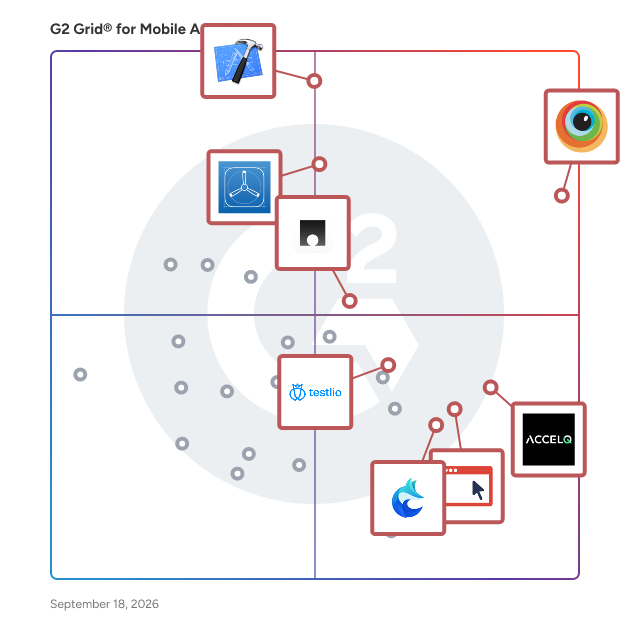
G2 Grid® for Mobile App Testing Software

G2 Grid® for Mobile App Testing Software plotting products by satisfaction and market presence

Highlighted products: BrowserStack, Xcode, TestFlight, ACCELQ, Maestro, Userfeel, Testlio, and foxphone.

Underlying data: [Grid® JSON](https://www.g2.com/categories/mobile-app-testing/grids.json?focus%5B%5D=browserstack&focus%5B%5D=xcode&focus%5B%5D=testflight&focus%5B%5D=accelq&focus%5B%5D=maestro-2025-10-30&focus%5B%5D=userfeel&focus%5B%5D=testlio&focus%5B%5D=foxphone)

BrowserStack

BrowserStack is the world’s leading cloud-based testing platform, trusted by 50,000+ Dev and QA teams to deliver fast, reliable, and high-quality software. From manual to automated, visual to accessibility testing, BrowserStack brings every layer of the QA process onto a single, integrated platform, so you can ship confidently at scale. Our Products: Manual Testing Live: Cross-browser testing App Live: Real device testing Testing Toolkit: Essential manual testing tools Test Automation Automate: Browser automation cloud App Automate: Mobile app automation cloud Percy: Visual testing & review App Percy: Visual testing & review Management & Optimization Test Management: Plan, track, and manage tests Test Management for Jira: Manage tests inside Jira Test Reporting & Analytics: Monitor & optimize all tests Automation without coding Low Code Automation: AI-driven automated tests Website Scanner: All-in-one website checker

Average Rating: 4.4/5.0

Total Reviews: 3,324

How Do G2 Users Rate BrowserStack?

  • Test Feedback: 8.7/10 (Category avg: 8.8/10)
  • Emulation: 9.0/10 (Category avg: 8.7/10)
  • Organization: 8.4/10 (Category avg: 8.8/10)
  • Ease of Admin: 8.8/10 (Category avg: 8.5/10)

Who Is the Company Behind BrowserStack?

  • Seller: BrowserStack
  • Company Website:
  • Year Founded: 2011
  • HQ Location: Dublin, Dublin
  • Twitter: @browserstack
    11,547 Twitter followers
  • LinkedIn® Page: www.linkedin.com
    1,731 employees on LinkedIn®

Who Uses This Product?

  • Who Uses This: Software Engineer, QA Engineer
  • Top Industries: Computer Software, Information Technology and Services
  • Company Size: 40% Small, 38% Medium

What Do G2 Reviewers Say About BrowserStack?

AI-generated summary from verified user reviews

Pros
  • Users find BrowserStack's interface easy to use, facilitating seamless access to real device testing across multiple platforms.
  • Users value the real device testing feature of BrowserStack, enhancing compatibility across diverse platforms without physical hardware.
  • Users value the wide coverage of real devices on BrowserStack, ensuring comprehensive product testing across different environments.
  • Users appreciate the extensive device and browser combinations in BrowserStack, significantly enhancing testing efficiency and compatibility.
  • Users find BrowserStack's easy testing capabilities invaluable for efficient cross-platform and UI-specific testing.
Cons
  • Users often experience slow performance with BrowserStack, impacting testing efficiency and reliability of results.
  • Users experience slow loading times with BrowserStack, leading to frustrating delays during tests and setup.
  • Users feel that the pricing of BrowserStack is expensive and suggest more affordable package options.
  • Users report testing difficulties due to inconsistencies and lag, making reliable results hard to achieve.
  • Users often face slow speed during peak hours, impacting performance and complicating debugging efforts.

What Are Recent G2 Reviews of BrowserStack?

What Are G2 Users Discussing About BrowserStack?

Xcode

Xcode is Apple's integrated development environment (IDE) that provides a comprehensive suite of tools for developing, testing, and distributing applications across all Apple platforms, including iOS, macOS, watchOS, and tvOS. Designed to streamline the app development process, Xcode offers features like predictive code completion, advanced debugging tools, and simulators for various Apple devices, enabling developers to create high-quality applications efficiently. Key Features and Functionality: - Coding Intelligence: Xcode leverages machine learning models to offer predictive code completion tailored to Swift and Apple SDKs, enhancing coding efficiency. - Previews: Developers can visualize and interact with their app's user interface in real-time using Xcode's preview feature, facilitating rapid iteration and design refinement. - Simulator: Xcode includes a simulator that allows testing of applications across different Apple devices and OS versions directly from a Mac, supporting scenarios like location changes and network conditions. - Debugging Tools: The IDE provides robust debugging capabilities, including breakpoints, memory usage inspection, and variable monitoring, aiding in the identification and resolution of issues. - Performance Analysis: With Instruments, developers can analyze app performance metrics such as CPU, memory, and GPU usage in real-time, helping to optimize app responsiveness and efficiency. - Testing Frameworks: Xcode supports unit and UI testing through frameworks like Swift Testing and XCTest, enabling comprehensive test coverage and quality assurance. - Xcode Cloud: Integrated continuous integration and delivery service that automates building, testing, and distributing apps, enhancing collaboration and development speed. Primary Value and User Solutions: Xcode serves as a unified platform that simplifies the app development lifecycle for Apple devices. By integrating coding, testing, debugging, and deployment tools within a single environment, it reduces development time and complexity. Features like real-time previews and simulators allow developers to iterate quickly and ensure their applications perform optimally across all Apple platforms. The inclusion of Xcode Cloud further streamlines workflows by automating routine tasks, enabling teams to focus on innovation and delivering high-quality apps to users efficiently.

Average Rating: 4.2/5.0

Total Reviews: 1,002

How Do G2 Users Rate Xcode?

  • Test Feedback: 8.7/10 (Category avg: 8.8/10)
  • Emulation: 9.0/10 (Category avg: 8.7/10)
  • Organization: 8.8/10 (Category avg: 8.8/10)
  • Ease of Admin: 8.0/10 (Category avg: 8.5/10)

Who Is the Company Behind Xcode?

  • Seller: Apple
  • Year Founded: 1976
  • HQ Location: Cupertino, CA
  • Twitter: @Apple
    9,935,357 Twitter followers
  • LinkedIn® Page: www.linkedin.com
    187,339 employees on LinkedIn®
  • Ownership: NASDAQ:AAPL

Who Uses This Product?

  • Who Uses This: Software Engineer, Senior Software Engineer
  • Top Industries: Computer Software, Information Technology and Services
  • Company Size: 55% Small, 23% Medium

What Do G2 Reviewers Say About Xcode?

AI-generated summary from verified user reviews

Pros
  • Users appreciate the ease of use in Xcode, highlighted by seamless integration and a user-friendly interface.
  • Users appreciate the seamless local app testing with Xcode, enabling easy simulation and straightforward setup for development.
  • Users value the efficient debugging capabilities of Xcode, which significantly expedite their app development process.
  • Users value the user-friendly interface of Xcode, which enhances their development experience with ease and efficiency.
  • Users value the integrated tools in Xcode, making development workflows simpler and more efficient for iOS apps.
Cons
  • Users experience slow performance with Xcode, especially during builds and when using the simulator, hindering productivity.
  • Users experience performance issues with Xcode, including slow speeds, crashes, and confusing error messages interrupting their workflow.
  • Users find Xcode's high specifications burdensome, especially regarding disk space and performance on older Macs.
  • Users face update issues, leading to stability concerns and complex configurations, especially on entry-level devices.
  • Users experience high memory usage with Xcode, causing slow performance and challenges, particularly on lower-end machines.

What Are Recent G2 Reviews of Xcode?

What Are G2 Users Discussing About Xcode?

TestFlight

TestFlight is Apple's official platform for beta testing apps, games, and App Clips across all Apple platforms. It enables developers to distribute pre-release versions to internal team members or external testers, facilitating comprehensive testing and feedback collection before public release. Key Features and Functionality: - Seamless Tester Management: Invite up to 100 internal testers and 10,000 external testers without the need to track UDIDs or provision profiles. - Flexible Distribution: Share beta builds via email invitations or public links, allowing for targeted or broad tester engagement. - Comprehensive Feedback Collection: Testers can provide feedback directly through the TestFlight app, including annotated screenshots and crash reports, aiding in efficient issue identification and resolution. - Multiple Build Testing: Upload and test up to 100 builds simultaneously, enabling parallel testing of different versions or features. - Detailed Tester Metrics: Monitor tester engagement and manage participation effectively through insightful metrics. Primary Value and Problem Solved: TestFlight streamlines the beta testing process by offering a centralized platform for distributing pre-release apps and gathering valuable user feedback. This ensures that developers can identify and address issues before the official launch, leading to higher-quality applications and enhanced user satisfaction. By simplifying tester management and feedback collection, TestFlight reduces the complexity and time associated with traditional beta testing methods.

Average Rating: 4.3/5.0

Total Reviews: 59

How Do G2 Users Rate TestFlight?

  • Test Feedback: 9.3/10 (Category avg: 8.8/10)
  • Emulation: 9.2/10 (Category avg: 8.7/10)
  • Organization: 9.2/10 (Category avg: 8.8/10)
  • Ease of Admin: 8.3/10 (Category avg: 8.5/10)

Who Is the Company Behind TestFlight?

  • Seller: Apple
  • Year Founded: 1976
  • HQ Location: Cupertino, CA
  • Twitter: @Apple
    9,935,357 Twitter followers
  • LinkedIn® Page: www.linkedin.com
    187,339 employees on LinkedIn®
  • Ownership: NASDAQ:AAPL

Who Uses This Product?

  • Top Industries: Information Technology and Services, Computer Software
  • Company Size: 55% Small, 32% Large

What Do G2 Reviewers Say About TestFlight?

AI-generated summary from verified user reviews

Pros
  • Users appreciate the user-friendly interface of TestFlight, making it easy to integrate and manage app development efficiently.
  • Users value the easy integrations of TestFlight, enhancing workflow efficiency for iOS application development and testing.
  • Users value the easy testing capabilities of TestFlight, enhancing workflow for iOS app development and release.
  • Users find TestFlight to have ease of implementation, enhancing their workflow for developing and releasing iOS applications.
  • Users value the multi-device support of TestFlight, enabling reliable app testing across all iOS devices seamlessly.
Cons
  • Users find the device-centric requirement of TestFlight limiting, lacking a web-based interface for managing tests.
  • Users are frustrated by TestFlight's limited device compatibility, restricting usage to only the Apple ecosystem.
  • Users find the device-centric requirement of TestFlight limiting, lacking a web-based interface for easier management.

What Are Recent G2 Reviews of TestFlight?

What Are G2 Users Discussing About TestFlight?

ACCELQ

ACCELQ offers AI-powered No-Code test automation and management built on a cloud-native platform. ACCELQ provides a unified platform for web, mobile, API, database, and packaged apps. Automation-first, codeless capabilities make it easy to use for testing teams without deep programming expertise. ACCELQ allows businesses to achieve 7.5x productivity and over 72% savings with its industry-first autonomics-based automation platform. ACCELQ was named a leader in The Forrester Wave™: Continuous Automation Testing Platforms, Q4 2022.

Average Rating: 4.8/5.0

Total Reviews: 114

How Do G2 Users Rate ACCELQ?

  • Test Feedback: 9.8/10 (Category avg: 8.8/10)
  • Emulation: 9.6/10 (Category avg: 8.7/10)
  • Organization: 9.7/10 (Category avg: 8.8/10)
  • Ease of Admin: 8.8/10 (Category avg: 8.5/10)

Who Is the Company Behind ACCELQ?

  • Seller: ACCELQ
  • Company Website:
  • Year Founded: 2014
  • HQ Location: Dallas, US
  • Twitter: @accelq
    1,677 Twitter followers
  • LinkedIn® Page: www.linkedin.com
    233 employees on LinkedIn®

Who Uses This Product?

  • Top Industries: Information Technology and Services, Computer Software
  • Company Size: 41% Medium, 34% Large

What Do G2 Reviewers Say About ACCELQ?

AI-generated summary from verified user reviews

Pros
  • Users value the ease of use of ACCELQ, enabling rapid implementation and efficient automation without deep technical knowledge.
  • Users praise the ease of automation with ACCELQ, enabling rapid development of comprehensive testing suites.
  • Users value the codeless automation of ACCELQ, enabling easy collaboration and effective testing for all team members.
  • Users appreciate the time-saving features of ACCELQ, enabling efficient backend testing and quicker bug detection.
  • Users appreciate the automation ease of ACCELQ, streamlining testing processes and enhancing efficiency from day one.
Cons
  • Users find the learning curve steep for desktop automation compared to web and mobile testing, impacting user experience.
  • Users find integration issues with ACCELQ, noting limited options and complexities in learning the platform effectively.
  • Users mention poor reporting, noting the dashboard becomes congested when handling many test cases and scenarios.
  • Users face a difficult learning curve in ACCELQ, particularly when trying to grasp advanced features and setup.
  • Users find the insufficient information on features and documentation to be a barrier for effective use.

What Are Recent G2 Reviews of ACCELQ?

What Are G2 Users Discussing About ACCELQ?

Maestro

Maestro is an end-to-end testing framework designed to streamline the process of mobile and web UI testing. It addresses common challenges faced by developers and QA teams, such as writing brittle test scripts, debugging flaky tests, and managing slow test suites. With Maestro, users can expect a more efficient and effective approach to testing their applications. This versatile framework supports testing for iOS, Android, and web applications through a unified methodology. Whether your team is developing native applications in Swift or Kotlin, utilizing frameworks like React Native or Flutter, or building web apps, Maestro accommodates all these platforms without the need for multiple testing frameworks or separate test suites. This integration simplifies the testing process, allowing teams to focus on development rather than juggling various tools. One of the standout features of Maestro is its user-friendly design. Unlike many testing frameworks that require extensive setup and technical expertise, Maestro employs a declarative YAML syntax that is intuitive and accessible. Users can create their first test in under five minutes, significantly reducing the time spent on test creation from hours to mere minutes. This ease of use makes it an attractive option for teams with varying levels of technical knowledge. For those who prefer a visual approach, Maestro Studio offers a no-code interface for test creation. This free desktop application enables users to find elements visually, record interactions, and leverage AI assistance in crafting maintainable tests. This feature is particularly beneficial for developers, QA engineers, and non-technical team members, fostering collaboration across diverse skill sets. Maestro Cloud enhances the framework's capabilities by providing enterprise-grade infrastructure for running tests in CI/CD pipelines and across multiple device configurations. Users can execute hundreds of tests in parallel on real iOS and Android devices, drastically reducing total test time by up to 90%. Each test run is accompanied by detailed video playback, comprehensive logs, and flake detection, facilitating quick and effective debugging. Unlike generic cloud testing solutions, Maestro Cloud is specifically designed for Maestro tests, ensuring reliable and consistent results. With a proven track record among engineering teams at major companies such as Microsoft, Meta, Uber, Disney, Stripe, and Deel, Maestro is an open-source framework that is actively maintained and supported by a growing community of developers. Whether you are a startup launching your first mobile app or an enterprise managing extensive testing across various devices, Maestro offers the reliability, speed, and simplicity necessary to deliver exceptional user experiences.

Average Rating: 4.4/5.0

Total Reviews: 70

How Do G2 Users Rate Maestro?

  • Test Feedback: 9.4/10 (Category avg: 8.8/10)
  • Emulation: 9.4/10 (Category avg: 8.7/10)
  • Organization: 8.8/10 (Category avg: 8.8/10)
  • Ease of Admin: 8.1/10 (Category avg: 8.5/10)

Who Is the Company Behind Maestro?

Who Uses This Product?

  • Who Uses This: Senior Software Engineer
  • Top Industries: Computer Software, Information Technology and Services
  • Company Size: 61% Small, 36% Medium

What Do G2 Reviewers Say About Maestro?

AI-generated summary from verified user reviews

Pros
  • Users find Maestro's ease of use remarkable, allowing quick setup and smooth automation for mobile testing.
  • Users praise Maestro for its ease of automation, fostering quick script updates and efficient management for distributed teams.
  • Users laud the setup ease of Maestro, allowing fast, intuitive test flow creation with minimal effort.
  • Users find Maestro's flexibility and ease of use invaluable for efficient mobile testing and project management.
  • Users praise Maestro for its easy setup, facilitating swift mobile and web automation testing with minimal fuss.
Cons
  • Users face testing difficulties due to slow runs, limited flexibility, and inadequate debugging support in complex scenarios.
  • Users find Maestro lacking in essential features, resulting in limited community support and flexibility for complex scenarios.
  • Users encounter insufficient information on configuration and troubleshooting, particularly affecting mobile usability and advanced features.
  • Users find limited customization in Maestro, particularly for complex workflows requiring advanced automation flexibility.
  • Users find the poor documentation of Maestro complicates configuration and slows down the initial setup process.

What Are Recent G2 Reviews of Maestro?

Userfeel

Make everything click. See where users get stuck. Gather feedback from real users on your prototype, app, or website. With a global panel of over 7 million participants, you can understand how your users feel and capture their genuine first impressions. Whether you are running a survey, A/B test, user test, tree test, or card sort, Userfeel helps you understand exactly how users interact with your product. We provide tools to support your research from start to finish: - Test Creation: Use our AI assistant to generate effective test scenarios and tasks in seconds. - AI Analysis: Automatically analyze sessions to generate sentiment maps and prioritized recommendations for improvement. - Seamless Sharing: Easily share highlight reels and narrative reports with your board or clients to align teams faster. Userfeel helps your team build with clarity and decide with confidence, all while maintaining compliance.

Average Rating: 4.5/5.0

Total Reviews: 94

How Do G2 Users Rate Userfeel?

  • Test Feedback: 9.5/10 (Category avg: 8.8/10)
  • Emulation: 9.3/10 (Category avg: 8.7/10)
  • Organization: 8.3/10 (Category avg: 8.8/10)
  • Ease of Admin: 9.1/10 (Category avg: 8.5/10)

Who Is the Company Behind Userfeel?

  • Seller: Userfeel
  • Year Founded: 2010
  • HQ Location: London, GB
  • Twitter: @userfeel
    548 Twitter followers
  • LinkedIn® Page: www.linkedin.com
    175 employees on LinkedIn®

Who Uses This Product?

  • Who Uses This: CEO
  • Top Industries: Computer Software, Retail
  • Company Size: 64% Small, 29% Medium

What Do G2 Reviewers Say About Userfeel?

AI-generated summary from verified user reviews

Pros
  • Users appreciate the ease of use of Userfeel, benefiting from quick access to remote usability testing participants.
  • Users value the diverse contributor access on Userfeel, enhancing research efficiency with insightful analytics and fast feedback.
  • Users find setup ease exceptional, allowing effortless initiation of usability tests and quick access to diverse participants.
  • Users find the easy setup of Userfeel invaluable for quick usability tests and diverse participant access.
  • Users highly value the easy access to a diverse panel and effective tools for diverse user research needs.
Cons
  • Users find the pricing steep, especially smaller teams that struggle to justify the cost.
  • Users express concerns about credit issues, finding the transfer process unclear and hoping for lower costs.
  • Users express concern over the inadequate feedback mechanism, noting a decline in contributor quality affecting results.
  • Users find the insufficient information regarding credit transfer processes confusing and frustrating during project management.
  • Users find the lack of guidance on transferring credits between projects to be confusing and frustrating.

What Are Recent G2 Reviews of Userfeel?

What Are G2 Users Discussing About Userfeel?

Testlio

Testlio’s AI-driven, fully managed crowdsourced testing platform integrates expert, on-demand testers directly into your release process. Ship faster and more confidently everywhere it matters. In any location. On any device. With any payment method. In any language. Powered by LeoAI Engine™, our proprietary intelligence layer, Testlio’s platform combines human expertise with machine intelligence to orchestrate testing, accelerate tester matching (LeoMatch™), streamline test execution, and deliver predictive insights across engagements. The result is faster releases, smarter testing, and consistently exceptional user experiences at a global scale. We’re a fully remote, distributed-by-design company with team members working from over 40 countries. Our freelance testing community is just as global, with vetted experts across 150+ countries, speaking 100+ languages. Each tester is carefully matched to your product, domain, and tech stack through LeoMatch™, ensuring you get the right fit every time. We support more than 20 testing capabilities, including payments, localization, accessibility, and AI. With access to 600k+ devices and 800+ payment methods, we test in-region, in-language, and in context. That’s why leading companies like Amazon, Microsoft, Netflix, NBA, Paramount, PayPal, and Uber rely on Testlio to deliver seamless experiences at scale, collectively serving billions of users. To learn more, visit testlio.com.

Average Rating: 4.7/5.0

Total Reviews: 76

How Do G2 Users Rate Testlio?

  • Test Feedback: 9.0/10 (Category avg: 8.8/10)
  • Emulation: 9.1/10 (Category avg: 8.7/10)
  • Organization: 9.1/10 (Category avg: 8.8/10)
  • Ease of Admin: 9.1/10 (Category avg: 8.5/10)

Who Is the Company Behind Testlio?

  • Seller: Testlio Inc.
  • Company Website:
  • Year Founded: 2012
  • HQ Location: San Francisco, CA
  • Twitter: @testlio
    2,545 Twitter followers
  • LinkedIn® Page: www.linkedin.com
    930 employees on LinkedIn®

Who Uses This Product?

  • Who Uses This: Product Manager
  • Top Industries: Computer Software, Financial Services
  • Company Size: 39% Medium, 39% Small

What Do G2 Reviewers Say About Testlio?

AI-generated summary from verified user reviews

Pros
  • Users commend the automation expertise of Testlio, highlighting its seamless adaptation to evolving testing requirements.
  • Users admire the reliable support from Testlio, which adapts impressively to their evolving testing needs and standards.
  • Users admire the seamless automation of Testlio, expressing satisfaction with its reliability and adaptability to changing needs.
  • Users commend the exceptional reliability of automation support, consistently adapting to evolving testing needs seamlessly.
  • Users are impressed by Testlio's reliable automation capabilities, seamlessly adapting to evolving testing needs and maintaining high standards.

What Are Recent G2 Reviews of Testlio?

What Are G2 Users Discussing About Testlio?

foxphone

Cloud phone platform providing virtual Android devices in the cloud, enabling remote access, app testing, automation, and scalable mobile operations without physical hardware.

Average Rating: 5.0/5.0

Total Reviews: 16

Who Is the Company Behind foxphone?

Who Uses This Product?

  • Top Industries: Computer Software
  • Company Size: 56% Medium, 50% Small

What Are Recent G2 Reviews of foxphone?

Global App Testing

Global App Testing is a crowdtesting platform that helps companies accelerate their software development lifecycle (SDLC) by providing on-demand software testing services delivered by real users around the world. The platform enables engineering, product, and QA teams to identify bugs, usability issues, and localization problems before release, helping organizations ship high-quality software faster. Through rapid testing cycles with results delivered in as little as 2 to 48 hours, Global App Testing allows teams to validate new features, releases, and digital experiences quickly. This fast turnaround supports agile development teams by reducing bottlenecks in the development process and enabling faster, more confident product launches. Global App Testing is designed for software development teams, product managers, and quality assurance professionals who need scalable testing across multiple devices, regions, and real-world environments. The platform is particularly valuable for companies expanding internationally, offering UX testing, localization testing, and competitor benchmarking that provide actionable insights into how products perform in specific markets. These insights help businesses improve user experience, reduce product risk, and protect revenue during global launches. One of the platform’s key strengths is its global community of over 90,000 professional testers across more than 189 countries. This diverse network enables companies to test applications on real devices, operating systems, and network conditions across global markets. Testers undergo a rigorous selection process, with only the top 3% of applicants accepted, ensuring high-quality feedback and reliable bug reporting. All testing results are also moderated for accuracy and relevance, helping teams quickly prioritize issues and resolve defects. Security and data protection are core priorities for Global App Testing. The company is ISO 27001 certified, demonstrating its commitment to internationally recognized information security standards. As one of the few crowdtesting vendors with ISO 27001 certification, Global App Testing ensures that testing processes, infrastructure, and personnel meet strict security and compliance requirements. By combining crowdtesting, global user insights, and rapid test execution, Global App Testing helps companies improve software quality, reduce release risk, and deliver better digital experiences to users worldwide. The platform provides organizations with the tools and real-world testing coverage needed to confidently scale their products across global markets.

Average Rating: 4.4/5.0

Total Reviews: 59

How Do G2 Users Rate Global App Testing?

  • Test Feedback: 8.2/10 (Category avg: 8.8/10)
  • Emulation: 8.4/10 (Category avg: 8.7/10)
  • Organization: 7.7/10 (Category avg: 8.8/10)
  • Ease of Admin: 9.3/10 (Category avg: 8.5/10)

Who Is the Company Behind Global App Testing?

  • Seller: Global App Testing
  • Company Website:
  • Year Founded: 2013
  • HQ Location: London, GB
  • Twitter: @QAOps
    1,157 Twitter followers
  • LinkedIn® Page: www.linkedin.com
    151 employees on LinkedIn®

Who Uses This Product?

  • Top Industries: Computer Software, Information Technology and Services
  • Company Size: 50% Medium, 38% Small

What Do G2 Reviewers Say About Global App Testing?

AI-generated summary from verified user reviews

Pros
  • Users appreciate the responsive and knowledgeable customer support, enhancing their testing experience through effective communication and tailored assistance.
  • Users appreciate the ease of use of Global App Testing, benefiting from responsive support and a smooth onboarding process.
  • Users value the responsive and knowledgeable team of Global App Testing, enhancing their testing experiences with tailored support.
  • Users value the efficient QA process of Global App Testing, benefiting from fast, detailed testing results and flexibility.
  • Users value the speed of test delivery with Global App Testing, ensuring quick feedback and efficient QA processes.
Cons
  • Users often face bug issues that hinder progress and lead to inconsistent quality and unmet expectations.
  • Users experience testing difficulties with slower responses and inconsistent quality in feedback from crowdsource testers.
  • Users experience software bugs leading to inconsistent quality and unreliability, impacting project delivery and growth insights.
  • Users find Global App Testing to be expensive, with a rigid pricing model that may limit customer satisfaction.
  • Users report technical issues with inconsistent testing quality and overcharging, affecting the overall experience with Global App Testing.

What Are Recent G2 Reviews of Global App Testing?

Akamai CloudTest

CloudTest provides a comprehensive performance platform for quickly validating and optimizing web and mobile user experience.

Average Rating: 4.6/5.0

Total Reviews: 19

How Do G2 Users Rate Akamai CloudTest?

  • Test Feedback: 8.3/10 (Category avg: 8.8/10)
  • Emulation: 9.4/10 (Category avg: 8.7/10)
  • Organization: 8.5/10 (Category avg: 8.8/10)
  • Ease of Admin: 9.3/10 (Category avg: 8.5/10)

Who Is the Company Behind Akamai CloudTest?

  • Seller: Akamai Technologies
  • Year Founded: 1998
  • HQ Location: Cambridge, MA
  • Twitter: @Akamai
    115,251 Twitter followers
  • LinkedIn® Page: www.linkedin.com
    10,658 employees on LinkedIn®
  • Ownership: NASDAQ:AKAM

Who Uses This Product?

  • Top Industries: Information Technology and Services
  • Company Size: 37% Small, 32% Medium

What Do G2 Reviewers Say About Akamai CloudTest?

AI-generated summary from verified user reviews

Pros
  • Users find Akamai CloudTest to be exceptionally easy to use, enhancing efficiency in mobile app testing and validation.
  • Users appreciate the optimal performance testing of Akamai CloudTest, ensuring their apps excel in real-world scenarios.
  • Users value the cloud compatibility of Akamai CloudTest, allowing for flexible, anywhere access to testing tools.
  • Users value the comprehensive mobile testing tools of Akamai CloudTest for ensuring optimal app performance in real-world scenarios.
  • Users highlight the performance optimization capabilities of Akamai CloudTest, ensuring apps perform well in real-world scenarios.
Cons
  • Users find the limited customization options restrictive, impacting the ability to execute complex testing scenarios effectively.
  • Users find Akamai CloudTest expensive and challenging for small organizations due to high costs and limited customization options.
  • Users find the limited features of Akamai CloudTest a drawback, restricting their testing capabilities and flexibility.
  • Users find the documentation lacking, emphasizing the need for clearer and more user-friendly resources.
  • Users find the configuration issues with XML setups limit flexibility, despite Akamai CloudTest being helpful for real-time load runs.

What Are Recent G2 Reviews of Akamai CloudTest?

What Are G2 Users Discussing About Akamai CloudTest?

Copado Robotic Testing

Copado Robotic Testing revolutionizes Salesforce QA by streamlining and optimizing manual testing. It accelerates test automation by leveraging AI-powered generative scripting, enabling teams to create robust, maintainable tests efficiently. Designed for scalability, Copado Robotic Testing includes parallel robots, increasing test performance and test coverage. Its seamless integration with CI/CD pipelines ensures that testing is part of the DevOps lifecycle, reducing errors and delays and ensuring teams deploy with confidence. Copado Robotic Testing is the solution for teams aiming to optimize manual testing, while building automation to improve software quality, and drive faster releases.

Average Rating: 4.5/5.0

Total Reviews: 47

How Do G2 Users Rate Copado Robotic Testing?

  • Test Feedback: 10.0/10 (Category avg: 8.8/10)
  • Emulation: 9.8/10 (Category avg: 8.7/10)
  • Organization: 9.8/10 (Category avg: 8.8/10)
  • Ease of Admin: 8.3/10 (Category avg: 8.5/10)

Who Is the Company Behind Copado Robotic Testing?

  • Seller: Copado Solutions
  • Company Website:
  • Year Founded: 2013
  • HQ Location: Chicago, IL
  • Twitter: @CopadoSolutions
    2,475 Twitter followers
  • LinkedIn® Page: www.linkedin.com
    668 employees on LinkedIn®

Who Uses This Product?

  • Top Industries: Telecommunications, Information Technology and Services
  • Company Size: 41% Large, 29% Small

What Do G2 Reviewers Say About Copado Robotic Testing?

AI-generated summary from verified user reviews

Pros
  • Users value the automation capabilities of Copado Robotic Testing, which simplify testing processes for all team members.
  • Users value the ease of use of Copado Robotic Testing, facilitating test creation for both technical and non-technical users.
  • Users value the time-saving benefits of Copado Robotic Testing, enhancing efficiency with minimal maintenance effort.
  • Users value the easy integrations of Copado Robotic Testing with Salesforce, significantly enhancing their regression testing efficiency.
  • Users value the seamless integration with Copado release pipelines, enhancing their test automation experience and workflow efficiency.
Cons
  • Users find the difficult setup of Copado Robotic Testing frustrating, especially for those less experienced in automation.
  • Users find the steep learning curve frustrating, particularly during the initial setup and for non-technical individuals.
  • Users find the performance issues in Copado Robotic Testing affect speed, especially with large data sets.
  • Users face issues with the poor UI of Copado Robotic Testing, leading to slow performance and frequent interaction failures.
  • Users report slow performance, particularly during test execution and when loading test steps, affecting overall efficiency.

What Are Recent G2 Reviews of Copado Robotic Testing?

What Are G2 Users Discussing About Copado Robotic Testing?

MonkeyRunner

A monkeyrunner class that contains static utility methods.

Average Rating: 4.3/5.0

Total Reviews: 11

How Do G2 Users Rate MonkeyRunner?

  • Ease of Admin: 8.1/10 (Category avg: 8.5/10)

Who Is the Company Behind MonkeyRunner?

  • Seller: Google
  • Year Founded: 1998
  • HQ Location: Mountain View, CA
  • Twitter: @google
    31,899,995 Twitter followers
  • LinkedIn® Page: www.linkedin.com
    301,144 employees on LinkedIn®
  • Ownership: NASDAQ:GOOG

Who Uses This Product?

  • Company Size: 55% Small, 27% Medium

What Are Recent G2 Reviews of MonkeyRunner?

What Are G2 Users Discussing About MonkeyRunner?

AWS Device Farm

Improve the quality of your iOS, Android, and web applications by testing against real phones and tablets in the AWS Cloud

Average Rating: 4.5/5.0

Total Reviews: 24

How Do G2 Users Rate AWS Device Farm?

  • Test Feedback: 8.3/10 (Category avg: 8.8/10)
  • Emulation: 8.3/10 (Category avg: 8.7/10)
  • Organization: 9.2/10 (Category avg: 8.8/10)
  • Ease of Admin: 9.0/10 (Category avg: 8.5/10)

Who Is the Company Behind AWS Device Farm?

  • Seller: Amazon Web Services (AWS)
  • Year Founded: 2006
  • HQ Location: Seattle, WA
  • Twitter: @awscloud
    2,232,483 Twitter followers
  • LinkedIn® Page: www.linkedin.com
    147,094 employees on LinkedIn®
  • Ownership: NASDAQ: AMZN

Who Uses This Product?

  • Top Industries: Computer Software
  • Company Size: 58% Medium, 38% Small

What Are Recent G2 Reviews of AWS Device Farm?

What Are G2 Users Discussing About AWS Device Farm?

Applause

Applause is the world leader in testing and digital quality. Brands today win or lose customers through digital interactions, and Applause alone can deliver authentic feedback on the quality of digital assets and experiences, provided by real users in real-world settings. Our disruptive approach harnesses the power of the Applause platform and leverages a vetted community of more than one million digital experts worldwide. Unlike traditional testing methods (including lab-based and offshoring), we respond with the speed, scale and flexibility that digital-focused brands require and expect. Applause provides insightful, actionable testing results that can directly inform go/no go release decisions, helping development teams build better and faster, and release with confidence. Thousands of digital-first brands – including Ford, Google, Western Union and Dow Jones – rely on Applause as a best practice to deliver the digital experiences their customers love. Learn more at www.applause.com.

Average Rating: 4.4/5.0

Total Reviews: 38

How Do G2 Users Rate Applause?

  • Ease of Admin: 8.3/10 (Category avg: 8.5/10)

Who Is the Company Behind Applause?

  • Seller: Applause App Quality
  • Year Founded: 2007
  • HQ Location: Framingham, MA
  • Twitter: @applause
    6,013 Twitter followers
  • LinkedIn® Page: www.linkedin.com
    1,613 employees on LinkedIn®

Who Uses This Product?

  • Top Industries: Computer Software
  • Company Size: 46% Medium, 44% Large

What Are Recent G2 Reviews of Applause?

What Are G2 Users Discussing About Applause?

NowSecure

NowSecure Inc., based in Oak Park, Illinois, was formed in 2009 with a mission to advance mobile security worldwide. We help secure mobile devices, enterprises and mobile apps.

Average Rating: 4.6/5.0

Total Reviews: 27

How Do G2 Users Rate NowSecure?

  • Test Feedback: 8.6/10 (Category avg: 8.8/10)
  • Emulation: 7.5/10 (Category avg: 8.7/10)
  • Organization: 9.0/10 (Category avg: 8.8/10)
  • Ease of Admin: 9.0/10 (Category avg: 8.5/10)

Who Is the Company Behind NowSecure?

  • Seller: NowSecure
  • Year Founded: 2009
  • HQ Location: Chicago, Illinois
  • Twitter: @nowsecuremobile
    6,372 Twitter followers
  • LinkedIn® Page: www.linkedin.com
    101 employees on LinkedIn®

Who Uses This Product?

  • Company Size: 41% Medium, 37% Large

What Are Recent G2 Reviews of NowSecure?

What Are G2 Users Discussing About NowSecure?

Adam Crivello
AC
Researched and written by Adam Crivello
Updated October 3, 2024

Learn More About Mobile App Testing Software

What is Mobile App Testing Software?

Mobile app testing software offers developers a toolkit to test their mobile applications for performance, functionality, and usability. Before mobile applications are published, individual developers and teams must conduct tests to ensure consistency—even something as simple as ensuring that an app is downloadable from its intended platform must be tested. Mobile app testing software combines both automation and manual tools to provide a complete testing environment for mobile applications. Some mobile app testing software is geared toward conducting specific types of tests, while other products grant access to a wide range of testing capabilities under one dashboard.

Depending on the needs of a given development team and the software used, mobile app testing software can either be integrated with the app development process throughout production or as a product is nearing completion. Agile teams utilizing iterative DevOps practices will test early and often as their product evolves, while others such as solo developers may take a “build first, test later" approach. Either way, mobile app testing software provides teams with in-depth analyses regarding multiple facets and components of their application. This analysis might, for example, inform developers of whether their app will successfully allow users to receive calls while using the app. With each change made to the application during development, such functionality must be tested to ensure quality; mobile app testing software features automation to run tests and analyses, allowing developers to focus on other tasks. Mobile app testing software also provides feedback and actionable insight as a starting point for developers to work off of when results are not up to par.

In some cases, mobile app testing software generates an emulated user environment upon which developers conduct usability and functionality testing. Such products will present developers with a mocked version of their application running within the relative dimensions of a mobile device, allowing teams to run tests via their desktop or other non-mobile screen. These emulated instances often give developers an enlarged view of a typical mobile screen, which enhances overall visibility and grants a higher level of granularity when focusing on an application’s visual elements and user interface (UI). When run on devices with a mouse and keyboard, this software will treat the cursor like a human finger and provide methods to emulate multi-touch scenarios so that the full scope of the application can be explored and tested. Other mobile app testing software functions directly via mobile devices, allowing developers to get a better idea of the to-scale look and feel of their applications. This view is a helpful supplement to desktop emulation because certain UI elements and buttons might seem clear when enlarged, but turn out to be less usable on an actual phone screen. Emulators also tend to miss hardware-specific issues that natively-run testing can catch—though with such a wide variety of mobile devices on the market, it can be costly and time consuming to use real devices for testing. Regardless, these tools give developers a better idea of what their users will actually experience when using and navigating their applications. Mobile app testing software often allows developers to transition seamlessly between this emulated frontend usability testing and backend functionality testing to provide teams with a complete testing framework.

Key Benefits of Mobile App Testing Software

  • Tests vital application performance and functionality to ensure quality predeployment
  • Automates aspects of testing and analysis to free up development time and resources
  • Provides developers with actionable insight after performing analyses

Why Use Mobile App Testing Software?

Mobile application development is complex; each iterative change made to an application during development presents the potential for lost functionality or subpar performance. Even aesthetic changes made to the user-facing elements of an application must be tested for usability. Mobile app testing software gives developers a range of testing capabilities that allow them to assess each element of their applications. These products even automate tests to alleviate development workloads and remove human error when assessing an application’s many facets. It is important to note that some products focus on one or a few types of testing, while others provide a full suite.

Functionality testing — Developers use mobile app testing software to determine whether their applications are operating according to requirements and per the developers’ intentions. This type of testing typically involves emulation or natively run instances of the application so that teams can assess whether the UI is functioning correctly.

Performance testing — Mobile app testing software allows developers to test their app’s performance relative to desired benchmarks. Performance can be tested under specific conditions, such as when a user has a low battery or when a high volume of users are attempting to access the application’s server simultaneously. Such tests run natively on a device that meets the desired test condition or conditions can be simulated.

Usability testing — Developers leverage mobile app testing software to assess the usability of their applications. This type of testing is qualitative as opposed to quantitative and involves either emulation or natively run instances of an application on various devices. Developers then interact with their application as a user would, allowing them to examine factors such as user experience consistency across all devices. Usability testing is also crucial for developers to maximize their products’ accessibility.

Interruption testing — Mobile app testing software often allows developers to analyze whether their application is able to handle common interruptions inherent to mobile use. Incoming and outgoing calls and SMS, notifications, and cable insertion or removal are just some of the many interruptions that regularly occur during mobile device use while an application is running. In all cases, developers use mobile app testing software to ensure that their application properly suspends and resumes in response to these interruptions.

Security testing — Developers can sometimes use mobile app testing software to make security assessments as they relate to their applications. Hacking vulnerabilities, data security, and more can be tested by mobile app testing software with this functionality.

Who Uses Mobile App Testing Software?

Mobile app testing software provides developers with crucial test capabilities for several facets of their software applications. Proper handling of these tests sometimes requires oversight from specific team members with the right knowledge to make assessments. However, even solo developers benefit from mobile app testing software.

Development teams— The most common users of mobile app testing software are development teams building mobile applications. Teams use mobile app testing software to ensure quality across all elements of their application before publishing it. These teams often coordinate testing by assigning different team members to conduct and assess different tests.

Solo developers — Solo developers working on a personal or business project use mobile app testing software for the same reason that development teams do. While solo developers may not be able to dole out tasks to different team members, they still rely on the pre-publication assurance provided by these tools.

Quality assurance (QA) testers — Some development teams hire QA testers specifically to perform usability testing with mobile app testing software. QA testers provide an outside perspective while navigating simulated or native instances of an application, which grants a more objective assessment of whether an application’s UI is intuitive.

Cybersecurity professionals — Some development teams employ cybersecurity professionals to assess an application’s overall security via mobile app testing software. These professionals typically have a better understanding of the potential vulnerabilities and threats facing an application than the average developer.

Mobile App Testing Software Features

Automation — Mobile app testing software automates many elements of the testing process to alleviate developer workload and save time. These tools make testing easier by allowing developers to automatically run certain tests whenever a change is made to the application, for example.

Test feedback — Developers using mobile app testing software to run backend performance and for stress testing can rely on these tools to provide actionable insight after running tests. This feedback gives developers a jumping off point when working to resolve issues or optimize their application after testing.

Test history — Most mobile app testing software maintains a history of test logs. This allows developers to track development progress and reference past test results when necessary.

Device emulation — Most mobile app testing software allows developers to emulate application environments based on a variety of mobile devices. With a multitude of devices available to users on the market, this allows developers to ensure that their app is working as intended across as many devices as possible without having to purchase those devices physically.

Test management — Mobile app testing software allows teams to manage their tests by assigning tasks to appropriate team members, scheduling tests, and more.