


It's been two months since this profile received a new review
Leave a Review
Compare this with other toolsSave it to your board and evaluate your options side by side.
Save to board

Shared Inbox by Canary Reviews & Product Details

Profile Status

This profile is currently managed by Shared Inbox by Canary but has limited features.

Are you part of the Shared Inbox by Canary team? Upgrade your plan to enhance your branding and engage with visitors to your profile!

Pricing

Pricing provided by Shared Inbox by Canary.

Starter

$10.00
1 User Per Month

Business

$20.00
1 User Per Month

Shared Inbox by Canary Media

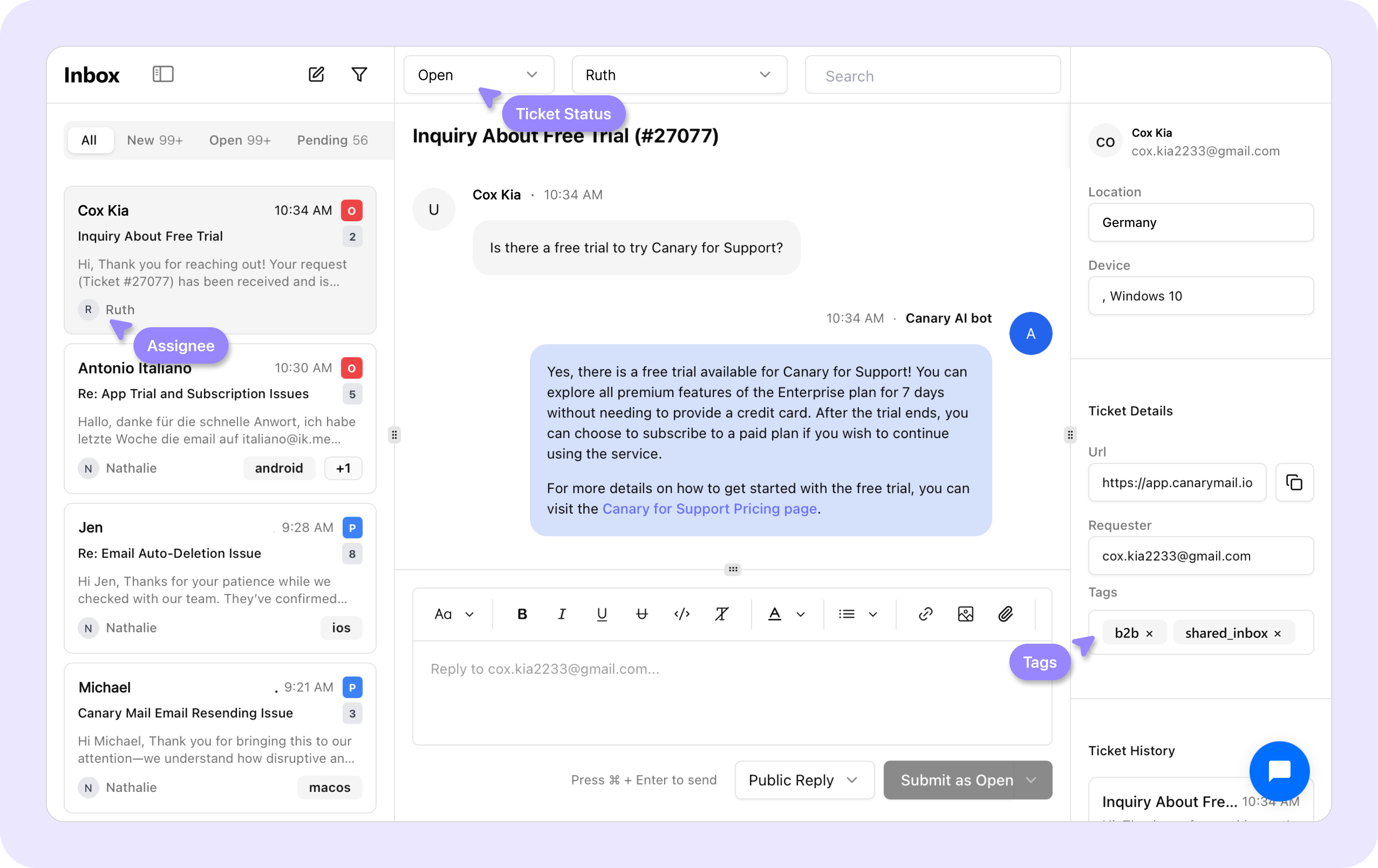
Shared Inbox by Canary Demo - Team Collaboration
1. See who's handling what: Clear ownership and status tracking—know who's working on each ticket to avoid duplicate replies. 2. Turn emails into workflows: Auto-tag by issue type. Merge duplicate threads. Watch chaos become structure. 3. All team emails, one view: Connect Gmail, Outlook, any p...
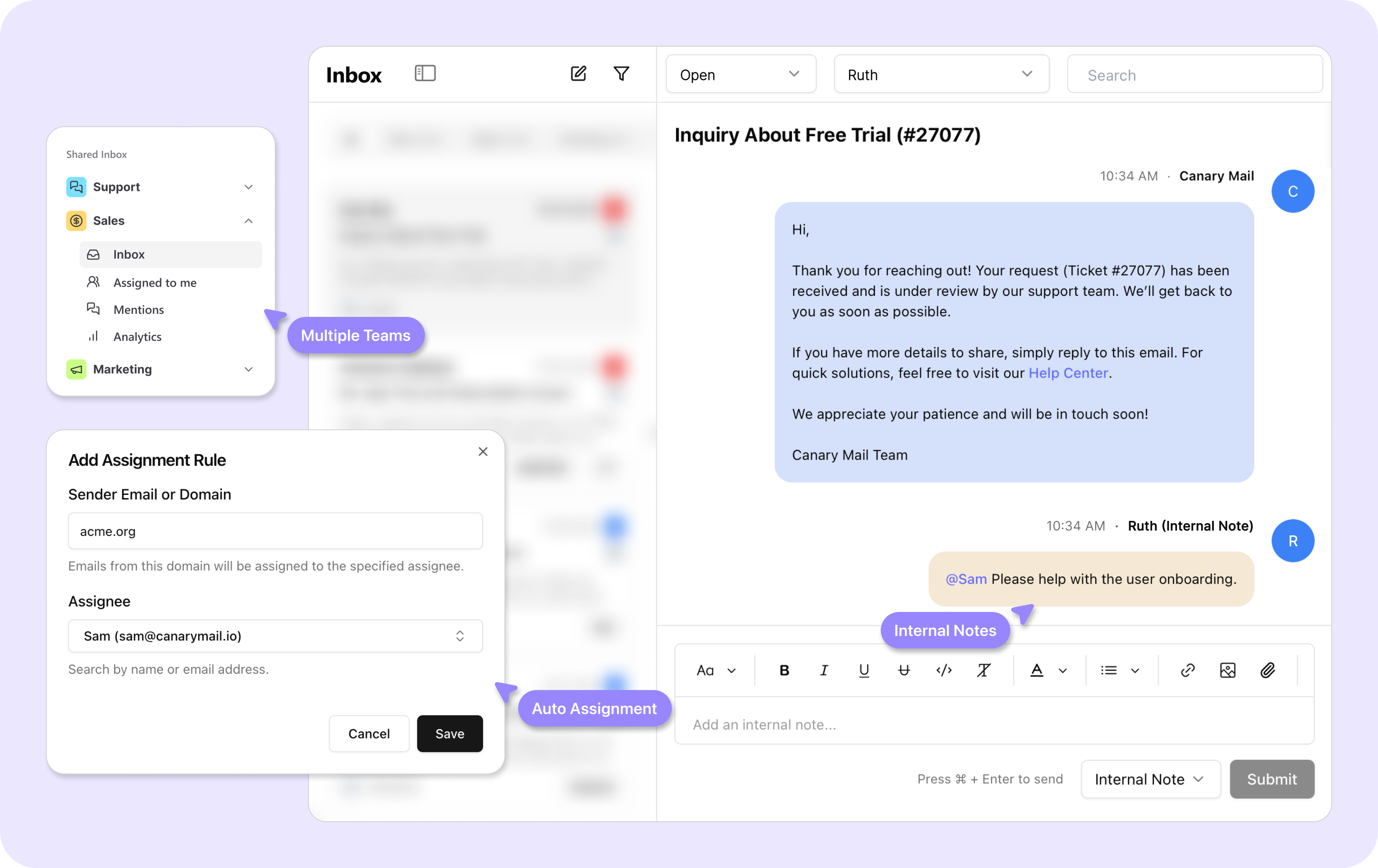
Shared Inbox by Canary Demo - Team Coordination
1. AI routing, zero bottlenecks: Billing → finance, bugs → engineering, VIPs → leadership, even when 100 emails land at once. 2. Templates that still feel human: AI learns from your past replies and drafts personalized responses—no generic templates, just review and send.
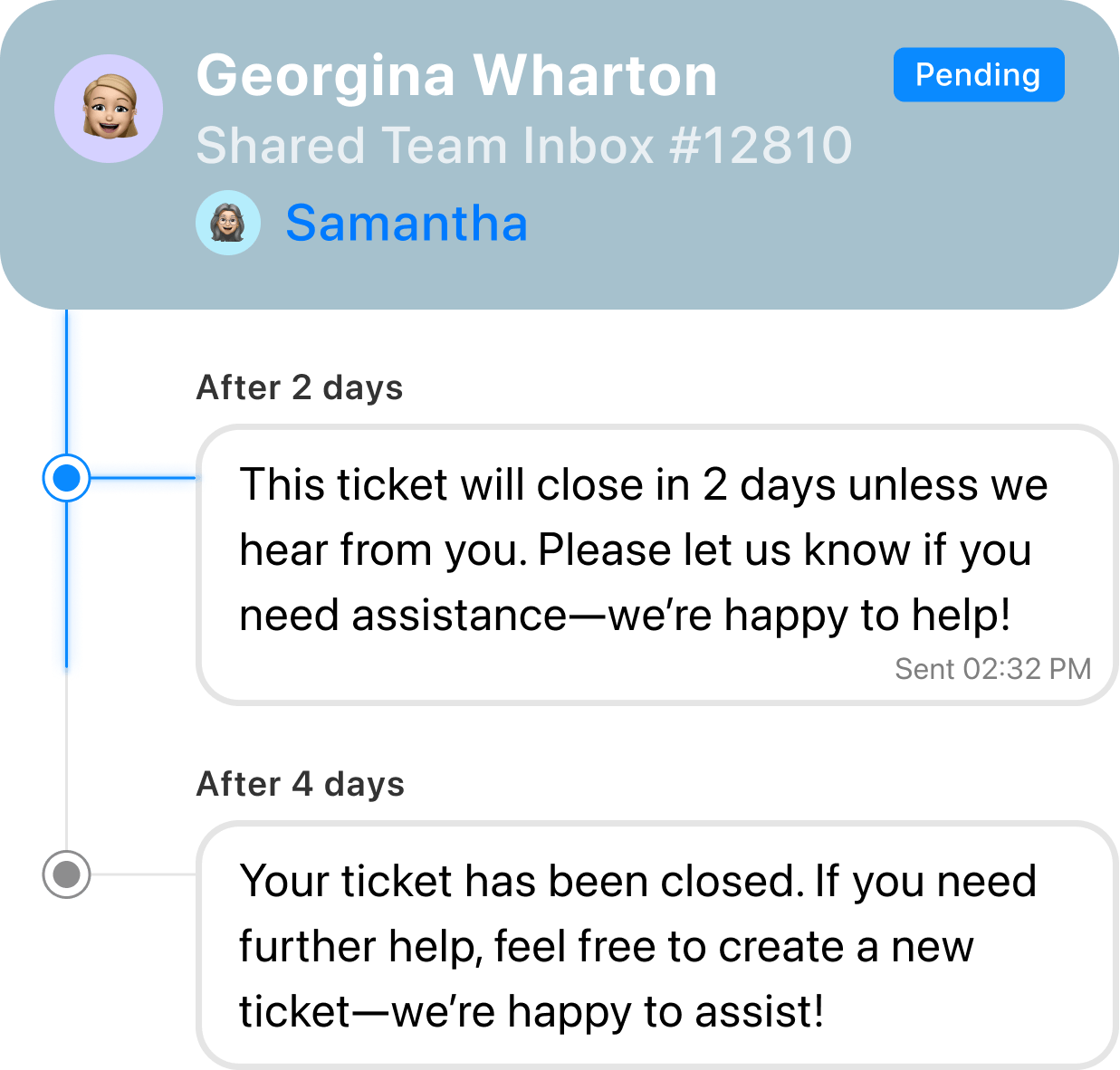
Shared Inbox by Canary Demo - Automations That Work
Free up time by automating email assignment, responses, and busywork.
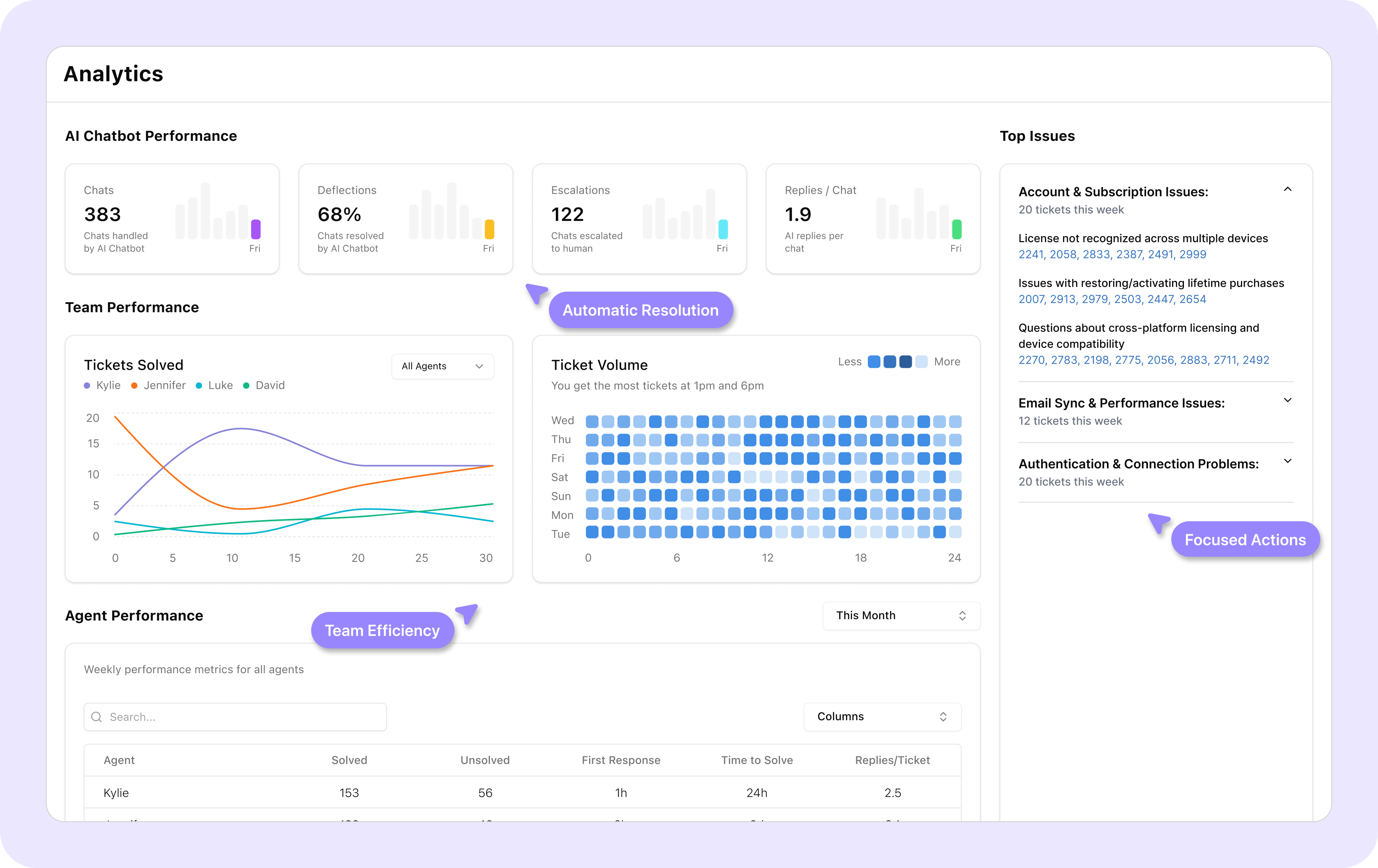
Shared Inbox by Canary Demo - Analytics Dashboard
Turn every email into instant insight: Live reports surface top issues, response rates, and team performance—no extra dashboards, just answers.
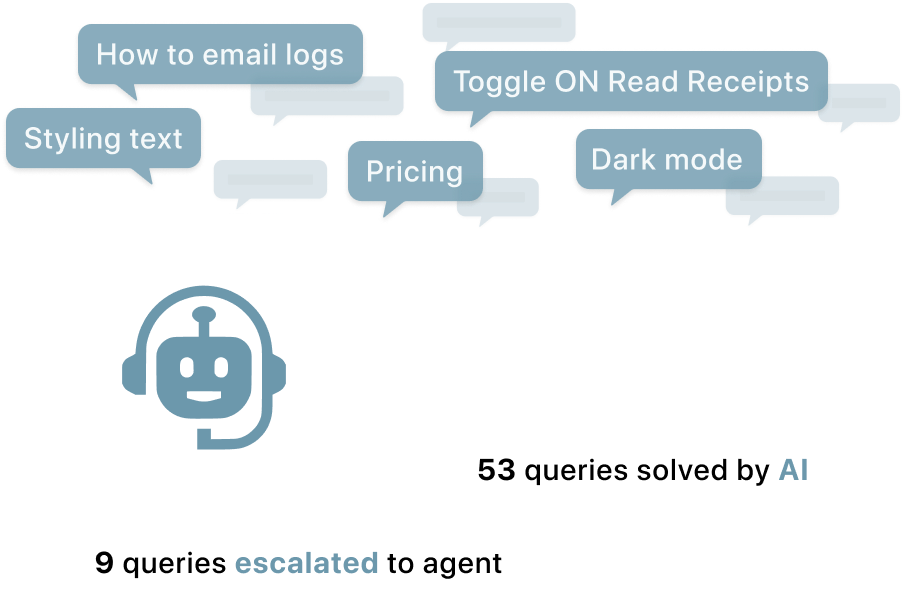
Shared Inbox by Canary Demo - Handle Volume Spikes through AI Chatbot
Scale support capacity instantly during peak times without adding headcount or compromising quality
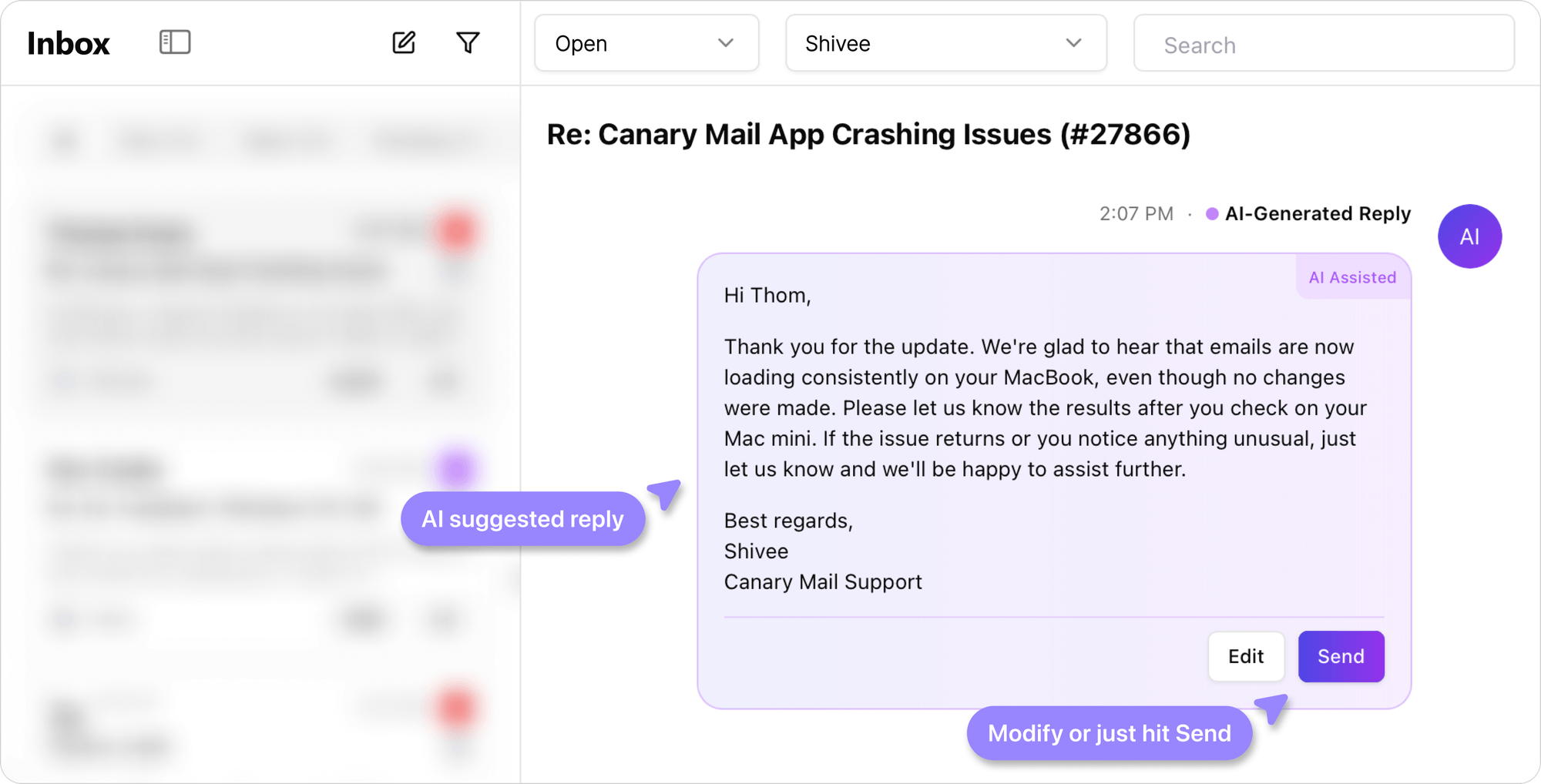
Shared Inbox by Canary Demo - AI Assisted Replies
AI suggests perfect replies based on how your best teammates handle similar issues.
Product Avatar Image

Have you used Shared Inbox by Canary before?

Answer a few questions to help the Shared Inbox by Canary community

Shared Inbox by Canary Reviews (4)

Reviews

Shared Inbox by Canary Reviews (4)

4.8
4 reviews

Pros & Cons

Generated from real user reviews
View All Pros and Cons
Search reviews
Filter Reviews
Clear Results
G2 reviews are authentic and verified.
VT
Founder And CEO
Small-Business (50 or fewer emp.)
"Shared inbox by Canary for teams using shared inbox beyond Support"
What do you like best about Shared Inbox by Canary?

What I like most about Shared Inbox by Canary is its flexibility. Our Financial team uses a shared email inbox to distribute and allocate tasks, and it works like magic. It’s not only great for support teams but also highly useful for operations. Very easy to set up, just a few clicks. We use it every day in our operations team. Review collected by and hosted on G2.com.

What do you dislike about Shared Inbox by Canary?

We’re on the free plan so I guess there are some limitations, having at least 2 tags would be great. I get that these features come with paid plans. I haven’t tested the integrations yet to check how simple it is to connect with other systems. Review collected by and hosted on G2.com.

Milford E.
ME
Director of Marketing And Advertising
Manufacturing
Mid-Market (51-1000 emp.)
"The Game-Changer for Efficient Marketing and Sales Client Communication"
What do you like best about Shared Inbox by Canary?

As a sales and marketing executive at a small business in the Sales And Marketing vertical, Shared Inbox by Canary has totally changed the way we handle our customer interactions. The platform’s capability to bring emails, SMS text, and other messaging channels all into a single dashboard saves my team countless hours every week. The tagging and shared inbox features are invaluable – we’re able to seamlessly assign conversations to our sales and support teams, add internal notes, and have visibility to client history without going back and forth between other tools. And the analytics dashboard allows us to track engagement trends, which is key to refining our outreach strategies. Review collected by and hosted on G2.com.

What do you dislike about Shared Inbox by Canary?

Though the tool is hearty, team members not similar to traditional email clients, may cause a slight learning curve. “I had a couple of friends who initially had trouble with the labeling system, but with onboarding support from Canary, we were able to address it immediately. Once in a while, we’ve seen slight hiccups syncing with older threads of emails, but these are infrequent and usually right themselves after a refresh. Review collected by and hosted on G2.com.

Verified User in Wholesale
GW
Small-Business (50 or fewer emp.)
Guest users or non-business users of the software, not included in G2 scores.
"Shared-Inbox.ai Review: A Promising AI-First Inbox Solution with Strategic Growth Potentia"
What do you like best about Shared Inbox by Canary?

Shared-Inbox.ai is a really solid tool it’s smart, easy to navigate, and does a great job of showing off what it can do. The messaging is clear, and the site makes it super simple to get started. That said, adding a few things like real screenshots, clearer pricing, some SEO-friendly content, and stronger signals for security could make a big difference. It would help turn casual browsers into confident customers, especially those comparing different team inbox options. Review collected by and hosted on G2.com.

What do you dislike about Shared Inbox by Canary?

At first glance, the site looks clean and professional, but it’s missing some important details that really matter like showing the actual product, having helpful content to find it on Google, and building trust with clear security info. Those things make a big difference when someone’s thinking about signing up. Review collected by and hosted on G2.com.

AT
Marketing Director
Building Materials
Mid-Market (51-1000 emp.)
"Shared Inbox improve the way we engage with leads"
What do you like best about Shared Inbox by Canary?

1. Easy to integrate

2. Department Management

3. Statistics on agent activity

4. Easy to integrate with the site

When our offline is quiet, all of our sales staff focus on shared inbox to generate leads. Our typical lead usually take 2-3 days to covert, but with shared inbox, our team gathers contact and closes leads in as little as 24hours Review collected by and hosted on G2.com.

What do you dislike about Shared Inbox by Canary?

The flows could be improved, for example, its not possible to set up double triggers Review collected by and hosted on G2.com.

There are not enough reviews of Shared Inbox by Canary for G2 to provide buying insight. Below are some alternatives with more reviews:

1
Front Logo
Front
4.7
(2,432)
Front takes out the pain of shared inboxes (contact@, team@, jobs@...) by introducing collaboration in email.
2
Tidio Logo
Tidio
4.6
(1,880)
Tidio is an all-in-one AI customer support platform that includes help desk issue tracking, live chat, chatbot automation (Flows), and an AI customer service agent (Lyro). The platform allows businesses to manage all customer communication from a single dashboard, including email and social media channels like WhatsApp, Messenger, and Instagram. Tidio’s interactive widget functions as both a live chat plugin and a chatbot. With Flows, businesses can create custom chatbot-like automations to automatically provide answers to incoming messages, offer support, and generate leads. Additionally, Lyro uses your knowledge base and FAQs to provide accurate, helpful, and natural answers and solutions in your brand’s unique tone of voice. Lyro can achieve up to a 64% resolution rate, allowing your team to focus on more complex issues.
3
Hiver Logo
Hiver
4.6
(1,280)
Hiver transforms your inbox (Gmail or Outlook) into a simple, powerful collaboration and customer support tool.
4
Fin by Intercom Logo
Fin by Intercom
4.5
(3,815)
Fin’s AI Agent System gives you complete control with four core capabilities, analyze, train, test, and deploy, all in one easy-to-use workspace. It’s designed to fine-tune quality and drive continuous performance improvement. No code required. Train: Teach Fin with your knowledge, data, policies, and tone of voice. It delivers accurate, consistent answers and handles complex tasks in more than 45 languages. Test: Use real customer questions to check answer quality. Simulate different audiences and refine sources and settings so Fin always reflects your brand and policies. Deploy: Launch Fin across email, voice, live chat, social, and more. It can answer, triage, and collaborate with your team to provide a consistent experience everywhere. Analyze: Monitor and optimize Fin’s performance across AI and human service. Spot issues, fill content gaps, and improve service quality with AI-powered suggestions.
5
Help Scout Logo
Help Scout
4.4
(424)
Help Scout is a customer support platform growing businesses use to manage all their customer conversations in one place.
6
Kapture CX Logo
Kapture CX
4.5
(359)
Kapture is a business automation platform that helps organisations manage sales, operations and customer service through a simple interface.
7
Zendesk for Customer Service Logo
Zendesk for Customer Service
4.3
(6,786)
Zendesk for Customer Service is an AI-powered service solution that’s easy to set up, use, and scale. It offers out-of-the-box functionality that’s simple to modify, helping businesses move faster. Leveraging AI built on billions of CX interactions, Zendesk enhances the entire service experience—from self-service to agents and admins—improving efficiency at scale. Zendesk equips agents with tools, insights, and context to deliver personalized service across all channels, including social messaging, phone, and email. It unifies personalized conversations, omnichannel case management, AI workflows, automation, and a Marketplace of 1800+ apps under one platform. Zendesk QA uses AI to evaluate and improve agent performance, while Workforce Management optimizes scheduling and productivity to ensure readiness during peak times. The solution is easy to implement and adjust without needing IT or developers. Zendesk’s mission is to simplify business complexity and enable meaningful customer connections for companies of all sizes. Serving 130K+ global brands in 30+ languages, Zendesk is headquartered in San Francisco with offices worldwide.
8
Freshdesk Logo
Freshdesk
4.4
(3,715)
Freshdesk is a cloud-based helpdesk software that streamlines customer conversations across multiple channels including email & phone. It enables faster collaboration with your support team for quick responses to your customer. With 150+ integrations, we make it simple for businesses to provide superior customer support. We are trusted by 100,000+ companies across different industries.
9
LiveAgent Logo
LiveAgent
4.5
(1,532)
LiveAgent helps businesses provide better customer service across all communication channels including email, chat and phone. Deliver customer Wow and grow your business with LiveAgent, a customer service software trusted by 30.000+ companies worldwide.
10
Plivo Logo
Plivo
4.5
(747)
Global SMS & Voice calls for businesses of all sizes
Show More
People Icons

Start a Discussion about Shared Inbox by Canary

Have a software question? Get answers from real users and experts.

Start a Discussion

Pricing Options

Pricing provided by Shared Inbox by Canary.

Starter

$10.00
1 User Per Month

Business

$20.00
1 User Per Month

Scale

$30.00
1 User Per Month
Product Avatar Image
Shared Inbox by Canary