# Best Translation Management Software

## How Many Translation Management Software Products Does G2 Track?

**Total Products under this Category:** 120

### Category Stats (Jul 2026)

- **Average Rating:** 4.51/5 The average rating of products in this category, based on all submitted ratings
- **Top Trending Product:** Trados (+0.17%) - Among all products in this category, Trados recorded the largest rating increase compared to last month

_Last updated: July 27, 2026_

## How Does G2 Rank Translation Management Software Products?

**Why You Can Trust G2's Software Rankings:**

- 30 Analysts and Data Experts
- 10,000+ Authentic Reviews
- 120+ Products
- Unbiased Rankings

G2's software rankings are built on verified user reviews, rigorous moderation, and a consistent research methodology maintained by a team of analysts and data experts. Each product is measured using the same transparent criteria, with no paid placement or vendor influence. While reviews reflect real user experiences, which can be subjective, they offer valuable insight into how software performs in the hands of professionals. Together, these inputs power the G2 Score, a standardized way to compare tools within every category.

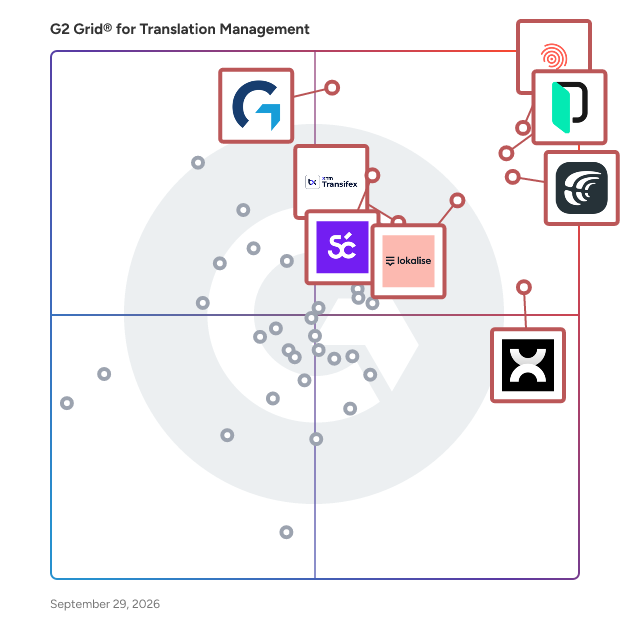
## G2 Grid® for Translation Management Software
 ![G2 Grid® for Translation Management Software plotting products by satisfaction and market presence](https://www.g2.com/categories/translation-management/grids.png?focus%5B%5D=1660&focus%5B%5D=4167&focus%5B%5D=17019&focus%5B%5D=49885&focus%5B%5D=142786&focus%5B%5D=8315&focus%5B%5D=15606&focus%5B%5D=104145)

Highlighted products: Smartling, Crowdin, Phrase, Lokalise, wxrks, GlobalLink, Transifex, and Weglot.

Underlying data: [Grid® JSON](https://www.g2.com/categories/translation-management/grids.json?focus%5B%5D=smartling&focus%5B%5D=crowdin&focus%5B%5D=phrase-phrase&focus%5B%5D=lokalise&focus%5B%5D=wxrks&focus%5B%5D=globallink&focus%5B%5D=transifex&focus%5B%5D=weglot)

**Sponsored**

### Intralinks DealCentre AI

DealCentre AI™ by SS&C Intralinks is the AI-powered platform that helps dealmakers move faster, work smarter and stay in control at every stage of the deal. Built for today’s high-stakes transactions, DealCentre AI simplifies the entire deal lifecycle, from preparation and marketing to diligence and closing. Whether you're launching a deal, managing hundreds of documents, or answering time-sensitive questions, DealCentre AI automates the manual work and delivers insights that help you make better decisions, faster. At the heart of the platform is Link, your built-in AI deal assistant. Ask Link to surface key information across thousands of documents, identify duplicative Q&A inquiries, or validate document readiness, all in seconds. With each deal, Link gets smarter, bringing even more clarity and speed to your process. With DealCentre AI, you can: - Launch and structure deals in minutes with self-service Deal Prep - Easily manage NDAs, outreach, and buyer engagement from one place - Streamline diligence with AI-powered Q&A and smart document tracking - Maintain document control and security with intuitive permission settings - Monitor activity and progress across all deals in a single dashboard DealCentre AI redefines how deals get done, removing friction, boosting productivity and helping teams close with confidence.

[Visit website](https://www.g2.com/external_clickthroughs/record?secure%5Bad_program%5D=ppc&secure%5Bad_slot%5D=category_product_list&secure%5Bcategory_id%5D=561&secure%5Bchosen_at%5D=2026-07-28T12%3A03%3A49Z&secure%5Bdisplayable_resource_id%5D=561&secure%5Bdisplayable_resource_type%5D=Category&secure%5Bmedium%5D=sponsored&secure%5Bplacement_reason%5D=page_category&secure%5Bplacement_resource_ids%5D%5B%5D=561&secure%5Bprioritized%5D=false&secure%5Bproduct_id%5D=1244127&secure%5Bresource_id%5D=561&secure%5Bresource_type%5D=Category&secure%5Bsource_type%5D=category_page&secure%5Bsource_url%5D=https%3A%2F%2Fwww.g2.com%2Fcategories%2Ftranslation-management&secure%5Btoken%5D=684cfefffcea110ab645befe9d337c59659737d267778a981579f3f83ab5546e&secure%5Burl%5D=https%3A%2F%2Fad.doubleclick.net%2Fddm%2Ftrackclk%2FN2471432.4572687G2-HONEYBOOK%2FB35800707.446280039%3Bdc_trk_aid%3D639648664%3Bdc_trk_cid%3D254591890%3Bdc_lat%3D%3Bdc_rdid%3D%3Btag_for_child_directed_treatment%3D%3Btfua%3D%3Bgdpr%3D%24%257bGDPR%257d%3Bgdpr_consent%3D%24%257bGDPR_CONSENT_755%257d%3Bltd%3D%3Bdc_tdv%3D1&secure%5Burl_type%5D=book_demo)

[
Smartling
](https://www.g2.com/products/smartling/reviews)

By [Smartling](https://www.g2.com/sellers/smartling)

[

4.4/5(707)

](https://www.g2.com/products/smartling/reviews)

What do users say?

Users consistently praise Smartling for its user-friendly interface and powerful automation features, which streamline the translation process and enhance collaboration. The platform's ability to inte

Pros and Cons

[
Ease of Use (175)
](https://www.g2.com/products/smartling/reviews?qs=pros-and-cons)[
Translation Issues (68)
](https://www.g2.com/products/smartling/reviews?qs=pros-and-cons)

[
Crowdin
](https://www.g2.com/products/crowdin/reviews)

By [Crowdin](https://www.g2.com/sellers/crowdin)

[

4.4/5(713)

](https://www.g2.com/products/crowdin/reviews)

What do users say?

Users consistently praise the ease of use and automation features of Crowdin, which streamline the localization process and enhance collaboration among teams. The platform's ability to integrate seaml

Pros and Cons

[
Ease of Use (197)
](https://www.g2.com/products/crowdin/reviews?qs=pros-and-cons)[
Usability Issues (162)
](https://www.g2.com/products/crowdin/reviews?qs=pros-and-cons)

[
Phrase
](https://www.g2.com/products/phrase-phrase/reviews)

By [Phrase](https://www.g2.com/sellers/phrase)

[

4.5/5(1,304)

](https://www.g2.com/products/phrase-phrase/reviews)

What do users say?

Users consistently praise the intuitive interface and ease of use of Phrase, highlighting how it simplifies translation tasks and enhances productivity. Many appreciate the platform's ability to strea

Pros and Cons

[
Ease of Use (114)
](https://www.g2.com/products/phrase-phrase/reviews?qs=pros-and-cons)[
Translation Issues (41)
](https://www.g2.com/products/phrase-phrase/reviews?qs=pros-and-cons)

[
Lokalise
](https://www.g2.com/products/lokalise/reviews)

By [Lokalise, Inc.](https://www.g2.com/sellers/lokalise-inc)

[

4.7/5(760)

](https://www.g2.com/products/lokalise/reviews)

What do users say?

Users consistently praise the intuitive interface and fast customer support of Lokalise, which significantly enhances their translation management experience. The platform's ability to streamline work

Pros and Cons

[
Ease of Use (79)
](https://www.g2.com/products/lokalise/reviews?qs=pros-and-cons)[
Usability Issues (82)
](https://www.g2.com/products/lokalise/reviews?qs=pros-and-cons)

[
GlobalLink
](https://www.g2.com/products/globallink/reviews)

By [TransPerfect](https://www.g2.com/sellers/transperfect)

[

4.5/5(186)

](https://www.g2.com/products/globallink/reviews)

What do users say?

Users consistently praise the ease of use and powerful automation features of GlobalLink, which streamline translation and localization processes. The integration with various platforms enhances effic

Pros and Cons

[
Ease of Use (22)
](https://www.g2.com/products/globallink/reviews?qs=pros-and-cons)[
Pricing Issues (6)
](https://www.g2.com/products/globallink/reviews?qs=pros-and-cons)

[
wxrks
](https://www.g2.com/products/wxrks/reviews)

By [wxrks](https://www.g2.com/sellers/wxrks)

[

4.6/5(282)

](https://www.g2.com/products/wxrks/reviews)

What do users say?

Users consistently praise the platform for its intuitive interface and workflow efficiency, which significantly enhance productivity in translation tasks. The integration of AI features and translatio

Pros and Cons

[
Ease of Use (114)
](https://www.g2.com/products/wxrks/reviews?qs=pros-and-cons)[
Steep Learning Curve (23)
](https://www.g2.com/products/wxrks/reviews?qs=pros-and-cons)

[
Weglot
](https://www.g2.com/products/weglot/reviews)

By [Weglot](https://www.g2.com/sellers/weglot)

[

4.7/5(731)

](https://www.g2.com/products/weglot/reviews)

What do users say?

Users consistently praise the ease of use and responsive support provided by Weglot, highlighting how quickly they can set up and manage multilingual websites. The Visual Editor is particularly valued

Pros and Cons

[
Customer Support (103)
](https://www.g2.com/products/weglot/reviews?qs=pros-and-cons)[
Translation Issues (40)
](https://www.g2.com/products/weglot/reviews?qs=pros-and-cons)

[
Transifex
](https://www.g2.com/products/transifex/reviews)

By [XTM International](https://www.g2.com/sellers/xtm-international)

[

4.2/5(723)

](https://www.g2.com/products/transifex/reviews)

What do users say?

Users consistently praise the ease of use and intuitive interface of Transifex, which simplifies the translation process and enhances team collaboration. The platform's ability to streamline workflows

Pros and Cons

[
Ease of Use (41)
](https://www.g2.com/products/transifex/reviews?qs=pros-and-cons)[
Complexity (11)
](https://www.g2.com/products/transifex/reviews?qs=pros-and-cons)

[
HeyGen
](https://www.g2.com/products/heygen/reviews)

By [HeyGen](https://www.g2.com/sellers/heygen)

[

4.8/5(1,924)

](https://www.g2.com/products/heygen/reviews)

What do users say?

Users consistently praise the ease of use and realistic avatars offered by HeyGen, which allow for quick and professional video creation without technical expertise. The platform's intuitive interface

Pros and Cons

[
Ease of Use (459)
](https://www.g2.com/products/heygen/reviews?qs=pros-and-cons)[
Pricing Issues (147)
](https://www.g2.com/products/heygen/reviews?qs=pros-and-cons)

[
Smartcat
](https://www.g2.com/products/smartcat/reviews)

By [Smartcat](https://www.g2.com/sellers/smartcat)

[

4.6/5(144)

](https://www.g2.com/products/smartcat/reviews)

What do users say?

Users consistently praise the ease of use and intuitive interface of Smartcat, which allows translators to manage projects efficiently and collaborate seamlessly. The platform's responsive customer su

Pros and Cons

[
Ease of Use (3)
](https://www.g2.com/products/smartcat/reviews?qs=pros-and-cons)[
Missing Features (1)
](https://www.g2.com/products/smartcat/reviews?qs=pros-and-cons)

[
Gridly
](https://www.g2.com/products/gridly/reviews)

By [Gridly](https://www.g2.com/sellers/gridly)

[

4.7/5(50)

](https://www.g2.com/products/gridly/reviews)

What do users say?

Users consistently praise Gridly for its ease of use and flexibility, allowing teams to collaborate effectively on localization projects. The intuitive interface and real-time updates enhance workflow

Pros and Cons

[
Ease of Use (13)
](https://www.g2.com/products/gridly/reviews?qs=pros-and-cons)[
Bugs (4)
](https://www.g2.com/products/gridly/reviews?qs=pros-and-cons)

[
Localazy
](https://www.g2.com/products/localazy/reviews)

By [Localazy](https://www.g2.com/sellers/localazy)

[

4.8/5(75)

](https://www.g2.com/products/localazy/reviews)

What do users say?

Users consistently praise the ease of use and intuitive interface of Localazy, which simplifies the localization process for both developers and non-technical team members. The platform's robust autom

Pros and Cons

[
Ease of Use (24)
](https://www.g2.com/products/localazy/reviews?qs=pros-and-cons)[
Translation Issues (7)
](https://www.g2.com/products/localazy/reviews?qs=pros-and-cons)

[
memoQ
](https://www.g2.com/products/memoq/reviews)

By [memoQ Ltd](https://www.g2.com/sellers/memoq-ltd)

[

4.5/5(129)

](https://www.g2.com/products/memoq/reviews)

What do users say?

Users consistently praise the ease of use and powerful features of memoQ, highlighting its intuitive interface and robust translation memory capabilities that enhance productivity. Many appreciate the

Pros and Cons

[
Ease of Use (35)
](https://www.g2.com/products/memoq/reviews?qs=pros-and-cons)[
Interface Issues (11)
](https://www.g2.com/products/memoq/reviews?qs=pros-and-cons)

[
Localize
](https://www.g2.com/products/localize/reviews)

By [Localize](https://www.g2.com/sellers/localize)

[

4.5/5(114)

](https://www.g2.com/products/localize/reviews)

What do users say?

Users consistently praise the ease of use and quick setup of Localize, highlighting how it simplifies the translation process and reduces the need for technical involvement. The intuitive interface an

Pros and Cons

[
Ease of Use (33)
](https://www.g2.com/products/localize/reviews?qs=pros-and-cons)[
Translation Issues (13)
](https://www.g2.com/products/localize/reviews?qs=pros-and-cons)

[
Trados
](https://www.g2.com/products/trados/reviews)

By [RWS](https://www.g2.com/sellers/rws-feb37b7a-b3be-4ac2-8036-086a1d54de9f)

[

4/5(154)

](https://www.g2.com/products/trados/reviews)

What do users say?

Users consistently praise the software for its translation memory and terminology management features, which significantly enhance efficiency and consistency in translation projects. Many find it esse

Pros and Cons

[
Translation Memory (9)
](https://www.g2.com/products/trados/reviews?qs=pros-and-cons)[
Expensive (5)
](https://www.g2.com/products/trados/reviews?qs=pros-and-cons)

- &lsaquo; Prev‹ Prev
- 1
- [2](/categories/translation-management?order=g2_score&page=2#product-list)
- [3](/categories/translation-management?order=g2_score&page=3#product-list)
- [4](/categories/translation-management?order=g2_score&page=4#product-list)
- [5](/categories/translation-management?order=g2_score&page=5#product-list)
- …
- [7](/categories/translation-management?order=g2_score&page=7#product-list)
- [8](/categories/translation-management?order=g2_score&page=8#product-list)
- [Next &rsaquo;Next ›](/categories/translation-management?order=g2_score&page=2#product-list)

Spotlight Categories

[Core HR Software](https://www.g2.com/categories/core-hr)

[Security Awareness Training Software](https://www.g2.com/categories/security-awareness-training)

[Sales Compensation Software](https://www.g2.com/categories/sales-compensation)

[Customer Data Platforms (CDP)](https://www.g2.com/categories/customer-data-platform-cdp)

[Influencer Marketing Platforms](https://www.g2.com/categories/influencer-marketing-platforms)

Similar Categories

- [Brand Asset Management](/categories/brand-asset-management)
- [Client Portal](/categories/client-portal)
- [Cloud Content Collaboration](/categories/cloud-content-collaboration)
- [CMS Tools](/categories/cms-tools)
- [Commenting Systems](/categories/commenting-systems)

- [Component Content Management Systems](/categories/component-content-management-systems)
- [Content Moderation Tools](/categories/content-moderation-tools)
- [Design Systems](/categories/design-systems)
- [Desktop Search](/categories/desktop-search)
- [Digital Asset Management](/categories/digital-asset-management)

- [Digital Experience Orchestration (DXO) Platforms](/categories/digital-experience-orchestration-dxo-platforms)
- [Digital Experience Platforms (DXP)](/categories/digital-experience-platforms-dxp)
- [Digital Rights Management (DRM)](/categories/digital-rights-management-drm)
- [Document Management](/categories/document-management)
- [Enterprise Content Management (ECM)](/categories/enterprise-content-management-ecm)

[Browse Translation Management Themes](/categories/translation-management/themes)

 ![Neeraja Prakash](/assets/transparent-ad5be28fbcd25b7b08d2cebe1d957125437fb5407d75ee717965ad22c8808791.gif "Neeraja Prakash")
NP

Researched and written by [Neeraja Prakash](https://research.g2.com/insights/author/neeraja-prakash)

Updated October 3, 2024

Translation management software is leveraged by freelance translators and language service providers (LSPs) to organize translation and localization projects. Translation management solutions are often referred to as translation project management, though many tools provide more than just project management functionality. Translation management systems span the entire lifecycle of a translation text; from inputting the source text to distributing the finished target text, these products serve as a central translation hub for organizations to track and collaborate on translations.

Many translation management tools also provide built-in [machine translation software](https://www.g2.com/categories/machine-translation) and [computer-assisted translation software](https://www.g2.com/categories/computer-assisted-translation) features. These all-in-one solutions allow translators and [translation services providers](https://www.g2.com/categories/translation-services) to plan and execute projects from a single solution. In this same vein, some translation management tools also provide features like billing and invoicing, client portals and client management, and resource management. Another important ability is to provide machine translation tools to make the translation process much more efficient. Some translation management vendors will also provide professional translators as a service for clients with translation needs who aren’t LSPs themselves.

Some translation management tools may refer to themselves as language operations (LangOps) platforms. LangOps is a holistic way of approaching localization strategy. LangOps platforms focus on how the outcomes of translation projects impact the business, providing robust performance and reporting features, visibility on each step of the translation process, strict control over machine translation engines, and the ability to customize translation workflows.

[Software localization tools](https://www.g2.com/categories/software-localization) can also provide many of the same project management features and translation tools as translation management but are specific to the localization of backend code for websites, apps, and video games. Similarly, some [website translation tools](https://www.g2.com/categories/website-translation-tools) can provide some of the same features, but these tools are concerned with the continuous translation of frontend web content.

To qualify for inclusion in the Translation Management category, a product must:

- Allow users to create custom workflows for translation projects
- Automate translation processes
- Centralize multilingual content
- Provide tools for translators, project managers, and other employees to communicate and collaborate
- Analyze translation quality and effectiveness

Top Tools at a Glance

| 

 | 

Enterprise-scale continuous localization

 | 

User Review

"Easy to use, clear functions and optimal work management"

 |
| 

 | 

Developer-centric product localization

 | 

User Review

"Translation Memory and Term Search Make Consistency Easy"

 |
| 

 | 

Scalable localization with flexible workflows

 | 

User Review

"Intuitive, Efficient Translation Management That Streamlines Multilingual Workflows"

 |
| 

 | 

Fast, collaborative product localization

 | 

User Review

"Smooth, easy to use, great to scale and to adapt"

 |
| 

 | 

Governance-heavy enterprise localization programs

 | 

User Review

"Scale Localization and Accuracy in Translation using GlobalLink"

 |
| 

 | 

Cost-aware, workflow-driven translation management

 | 

User Review

"Intelligent Editing with Streamlined Workflow"

 |
| 

 | 

Quick website translation with minimal setup

 | 

User Review

"Powerful, Easy-to-Deploy Multilingual Solution with Seamless Integrations"

 |
| 

 | 

Continuous localization for SaaS and documentation

 | 

User Review

"Transifex Makes Localization Easy and Efficient"

 |
| 

 | 

AI-powered multilingual video localization

 | 

User Review

"Unmatched Lip-Sync and Avatar Animation - A Game-Changer for High-End Marketing Clips"

 |
| 

 | 

Hybrid human and AI-powered translation workflows

 | 

User Review

"A powerful translation platform with clean interface and great AI integration"

 |

* * *

Show More

* * *

## How Do You Choose the Right Translation Management Software?

### What You Should Know About Translation Management Software

### What is Translation Management Software?

Translation management software, also known as translation management system (TMS), consolidates all the features necessary for translation and localization projects into a single platform. The core components of a TMS are a built-in or integrated computer-assisted translation (CAT), [project management](https://www.g2.com/categories/project-management), [workflow management](https://www.g2.com/categories/workflow-management) and automation, and [online proofing](https://www.g2.com/categories/online-proofing) specifically for translation and localization projects. Some translation management software provides an extensive set of features depending on the type and size of business their product or offering is intended for.

Key Benefits of Translation Management Software

- Enhanced efficiency for translation and localization projects
- Potential to consolidate software solutions depending on a specific product and current software stack

### Why Use Translation Management Software?

**Translation automation —** TMSs provide multiple features to automate parts of the translation process. Translation management software is partially thought of as project management tools specifically for translation and localization projects. They include built-in features for feedback and task delegation, and some even provide resource management functionality for systems intended for larger translation service providers. TMSs may also include features like machine translation, which allows translators to partially automate some of the translation processes.

**Software solution consolidation —** By using a TMS, translators access their CAT solution, solicit feedback from peers or clients, manage projects, and bill their clients. This feature consolidation allows translators to reduce the time wasted moving between different software solutions and potentially save money. Some TMSs also handle tasks like marketing or are themselves translation services marketplaces, reducing non-billable workload tasks.

### Who Uses Translation Management Software?

**Language services providers (LSPs) —** LSPs are dedicated translation and localization firms. Businesses outsource their translation needs to LSPs if they don’t have the volume to warrant investment in an in-house translation team. TMSs are the technological backbones of an LSP’s business, and many translation management software intended for full LSPs offer substantially more features than those intended for small teams or freelance translators. LSPs leverage fully-featured translation management software with additional client-focused features, including client portals, client management, billing and invoicing, and client feedback solicitation.

**Freelance translators —** Freelance translators manage their translation business by leveraging translation management software, as well. Many translation management tools for freelancers aim to be affordable, so they only come with the core, necessary features required in a TMS. Some freelancers still opt to use translation management tools with features like client management and billing and invoicing to consolidate their software needs. In response, translation management software vendors often have different pricing plans depending on how many seats are needed, and some have specific plans for freelance translators.

**In-house translation teams —** Businesses with frequent translation and localization needs sometimes hire an in-house translation team. These departments function similarly to a language service provider in terms of their organization and the type of Translation management software they use, but only handle projects within the company. In-house translation teams are a great investment if a company is frequently publishing content in multiple languages or localizing their software.

### Translation Management Software Features

Translation management tools bring together mainstay translation software solutions with automation to streamline the translation and localization process. Below are the core features within translation management software, as well as secondary features that some products may include in their offering.

**Computer-assisted translation (CAT) —** Translation management software comes with a built-in CAT program. Some translation management solutions provide their own native CAT solution or provide integrations with leading CAT tools in the industry. In either case, translation management software always allows translators to access a CAT tool within the application.

**Glossary —** Translation management software allows users to store glossaries for multiple languages. Editable glossaries allow translators to record and store frequently-used words, speeding up the translation process so they are able to focus on novel words or technical terms specific to a project.

**User permissions —** This type of software allows administrators to designate certain permissions on a user-by-user basis. This feature is particularly popular in solutions with client-facing capabilities. This feature enables LSPs to give their clients insight and input into translation projects without giving them all the permissions of their translators.

**Comments and mentions —** Translation management software allows users to comment or mention others for proofreading purposes. Comments and mentions are the main forms of communication between translators working on a project. They allow translators to ask questions and provide feedback without tampering with the project itself.

#### Additional Translation Management Software Features

[**Billing and invoicing**](https://www.g2.com/categories/translation-management/f/billing-and-invoicing) **—** The software allows users to bill and invoice clients from within the application. Some translation management tools are integrated with external billing and invoicing tools instead of providing one themselves, but are still made available in the application for the convenience of the user.

[**Client portal**](https://www.g2.com/categories/translation-management/f/client-portal) **—** Translation management software offers a client-facing portal that allows clients to provide feedback and review information within the application. Some translation management tools are integrated with external client portal tools instead of providing one themselves, but they are still made available in the application for the benefit of the user.

[**Client management**](https://www.g2.com/categories/translation-management/f/client-management) **—** Translation management software allows users to manage their client information within the application.

[**Resource management**](https://www.g2.com/categories/translation-management/f/resource-management) **—** This type of software allows users to manage their workforce and resources.

[**Task delegation**](https://www.g2.com/categories/translation-management/f/task-delegation) **—** Translation management software allows users to create and delegate tasks surrounding translation within the application. Task delegation features can look very similar to those found in task management software, though these will be more specific to translation and localization projects. Some solutions come with pre-built workflows as well.

[**Quality assurance**](https://www.g2.com/categories/translation-management/f/quality-assurance) **—** The software comes with built-in quality assurance testing features.

### Software and Services Related to Translation Management Software

[**Computer-assisted translation software**](https://www.g2.com/categories/computer-assisted-translation) **—** Computer-assisted translation or CAT software is a key component within a TMS. Translation management software aims to streamline and automate the translation process as much as possible, and allowing translators to access a CAT tool within the application supports that goal. Translation management software either provides its own native CAT tool or offers integrations with third-party CAT solutions.

[**Machine translation software**](https://www.g2.com/categories/machine-translation) **—** Machine translation software is often found as a feature inside CAT tools, and since CAT solutions are found within translation management software, TMS solutions also include machine translation in their offering. Translators sometimes utilize machine translation to automate a portion of the translation process by letting it handle an initial translation of a piece of content or the translation of very basic words while they’re translating. In either case, machine translation allows translators to automate a portion of their work, the ultimate goal of TMSs.

[**Website translation tools**](https://www.g2.com/categories/website-translation-tools) **—** Website translation tools look very similar to translation management software, and there is significant overlap between their features. However, website translation tools are more concerned with the continuous translation of content found on websites whereas TMSs are leveraged for multiple, disparate translation projects. For this reason, website translation tools are more likely to be leveraged by businesses for internal use to translate and localize their own website content.

[**Software localization tools**](https://www.g2.com/categories/software-localization-tools) **—** Software localization tools, like website translation tools, are similar to translation management software in terms of their functionality. However, software localization tools are more focused on software localization as opposed to the translation of standard, text-based content. Software localization tools are typically leveraged internally by development teams or by software development companies for their own software.

[**Translation services**](https://www.g2.com/categories/translation-services) **—** Translation services, or LSPs, rely entirely on translation management software. As previously mentioned, some translation management software provide a substantial amount of features and allow LSPs to run most of their business within one application. Even small translation services businesses depend on translation management software to automate their workflow and provide a CAT tool for their translators.

### **Translation Management FAQs**

#### Most Popular FAQs

##### Which translation management software has the best reviews?

Shortlist the products that feel consistently strong on usability, support, and day-to-day workflow quality:

- [Weglot](https://www.g2.com/products/weglot/reviews) - A strong fit for teams that want fast multilingual website deployment with minimal setup overhead.
- [Lokalise](https://www.g2.com/products/lokalise/reviews) - Best for teams that need structured localization workflows, automation, and cross-functional collaboration.
- [Smartling](https://www.g2.com/products/smartling/reviews) - A good choice for organizations that want polished workflow controls, QA, and managed translation operations.
- [Crowdin](https://www.g2.com/products/crowdin/reviews) - Well-suited to software and product teams that want collaborative translation tied closely to development workflows.

##### Why consider a translation management system?

Consider a translation management system when multilingual content is starting to outgrow spreadsheets, ad hoc vendor handoffs, or manual copy-paste work. The value is usually in centralizing translation memory, glossaries, approvals, and collaboration, so launches move faster, consistency improves, and fewer errors slip into production.

##### What is the best solution for managing multi-language content workflows?

Prioritize platforms that make intake, assignment, review, QA, and handoff feel connected rather than fragmented:

- [Phrase Localization Platform](https://www.g2.com/products/phrase-localization-platform/reviews) - A strong all-in-one option for teams managing recurring localization work with translation memory and streamlined project flow.
- [Smartling](https://www.g2.com/products/smartling/reviews) - Best for organizations that want governance, workflow clarity, and fewer quality issues at scale.
- [Lokalise](https://www.g2.com/products/lokalise/reviews) - Ideal for teams that want automation and task-based workflows across product, content, and localization.
- [Crowdin](https://www.g2.com/products/crowdin/reviews) - A good match for collaborative, file-based, and developer-linked localization processes.

##### What platform integrates translation management with CMS systems?

Start with products that repeatedly feel natural in connected publishing environments and reduce manual publishing work:

- [**Weglot**](https://www.g2.com/products/weglot/reviews) **-** Best for website teams that want a fast CMS-friendly path into multilingual publishing.
- [**Crowdin**](https://www.g2.com/products/crowdin/reviews) **-** A solid pick for teams that want localization tied to repos, content sources, and developer workflows.
- [Transifex](https://www.g2.com/products/transifex/reviews) - A good option for companies managing website, product, and digital content localization from one hub.
- [Smartling](https://www.g2.com/products/smartling/reviews) - Strong for enterprises that want broader integration flexibility with workflow and quality controls.

##### What is the difference between LLM and NMT?

NMT is a translation-first engine, and an LLM is a broader language model that can also translate. In practice, NMT is usually better when you want predictable, scalable translation with terminology control and repeatability, while LLMs are more useful when you need context handling, rewriting, or tone adaptation around the translation task. The practical tradeoff is that LLMs can feel more flexible, but NMT often remains the safer choice for high-volume production localization and domain-specific consistency.

#### Small Business FAQs

##### What is the most affordable translation management software for SMBs?

For smaller teams, focus on tools that look lightweight to adopt before worrying about enterprise depth.

- [Localazy](https://www.g2.com/products/localazy/reviews) - A smart fit for SMBs that want automation and fast rollout without a heavy admin burden.
- [POEditor](https://www.g2.com/products/poeditor/reviews) - Best for small teams that want a straightforward online localization workflow with less operational complexity.
- [Loco](https://www.g2.com/products/loco/reviews) - A practical choice for teams that want a simpler translation workflow without overbuilding their stack.

##### What is the best translation management software for startups?

For startups, favor products that help a lean team move quickly, launch internationally, and avoid building localization operations from scratch.&nbsp;

- [Gridly](https://www.g2.com/products/gridly/reviews) - A strong option for startup teams that want flexible content structures and localization workflow control in one place.
- [Phrase Localization Platform](https://www.g2.com/products/phrase-localization-platform/reviews) - A good fit for startups that need room to grow from simple localization into more mature workflows.
- [Crowdin](https://www.g2.com/products/crowdin/reviews) - Best for product-led startups that want collaboration and developer-friendly localization.
- [Localize](https://www.g2.com/products/localize/reviews) - Worth a look for startups that want a focused path to managing website and product localization.

##### Which translation management software is the most user-friendly for startups?

Ease of use is especially important for startup teams that need software with a short onboarding curve, minimal setup friction, and a workflow that feels intuitive from the first project. These [translation management platforms for small business](https://www.g2.com/categories/translation-management/small-business) earn strong marks for usability among startup and small-team users:

- [Weglot](https://www.g2.com/products/weglot/reviews) - Best for startups that want the fastest path from one-language content to multilingual publishing.
- [Localazy](https://www.g2.com/products/localazy/reviews) - A strong fit for small teams that want automation and easy review cycles without much setup friction.
- [memoQ](https://www.g2.com/products/memoq/reviews) - A good option when startups want richer translation features but still need the product to stay approachable.
- [POEditor](https://www.g2.com/products/poeditor/reviews) - Useful for teams that want a simple online interface for organizing strings and translations.

##### Why do SMBs adopt translation management earlier than they expect?

SMBs hit the need for [translation management](https://www.g2.com/categories/translation-management) as soon as multilingual content becomes continuous instead of occasional. Once marketing pages, product UI, help content, and release updates all need to stay in sync across languages, a dedicated system starts saving time immediately by reducing rework and keeping terminology consistent.

##### How quickly can a small business see value from translation management?

A small business can see value quickly when the tool removes manual coordination, speeds up publishing, and gives the team one place to manage translations and reviews. The fastest wins usually come from easier setup, cleaner handoffs, and fewer repetitive edits across languages.

#### Enterprise FAQs

##### What is the best-rated translation management software for tech enterprises?

For larger organizations, look for products that balance governance, integrations, and workflow discipline.

- [Lokalise](https://www.g2.com/products/lokalise/reviews) - A strong fit for tech enterprises that need automation, task management, and collaboration across product teams.
- [Phrase Localization Platform](https://www.g2.com/products/phrase-localization-platform/reviews) - Best for enterprises that want an all-in-one localization operating layer with room for scale.
- [Smartling](https://www.g2.com/products/smartling/reviews) - A dependable choice for enterprises that value QA, workflow consistency, and managed localization rigor.
- [GlobalLink](https://www.g2.com/products/globallink/reviews) - Worth considering when enterprise-grade control and centralized global translation operations matter most.

##### What is the most reliable translation management tool for enterprises?

For enterprise buyers, reliability usually means stable workflows, strong support, repeatable quality, and fewer surprises during high-volume localization.&nbsp;

- [GlobalLink](https://www.g2.com/products/globallink/reviews) - A good fit for enterprises that prioritize consistency, operational control, and broad global translation coverage.
- [XTM Cloud](https://www.g2.com/products/xtm-cloud/reviews) - Best for organizations that need structured multilingual workflow management across larger programs.
- [Smartling](https://www.g2.com/products/smartling/reviews) - A reliable option for enterprises that want a mature workflow and strong service layer.
- [Crowdin](https://www.g2.com/products/crowdin/reviews) - A solid enterprise choice when collaboration and developer-connected localization are central.

##### What is the best-reviewed translation management software for enterprise app integration?

For enterprise integration needs, prioritize products that fit naturally into product, repository, and content workflows rather than forcing localization into a separate silo.&nbsp;

- [Transifex](https://www.g2.com/products/transifex/reviews) - A strong choice for enterprises managing ongoing app, website, and digital content localization.
- [Lokalise](https://www.g2.com/products/lokalise/reviews) - Best for product organizations that want localization embedded into engineering and release workflows.
- [memoQ](https://www.g2.com/products/memoq/reviews) - A good fit for enterprises that need API-connected workflows and centralized language assets.
- [Phrase Localization Platform](https://www.g2.com/products/phrase-localization-platform/reviews) - Useful for teams that want flexible integration paths plus broader localization management.

##### How do enterprises keep terminology and approval workflows consistent across regions?

Treat this as a governance problem first and a translation problem second. The best enterprise setups centralize translation memory, term bases, style rules, reviewer roles, and approval stages so regional teams can move quickly without rewriting brand language every time content changes.

##### When should an enterprise prioritize translation management over standalone AI translation?

Prioritize a translation management platform when the organization needs auditability, approvals, glossary control, handoffs between teams, and integrations with product or content systems. Standalone AI translation can help with speed, but enterprises usually need workflow control and consistency more than raw translation output alone.

**Last updated on April 23, 2026**

## Frequently asked questions about Translation Management Software

### How do user reviews reflect the reliability of Translation Management solutions?

User reviews indicate that reliability in Translation Management solutions is often reflected in high user satisfaction ratings, with products like Smartling, Lokalise, and Transifex receiving average ratings above 4.5 out of 5. Users frequently highlight features such as ease of integration, customer support, and consistent performance as key factors contributing to perceived reliability. Additionally, positive feedback on the ability to handle large volumes of content and maintain translation quality further underscores the reliability of these solutions.

### What are the typical implementation timelines for Translation Management software?

Implementation timelines for Translation Management software typically range from a few weeks to several months, depending on factors such as the complexity of the project and the specific software used. For instance, products like Smartling and Transifex often report average implementation times of 1 to 3 months, while others like Lokalise may take 2 to 4 weeks for simpler setups. User reviews indicate that thorough training and integration with existing systems can extend these timelines, emphasizing the importance of planning and resource allocation.

### How do I evaluate the effectiveness of machine translation within these systems?

To evaluate the effectiveness of machine translation within translation management systems, consider user ratings and reviews focusing on translation accuracy, speed, and integration capabilities. For instance, products like Smartling and Lokalise are noted for their high accuracy ratings, with users highlighting Smartling's robust machine translation features and Lokalise's seamless integration with various platforms. Additionally, user feedback often emphasizes the importance of customization options and post-editing capabilities, which can significantly enhance translation quality.

### What security features should I prioritize in a Translation Management platform?

When selecting a Translation Management platform, prioritize security features such as data encryption, user access controls, and compliance with regulations like GDPR. Platforms like Smartling and Transifex are noted for robust security measures, including role-based access and secure data storage. Additionally, look for features like audit logs and secure API access, which enhance accountability and integration security. User feedback highlights the importance of these features in maintaining data integrity and protecting sensitive information during the translation process.

### How do Translation Management systems handle multiple languages and dialects?

Translation Management systems effectively handle multiple languages and dialects by offering features such as automated language detection, customizable glossaries, and support for regional variations. For instance, products like Smartling and Lokalise provide extensive language support and allow users to manage dialects through tailored workflows. Additionally, tools like Transifex and Crowdin enable collaboration among translators, ensuring that nuances in dialects are preserved. User reviews highlight the importance of these features, with many praising the systems' ability to streamline multilingual projects and maintain consistency across different language versions.

### What level of customer support is typically offered by Translation Management vendors?

Translation Management vendors typically offer varying levels of customer support, with many providing 24/7 support options. For instance, products like Smartling and Lokalise are noted for their responsive customer service, often receiving high ratings for support quality. Users frequently highlight the availability of dedicated account managers and comprehensive onboarding assistance. Additionally, platforms such as Transifex and Phrase offer extensive documentation and community support, enhancing user experience. Overall, the consensus indicates that robust customer support is a common feature among leading vendors in this category.

### How scalable are Translation Management solutions for growing organizations?

Translation Management solutions are generally highly scalable for growing organizations, with products like Smartling, Transifex, and Lokalise receiving positive feedback for their ability to handle increased translation volumes and user demands. Users report that Smartling excels in managing large projects with multiple languages, while Transifex is noted for its robust API and integration capabilities, making it suitable for scaling operations. Lokalise is praised for its user-friendly interface and collaborative features, which support teams as they expand. Overall, these solutions are designed to adapt to the evolving needs of growing businesses.

### What are common use cases for Translation Management software in businesses?

Common use cases for Translation Management software in businesses include streamlining the localization of websites and applications, managing multilingual content for marketing campaigns, facilitating collaboration between translators and project managers, and ensuring consistency in terminology across various languages. Users frequently highlight the importance of features like automated workflows, integration with content management systems, and real-time collaboration tools, which enhance efficiency and reduce time-to-market for global products. Additionally, businesses utilize these tools to maintain compliance with regional regulations and improve customer engagement in diverse markets.

### How can I assess the user experience of different Translation Management tools?

To assess the user experience of different Translation Management tools, consider user ratings and reviews focusing on ease of use, customer support, and integration capabilities. For instance, tools like Smartling and Lokalise are highly rated for their user-friendly interfaces, while Crowdin excels in customer support. Additionally, features such as collaboration tools and automation capabilities can significantly impact user satisfaction. Analyzing these aspects across products like Transifex, Phrase, and Memsource will provide a comprehensive view of user experiences.

### What integrations should I consider for my Translation Management software?

When considering integrations for Translation Management software, focus on those that enhance workflow efficiency and collaboration. Key integrations to look for include content management systems like WordPress and Drupal, cloud storage solutions such as Google Drive and Dropbox, and collaboration tools like Slack and Microsoft Teams. Additionally, integration with machine translation services like Google Translate and translation memory tools can significantly improve productivity. Popular software options in this category, such as Smartling, Transifex, and Lokalise, frequently highlight these integrations in user reviews, emphasizing their importance for seamless operations.

### How does pricing typically vary among Translation Management solutions?

Pricing for Translation Management solutions varies significantly based on features and user needs. For instance, products like Smartling and Transifex typically offer tiered pricing models, with Smartling starting around $0.10 per word and Transifex offering plans that can range from $0 to $1,000+ per month depending on usage. Other solutions like Lokalise and Crowdin also provide flexible pricing, with Lokalise starting at $120 per month for basic features. Overall, costs can range from free tiers for small teams to several thousand dollars annually for enterprise-level solutions.

### What are the key features to look for in a Translation Management system?

Key features to look for in a Translation Management system include robust collaboration tools, which enhance team communication, and integration capabilities with other software, facilitating seamless workflows. Additionally, look for advanced translation memory and glossary management to ensure consistency across projects. User-friendly interfaces and customizable workflows are also crucial for efficiency. Support for multiple file formats and automated quality assurance features can significantly improve the translation process. Finally, strong reporting and analytics tools help track project progress and team performance.