
2026 Best Software Awards are here!See the list
Inactive Profile: Need Admin Access?
No one has managed this profile for over a year.
If you work at PDF Autosigner, reclaim access to make changes.
PDF Autosigner

By Adweb Technologies

Re-claim Profile

Re-claim your company’s G2 profile

This profile hasn’t been active for over a year.
If you work at PDF Autosigner, you can re-claim it to keep your company’s information up to date and make the most of your G2 presence.

    Once approved, you can:

  • Update your company and product details

  • Boost your brand's visibility on G2, search and LLMs

  • Access insights on visitors and competitors

  • Respond to customer reviews

  • We’ll verify your work email before granting access.

Re-claim
4.8 out of 5 stars
3 star
0%
2 star
0%
1 star
0%

How would you rate your experience with PDF Autosigner?

It's been two months since this profile received a new review
Leave a Review

PDF Autosigner Reviews & Product Details

PDF Autosigner Media

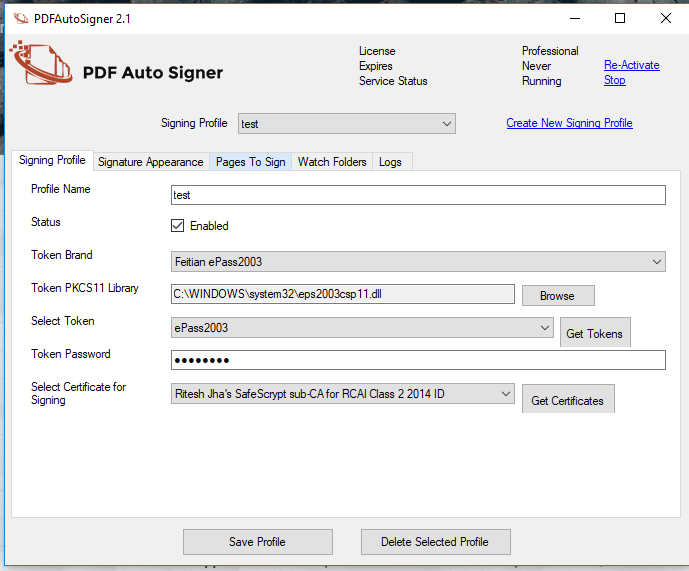
PDF Autosigner Demo - Signatory Profile Configuration
Configuration of signing profile. (Have to configure once)
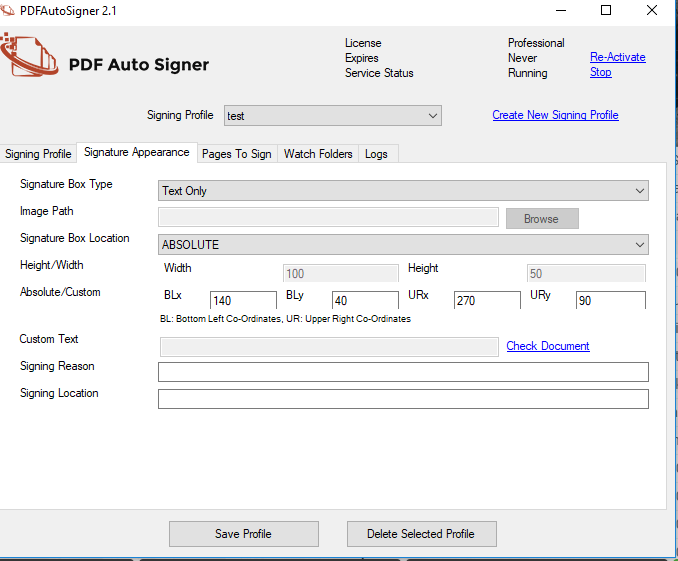
PDF Autosigner Demo - On Page Signature Placement Configuration
This is the step that allows us to configure the signature placement on the page.
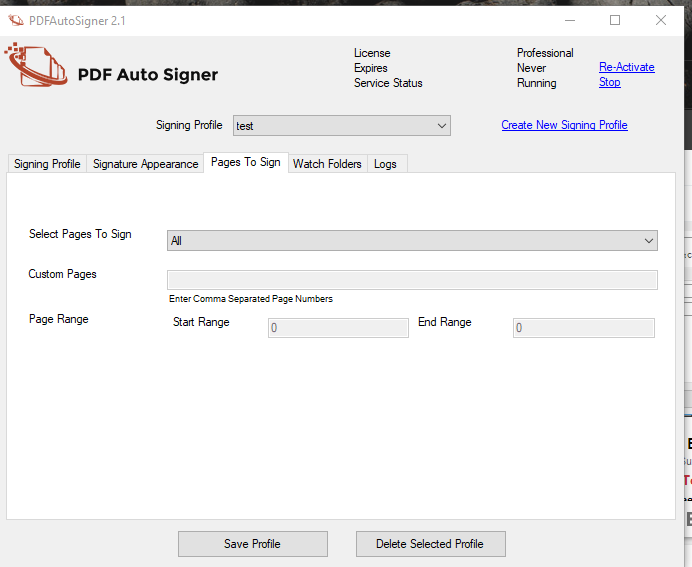
PDF Autosigner Demo - Signature Page Configuration
Here we configure the page to be signed
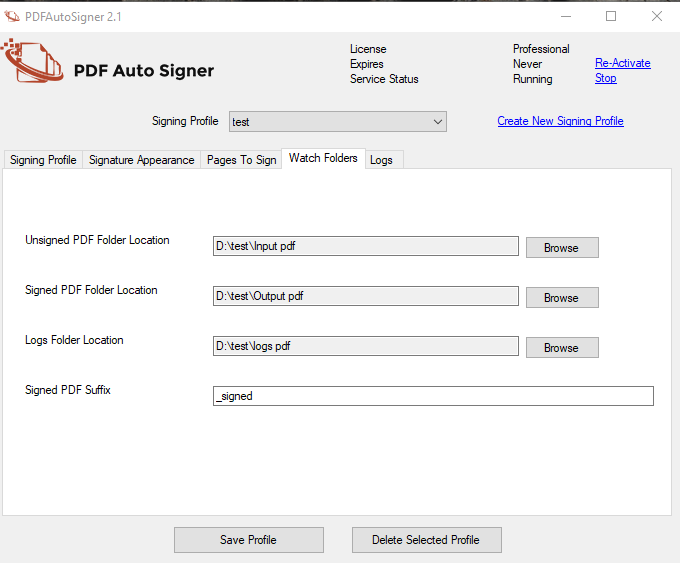
PDF Autosigner Demo - Folder Configuration
Here you have to assign the input folder (where the unsigned document will be placed) and the output folder (where the signed documents will be placed).
PDF Autosigner Demo - Logs Folder Location
Logs folder is where the log file is placed which displays the status type as success or failure of the signing process.
Product Avatar Image

Have you used PDF Autosigner before?

Answer a few questions to help the PDF Autosigner community

PDF Autosigner Reviews (5)

View 1 Video Reviews
Reviews

PDF Autosigner Reviews (5)

View 1 Video Reviews
4.8
5 reviews
Search reviews
Filter Reviews
Clear Results
G2 reviews are authentic and verified.
Souprit S.
SS
Web Design Intern
Mid-Market (51-1000 emp.)
"Digital signature solution tools"
What do you like best about PDF Autosigner?

PDF Autosigner is an easy to use, user friendly application. It's not complicated to install and license activation. We can easily create a valid signature in multiple size of documents. We can put signature anywhere I need of the documents. To crating a files it's easy to sign multiples documents at a time. Review collected by and hosted on G2.com.

What do you dislike about PDF Autosigner?

There is nothing I have found to dislike about it. All features are working well I never required to improved. But I think price should need to reduce. Review collected by and hosted on G2.com.

Verified User in Financial Services
UF
Enterprise (> 1000 emp.)
"It's very easy to use"
What do you like best about PDF Autosigner?

The easiness in the product is amazingly the best Review collected by and hosted on G2.com.

What do you dislike about PDF Autosigner?

nothing as such, maybe you can reduce your pricing Review collected by and hosted on G2.com.

Joe J.
JJ
Sales Director
Mid-Market (51-1000 emp.)
"Simple, effiecient and easy to use across all computer platforms"
What do you like best about PDF Autosigner?

The program is intuitive, points on where to sign, and gives the signer direction on where they have to sign and also something they may have missed Review collected by and hosted on G2.com.

What do you dislike about PDF Autosigner?

The only drawback is Microsoft Edge likes to be the default on PDF's and you have to ensure to select "No" to Edge as the default program. Simple fix to solve for Review collected by and hosted on G2.com.

Nichole L.
NL
Cashier
Small-Business (50 or fewer emp.)
"great autosigner"
What do you like best about PDF Autosigner?

i honestly have no complaints everytime i use it this pdf autosigner works smoothlynot complicated to figure out Review collected by and hosted on G2.com.

What do you dislike about PDF Autosigner?

nothing i found i dislike so far so good everything works fine Review collected by and hosted on G2.com.

Verified User in Consumer Goods
UC
Small-Business (50 or fewer emp.)
"Easy to use | Smooth"
What do you like best about PDF Autosigner?

Following are the pros of using PDF Autosigner:

Easy to use

Consolidates documents

Smooth to operate

Easy indexing of documents

Collaborative Review collected by and hosted on G2.com.

What do you dislike about PDF Autosigner?

Following are the cons of using PDF Autosigner:

A bit pricey as compared to the other alternatives that are available in the market

Can have integrations with major browser(s) Review collected by and hosted on G2.com.

Pricing

Pricing details for this product isn’t currently available. Visit the vendor’s website to learn more.

Product Avatar Image
PDF Autosigner