
Email Signature

by Mara Calvello
An email signature closes an email with the sender’s professional details. Learn the components to include and the benefits of having an email signature.
Mara Calvello
MC

Mara Calvello

Mara Calvello is a Content and Communications Manager at G2. She received her Bachelor of Arts degree from Elmhurst College (now Elmhurst University). Mara writes content highlighting G2 newsroom events and customer marketing case studies, while also focusing on social media and communications for G2. She previously wrote content to support our G2 Tea newsletter, as well as categories on artificial intelligence, natural language understanding (NLU), AI code generation, synthetic data, and more. In her spare time, she's out exploring with her rescue dog Zeke or enjoying a good book.

What is an email signature?

An email signature is a text block at the end of an email. It includes professional details, company branding, and contact information about the sender. Sometimes called an email footer, it should end the email professionally by letting the reader know who someone is, the company they work for, and how they can be reached.

Some organizations may use email signature software to incorporate branded elements and enhance marketing programs within the signature. These tools simplify creating branded email signatures by inputting basic information, like an employee’s name, phone number, and job title. 

Basic components of email signatures

When it comes to the email signature design, basic components of a professional email signature should involve:

  • Signoff. “Best Regards” or “Thank you!” are common examples.
  • Company name. The name of the organization the individual works for should be part of the email signature.
  • Name. An email signature should always include the employee’s first and last name. If someone goes by a nickname, they can use that as well.
  • Pronouns. If an individual has pronouns they wish to go by, they can go in their signature. Pronouns can be listed as “he/him”, “she/her”, or “they/them”. 
  • Job title. An individual's job title should be in their email signature. If an employee receives a promotion or title change, it should be reflected here.
  • Phone number. If an employee has a work cell phone or prefers phone conversations when customers or clients have concerns, it should be in the email signature.
  • Branded elements. A branded logo, slogan, or banner can also be part of an email signature. These can be especially beneficial when marketing a new product or sharing an announcement.
  • Company links. A signature can link to the company website –but it doesn’t have to be a homepage. If an organization is ramping up its recruitment marketing strategies, signatures can drop a link to a company’s careers page.
  • Registered address. If an organization has multiple office locations, an employee can include the address of the corporate headquarters they work at.
  • Social links. Employees can list links to their social profiles, like LinkedIn and Twitter, in their signature to connect elsewhere with clients and customers.
  • Headshot. Depending on the industry and an individual's role, an employee may place a professional headshot within their email signature.

Benefits of email signatures

A well-thought-out and constructed email signature leads to many benefits. Below are some that could be experienced.

  • Standout professionalism. When done right, an email signature makes the message look and feel more professional. This information lets people know the business, the sender, and the profession are trustworthy.
  • Increased efficiency. An email signature provides clients and customers with an individual’s key contact information clearly and concisely. Plus, every email contact has the sender’s important contact information without the sender having to type it out every time. 
  • Branding awareness. A great place to push brand awareness is within an email signature, as it can tie into a company’s color palette, logo, slogan, and overall aesthetic. 
  • Opportunities for traffic and lead generation. Hyperlinks in an email signature can drive traffic to social channels, a company website, or a landing page.

Email signature best practices

As employees create email signatures, they should remember the following best practices.

  • Keep it simple. Despite several components listed above, an email signature doesn’t need every single one to be effective. If the design is too busy or packed with information, the recipient will ignore it. Besides the must-haves, like name and title, focus on the information that matters most.
  • Choose links wisely. Even though an email signature is a great spot for a call to action (CTA), don’t include too many. One important link is usually enough.
  • Be consistent across the organization. Businesses should set guidelines for email signatures or have these automatically generated to match across departments and employees.
  • Test on desktop and mobile. Before an employee begins emailing customers and clients with a newly designed email signature, test how it looks on both desktop and mobile devices to ensure the sizing works and everything is easy to read.

Email signature example

Below is an example of what an email signature may look like.
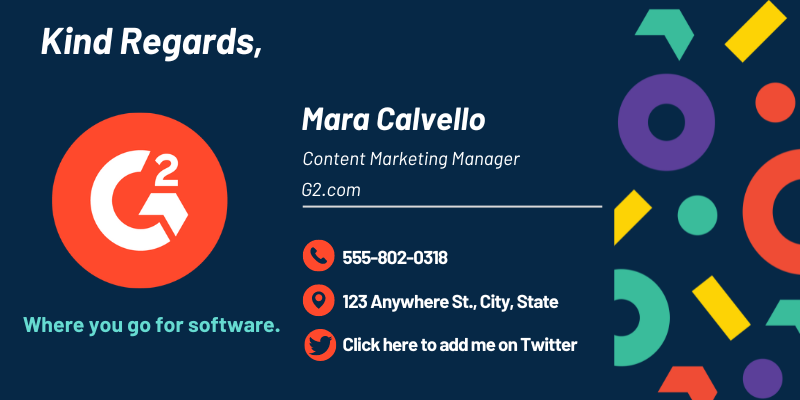
Email Signature Example


In addition to an email signature, learn how an
email can be customized based on branding and style preferences.

Email Signature Software

This list shows the top software that mention email signature most on G2.

NEWOLDSTAMP is a tool designed for creating email signatures and utilizing them as a new marketing channel that is affordable for professionals and businesses.

CodeTwo Email Signatures for Office 365 lets you create and centrally manage email signatures and disclaimers for all users in your Office 365 tenant. The service is easy to set up and works with all email clients (including mobile devices).

Exclaimer provides world-class email signature software for Microsoft 365 (Office 365), Google Workspace (G Suite), and Microsoft Exchange that let companies design and manage professional email signatures.

WiseStamp's vision is to build an Email Apps Platform that enables users to utilize their emails with social, productive and engaging Email Apps.

Opensense Email Signatures enables teams to easily create and manage beautiful email signatures and add personalized marketing banners to everyday business email to boost engagement, promote events and distribute content.

MySignature is a free online signature maker that provides you with the easy and professional way of identifying yourself via email correspondence. Templates, created by professional designers, and tips on using them for the best results are here at your service.

YouCanBookMe is booking software that integrates with your Google Calendar. Get a personalized scheduling page so your customers can book you online.

Simple, beautiful scheduling. Say goodbye to phone and email tag for finding the perfect time

Letsignit removes all email signatures related tasks by enabling automatic creation and update with central control. It offers total control over brand in email signatures to achieve perfect harmony. It provides a new media to reach millions of people/leverage your employees and clients database with highly customized messages.

BrandMail, developed by BrandQuantum, is a software solution that seamlessly integrates with Microsoft Outlook to empower every employee in the organisation to automatically create consistently branded emails via a single toolbar that provides access to brand standards and the latest pre-approved content.

Microsoft Outlook is a comprehensive email and calendar application designed to help users stay connected and organized across various devices. It integrates email, calendar, contacts, and tasks into a single platform, enabling efficient management of communications and schedules. With a Microsoft 365 subscription, users can share attachments directly from OneDrive, access contacts, and view LinkedIn profiles, enhancing productivity and collaboration. Key Features and Functionality: - Unified Communication: Combines email, calendar, contacts, and tasks in one application, streamlining workflow and reducing the need to switch between different apps. - Calendar Management: Allows booking of conference rooms, tracking RSVPs, and sharing calendars to coordinate schedules effectively. - Enterprise-Grade Security: Provides robust security measures to protect confidential information, ensuring peace of mind for users. - Intelligent Assistance: Automatically adds travel and bill payment details to the calendar and offers intelligent reminders to keep users on track. Primary Value and User Solutions: Microsoft Outlook addresses the need for a centralized platform to manage emails, schedules, and tasks efficiently. By integrating these functions, it reduces the complexity of juggling multiple applications, thereby enhancing productivity. Its security features ensure that sensitive information remains protected, while intelligent tools assist in planning and organization, allowing users to focus on their priorities without missing important events or communications.

MySigMail is an open-source email signature generator designed to help users create professional and customizable email signatures without any coding knowledge. It offers a user-friendly interface that allows for deep customization, including fonts, colors, avatar shapes, and social icons, ensuring that each signature aligns with personal or corporate branding. The platform provides ready-to-use templates for a quick start and flexible add-ons like disclaimers and call-to-action blocks to enhance the signature's functionality. Built with Vue 3, Vite, and Tailwind, MySigMail is lightweight and operates entirely on the client-side, making it easy to run locally without server setup. Key Features: - Customization: Adjust fonts, colors, avatar shapes, and social icons to match your brand identity. - Templates: Access a variety of professionally designed layouts for quick and easy signature creation. - Add-Ons: Incorporate elements like disclaimers and call-to-action blocks to enhance your signature's effectiveness. - Client-Side Operation: Run the application locally without the need for server setup, ensuring privacy and control. - Open Source: Freely access, modify, and distribute the code, fostering community-driven improvements and collaboration. The primary value of MySigMail lies in its ability to simplify the creation of professional email signatures, enabling users to enhance their brand image and communication without technical expertise. By offering a free, customizable, and open-source solution, it addresses the need for accessible and flexible email signature generation, catering to individuals and businesses seeking to maintain a consistent and polished email presence.

Rocketseed offer 3 key business email signature products - Signature, Campaign and Campaign Enterprise. SIGNATURE: Geared to IT professionals. Central email signature creation and control. 1 banner campaign across all users at any one time and key number reporting. The leading essential email signature solution. CAMPAIGN: The complete email signature marketing solution. Multiple banners across multiple users. Audience segmentation, recipient targeting and campaign scheduling. Advanced tracking and reporting. CAMPAIGN ENTERPRISE: The full-service email branding solution. All the features and benefits of Campaign with all your company email signature updates and administration managed by Rocketseed.

Sales Hub is a modern sales software that helps teams build pipeline, accelerate deal velocity, and create stronger customer connections. Powered by HubSpot’s Smart CRM, it combines AI, automation, and insights in one easy-to-use platform, so reps can sell smarter and scale without added complexity.

Sales automation software that puts your outreach on autopilot, while still making each communication personal.

Front takes out the pain of shared inboxes (contact@, team@, jobs@...) by introducing collaboration in email.

Showpad makes every buyer interaction count, by preparing sellers better beforehand, turning them into trusted advisors during and by providing actionable insights for a better follow-up afterward. Showpad Content is a part of the Showpad Sales Enablement Platform, which unifies sales content management, training, and coaching into a single user experience.

Work together, everywhere! Gmelius offers a unique collaboration platform that integrates with the tools already used by your company. No need to migrate your data to a different solution or train your teams on how to use another application.