Best Virtual Classroom Software with Technical Support Capabilities

How Many Virtual Classroom Software Products Does G2 Track?

Total Products under this Category: 124

Category Stats (Sep 2026)

  • Average Rating: 4.46/5 (↑0.01 vs Aug 2026) The average rating of products in this category, based on all submitted ratings
  • Top Trending Product: Panopto (+0.23%) - Among all products in this category, Panopto recorded the largest rating increase compared to last month

Last updated: September 01, 2026

How Does G2 Rank Virtual Classroom Software Products?

Why You Can Trust G2's Software Rankings:

  • 30 Analysts and Data Experts
  • 79,800+ Authentic Reviews
  • 124+ Products
  • Unbiased Rankings

G2's software rankings are built on verified user reviews, rigorous moderation, and a consistent research methodology maintained by a team of analysts and data experts. Each product is measured using the same transparent criteria, with no paid placement or vendor influence. While reviews reflect real user experiences, which can be subjective, they offer valuable insight into how software performs in the hands of professionals. Together, these inputs power the G2 Score, a standardized way to compare tools within every category.

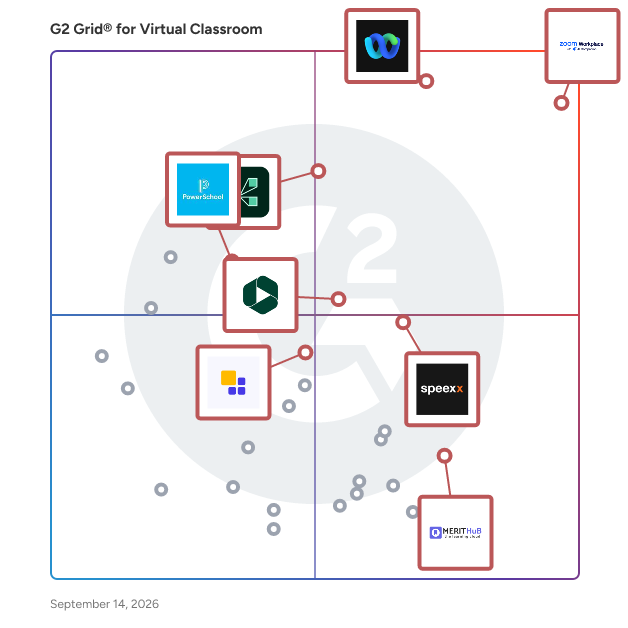
G2 Grid® for Virtual Classroom Software

G2 Grid® for Virtual Classroom Software plotting products by satisfaction and market presence

Highlighted products: Zoom Workplace, Webex Suite, Adobe Connect, Speexx, Panopto, MeritHub, PowerSchool Schoology Learning, and Class.

Underlying data: [Grid® JSON](https://www.g2.com/categories/virtual-classroom/grids.json?focus%5B%5D=zoom-workplace&focus%5B%5D=cisco-webex-suite&focus%5B%5D=adobe-connect&focus%5B%5D=speexx&focus%5B%5D=panopto&focus%5B%5D=merithub&focus%5B%5D=powerschool-schoology-learning&focus%5B%5D=class-technologies)

Zoom Workplace

Goodbye app overload. Hello effortless work. Work can be complicated. Your tools shouldn't be. Zoom Workplace connects all the ways you collaborate — from meetings to docs to chat and more — with built-in AI and seamless integrations that help teams focus and work flawlessly. Zoom Communications: Unified, Effortless Connection for Modern Work Bring every way your teams communicate—meetings, chat, calls, email, and scheduling—into one seamless experience. With Zoom, collaboration happens faster and more naturally across channels, without switching apps or losing context. From spontaneous chats to scheduled meetings and calls, everything stays connected, searchable, and secure—powered by one intuitive platform built for how modern teams work. Zoom Productivity: Workflows Connected, Work Effortless Transform how work gets done with AI-first collaboration that keeps people, content, and actions in one place. From brainstorming on whiteboards to co-creating in docs, sharing clips, and automating follow-ups, Zoom connects every step of your workflow. With Zoom Hub and integrated video management, knowledge stays organized, accessible, and actionable—so teams can move from idea to outcome without friction. Zoom Spaces: Smarter, Connected Workplaces for Every Team Bring your physical and hybrid environments to life with intelligent, connected spaces. Zoom Spaces unifies meeting rooms, desk reservations, digital signage, and visitor management into one seamless experience—making it simple to collaborate, navigate, and manage the workplace. Whether employees are remote, hybrid, or on-site, Zoom creates a consistent, secure, and flexible environment that keeps teams connected wherever work happens. Zoom Employee Engagement: Connect, Inspire, and Empower Every Employee Foster belonging and alignment with Workvivo by Zoom—a modern employee experience platform that unites communication, culture, and community in one place. From company-wide updates to recognition, feedback, and social engagement, Workvivo gives every employee a voice and a sense of connection. Built right into Zoom Workplace, it helps organizations strengthen culture, boost engagement, and keep teams informed and inspired—no matter where they work.

Average Rating: 4.5/5.0

Total Reviews: 53,599

How Do G2 Users Rate Zoom Workplace?

  • Has the product been a good partner in doing business?: 9.1/10 (Category avg: 9.1/10)
  • Video Streaming: 9.0/10 (Category avg: 8.5/10)
  • Session Recording: 9.1/10 (Category avg: 8.7/10)
  • Screen Sharing: 9.3/10 (Category avg: 8.9/10)

Who Is the Company Behind Zoom Workplace?

  • Seller: Zoom
  • Company Website:
  • Year Founded: 2011
  • HQ Location: San Jose, CA
  • Twitter: @zoom
    1,042,714 Twitter followers
  • LinkedIn® Page: www.linkedin.com
    14,013 employees on LinkedIn®

Who Uses This Product?

  • Who Uses This: Owner, Software Engineer
  • Top Industries: Information Technology and Services, Computer Software
  • Company Size: 51% Small, 31% Medium

What Do G2 Reviewers Say About Zoom Workplace?

AI-generated summary from verified user reviews

Pros
  • Users love the ease of use of Zoom Workplace, enjoying seamless access to features with just a click.
  • Users appreciate the ease of collaboration in Zoom Workplace, especially with breakout rooms and seamless screen sharing.
  • Users value the reliability of Zoom Workplace, ensuring seamless connectivity and stability even during adverse conditions.
  • Users find the ease of use for meetings in Zoom Workplace invaluable for seamless collaboration and productivity.
  • Users enjoy the easy-to-use video conferencing features of Zoom, facilitating smooth communication and collaboration in hybrid work settings.
Cons
  • Users note the limited features of Zoom Workplace, expressing a need for improved built-in collaboration tools.
  • Users experience Zoom issues like fatigue, connectivity problems, and confusing configurations that hinder their overall meeting effectiveness.
  • Users experience Zoom fatigue, notification overload, and connectivity issues, making long meetings feel overwhelming and impersonal.
  • Users find missing features in Zoom Workplace, like improved sharing links and chat access post-calls, frustrating.
  • Users often face connection issues with Zoom Workplace, leading to a frustrating and less seamless experience.

What Are Recent G2 Reviews of Zoom Workplace?

What Are G2 Users Discussing About Zoom Workplace?

Adobe Connect

Adobe Connect empowers you with the true potential of virtual technology to craft unforgettable stories. Utilize its adaptable platform to create and present exceptional virtual experiences for diverse audiences. Elevate your training sessions, webinars, and meetings, making them extraordinary while ensuring secure outreach beyond the ordinary. Create Genuine Connections: Redefine audience engagement by crafting immersive virtual experiences using robust storyboarding and engagement design tools. Global Outreach: Harness the genuine power of virtual communication to connect with audiences from various backgrounds and abilities worldwide. All-in-One Solution: Your search ends here. A unified platform to plan, execute, and monitor your events. We've got all your event workflows covered.

Average Rating: 4.0/5.0

Total Reviews: 917

How Do G2 Users Rate Adobe Connect?

  • Has the product been a good partner in doing business?: 7.8/10 (Category avg: 9.1/10)
  • Video Streaming: 8.0/10 (Category avg: 8.5/10)
  • Session Recording: 8.7/10 (Category avg: 8.7/10)
  • Screen Sharing: 8.5/10 (Category avg: 8.9/10)

Who Is the Company Behind Adobe Connect?

  • Seller: Adobe
  • Year Founded: 1982
  • HQ Location: San Jose, CA
  • Twitter: @Adobe
    956,842 Twitter followers
  • LinkedIn® Page: www.linkedin.com
    42,975 employees on LinkedIn®
  • Ownership: NASDAQ:ADBE

Who Uses This Product?

  • Who Uses This: Teacher, Instructor
  • Top Industries: Higher Education, Primary/Secondary Education
  • Company Size: 37% Medium, 33% Large

What Do G2 Reviewers Say About Adobe Connect?

AI-generated summary from verified user reviews

Pros
  • Users appreciate the ease of use of Adobe Connect, enhancing their virtual communication and project collaboration efficiently.
  • Users appreciate the robust features of Adobe Connect for effective collaboration and presentation in virtual workspaces.
  • Users commend the excellent video quality of Adobe Connect, enhancing their virtual meetings and collaboration effectively.
  • Users value the efficiency of Adobe Connect, enhancing collaboration and presentation capabilities for seamless virtual teamwork.
  • Users value the high security of Adobe Connect, ensuring confidentiality and controlled access during virtual meetings.
Cons
  • Users find Adobe Connect to be expensive for smaller organizations, limiting access to essential features and functionality.
  • Users find the mobile app performance lacking on phones and older laptops, preferring more functionality from desktop versions.
  • Users experience inconsistent audio and video quality, and dislike limited mic access without purchasing the software for hosting.
  • Users experience admin control issues that limit personal access and hinder effective participation in meetings.
  • Users experience application instability on mobile devices and older laptops, leading to a frustrating experience.

What Are Recent G2 Reviews of Adobe Connect?

What Are G2 Users Discussing About Adobe Connect?

Panopto

Panopto is the leading provider of video knowledge management, enabling universities and enterprises to create, manage, and scale knowledge with confidence. Panopto is trusted by 1,600+ organizations to turn expertise into searchable, accessible video at scale. With AI-powered creation, centralized governance, and secure delivery, Panopto improves engagement and comprehension, accelerates onboarding, and extends institutional knowledge. The Panopto platform serves a wide range of use cases—from lecture capture and flipped classrooms in academic institutions to employee training, onboarding, and knowledge management in corporate environments. Deep integrations with learning management systems (LMS) and enterprise tools ensure a seamless experience across every workflow. Powerful features, including automated video indexing, full-text search, and detailed analytics, help organizations unlock the full value of their video libraries. Panopto's AI video studio, Elai, extends the platform's capabilities with an all-in-one solution for AI-generated video content. Trusted by over 2,000 clients, Elai enables organizations to produce professional, interactive videos narrated by digital human presenters—in minutes, and without a camera, studio, or green screen. Its intuitive editor supports instant video creation from text, PowerPoint, and PDF files; translation into 75+ languages; and interactive elements including buttons, quizzing, and branching scenarios—making scalable content creation accessible to everyone. Panopto's customer base spans higher education, global enterprises, and government agencies, reflecting a shared commitment to accessibility, engagement, and the lasting impact of well-managed knowledge.

Average Rating: 4.4/5.0

Total Reviews: 162

How Do G2 Users Rate Panopto?

  • Has the product been a good partner in doing business?: 9.2/10 (Category avg: 9.1/10)
  • Video Streaming: 9.4/10 (Category avg: 8.5/10)
  • Session Recording: 9.7/10 (Category avg: 8.7/10)
  • Screen Sharing: 9.2/10 (Category avg: 8.9/10)

Who Is the Company Behind Panopto?

  • Seller: Panopto
  • Company Website:
  • Year Founded: 2007
  • HQ Location: 600 River Avenue Suite 100 Pittsburgh, PA 15212
  • Twitter: @Panopto
    2,831 Twitter followers
  • LinkedIn® Page: www.linkedin.com
    194 employees on LinkedIn®

Who Uses This Product?

  • Top Industries: Higher Education, Education Management
  • Company Size: 51% Large, 35% Medium

What Do G2 Reviewers Say About Panopto?

AI-generated summary from verified user reviews

Pros
  • Users find Panopto to be extremely user-friendly, facilitating easy adoption for both faculty and students alike.
  • Users highlight the ease of use and seamless integration of Panopto with platforms like Canvas and Zoom.
  • Users value the helpfulness of Panopto, enhancing learning through easy access and streamlined video integration.
  • Users praise the friendly and efficient customer support from Panopto, quickly resolving issues and providing valuable insights.
  • Users appreciate the user-friendly recording feature of Panopto, which simplifies video creation and organization significantly.
Cons
  • Users find Panopto's feature deficiencies frustrating, citing slow performance and limited editing capabilities as major drawbacks.
  • Users find difficulty in learning and using basic editing tools, and the unarchive process is often slow and unpredictable.
  • Users experience significant interface issues with Panopto, facing slow navigation and cumbersome admin functionalities.
  • Users often experience slow performance with Panopto, finding video uploads and editing tools less responsive than expected.
  • Users often find Panopto slow and clunky, causing frustration during video uploads and processing times.

What Are Recent G2 Reviews of Panopto?

What Are G2 Users Discussing About Panopto?

PowerSchool Schoology Learning

Schoology Learning, the leading K-12 learning management system (LMS), is part of the PowerSchool Unified Classroom solution. The system is designed to help schools and districts improve student performance, parent engagement, and overall communication and collaboration. With Schoology Learning, you can support student growth with individualized instruction and equitable access to learning for every student—at home, at school, or anywhere in between.

Average Rating: 4.4/5.0

Total Reviews: 382

How Do G2 Users Rate PowerSchool Schoology Learning?

  • Has the product been a good partner in doing business?: 8.9/10 (Category avg: 9.1/10)
  • Video Streaming: 7.5/10 (Category avg: 8.5/10)
  • Session Recording: 7.0/10 (Category avg: 8.7/10)
  • Screen Sharing: 7.3/10 (Category avg: 8.9/10)

Who Is the Company Behind PowerSchool Schoology Learning?

  • Seller: PowerSchool
  • HQ Location: Folsom, CA
  • Twitter: @MyPowerSchool
    12,129 Twitter followers
  • LinkedIn® Page: www.linkedin.com
    3,303 employees on LinkedIn®
  • Ownership: NYSE: PWSC

Who Uses This Product?

  • Who Uses This: Teacher, Educator
  • Top Industries: Primary/Secondary Education, Education Management
  • Company Size: 48% Medium, 34% Large

What Do G2 Reviewers Say About PowerSchool Schoology Learning?

AI-generated summary from verified user reviews

Pros
  • Users value the seamless integration of Schoology with PowerSchool, enhancing lesson pacing and professional development tracking.
  • Users appreciate the efficient organization of student work in Schoology, enhancing assignment management and analysis.
  • Users find Assignment Management in Schoology efficient for organizing resources, facilitating communication, and analyzing student performance.
  • Users appreciate the ease of use of PowerSchool Schoology Learning, making it ideal for organizing student work effectively.
  • Users appreciate the easy organization and accessibility of resources and curriculum through PowerSchool Schoology Learning.
Cons
  • Users find the lack of intuitiveness in PowerSchool Schoology Learning frustrating, complicating their ability to use features smoothly.
  • Users find the embedded features not intuitive, leading to frustrating troubleshooting and a complicated experience.
  • Users find PowerSchool Schoology Learning to be not user-friendly, often struggling with intuitive navigation and outdated design.
  • Users often face technical glitches and non-intuitive features in PowerSchool Schoology, complicating their overall experience.
  • Users experience integration issues with outside resources, leading to difficulties in achieving a seamless learning experience.

What Are Recent G2 Reviews of PowerSchool Schoology Learning?

What Are G2 Users Discussing About PowerSchool Schoology Learning?

BigBlueButton

BigBlueButton is an open-source virtual classroom software designed specifically for online education, enabling educators to engage students through real-time sharing of audio, video, slides, whiteboard, chat, and screen. Developed by the Technology Innovation Management program at Carleton University in 2007, it has been integrated into major learning management systems (LMS) such as Canvas, Moodle Cloud, Sakai, Jenzabar, D2L, and Schoology, collectively serving over 75% of the global LMS market. Key Features and Functionality: - Media Sharing: Facilitates real-time sharing of audio and video, with options for low, medium, and high-resolution video. - Content Sharing: Supports uploading and presenting documents in formats like PDF, Microsoft PowerPoint, Word, and Excel. - Interactive Tools: Includes a multi-user whiteboard, breakout rooms for group collaboration, shared notes, polling, and the ability to share external videos. - Communication: Offers public and private chat functionalities, along with features like hand-raising and emojis to enhance interaction. - Recording: Allows recording of sessions (excluding shared videos) for later playback. - Integrations: Seamlessly integrates with major LMS platforms and supports Learning Tools Interoperability (LTI) for broader compatibility. - Accessibility: Provides support for JAWS screen reader and live closed captioning to ensure inclusivity. - Mobility: Operates on desktop, laptop, and mobile devices using HTML5, compatible with iOS 12.2+ and Android 6.0+. Primary Value and User Solutions: BigBlueButton addresses the unique challenges of online education by offering a platform tailored for virtual learning environments. Its comprehensive suite of tools fosters collaboration, engagement, and effective communication between educators and students. By integrating seamlessly with existing LMS platforms, it simplifies the virtual classroom setup, allowing educators to focus on delivering quality education. The software's open-source nature ensures continuous improvement and adaptability to the evolving needs of the educational community.

Average Rating: 4.2/5.0

Total Reviews: 27

How Do G2 Users Rate BigBlueButton?

  • Has the product been a good partner in doing business?: 9.0/10 (Category avg: 9.1/10)
  • Video Streaming: 8.6/10 (Category avg: 8.5/10)
  • Session Recording: 8.9/10 (Category avg: 8.7/10)
  • Screen Sharing: 8.4/10 (Category avg: 8.9/10)

Who Is the Company Behind BigBlueButton?

  • Seller: BigBlueButton
  • Year Founded: 2008
  • HQ Location: N/A
  • Twitter: @bigbluebutton
    7,041 Twitter followers
  • LinkedIn® Page: www.linkedin.com
    3 employees on LinkedIn®

Who Uses This Product?

  • Top Industries: Higher Education
  • Company Size: 52% Medium, 44% Small

What Do G2 Reviewers Say About BigBlueButton?

AI-generated summary from verified user reviews

Pros
  • Users appreciate the effective breakout rooms in BigBlueButton, enhancing interaction in virtual learning environments.
  • Users appreciate the ease of use with BigBlueButton's minimalist interface and helpful online resources.
  • Users appreciate the strong virtual classroom features of BigBlueButton, enhancing interactive teaching and training sessions effectively.
  • Users appreciate the navigation ease of BigBlueButton, finding it reliable and intuitive for interactive learning environments.
  • Users value BigBlueButton for its reliability, ensuring seamless experiences in virtual classrooms and interactive sessions.
Cons
  • Users find the difficult setup of BigBlueButton challenging, especially non-IT users facing technical hurdles.
  • Users find the difficulty in setup and resource requirements for BigBlueButton challenging, especially for non-technical users.
  • Users find the high bandwidth requirement of BigBlueButton challenging, impacting usability and performance expectations.
  • Users find BigBlueButton not user-friendly, especially for non-IT users due to complex setup and outdated interface.

What Are Recent G2 Reviews of BigBlueButton?

What Are G2 Users Discussing About BigBlueButton?

LearnCube

Tired of clunky systems and boring business conferencing software? LearnCube provides professional virtual classroom software made for tutoring & teaching. It's perfect for teachers and online schools wanting to brand their classroom, boost student engagement/retention and make teaching online feel effortless. Our virtual classroom includes: - Interactive online whiteboard - Reliable live video + high-quality audio - Instant access to your saved lesson materials (PDF, video, Google docs, etc) - Student access via link (i.e. download-free) - Teacher features (multiple tabs, on-page annotations, video-sync, subject-specific tools, pointer, etc) - Automated note-taking (post-class review) Most tutors will want our standalone virtual classroom software that you can signup for free on our website. If you are part of a large-scale business or developer, you'll most likely want to use our API which you can access via the same free trial account, just click Software Developer when you signup. Finally, if you run an online tutoring company and language school, you'll love our Online School solution. On top of having the world's leading online classroom, our Online School feels like 8+ solutions wrapped into one easy platform: 1 - Streamline online classes/courses and automated email reminders 2 - Centrally manage content in the cloud 3 - Engage students with personalised homework 4 - Protect students and your database via our internal messaging system 5 - Take payments through our optional payment gateway (class credit system) 6 - Manage staff, students, teachers, admins with role permissions 7 - Boost your business with unique student self-booking flows 8 - Identify threats & opportunities with powerful reports. It all starts with a free 14 day free trial. Sign up today at https://www.learncube.com/

Average Rating: 4.7/5.0

Total Reviews: 23

How Do G2 Users Rate LearnCube?

  • Has the product been a good partner in doing business?: 9.3/10 (Category avg: 9.1/10)
  • Video Streaming: 9.8/10 (Category avg: 8.5/10)
  • Session Recording: 8.3/10 (Category avg: 8.7/10)
  • Screen Sharing: 9.4/10 (Category avg: 8.9/10)

Who Is the Company Behind LearnCube?

  • Seller: LearnCube
  • Year Founded: 2014
  • HQ Location: London, England
  • Twitter: @LearnCubeLMS
    850 Twitter followers
  • LinkedIn® Page: www.linkedin.com
    15 employees on LinkedIn®

Who Uses This Product?

  • Top Industries: Education Management, E-Learning
  • Company Size: 71% Small, 29% Medium

What Are Recent G2 Reviews of LearnCube?

What Are G2 Users Discussing About LearnCube?

Digital Samba

Since its foundation in 2003, Digital Samba has been a trusted provider of secure video conferencing solutions in the European market. Entirely built and hosted within the European Union, it guarantees full GDPR compliance and delivers a robust platform for modern digital communication. With both a free, ready-to-use platform and an embeddable API/SDK, Digital Samba is designed for effortless use or seamless integration into applications across industries, from healthcare to event management. Digital Samba stands out for its minimalist design combined with a feature-rich conferencing experience. Core features include high-definition group video calls, customisable roles and permissions, screen sharing, interactive hand raise, AI-powered captions, and secure cloud recordings. The platform also offers multilingual support in English, German, and Spanish. For organisations requiring deeper integration, Digital Samba Embedded extends these capabilities with advanced options such as full white labelling, CNAME support, and extensive developer tools for custom branding and workflow integration. Known for its reliability, Digital Samba ensures smooth connectivity with negligible downtime and swift resolution of any technical issues. The platform emphasises security, featuring anonymised user IDs and token-based authentication to safeguard user data. To discover more about Digital Samba, visit www.digitalsamba.com.

Average Rating: 4.3/5.0

Total Reviews: 58

How Do G2 Users Rate Digital Samba?

  • Has the product been a good partner in doing business?: 9.4/10 (Category avg: 9.1/10)
  • Video Streaming: 7.7/10 (Category avg: 8.5/10)
  • Session Recording: 8.8/10 (Category avg: 8.7/10)
  • Screen Sharing: 7.7/10 (Category avg: 8.9/10)

Who Is the Company Behind Digital Samba?

Who Uses This Product?

  • Top Industries: E-Learning, Information Technology and Services
  • Company Size: 54% Small, 38% Medium

What Do G2 Reviewers Say About Digital Samba?

AI-generated summary from verified user reviews

Pros
  • Users value the ease of use in Digital Samba, appreciating its simple setup and smooth collaboration features.
  • Users find the initial setup easy, enabling a seamless experience for secure and professional video communication.
  • Users appreciate the consistently strong video quality of Digital Samba, ensuring smooth interactions during important events.
  • Users appreciate the reliable and secure video communication of Digital Samba, enhancing engagement and professionalism in meetings.
  • Users commend the reliability of Digital Samba, enjoying seamless video communication with minimal technical issues.
Cons
  • Users feel that Digital Samba has limited features, seeking improvements in usability and mobile performance.
  • Users find the limited customization options of Digital Samba restricts flexibility and complicates specific setups.
  • Users find missing features in Digital Samba, urging for enhancements in integrations and customization options.
  • Users find the learning curve steep for first-time use, especially with webinar setups and navigation complications.
  • Users often face integration issues with Digital Samba, affecting the overall functionality and ease of use.

What Are Recent G2 Reviews of Digital Samba?

What Are G2 Users Discussing About Digital Samba?

ConexED

The ConexED Student Services Management Platform is designed exclusively for streamlining and simplifying complex enrollment, eligibility, support, and completion processes. ConexED provides critical engagement features and tools such as Campus Anywhere Booths and functionality on any device so that every student has opportunities to connect in high-touch meaningful ways, especially for those in historically marginalized populations. Too often students give up because they can’t find the time to get to an office or don’t have the right technology. ConexED has spent thousands of hours with education administrators, faculty, and staff to create a product tuned to the needs of students so that they can be successful and persist to graduation. ConexED’s easy-to-use platform with its user-friendly interface and automated processes allows staff to have 25% more time each day to focus on connecting with and helping students in meaningful ways that best match the student's needs. The ConexED platform facilitates face-to-face meetings both online and in person so that students have equitable access to support services. Robust reporting capabilities capture all meetings and interactions that can help with grant opportunities. The single platform eliminates redundant technologies and reduces associated expenses, simplifies training, promotes ease of use, and provides a consistent user and student experience.

Average Rating: 4.2/5.0

Total Reviews: 190

How Do G2 Users Rate ConexED?

  • Has the product been a good partner in doing business?: 8.5/10 (Category avg: 9.1/10)
  • Video Streaming: 9.0/10 (Category avg: 8.5/10)
  • Session Recording: 9.9/10 (Category avg: 8.7/10)
  • Screen Sharing: 8.8/10 (Category avg: 8.9/10)

Who Is the Company Behind ConexED?

  • Seller: ConexEd
  • Year Founded: 2014
  • HQ Location: Salt Lake City, Utah
  • Twitter: @_Conexed
    1,464 Twitter followers
  • LinkedIn® Page: www.linkedin.com
    16 employees on LinkedIn®

Who Uses This Product?

  • Who Uses This: Student, Instructor
  • Top Industries: Higher Education, Education Management
  • Company Size: 58% Small, 22% Medium

What Do G2 Reviewers Say About ConexED?

AI-generated summary from verified user reviews

Pros
  • Users appreciate the self-scheduling feature, finding it convenient for managing their own appointments effortlessly.
  • Users value the convenience of self-scheduling appointments with ConexED, enhancing organization and time management.
  • Users appreciate the ease of use of ConexED, finding it intuitive and feature-rich for connecting with students.
  • Users enjoy the easy access to ConexED via their school's portal, enhancing connectivity with students and staff.
  • Users appreciate the responsive customer support from ConexED, noting quick resolutions and effective follow-through on issues.
Cons
  • Users frequently experience glitches in ConexED, including issues with settings, communication, and technical difficulties during appointments.
  • Users express frustration over missing features in ConexED, hindering customization and ease of use.
  • Users find the limited features of ConexED frustrating, leading to inconsistent functionality and user experience challenges.
  • Users often face connectivity issues with ConexED, leading to frustrating experiences during virtual appointments.
  • Users express concerns about limited customization, particularly with settings and user experience affecting functionality.

What Are Recent G2 Reviews of ConexED?

What Are G2 Users Discussing About ConexED?

WizIQ

WizIQ LMS provides a complete solution to tutors, institutes and organizations to deliver live online classes and launch self-paced courses. WizIQ is easy-to-use, affordable and gives the freedom to learners to access the courses from any location and device. With WizIQ, businesses can launch their own custom-branded learning/training portal with features such as virtual classroom, course builder, tests and assessment builder, customized mobile application, eCommerce and reports.

Average Rating: 4.2/5.0

Total Reviews: 45

How Do G2 Users Rate WizIQ?

  • Has the product been a good partner in doing business?: 6.9/10 (Category avg: 9.1/10)
  • Video Streaming: 9.0/10 (Category avg: 8.5/10)
  • Session Recording: 8.8/10 (Category avg: 8.7/10)
  • Screen Sharing: 8.8/10 (Category avg: 8.9/10)

Who Is the Company Behind WizIQ?

  • Seller: WizIQ
  • Year Founded: 2007
  • HQ Location: Gurugram, Haryana
  • Twitter: @WizIQ
    6,435 Twitter followers
  • LinkedIn® Page: www.linkedin.com
    150 employees on LinkedIn®

Who Uses This Product?

  • Top Industries: Education Management, E-Learning
  • Company Size: 50% Small, 26% Medium

What Are Recent G2 Reviews of WizIQ?

What Are G2 Users Discussing About WizIQ?