Best Transcription Software - Page 38

Last updated: April 9, 2026

How Many Transcription Software Products Does G2 Track?

Total Products under this Category: 588

Category Stats (Nov 2026)

  • Average Rating: 4.59/5 (↑0.01 vs Oct 2026) The average rating of products in this category, based on all submitted ratings
  • Top Trending Product: CaseGuard Studio (+7.99%) - Among all products in this category, CaseGuard Studio recorded the largest rating increase compared to last month

Last updated: November 01, 2026

How Does G2 Rank Transcription Software Products?

Why You Can Trust G2's Software Rankings:

  • 30 Analysts and Data Experts
  • 43,200+ Authentic Reviews
  • 588+ Products
  • Unbiased Rankings

G2's software rankings are built on verified user reviews, rigorous moderation, and a consistent research methodology maintained by a team of analysts and data experts. Each product is measured using the same transparent criteria, with no paid placement or vendor influence. While reviews reflect real user experiences, which can be subjective, they offer valuable insight into how software performs in the hands of professionals. Together, these inputs power the G2 Score, a standardized way to compare tools within every category.

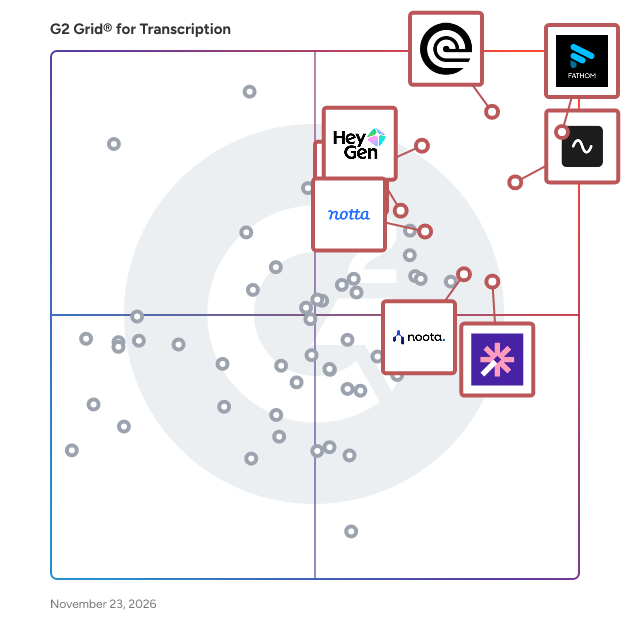
G2 Grid® for Transcription Software

G2 Grid® for Transcription Software plotting products by satisfaction and market presence

Highlighted products: Fathom, Rev, Riverside, Otter.ai, Vizard, Notta, HeyGen, and Noota.

Underlying data: [Grid® JSON](https://www.g2.com/categories/transcription/grids.json?focus%5B%5D=fathom-video&focus%5B%5D=rev&focus%5B%5D=riverside&focus%5B%5D=otter-ai&focus%5B%5D=vizard-corp-vizard&focus%5B%5D=notta&focus%5B%5D=heygen&focus%5B%5D=noota)

VoiceVibe

An AI voice assistant you can use anywhere on your computer. Press a key and talk. It types, speaks and does what you say. Do more without losing your train of thought. Some of what you can do - Dictate into any text field, and it types what you say. Voice typing is free on your device and works offline. With Pro, it also cleans up grammar, filler words and self-corrections, and uses your dictionary. - Create or transform text: select some text and say "shorter", "more formal" or "translate to Spanish", or ask for a new reply or paragraph. - Ask about your screen: add a screenshot, selected text or a file, ask your question, and hear the answer, with web search when needed. - Hear any text read aloud in a natural voice, or one that sounds like you. - Chat or launch agents: open ChatGPT, Claude or another chat with your words ready, or hand a task to Claude Code, Codex or another agent. - Create or edit images by describing them. - Teach it your words: add names and terms to your dictionary from selected text or a screenshot, so it spells them right. Set up word replacements for the things you write often. Your voice, your data It listens only while you use your key. Screenshots and files are sent only when you add them. Free voice typing never leaves your device. Free and Pro Voice typing is free, with no account needed. Pro adds everything else, from $14.99 a month. Try Pro with no credit card. Available for Windows 10+, macOS 14+ on Apple Silicon, and Linux (X11).

Who Is the Company Behind VoiceVibe?

Voicy Speech to Text

Voicy is a speech-to-text Mac/Windows app that lets you write with your voice everywhere. Powered by the Whisper API.

Who Is the Company Behind Voicy Speech to Text?

Voltscribe

Accurate transcripts of mixed English and Spanish audio. Switch on Multilingual, no language to pick. Most transcription tools make you choose one language. When a speaker switches from English to Spanish halfway through a sentence, the other language turns into gibberish or disappears. Voltscribe is built for that audio. Upload a podcast, interview or meeting, switch on Multilingual, and it transcribes both languages as they're spoken. There's no language list to choose from. It runs on Deepgram's Nova-3 multilingual model, which handles code-switching across English, Spanish and 53 more languages, and labels each speaker. An hour of audio takes about 20 seconds, and paid plans add AI show notes, summaries and social posts from the same upload. Built for bilingual podcasters, journalists, researchers and immigration law teams. Try it with a free 1-hour transcript, no account needed, or start on the free plan.

Who Is the Company Behind Voltscribe?

AI can help you find the answers. G2 helps you trust them.

Connect G2 to Claude or ChatGPT for answers grounded in G2's trusted reviews, comparisons, and pricing from real user insights.

How it works

VorbeAI

VorbeAI is an AI-powered audio-to-text platform designed for accurate and secure transcription of meetings, hearings, and official conversations. Built with legal and professional use cases in mind, VorbeAI converts spoken language into structured, searchable text, significantly reducing manual note-taking and documentation time.

Who Is the Company Behind VorbeAI?

Voxnoto

Voxnoto turns audio, video and meetings into accurate text with speaker labels in 99 languages, with automatic language detection. Upload a file or a direct link, send a bot into Zoom, Google Meet, Teams or Webex, or record calls silently with the desktop app for macOS and Windows. Get a summary in one tap, translate into 22 languages and export TXT or SRT subtitles. Files up to 8 hours. Works with MP3, MP4, M4A, MOV, AAC, WAV, OGG, OPUS, MPEG, WMA and WMV, no converting first. Private by default: only you can open your recordings. Free plan with 10 minutes a day, no card needed.

Who Is the Company Behind Voxnoto?

vSubtitle

vSubtitle is an AI-powered subtitling and captioning platform that helps content creators, businesses, educators, media teams, and video production professionals generate, edit, and translate subtitles for video content. Supporting more than 100 languages, vSubtitle simplifies the process of making videos accessible, engaging, and ready for audiences across different languages and markets. The platform automatically generates synchronized subtitles and captions from video content, allowing users to review and edit text, fine-tune subtitle timing, customize caption styles, and translate subtitles into multiple languages. Users can export subtitle files in formats such as SRT and VTT or create videos with embedded subtitles for publishing across digital platforms. vSubtitle is suitable for YouTube videos, social media content, marketing campaigns, online courses, corporate training, interviews, webinars, and other video-based content. Its multilingual capabilities help users expand their audience reach, while its editing tools provide greater control over subtitle accuracy, timing, and presentation. By automating time-consuming subtitling and captioning tasks, vSubtitle helps individuals and teams streamline video production workflows, improve content accessibility for deaf and hard-of-hearing viewers, and prepare multilingual video content more efficiently. Whether you are a solo content creator or part of a professional media team, vSubtitle provides a practical solution for creating and managing subtitles and captions at scale.

Who Is the Company Behind vSubtitle?

vTranscribe

vTranscribe’s AI transcription platform specializes in converting audio and video files into text quickly and accurately. Built on cutting-edge speech-recognition technology, it delivers automated transcripts in seconds. With support for 20+ languages and advanced AI models, we provide up to 99% accuracy. Plus, our platform is highly secure, so you can trust it with confidential media interviews, legal recordings, lectures, or any language content.

Who Is the Company Behind vTranscribe?

VXT

VXT is a cloud-based VoIP phone system built for professionals. By integrating with the tools you use to run your business, VXT helps you to save time, mitigate risk and generate revenue by automatically managing your admin. VXT is the easiest phone system you will ever use. Enjoy reliable calling and industry-specific features like: recording and transcriptions, automatic time recording, SMS, advanced call routing, IVR, analytics, call tagging, and internal team chat. Join professionals worldwide in automating administrative tasks for a better client experience. VXT is perfect for businesses that make and receive calls frequently. In particular: law firms, staffing and recruitment agencies, accounting firms, financial services and other professional services.

Average Rating: 4.8/5.0

Total Reviews: 2

Who Is the Company Behind VXT?

  • Seller: VXT
  • Year Founded: 2018
  • HQ Location: Christchurch, NZ
  • LinkedIn® Page: www.linkedin.com
    52 employees on LinkedIn®

Who Uses This Product?

  • Company Size: 100% Small

What Are Recent G2 Reviews of VXT?

What Are G2 Users Discussing About VXT?

wavel

Wavel is an AI tools marketplace that helps professionals and business owners discover, compare, and choose the best AI solutions for their needs.

Who Is the Company Behind wavel?

Wavelength

Wavelength is an AI process mapping tool that builds the process map from a conversation. You talk through a process on a call, record a voice note, or paste a meeting transcript, and Wavelength draws an editable flow diagram while you speak. Actors, systems, decisions, and data stores each get their own shape. Sales engineers, solution architects, business analysts, consultants, and operations teams use Wavelength on discovery calls, requirements sessions, and process workshops. The map is ready to share before the call ends. After the call, you can edit each step by hand or by prompt, add swim lanes, and share a review link so the customer can confirm or correct each step. Export to PNG, PDF, PowerPoint, draw.io, Visio, BPMN, Mermaid, or an SOP document. Wavelength works with Zoom, Microsoft Teams, Google Meet, Slack, Notion, Jira, Confluence, HubSpot, Salesforce, ServiceNow, Zapier, n8n, Make, Claude, and ChatGPT. The Free plan includes 10 saved flows and needs no card. Pro is $9.99 per user per month.

Who Is the Company Behind Wavelength?

WaveMemo

WaveMemo is the AI-powered notetaker that turns every conversation into crystal-clear transcripts and instantly actionable insights. Capture & Transcribe: WaveMemo can ingest any video or audio file and produces verbatim, time-stamped transcripts in 50 + languages. It automatically detects and labels every speaker, so you always know who said what. Summarize & Organize: Forget wading through an hour of “circling back.” WaveMemo’s AI Meeting Summaries condense the discussion into snack-size bullet points, key decisions, and next steps your team will actually read. Search & Discover: With Full-Text Search, you can surface that “budget-cut” comment from last March in milliseconds, complete with clickable timecodes for instant context. Export & Share: Need to circulate notes? Grab the entire transcript or just the highlights with One-Click Export. Share links keep stakeholder inboxes attachment-free. Privacy & Compliance: WaveMemo is built in the Netherlands and kept on EU soil, ensuring GDPR-aligned data residency. How It Works 1. Upload any audio or video. 2. Have WaveMemo Transcribe the recording with speaker labels. 3. Analyze with AI summaries, action items, and search. WaveMemo transforms raw talk into structured knowledge, so you can stop note-taking and start decision-making.

Who Is the Company Behind WaveMemo?

Neeraja Prakash
NP
Researched and written by Neeraja Prakash