Best Text Expanders Software - Page 2

How Many Text Expanders Software Products Does G2 Track?

Total Products under this Category: 32

Category Stats (Sep 2026)

  • Average Rating: 4.52/5 The average rating of products in this category, based on all submitted ratings
  • Top Trending Product: Typinator (+0.23%) - Among all products in this category, Typinator recorded the largest rating increase compared to last month

Last updated: September 15, 2026

How Does G2 Rank Text Expanders Software Products?

Why You Can Trust G2's Software Rankings:

  • 30 Analysts and Data Experts
  • 700+ Authentic Reviews
  • 32+ Products
  • Unbiased Rankings

G2's software rankings are built on verified user reviews, rigorous moderation, and a consistent research methodology maintained by a team of analysts and data experts. Each product is measured using the same transparent criteria, with no paid placement or vendor influence. While reviews reflect real user experiences, which can be subjective, they offer valuable insight into how software performs in the hands of professionals. Together, these inputs power the G2 Score, a standardized way to compare tools within every category.

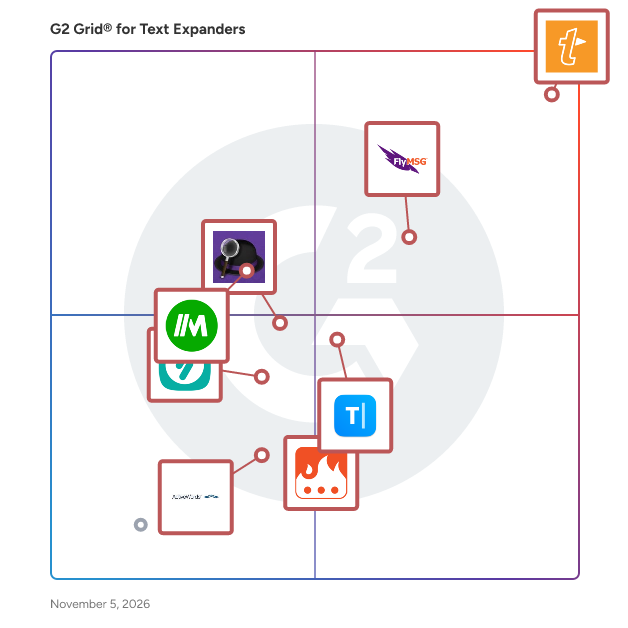
G2 GridĀ® for Text Expanders Software

G2 GridĀ® for Text Expanders Software plotting products by satisfaction and market presence

Highlighted products: TextExpander, FlyMSG, Typinator, Magical, Alfred, Text Blaze, Typedesk, and aText.

Underlying data: [GridĀ® JSON](https://www.g2.com/categories/text-expanders/grids.json?focus%5B%5D=textexpander&focus%5B%5D=flymsg&focus%5B%5D=typinator&focus%5B%5D=magical&focus%5B%5D=alfred&focus%5B%5D=text-blaze&focus%5B%5D=typedesk&focus%5B%5D=atext)

Briskine

Briskine is a text expander browser extension that speeds up writing emails or messages. ⚔ Write emails, messages, and replies faster by inserting templates in Gmail, Outlook.com, LinkedIn, or any other website. šŸ–Œļø Briskine templates can have rich text (bold, italic, text color, text alignment) and even images, tables, or emojis. šŸŖ„ Use variables and helpers to insert dynamic content like today's date or a person's name. ✨ Automatically add attachments to an email, set the to/cc/bcc address, or send the email from a different address. šŸ“˜ Share and edit template with your whole team, to keep them consistent and up to date when replying to your customers.

Who Is the Company Behind Briskine?

Chartnote

Chartnote has everything you need to expedite your medical documentation.

Who Is the Company Behind Chartnote?

Espanso

Discover the incredible power of a full-blown text expander.

Who Is the Company Behind Espanso?

Fastkeys

Expand abbreviations for frequently used text and save hours of typing. Including Auto Complete with learning.

Who Is the Company Behind Fastkeys?

Keyboard Maestro

Keyboard Maestro is a comprehensive automation software for macOS that empowers users to streamline repetitive tasks and enhance productivity. By creating custom macros, users can automate a wide range of actions, from launching applications and managing windows to controlling system functions and executing complex workflows with a single keystroke. The intuitive interface facilitates the creation and management of macros, while advanced features like text expansions, clipboard management, and automated script execution offer extensive customization options to meet individual needs. Seamlessly integrating with various macOS applications, Keyboard Maestro is designed to make your Mac experience more efficient and tailored to your preferences. Key Features and Functionality: - Macro Creation: Design and record custom macros to automate repetitive tasks. - Triggers: Activate macros using hotkeys, typed strings, application events, system events, and more. - Clipboard Management: Access previous clipboards and work with multiple saved clipboards. - Application Control: Navigate through running applications and open windows efficiently. - Macro Groups: Organize macros into groups that can be activated or deactivated based on specific conditions. - Synchronization: Sync macros across multiple Macs using file-sharing systems like Dropbox. - Macro Debugger: Detailed control and debugging of macros in action. - Status Menu: Access macros from a global system status menu. - Custom Icons: Customize macro icons with the Icon Chooser and creator. - Dark Mode Support: Use Dark Mode or Light Mode for a comfortable user experience. Primary Value and User Solutions: Keyboard Maestro significantly enhances productivity by automating routine and complex tasks, allowing users to focus on more critical aspects of their work. It offers a high degree of customization, enabling users to tailor their Mac experience to their specific needs and preferences. By automating tasks, users can perform complex actions quickly and efficiently, reducing the time spent on repetitive processes. The software's flexibility, with a wide range of triggers and actions, allows for the automation of almost any task, from simple to complex workflows. Its user-friendly interface makes it accessible to both beginners and power users, streamlining tedious tasks and improving overall workflow. Additionally, Keyboard Maestro ensures tasks are performed consistently and accurately every time, enhancing reliability and efficiency.

Average Rating: 5.0/5.0

Total Reviews: 1

Who Is the Company Behind Keyboard Maestro?

Who Uses This Product?

  • Company Size: 100% Small

What Are Recent G2 Reviews of Keyboard Maestro?

What Are G2 Users Discussing About Keyboard Maestro?

Lintalist

Lintalist allows you to store and (incrementally) search and edit texts in bundles and paste a selected text in your active program. The text can be interactive, for example you can automatically insert the current time and date, ask for (basic) user input or make a selection from a list etc and finally it can also run a script. You can use keyboard shortcuts or abbreviations to paste the text (or run the script) without opening the search window.

Who Is the Company Behind Lintalist?

NexoPad Text Expander

What is NexoPad Text Expander? NexoPad is an all-in-one browser workspace designed to eliminate tab-switching and extension bloat. By consolidating a powerful Smart Text Expander, Secure Markdown Notes, an advanced Link Manager, and an optional BYOK (Bring Your Own Key) AI Assistant into a single lightweight Chrome extension, NexoPad helps professionals and teams centralize their daily workflows. Built for customer support teams, sales representatives, recruiters, and developers, NexoPad allows you to automate repetitive typing and access your team's knowledge base without ever leaving your current web page, CRM, or email client. Key Capabilities: Smart Text Expander: Instantly inject pre-written templates into any text field across the web (Gmail, LinkedIn, Salesforce, Zendesk) using short keyboard triggers. It supports dynamic variables, A/B/C spintax rotation, and a unique "Visual Data Inspector" that auto-extracts on-screen data (like a lead's name or company) to personalize messages instantly. Team Collaboration (Shared Vault): Keep your entire organization aligned with a shared workspace. Manage role-based permissions, share winning snippets, and use global company variables to ensure consistent communication across departments. Secure Markdown Notes & Web Clipper: Capture text from any website with one click, or jot down ideas using the Notion-style rich text editor. Notes can be secured with a local PIN and opened as floating windows. Tab & Link Manager: Save open tabs, organize frequently used URLs into groups, and launch them instantly using the omnibox or the command palette (Ctrl+K). Optional Private AI (BYOK): Plug in your own API key (OpenAI, Anthropic, Gemini) to summarize pages, rewrite text, or translate snippets directly within your active tab, avoiding expensive third-party AI subscriptions. NexoPad operates with a privacy-first approach, keeping data encrypted and stored locally, while offering optional cloud synchronization for multi-device and team setups.

Who Is the Company Behind NexoPad Text Expander?

PhraseVault

PhraseVault is a desktop text expander and snippet manager for Windows and macOS that helps individuals and teams eliminate repetitive typing. Users store frequently used text — email templates, customer support responses, code snippets, AI prompts, legal clauses, and more — and insert them into any application with a keyboard shortcut. The application runs entirely offline. All data is stored locally in SQLite databases on the user's device. No cloud account, internet connection, or sign-up is required. PhraseVault does not collect telemetry, analytics, or usage data. The source code is publicly available on GitHub for inspection (source available). Core capabilities include instant text expansion (press a global hotkey, fuzzy-search stored phrases, and paste into the active application in milliseconds — no abbreviations or trigger phrases to memorize), dynamic placeholders (live dates, user input prompts, dropdown selections, clipboard embedding, and nested phrases), and rich content types (plain text, Markdown, or HTML with automatic format conversion on paste). PhraseVault supports importing existing snippets from TextExpander (CSV), Espanso (YAML), PhraseExpress, or JSON files with built-in conflict resolution. Users can create, open, and switch between multiple phrase databases. Databases are portable SQLite files that can be shared via network drives, NAS, or cloud-synced folders for team collaboration. Organization features include full-text fuzzy search with Unicode normalization, and usage-count sorting so the most-used phrases appear first. Native applications are available for Windows 10/11 and macOS 12+, with 7 UI languages (German, English, Spanish, Japanese, Italian, French, Portuguese). PhraseVault uses a one-time lifetime license model. There are no subscription fees, no recurring charges, and free updates are included. Pricing starts at $29 for a single license, with volume discounts for teams and special pricing for education. The application is designed for solo professionals, freelancers, small businesses, and teams that need a straightforward way to manage reusable text without enterprise complexity. Common use cases include customer support (canned responses, FAQ answers), sales outreach (email templates, follow-ups), software development (code boilerplates, Git templates), AI workflows (ChatGPT/Claude/Midjourney prompt management), healthcare documentation, legal templates, and general office productivity. PhraseVault is developed in Austria and operates under EU data protection jurisdiction. A 14-day free trial with full feature access is available — no credit card required. All purchases include a 30-day money-back guarantee.

Who Is the Company Behind PhraseVault?

ProKeys

This user-friendly text expander lets you save largish text expansions and associate them with short abbreviations. We support plain or styled text, local and sync browser storage, clipboard macros, date and time macros, dynamic value fields in expansions, dynamic math, omnibox support, and much more!

Who Is the Company Behind ProKeys?

RapidKey

RapidKey provides you with a new Windows functionality. This software autocompletes text phrases and autoexpands shorthands in any Windows applications.

Who Is the Company Behind RapidKey?

Rocket Typist

During our daily routines, we often find ourselves repeatedly typing similar text over and over again. Rocket Typist is your solution for saving valuable time while typing. Let Rocket Typist create and insert text and image snippets on your Mac, iPhone, or iPad.

Who Is the Company Behind Rocket Typist?

Texter

Much like texting via a standard mobile device there can be instances when you require preset abbreviations or acronyms to be replaced with text. One common example is the ability to translate 'ttyl' into 'talk to you later'. This Lifehacker Code Texter is an excellent and user-friendly piece of software to keep in mind. It is able to work within standard operating systems and can be installed in only minutes.

Who Is the Company Behind Texter?

  • Seller: Texter
  • Year Founded: 1997
  • HQ Location: Barcelona, Catalonia, Spain
  • LinkedInĀ® Page: www.linkedin.com
    278 employees on LinkedInĀ®

Type4

Boost your productivity and eliminate repetitive typing with Type4, a free text expander and snippets extension built for modern professionals. Whether you're replying to emails, resolving customer support tickets, or managing outreach campaigns, Type4 speeds up your workflow by letting you insert customizable snippets & macros anywhere you type in Chrome. Type4 is the smart text expander that works seamlessly across websites—making it easier than ever to save time, reduce errors, and stay focused on what matters.

Who Is the Company Behind Type4?

Inia Debnath
ID
Researched and written by Inia Debnath
Updated October 3, 2024