# Best Enterprise Service Desk Software - Page 3

## How Many Service Desk Software Products Does G2 Track?

**Total Products under this Category:** 136

### Category Stats (Aug 2026)

- **Average Rating:** 4.35/5 (↑0.01 vs Jul 2026) The average rating of products in this category, based on all submitted ratings
- **Top Trending Product:** Alloy Navigator (+0.48%) - Among all products in this category, Alloy Navigator recorded the largest rating increase compared to last month

_Last updated: August 01, 2026_

## How Does G2 Rank Service Desk Software Products?

**Why You Can Trust G2's Software Rankings:**

- 30 Analysts and Data Experts
- 14,300+ Authentic Reviews
- 136+ Products
- Unbiased Rankings

G2's software rankings are built on verified user reviews, rigorous moderation, and a consistent research methodology maintained by a team of analysts and data experts. Each product is measured using the same transparent criteria, with no paid placement or vendor influence. While reviews reflect real user experiences, which can be subjective, they offer valuable insight into how software performs in the hands of professionals. Together, these inputs power the G2 Score, a standardized way to compare tools within every category.

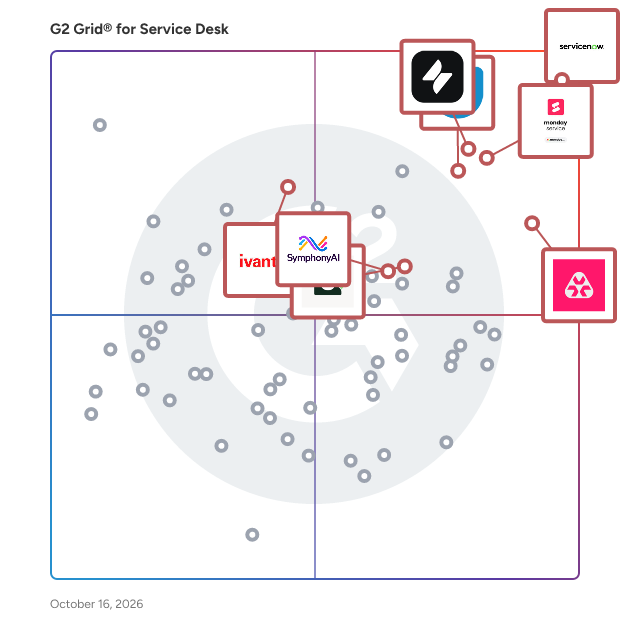
## G2 Grid® for Service Desk Software
 ![G2 Grid® for Service Desk Software plotting products by satisfaction and market presence](https://www.g2.com/categories/service-desk/grids.png?focus%5B%5D=71310&focus%5B%5D=2864&focus%5B%5D=5231&focus%5B%5D=39966&focus%5B%5D=2647&focus%5B%5D=16222&focus%5B%5D=806&focus%5B%5D=3773)

Highlighted products: ServiceNow IT Service Management, Freshservice, Jira Service Management, SymphonyAI IT Service Management, SysAid, Atera, Ivanti Neurons for ITSM, and EasyVista Service Manager.

Underlying data: [Grid® JSON](https://www.g2.com/categories/service-desk/grids.json?focus%5B%5D=servicenow-it-service-management&focus%5B%5D=freshservice&focus%5B%5D=jira-service-management&focus%5B%5D=symphonyai-it-service-management&focus%5B%5D=sysaid&focus%5B%5D=atera&focus%5B%5D=ivanti-neurons-for-itsm&focus%5B%5D=easyvista-service-manager&segment=enterprise)

**Sponsored**

### SysAid

SysAid is a robust IT Service Management (ITSM) platform powered by Agentic AI, automating the repetitive, time-consuming work that keeps teams stuck in reactive mode. Adding a powerful new operational layer to IT, AI Agents take the first action, freeing IT teams to focus on optimization, innovation, and bigger challenges. Go live in weeks with fast onboarding, no heavy migrations, or steep learning curves. SysAid’s AI is purpose-built for IT, with security and governance built in. With our award-winning support, you’re set up for success. ITSM run by AI, and you.

[Visit website](https://www.g2.com/external_clickthroughs/record?secure%5Bad_program%5D=ppc&secure%5Bad_slot%5D=category_product_list_llm&secure%5Bcategory_id%5D=82&secure%5Bchosen_at%5D=2026-08-03T08%3A03%3A39Z&secure%5Bdisplayable_resource_id%5D=82&secure%5Bdisplayable_resource_type%5D=Category&secure%5Bmedium%5D=sponsored&secure%5Bplacement_reason%5D=page_category&secure%5Bplacement_resource_ids%5D%5B%5D=82&secure%5Bprioritized%5D=false&secure%5Bproduct_id%5D=2647&secure%5Bresource_id%5D=82&secure%5Bresource_type%5D=Category&secure%5Bsource_type%5D=category_page&secure%5Bsource_url%5D=https%3A%2F%2Fwww.g2.com%2Fcategories%2Fservice-desk%2Fenterprise%3Fpage%3D3&secure%5Btoken%5D=713707382bdff7aa685fa0e96c64dfc8dac13f061671dbcaa8b91ab0e3e4b792&secure%5Burl%5D=https%3A%2F%2Fwww.sysaid.com%2Flp%2Foverview-ai-itsm%3Futm_source%3Dg2%26utm_medium%3Dcpc%26utm_campaign%3Dg2_clicks%26sysaidlsd%3Dhelp-desk&secure%5Burl_type%5D=custom_url)

### [Xurrent ITSM](https://www.g2.com/products/xurrent-itsm/reviews)

Xurrent is an AI-powered service and operations management platform that unifies ITSM, IT operations, and incident management on a single system of record. With an always-on AI fabric and deep automation, Xurrent helps teams eliminate silos, reduce MTTR, and keep the business running smoothly.

**Average Rating:** 4.6/5.0

**Total Reviews:** 83

#### How Do G2 Users Rate Xurrent ITSM?

- **Has the product been a good partner in doing business?:** 9.2/10 (Category avg: 8.6/10)
- **Ticket Prioritization:** 8.3/10 (Category avg: 8.7/10)
- **Automate Ticket Routing:** 8.6/10 (Category avg: 8.8/10)
- **Knowledge Base/Ticket Integration:** 8.6/10 (Category avg: 8.3/10)

#### Who Is the Company Behind Xurrent ITSM?

- **Seller:** [Xurrent](https://www.g2.com/sellers/xurrent)
- **Company Website:** www.xurrent.com
- **Year Founded:** 2010
- **HQ Location:** Santa Barbara, US
- **Twitter:** @4me  
250 Twitter followers
- **LinkedIn® Page:** [www.linkedin.com](https://www.g2.com/external_clickthroughs/record?secure%5Bsource_type%5D=product_profile&secure%5Btoken%5D=b32f9214e90dab74973cbde38ad788cfccabe9b8d5f3a6fb5bbeade42b9a5a3b&secure%5Burl%5D=https%3A%2F%2Fwww.linkedin.com%2Fcompany%2Fxurrent%2F&secure%5Burl_type%5D=linkedin_company_website)  
174 employees on LinkedIn®

#### Who Uses This Product?

- **Top Industries:** Information Technology and Services, Insurance
- **Company Size:** 51% Large, 30% Medium

#### What Do G2 Reviewers Say About Xurrent ITSM?

_AI-generated summary from verified user reviews_

##### Pros

- Users appreciate the **ease of use** of Xurrent ITSM, benefiting from a seamless and intuitive interface.
- Users commend Xurrent ITSM for its **effective service delivery and scalability** , driving efficiencies across various departments.
- Users value the **collaborative features** of Xurrent, enhancing service delivery and support through seamless integration and communication.
- Users value the **intuitive user interface and seamless integration** of Xurrent ITSM, enhancing their overall experience and efficiency.
- Users commend the **intuitive user interface** of Xurrent ITSM, enhancing incident management and service requests effortlessly.

##### Cons

- Users express frustration over **limited features** in Xurrent ITSM, wishing for more advanced capabilities and improved documentation.
- Users find Xurrent ITSM lacks **dynamic API lookups** and advanced features, making data management and reporting cumbersome.
- Users find the **outdated interface** of Xurrent adds a dated feel, but improvements are on the way.
- Users find the **steep learning curve** with Xurrent ITSM challenging, requiring time to adapt to its updates and features.
- Users are frustrated by the **frequent bugs** in Xurrent ITSM, making it difficult to keep up with updates.

#### What Are Recent G2 Reviews of Xurrent ITSM?

**["Diamond in a rough"](https://www.g2.com/survey_responses/xurrent-itsm-review-11661901)**

**Rating:** 5.0/5.0 stars

_— George E._

[Read full review](https://www.g2.com/survey_responses/xurrent-itsm-review-11661901)

**["Practical intuitive ITSM with continuous improvements"](https://www.g2.com/survey_responses/xurrent-itsm-review-11662894)**

**Rating:** 5.0/5.0 stars

_— Nils L._

[Read full review](https://www.g2.com/survey_responses/xurrent-itsm-review-11662894)

#### What Are G2 Users Discussing About Xurrent ITSM?

- [What is 4me used for?](https://www.g2.com/discussions/what-is-4me-used-for)

### [SolarWinds Web Help Desk](https://www.g2.com/products/solarwinds-web-help-desk/reviews)

SolarWinds® Web Help Desk® (WHD) is designed as easy-to-use help desk and service desk ticketing and asset management software, that helps IT technicians and help desk support members simplify and streamline support from initial request to resolution. Key Features: • Single web interface to manage all support requests with ability to group tickets by request type, priority, client, and more • Easy-to-use ticketing system that uses rules to automate creating, routing, assigning, and tracking of tickets • A pragmatic approach to applying ITIL best practices with the flexibility to make it work for your environment • Automate and schedule discovery of hardware and software assets in your IT infrastructure, and track asset history including ownership and related service requests • Built-in knowledge base for creating FAQ and knowledge base articles to assist your help desk team and promote self-service to end users

**Average Rating:** 3.9/5.0

**Total Reviews:** 59

#### How Do G2 Users Rate SolarWinds Web Help Desk?

- **Has the product been a good partner in doing business?:** 8.1/10 (Category avg: 8.6/10)
- **Ticket Prioritization:** 8.7/10 (Category avg: 8.7/10)
- **Automate Ticket Routing:** 8.7/10 (Category avg: 8.8/10)
- **Knowledge Base/Ticket Integration:** 7.1/10 (Category avg: 8.3/10)

#### Who Is the Company Behind SolarWinds Web Help Desk?

- **Seller:** [SolarWinds Worldwide LLC](https://www.g2.com/sellers/solarwinds-worldwide-llc)
- **Year Founded:** 1999
- **HQ Location:** Austin, TX
- **Twitter:** @solarwinds  
19,570 Twitter followers
- **LinkedIn® Page:** [www.linkedin.com](https://www.g2.com/external_clickthroughs/record?secure%5Bsource_type%5D=product_profile&secure%5Btoken%5D=a1765c38bb6352c68352819e76f659e536738a569e70b5125a52a054a2348dc6&secure%5Burl%5D=https%3A%2F%2Fwww.linkedin.com%2Fcompany%2F166039%2F&secure%5Burl_type%5D=linkedin_company_website)  
2,824 employees on LinkedIn®
- **Ownership:** NYSE: SWI

#### Who Uses This Product?

- **Top Industries:** Information Technology and Services, Education Management
- **Company Size:** 62% Medium, 22% Large

#### What Do G2 Reviewers Say About SolarWinds Web Help Desk?

_AI-generated summary from verified user reviews_

##### Pros

- Users find the **ease of use** of SolarWinds Web Help Desk to be straightforward and intuitive.

##### Cons

- Users report **outdated features** in SolarWinds Web Help Desk that often fail to function as intended.
- Users find the **missing features** in SolarWinds Web Help Desk detrimental to their overall experience and efficiency.
- Users experience **outdated interface** issues that lead to problems with functionality and user satisfaction.

#### What Are Recent G2 Reviews of SolarWinds Web Help Desk?

**["Efficient Ticket Management and Workflow Automation for IT Support Operations"](https://www.g2.com/survey_responses/solarwinds-web-help-desk-review-12851149)**

**Rating:** 4.0/5.0 stars

_— Thisal R._

[Read full review](https://www.g2.com/survey_responses/solarwinds-web-help-desk-review-12851149)

**["Decent ticketing solution for low Budget"](https://www.g2.com/survey_responses/solarwinds-web-help-desk-review-11326908)**

**Rating:** 4.0/5.0 stars

_— Harshvardhan K._

[Read full review](https://www.g2.com/survey_responses/solarwinds-web-help-desk-review-11326908)

#### What Are G2 Users Discussing About SolarWinds Web Help Desk?

- [What is SolarWinds Web Help Desk used for?](https://www.g2.com/discussions/what-is-solarwinds-web-help-desk-used-for)
- [What is SolarWinds software?](https://www.g2.com/discussions/solarwinds-web-help-desk-what-is-solarwinds-software)
- [How does help desk software work?](https://www.g2.com/discussions/how-does-help-desk-software-work)
- [How do I install SolarWinds Web Help Desk?](https://www.g2.com/discussions/how-do-i-install-solarwinds-web-help-desk)
- [What is SolarWinds Web Help Desk?](https://www.g2.com/discussions/what-is-solarwinds-web-help-desk)

### [BMC FootPrints](https://www.g2.com/products/bmc-footprints/reviews)

Easy to own, use & extend IT service management for mid-size organizations. Create personalized experiences for your employees to increase their productivity. Admins can quickly configure end-to-end business services for IT and beyond. FootPrints integrates with other systems such as BMC Client Management, Active Directory, SQL Databases & more. Configurable capabilities streamline the automation of service delivery, improving employee satisfaction and IT's reputation with your business users.

**Average Rating:** 3.5/5.0

**Total Reviews:** 57

#### How Do G2 Users Rate BMC FootPrints?

- **Has the product been a good partner in doing business?:** 8.1/10 (Category avg: 8.6/10)
- **Ticket Prioritization:** 8.3/10 (Category avg: 8.7/10)
- **Automate Ticket Routing:** 8.2/10 (Category avg: 8.8/10)
- **Knowledge Base/Ticket Integration:** 7.9/10 (Category avg: 8.3/10)

#### Who Is the Company Behind BMC FootPrints?

- **Seller:** [BMC Helix](https://www.g2.com/sellers/bmc-helix)
- **Year Founded:** 2025
- **HQ Location:** N/A
- **LinkedIn® Page:** [www.linkedin.com](https://www.g2.com/external_clickthroughs/record?secure%5Bsource_type%5D=product_profile&secure%5Btoken%5D=63b4dbbe36c184b8e0bcfe321196485a32ca82b8a8050b7bdd9dc630481c3b87&secure%5Burl%5D=https%3A%2F%2Fwww.linkedin.com%2Fcompany%2Fbmchelix%2F&secure%5Burl_type%5D=linkedin_company_website)  
1,266 employees on LinkedIn®

#### Who Uses This Product?

- **Top Industries:** Higher Education, Law Practice
- **Company Size:** 60% Large, 39% Medium

#### What Are Recent G2 Reviews of BMC FootPrints?

**["Easy"](https://www.g2.com/survey_responses/bmc-footprints-review-3525866)**

**Rating:** 5.0/5.0 stars

_— Kyra D._

[Read full review](https://www.g2.com/survey_responses/bmc-footprints-review-3525866)

**["Footprints is a pretty good service desk"](https://www.g2.com/survey_responses/bmc-footprints-review-4295067)**

**Rating:** 4.0/5.0 stars

_— Verified User in Higher Education_

[Read full review](https://www.g2.com/survey_responses/bmc-footprints-review-4295067)

#### What Are G2 Users Discussing About BMC FootPrints?

- [What is BMC FootPrints used for?](https://www.g2.com/discussions/what-is-bmc-footprints-used-for)

### [Track-It!](https://www.g2.com/products/track-it/reviews)

Newly redesigned, fully web based integrated Help Desk and IT Asset Management system designed for small to medium sized companies to be affordable to own, easy to install and configure and easy to use. Track-It! includes modules for Help Desk, Asset Management, Endpoint Management, Software Deployment, Patch Management, Change Management, Purchasing, Self Service, Dashboards, Reporting, SLAs, Business Rules and more.

**Average Rating:** 3.7/5.0

**Total Reviews:** 98

#### How Do G2 Users Rate Track-It!?

- **Has the product been a good partner in doing business?:** 8.1/10 (Category avg: 8.6/10)
- **Ticket Prioritization:** 7.5/10 (Category avg: 8.7/10)
- **Automate Ticket Routing:** 7.4/10 (Category avg: 8.8/10)
- **Knowledge Base/Ticket Integration:** 6.8/10 (Category avg: 8.3/10)

#### Who Is the Company Behind Track-It!?

- **Seller:** [BMC Helix](https://www.g2.com/sellers/bmc-helix)
- **Year Founded:** 2025
- **HQ Location:** N/A
- **LinkedIn® Page:** [www.linkedin.com](https://www.g2.com/external_clickthroughs/record?secure%5Bsource_type%5D=product_profile&secure%5Btoken%5D=63b4dbbe36c184b8e0bcfe321196485a32ca82b8a8050b7bdd9dc630481c3b87&secure%5Burl%5D=https%3A%2F%2Fwww.linkedin.com%2Fcompany%2Fbmchelix%2F&secure%5Burl_type%5D=linkedin_company_website)  
1,266 employees on LinkedIn®

#### Who Uses This Product?

- **Top Industries:** Information Technology and Services, Higher Education
- **Company Size:** 56% Medium, 29% Large

#### What Are Recent G2 Reviews of Track-It!?

**["Nice tool with a great Name"](https://www.g2.com/survey_responses/track-it-review-10177651)**

**Rating:** 4.0/5.0 stars

_— Hector D._

[Read full review](https://www.g2.com/survey_responses/track-it-review-10177651)

**["A Solid Business help desk Tool"](https://www.g2.com/survey_responses/track-it-review-9021286)**

**Rating:** 4.0/5.0 stars

_— Aryan K._

[Read full review](https://www.g2.com/survey_responses/track-it-review-9021286)

#### What Are G2 Users Discussing About Track-It!?

- [What needs improvement with Track-It! to better support your IT help desk operations?](https://www.g2.com/discussions/what-needs-improvement-with-track-it-to-better-support-your-it-help-desk-operations)
- [What is Track-It! used for?](https://www.g2.com/discussions/what-is-track-it-used-for)

### [C2 ITSM](https://www.g2.com/products/c2-itsm/reviews)

C2 ITSM is a comprehensive IT service management solution designed to help organizations of all sizes streamline their IT operations, boost productivity, and enhance customer service. Built on a flexible and customizable framework, C2 ITSM adapts to the unique workflows and processes of each organization, offering a tailored approach to IT service management that aligns with specific operational requirements. Targeted primarily at IT departments across various sectors, C2 ITSM is particularly beneficial for organizations that manage a high volume of service requests and require efficient incident and problem resolution. The platform is equipped to handle a wide range of use cases, from automating repetitive tasks to providing a centralized configuration management database (CMDB) that offers complete visibility into IT assets and configurations. By adhering to ITIL's best practices, C2 ITSM enables organizations to effectively manage incidents, problems, changes, and assets, ultimately leading to improved service delivery and customer satisfaction. Key features of C2 ITSM include robust incident and problem management capabilities, which empower IT teams to resolve issues quickly and efficiently. The platform also offers change management tools that facilitate the implementation of changes with minimal disruption to ongoing operations. Additionally, the asset management feature provides valuable insights into the lifecycle of IT assets, allowing organizations to optimize their resources and reduce operational costs. The user-friendly interface unifies service management processes, simplifying collaboration and communication among team members. C2 ITSM distinguishes itself in the IT service management category by offering seamless integration with existing tools, advanced reporting, and analytics capabilities. This functionality empowers IT teams to make data-driven decisions and enhances their ability to respond proactively to service requests. Furthermore, the solution is backed by a strong support system, including 24/7 North American support and a financially backed 99.9% service level guarantee, ensuring that organizations can depend on C2 ITSM for their IT service management needs. With a proven track record since 2008, C2 ITSM is committed to security and compliance, being hosted in North America and adhering to ISO 27001 and SOC-2 Type II certifications. This dedication to quality and security, combined with an affordable pricing model that avoids costly add-ons, positions C2 ITSM as a reliable choice for organizations seeking to enhance their IT service management capabilities.

**Average Rating:** 4.2/5.0

**Total Reviews:** 39

#### How Do G2 Users Rate C2 ITSM?

- **Has the product been a good partner in doing business?:** 8.1/10 (Category avg: 8.6/10)
- **Ticket Prioritization:** 8.2/10 (Category avg: 8.7/10)
- **Automate Ticket Routing:** 9.2/10 (Category avg: 8.8/10)
- **Knowledge Base/Ticket Integration:** 8.1/10 (Category avg: 8.3/10)

#### Who Is the Company Behind C2 ITSM?

- **Seller:** [SherWeb](https://www.g2.com/sellers/sherweb)
- **Year Founded:** 1998
- **HQ Location:** Sherbrooke, Quebec, Canada
- **Twitter:** @SherWeb  
2,384 Twitter followers
- **LinkedIn® Page:** [www.linkedin.com](https://www.g2.com/external_clickthroughs/record?secure%5Bsource_type%5D=product_profile&secure%5Btoken%5D=0853f9a8b7a50923b3a20227d0e517b3bef72fdf6eb1ced7d46be8ed4b40b353&secure%5Burl%5D=https%3A%2F%2Fwww.linkedin.com%2Fcompany%2Fsherweb%2F&secure%5Burl_type%5D=linkedin_company_website)  
935 employees on LinkedIn®

#### Who Uses This Product?

- **Top Industries:** Government Administration
- **Company Size:** 57% Medium, 40% Large

#### What Are Recent G2 Reviews of C2 ITSM?

**["Very versatile application"](https://www.g2.com/survey_responses/c2-itsm-review-7129749)**

**Rating:** 4.5/5.0 stars

_— Stéphane c._

[Read full review](https://www.g2.com/survey_responses/c2-itsm-review-7129749)

**["the software is efficient and easy to use"](https://www.g2.com/survey_responses/c2-itsm-review-7129860)**

**Rating:** 4.0/5.0 stars

_— Marc-Andre D._

[Read full review](https://www.g2.com/survey_responses/c2-itsm-review-7129860)

#### What Are G2 Users Discussing About C2 ITSM?

- [What is C2 ITSM used for?](https://www.g2.com/discussions/what-is-c2-itsm-used-for)

- [&lsaquo; Prev‹ Prev](/categories/service-desk/enterprise?order=g2_score&page=2#product-list)
- [1](/categories/service-desk/enterprise?order=g2_score#product-list)
- [2](/categories/service-desk/enterprise?order=g2_score&page=2#product-list)
- 3
- Next &rsaquo;Next ›

Spotlight Categories

[AI Writing Assistants](https://www.g2.com/categories/ai-writing-assistant)

[Field Service Management Software](https://www.g2.com/categories/field-service-management)

[Third Party & Supplier Risk Management Software](https://www.g2.com/categories/third-party-supplier-risk-management)

[Analytics Platforms](https://www.g2.com/categories/analytics-platforms)

[User Research Tools](https://www.g2.com/categories/user-research)

Similar Categories

- [Application Portfolio Management](/categories/application-portfolio-management)
- [Auto Scaling](/categories/auto-scaling)
- [Cloud Cost Management](/categories/cloud-cost-management)
- [Cloud Management Platforms](/categories/cloud-management-platforms)
- [Cloud Migration Assessment Tools](/categories/cloud-migration-assessment-tools)

- [Columnar Databases](/categories/columnar-databases)
- [Data as a Service (DaaS)](/categories/data-as-a-service-daas)
- [Data Destruction](/categories/data-destruction)
- [Data Extraction](/categories/data-extraction-tools)
- [Data Governance](/categories/data-governance-tools)

- [Data Observability](/categories/data-observability)
- [Data Recovery](/categories/data-recovery)
- [Digital Employee Experience (DEX) Management](/categories/digital-employee-experience-dex-management)
- [Digital Experience Monitoring (DEM)](/categories/digital-experience-monitoring-dem)
- [Digital Governance](/categories/digital-governance)

[Browse Service Desk Themes](/categories/service-desk/themes)

 ![Tian Lin](/assets/transparent-ad5be28fbcd25b7b08d2cebe1d957125437fb5407d75ee717965ad22c8808791.gif "Tian Lin")
TL

Researched and written by [Tian Lin](https://research.g2.com/insights/author/tian-lin)

Updated 

Products classified in the overall Service Desk category are similar in many regards and help companies of all sizes solve their business problems. However, enterprise business features, pricing, setup, and installation differ from businesses of other sizes, which is why we match buyers to the right Enterprise Business Service Desk to fit their needs. Compare product ratings based on reviews from enterprise users or connect with one of G2's buying advisors to find the right solutions within the Enterprise Business Service Desk category.

In addition to qualifying for inclusion in the Service Desk Software category, to qualify for inclusion in the Enterprise Business Service Desk Software category, a product must have at least 10 reviews left by a reviewer from an enterprise business.

Show More

* * *

## How Do You Choose the Right Service Desk Software?

### What You Should Know About Service Desk Software

### What is Service Desk Software?

An IT service desk, also known as a service desk, is a ticket management system that allows businesses to implement strong and effective workflows for internal support departments. It is the single point of contact (SPOC) between the IT service provider and users for day-to-day activities.&nbsp;

Service desk software is designed to manage incidents and services apart from user communications for outages. It plays a crucial role in facilitating the amalgamation of business processes with the technology ecosystem and broader service management infrastructure.

Service desk products provide a variety of other functionalities, including IT asset management and incident management, which can be beneficial for companies of all sizes. Users can track IT assets in real time and record data regarding the health and performance of such assets. Additionally, IT asset management allows teams to assign specific assets to specific employees for ticket routing purposes. Tracking all these devices and assets provides greater transparency to a business. Asset management also helps optimize IT purchasing, regardless of company or department size. Enterprise service desk tools that reduce support costs and improve user satisfaction typically centralize incident response, asset tracking, and SLA reporting across distributed IT teams. Based on G2 reviews, IT service managers evaluate service desk software by comparing SLA visibility, usability, and self-service capabilities that reduce ticket volume.

#### What Types of Service Desk Software Exist?

Service desk system types are categorized based on the size of their target business users, deployment, and source code accessibility. Here are the five types of service desk software:

**Cloud-based service desk software**

Cloud-based service desk software is hosted on external servers accessible to agents and IT admins with the help of a browser on any device. It allows the business to handle fluctuating workloads without worrying about overloaded support portals during peak hours. SaaS tools enable teams to use a cloud-hosted product without requiring local installation. One of the most significant advantages of having a service desk ticket management system in the cloud is that the data is secure with retrievable backup options.

**Enterprise service desk software**

Enterprise service desk software is more complex with modules that comprise IT asset management, account management, service request fulfillment, and change and survey management. For large enterprises, different departments require a stable and systematic process to ask for and receive support, especially when it comes to asset management and technical aid. Organizations use enterprise service desk tools because they include features that most lower-tier packages do not, such as advanced encryption and security, multi-brand support, custom user roles, enterprise reporting, and sandbox. Enterprise-level software is also known to be more customizable so that organizations can automate more sophisticated capabilities for their teams.

**On-premises service desk software**

An on-premises service desk is licensed software purchased and installed by an organization on its servers to run the system. It generally requires a one-time setup fee, while a scheduled upgrade would demand an additional charge. The IT team assumes the responsibility of system maintenance and data backup. Alternatively, the organization can purchase a separate plan that includes technical support. The major advantage of on-premises service desk software is that the company owns and hosts the system resulting in complete authority over data security and privacy of information. On-premises software integrates better with local security options and generally provides greater customization.

**Open-source service desk software**

Open-source service desk software lets developers access its source code contrary to proprietary software that either forbids it completely or needs user license and permission. Since open-source service desks can be modified or enhanced, developers can add features, adjust processes, or fix bugs in the system. It is ideal for businesses with programming capabilities whose skilled IT departments can execute these changes and enhancements.

**Mobile device support service desk software**

If employees use mobile devices such as smartphones or tablets for work, a company’s service desk product must support such devices. Before selecting the software, it is necessary to verify a service desk solution that provides mobile support if needed, and if so, which devices are covered; some products only support iOS while others support Android. Buyers should work with their company’s IT team to decide which type of mobile app support, if any, is required and focus on the software that offers easy integration with these devices.

### What are the Common Features of Service Desk Software?

Service desk software is an excellent resource for companies to keep their IT infrastructure running optimally. The following are some core features within service desk tools that can help users make the most of them:

**Automated ticket creation**** :** Manually handling customer issues can take up a lot of time. Efficient service desk software streamlines workflows to automatically create support tickets based on the information that users provide. These tickets can be viewed by the filing user, analysts, and management auditing the ticket.

**Ticket notification:** Service desk platforms need a system that automatically notifies the IT team whenever a new ticket is created. This helps in prompt management of issues. Communication received via email, live chat, or phone is converted into actionable tickets. Custom priorities and statuses can also be created for these tickets based on the user’s requirements. Users can create a custom priority called “High-value customer” to expedite a ticket resolution or a custom status called “Manager’s approval” for them to identify tickets faster.

**Ticket tagging:** Another important feature that a service desk software should have is the organization of tickets by issue, service level agreement (SLA), or other priorities. A high-quality service desk tool allows the IT team to tag and sort tickets according to their tag. This helps them take a broader look at the requests that come in and check any recurring issues that need to be addressed or require de-escalation.

**Knowledge management:** With an integrated knowledge base, automatic recommendations can be made based on keyword recognition for new tickets. This aids new people in the IT team in understanding typical troubleshooting methods and helps experienced people watch over what knowledge needs to be updated or added.

**Ticket history tracking:** Mistakes may come up during a ticket resolution process, and it is imperative for the IT team to be able to track the mistake. A service desk tool needs to have ticket history tracking to view the history of a ticket and ensure that everything is functioning as intended.&nbsp;

**Reporting:** It is essential to track the IT team's progress in handling and resolving service tickets. An effective service desk tool helps generate reports on each part of the customer service process. This includes the volume of tickets coming in, number of tickets resolved, average resolution time, what kinds of tickets are resolved the most, and more.&nbsp;

**Asset management:** Service desk software must track internal hardware and software issues. This allows the IT team to sort and access all assets and the maintenance history related to a specific ticket or product. This aids in resolving issues efficiently.

### What are the Benefits of Service Desk Software?

Service desk solutions can have their own set of benefits. A few of them are listed below:

**Cost savings and scalability:** The two most common benefits organizations seek while implementing IT service desk software are cost savings and scalability. A service desk that is adequately staffed and well managed can handle much of the routine IT work. It provides companies with a relatively low-cost option for transferring simple work from engineering teams and subject matter experts, enabling them to focus on activities that add more value to the company.&nbsp;

**Early warning of potential problems:** Based on the volume of issues and requests that the service desk handles, organizations can use it as a monitoring tool to identify and preemptively address issues. The “early warning system” that the service desk provides can enable proactive problem management, preventative maintenance, and service changes to reduce the user impacts of outages and service deterioration.

**Increased communication and transparency:** Service desk software facilitates communication between IT and other departments, helping resolve and prevent glitches and breakdowns by helping users create, assign, track, and resolve tickets.

**Reduced downtime:** Service desk platforms help reduce end-user downtime with streamlined ticket tracking and issue resolution. It facilitates standardization of IT processes, enabling better IT-related strategy planning and tracking.

**Improved productivity:** Service desks help improve agent productivity by preventing ticket losses. It minimizes disruptions, equipping an organization with 360-degree visibility of their IT and business assets.

Based on G2 reviews, enterprise service desk platforms reduce ticket volume primarily through self-service portals and knowledge bases that let employees resolve common issues without filing tickets. Reviewers from large IT teams consistently link well-designed self-service deflection to reduced support costs and improved user satisfaction, since fewer routine tickets leaves agents free to focus on higher-value incidents. Enterprise buyers also evaluate how cleanly the platform extends beyond IT into HR, facilities, and finance for unified service management across the organization.

### Who Uses Service Desk Software?

**IT teams:** Service desk software is traditionally used by the internal IT service teams of enterprises, small businesses, and medium businesses as a ticketing system to provide better assistance to employees using IT equipment. These tickets can track the progress of IT requests, offering users transparency into issue resolution. Service desk products centralize the tickets and allocate them to the proper IT support staff. This can lead to quicker resolutions and prevent any issues from being lost in the shuffle. By increasing support efficiency with these methods, IT support teams can better meet SLAs and keep employees satisfied and productive.

#### Software Related to Service Desk Software

Related solutions that can be used together with service desk software include:

[Help desk software](https://www.g2.com/categories/help-desk) **:** IT help desk software is a one-stop point of contact where customers can send their queries or problems. It organizes ticket requests from customers outside the company and provides them with information and support regarding its products or services. If a team is handling customer issues, they’ll likely want to investigate help desk solutions providing features for external-facing resources and communication. Some product suites support both internal service and external assistance if an organization requires both. Usually, service desks have a help desk component incorporated to improve IT processes and enhance efficiency.

[Knowledge management software](https://www.g2.com/categories/knowledge-management) **:** A knowledge management system is crucial for managing resources and ensuring organizational knowledge is available to those who need it. Knowledge management solutions can speed up issue resolution time by providing guidance and answers to often seen issues. Knowledge management software has both internal and external use cases. Some companies use knowledge management software as an internal database for employees to reference, while others use it as an external reference for customers.

[Customer self-service software](https://www.g2.com/categories/customer-self-service) **:** Often, issues and requests that generate user calls into the IT service desk are matters that the user could address on their own if they had the right set of tools and access to information. One of the best ways to maximize service desk efficiency is to provide self-service options. A self-service portal helps users resolve their issues faster, without the delays of waiting for an agent. They also help the company save funds by reducing the need for additional agent capacity in the IT service desk to address simple requests.&nbsp;

[Remote support software](http://www.g2.com/categories/remote-support) **:** Internal support analysts can provide greater support to employees by being able to assist remotely whenever possible. Remote support solutions allow analysts to work with internal users on issue resolution via virtual access established through a cloud gateway. Remote support solutions enable analysts to work with internal users on issue resolution without physically accessing the user’s device.

### Challenges with Service Desk Software

Working in the IT service desk business is quite hectic. Every customer wants to receive fast and professional support, which puts a considerable amount of pressure on staff members. Here are some challenges that agents working in an IT service desk encounter:

**Numerous requests from different departments and interruptions:** IT teams at high technology companies can get swamped by technical issues at a near-constant rate. At the same time, more niche businesses will only see a few requests per day. As technology becomes more vital in business operations, the need for instant troubleshooting increases significantly. This can quickly become a problem when the service desk receives too many requests and lacks the necessary communication tools. The cost of IT service failures can be substantial, and downtime can have an adverse impact on the organization's business. Therefore, it’s crucial to have an IT service desk and efficient processes in place to deal with issues promptly while maintaining quality standards.

**Up-to-date knowledge:** Within service desk solutions, knowledge bases are effective only if they’re maintained. This may demand extra time on the part of the IT team in case they find that a previous piece of knowledge is outdated and needs to be updated. While the task shouldn’t necessarily have to fall on one person to maintain the effectiveness of a knowledge base, companies should consider having an analyst on the service desk who would be responsible for maintaining the knowledge base, should their size necessitate this consideration.

**Wasting time on recurring issues:** Without a tool for collecting, recording, and analyzing support data, organizations can easily fall into the trap of solving the same problems all over again. If the IT service desk doesn’t keep track of the most common issues, the IT team will waste time trying to identify and fix the issues that have already been worked on. However, it is impossible to remove every problem, so it’s essential to invest in reliable software and create a database of all the issues together with solutions. Such a database will enable the IT service desk to quickly address recurring issues and prevent some common operational bottlenecks in the future.

**Lack of useful self-service tools:** Technology is instrumental to providing efficient and effective IT support, yet many service desks suffer from a technology gap between what they have and what is needed. Unavailability of sufficient time and resources to upgrade to the most recent version of the service desk tool and constrained business budgets for getting a new solution make it difficult for the IT team to resolve issues smoothly. It is essential for the IT team to future-proof their purchase decision by creating an improvement roadmap and deciding on the supporting features they would require.

### How to Buy Service Desk Software

#### Requirements Gathering (RFI/RFP) for Service Desk Software

Wherever a business is in its buying process, G2 can help select the best service desk software for their needs.

The buyer might find that the IT team in the organization spends too much time manually tracking tickets in email chains and filling out spreadsheets. Instead, they can switch over to software to manage all of that in an organized location. Users should think about the pain points and jot them down; these should help create a checklist of criteria. Additionally, the buyer must determine the number of employees who will need to use this software, which drives the number of licenses they are likely to buy.

The checklist serves as a detailed guide that includes both essential and nice-to-have features, including budget features, number of users, integrations, security requirements, cloud or on-premises solutions, and more.

Depending on the scope of the deployment, it might be helpful to produce an RFI, a one-page list with a few bullet points describing what is needed from a service desk software.

#### Compare Service Desk Products

**Create a long list**

From meeting the business functionality needs to implementation, service desk software vendor evaluations are an essential part of the software buying process. For ease of comparison, after all demos and trials are complete, it helps prepare a consistent list of questions regarding specific requirements and concerns to ask each vendor.&nbsp;

**Create a short list**

From the long list of vendors, it is helpful to narrow down the list of vendors and come up with a shorter list of contenders after excluding from consideration any products that don’t cover all of the required features. With this list in hand, businesses can produce a matrix to compare the pros and cons as well as the pricing of the various products.

**Conduct demos**

Demos provide an opportunity to buyers to see how a service desk software can address IT-related issues effectively. It is lucrative to request the vendor for a live demo of the software to have an in-depth understanding of the features it offers. This will allow the business to evaluate how each vendor stacks up against the competition. Also, It's typical for vendors to offer a free trial of their software, and buyers should sign up for that option. Companies can use dummy data to see how ticket creation, status tracking, and other features will work in the system to make sure it's what they are looking for.

#### Selection of Service Desk Software

**Choose an evaluation team**

Before getting started, it's crucial to create a team that will work together throughout the entire process, from identification of pain points to implementation. The software selection team should consist of members of the organization who have the right interest, skills, and time to participate in this process. A good starting point is to aim for a group of three to five people, including a junior-level customer service person, a couple of service desk users, and a manager or senior leader. Combining their different needs and backgrounds will provide the buyer with a more efficient way to tell if the service desk will be a good fit for the whole organization. It is necessary for the whole evaluation team to look at the same tool simultaneously rather than working in silos.

**Consider scalability**

Functionality matters a great deal while choosing an IT service management solution, but scale is also an incredibly important consideration. The cost of having to refresh the service desk can be significant. Correctly projecting scale based on the organization’s staffing requirements can lead to significant cost savings over time, as the organization is able to continue expanding without having to invest in a new solution to meet the new challenges created by a large-scale operation. The solution should be scalable to provide room for future business growth. It should be able to adjust for more technicians, end-users, modules, and other IT management tools.

**Prioritize reliability and support**

The buying organization should be aware of the support channels available when a service desk system has an outage or when a process needs reworking. Every software product experiences issues, but some companies do much better than others in handling those situations. The organization should always take into consideration the quality of support provided by the vendor while evaluating alternatives. Within this, timeliness and available support channels can be two major factors to consider.

Based on G2 reviews, IT service managers evaluating the most trusted IT service desk platforms weigh day-to-day usability, support queue SLA visibility, and reporting depth as the features that determine team adoption beyond the initial purchase. Reviewers describe usability and CSAT scores as tightly linked, since clean interfaces, intuitive ticket routing, and customizable dashboards directly influence agent throughput and end-user feedback. Buyers in mission-critical IT environments also weigh platform reliability under load, since service disruptions and risk of data loss during heavy usage are cited as the difference between reliable service desk systems and ones agents work around.

### What does Service Desk Software Cost?

Pricing is a major consideration when finding a solution that meets the organization’s needs for issues relating to the size of operations in the service desk. Sometimes, purchasing a solution that meets current requirements and replacing it over time may make sense, but only if an organization anticipates making major technological changes that make an entirely new platform necessary regardless of scale concerns. Finding the right price point depends on weighing functionality, features, and capacity issues besides one another to find the right fit for the organization’s operational needs.

ITSM solutions usually come with different licenses at different prices. When choosing a service desk software, it is important to strike a balance between features and license price based on the company’s budget. The organization must look into the cost of scaling up, receiving support, and annual maintenance.

### Service Desk Software Trends

**Internet of things (IoT)**

As more devices become network-connected, service desk analysts and support staff will require the ability to manage and troubleshoot a variety of devices. Pairing service desk solutions with [IoT management platforms](https://www.g2.com/categories/iot-management) may help a company’s analysts stay on top of growing IoT needs.

**Automation&nbsp;**

Chatbots, Machine Learning, and other AI technologies will likely be integrated into day-to-day service desk functions sooner rather than later. These options can help mediate some of the simpler issues service desks face, allowing the IT team to spend more time addressing larger issues.

**Focus on consumer experience**

The role of IT support is to make sure that IT services help employees with their work. Increased expectations of IT employees have shifted the focus of IT towards providing a better end-user experience. Providing a better end-user experience improves the IT department's reputation and creates a work environment free of frustration for both end users and IT technicians.