Best Queue Management Software - Page 5

How Many Queue Management Software Products Does G2 Track?

Total Products under this Category: 113

Category Stats (Sep 2026)

  • Average Rating: 4.6/5 The average rating of products in this category, based on all submitted ratings
  • Top Trending Product: Qminder (+0.02%) - Among all products in this category, Qminder recorded the largest rating increase compared to last month

Last updated: September 15, 2026

How Does G2 Rank Queue Management Software Products?

Why You Can Trust G2's Software Rankings:

  • 30 Analysts and Data Experts
  • 1,100+ Authentic Reviews
  • 113+ Products
  • Unbiased Rankings

G2's software rankings are built on verified user reviews, rigorous moderation, and a consistent research methodology maintained by a team of analysts and data experts. Each product is measured using the same transparent criteria, with no paid placement or vendor influence. While reviews reflect real user experiences, which can be subjective, they offer valuable insight into how software performs in the hands of professionals. Together, these inputs power the G2 Score, a standardized way to compare tools within every category.

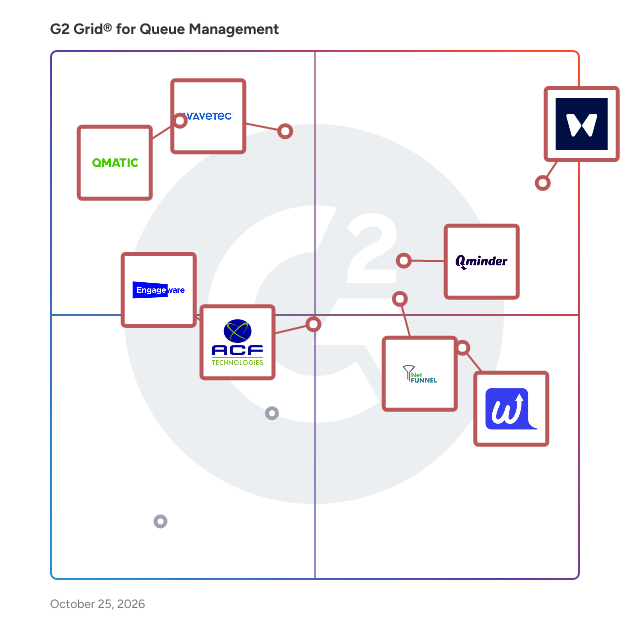
G2 Grid® for Queue Management Software

G2 Grid® for Queue Management Software plotting products by satisfaction and market presence

Highlighted products: Waitwhile, Wavetec, Qminder, NetFUNNEL, WaitWell, Qmatic, Customer Experience Solutions, and Qtrac Virtual Queuing and Appointment Scheduling Platform.

Underlying data: [Grid® JSON](https://www.g2.com/categories/queue-management/grids.json?focus%5B%5D=waitwhile&focus%5B%5D=wavetec&focus%5B%5D=qminder&focus%5B%5D=netfunnel&focus%5B%5D=waitwell&focus%5B%5D=qmatic&focus%5B%5D=acf-technologies-customer-experience-solutions&focus%5B%5D=qtrac-virtual-queuing-and-appointment-scheduling-platform)

Jonot

Jonot is a queue management platform for businesses serving walk-in customers. Customers can join a virtual queue using a QR code, web link or self-service kiosk, then follow their position and estimated wait time from their phone while they wait anywhere. Staff manage the queue from any web browser, while shared lobby displays keep visitors informed about current and upcoming ticket numbers. Jonot works with existing tablets, computers and displays, requires no customer app or account, and can keep ticket calling available over the local network during unreliable internet connectivity. Jonot supports multiple locations and queues, multilingual customer experiences, custom branding, customer feedback, marketing content and webhook integrations.

Who Is the Company Behind Jonot?

Kabob Cloud

One Cloud of Foods and Retail Chains, with AI, Devices, Automation and Staff apps. We provide three major SaaS apps cover: - Screens: Lookr Digital Signage - Music: Voicer BGM Master - Experience: Teachor Training Management - Automation: Queue & Reservation. Wayfinding Directory, AIoT. Manage all-scenario store applications through one platform and empower chain brand experience and management.

Average Rating: 5.0/5.0

Total Reviews: 2

How Do G2 Users Rate Kabob Cloud?

  • Ease of Use: 10.0/10 (Category avg: 9.3/10)

Who Is the Company Behind Kabob Cloud?

Who Uses This Product?

  • Company Size: 100% Small

What Are Recent G2 Reviews of Kabob Cloud?

Linistry Queue Management System

Linistry Queue Management System eliminates queues, treats waiting time and enhances branch/store productivity and customer loyalty.

Who Is the Company Behind Linistry Queue Management System?

  • Seller: Linistry
  • Year Founded: 2016
  • HQ Location: Budapest, HU
  • LinkedIn® Page: www.linkedin.com
    12 employees on LinkedIn®

LoudCurtain Queuer

LoudCurtain Queuer (formerly Queue+) is QR code ordering and order management software for cafés, coffee shops, bakeries, restaurants, food trucks, bars and hotels. Customers scan a QR code, browse your digital menu and order from their own phone, with no app to download and no account to create. When the order is ready, they get a push notification, so you don't need pagers or buzzers, or to shout out names. A complete order management system for the counter and the kitchen. Every order lands on a live order board that all your cashiers share. A kitchen display system (KDS) shows the kitchen what to make, a pickup display shows customers what's ready, and kitchen tickets print on a standard receipt printer. Each order gets its own QR code. Staff scan it to open that exact order at the counter, then take payment on their own card machine or in cash. One ordering system for every service style: Counter service ordering for cafés, food trucks and pharmacies. Customers order, pay at the counter and collect. Grab-and-go ordering for bakeries and espresso bars. The kitchen starts as soon as the order comes in. QR table ordering for restaurants and pubs. Guests order from the table and settle the tab at the end. Room service ordering for hotels and resorts. Staff accept each order and deliver it to the room. Built for busy service. Several cashiers can work the same orders at once without clashing. Set scheduled menus for breakfast, lunch and dinner, and print a QR code for every table. When the kitchen falls behind, pause new orders. If a customer misses their pickup, their order is held for them. You also get receipts in any currency, sales reports, full order history and multi-location management. Commission-free online ordering with no transaction fees. Every feature is included on every plan, including the free Starter plan with 500 check-ins a month. Paid plans start at $24 a year, and day passes for busy days start at $0.20. Queuer also runs virtual walk-in queues and appointment booking from the same dashboard.

Who Is the Company Behind LoudCurtain Queuer?

Minitable: Growth-Focused Restaurant CRM & Waitlist

Minitable is a growth-focused restaurant CRM and waitlist engine designed to transform guest wait times into measurable revenue. Unlike legacy queue management tools, Minitable provides a comprehensive guest discovery and marketing ecosystem. The platform features an integrated marketplace for guest acquisition, automated CRM data capture, and AI-driven marketing tools that trigger personalized re-marketing campaigns. By bridging the gap between operations and customer retention, Minitable enables high-volume restaurants and multi-unit chains to automate guest loyalty, increase customer lifetime value (LTV), and drive ROI through a seamless data-to-marketing funnel.

Who Is the Company Behind Minitable: Growth-Focused Restaurant CRM & Waitlist?

NEMO-Q

NEMO-Q delivers tailored queue management and customer flow solutions backed by over 30 years of experience to create business efficiencies and ensure seamless customer experiences.

Who Is the Company Behind NEMO-Q?

  • Seller: Nemo Q
  • Year Founded: 2002
  • HQ Location: McKinney, US
  • LinkedIn® Page: www.linkedin.com
    19 employees on LinkedIn®

NumberApp-Find & Queue for Top Salons & Barbers

NumberApp helps you discover top-rated salons and barbers nearby, check real-time wait times, and join the queue remotely. Skip crowded waiting areas and arrive exactly when it’s your turn. Save time, avoid chaos, and enjoy a smooth, predictable salon experience. For owners, NumberApp acts as a complete Salon Operating System, seamlessly managing both walk-ins and online customers in one synchronized queue. Join NumberApp · numberapp.in

Who Is the Company Behind NumberApp-Find & Queue for Top Salons & Barbers?

Ordelio

Ordelio is browser-based queue management software for order pickup and customer service points. It helps teams manage ticket numbers, update pickup status and give customers a clear view of their progress through a live browser page or public display. Designed for straightforward, ticket-based workflows, Ordelio connects the staff view with the customer-facing queue. Customers can follow progress through a QR code or shared link without installing an app. Teams can use existing browser-capable devices rather than introducing a dedicated pager system. WHAT DOES ORDELIO DO? Ordelio provides a shared status layer between the people managing a queue and the people waiting in it. At a busy counter, customers may not know whether their order is still being prepared, ready for collection or waiting for the next service step. Staff may have to repeat the same updates or call out ticket numbers. Ordelio makes that information visible through a connected workflow: • Staff create and manage tickets in the web dashboard. • Customers open a shared queue or ticket-status page. • Staff update tickets as preparation or service progresses. • The customer-facing browser view and public display reflect those changes. • Staff complete the handover at the service or pickup point. Ordelio supports the waiting and handover process. It does not replace the operational work required to prepare an order or serve a customer. KEY CAPABILITIES Browser-based staff dashboard Create tickets, manage queue states and keep the visible status aligned with what is happening at the counter. Staff work through a web interface. Customer queue and ticket views Give customers access to live queue information through a QR code or shared link. Depending on the selected queue type and configuration, the view can show ticket numbers, status, queue position and an estimated wait. Estimates and positions may change as service progresses. Public queue display Show queue information on a browser-capable screen so customers can follow progress without opening an individual status page. A public display can provide a shared reference for a waiting area or collection point. Different queue formats Choose a queue format suited to the operation, including pickup-status columns, number-only displays and standard ticket-based workflows. Configurable display language Public display labels can be configured in different languages, including bilingual wording. This display flexibility is separate from the language of the staff application. Team and location options Plans offer different allowances for team access, locations, queues, branding, event history and analytics. Businesses can choose the scope that fits their operation rather than beginning with a large deployment. WHO IS ORDELIO FOR? Ordelio is suited to businesses that need a clear, browser-based way to communicate queue progress at a physical service point. Typical applications include: • Restaurants and quick-service venues managing takeaway collection. • Cafés handling drink and food pickup. • Food halls and food courts with vendor-specific collection points. • Retail pickup counters where customers wait for a staffed handover. • Temporary event service points using ticket numbers to organize collection. • Other customer-facing counters with a straightforward ticket-based process. The key consideration is the workflow, not just the industry. Ordelio fits operations where staff can maintain accurate ticket states and customers benefit from a visible indication of progress. WHY USE ORDELIO? Make progress easier to understand Give customers a visible reference instead of relying entirely on verbal updates or repeated questions at the counter. Keep staff and customer views connected Use the same queue information across the team dashboard, customer browser views and public display. Support a clearer collection area Help distinguish customers who are still waiting from those whose tickets are ready for handover. The actual effect depends on the venue layout, instructions and staff process. Avoid requiring a customer app Customers access the relevant browser page through a QR code or link. Start with a focused workflow Use Ordelio alongside established ordering, payment and service processes. POS integration is not required to operate the browser-based queue. PRODUCT SCOPE AND PRACTICAL CONSIDERATIONS Ordelio is queue management software, not a supply chain, logistics or full order management platform. It is not intended to replace a POS, payment system, table reservation platform or event ticket-sales system. The workflow relies on connectivity and timely updates from staff. Customers follow the visible browser page or public display; the product should not be evaluated as an SMS pager replacement based on an assumption of automatic text notifications. Visible queue information does not increase preparation capacity or remove operational bottlenecks on its own. It works best when the team defines clear statuses, agrees when a ticket is ready and provides understandable collection instructions. GETTING STARTED Ordelio offers a free Basic plan for one simple queue, with no payment card required. Paid plans provide additional capabilities and allowances, and subscription plans include a 14-day trial. A practical first evaluation is to create a workspace, configure one queue, open the staff and customer views on separate devices and run a sample ticket through the complete process. This helps a team assess how Ordelio fits its existing service routine before expanding its use. Visit ordelio.io for current features, plan limits and pricing.

Who Is the Company Behind Ordelio?

Neeraja Prakash
NP
Researched and written by Neeraja Prakash
Updated October 3, 2024