Punch Ledger
Who Is the Company Behind Punch Ledger?
- Seller: Punch Ledger Corp
- HQ Location: N/A
-
LinkedIn® Page: www.linkedin.com
1 employees on LinkedIn®
Last updated: October 3, 2024
Total Products under this Category: 274
Last updated: November 17, 2026
Why You Can Trust G2's Software Rankings:
G2's software rankings are built on verified user reviews, rigorous moderation, and a consistent research methodology maintained by a team of analysts and data experts. Each product is measured using the same transparent criteria, with no paid placement or vendor influence. While reviews reflect real user experiences, which can be subjective, they offer valuable insight into how software performs in the hands of professionals. Together, these inputs power the G2 Score, a standardized way to compare tools within every category.
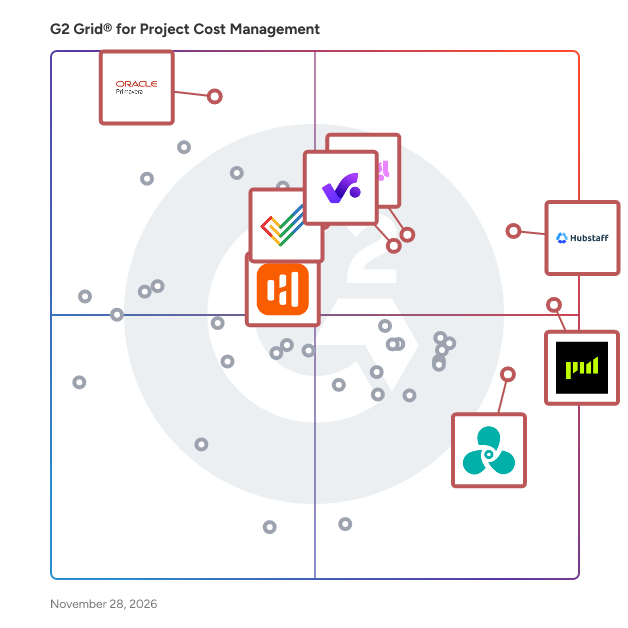
Highlighted products: Hubstaff, Projectworks, Toggl, Zoho Projects, Productive, Ruddr Professional Services Automation, Oracle Primavera, and Harvest.
Underlying data: [Grid® JSON](https://www.g2.com/categories/project-cost-management/grids.json?focus%5B%5D=hubstaff&focus%5B%5D=projectworks&focus%5B%5D=toggl&focus%5B%5D=zoho-projects&focus%5B%5D=productive&focus%5B%5D=ruddr-professional-services-automation&focus%5B%5D=oracle-primavera&focus%5B%5D=harvest)
PunchProfit is free software for small contractors who want to know what every job really makes. Build itemized estimates with your margins, add change orders, track crew time and expenses against the job, and see budget vs. actual while the work is still going. Invoice fixed-price milestones or time and materials, give clients a portal to see estimates and invoices, and push clients, invoices and approved costs to QuickBooks Online with a click. Crews log their own time from a phone and you approve it. No monthly fee, no per-user charge, no credit card.
Q360™ is the only complete business software package that is purpose built for Technology Integrators that includes Full Accounting, Project Management, Job Costing, Service & Dispatch, Inventory and Sales. Scaling from 20 staff to 2,000 staff Q360™ is the last software solution you’ll ever need to buy.
Average Rating: 4.0/5.0
Total Reviews: 12
"It is not just the great software, It is the great team behind the software that counts!"
Rating: 5.0/5.0 stars
— Orin K.
"Highly recommended! Q360 is a business partner, not just as an IT provider!"
Rating: 5.0/5.0 stars
— Kate M.
Connect G2 to Claude or ChatGPT for answers grounded in G2's trusted reviews, comparisons, and pricing from real user insights.
Digitalize your project management and project time tracking! With a digital system you can have control over your projects from start to finish. Get a full overview of time, resources and costs in real-time. Automatically collected reports helps you get insight and lets you find new ways to optimize your business. QBIS Business Systems offers cloud-based software products with the primary aim to help businesses spend their time right. In addition to QBIS Time we also offer QBIS Expense and QBIS Project to help you digitalize your expense- and project management. Based in Sweden, QBIS now has over 22.000 users in Scandinavia, Germany and the United Kingdom.
QScope runs a construction project from the first estimate to the final account, in one place, for everyone on the job. Built by a practising quantity surveyor, it brings together the work that usually sits across spreadsheets, email threads, shared drives and WhatsApp groups: estimating and cost plans, built in the app or imported from your own Excel; tenders, bid comparison and contracts; site drawings, photos, tasks, RFIs and documents; applications, valuations and payment certificates, with payment dates from your own contract terms; variations, subcontractors, retention and advance payments; completion, defects, risk and insurance; the final account; and loan monitoring with drawdown recommendations for lenders. Clients, architects, lenders and subcontractors join by link and see only what is meant for them, with no account to set up and nothing to pay. Every change is recorded: who, what and when. For contractors with or without a QS, client-side QS and project managers, and monitoring surveyors acting for lenders. Every feature on every plan, with a 30-day free trial and no card required.
Enhanced visibility and control to help power your business. QuickBooks Enterprise helps improve decision-making, efficiency, and productivity with a clear line of sight across your business. Manage more of your business with Enterprise • Get best-in-class accounting, inventory management, reporting, pricing rules, job costing, integrated payroll*, time tracking, and more • Capacity for 1 million customers, vendors and inventory items, 100,000 classes, 45 custom fields, and up to 40 users • Boost productivity, enhance collaboration and free your team to work from anywhere with hosting • Automate your work with our best integrated time tracking and payroll tools, plus the optional Salesforce CRM connector. And plug in more than 200 applications to extend the value of your Enterprise Improve your productivity and make quicker decisions by seeing of more of your data in real-time • Industry-focused editions give you tools and reporting built with your business in mind. Specialized industry editions offer customized capabilities, reports, and features designed for your company type and industry. • Store vendors, inventory, pricing, and customer information all right in QuickBooks for easy access, faster workflows, and better decision making • Work faster with batch transactions to speed up your workflows and reduce data entry • Get a picture of with what’s incoming and outgoing with a cash flow hub to track payments, bills, invoices, sales receipts, and more Get more transparency-more efficiently • Maintain control of your data with out-of-the box (# here) user permissions and custom user permissions - you decide who has access to what data • Work with multiple companies. Seamlessly track and report on intercompany transactions from one simple dashboard. Manage inventory more effectively • Organize and track inventory across warehouses right down to the specific bin or pallet with intuitive, multi-level categorization • Manage sales orders and inventory from a single dashboard with Enhanced Pick, Pack and Ship • Reduce business losses by assigning expiration dates to inventory Call Intuit to partner with one of our Customer Success Managers to help you choose the right edition of Enterprise for your business, and work with our best on-boarding specialists to get you up and running quickly. * Additional fees may apply
Average Rating: 4.3/5.0
Total Reviews: 1,055
AI-generated summary from verified user reviews
"Easy Invoicing and Emailing, but Updates Need Work"
Rating: 5.0/5.0 stars
— Darrell D.
"Robust Multi-User Accounting with Powerful Inventory and Reporting"
Rating: 4.5/5.0 stars
— Swostipriy M.
Easy Online Accounting to Organize Your Finances in One Place. Run your entire business with the #1 small business cloud accounting solution!
Average Rating: 4.0/5.0
Total Reviews: 3,812
AI-generated summary from verified user reviews
"A Reliable and Efficient Accounting Solution for Small Business"
Rating: 5.0/5.0 stars
— Solomon A.
"Real-Time, All-in-One Platform with Outstanding Customer Support"
Rating: 4.0/5.0 stars
— James H.
Red or Green is job profitability software for any trade, including HVAC, plumbing, electrical, and roofing shops, offering live margin tracking. It provides real-time profitability data to technicians, enabling shops to identify unprofitable jobs as costs arise rather than after books close. The software uses a four-step workflow: jobs are budgeted in about 60 seconds with trade-specific templates showing planned margins; receipt data is captured via photo recognition or manual entry, extracting vendor details automatically; active projects are displayed on a color-coded job board—green for on-target, amber for drifting, and red for underwater jobs. Upon job completion, variance analysis compares quoted figures to actual costs, breaking down labor and material differences to refine future estimates. Focused solely on profitability tracking, the mobile-friendly platform supports offline use, one-handed operation, and quick CSV exports for data portability.
RedSky develops, hosts, and supports fully integrated, construction-specific ERP, Supply Chain Management, and Project Information Management solutions. Scalable and modular, our platform delivers real-time visibility, allowing customers to control change, eliminate risk, and improve daily operations. Find out more about RedSky construction solutions https://www.redskyit.com/
All-in-one construction management software. Built specifically for small and medium contractors. 1. Project management (tasks, budgets, timelines, blueprints, documentation, site-gallery) 2. Staff management & work tracking (work schedules, time tracking, process reporting, GPS attendance control, site-photo capturing, live overview) 3. Asset management (tools & equipment, materials, maintenance & remote checks, etc.) Easy to use, secure, and works on any device (phones, tablets, computers).
Reperline is construction project control software for developers, general contractors and project managers. It keeps the schedule, the budget, client contracts and tenders in one system and answers two questions every day: where does the project stand now, and what will it look like in a month. Site facts come in where people already are. The foreman reports progress with photos through a Telegram bot and Mini App, with nothing to install. Rules compare fact with plan automatically, and checks review every entry from site. A deviation reaches the right person the same day: a late milestone, a budget overrun, a silent site, an overdue payment. Money out and money in sit on one page. Commitments count before the invoice, so an overrun shows when it is agreed. Contracts carry instalments and each receipt is matched. Any currency works, at the European Central Bank rate or a rate entered by hand. The system does not invent numbers: if a fact is missing, it says so. Every change is kept in a permanent log (who, when, before and after). Access by role is enforced in the database, and each company sees only its own data. Claude connects over MCP: drop in an invoice and Claude prepares the entry for approval, or ask where the project stands and get an answer from confirmed data. The AI proposes, a person approves. A fixed price per project with unlimited users, so contractors, site managers and accounts join at no extra cost.
RIB Candy is the ultimate construction project management software for the built environment. From on-screen quantity take-off, estimating and project planning through to final certificate, RIB Candy targets the unique requirements of construction and engineering contractors; providing an interactive link between the bill of quantity (BOQ), estimate and program in one exceptional project management solution. This is achieved by combining powerful features within a single user interface that eliminates departmental silos while aligning time and money to deliver a wealth of forecast information.
Average Rating: 4.0/5.0
Total Reviews: 2
"Powerful and very useful to carry out a proper management of the projects."
Rating: 4.0/5.0 stars
— Jonathan S.
"Impressive tool to plan out all your project beforehand"
Rating: 4.5/5.0 stars
— Deepanshu D.
Sage 300 is a comprehensive business management solution designed to keep your total cost of ownership low by supporting multiple technologies, databases, and operating systems. Available in multiple editions, Sage 300 gives you the opportunity to add users and adopt greater functionality as your business grows and offers built-in support for multiple languages and multicurrency transactions, so your business can comfortably reach around the globe. Sage 300 contains the power and tools to help you see your business in a new way so you can improve productivity, envision success, and accelerate growth. It’s time to turn your business dreams into reality with the real-time visibility, collaboration, and innovation you need to succeed.
Average Rating: 3.8/5.0
Total Reviews: 87
AI-generated summary from verified user reviews
"Sage’s Robust Functionality Keeps It Ahead of the Market"
Rating: 4.0/5.0 stars
— Verified User in Construction
"Customizable Yet Manual Payroll Solution"
Rating: 4.0/5.0 stars
— Alex W.
