Best Project Cost Management Software - Page 12

Last updated: October 3, 2024

How Many Project Cost Management Software Products Does G2 Track?

Total Products under this Category: 274

Category Stats (Nov 2026)

  • Average Rating: 4.38/5 (↑0.01 vs Oct 2026) The average rating of products in this category, based on all submitted ratings
  • Top Trending Product: CiMS Job Costing for Creative & Production Teams (+0.69%) - Among all products in this category, CiMS Job Costing for Creative & Production Teams recorded the largest rating increase compared to last month

Last updated: November 17, 2026

How Does G2 Rank Project Cost Management Software Products?

Why You Can Trust G2's Software Rankings:

  • 30 Analysts and Data Experts
  • 34,900+ Authentic Reviews
  • 274+ Products
  • Unbiased Rankings

G2's software rankings are built on verified user reviews, rigorous moderation, and a consistent research methodology maintained by a team of analysts and data experts. Each product is measured using the same transparent criteria, with no paid placement or vendor influence. While reviews reflect real user experiences, which can be subjective, they offer valuable insight into how software performs in the hands of professionals. Together, these inputs power the G2 Score, a standardized way to compare tools within every category.

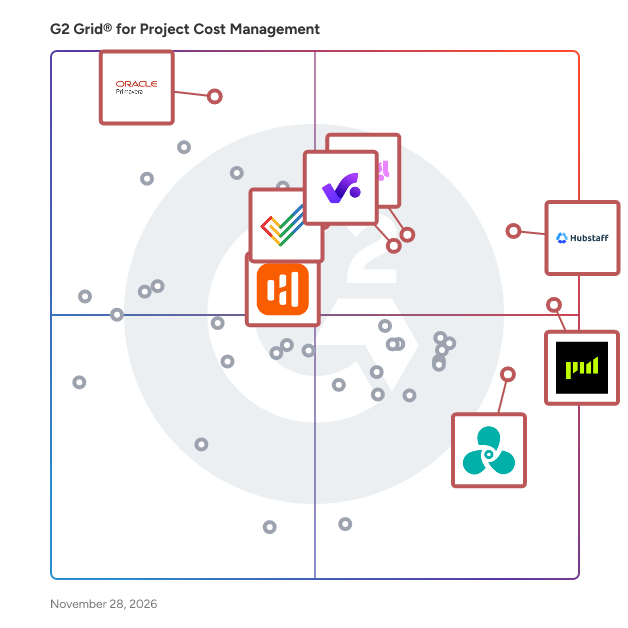
G2 Grid® for Project Cost Management Software

G2 Grid® for Project Cost Management Software plotting products by satisfaction and market presence

Highlighted products: Hubstaff, Projectworks, Toggl, Zoho Projects, Productive, Ruddr Professional Services Automation, Oracle Primavera, and Harvest.

Underlying data: [Grid® JSON](https://www.g2.com/categories/project-cost-management/grids.json?focus%5B%5D=hubstaff&focus%5B%5D=projectworks&focus%5B%5D=toggl&focus%5B%5D=zoho-projects&focus%5B%5D=productive&focus%5B%5D=ruddr-professional-services-automation&focus%5B%5D=oracle-primavera&focus%5B%5D=harvest)

Hourly

Hourly is a people platform that makes it easy for small business owners to track time, run payroll and get workers comp for their employees. Its the only tool out there that does all three seamlessly, saving you time and money.

Average Rating: 4.9/5.0

Total Reviews: 46

How Do G2 Users Rate Hourly?

  • Has the product been a good partner in doing business?: 9.9/10 (Category avg: 8.9/10)

Who Is the Company Behind Hourly?

Who Uses This Product?

  • Top Industries: Construction
  • Company Size: 96% Small, 4% Large

What Do G2 Reviewers Say About Hourly?

AI-generated summary from verified user reviews

Pros
  • Users find Hourly to be highly user-friendly, making navigation and task completion simple and efficient.
  • Users praise the fantastic customer support of Hourly, highlighting their responsiveness and helpfulness in resolving issues.
  • Users appreciate the ease of use for tracking labor and running payroll, simplifying billing and reporting processes.
  • Users appreciate the ease of tracking labor and payroll with Hourly, making payroll management efficient and user-friendly.
  • Users appreciate the simplicity and ease of navigation of Hourly, making it perfect for those less tech-savvy.
Cons
  • Users find that complex reporting leads to unexpected results, often producing cluttered Excel downloads.
  • Users experience connectivity issues in areas with poor cell service, affecting the time punch functionality.
  • Users report download issues with requested reports often appearing cluttered in Excel format, affecting usability.
  • Users often face feature absence issues with Hourly, particularly with real-time updates and payroll processing for construction.
  • Users find Hourly not intuitive, struggling with features like tip adjustments for their bartenders.

What Are Recent G2 Reviews of Hourly?

What Are G2 Users Discussing About Hourly?

Hover

Hover’s new connected platform replaces disconnected apps with one reliable solution for measuring, designing, estimating, and bidding. Powered by our proprietary 3D property technology and industry-leading spatial database of over 10 million homes, Hover now puts every feature you need into a single, end-to-end, visual workflow. No more manual data transfer, errors or time wasted navigating multiple apps. Just one platform that takes you from first contact to signed contract, with the integrations you value most. Contractors and builders use Hover to measure, design, and estimate all in one place. Insurance professionals use Hover to generate faster, more cost-effective settlements. Homeowners use Hover to power dream home projects. Create custom designs, then take your ideas from inspiration to action.

Average Rating: 3.5/5.0

Total Reviews: 1

Who Is the Company Behind Hover?

  • Seller: Hover
  • Year Founded: 2011
  • HQ Location: San Francisco, California, United States
  • LinkedIn® Page: www.linkedin.com
    480 employees on LinkedIn®

Who Uses This Product?

  • Company Size: 100% Medium

AI can help you find the answers. G2 helps you trust them.

Connect G2 to Claude or ChatGPT for answers grounded in G2's trusted reviews, comparisons, and pricing from real user insights.

How it works

InterAcct Real Estate Software

A modular database system with marketing, CRM, quoting, accounting, scheduling, performance analysis, purchasing, stock control, etc.

Average Rating: 5.0/5.0

Total Reviews: 1

Who Is the Company Behind InterAcct Real Estate Software?

Who Uses This Product?

  • Company Size: 100% Small

What Are Recent G2 Reviews of InterAcct Real Estate Software?

What Are G2 Users Discussing About InterAcct Real Estate Software?

Jet.Build

Jet.Build is an all-in-one construction and real estate development management platform built for owners, developers, general contractors, construction managers, and owner's representatives. From pre-development through construction and closeout, Jet.Build brings project management, financial controls, document management, scheduling, RFIs, submittals, approvals, reporting, and collaboration into one connected platform. Designed to eliminate fragmented tools and complicated workflows, Jet.Build provides real-time visibility across projects and portfolios while keeping critical information centralized, organized, and accessible. Jenny, Jet.Build's AI assistant, helps teams find information, identify potential risks, and generate actionable insights from their project data. Unlike traditional construction management software, Jet.Build offers **flat annual pricing with unlimited users, unlimited projects, and all capabilities included**. Every customer also receives hands-on onboarding, ongoing training, and dedicated U.S.-based support. Whether managing a single construction project or an extensive development portfolio, Jet.Build helps teams simplify operations, improve accountability, reduce administrative work, and make better decisions throughout the entire project lifecycle.

Who Is the Company Behind Jet.Build?

JobBOSS²

JobBOSS² promotes the profitability of scaling job shops, make-to-order manufacturers, and contract manufacturers by delivering a seamless quote-to-cash solution. A combination of JobBOSS expertise and the E2 Shop software, JobBOSS² has been helping five thousand shops increase profits by eliminating waste and streamlining operations. With an intuitive cloud-based solution and set of native mobile apps, JobBOSS² has all the tools and integrations you need to easily run your shop floor and back office operations.

Average Rating: 3.8/5.0

Total Reviews: 54

How Do G2 Users Rate JobBOSS²?

  • Has the product been a good partner in doing business?: 6.8/10 (Category avg: 8.9/10)

Who Is the Company Behind JobBOSS²?

Who Uses This Product?

  • Top Industries: Aviation & Aerospace, Machinery
  • Company Size: 59% Small, 41% Medium

What Are Recent G2 Reviews of JobBOSS²?

What Are G2 Users Discussing About JobBOSS²?

JobCostingApp

JobCostingApp is job costing software for small and mid-size U.S. contractors: general contractors, remodelers, home builders and specialty trades. Every job has a budget, and every cost you record — crew hours, materials, subcontractors and other expenses — lands on that job as it happens. You see budget vs. actual by category, and the dashboard shows revenue, cost and profit for every job in one view, so you catch overruns while you can still fix them. Build estimates, contracts, change orders and invoices with your logo, and have clients sign electronically from a link. Track progress billing, payments and subcontractor compliance. Field users log hours, materials and photos from their phones for free and never see your margins. Scan receipts with your phone camera, send customers, invoices and payments to QuickBooks Online, and give clients a private portal with progress and decisions, never costs. The whole app works in English and Spanish, with bilingual support by email on every plan. Use it in any browser or with the Android app on Google Play. 14-day free trial, no credit card required.

Who Is the Company Behind JobCostingApp?

Job Cost Pro

Job Cost Pro helps contractors and remodelers track the costs of individual jobs from an iPhone or a web browser. Scan a material receipt and review the job suggested by AI. One tap confirms the assignment. Record labor costs and crew hours against the job, then compare recorded costs with the contract amount and budget. Profit and margin on an open job reflect costs recorded so far; they are not final earnings. Crew members can clock in and view their own time and pay. The app records crew pay and payment information; it does not transfer money. English and Spanish interfaces are available. The Free plan includes 3 projects and 50 receipts per month. Pro costs $29.99 per month; Contractor costs $49.99 per month. Sending invoices and QuickBooks file exports require a paid plan. QuickBooks exports use CSV, IIF, or ZIP files, rather than live sync. Paid plans have a monthly AI allowance. Start with a free account at jobcostpro.online or download Job Cost Pro: AI Receipt Scan from the App Store. Free plan available. Some features require a paid plan.

Who Is the Company Behind Job Cost Pro?

Kadra

Kadra brings an interior design studio's day-to-day work into one place, so designers spend less time on admin and more time designing. Keep clients, consultations and projects organized by room. Save products from vendor websites with the Kadra Clipper, build a reusable product library with retail and trade pricing, and add selections to each room with budgets. Share a clean client portal where clients review and approve selections and mood boards, see their budget, pay invoices and sign contracts. Vendor order and shipping emails come to Kadra, which updates each product's status, expected date and tracking for you. Send invoices for design fees, consultations and products, with deposits or a payment schedule. Clients pay by card through the designer's own Stripe account, and Kadra takes no cut. Checks, transfers and cash can be recorded too. See what each project really made after product costs, fees and expenses. Built for solo and small residential design studios. Plans start at $29/month with a 14-day free trial, no contract, and full data export.

Who Is the Company Behind Kadra?

Kahua

Kahua is a construction project management platform that helps owners and contractors manage capital projects, programs, and assets across the full project lifecycle. Kahua's secure and configurable platform is built for complex construction. Teams, processes, and project data are connected within a FedRAMP-certified, AI enterprise PMIS. Kahua Difference • Owner-first platform; connected system of record across the asset lifecycle • One platform across the asset lifecycle • Configurability: Conforms to business processes at the project and portfolio level; create, modify, and extend applications • Adapts as your needs change • Project, program, and portfolio management • Visibility of entire portfolio • Enterprise Structure: Project, program, and portfolio views for various roles and permissions; configurable workflows, WBS, cost codes, nomenclature, and user access • Built-in AI Are you an owner? For a guided virtual tour, copy and paste this link into your browser: https://tinyurl.com/36vjy8p2 Are you a general contractor? Use this link for a guided virtual tour: https://tinyurl.com/bde4dacj

Average Rating: 4.4/5.0

Total Reviews: 33

How Do G2 Users Rate Kahua?

  • Has the product been a good partner in doing business?: 9.5/10 (Category avg: 8.9/10)

Who Is the Company Behind Kahua?

  • Seller: Kahua
  • Company Website:
  • Year Founded: 2009
  • HQ Location: Alpharetta, Georgia
  • LinkedIn® Page: www.linkedin.com
    376 employees on LinkedIn®

Who Uses This Product?

  • Top Industries: Construction
  • Company Size: 48% Medium, 27% Large

What Do G2 Reviewers Say About Kahua?

AI-generated summary from verified user reviews

Pros
  • Users value Kahua's customizable logs and reports, enhancing task management and facilitating efficient project communication.
  • Users value the customization options in Kahua, enhancing their project management with tailored logs and reports.
  • Users value the user-friendly interface of Kahua, facilitating easy navigation and effective project management.
  • Users value Kahua’s scalability and flexibility, enhancing project management efficiency with customizable features and streamlined processes.
  • Users value Kahua for its scalability and flexibility, enhancing project efficiency and adaptability to various client needs.
Cons
  • Users often face slow loading times, which can hinder their overall experience and workflow efficiency.
  • Users find the pricing structure a bit steep, especially for smaller teams with limited budgets.
  • Users find the pricing structure steep for smaller teams, making it less accessible for those with limited budgets.
  • Users find the inadequate tools in Kahua lead to accidental duplicate input data and require manual cross-referencing.
  • Users desire better integration capabilities for Kahua to work seamlessly with other legacy systems and competitors.

What Are Recent G2 Reviews of Kahua?

Kaptiq

Kaptiq is a project execution and cost control software designed for EPC, construction, and other project-based teams. It helps organizations track project progress, monitor costs, and make informed decisions using real-time data and predictive insights. The platform connects project workflows—such as phases, milestones, contractors, and billing—with cost tracking to provide a unified view of execution and financial performance. Users can track budget vs actual costs as projects progress, rather than relying on post-facto reports. Kaptiq includes built-in intelligence for: Cost overrun prediction, using current progress and spend patterns Anomaly detection, to identify unusual cost or execution deviations Decision advisories, based on historical and live project data What-if analysis, to evaluate the impact of delays, cost changes, or resource adjustments The system is designed to work with real-world project environments, where data may be fragmented or incomplete, and provides structured visibility across execution and cost dimensions. Kaptiq is used by EPC contractors, infrastructure teams, and asset-heavy organizations to improve cost control, reduce delays, and support data-driven project decisions.

Who Is the Company Behind Kaptiq?

Subhransu Sahu
SS
Researched and written by Subhransu Sahu