Best Operating Systems - Page 2

How Many Operating Systems Products Does G2 Track?

Total Products under this Category: 146

Category Stats (Sep 2026)

  • Average Rating: 4.31/5 The average rating of products in this category, based on all submitted ratings
  • Top Trending Product: SUSE Multi-Linux Support (+3.13%) - Among all products in this category, SUSE Multi-Linux Support recorded the largest rating increase compared to last month

Last updated: September 01, 2026

How Does G2 Rank Operating Systems Products?

Why You Can Trust G2's Software Rankings:

  • 30 Analysts and Data Experts
  • 18,800+ Authentic Reviews
  • 146+ Products
  • Unbiased Rankings

G2's software rankings are built on verified user reviews, rigorous moderation, and a consistent research methodology maintained by a team of analysts and data experts. Each product is measured using the same transparent criteria, with no paid placement or vendor influence. While reviews reflect real user experiences, which can be subjective, they offer valuable insight into how software performs in the hands of professionals. Together, these inputs power the G2 Score, a standardized way to compare tools within every category.

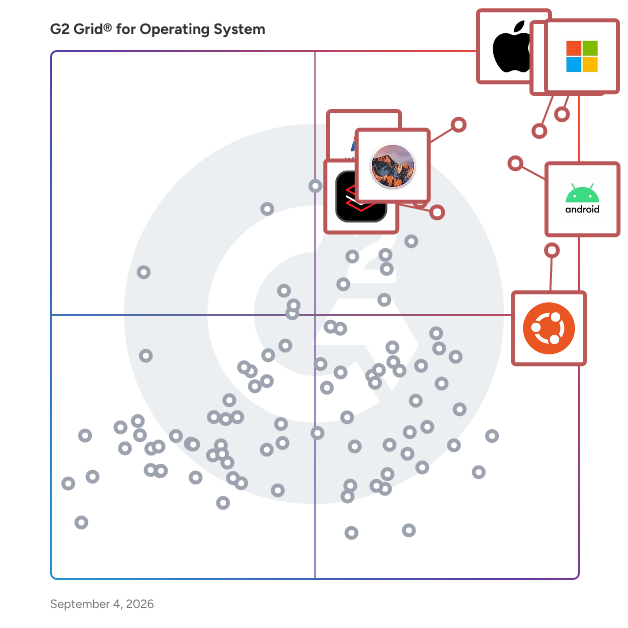
G2 Grid® for Operating Systems

G2 Grid® for Operating Systems plotting products by satisfaction and market presence

Highlighted products: Apple iOS, Windows 11, Chrome OS, Android, macOS Sierra, Ubuntu, Red Hat Enterprise Linux, and Windows 7.

Underlying data: [Grid® JSON](https://www.g2.com/categories/operating-system/grids.json?focus%5B%5D=apple-ios&focus%5B%5D=windows-11&focus%5B%5D=chrome-os&focus%5B%5D=android&focus%5B%5D=apple-macos-sierra&focus%5B%5D=ubuntu&focus%5B%5D=red-hat-enterprise-linux&focus%5B%5D=windows-7)

Apple OS X Yosemite

OS X Yosemite, released in October 2014, is the eleventh major version of Apple's desktop operating system for Mac computers. This update introduced a comprehensive redesign, aligning the Mac interface more closely with the aesthetics of iOS, featuring a flatter, more modern look with translucent elements and a refreshed color palette. Yosemite also emphasized enhanced integration between Mac and iOS devices, offering users a more seamless and connected experience across their Apple products. Key Features and Functionality: - Redesigned User Interface: Yosemite introduced a flatter, more modern design with translucent elements and a refreshed color palette, aligning the Mac interface more closely with iOS aesthetics. - Continuity: This suite of features enhances integration between Mac and iOS devices. Handoff allows users to start tasks on one device and continue them on another, while Instant Hotspot enables easy tethering to an iPhone's internet connection. - Phone and SMS Integration: Users can make and receive iPhone calls and send SMS messages directly from their Mac, provided both devices are connected to the same Wi-Fi network. - AirDrop Between Mac and iOS: Yosemite enables file sharing between Mac and iOS devices using AirDrop, facilitating quick and easy transfers without the need for cables or external drives. - Enhanced Spotlight Search: Spotlight received significant improvements, offering a more prominent search bar and the ability to pull in results from various sources, including Wikipedia, Maps, and news, providing a more comprehensive search experience. - Updated Native Applications: Core apps like Safari, Mail, and Messages were updated with new features and improved performance. For instance, Safari introduced a new tab view and improved sharing options, while Mail added functionalities like Mail Drop for sending large attachments. Primary Value and User Solutions: OS X Yosemite's primary value lies in its enhanced continuity and integration features, bridging the gap between Mac and iOS devices. By enabling seamless transitions between devices, users can maintain productivity without interruption, whether they're composing emails, browsing the web, or managing files. The redesigned interface offers a more intuitive and visually appealing experience, while the updated native applications and improved search capabilities streamline daily tasks. Overall, Yosemite addresses the need for a cohesive and interconnected ecosystem, enhancing user efficiency and satisfaction across Apple's hardware and software platforms.

Average Rating: 4.5/5.0

Total Reviews: 91

How Do G2 Users Rate Apple OS X Yosemite?

  • Has the product been a good partner in doing business?: 8.7/10 (Category avg: 8.5/10)
  • Ease of Use: 9.2/10 (Category avg: 8.5/10)
  • Quality of Support: 9.0/10 (Category avg: 8.2/10)
  • Ease of Admin: 8.9/10 (Category avg: 8.5/10)

Who Is the Company Behind Apple OS X Yosemite?

  • Seller: Apple
  • Year Founded: 1976
  • HQ Location: Cupertino, CA
  • Twitter: @Apple
    9,935,357 Twitter followers
  • LinkedIn® Page: www.linkedin.com
    187,339 employees on LinkedIn®
  • Ownership: NASDAQ:AAPL

Who Uses This Product?

  • Top Industries: Information Technology and Services, Computer Software
  • Company Size: 61% Small, 23% Medium

What Do G2 Reviewers Say About Apple OS X Yosemite?

AI-generated summary from verified user reviews

Pros
  • Users love the fresh, modern design of Yosemite, appreciating its clean interface and intuitive aesthetics.
  • Users find the ease of use of Apple OS X Yosemite refreshing, enhancing their overall experience with its intuitive design.
  • Users rave about the user-friendly interface of OS X Yosemite, enhancing daily tasks across Apple devices effortlessly.
  • Users praise the easy installation of Apple OS X Yosemite, making setup quick and hassle-free.
  • Users love the seamless Apple ecosystem in Yosemite, enhancing connectivity across their devices effortlessly.
Cons
  • Users experience performance issues such as slowdowns and compatibility problems, especially on older Mac models.
  • Users are frustrated by the app incompatibility that prevents playing AAA games on OS X Yosemite.
  • Users experience compatibility issues with apps and devices, leading to frustration and limited functionality on Yosemite.
  • Users express concern over hardware limitations potentially making updates obsolete, leading to difficult purchasing decisions.
  • Users find the limited customization options in Apple OS X Yosemite frustrating, especially on older Macs with slow performance.

What Are Recent G2 Reviews of Apple OS X Yosemite?

What Are G2 Users Discussing About Apple OS X Yosemite?

Hitachi Storage Virtualization Operating System RF

Hitachi Storage Virtualization Operating System RF (SVOS RF) is an advanced storage management solution designed to enhance the performance, availability, and efficiency of enterprise storage systems. Serving as the common operating system across all Hitachi Virtual Storage Platform (VSP) systems, SVOS RF simplifies storage operations by providing a unified platform for managing diverse storage resources. Key Features and Functionality: - Flash-Optimized Performance: Incorporates a patented flash-aware I/O stack to accelerate data access, ensuring consistently low latency and high throughput. - Adaptive Inline Data Reduction: Enhances storage efficiency by dynamically reducing data size, balancing data optimization with application performance. - Storage Virtualization: Extends the life of existing storage investments by virtualizing third-party all-flash and hybrid arrays, consolidating resources into a unified storage pool. - Software-Defined Storage: Abstracts and manages heterogeneous storage systems, creating a unified virtual storage layer that supports resource pooling and automation. - Advanced Data Protection: Offers active-active clustering, data-at-rest encryption, and policy-defined data protection with local and remote replication, ensuring superior availability and operational efficiency. Primary Value and User Benefits: SVOS RF addresses critical challenges in modern data centers by simplifying storage management, enhancing performance, and ensuring high availability. By unifying diverse storage resources and automating key data management functions, it reduces operational overhead and risk. Its flash-optimized architecture and adaptive data reduction capabilities ensure that enterprises can meet demanding performance requirements while maximizing storage efficiency. Additionally, the integration of advanced data protection features safeguards critical data, providing peace of mind and supporting business continuity.

Average Rating: 4.7/5.0

Total Reviews: 14

How Do G2 Users Rate Hitachi Storage Virtualization Operating System RF?

  • Has the product been a good partner in doing business?: 9.7/10 (Category avg: 8.5/10)
  • Ease of Use: 9.1/10 (Category avg: 8.5/10)
  • Quality of Support: 9.0/10 (Category avg: 8.2/10)
  • Ease of Admin: 8.1/10 (Category avg: 8.5/10)

Who Is the Company Behind Hitachi Storage Virtualization Operating System RF?

  • Seller: Hitachi Vantara
  • HQ Location: Santa Clara, CA
  • Twitter: @HitachiVantara
    28,391 Twitter followers
  • LinkedIn® Page: www.linkedin.com
    10,547 employees on LinkedIn®

Who Uses This Product?

  • Company Size: 64% Medium, 21% Large

What Do G2 Reviewers Say About Hitachi Storage Virtualization Operating System RF?

AI-generated summary from verified user reviews

Pros
  • Users value the high-speed performance of Hitachi Storage Virtualization OS RF, ensuring smooth operation even under heavy loads.
  • Users commend the exceptional stability of Hitachi Storage Virtualization OS RF, ensuring smooth handling of large workloads.
  • Users appreciate the disaster recovery capabilities and high-performance snapshot feature of Hitachi Storage Virtualization Operating System RF.
  • Users highlight the stability and reliability of Hitachi Storage Virtualization OS RF, effectively managing large-scale workloads seamlessly.
  • Users appreciate the stability and safety of Hitachi Storage Virtualization OS RF, ensuring peace of mind for their data.
Cons
  • Users find the high cost to be a downside, despite having no other complaints about the product.
  • Users find the high complexity in setup and configurations often demands deep expertise or vendor support.

What Are Recent G2 Reviews of Hitachi Storage Virtualization Operating System RF?

What Are G2 Users Discussing About Hitachi Storage Virtualization Operating System RF?

IBM AIX

IBM AIX is a robust and secure UNIX operating system designed for IBM Power Systems, offering a scalable and cost-effective platform for mission-critical workloads in regulated environments. With a history dating back to 1986, AIX has evolved to provide 99.9999% uptime, hybrid cloud integration, and AI-ready performance, enabling organizations to modernize infrastructure, reduce risk, and streamline operations. Built for long-term return on investment, AIX supports both legacy and cloud-native applications through automation, live migration, and enterprise-grade security, allowing businesses to transform confidently at their own pace. Key Features and Functionality: - Integrated Security & Compliance: AIX includes built-in encryption, secure boot, and PowerSC policy enforcement to protect data across hybrid environments and simplify compliance in regulated industries. - Intelligent Resource Management: Features like micro-partitioning, dynamic allocation, and multi-threading optimize CPU, memory, and I/O resources, reducing IT costs and improving sustainability. - High Availability Architecture: With Live Partition Mobility and deep hardware-software integration, AIX delivers 99.9999% uptime, ensuring uninterrupted performance for mission-critical workloads. - Hybrid Cloud & AI Integration: AIX supports containerized, cloud-native, and AI workloads with seamless integration into IBM Cloud, Red Hat OpenShift, and modern automation frameworks. Primary Value and Solutions Provided: IBM AIX addresses the needs of organizations requiring a secure, reliable, and scalable operating system for their critical applications. By offering advanced security features, efficient resource management, and high availability, AIX helps businesses minimize downtime, comply with regulatory requirements, and optimize operational costs. Its support for hybrid cloud and AI workloads enables enterprises to innovate and modernize their IT infrastructure, ensuring they remain competitive in a rapidly evolving technological landscape.

Average Rating: 4.4/5.0

Total Reviews: 68

How Do G2 Users Rate IBM AIX?

  • Has the product been a good partner in doing business?: 8.6/10 (Category avg: 8.5/10)
  • Ease of Use: 8.5/10 (Category avg: 8.5/10)
  • Quality of Support: 9.2/10 (Category avg: 8.2/10)
  • Ease of Admin: 8.3/10 (Category avg: 8.5/10)

Who Is the Company Behind IBM AIX?

  • Seller: IBM
  • Year Founded: 1911
  • HQ Location: Armonk, New York, United States
  • Twitter: @IBMSecurity
    74,660 Twitter followers
  • LinkedIn® Page: www.linkedin.com
    328,202 employees on LinkedIn®
  • Ownership: SWX:IBM

Who Uses This Product?

  • Top Industries: Information Technology and Services, Banking
  • Company Size: 56% Large, 27% Medium

What Do G2 Reviewers Say About IBM AIX?

AI-generated summary from verified user reviews

Pros
  • Users commend the world-class security of IBM AIX, ensuring exceptional protection for mission-critical workloads and data.
  • Users value the exceptional stability of IBM AIX, ensuring reliable performance for mission-critical workloads and enterprise demands.
  • Users praise the excellent performance of IBM AIX, especially under heavy enterprise workloads and mission-critical demands.
  • Users laud the extreme stability of IBM AIX, ensuring reliable performance for demanding, round-the-clock operations.
  • Users value the long-term support of IBM AIX, ensuring stability and reliability for critical tasks and systems.
Cons
  • Users highlight the high cost of IBM AIX compared to similar applications, making it less accessible for smaller organizations.
  • Users face a high complexity and cost with IBM AIX, necessitating specialized training and knowledge for effective use.
  • Users find it challenging to stay current with JDK versions not supported by IBM, limiting flexibility and updates.
  • Users find integration issues with IBM AIX hinder their experience and compatibility with existing technologies.
  • Users find the limited apps and store of IBM AIX restrictive compared to other options available.

What Are Recent G2 Reviews of IBM AIX?

What Are G2 Users Discussing About IBM AIX?

Wind River Linux

Wind River Linux is a purpose-built, Yocto Project–based embedded Linux platform designed to enable the development and deployment of robust, reliable, and secure edge devices and systems. It offers over a decade of support, proactive monitoring for Common Vulnerabilities and Exposures (CVEs), and eliminates per-device fees, allowing developers to focus on innovation without the complexities of maintaining an in-house Linux distribution. Key Features and Functionality: - Long-Term Support & Maintenance: Provides more than 10 years of CVE monitoring, daily testing, and board support packages (BSPs) to ensure system reliability and security. - Hardware-Independent BSP Support: Offers pre-validated BSPs compatible with leading hardware platforms, including AMD, Intel, NXP, and Nvidia, facilitating seamless hardware integration. - Built-In Security & Compliance: Features proactive CVE mitigation, software bill of materials (SBOM), export artifacts, and a secure development lifecycle (SDL) to maintain compliance and security standards. - Yocto Project Leadership: As a founding and platinum member of the Yocto Project, Wind River contributes significantly to the open-source community, ensuring that Wind River Linux remains at the forefront of embedded Linux development. Primary Value and Solutions Provided: Wind River Linux addresses the challenges of developing and maintaining embedded Linux systems by offering a commercially supported, customizable platform that reduces development effort and risk. It ensures that codebases are up-to-date, defects are promptly addressed, and security patches are applied, all while adhering to strict market specifications and certifications. This comprehensive support allows organizations to focus on their core competencies, accelerate time-to-market, and reduce the total cost of ownership for their embedded and IoT devices.

Average Rating: 4.5/5.0

Total Reviews: 25

How Do G2 Users Rate Wind River Linux?

  • Has the product been a good partner in doing business?: 9.3/10 (Category avg: 8.5/10)
  • Ease of Use: 9.1/10 (Category avg: 8.5/10)
  • Quality of Support: 9.0/10 (Category avg: 8.2/10)
  • Ease of Admin: 10.0/10 (Category avg: 8.5/10)

Who Is the Company Behind Wind River Linux?

  • Seller: Wind River
  • Year Founded: 1981
  • HQ Location: United States
  • Twitter: @WindRiver
    7,834 Twitter followers
  • LinkedIn® Page: www.linkedin.com
    2,481 employees on LinkedIn®

Who Uses This Product?

  • Top Industries: Computer Software
  • Company Size: 48% Small, 32% Large

What Do G2 Reviewers Say About Wind River Linux?

AI-generated summary from verified user reviews

Pros
  • Users value the long-term support and security updates of Wind River Linux, ensuring stability in production environments.
  • Users value the regular updates of Wind River Linux, ensuring stability and security in critical deployment environments.
  • Users value the stability and predictability of Wind River Linux, essential for reliable embedded and production environments.
Cons
  • Users find the high cost of Wind River Linux challenging, especially compared to more affordable community distributions.
  • Users find the limited customization options in Wind River Linux hinder efficient setup and workflow flexibility.
  • Users find Wind River Linux's usage difficult due to its complexity during initial setup and slow customization processes.

What Are Recent G2 Reviews of Wind River Linux?

What Are G2 Users Discussing About Wind River Linux?

Windows Server

Windows Server is a comprehensive operating system designed to meet the needs of businesses by providing a robust platform for managing applications, networks, and web services. It seamlessly integrates on-premises environments with Azure, enhancing security and facilitating the modernization of applications and infrastructure. Key Features and Functionality: - Multilayered Security: Windows Server offers advanced identity protection through Active Directory, virtualization-based security with Hyper-V, and secure networking features like TLS 1.3 encryption and SMB over QUIC. - Hybrid Cloud Integration: With Azure Arc, Windows Server enables seamless management across on-premises and cloud environments, providing deployment flexibility and unified management. - Scalability and Performance: The system supports large-scale virtualization with Hyper-V, accommodating up to 240 TB of RAM and 2,048 virtual processors per virtual machine, making it suitable for demanding workloads. - Container Support: Windows Server facilitates the development, deployment, and management of containers, allowing for efficient application modernization using containers and microservices. Primary Value and Solutions: Windows Server addresses critical business needs by offering a secure, scalable, and flexible infrastructure. It enhances productivity through hybrid operations, allowing applications running on-premises to leverage cloud innovations such as Artificial Intelligence and IoT. The system's advanced security features protect data and applications from evolving threats, while its scalability supports the growth and performance demands of modern businesses. By integrating with Azure, Windows Server enables organizations to bridge their on-premises environments with cloud services, facilitating a smooth transition to hybrid cloud solutions.

Average Rating: 4.5/5.0

Total Reviews: 243

How Do G2 Users Rate Windows Server?

  • Has the product been a good partner in doing business?: 8.9/10 (Category avg: 8.5/10)
  • Ease of Use: 9.2/10 (Category avg: 8.5/10)
  • Quality of Support: 8.6/10 (Category avg: 8.2/10)
  • Ease of Admin: 9.1/10 (Category avg: 8.5/10)

Who Is the Company Behind Windows Server?

Who Uses This Product?

  • Who Uses This: System Administrator, IT Manager
  • Top Industries: Information Technology and Services, Computer & Network Security
  • Company Size: 42% Medium, 28% Large

What Do G2 Reviewers Say About Windows Server?

AI-generated summary from verified user reviews

Pros
  • Users value the reliability of Windows Server, appreciating its dependable performance and effective security measures.
  • Users value the seamless integration of Windows Server with the Microsoft ecosystem, enhancing management and user experience.
  • Users value the strong security features of Windows Server, ensuring a secure environment against threats and vulnerabilities.
  • Users value the user-friendly interface of Windows Server, simplifying management and enhancing overall functionality.
  • Users find Windows Server to be user-friendly and easy to navigate, streamlining management tasks and role installations.
Cons
  • Users find the high cost of Windows Server licensing and management a significant drawback compared to alternatives.
  • Users note that mandatory updates and restarts can disrupt uptime and complicate maintenance efforts for Windows Server.
  • Users highlight the requirement for advanced technical expertise to effectively manage Windows Server, complicating maintenance.
  • Users find that maintenance and updates are time-consuming, leading to challenges in scheduling and system performance.
  • Users find mandatory updates disruptive, often requiring server restarts that negatively impact system uptime.

What Are Recent G2 Reviews of Windows Server?

Debian

Debian is a free and open-source operating system developed collaboratively by a global community of volunteers. Established in 1993, it has become one of the most popular and influential Linux distributions, known for its stability, security, and extensive software repositories. Debian serves as the foundation for numerous other distributions, including Ubuntu and Linux Mint, and is widely used on both servers and desktops. Key Features and Functionality: - Extensive Software Repository: Debian offers access to over 59,000 software packages, providing users with a vast selection of applications and tools to meet diverse needs. - Multi-Architecture Support: It supports a wide range of hardware architectures, from common x86-64 systems to ARM-based devices and IBM mainframes, ensuring broad compatibility. - Advanced Package Management: Debian utilizes the Advanced Packaging Tool (APT) for efficient package management, simplifying the installation, upgrade, and removal of software. - Security and Stability: With a strong focus on security, Debian provides timely updates and a robust security infrastructure, making it a reliable choice for critical systems. - Community-Driven Development: The Debian Project is governed by a social contract and constitution, emphasizing transparency, collaboration, and adherence to free software principles. Primary Value and User Solutions: Debian addresses the needs of users seeking a dependable and versatile operating system that upholds the ideals of free software. Its comprehensive package repository and support for multiple architectures make it suitable for a wide array of applications, from personal computing to enterprise servers. The community-driven approach ensures continuous improvement and responsiveness to user needs, while its commitment to security and stability provides a trustworthy platform for both developers and end-users.

Average Rating: 4.6/5.0

Total Reviews: 221

How Do G2 Users Rate Debian?

  • Has the product been a good partner in doing business?: 8.8/10 (Category avg: 8.5/10)
  • Ease of Use: 8.4/10 (Category avg: 8.5/10)
  • Quality of Support: 8.4/10 (Category avg: 8.2/10)
  • Ease of Admin: 8.9/10 (Category avg: 8.5/10)

Who Is the Company Behind Debian?

  • Seller: Debian Project
  • Year Founded: 1993
  • HQ Location: Indiana, United States
  • Twitter: @debian
    277,045 Twitter followers
  • LinkedIn® Page: www.linkedin.com
    491 employees on LinkedIn®

Who Uses This Product?

  • Who Uses This: Software Engineer
  • Top Industries: Information Technology and Services, Computer Software
  • Company Size: 47% Small, 30% Medium

What Do G2 Reviewers Say About Debian?

AI-generated summary from verified user reviews

Pros
  • Users value Debian's ease of use with its straightforward installation and reliable performance for diverse tasks.
  • Users appreciate Debian's rock-solid reliability, ensuring stability and consistent performance for developers and server environments.
  • Users value the exceptional stability of Debian, making it ideal for servers, development, and secure environments.
  • Users value Debian for its exceptional stability and security, making it a trusted choice for servers and development.
  • Users value the strong security focus of Debian, ensuring a dependable environment for servers and development tasks.
Cons
  • Users note that packages can feel outdated, requiring manual installs for newer versions and complicating hardware support.
  • Users note the lack of features due to older software versions, impacting newer hardware support and usability.
  • Users find the difficult setup process of Debian challenging, especially when dealing with older packages and hardware support.
  • Users often face driver issues in Debian, needing extra configuration for hardware support and missing drivers.
  • Users find the interface outdated and note the need for modern features and better hardware support in Debian.

What Are Recent G2 Reviews of Debian?

What Are G2 Users Discussing About Debian?

Windows 8

Windows 8 is an operating system developed by Microsoft, released in October 2012, designed to provide a modern and dynamic user experience across various devices, including desktops, laptops, and tablets. It introduced a new user interface with live tiles, offering real-time updates and a more interactive experience. The system also featured the Windows Store, enabling users to download and install a wide range of applications. Key Features and Functionality: - Modern User Interface: Incorporates live tiles that display real-time information, enhancing user engagement. - Windows Store: Provides access to a vast array of applications, facilitating easy download and installation. - Enhanced Connectivity: Improved networking technologies and power management for better connectivity and device availability. - Touch and Gesture Support: Optimized for touch-enabled devices, offering a more natural and intuitive user experience. - App Packaging and Deployment: Enables developers to produce, consume, or interact with app packages, streamlining the development process. Primary Value and User Solutions: Windows 8 aimed to bridge the gap between traditional computing and the growing demand for mobile and touch-enabled devices. By introducing a unified interface and enhancing app accessibility through the Windows Store, it provided users with a versatile platform suitable for both work and entertainment. The system's focus on connectivity and power efficiency addressed the needs of modern users seeking seamless integration across multiple devices.

Average Rating: 3.7/5.0

Total Reviews: 557

How Do G2 Users Rate Windows 8?

  • Has the product been a good partner in doing business?: 7.4/10 (Category avg: 8.5/10)
  • Ease of Use: 7.6/10 (Category avg: 8.5/10)
  • Quality of Support: 7.6/10 (Category avg: 8.2/10)
  • Ease of Admin: 7.7/10 (Category avg: 8.5/10)

Who Is the Company Behind Windows 8?

  • Seller: Microsoft
  • Year Founded: 1975
  • HQ Location: Redmond, Washington
  • Twitter: @microsoft
    13,091,739 Twitter followers
  • LinkedIn® Page: www.linkedin.com
    231,632 employees on LinkedIn®
  • Ownership: MSFT

Who Uses This Product?

  • Who Uses This: Software Engineer, Senior Software Engineer
  • Top Industries: Information Technology and Services, Computer Software
  • Company Size: 44% Small, 28% Medium

What Do G2 Reviewers Say About Windows 8?

AI-generated summary from verified user reviews

Pros
  • Users love the speed and responsiveness of Windows 8, noting significant improvements in boot time and performance.
  • Users appreciate the ease of use in Windows 8, making tasks simple and intuitive for productivity.
  • Users enjoy the touch-friendly interface of Windows 8, making it ideal for tablets and hybrid devices.
  • Users find Windows 8 to be very user-friendly, enjoying its easy learning curve and modern interface.
  • Users value the innovative tile-based Start Screen of Windows 8, enhancing the visual experience on touch devices.
Cons
  • Users find the unfriendly interface of Windows 8 frustrating, especially for non-touch device use and navigation.
  • Users find Windows 8's usage difficulty challenging due to hidden buttons and confusing navigation for keyboard-mouse users.
  • Users find the Menu Issues in Windows 8 frustrating, as it complicates navigation for those unfamiliar with technology.
  • Users desire enhanced compatibility issues with Windows 8, especially regarding iPhone and other MS documents.
  • Users criticize the poor UI/UX of Windows 8 for its confusing interface and steep learning curve.

What Are Recent G2 Reviews of Windows 8?

What Are G2 Users Discussing About Windows 8?

Kali Linux

Desktop Kali Linux is a specialized Linux distribution designed for penetration testing and security auditing. This Kali Linux VM (configured by Techlatest.net) with GUI Desktop interface is pre-installed with 2500+ wide variety of security tools that can be used for ethical hacking, vulnerability assessment, and other security-related tasks and made available on the leading Cloud Marketplaces so you can quickly and easily spin up an instance and start using its powerful security tools. Key Features: - GUI Based : Desktop Interface for easy and intuitive user experience. - Pre-installed Security Tools : 2500+ Comprehensive set of security tools, including Nmap, Metasploit Framework, Wireshark, Aircrack-ng, John the Ripper, Hydra, Nikto, Burp Suite, Sqlmap, THC-Hydra, among others. - Easy Deployment : With Desktop Linux Kali available on the Cloud Marketplace, you can quickly spin up an instance of the operating system on Cloud Platforms with just a few clicks. - High Performance : Cloud Platforms provide a reliable and high-performance infrastructure for running Desktop Linux Kali, ensuring that your security testing and auditing tasks can be completed quickly and efficiently. - Secure : Cloud Platforms provide a secure infrastructure for running Desktop Linux Kali, with features such as encryption at rest and in transit, security key management, and DDoS protection. - Use Cases: Kali Linux is an ideal solution for security professionals, ethical hackers, and other individuals or organizations that need to perform security testing and auditing. Its pre-installed security tools and easy deployment on Cloud Platforms make it a powerful and convenient solution for testing the security of networks, web applications, and other systems. - Legal & Ethical Use: It is important to note that the security tools included in the VM should only be used for legal and ethical purposes. - Disclaimer : Other trademarks and trade names may be used in this document to refer to either the entities claiming the marks and/or names or their products and are the property of their respective owners. We disclaim proprietary interest in the marks and names of others.

Average Rating: 4.5/5.0

Total Reviews: 244

How Do G2 Users Rate Kali Linux?

  • Has the product been a good partner in doing business?: 8.8/10 (Category avg: 8.5/10)
  • Ease of Use: 8.2/10 (Category avg: 8.5/10)
  • Quality of Support: 8.3/10 (Category avg: 8.2/10)
  • Ease of Admin: 8.6/10 (Category avg: 8.5/10)

Who Is the Company Behind Kali Linux?

  • Seller: OffSec
  • Year Founded: 2006
  • HQ Location: New York, US
  • Twitter: @offsectraining
    329,436 Twitter followers
  • LinkedIn® Page: www.linkedin.com
    1,141 employees on LinkedIn®

Who Uses This Product?

  • Who Uses This: Software Engineer
  • Top Industries: Information Technology and Services, Computer & Network Security
  • Company Size: 52% Small, 26% Medium

What Do G2 Reviewers Say About Kali Linux?

AI-generated summary from verified user reviews

Pros
  • Users praise the extensive pre-installed tools in Kali Linux, enhancing efficiency and facilitating effective security testing.
  • Users value the strong community support in Kali Linux, which enhances troubleshooting and learning experiences effectively.
  • Users appreciate the comprehensive security tools in Kali Linux, enabling seamless practice and learning in cybersecurity.
  • Users love the customization options in Kali Linux, enhancing their experience for learning and practicing cybersecurity.
  • Users value the regular updates of Kali Linux, ensuring access to the latest security tools and improvements.
Cons
  • Users find the skill requirements of Kali Linux overwhelming, making it challenging for beginners to navigate effectively.
  • Users find Kali Linux to have a steep learning curve, making it challenging for beginners to navigate effectively.
  • Users face driver issues with Kali Linux, particularly with Wi-Fi and hardware compatibility, complicating their experience.
  • Users report that Kali Linux has hardware limitations, resulting in slow performance on lower-end systems and resource-heavy demands.
  • Users experience performance issues with Kali Linux, especially on lower-end systems and when using hacking tools.

What Are Recent G2 Reviews of Kali Linux?

What Are G2 Users Discussing About Kali Linux?

CIS Red Hat Enterprise Linux

The Center for Internet Security (CIS) provides comprehensive security configuration guidelines for Red Hat Enterprise Linux (RHEL) through its CIS Benchmarks. These benchmarks are consensus-based, best-practice security configuration guides developed and accepted by government, business, industry, and academia. They offer detailed recommendations to enhance the security posture of RHEL systems, helping organizations safeguard against cyber threats. Key Features and Functionality: - Consensus-Based Guidelines: Developed through a community consensus process involving IT professionals worldwide, ensuring relevance and effectiveness. - Comprehensive Coverage: Provides detailed security configurations for various versions of RHEL, including RHEL 5 through RHEL 10. - Audit and Remediation Procedures: Includes specific steps for auditing current configurations and implementing recommended security measures. - Multiple Configuration Profiles: Offers various profiles to cater to different organizational security requirements, allowing flexibility in implementation. Primary Value and Problem Solved: The CIS Red Hat Enterprise Linux Benchmarks serve as a critical resource for organizations aiming to secure their RHEL environments. By adhering to these benchmarks, organizations can systematically reduce vulnerabilities, ensure compliance with industry standards, and enhance their overall cybersecurity defenses. This proactive approach mitigates potential security risks, supports regulatory compliance, and fosters a robust security culture within the organization.

Average Rating: 4.3/5.0

Total Reviews: 23

How Do G2 Users Rate CIS Red Hat Enterprise Linux?

  • Has the product been a good partner in doing business?: 9.8/10 (Category avg: 8.5/10)
  • Ease of Use: 7.7/10 (Category avg: 8.5/10)
  • Quality of Support: 9.0/10 (Category avg: 8.2/10)
  • Ease of Admin: 9.2/10 (Category avg: 8.5/10)

Who Is the Company Behind CIS Red Hat Enterprise Linux?

Who Uses This Product?

  • Top Industries: Computer & Network Security, Information Technology and Services
  • Company Size: 36% Large, 32% Small

What Do G2 Reviewers Say About CIS Red Hat Enterprise Linux?

AI-generated summary from verified user reviews

Pros
  • Users love the ability to run multiple stable software versions simultaneously, enhancing flexibility and compatibility.
  • Users value the robust security features of CIS Red Hat Enterprise Linux, enhancing system protection effectively.
  • Users value the strong security features of CIS Red Hat Enterprise Linux, enhancing protection against unauthorized access and execution.
  • Users commend the robust security features of CIS Red Hat Enterprise Linux, ensuring tight control over system access and data protection.
Cons
  • Users find the high cost of migrating to a subscription for CIS Red Hat Enterprise Linux to be burdensome.
  • Users face installation difficulties with CIS Red Hat Enterprise Linux, finding the setup process complicated and convoluted.
  • Users find the unfriendly interface of CIS Red Hat Enterprise Linux complicates the management of essential services and setup.
  • Users find the usage difficulty of CIS Red Hat Enterprise Linux frustrating due to complex PAM authentication and setup challenges.

What Are Recent G2 Reviews of CIS Red Hat Enterprise Linux?

What Are G2 Users Discussing About CIS Red Hat Enterprise Linux?

Amazon Linux 2

Amazon Linux 2 is a Linux operating system developed by Amazon Web Services (AWS) to provide a secure, stable, and high-performance environment for cloud and enterprise applications. It is designed to integrate seamlessly with AWS services, offering a robust platform for developers and IT administrators. Amazon Linux 2 is available at no additional charge and includes long-term support with ongoing security and maintenance updates. Key Features and Functionality: - AWS Integration: Pre-installed packages and configurations facilitate tight integration with AWS services, simplifying the deployment and management of applications. - Long-Term Support: Provides five years of support, ensuring stability and predictability for enterprise applications. - Extras Repository: Offers access to the latest software packages through the Amazon Linux Extras repository, allowing users to install newer versions of popular software without compromising system stability. - On-Premises Use: Available as virtual machine images for VMware, Oracle VM VirtualBox, and Microsoft Hyper-V, enabling on-premises development and testing. - Systemd Support: Includes the systemd init system for efficient process management and service control. - Optimized Kernel and Toolchain: Features an LTS Kernel tuned for enhanced performance on Amazon EC2, along with updated compiler and build toolchain components. - Security Features: Implements default security measures such as limiting remote access, disabling remote root login, and reducing non-critical packages to minimize exposure to vulnerabilities. - Kernel Live Patching: Supports live patching of the Linux kernel, allowing critical and important security updates to be applied without rebooting or downtime. Primary Value and User Solutions: Amazon Linux 2 addresses the need for a secure, reliable, and high-performance operating system tailored for cloud environments. Its deep integration with AWS services streamlines application deployment and management, enhancing developer productivity. The long-term support and regular security updates provide peace of mind for enterprises, ensuring system stability and compliance. Additionally, the availability of virtual machine images for on-premises use allows for consistent development and testing environments, bridging the gap between local and cloud-based operations.

Average Rating: 4.5/5.0

Total Reviews: 92

How Do G2 Users Rate Amazon Linux 2?

  • Has the product been a good partner in doing business?: 9.2/10 (Category avg: 8.5/10)
  • Ease of Use: 9.2/10 (Category avg: 8.5/10)
  • Quality of Support: 9.1/10 (Category avg: 8.2/10)
  • Ease of Admin: 9.4/10 (Category avg: 8.5/10)

Who Is the Company Behind Amazon Linux 2?

Who Uses This Product?

  • Who Uses This: DevOps Engineer, Software Engineer
  • Top Industries: Information Technology and Services, Computer Software
  • Company Size: 43% Small, 30% Large

What Do G2 Reviewers Say About Amazon Linux 2?

AI-generated summary from verified user reviews

Pros
  • Users commend the speed and performance of Amazon Linux 2, appreciating its rapid boot times and reliability under heavy workloads.
  • Users value the long-term stability of Amazon Linux 2, ensuring reliable performance for their AWS workloads.
  • Users value the regular updates of Amazon Linux 2, ensuring stability and security for their AWS environments.
  • Users appreciate the cloud optimization of Amazon Linux 2, facilitating easy integration and smooth operation on AWS.
  • Users value the lightweight size of Amazon Linux 2 for its rapid boot times and resource efficiency on AWS.
Cons
  • Users find the limited app/store selection restrictive, especially outside AWS, lacking updates and flexibility of other Linux distributions.
  • Users report installation difficulties due to missing dependencies and limited documentation, especially outside AWS environments.
  • Users face lack of support for issues outside the AWS ecosystem, making problem resolution time-consuming and difficult.
  • Users find the limited software availability on Amazon Linux 2 restricts flexibility and updates for various use cases.
  • Users experience limited support for Amazon Linux 2 when used on non-AWS platforms compared to AWS environments.

What Are Recent G2 Reviews of Amazon Linux 2?

AppArmor

AppArmor is a Linux kernel security module that enforces mandatory access control (MAC) policies to restrict programs' capabilities, thereby enhancing system security. By confining applications to predefined profiles, AppArmor limits their access to system resources, mitigating potential threats from both known and unknown vulnerabilities. Integrated into the mainline Linux kernel since version 2.6.36, AppArmor has been actively supported by Canonical since 2009. Key Features and Functionality: - Per-Program Profiles: AppArmor allows administrators to create specific security profiles for individual applications, defining permissible actions and resource access. - Path-Based Access Control: Unlike label-based systems, AppArmor utilizes file paths to enforce access controls, simplifying profile management and compatibility across different file systems. - Learning Mode: This mode logs policy violations without enforcing restrictions, enabling administrators to refine profiles based on actual application behavior before full enforcement. - Integration with Linux Security Modules (LSM): AppArmor is implemented using the LSM framework, ensuring seamless integration with the Linux kernel. Primary Value and Problem Solved: AppArmor enhances system security by providing a straightforward and effective method for implementing mandatory access controls. By restricting applications to their intended functionalities, it prevents exploitation of software vulnerabilities, including zero-day attacks. Its path-based approach and user-friendly profile management make it accessible for administrators, offering a less complex alternative to other MAC systems like SELinux. This ease of use, combined with robust security enforcement, makes AppArmor a valuable tool for protecting Linux systems against unauthorized access and potential threats.

Average Rating: 4.6/5.0

Total Reviews: 15

How Do G2 Users Rate AppArmor?

  • Has the product been a good partner in doing business?: 9.8/10 (Category avg: 8.5/10)
  • Ease of Use: 8.9/10 (Category avg: 8.5/10)
  • Quality of Support: 9.5/10 (Category avg: 8.2/10)
  • Ease of Admin: 9.5/10 (Category avg: 8.5/10)

Who Is the Company Behind AppArmor?

  • Seller: The Linux Foundation
  • Year Founded: 2015
  • HQ Location: San Francisco, CA
  • Twitter: @hyperledger
    299 Twitter followers
  • LinkedIn® Page: www.linkedin.com
    89 employees on LinkedIn®

Who Uses This Product?

  • Company Size: 47% Small, 33% Large

What Do G2 Reviewers Say About AppArmor?

AI-generated summary from verified user reviews

Pros
  • Users value AppArmor's reliable protection, offering intuitive security that operates quietly without constant oversight.
  • Users value AppArmor's intuitive security features that offer reliable protection without constant maintenance.
  • Users value the reliable security of AppArmor, appreciating its intuitive protection and clear troubleshooting logs.
Cons
  • Users find that AppArmor's limited customization can make profile management tedious in dynamic environments.
  • Users find AppArmor's profile upkeep time-consuming, especially in dynamic environments with its rigid path-based rules.

What Are Recent G2 Reviews of AppArmor?

What Are G2 Users Discussing About AppArmor?

AlmaLinux OS

AlmaLinux OS is an enterprise Linux operating system used across the globe by enterprises, supercomputers, and hobbyists alike, but it’s guided and built by the community. We were the first downstream RHEL clone to be released after the announcement by Red Hat that support for CentOS Linux was ending, and we shifted to maintaining RHEL compatibility in the wake of Red Hat’s announcement in June that they would no longer be releasing their SRPMs. Our goal is to provide a stable, long-term option for folks who have historically used CentOS Linux, and for whom CentOS Stream is not an option. The AlmaLinux OS Foundation is a 501(c)(6) non-profit created to own everything to do with AlmaLinux, and for the benefit of the AlmaLinux OS community.

Average Rating: 4.5/5.0

Total Reviews: 21

How Do G2 Users Rate AlmaLinux OS?

  • Has the product been a good partner in doing business?: 10.0/10 (Category avg: 8.5/10)
  • Ease of Use: 9.6/10 (Category avg: 8.5/10)
  • Quality of Support: 8.6/10 (Category avg: 8.2/10)
  • Ease of Admin: 9.8/10 (Category avg: 8.5/10)

Who Is the Company Behind AlmaLinux OS?

Who Uses This Product?

  • Company Size: 33% Small, 33% Medium

What Do G2 Reviewers Say About AlmaLinux OS?

AI-generated summary from verified user reviews

Pros
  • Users value the RHEL compatibility of AlmaLinux OS, ensuring easy management and seamless transitions from CentOS.
  • Users value the regular updates of AlmaLinux OS, ensuring reliable performance and enhanced security in their environments.
  • Users value the 1:1 binary compatibility of AlmaLinux OS with RHEL, ensuring seamless operation of vital business tools.
  • Users find the initial setup of AlmaLinux OS simple and straightforward, making deployment a breeze for IT teams.
  • Users value the reliability of AlmaLinux OS, praising its stability and community support for professional environments.
Cons
  • Users note that AlmaLinux OS requires prior Linux knowledge, making it challenging for those without experience to use effectively.
  • Users find the usage difficulty of AlmaLinux OS challenging, especially during initial setup and configuration processes.
  • Users face limitations in cloud sync, requiring separate configurations for AWS and Azure, increasing maintenance workload.
  • Users find the CLI-focused default installation challenging due to limited Linux expertise within their teams.
  • Users experience compatibility issues with AlmaLinux OS, facing delays when accessing newer packages and configuring hardware.

What Are Recent G2 Reviews of AlmaLinux OS?

What Are G2 Users Discussing About AlmaLinux OS?

openSUSE Leap

The openSUSE Project is a worldwide effort that promotes the use of free and open source software wherever possible, and well known for its GNU/Linux based operating systems. openSUSE Leap is the keystone community distribution that offers unmatched choice by being binary-compatible with the commercially-available SUSE Linux Enterprise (SLE). openSUSE Leap combines SLE quality with the amazing ecosystem of openSUSE, which offers thousands of additional community-maintained software packages.

Average Rating: 4.3/5.0

Total Reviews: 36

How Do G2 Users Rate openSUSE Leap?

  • Has the product been a good partner in doing business?: 8.1/10 (Category avg: 8.5/10)
  • Ease of Use: 8.2/10 (Category avg: 8.5/10)
  • Quality of Support: 7.7/10 (Category avg: 8.2/10)
  • Ease of Admin: 8.5/10 (Category avg: 8.5/10)

Who Is the Company Behind openSUSE Leap?

  • Seller: SUSE
  • Year Founded: 1992
  • HQ Location: Nürnberg, DE
  • Twitter: @SUSE
    64,779 Twitter followers
  • LinkedIn® Page: www.linkedin.com
    2,729 employees on LinkedIn®

Who Uses This Product?

  • Top Industries: Information Technology and Services, Computer Software
  • Company Size: 41% Small, 30% Large

What Do G2 Reviewers Say About openSUSE Leap?

AI-generated summary from verified user reviews

Pros
  • Users praise the ease of use of openSUSE Leap, appreciating its intuitive interface and efficient tools for all skill levels.
  • Users praise the speed and performance of openSUSE Leap, finding it efficient even on older hardware.
  • Users appreciate the easy installation with openSUSE Leap, finding it hassle-free and reliable for everyday use.
  • Users appreciate the easy setup of openSUSE Leap, making it accessible for various users, including low-spec machine owners.
  • Users appreciate the free cost of openSUSE Leap, making it an accessible option for all users.
Cons
  • Users find the command line interface challenging, particularly those with limited technical knowledge of Linux.
  • Users note the outdated technology in openSUSE Leap, feeling it lags behind other distributions like Ubuntu.
  • Users feel that low technical skill requirements can hinder their experience when setting up openSUSE Leap's tools.
  • Users note the slow updates in openSUSE Leap, feeling it lags behind other distributions like Ubuntu.

What Are Recent G2 Reviews of openSUSE Leap?

What Are G2 Users Discussing About openSUSE Leap?

Linux Mint

Linux Mint is a community-driven Linux distribution that aims to provide a modern, elegant, and comfortable operating system that is both powerful and easy to use. Based on Ubuntu and Debian, it offers full multimedia support out of the box and comes bundled with a variety of free and open-source applications. The default desktop environment is Cinnamon, developed by the Linux Mint team, with MATE and Xfce available as alternatives. Linux Mint is available for x86-64 systems. Key Features and Functionality: - User-Friendly Interface: Linux Mint features the Cinnamon desktop environment, which combines modern design with traditional desktop elements, providing an intuitive and familiar user experience. - Comprehensive Software Suite: Pre-installed applications include LibreOffice for office productivity, Firefox for web browsing, Thunderbird for email management, and VLC media player for multimedia playback. - Multimedia Support: Out-of-the-box support for various multimedia formats, including MP3, MP4, and DVD playback, ensuring users can enjoy their media without additional configurations. - Software Management: The Software Manager allows easy installation and management of thousands of applications, while the Update Manager ensures the system remains secure and up-to-date. - Customization and Flexibility: Users can personalize their desktop with various themes, applets, and extensions, tailoring the system to their preferences. Primary Value and User Solutions: Linux Mint addresses the need for a user-friendly and fully functional operating system that caters to both beginners and experienced users. By providing a stable and secure environment with comprehensive multimedia support and a rich set of pre-installed applications, it eliminates the need for extensive post-installation configurations. Its commitment to simplicity and ease of use makes it an ideal choice for those transitioning from other operating systems or seeking a reliable Linux experience.

Average Rating: 4.5/5.0

Total Reviews: 187

How Do G2 Users Rate Linux Mint?

  • Has the product been a good partner in doing business?: 8.2/10 (Category avg: 8.5/10)
  • Ease of Use: 9.0/10 (Category avg: 8.5/10)
  • Quality of Support: 8.3/10 (Category avg: 8.2/10)
  • Ease of Admin: 8.7/10 (Category avg: 8.5/10)

Who Is the Company Behind Linux Mint?

  • Seller: Linux Mark Institute
  • Year Founded: 2007
  • HQ Location: Zemun, Zemun
  • Twitter: @Linux_Mint
    161,302 Twitter followers
  • LinkedIn® Page: www.linkedin.com
    2 employees on LinkedIn®

Who Uses This Product?

  • Who Uses This: Software Engineer, Software engineer
  • Top Industries: Information Technology and Services, Computer Software
  • Company Size: 54% Small, 34% Medium

What Do G2 Reviewers Say About Linux Mint?

AI-generated summary from verified user reviews

Pros
  • Users find Linux Mint to be user-friendly, offering a comfortable and fast experience with essential tools pre-installed.
  • Users admire the ease of setup and stability of Linux Mint, making it an excellent OS choice for everyone.
  • Users commend the exceptional stability of Linux Mint, especially on older hardware, providing a reliable experience.
  • Users appreciate the speed and efficiency of Linux Mint, enjoying smooth performance on both new and old hardware.
  • Users find Linux Mint to be incredibly easy to use, especially those transitioning from Windows, enhancing their experience.
Cons
  • Users often face driver issues requiring extra setup for new hardware and delays in updates for optimal performance.
  • Users note a limited app selection in Linux Mint, requiring workarounds for some desired software or drivers.
  • Users find the limited software selection in Linux Mint frustrating compared to other systems, affecting usability and feature access.
  • Users note the outdated technology in Linux Mint, which can limit access to the latest features and updates.
  • Users find the slow updates frustrating, as new features and hardware support lag behind other distributions.

What Are Recent G2 Reviews of Linux Mint?

What Are G2 Users Discussing About Linux Mint?

Windows Server

Windows Server is a comprehensive operating system designed to meet the needs of businesses by providing a robust platform for managing applications, networks, and web services. It seamlessly integrates on-premises environments with Azure, enhancing security and facilitating the modernization of applications and infrastructure. Key Features and Functionality: - Multilayered Security: Windows Server offers advanced identity protection through Active Directory, virtualization-based security with Hyper-V, and secure networking features like TLS 1.3 encryption and SMB over QUIC. - Hybrid Cloud Integration: With Azure Arc, Windows Server enables seamless management across on-premises and cloud environments, providing deployment flexibility and unified management. - Scalability and Performance: The system supports large-scale virtualization with Hyper-V, accommodating up to 240 TB of RAM and 2,048 virtual processors per virtual machine, making it suitable for demanding workloads. - Container Support: Windows Server facilitates the development, deployment, and management of containers, allowing for efficient application modernization using containers and microservices. Primary Value and Solutions: Windows Server addresses critical business needs by offering a secure, scalable, and flexible infrastructure. It enhances productivity through hybrid operations, allowing applications running on-premises to leverage cloud innovations such as Artificial Intelligence and IoT. The system's advanced security features protect data and applications from evolving threats, while its scalability supports the growth and performance demands of modern businesses. By integrating with Azure, Windows Server enables organizations to bridge their on-premises environments with cloud services, facilitating a smooth transition to hybrid cloud solutions.

Average Rating: 4.6/5.0

Total Reviews: 136

How Do G2 Users Rate Windows Server?

  • Has the product been a good partner in doing business?: 8.7/10 (Category avg: 8.5/10)
  • Ease of Use: 9.1/10 (Category avg: 8.5/10)
  • Quality of Support: 8.6/10 (Category avg: 8.2/10)
  • Ease of Admin: 9.0/10 (Category avg: 8.5/10)

Who Is the Company Behind Windows Server?

Who Uses This Product?

  • Top Industries: Information Technology and Services, Computer Software
  • Company Size: 40% Medium, 31% Small

What Do G2 Reviewers Say About Windows Server?

AI-generated summary from verified user reviews

Pros
  • Users value the strong compatibility of Windows Server with diverse software and hardware, enhancing seamless operations.
  • Users appreciate the user-friendly design of Windows Server, making management and deployment intuitive and efficient.
  • Users appreciate the ease of use of Windows Server, enjoying seamless integration and simplified onboarding processes.
  • Users appreciate the powerful features of Windows Server, especially its seamless integration with the Microsoft ecosystem and automation tools.
  • Users commend Windows Server for its exceptional reliability, making it a trusted foundation for business and network operations.
Cons
  • Users find the high cost and complexity of Windows Server licensing challenging, particularly for small businesses.
  • Users often face update issues with Windows Server, experiencing disruptive reboots and resource-heavy demands during critical times.
  • Users highlight the high resource requirements of Windows Server, making it challenging for smaller organizations and simple tasks.
  • Users dislike the slow updates of Windows Server, often finding them time-consuming and prone to issues during installation.
  • Users often face unexpected system restarts due to updates, disrupting operations and affecting overall reliability.

What Are Recent G2 Reviews of Windows Server?

Shalaka Joshi
SJ
Researched and written by Shalaka Joshi
Updated March 5, 2025