Best Mind Mapping Software - Page 5

How Many Mind Mapping Software Products Does G2 Track?

Total Products under this Category: 80

Category Stats (Aug 2026)

  • Average Rating: 4.47/5 The average rating of products in this category, based on all submitted ratings
  • Top Trending Product: MindMap AI (+2.78%) - Among all products in this category, MindMap AI recorded the largest rating increase compared to last month

Last updated: August 06, 2026

How Does G2 Rank Mind Mapping Software Products?

Why You Can Trust G2's Software Rankings:

  • 30 Analysts and Data Experts
  • 43,500+ Authentic Reviews
  • 80+ Products
  • Unbiased Rankings

G2's software rankings are built on verified user reviews, rigorous moderation, and a consistent research methodology maintained by a team of analysts and data experts. Each product is measured using the same transparent criteria, with no paid placement or vendor influence. While reviews reflect real user experiences, which can be subjective, they offer valuable insight into how software performs in the hands of professionals. Together, these inputs power the G2 Score, a standardized way to compare tools within every category.

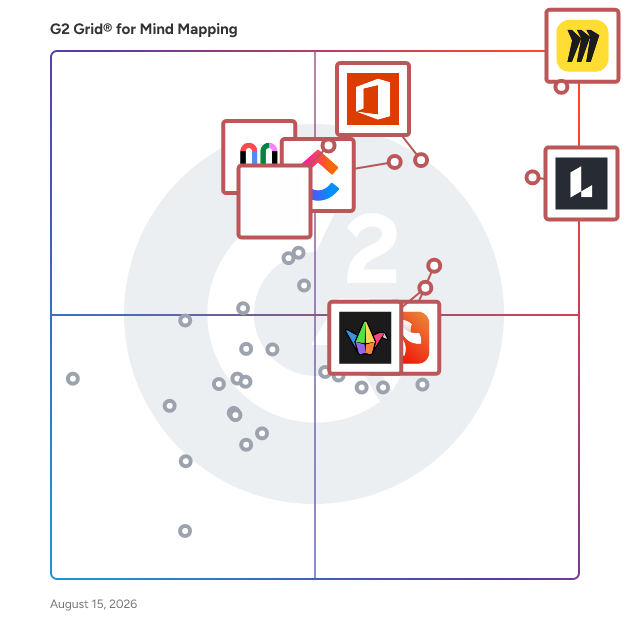
G2 Grid® for Mind Mapping Software

G2 Grid® for Mind Mapping Software plotting products by satisfaction and market presence

Highlighted products: Miro, Lucid Visual Collaboration Suite, Visio, ClickUp, FigJam, Xmind, Padlet, and Mural.

Underlying data: [Grid® JSON](https://www.g2.com/categories/mind-mapping-software/grids.json?focus%5B%5D=miro&focus%5B%5D=lucid-software-inc-lucid-visual-collaboration-suite&focus%5B%5D=visio&focus%5B%5D=clickup&focus%5B%5D=fig-jam&focus%5B%5D=xmind&focus%5B%5D=padlet&focus%5B%5D=mural)

Sponsored

Sangfor Cloud Platform

Sangfor Technologies is a rising global challenger in enterprise IT, helping organizations simplify Digital and AI transformation with secure, AI-enabled cloud infrastructure. Headquartered in Shenzhen (China), Sangfor serves over 100,000 customers worldwide across 100+ countries and regions. Sangfor has 22+ international offices across Asia-Pacific, Middle East, Europe and Latin America regions. Sangfor Cloud Platform (SCP) is built for large and mid-sized enterprises, based on a business-centric HCI architecture that integrates compute, storage, networking, virtualization, and security into a unified, software-defined platform. Sangfor Cloud Platform enables organizations to build secure, scalable, and flexible private and hybrid cloud environments. With centralized management, intelligent resource scheduling, and elastic infrastructure capabilities, Sangfor Cloud Platform simplifies cloud operations and reduces management complexity through standardized and automated processes. Built on a secure, reliable, and scalable architecture, it enables businesses to efficiently run mission-critical workloads while supporting future growth and expansion. To strengthen data protection and business continuity, Sangfor Cloud Platform also combines built-in security and resilience capabilities, including anti-ransomware protection, high availability, disaster recovery, and automated resource optimization, with seamless integration to leading backup solutions from Veeam and Cohesity. Sangfor Cloud Platform is trusted by large and mid-market enterprises across APAC, the Middle East, Europe, and LATAM. It is recognized as a Leader in the G2 Grid® for Server Virtualization and Hyperconverged Infrastructure in the Summer 2026 report. Sangfor Technologies has also been widely recognized by Gartner for its innovation, market presence, and customer satisfaction across the cloud and hyperconverged infrastructure landscape: ▪ Sangfor Recognized as a Representative Vendor in 2026 Gartner® Market Guide for Cloud Infrastructure Sovereign Solutions ▪ Sangfor Technologies Ranked among Top 5 Largest HCIS Vendors by Revenue in Asia-Pacific in the 2026 Gartner® Market Share Report ▪ Sample Vendor for VMware Alternative in Hyperconverged Infrastructure by Gartner ▪ Strong Performer in the Gartner® Peer Insights™ Voice of the Customer for Full-Stack HCI Software Whether you're modernizing legacy infrastructure, building a private or hybrid cloud, or seeking a powerful VMware alternative, Sangfor Cloud Platform delivers the performance, security, and simplicity needed to accelerate digital and AI transformation.

Visit website

Mapify

Mapify is an AI mind mapping tool that allows you to summarize any content into mind maps, such as YouTube videos, meeting records, PDFs, images, audio files, etc. Powered by GPT, Gemini, or other top LLMs, you can generate a mind map within seconds.

Average Rating: 5.0/5.0

Total Reviews: 1

How Do G2 Users Rate Mapify?

  • Quality of Support: 10.0/10 (Category avg: 8.7/10)

Who Is the Company Behind Mapify?

Who Uses This Product?

  • Company Size: 100% Medium

What Do G2 Reviewers Say About Mapify?

AI-generated summary from verified user reviews

Pros
  • Users find Mapify's ease of use exceptional, quickly summarizing videos into mind maps for efficient understanding.
  • Users find that Mapify offers time-saving summaries for YouTube videos, allowing quick understanding of key points.
Cons
  • Users find the linking issues limiting, suggesting that collaboration features would enhance team productivity.

What Are Recent G2 Reviews of Mapify?

meetXcc

meetXcc is a Chrome extension that revolutionizes meeting for Google Meet. Unlike traditional AI meeting assistants that provide basic summaries, meetXcc creates detailed, intuitive mind maps that capture the full depth and structure of your meeting.

Average Rating: 5.0/5.0

Total Reviews: 1

How Do G2 Users Rate meetXcc?

  • Quality of Support: 10.0/10 (Category avg: 8.7/10)

Who Is the Company Behind meetXcc?

Who Uses This Product?

  • Company Size: 100% Large

What Are Recent G2 Reviews of meetXcc?

Mind Maps Pro

Mind Maps Pro is an intuitive mind mapping application designed exclusively for the Microsoft Store, enabling users to transform their thoughts into structured visual diagrams with ease. With just a few clicks, users can create mind maps, organizational charts, or family trees, utilizing shapes, colors, flags, and an auto-layout feature to enhance clarity and organization. The app supports annotation and highlighting using a pen, and allows exporting to PDF or PNG formats for easy sharing. Additionally, Mind Maps Pro offers synchronization with OneDrive, ensuring access to your work across all devices. Key Features and Functionality: - User-Friendly Interface: Create mind maps effortlessly with a few clicks, using customizable shapes, colors, and flags. - Auto-Layout Feature: Automatically arrange elements to produce clear and organized diagrams, including mind maps, organizational charts, and family trees. - Annotation and Highlighting: Utilize pen input to annotate and highlight mind maps, enhancing visual emphasis and clarity. - Export Options: Save and share your mind maps in PDF or PNG formats, facilitating easy distribution and presentation. - OneDrive Synchronization: Sync your work with OneDrive to access and edit your mind maps across multiple devices seamlessly. Primary Value and User Solutions: Mind Maps Pro addresses the need for an efficient and user-friendly tool to organize and visualize complex ideas. By offering customizable mind mapping capabilities, it aids users in brainstorming, planning, and presenting information effectively. The integration with OneDrive ensures that users can access and modify their mind maps from any device, promoting flexibility and continuous productivity. Whether for personal organization, educational purposes, or professional project planning, Mind Maps Pro provides a comprehensive solution for structuring and sharing ideas.

Average Rating: 3.5/5.0

Total Reviews: 1

How Do G2 Users Rate Mind Maps Pro?

  • Quality of Support: 6.7/10 (Category avg: 8.7/10)

Who Is the Company Behind Mind Maps Pro?

Who Uses This Product?

  • Company Size: 100% Medium

Mindmaps Pro for Confluence

Add great charts to your wiki documentation in seconds! Share and collaborate with your peers and stakeholders to illustrate mind maps, tree and dependency charts inline directly within your Confluence documentation pages. Free for up to 10 users.

Average Rating: 5.0/5.0

Total Reviews: 1

How Do G2 Users Rate Mindmaps Pro for Confluence?

  • Quality of Support: 6.7/10 (Category avg: 8.7/10)

Who Is the Company Behind Mindmaps Pro for Confluence?

Who Uses This Product?

  • Company Size: 100% Small

What Are Recent G2 Reviews of Mindmaps Pro for Confluence?

Relate

Relate is a digital collaboration platform designed to help organizations and teams transform the way they manage knowledge, ideas, and projects. With its intuitive and visual mapping features, Relate enables companies to build a clear, shared understanding of processes, workflows, and strategies. Whether you are onboarding new employees, developing training programs, or driving complex team projects, Relate provides the tools to keep everyone aligned and engaged. For businesses, Relate acts as a corporate learning and development platform as well as a knowledge management solution. Managers and HR leaders can use it to simplify employee onboarding, centralize internal knowledge, and support ongoing training. Teams gain access to a collaborative project management environment where they can visually organize ideas, map business processes, and plan initiatives with clarity. This helps reduce silos, improve internal communication, and ensure that employees are moving in the same direction. Relate also supports workflow mapping and ecosystem mapping, allowing organizations to visually represent how processes, departments, and stakeholders connect. This feature is especially useful for corporate strategy development, change management projects, or event planning, where a clear overview of all moving parts is essential. By combining knowledge management with collaboration tools, Relate bridges the gap between day-to-day teamwork and long-term organizational growth. Beyond the corporate sector, Relate is also widely adopted in education. Teachers, professors, and students use the platform as a digital teaching and collaboration tool. Academic users benefit from lesson planning tools, curriculum mapping, and project collaboration spaces, making Relate a flexible solution for both classroom and research environments. What sets Relate apart is its ability to combine simplicity and depth. The platform is designed to be easy to use while supporting advanced needs such as business process mapping, employee training programs, and knowledge sharing across teams. Organizations can integrate Relate into their learning and development strategies while also using it as a visual tool for innovation and brainstorming. In short, Relate helps companies and educators collaborate more effectively, learn continuously, and manage complex information with clarity. By aligning people, processes, and knowledge in one place, Relate empowers teams to move faster, think smarter, and achieve more together.

Average Rating: 4.3/5.0

Total Reviews: 2

How Do G2 Users Rate Relate?

  • Has the product been a good partner in doing business?: 5.0/10 (Category avg: 9.1/10)
  • Quality of Support: 8.3/10 (Category avg: 8.7/10)

Who Is the Company Behind Relate?

  • Seller: Relate
  • Year Founded: 2010
  • HQ Location: Sherbrooke, Qc
  • LinkedIn® Page: ca.linkedin.com
    1 employees on LinkedIn®

Who Uses This Product?

  • Company Size: 100% Small

What Do G2 Reviewers Say About Relate?

AI-generated summary from verified user reviews

Pros
  • Users appreciate the business management solutions from Relate, enhancing flexibility and customer experience in their operations.
  • Users value the quick and personal customer support of Relate, which effectively resolves issues and enhances usability.
  • Users value the easy and intuitive interface of Relate, making daily use efficient and seamless.
  • Users appreciate the ease of use of Relate, finding it intuitive and seamlessly integrated into their workflow.
  • Users value the easy integrations of Relate, enabling a smooth and quick implementation into their workflows.
Cons
  • Users desire more native integrations with their daily tools for a smoother automation experience with Relate.
  • Users wish for more native integrations with other tools to enhance the overall experience and automation capabilities.

What Are Recent G2 Reviews of Relate?

CardBoardIt

CardBoard is a real-time online whiteboard collaboration tool designed for engineering and product management teams. CardBoard software specializes in user story mapping, used to visualize and plan product releases. Users choose CardBoard for its: - Simplicity: Intuitive interface that facilitates productive conversations. - Focus on story mapping: Tailored features for release planning. - Integrations: Connects seamlessly with Jira, Azure DevOps, and Shortcut. Key Features: - Infinite digital whiteboard for creating and organizing user stories. - Customizable templates for various story mapping scenarios. - Card backside to add descriptions, attach files, and set status. - Live cursor display for real-time collaboration across teams. - Integration with popular project management tools. Benefits: - Streamlined release planning through visual story mapping - Enhanced team alignment on product features and priorities - Time savings through direct integration with project tools - Improved product roadmap visualization - Access to a proven user story mapping methodology CardBoard stands out by offering a focused, efficient platform for user story mapping. As a tool featured in the Jeff Patton's best-selling book, CardBoard provides teams with a trusted method for planning releases and managing product backlogs. Prospective customers should know that CardBoard is ideal for engineering and product teams seeking a straightforward, purpose-built tool for collaborative release planning through user story mapping. Its ease of use, integration capabilities, and foundation in established methodology make it an excellent choice for teams looking to improve their product planning process.

Average Rating: 5.0/5.0

Total Reviews: 2

How Do G2 Users Rate CardBoardIt?

  • Quality of Support: 10.0/10 (Category avg: 8.7/10)

Who Is the Company Behind CardBoardIt?

Who Uses This Product?

  • Company Size: 50% Medium, 50% Small

What Are Recent G2 Reviews of CardBoardIt?

What Are G2 Users Discussing About CardBoardIt?

ClipMind

ClipMind is an AI-powered mind-mapping tool that transforms webpages, documents, and AI chats into clear, editable mind maps. Designed for learners, creators, and professionals, ClipMind helps users understand complex information faster, brainstorm ideas, and organize knowledge with ease. With one click, users can summarize webpages, PDFs, Word files, PPTs, or chat conversations into structured visual maps. ClipMind also includes an AI brainstorming assistant, a powerful drag-and-drop editor, multiple layouts and themes, and flexible export options. Fast, intuitive, and free to use, ClipMind makes visual thinking accessible to everyone.

Who Is the Company Behind ClipMind?

Cloudairy

Cloudairy is a visual collaboration platform that transforms how distributed teams ideate, plan, and build together. It provides a cloud-native AI workspace where teams can co-create diagrams, flowcharts, mind maps, manage projects, brainstorm on a whiteboard, and create dynamic documents in real-time. Teams across various industries utilize Cloudairy to streamline workflows, centralize knowledge, and expedite decision-making. Whether you're mapping processes, structuring content, or visualizing strategy, Cloudairy keeps your team aligned with intelligent organization and seamless collaboration. We bring together everything you need to design, plan, manage, and deliver: ✅ Cloudchart – Design technical diagrams, cloud architectures, flowcharts, and more with AI ✅ Whiteboard – Plan sprints, run workshops, and brainstorm ideas visually and collaboratively ✅ Workhub – Manage projects, track tasks, and execute agile workflows — all powered by smart automation ✅ Docs & Slides – Create documents and presentations with built-in intelligence and visual tools ✅ Cloudairy AI – Auto-generate diagrams, summarize notes, transform content, and drive efficiency Collaboration Tool Technical Diagramming Tool Diagram Maker Project Management Tool Brainstorming Tool Online Whiteboarding Tool Documents Editor Slides Generator AI Diagram Generator AI Flowchart Maker AI Idea Generation AI Mind Mapping AI Document Creator

Average Rating: 4.0/5.0

Total Reviews: 1

How Do G2 Users Rate Cloudairy?

  • Has the product been a good partner in doing business?: 10.0/10 (Category avg: 9.1/10)
  • Quality of Support: 8.3/10 (Category avg: 8.7/10)

Who Is the Company Behind Cloudairy?

  • Seller: Cloudairy
  • Year Founded: 2023
  • HQ Location: New York, US
  • Twitter: @cloudairyhq
    148 Twitter followers
  • LinkedIn® Page: www.linkedin.com
    47 employees on LinkedIn®
  • Ownership: Private

Who Uses This Product?

  • Company Size: 100% Large

What Do G2 Reviewers Say About Cloudairy?

AI-generated summary from verified user reviews

Pros
  • Users appreciate the seamless collaboration features of Cloudairy, enhancing productivity with its intuitive and lightweight design.
  • Users appreciate the intuitive design of Cloudairy, enabling effortless navigation and powerful cloud capabilities seamlessly.
  • Users appreciate the ease of use of Cloudairy, enjoying its intuitive design and effortless navigation.
  • Users value the easy integration of Cloudairy, enhancing productivity while maintaining a seamless experience with modern tools.
  • Users value the easy integrations of Cloudairy, enhancing productivity while maintaining a smooth and responsive experience.
Cons
  • Users experience connection issues with Cloudairy, including frustrating sync delays when switching between devices.
  • Users experience connectivity issues with Cloudairy, including sync delays that disrupt work and cause frustration.
  • Users experience sync delays with Cloudairy, causing frustration during time-sensitive tasks across devices.
  • Users experience occasional sync delays on Cloudairy, which can be frustrating when handling time-sensitive tasks.
  • Users find Cloudairy's limited features frustrating, especially the lack of advanced options for power users.

What Are Recent G2 Reviews of Cloudairy?

Comapping

Comapping is online mind mapping software to manage and share information. Use it to take notes, plan and organize. It's a way to have one set of notes.

Who Is the Company Behind Comapping?

  • Seller: Comapping
  • HQ Location: N/A
  • Twitter: @comapping
    40 Twitter followers
  • LinkedIn® Page: www.linkedin.com
    1 employees on LinkedIn®

FiaMind

FiaMind is a beautifully simple AI mind mapping tool designed to intelligently assist with organizing information, capturing creative ideas, planning & designing projects, and constructing powerful knowledge systems — delivering all-around efficiency gains.

Who Is the Company Behind FiaMind?

iMindQ

iMindQ is a dynamic mind mapping software that can be used as a tool for visual thinking, organising your brainstorming session, writing down and structuring your thoughts, ideas or research and more. It is great for solving problems, planning, visual presentations and communicating information and concepts. Why choose iMindQ? Some of the key benefits include: - Creation of mind maps, concepts maps and other diagrams. - Unique Presentation Mode. - Mind map templates. - Project Planning options. - Research panel, SharePoint and Cloud platforms integration. - Dedicated Support. iMindQ helps you to brings your ideas to live by mapping and organising thoughts and information. The software incorporates many types of map styles for business, educational as well as personal use that can be used by any department in an organization, School system or University. With its key features, iMindQ supports the creation of mind maps, concept maps, flowcharts, Gantt charts, organizational charts, WBS charts and other types of diagrams that help present important information and data in a rather easily memorable and understandable format. With mind maps users can map out any information and visualise their thoughts and ideas. The software can be used to make a accurate and memorable representation of complex systems and processes with a concept map, or at the same time visually simplify processes with flowchart diagrams. iMindQ is available for the Windows platform with different pricing plans for individuals and organisations. A free 15-day trial for testing and evaluation purposes is available for download from the official website.

Who Is the Company Behind iMindQ?

Kosmik

Kosmik is a visual research app that transforms your research workflow. From mood boarding to strategic thinking, Kosmik does not just store your images, notes and videos. Instead, Kosmik proactively finds what you need next. Key Features - Auto-tagging: import images or clip assets from the web and let Kosmik organise and tag them to build your assets library automatically. - AI search: Select any items and let Kosmik browse the web for you to find related images, links, or even videos. Benefits - Build mood boards in seconds: Input a few key words and let Kosmik go online to kickstart your research process. - Never worry about organising references again: Kosmik categorizes and tags everything you save automatically. It recognizes objects, subjects, and even colors. No need to remember filenames or folders, just describe what you’re looking for, and Kosmik will find it across your canvas.

Who Is the Company Behind Kosmik?

  • Seller: Kosmik
  • Year Founded: 2018
  • HQ Location: Paris, FR
  • LinkedIn® Page: www.linkedin.com
    15 employees on LinkedIn®

Matilda Workspace

The All-New All-In-One Workspace for Modern Teams Embracing the concept of a unified workspace, Matilda brings a powerful suite of best-in-class apps together in one place, allowing teams across the globe to connect, create, coordinate, and delight their customers effortlessly. With its mission to simplify technology, Matilda empowers organisations to do more with less, making it an essential tool for startups to Fortune 500 companies alike. Key Features: -Powerful Apps Included: Matilda comes packed with a suite of powerful applications including Docs, Projects, Tables, Chat, Customers, and Copilot, ensuring that teams have all the tools they need to succeed. - Create with Ease: With Docs, teams can co-edit in real time, making document creation and coordination seamless. This feature aims to replace Google Docs, Notion, and Coda, by providing a more integrated and efficient experience. - Streamlined Project Management: Matilda's Projects feature allows for effortless management and tracking of every aspect of your projects. With capabilities like auto-scheduling, it's designed to replace tools like Jira, Trello, and Asana. - Advanced Data Management: Although Tables are coming soon, they promise to redefine data handling by syncing data from hundreds of sources or creating new collections, aiming to replace tools like Airtable, Notion, and Segment. - Seamless Communication: Chat brings all team communication into one place, integrated across projects, tasks, and docs, providing an alternative to Slack and MS Teams. - Customer Relationship Management: The soon-to-be-released Customers feature will allow teams to effortlessly track leads and manage customer interactions in one streamlined interface, aiming to replace Salesforce and Hubspot. - AI-Powered Assistance: Copilot offers custom AI assistants to help automate and streamline workflows, aiming to replace AI tools like ChatGPT and Google Bard. Conclusion: Matilda Workspace stands out as an all-encompassing solution that not only promises to streamline and simplify the way teams work but also embraces the future with its AI-powered capabilities and commitment to sustainability. Whether you’re managing projects, coordinating with your team, handling customer relationships, or leveraging AI for automation, Matilda Workspace provides an intuitive, powerful, and adaptable platform for every kind of team to thrive. Try Matilda today and experience the future of work, designed to help you deliver projects on time, every time.

Average Rating: 4.7/5.0

Total Reviews: 14

How Do G2 Users Rate Matilda Workspace?

  • Has the product been a good partner in doing business?: 9.7/10 (Category avg: 9.1/10)
  • Quality of Support: 8.9/10 (Category avg: 8.7/10)

Who Is the Company Behind Matilda Workspace?

  • Seller: Matilda Workspace
  • Year Founded: 2024
  • HQ Location: San Francisco, California
  • Twitter: @matildaworkspce
    127 Twitter followers
  • LinkedIn® Page: www.linkedin.com
    2 employees on LinkedIn®

Who Uses This Product?

  • Company Size: 80% Small, 20% Medium

What Do G2 Reviewers Say About Matilda Workspace?

AI-generated summary from verified user reviews

Pros
  • Users value the team collaboration features of Matilda Workspace, enhancing productivity and simplifying project management.
  • Users appreciate the rich functionalities of Matilda Workspace, streamlining project management and enhancing communication effortlessly.
  • Users find Matilda Workspace's ease of use enhances productivity and seamless collaboration for both in-office and remote teams.
  • Users value the all-in-one functionalities of Matilda Workspace, enhancing collaboration and simplifying project management tasks.
  • Users appreciate the AI-powered Copilot in Matilda Workspace, enhancing efficiency and simplifying project management tasks.
Cons
  • Users note some missing features due to Matilda Workspace's newness, but anticipate improvements in future updates.
  • Users note a lack of features in Matilda Workspace due to its relative novelty, with future updates anticipated.
  • Users report tiny bugs in Matilda Workspace, but the team is responsive and attentive to feedback.
  • Users find the learning curve challenging for some team members, though onboarding assistance helps ease the transition.
  • Users feel that the limited customization options in Matilda Workspace could be improved for a better experience.

What Are Recent G2 Reviews of Matilda Workspace?

Merlin Project

Merlin Project is a project management on the Mac that has features that include kanban boards, groupings, resource pool & much more.

Average Rating: 2.8/5.0

Total Reviews: 2

Who Is the Company Behind Merlin Project?

  • Seller: ProjectWizards
  • Year Founded: 2002
  • HQ Location: Melle, DE
  • Twitter: @MerlinPM
    1,669 Twitter followers
  • LinkedIn® Page: www.linkedin.com
    9 employees on LinkedIn®

Who Uses This Product?

  • Company Size: 50% Large, 50% Small

Mind Vector

Available to the iOS (iPhone and iPad) users, Mind Vector introduces you to the productivity-enhancing world of mind mapping. Utilise this intuitive app to create notes, plans and collaborate with colleagues.

Who Is the Company Behind Mind Vector?

Neeraja Prakash
NP
Researched and written by Neeraja Prakash
Updated March 10, 2025