Best Malware Analysis Tools

How Many Malware Analysis Tools Products Does G2 Track?

Total Products under this Category: 55

Category Stats (Sep 2026)

  • Average Rating: 4.51/5 The average rating of products in this category, based on all submitted ratings

Last updated: September 08, 2026

How Does G2 Rank Malware Analysis Tools Products?

Why You Can Trust G2's Software Rankings:

  • 30 Analysts and Data Experts
  • 2,200+ Authentic Reviews
  • 55+ Products
  • Unbiased Rankings

G2's software rankings are built on verified user reviews, rigorous moderation, and a consistent research methodology maintained by a team of analysts and data experts. Each product is measured using the same transparent criteria, with no paid placement or vendor influence. While reviews reflect real user experiences, which can be subjective, they offer valuable insight into how software performs in the hands of professionals. Together, these inputs power the G2 Score, a standardized way to compare tools within every category.

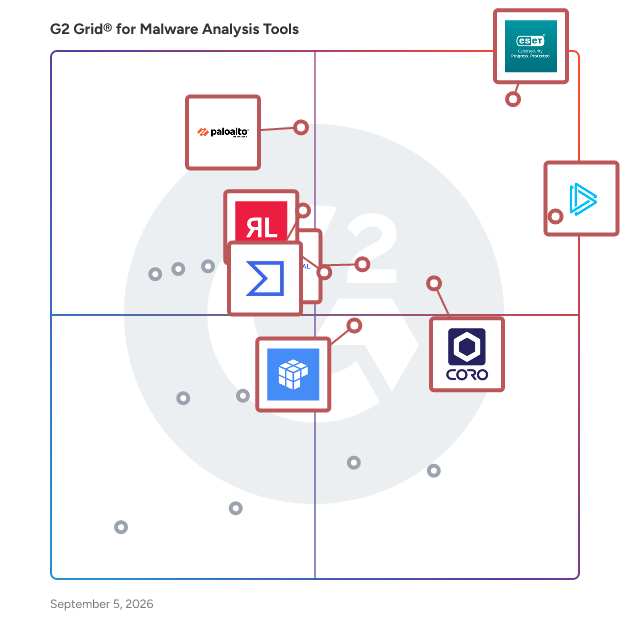
G2 Grid® for Malware Analysis Tools

G2 Grid® for Malware Analysis Tools plotting products by satisfaction and market presence

Highlighted products: ESET PROTECT, ANY.RUN Sandbox, Cloud-Delivered Security Services, Coro Cybersecurity, VirusTotal, Google VirusTotal, ReversingLabs, and Intezer.

Underlying data: [Grid® JSON](https://www.g2.com/categories/malware-analysis-tools/grids.json?focus%5B%5D=eset-protect&focus%5B%5D=any-run-sandbox&focus%5B%5D=cloud-delivered-security-services&focus%5B%5D=coro-cybersecurity&focus%5B%5D=virustotal&focus%5B%5D=google-virustotal&focus%5B%5D=reversinglabs&focus%5B%5D=intezer-intezer)

ESET PROTECT

Stay one step ahead of known and emerging cyber threats with our AI-native, prevention-first approach. ESET combines the power of AI and human expertise to make protection easy and effective. Experience best-in-class protection thanks to our in-house global cyber threat intelligence, compiled and examined for over 30 years, which drives our extensive R&D network led by industry-acclaimed researchers. ESET PROTECT, our cloud-first XDR cybersecurity platform combines next-gen prevention, detection, and proactive threat hunting capabilities. ESET's highly customizable solutions include local support and have minimal impact on performance, identify and neutralize known and emerging threats before they can be executed, support business continuity, and reduce the cost of implementation and management. HOW YOUR ORGANIZATION WILL BENEFIT - Improved protection against ransomware and zero-day threats via cloud-based sandboxing technology. - Helps comply with data regulations thanks to full disk encryption capabilities on Windows and macOS. - Easily accessible ESET PROTECT console improves TCO of security management. - Single-pane-of-glass remote management for visibility of threats, users, and quarantined items. - Company endpoints and mobiles are protected via advanced multilayered technology, now with brute-force attack protection.

Average Rating: 4.6/5.0

Total Reviews: 961

How Do G2 Users Rate ESET PROTECT?

  • Has the product been a good partner in doing business?: 8.9/10 (Category avg: 8.8/10)
  • Malware Evaluation: 9.6/10 (Category avg: 9.0/10)
  • Malware Detection: 9.6/10 (Category avg: 9.1/10)
  • File Analysis: 9.5/10 (Category avg: 9.0/10)

Who Is the Company Behind ESET PROTECT?

  • Seller: ESET
  • Company Website:
  • Year Founded: 1992
  • HQ Location: Bratislava, Slovak Republic
  • Twitter: @ESET
    275,702 Twitter followers
  • LinkedIn® Page: www.linkedin.com
    2,014 employees on LinkedIn®

Who Uses This Product?

  • Who Uses This: IT Manager, Network Administrator
  • Top Industries: Information Technology and Services, Computer Software
  • Company Size: 47% Medium, 45% Small

What Do G2 Reviewers Say About ESET PROTECT?

AI-generated summary from verified user reviews

Pros
  • Users appreciate the straightforward installation of ESET PROTECT, making it easy for anyone to get started.
  • Users commend ESET PROTECT for its robust ransomware protection, ensuring comprehensive security across multiple endpoints.
  • Users commend the reliability of ESET PROTECT, especially its strong protection against ransomware across multiple platforms.
  • Users value the great security of ESET PROTECT, ensuring computer safety with minimal impact on performance.
  • Users value the centralized management of ESET PROTECT, enabling effortless device oversight and enhanced threat detection.
Cons
  • Users find a learning curve with ESET PROTECT, as some features are complex and require expensive licenses.
  • Users find the difficult configuration process of ESET PROTECT time-consuming and sometimes overly complex for setup and management.
  • Users find the dashboard not user-friendly, citing excessive clicks for accessing necessary data and managing settings.
  • Users report a lack of clarity in policy management and task handling, complicating effective security oversight.
  • Users find difficult navigation in ESET PROTECT, requiring advanced skills and patience during implementation and setup.

What Are Recent G2 Reviews of ESET PROTECT?

What Are G2 Users Discussing About ESET PROTECT?

ANY.RUN Sandbox

ANY.RUN's Interactive Sandbox is a cloud-based service for in-depth malware analysis. It offers visibility into threat behavior based on interactivity that allows you to detonate threats, fine-tune analysis, and see the entire attack unfold with insights into related network activities, system processes, and TTPs in use. The environment is secure, configurable, and supports Windows, Linux, and Android. The sandbox provides SOC teams with a simple yet highly detailed way to break down cyber threats for fast decision making, investigation, and response.

Average Rating: 4.7/5.0

Total Reviews: 217

How Do G2 Users Rate ANY.RUN Sandbox?

  • Has the product been a good partner in doing business?: 9.2/10 (Category avg: 8.8/10)
  • Malware Evaluation: 9.3/10 (Category avg: 9.0/10)
  • Malware Detection: 9.2/10 (Category avg: 9.1/10)
  • File Analysis: 9.3/10 (Category avg: 9.0/10)

Who Is the Company Behind ANY.RUN Sandbox?

  • Seller: ANY.RUN
  • Company Website:
  • Year Founded: 2016
  • HQ Location: Dubai, United Arab Emirates
  • Twitter: @anyrun_app
    33,120 Twitter followers
  • LinkedIn® Page: www.linkedin.com
    399 employees on LinkedIn®

Who Uses This Product?

  • Who Uses This: Security Analyst, Cyber Security Analyst
  • Top Industries: Computer & Network Security, Information Technology and Services
  • Company Size: 32% Large, 30% Small

What Are Recent G2 Reviews of ANY.RUN Sandbox?

What Are G2 Users Discussing About ANY.RUN Sandbox?

Cloud-Delivered Security Services

Overview Our Cloud-Delivered Security Services are natively integrated, offering consistent best-in-class protection everywhere. Backed by our world-renowned Unit 42® Threat Research team, this one-of-a-kind protection uses the network effect of 70,000+ global customers to share intelligence across all threat vectors to stop known, unknown and zero-day threats 180X faster than any other platform or point solution and prevent patient zero. What are Cloud-Delivered Security Services? A comprehensive suite of natively-integrated security services delivered from the cloud that provide protection for a customer’s entire network, securing all users, applications, devices, and data, regardless of the location. Our security services are powered by Precision AI™ and analyze real network traffic inline and stop threats in real time, including phishing, malware, command and control, ransomware, DNS-layered threats, and much more. These services include: Advanced Threat Prevention, the industry’s leading intrusion prevention system that addresses known and unknown command-and-control attacks from red team tools, as well as injection attacks and vulnerability exploits. Advanced WildFire, the industry’s largest malware analysis engine that stops the first instance of known, unknown and highly-evasive malware. Advanced URL Filtering, the industry’s first web security engine to stop unknown phishing attacks in real time. Advanced DNS Security, the industry’s most comprehensive DNS security solution that offers over 2x more threat coverage than the next leading security vendor and is also the industry’s first solution to stop network-based DNS hijacking attacks in real time. IoT/OT Security, the industry’s most comprehensive zero trust solution for IoT devices, helping you see and secure all connected devices in your network. NG-CASB, our SaaS application and data security solution that allows you to discover and control all of the SaaS consumption in your network. AI Access Security, our solution that ensures safe use of GenAI apps with access control, data protection and real-time visibility of over 600 applications, so that your employees can securely use AI to increase their productivity. With the power of AI and a robust global cloud infrastructure, Palo Alto Networks Cloud-Delivered Security Services can scale to stay ahead of today's threats and keep up with your organization's network security needs.

Average Rating: 4.4/5.0

Total Reviews: 101

How Do G2 Users Rate Cloud-Delivered Security Services?

  • Has the product been a good partner in doing business?: 8.8/10 (Category avg: 8.8/10)
  • Malware Evaluation: 8.8/10 (Category avg: 9.0/10)
  • Malware Detection: 8.7/10 (Category avg: 9.1/10)
  • File Analysis: 8.5/10 (Category avg: 9.0/10)

Who Is the Company Behind Cloud-Delivered Security Services?

  • Seller: Palo Alto Networks
  • Year Founded: 2005
  • HQ Location: Santa Clara, CA
  • Twitter: @PaloAltoNtwks
    128,951 Twitter followers
  • LinkedIn® Page: www.linkedin.com
    23,492 employees on LinkedIn®
  • Ownership: NYSE: PANW

Who Uses This Product?

  • Who Uses This: Network Engineer
  • Top Industries: Information Technology and Services, Computer & Network Security
  • Company Size: 41% Medium, 34% Large

What Are Recent G2 Reviews of Cloud-Delivered Security Services?

Coro Cybersecurity

Coro is the easy cybersecurity company. We designed an all-in-one platform that every lean IT team will master. While other solutions scare people into buying complicated, confusing products, we lead with elegant simplicity. Coro is fast to deploy, easy to use, and designed not to waste your time. Once you install Coro, you’ll hardly think about us. That’s the point. Coro automatically detects and fixes security problems, so IT teams don’t have to spend time investigating or troubleshooting. We’re also one of the fastest-growing tech companies in North America, just ask Deloitte. Designed primarily for lean IT teams, Coro’s platform is particularly beneficial for organizations that may lack extensive IT resources or dedicated cybersecurity teams. With the increasing complexity of cyber threats, these businesses often find it challenging to maintain adequate security measures. Coro addresses this gap by automating the detection and remediation of security threats, allowing businesses to focus on their core operations without the constant worry of potential breaches or security incidents. One of Coro's key benefits is its intuitive, user-friendly interface, which simplifies the management of cybersecurity protocols. This ease of use is particularly advantageous for organizations with limited IT expertise, as it minimizes the need for extensive training or technical knowledge. Additionally, Coro’s continuous monitoring and reporting features provide businesses with valuable insights into their security posture, enabling them to make informed decisions about their cybersecurity strategies. Another impressive features is how comprehensive, yet powerful, it's all-in-one platform is. Using advanced AI technology, it detects and remediates over 92% of threats automatically, ensuring potential vulnerabilities are identified and addressed in real-time, significantly reducing the risk of data breaches and other cyber incidents. Their impressive performance has been recognised by G2 with a 94% approval rating from users and SE Labs, who awarded them three AAA ratings for their EDR, Email and Cloud modules. Overall, Coro’s cybersecurity platform represents a significant advancement in the field of cybersecurity. By automating threat detection and remediation, offering customizable solutions, and providing a user-friendly experience, Coro empowers organizations to effectively defend against the evolving landscape of cyber threats. Its recognition as one of the fastest-growing cybersecurity companies in North America further underscores its commitment to delivering innovative and effective security solutions.

Average Rating: 4.7/5.0

Total Reviews: 233

How Do G2 Users Rate Coro Cybersecurity?

  • Has the product been a good partner in doing business?: 9.6/10 (Category avg: 8.8/10)
  • Malware Evaluation: 9.3/10 (Category avg: 9.0/10)
  • Malware Detection: 9.6/10 (Category avg: 9.1/10)
  • File Analysis: 9.4/10 (Category avg: 9.0/10)

Who Is the Company Behind Coro Cybersecurity?

  • Seller: Coronet
  • Company Website:
  • Year Founded: 2014
  • HQ Location: Chicago, IL
  • Twitter: @coro_cyber
    1,876 Twitter followers
  • LinkedIn® Page: www.linkedin.com
    275 employees on LinkedIn®

Who Uses This Product?

  • Who Uses This: IT Manager, IT Director
  • Top Industries: Financial Services, Non-Profit Organization Management
  • Company Size: 56% Medium, 36% Small

What Do G2 Reviewers Say About Coro Cybersecurity?

AI-generated summary from verified user reviews

Pros
  • Users find Coro Cybersecurity's ease of use outstanding, with quick setup and excellent support for seamless protection.
  • Users value the peace of mind provided by Coro Cybersecurity's easy installation and effective endpoint protection.
  • Users appreciate the fantastic customer support from Coro Cybersecurity, making implementation and maintenance seamless.
  • Users value Coro Cybersecurity for its affordability and robust protection, enhancing security for users and endpoints.
  • Users appreciate the easy setup of Coro Cybersecurity, enjoying a seamless experience with excellent customer support.
Cons
  • Users experience performance issues with Coro Cybersecurity, particularly regarding spam filtration and agent limitations.
  • Users indicate that improvements are needed in malware reporting, dashboard detail, and client update reliability.
  • Users report a higher than expected incidence of false positives, complicating email management and efficiency.
  • Users experience inaccuracy in spam training, with false positives and region-specific content hindering effectiveness for USA users.
  • Users express concerns about limited features in Coro, particularly regarding email reporting and basic module functionalities.

What Are Recent G2 Reviews of Coro Cybersecurity?

What Are G2 Users Discussing About Coro Cybersecurity?

Google VirusTotal

VirusTotal is a comprehensive online service that analyzes files and URLs to detect viruses, worms, trojans, and other malicious content. By aggregating results from over 70 antivirus scanners and URL/domain blacklisting services, it provides a thorough assessment of potential threats. Users can upload files up to 650 MB or submit URLs for scanning, receiving detailed reports on the safety of the content. This collaborative approach enhances the detection of malware and helps in identifying false positives. Key Features and Functionality: - Multi-Engine Scanning: Utilizes a vast array of antivirus engines to provide comprehensive threat detection. - Dynamic and Static Analysis: Employs both dynamic (behavioral) and static (code) analysis techniques to identify malicious behavior. - URL and Domain Analysis: Assesses the safety of URLs and domains, identifying potential phishing sites or malicious content. - API Access: Offers API integration for automated submissions and retrieval of analysis reports, facilitating seamless incorporation into security workflows. - Community Collaboration: Enables users to share insights, comments, and ratings, fostering a collaborative environment for threat intelligence. Primary Value and User Solutions: VirusTotal serves as a vital tool for individuals and organizations aiming to bolster their cybersecurity defenses. By providing a centralized platform for malware detection and analysis, it aids in the early identification of threats, reducing the risk of infection and data breaches. Security professionals leverage VirusTotal for incident response, threat hunting, and research, while developers use it to ensure their software is free from malicious code. The service's extensive database and collaborative features enhance situational awareness and contribute to a more secure digital environment.

Average Rating: 4.6/5.0

Total Reviews: 13

How Do G2 Users Rate Google VirusTotal?

  • Has the product been a good partner in doing business?: 6.7/10 (Category avg: 8.8/10)
  • Malware Evaluation: 9.2/10 (Category avg: 9.0/10)
  • Malware Detection: 8.8/10 (Category avg: 9.1/10)
  • File Analysis: 9.4/10 (Category avg: 9.0/10)

Who Is the Company Behind Google VirusTotal?

  • Seller: Google
  • Year Founded: 1998
  • HQ Location: Mountain View, CA
  • Twitter: @google
    31,899,995 Twitter followers
  • LinkedIn® Page: www.linkedin.com
    301,144 employees on LinkedIn®
  • Ownership: NASDAQ:GOOG

Who Uses This Product?

  • Company Size: 38% Small, 31% Medium

What Are Recent G2 Reviews of Google VirusTotal?

VirusTotal

VirusTotal is a free online service that analyzes files and URLs to detect malware and other malicious content. By aggregating results from over 70 antivirus scanners and URL/domain blocklisting services, it provides a comprehensive assessment of potential threats. Users can submit files up to 650 MB or URLs for scanning, receiving detailed reports that include detection rates from various security vendors, behavioral analysis, and metadata extraction. This collaborative approach enhances the detection of threats that individual antivirus solutions might miss. Key Features: - Multi-Engine Scanning: Utilizes over 70 antivirus engines to analyze files and URLs, offering a broad detection capability. - File and URL Analysis: Supports scanning of files up to 650 MB and URLs, providing flexibility in threat assessment. - API Integration: Offers an API for automated submissions and integration with other security tools, facilitating streamlined workflows. - Dynamic Analysis: Employs the Cuckoo sandbox for dynamic malware analysis, enabling in-depth examination of suspicious files. - Statistical Insights: Provides real-time statistics on scanned files and detected threats, aiding in trend analysis and threat intelligence. Primary Value: VirusTotal enhances cybersecurity by offering a centralized platform for comprehensive malware detection and analysis. It addresses the limitations of individual antivirus solutions by aggregating multiple detection engines, thereby reducing false negatives and improving threat identification. This service is invaluable for security professionals, researchers, and organizations seeking to bolster their threat intelligence, validate suspicious files or URLs, and respond swiftly to potential security incidents.

Average Rating: 4.7/5.0

Total Reviews: 33

How Do G2 Users Rate VirusTotal?

  • Has the product been a good partner in doing business?: 10.0/10 (Category avg: 8.8/10)
  • Malware Evaluation: 8.9/10 (Category avg: 9.0/10)
  • Malware Detection: 9.3/10 (Category avg: 9.1/10)
  • File Analysis: 9.3/10 (Category avg: 9.0/10)

Who Is the Company Behind VirusTotal?

  • Seller: VirusTotal
  • Year Founded: 2004
  • HQ Location: Spain
  • Twitter: @virustotal
    32,650 Twitter followers
  • LinkedIn® Page: www.linkedin.com
    70 employees on LinkedIn®

Who Uses This Product?

  • Top Industries: Information Technology and Services
  • Company Size: 40% Small, 31% Medium

What Are Recent G2 Reviews of VirusTotal?

What Are G2 Users Discussing About VirusTotal?

ReversingLabs

ReversingLabs is the trusted name in file and software security. We provide the modern cybersecurity platform to verify and deliver safe binaries. Trusted by the Fortune 500 and leading cybersecurity vendors, RL Spectra Core powers the software supply chain and file security insights, tracking over 422 billion searchable files with the ability to deconstruct full software binaries in seconds to minutes. Only ReversingLabs provides that final exam to determine whether a single file or full software binary presents a risk to your organization and your customers.

Average Rating: 4.7/5.0

Total Reviews: 10

How Do G2 Users Rate ReversingLabs?

  • Has the product been a good partner in doing business?: 8.9/10 (Category avg: 8.8/10)
  • Malware Evaluation: 9.4/10 (Category avg: 9.0/10)
  • Malware Detection: 9.0/10 (Category avg: 9.1/10)
  • File Analysis: 8.8/10 (Category avg: 9.0/10)

Who Is the Company Behind ReversingLabs?

  • Seller: ReversingLabs
  • Year Founded: 2009
  • HQ Location: Cambridge, US
  • Twitter: @ReversingLabs
    7,022 Twitter followers
  • LinkedIn® Page: www.linkedin.com
    321 employees on LinkedIn®

Who Uses This Product?

  • Company Size: 80% Small, 10% Medium

What Do G2 Reviewers Say About ReversingLabs?

AI-generated summary from verified user reviews

Pros
  • Users commend the accuracy of information offered by ReversingLabs, utilizing an extensive repository of files for effective risk management.
  • Users commend the excellent customer support from ReversingLabs, enhancing their onboarding and overall experience effectively.
  • Users commend the efficient onboarding process of ReversingLabs, facilitating a seamless and effective transition to their services.
  • Users appreciate the effective prioritization of risk management with ReversingLabs, enhancing their security processes significantly.
  • Users commend the high reliability of ReversingLabs, citing exceptional support and a vast repository of files.
Cons
  • Users find the endpoints for checking usage confusing, which complicates their overall experience with the product.
  • Users find the confusing interface for usage endpoints makes it difficult to navigate the product effectively.
  • Users find the navigation issues related to usage endpoints somewhat confusing, impacting their overall experience.
  • Users feel the UI could be nicer, yet it doesn't hinder the overall functionality of ReversingLabs.

What Are Recent G2 Reviews of ReversingLabs?

Intezer

Intezer automates the entire alert triage process, like an extension of your team handling Tier 1 SOC tasks for every alert at machine-speed. Intezer monitors incoming incidents from endpoint, reported phishing pipelines, or SIEM tools, then autonomously collects evidence, investigates, makes triage decisions, and escalates only the serious threats to your team for human intervention. Power your SOC with artificial intelligence that makes sure every alert is deeply analyzed (including every single artifact like files, URLs, endpoint memory, etc.), detecting malicious code in memory and other evasive threats. Fast set up and integrations with your SOC team's workflows (EDR, SOAR, SIEM, etc.) means Intezer's AI can immediately start filtering out false positives, giving you detailed analysis about every threat, and speeding up your incident response time. With Intezer: • Reduce Tier 1 escalation, sending only 4% of alerts on average to your team for immediate action. • Identify up to 97% of false positive alerts without taking any time from your analysts. • Reduce average triage time to 5 minutes or less, while giving your analysts deep context about every alert to prioritize critical treats and respond faster.

Average Rating: 4.5/5.0

Total Reviews: 187

How Do G2 Users Rate Intezer?

  • Has the product been a good partner in doing business?: 8.6/10 (Category avg: 8.8/10)
  • Malware Evaluation: 9.3/10 (Category avg: 9.0/10)
  • Malware Detection: 9.6/10 (Category avg: 9.1/10)
  • File Analysis: 9.4/10 (Category avg: 9.0/10)

Who Is the Company Behind Intezer?

  • Seller: Intezer
  • Year Founded: 2015
  • HQ Location: New York
  • Twitter: @IntezerLabs
    10,170 Twitter followers
  • LinkedIn® Page: www.linkedin.com
    89 employees on LinkedIn®

Who Uses This Product?

  • Who Uses This: Software Engineer, Student
  • Top Industries: Computer & Network Security, Information Technology and Services
  • Company Size: 54% Small, 23% Medium

What Do G2 Reviewers Say About Intezer?

AI-generated summary from verified user reviews

Pros
  • Users appreciate the robust security features of Intezer, ensuring timely detection and blocking of malware.
  • Users value the effective malware detection and security features of Intezer that enhance system protection.
  • Users value Intezer for its effective malware detection and response capabilities, enhancing overall security and incident management.
  • Users value the high detection accuracy of Intezer, ensuring timely malware detection and enhanced system security.
  • Users appreciate the ease of use of Intezer, making malware detection and incident response straightforward and efficient.
Cons
  • Users feel the inability to control file visibility limits their privacy and management options in certain situations.
  • Users report complex interface issues with Intezer, making navigation challenging and less intuitive.
  • Users are concerned about limited file visibility control, which may impact their data privacy and access management.
  • Users find the difficult navigation of Intezer frustrating, with a less-than-ideal UI and small text affecting readability.
  • Users find the expensive pricing of Intezer problematic, especially with the limited free tier and some GUI issues.

What Are Recent G2 Reviews of Intezer?

What Are G2 Users Discussing About Intezer?

Trend Micro Deep Discovery

Deep Discovery Inspector is available as a physical or virtual network appliance. It's designed to quickly detect advanced malware that typically bypasses traditional security defenses and exfiltrates sensitive data. Specialized detection engines and custom sandbox analysis detect and prevent breaches.

Average Rating: 4.3/5.0

Total Reviews: 16

How Do G2 Users Rate Trend Micro Deep Discovery?

  • Has the product been a good partner in doing business?: 9.2/10 (Category avg: 8.8/10)
  • Malware Evaluation: 8.8/10 (Category avg: 9.0/10)
  • Malware Detection: 9.4/10 (Category avg: 9.1/10)
  • File Analysis: 9.0/10 (Category avg: 9.0/10)

Who Is the Company Behind Trend Micro Deep Discovery?

  • Seller: TrendAI
  • Year Founded: 1988
  • HQ Location: Tokyo
  • LinkedIn® Page: www.linkedin.com
    7,996 employees on LinkedIn®
  • Ownership: OTCMKTS:TMICY
  • Total Revenue (USD mm): $1,515

Who Uses This Product?

  • Top Industries: Information Technology and Services
  • Company Size: 41% Medium, 35% Large

What Are Recent G2 Reviews of Trend Micro Deep Discovery?

Symantec Content Analysis and Sandboxing

Detect and block advanced threats that elude traditional analysis with multiple-layer inspection and customizable sandboxing

Average Rating: 4.6/5.0

Total Reviews: 29

How Do G2 Users Rate Symantec Content Analysis and Sandboxing?

  • Has the product been a good partner in doing business?: 10.0/10 (Category avg: 8.8/10)
  • Malware Evaluation: 9.7/10 (Category avg: 9.0/10)
  • Malware Detection: 9.7/10 (Category avg: 9.1/10)
  • File Analysis: 9.3/10 (Category avg: 9.0/10)

Who Is the Company Behind Symantec Content Analysis and Sandboxing?

  • Seller: Broadcom
  • Year Founded: 1991
  • HQ Location: San Jose, CA
  • Twitter: @broadcom
    63,909 Twitter followers
  • LinkedIn® Page: www.linkedin.com
    44,602 employees on LinkedIn®
  • Ownership: NASDAQ: CA

Who Uses This Product?

  • Top Industries: Computer & Network Security, Information Technology and Services
  • Company Size: 37% Large, 37% Medium

What Are Recent G2 Reviews of Symantec Content Analysis and Sandboxing?

FileWall for Microsoft 365

FileWall is a must-have native security solution for Microsoft 365 and provides the ultimate protection against file-based cyber-attacks for Microsoft 365 business applications. Leveraging odix’s patented Deep File Analysis (DFA) technology containing proprietary Content Disarm and Reconstruction (TrueCDR™) algorithms. The DFA process considers a file like an iceberg, often unassuming on the surface but looking deep down into what lies beneath the surface eliminating embedded malware in files where traditional legacy solutions fail to detect. FileWall complements Microsoft’s security products such as Exchange Online Protection (EOP) and Defender (formerly Advanced Threat Protection - ATP), providing effective, real-time protection against any unknown threat hidden in innocent-looking files from both external, and internal sources.

Average Rating: 4.9/5.0

Total Reviews: 15

How Do G2 Users Rate FileWall for Microsoft 365?

  • Has the product been a good partner in doing business?: 10.0/10 (Category avg: 8.8/10)
  • Malware Detection: 10.0/10 (Category avg: 9.1/10)
  • File Analysis: 10.0/10 (Category avg: 9.0/10)

Who Is the Company Behind FileWall for Microsoft 365?

  • Seller: odix
  • Year Founded: 2012
  • HQ Location: Rosh Haain, Israel
  • Twitter: @odix
    6 Twitter followers
  • LinkedIn® Page: www.linkedin.com
    18 employees on LinkedIn®

Who Uses This Product?

  • Top Industries: Information Technology and Services
  • Company Size: 90% Small, 10% Medium

What Are Recent G2 Reviews of FileWall for Microsoft 365?

Trellix Intelligent Virtual Execution (IVX)

IVX is a signature-less, dynamic analysis engine that captures and confirms zero-day, and targeted APT attacks. IVX identifies attacks that evade traditional signature-based defenses by detonating suspicious files, web objects, URLs, and email attachments within a proprietary hypervisor instrumented for over 200 potential simultaneous executions. IVX accelerates incident response by enabling analysts to visualize how malware is behaving within the virtual image and securely interact with malware to test effectiveness of countermeasures. Available on prem or as a cloud-native service Trellix IVX delivers proven, flexible analysis capabilities wherever you need to quickly inspect and verdict potentially malicious content. SOC analysts can manually submit objects for inspection and insight. Or seamlessly integrate IVX with enterprise applications— built or bought—for continuous and frictionless protection.

Average Rating: 3.8/5.0

Total Reviews: 29

How Do G2 Users Rate Trellix Intelligent Virtual Execution (IVX)?

  • Has the product been a good partner in doing business?: 7.5/10 (Category avg: 8.8/10)
  • Malware Evaluation: 6.7/10 (Category avg: 9.0/10)
  • Malware Detection: 7.9/10 (Category avg: 9.1/10)
  • File Analysis: 6.7/10 (Category avg: 9.0/10)

Who Is the Company Behind Trellix Intelligent Virtual Execution (IVX)?

  • Seller: Trellix
  • Year Founded: 2004
  • HQ Location: Plano, TX
  • Twitter: @Trellix
    241,168 Twitter followers
  • LinkedIn® Page: www.linkedin.com
    3,811 employees on LinkedIn®

Who Uses This Product?

  • Company Size: 43% Medium, 37% Small

What Do G2 Reviewers Say About Trellix Intelligent Virtual Execution (IVX)?

AI-generated summary from verified user reviews

Pros
  • Users value the automated threat detection of Trellix IVX, praising its effectiveness in malware and virus mitigation.
  • Users value the detection efficiency of Trellix IVX, praising its automated threat detection and malware mitigation capabilities.
  • Users find Trellix IVX a user-friendly security solution with automated updates and straightforward threat management.
  • Users value the automated threat detection and flexibility of Trellix IVX, enhancing overall security and responsiveness.
  • Users value the flexible cloud integration features of Trellix IVX, enhancing security across various platforms and applications.
Cons
  • Users find Trellix IVX to be quite expensive to purchase and maintain, affecting overall accessibility.
  • Users find the high pricing structure of FireEye Detection On Demand restrictive for budget-conscious organizations.
  • Users find the learning curve steep due to the platform's complexity, making it less user-friendly for new users.
  • Users express concern over cloud dependency, limiting usage for organizations with strict data privacy requirements.
  • Users face compatibility issues with Trellix IVX, especially affecting On Prem customers' experience and integration.

What Are Recent G2 Reviews of Trellix Intelligent Virtual Execution (IVX)?

PT MultiScanner

PT MultiScanner is a multithreaded malware detection system designed to find threats with precision and speed by combining multiple anti-virus engines and supplementing them with other detection methods, including retrospective analysis of malicious files and reputation services.

Average Rating: 4.5/5.0

Total Reviews: 17

How Do G2 Users Rate PT MultiScanner?

  • Has the product been a good partner in doing business?: 8.3/10 (Category avg: 8.8/10)
  • Malware Evaluation: 9.2/10 (Category avg: 9.0/10)
  • Malware Detection: 9.6/10 (Category avg: 9.1/10)
  • File Analysis: 8.8/10 (Category avg: 9.0/10)

Who Is the Company Behind PT MultiScanner?

Who Uses This Product?

  • Company Size: 61% Small, 22% Medium

What Are Recent G2 Reviews of PT MultiScanner?

Threat Zone

Threat.Zone is a a holistic malware platform that is hypervisor-based, automated and interactive tool for analyzing malware, so you can fight new generation malwares by conducting: Real-time behavioral analysis, Simulating potential threats in a controlled environment to identify malicious activities, Multi-OS sandboxes Code execution, Evasion techniques And many more features.

Average Rating: 4.4/5.0

Total Reviews: 19

How Do G2 Users Rate Threat Zone?

  • Has the product been a good partner in doing business?: 9.6/10 (Category avg: 8.8/10)
  • Malware Evaluation: 9.0/10 (Category avg: 9.0/10)
  • Malware Detection: 9.0/10 (Category avg: 9.1/10)
  • File Analysis: 9.2/10 (Category avg: 9.0/10)

Who Is the Company Behind Threat Zone?

  • Seller: Malwation
  • Year Founded: 2020
  • HQ Location: Delaware, US
  • Twitter: @malwation
    1,026 Twitter followers
  • LinkedIn® Page: www.linkedin.com
    11 employees on LinkedIn®

Who Uses This Product?

  • Top Industries: Computer & Network Security
  • Company Size: 50% Medium, 35% Large

What Are Recent G2 Reviews of Threat Zone?

OPSWAT Filescan

OPSWAT Filescan.io, powered by MetaDefender Aether™, is a cloud-based malware analysis and zero-day detection service designed to help security teams identify known, unknown, and evasive file-based threats. Rather than relying on a single detection method, Filescan.io uses MetaDefender Aether’s five-layer zero-day detection pipeline to progressively analyze files based on risk. The pipeline combines threat reputation, Pre-Execution AI analysis, emulation-based dynamic analysis, threat scoring, and ML-powered threat hunting to deliver a consolidated verdict with detailed behavioral context. Key Features and Functionality Threat Reputation: Checks files, URLs, IP addresses, and domains against known threat intelligence to quickly identify known malicious activity. Static Analysis: Predictive Alin AI analyzes file structure and behavioral characteristics before execution. High-confidence clean files can avoid unnecessary sandbox analysis, while malicious files can be identified before detonation. Dynamic Analysis: Suspicious and unresolved files are analyzed in an adaptive, emulation-based sandbox designed to expose evasive malware, hidden payloads, loader chains, scripts, and runtime behaviors that traditional static tools or VM-based sandboxes may miss. Threat Scoring: Correlates reputation, static, and dynamic analysis signals into a confidence-based risk score and consolidated file verdict, helping analysts quickly understand which threats require attention. Threat Hunting and Attribution: ML-powered similarity search connects samples with related malware families, infrastructure, variants, and campaigns, giving analysts additional context for investigation and response. Actionable Threat Intelligence: Extracts behavioral IOCs, malware configurations, MITRE ATT&CK context, network indicators, and other evidence that can support threat hunting and incident response. Continuous Detection Feedback: New indicators discovered through deeper analysis can strengthen reputation intelligence and contribute to future Predictive Alin AI model improvements, helping subsequent variants get identified earlier in the analysis pipeline. Primary Value and Problem Solved OPSWAT Filescan.io helps security teams answer a harder question than whether a file matches a known malware signature: Can this file be trusted before it is allowed to move further into the environment? Powered by MetaDefender Aether, Filescan.io combines fast Pre-Execution analysis with deeper behavioral inspection when a file requires it. Known threats can be identified through reputation, supported files can receive AI-driven verdicts before execution, and uncertain samples can automatically proceed to emulation-based dynamic analysis. The result is a consolidated verdict backed by behavioral evidence, threat scoring, and campaign context. This helps SOC analysts, malware researchers, threat hunters, and security teams investigate suspicious files faster, reduce unnecessary sandbox analysis, uncover evasive and zero-day malware, and make more confident file decisions.

Average Rating: 4.6/5.0

Total Reviews: 52

How Do G2 Users Rate OPSWAT Filescan?

  • Has the product been a good partner in doing business?: 8.8/10 (Category avg: 8.8/10)
  • Malware Evaluation: 9.1/10 (Category avg: 9.0/10)
  • Malware Detection: 9.6/10 (Category avg: 9.1/10)
  • File Analysis: 9.3/10 (Category avg: 9.0/10)

Who Is the Company Behind OPSWAT Filescan?

  • Seller: OPSWAT
  • Company Website:
  • Year Founded: 2002
  • HQ Location: Tampa, Florida
  • Twitter: @OPSWAT
    7,257 Twitter followers
  • LinkedIn® Page: www.linkedin.com
    1,185 employees on LinkedIn®

Who Uses This Product?

  • Top Industries: Information Technology and Services, Marketing and Advertising
  • Company Size: 49% Small, 34% Medium

What Do G2 Reviewers Say About OPSWAT Filescan?

AI-generated summary from verified user reviews

Pros
  • Users value the improved speed of OPSWAT FileScan, enhancing efficiency and reliability in daily malware analysis.
  • Users value the high-speed cloud integration of OPSWAT Filescan, enhancing automated analysis and improving overall capabilities.
  • Users appreciate the multi-engine scanning capability of OPSWAT FileScan, enhancing security and confidence in file safety.
  • Users value the reliability of OPSWAT Filescan, gaining confidence from its multi-engine scanning and thorough threat analysis.
  • Users appreciate the multi-engine malware scanning of OPSWAT Filescan, enhancing confidence in threat detection and file security.
Cons
  • Users find the complex setup of OPSWAT Filescan challenging, requiring technical effort for proper configuration and support.
  • Users find OPSWAT Filescan to have a complex interface that can be overwhelming for beginners and new users.
  • Users find the difficult learning curve of OPSWAT Filescan challenging, especially for beginners navigating the system.
  • Users report challenges with initial configuration and file-type support, needing manual adjustments for less common formats.
  • Users find that integration issues limit OPSWAT FileScan's effectiveness in complex environments and hinder usability with other tools.

What Are Recent G2 Reviews of OPSWAT Filescan?

Brandon Summers-Miller
BS
Researched and written by Brandon Summers-Miller
Updated October 3, 2024

Learn More About Malware Analysis Tools

What are Malware Analysis Tools?

Malware analysis tools help organizations detect and mitigate potential cyber threats. Malware is a malicious software that attacks and causes damage to programmable devices, servers, networks, and host systems. It can be of different varieties, such as ransomware, virus, spyware, and more. Malware analysis is the process that allows for easy identification of malware emergence, its purpose, and its impact on the organization’s IT assets, endpoints, and applications. It helps in tackling vulnerabilities on time and reduces threats to applications, websites, and servers.

Once a malware is detected in the system, cybersecurity experts typically collect a sample and analyze it in a sandboxed environment to understand its functionalities and the impact it can have on the company’s security infrastructure. The team then devises how the malware can be reverse engineered by testing its response to various countermeasures such as antivirus programs.

What Types of Malware Analysis Tools Exist?

Malware analysis tools can be categorized based on how the analysis is conducted. They will fall under one of the following types:

Static malware analysis tools

This type of tool examines a file without executing the code. Static analysis can easily be performed and helps derive static information associated with the files being examined, such as metadata, embedded resources, headers, and more. Certain technical parameters are used to identify if the file is harmful. Static analysis is not instrumental in detecting sophisticated malware as it does not run the program. It can, however, provide insights to identify where the security team should conduct their subsequent investigation. If the results of static malware analysis reveal no malicious intent, the code is usually discarded, and no further analysis is conducted to detect malware.

Dynamic malware analysis tools

Tools for conducting dynamic analysis execute suspicious codes in a secure environment known as a sandbox. They search through the codes of executable files to pull out specific suspicious actions. The sandbox helps simulate an entire host environment (memory, CPU, operating systems), allowing the security experts to constantly monitor the malware's capabilities without posing any threat to the organization’s security. It provides high-level insights to understand the nature of the malware and its impact. It also expedites the process of rediscovering a malicious file. 

Hybrid malware analysis tools

Static analysis does not help in detecting sophisticated malicious code. Sophisticated malware can sometimes go undetected, even with the application of sandbox technology. Hybrid tools offer a combination of both techniques. Hybrid analysis identifies risks even from the most sophisticated malware. It detects files hiding malicious codes and derives more indicators of compromise for more informed analysis.

Forensic malware analysis tools

Digital forensic analysts use these tools to examine a system post-compromise to identify malicious files, log changes, and suspicious activity. These tools are typically used after a malware attack for security teams to analyze the capability and effects of the malware and deal with it in the future. 

What are the Common Features of Malware Analysis Tools?

The following are some core features within malware analysis tools that can help users in detecting potential cybersecurity threats:

Malware identification: Malware analysis tools have built-in capabilities to identify good and malicious code. They assist in the effective detection of vulnerabilities and threats. Threat actors are resorting to highly advanced techniques that make detecting an anomaly more difficult. Malware analysis tools provide behavioral analysis to identify malicious codes and suspicious activities. This includes analysis of activity logs, process monitoring, file system tracking, and more to assist in responding to threats efficiently. Additionally, malware analysis offers extraction of indicators of compromise (IoCs), which helps to identify future threats of the same nature.

Threat alerts and triage: These tools help security teams understand the pattern of malware threats and enable them to take corrective actions on time. They conduct an initial triage of malware samples and help malware analysts to discover suspicious artifacts for debugging and reverse engineering the malware. Malware analysis tools emphasize sending high-fidelity alerts that users can trust and act on. Therefore, security professionals can prevent time wastage and take prompt actions based on these alerts.

Network activity monitoring: Organizations can benefit from malware analysis tools that monitor endpoints and networks to detect suspicious files. The tools can record, filter, and analyze network traffic to help security operations teams understand the behavioral indicators of malware and how the malware impacts network traffic.

What are the Benefits of Malware Analysis Tools?

Organizations can benefit from malware analysis tools in the following ways:

Effective response to incidents: Malware analysis tools allow security experts to efficiently respond to and contain incidents. By correctly analyzing with the help of these tools, responders can prevent the malicious code from causing massive damage to the organization and its sensitive data.

In-depth analysis of suspicious activities: The tools provide real-time insights into processes and file systems. They help incident responders and security analysts to collect, analyze and gain an in-depth understanding of the information from events and log files. This threat intelligence data can be gathered from firewalls, routers, network detection systems, and domain controllers. After performing deep analysis, these tools generate detailed reports in various formats to guide the team in determining the attacker’s motive and devise strategies for the containment and eradication of malware.

Increased security: Tools for malware analysis facilitate quick identification of threats in their systems and take corrective actions on time. This ensures the security of sensitive data and intellectual property from threat actors. Security teams also ensure safety by analyzing compiled code on different platforms such as Windows, macOS, and Linux using these tools.

Who Uses Malware Analysis Tools?

Incident response teams: Cyber security incident response teams conduct digital forensics and malware analysis. Incident response teams conduct root cause analysis to understand how the malware can affect the organization. The team uses malware analysis tools for reverse engineering malware samples and extracting actionable threat intelligence that can be used as reference to identify suspicious files in the future.

Malware researchers: Industry or academic malware researchers use malware analysis solutions to enhance their knowledge of the latest techniques, maneuvers, and tools used by cyber attackers to disrupt the security thread of organizations.

What are the Alternatives to Malware Analysis Tools?

Alternatives to malware analysis tools can replace this type of software, either partially or completely:

Website security software: Website security software safeguards websites from cyber attacks, online threats, and adversaries. These tools offer attributes of distributed denial of service (DDoS) protection software, content delivery networks (CDN), and web application firewalls (WAF) to provide all-around website protection. 

Antivirus software: It is a software that searches for, detects, debugs, and prevents malicious software from infecting the networks, virtual machines, systems, and devices. Malware detected by an antivirus includes viruses, worms, trojans, adware, etc.

Software Related to Malware Analysis Tools

Related solutions that can be used together with malware analysis tools include:

Network sandboxing software: A network sandboxing software provides a secure and isolated environment for security analysts to monitor, analyze, identify, and eradicate suspicious files on the company’s network.

Challenges with Malware Analysis Tools

While malware analysis tools provide numerous advantages to businesses across the globe, they pose certain challenges, as listed below, which organizations must take into account.

Lack of integration, accuracy, and automation: One of the core challenges with malware analysis tools is their lack of integration and automation of workflows. As a result, the process becomes error-prone and doesn’t yield productive results. Organizations can lose valuable time due to a lack of accuracy and faulty code analysis while investigating malicious software.

Lack of expertise in the application of malware analysis tools: Malware analysis demands accuracy and requires the staff to be properly trained for the execution of this job. It is often challenging to find professionals with the right skill set. Additionally, security teams are often short-staffed and overwhelmed by the increasing number of threats. As a result, they can investigate only a fraction of the total alerts generated.

How to Buy Malware Analysis Tools

Requirements Gathering (RFI/RFP) for Malware Analysis Tools

Whether a company is looking to buy its first malware analysis tool or switching to a new solution—wherever a business is in its buying process, g2.com can help select the best tool to suit the organization’s requirements.

The organization’s security professionals team should think about the pain points and jot them down, and these should be used to help create a criteria checklist. The business pain points might be related to the functionalities the tool must have to meet expectations. Besides technical and performance considerations, the team must also take into account how the new solution can add value to the existing security stack of the company. The checklist is a detailed guide that includes security requirements, necessary and nice-to-have features, budget, number of users, integrations, cloud or on-premises solutions, etc.

Depending on the scope of the deployment, it might be helpful to produce a request for information (RFI), a one-page list with a few bullet points describing what is needed from the malware analysis tool.

Compare Malware Analysis Tools Products

Create a long list

Vendor evaluations are essential to the software buying process, from meeting the business functionality needs to implementation. It helps to prepare a consistent list of questions regarding specific requirements and concerns to ask each vendor. The buyer may choose between an open-source or a closed-source tool.

The malware analysis products should be evaluated based on the following major parameters:

User-friendly interface: Malware analysis is not an easy task. As such, the tools for this job should come with a couple of user-friendly features which make the job of malware analysts as easy as possible. The tools should provide easy-to-use customizable features to help them stay organized.

Extensive library of malware variants: It becomes imperative for the tool to have large threat repositories of malware samples to help in the easy identification of different kinds of malware that can infect the system. The tools used for malware analysis typically use signature-based detection, which scans the database for artifacts of known malware families. Malware can go undetected if there is no record of the same variant in the database.

Automation: Without automation capabilities, malware detection can become tedious and error-prone even as evasive and advanced malware are becoming more common. To ensure higher accuracy, it is desirable to have additional automation capabilities within the tool as compared to a regular malware analysis solution. The organization can benefit from tools that incorporate machine learning (ML) and artificial intelligence (AI) in malware detection and analysis. ML is not limited to signature-based analysis. Machine learning algorithms help in behavior-based malware detection through the evaluation of objects for malicious behavior by identifying patterns and trends.

Create a short list

From the long list of vendors, narrowing down the list of contenders is pragmatic. Buyers must read user reviews, view ratings on the G2 Grid for the malware analysis software category and read useability ratings. Buyers can compare the features offered by different products, such as decompilation, disassembly, assembly, graphing, and scripting, along with various other features. It is also recommended to compare the pricing structure of various solutions to shorten the list to a handful of contenders.

Conduct demos

While extensive documentation and tutorials are available on vendor websites, it is beneficial to request the provider for a live demo to have a better understanding of their offering. During each demo, buyers must ask questions and get clarifications on different use cases to best evaluate how each vendor stacks up against the competition. 

Selection of Malware Analysis Tools

Choose a selection team

Before getting started, creating a winning team that will work together throughout the entire process, from identifying pain points to implementation, is essential. The selection team should consist of organization members with the right interest, skills, and time to participate in this process. A good starting point is to aim for three to five people who fill the required roles. This may include the primary decision maker, cyber security incident response professional, technical lead, and IT administrator. 

Users must make sure that the selection team takes productivity-driven data into account. The selection process should involve comparing notes, facts, and figures noted during the process, such as the availability of advanced capabilities, usability, and security features.

Negotiation

It is important to discuss with the vendor their pricing structure, subscription fees, and licensing costs. For instance, the vendor may be willing to give a discount for multi-year contracts or for recommending the tool to other users.

Final decision

Selecting a vendor that has a strategy aligned with the company’s security objectives will accelerate growth. Before going all in, it is recommended to roll out a test run or pilot program to test adoption with a small sample size of users. If the tool is well used and received, the buyer can be confident that the selection is correct. If not, it might be time to evaluate other offerings.