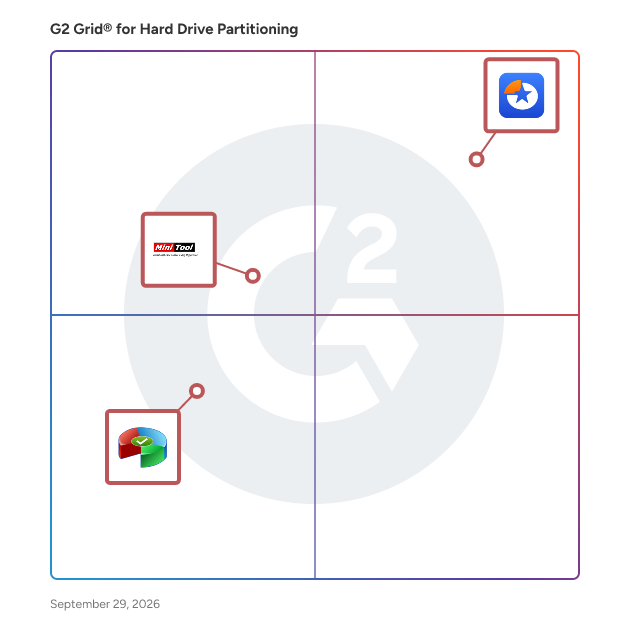
  # Best Hard Drive Partitioning Software

  *By [Tian Lin](https://research.g2.com/insights/author/tian-lin)*

   Hard drive partitioning software splits a hard drive’s storage capacity into compartmentalized pieces. Drive partitioning can be utilized to make a hard drive available to have an [operating system](https://www.g2.com/categories/operating-system) installed, but it is more commonly used to install multiple operating systems on a single hard drive, without those operating systems interfering with each other. By running multiple operating systems on a single drive, users (most commonly, developers and IT administrators) can select which operating system they’d like to access when booting up their device. This enables users to work with software that is optimized for different operating systems, all from a single device. It also can be used with [hard drive cloning software](https://www.g2.com/categories/hard-drive-cloning) to create drive images.

To qualify for inclusion in the Hard Drive Partitioning category, a product must:

- Segment a hard drive into one or more additional partitions
- Format a hard drive segment into the appropriate file system format
- Adjust partition sizes without having to recreate a partition outright


  ## How Many Hard Drive Partitioning Software Products Does G2 Track?
**Total Products under this Category:** 10

  
## How Does G2 Rank Hard Drive Partitioning Software Products?

**Why You Can Trust G2's Software Rankings:**

- 30 Analysts and Data Experts
- 500+ Authentic Reviews
- 10+ Products
- Unbiased Rankings

G2's software rankings are built on verified user reviews, rigorous moderation, and a consistent research methodology maintained by a team of analysts and data experts. Each product is measured using the same transparent criteria, with no paid placement or vendor influence. While reviews reflect real user experiences, which can be subjective, they offer valuable insight into how software performs in the hands of professionals. Together, these inputs power the G2 Score, a standardized way to compare tools within every category.

  
## Which Hard Drive Partitioning Software Is Best for Your Use Case?

- **Leader:** [EaseUS Partition Master](https://www.g2.com/products/easeus-partition-master/reviews)
- **Easiest to Use:** [EaseUS Partition Master](https://www.g2.com/products/easeus-partition-master/reviews)
- **Top Trending:** [EaseUS Partition Master](https://www.g2.com/products/easeus-partition-master/reviews)

  
  ## What Are the Top-Rated Hard Drive Partitioning Software Products in 2026?
### 1. [EaseUS Partition Master](https://www.g2.com/products/easeus-partition-master/reviews)
  EaseUS Partition Master is an all-in-one disk partitioning software that helps users to manage, create, delete, resize, extend, shrink, clone, convert, and migrate hard disk drives and partitions.


  **Average Rating:** 4.9/5.0
  **Total Reviews:** 399
**How Do G2 Users Rate EaseUS Partition Master?**

- **Has the product been a good partner in doing business?:** 9.7/10 (Category avg: 9.2/10)
- **Resizing:** 9.7/10 (Category avg: 9.3/10)
- **Partition Management:** 9.8/10 (Category avg: 9.0/10)
- **Partition Previews:** 9.7/10 (Category avg: 9.2/10)

**Who Is the Company Behind EaseUS Partition Master?**

- **Seller:** [EaseUS](https://www.g2.com/sellers/easeus)
- **Year Founded:** 2004
- **HQ Location:** Sichuan, China
- **Twitter:** @easeus_software (3,362 Twitter followers)
- **LinkedIn® Page:** https://www.linkedin.com/company/easeussoftware/ (83 employees on LinkedIn®)
- **Total Revenue (USD mm):** $500

**Who Uses This Product?**
  - **Who Uses This:** Owner, Director
  - **Top Industries:** Information Technology and Services, Computer Hardware
  - **Company Size:** 83% Small-Business, 13% Mid-Market


### 2. [MiniTool Partition Wizard](https://www.g2.com/products/minitool-partition-wizard/reviews)
  MiniTool Partition Wizard is a comprehensive disk partition management software designed to optimize disk usage and safeguard data for Windows users. It offers over 50 features, enabling users to manage partitions and disks effectively, from partition creation to data recovery and system migration. Key Features and Functionality: - Partition Management: Create, delete, resize, move, merge, split, format, and wipe partitions to better configure disk storage space. - Disk Conversion: Convert between MBR and GPT, primary and logical partitions, and FAT to NTFS file systems. - Data Recovery: Recover lost or deleted partitions and files from damaged or inaccessible hard drives. - OS Migration: Migrate the operating system to faster SSDs or larger HDDs to enhance computer performance. - Disk Benchmark: Measure disk performance by testing sequential and random read/write speeds. - Space Analyzer: Analyze disk usage to identify files consuming significant disk space. - Bootable Media Creation: Create bootable media to resolve disk issues when the system fails to boot. Primary Value and User Solutions: MiniTool Partition Wizard addresses the need for efficient disk management by providing a user-friendly interface and a wide array of tools to manage partitions and disks. It simplifies complex tasks such as resizing partitions, converting disk formats, recovering lost data, and migrating operating systems, thereby enhancing system performance and ensuring data integrity. This all-in-one solution eliminates the need for multiple specialized tools, streamlining disk management workflows for both routine maintenance and critical recovery scenarios.


  **Average Rating:** 4.4/5.0
  **Total Reviews:** 55
**How Do G2 Users Rate MiniTool Partition Wizard?**

- **Has the product been a good partner in doing business?:** 9.1/10 (Category avg: 9.2/10)
- **Resizing:** 9.2/10 (Category avg: 9.3/10)
- **Partition Management:** 9.4/10 (Category avg: 9.0/10)
- **Partition Previews:** 8.9/10 (Category avg: 9.2/10)

**Who Is the Company Behind MiniTool Partition Wizard?**

- **Seller:** [MiniTool Software](https://www.g2.com/sellers/minitool-software)
- **Year Founded:** 2001
- **HQ Location:** Surrey, Canada
- **Twitter:** @minitool_ (6,592 Twitter followers)
- **LinkedIn® Page:** https://www.linkedin.com/company/2606063/ (48 employees on LinkedIn®)

**Who Uses This Product?**
  - **Top Industries:** Information Technology and Services, Computer Software
  - **Company Size:** 52% Small-Business, 43% Mid-Market


### 3. [AOMEI Partition Assistant Standard](https://www.g2.com/products/aomei-partition-assistant-standard/reviews)
  FREE Hard Disk Partition Software AOMEI Partition Assistant Standard Edition FREE for Commercial Use and Home Use Support Windows 10/8.1/8/7/Vista/XP (both 32 and 64bit) Support resizing partition, merging partitions and migrating system to SSD, et


  **Average Rating:** 4.4/5.0
  **Total Reviews:** 20
**How Do G2 Users Rate AOMEI Partition Assistant Standard?**

- **Has the product been a good partner in doing business?:** 9.4/10 (Category avg: 9.2/10)

**Who Is the Company Behind AOMEI Partition Assistant Standard?**

- **Seller:** [AOMEI Technology](https://www.g2.com/sellers/aomei-technology)
- **Year Founded:** 2010
- **HQ Location:** Jiangxi, China
- **Twitter:** @aomeitech (3,189 Twitter followers)
- **LinkedIn® Page:** https://www.linkedin.com/company/aomeitech/ (30 employees on LinkedIn®)

**Who Uses This Product?**
  - **Top Industries:** Computer Software, Information Technology and Services
  - **Company Size:** 52% Small-Business, 48% Mid-Market


### 4. [R-Drive Image](https://www.g2.com/products/r-drive-image/reviews)
  R-Drive Image is a potent utility providing disk image files creation for backup or duplication purposes. A disk image file contains the exact, byte-by-byte copy of a hard drive, partition or logical disk and can be created with various compression levels on the fly without stopping Windows OS and therefore without interrupting your business. These drive image files can then be stored in a variety of places, including various removable media such as CD-R(W)/DVD, Iomega Zip or Jazz disks, etc.


  **Average Rating:** 4.7/5.0
  **Total Reviews:** 11
**How Do G2 Users Rate R-Drive Image?**

- **Has the product been a good partner in doing business?:** 9.2/10 (Category avg: 9.2/10)
- **Resizing:** 8.8/10 (Category avg: 9.3/10)
- **Partition Management:** 7.8/10 (Category avg: 9.0/10)
- **Partition Previews:** 9.2/10 (Category avg: 9.2/10)

**Who Is the Company Behind R-Drive Image?**

- **Seller:** [R-Tools Technology](https://www.g2.com/sellers/r-tools-technology-033e886d-defd-479c-a12d-056067f9ca58)
- **Year Founded:** 2001
- **HQ Location:** Richmond Hill, CA
- **Twitter:** @RTT_Inc (830 Twitter followers)
- **LinkedIn® Page:** https://ca.linkedin.com/company/r-tools-technology-inc- (5 employees on LinkedIn®)

**Who Uses This Product?**
  - **Company Size:** 58% Small-Business, 42% Mid-Market


### 5. [DiskGenius](https://www.g2.com/products/diskgenius/reviews)
  All-in-one solution for IT professionals, use it and you will love it.


  **Average Rating:** 4.9/5.0
  **Total Reviews:** 4
**How Do G2 Users Rate DiskGenius?**

- **Resizing:** 8.9/10 (Category avg: 9.3/10)
- **Partition Management:** 9.4/10 (Category avg: 9.0/10)
- **Partition Previews:** 9.2/10 (Category avg: 9.2/10)

**Who Is the Company Behind DiskGenius?**

- **Seller:** [Eassos, ltd.](https://www.g2.com/sellers/eassos-ltd)
- **Year Founded:** 2010
- **HQ Location:** N/A
- **LinkedIn® Page:** http://www.linkedin.com/company/eassos-ltd- (1 employees on LinkedIn®)

**Who Uses This Product?**
  - **Company Size:** 50% Mid-Market, 25% Enterprise


### 6. [AOMEI PE Builder](https://www.g2.com/products/aomei-pe-builder/reviews)
  AOMEI PE Builder is a free assistant to AOMEI Backupper or AOMEI Partition Assistant, and a freeware to create a bootable environment into CD/DVD, USB flash drive or ISO file based on Windows PE.


  **Average Rating:** 4.5/5.0
  **Total Reviews:** 3
**How Do G2 Users Rate AOMEI PE Builder?**

- **Has the product been a good partner in doing business?:** 8.3/10 (Category avg: 9.2/10)
- **Resizing:** 10.0/10 (Category avg: 9.3/10)
- **Partition Management:** 10.0/10 (Category avg: 9.0/10)
- **Partition Previews:** 10.0/10 (Category avg: 9.2/10)

**Who Is the Company Behind AOMEI PE Builder?**

- **Seller:** [AOMEI Technology](https://www.g2.com/sellers/aomei-technology)
- **Year Founded:** 2010
- **HQ Location:** Jiangxi, China
- **Twitter:** @aomeitech (3,189 Twitter followers)
- **LinkedIn® Page:** https://www.linkedin.com/company/aomeitech/ (30 employees on LinkedIn®)

**Who Uses This Product?**
  - **Company Size:** 67% Mid-Market, 33% Small-Business


### 7. [Paragon Partition Manager](https://www.g2.com/products/paragon-partition-manager/reviews)
  Paragon Partition Manager Free easily organizes your hard drive and redistributes free space to enhance system performance


  **Average Rating:** 4.3/5.0
  **Total Reviews:** 2
**How Do G2 Users Rate Paragon Partition Manager?**

- **Has the product been a good partner in doing business?:** 9.2/10 (Category avg: 9.2/10)
- **Resizing:** 9.2/10 (Category avg: 9.3/10)
- **Partition Management:** 9.2/10 (Category avg: 9.0/10)
- **Partition Previews:** 10.0/10 (Category avg: 9.2/10)

**Who Is the Company Behind Paragon Partition Manager?**

- **Seller:** [Paragon Software Group](https://www.g2.com/sellers/paragon-software-group)
- **Year Founded:** 1994
- **HQ Location:** Freiburg im Breisgau, Germany
- **Twitter:** @ParagonSoftware (2,723 Twitter followers)
- **LinkedIn® Page:** https://www.linkedin.com/company/paragon-software (89 employees on LinkedIn®)

**Who Uses This Product?**
  - **Company Size:** 50% Mid-Market, 50% Small-Business


### 8. [Visual LVM](https://www.g2.com/products/visual-lvm/reviews)
  The weLees&#39; Visual LVM is a GUI based LVM managing tool. It provides user an easy way to manage LVM devices. A storage administrator can do LVM managing operations with only some basic knowledge. No calculating, no locating, no endless command line, and more detail showing, more architecture viewing. The overview of storage system showing of Visual LVM is different with all other GUI based LVM manager. Try it and you will get an excellent experience.


  **Average Rating:** 4.8/5.0
  **Total Reviews:** 4
**How Do G2 Users Rate Visual LVM?**

- **Has the product been a good partner in doing business?:** 10.0/10 (Category avg: 9.2/10)
- **Resizing:** 8.3/10 (Category avg: 9.3/10)
- **Partition Management:** 6.7/10 (Category avg: 9.0/10)
- **Partition Previews:** 8.3/10 (Category avg: 9.2/10)

**Who Is the Company Behind Visual LVM?**

- **Seller:** [weLees](https://www.g2.com/sellers/welees)
- **HQ Location:** N/A
- **LinkedIn® Page:** https://www.linkedin.com/company/No-Linkedin-Presence-Added-Intentionally-By-DataOps (1 employees on LinkedIn®)

**Who Uses This Product?**
  - **Company Size:** 50% Small-Business, 25% Enterprise


### 9. [Active@ Partition Manager](https://www.g2.com/products/active-partition-manager/reviews)
  Active@ Partition Manager is a freeware application that helps you to manage storage devices and the logical drives or partitions that they contain.


  **Average Rating:** 4.5/5.0
  **Total Reviews:** 1
**How Do G2 Users Rate Active@ Partition Manager?**

- **Resizing:** 10.0/10 (Category avg: 9.3/10)
- **Partition Management:** 10.0/10 (Category avg: 9.0/10)
- **Partition Previews:** 8.3/10 (Category avg: 9.2/10)

**Who Is the Company Behind Active@ Partition Manager?**

- **Seller:** [LSoft Technologies](https://www.g2.com/sellers/lsoft-technologies-61c2d7f2-7213-4e97-994f-a63f4617daa6)
- **Year Founded:** 1999
- **HQ Location:** Mississauga, Ontario
- **Twitter:** @lsoft_net (257 Twitter followers)
- **LinkedIn® Page:** https://www.linkedin.com/company/lsoft-technologies-inc/ (6 employees on LinkedIn®)

**Who Uses This Product?**
  - **Company Size:** 100% Mid-Market


### 10. [Hard Disk Manager 15](https://www.g2.com/products/hard-disk-manager-15/reviews)
  Hard Disk Manager 15 provides Data safety and disk health for tech-savvy users.


  **Average Rating:** 5.0/5.0
  **Total Reviews:** 1

**Who Is the Company Behind Hard Disk Manager 15?**

- **Seller:** [Paragon Software Group](https://www.g2.com/sellers/paragon-software-group)
- **Year Founded:** 1994
- **HQ Location:** Freiburg im Breisgau, Germany
- **Twitter:** @ParagonSoftware (2,723 Twitter followers)
- **LinkedIn® Page:** https://www.linkedin.com/company/paragon-software (89 employees on LinkedIn®)

**Who Uses This Product?**
  - **Company Size:** 100% Small-Business


    ## What Is Hard Drive Partitioning Software?
  [IT Management Software](https://www.g2.com/categories/it-management)


