  # Best File Converter Software - Page 40

  *By [Neeraja Prakash](https://research.g2.com/insights/author/neeraja-prakash)*

   File converter software converts a document from one file type to another. These solutions offer simple step-by-step processes to perform conversions, so that a user simply needs to upload the original document, select which file type they’d like the document to be converted to, and convert. Additionally, file converter software offers batch conversions so users can convert multiple documents to the same format at one time, and also typically supports converting between two specific file types. File converter software may also offer a recovery mode, so files can be safely converter from one format to another. These solutions typically integrate with [file reader software](https://www.g2.com/categories/file-reader) to ensure that users can always access the files they need to read.

To qualify for inclusion in the File Converter category, a product must:

- Convert documents from one file type to another
- Offer batch file conversions
- Provide data recovery so that files convert accurately


## How Many File Converter Software Products Does G2 Track?
**Total Products under this Category:** 1,390

### Category Stats (Jun 2026)
- **Average Rating**: 4.37/5 The average rating of products in this category, based on all submitted ratings
- **New Reviews This Quarter**: 477
- **Buyer Segments**: Small-Business 47% │ Mid-Market 28% │ Enterprise 25% Represents the distribution of reviewers across all products in this category.
- **Top Trending Product**: 4K video downloader Pro (+1.49%) - Among all products in this category, 4K video downloader Pro recorded the largest rating increase compared to last month
*Last updated: June 09, 2026*

  
## How Does G2 Rank File Converter Software Products?

**Why You Can Trust G2's Software Rankings:**

- 30 Analysts and Data Experts
- 12,900+ Authentic Reviews
- 1,390+ Products
- Unbiased Rankings

G2's software rankings are built on verified user reviews, rigorous moderation, and a consistent research methodology maintained by a team of analysts and data experts. Each product is measured using the same transparent criteria, with no paid placement or vendor influence. While reviews reflect real user experiences, which can be subjective, they offer valuable insight into how software performs in the hands of professionals. Together, these inputs power the G2 Score, a standardized way to compare tools within every category.

  
## Which File Converter Software Is Best for Your Use Case?

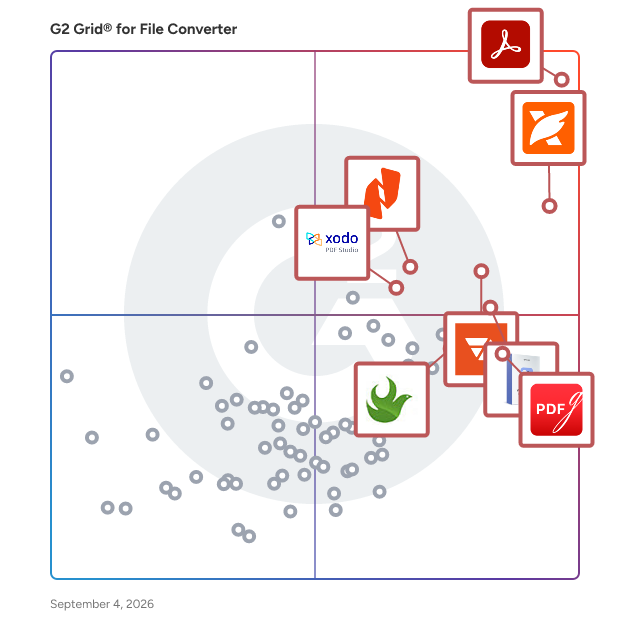
- **Leader:** [Adobe Acrobat](https://www.g2.com/products/adobe-acrobat/reviews)
- **Highest Performer:** [PDFgear](https://www.g2.com/products/pdfgear/reviews)
- **Easiest to Use:** [Adobe Acrobat](https://www.g2.com/products/adobe-acrobat/reviews)
- **Top Trending:** [Foxit PDF Editor](https://www.g2.com/products/foxit-pdf-editor/reviews)
- **Best Free Software:** [Foxit PDF Editor](https://www.g2.com/products/foxit-pdf-editor/reviews)

  
---

**Sponsored**

### Certyneo

Certyneo is a European electronic signature platform built for SMBs and professional teams. Sign, send, and manage legally binding documents in seconds — fully compliant with eIDAS (SES &amp; AES), GDPR-native, and hosted in the EU. Unlike DocuSign or Yousign, Certyneo includes a built-in AI contract generator, letting you create any contract before signing it — all in one platform. Flat-rate pricing means no per-user fees, saving teams up to 70% vs. legacy solutions. Key features: eIDAS-compliant signatures, AI contract generation, audit trail, custom branding, REST API, multi-signatory workflows, and 10-year archiving.


[Visit website](https://www.g2.com/external_clickthroughs/record?secure%5Bad_program%5D=ppc&amp;secure%5Bad_slot%5D=category_product_list&amp;secure%5Bcategory_id%5D=1706&amp;secure%5Bdisplayable_resource_id%5D=152&amp;secure%5Bdisplayable_resource_type%5D=Category&amp;secure%5Bmedium%5D=sponsored&amp;secure%5Bplacement_reason%5D=neighbor_category&amp;secure%5Bplacement_resource_ids%5D%5B%5D=152&amp;secure%5Bprioritized%5D=false&amp;secure%5Bproduct_id%5D=1843406&amp;secure%5Bresource_id%5D=1706&amp;secure%5Bresource_type%5D=Category&amp;secure%5Bsource_type%5D=category_page&amp;secure%5Bsource_url%5D=https%3A%2F%2Fwww.g2.com%2Fcategories%2Ffile-converter%3Fpage%3D4&amp;secure%5Btoken%5D=fd1ba93768ddb95e65cb69a9c6f5d2223dc4b6923cf83c9455eadb20721d6f24&amp;secure%5Burl%5D=https%3A%2F%2Fcertyneo.com%2Ffr%2Fpricing&amp;secure%5Burl_type%5D=custom_url)

---

  ## What Are the Top-Rated File Converter Software Products in 2026?
### 1. [Paperplane](https://www.g2.com/products/paperplane-paperplane/reviews)
  Paperplane converts web pages to PDF documents. PDFs are rendered using Google Chrome, so that the latest web standards can be used to author source documents. The API also allows you to convert multiple documents in parallel, and automatically uploads PDFs to cloud storage.


**Who Is the Company Behind Paperplane?**

- **Seller:** [Paperplane](https://www.g2.com/sellers/paperplane)
- **HQ Location:** N/A
- **LinkedIn® Page:** https://www.linkedin.com/company/No-Linkedin-Presence-Added-Intentionally-By-DataOps (1 employees on LinkedIn®)


### 2. [PCVARE MBOX to PDF Converter](https://www.g2.com/products/pcvare-mbox-to-pdf-converter/reviews)
  PCVARE MBOX to PDF Converter is created to solve how to print MBOX files to PDF in Bach mode. The MBOX to PDF Tool is a useful solution to export MBOX mailbox to PDF with attachments. It is safe solution from any type of virus &amp; malware attack so users can get safe MBOX to PDF migration with 100% accurate outcome. The MBOX to PDF Converter helps to export all MBOX files to PDF documents at once and simply open MBOX files to PDF with metadata, images, formatting, &amp; attachments. The MBOX to PDF Tool provides the “Convert Attachments as PDF” option that can save MBOX emails &amp; Attachments into PDF without any issue and also supports multiple file naming option – from + subject + date, subject + from + date, date + subject + from, etc to save MBOX files to PDF with desired file naming option. The Download MBOX to PDF Converter Free online demo that can export 25 emails from MBOX to PDF at free of cost so you can also check its efficiency and working at free of cost. It supports MBOX/ MBS files of all supported mail &amp; webmail apps – Thunderbird, Mac Mail, The Bat, Eudora, Entourage, PocoMail, Postbox, PocoMail, SeaMonkey, etc. Try the advanced MBOX to PDF Converter and solve entire problems regarding MBOX to PDF migration.


**Who Is the Company Behind PCVARE MBOX to PDF Converter?**

- **Seller:** [PCVARE](https://www.g2.com/sellers/pcvare)
- **HQ Location:** N/A
- **LinkedIn® Page:** https://www.linkedin.com/company/No-Linkedin-Presence-Added-Intentionally-By-DataOps (1 employees on LinkedIn®)


### 3. [PCVARE MSG to PDF Converter](https://www.g2.com/products/pcvare-msg-to-pdf-converter/reviews)
  PCVARE MSG to PDF Converter helps to print &amp; save Outlook MSG files to PDF with attachments. The MSG to PDF tool is created to solve how to convert Outlook emails &amp; Attachments to PDF. It provides batch MSG to PDF migration facility for the quick response and has simple, safe &amp; advanced processing for accurate MSG to PDF Conversion. The Converter program helps to Convert &amp; Export MSG files of Outlook to PDF with attachments, images, metadata, formatting, hyperlinks, etc. The MSG to PDF Converter provides the “convert Attachments as PDF” option to save Outlook MSG emails &amp; their attachments to PDF. With this tool, you can also convert 25 MSG files to PDF at free of cost and know about how to convert Outlook .msg files to .pdf perfectly.


**Who Is the Company Behind PCVARE MSG to PDF Converter?**

- **Seller:** [PCVARE](https://www.g2.com/sellers/pcvare)
- **HQ Location:** N/A
- **LinkedIn® Page:** https://www.linkedin.com/company/No-Linkedin-Presence-Added-Intentionally-By-DataOps (1 employees on LinkedIn®)


### 4. [PCVITA OST Converter](https://www.g2.com/products/pcvita-ost-converter/reviews)
  PCVITA OST Converter is a perfect solution for those user who want to convert outlook offline file (.ost) into pst file with all attachment. With this tool any non-technical user simply complete ost recovery task without any file size restrictions and without wasting time, energy and money. Try it today.


**Who Is the Company Behind PCVITA OST Converter?**

- **Seller:** [PCVITA Software](https://www.g2.com/sellers/pcvita-software)
- **Year Founded:** 2007
- **HQ Location:** Pune, IN
- **LinkedIn® Page:** https://www.linkedin.com/company/pcvita (17 employees on LinkedIn®)


### 5. [pdf2dxf](https://www.g2.com/products/pdf2dxf/reviews)
  Free online PDF to DXF converter for CAD engineers. Preserves layers, colors, text and dimensions. No signup required. 5 free conversions/day.


**Who Is the Company Behind pdf2dxf?**

- **Seller:** [pdf2dxf.us](https://www.g2.com/sellers/pdf2dxf-us)
- **HQ Location:** N/A
- **LinkedIn® Page:** https://www.linkedin.com/company/No-Linkedin-Presence-Added-Intentionally-By-DataOps (1 employees on LinkedIn®)


### 6. [PDF and Image to Text Converter](https://www.g2.com/products/pdf-and-image-to-text-converter/reviews)
  PDF OCR Free Tool is a free, browser-based solution powered by the Mistral AI engine. It converts scanned PDF files and image files (JPG, PNG, etc.) into editable text using advanced OCR technology. The tool can also recognize handwritten English text and convert it into digital text. It is simple, fast, and requires no registration. Works directly in the browser with support for multiple languages and no installation needed.


**Who Is the Company Behind PDF and Image to Text Converter?**

- **Seller:** [Plivo](https://www.g2.com/sellers/plivo-2880e029-89f5-4ba3-8133-8e791654a76e)
- **Year Founded:** 2011
- **HQ Location:** Austin, TX
- **Twitter:** @plivo (12,555 Twitter followers)
- **LinkedIn® Page:** https://www.linkedin.com/company/plivo-inc/ (198 employees on LinkedIn®)


### 7. [PDF Converter](https://www.g2.com/products/macgater-pdf-converter/reviews)
  MacGater PDF Converter for Mac is a versatile and easy-to-use tool that converts PDF files into 20+ formats, including DOCX, XLSX, PPTX, HTML, TXT, JPEG, PNG, and more. It supports batch processing, password-protected PDFs, and offers options to include or exclude attachments. Users can customize image resolution and quality during conversion. The software retains original formatting and works seamlessly on all macOS versions, including macOS 14 Sonoma and earlier. Ideal for professionals and everyday users, MacGater offers a free demo to try before upgrading. With a 4.8-star rating, it’s a trusted PDF solution for Mac users.


**Who Is the Company Behind PDF Converter?**

- **Seller:** [MacGater](https://www.g2.com/sellers/macgater)
- **HQ Location:** N/A
- **LinkedIn® Page:** https://www.linkedin.com/company/No-Linkedin-Presence-Added-Intentionally-By-DataOps (1 employees on LinkedIn®)


### 8. [PDF Converter Tool](https://www.g2.com/products/pdf-converter-tool/reviews)
  The MigrateEmails PDF Converter is a powerful and user-friendly tool designed to convert PDF files into multiple formats, including Word, Excel, PowerPoint, images (JPG, PNG, BMP, GIF), HTML, and more. It preserves the original layout, fonts, images, hyperlinks, and attachments, ensuring accurate and professional results. Ideal for businesses, students, and professionals, it supports batch conversion, password-protected PDFs, and embedded attachment extraction. Users can select the destination folder for organized file management. Compatible with Windows 11, 10, 8, 7, and macOS, the software offers a smooth experience across devices. The free demo version allows testing of core features, while the full version enables unlimited conversions with advanced options. Fast, secure, and reliable, it simplifies PDF handling for every user.


**Who Is the Company Behind PDF Converter Tool?**

- **Seller:** [MigrateEmails](https://www.g2.com/sellers/migrateemails)
- **Year Founded:** 2010
- **HQ Location:** Noida, Uttar Pradesh
- **Twitter:** @drssoftech (2 Twitter followers)
- **LinkedIn® Page:** https://www.linkedin.com/company/data-recovery-solutions/ (5 employees on LinkedIn®)


### 9. [pdftables](https://www.g2.com/products/pdftables/reviews)
  pdftables.io enables you to extract tables from PDF documents and convert them into structured data formats such as Excel (XLSX), CSV, or JSON. You can either use predefined templates or define your own data structure, allowing the extracted data to match your exact requirements.


**Who Is the Company Behind pdftables?**

- **Seller:** [Softwareservice Fuhrmeister](https://www.g2.com/sellers/softwareservice-fuhrmeister)
- **HQ Location:** N/A
- **LinkedIn® Page:** https://www.linkedin.com/company/No-Linkedin-Presence-Added-Intentionally-By-DataOps (1 employees on LinkedIn®)


### 10. [pdftoxlsx](https://www.g2.com/products/pdftoxlsx/reviews)
  pdftoxlsx converts PDF bank statements into structured Excel and CSV files in under 30 seconds. Built for accountants, bookkeepers, and small businesses who need transaction data out of PDFs without manual re-keying. Supports major US, UK, and Spanish banks including Chase, Bank of America, Wells Fargo, HSBC, Barclays, Santander, BBVA, and 90+ more. Features include OCR for scanned statements, password-protected PDF handling, multi-currency support, and batch conversion of up to 12 statements into one consolidated file. Output columns (date, description, amount, balance, currency) are ready for import into QuickBooks, Xero, FreeAgent, or Sage.


**Who Is the Company Behind pdftoxlsx?**

- **Seller:** [Technology Pro Bono](https://www.g2.com/sellers/technology-pro-bono)
- **HQ Location:** N/A
- **LinkedIn® Page:** https://www.linkedin.com/company/No-Linkedin-Presence-Added-Intentionally-By-DataOps (1 employees on LinkedIn®)


### 11. [PDNob Image Translator](https://www.g2.com/products/pdnob-image-translator/reviews)
  PDNob Image Translator is an easy-to-use free screen translator that works both on Win and Mac OS. It allows you to extract text from non-editable PDFs, images, and protected websites. Unlike other OCR software, users don’t need to upload the files, which may risk data leaking. Instead, you can take a screenshot of the area you want to take out text and PDNob Image Translator will recognize it and provide you with both the original text and the translation result. It can recognize 12 languages, including Japanese, and translate them into 100+ languages.


**Who Is the Company Behind PDNob Image Translator?**

- **Seller:** [PDNob](https://www.g2.com/sellers/pdnob)
- **HQ Location:** N/A
- **LinkedIn® Page:** https://www.linkedin.com/company/No-Linkedin-Presence-Added-Intentionally-By-DataOps (1 employees on LinkedIn®)

**Who Uses This Product?**
  - **Company Size:** 100% Small-Business


#### What Are PDNob Image Translator's Pros and Cons?

**Pros:**

- Ease of Use (1 reviews)
- Feature Quality (1 reviews)


### 12. [pds olm](https://www.g2.com/products/pds-olm/reviews)
  PDS Converter for OLM converts OLM file &amp; extract items without mac outlook. Recommended by Microsoft MVPs and IT Administrators, the software can export OLM File conversion to Outlook PST, Gmail and Office 365. Best tool to convert OLM to PST Outlook file with preserve all internal folders emails Automatically search the location of .olm file to start extracting and conversion process Allows to directly attaching newly created PST File to the MS Outlook Profile Convert OLM Mailbox items such as- attachments, contacts, emails etc into PST and MSG formats Software capable to supports all MS Outlook, Windows, and Mac Outlook versions Supports Outlook 2021, 2019, 2016, 2013, 2010, 2007 and 2003 version. Offers to Export OLM Mailboxes into PDF, HTML, RTF, and Office 365


**Who Is the Company Behind pds olm?**

- **Seller:** [Perfect Data Solutions](https://www.g2.com/sellers/perfect-data-solutions)
- **Year Founded:** 2008
- **HQ Location:** Perth, IN
- **Twitter:** @pdssoftgroup (19 Twitter followers)
- **LinkedIn® Page:** https://www.linkedin.com/company/perfect-data-solutions (20 employees on LinkedIn®)


### 13. [Pegasus Mail Converter](https://www.g2.com/products/pegasus-mail-converter/reviews)
  The DRS Softech Pegasus Converter Tool is a user-friendly utility that helps you convert Pegasus Mail files (PMM, CNM, and others) into various file formats with ease. It supports conversion into PST, MBOX, PDF, MSG, HTML, EML, CSV, and more. The software also enables direct migration of Pegasus emails to clients like Outlook, Thunderbird, and Apple Mail. With the help of its smart features like Batch Conversion, Mail Preview, Keyword Filters, Exclude Attachments option, and Custom Naming Convention, it ensures precise and organized email migration. The tool is compatible with all major Windows OS versions.


**Who Is the Company Behind Pegasus Mail Converter?**

- **Seller:** [DRS Softech](https://www.g2.com/sellers/drs-softech)
- **Year Founded:** 2010
- **HQ Location:** Noida, IN
- **LinkedIn® Page:** https://www.linkedin.com/company/13699368 (5 employees on LinkedIn®)


### 14. [Picsart Enterprise](https://www.g2.com/products/picsart-enterprise/reviews)
  Unlock the power of creativity with Picsart Enterprise, the leading solution for integrating photo and video editing into your business. Our AI-powered APIs and versatile SDKs empower teams to streamline content creation, automate workflows, and bring ideas to life faster than ever before. Whether you&#39;re looking to build custom internal tools or enhance your web applications, our creative toolset seamlessly integrates into your existing systems. With Picsart, you can produce thousands of high-quality images and videos in minutes, not days. From background removal and upscaling to dynamic effects and enhancements, our robust platform eliminates manual tasks, allowing your team to focus on innovation and creativity. Secure, reliable, and scalable, our solutions come with pre-built compliance features and guarantee 99.5% uptime, ensuring your business runs smoothly. Our Photo and Video Editor SDK offers businesses a fully embeddable, customizable editing experience. Perfect for photo print, web-to-print, eCommerce, and product photography, it empowers seamless image and video editing, tailored to your unique needs and creative goals. Picsart&#39;s comprehensive documentation and support will have businesses up and running in just minutes, giving you a competitive edge and reducing time to market. Unleash creativity without limits—Picsart is your ultimate partner for content creation at scale.


  **Average Rating:** 4.6/5.0
  **Total Reviews:** 4
**How Do G2 Users Rate Picsart Enterprise?**

- **Quality of Support:** 10.0/10 (Category avg: 8.5/10)

**Who Is the Company Behind Picsart Enterprise?**

- **Seller:** [PICSART](https://www.g2.com/sellers/picsart)
- **Company Website:** https://www.picsart.com
- **Year Founded:** 2011
- **HQ Location:** Miami, US
- **Twitter:** @Picsart (123,366 Twitter followers)
- **LinkedIn® Page:** https://www.linkedin.com/company/picsart/ (1,379 employees on LinkedIn®)

**Who Uses This Product?**
  - **Company Size:** 50% Small-Business


#### What Are Picsart Enterprise's Pros and Cons?

**Pros:**

- Ease of Use (3 reviews)
- Easy Integrations (3 reviews)
- Features (2 reviews)
- Integrations (2 reviews)
- Affordable (1 reviews)

**Cons:**

- Difficult Navigation (1 reviews)
- Difficulty (1 reviews)
- Not User-Friendly (1 reviews)
- Poor Design Quality (1 reviews)
- Poor Navigation (1 reviews)

### 15. [Pincette ODT to ePub](https://www.g2.com/products/pincette-odt-to-epub/reviews)
  With ODFToEPub everyone can write an e-book with full control over how it will look.


**Who Is the Company Behind Pincette ODT to ePub?**

- **Seller:** [Pincette bvba](https://www.g2.com/sellers/pincette-bvba)
- **HQ Location:** Tienen, BE
- **LinkedIn® Page:** http://www.linkedin.com/company/pincette (1 employees on LinkedIn®)


### 16. [Pixillion Image Converter](https://www.g2.com/products/pixillion-image-converter/reviews)
  Pixillion is a multi-format image file conversion software that allows users to convert images between a wide range of file formats. It supports common formats such as JPEG, PNG, GIF, BMP, TIFF, and RAW, as well as less common and professional formats. The software includes batch processing functionality, enabling multiple images to be converted, resized, or compressed at once. Users can also apply basic editing operations such as rotation, resizing, watermarking, and adding text during the conversion process. Pixillion provides options to adjust image settings including size, compression, and metadata. It also supports converting between raster and vector formats while preserving image quality where possible. The software is designed for local use on Windows and macOS systems, allowing image files to be processed directly on the user’s computer. It can be used for preparing images for business documents, websites, presentations, and archival purposes.


**Who Is the Company Behind Pixillion Image Converter?**

- **Seller:** [NCH Software](https://www.g2.com/sellers/nch-software)
- **Year Founded:** 1993
- **HQ Location:** Greenwood Village, CO
- **Twitter:** @nchsoftware (9,909 Twitter followers)
- **LinkedIn® Page:** https://www.linkedin.com/company/285305/ (78 employees on LinkedIn®)


### 17. [PloCompAuto Ver.12.0](https://www.g2.com/products/plocompauto-ver-12-0/reviews)
  PloCompAuto is a program that automatically and continuously converts files with the following formats. When there are a large number of drawing files, multiple drawings can be overlapped to form a single drawing. When the difference between two drawings is color-coded or the change area is calculated, it is very efficient. [Outline] \*Output 1 Input:HPGL, HP-GL/2, HP RTL, PDF, DXF, DWG, GERBER, NC-drill,IGES, SXF, TIFF, JPEG, Bitmap, PCX, FPX, PNG, GIF, EMF, CMT Output:PDF, TIFF, DXF, DWG, JPEG, BITMAP, IGES, SXF, EMF, XPS,PCL, WMF,PS, EPS, SVG, GIF, PNG, PCX, FPX, CMT,HPGL/Printer, PloComp screen Compare the drawings of the two input files, add the changed area, and output. \*Output 2 Input: PDF Output: WMF, EMF, PS, EPS, SVG, XPS, HPGL, PCL [Output mode] (1) Standby output mode The specified folder is monitored and output when an input file arrives. The input file is automatically deleted after output. If there is no input file, wait until the file arrives. It also supports drawing comparison. When an input file is received, (3) Drawing comparison between folders is started. (2) Batch file output mode Multiple input files listed in the specified output list file are output continuously. Also supports drawing comparison. You can open multiple input files at the same time. When the output is on screen, start PloComp and display it on the screen. When you exit PloComp, PloComp starts again and displays the following screen. (3) Inter-folder drawing comparison The input files with the same file names in the two specified folders are continuously compared, and the changed area is added and output. PloCompAuto is a set with automatic output special specification version PloComp (hereinafter referred to as PloComp). PloCompAuto generates a command line to start PloComp and has a function to start PloComp. You can also start and convert PloComp from your application. PloComp HPGL input, PDF output command line example: PloComp.exe /p ab1.hgl /oab.pdf


**Who Is the Company Behind PloCompAuto Ver.12.0?**

- **Seller:** [Isoplotec](https://www.g2.com/sellers/isoplotec)
- **HQ Location:** N/A
- **LinkedIn® Page:** https://www.linkedin.com/company/No-Linkedin-Presence-Added-Intentionally-By-DataOps (1 employees on LinkedIn®)


### 18. [PloCon Ver.12.0](https://www.g2.com/products/plocon-ver-12-0/reviews)
  PloCon is program which carries out continuation output of the drawing of PDF/HPGL/image file at Windows printer, and there are the following functions. It does not give displaying. (1) Paper and output scale - Specify fixed form paper, and carry out automatic scaling so that paper size may be matched. - Specify fixed form paper and output with designation scale. - Select fixed form paper automatically with designation scale. It is automatic selection about fixed form paper and direction of the optimal printer matched with drawing size which applied scale to drawing area. (2) Output from interactive output and other applications. (3) Color and width change of line, whole drawing black and white / color change, background color change, pen ON/OFF (4) Vector font / TrueType font change of character font (5) Multi-page correspondence (6) Support to many input file formats PDF,HPGL,HP-GL/2,HP RTL,DXF,DWG,IGES,GERBER,NC-Drill,EMF,TIFF,JPEG,Bitmap,PCX,FPX,PNG (7) Output mode Mode 1: Automatic output mode It will output, if specified output folder is supervised and PDF/HPGL/Image file enters in output folder, and PDF/HPGL/Image file after output is deleted automatically. When there is no drawing file, it waits until file comes. Mode 2 : Continuation output mode Plural drawing files described in specified output list file are outputted continuously. Mode 3 : Step output mode One file in plural drawing files described in specified output list file is outputted, and it waits for the next output directions.


**Who Is the Company Behind PloCon Ver.12.0?**

- **Seller:** [Isoplotec](https://www.g2.com/sellers/isoplotec)
- **HQ Location:** N/A
- **LinkedIn® Page:** https://www.linkedin.com/company/No-Linkedin-Presence-Added-Intentionally-By-DataOps (1 employees on LinkedIn®)


### 19. [PloViewAuto Ver.12.0](https://www.g2.com/products/ploviewauto-ver-12-0/reviews)
  PloViewAuto reads a lot of HPGL/Vector/Image files continuously, and converts it into format files often used, such as PDF, TIFF, DXF, and IGES, at high speed automatically. 1. File format which PloViewAuto handles is as follows. (1) Output 1 \* Input HPGL,HP-GL/2,HP RTL,PDF,DXF,DWG,GERBER,NC-Drill,IGES,SXF,EMF,TIFF,JPEG,Bitmap,PCX,FPX,GIF,PNG \* Output PDF,HP-GL/2,EMF,TIFF,DXF,DWG,JPEG,Bitmap,IGES,SXF, PCX,FPX,GIF,PNG,,CMT,HPGL/Printer (2) Output 2 \* Input PDF \* Output WMF, EMF, PS, EPS, SVG, XPS, HPGL, PCL 2. Output mode has the two following modes. (1) Standby output mode The same input file as specified input file name with wild card is looked for, if it is, it will output, and input file is automatically deleted after output. When there is no input file , it waits until file comes. (2) Batch Output mode Plural input files described in specified output list file are outputted continuously. 3. This program is the automatic output special edition version PloView and set. This program generates command line which starts the automatic output special edition version PloView, and has function to start PloView. Example of PDF output command line of PloView : PloView.exe /p abc.hgl abc.pdf.


**Who Is the Company Behind PloViewAuto Ver.12.0?**

- **Seller:** [Isoplotec](https://www.g2.com/sellers/isoplotec)
- **HQ Location:** N/A
- **LinkedIn® Page:** https://www.linkedin.com/company/No-Linkedin-Presence-Added-Intentionally-By-DataOps (1 employees on LinkedIn®)


### 20. [PloView Ver.12.0](https://www.g2.com/products/ploview-ver-12-0/reviews)
  PloView is viewer for viewing drawing of HPGL/Vector/image file. And, it has about the same powerful input and edit function as 2D-CAD. (1) File: Support to many file formats Input: HPGL,HP-GL/2,HP RTL,PDF,DXF,DWG,GERBER,NC-Drill,IGES,EMF, TIFF,JPEG,Bitmap,PCX,FPX,GIF,PNG,CMT Output:HPGL,HP-GL/2,HP RTL,PDF,DXF,DWG,IGES,EMF,TIFF,JPEG,Bitmap, PCX,FPX,GIF,PNG,Printer,Plotter,WMF,PS,EPS,SVG,XPS,PCL,CMT Black / white and color copy to clipboard. (2) Display - Color and width change of line, &#39;black and white&#39; / &#39;color&#39; change, background color change, pen ON/OFF - Display mode (Copy/Merge/Xor/data) change - Rotation, mirror, grid displaying - Thumbnail display - Multi-page correspondence - Vector font / TrueType font change of text font (3) Request - Measurement function of coordinates, length, area, line width, and angle - Search text - Connected line search, the total line length measurement (4) Edit drawing (Comment function) \* File: - New create - Input file of (1) - Save to file of (1) \* Insert: Figure kind: Polyline, Arc, Circle, Horizontal line, Vertical line, Slanting line, Opposite side angle line, Regular polygon, Ellipse, Offset line, Free curve, Cloud shape line, Spline, Surface, Rectangle, Long circle, Text, Bitmap, Macro, Dimension (Horizontal, Vertical, Parallel, Angle, Radius, Diameter) Insert Coodinates at Key, Insert Same Point, Next Same Point, Insert-Grid ON/OFF \* Set: Layer: 1..20, Set property \* Edit: Select (individual, rectangular area, polygon area selecting), Move copy, Delete, Divide/Delete/Move/RouteChange polyline section, Delete line in selected area boundary, Trim, Change property, Change vertex R, Chamfer, Connect Line, Rotate copy, Scale Up/Down copy, Macro-izing, Macro breakup, ReDo, UnDo.


**Who Is the Company Behind PloView Ver.12.0?**

- **Seller:** [Isoplotec](https://www.g2.com/sellers/isoplotec)
- **HQ Location:** N/A
- **LinkedIn® Page:** https://www.linkedin.com/company/No-Linkedin-Presence-Added-Intentionally-By-DataOps (1 employees on LinkedIn®)


### 21. [Print2CAD AI Phenomenon](https://www.g2.com/products/print2cad-ai-phenomenon/reviews)
  Artificial Intelligence PDF to CAD converter. Converts any PDF file (vector and raster based) into fully editable DWG or DXF for any CAD system. OCR of PDF Text and vectorization of PDF raster pictures.


**Who Is the Company Behind Print2CAD AI Phenomenon?**

- **Seller:** [BackToCAD Technologies](https://www.g2.com/sellers/backtocad-technologies)
- **Year Founded:** 1993
- **HQ Location:** Clearwater, US
- **LinkedIn® Page:** http://www.linkedin.com/company/back2cad-ai-technologies (4 employees on LinkedIn®)


### 22. [Prism Video File Converter](https://www.g2.com/products/prism-video-file-converter/reviews)
  Prism Video Converter is a fast, reliable, and easy-to-use video conversion software designed for businesses and professionals who need to convert, compress, and standardize video files across multiple formats and platforms. Whether you&#39;re preparing videos for client delivery, internal presentations, archiving, or your YouTube channel, Prism simplifies the entire process with high-quality results and minimal effort. Key Features: Broad Format Support - Convert between all popular video formats including MP4, AVI, MOV, MKV, WMV, FLV, VOB, and many more. Batch Conversion - Convert hundreds or thousands of videos at once to save significant time. Fast &amp; High-Quality Conversion - Lightning-fast processing with lossless encoding options and no noticeable quality loss. Built-in Video Editing Tools - Trim, split, crop, rotate, flip, adjust speed, and change resolution or frame rate before converting. Add Effects &amp; Watermarks - Apply text captions, watermarks (including company logos), color filters, brightness/contrast adjustments, and more. Direct DVD Converter - Easily convert DVDs to digital files with just a few clicks (non-copy-protected discs only). Video Preview - Preview original and converted videos to ensure settings are perfect before final conversion. Compression &amp; Optimization - Reduce file size while maintaining quality - ideal for email, web upload, or storage efficiency. Cross-Platform Compatibility - Export videos ready for YouTube, Vimeo, Dropbox, OneDrive, and various devices. Prism is trusted by professionals for its speed, stability, and straightforward interface. It works on Windows (7–11) and macOS, making it a practical choice for teams managing large volumes of video content. Start converting your video files efficiently today.


**Who Is the Company Behind Prism Video File Converter?**

- **Seller:** [NCH Software](https://www.g2.com/sellers/nch-software)
- **Year Founded:** 1993
- **HQ Location:** Greenwood Village, CO
- **Twitter:** @nchsoftware (9,909 Twitter followers)
- **LinkedIn® Page:** https://www.linkedin.com/company/285305/ (78 employees on LinkedIn®)


### 23. [Prism WorkPath](https://www.g2.com/products/prism-workpath/reviews)
  Prism WorkPath is a work process automation solution designed to streamline and enhance organizational workflows. It enables businesses to automate complex processes, reducing manual intervention and increasing efficiency. By integrating seamlessly with existing systems, WorkPath facilitates smoother operations and improved productivity. Key Features and Functionality: - Work Process Automation: Automates routine tasks and processes, minimizing manual effort and errors. - Seamless Integration: Integrates with existing enterprise systems to ensure continuity and ease of use. - Scalability: Adapts to the growing needs of organizations, supporting various industries such as healthcare, government, financial services, insurance, defense, education, and corporations. Primary Value and Solutions Provided: Prism WorkPath addresses the challenge of inefficient and error-prone manual processes by automating workflows. This leads to increased operational efficiency, reduced costs, and enhanced accuracy. Organizations benefit from streamlined operations, allowing them to focus on core activities and strategic initiatives.


**Who Is the Company Behind Prism WorkPath?**

- **Seller:** [Prism Software](https://www.g2.com/sellers/prism-software)
- **HQ Location:** Irvine, US
- **LinkedIn® Page:** https://www.linkedin.com/company/prism-software/ (46 employees on LinkedIn®)


### 24. [PST Recovery Tool](https://www.g2.com/products/pst-recovery-tool/reviews)
  The ConverterTools PST Recovery tool is the most relevant and reliable solution to recovering Emails, Contacts, Calendars, Journals, Tasks, Notes, etc., from Corrupt PST files. It also allows users to repair data from corrupt PST files and convert them into new many file formats like PST, EML, DBX, MSG, and MBOX. It helps to preview the recovered data of PST files and permits to management of the folder hierarchy as per the real files. Along with this, it is able to handle alignment errors in Outlook PST files. Equally important, there is no restriction on PST file size that is required to be recovered. Furthermore, this advanced utility is highly supported with all Windows OS versions including the new version of Windows 11.


**Who Is the Company Behind PST Recovery Tool?**

- **Seller:** [ConverterTools](https://www.g2.com/sellers/convertertools)
- **Year Founded:** 2014
- **HQ Location:** San Jose, US
- **Twitter:** @converttools (3 Twitter followers)
- **LinkedIn® Page:** https://www.linkedin.com/company/No-Linkedin-Presence-Added-Intentionally-By-DataOps (1 employees on LinkedIn®)


### 25. [PST to EML Converter](https://www.g2.com/products/mailconvertertools-pst-to-eml-converter/reviews)
  PST to EML Converter Software is the most trustable and prominent utility to use. It has some extraordinary features which make it the best in the market. The PST Converter Wizard provides users with multiple options for selectively exporting Outlook data. The users can export the data based on date range and categories such as Email, Contacts, Calendar, Notes, etc. Through the Mail Filter option, this tool can convert selected folders and any number of individual data items. For converting the PST files into EML you have to download the PST Converter tool on your system. Then, the tool will provide you single file and multiple files or a folder option. Choose the option and click Next. After then, select the desired files or folders from your system and click on the Next button. All the selected PST files will appear in the tree-like structure. You can preview the selected PST files before migrating them and click next for the further proceedings. Now, you have to choose the saving format in which you want to export the PST file, and in case you want to migrate the PST file to any Email client, you have to add the email address and third-party app password and click on the Sign In button. The complete PST Converter tool provides advanced features such as removing duplicate emails, mail filter option, task filter, maintaining folders hierarchy, custom folder name, etc.


**Who Is the Company Behind PST to EML Converter?**

- **Seller:** [MailConverterTools](https://www.g2.com/sellers/mailconvertertools)
- **HQ Location:** Noida, IN
- **Twitter:** @mconvertertools (8 Twitter followers)
- **LinkedIn® Page:** https://www.linkedin.com/company/mailconverter-tools/


    ## What Is File Converter Software?
  [Collaboration &amp; Productivity Software](https://www.g2.com/categories/collaboration-productivity)
  ## What Software Categories Are Similar to File Converter Software?
    - [E-Signature Software](https://www.g2.com/categories/e-signature)
    - [Document Creation Software](https://www.g2.com/categories/document-creation)
    - [PDF Editors](https://www.g2.com/categories/pdf-editor)

  
---

## How Do You Choose the Right File Converter Software?

### What You Should Know About File Converter Software

### What is File Converter Software?

In the digital age, we speak in the language of files. We have more than we know what to do with: documents, videos, audio files, photos, and numerous other formats. In order for them to reach their final destination or be used by the right person, their extensions or file types often need to be updated along the way. This is where conversion comes into play.

Different media players or devices process raw files in different ways. If you download a user manual as a PDF, for example, this might not be supported by the applications on your computer. On the other hand, if you create a video but send it to a client for review, they may not be able to view it as created since you used a specific kind of software. These are just two (of many) cases where a converter tool would come in handy. With the right converter app, you can prepare this information for a new medium while preserving the contents. This way your documents can zip about as necessary between the varied applications your coworkers or clients may be using. The ability to convert files empowers your business with freedom and flexibility in creating, sharing, and using as many files as possible.

Key Benefits of File Converter Software

- Allow users to conveniently upload or drag and drop files for conversion
- Easily convert single or multiple files from their original format to the intended one while maintaining their high quality
- Export completed files into a designated output folder

### What are the Different Kinds of File Converter Software?

Due to the complexity of various files, the majority of products in this category are designed to identify, compress, and convert particular formats and output them in a select number of different formats. Conversion, especially of large or detailed data (e.g., video, audio), is an intensive task. So rather than attempt to handle too many conversions, at the risk of doing a poor job with a particular format, these products are designed for converting files of a specific type.

It’s easy to get a sense of these specializations by browsing the products featured in this category. In fact, many of the developers put the file types right in the name of the tool. Once you have an idea of the types of files you need to work with, or the specific extensions you’re aiming for in the end, you should be able to discern how a given application will assist you by reading the product name and the description. Whether you’re looking for a video converter, image converters, or something designed for Word documents, there is likely a solution to fit your needs. And because these products are typically small and affordable to download, you may wind up with several in the end.

### What are the Potential Issues with File Converter Software?

**Crashing —** Depending on the user interface, the type of file, and the file size, conversion could take anywhere from a few seconds to several hours. In this span of time, your app may lag or crash for any number of reasons, forcing you to start over from the beginning. This could also occur with your hardware if it is being overworked with a large transfer, or even just a random lapse in performance. If your source files are saved and backed up, this isn’t the end of the world. But it could cause frustration if you are on a deadline of any sort.

**Incomplete Transfers —** Occasionally, when you convert a complex file, something can be lost in translation. This could mean that some content is missing from the completed file, components are out of place, or audio is missing from your video. It’s important to double-check your finished files to be sure they are processed successfully and as you intended. If there are any problems, check the settings on your program first to see if there is anything amiss.

**Limitations —** As we previously discussed, products in this category are extremely specialized to handle one or just a few types of files. If you have a video converter, for example, it handles not only a specific media type—but probably a specific format related to that media type and not much else. If your job entails repeated conversions of different files, you may have to download a number of products to complete the full range of tasks. This is an easy fix on the surface, but these limitations could prove aggravating for some users.

### Software and Services Related to File Converter Software

Along the lifecycle of your company’s files, a number of other software tools are likely to make an appearance. This begins with the brainstorming and developing of files. Solutions such as [audio editing software](https://www.g2.com/categories/audio-editing), [graphic design software](https://www.g2.com/categories/graphic-design), [document creation software](https://www.g2.com/categories/document-creation), and [video software](https://www.g2.com/categories/video) help users produce the kind of rich multimedia that is often associated with file conversion. If you are aware from the beginning which formats will be required for your end audience, these platforms may allow you to export files and save files with various extensions—so you essentially have multiple versions of the same file and don’t need to convert again. But even in these situations, it is helpful to have an audio file converter, or whichever kind you need, at your disposal.

After your documents are created, they may travel between a number of users, disks, and devices over the course of their lives. This is where some of these additional software types may come into play.

[**File Storage and Sharing Software**](https://www.g2.com/categories/file-storage-and-sharing) **—** These tools are perhaps the most basic way to keep your files secure, organized, and accessible by the people in your organization who need them. With this software, users are allotted a certain amount of storage capacity and can upload their files into folders based on the project, team, file type, or however else they might want to organize them. Permissions are then determined by the system administrator or the individual uploaders as to who can view, edit, or download the files—whether this person is a fellow employee or a client across the world. These platforms are typically compatible with a wide range of file formats, but in cases where certain file types aren’t supported by the software, you can leverage a conversion tool to convert it as needed based on the type (e.g., a video converter to convert videos).

[**Backup Software**](https://www.g2.com/categories/backup) **—** Your important files are always at risk of being damaged, lost during transfers or computer crashes, or simply misplaced somewhere along the way. There is always the chance of user error as well. Backup software is designed to create note-for-note copies of selected batches of data or files from servers, devices, or databases. This is a proactive measure to take especially when it comes to valuable, confidential data or documents/files that were significant labors of love. If you are planning to transfer large-scale files after you convert them, you should definitely consider backing them up to be safe.

[**Digital Asset Management Software**](https://www.g2.com/categories/digital-asset-management) **—** For media files you plan to use frequently, such as branded marketing materials (e.g., logos, banners, promotional videos), these tools can help streamline your storage, sharing, and collaborating processes. Digital asset management (DAM) products typically work with popular audio formats, image files, and video files, with features like thumbnail views to give creative and marketing teams a clean view of their files. Some DAM tools can also convert files between formats right from the platform and can host various versions of the same file so you can have different file formats ready when you need them.

[**Email Software**](https://www.g2.com/categories/email) **—** Email is the most tried-and-true method of transferring files, so long as they aren’t too large. In the event of oversized videos or bulk batches of photos, it is recommended to use file storage and sharing software, video hosting software, or photo management software to transfer between clients, viewers, and colleagues. But for most other documents, sending them at email attachments is a fast, painless way to get them where they need to go. This also allows you to write a message in the body of the email to accompany the files that can help introduce it, ask questions, or add context for the recipient.


