  # Best File Converter Software - Page 2

  *By [Nana Serwah Nkrahene](https://research.g2.com/insights/author/nana-nkrahene)*

   File converter software converts a document from one file type to another. These solutions offer simple step-by-step processes to perform conversions, so that a user simply needs to upload the original document, select which file type they’d like the document to be converted to, and convert. Additionally, file converter software offers batch conversions so users can convert multiple documents to the same format at one time, and also typically supports converting between two specific file types. File converter software may also offer a recovery mode, so files can be safely converter from one format to another. These solutions typically integrate with [file reader software](https://www.g2.com/categories/file-reader) to ensure that users can always access the files they need to read.

To qualify for inclusion in the File Converter category, a product must:

- Convert documents from one file type to another
- Offer batch file conversions
- Provide data recovery so that files convert accurately


## How Many File Converter Software Products Does G2 Track?
**Total Products under this Category:** 1,376

### Category Stats (May 2026)
- **Average Rating**: 4.38/5 (↑0.01 vs Apr 2026)
- **New Reviews This Quarter**: 429
- **Buyer Segments**: Small-Business 45% │ Mid-Market 28% │ Enterprise 26%
- **Top Trending Product**: Zoho Mail Converter (+0.25)
*Last updated: May 18, 2026*

  
## How Does G2 Rank File Converter Software Products?

**Why You Can Trust G2's Software Rankings:**

- 30 Analysts and Data Experts
- 12,800+ Authentic Reviews
- 1,376+ Products
- Unbiased Rankings

G2's software rankings are built on verified user reviews, rigorous moderation, and a consistent research methodology maintained by a team of analysts and data experts. Each product is measured using the same transparent criteria, with no paid placement or vendor influence. While reviews reflect real user experiences, which can be subjective, they offer valuable insight into how software performs in the hands of professionals. Together, these inputs power the G2 Score, a standardized way to compare tools within every category.

  
## Which File Converter Software Is Best for Your Use Case?

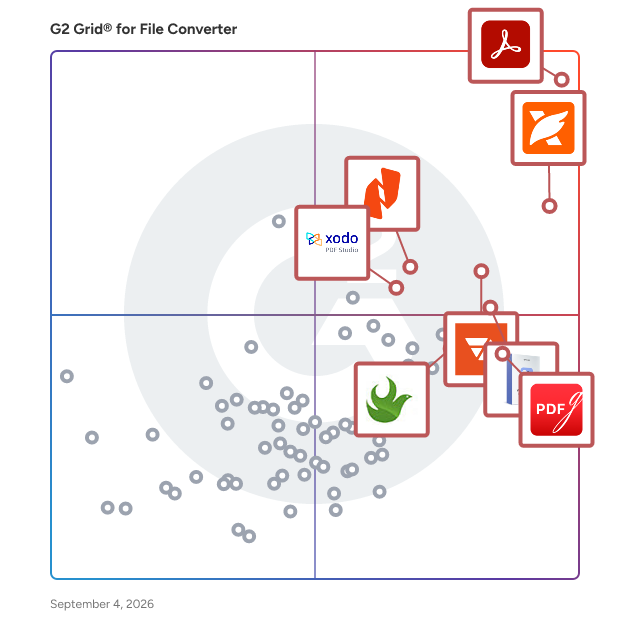
- **Leader:** [Adobe Acrobat](https://www.g2.com/products/adobe-acrobat/reviews)
- **Highest Performer:** [PDFgear](https://www.g2.com/products/pdfgear/reviews)
- **Easiest to Use:** [Adobe Acrobat](https://www.g2.com/products/adobe-acrobat/reviews)
- **Top Trending:** [Foxit PDF Editor](https://www.g2.com/products/foxit-pdf-editor/reviews)
- **Best Free Software:** [Foxit PDF Editor](https://www.g2.com/products/foxit-pdf-editor/reviews)

  
---

**Sponsored**

### altaFlow

altaFlow generates custom docs with a click, integrates eSignatures, creates webforms, and more without coding. It’s the ultimate tool to simplify, automate, and elevate your workflows.


[Visit website](https://www.g2.com/external_clickthroughs/record?secure%5Bad_program%5D=ppc&amp;secure%5Bad_slot%5D=category_product_list&amp;secure%5Bcategory_id%5D=1706&amp;secure%5Bdisplayable_resource_id%5D=660&amp;secure%5Bdisplayable_resource_type%5D=Category&amp;secure%5Bmedium%5D=sponsored&amp;secure%5Bplacement_reason%5D=neighbor_category&amp;secure%5Bplacement_resource_ids%5D%5B%5D=152&amp;secure%5Bprioritized%5D=false&amp;secure%5Bproduct_id%5D=116146&amp;secure%5Bresource_id%5D=1706&amp;secure%5Bresource_type%5D=Category&amp;secure%5Bsource_type%5D=category_page&amp;secure%5Bsource_url%5D=https%3A%2F%2Fwww.g2.com%2Fcategories%2Ffile-converter%3Fpage%3D2&amp;secure%5Btoken%5D=91f42848f605a06f255c767c6631360fd30a56a4e71e14d3ba84b4ea303a348b&amp;secure%5Burl%5D=https%3A%2F%2Faltaflow.com%2Fg2-demo%2F%3Futm_source%3Dg2%26utm_medium%3Dppc%26utm_campaign%3Dg2clicks&amp;secure%5Burl_type%5D=book_demo)

---

  ## What Are the Top-Rated File Converter Software Products in 2026?
### 1. [PDF File Converter Tool](https://www.g2.com/products/pdf-file-converter-tool/reviews)
  MCT PDF Converter Software has an interactive and self-explanatory user interface. It helps users to save multiple PDF files into 8+ image formats including, PNG, JPEG, SVG, BMP, etc. It also exports file data into editable word/presentation file formats such as DOC, DOCX, PPT, PPTX. This Online PDF Converter tool supports PDF files of all versions. Users can save PDF files into XML and HTML markup languages. Additionally, it converts PDF to excel, text, and Ebook file formats by maintaining high data integrity. It has advanced functionality to save attachments in a subfolder. Users can also specify Pixel, DPI, and Image Quality while saving PDF into image format. You need to Download and Run it as an Administrator then you can Add Files/Folders in this PDF file converter tool. Then, select the desired file format from Select Save As option. Here, you can specify the Image properties while saving PDF in Image format. After that, click on the Convert button to start the process. You can also download the report on the conversion process. This PDF File Converter software helps users to convert PDF to editable word and PowerPoint formats. It is compatible in case you want to convert PDF to excel file formats such as XLS and XLSX. It is a convenient software that is the best alternative of PDF to Image Converter. Moreover, it allows a novice to operate this software conveniently.


  **Average Rating:** 4.7/5.0
  **Total Reviews:** 10
**How Do G2 Users Rate PDF File Converter Tool?**

- **Quality of Support:** 10.0/10 (Category avg: 8.5/10)
- **Convert:** 9.6/10 (Category avg: 9.0/10)
- **Edit:** 9.8/10 (Category avg: 8.4/10)
- **Batch Conversion:** 9.4/10 (Category avg: 8.7/10)

**Who Is the Company Behind PDF File Converter Tool?**

- **Seller:** [SysInfoTools Software](https://www.g2.com/sellers/sysinfotools-software)
- **Year Founded:** 2010
- **HQ Location:** Uttarakhand, India
- **Twitter:** @SysInfoTools (414 Twitter followers)
- **LinkedIn® Page:** https://www.linkedin.com/company/6619925/ (24 employees on LinkedIn®)

**Who Uses This Product?**
  - **Company Size:** 40% Mid-Market, 30% Enterprise


### 2. [AnyRec Video Converter](https://www.g2.com/products/anyrec-video-converter/reviews)
  AnyRec Video Converter is definitely a powerful converter and editor for you. It helps you convert 1000+ video and audio formats to compatible one for smooth playback on any device. It also provides exciting editing tools before conversion to meet all of your requirements. Get to know the essential functions: 1. Convert various audio and video files to almost all popular formats, including MP4, MKV, MOV, AVI, WMV, FLAC, WMA, MP3, etc. It also provides many preset settings for different platforms like Facebook, Instagram, YouTube, TikTok, etc. 2. Support high-quality output and enhance video quality with AI technology. It helps you fix the shaky videos, increase video resolution, remove noise, and optimize the brightness and contrast. 3. Provide easy-to-use editing tools to trim video length, crop video aspect ratio, add audio or text to your videos, adjust the effects freely, and add your watermark to protect your videos. There are many unique effects and filters for you to make your videos more appealing. 4. MV effects allow you to make slideshows of videos or photos. Even if you are a beginner, you can effortlessly use the preset themes and effects to make cool videos. 5. Combine up to 13 videos into one screen and make video collages easily. The various templates help you merge videos in different styles. And you can drag the borderlines to customize the collage on your own. 6. Powerful toolbox is continually upgrading. Here are 3D Maker, Video Compressor, Video Trimmer, Volume Booster, Color Correction, Video Merger, Watermark Remover, and Video Speed Controller to deal with all of your videos as you like. 7. Rip DVD disc or ISO files to digital media formats for easier playback on your computers and mobiles.


  **Average Rating:** 4.4/5.0
  **Total Reviews:** 10
**How Do G2 Users Rate AnyRec Video Converter?**

- **Quality of Support:** 8.8/10 (Category avg: 8.5/10)
- **Convert:** 9.8/10 (Category avg: 9.0/10)
- **Edit:** 8.5/10 (Category avg: 8.4/10)
- **Batch Conversion:** 9.2/10 (Category avg: 8.7/10)

**Who Is the Company Behind AnyRec Video Converter?**

- **Seller:** [AnyRec Studio](https://www.g2.com/sellers/anyrec-studio)
- **HQ Location:** N/A
- **LinkedIn® Page:** https://www.linkedin.com/company/anyrec/about/ (1 employees on LinkedIn®)

**Who Uses This Product?**
  - **Company Size:** 50% Small-Business, 30% Mid-Market


#### What Are AnyRec Video Converter's Pros and Cons?

**Pros:**

- Easy Conversion (5 reviews)
- Feature Quality (3 reviews)
- Compatibility (2 reviews)
- Ease of Use (2 reviews)
- Editing (2 reviews)

**Cons:**

- Feature Limitations (2 reviews)
- Slow Speed (2 reviews)
- Download Issues (1 reviews)
- Functionality Issues (1 reviews)
- Installation Issues (1 reviews)

### 3. [Recovery Toolbox for Outlook](https://www.g2.com/products/recovery-toolbox-for-outlook/reviews)
  Recovery Toolbox for Outlook designed for repairing of corrupted \*.pst and \*.ost files of Microsoft Outlook.


  **Average Rating:** 4.4/5.0
  **Total Reviews:** 15
**How Do G2 Users Rate Recovery Toolbox for Outlook?**

- **Quality of Support:** 9.6/10 (Category avg: 8.5/10)

**Who Is the Company Behind Recovery Toolbox for Outlook?**

- **Seller:** [File Master](https://www.g2.com/sellers/file-master)
- **HQ Location:** Riyadh, SA
- **LinkedIn® Page:** https://www.linkedin.com/company/the-filemaster/ (1 employees on LinkedIn®)

**Who Uses This Product?**
  - **Company Size:** 44% Small-Business, 38% Enterprise


### 4. [SanPDF Converter](https://www.g2.com/products/sanpdf-converter/reviews)
  SanPDF Converter is a and user-friendly software designed to streamline the management and conversion of various document formats. It supports a wide range of file types, including PDF, XPS, DjVu, CHM, Mobi, EPUB, and comic book formats, allowing users to read and convert documents effortlessly. Key Features and Functionality: - Comprehensive Format Support: SanPDF enables users to view and convert multiple document and e-book formats, eliminating the need for multiple readers. - Document Conversion: The software facilitates seamless conversion between PDF and Office formats (Word, Excel, PowerPoint), as well as between PDF and image formats (JPEG, PNG, BMP). - PDF Management Tools: Users can split and merge PDF documents, enhancing document organization and management. - Cross-Platform Availability: SanPDF offers both desktop and web versions, ensuring accessibility across various operating systems, including Windows, Mac, and Linux. Primary Value and User Solutions: SanPDF Converter addresses the common challenges associated with handling multiple document formats by providing an all-in-one solution for reading, converting, and managing documents. Its intuitive interface and broad format support enhance productivity, allowing users to perform tasks such as format conversion, document splitting, and merging efficiently. By consolidating these functionalities into a single platform, SanPDF simplifies document management processes, saving users time and effort.


  **Average Rating:** 4.6/5.0
  **Total Reviews:** 23
**How Do G2 Users Rate SanPDF Converter?**

- **Quality of Support:** 9.1/10 (Category avg: 8.5/10)
- **Convert:** 9.4/10 (Category avg: 9.0/10)
- **Edit:** 7.8/10 (Category avg: 8.4/10)
- **Batch Conversion:** 7.5/10 (Category avg: 8.7/10)

**Who Is the Company Behind SanPDF Converter?**

- **Seller:** [Sanshangyun Technology Co., Ltd](https://www.g2.com/sellers/sanshangyun-technology-co-ltd)
- **HQ Location:** N/A
- **Twitter:** @SanPDFConverter (4 Twitter followers)
- **LinkedIn® Page:** https://www.linkedin.com/company/No-Linkedin-Presence-Added-Intentionally-By-DataOps (1 employees on LinkedIn®)

**Who Uses This Product?**
  - **Company Size:** 54% Small-Business, 29% Mid-Market


#### What Are SanPDF Converter's Pros and Cons?

**Pros:**

- Easy Conversion (14 reviews)
- Ease of Use (12 reviews)
- User-Friendly (6 reviews)
- Cloud Integration (3 reviews)
- Feature Quality (3 reviews)

**Cons:**

- Intrusive Advertising (4 reviews)
- Conversion Issues (3 reviews)
- Expensive (2 reviews)
- Feature Limitations (2 reviews)
- Page Management (2 reviews)

### 5. [Zamzar](https://www.g2.com/products/zamzar/reviews)
  Zamzar is the primary online file conversion site on the Internet.


  **Average Rating:** 4.6/5.0
  **Total Reviews:** 14
**How Do G2 Users Rate Zamzar?**

- **Quality of Support:** 10.0/10 (Category avg: 8.5/10)
- **Convert:** 10.0/10 (Category avg: 9.0/10)
- **Edit:** 9.2/10 (Category avg: 8.4/10)
- **Batch Conversion:** 10.0/10 (Category avg: 8.7/10)

**Who Is the Company Behind Zamzar?**

- **Seller:** [Zamzar](https://www.g2.com/sellers/zamzar)
- **Year Founded:** 2006
- **HQ Location:** , GB
- **Twitter:** @zamzar (4,723 Twitter followers)
- **LinkedIn® Page:** https://www.linkedin.com/company/zamzar (7 employees on LinkedIn®)

**Who Uses This Product?**
  - **Company Size:** 71% Small-Business, 21% Mid-Market


### 6. [PDF Converter Elite](https://www.g2.com/products/pdf-converter-elite/reviews)
  Turn PDF documents to editable MS Office or OpenOffice file formats. Convert PDF files to JPG, PNG and other image formats. Use PDF Converter to convert PDF to AutoCAD and HTML as well.


  **Average Rating:** 4.4/5.0
  **Total Reviews:** 20
**How Do G2 Users Rate PDF Converter Elite?**

- **Quality of Support:** 9.4/10 (Category avg: 8.5/10)
- **Convert:** 8.8/10 (Category avg: 9.0/10)
- **Edit:** 8.8/10 (Category avg: 8.4/10)
- **Batch Conversion:** 8.9/10 (Category avg: 8.7/10)

**Who Is the Company Behind PDF Converter Elite?**

- **Seller:** [PDFConverter.com](https://www.g2.com/sellers/pdfconverter-com)
- **HQ Location:** Vancouver, British Columbia
- **LinkedIn® Page:** https://www.linkedin.com/company/pdfconverter.com/ (1 employees on LinkedIn®)

**Who Uses This Product?**
  - **Company Size:** 55% Small-Business, 32% Mid-Market


### 7. [Filestar](https://www.g2.com/products/filestar/reviews)
  With Filestar you can quickly do anything with any file. It is an intuitive software that helps you save time, get rid of repetitive tasks and boost your productivity. Make magic with hundreds of files all at once. Over 30.000 file conversion skills at your fingertips. Resize, compress or rotate images with a few simple clicks. Add filters to or change colours on your photos. Handle PDF documents easily by splitting, merging or removing pages.


  **Average Rating:** 4.6/5.0
  **Total Reviews:** 12
**How Do G2 Users Rate Filestar?**

- **Quality of Support:** 9.0/10 (Category avg: 8.5/10)
- **Convert:** 9.2/10 (Category avg: 9.0/10)
- **Edit:** 8.5/10 (Category avg: 8.4/10)
- **Batch Conversion:** 9.8/10 (Category avg: 8.7/10)

**Who Is the Company Behind Filestar?**

- **Seller:** [FileStar AB](https://www.g2.com/sellers/filestar-ab)
- **Year Founded:** 2018
- **HQ Location:** Stockholm, Stockholm
- **Twitter:** @filestarapp (57 Twitter followers)
- **LinkedIn® Page:** https://www.linkedin.com/company/14836132/ (3 employees on LinkedIn®)

**Who Uses This Product?**
  - **Company Size:** 50% Small-Business, 33% Mid-Market


### 8. [Icecream PDF Split &amp; Merge for Mac](https://www.g2.com/products/icecream-pdf-split-merge-for-mac/reviews)
  Icecream PDF Split &amp; Merge for Mac is an app to split and merge PDF files on Mac easily. This app offers 4 split modes to select from. PDF files can be divided into single pages, can be split by page ranges or by groups of pages plus detached pages can be deleted from a PDF by their numbers.


  **Average Rating:** 4.6/5.0
  **Total Reviews:** 12
**How Do G2 Users Rate Icecream PDF Split &amp; Merge for Mac?**

- **Quality of Support:** 8.5/10 (Category avg: 8.5/10)
- **Convert:** 9.0/10 (Category avg: 9.0/10)
- **Edit:** 8.3/10 (Category avg: 8.4/10)
- **Batch Conversion:** 8.9/10 (Category avg: 8.7/10)

**Who Is the Company Behind Icecream PDF Split &amp; Merge for Mac?**

- **Seller:** [Icecream Apps](https://www.g2.com/sellers/icecream-apps)
- **Year Founded:** 2014
- **HQ Location:** Cyprus, Limassol
- **Twitter:** @icecreamapps (10,124 Twitter followers)
- **LinkedIn® Page:** https://www.linkedin.com/company/icecream-apps/ (4 employees on LinkedIn®)

**Who Uses This Product?**
  - **Company Size:** 58% Small-Business, 33% Mid-Market


### 9. [Apowersoft PDF Converter](https://www.g2.com/products/apowersoft-pdf-converter/reviews)
  Apowersoft PDF Converter is a and user-friendly tool designed to simplify the management of PDF documents across various platforms, including Windows, Mac, Android, and iOS. It offers a comprehensive suite of features that cater to both individual and professional needs, ensuring efficient handling of PDF files. Key Features and Functionality: - Format Conversion: Effortlessly convert PDFs to multiple formats such as Word, Excel, PowerPoint, JPG, PNG, TXT, and HTML, and vice versa, while maintaining the original quality and layout. - Batch Processing: Save time by converting multiple files simultaneously, enhancing productivity for users dealing with large volumes of documents. - PDF Merging: Combine multiple PDF files into a single document with just one click, streamlining document management. - Compression: Reduce the size of PDF files without compromising quality, facilitating easier sharing and storage. - Optical Character Recognition (OCR): Extract text from images or scanned PDFs, converting them into editable and searchable documents. - Security Features: Protect sensitive information by adding passwords to PDF files, ensuring confidentiality and control over document access. Primary Value and User Solutions: Apowersoft PDF Converter addresses the common challenges associated with PDF management by providing a comprehensive, all-in-one solution. Its intuitive interface and robust functionality enable users to perform complex tasks such as format conversion, file merging, compression, and text extraction with ease. By offering batch processing capabilities and maintaining high-quality outputs, it significantly enhances efficiency and productivity for individuals and businesses alike. Whether it&#39;s converting documents for different uses, reducing file sizes for easier sharing, or securing sensitive information, Apowersoft PDF Converter delivers reliable and effective solutions tailored to meet diverse user needs.


  **Average Rating:** 4.2/5.0
  **Total Reviews:** 16
**How Do G2 Users Rate Apowersoft PDF Converter?**

- **Quality of Support:** 6.7/10 (Category avg: 8.5/10)
- **Convert:** 7.8/10 (Category avg: 9.0/10)
- **Edit:** 8.3/10 (Category avg: 8.4/10)
- **Batch Conversion:** 9.2/10 (Category avg: 8.7/10)

**Who Is the Company Behind Apowersoft PDF Converter?**

- **Seller:** [Apowersoft](https://www.g2.com/sellers/apowersoft)
- **HQ Location:** N/A
- **Twitter:** @Apowersoft (749 Twitter followers)
- **LinkedIn® Page:** https://www.linkedin.com/company/No-Linkedin-Presence-Added-Intentionally-By-DataOps (1 employees on LinkedIn®)

**Who Uses This Product?**
  - **Top Industries:** Information Technology and Services
  - **Company Size:** 44% Mid-Market, 31% Enterprise


#### What Are Apowersoft PDF Converter's Pros and Cons?

**Pros:**

- Ease of Use (1 reviews)
- Easy Conversion (1 reviews)
- Feature Quality (1 reviews)
- User-Friendly (1 reviews)

**Cons:**

- Tool Issues (1 reviews)

### 10. [4kFinder Video Downloader](https://www.g2.com/products/4kfinder-inc-0-4kfinder-video-downloader/reviews)
  4kFinder Video Downloader is an all-in-one online video downloader to download online videos from 1000+ popular websites to MP4 and MP3 format with high output quality and fast speed. 4kFinder is a desktop tool, which is special designed to download online videos on PC and Mac, it enables users to effortlessly download online videos to MP4 in 8K, 4K, 1080P and 720P, so that you can offline watching videos on any devices. Only with few clicks, you can save online videos to MP4 or MP3 format on Windows or Mac computer. Get the Free Trial version:https://www.4kfinder.com/4kfinder-video-downloader/ 4kFinder is 100% safe and easy to use, you can use it to download Youtube, Tiktok, Facebook, Xvideo, Pornhub, Twitter, Instagram videos... you can save HD quality videos to Full HD,2k, 4k, and even 8k. Key Features: Download online videos from 1000+ popular websites Save online videos to MP4/MP3/WEBM format Save videos to MP4 in 8K, 4K, 1080P and 720P high output quality Convert YouTube video to MP3 in 128kbps, 320 kbps Support batch downloading videos with 6X fast speed If you want to download your videos to watch later, you should learn how to download YouTube videos effectively with 4kFinder. With 4kFinder, you can batch download YouTube videos to MP4 format. Or if you only need the audio, you can convert YouTube videos to MP3 format.


  **Average Rating:** 4.3/5.0
  **Total Reviews:** 12
**How Do G2 Users Rate 4kFinder Video Downloader?**

- **Quality of Support:** 9.0/10 (Category avg: 8.5/10)
- **Convert:** 9.0/10 (Category avg: 9.0/10)
- **Edit:** 8.9/10 (Category avg: 8.4/10)
- **Batch Conversion:** 9.4/10 (Category avg: 8.7/10)

**Who Is the Company Behind 4kFinder Video Downloader?**

- **Seller:** [4kFinder](https://www.g2.com/sellers/4kfinder)
- **HQ Location:** N/A
- **LinkedIn® Page:** https://www.linkedin.com/company/No-Linkedin-Presence-Added-Intentionally-By-DataOps (1 employees on LinkedIn®)

**Who Uses This Product?**
  - **Company Size:** 67% Small-Business, 17% Mid-Market


### 11. [Doc.Convert](https://www.g2.com/products/doc-convert/reviews)
  The professional mass conversion solution that includes an OCR engine. It allows companies to convert the files in the desired format. Authorize mass processing of several hundred documents to several million documents. Doc.Convert is a powerful tool adapted to the most demanding. The software allows you to plan these transformations of files with multiple input sources (source directories) to multiple output sources (destination directories). The logistic allows OCR on the files and transform the images into PDF/A fulltext documents. Thanks to the interface designed for you, the software is configured in a few clicks and is followed through a control panel in order to obtain a perfect audit of the transformations. The text recognition software (OCR software) Doc.OCR, is an integral part of Doc.Convert. It helps you create search files (PDF and PDF/A fulltext) of the image files (PDF image, Jpeg, Tif, BMP). Doc.Convert has a very fast optical recognition engine, and you can convert non-editable PDFs into a text document without any problem.


  **Average Rating:** 4.3/5.0
  **Total Reviews:** 14
**How Do G2 Users Rate Doc.Convert?**

- **Quality of Support:** 8.5/10 (Category avg: 8.5/10)
- **Convert:** 9.1/10 (Category avg: 9.0/10)
- **Edit:** 8.7/10 (Category avg: 8.4/10)
- **Batch Conversion:** 8.3/10 (Category avg: 8.7/10)

**Who Is the Company Behind Doc.Convert?**

- **Seller:** [Doc.Series](https://www.g2.com/sellers/doc-series)
- **Year Founded:** 2014
- **HQ Location:** Bevaix, CH
- **Twitter:** @Doc_Series (24 Twitter followers)
- **LinkedIn® Page:** https://www.linkedin.com/company/doc-series/ (10 employees on LinkedIn®)

**Who Uses This Product?**
  - **Company Size:** 50% Small-Business, 29% Mid-Market


#### What Are Doc.Convert's Pros and Cons?

**Pros:**

- Ease of Use (4 reviews)
- Ease of Learning (3 reviews)
- Easy Conversion (3 reviews)
- Speed Efficiency (3 reviews)
- Cloud Integration (1 reviews)

**Cons:**

- Feature Limitations (2 reviews)
- Conversion Issues (1 reviews)
- Download Issues (1 reviews)
- Limited Access (1 reviews)
- Navigation Issues (1 reviews)

### 12. [Pazu Spotify Music Converter](https://www.g2.com/products/pazu-spotify-music-converter/reviews)
  Pazu Spotify Converter allows you to download and convert any Spotify songs, albums, playlists to MP3/M4A/WAV/FLAC/OGG/AIFF


  **Average Rating:** 4.3/5.0
  **Total Reviews:** 19
**How Do G2 Users Rate Pazu Spotify Music Converter?**

- **Quality of Support:** 9.2/10 (Category avg: 8.5/10)
- **Convert:** 9.6/10 (Category avg: 9.0/10)
- **Edit:** 9.7/10 (Category avg: 8.4/10)
- **Batch Conversion:** 9.0/10 (Category avg: 8.7/10)

**Who Is the Company Behind Pazu Spotify Music Converter?**

- **Seller:** [Pazusoft](https://www.g2.com/sellers/pazusoft)
- **HQ Location:** N/A
- **Twitter:** @PazusoftTeam (53 Twitter followers)
- **LinkedIn® Page:** https://www.linkedin.com/company/No-Linkedin-Presence-Added-Intentionally-By-DataOps (1 employees on LinkedIn®)

**Who Uses This Product?**
  - **Company Size:** 63% Small-Business, 26% Enterprise


### 13. [OneNote Converter](https://www.g2.com/products/onenote-converter/reviews)
  DRS OneNote Converter is a versatile tool designed to facilitate seamless conversion of OneNote files into multiple file formats such as PDF, DOC, DOCX, HTML, XLS, PNG, GIF, JPG, and BMP. This tool offers a user-friendly interface, making it easy to convert OneNote files effortlessly and quickly. By utilizing the OneNote File Converter, users can overcome the limitations and complexities of the manual conversion method. Explore this tool for hassle-free and smooth conversion of OneNote files.


  **Average Rating:** 4.2/5.0
  **Total Reviews:** 16
**How Do G2 Users Rate OneNote Converter?**

- **Quality of Support:** 8.3/10 (Category avg: 8.5/10)
- **Convert:** 9.2/10 (Category avg: 9.0/10)
- **Edit:** 8.5/10 (Category avg: 8.4/10)
- **Batch Conversion:** 8.0/10 (Category avg: 8.7/10)

**Who Is the Company Behind OneNote Converter?**

- **Seller:** [DRS Softech](https://www.g2.com/sellers/drs-softech)
- **Year Founded:** 2010
- **HQ Location:** Noida, IN
- **LinkedIn® Page:** https://www.linkedin.com/company/13699368 (5 employees on LinkedIn®)

**Who Uses This Product?**
  - **Company Size:** 50% Mid-Market, 31% Small-Business


### 14. [HTML to PDF](https://www.g2.com/products/html-to-pdf/reviews)
  HTML to PDF converts HTML files to PDF format.


  **Average Rating:** 4.1/5.0
  **Total Reviews:** 16
**How Do G2 Users Rate HTML to PDF?**

- **Quality of Support:** 8.3/10 (Category avg: 8.5/10)
- **Convert:** 9.2/10 (Category avg: 9.0/10)
- **Edit:** 7.4/10 (Category avg: 8.4/10)
- **Batch Conversion:** 7.6/10 (Category avg: 8.7/10)

**Who Is the Company Behind HTML to PDF?**

- **Seller:** [HTML to PDF](https://www.g2.com/sellers/html-to-pdf)
- **HQ Location:** N/A
- **LinkedIn® Page:** https://www.linkedin.com/company/No-Linkedin-Presence-Added-Intentionally-By-DataOps (1 employees on LinkedIn®)

**Who Uses This Product?**
  - **Company Size:** 56% Mid-Market, 38% Small-Business


### 15. [pdflayer API](https://www.g2.com/products/pdflayer-api/reviews)
  The pdflayer API was built to provide a quick and seamless way to automate HTML to PDF conversion in any application. Its lightweight RESTful infrastructure is based on an efficient combination of the most powerful PDF rendering engines available, making it the most cost-effective and reliable option for anyone looking to process small or large numbers of documents within short time windows.


  **Average Rating:** 4.5/5.0
  **Total Reviews:** 10
**How Do G2 Users Rate pdflayer API?**

- **Quality of Support:** 9.4/10 (Category avg: 8.5/10)

**Who Is the Company Behind pdflayer API?**

- **Seller:** [pdflayer API](https://www.g2.com/sellers/pdflayer-api)
- **Year Founded:** 2015
- **HQ Location:** Wien, Wien
- **Twitter:** @apilayernet (15 Twitter followers)
- **LinkedIn® Page:** https://www.linkedin.com/company/apilayer/ (20 employees on LinkedIn®)

**Who Uses This Product?**
  - **Company Size:** 45% Enterprise, 45% Small-Business


### 16. [Stellar Converter for OST](https://www.g2.com/products/stellar-converter-for-ost/reviews)
  Stellar Converter for OST is a powerful software to convert an encrypted orphaned OST files into PST files. The OST to PST software is trusted by Microsoft MVPs and IT administrators. It converts all the mailbox components, including emails, attachments, contacts, calendars, etc., with 100% precision with no file size limitation.


  **Average Rating:** 4.2/5.0
  **Total Reviews:** 11
**How Do G2 Users Rate Stellar Converter for OST?**

- **Quality of Support:** 8.0/10 (Category avg: 8.5/10)

**Who Is the Company Behind Stellar Converter for OST?**

- **Seller:** [Stellar Data Recovery Inc.](https://www.g2.com/sellers/stellar-data-recovery-inc-26139858-0917-41ff-b105-400e8b7940b9)
- **Year Founded:** 1993
- **HQ Location:** Gurgaon, Haryana
- **Twitter:** @stellarinfo (1,697 Twitter followers)
- **LinkedIn® Page:** https://www.linkedin.com/company/224974/ (594 employees on LinkedIn®)

**Who Uses This Product?**
  - **Company Size:** 73% Small-Business, 27% Mid-Market


### 17. [BuildVu](https://www.g2.com/products/buildvu/reviews)
  With BuildVu, you’ll unlock precise PDF-to-HTML/SVG conversion, giving you greater control and added functionality over PDF in your web application. -Optimized Content: BuildVu intelligently converts PDFs, optimizing for smaller file sizes and fast rendering in browsers. -File Metadata: Access PDF data in JSON format, including metadata, word lists, outlines (bookmarks), and annotations. -Thumbnails: Generate high-quality page thumbnails with customizable dimensions. -Annotations: Enjoy support for various annotation types (Links, Popups, Sound/Video, Text, Highlight, Underline) in easy-to-use JSON format. -search.json: Extract all text from the document alongside the HTML content. -Font Conversion: Restructure embedded fonts for compatibility across web browsers. -Office Conversion: Combine BuildVu with LibreOffice for seamless conversion from Office formats (Word, PowerPoint, Excel).


  **Average Rating:** 4.8/5.0
  **Total Reviews:** 10
**How Do G2 Users Rate BuildVu?**

- **Quality of Support:** 9.3/10 (Category avg: 8.5/10)
- **Convert:** 9.5/10 (Category avg: 9.0/10)
- **Edit:** 10.0/10 (Category avg: 8.4/10)
- **Batch Conversion:** 9.2/10 (Category avg: 8.7/10)

**Who Is the Company Behind BuildVu?**

- **Seller:** [IDRsolutions ltd](https://www.g2.com/sellers/idrsolutions-ltd)
- **Year Founded:** 1999
- **HQ Location:** Kings Hill, GB
- **Twitter:** @javapdf (1,168 Twitter followers)
- **LinkedIn® Page:** https://www.linkedin.com/company/idrsolutions/ (11 employees on LinkedIn®)

**Who Uses This Product?**
  - **Company Size:** 60% Small-Business, 30% Mid-Market


### 18. [PDF Candy](https://www.g2.com/products/pdf-candy/reviews)
  PDF Candy is a comprehensive online platform offering a suite of over 80 tools designed to manage and manipulate PDF files efficiently. Users can edit, convert, merge, compress, and secure PDFs without the need for software installation, making it accessible directly through web browsers. Key Features and Functionality: - Edit PDF Text: Modify existing text within PDFs, including font size, color, and alignment adjustments. - Convert Files: Transform various file formats to and from PDF, such as Word, Excel, PowerPoint, JPG, PNG, EPUB, and more. - Merge and Split PDFs: Combine multiple PDF files into one or divide a single PDF into separate documents. - Compress PDFs: Reduce file sizes to optimize storage without compromising quality. - Secure PDFs: Add password protection and encryption to safeguard sensitive information. - Optical Character Recognition (OCR): Extract text from scanned documents or images, supporting multiple languages. - Add Watermarks and Annotations: Insert watermarks, comments, and highlights to PDFs for enhanced collaboration. - AI-Powered Tools: Utilize built-in AI features to translate content, rewrite passages, generate new text, or summarize lengthy sections. Primary Value and User Solutions: PDF Candy simplifies PDF management by providing an all-in-one solution that eliminates the need for multiple software applications. Its user-friendly interface caters to both beginners and advanced users, enabling efficient handling of various PDF tasks. The platform&#39;s web-based nature ensures accessibility from any device with an internet connection, while the desktop version offers offline capabilities for frequent users. By offering a wide array of tools, PDF Candy addresses common challenges associated with PDF files, such as editing restrictions, large file sizes, and format compatibility issues, thereby enhancing productivity and streamlining document workflows.


  **Average Rating:** 3.8/5.0
  **Total Reviews:** 18
**How Do G2 Users Rate PDF Candy?**

- **Quality of Support:** 7.6/10 (Category avg: 8.5/10)
- **Convert:** 8.8/10 (Category avg: 9.0/10)
- **Edit:** 9.0/10 (Category avg: 8.4/10)
- **Batch Conversion:** 8.2/10 (Category avg: 8.7/10)

**Who Is the Company Behind PDF Candy?**

- **Seller:** [Icecream Apps](https://www.g2.com/sellers/icecream-apps)
- **Year Founded:** 2014
- **HQ Location:** Cyprus, Limassol
- **Twitter:** @icecreamapps (10,124 Twitter followers)
- **LinkedIn® Page:** https://www.linkedin.com/company/icecream-apps/ (4 employees on LinkedIn®)

**Who Uses This Product?**
  - **Company Size:** 44% Small-Business, 39% Mid-Market


#### What Are PDF Candy's Pros and Cons?

**Pros:**

- Ease of Use (1 reviews)
- Easy Conversion (1 reviews)
- Easy Editing (1 reviews)
- Editing (1 reviews)
- Feature Diversity (1 reviews)

**Cons:**

- Limited Access (2 reviews)
- Additional Costs (1 reviews)
- Licensing Issues (1 reviews)
- Software Limitations (1 reviews)

### 19. [PDF to Word Converter](https://www.g2.com/products/pdf-to-word-converter/reviews)
  Xodo&#39;s PDF to Word Converter is a free online tool designed to transform both native and scanned PDF documents into editable Word files. Utilizing Optical Character Recognition (OCR) technology, it accurately converts scanned PDFs, ensuring that text from images is extracted and editable. The platform emphasizes user security by keeping data confidential and permanently deleting files after one hour. Its rapid processing capabilities allow users to convert files in seconds, enhancing productivity. Additionally, Xodo&#39;s tools are compatible across various devices and operating systems, including Windows, Mac, Linux, Android, and iOS, providing a versatile solution for users needing to edit and repurpose PDF content efficiently.


  **Average Rating:** 4.8/5.0
  **Total Reviews:** 13
**How Do G2 Users Rate PDF to Word Converter?**

- **Quality of Support:** 7.8/10 (Category avg: 8.5/10)
- **Convert:** 9.7/10 (Category avg: 9.0/10)
- **Edit:** 7.5/10 (Category avg: 8.4/10)
- **Batch Conversion:** 7.1/10 (Category avg: 8.7/10)

**Who Is the Company Behind PDF to Word Converter?**

- **Seller:** [Xodo](https://www.g2.com/sellers/xodo-153edca1-035f-462a-85d9-d1ae71444129)
- **Year Founded:** 2013
- **HQ Location:** Vancouver, CA
- **Twitter:** @cometdocs (2,613 Twitter followers)
- **LinkedIn® Page:** https://www.linkedin.com/company/xodo-pdf/ (4 employees on LinkedIn®)

**Who Uses This Product?**
  - **Company Size:** 62% Small-Business, 31% Mid-Market


#### What Are PDF to Word Converter's Pros and Cons?

**Pros:**

- Easy Conversion (1 reviews)

**Cons:**

- Conversion Issues (1 reviews)

### 20. [Conversion Tools](https://www.g2.com/products/conversion-tools/reviews)
  Conversion Tools is an advanced online file conversion service supporting a wide range of formats, including data files (JSON, XML, CSV), Office documents (Excel, Word, PowerPoint), PDFs, images, video, audio, and eBooks. We specialize in converting large files, even those exceeding 50 GB, making us ideal for heavy-duty tasks. Our platform offers flexibility through a public REST API and SDK libraries, enabling seamless integration into your workflows. With Conversion Tools, you can easily convert complex XML and JSON files into user-friendly formats like Excel and CSV, or between various other formats with precision and speed. In addition to standard conversions, we provide custom converter development, tailoring file conversion solutions to your unique business needs. Whether it&#39;s automating processes or handling specific file types, we ensure your requirements are met. Supported Formats: Data Files: XML, JSON, CSV Office Documents: Excel, Word, PowerPoint PDF Files: Conversion and OCR Images: JPEG, PNG, WebP, and OCR for PNG/JPG and PDFs Video: MP4 Audio: MP3, FLAC, WAV eBooks: ePUB, MOBI, AZW, FB2, PDF Other Formats: TXT, YAML With Conversion Tools, your file conversion challenges become opportunities for streamlined workflows, allowing your business to operate more efficiently and effectively.


  **Average Rating:** 4.5/5.0
  **Total Reviews:** 11
**How Do G2 Users Rate Conversion Tools?**

- **Quality of Support:** 7.1/10 (Category avg: 8.5/10)
- **Convert:** 9.8/10 (Category avg: 9.0/10)
- **Edit:** 5.0/10 (Category avg: 8.4/10)
- **Batch Conversion:** 7.8/10 (Category avg: 8.7/10)

**Who Is the Company Behind Conversion Tools?**

- **Seller:** [Conversion Tools](https://www.g2.com/sellers/conversion-tools)
- **Year Founded:** 2011
- **HQ Location:** 16 Burgurgundergasse, Guntramsdorf, Lower Austria
- **Twitter:** @ConversionTools (16 Twitter followers)
- **LinkedIn® Page:** https://www.linkedin.com/company/39805988 (1 employees on LinkedIn®)

**Who Uses This Product?**
  - **Company Size:** 50% Mid-Market, 25% Small-Business


### 21. [PDFtoImage Converter](https://www.g2.com/products/pdftoimage-converter/reviews)
  PDF to Image Converter is a PDF conversion tool that prioritizes quality above everything else, allowing you to extract content from multiple PDF files and easily convert it to frequently-used high-quality image formats.


  **Average Rating:** 4.4/5.0
  **Total Reviews:** 14
**How Do G2 Users Rate PDFtoImage Converter?**

- **Quality of Support:** 9.3/10 (Category avg: 8.5/10)
- **Convert:** 9.5/10 (Category avg: 9.0/10)
- **Edit:** 7.5/10 (Category avg: 8.4/10)
- **Batch Conversion:** 9.4/10 (Category avg: 8.7/10)

**Who Is the Company Behind PDFtoImage Converter?**

- **Seller:** [PDFConverters](https://www.g2.com/sellers/pdfconverters)
- **HQ Location:** N/A
- **Twitter:** @WPExplorer (29,032 Twitter followers)
- **LinkedIn® Page:** https://www.linkedin.com/company/No-Linkedin-Presence-Added-Intentionally-By-DataOps (1 employees on LinkedIn®)

**Who Uses This Product?**
  - **Company Size:** 60% Small-Business, 47% Mid-Market


### 22. [SelectPdf](https://www.g2.com/products/selectpdf/reviews)
  HTML to PDF API SelectPdf offers a REST API that can be used to convert html to pdf in any language with our dedicated cloud service. SAVE AS PDF LINK Add &#39;Convert to PDF&#39; functionality to your site or blog in a very easy way. Just add a link to your web page and you are done. PDF LIBRARY FOR .NET SelectPdf offers a fully managed .NET library that can help you add pdf functionality to any .NET framework application.


  **Average Rating:** 4.2/5.0
  **Total Reviews:** 13
**How Do G2 Users Rate SelectPdf?**

- **Quality of Support:** 8.3/10 (Category avg: 8.5/10)
- **Convert:** 9.0/10 (Category avg: 9.0/10)
- **Edit:** 9.4/10 (Category avg: 8.4/10)
- **Batch Conversion:** 9.2/10 (Category avg: 8.7/10)

**Who Is the Company Behind SelectPdf?**

- **Seller:** [SelectPdf](https://www.g2.com/sellers/selectpdf)
- **HQ Location:** Poland
- **Twitter:** @selectpdf (354 Twitter followers)
- **LinkedIn® Page:** https://www.linkedin.com/company/7030705/ (1 employees on LinkedIn®)

**Who Uses This Product?**
  - **Company Size:** 62% Small-Business, 23% Enterprise


### 23. [Xodo Web](https://www.g2.com/products/xodo-web/reviews)
  Cometdocs is an online document management system.


  **Average Rating:** 4.3/5.0
  **Total Reviews:** 10
**How Do G2 Users Rate Xodo Web?**

- **Quality of Support:** 7.1/10 (Category avg: 8.5/10)
- **Convert:** 9.4/10 (Category avg: 9.0/10)
- **Edit:** 6.1/10 (Category avg: 8.4/10)
- **Batch Conversion:** 7.8/10 (Category avg: 8.7/10)

**Who Is the Company Behind Xodo Web?**

- **Seller:** [Xodo](https://www.g2.com/sellers/xodo-153edca1-035f-462a-85d9-d1ae71444129)
- **Year Founded:** 2013
- **HQ Location:** Vancouver, CA
- **Twitter:** @cometdocs (2,613 Twitter followers)
- **LinkedIn® Page:** https://www.linkedin.com/company/xodo-pdf/ (4 employees on LinkedIn®)

**Who Uses This Product?**
  - **Company Size:** 70% Small-Business, 20% Enterprise


### 24. [GorillaPDF](https://www.g2.com/products/gorillapdf/reviews)
  Free online PDF converter that converts images, text files, excel, presentations into PDF. It also reduce PDF files size, merge, extract text from image, and encrypt PDF files. GorillaPDF is an efficient, reliable, and easy-to-use solution to manage your PDF needs. Whether you need to convert Word, Excel, or PowerPoint files to PDF, or transform your PDFs into editable formats, GorillaPDF have the right tools. Merge, Compress, and Protect PDF documents with ease. Experience the convenience of handling PDFs like never before. Tackle your digital document challenges with the strength of a Gorilla.


  **Average Rating:** 4.3/5.0
  **Total Reviews:** 41
**How Do G2 Users Rate GorillaPDF?**

- **Quality of Support:** 8.2/10 (Category avg: 8.5/10)
- **Convert:** 9.3/10 (Category avg: 9.0/10)
- **Edit:** 8.2/10 (Category avg: 8.4/10)
- **Batch Conversion:** 8.5/10 (Category avg: 8.7/10)

**Who Is the Company Behind GorillaPDF?**

- **Seller:** [GorillaPDF](https://www.g2.com/sellers/gorillapdf)
- **Year Founded:** 2019
- **HQ Location:** Los Angeles, CA
- **Twitter:** @GorillaPdf (3 Twitter followers)
- **LinkedIn® Page:** https://www.linkedin.com/company/gorillapdf (1 employees on LinkedIn®)

**Who Uses This Product?**
  - **Top Industries:** Computer Software, Information Technology and Services
  - **Company Size:** 54% Small-Business, 37% Mid-Market


### 25. [PDFtoWord Converter](https://www.g2.com/products/pdftoword-converter/reviews)
  PDFtoWord Converter for Win is the simplest solution for converting PDF to editable Word documents. It is designed to boost productivity when you are working with PDF files and wish to turn them into Word files.


  **Average Rating:** 4.2/5.0
  **Total Reviews:** 43
**How Do G2 Users Rate PDFtoWord Converter?**

- **Quality of Support:** 7.6/10 (Category avg: 8.5/10)
- **Convert:** 8.3/10 (Category avg: 9.0/10)
- **Edit:** 8.4/10 (Category avg: 8.4/10)
- **Batch Conversion:** 8.3/10 (Category avg: 8.7/10)

**Who Is the Company Behind PDFtoWord Converter?**

- **Seller:** [PDFConverters](https://www.g2.com/sellers/pdfconverters)
- **HQ Location:** N/A
- **Twitter:** @WPExplorer (29,032 Twitter followers)
- **LinkedIn® Page:** https://www.linkedin.com/company/No-Linkedin-Presence-Added-Intentionally-By-DataOps (1 employees on LinkedIn®)

**Who Uses This Product?**
  - **Top Industries:** Information Technology and Services
  - **Company Size:** 45% Mid-Market, 30% Enterprise


    ## What Is File Converter Software?
  [Collaboration &amp; Productivity Software](https://www.g2.com/categories/collaboration-productivity)
  ## What Software Categories Are Similar to File Converter Software?
    - [E-Signature Software](https://www.g2.com/categories/e-signature)
    - [Document Creation Software](https://www.g2.com/categories/document-creation)
    - [PDF Editors](https://www.g2.com/categories/pdf-editor)

  
---

## How Do You Choose the Right File Converter Software?

### What You Should Know About File Converter Software

### What is File Converter Software?

In the digital age, we speak in the language of files. We have more than we know what to do with: documents, videos, audio files, photos, and numerous other formats. In order for them to reach their final destination or be used by the right person, their extensions or file types often need to be updated along the way. This is where conversion comes into play.

Different media players or devices process raw files in different ways. If you download a user manual as a PDF, for example, this might not be supported by the applications on your computer. On the other hand, if you create a video but send it to a client for review, they may not be able to view it as created since you used a specific kind of software. These are just two (of many) cases where a converter tool would come in handy. With the right converter app, you can prepare this information for a new medium while preserving the contents. This way your documents can zip about as necessary between the varied applications your coworkers or clients may be using. The ability to convert files empowers your business with freedom and flexibility in creating, sharing, and using as many files as possible.

Key Benefits of File Converter Software

- Allow users to conveniently upload or drag and drop files for conversion
- Easily convert single or multiple files from their original format to the intended one while maintaining their high quality
- Export completed files into a designated output folder

### What are the Different Kinds of File Converter Software?

Due to the complexity of various files, the majority of products in this category are designed to identify, compress, and convert particular formats and output them in a select number of different formats. Conversion, especially of large or detailed data (e.g., video, audio), is an intensive task. So rather than attempt to handle too many conversions, at the risk of doing a poor job with a particular format, these products are designed for converting files of a specific type.

It’s easy to get a sense of these specializations by browsing the products featured in this category. In fact, many of the developers put the file types right in the name of the tool. Once you have an idea of the types of files you need to work with, or the specific extensions you’re aiming for in the end, you should be able to discern how a given application will assist you by reading the product name and the description. Whether you’re looking for a video converter, image converters, or something designed for Word documents, there is likely a solution to fit your needs. And because these products are typically small and affordable to download, you may wind up with several in the end.

### What are the Potential Issues with File Converter Software?

**Crashing —** Depending on the user interface, the type of file, and the file size, conversion could take anywhere from a few seconds to several hours. In this span of time, your app may lag or crash for any number of reasons, forcing you to start over from the beginning. This could also occur with your hardware if it is being overworked with a large transfer, or even just a random lapse in performance. If your source files are saved and backed up, this isn’t the end of the world. But it could cause frustration if you are on a deadline of any sort.

**Incomplete Transfers —** Occasionally, when you convert a complex file, something can be lost in translation. This could mean that some content is missing from the completed file, components are out of place, or audio is missing from your video. It’s important to double-check your finished files to be sure they are processed successfully and as you intended. If there are any problems, check the settings on your program first to see if there is anything amiss.

**Limitations —** As we previously discussed, products in this category are extremely specialized to handle one or just a few types of files. If you have a video converter, for example, it handles not only a specific media type—but probably a specific format related to that media type and not much else. If your job entails repeated conversions of different files, you may have to download a number of products to complete the full range of tasks. This is an easy fix on the surface, but these limitations could prove aggravating for some users.

### Software and Services Related to File Converter Software

Along the lifecycle of your company’s files, a number of other software tools are likely to make an appearance. This begins with the brainstorming and developing of files. Solutions such as [audio editing software](https://www.g2.com/categories/audio-editing), [graphic design software](https://www.g2.com/categories/graphic-design), [document creation software](https://www.g2.com/categories/document-creation), and [video software](https://www.g2.com/categories/video) help users produce the kind of rich multimedia that is often associated with file conversion. If you are aware from the beginning which formats will be required for your end audience, these platforms may allow you to export files and save files with various extensions—so you essentially have multiple versions of the same file and don’t need to convert again. But even in these situations, it is helpful to have an audio file converter, or whichever kind you need, at your disposal.

After your documents are created, they may travel between a number of users, disks, and devices over the course of their lives. This is where some of these additional software types may come into play.

[**File Storage and Sharing Software**](https://www.g2.com/categories/file-storage-and-sharing) **—** These tools are perhaps the most basic way to keep your files secure, organized, and accessible by the people in your organization who need them. With this software, users are allotted a certain amount of storage capacity and can upload their files into folders based on the project, team, file type, or however else they might want to organize them. Permissions are then determined by the system administrator or the individual uploaders as to who can view, edit, or download the files—whether this person is a fellow employee or a client across the world. These platforms are typically compatible with a wide range of file formats, but in cases where certain file types aren’t supported by the software, you can leverage a conversion tool to convert it as needed based on the type (e.g., a video converter to convert videos).

[**Backup Software**](https://www.g2.com/categories/backup) **—** Your important files are always at risk of being damaged, lost during transfers or computer crashes, or simply misplaced somewhere along the way. There is always the chance of user error as well. Backup software is designed to create note-for-note copies of selected batches of data or files from servers, devices, or databases. This is a proactive measure to take especially when it comes to valuable, confidential data or documents/files that were significant labors of love. If you are planning to transfer large-scale files after you convert them, you should definitely consider backing them up to be safe.

[**Digital Asset Management Software**](https://www.g2.com/categories/digital-asset-management) **—** For media files you plan to use frequently, such as branded marketing materials (e.g., logos, banners, promotional videos), these tools can help streamline your storage, sharing, and collaborating processes. Digital asset management (DAM) products typically work with popular audio formats, image files, and video files, with features like thumbnail views to give creative and marketing teams a clean view of their files. Some DAM tools can also convert files between formats right from the platform and can host various versions of the same file so you can have different file formats ready when you need them.

[**Email Software**](https://www.g2.com/categories/email) **—** Email is the most tried-and-true method of transferring files, so long as they aren’t too large. In the event of oversized videos or bulk batches of photos, it is recommended to use file storage and sharing software, video hosting software, or photo management software to transfer between clients, viewers, and colleagues. But for most other documents, sending them at email attachments is a fast, painless way to get them where they need to go. This also allows you to write a message in the body of the email to accompany the files that can help introduce it, ask questions, or add context for the recipient.


